

Page 1
http://www.fourstar-dy.com
Industrial Ethernet Optical Fiber Lin k Adapter
FIB-IE-M
User Manual
FOURSTAR Electronic Technology Co., Ltd.
All rights reserved
Page 2

User Manual of Industrial Ethernet Optical Fiber Link Adapter FIB-IE-M
___________________________________________________________________________________________________
FOURSTAR Electronic Technology Co., Ltd. TEL:+86-838-2515543 FAX:+86-838-2515546 http://www.fourstar-dy.com
- 2 -
Contents
Preface………………………………………………………………………………..…………….…….…3
Copyright ………………………………………………………………………………………….…..........3
Version i nformation …………………………………………………………………………….…………..3
Product list ………………………………………………………………………………..……….……..…4
1. Overview ………………………………………………………………………………………….………4
2. Product Features and Main Technical Parameters ……………………………………………….…5
3. Product Appearance and Part s Descr ipti on ……………………………………………………….…6
4. User Guide ...…………………….…….…………………………………………………………..….…7
4.1 Typical application 1 ……………………………………………………………………...………8
4.2 Typical application 2 …………………………………………………………….………….…….8
5. Link Fault Pass ………..……………………………………………………………………..……...…..9
6. Commonly Used Network Topological Structure ………………………………………...…...….…10
6.1 Bus network topological structure ………………………………………………...……10
6.2 Star net work topological structur e ……………………………………………………..………11
7. Order Information ………………………………………………………………………....….………..12
Page 3

User Manual of Industrial Ethernet Optical Fiber Link Adapter FIB-IE-M
___________________________________________________________________________________________________
FOURSTAR Electronic Technology Co., Ltd. TEL:+86-838-2515543 FAX:+86-838-2515546 http://www.fourstar-dy.com
- 3 -
Preface
Thank you for using indus tr ial Ethernet opt ical fiber lin k adapter manu fact ured by FOURSTAR
Electronic Technology Co., Ltd.
Be sure to read this manual carefully before use. The product specifications and information
referred to in this manual are for reference only, subject to updates without prior notice. It’s used
as a guide only. All statement s and information in the manual do not constitut e any for m of warra nty.
The Company reserves the right to modify the content of this manual and product features
according to the needs of the tec hnol ogica l dev elop ment w itho ut pri or an nou nc ement and sha ll not
assume the property damage or per sonal injury caused by user ’s improper operation.
is a registered trademark of FOURSTAR Electronic Technology Co., Ltd. All
other trademarks or registered trademarks mentioned in this document are owned by their
respective trademar k owners.
Copyright
Without written permission from FOURSTAR Electronic Technology Co., Ltd., no individual or
institution is allowed to imitate, copy or translate the document in whole or in part. It shall not be
spread in any form (electronic, mechanic, photocopy, recording or other possible means) or used
for any commercial purpo s es.
Copyright© 2013 FOU RSTAR Electronic Technology Co., Ltd. All rights reserved.
Version information
Document name: User Manual of Industrial Ethernet O ptical Fiber Link Adapter FIB-IE-M
Revision history
Version Revision date Reason for revision
V2.0 2013-03-08 Creation of document
2013-04-18 Modification of some pictures
Page 4

User Manual of Industrial Ethernet Optical Fiber Link Adapter FIB-IE-M
___________________________________________________________________________________________________
FOURSTAR Electronic Technology Co., Ltd. TEL:+86-838-2515543 FAX:+86-838-2515546 http://www.fourstar-dy.com
- 4 -
Product List
1. One set of industrial Ethernet opti cal fiber link adapter FIB-IE-M.
2. One copy of user manual in print or CD-ROM. (this product does not require any driver
software).
1. Overview
With the rapid devel opme nt of industrial Ethernet t e chnology an d app licati ons of large number
of its products, the Ethernet has become one of the most popular industrial control communication
networks with its advantages in low price, high reliability, high-speed communications, rich
hardware and software products, wide application and mature support technology, etc. In recent
years, with the development of network technology, Ethernet enters the automation control field to
form a new industrial Ethernet control network technology, which is mainly due to industrial
automation systems that develop i n the direction of distributed and intelligent control, The open
communication protocol and the simplicity in use have been widely recognized by the industrial
control industry and many industrial control equipments have been equipped with industrial
Ethernet interfaces.
The Ethernet signal transmission distance can only reach 100m, which becomes a bottleneck
restricting industrial Ethernet applications. We know that in the distributed control system, the
distances between I/O equipments may reach a few kilometers to tens of kilometers. To transfer
the Ethernet signal ov er s uch long d ist a nce in real time, the use of optical fiber is currently the best
choice. In addition to achieving high-speed long-distance signal transmission, it also can eliminate
grounding circuit interference, resist electromagnetic interference and lightning and many other
advantages.
FIB-IE-M can be widely used in PLC, HMI, VVVF, DCS and other ind ustria l equip ment s bas ed
on Industrial Ethernet.
Page 5

User Manual of Industrial Ethernet Optical Fiber Link Adapter FIB-IE-M
___________________________________________________________________________________________________
FOURSTAR Electronic Technology Co., Ltd. TEL:+86-838-2515543 FAX:+86-838-2515546 http://www.fourstar-dy.com
- 5 -
2. Product Features and Main Technical Parameters
● Power supply voltage: 9-40VDC wide voltage range not affected by voltage fluctuation with the
power consumption at approxi m at ely 2 watts.
● Power port, Ethernet port and all fiber ports are insulated with the isolation voltage of
1500Vrms.
● Comply with IEEE802.3u, 10/100Base-TX and 100Base-FX Indust r ial Ethernet standards.
● Link Fault Pass-through.
● Transmission rate: Et her net port 10/100M self-adaptive, optical port 100M.
● The Ethernet port with the MDI/MDI-X auto-crossover function can automatically adapt to the
straight-through cables an d c ros sover cables.
● Fiber optical connectors: standard ST connector, optional SC or FC connector.
● Wavelength: 1310nm.
● Applicable fiber: multimode 62.5/125um and 50/125um.
● Maximum transmission distance: Cat.5 cable, 100m, multimode optical fiber 5km.
● Equipped with power supply, optical fiber and cable port st at us indicator.
● Operating temperature: -20~+75℃.
● Dimensions: 85mm*49mm*100mm (L*W*H)
● Weight: 170g.
● Installation: DIN35mm standard rail mounting or bolted installation.
Page 6

User Manual of Industrial Ethernet Optical Fiber Link Adapter FIB-IE-M
___________________________________________________________________________________________________
FOURSTAR Electronic Technology Co., Ltd. TEL:+86-838-2515543 FAX:+86-838-2515546 http://www.fourstar-dy.com
- 6 -
3. Product Appearance and Component Description
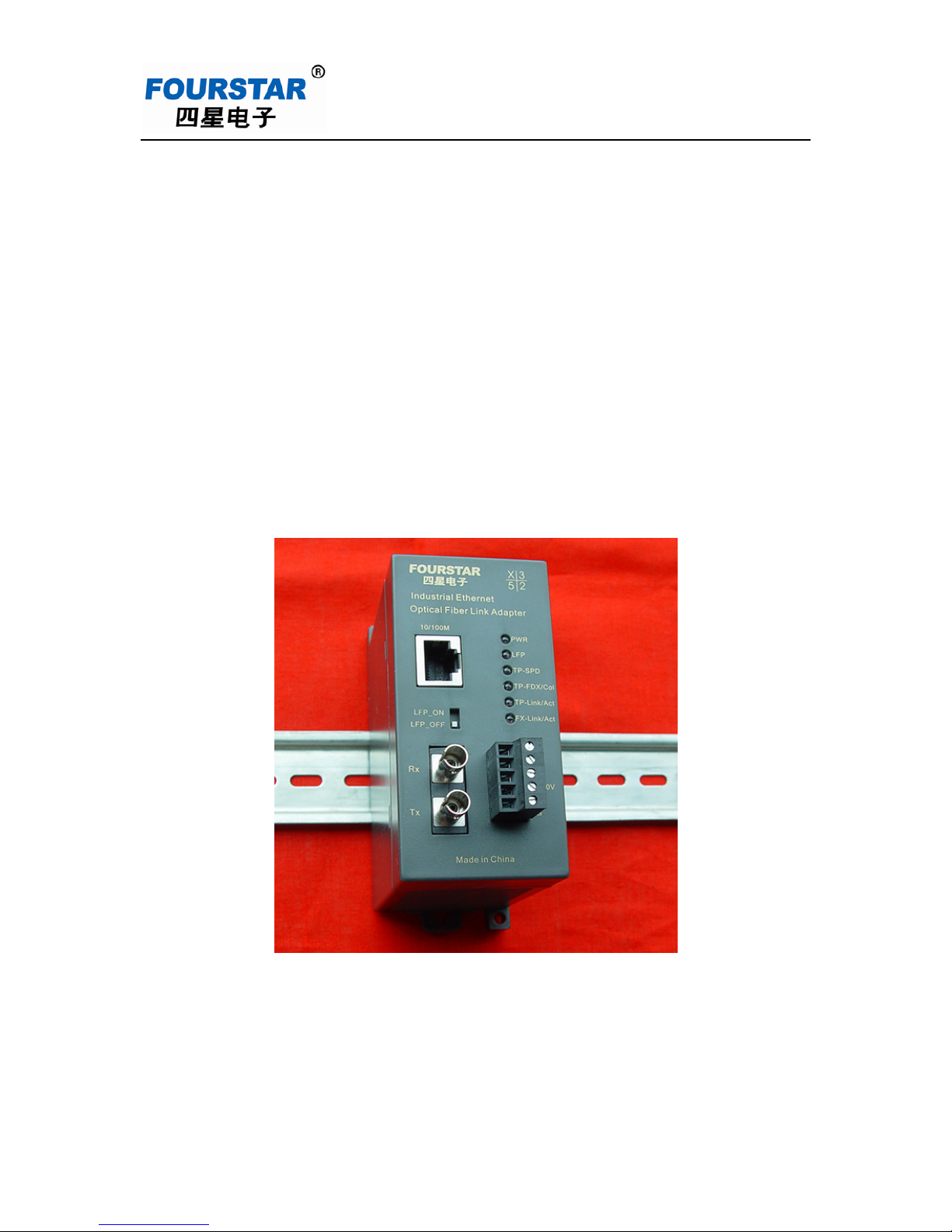
Figure 3-1 FIB-IE-M external structure
● Power plug:
Plug name
Description
NC
No connection
NC
No connection
+9-40V
Connect to the anode of any direct current of
9-40V
0V
Connect to the cathode of any direct current of
9-40V
FG
Shield grounding (casing grounding)
Page 7

User Manual of Industrial Ethernet Optical Fiber Link Adapter FIB-IE-M
___________________________________________________________________________________________________
FOURSTAR Electronic Technology Co., Ltd. TEL:+86-838-2515543 FAX:+86-838-2515546 http://www.fourstar-dy.com
- 7 -
● LED indicator
LED indicator
Normally on
Blink
Off
PWR Power on Product fault Power off or product
failure
LFP
Link fault pass function is
enabled
Product fault
Link fault pass function
is disabled
TP-SPD The Ethernet port is
connected with 100M
device
Product fault The Ethernet port is
connected with 10M
device
TP-FDX/Col The Ethernet port
operates in full-duplex
mode
The Ethernet port
data conflicts
The Ethernet port
operates in half-duplex
mode
TP-Link/Act The Ethernet port is
correctly connected
The Ethernet port is
transferring data
The Ethernet port is
not connected
FX-Link/Act Optical fiber is correctly
connected
The optical port is
transferring data
The optical fiber is not
connected
● Link Fault Pass Switch:
Switch position
Function
Remarks
LFP_ON
Enable link fault pass
LFP_OFF
Disable link fault pass
Factory default
Note: after turning the switch, the new setting s will not take effect unt i l pow er on again.
4. User Guide
Before installin g t he Et her net optical fiber link adapter, please confirm that the connected
network cable (Cat. 5 twisted pair) c an not exceed 100m in length and the ma ximum length of the
optical fiber cannot excee d that spec ified by t he user manua l, which is 5km in multimode and 2 0km
in single mode.
The fiber ports of two Ethernet optical fiber link adapters will always follow the principal of
“sending port connects to receiving port and receiving port connects to sending port”, which is
Tx-Rx, Rx-Tx.
Page 8

User Manual of Industrial Ethernet Optical Fiber Link Adapter FIB-IE-M
___________________________________________________________________________________________________
FOURSTAR Electronic Technology Co., Ltd. TEL:+86-838-2515543 FAX:+86-838-2515546 http://www.fourstar-dy.com
- 8 -
4.1 Typical application 1:
Figure 4-1 is the connection diagram of typical application 1 of Et hernet optical fiber link
adapter. The network equipment A and n etwork equipment B in the figur e ar e both equipped with
10/100Base-TX Ether net i nt er face and can realize long-distance optical fiber connection between
network equipment A and network equipm ent B w it h optical fiber through two optica l f ib er li nk
adapters.
The network equipment s A and B can be the Ethernet servers, w orkstat ions, rout ers, switch es,
hubs, PLC with Ethernet port , t ouc h scr eens, inverters and other indu st r ia l control equipments, as
well as other equipments with Ethernet port.
Figure 4-1 Typical application 1
4.2 Typical application 2:
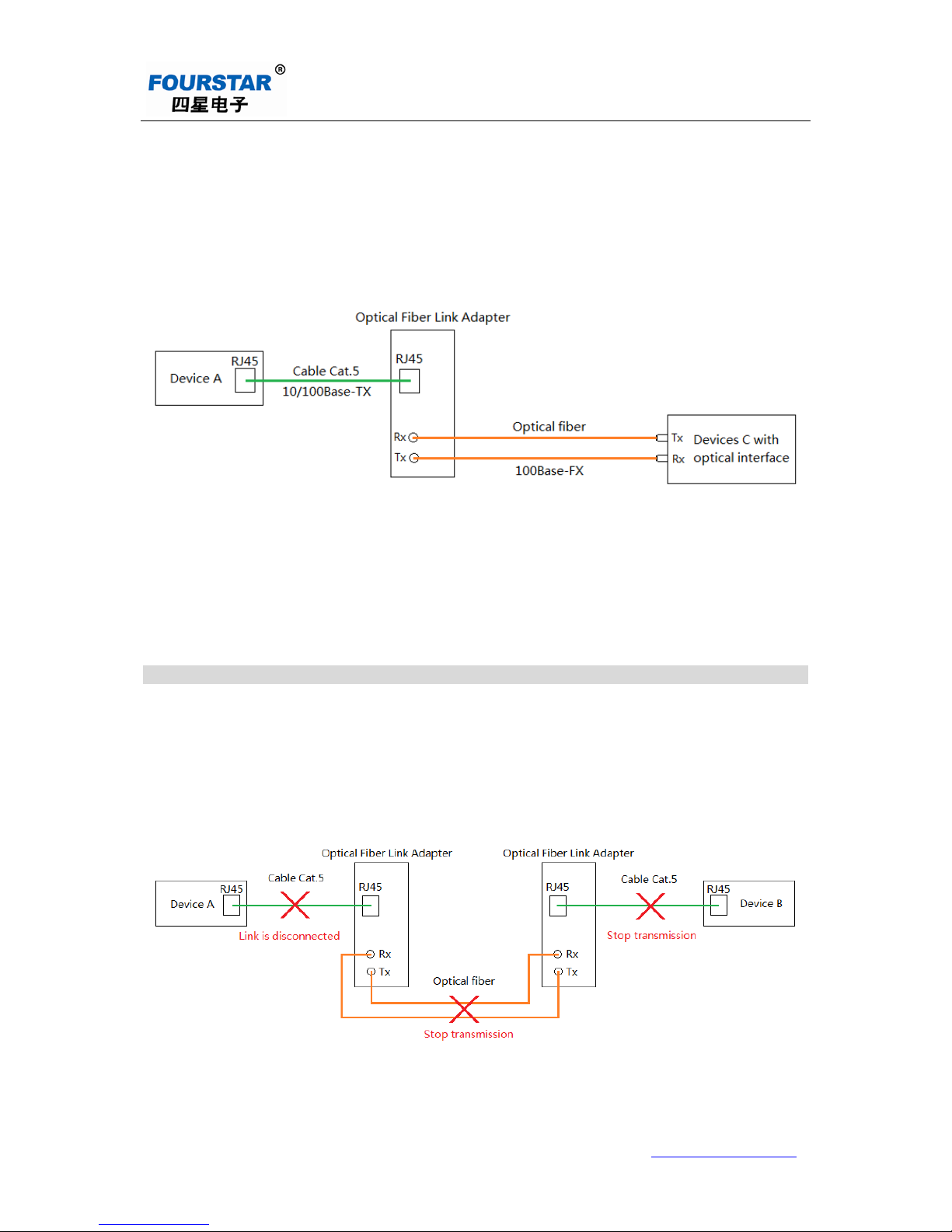
Figure 4-2 is the connection diagram of typical application 2 of Et her net optical fiber link
adapter. The network equ ipment A with 10/100Base-TX Ethernet por t is connected to the RJ45
Ethernet port of the optical fiber l ink adapter through twisted-pair cable and another networ k
equipment C with 10/100Base-FX fiber interface is connected to the fiber interface o f optical fiber
link adapter through optical fiber, then the interconnection of the networ k equipments can be
realized.
The network equipment s A and C can b e Et her net servers, workstati ons , r outers, switches,
Page 9
User Manual of Industrial Ethernet Optical Fiber Link Adapter FIB-IE-M
___________________________________________________________________________________________________
FOURSTAR Electronic Technology Co., Ltd. TEL:+86-838-2515543 FAX:+86-838-2515546 http://www.fourstar-dy.com
- 9 -
hubs, PLC with Ethernet port or optical port, touch screens, inver t er s and ot her industrial control
equipments, as well as other equipments with Ethernet port or optical port.
Figure 4-2 typical application 2
5. Link Fault Pass
When LFP_ON/OFF switch is turned to LFP_ON position, the link fault pass function is
enabled after the optic al fi ber adapter is powered on. This functi on w il l for ce other ports of this link
to stop transmission when aut om at ically detecting any port on the link that is disconnected.
Figure 5-1 Link Fault Pass
Page 10

User Manual of Industrial Ethernet Optical Fiber Link Adapter FIB-IE-M
___________________________________________________________________________________________________
FOURSTAR Electronic Technology Co., Ltd. TEL:+86-838-2515543 FAX:+86-838-2515546 http://www.fourstar-dy.com
- 10 -
As shown in Figure 5-1, when the ca ble of network equipment A is disconnected, the two
optical fiber link adapters and t he net work equipment B will stop transferring data. Then the
indicator status of each device is as follows:
Network equipment A Link/Act indicator off
Network equipment B Link/Act indicator off
Optical fiber link
adapter
LFP light on
TP-Link/Act indicator off
FX-Link/Act indicator off
6. Commonly Used Networ k Topologic Structure
6.1 Bus network topologic al str uc t ur e:
Figure 6-1 bus network topol ogi c al structure
Page 11

User Manual of Industrial Ethernet Optical Fiber Link Adapter FIB-IE-M
___________________________________________________________________________________________________
FOURSTAR Electronic Technology Co., Ltd. TEL:+86-838-2515543 FAX:+86-838-2515546 http://www.fourstar-dy.com
- 11 -
6.2 Star net work topological structur e:
Figure 6-2 St ar networ k topol ogi c al structure
Page 12

User Manual of Industrial Ethernet Optical Fiber Link Adapter FIB-IE-M
___________________________________________________________________________________________________
FOURSTAR Electronic Technology Co., Ltd. TEL:+86-838-2515543 FAX:+86-838-2515546 http://www.fourstar-dy.com
- 12 -
7. Order information
Product name: Industria l Ether net Optical Fiber Link Adapter
Model: FIB-IE-M
Note: this document is to provide guidance for the user to use FIB-IE-M Industrial Optical
Fiber Link Adapter. The product functions shall be subject to the functions on the actual device due
to the rapid development of new technology. FOURSTAR Electronic Technology Co., Ltd. reserves
the right to modify the document w ithout any prior notice.
FOURSTAR El ectronic Technology Co., Ltd.
Address: 2/F, Building H, No.88, Section 2, Lushan Road South , D eyang City, Sichuan Province,
China.
Tel: +86-838-2515543 2515549
Fax: +86-838-2515546
Website: http://www.fourstar-dy.com
 Loading...