

Page 1
F7916 Series IP
MODEM User Manual
Document Version
Page
V2.0.0
Product Name:F7916
Total:37
F7916 Series IP MODEM User Manual
The user manual is suitable for the following model:
Model
Product Type
F7916-G
GPS+GPRS IP MODEM
F7916-C
GPS+CDMA IP MODEM
F7916-W
GPS+WCDMA IP MODEM
F7916-V
GPS+EVDO IP MODEM
F7916-TL
GPS+TDD-LTE IP MODEM
F7916-FL
GPS+FDD-LTE IP MODEM
F7916-L
GPS+LTE IP MODEM
Xiamen Four-Faith Communication Technology Co., Ltd.
Add:Floor 11, Area A06, No 370, chengyi street, Jimei, Xiamen
Tel:+86 592-5907276 Fax:+86 592-5912735
Web:en.four-faith.com
Page 2

F7916 Series IP MODEM User Manual
Xiamen Four-Faith Communication Technology Co.,Ltd. Page 2 of 37
Add: Floor 11, Area A06, No 370, chengyi street, Jimei, Xiamen.China
http://en.four-faith.com Tel: +86 592-5907276 Fax:+86 592-5912735
Files Revised Record
Date
Version
Remark
Author
2017.2.16
V1.0.0
build
WSP/Zhengli
2017.10.10
V2.0.0
Change of company address
LXP
Page 3

F7916 Series IP MODEM User Manual
Xiamen Four-Faith Communication Technology Co.,Ltd. Page 3 of 37
Add: Floor 11, Area A06, No 370, chengyi street, Jimei, Xiamen.China
http://en.four-faith.com Tel: +86 592-5907276 Fax:+86 592-5912735
Copyright Notice
All contents in the files are protected by copyright law, and all copyrights are reserved by Xiamen
Four-Faith Communication Technology Co., Ltd. Without written permission, all commercial
use of the files from Four-Faith are forbidden, such as copy, distribute, reproduce the files, etc.,
but non-commercial purpose, downloaded or printed by individual (all files shall be not revised,
and the copyright and other proprietorship notice shall be reserved) are welcome.
Trademark Notice
Four-Faith 、 四信 、 、 、 are all registered trademarks of Xiamen
Four-Faith Communication Technology Co., Ltd., illegal use of the name of Four-Faith,
trademarks and other marks of Four-Faith is forbidden, unless written permission is authorized in
advance.
Page 4
F7916 Series IP MODEM User Manual
Xiamen Four-Faith Communication Technology Co.,Ltd. Page 4 of 37
Add: Floor 11, Area A06, No 370, chengyi street, Jimei, Xiamen.China
http://en.four-faith.com Tel: +86 592-5907276 Fax:+86 592-5912735
Page 5

F7916 Series IP MODEM User Manual
Xiamen Four-Faith Communication Technology Co.,Ltd. Page 5 of 37
Add: Floor 11, Area A06, No 370, chengyi street, Jimei, Xiamen.China
http://en.four-faith.com Tel: +86 592-5907276 Fax:+86 592-5912735
Contents
Contents
Chapter 1 Brief Introduction of Product............................................................................................. 6
1.1 General.................................................................................................................................. 6
1.2 Features and Benefits............................................................................................................6
1.3 Working Principle..................................................................................................................7
1.4 Specifications........................................................................................................................8
Chapter 2 Installation Introduction................................................................................................... 12
2.1 General................................................................................................................................ 12
2.2 Encasement List.................................................................................................................. 12
2.3 Installation and Cable Connection......................................................................................12
2.4 Power...................................................................................................................................15
2.5 Indicator Lights Introduction.............................................................................................. 15
Chapter 3 Configuration....................................................................................................................16
3.1 Configuration Connection...................................................................................................16
3.2 Configuration Introduction................................................................................................. 16
3.3 IP Modem’s Parameters Configuration...............................................................................17
3.3.1 Run the Configure Tools..........................................................................................17
3.3.2 Re-Power IP Modem................................................................................................18
3.3.3 Work Mode...............................................................................................................18
3.3.4 Data Service Center Settings................................................................................... 25
3.3.5 Serial port.................................................................................................................27
3.3.6 Dial........................................................................................................................... 29
3.3.7 Global Parameters.................................................................................................... 30
3.3.8 Device Manage.........................................................................................................31
3.3.9 GPS...........................................................................................................................32
3.3.10 Miscellaneous.........................................................................................................33
Appendix........................................................................................................................................... 35
Page 6
F7916 Series IP MODEM User Manual
Xiamen Four-Faith Communication Technology Co.,Ltd. Page 6 of 37
Add: Floor 11, Area A06, No 370, chengyi street, Jimei, Xiamen.China
http://en.four-faith.com Tel: +86 592-5907276 Fax:+86 592-5912735
Chapter 1 Brief Introduction of Product
1.1 General
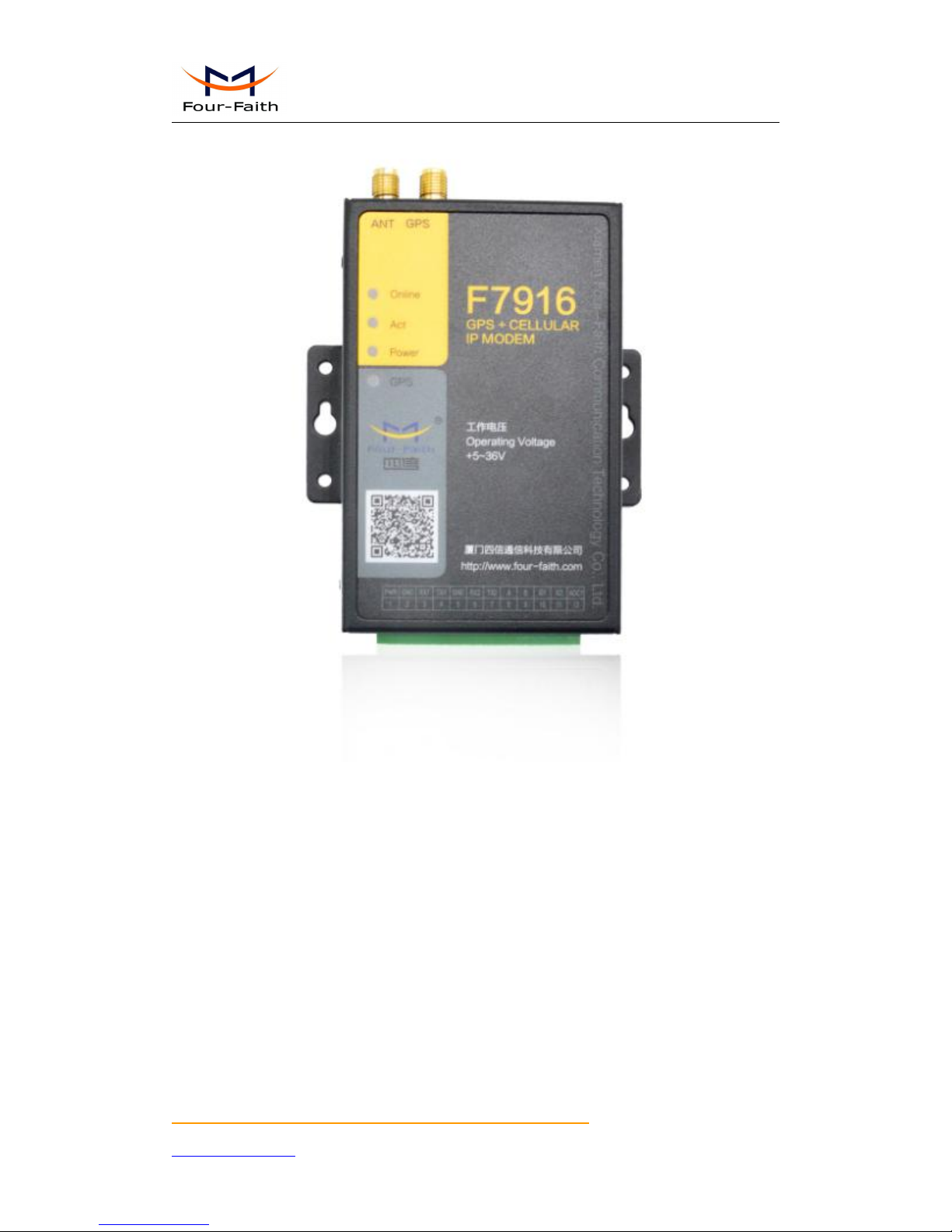
F7916 series IP MODEM is a kind of
cellular terminal device that provides data transfer and
GPS function by public cellular network.
It adopts high-powered industrial 32 bits CPU and embedded real time operating system. It
supports RS232 and RS485 (or RS422) port that can conveniently and transparently connect one
device to a cellular network, allowing you to connect to your existing serial devices with only
basic configuration. It has low power consumption states in which the power consumption could
be 1ower than 5mA@12VDC. It has compatible digital I/O channel, ADC, input pulse counter and
pulse wave output function.
It has been widely used on M2M fields, such as intelligent transportation, smart grid,
industrial automation, telemetry, finance, POS, water supply, environment protection, post,
weather, and so on.
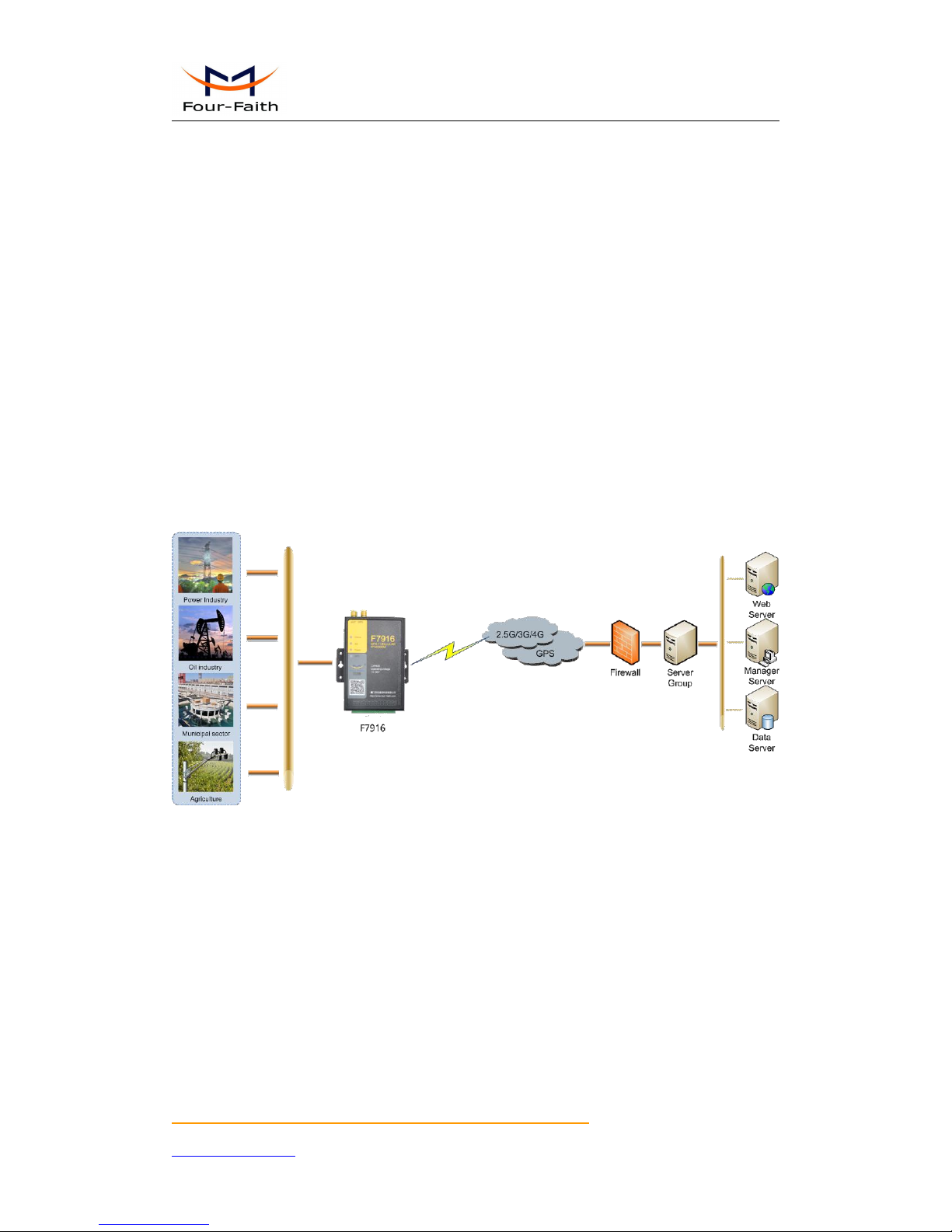
Figure 1-1 IP MODEM Application Topology
1.2 Features and Benefits
Design for Industrial Application
High-powered industrial cellular module
High-powered industrial GPS module
High-powered industrial 32 bits CPU
Support low power consumption mode, including multi-sleep and trigger modes to reduce the
power dissipation farthest
Housing: iron, providing IP30 protection
Power range: DC 5~36V
Page 7

F7916 Series IP MODEM User Manual
Xiamen Four-Faith Communication Technology Co.,Ltd. Page 7 of 37
Add: Floor 11, Area A06, No 370, chengyi street, Jimei, Xiamen.China
http://en.four-faith.com Tel: +86 592-5907276 Fax:+86 592-5912735
Stability and Reliability
Support hardware and software WDT
Support auto recovery mechanism, including online detect, auto redial when offline to make
it always online
RS232/RS485/RS422 port: 15KV ESD protection
SIM/UIM port: 15KV ESD protection
Power port: reverse-voltage and overvoltage protection
Antenna port: lightning protection(optional)
Standard and Convenience
Adopt terminal block interface, convenient for industrial application
Support standard RS232 and RS485(or RS422) port that can connect to serial devices directly
TTL logic level RS232 interface can be customized
Support intellectual mode, enter into communication state automatically when powered
Provide management software for remote management
Support several work modes
Convenient configuration and maintenance interface
High-performance
Support TCP server and support multi TCP client connection(optional)
Support double data centers, one main and another backup
Supply 2 I/O channels, compatible 2 pulse wave output channels, 2 analog inputs and one
pulse input counters
Support multi data centers and it can support 5 data centers at the same time
Support multi online trigger ways, including SMS, ring and data. Support link disconnection
when timeout
Support dynamic domain name(DDNS) and IP access to data center
Design with standard TCP/IP protocol stack
Support APN/VPDN
1.3 Working Principle
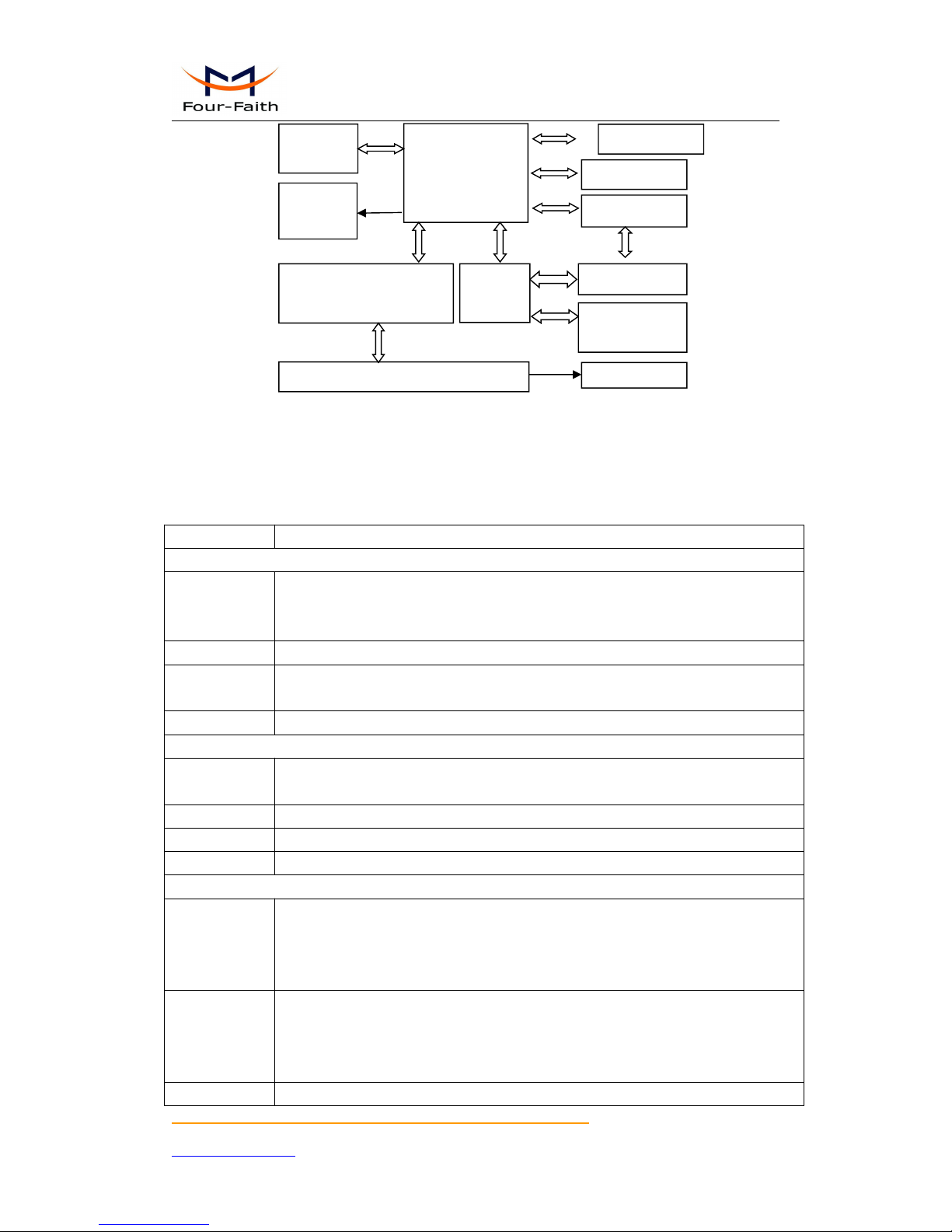
The principle chart of the IP MODEM is as following:
Page 8
F7916 Series IP MODEM User Manual
Xiamen Four-Faith Communication Technology Co.,Ltd. Page 8 of 37
Add: Floor 11, Area A06, No 370, chengyi street, Jimei, Xiamen.China
http://en.four-faith.com Tel: +86 592-5907276 Fax:+86 592-5912735
Cellular
Module
MCU
Antenna
SIM/UIM
Interface
Indicator
Lights
SRAM&
FLASH
WDT Module
User Interface
RS232/RS485/RS422
Module
Power Module
GPS Module
Figure1-2 IP Modem principle chart
1.4 Specifications
Cellular Specification
Item
Content
F7916-G GPS+GPRS IP MODEM
Standard and
Band
EGSM 900/GSM 1800MHz, GSM 850/900/1800/1900MHz(optional)
Compliant to GSM phase 2/2+
GPRS class 10, class 12(optional)
Bandwidth
85.6Kbps
TX power
GSM850/900:<33dBm
GSM1800/1900:<30dBm
RX sensitivity
<-107dBm
F7916-C GPS+CDMA IP MODEM
Standard and
Band
CDMA2000 1xRTT 800MHz, 450MHz(optional)
Bandwidth
153.6Kbps
TX power
<30dBm
RX sensitivity
<-104dBm
F7916-W GPS+WCDMA IP MODEM
Standard and
Band
UMTS/WCDMA/HSDPA/HSUPA/HSPA+ 850/1900/2100MHz,
850/900/1900/2100MHz(optional)
GSM 850/900/1800/1900MHz
GPRS/EDGE CLASS 12
Bandwidth
DC-HSPA+: Download speed 42Mbps, Upload speed 5.76Mbps
HSPA+: Download speed 21Mbps, Upload speed 5.76Mbps
HSDPA: Download speed 7.2Mbps, HSUPA: Upload speed 5.76Mbps
UMTS: 384Kbps
TX power
<24dBm
RTC Module
Page 9
F7916 Series IP MODEM User Manual
Xiamen Four-Faith Communication Technology Co.,Ltd. Page 9 of 37
Add: Floor 11, Area A06, No 370, chengyi street, Jimei, Xiamen.China
http://en.four-faith.com Tel: +86 592-5907276 Fax:+86 592-5912735
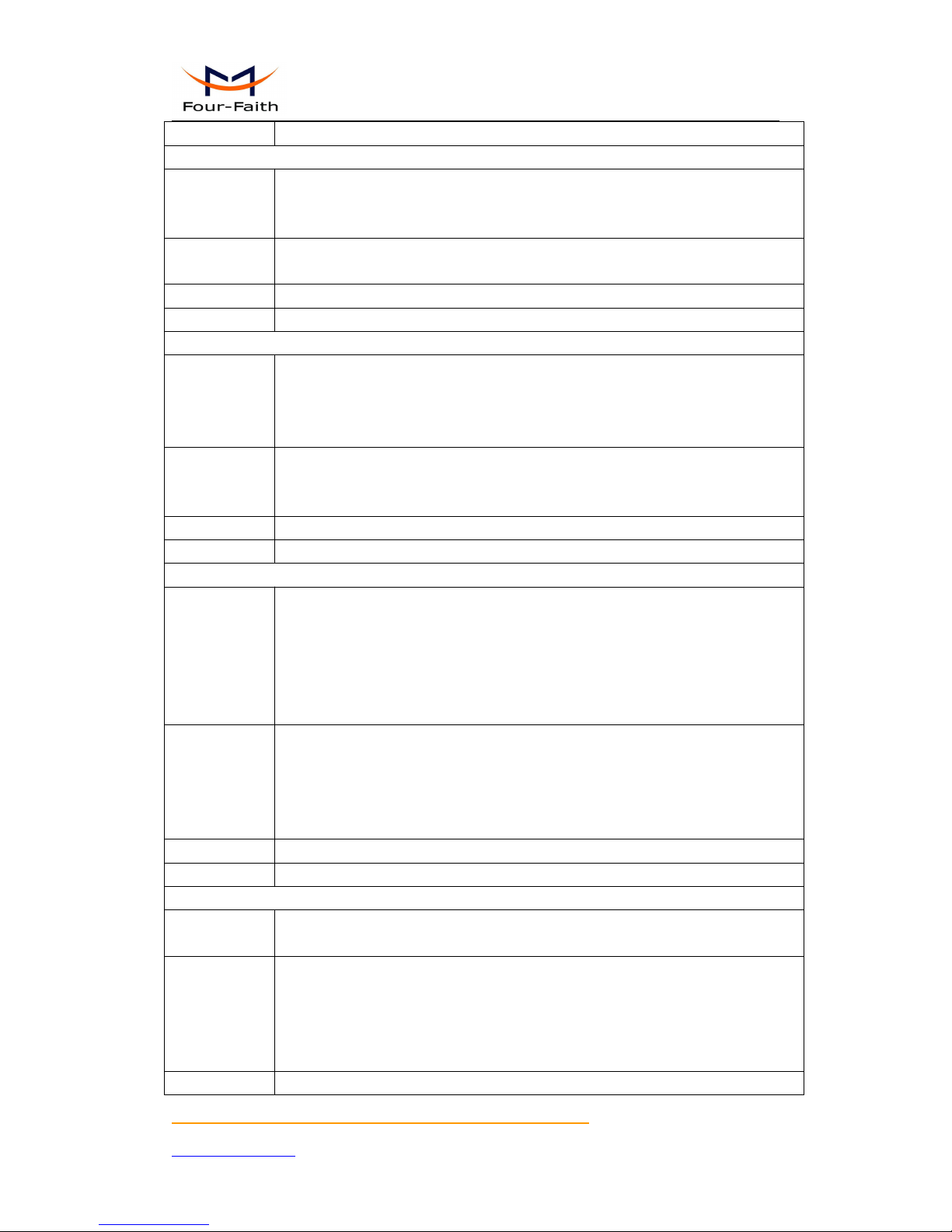
RX sensitivity
<-109dBm
F7916-V GPS+EVDO IP MODEM
Standard and
Band
CDMA2000 1X EVDO Rev A 800MHz, 800/1900MHz(optional), 450MHz(optional)
CDMA2000 1X EVDO Rev B 800/1900MHz(optional)
CDMA2000 1X RTT, IS-95 A/B
Bandwidth
EVDO Rev. A: Download speed 3.1Mbps, Upload speed 1.8Mbps
EVDO Rev. B: Download speed 14.7Mbps, Upload speed 5.4Mbps (optional)
TX power
<23dBm
RX sensitivity
<-104dBm
F7916-TL GPS+TDD-LTE IP MODEM
Standard and
Band
LTE TDD 2600/1900/2300MHz(Band 38/39/40), 800/1400/1800MHz(Band
27/61/62)(optional)
TD-SCDMA 2010/1900MHz(A/F frequency band, Band 34/39)
GSM /GPRS/EDGE 900/1800/1900MHz
Bandwidth
LTE TDD: Download speed 61Mbps, Upload speed 18Mbps
TD-HSPA+: Download speed 4.2Mbps, Upload speed 2.2Mbps
TD-HSPA: Download speed 2.2Mbps, Upload speed 2.2Mbps
TX power
<23dBm
RX sensitivity
<-97dBm
F7916-FL GPS+FDD-LTE IP MODEM
Standard and
Band
LTE FDD 2600/2100/1800/900/800MHz, 700/1700/2100MHz(optional)
DC-HSPA+/HSPA+/HSDPA/HSUPA/UMTS 850/900/2100MHz,
800/850/1900/2100MHz(optional)
EDGE/GPRS/GSM 850/900/1800/1900MHz
GPRS CLASS 10
GPRS CLASS 12
Bandwidth
LTE FDD: Download speed 100Mbps, Upload speed 50Mbps
DC-HSPA+: Download speed 42Mbps, Upload speed 5.76Mbps
HSPA+: Download speed 21Mbps, Upload speed 5.76Mbps
HSDPA: Download speed 7.2Mbps, HSUPA: Upload speed 5.76Mbps
UMTS: 384Kbps
TX power
<23dBm
RX sensitivity
<-93.3dBm
F7916-L GPS+LTE IP MODEM
Standard and
Band
LTE FDD,LTE TDD,EVDO,WCDMA,TD-SCDMA,CDMA1X,GPRS/EDGE
Bandwidth
LTE FDD: Download speed 100Mbps, Upload speed 50Mbps
LTE TDD: Download speed 61Mbps, Upload speed 18Mbps
DC-HSPA+: Download speed 42Mbps, Upload speed 5.76Mbps
TD-HSPA+: Download speed 4.2Mbps, Upload speed 2.2Mbps
EVDO Rev. A: Download speed 3.1Mbps, Upload speed 1.8Mbps
TX power
<23dBm
Page 10
F7916 Series IP MODEM User Manual
Xiamen Four-Faith Communication Technology Co.,Ltd. Page 10 of 37
Add: Floor 11, Area A06, No 370, chengyi street, Jimei, Xiamen.China
http://en.four-faith.com Tel: +86 592-5907276 Fax:+86 592-5912735
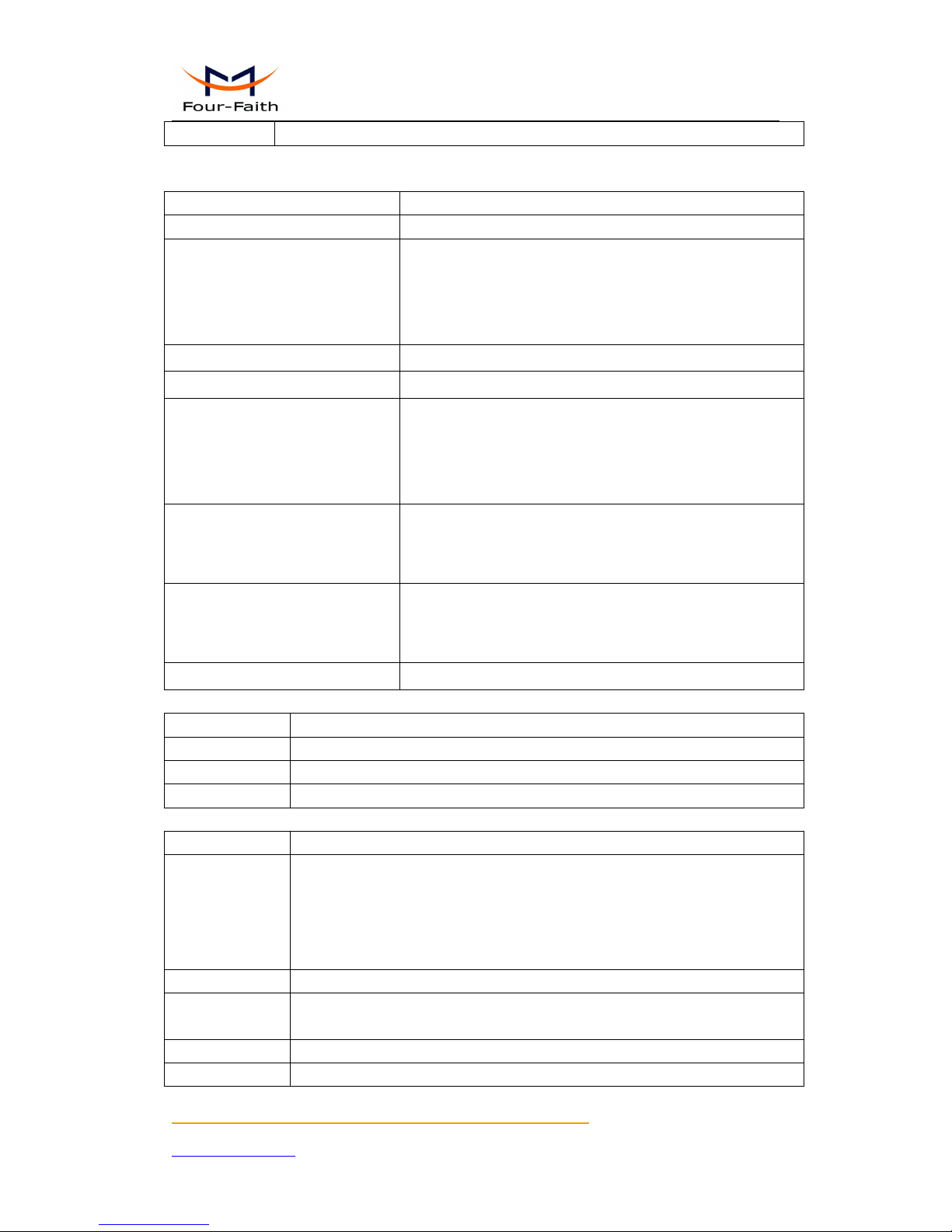
RX sensitivity
<-93.3dBm
GPS Specification
Item
Content
GPS Module
Industrial GPS Module
Receiver Type
50-Channel
GPS L1(1575.42MHz)C/A Code
SBAS:WAAS,EGNOS,MSAS,GAGAN
Compatible:GALILEO
Maximum Navigation Update Rate
4Hz
Horizontal position accuracy
Autonomous:2.5m CPE SBAS:2.0m CPE
Time-To-First-Fix
Cold Start(Autonomous):29S
Warm Start(Autonomous):29S
Aided Starts:<1S
Hot Starts(Autonomous):<1S
Sensitivity
Tracking & Navigation:-160dBm
Reacquisition:-160dBm
Cold Start(Autonomous):-144dBm
Timing Accuracy
RMS:30ns
99%:<60ns
Granularity:21ns
Time Pulse Frequency
Configurable 0.25Hz to 1000Hz
Hardware System
Item
Content
CPU
Industrial 32 bits CPU
FLASH
512KB(Extendable)
SRAM
256KB
Interface Type
Item
Content
Serial
2 RS232 port and 1 RS485(orRS422) port, 15KV ESD protection
Data bits: 5, 6 ,7, 8
Stop bits: 1, 1.5, 2
Parity: none, even, odd, space, mark
Baud rate: 1200~230400 bps, (110~600bps optional )
Indicator
"Power", "ACT", "Online"
,"GPS"
Antenna
Cellular: Standard SMA female interface, 50 ohm, lighting protection(optional)
GPS: Standard SMA female interface, 50 ohm, lighting protection(optional)
SIM/UIM
Standard 3V/1.8V user card interface, 15KV ESD protection
Power
Terminal block interface, reverse-voltage and overvoltage protection
Page 11
F7916 Series IP MODEM User Manual
Xiamen Four-Faith Communication Technology Co.,Ltd. Page 11 of 37
Add: Floor 11, Area A06, No 370, chengyi street, Jimei, Xiamen.China
http://en.four-faith.com Tel: +86 592-5907276 Fax:+86 592-5912735
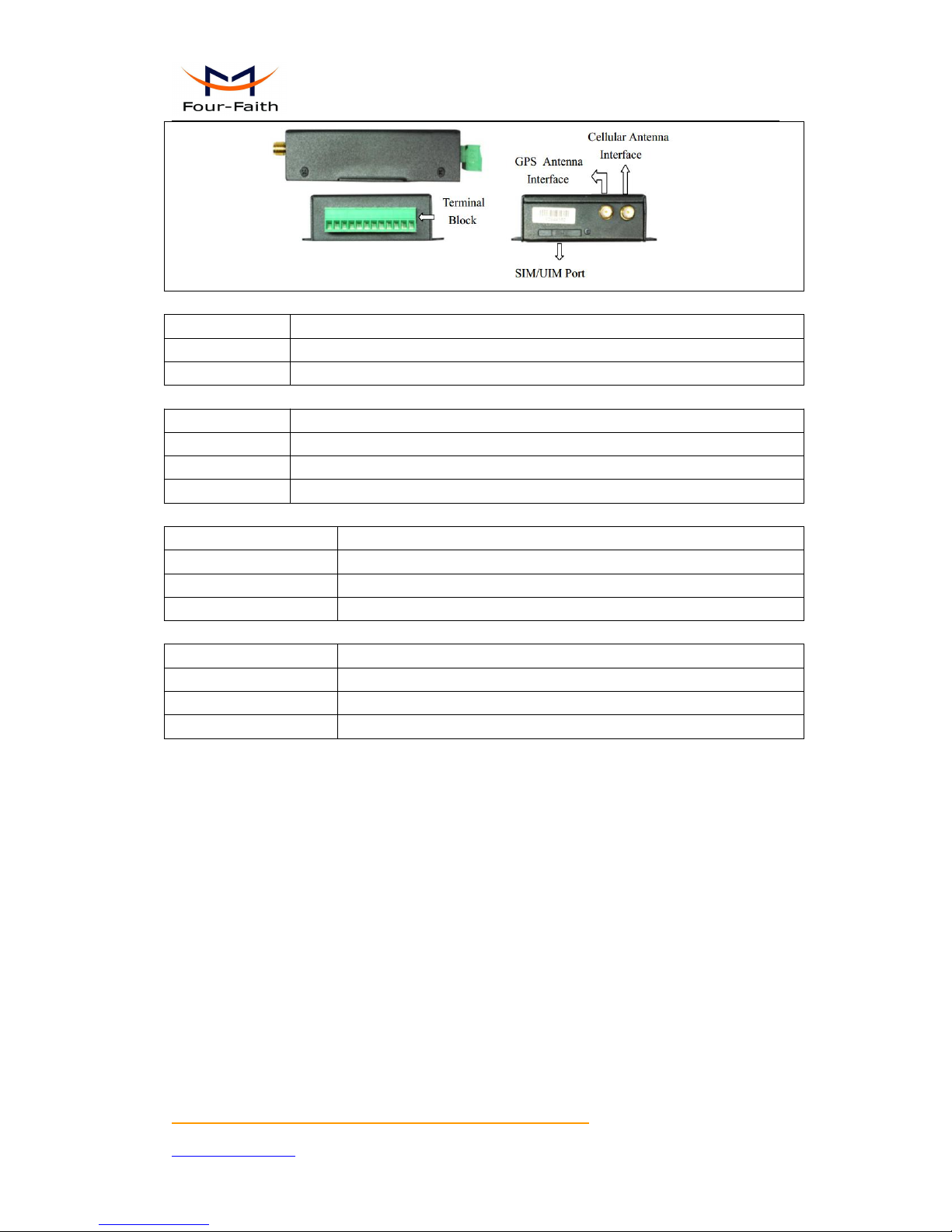
Power Input
Item
Content
Standard Power
DC 12V/0.5A
Power Range
DC 5~36V
Power Consumption
Working States
Power Consumption
Communication
80~100mA@12VDC 170~220mA@5VDC
Standby
45~55mA@12VDC 105~125mA@5VDC
Sleep
3mA@12VDC 6mA@5VDC
Physical Characteristics
Item
Content
Housing
Iron, providing IP30 protection
Dimensions
91x58.5x22 mm
Weight
205g
Environmental Limits
Item
Content
Operating Temperature
-35~+75ºC (-22~+167℉)
Storage Temperature
-40~+85ºC (-40~+185℉)
Operating Humidity
95% ( Non-condensing)
Page 12
F7916 Series IP MODEM User Manual
Xiamen Four-Faith Communication Technology Co.,Ltd. Page 12 of 37
Add: Floor 11, Area A06, No 370, chengyi street, Jimei, Xiamen.China
http://en.four-faith.com Tel: +86 592-5907276 Fax:+86 592-5912735
Chapter 2 Installation Introduction
2.1 General
The IP MODEM must be installed correctly to make it work properly.
Warning: Forbid to install the IP MODEM when powered!
2.2 Encasement List
Name
Quantity
Remark
IP MODEM host
1
Cellular Antenna
1
GPS Antenna
1
Power adapter
1
RS232 data cable
1
optional
RS485 data cable
1
optional
Manual CD
1
Certification card
1
Maintenance card
1
Table 2-1 Encasement List
2.3 Installation and Cable Connection
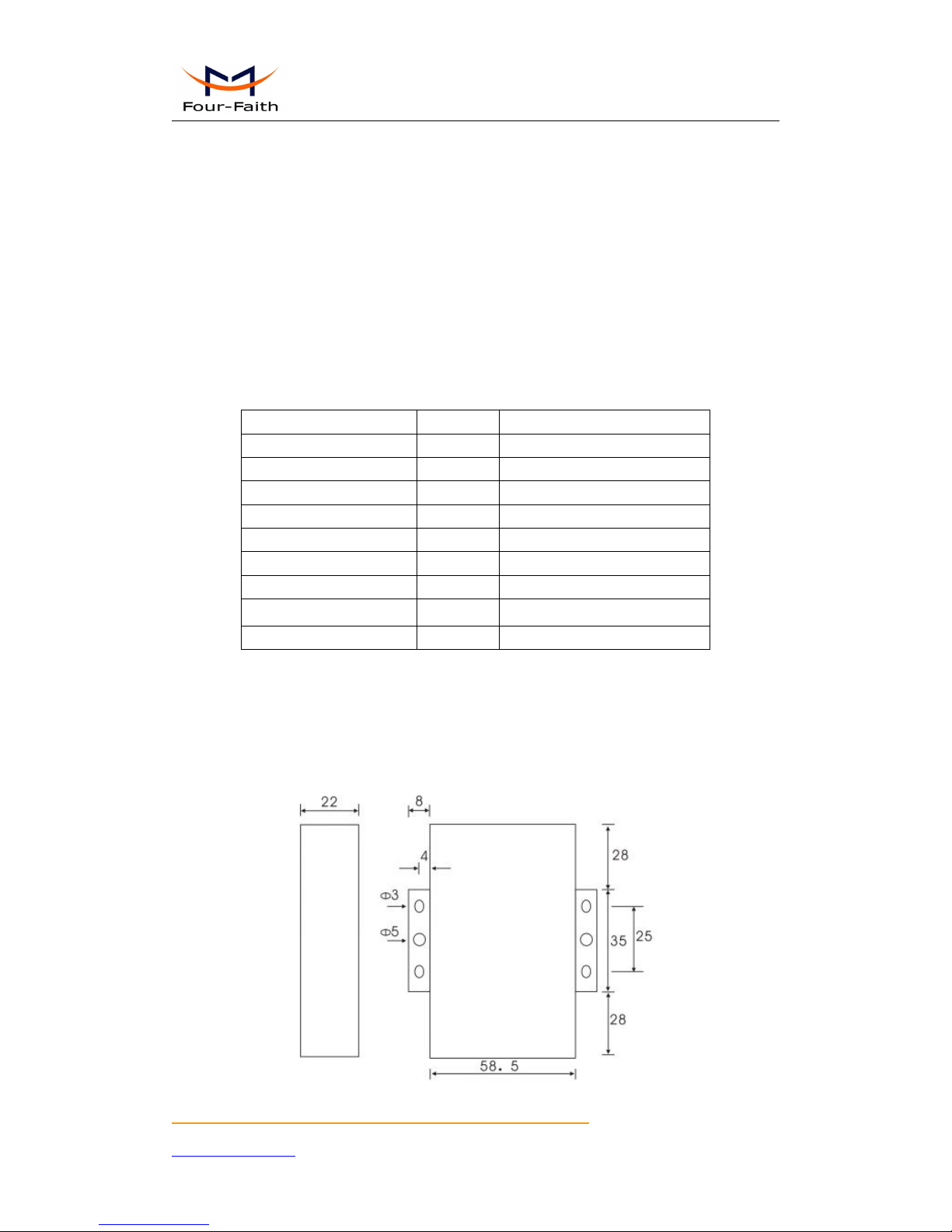
Dimension: (unit: mm)
Page 13
F7916 Series IP MODEM User Manual
Xiamen Four-Faith Communication Technology Co.,Ltd. Page 13 of 37
Add: Floor 11, Area A06, No 370, chengyi street, Jimei, Xiamen.China
http://en.four-faith.com Tel: +86 592-5907276 Fax:+86 592-5912735
Figure 2-1 Installation Chart
Installation of SIM/UIM card:
Firstly power off the IP MODEM, and press the out button of the SIM/UIM card outlet with a
needle object. Then the SIM/UIM card sheath will flick out at once. Put SIM/UIM card into the
card sheath (Pay attention to put the side which has metal point outside), and insert card sheath
back to the SIM/UIM card outlet.
Warning: Forbid to install SIM/UIM card when powered!
Installation of antenna:
Screw the SMA male pin of the cellular antenna to the female SMA interface of the IP MODEM
with sign “ANT”.
Screw the SMA male pin of the GPS antenna to the female SMA interface of the IP MODEM
with sign “GPS”.
Warning: The cellular antenna and the GPS antenna can not be connected wrongly. And the
antennas must be screwed tightly, or the signal quality of antenna will be influenced!
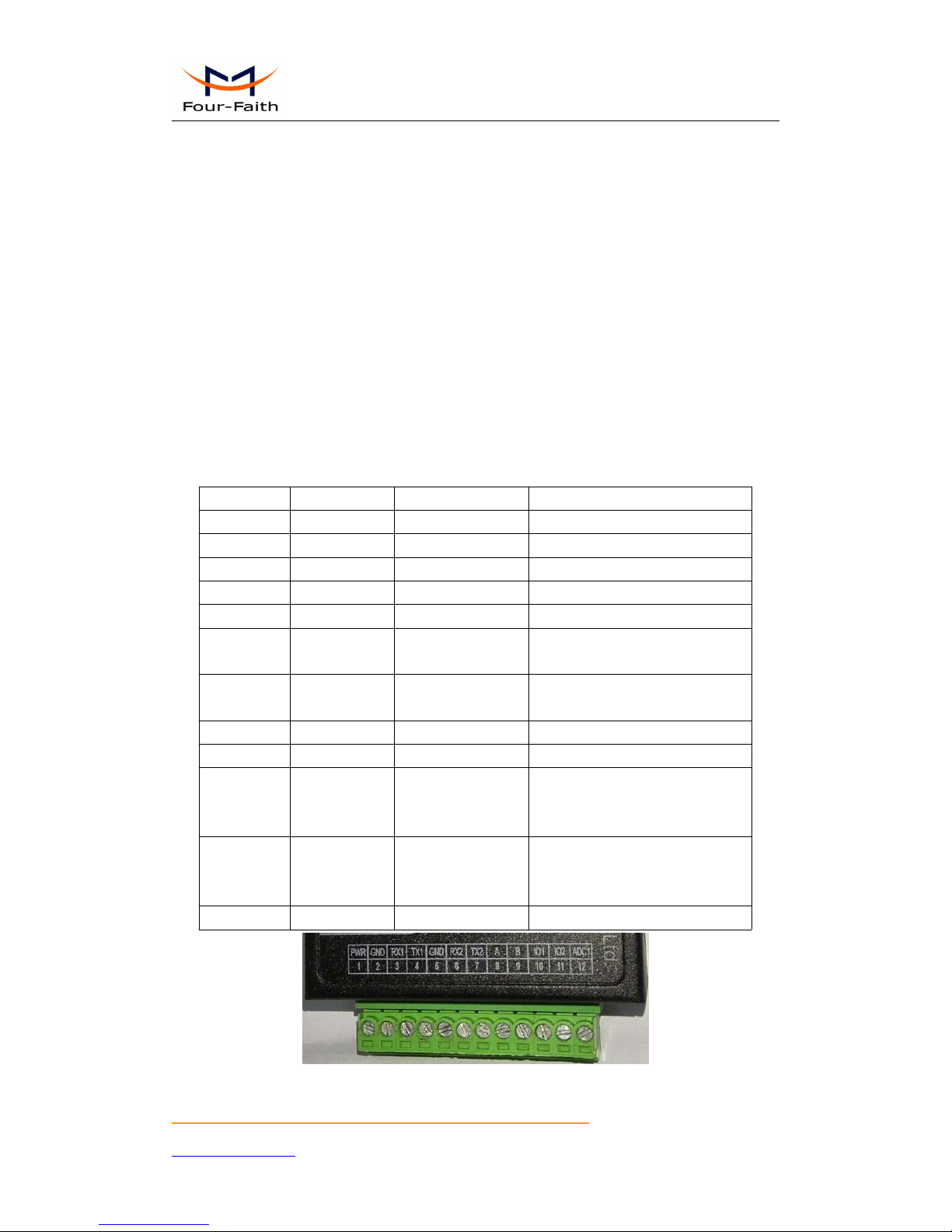
User Interface Signal Definition
Pin Number
Signal Name
Default Function
Extensible Function
1
PWR
Power input anode
N/A
2
GND
Power Ground
N/A
3
RX1
RS232 RX
N/A
4
TX1
RS232 TX
N/A
5
GND
System Ground
N/A
6
RX2
RS232 RX
Reserved compatible ADC and
RS232 RX (TTL logic level)
7
TX2
RS232 TX
Reserved compatible ADC and
RS232 TX (TTL logic level)
8
A
RS485 anode
Reserved compatible ADC
9
B
RS485 cathode
Reserved compatible ADC
10
IO1
GPIO
Reserved compatible pulse wave
input counter, ADC, and pulse
output
11
IO2
GPIO
Reserved compatible pulse wave
input counter, ADC, and pulse
output
12
ADC1
ADC
N/A
Page 14

F7916 Series IP MODEM User Manual
Xiamen Four-Faith Communication Technology Co.,Ltd. Page 14 of 37
Add: Floor 11, Area A06, No 370, chengyi street, Jimei, Xiamen.China
http://en.four-faith.com Tel: +86 592-5907276 Fax:+86 592-5912735
Installation of cable:
F7916 adopts industrial terminal block interface. The recommendatory cable is 28-16AWG.
The detail description of standard layout adapter and communication cables as is following:
Adapter(Rating Output 12VDC/0.5A):
Cable Color
Power Output Polarity
Black &White Alternate
Anode
Black
Cathode
RS232 Cable:
Cable Color
Corresponding DB9-M Pin Number
Brown
Pin 2
Blue
Pin 3
Black
Pin 5
RS485 Cable:
Cable Color
Signal definition
Red
RS485(A)
Black
RS485(B)
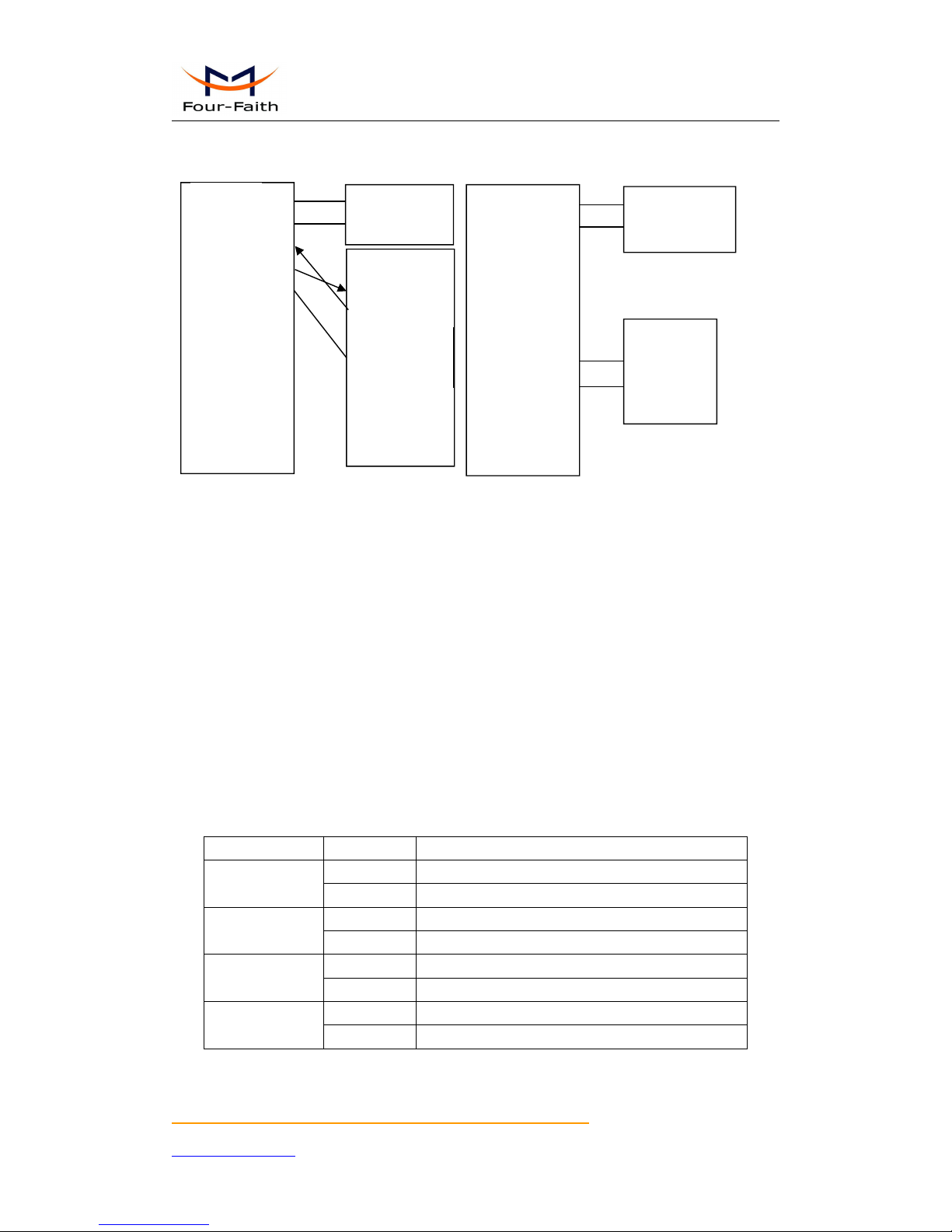
Power adapter and communication cable connection chart as following:
Page 15
F7916 Series IP MODEM User Manual
Xiamen Four-Faith Communication Technology Co.,Ltd. Page 15 of 37
Add: Floor 11, Area A06, No 370, chengyi street, Jimei, Xiamen.China
http://en.four-faith.com Tel: +86 592-5907276 Fax:+86 592-5912735
2.4 Power
The power range of the IP MODEM is DC 5~36V
Warning: When we use other power, we should make sure that the power can supply power
above 4W.
We recommend user to use the standard DC 12V/0.5A power adaptor.
2.5 Indicator Lights Introduction
The IP MODEM provides three indicator lights: “Power”, “ACT”, “Online”,
“GPS”.
Indicator Light
State
Introduction
Power
ON
IP MODEM is powered on
OFF
IP MODEM is powered off
ACT
BLINK
Data is communicating
OFF
No data
Online
ON
IP MODEM has logged on network
OFF
IP MODEM hasn’t logged on network
GPS
ON
GPS data is communicating
OFF
No GPS data is communicating
F7916
F7916
User Device
(DB9M)
User device
1
2
3
4
5
6
7
8
9
10
11
12
RX
GND
GND
RX2
TX2
A
B
IO1
IO2
PWR
Rx1
ADC1
1
2
3
4
5
6
7
8
9
GND
TX
RX
+ Anode
- Cathode
Tx1
1
2
3
4
5
6
7
8
9
10
11
12
TX1
GND
GND
RX2
TX2
A
B
IO1
IO2
PWR
Rx1
ADC1
+ Anode
- Cathode
A
B
Connect via RS232
Connect via RS485
Page 16

F7916 Series IP MODEM User Manual
Xiamen Four-Faith Communication Technology Co.,Ltd. Page 16 of 37
Add: Floor 11, Area A06, No 370, chengyi street, Jimei, Xiamen.China
http://en.four-faith.com Tel: +86 592-5907276 Fax:+86 592-5912735
Chapter 3 Configuration
3.1 Configuration Connection
Before configuration, It’s necessary to connect the IP MODEM with the configure PC by the
shipped RS232 or RS232-485 conversion cable as following.
3.2 Configuration Introduction
There are two ways to configure the IP MODEM:
Configuration software tool: All the settings are configured through the shipped software tool.
It’s necessary to have one PC to run this tool.
Extended AT command: All the settings are configured through AT command, so any device
with serial port can configure it. Before configuration with extended AT command, you should
make IP MODEM enter configure state. The steps how to make IP MODEM enter configure
state, please refer to appendix.
The following describes how to configure IP MODEM with the configure software tool. At
the same time, it gives out the corresponding AT command of each configuration item.
Page 17
F7916 Series IP MODEM User Manual
Xiamen Four-Faith Communication Technology Co.,Ltd. Page 17 of 37
Add: Floor 11, Area A06, No 370, chengyi street, Jimei, Xiamen.China
http://en.four-faith.com Tel: +86 592-5907276 Fax:+86 592-5912735
3.3 IP Modem’s Parameters Configuration
3.3.1 Run the Configure Tools
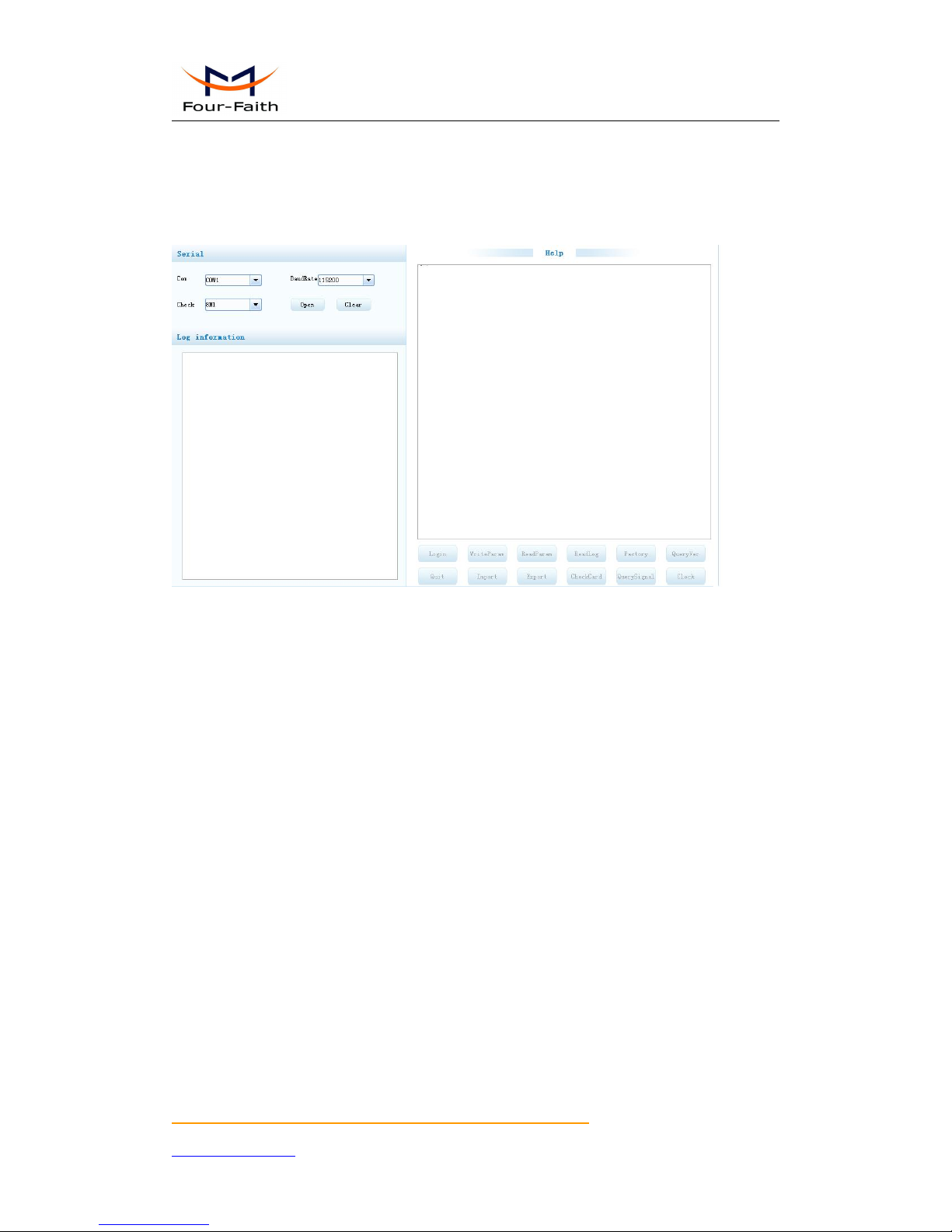
The “Serial” area shows the current serial port settings. To configure IP MODEM, please choose
the correct serial port which connects to IP MODEM, and the baud-rate is 115200 with no parity,
then open the serial port. If the button text is“Close”, it shows the serial port now has been opened.
If the text is “Open”, you should open the port first. When the port opened, the “Output Info”
column will display
“Port(COM1) Has Opened,Please Re-Power the IP MODEM,
Waiting IP MODEM Enter Configure State...”
Page 18
F7916 Series IP MODEM User Manual
Xiamen Four-Faith Communication Technology Co.,Ltd. Page 18 of 37
Add: Floor 11, Area A06, No 370, chengyi street, Jimei, Xiamen.China
http://en.four-faith.com Tel: +86 592-5907276 Fax:+86 592-5912735
3.3.2 Re-Power IP Modem
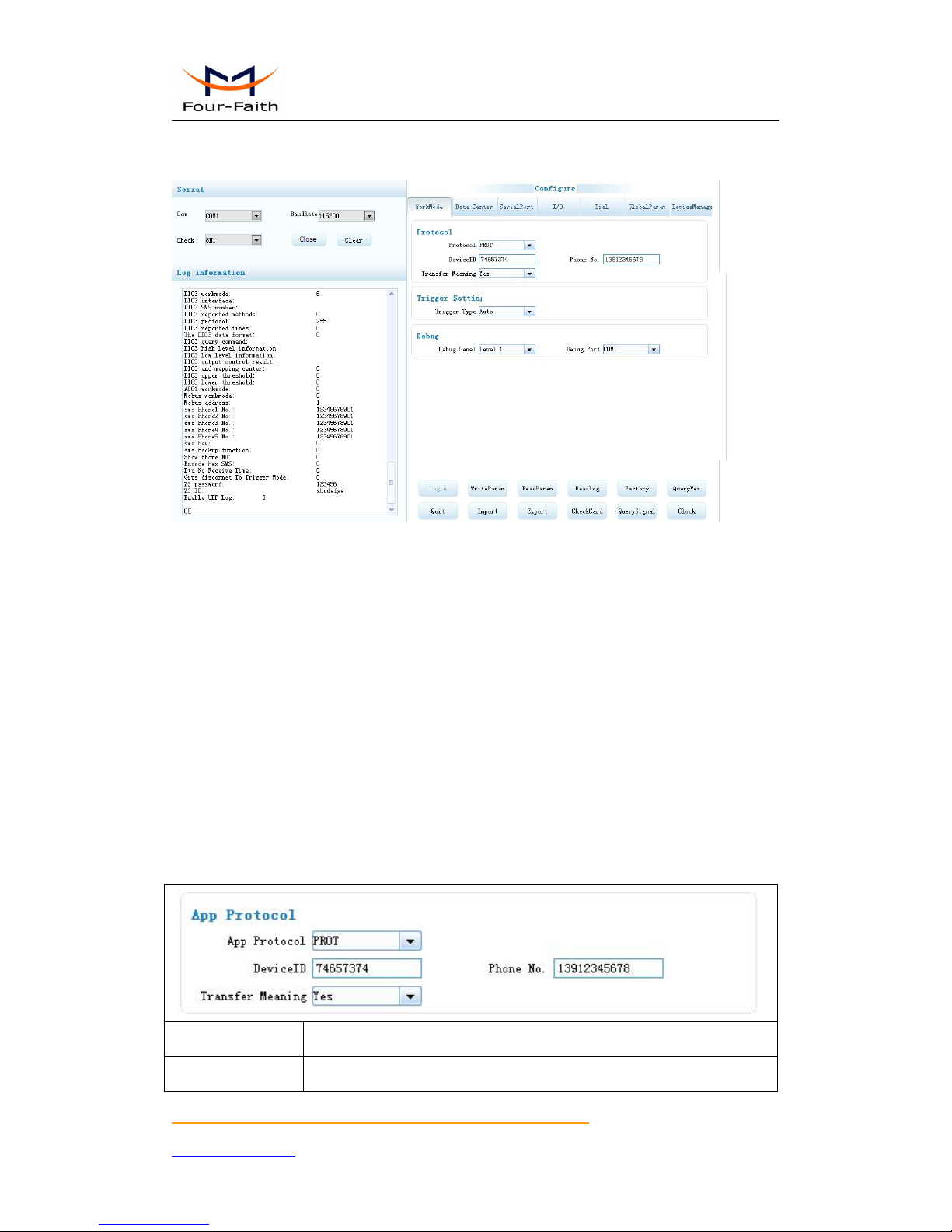
After Re-power IP MODEM, The configure tool will make it enter configure state. At the
same time, the software will load current settings from IP MODEM and displays on the right
configure columns. It’s now ready to configure.
Note:To enter configure state for 4G device may need more time. It is about 40 seconds.
3.3.3 Work Mode
3.3.3.1 App protocol
The IP Modem can be configured many communication protocols to adapt for different
applications.
Note : The tool will show the reference parameters according to the communication
protocols setting.
PROT
It uses TCP Protocol to send or receive data. In this mode, ID and phone number MUST be
set.
DeviceID
ID number for the device. 8 characters
PhoneNo.
Phone number
Page 19
F7916 Series IP MODEM User Manual
Xiamen Four-Faith Communication Technology Co.,Ltd. Page 19 of 37
Add: Floor 11, Area A06, No 370, chengyi street, Jimei, Xiamen.China
http://en.four-faith.com Tel: +86 592-5907276 Fax:+86 592-5912735
Transfer Meaning
This item is only valid when the WorkMode is PROT. If this item is set to
0, IP MODEM will transfer meaning to 0xfd and 0xfe. To know detail
transfer meaning method, please refer “IP MODEM Transfer Meaning
Explanation In the PROT work mode”. If this item is set to Yes, all the
transmission is transparent.
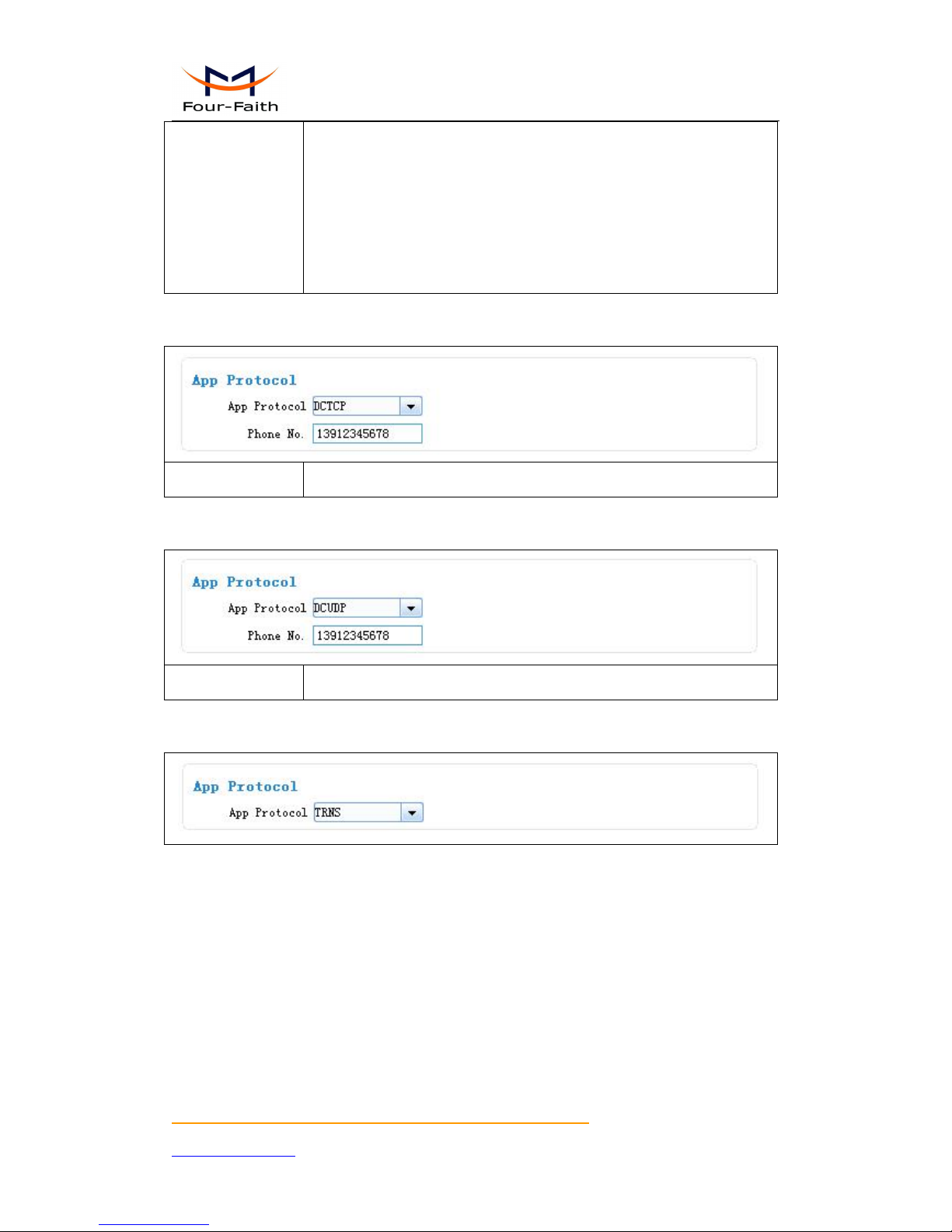
DCTCP
This protocol is used in electric power field, with TCP protocol.
PhoneNo.
Phone number
DCUDP
This protocol is used in electric power field, with UDP protocol
PhoneNo.
Phone number
TRNS
The device work as MODEM for sending/receiving SMS, CSD and GPRS dialing.
SMSCLI
IP MODEM work as a SMS DTU. All data will send to binding phone number via SMS. The
SMS from the binding phone number will send to Serial port.
Page 20

F7916 Series IP MODEM User Manual
Xiamen Four-Faith Communication Technology Co.,Ltd. Page 20 of 37
Add: Floor 11, Area A06, No 370, chengyi street, Jimei, Xiamen.China
http://en.four-faith.com Tel: +86 592-5907276 Fax:+86 592-5912735
Pone No 1st Group
Pone No 2nd Group
Pone No 3rd Group
Pone No 4th Group
Bind phone number. Max phone number is 5 for one group
Show Phone Number
If send phone number to serial port or not
Hex To Text
If convert HEX data to ASCII data or not
SMSSER
IP MODEM work as a SMS DTU. All the data paced with special format send to any phone
number. he SMS from phone number will send to serial port.
Show Phone Number
If send phone number to serial port or not
Hex To Text
If convert HEX data to ASCII data or not
Custom protocol:client mode
It support TCP and UDP protocol with custom heart and login packet.
Page 21
F7916 Series IP MODEM User Manual
Xiamen Four-Faith Communication Technology Co.,Ltd. Page 21 of 37
Add: Floor 11, Area A06, No 370, chengyi street, Jimei, Xiamen.China
http://en.four-faith.com Tel: +86 592-5907276 Fax:+86 592-5912735
Base Protocol
TCP or UDP
DeviceMode
Client Mode: the IP Modem work as a client
Login&Heartbeat
Enable: custom login and heart packet
Disable: no login and heart packet. The flowing items can be ignored
Data Format
Text: the flowing items are Text format
Hex:the flowing items are Hex format
Login Packet
Login packet
Login Reply
Login packet respond
Heartbeat Packet
Heart packet
Heartbeat Reply
Heartbeat packet respond
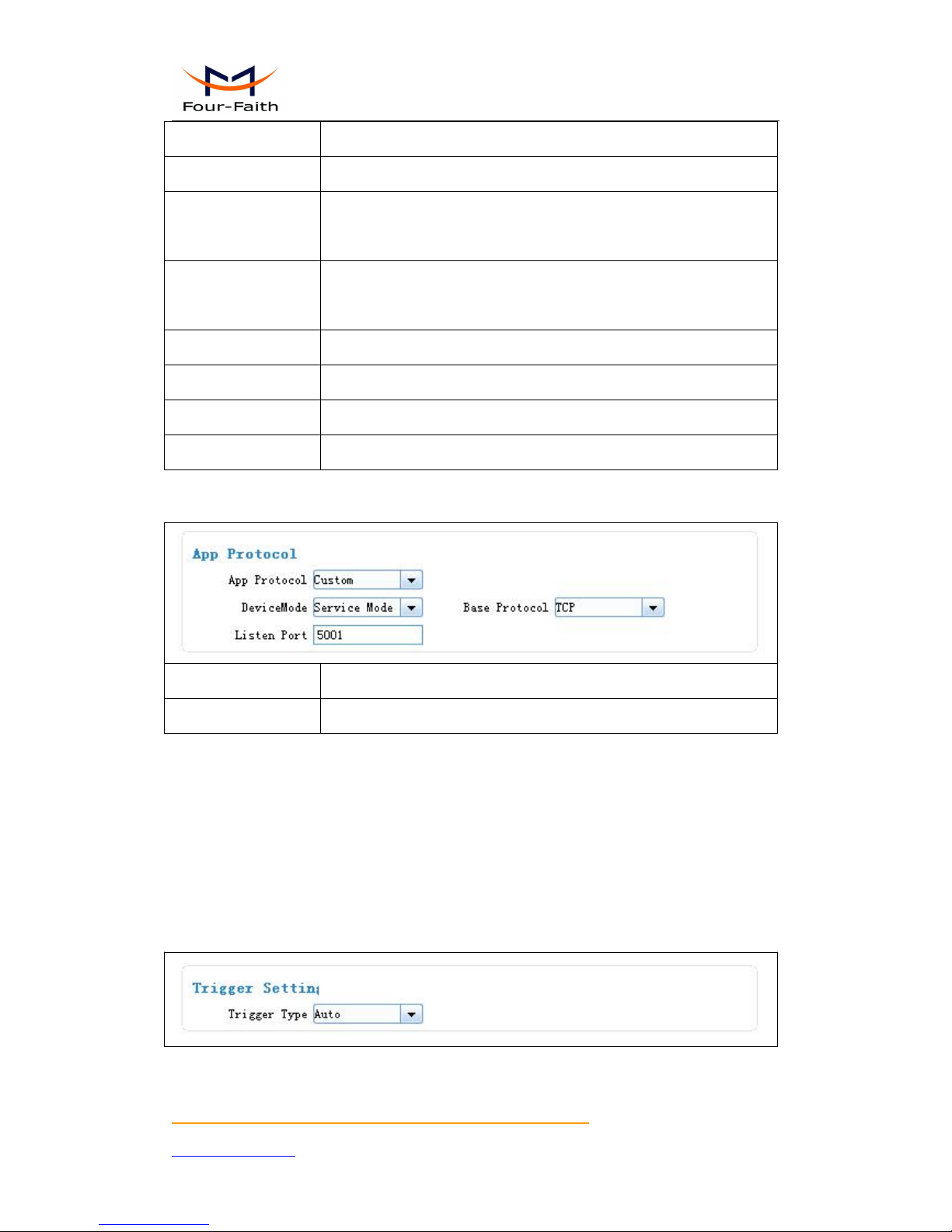
Custom protocol:Server mode
It supports TCP and udp server.
Base Protocol
TCP or UDP
Listen Port
Listen port for service
3.3.3.2 Trigger mode
Normally, IP MODEM always keeps online and always be ready for data transmission. But in
some circumstances, it’s important to reduce wireless data flow. To realize this function, the
software can makes IP MODEM into sleep state in idle time. When there is application data to
transmit, IP MODEM can be triggered online ready for data transmission. There are total five
methods to make IP MODEM online.
AUTO
IP MODEM always keeps online
SMSD
send a special short message to make IP MODEM online.
Page 22

F7916 Series IP MODEM User Manual
Xiamen Four-Faith Communication Technology Co.,Ltd. Page 22 of 37
Add: Floor 11, Area A06, No 370, chengyi street, Jimei, Xiamen.China
http://en.four-faith.com Tel: +86 592-5907276 Fax:+86 592-5912735
Any phone number’s SMS can wake up IP Modem, if the trigger number is empty. Otherwise only
the trigger phone number’s SMS can trigger the IP Modem.
SMS Phone No.
Trigger phone number. If it is empty, sms received from any phone no.
can trigger the device
SMS Password
The content of SMS to trigger. If it is empty, any content of sms can
trigger the device
CTRL
Make IP MODEM online through a phone call to IP MODEM.
Any phone number call can wake up IP Modem, if the trigger number is empty. Otherwise only
the trigger phone number call can trigger the IP Modem.
Note:if the trigger phone was set, the sim card in IP Modem Must have “caller ID display”
function.
CALL Phone No.
Trigger phone number
DATA
send special serial data to make IP MODEM online
Data Trigger On
If it was empty, any data form serial can trigger the IP Modem. The
first frame data will be discarded because the IP modem was in deep
sleep state.
If it is not empty, only the data matching to the “online data” can
trigger the IP Modem.
Page 23
F7916 Series IP MODEM User Manual
Xiamen Four-Faith Communication Technology Co.,Ltd. Page 23 of 37
Add: Floor 11, Area A06, No 370, chengyi street, Jimei, Xiamen.China
http://en.four-faith.com Tel: +86 592-5907276 Fax:+86 592-5912735
Data Trigger Off
If it was empty, the IP Modem kept online.
If it is not empty, only the data matching to the “offline data” can made
the IP Modem offline.
Trigger Port
Set the trigger data source from PORT1 or PORT2
Data Format
Format of the trigger data: Text or HEX
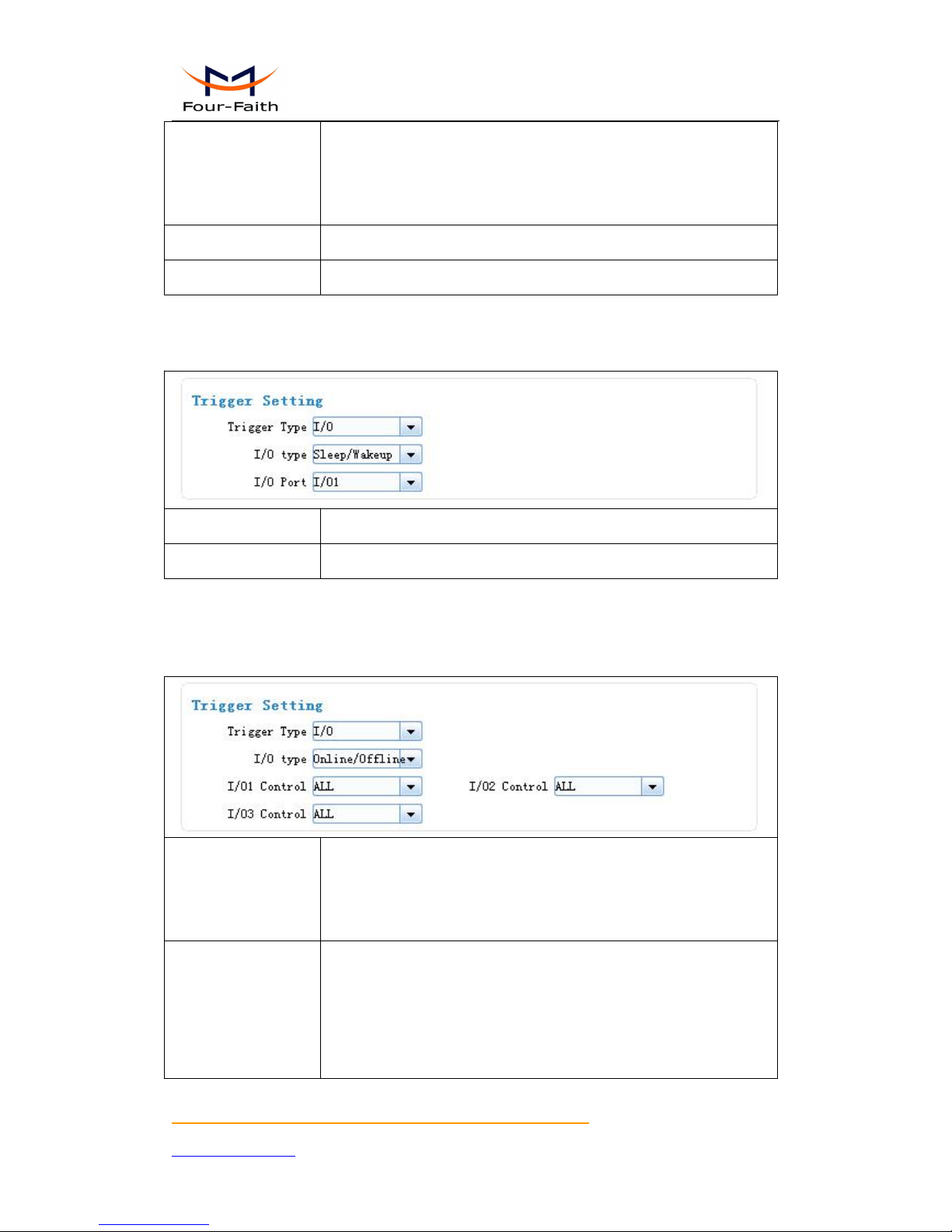
I/O:Sleep and Wake up
Made the IP Modem sleep or wake up via I/O level. If the I/O was in high level or suspend, the
IP Modem was sleep. Otherwise, It would trigger the IP Modem wake up.
Sleep/Wakeup
Made the IP Modem sleep or wake up depended on the I/O state
I/O
Set I/O port to trigger the IP Modem to sleep or wake up
I/O:online or offline
Made the IP Modem online or offline via I/O level. If the I/O was in high level or suspend, the
IP Modem was offline. Otherwise, It would trigger the IP Modem online.
I/O type
Once it select “Online/Offline”, the bind IO state indication as follow,
1) high level made corresponding center online.
2) low level make corresponding center offline.
I/O1Control
ALL: all center online/offline
NONE: do noting
Center 1: center 1 online/offline
Center 2:center 2 online/offline
Page 24
F7916 Series IP MODEM User Manual
Xiamen Four-Faith Communication Technology Co.,Ltd. Page 24 of 37
Add: Floor 11, Area A06, No 370, chengyi street, Jimei, Xiamen.China
http://en.four-faith.com Tel: +86 592-5907276 Fax:+86 592-5912735
Center 3:center 2 online/offline
Center 4: center 4 online/offline
Center 5: center 5 online/offline
I/O2Control
the same as above
I/O3Control
the same as above
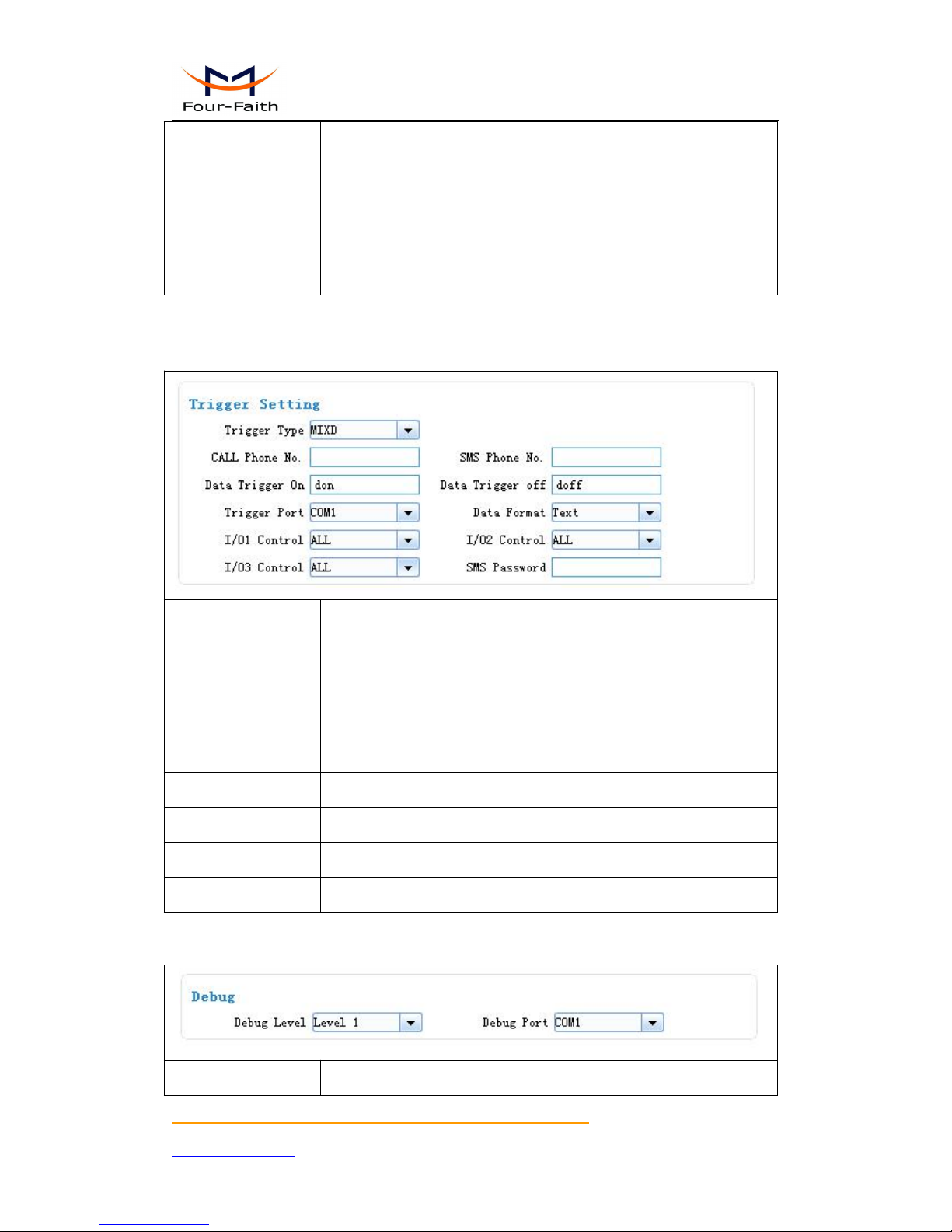
MIXD
the combination of SMSD, CTRL, DATA. IP MODEM will be online when meet one of these
three trigger methods.
CALL Phone No.
Any phone number call can wake up IP Modem, if the trigger number
is empty. Otherwise only the trigger phone number call can trigger the
IP Modem.
SMS Phone No.
Any phone number’s SMS can wake up IP Modem, if the trigger
number is empty. Otherwise only the trigger phone number’s SMS can
trigger the IP Modem.
Data Trigger On
Online data
Data Trigger Off
Offline data
Trigger Port
Set the trigger data source from PORT1 or PORT2
Data Format
Format of the trigger data: Text or HEX
3.3.3.3 Debug Level
Debug information is used to debug software when there is software problem.
Close:no debug information output
Page 25
F7916 Series IP MODEM User Manual
Xiamen Four-Faith Communication Technology Co.,Ltd. Page 25 of 37
Add: Floor 11, Area A06, No 370, chengyi street, Jimei, Xiamen.China
http://en.four-faith.com Tel: +86 592-5907276 Fax:+86 592-5912735
Debug Level
Level 1:simple prompt information output
Level 2:detail debug information output
Debug Port
Port 1:debug info send to port 1
Port 2:debug info send to port 2
485:debug info send to RS485
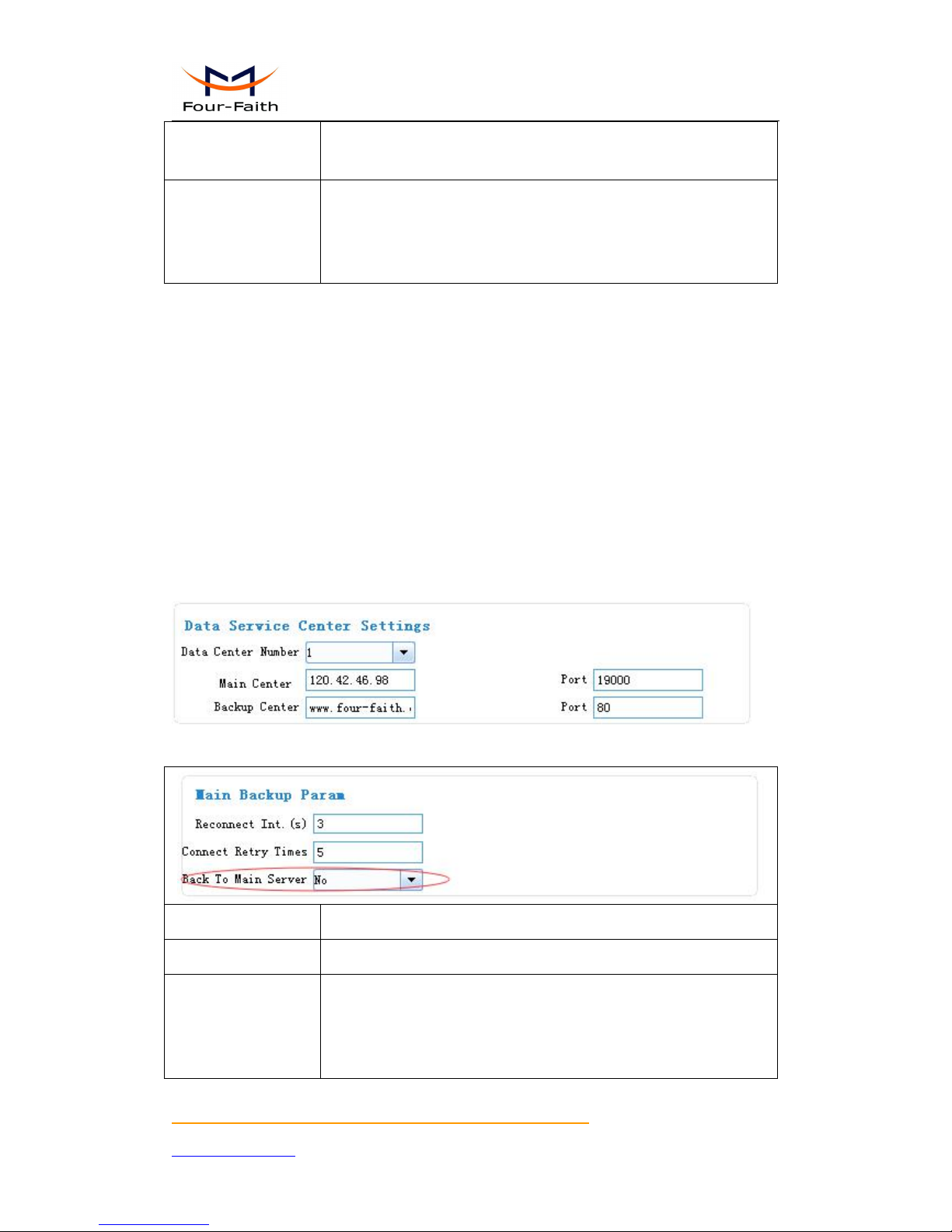
3.3.4 Data Service Center Settings
Settings on this page are the parameters related to Data Service Center (DSC).
3.3.4.1 Data Service Center
IP MODEM support two Data Service Center methods to transmit data.
Main and Backup: IP MODEM always tries to connect with the Main DSC. If fails to connect
with Main DSC, it will connect with Backup DSC at once
Note:If no Backup DSC exists, please configure the Backup DSC same as Main DSC.
Multi Data Service Center: IP MODEM can connect with at most five DSC at the same time.
All the multi DSC can receive the same application data .
Reconnect Int.(s)
reconnect time interval in second
Connect Retry Times
reconnect times
Back To Main Server
This item is only valid when you set “Data Center Number” as 1. In
this mode, IP MODEM will switch to backup center when main center
have problems. If this item is set to 1 , IP MODEM will check whether
Page 26

F7916 Series IP MODEM User Manual
Xiamen Four-Faith Communication Technology Co.,Ltd. Page 26 of 37
Add: Floor 11, Area A06, No 370, chengyi street, Jimei, Xiamen.China
http://en.four-faith.com Tel: +86 592-5907276 Fax:+86 592-5912735
the main center work fine timely. When it detects the main server work
fine, it will return back to the main server at once.
If the Data Center Number is 0,there is no DSC working.
If the Data Center Number is 1, IP MODEM work in Main and Backup DSC method.
When “Data Center Number” is greater than 1, IP MODEM works in Multi Data Service Center
method. The back center is invalid. The IP Modem will connect to mulit Data Center and transmit
data.
3.3.4.2 Multi-Center Connection Check
This item is valid only when the “Data Center Number” is greater than 1.
When one of the configured data center lost connection, IP MODEM will try to reconnect after the
configured reconnect interval
Reconnect Int.(s)
reconnect time interval in second
Connect Retry Times
reconnect times
Data Send Type
ALL:Send data to all center
Poll:send data to the centers order by order. Once data send success, it
will stop to send to next other centers.
Page 27
F7916 Series IP MODEM User Manual
Xiamen Four-Faith Communication Technology Co.,Ltd. Page 27 of 37
Add: Floor 11, Area A06, No 370, chengyi street, Jimei, Xiamen.China
http://en.four-faith.com Tel: +86 592-5907276 Fax:+86 592-5912735
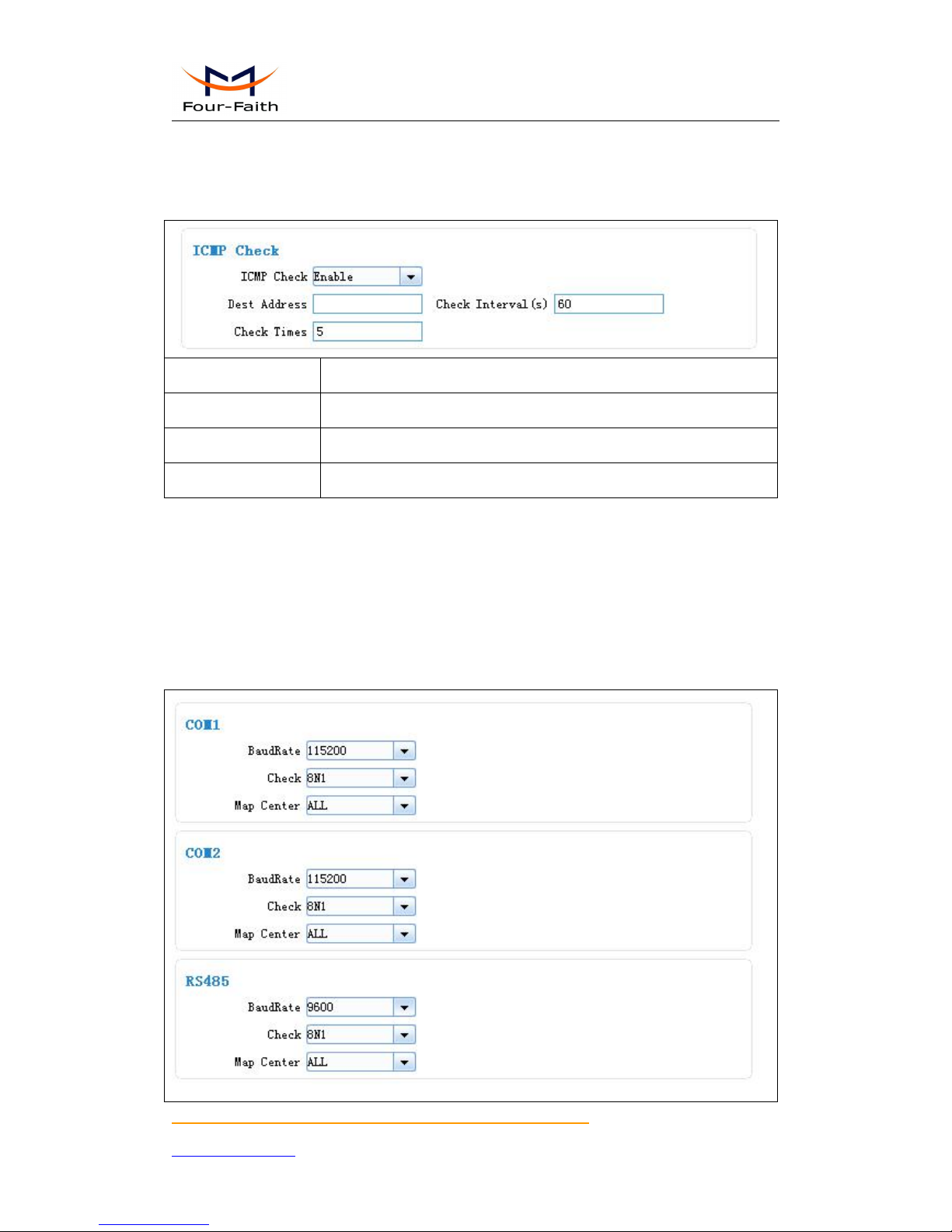
3.3.4.3 ICMP Link Check
ICMP link check send to server a icmp packet and wait reply to check the link status. If the
reply is lost, it means that the link may be broken.
ICMP Check
Enable or Disable
Dest Address
The destination address of ICMP packet to send
Check Interval(s)
The interval should not be too small. 60 is recommended(in second)
Check Times
>= 3 times
3.3.5 Serial port
IP MODEM support three individual serial ports, Port1, Port2 and RS485. All the three
ports can enter configuration state. The default parameters of the port with baudrate 115200, data
property 8N1
The data from the three port can bind to Data center.
Page 28

F7916 Series IP MODEM User Manual
Xiamen Four-Faith Communication Technology Co.,Ltd. Page 28 of 37
Add: Floor 11, Area A06, No 370, chengyi street, Jimei, Xiamen.China
http://en.four-faith.com Tel: +86 592-5907276 Fax:+86 592-5912735
COM1
baud:the baud rate of the PORT(110~600bps optional)
1200 --- 1200 bps
2400 --- 2400 bps
4800 --- 4800 bps
9600 --- 9600 bps
14400 --- 14400 bps
19200 --- 19200 bps
38400 --- 38400 bps
56000 --- 56000 bps
57600 --- 57600 bps
115200 --- 115200 bps
Property:Databit, Parity, Stopbit
8N1 --- 8 Databit, No parity, 1 Stopbit
8E1 --- 8 Databit, Even parity, 1 Stopbit
8O1 --- 8 Databit, Odd parity, 1 Stopbit
Bind: Center1: the data from the port send to center 1
Center2: the data from the port send to center 3
Center3: the data from the port send to center 3
Center4: the data from the port send to center 4
Center5: the data from the port send to center 5
ALL: the data from the port send to all centers
Close: send to none
COM2
The same as above
RS485
The same as above
Page 29
F7916 Series IP MODEM User Manual
Xiamen Four-Faith Communication Technology Co.,Ltd. Page 29 of 37
Add: Floor 11, Area A06, No 370, chengyi street, Jimei, Xiamen.China
http://en.four-faith.com Tel: +86 592-5907276 Fax:+86 592-5912735
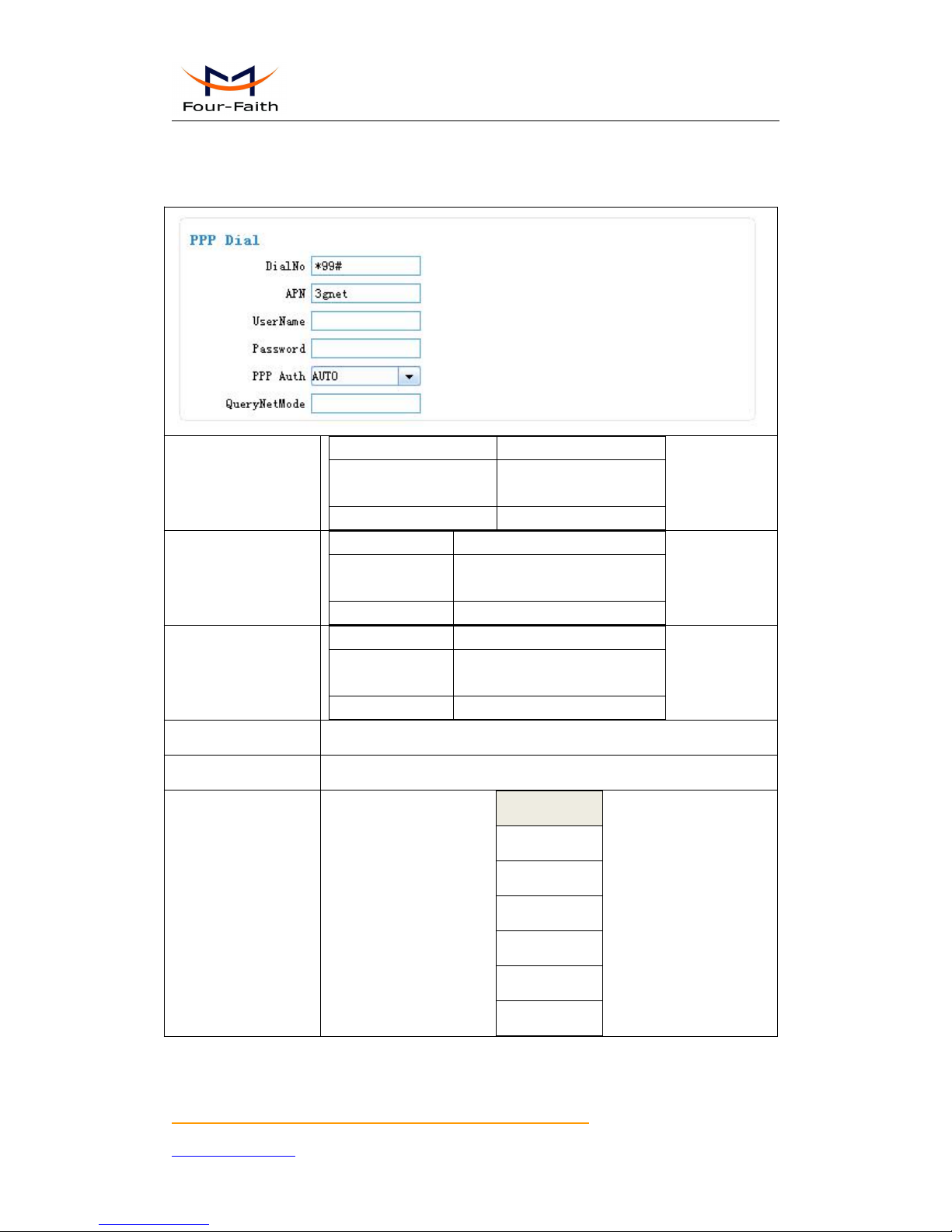
3.3.6 Dial
3.3.6.1 PPP Dial
DialNo
Network
Dial number
GPRS/WCDMA/LTE
*99***1#、*99#、
*98*1#
CDMA/EVDO
#777
APN
Network
APN
GPRS/WCDMA/
LTE
cmnet、uninet
CDMA/EVDO
empty
Username/password
Network
User name/password
GPRS/WCDMA/
LTE
empty
CDMA/EVDO
card/card
PPP Auth
AUTO,PAP and CHAP
QueryNetMode
Search the network mode for the 4G network
Net Mode
Net Mode
AUTO
EVDO
WCDMA
TD-SCDMA
CDMA
GSM
Page 30
F7916 Series IP MODEM User Manual
Xiamen Four-Faith Communication Technology Co.,Ltd. Page 30 of 37
Add: Floor 11, Area A06, No 370, chengyi street, Jimei, Xiamen.China
http://en.four-faith.com Tel: +86 592-5907276 Fax:+86 592-5912735
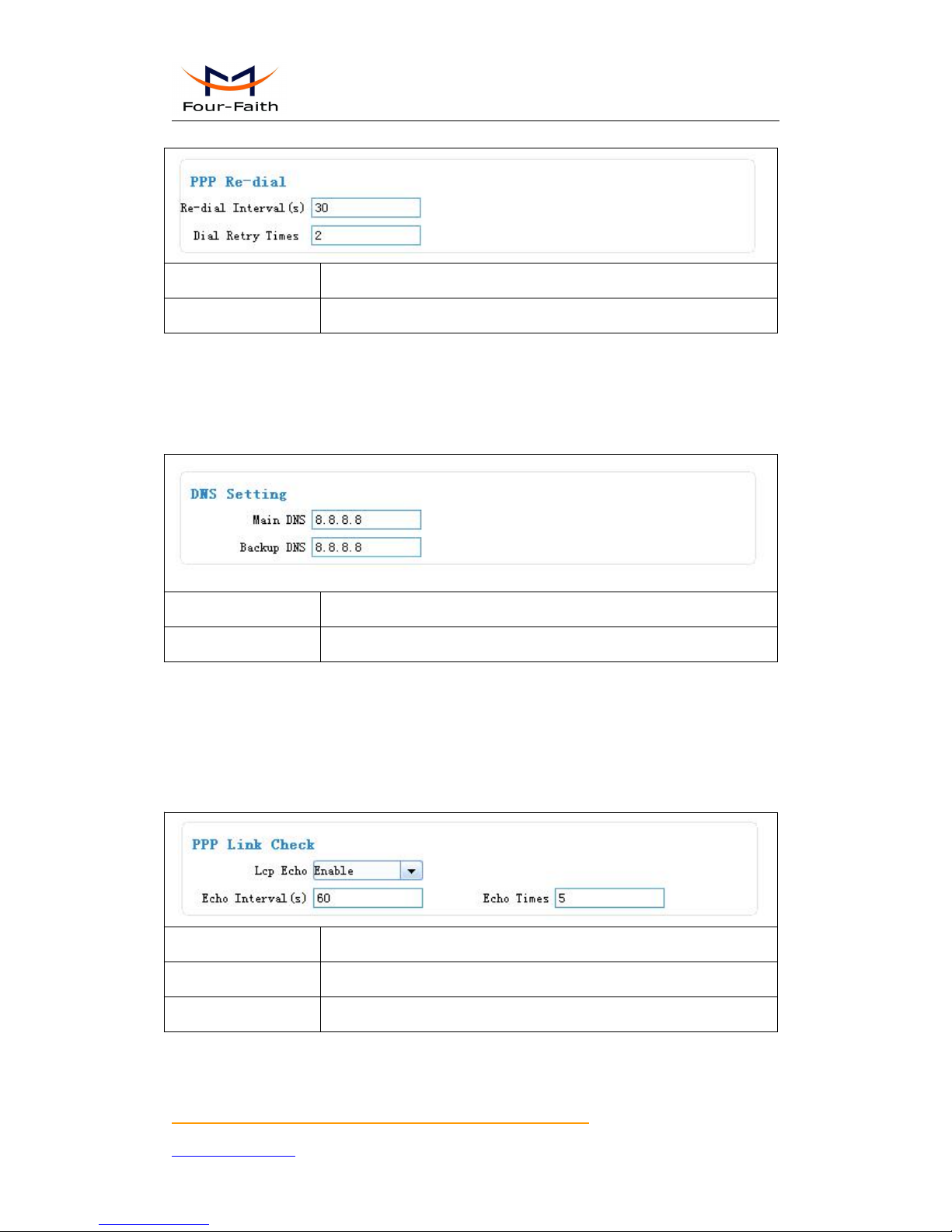
3.3.6.2 PPP Redial
Re-dial Interval(s)
The interval between ppp dial in second
Dial Retry Times
max times of ppp dial failure
3.3.6.3 DNS Parameters
When the DSC Internet access uses domain name, It’s necessary to set DNS server resolving the
DSC domain name. When the Data Center Number is 1, Main and Backup Center DNS Server is
used to resolve the Main center and Backup center correspondingly.
Main DNS
The DNS server IP address(must be IP address)
Backup DNS
The DNS server IP address(must be IP address)
3.3.7 Global Parameters
3.3.7.1 PPP Link Check
PPP Link Check adopt LCP echo method to check the link status. Once the check failure’s
times meet the max times. The IP Modem will re-dial.
Lcp Echo
Enable or Disable
Echo Interval(s)
The interval should not be too small. 60 is recommended. (in second)
Echo Times
>= 3 times
Page 31
F7916 Series IP MODEM User Manual
Xiamen Four-Faith Communication Technology Co.,Ltd. Page 31 of 37
Add: Floor 11, Area A06, No 370, chengyi street, Jimei, Xiamen.China
http://en.four-faith.com Tel: +86 592-5907276 Fax:+86 592-5912735
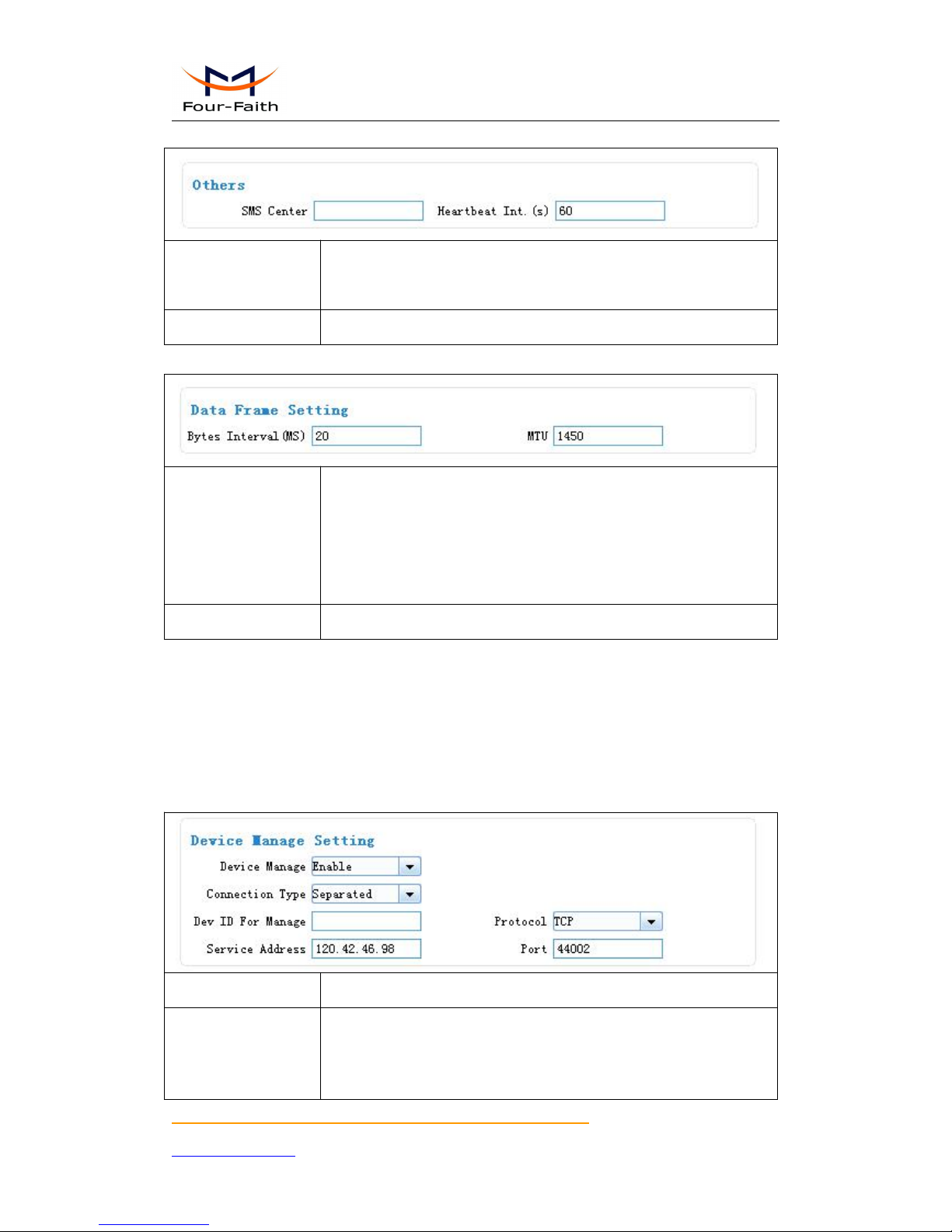
3.3.7.2 Other Parameters
SMS Center
The local SMS center number. It should set according to the local
operation.
Heartbeat Int.(s)
Time interval sent heartbeat packet. (in second)
3.3.7.3 Data Frame Parameters
Bytes Interval(MS)
The time interval used to determine whether the serial data frame
transmission has completed, IP MODEM will send the serial data to the
center when two bytes transmit time interval larger than this item
value.(in milliseconds)
MTU
TCP Max packet length
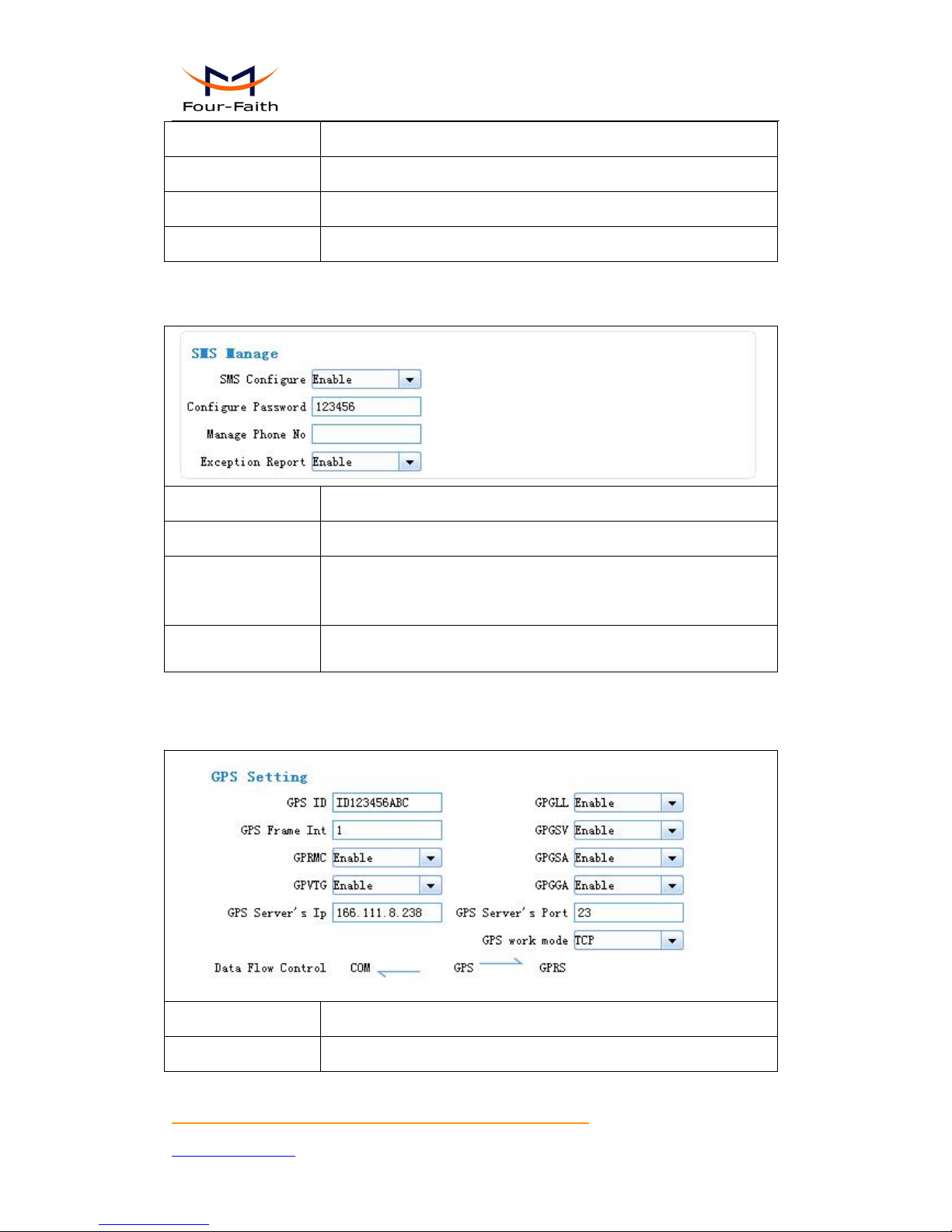
3.3.8 Device Manage
3.3.8.1 Device Manage Center Parameters
The IP Modem send device status information to the Device Manage Center. The information
include network signal, network status, traffic flow and so on.
The Device Manage Center also query and configure the device parameters.
Device Manage
Enable or Disable
Connection Type
separate:data service and manage service are separated from each other
by transmitting data in two connection.
combine:data service and manage service transmit in one connection
together.
Page 32
F7916 Series IP MODEM User Manual
Xiamen Four-Faith Communication Technology Co.,Ltd. Page 32 of 37
Add: Floor 11, Area A06, No 370, chengyi street, Jimei, Xiamen.China
http://en.four-faith.com Tel: +86 592-5907276 Fax:+86 592-5912735
Dev ID For Manage
Device ID for manage center. 8 character
Protocol
TCP or UDP
Service Address
manage center server address
Port
manage center server port
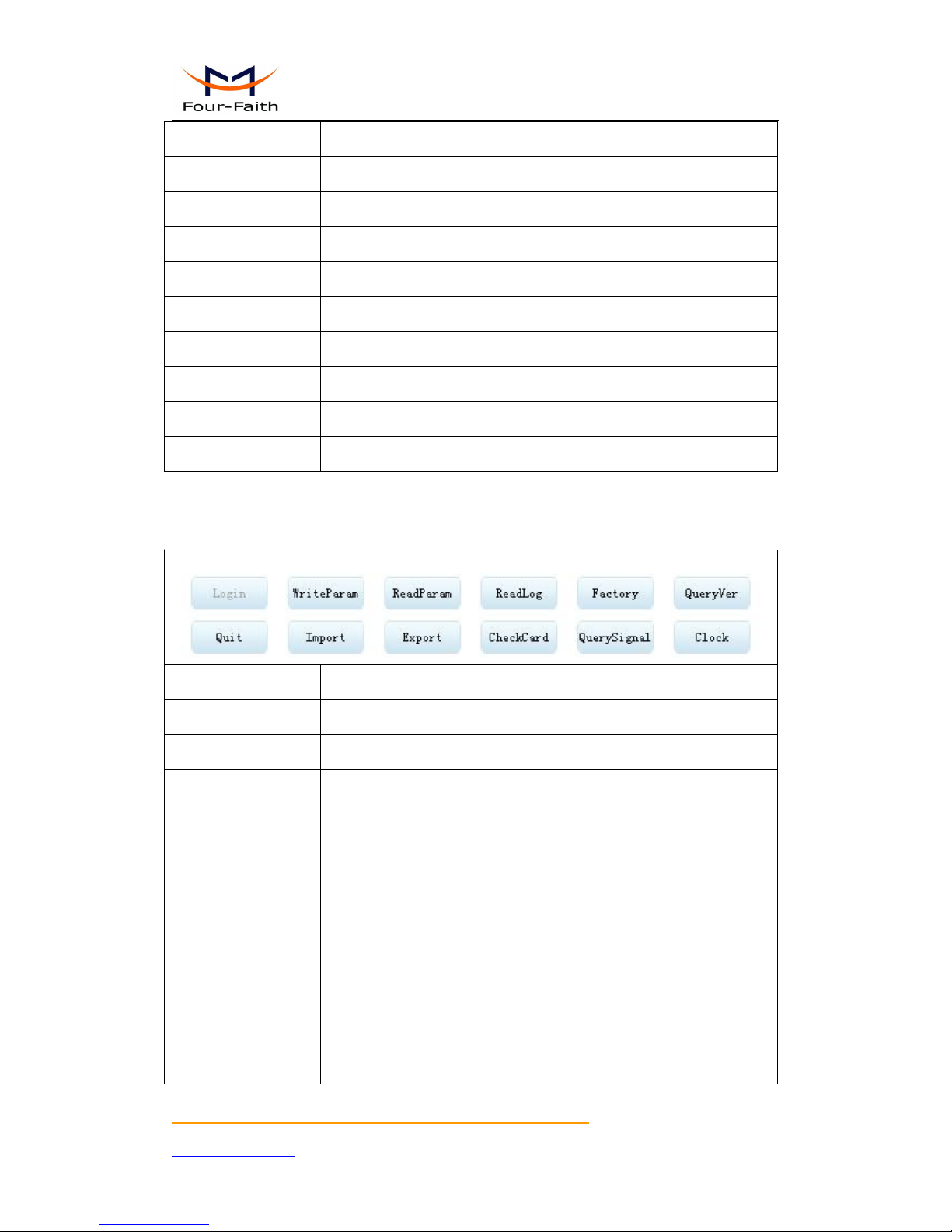
3.3.8.2 Manage by SMS
Configure the IP Modem by SMS
SMS Configure
Enable or Disable
Configure Password
The password for SMS Configure
Manage Phone No.
If it is empty, any number can configure the IP Modem Parameters.
Otherwise, only the “Administrator Number” can configure the IP
Modem Parameters.
Exception Report
Enable, exception information report by SMS
Disable, do nothing when exceptions meet
3.3.9 GPS
GPS ID
ID number of GPS Device
GPS Frame Int
The Interval of GPS info Output.(in second)
Page 33
F7916 Series IP MODEM User Manual
Xiamen Four-Faith Communication Technology Co.,Ltd. Page 33 of 37
Add: Floor 11, Area A06, No 370, chengyi street, Jimei, Xiamen.China
http://en.four-faith.com Tel: +86 592-5907276 Fax:+86 592-5912735
GPS Server’s IP
GPS server address
GPS Server’s Port
GPS server port
GPS work mode
GPS server workmode: TCP or UDP
GPRMC
Enable or Disable
GPVTG
Enable or Disable
GPGLL
Enable or Disable
GPGSV
Enable or Disable
GPGSA
Enable or Disable
GPGGA
Enable or Disable
Data Flow Control
GPS output info direction
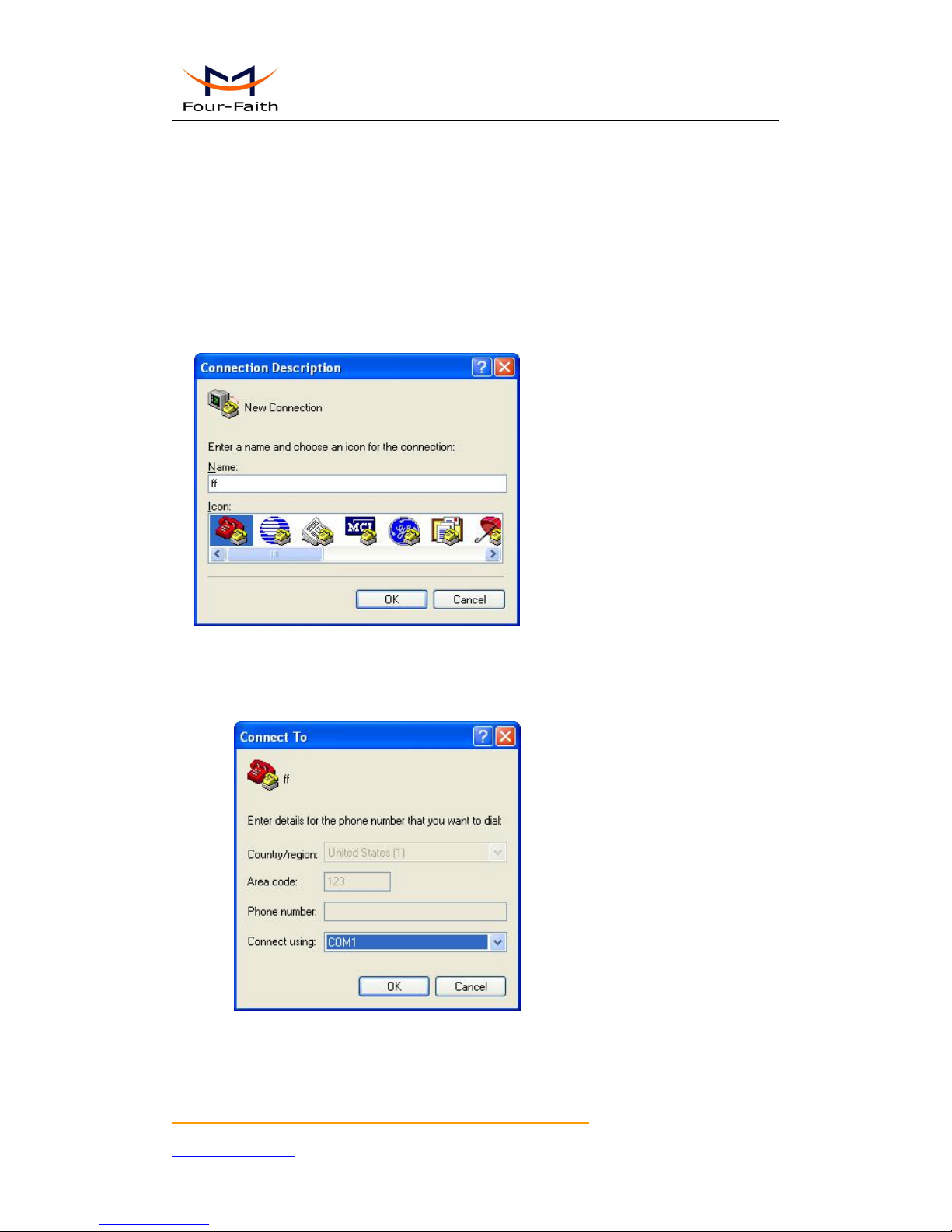
3.3.10 Miscellaneous
Login
Enter configuration state while IP Modem normal work.
WriteParam
Send parameters to IP Modem
ReadParam
Read All parameters of IP Modem
ReadLog
Read log information of IP Modem
Factory
Factory the IP Modem’s parameters
QueryVer
Query the version of IP Modem
Quit
Quit configuration state
Import
Import parameters from file to IP Modem
Export
Export parameters from IP Modem to file
CheckCard
Check SIM card
QuerySignal
Query the CSQ of IP Modem
Clock
Set the system time for IP Modem
Page 34

F7916 Series IP MODEM User Manual
Xiamen Four-Faith Communication Technology Co.,Ltd. Page 34 of 37
Add: Floor 11, Area A06, No 370, chengyi street, Jimei, Xiamen.China
http://en.four-faith.com Tel: +86 592-5907276 Fax:+86 592-5912735
Page 35
F7916 Series IP MODEM User Manual
Xiamen Four-Faith Communication Technology Co.,Ltd. Page 35 of 37
Add: Floor 11, Area A06, No 370, chengyi street, Jimei, Xiamen.China
http://en.four-faith.com Tel: +86 592-5907276 Fax:+86 592-5912735
Appendix
The following steps describe how to make IP MODEM enter configure state with the Windows
XP Hyper Terminal.
1. Press “Start””Programs””Accessories””Communications””Hyper Terminal”
2. Input connection name, choose “OK”
3. Choose the correct COM port which connect to IP MODEM, choose “OK”
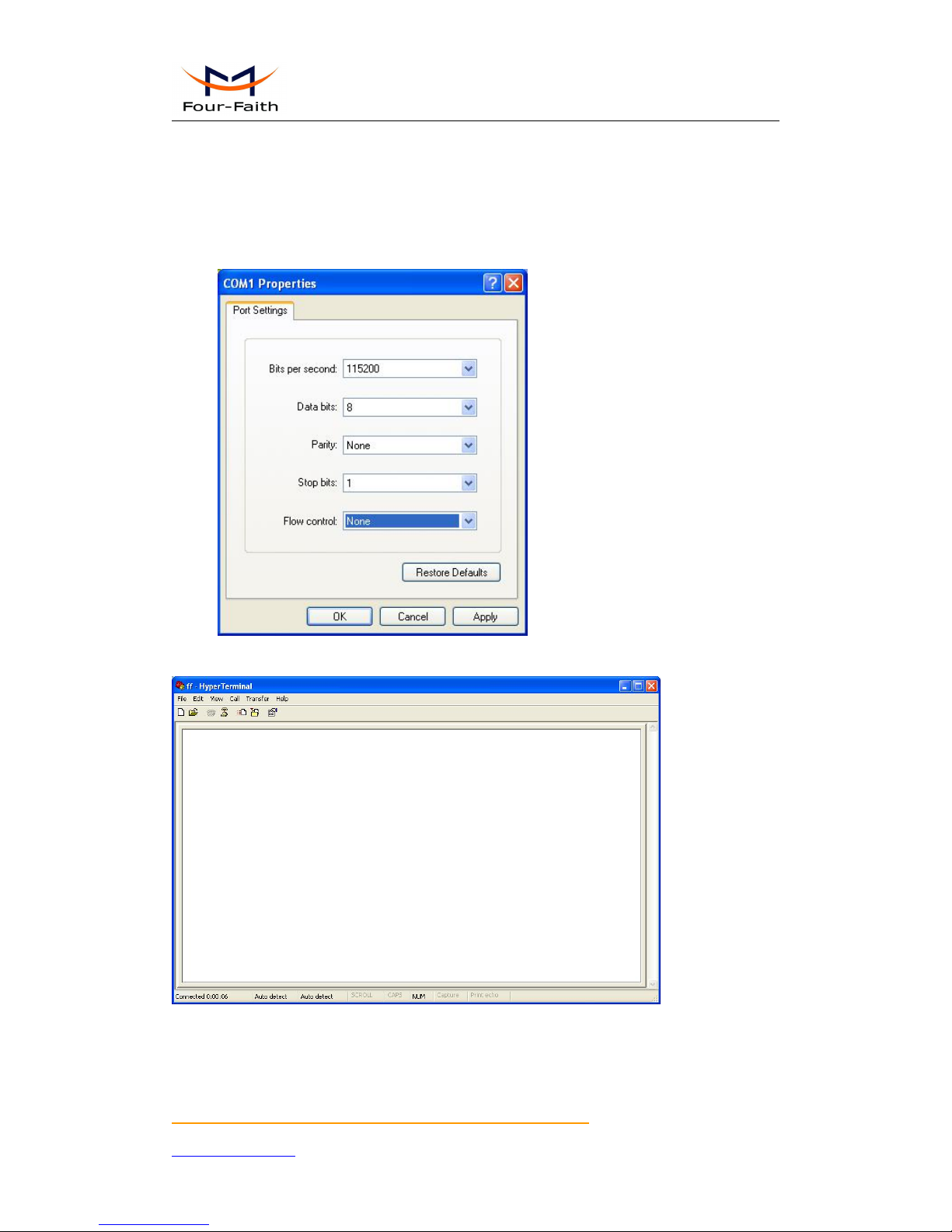
4. Configure the serial port parameters as following, choose “OK”
Bits per second: 115200
Page 36
F7916 Series IP MODEM User Manual
Xiamen Four-Faith Communication Technology Co.,Ltd. Page 36 of 37
Add: Floor 11, Area A06, No 370, chengyi street, Jimei, Xiamen.China
http://en.four-faith.com Tel: +86 592-5907276 Fax:+86 592-5912735
Data bits: 8
Parity: None
Stop bits: 1
Flow control: None
5. Complete Hyper Terminal operation, It runs as following
6. Re-power IP MODEM, put mouse focus on the Hyper Terminal and press “s” key
continuously until IP MODEM enter configure state as following
Page 37

F7916 Series IP MODEM User Manual
Xiamen Four-Faith Communication Technology Co.,Ltd. Page 37 of 37
Add: Floor 11, Area A06, No 370, chengyi street, Jimei, Xiamen.China
http://en.four-faith.com Tel: +86 592-5907276 Fax:+86 592-5912735
7. IP MODEM has entered configure state, you can configure the parameters through AT
command.
 Loading...