

Page 1
Test Equipment Depot - 800.517.8431 - 5 Commonwealth Ave, MA 01801
TestEquipmentD
epot.com
Fotric 320M/320F Series
Page 2

Contents
Legal Disclaimer . . . . . . . . . . . . . . . . . . . . . . . . . 1
Safety Information . . . . . . . . . . . . . . . . . . . . . . 5
Thermal Imager . . . . . . . . . . . . . . . . . . . . . . . . . 8
Interface Introduction . . . . . . . . . . . . . . . . . . 12
Quick-Start . . . . . . . . . . . . . . . . . . . . . . . . . . . . .18
Tips . . . . . . . . . . . . . . . . . . . . . . . . . . . . . . . . . . . 20
Documents . . . . . . . . . . . . . . . . . . . . . . . . . . . 21
Appendix A . . . . . . . . . . . . . . . . . . . . . . . . . . . 23
Page 3

Legal Disclaimer
1.1 Legal Disclaimer
Uncooled thermal imager manufactured by FOTRIC are
entitled to 1 to 2 years warranty service (depending on
the specic model) from the date of initial purchase and
delivery. Warranty covers defects caused by materials and
production processes, provided that such products are
handled under normal storage, use, and repair conditions
and in accordance with FOTRIC instructions.
Products not manufactured by FOTRIC but included in
the system that FOTRIC sells to the original purchaser are
covered by the specic supplier's warranty terms (if any)
and FOTRIC is not liable for those products. This warranty is
provided to the original purchaser and is not transferable.
This warranty does not apply to any product that has
been damaged by misuse, neglect, accident, or abnormal
operating conditions. Consumable parts are not covered by
this warranty.
Any defects in the products covered by this warranty must
be reported and the product must not be used after, to
prevent further damage. The purchaser must report any
defects to FOTRIC immediately, otherwise this warranty will
not apply.
If the product is proven defective in relation to materials
or manufacturing after FOTRIC's inspection, it is up to
the user whether it is to be repaired or replaced (refer
to FOTRIC warranty policy), provided that the product
must be returned to FOTRIC within 3 Months from above
1
Page 4

Legal Disclaimer
mentioned report date. FOTRIC has no obligation or liability
for any defects other than those mentioned above. This
product is exempt from any other warranties, expressed or
implied. FOTRIC hereby disclaims any implied warranties of
merchantability and applicability for a particular purpose.
FOTRIC is not responsible for any direct, indirect, special,
incidental or consequential loss or damage based on
contract, civil, or any other legal theory. This warranty
clause shall apply the relevant provisions of the laws of the
People's Republic of China. Any dispute or claim arising out
of or relate to this warranty shall be nally settled through
arbitration in accordance with the rules of the Shanghai
Pudong New District People's Court of the People's Republic
of China. The place of arbitration shall be Shanghai.
1.2 Usage Statistics
FOTRIC reserves the right to collect anonymous usage
statistics to help maintain and improve the quality of the
products and services provided.
2
Page 5

Legal Disclaimer
1.3 Copyright
No parts of this software (including source code) may be
reproduced, transmitted, transcribed, or translated into
any kind of language or computer language in any form or
by electronic, electromagnetic, optical, manual ways, or
any other means without the prior written permission of
FOTRIC.
No parts of this document may be reproduced,
photocopied, reprinted, translated, or transmitted to any
readable electronic medium or machine without the prior
written consent of FOTRIC.
The names and logos shown on the products herein are
either registered trademarks or trademarks of FOTRIC
and/or its aliates. All other trademarks, trade names or
company names referenced herein are for identication
purposes only and are the property of respective owners.
1.4 Quality Assurance
The quality management system for the development and
production of these products in FOTRIC has been certied
in accordance with the ISO 9001 standard.
FOTRIC is committed to a policy of continuous
development, as we reserve the right to modify or upgrade
any product without prior notice.
3
Page 6

Legal Disclaimer
1.5 Export Control
Thermal imaging products are listed as export-controlled
products by U.S. Department of Commerce, United Nations
Security Council (UNSC), and European Union (EU). This
product contains a focal plane array and cannot be used in
controlled countries (such as North Korea, Iran, Syria, Cuba,
Sudan, Russia, etc.). Please do not bring this product into
or used in controlled countries. Any loss or liability arising
from the above actions will be borne by the purchaser.
4
Page 7

Safety Information
This product complies with the restrictions for Class A
digital equipment in Chapter 15 of the FCC Rules. These
restrictions are designed to prevent harmful interference
to civilian installations. If not installed and used in strict
accordance with the instructions , this device will generate,
use and emit radio frequency energy, which may cause
harmful interference to radio communications.
Denition
! Warning> Represents a hazardous situation or behavior
that could result in personal injury or death.
! Caution > Represents conditions or actions that could
result in damage to the device or permanent loss of data.
! Notice> Represents useful information for users.
Please read before using:
! Warning > This is class A product. In a domestic
environment, this product may cause radio interference
in which cause the user may be required to take adequate
measures.
! Warning > Do not disassemble or do modications to
the battery of the thermal imager . The battery contains
safety and protection devices, which, if damage occurs, can
cause the battery to become hot, or cause an explosion or
an ignition. If there is a leak from the battery and you get
5
Page 8

Safety Information
the uid in your eyes, do not rub your eyes. Flush well with
water and immediately get medical care. The battery uid
can cause injury to your eyes if you do not do this.
! Warning > The thermal imager is equipped with a laser
pointer. Do not look directly into the laser beam. The laser
beam can cause eye irritation.
!Caution> The thermal imager uses a very sensitive
thermal sensor, so do not point the infrared camera (with
or without the lens cover) at strong energy sources, for
example, devices that cause laser radiation, or the sun. This
can have an unwanted eect on the accuracy of the camera.
It can also cause damage to the detector in the camera
which is not covered in Fotric's warranty.
!Caution> Original packing box must be used during
transportation.Please do not strongly hit the thermal
imager during use and transportation.
! Caution > When storing the thermal imager, it is
recommended to use the original packing box and place it
in a cool and dry place, away from strong electromagnetic
eld.
!Caution> Please avoid oil and various chemical
substances to contaminate or damage the surface of the
lens. Please cover the lens with cap when not use.
!Caution> Do not use the camera in temperatures
higher than +50° C (+122° F), unless other information is
specied in the user documentation or technical data. High
temperatures can cause damage to the camera.
!Caution> In order to prevent potential risk of data loss,
please copy (back up) the data to a computer or server
6
Page 9

Safety Information
periodically.
! Caution > Please do not open the thermal imager' s shell
or modify it without permission. Repair services can only be
performed by authorized FOTRIC personnel.
! Notice> After the thermal imager is turned on, it may
take about 10~15 minutes to warm up before accurate
measurement.
!Notice> Every thermal imager's temperature correction
has been performed before delivered from factory.
7
Page 10
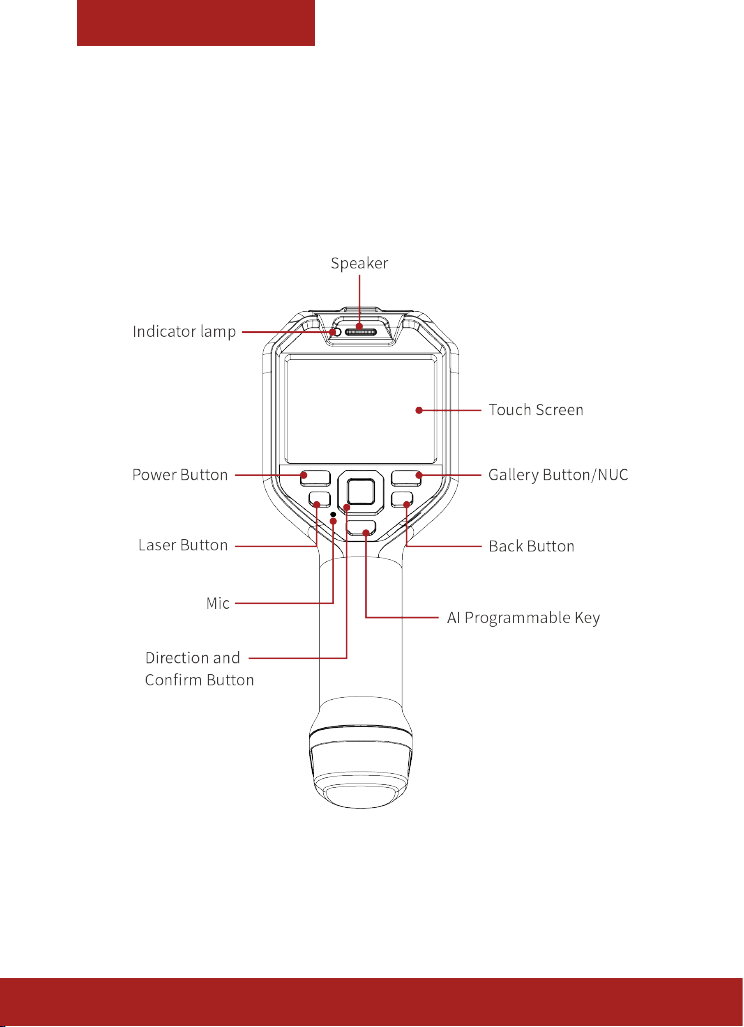
Thermal Imager
Front View
8
Page 11
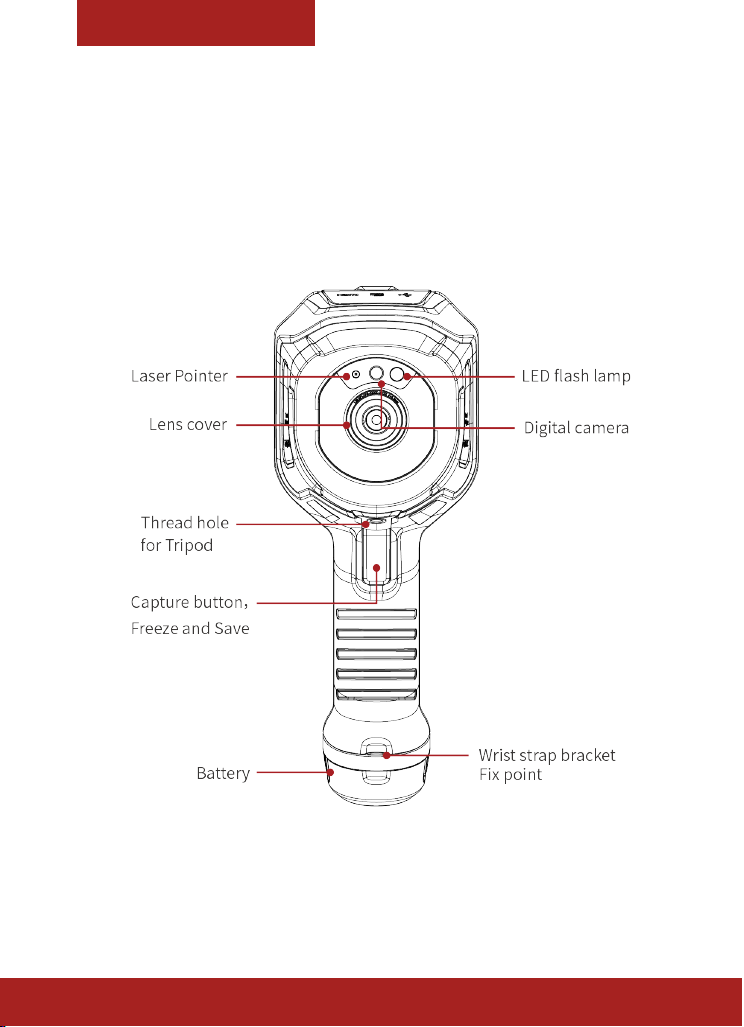
Thermal Imager
Rear View
9
Page 12
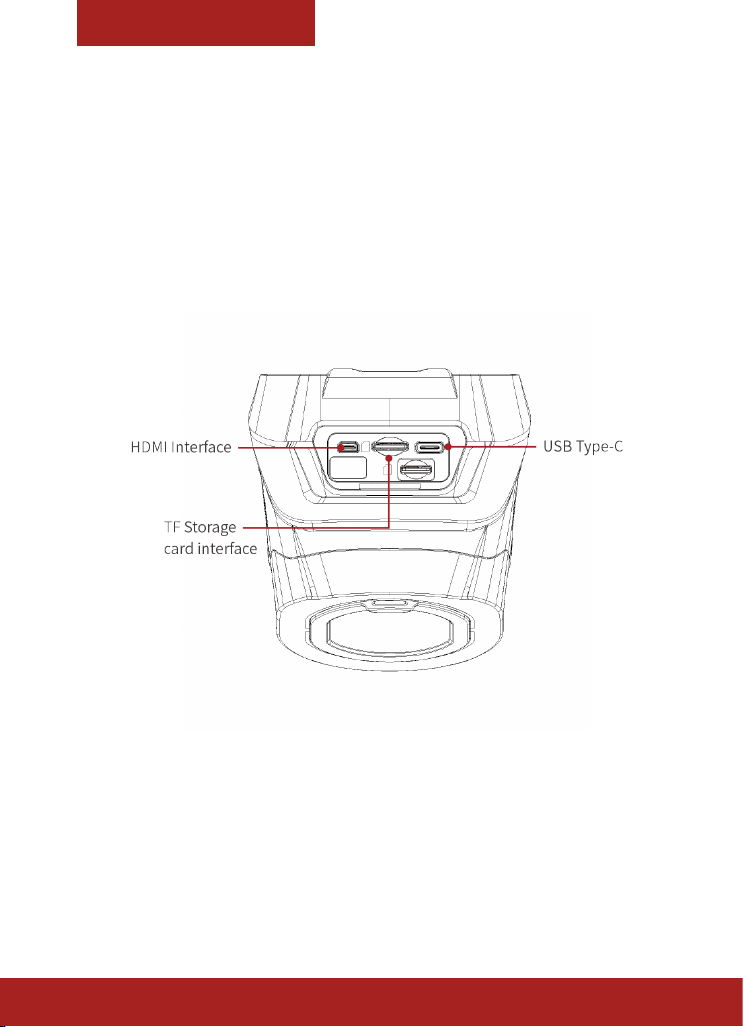
Thermal Imager
Top View
10
Page 13
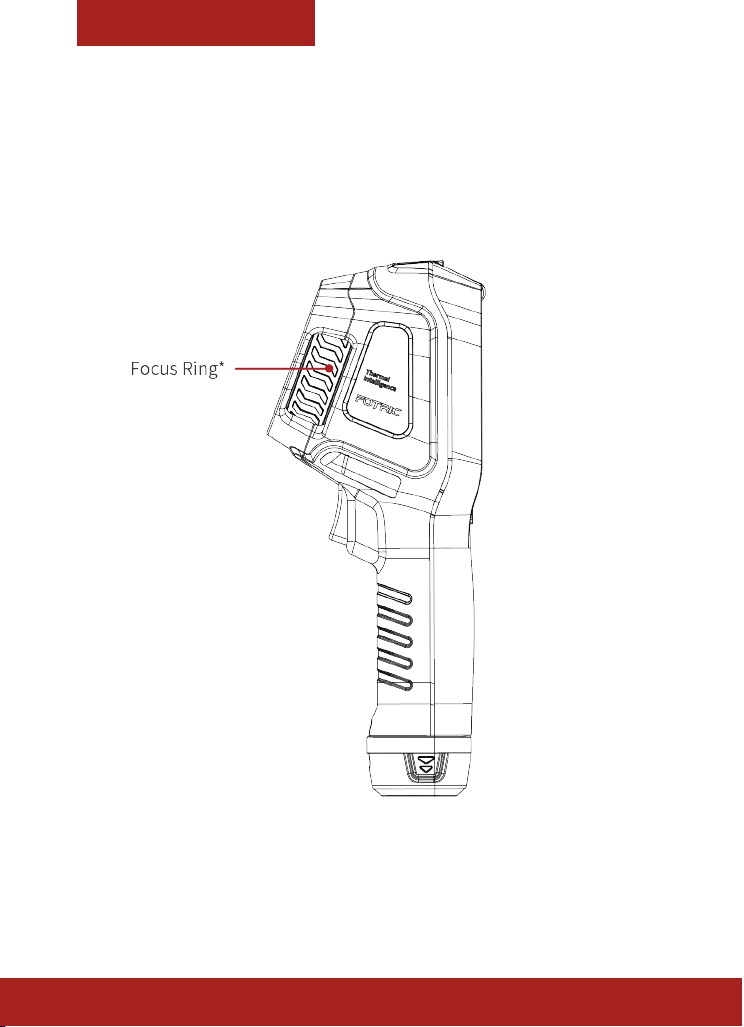
Thermal Imager
Side View
* Available for 320M series
11
Page 14
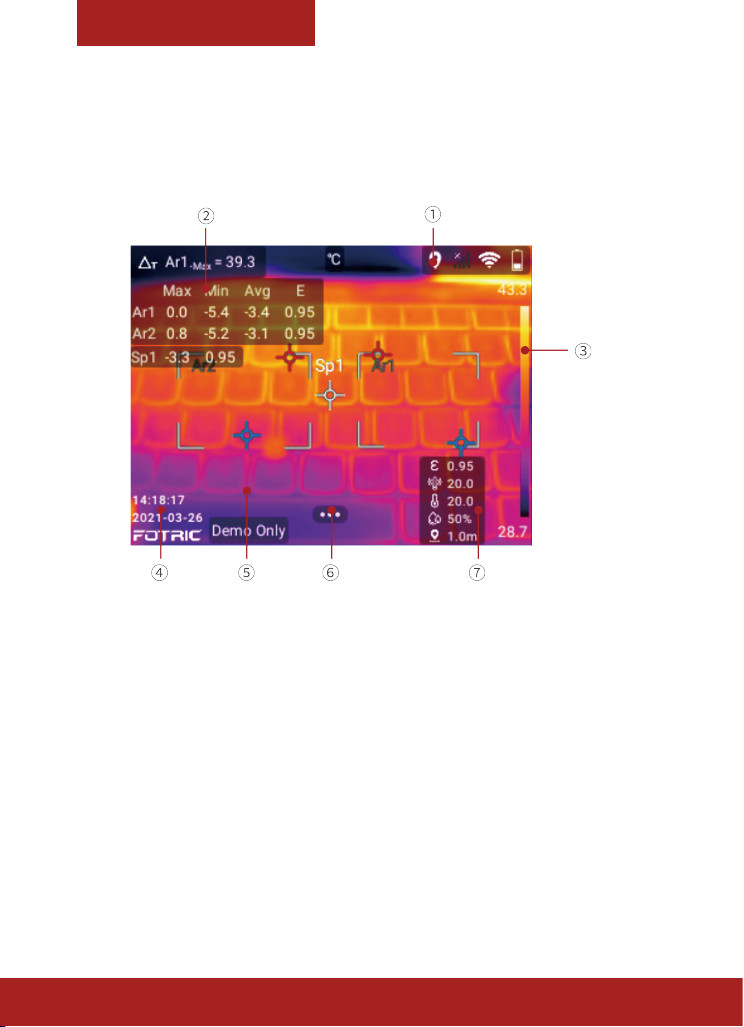
Interface
Main Interface
① Status Bar: Display Battery, Wi, Bluetooth, GPS, TF card
low storage warning, Laser warning etc.
12
② Measurement Result: Display overview and ROI Max/
Min temp, Emissivity etc.
③ Palette and Temperature scale: Display pallet and
Temperature scale range.
④ Logo and System time: Display System data &time,
Logo
Page 15

Interface
⑤ Thermal Imaging Display: Display thermal image,
positions of Overview temperature & ROI temperature MAX/
MIN, etc.
⑥ System Menu Button: Press to enter Temperature scale
mode, Parameters, Image mode, ROI measurement tools,
Palette and Settings.
⑦ Parameters: Display emissivity, Reected temp,
Environment temp, Humidity, and Distance.
13
Page 16
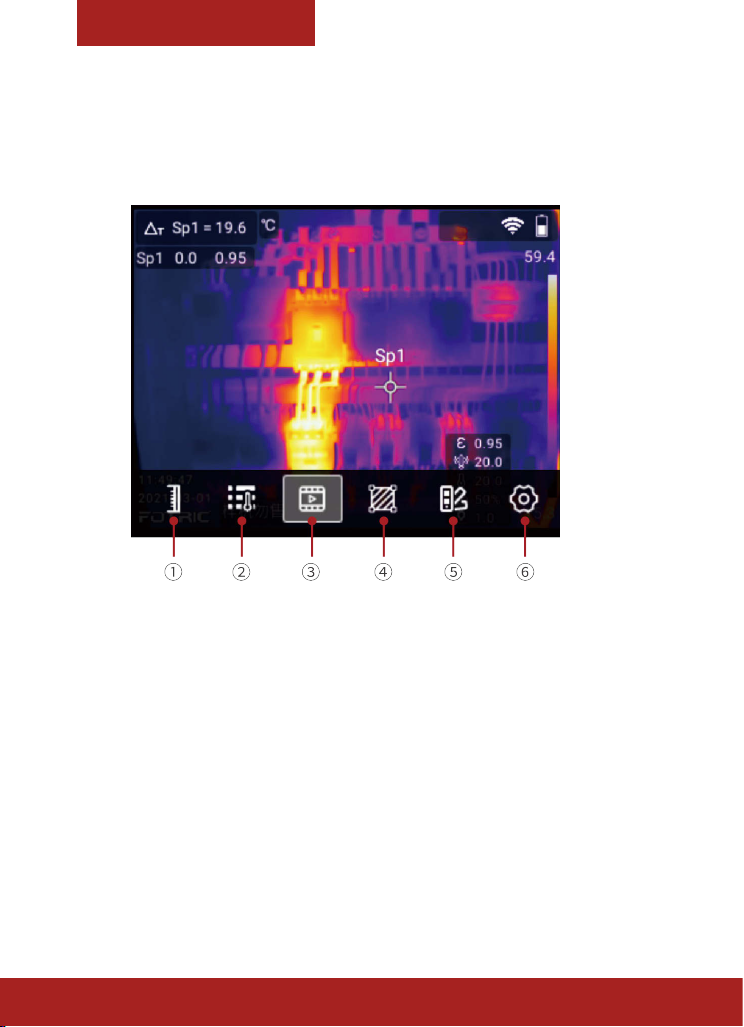
Interface
System Menu
① Temperature scale: Auto scale, Manual scale, Touch
scale settings.
14
② Parameters:Emissivity, reected temperature, ambient
temperature, humidity, target distance and IR window
compensation settings.
③ Image mode:Thermal image, Visible light digital
image, Picture in Picture, T-DEF image fusion mode settings.
④ Measurement tools:Add, delete and edit ROI
Page 17

Interface
measurement tools include spots, rectangles, circle, and
lines. Temperature rise calculation, ROI alarm display and
other settings.
⑤ Palette:Multiple palettes and inverted palettes, color
Isotherm, and Magicthermal advanced palette.
⑥ Settings:Capture mode, Connect, Temp measurement
Range, Storage & Save options, Device Set.
15
Page 18
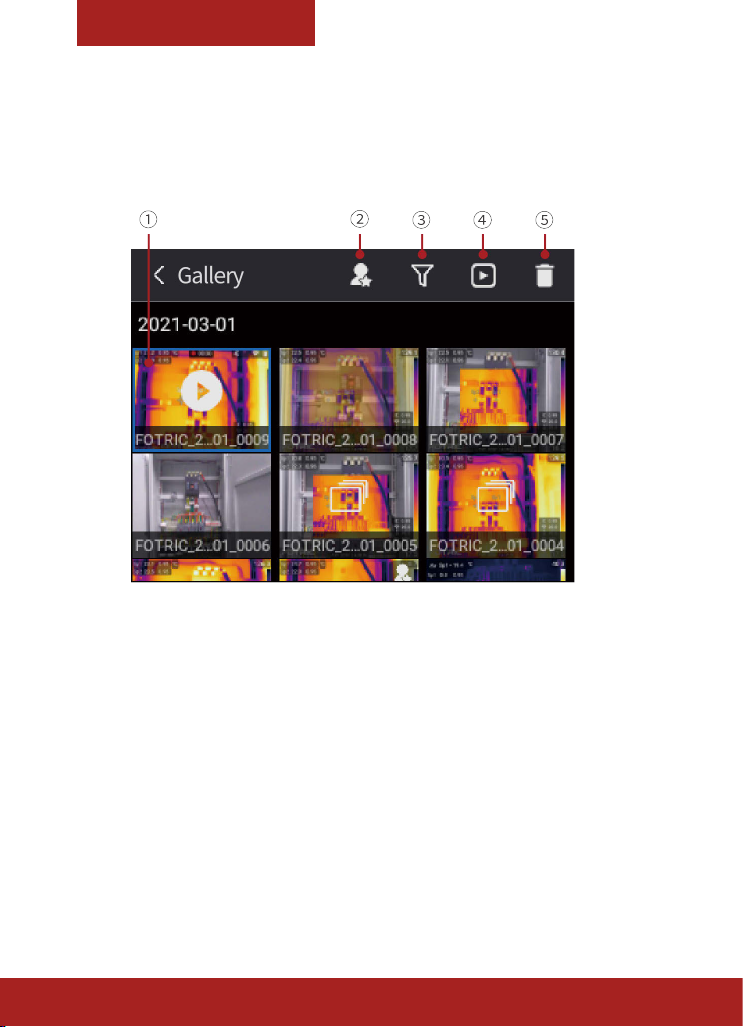
Interface
Gallery
① Images and videos:Display captured thermal photos,
visible image photos, full radiation and MP4 format thermal
videos. Click to choose one; Long press to choose multiple.
16
② Favorite:Only Display favorite photos.
③ Tags :Filter by Tags, Display selected tags les.
④ Analyze: Analyze thermal photos and videos.
⑤ Delete:Delete selected les.
Page 19
Interface
System Settings
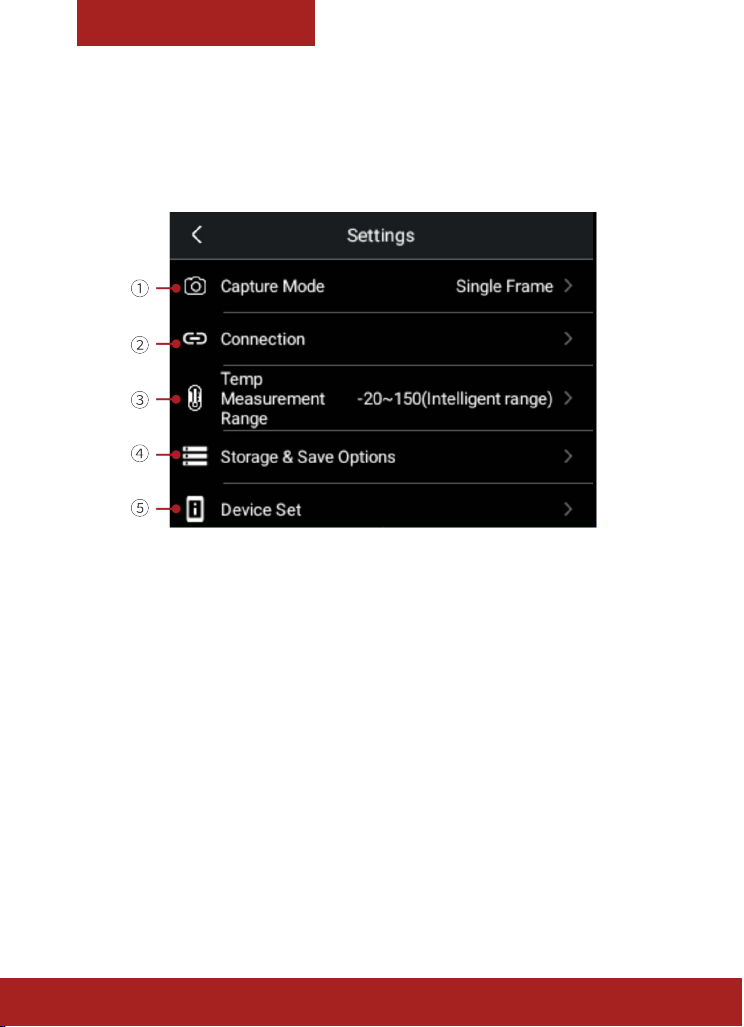
①:Single frame Capture, Recording and time-lapse
settings.
②:Wi, Bluetooth, FTP transfer setting.
③:Temperature measurement range, include Intelligent
Range.
④:Settings such as SuperResolution, Video format, delete
all saved les, etc.
⑤:Language&Time&Region, TWB, Display settings, Screen
o, Reset, About, etc.
17
Page 20

Quick-Start
For quick start of the thermal imager, please follow the
procedures as below:
1. Insert the battery into the battery compartment of the
thermal imager. (Make sure the battery is fully charged
before starting up the thermal imager)
2. Insert TF storage card into the TF card slot.
3. Long press the Power Button to turn on the thermal
imager.
4. Aim the thermal imager toward the object of interest.
5. For 320M series, adjust the Manual focus ring to get a
clear image.
For 320F series, keep object distance of more than
0.5meters to stay focus.
6. Press the Capture Button to freeze the thermal image,
so that it can be analyzed in this interface.
18
7. Press the Capture Button again; the analyzed thermal
image will be saved automatically.
Page 21

Quick-Start
For quick–start of Fotric AnalyzlR PC software, please follow
the procedures as below:
19
Page 22

Tips
• It is very important to adjust the focal length correctly.
An incorrect focal adjustment will aect the imaging
quality and temperature measurement accuracy of the
thermal imager.
• The thermal imager has a resolution limit, which
depends on the detector size, lens, and distance to the
object. If necessary, please move closer to the object.
Stay away from hazardous areas or energized electrical
components
• Be careful when using the thermal imager
perpendicular to the target, because you may become
the main radiation source of infrared ray.
• Please choose a high-emission area (for example, an
area with rough surface) for measurement.
• Blank objects (and objects with low emissivity) are
mainly reected in the environment, so they may
appear wrong result in the thermal imager.
• Various types of faults (such as faults that occur in
building construction) may generate the same type of
heat distribution pattern.
• Analysis of the infrared images requires corresponding
professional knowledge.
• Please ensure your battery is fully charged before use.
20
* This manual may be inconsistent with the product due to
product upgrade or customization; please always refer to
the specied product.
Page 23

Documents
21
Page 24

Documents
22
Page 25

Appendix A
Emissivity Table
(For reference only)
Material
Name
Aluminum
Brass
Copper Severely oxidized 20 0.78
Iron
Cast iron
Wrought
iron
Nickel Oxidized 200 0.37
Stainless
steel
Steel Oxidized at 800
Surface Condition
Non-oxidized 100 0.20
Oxidized 100 0.55
Polished brown 20 0.40
Unpolished 38 0.22
Oxidized 100 0.61
Oxidized 100 0.74
Rusty
Oxidized 200 0.64
Non-oxidized 100 0.21
Roughened 25 0.94
Polished 38 0.28
Oxidized 60 0.85
Temperature
℃
Emissivity
(℃)
25 0.65
200 0.79
(ε)
23
Page 26

Appendix A
Common
brick
Concrete Surface 20 0.92
Glass Polished plate 20 0.94
Lacquer
Carbon
Paint
Paper White 20 0.93
Sand Surface 20 0.90
Wood Polished 20 0.90
Water Distilled water 20 0.96
Skin Human 32 0.98
Pottery
Surface
White 100 0.92
Natural color
black
Smoke black 25 0.95
Candle soot 20 0.95
Graphite rough
surface
Average of 16
colors
Fine 21 0.90
Abrasive 21 0.93
20 0.93
100 0.97
20 0.98
100 0.94
24
Page 27

Page 28
Innovation
Excellence
Integrity
Company Disclaimer
Equipment described herein may require EU, US and UNSC
authorization for export purposes.
Imagery for illustration purposes only.
Specications are subject to change without notice.
FOTRIC INC. © 2021 All Rights reserved.
FOTRIC INC.
 Loading...