

Page 1
www.aputure.com
R
User Manual
R
Aputure Manufacturing Authority
使 用 者 指 南
Page 2
Foreword
Thank yo u f or purch as ing Aputu re Tri gmast er Pl us 2.4 G. It inherit s
the adva nt ages of pre vi ous flash a nd sh utter tr ig ger produc ts wh ile
integ ra ti ng e xciti ng n ew fea tu res, brin gi ng y ou a rem ar kable fla sh
co nt rol ex pe rie nc e. Rea d t hi s in st ru ction ma nua l t o be tt er
underst an d your new Trig ma ster Plus 2.4G and maxi mi ze your
shootin g expe ri ence. Al so refer to your cam er a and flas h manual
befor e u se .
Product Introduction
Tri gma ste r Pl us 2 .4G fea tur es a tra nsm it ter and r ec eiv er s yst em b uil t in to o ne
pocke t-s ize d uni t. The Auto -S ens ing te chnol ogy an aly ze s the sta tus of th e
Tri gma st er Plu s 2 .4G c onn ec tio n to d eterm ine wh ich m ode to utili ze
(tr an smi tte r or rec eiv er). Wi th a f lash sy nc s pee d of 1 /2 50s , a re mot e di sta nc e
of 120 mete rs, and 6 differe nt cha nnels , y ou' ll be able to wor k e ffi cie ntly in a
varie ty of c ond it ion s.
Main Features:
1. Trans mit ter a nd R ece ive r bu ilt -in -o ne
2. Auto- Sen sin g Techn ol ogy
3. In te rli nk Tri gg eri ng Mo de
4. St ro be, S pee dl igh t, an d Ca mer a all c on tro lla bl e
5. 2.4G r adi o fre qu enc y, mor e sta bl e and s ens it ive
6. Co mp ati ble w it h upc omi ng a ll tr igg er s bel ong in g to Tri gma st er fa mil y
7. C an aw ake n mo st br an ded S pe edl igh ts , e.g . Canon , Nik on , Son y, Oly mp us,
etc
8. On e ca mer a can s hu tte r mul ti ple c ame ra s
9. Long r ang e up to 1 20 m at an y ang le , no mi sfi re w ith in 90 m
10. Ult ra- fas t mi cro chi ps e nab le sy nc s pee ds of 1 /2 50s ec
11. Re lia bl e, lo ng ra ng e and s pee dy
Ordering Options:
1. On e ma y ord er an e xt ra Tri gma st er Pl us 2. 4G t o con tro l mu lti ple f la she s.
2. On e ma y ord er an i nd ivi dua l re mot e cab le t o con tro l di ffe ren t
cam er a mod els .
1
2
Page 3
Components
1
7
8
9
10
11
16
17
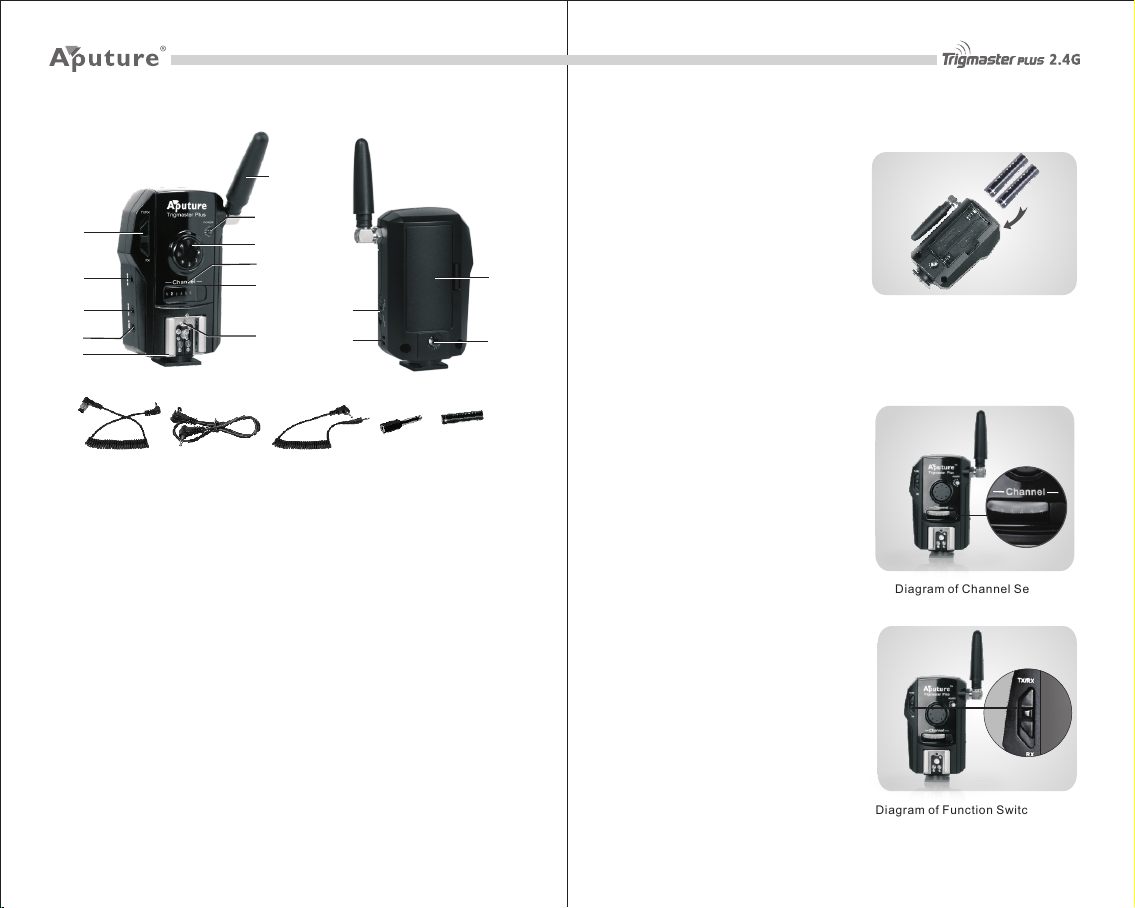
Body
1. Ant en na 12. Bat ter y hol de r
2. St at us in dic at or la mp 13.Co ppe r nut
3. Tri gg er bu tto n 14. Pow er sw itc h
4. Ch an nel i ndi ca tor l amp 15. Rop e hol e
5. Ch an nel s wit ch
6. Ho t sh oe co nne ct ion
7. Fu nc tio n swi tc h
8. St ud io fl ash s yn c hol e
9. Ca me ra re mot e sh utt er ho le
10. P C_ IN ho le
11. Fa ste ni ng nu t
Accessories
16. Rem ote c abl e
17. Syn c cab le
18. PC ca ble
19. Syn c out put c on ver tor
20.Ba tte ry: t wo AA A1. 5V ba tt eri es
2
3
4
5
14
6
15
18 19 20
12
13
Battery Setup
Tri gma ste r P lus 2. 4G u se s tw o AA A
1.5V ba tte rie s, whic h can n or mal ly be
used u p to 100 hours. To i ns ert the
batte ry, o pe n t he batt ery ha tc h b y
follo win g the ar row 's di rec ti on; th en
inser t the bat tery acco rdi ng to the +/icons , the n clo se t he ba tte ry h atc h.
Switch Settings
Channel S etting
Trigmaster Plus 2.4G contains 6 possible
channels. Set all the Trigmaster Plus 2.4G
units on the same channel before use.
One transmitter can work with multiple
receivers to control multiple flashes or
mu lt ip le c am er as s im ul ta ne ou sl y.
Trigmaster Plus 2.4G can also be used by
multiple photographers working together
to control different cameras, but each
photographer must set their own channel
different from ot hers to avoid signal
disturbance.
Functio n Setting
When Trigmaster Plus 2.4G works as a
flash receiver, the function switch should
be set to RX. When Trigmaster Plus 2.4G
works as a camera remote trigger, camera
remote receiver or fla sh trigger, th e
function switch should be set to TX/RX.
Cha nnel
2
1
3
4
6
5
Diagr am of C han ne l Set tin g
Diagr am of F unc ti on Sw itc h Se tti ng
3
4
Page 4
Operation
Camera Remote Opera tion
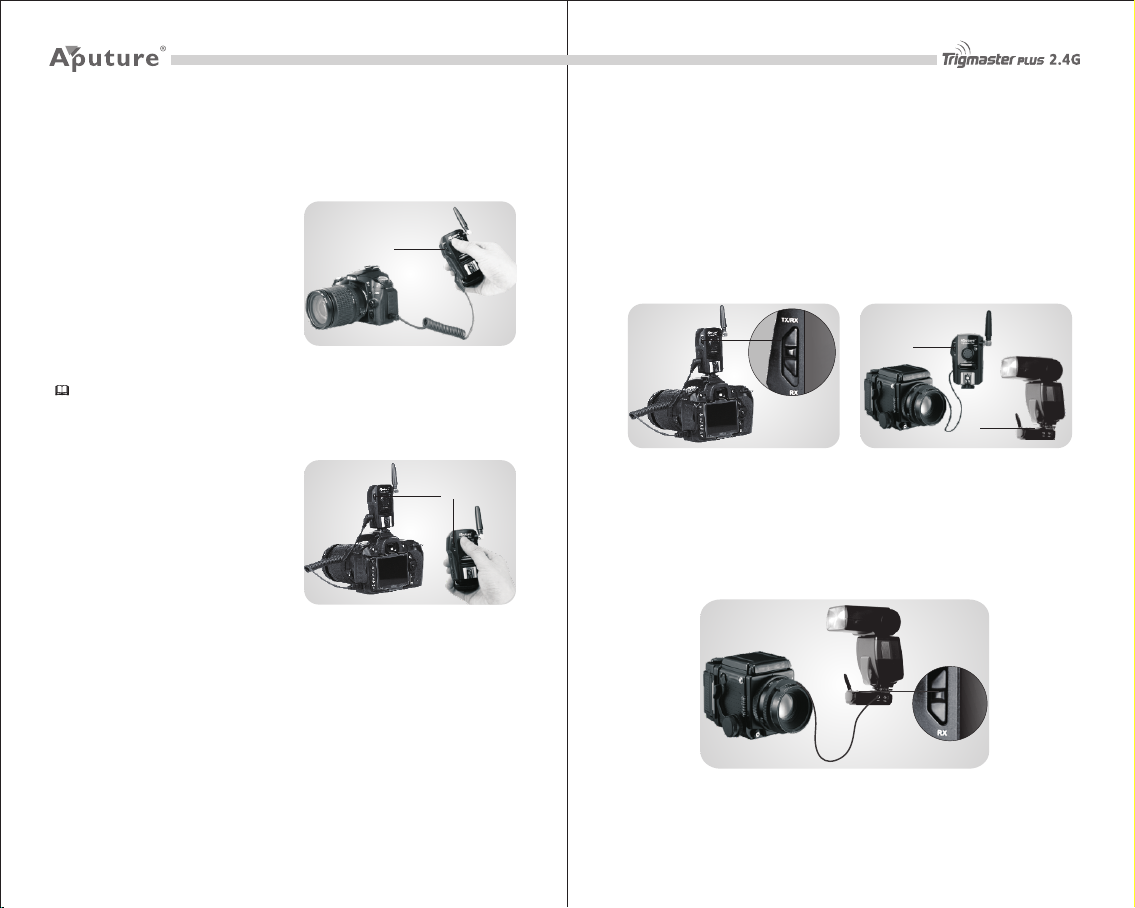
Wired Mode Shutter
Use one Tr ig mas ter Plu s 2. 4G (f un cti on
switc h set to TX/ RX ), co nne ct ed wi th
camer a via r emo te c abl e.
Half pr ess t he t rig ger butt on t o aut ofocus (tr ans mi tte r in dic ato r lamp tur ns
green ); ful l pres s the trig ger bu tto n to
take a pi ctu re (tra ns mit ter in dic ato r
lamp tu rns r ed) .
Tips: Please select wireless mode for longer distance camera remote.
Wireless Mode Shutter
Use tw o Tr igm aster Plu s 2 .4G uni ts .
Wit h ea ch f unc tion sw itch se t to T X/R X,
one w ork s a s a came ra rem ot e t rig ger;
wh ile the ot her w or ks as ca mer a
remot e rec eiv er c onn ect ed t o cam era .
Half p re ss the trig ger butt on of cam era
r e m o te t r i g g e r t o a u t o- f o c u s
( tr an sm it te r i nd ic at or l am p t ur n s
green ); ful ly pr ess the tri gge r b ut ton to
take a pic ture ( trans mit ter in di cat or
lamp tu rns r ed) .
Continuous Shooting and
Long-Exposure Settings (Bulb mode)
Use two Trigmas ter Plu s 2.4 G un its . Wit h ea ch func tio n swi tc h set to TX/RX ,
press t rigge r butto n of t rig ge r for 3 sec on ds (t ra nsm itt er i ndi ca tor l am p tur ns o ff
autom ati cal ly, receiv er indi cator lam p tu rns red ), then rel ea se trig ger but ton,
camer a sta rts exp osu re or conti nuo us shoo ti ng. Re- pre ss trig ger but ton , an d
camer a exp osure and shooti ng stop s (bo th transm itt er and rece ive r indicat or
lamps t urn o ff) .
TX/ RX
TX/ RX
Flash Trig ger Operat ion
Triggering
Use two (o r mor e) Tri gma st er Pl us 2. 4G un its . One w ork s as fl ash t rig ger
(fu nc tio n sw itc h se t to T X/RX) , co nne cte d to cam era via Hot -sh oe o r PC cab le;
the other one wor ks a s fl ash re cei ver (fu nc tio n sw itc h set t o RX ), c onn ect ed to
fla sh v ia Sy nc ca bl e or Ho t-s ho e.
Pre ss camera shu tte r ( trans mit ter indi cat or lamp tur ns red ), flash is tr ig ger ed
at th e sa me ti me.
TX/ RX
RX
Local Flash
Tri gma ste r P lus 2.4 G, w he n us ed a s fl as h tr igg er, can als o be co nne cte d wi th
one loc al fl ash v ia s ync c abl e.
Pre ss ca me ra sh utt er (t ran sm itt er in dic ator lam p tur ns re d) , and th e loc al
fla sh w ill b e tri gg ere d at th e sa me ti me.
5
6
Page 5
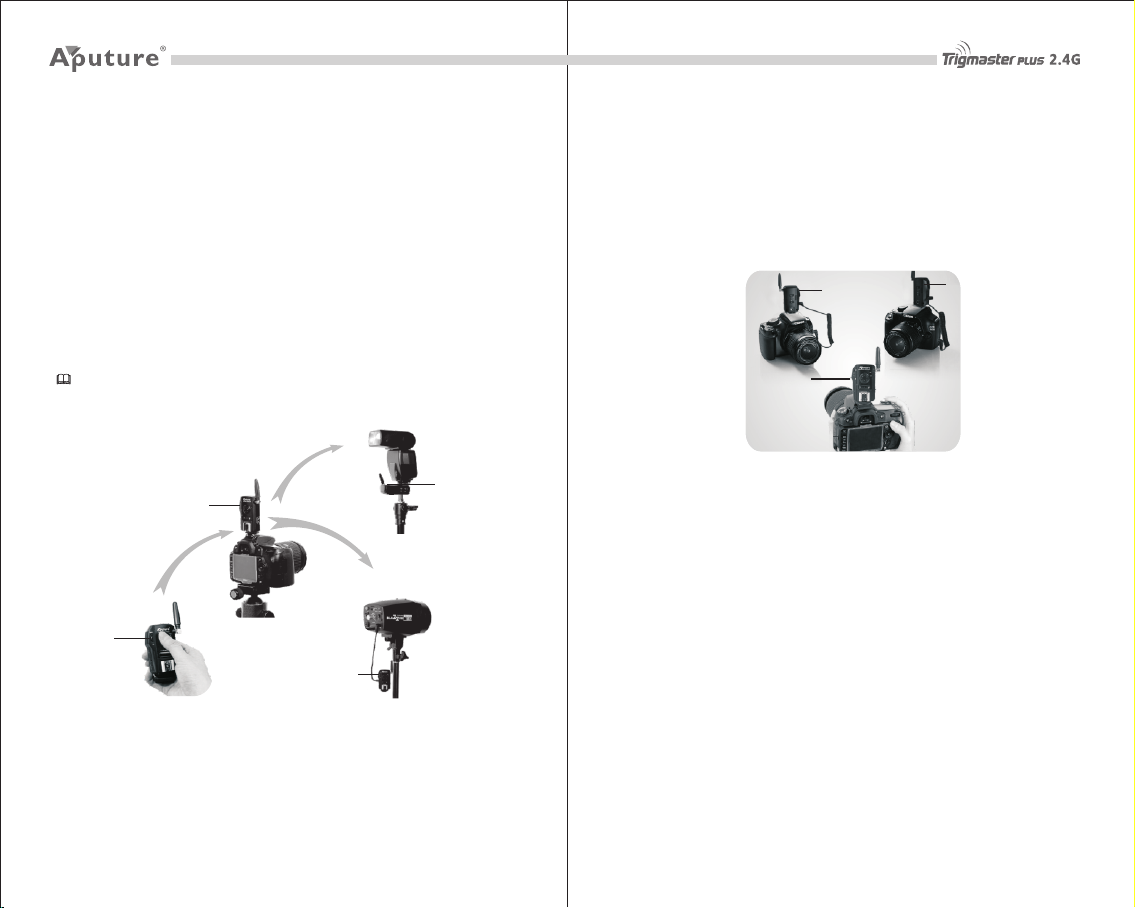
Interlink Triggering Operation
User ca n re mot ely tri gge r a fl as h in s ync w it h cam er a to enab le the wh ole sys tem
to wo rk s imu lta ne ous ly. Th is is c all ed r ela y mod e.
Use thr ee (or more ) T rig mas te r Plu s 2.4 G un its . One wor ks as cam era rem ote
tri gg er hel d i n h an d ( fun cti on switch set to TX /RX ); one w orks as eit her came ra
remot e rece ive r or flas h trig ge r (fun cti on swi tc h set to TX/R X); th e othe r one
works a s fla sh re ce ive r con ne cte d wit h fl ash ( fun ct ion s wit ch s et to R X).
Half- pre ss tri gg er but ton of re mot e came ra tri gg er (tr ans mitte r indi cat or lamp
tur ns gre en), c ame ra wil l au to -fo cus . F ull -pr es s tr igg er but ton of rem ote camera
tri gg er (transm itt er indi cat or lamp turns re d), came ra shut ter i s act iv ate d whi le
tri gg eri ng fl as h at th e sam e ti me.
Tips: Just set all Trigmaster Plus 2.4G's channel switch to the same, no need to
be differed.
RX
TX/ RX
Rem ote spe edlig ht cont rol
TX/ RX
Rem ote con trol in h and
Rem ote shu tter co ntrol
RX
Rem ote str obe con trol
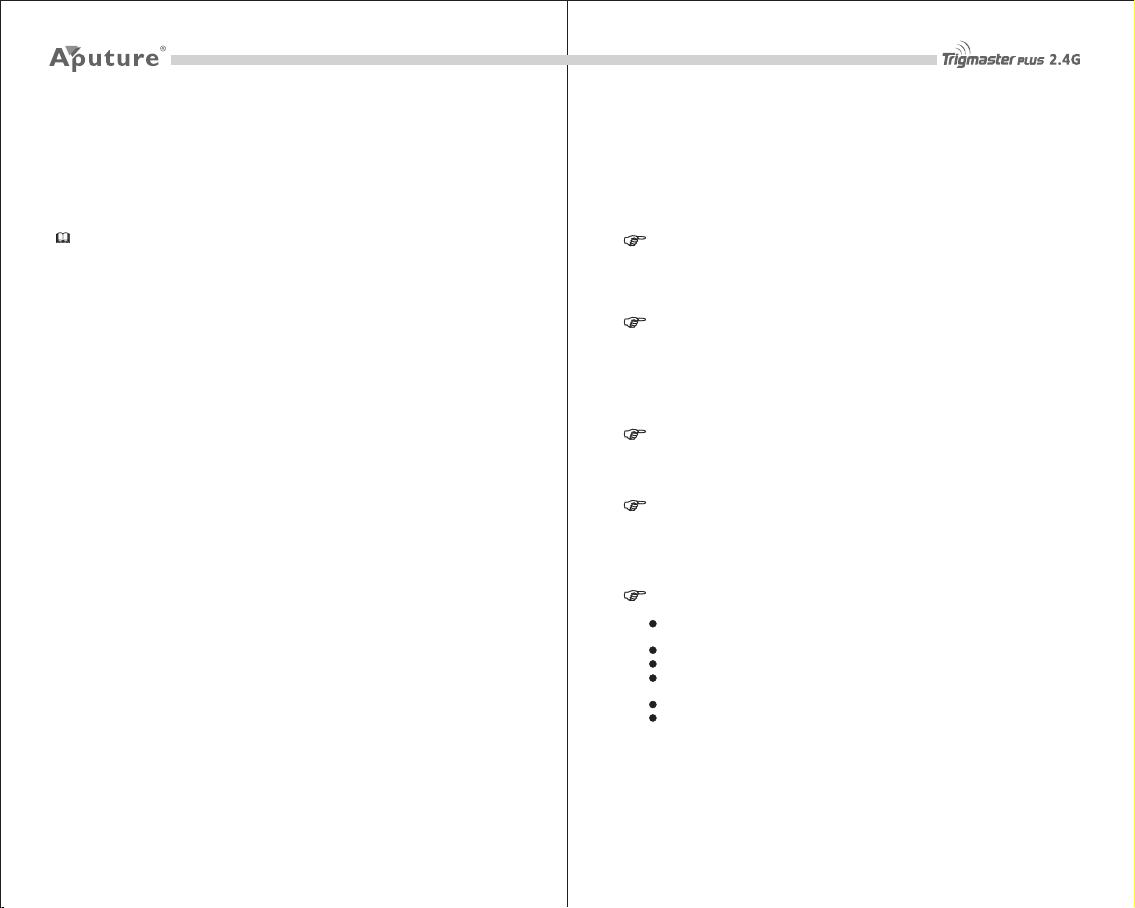
Multiple Camera Shutter Control
Wit h Tri gm ast er P lus 2.4 G, y ou c an c on tro l mu lti ple camer as a t th e sa me t ime .
Place one uni t on you r ma st er c ame ra, an d se t it to TX/R X mo de. Set the ot her
units on your addit ion al cam era s, and set the m to RX mode (Don' t fo rge t to
att ac h t he remo te sh utt er cabl e). When you pres s t he shut ter on you r m as ter
camer a, the shutter s w ill be tr igger ed on you r a ddi tiona l c ame ras at the s am e
tim e.
RX
TX/ RX
RX
Wak e up F un ct io n
Tri gma ste r Plus 2. 4G is able to wak e your sp eed li ght fl ash . When you st op
using your flas h for a p eri od of t im e, it will go to sle ep and be com e dor man t.
Whe n us ing Tr igm as ter P lus 2 .4 G, yo u can w ak e up th e fla sh .
2.4G Compatibility
All 2. 4G pro du cts from the Apu tur e Tr ig mas ter fami ly are co mpa tib le wit h o ne
anoth er.
Notice
Triggeri ng Test
Local Test (Tes te d by o ne Tr ig ma st er P lu s 2. 4G )
Whe n Trigm ast er Plu s 2. 4G’ s fu nct ion swi tc h is set to RX, pres s the trig ger
butto n, an d the c on nec ted f la sh wi ll be t ri gge red a nd f las h at th e sa me ti me.
87
Page 6
Remote Test (Test ed b y tw o Tri gm as te r Pl us 2 .4 G)
One T rig mas te r Plu s 2.4G he ld in h and( fun cti on s wit ch set to T X/R X), t he oth er
one co nne cte d with fl ash (f unc ti on swi tch se t to RX ). Hal f-p res s the tri gge r
butto n firs t, the n pres s the cha nne l swit ch , and the con ne cte d flas h will be
tri gg ere d and f la sh at t he sa me t ime .
Tips: To avoid channel changing, make sure to half-press the trigger button
before pressing the channel switch, and release the trigger button after
releasing the channel switch.
Whe n Trigm ast er Plus 2.4 G st atu s ind ic ato r la mp is red and fli cke rin g,
the b at ter y pow er i s low.
Troubleshooting
Q: Un ab le to t rig ge r fla sh or c am era s hut te r
A: Ma ke s ure t he ba tt ery i s ins ta lle d and r ec eiv er po we r swi tch t ur ned o n.
A: Se t th e tra nsm it ter a nd re ce ive r to th e sa me ch ann el .
A: Ma ke s ure t he tr an smi tte r an d rec eiv er a re se t to th e co rre ct fu nc tio n
switc h(T X/R X or R X).
A: Ma ke s ure t he ho t sh oe mo unt o r PC c abl e are c om ple tel y co nne cte d.
Q: Ca me ra sh oot s bu t doe sn' t fo cus
A: Ma ke s ure t he le ns f ocu s mod e is s et to AF, no t MF.
Q: Op er ati ng di st anc e lim it ed
A: Ch ec k if th e bat te ry is e xha us ted
A:T ry to m ove t ra nsm itt er 's lo cat io n and a ngl e, a s fol low in g
A: Ch ec k if th ere i s ba rri er be tw een t ran sm itt er an d re cei ver
Q: Si gn al Di stu rb anc e or Sh oo tin g Int er fer enc e
A: Ma ke su re Tri gm ast er pl us 2 .4G c han ne l swi tch s et tin gs ar e di ffe ren t tha n
oth er p hot ogr ap her s.
Specifications
Type : 2.4G w ire les s re mot e sys te m
Transm itt er di st anc e: 120 met ers ( ope n ar ea)
Cha nn el: 6 di ffe ren t cha nn els
Sync- spe ed: 1 /25 0 se c
Con ti nuo us tr ig ger f req ue ncy : 8 fr ame s/ sec ond
Dim en sio ns: 80x 48x 27 mm
Pow er l ife s tan db y: 200 0 hou rs.
Con ti nuo us wo rk ing t ime : 10 0 hou rs.
For Your Safety
To prev ent dama ge to your prod uct or i njury to y our self or to others, read the
fol lo win g sa fet y pr eca ution s in t hei r en tir et y befor e using t hi s equ ip men t. K eep
the se sa fe ty instr uct ions whe re al l tho se wh o use this eq ui pme nt wi ll re ad
the m.
Do not di sa ss emble o r mo dify
Fai lu re t o ob se rve thi s pr ec aut ion co uld res ul t in ele ctr ic sho ck o r prod uct
malfu nct ion . S hou ld the pr odu ct bre ak ope n as th e r esu lt of a fa ll o r o the r
accid ent , rem ov e the b att er ies .
Keep dr y
Do not hand le with wet han ds or immer se in or expo se to water or rain.
Fai lu re to o bse rv e thi s pre ca uti on co ul d res ult i n fi re or e lec tr ic sh ock .
Do not us e in th e pre se nce o f fla mm abl e gas
Fai lu re to o bse rv e thi s pre ca uti on co ul d res ult i n ex plo sio n or f ire .
Keep ou t of r ea ch of chi ld ren
Thi s d ev ice con ta ins small par ts whi ch may pos e a ch oki ng haz ard .
Consu lt a ph ysi ci an im med ia tel y if a ch il d swa llo ws a ny pa rt of t hi s dev ice .
Do not ex po se to high te mp eratu re s
Do n ot l eave th e de vi ce i n a cl os ed v ehi cle und er t he s un o r in oth er a re as
subje ct to ext re mel y hi gh t emp era tures . Fa ilu re t o ob ser ve t his pre cau tio n
could r esu lt in f ir e or in d ama ge t o the c asi ng o r int ern al p art s.
Obser ve p re cauti on w hen han dl ing batte ri es
Use onl y bat ter ie s lis ted i n th is ma nua l. D o not m ix ol d an d new
batte rie s or ba tt eri es of d iff er ent t ype s.
Do not sh ort o r dis as sem ble .
Do not at tem pt to i ns ert b att er ies u psi de d own o r bac kw ard s.
Batte rie s are p ro ne to l eak ag e whe n ful ly d isc har ge d. To avo id da mag e
to th e pr odu ct, b e su re to r emo ve t he ba tte ri es wh en le av ing t he pr od uct
Unatt end ed fo r pr olo nge d pe rio ds or w he n no ch arg e re mai ns.
Shoul d liq uid f ro m the b att er ies c ome i nt o con tac t wi th sk in or c lo thi ng,
rinse i mme dia te ly wi th fr es h wat er.
9
10
 Loading...