

Page 1
i
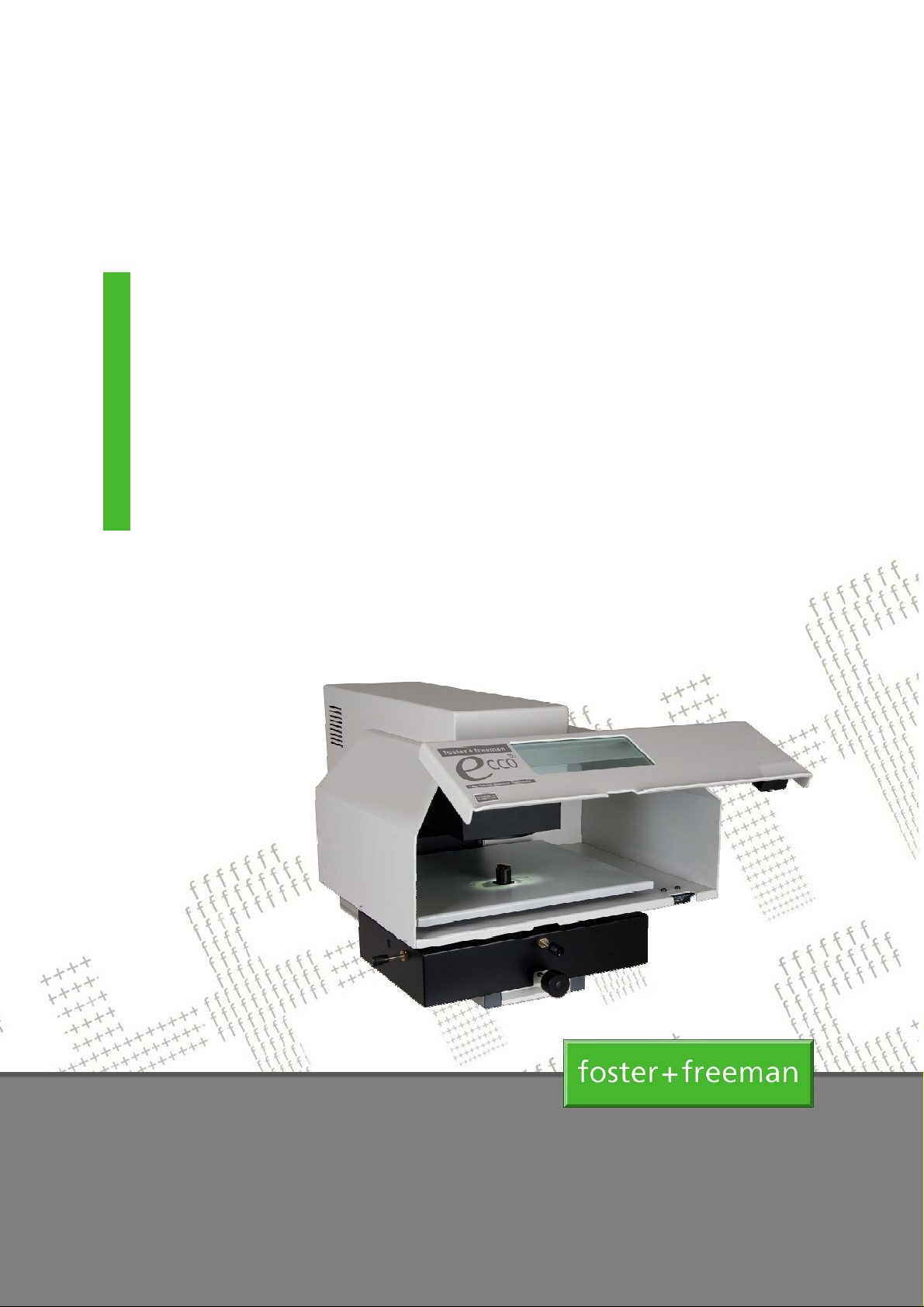
ECCO2™
Laser Induced Breakdown
Spectrometer
User Manual
(Hardware)
(0142-0-02)
May 2013
Page 2

Head Office & UK Sales Office
Foster + Freeman Ltd
Vale Business Park
Evesham
Worcestershire
WR11 1TD
UK
+ 44 (0) 1386 768050
+ 44 (0) 1386 765351
www.fosterfreeman.com
US Sales Office
Foster + Freeman USA Inc
46030 Manekin Plaza
Sterling
Virginia 20166
USA
+1 888 445 5048
+1 888 445 5049
www.fosterfreeman.com
Sales Support and Feedback
Foster + Freeman welcome feedback from Customers regarding this product. Please contact one of our
offices if you would like to pass on your comments.
Foster + Freeman are pleased to offer advice, installation, training and on-site maintenance worldwide for
all of their products.
Specification
Foster + Freeman reserve the right to alter the specification of this product, accessories and consumables
without prior notice.
Copyright
This document contains proprietary information that is protected by copyright.
All rights are reserved. No part of this publication may be reproduced in any form whatsoever without the
prior, written permission of Foster + Freeman Ltd.
Copyright © Foster + Freeman Ltd
(0000-001-16) Copyright © Foster + Freeman Ltd
ii zzz ii
ii
Page 3

PLEASE REFER TO THE WELCOME SECTION BEFORE USING THE EQUIPMENT FOR THE FIRST TIME
C
ONTENTS
Welcome ................................................................................................................................. v
Safety information ................................................................................................................... vii
Quick Start Guides
Unpacking ............................................................................................................................... 01-1
Getting started ......................................................................................................................... 02-1
Hardware Guides
Main unit .................................................................................................................................. 11-1
Power supply unit .................................................................................................................... 12-1
Mains power adaptor ............................................................................................................... 19-1
Page
ECCO2™: Laser Induced Breakdown Spectrometer (User Manual) iii
Page 4

(0142-002-04) Copyright © Foster + Freeman Ltd
iv z iv
iv ECCO2™: Laser Induced Breakdown Spectrometer (User Manual)
Page 5
PLEASE READ THIS INFORMATION BEFORE USING THE EQUIPMENT FOR THE FIRST TIME
Welcome to the Foster + Freeman ECCO2™ Laser Induced Breakdown Spectrometer.
This equipment allows you to generate and compare laser induced breakdown spectra obtained from
items of forensic value.
About this manual
Text
Text formats are used as follows:
CONTROL FEATURES
Illustrations
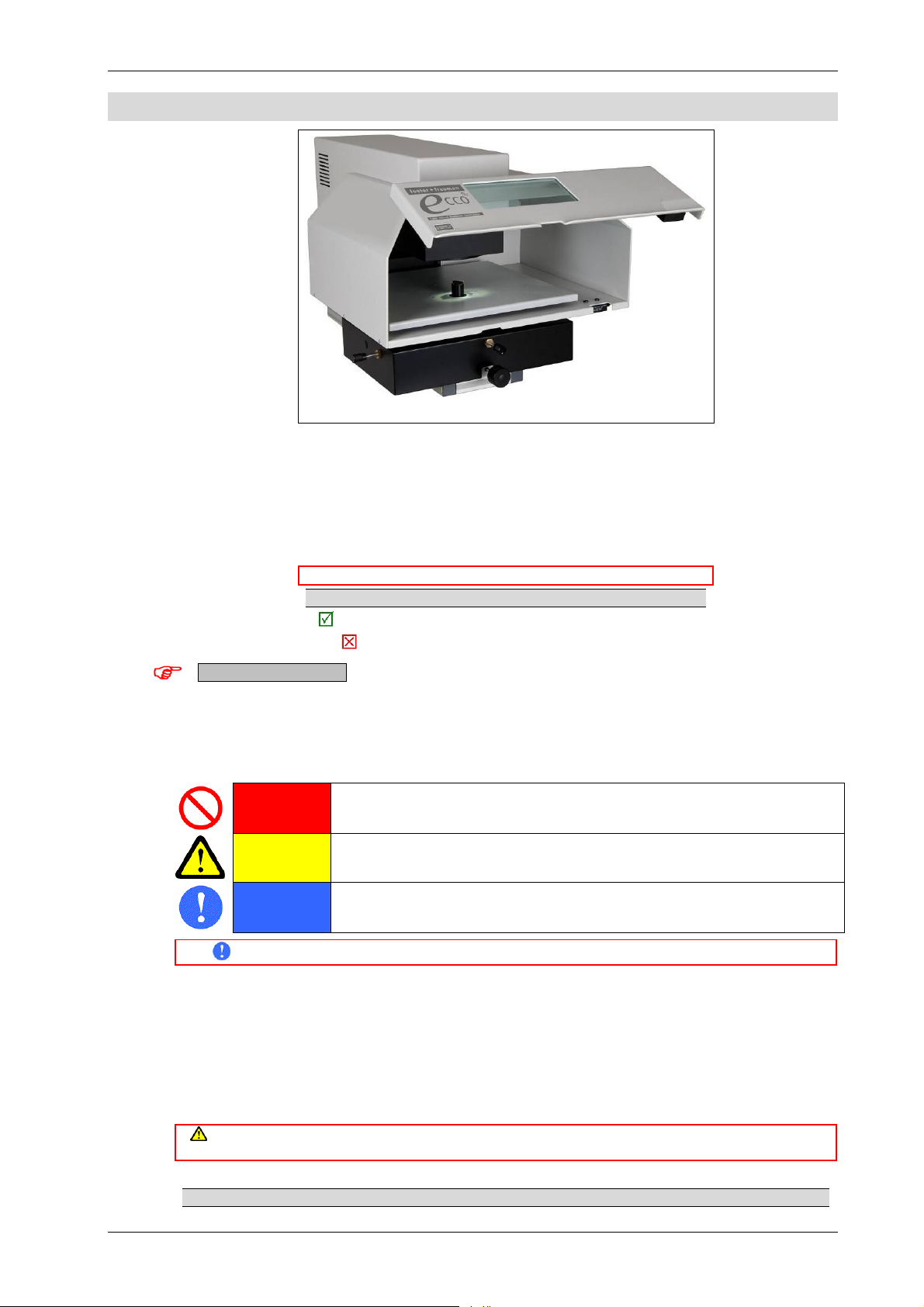
Illustrations are for explanatory purposes only. The appearance of the product, its components,
accessories and consumables may differ from that shown.
Safety and Warning Markers
PROHIBITED
CAUTION
MANDATORY
Before using the equipment for the first time, please read the safety information on the following pages.
W
ELCOME
ECCO2™: Laser Induced Breakdown Spectrometer
Important operating information
Additional notes and advice
Good practice. Information on recommended proce du res.
Bad practice. Information on procedures to avoid.
Red markers prohibit certain actions or procedures. Disregard of these warnings may
pose a health or safety risk to the user or cause damage to the equipment.
Yellow markers warn of a hazard. The user should be aware of the associated risk and
Blue markers advise of mandatory health and safety procedures. Disregard of the advice
take appropriate precautions.
may increase an associated risk.
About this product
Compliance
When correctly employed by appropriately trained personnel, this equipment is fully compliant with the
relevant standards laid down by the UK Health & Safety Executive (HSE).
Hazard protection
When correctly employed, this equipment provides the user with the necessary level of protection from
operating hazards.
Protection provided by the equipment may be impaired if the equipment is used in a manner not specified in the
Certificate of conformity
A certificate of conformity for this product is available from Foster + Freeman Ltd
Welcome v
operating instructions.
Page 6

PLEASE READ THIS INFORMATION BEFORE USING THE EQUIPMENT FOR THE FIRST TIME
This equipment is manufactured in conformity with the requirements of the relevant directives of the
European Community through compliance with a number of harmonised standards.
Calibration and adjustment
In the event of query, contact Foster + Freeman Technical Support: [email protected]
This equipment is correctly calibrated and adjusted at the time of manufacture.
See: Software Manual (Calibrating the equipment).
(0142-003-02) Copyright © Foster + Freeman Ltd
v z v
vi ECCO2™: Laser Induced Breakdown Spectrometer (Hardware Manual)
Page 7
Page of vii
SAFETY INFORMATION
ECCO2™: L
General safety
In the event of query, contact Foster + Freeman Technical Support: [email protected]
Read this manual
Use the equipment only for the intended purpose.
Use the equipment only in accordance with the operating instructions.
Use only with equipment specified by Foster + Freeman.
Use only with spares, accessories and consumables supplied by Foster + Freeman.
Do not use damaged equipment.
Dispose of the equipment only in a responsible manner.
Do not remove any access covers except during authorised maintenance.
Do not operate the equipment with any access cover removed.
Do not attempt to defeat the safety interlocks.
Location
Do not operate the equipment outdoors.
Disposal
This equipment falls within the scope of the European Directive 2002/96/EC on Waste Electrical & Electronic
Dispose of the equipment only where appropriate disposal or recycling facilities exist.
Electrical safety
(0142-004-03) May 2013
ASER INDUCED BREAKDOWN SPECTROMETER
Employ safe work practices
Do not discard with normal commercial or
domestic waste
Equipment (WEEE).
Indoor use only
Do not tamper with interlocks
Comply with all relevant
legislation
Indoor use only
Do not open
Equipment must be earthed
DANGER
Risk of electric shock
Operate the equipment only from a compatible electrical power source specified by Foster + Freeman.
Do not operate the equipment without a reliable earth connection.
Do not operate the equipment with damaged electrical connection cables.
Do not replace electrical spares without first disconnecting the equipment from its power supply.
Do not replace electrical spares except with those of the correct and specified rating.
ECCO2™: Laser Induced Breakdown Spectrometer (Safety information 0142-004-03) vii
Page 8
Mechanical safety
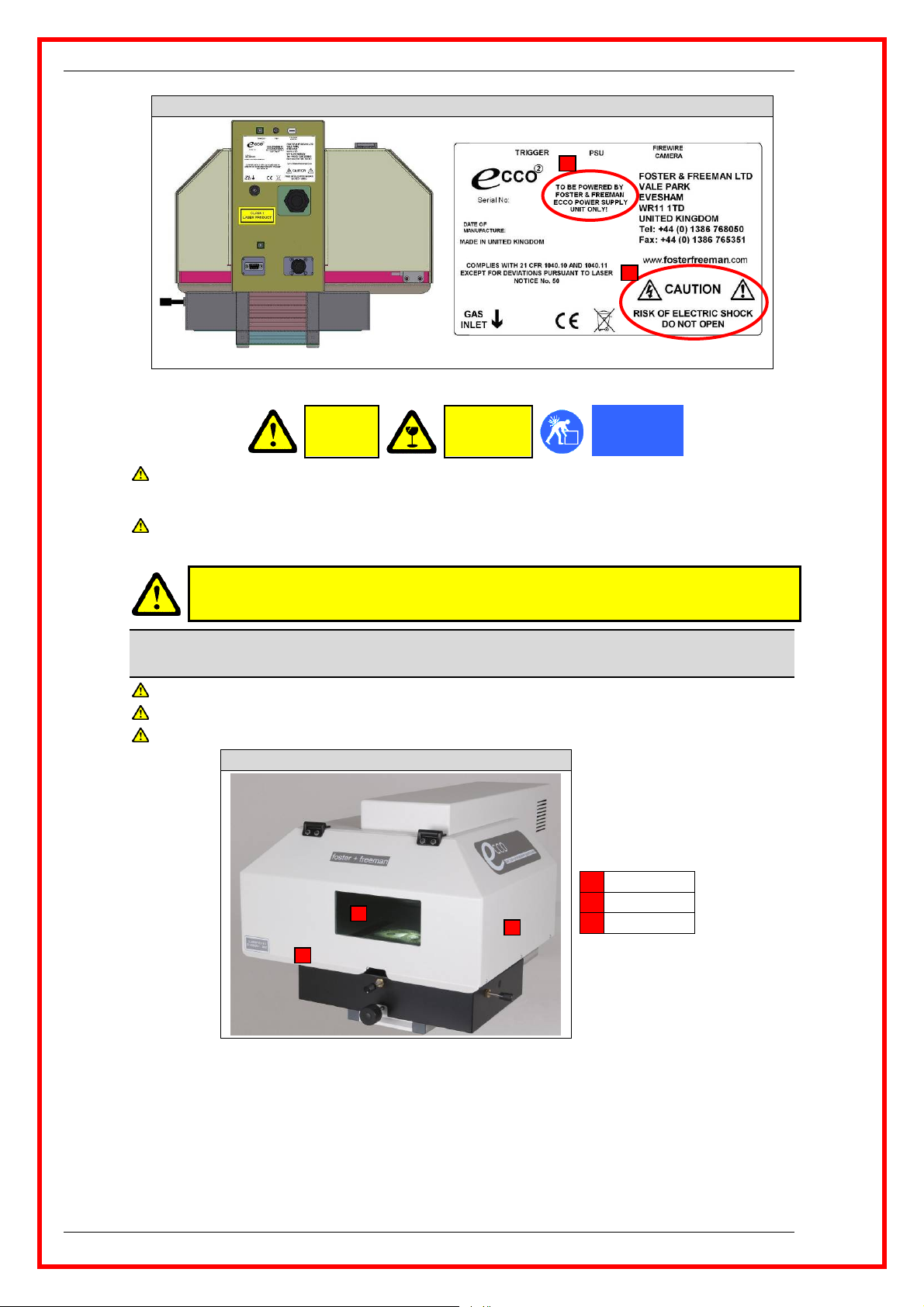
ECCO2™: Electrical safety (Main unit)
1
2
Mechanical safety
Use safe lifting and handling procedures.
Optical safety
Do not attempt to defeat the safety interlocks.
Laser Safety
USE OF CONTROLS OR ADJUSTMENTS OR PERFORMANCE OF PROCEDURES OTHER THAN
The ECCO2™ incorporates a pulsed, actively Q-switched flashlamp-pumped Nd:YAG laser. The laser emits an intense
pulse of infrared radiation: Wavelength = 1064 nm. The laser beam is enclosed by protective covers which are securely
fastened. The protective covers do not need to be removed for the normal operation of the instrument.
Do not remove the protective covers.
Ensure that the optical shield surrounding the document platen is complete and undamaged.
Ensure that the viewing filter in the optical shield is present and undamaged.
Lift correctly
Rear view
CAUTION
Heavy
WITH CARE
Fragile
CAUTION
THOSE SPECIFIED HEREIN MAY RESULT IN HAZARDOUS RADIATION EXPOSURE
ECCO2™: Laser Safety (Main unit)
1 Optical shield
3
1
2
2 Access door
3 Viewing filter
Compliance
Classified to EN 60825-1:2007: “Safety of Laser Products Part 1: Equipment classification and user’s
guide”.
Complies with 21 CFR 1040.10 and 1040.11 except for deviations pursuant to Laser Notice No. 50.
See: Laser safety labels (p. ix).
Product Class
The accessible laser beam pulse energy does not exceed 2 x 10⁻⁶ joules.
viii ECCO2™: Laser Induced Breakdown Spectrometer (Safety information 0142-004-03)
Page 9
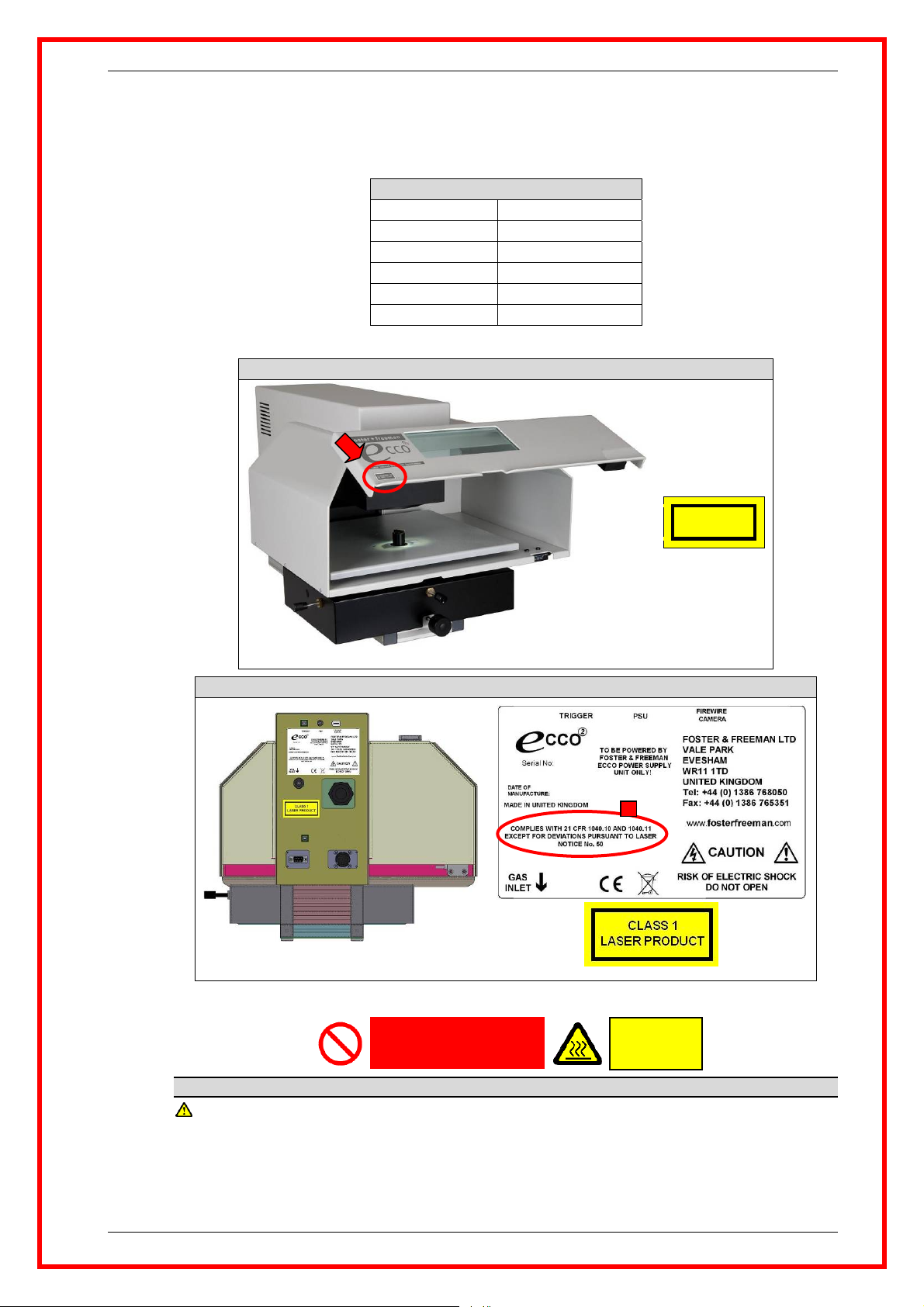
The ECCO2™ is classified as Class 1. See: Laser safety labels (p. ix).
The ECCO
2
™ complies with all safety requirements for this class of laser product.
Embedded laser
The embedded laser is classified as Class 4:
ECCO2™: Embedded laser
Laser class Class 4
Pulse energy (Max) 60 mJ (millijoule)
Wavelength 1064 nm (nanometre)
Beam divergence < 2.5 mrad (milliradian)
Pulse repetition rate 0.5 Hz (hertz)
Pulse duration 4 – 6 ns (nanosecond)
Laser safety labels
ECCO2™: Laser Safety (Main unit)
CLASSIFIED TO
EN 60825-1:2007
Thermal safety
Thermal safety
Do not obstruct the ventilation ports or the air flow around them.
Front view
ECCO2™: Laser Safety (Main unit)
3
Rear view
CAUTION
Hot surfaces
Do not obstruct ventilation
The equipment generates heat that is removed by fan-assisted ventilation.
ECCO2™: Laser Induced Breakdown Spectrometer (Safety information 0142-004-03) ix
Page 10

(0142-004-03) Copyright © Foster + Freeman Ltd
x z x
x ECCO2™: Laser Induced Breakdown Spectrometer (Safety information 0142-004-03)
Page 11
Page of 1
QUICK START GUIDE
ECCO2™: U
NPACKING
(0142-01-02) April 2013
The ECCO2™ main unit is supplied in suitable transit packing.
1.
Lift the unopened cardboard box onto a laboratory worktop.
2.
Ensure that there is adequate clear space next to the box to accommodate the ECCO2™ main unit.
3.
Cut the restraining straps on the packing box.
4.
Lift off the box lid.
5.
Carefully lift away the sides of the box to reveal the ECCO2™ main unit.
6.
Use a sharp blade to cut the two corners at the front edge of the cardboard base that remains.
7.
Fold down the front edge of the cardboard base.
8.
Carefully slide the ECCO2™ main unit out of the cardboard base onto the worktop.
9.
Carefully unpack all items.
10.
Check the items supplied against your original purchase order and packing list.
11.
Report any discrepancy to your nearest Foster + Freeman Sales Office immediately.
12.
Account for all items before discarding any packing material.
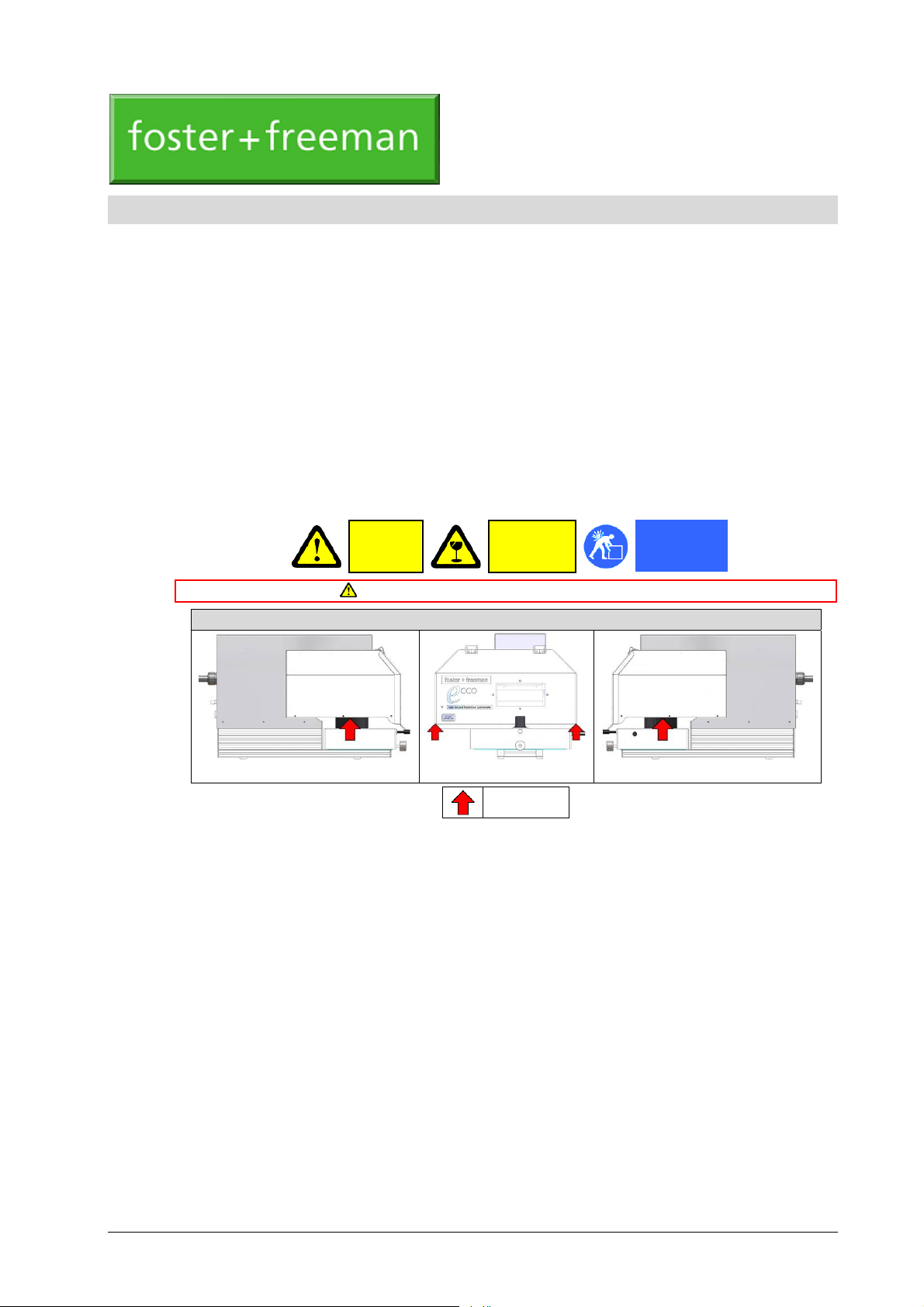
CAUTION
Heavy
Use safe lifting and handling procedures: Weight = 24 kg
ECCO2™: Lift correctly
WITH CARE
Fragile
Lift correctly
Side view (Left) Front view Side view (Right)
Lifting points
ECCO2™: Unpacking (Quick Start Guide 0142-01-02) 01-1
Page 12

(0142-01-02) Copyright © Foster + Freeman Ltd
2 z 2
01-2 ECCO2™: Unpacking (Quick Start Guide 0142-01-02)
Page 13
Page of 1
QUICK START GUIDE
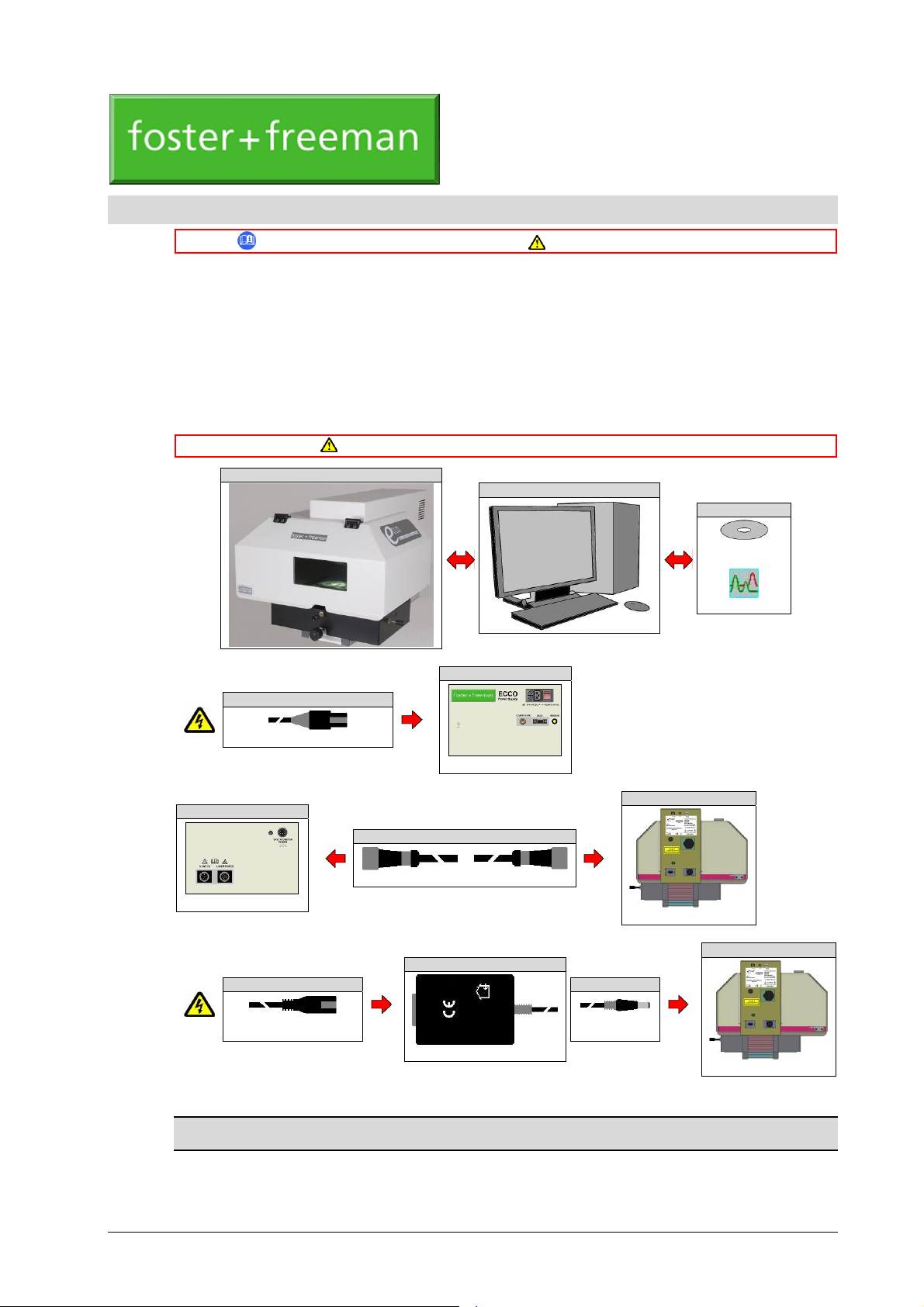
Carefully unpack all items. Check the items supplied against your original purchase order and packing
list. Report any discrepancy to your nearest Foster + Freeman Sales Office immediately. Account for all
items before discarding any packing material.
Installation
The equipment should be located in a clean, well-ventilated, dust free environment, away from sources of
heat, air currents and risk of contamination. For best results, locate the equipment away from areas of
high ambient lighting, direct sunshine or unscreened windows. The equipment should be used on a flat,
level working surface of adequate strength and of convenient height for the operator, within reach of a
mains power outlet with an earth connection.
Mains power ¨
ECCO™: Power supply unit
ECCO2™: G
ETTING STARTED
(0142-02-06) May 2013
Refer to the relevant User Manual for full details. Use safe lifting and handling procedures.
Do not obstruct the ventilation ports or the air flow around them.
ECCO2™: Main unit
85 − 264 V AC 50/60 Hz; 0.4 A (Max)
DC power ¨
ECCO™: Power supply unit
Front view
PC system
ECCO2™: Main unit
ECCO2™ software
CD-ROM
Desktop icon
5 V DC; 2 A (Max)
Rear view
Mains power ¨
100 – 240 V AC 50/60; Hz
0.4 A (Max)
ECCO2™: Mains power adaptor
DC power ¨
5 V DC; 2 A
(Max)
Rear view
ECCO2™: Main unit
Rear view
PC system
Specification and appearance may vary according to user requirements. For full details, refer to the relevant Operating
A suitable PC system is supplied for use with the ECCO2™ main unit.
ECCO2™: Getting started (Quick Start Guide 0142-02-06) 02-1
Manual supplied by the Manufacturer.
Page 14
Connecting the hardware
ECCO2™ software
ECCO2™ software is a custom product supplied by Foster + Freeman on one or more CD-ROM.
Software will normally have been installed on the PC.
Connecting the hardware
1.
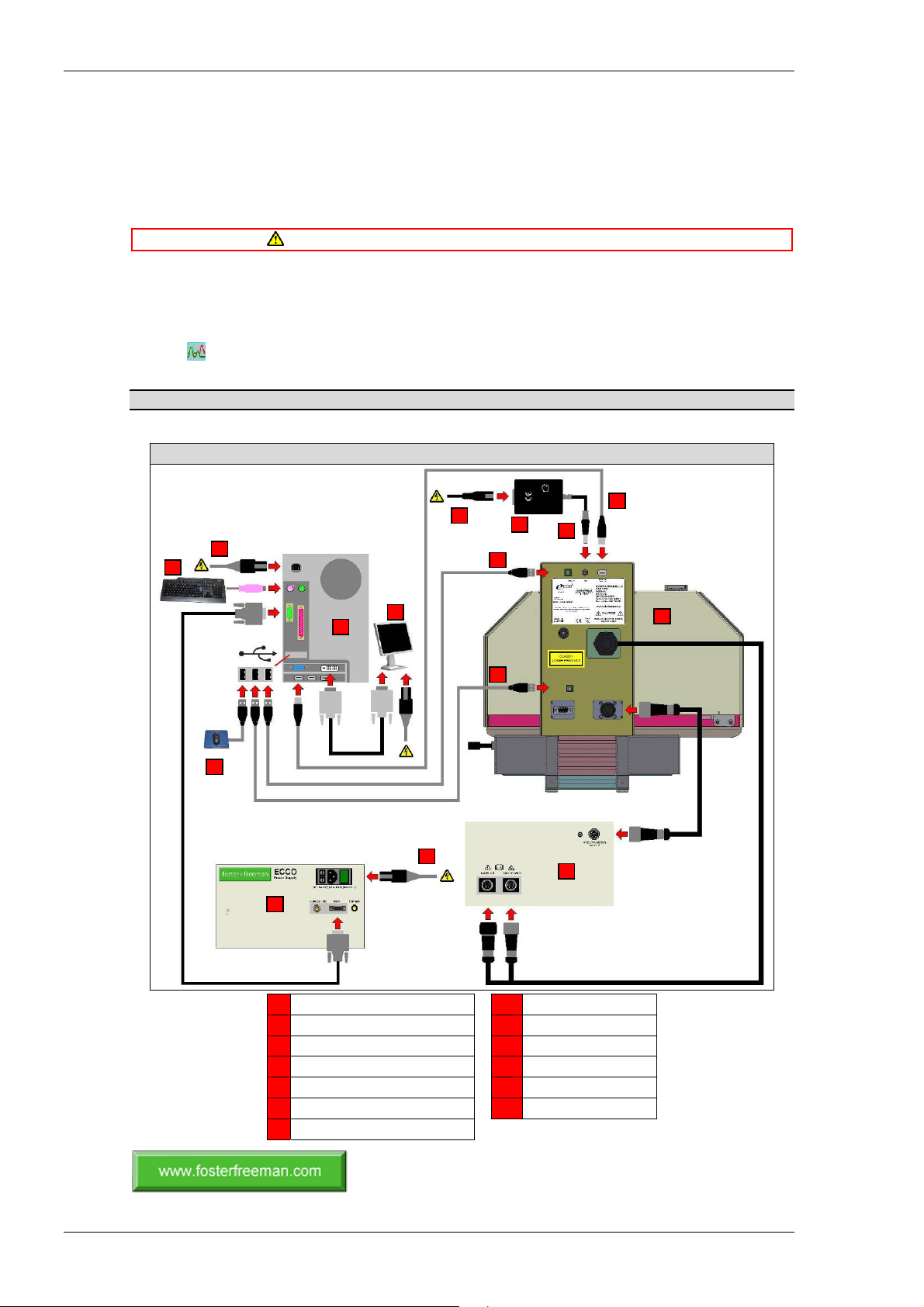
Interconnect the hardware with the cables provided. See: Connection diagram (p. 02-2).
2.
Connect the mains power.
Switching on
3.
Switch on the PC system. Wait for the Windows desktop to be displayed.
4.
Switch on the power supply. The ECCO2™ main unit will emit an audible “beep”. The target stage
will be illuminated.
5.
(Windows desktop): Start the ECCO2™ software.
6.
The equipment is now ready for use.
Do not connect any unit to an incompatible mains electricity supply.
Refer to the relevant User Manual for full details.
Connection diagram
13
6
7
ECCO2™: Connection diagram
13
5
4
13
8
12
11
10
1
9
3
2
1 Main unit (Rear view) 8 Video connection
2 Power supply unit (Front view) 9 Control connection
3 Power supply unit (Rear view) 10 UV sensor
4 PC (Rear view) 11 DC input (UV sensor)
5 Monitor 12 Mains power adaptor
6 Keyboard 13 Mains power
7 Mouse
(0142-02-06) Copyright © Foster + Freeman Ltd
2 z 2
02-2 ECCO2™: Getting started (Quick Start Guide 0142-02-06)
Page 15
Page of 1
HARDWARE GUIDE
1
ECCO2™: Main unit
ECCO2™: M
AIN UNIT
ECCO2™: Main unit
3
5
4
6
2
PC system
(0142-11-02) April 2013
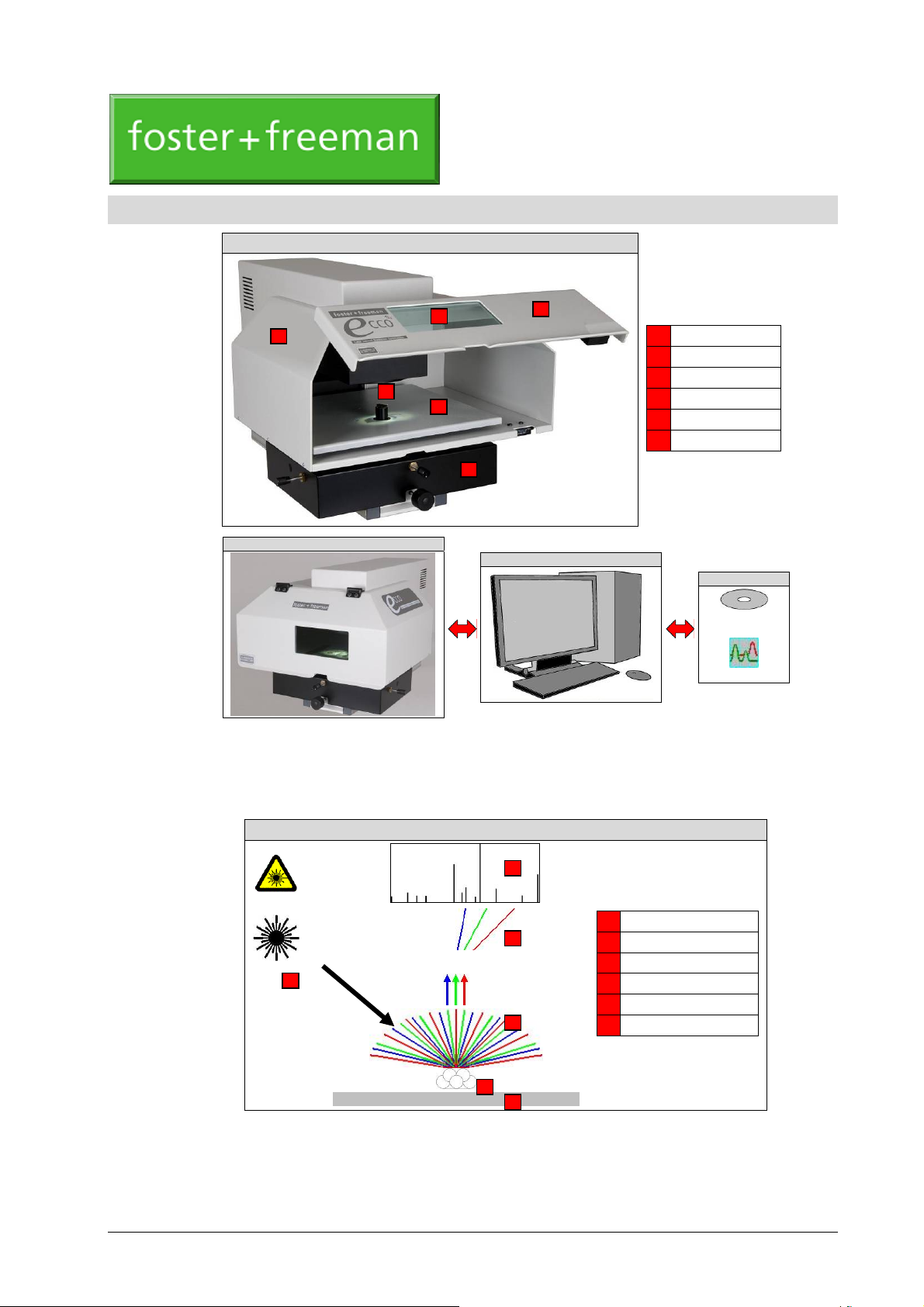
1 Sample chamber
2 Access door
3 Viewing window
4 Target stage
5 Sample stalk
6 XYZ stage
ECCO™ software
CD-ROM
The ECCO2™ is a powerful spectrometric system for the elemental analysis of inorganic materials of
forensic value, e.g. Glass, Inks, Toners. The ECCO
ECCO™ software.
Laser Induced Breakdown Spectroscopy
ECCO2™: Laser Induced Breakdown Spectroscopy
1
████████████████████████████
Laser induced breakdown generates a plasma which emits light with a spectrum that is characteristic of the elemental
The ECCO2™ employs the well-established technique of Laser Induced Breakdown Spectroscopy
(LIBS). In practice, the material to be analysed is mounted within the sample chamber and a target area
selected. The target area is then subjected to a very high power laser pulse causing a microscopic amount
▬▬▬▬▬▬
composition of the surface.
Desktop icon
2
™ main unit is controlled by the PC system and
6
1 Excitation laser
5
2 Target material
3 Laser induced plasma
4 Optical emission
4
3
2
5 Spectrometer
6 Spectral graph
ECCO2™: Main unit (Hardware Guide 0142-11-02) 11-1
Page 16
Optical specification
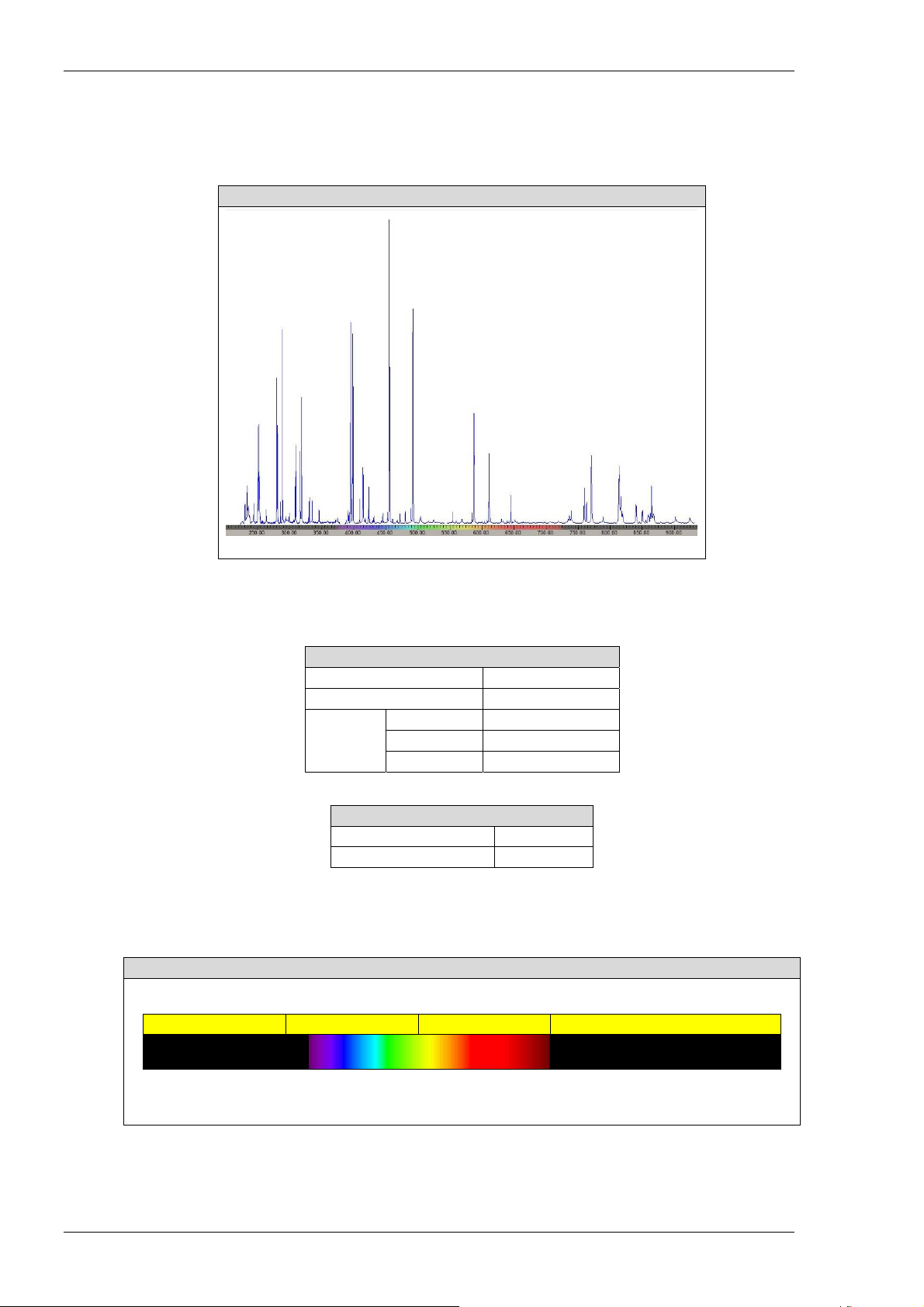
of material to be ejected from the sample surface as a high temperature plasma. The brief flash of light
from this plasma is analysed in the ECCO
spectrum.
The ECCO
2
™ spectrum shows prominent peaks that are characteristic of the elemental composition of
the material.
Typical ECCO2™ spectrum showing emission peaks at wavelengths which are characteristic of the elemental
Optical specification
Excitation laser
Target area
Spectrometer
The ECCO2™ spectrometer consists of four distinct parts, each equipped with an optical sensor suitable
for detecting radiation within the required wavelength rang e. The spectrometer is calibrated against a
calibration spectrum produced from a standard material.
225 385 540 700 930
▼ ▼ ▼ ▼ ▼
Sensor 0 Sensor 1 Sensor 2 Sensor 3
2
™ spectrometer and presented to the user as an ECCO2™
ECCO2™: Spectral graph
Wavelength (nm)
composition of the target material
ECCO2™: Optical specification (Excitation laser)
Laser type Nd:YAG (Q-switched)
Wavelength 1064 nm
Optical energy 60 mJ
Laser pulse
Duration 7 ns
Optical power ~ 10 MW
ECCO2™: Optical specification (Target area)
Diameter ~ 80 µm
Plasma temperature ~ 15,000 K
ECCO2™: Spectrometer (Optical sensors)
▲ ▲
400 700
Wavelength (nm)
11-2 ECCO2™: Main unit (Hardware Guide 0142-11-02)
Page 17
Electrical specification
The ECCO2™ can be operated from a compatible power source specified by Foster + Freeman. See:
Quick Start Guide (Getting started); User Guide (Power Supply Unit).
Sample chamber
The sample chamber completely encloses the target stage during the analysis procedure so protecting the
operator from potentially hazardous radiation. The access door in the sample chamber contains a viewing
window fitted with an optical filter, allowing the sample to be safely viewed during the course of the
analysis.
Safety interlocks
The access door is interlocked to the ECCO2™ control system and must be closed before the laser can be
fired.
Target stage
ECCO2™: Spectrometer (Optical sensors)
Sensor Colour Wavelength (nm)
0 UV 225 – 385
1 UV – Green 385 – 540
2 Green – Red 540 – 700
3 IR 700 – 930
Do not attempt to defeat the safety interlocks.
ECCO2™: Main unit (Target stage)
Electrical specification
Large sample Sample stalk + Small sample
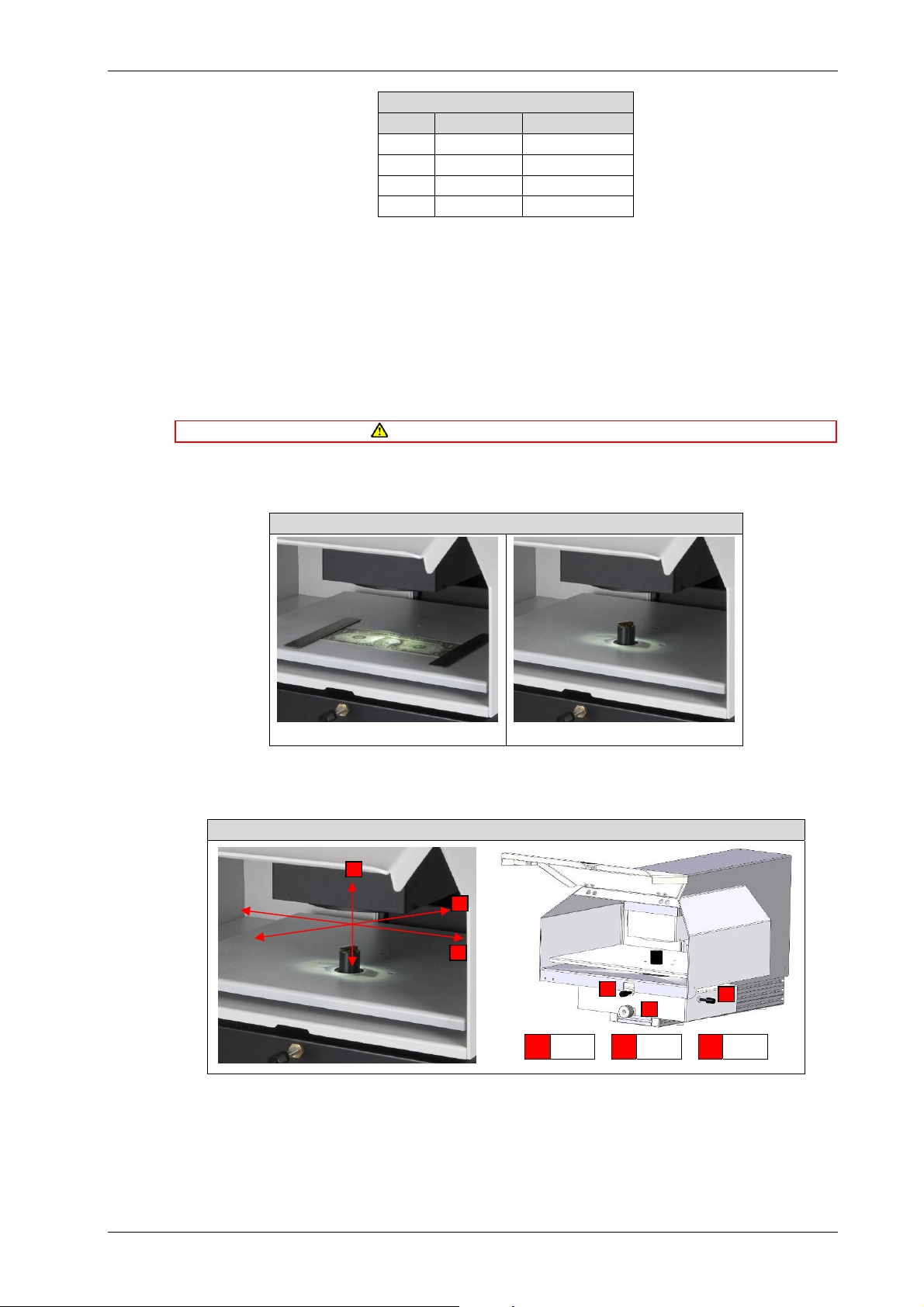
The target stage supports the evidential material during the analysis procedure. Large samples rest
directly on the target stage whilst smaller samples are mounted on a sample stalk.
XYZ stage
ECCO2™: Main unit (XYZ stage)
Z
Y
X
Y
Z
X
34
Y
34
X
Z
The target stage is supported on an XYZ stage which can be moved in its own plane, i.e. in both X (leftright) and Y (forward-backward) directions, as well as the Z (up-down) directions. Movement in the XYplane allows the desired target area to be placed in the optical path of the laser. Movement in the Zdirection places the target area at the focal point of the beam so as to maximise the laser induced
emission.
34
ECCO2™: Main unit (Hardware Guide 0142-11-02) 11-3
Page 18
Video camera
Video camera
A video camera and LED lighting are used to present the operator with a live image of the target surface.
The image allows the target area to be correctly positioned using the XYZ stage before the laser is fired.
Service, Care and Maintenance
Servicing
The equipment contains no user-serviceable parts. The equipment contains no user-replaceable parts other
than the spares provided. Do not use spares, accessories and consumables other than those supplied by Foster
+ Freeman. Refer all servicing to qualified Foster + Freeman personnel. Unauthorised servicing may void the
Care
The product contains optical and other glass components. Protect the equipment from damage and
contamination. When not required for use, store the equipment under its protective cover. Handle with care.
Do not subject the equipment to mechanical shock. Do not drop.
Cleaning
Do not use abrasive cleaning materials or those containing strong acids or alkalis. Do not allow the ingress of
liquids or other contaminants. Do not immerse.
Remove dust and deposits from external surfaces using a soft dry cloth or paper tissue. When necessary,
use a soft cloth or paper tissue dampened with a mild cleaning solution. Allow all surfaces to dry
thoroughly before resuming use.
Water-based solutions should contain only a little liquid soap, detergent or mild bleach. Alcohol-based
cleaning agents may eventually degrade the surface of some types of plastic and should be used sparingly
on such materials.
Maintenance
Access covers
Do not remove any access covers except during authorised maintenance. Do not operate the equipment with
warranty on this product.
any access cover removed.
(0142-11-02) Copyright © Foster + Freeman Ltd
11-4 ECCO2™: Main unit (Hardware Guide 0142-11-02)
4 z 4
Page 19
Page of 1
HARDWARE GUIDE
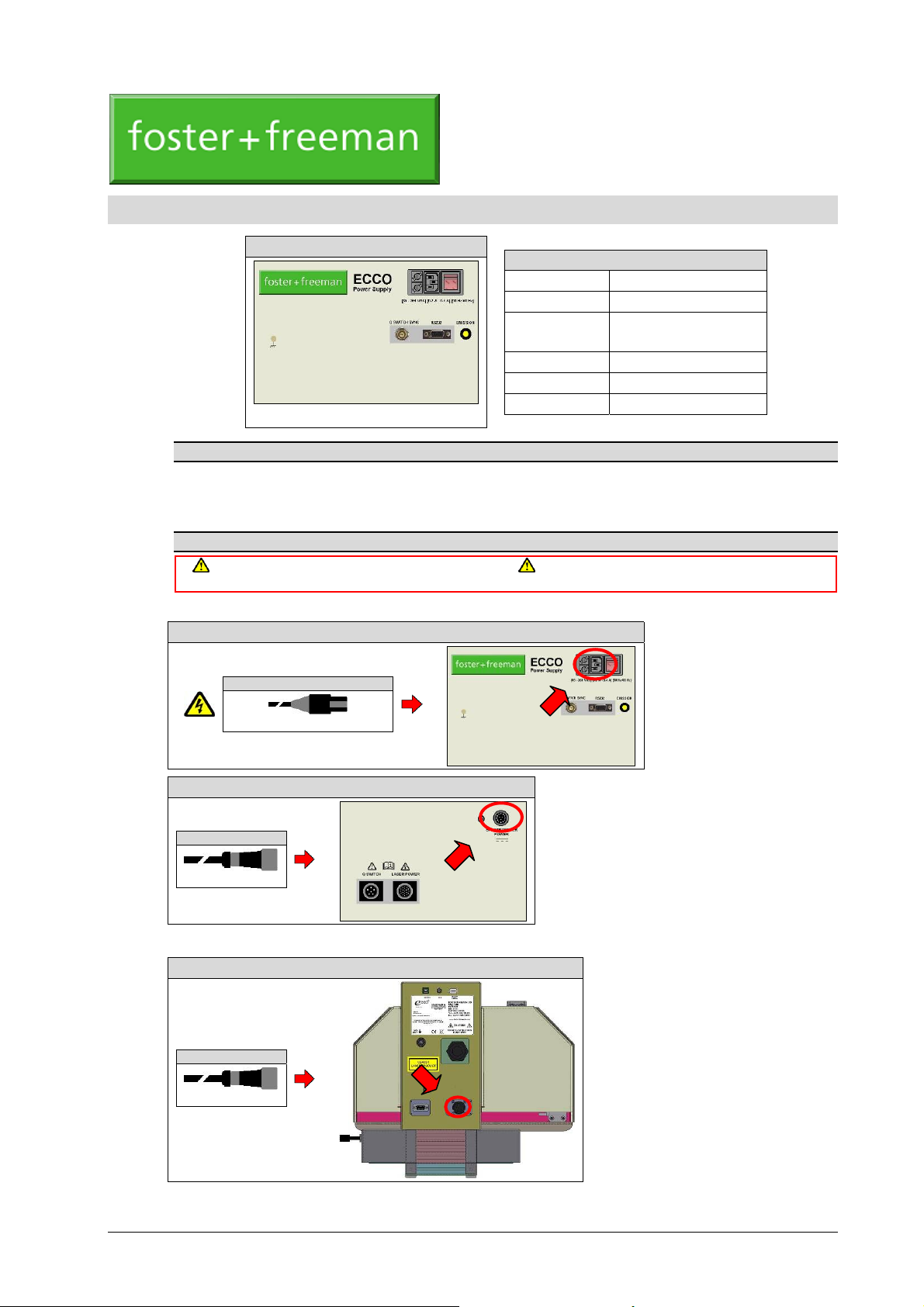
ECCO™: Power Supply Unit
The ECCO™ Power Supply Unit is designed to power compatible types of ECCO™ Laser Induced
Breakdown Spectrometer.
Using the equipment
Switch off all units before making any interconnections. Do not operate the equipment with an incompatible
Power Supply Unit
ECCO™: Power Supply Unit (Mains power)
ECCO™: P
OWER SUPPLY UNIT
ECCO™: Power Supply Unit
Product code
Manufacturer Foster + Freeman Ltd
Electrical input
Electrical output 5 V DC; 2.5 A (Max)
Dimensions 320 x 235 x 160 mm
Weight 6.6 kg
Appearance and specification may vary
Refer to the relevant Quick Start Guide for further details
mains electricity supply.
(0140-12-03) May 2013
85 − 264 V AC, 50/60 Hz;
0.4 A (Max)
Mains power ¨
85 − 264 V AC 50/60 Hz; 0.4 A (Max)
ECCO™: Power Supply Unit (DC power)
§ DC power
5 V DC; 2 A (Max)
ECCO™: Main unit
DC power ¨
5 V DC; 2 A (Max)
ECCO™: Main unit (Spectrometer)
ECCO™: Power Supply Unit (Hardware Guide 0140-12-03) 12-1
Page 20
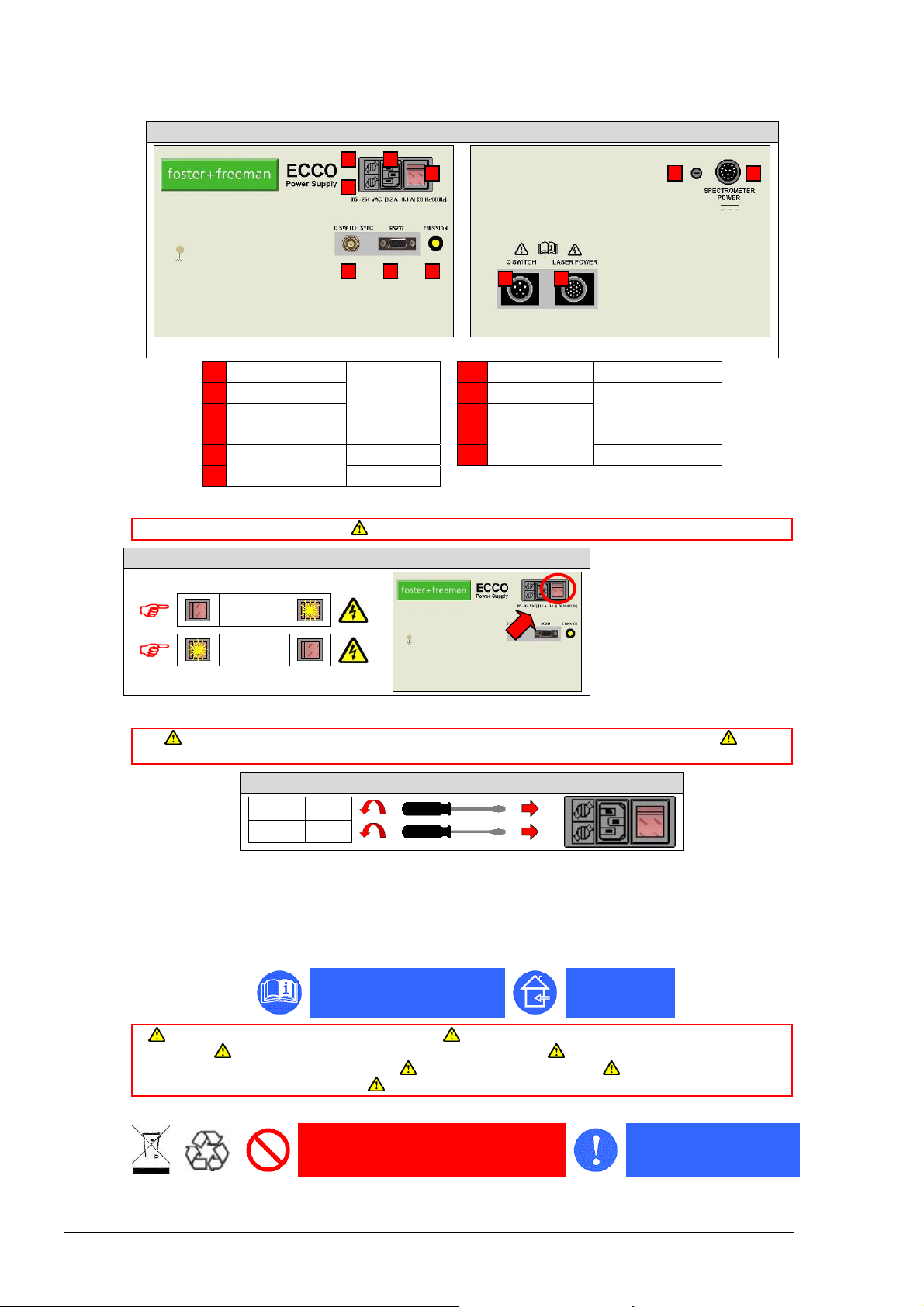
Control features
Control features
1 On/off switch
2 Electrical input 8 Electrical output
3 Fuse (Live) 9 Fuse
4 Fuse (Neutral) 10
5
Control connection
6 RS232
Mains power: On/off switch
ECCO™: Power Supply Unit (Mains power)
Front view
ECCO™: Power Supply Unit (Control features)
3
2
4
5 6 7
1
1110
Rear view
7 Indicator light Emission
Mains power
Q switch sync 11 Laser power
Switch off when not required for use.
Electrical output
Spectrometer power
Q-switch
9
8
Switch on
Switch off
Replacing the fuses
Switch off and disconnect the equipment from the mains electricity supply before replacing fuses. For
continued protection against fire, use replacement fuses of only the correct size and rating.
The mains power fuses are located in the IEC power input socket. Release each fuse by inserting the flat
blade of a suitable screwdriver into the slotted recess in the fuse holder and gently turning it anticlockwise.
Safety information
General safety
Use the equipment only for the intended purpose. Use the equipment only in accordance with the operating
instructions. Use only with equipment specified by Foster + Freeman. Use only with spares, accessories and
consumables supplied by Foster + Freeman. Do not use damaged equipment. The equipment contains no
user-adjustable controls. Dispose of the equipment only in a responsible manner.
Disposal
ECCO™: Power Supply Unit (Replacing the fuses)
Live 0.5 A
Neutral 0.5 A
Read the information supplied
Do not discard with normal commercial or
domestic waste
Indoor use only
Comply with all relevant
legislation
12-2 ECCO™: Power Supply Unit (Hardware Guide 0140-12-03)
Page 21
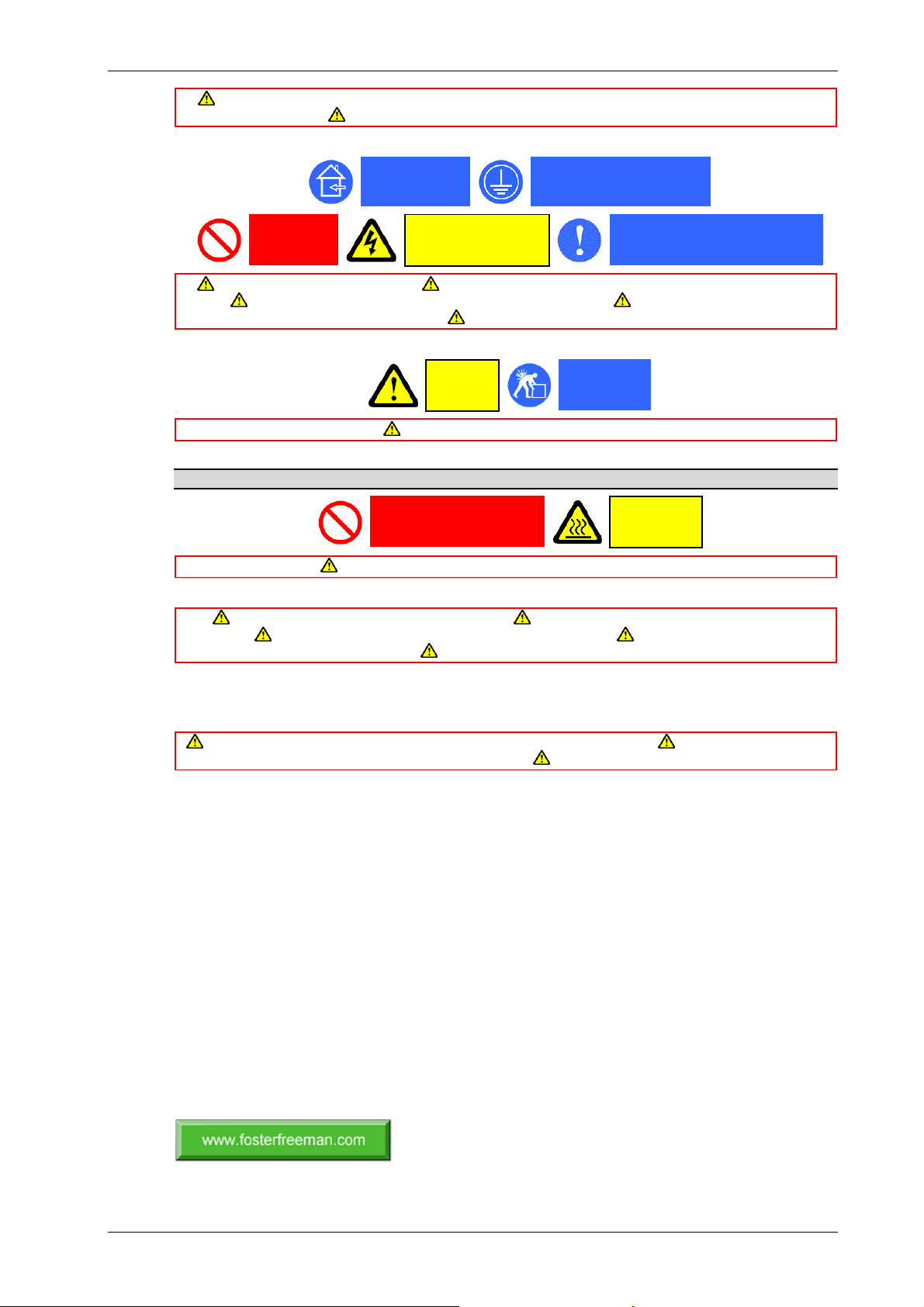
This equipment falls within the scope of the European Directive 2002/96/EC on Waste Electrical & Electronic
Equipment (WEEE). Dispose of the product only where appropriate disposal or recycling facilities exist.
Electrical safety
Service, Care and Maintenance
Indoor use only
Do not open
Switch off when not required for use. Do not operate the equipment with an incompatible mains electricity
supply. Do not operate the equipment without a reliable earth connection. Do not operate the equipment with
damaged electrical connection cables. Use only with equipment specified by Foster + Freeman.
Mechanical safety
Thermal safety
The equipment generates heat that is removed by fan-assisted ventilation. The equipment becomes warm during use.
Do not obstruct the ventilation ports or the air flow around them.
Service, Care and Maintenance
The equipment contains no user serviceable parts. Refer all servicing to qualified Foster + Freeman
personnel. Unauthorised servicing may void the warranty on this product. The equipment contains no user-
adjustable controls. Do not dismantle or tamper with the equipment.
Protect the equipment from damage and contamination. Handle with care. Do not subject to excessive
mechanical shock. Do not drop.
Cleaning
Do not use abrasive cleaning materials or those containing strong acids or alkalis. Do not allow the ingress of
liquids or other contaminants. Do not immerse.
Remove dust and deposits from external surfaces using a soft dry cloth or paper tissue. When necessary,
use a soft cloth or paper tissue dampened with a mild cleaning solution. Allow all surfaces to dry
thoroughly before resuming use. Water-based solutions should contain only a little liq uid soap, detergent
or mild bleach. Alcohol-based cleaning agents may eventually degrade the surface of some types of
plastic and should be used sparingly on such materials.
Equipment must be earthed
DANGER
Risk of electric shock
CAUTION
Heavy
Lift correctly
Use safe lifting and handling procedures.
Do not obstruct ventilation
Check mains power compatibility
CAUTION
Hot surfaces
(0140-12-03) Copyright © Foster + Freeman Ltd
3 z 3
ECCO™: Power Supply Unit (Hardware Guide 0140-12-03) 12-3
Page 22

12-4 ECCO™: Power Supply Unit (Hardware Guide 0140-12-03)
Page 23
Page of 1
USER GUIDE
ECCO2™: M
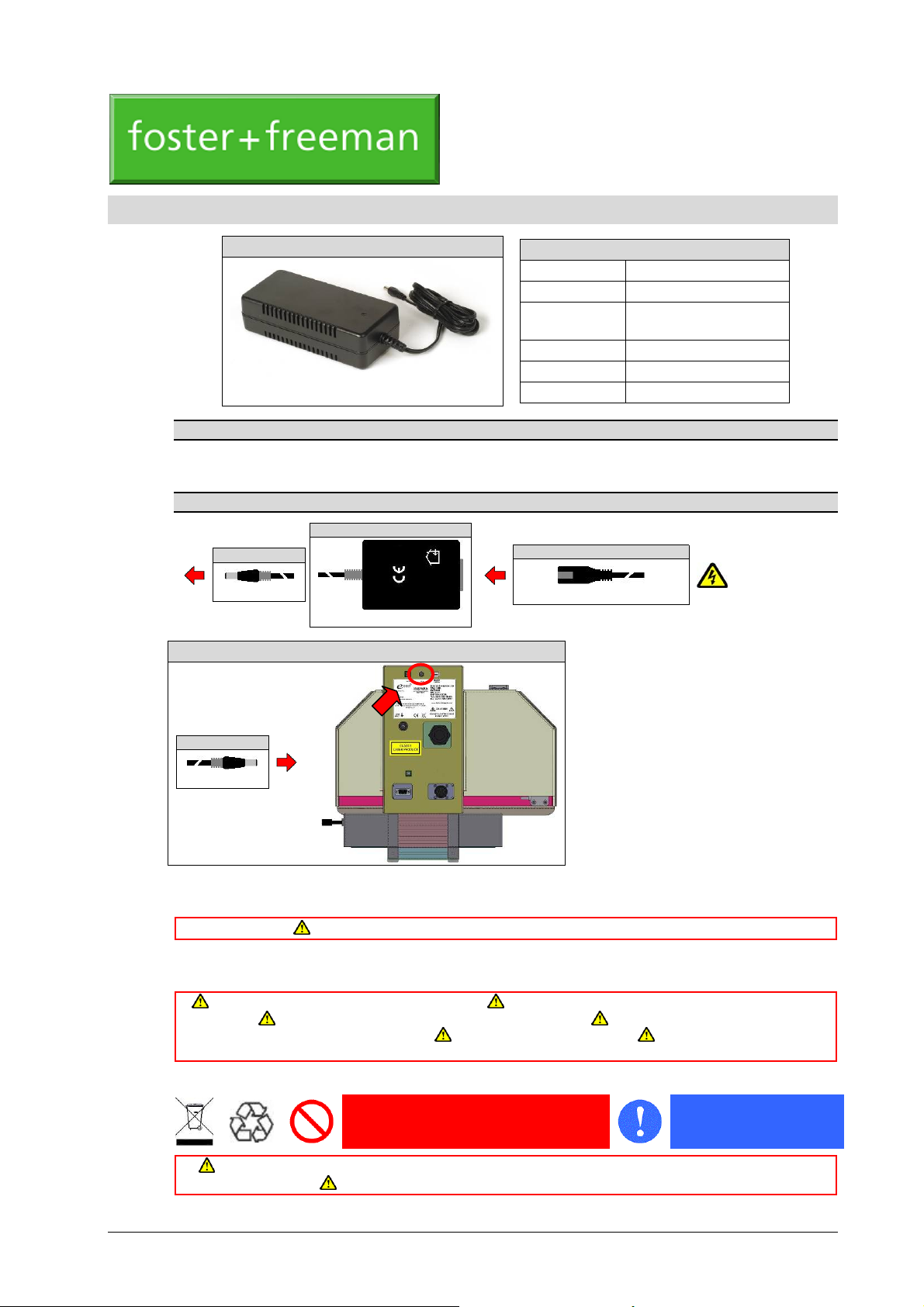
ECCO2™: Mains power adaptor
The mains power adaptor provides electrical power for the UV sensor in the ECCO2™ main unit.
Using the equipment
§ DC power
5 V DC; 2 A (Max)
ECCO2™: DC input (UV sensor)
Refer to the relevant Quick Start Guide for further details
ECCO2™: Mains power adaptor
AINS POWER ADAPT OR
ECCO2™: Mains power adaptor
Product code
Manufacturer UNIFIVE
Electrical input
Electrical output 5 V DC; 2 A (Max)
Dimensions 65 x 48 x 25 mm
Appearance and specification may vary.
§ Mains power
100 – 240 V AC 50/60 Hz; 0.4 A (Max)
Weight 85 g
(0142-19-01) May 2013
100 – 240 V AC, 50/60 Hz;
0.4 A (Max)
DC power ¨
5 V DC; 2 A (Max)
1.
2.
Interconnect the equipment with the cables provided.
Connect the mains power.
The equipment is now ready for use.
Safety information
Use the equipment only for the intended purpose. Use the equipment only in accordance with the operating
instructions. Use only with equipment specified by Foster + Freeman. Use only with spares, accessories and
consumables supplied by Foster + Freeman. Do not use damaged equipment. Dispose of the equipment only
Disposal
This equipment falls within the scope of the European Directive 2002/96/EC on Waste Electrical & Electronic
Equipment (WEEE). Dispose of the equipment only where appropriate disposal or recycling facilities exist.
Do not connect the equipment to an incompatible mains electricity supply.
in a responsible manner.
Do not discard with normal commercial or
domestic waste
Comply with all relevant
legislation
ECCO2™: Mains power adaptor (User Guide 0142-19-01) 19-1
Page 24
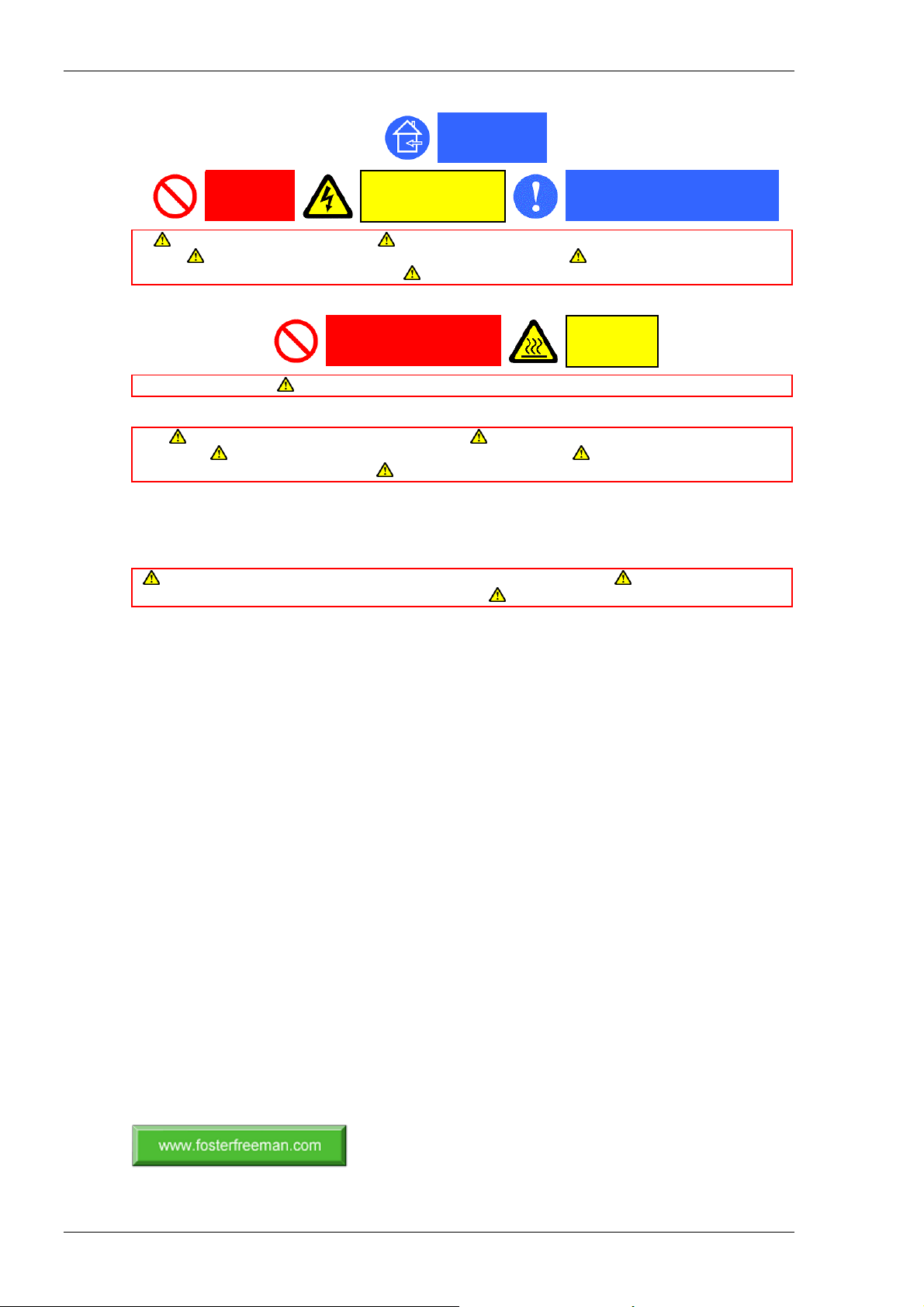
Service, Care and Maintenance
Electrical safety
Do not open
Switch off when not required for use. Do not operate the equipment with an incompatible mains electricity
supply. Do not operate the equipment without a reliable earth connection. Do not operate the equipment with
damaged electrical connection cables. Use only with equipment specified by Foster + Freeman.
Thermal safety
Do not obstruct the ventilation ports or the air flow around them.
Service, Care and Maintenance
The equipment contains no user serviceable parts. Refer all servicing to qualified Foster + Freeman
personnel. Unauthorised servicing may void the warranty on this product. The equipment contains no user-
adjustable controls. Do not dismantle or tamper with the equipment.
Protect the equipment from damage and contamination. When not required for use, store the equipment in
its case or protective wrapping. Handle with care. Do not subject to excessive mechanical shock. Do not
drop.
Cleaning
Do not use abrasive cleaning materials or those containing strong acids or alkalis. Do not allow the ingress of
liquids or other contaminants. Do not immerse.
Remove dust and deposits from external surfaces using a soft dry cloth or paper tissue. When necessary,
use a soft cloth or paper tissue dampened with a mild cleaning solution. Allow all surfaces to dry
thoroughly before resuming use. Water-based solutions should contain only a little liq uid soap, detergent
or mild bleach. Alcohol-based cleaning agents may eventually degrade the surface of some types of
plastic and should be used sparingly on such materials.
Indoor use only
DANGER
Risk of electric shock
Do not obstruct ventilation
Check mains power compatibility
CAUTION
Hot surfaces
(0142-19-01) Copyright © Foster + Freeman Ltd
2 z 2
19-2 ECCO2™: Mains power adaptor (User Guide 0142-19-01)
Page 25

i
(0000-97-01) Copyright © Foster + Freeman Ltd
i zzz i
Page 26

0001234567276689138
%ÿ&'(ÿ)*+!ÿ,-..ÿ./0
" ÿ"1!
/2ÿ 33ÿ456ÿ.789ÿ:98ÿ5;5
<2ÿ 33ÿ456ÿ.789ÿ:9;ÿ7;.
+"=
!"$!
ÿ ÿ!"
ÿÿÿ
ÿ !"ÿ#$
 Loading...