

Page 1

SMART FACIAL
CLEANSING &
FIRMING MASSAGE
Page 2
FULL USER MANUAL
GETTING STARTED
Congratulations on taking the first step toward discovering smarter skincare by acquiring LUNA 3. Before you
begin to enjoy all the benefits of sophisticated skincare technology in the comfort of your home, please take a few
moments to carefully read the instructions in this manual.
Please READ ALL INSTRUCTIONS BEFORE USE and utilize this product only for its intended use as described
in this manual.
WARNING: NO MODIFICATION OF THIS EQUIPMENT IS ALLOWED.
LUNA 3 OVERVIEW
Meet LUNA 3, the softest skincare device in the beauty world. Featuring 30% softer silicone touchpoints and T-Sonic
technology, LUNA 3 lifts away dirt, oil, and excess sebum with a 1-minute cleansing routine while a targeted firming
facial massage leaves skin smoother and younger-looking.
Used as part of your daily cleansing routine, LUNA 3’s Cleansing Mode channels T-Sonic pulsations to provide a much
deeper clean than washing by hand, lifting away dirt, oil and dead skin cells to allow better absorption of your favorite
skincare products. In Firming Massage Mode, choose from a variety of app-guided massage routines that use gentle
T-Sonic pulsations to help diminish visible signs of aging.
With three brush heads tailor-made for each skin type, LUNA 3 paves the way for a healthier, younger-looking
complexion.
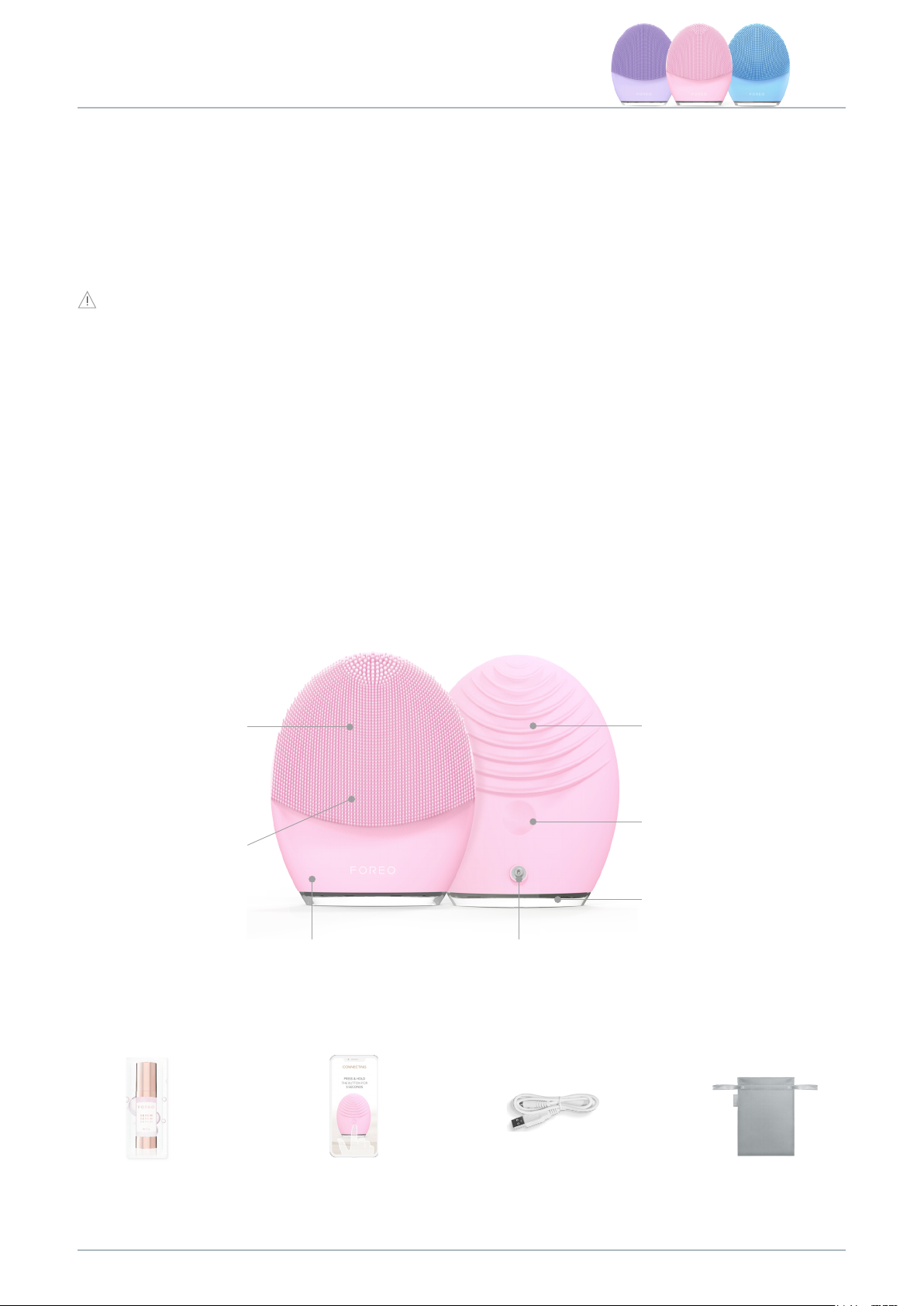
GETTING TO KNOW LUNA 3
T-SONIC PULSATIONS
Effectively cleanse with
up to 8,000 pulsations per
minute at 16 intensities
EXTRA SOFT &
ULTRA-HYGIENIC
SILICONE
35x more hygienic
than nylon bristles and
suitable for all skin types.
BPA & phthalate free
SMART SWEDISH DESIGN
Tailor-made for each skin type
with no replacement brush
heads required
CHARGING PORT
Up to 650 uses per charge.
100% waterproof closure
FIRMING FACIAL
MASSAGE
Targeted massage routines
give skin a firmer, more
youthful appearance
UNIVERSAL POWER
BUTTON
Turns device on and off and
puts device in Bluetooth
pairing mode
INDICATOR LIGHT
Flashes to indicate when
device is in Bluetooth
pairing mode and when
device needs to be charged
2ML SAMPLE SERUM
Provides the perfect base for
your firming massage
INTERACTIVE FOREO APP
Control device settings and
select your preferred firming
massage routine
USB CABLE
Charge anytime, anywhere
2
TRAVEL POUCH
Conveniently store device for
skincare on the go
Page 3
HOW TO USE LUNA 3
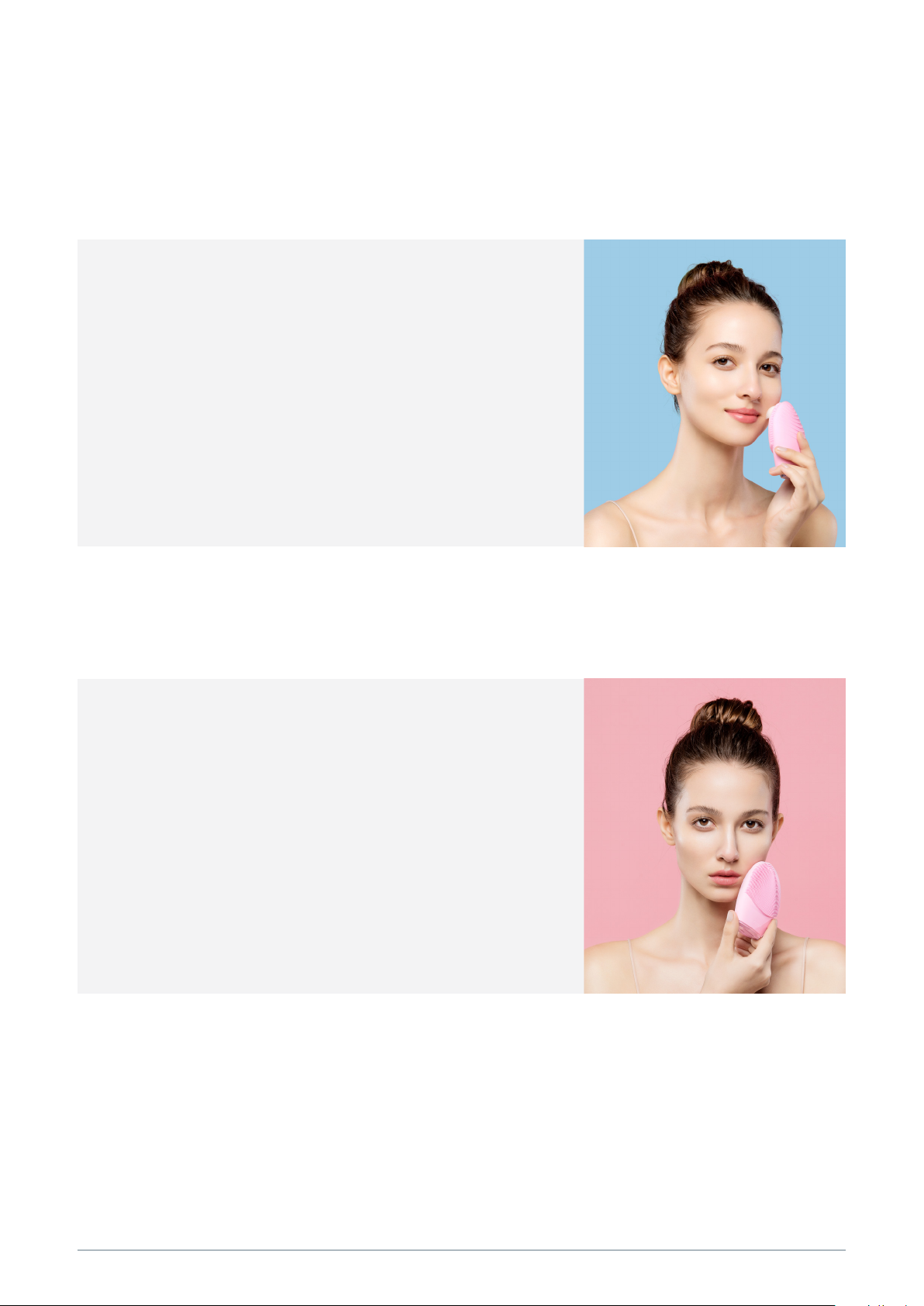
CLEANSING MODE
To unlock and register your device, activate Bluetooth on your mobile device or tablet and then press the
universal button to sync to the FOREO app and set up your cleansing preferences. We recommend cleansing
with LUNA 3 for 1 minute every morning and evening.
Remove all makeup, dampen skin and then apply your
1
FOREO cleanser.
Press universal button again to activate cleansing mode.
2
Cleanse using circular movements on cheeks and forehead,
3
gliding up and down the nose.
Press and hold button for 3 seconds to turn off device.
4
Rinse and pat your face dry.
5
NOTE: To keep your device in optimal condition, avoid clay-based, silicone-based, or grainy cleansers as they
may damage the silicone. If the long silicone bristles become tangled, gently brush them in any direction to
reset them to their normal position.
FIRMING MASSAGE MODE
Apply FOREO serum to clean, dry skin.
1
Follow instructions in the FOREO app to activate your
2
preferred firming massage routine.
Follow with moisturizer of your choice.
3
* Device will automatically switch off after routine is complete.
CLEANING YOUR LUNA 3
Always clean LUNA 3 thoroughly after use. Wash the brush surface with water and soap, then rinse with warm
water. Avoid using clay-based, silicone-based or grainy cleansers, exfoliators or scrubs, as they may damage
LUNA 3’s soft silicone. Pat dry with a lint-free cloth or towel. After use, we recommend spraying the device with
FOREO Silicone Cleaning Spray and rinsing with warm water for optimal results.
NOTE: Never use cleaning products containing alcohol, petrol or acetone, as they may irritate the skin and
damage the silicone.
3
Page 4

IMPORTANT
FOR OPTIMUM SAFETY:
• If you have a skin condition or any medical concerns, please consult a dermatologist before use.
• Cleansing with LUNA 3 should be comfortable – if you experience discomfort, discontinue use
immediately and consult a physician.
• Exercise particular care when cleansing the under-eye regions and do not bring the device into contact with
the eyelids or eyes themselves.
• For reasons of hygiene, we do not recommend sharing your LUNA 3 with anyone else.
• Avoid leaving your LUNA 3 in direct sunlight and never expose it to extreme heat or boiling water.
• Close supervision is necessary when this device is used by, on, or near children, as well as those with reduced
physical and mental abilities.
• Discontinue use if this product appears damaged in any way. This product contains no serviceable parts.
•
Given the efficiency of the FOREO cleansing routine, we recommend that you do not use LUNA 3 for more than
3 minutes at a time.
•
Use this device only for its intended use as described in this manual. If you do not find the answer to your specific
question, or if you have any other questions regarding the device’s operation, please visit foreo.com/support.
TROUBLESHOOTING
PRECAUTIONS TO BE TAKEN IN THE EVENT OF CHANGES IN THE PERFORMANCE OF LUNA 3.
If LUNA 3 is not activated when pressing the center button:
• Battery is dead, Recharge using USB charging cable for 2 hours until fully charged and then restart your device
by holding down the power button.
If LUNA 3 cannot be switched off and/or interface buttons do not respond:
• Microprocessor is temporarily malfunctioning. Press and hold power button to restart the device.
If LUNA 3 won’t sync to the FOREO app:
• Switch your Bluetooth off and then on again to try reconnecting.
• Close the FOREO app and then reopen it to start the process over.
WARRANTY TERMS & CONDITIONS
REGISTER WARRANTY
To activate your 2-Year Limited Warranty and 10-Year Quality Guarantee, register through the FOREO app, or visit
foreo.com/product-registration for more information.
2-YEAR LIMITED WARRANTY
FOREO warrants this device for a period of TWO (2) YEARS after the original date of purchase against defects due to
faulty workmanship or materials arising from normal use of the device. The warranty covers working parts that affect
the function of the device. It does NOT cover cosmetic deterioration caused by fair wear and tear, or damage caused
by accident, misuse or neglect. Any attempt to open or take apart the device (or its accessories) will void the warranty.
If you discover a defect and notify FOREO during the warranty period, FOREO will, at its discretion, replace the device
free of charge. Claims under warranty must be supported by reasonable evidence that the date of the claim is within
the warranty period. To validate your warranty, please keep your original purchase receipt together with these warranty
conditions for the duration of the warranty period.
To claim your warranty, you must log in to your account at www.foreo.com and then select the option to make a
warranty claim. Shipping costs are nonrefundable. This undertaking is in addition to your statutory rights as a consumer
and does not affect those rights in any way.
10-YEAR QUALITY GUARANTEE
As a continuation of the terms of FOREO’s TWO (2) Year Limited Warranty, FOREO’s TEN (10) Year Quality Guarantee
makes owners eligible to purchase a new device from www.foreo.com for 50% of the listed price.
4
Page 5
DISPOSAL INFORMATION
Disposal of old electronic equipment (applicable in the EU and other European countries with separate waste collection systems).
The crossed-out dustbin symbol indicates that this device should not be treated as household waste, but rather be brought to the
appropriate collection point for recycling of electrical and electronic equipment. By ensuring this device is disposed of correctly,
you will help prevent the potential negative consequences for the environment and human health which could be caused by
inappropriate waste handling of the product. The recycling of materials will also help conserve natural resources.
For more information about the recycling of your device, please contact your local household waste disposal service or your
place of purchase.
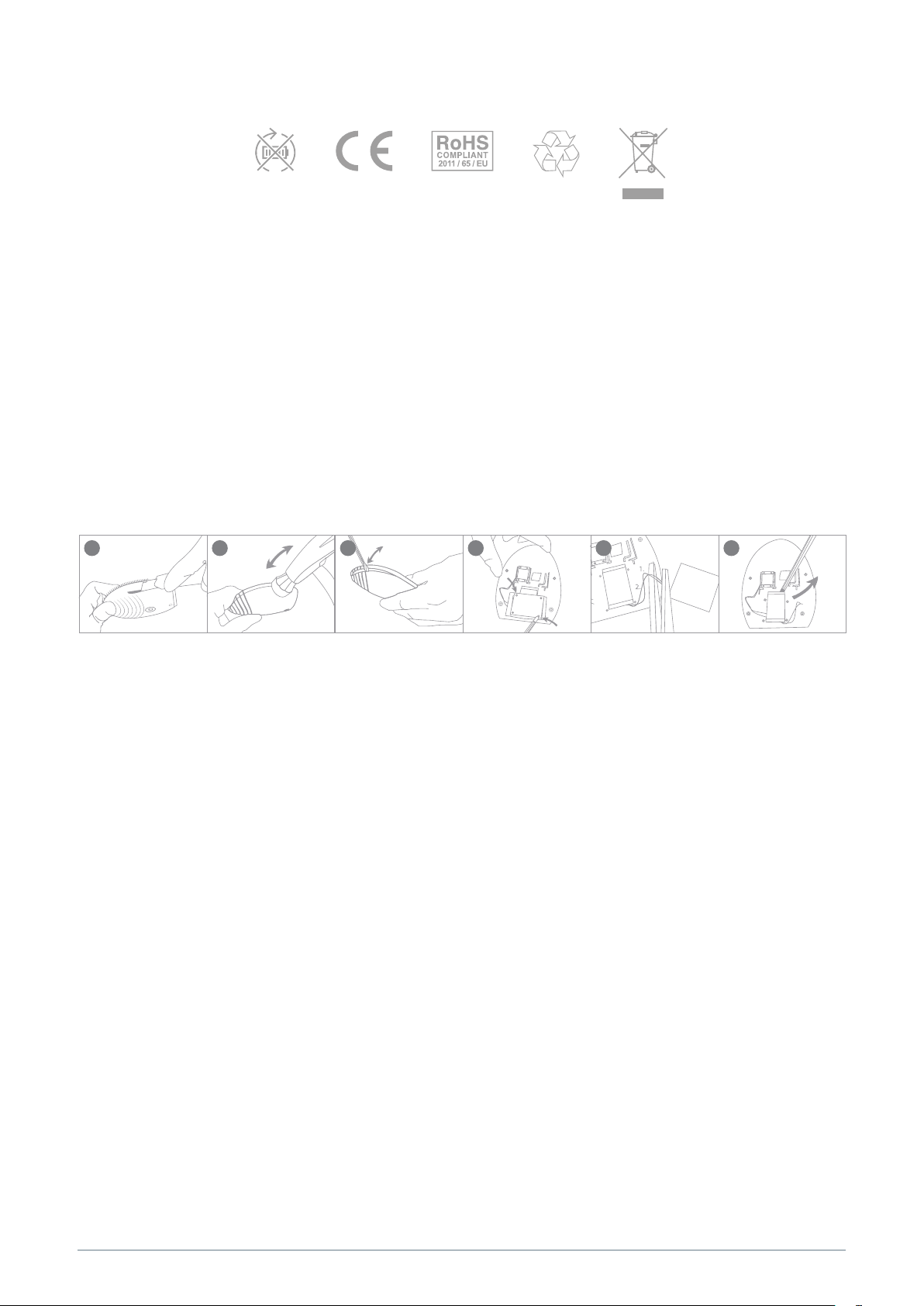
BATTERY REMOVAL
NOTE: This process is not reversible. Opening the device will void its warranty. This action must only be undertaken when
the device is ready to be disposed of.
Because this device contains a lithium-ion battery, the battery must be removed before disposal and should not be thrown
away with household waste. To remove the battery, open the inner plastic shell after removing silicone outer layer and
remove the battery to be disposed of in accordance with your local environmental regulations. Wear gloves during this
process for your safety. Detailed visual instructions are provided below:
1 2
3 4
5 6
SPECIFICATIONS
MATERIALS: Body-safe silicone & ABS plastic
COLOR: Pink, Blue & Lavender
SIZE: 102*82.5*39.2mm
WEIGHT: 126g
BAT TERY: Li-ion 850mAh 3.7V
Disclaimer: Users of this device do so at their own risk. Neither FOREO nor its retailers assume any responsibility or liability for
any injuries or damages, physical or otherwise, resulting, directly or indirectly, from the use of this device. Further, FOREO
reserves the right to revise this publication and to make changes from time to time in the contents thereof without obligation
to notify any person of such revision or changes.
Any changes or modifications not expressly approved by the party responsible for compliance could void the user’s au
thority to operate the equipment. This device complies with part 15 of the FCC Rules. Operation is subject to the
following two conditions: (1) This device may not cause harmful interference, and (2) this device must accept any interference
received, including interference that may cause undesired operation.
USAGE: Up to 650
STAN DBY: 90 days
FREQUENCY: 100 Hz
MAX NOISE LEVEL: <50dB
INTERFACE: 1- button
-
RF exposure statement:
environment. The device has been evaluated to meet general RF exposure requirement. The device can be used in portable
exposure condition without restriction.
MODEL MAY BE CHANGED FOR IMPROVEMENTS WITHOUT NOTICE.
©2019 FOREO AB. ALL RIGHTS RESERVED.
IMPORTER AND DISTRIBUTOR IN EU: FOREO AB, KARLÄVAGEN 41, 114 31 STOCKHOLM, SWEDEN
IMPORTER AND DISTRIBUTOR IN US: FOREO INC., 1525 E. PAMA LANE, LAS VEGAS, NV 89119, USA
MANUFACTURED FOR FOREO AB DESIGNED AND DEVELOPED BY FOREO SWEDEN.
IMPORTER AND DISTRIBUTOR IN AUS.: SUITE 10, 1014 DONCASTER ROAD, DONCASTER EAST VICTORIA 3109, AUSTRALIA.
WWW.FOREO.COM
This equipment complies with FCC radiation exposure limits set forth for an uncontrolled
5
 Loading...