

Page 1
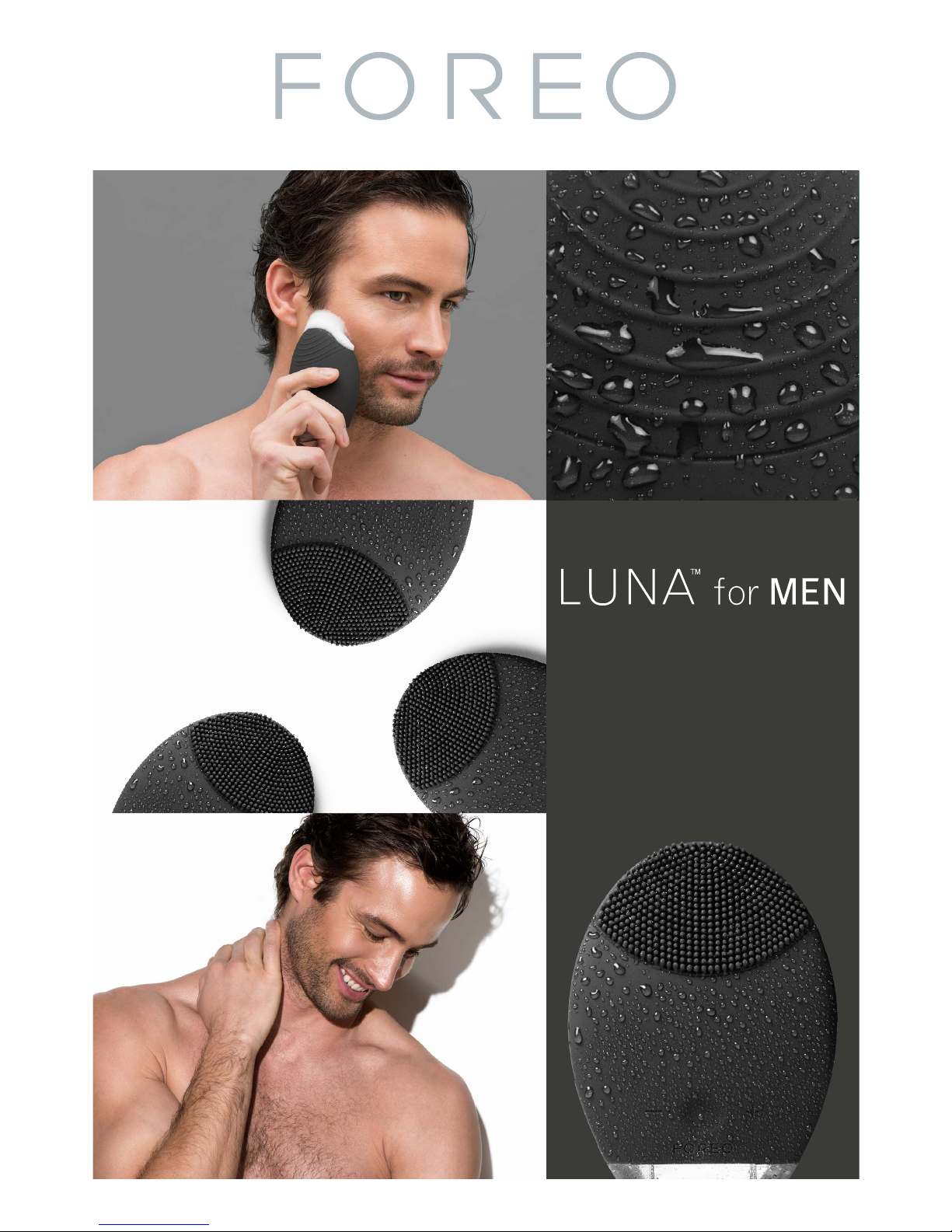
THE ULTIMATE
PRE-SHAVING &
FACIAL-CLEANSING
DEVICE
Page 2
2
LUNA™ for MEN OVERVIEW
Experience all the advantages of advanced skincare in one high-tech device, engineered specifically with
a man’s skin in mind.
The LUNATM for MEN’s Cleansing Mode directs T-SonicTM pulsations through rounded silicone touch-points
to remove impurities while cleansing deeply in a way that protects the skin’s moisture barrier. Not only
does this refresh the look and feel of your skin, it also conditions the face for a more comfortable shave.
In Anti-Aging Mode, the LUNATM for MEN channels lower-frequency pulsations through a curved surface of
concentric ridges to help reduce the visible signs of aging.
FULL USER MANUAL
GETTING STARTED
Congratulations on acquiring the LUNATM for MEN T-SonicTM pre-shaving cleansing and anti-aging device.
Before you begin to enjoy all the benefits of sophisticated skincare technology in the comfort of your home,
please take a few moments to carefully read the instructions in this manual.
Please READ ALL INSTRUCTIONS BEFORE USE and utilize this product only for its intended use as described
in this manual.
WARNING: NO MODIFICATION OF THIS EQUIPMENT IS ALLOWED.
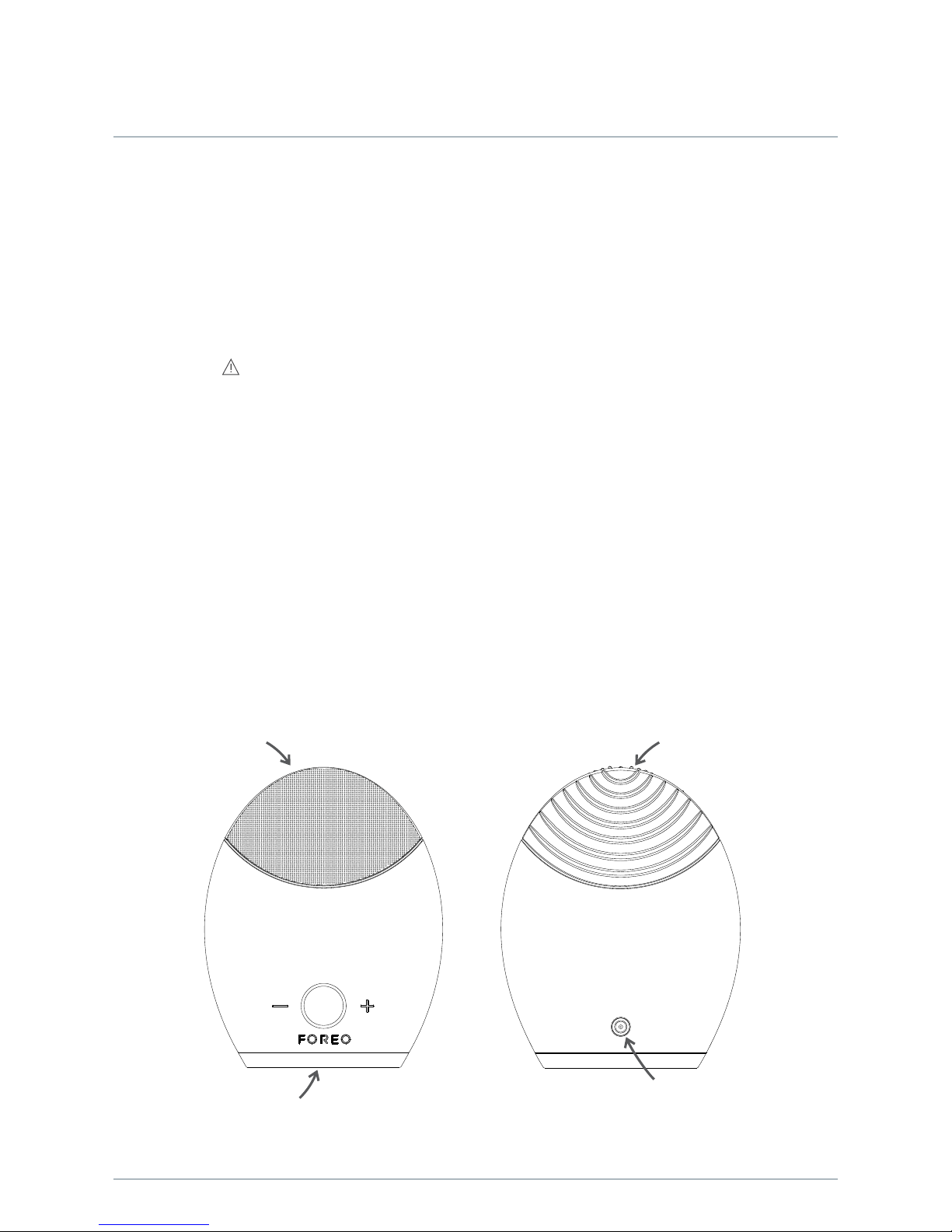
3-Button
Interface
Waterproof
Charging Port
Anti-Aging
Surface
Cleansing Brush
Surface
Page 3

3
USING YOUR LUNA™ for MEN
The LUNATM for MEN’s cleansing brush boasts hundreds of broad silicone touch-points in a controlled
alignment, allowing T-SonicTM pulsations to refresh men’s thicker skin, while deeply cleansing the natural oils
from their more active sebaceous glands. To maximize the skincare benefits of the LUNATM for MEN, we
suggest you use it for 2 minutes each morning and evening.
MODE SELECT
1. Press the center button once to turn on your LUNATM for MEN. When activated, it will be in Cleansing Mode.
2. Press the center button again to put the device on Standby (on Standby, the indicator will emit a steady
glow and the pulsations will stop, giving you the chance to rinse your face).
3. Press the center button a third time to activate the Anti-Aging Mode.
4. Press the center button once more to deactivate your LUNATM for MEN.
The intensities of the LUNATM for MEN’s Cleansing and Anti-Aging Modes are adjustable for comfort using
the +/– buttons, with a memory function for the Cleansing Mode that will remember your preferences for
the next time the device is used. The individual stages of FOREO’s cleansing and anti-aging routines are
described below. After each stage of these routines, you will feel the T-SonicTM pulsations momentarily
pause and see the indicator light flash, prompting you to move on to the next area of your face.
NOTE: The LUNATM for MEN may be locked when first unboxed – unlock it by holding down the + and –
buttons together. The light will flash to indicate that your device is unlocked. Should you wish to lock your
device for travel convenience, follow the same procedure.
Page 4
4
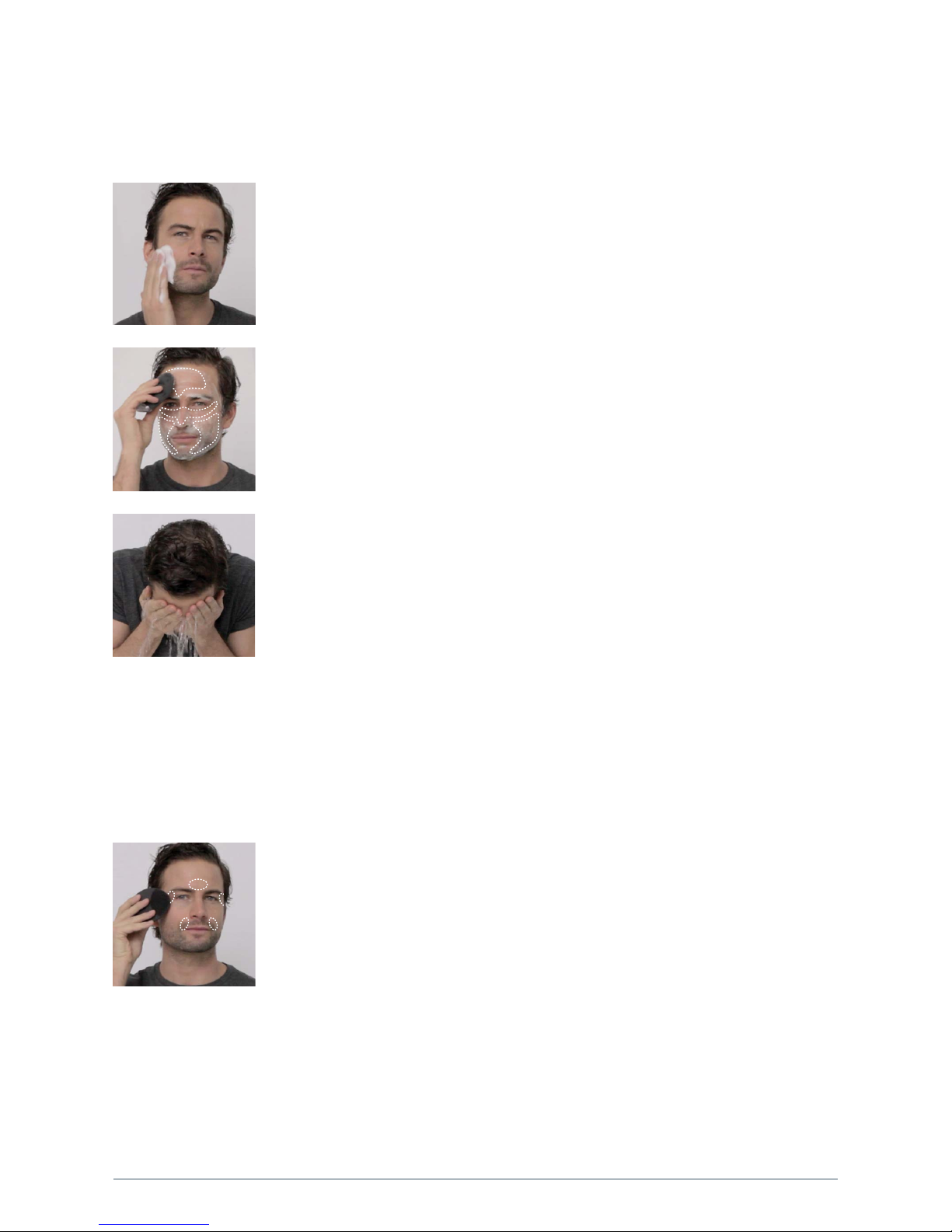
1. APPLY CLEANSER
Wet the LUNATM for MEN then dampen your face and apply your regular cleansing product.
Turn on your LUNATM for MEN by pressing the center button once, activating the Cleansing
Mode.
2. CLEANSE THE FOLLOWING ZONES:
Every 15 seconds pulsations will pause to indicate when to cleanse a new zone.
- Cleanse your chin and cheek using circular movements and repeat on the other side.
- Starting from the center, cleanse your forehead with gentle outward circular strokes.
- Cleanse the nose by gliding up and down one side, then the other. Delicately cleanse
the under-eye region using outward strokes – we suggest reducing the pulsation intensity.
After 1 minute, the pulsations will pause 3 times, indicating the end of the cleansing routine.
Press the center button once more to put the LUNATM for MEN on Standby.
3. RINSE
Rinse and dry your face to complete the 1-minute cleansing routine. Then, apply your
favorite skincare products, if any.
CLEANSING MODE
Channeled through nonabrasive silicone touch-points, LUNATM for MEN pulsations drive out 99.5% of dirt and
oil*, as well as dead skin cells, conditioning the face for a more comfortable shave.
ANTI-AGING MODE
The LUNATM for MEN’s Anti-Aging Mode diminishes the appearance of fine lines and wrinkles, and leaves the skin
looking smoother and more youthful.
From Standby, press the center button to activate the Anti-Aging Mode. Try spending around 12 seconds on each
stage of the routine; after this interval the LUNATM for MEN’s pulsations will pause. Press the LUNATM for MEN’s anti-aging
surface to the following wrinkle-prone areas, where muscle tension can cause worry lines, crow’s feet and laugh lines:
1. Region between the eyebrows
2. Right temple
3. Right nasolabial fold
4. Left nasolabial fold
5. Left temple
After 1 minute, you will feel the pulsations pause 3 times in quick succession.
Please note that to prevent overuse, the LUNA
TM
for MEN will automatically switch itself off if left for 3 minutes in
Cleansing or Anti-Aging Mode.
CAUTION: If you experience any discomfort when using your FOREO device, discontinue use immediately and
consult a physician.
*Based on clinical tests, results on file.
Page 5

5
CLEANING YOUR LUNA™ for MEN
Always clean the LUNATM for MEN thoroughly after use. Wash the brush surfaces with water and soap, then rinse
with warm water. Pat dry with a lint-free cloth or towel. We recommend spraying the device with FOREO’s Silicone
Cleaning Spray and rinsing with warm water afterwards for optimal results.
NOTE: Never use cleaning products containing alcohol, petrol or acetone, as they may irritate the skin.
CHARGING
Your FOREO device is rechargeable with its included charger. One hour of charging delivers a full charge which
lasts for over 7 months of use.
• Insert the DC connector into the LUNA
TM
for MEN's charging port.
• Insert the mains plug into a charging point. The LUNA
TM
for MEN’s LED indicator will flash repeatedly to indicate
the battery is charging. When it is fully charged (after approximately 1 hour), the LED indicator will emit a steady glow.
• When the battery is running low, the LED indicator on your LUNA
TM
for MEN will emit a blinking white light.
CAUTION: Before charging, make sure the charging port and charger are free from water and cleanser residue.
Do not charge the LUNA
TM
for MEN in any location where it or the charger may become immersed in water.
Do NOT use your FOREO device while charging, and do NOT charge for more than 24 hours. Only use the
FOREO-provided charger.
IMPORTANT
FOR OPTIMUM SAFETY:
• Avoid using clay-based, silicone-based or grainy cleansers, exfoliators or scrubs, as they may damage the
LUNA
TM
for MEN’s soft silicone touch-points.
• If you have a skin condition or any medical concerns, please consult a dermatologist before use.
• Cleansing with the LUNA
TM
for MEN should be comfortable – if you experience discomfort, discontinue use
immediately and consult a physician.
• Exercise particular care when cleansing the under-eye regions and do not bring the device into contact
with the eyelids or eyes themselves.
• For reasons of hygiene, we do not recommend sharing your LUNA
TM
for MEN with anyone else.
• Avoid leaving your LUNA
TM
for MEN in direct sunlight and never expose it to extreme heat or boiling water.
• Close supervision is necessary when this device is used by, on, or near children, as well as those with
reduced physical and mental abilities.
• Never use the device or charger if they are damaged, and only use the charger supplied by FOREO with the device.
• Discontinue use if this product appears damaged in any way. This product contains no serviceable parts.
• To avoid the risk of electric shock, this equipment must only be connected to a supply mains with
protective earth.
• Given the efficiency of the FOREO cleansing and anti-aging routines, we recommend that you do not
use the LUNA
TM
for MEN’s Cleansing or Anti-Aging Modes for more than 3 minutes at a time.
• Use this device only for its intended use as described in this manual.
Page 6

6
TROUBLESHOOTING
LED does not pulse when charger is connected?
• Battery is fully charged, ready for up to 450 full cleansing and anti-aging routines.
• Battery is drained and will require several minutes to acknowledge charging cable.
• Charging cable is not properly connected. Check wall socket and charging port.
The LUNA
TM
for MEN does not activate when the center button is pressed?
• Battery is empty. Recharge your LUNA
TM
for MEN.
• Interface is locked. Unlock it by holding down + and – buttons together.
The LUNA
TM
for MEN cannot be switched off and/or interface buttons do not respond?
• Microprocessor is temporarily malfunctioning. Connect the charging cable to restore function to normal.
The LUNA
TM
for MEN's silicone surfaces have degraded to a sticky or bubbly texture?
• Discontinue use. Silicone is highly durable, but degrades under certain conditions – consult this manual’s
Cleaning and Safety sections for how to prevent this.
If you do not find the answer to your specific question in the troubleshooting section, or if you have any
other questions regarding the device’s operation, please visit the Customer Care section of www.foreo.com.
WARRANTY TERMS AND CONDITIONS
REGISTER WARRANTY
To activate your 2-Year Limited Warranty and 10-Year Quality Guarantee, register the number provided on the
FOREO Authenticity Card at www.foreo.com Warranty and Returns section under Customer Care.
2-YEAR LIMITED WARRANTY
FOREO warrants this device for a period of TWO (2) YEARS after the original date of purchase, against defects due to
faulty workmanship or materials. If you discover a defect and notify FOREO during the warranty period, FOREO will,
at its discretion, replace the device free of charge.
The warranty covers working parts that affect the device’s function. It does NOT cover purely cosmetic deterioration
caused by fair wear and tear or damage caused by accident, misuse or neglect. Any attempt to open or disassemble
the device (or its accessories) will void the warranty.
For any warranty claim, reasonable evidence must be provided that the date of the claim is within the warranty period.
For this reason, please keep your original purchase receipt for the duration of the warranty period.
To claim your warranty, you must first register and log in to your account on www.foreo.com, then select the option to
make a warranty claim. You will be sent a Return Merchandise Authorization (RMA) number which should be returned
with the FOREO product to your nearest FOREO office. Shipping costs are non-refundable. This undertaking is in
addition to your statutory rights as a consumer and does not affect those rights in any way.
10 -YEAR QUALITY GUARANTEE
As a continuation of the terms of FOREO’s TWO (2) Year Limited Warranty, FOREO’s TEN (10) Year Quality Guarantee
makes owners eligible to purchase a new device from w ww.foreo.com for 50% of the listed price should a manufacturing
defect be discovered in this time. See the Customer Care section of www.foreo.com for full terms and conditions.
Page 7

7
Model may be changed for improvements without notice.
©2016 FOREO AB. ALL RIGHTS RESERVED.
IMPORTER AND DISTRIBUTOR IN EU: FOREO AB,
BIRGER JARLSGATAN 22, 114 34 STOCKHOLM, SWEDEN
IMPORTER AND DISTRIBUTOR IN US: FOREO INC.,
3565 S. LAS VEGAS BLVD. #159, LAS VEGAS, NV 89109, USA
MANUFACTURED BY FOREO AB
DESIGNED AND DEVELOPED BY FOREO SWEDEN.
www.foreo.com
DISPOSAL INFORMATION
Disposal of old electronic equipment (applicable in the EU and other European countries with separate waste collection systems).
The crossed-out dustbin symbol indicates that this device should not be treated as household waste, but rather be
brought to the appropriate collection point for recycling of electrical and electronic equipment. By ensuring this
device is disposed of correctly, you will help prevent the potential negative consequences for the environment and
human health which could be caused by inappropriate waste handling of the product. The recycling of materials will
also help conserve natural resources.
For more information about the recycling of your device, please contact your local household waste disposal service
or your place of purchase.
Disclaimer: Users of this device do so at their own risk. Neither FOREO nor its retailers assume any responsibility or
liability for any injuries or damages, physical or otherwise, resulting, directly or indirectly, from the use of this device.
Further, FOREO reserves the right to revise this publication and to make changes from time to time in the contents
thereof without obligation to notify any person of such revision or changes. Further, FOREO reserves the right to
revise this publication and to make changes from time to time in the contents thereof without obligation to notify
any person of such revision or changes.
SPECIFICATIONS
MATERIALS: Body-safe silicone & ABS
COLOR: Black
SIZE: 100 x 80 x 32 mm
WEIGHT: 100 g
BAT TERY: Li-ion 500 mAh 3.7 V
CHARGING: 60 min
USAGE: up to 450 uses
STAN DBY: 90 days
FREQUENCY: 125 Hz
MAX NOISE LEVEL: 50 dB
INTERFACE: 3-button
 Loading...