

Page 1
Courtesy of:DiscountCarStereo.com
PXDXFB
Quick Start Installation
Quick Start Installation Quick Start Installation
Quick Start Installation Guide
Guide Guide
Guide for
for for
for
2000
20002000
2000----04
04 04
04 Focus
FocusFocus
Focus with
withwith
with Blaupunkt
BlaupunktBlaupunkt
Blaupunkt Radio
RadioRadio
Radio
Revised January 15, 2018
Page 2
Introduction:
Introduction:Introduction:
Introduction:
Many Ford Focus Owners with Blaupunkt stereo are having a
difficult time finding an effective way of connecting their portable
audio devices to the car system. Many are turned away, offered an
FM Modulator, told nothing is available or recommended replacing
radio. For those adamant about retaining the factory we offer this
exclusive Kit. The PXDXFB Kit works in 2000
20002000
2000----04 Focus
04 Focus 04 Focus
04 Focus with
with with
with
Blaupunkt
BlaupunktBlaupunkt
Blaupunkt Radio model 3S4T
3S4T3S4T
3S4T----18C869
18C86918C869
18C869 and European Travel Pilot
and European Travel Pilot and European Travel Pilot
and European Travel Pilot
DX
DXDX
DX models
modelsmodels
models and the only requirement is to disconnect the ex
exex
external
ternal ternal
ternal
CD Changer
CD ChangerCD Changer
CD Changer** (if present), but with the storage capacity of most
portable devices, sacrificing the CD Changer should be an easy
decision.
Installation:
Installation:Installation:
Installation: (At the radio)
(At the radio)(At the radio)
(At the radio)
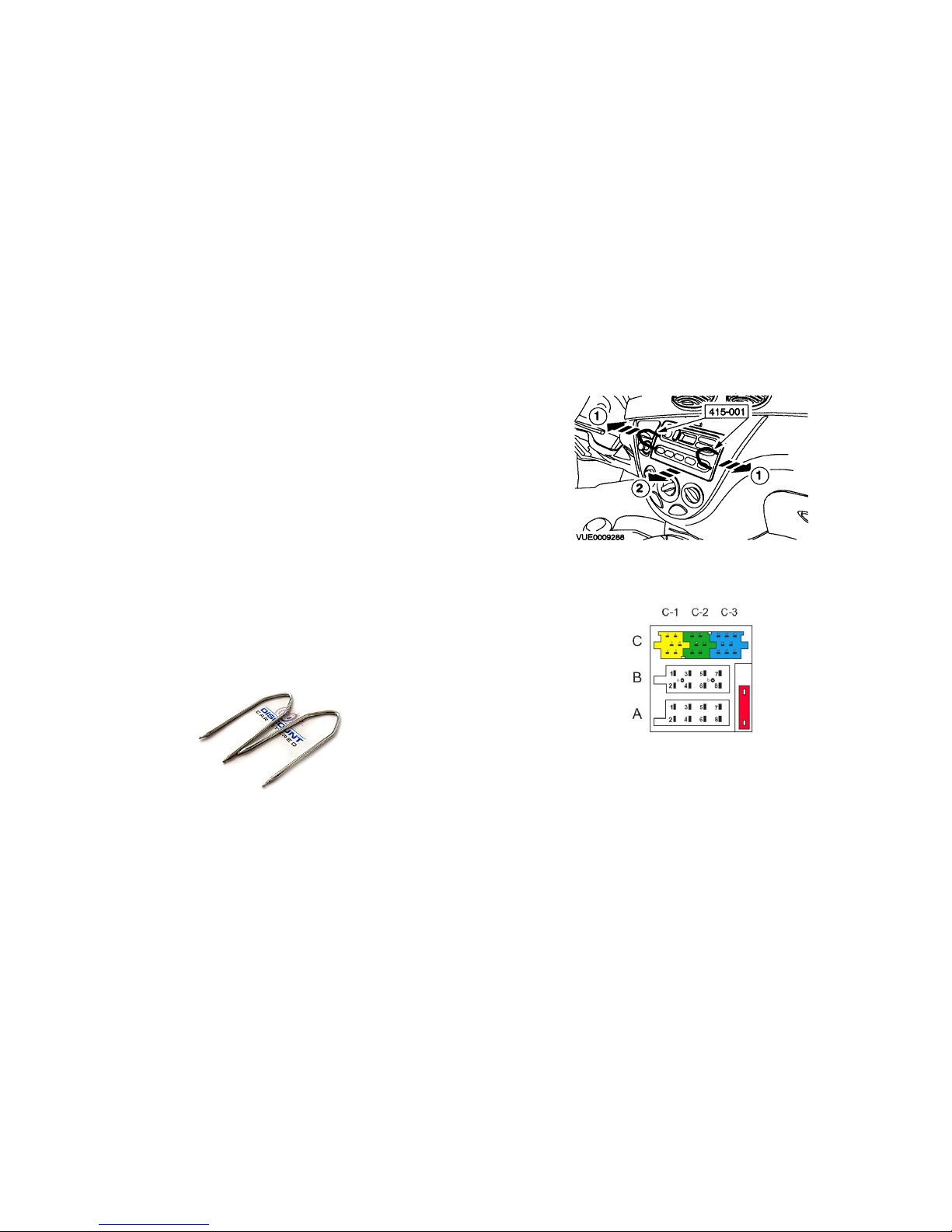
Remove radio from dashboard to gain access to connectors.
This kit includes tools required to remove radio (See Fig. 1
Fig. 1Fig. 1
Fig. 1)
Fig. 1
Fig. 1Fig. 1
Fig. 1
Radio Removal Tool
1.
To remove radio simply push tools into keyholes on both
sides of radio until locked, then (1) pull tools slightly
sideways and (2) forward as illustrated in
Fig.
Fig. Fig.
Fig. 2222
Fig.
Fig. Fig.
Fig. 2222
Fig.
Fig. Fig.
Fig. 3333
Radio Connectors
2.
Radio connectors resemble those seen in
Fig.
Fig.Fig.
Fig. 3333
3. Connect blue/ green plug from installation harness (See
Fig.
Fig. Fig.
Fig.
4444
) to CCCC----2222////CCCC----3333 slots on radio (See
Fig.
Fig. Fig.
Fig. 3333
))))
Page 3
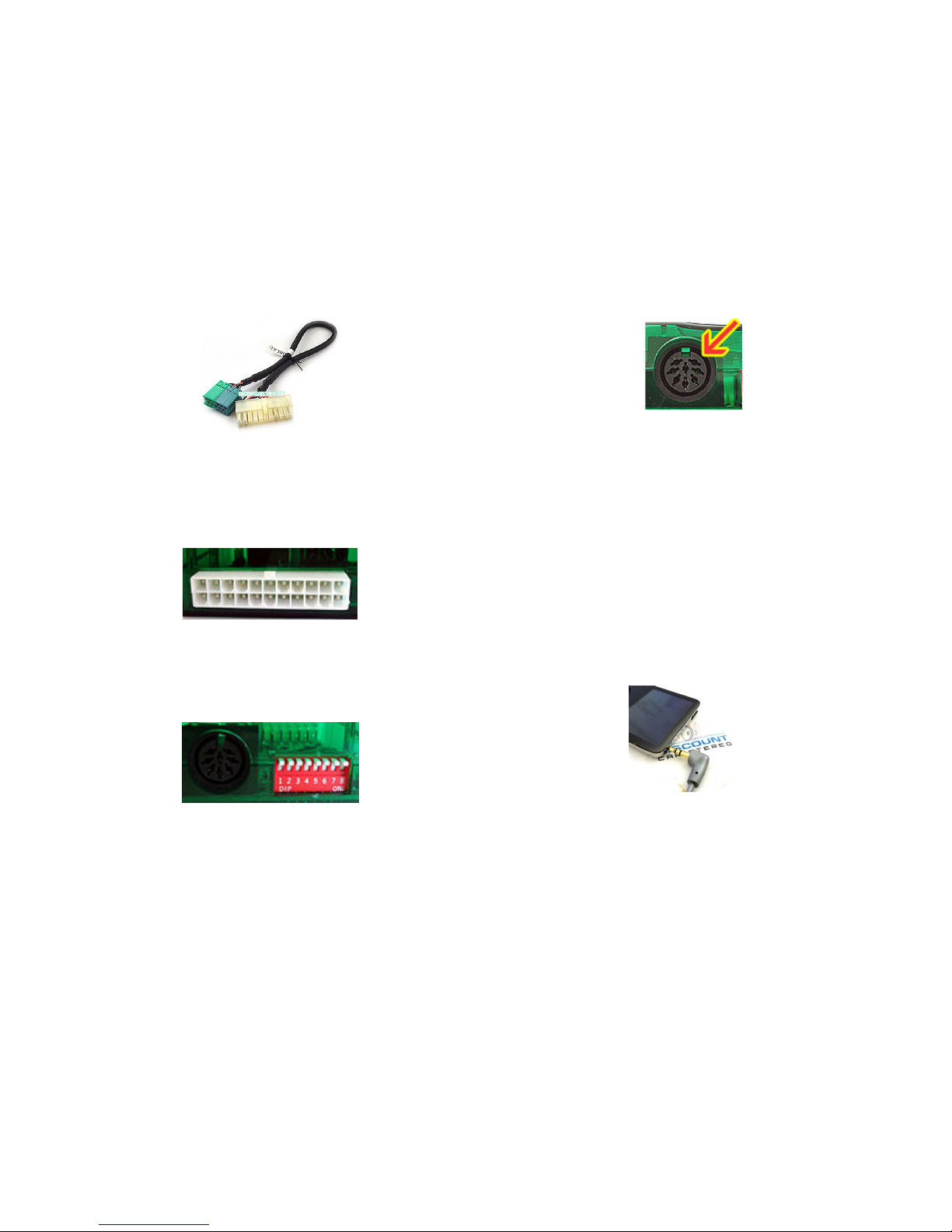
Fig.
Fig. Fig.
Fig. 4444
installation harness
4. Connect 22-pin Molex plug on installation harness (See
Fig.
Fig. Fig.
Fig.
4444
) to 22-pin connector on Module (See
Fig.
Fig. Fig.
Fig. 5555
)
Fig.
Fig. Fig.
Fig. 5555
22-pin Module connector
5. Set dip switches # 2222 &
& &
& #
# #
# 8
8 8
8 tttto “ON” (down). All others should
be “OFF” (Up) (See
Fig.
Fig. Fig.
Fig. 6666
))))
Fig. 6
Fig. 6Fig. 6
Fig. 6
dip-switches
6. Connect included DIN to RCA or DIN to 3.5mm cable to 8-
pin DIN input on Module. (See
Fig.
Fig. Fig.
Fig. 7777
)
Fig. 7
Fig. 7Fig. 7
Fig. 7
8-pin DIN input
7. Route 3.5mm plug to front of dash or location where audio
device will reside (within 6 ft.) OR connect and route a set of
RCA audio cables (not included) to audio device
Test Operation
Test OperationTest Operation
Test Operation::::
1. Turn Radio “ON”
2. Press “CD
CDCD
CDCCCC” or “CD/AUX”
“CD/AUX”“CD/AUX”
“CD/AUX” button to enter CD
Changer/Aux Mode
3. Connect audio device to 3.5mm jack (See
Fig.
Fig.Fig.
Fig.8888
) or to RCA
jacks.
Fig.
Fig. Fig.
Fig. 8888
3.5mm plug
4. Press play and audio device and music will be played on car
speakers.
Page 4
5. Use radio volume control button to set playback level. To
reduce distortion we recommended setting the audio device
volume level to 50% or less
Warning!
Warning!Warning!
Warning!
Playlist and Track selection is *NOT* possible from the
radio. You must use the audio devices built-in controls to access
audio files.
6. If correct operation is confirmed go ahead and reinstall the
Radio.
FFFFrequent
requentrequent
requent asked questions
asked questionsasked questions
asked questions
1. Does the
Does the Does the
Does the PXDX
PXDXPXDX
PXDX FB
FBFB
FB work
workwork
work on other Focus Radios
on other Focus Radioson other Focus Radios
on other Focus Radios
YES
YESYES
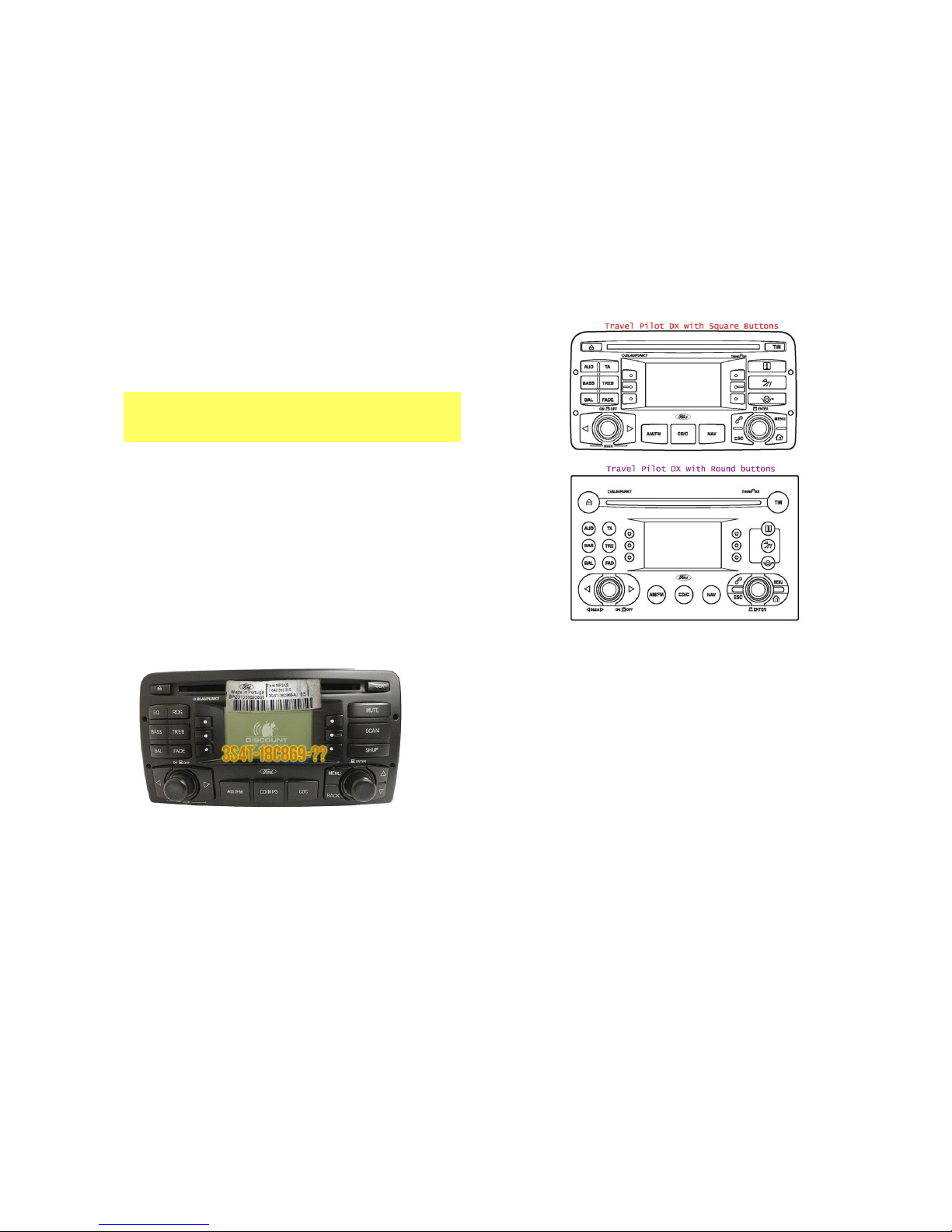
YES;;;; The PXDXFB is exclusive to US Ford Focus CD/MP3 Player
Model 3S4T-18C869 (as seen in below picture). Will also work on
Eu
EuEu
European Travel
ropean Travelropean Travel
ropean Travel PPPPilot DX
ilot DX ilot DX
ilot DX with Square and Round
with Square and Roundwith Square and Round
with Square and Rounded mode
ed modeed mode
ed mode buttons
buttons buttons
buttons
only
onlyonly
only ....
Fig. 7
Fig. 7Fig. 7
Fig. 7
If your 2000-04 Focus has a different radio, please call or email us for other
possible solution.
2. Can I use the radio buttons to control the audio device
Can I use the radio buttons to control the audio deviceCan I use the radio buttons to control the audio device
Can I use the radio buttons to control the audio device
NO;
NO; NO;
NO; Auxiliary input adapters are passive devices that do not control
the audio device.
3. Can I charge
Can I charge Can I charge
Can I charge my iPod or iPhone from this device
my iPod or iPhone from this devicemy iPod or iPhone from this device
my iPod or iPhone from this device
YES,
YES, YES,
YES, but only with optional PODCBLB
optional PODCBLBoptional PODCBLB
optional PODCBLB----5V
5V5V
5V dock cable which provides
audio playback and charging (no controls) of Apple iPod and iPhones
with 30-pin connectors OR purchase our PXDPFB
PXDPFBPXDPFB
PXDPFB Kit.
4. I have followed the instructions but
I have followed the instructions but I have followed the instructions but
I have followed the instructions but the radio does not recognize
the radio does not recognize the radio does not recognize
the radio does not recognize
the adapter. What do you suggest?
the adapter. What do you suggest?the adapter. What do you suggest?
the adapter. What do you suggest?
Please make sure to set dip-switches #2 & 8 to their “ON” position prior
to connecting module to harness otherwise the radio may not recognize
it. Please contact us if radio still does not recognize adapter.
Page 5

5. The install
The installThe install
The installation
ationation
ation manual included with this kit states
manual included with this kit states manual included with this kit states
manual included with this kit states “Blaupunkt
“Blaupunkt “Blaupunkt
“Blaupunkt
Radios are not compatible.
Radios are not compatible. Radios are not compatible.
Radios are not compatible. What is accurate
What is accurateWhat is accurate
What is accurate ????
The PXDX (as sold by supplier) is not compatible with Blaupunkt
stereos; however the PXDXFB Kit offered eeeexclusive
xclusivexclusive
xclusively
lyly
ly by Discount Car
Stereo.com is compatible
is compatibleis compatible
is compatible with 2000-04 Ford Focus with Blaupunkt
Radios. Please follow this guide for the proper installation of this kit.
** External or remote CD Changer refers to the optional Changer installed on the
lower dash, center armrest, hatch, trunk etc. (external CD Changer is not the
Changer built-into the head unit)
Call 804-717-5717 or email [email protected]
© 1995-Jan-18 Discount Car Stereo, Inc. All rights reserved. Information in this document is
subject to change without notice. Other products and companies referred to herein are
trademarks or registered trademarks of their respective companies or mark holders.
 Loading...