

Page 1
2023 FORD F-150 Owner's Manual
Page 2

Page 3
The information contained in this publication was correct at the time of release. In the interest of continuous
development, we reserve the right to change specifications, design or equipment at any time without
notice or obligation. No part of this publication may be reproduced, transmitted, stored in a retrieval
system or translated into any language in any form by any means without our written permission. Errors
and omissions excepted.
© Ford Motor Company 2022
All rights reserved.
Part Number: -202206-20220624192152
California Proposition 65
WARNING: Operating, servicing and maintaining a passenger vehicle or off-highway motor vehicle
can expose you to chemicals including engine exhaust, carbon monoxide, phthalates, and lead, which
are known to the State of California to cause cancer and birth defects or other reproductive harm. To
minimize exposure, avoid breathing exhaust, do not idle the engine except as necessary, service your
vehicle in a well-ventilated area and wear gloves or wash your hands frequently when servicing your
vehicle. For more information go to www.P65Warnings.ca.gov/passenger-vehicle.
WARNING: Battery posts, terminals and
related accessories contain lead and lead
compounds, chemicals known to the State of
California to cause cancer and reproductive harm.
Wash your hands after handling.
Page 4

Page 5

About Us - Raptor
SVT ......................................................................21
Team RS .............................................................21
Ford Performance ..........................................21
Contacting Us
Contacting Us .................................................22
Introduction
About This Publication ................................24
Using This Publication .................................25
Symbols Glossary
Symbols Used on Your Vehicle ................26
Data Privacy
Data Privacy ....................................................29
Service Data ....................................................30
Event Data .......................................................30
Settings Data ...................................................31
Connected Vehicle Data - Excluding:
Police Responder .......................................31
Mobile Device Data .......................................32
Emergency Call System Data ...................32
At a Glance - Raptor
Unique Features - 5.2L ................................33
Unique Features - 3.5L Ecoboost™ .......33
Visual Search
Steering Wheel - Excluding: Raptor/
Police Responder ......................................35
Steering Wheel - Raptor .............................36
Steering Wheel - Police Responder ........37
Instrument Panel - Excluding: Raptor/
Police Responder ......................................38
Instrument Panel - Raptor ........................39
Instrument Panel - Police Responder
..........................................................................40
Vehicle Interior - Excluding: Raptor/
Police Responder .......................................41
Vehicle Interior - Raptor ..............................42
Vehicle Interior - Police Responder ........43
Front Exterior - Excluding: Raptor/Police
Responder ...................................................44
Front Exterior - Raptor ................................45
Front Exterior - Police Responder ...........46
Rear Exterior - Excluding: Raptor/Police
Responder ....................................................47
Rear Exterior - Raptor ..................................48
Rear Exterior - Police Responder ............49
Child Safety
Child Safety Precautions ...........................50
Child Restraint Anchor Points ...................51
Child Restraints ..............................................53
Installing Child Restraints ..........................54
Booster Seats ..................................................61
Child Safety Locks ........................................63
Seatbelts
Seatbelt Precautions ...................................64
Fastening and Unfastening the Seatbelts
..........................................................................65
Sensitive Locking Mode .............................66
Automatic Locking Mode ..........................66
Adjusting the Seatbelts During
Pregnancy ....................................................67
Adjusting the Seatbelt Height ..................67
Adjusting the Seatbelt Length .................68
Seatbelt Reminder .......................................68
Checking the Seatbelts ...............................70
Seatbelt Extensions .......................................71
Personal Safety System™
What Is the Personal Safety System
...........................................................................72
How Does the Personal Safety System
Work ...............................................................72
1
2023 F-150 (TFD) Canada/United States of America, enUSA, Edition date: 202206, DOM
Table of Contents
Page 6

Personal Safety System Components
...........................................................................72
Airbags
How Do the Front Airbags Work ..............73
How Do the Side Airbags Work ................73
How Do the Knee Airbags Work ...............74
How Does the Safety Canopy™ Work
...........................................................................74
Airbag Precautions ........................................75
Properly Adjusting the Driver and Front
Passenger Seats ........................................76
Children and Airbags ....................................76
Front Passenger Sensing System ............77
Crash Sensors and Airbag Indicator ......80
Crash Sensors and Airbag Indicator -
Police Responder .......................................81
Disposing of Airbags ....................................86
Pedestrian Alert System -
Hybrid Electric Vehicle
(HEV)
What Is the Pedestrian Alert System
...........................................................................87
911 Assist
What Is 911 Assist .........................................88
How Does 911 Assist Work ........................88
Emergency Call Requirements ................88
Emergency Call Limitations ......................89
Keys and Remote Controls
Remote Control Limitations .....................90
Using the Remote Control - Police
Responder ...................................................90
Using the Remote Control ..........................91
Opening and Closing the Flip Key ............91
Removing the Key Blade ............................92
Sounding the Panic Alarm .........................92
Locating Your Vehicle ..................................92
Changing the Remote Control Battery -
Police Responder ......................................92
Changing the Remote Control Battery -
Vehicles With: Push Button Start .......93
Changing the Remote Control Battery -
Vehicles With: Flip Key ............................95
Replacing a Lost Key or Remote Control
..........................................................................96
Programming the Remote Control -
Vehicles With: Push Button Start .......96
Programming the Remote Control -
Vehicles With: Flip Key ............................97
Keys and Remote Controls –
Troubleshooting ........................................98
MyKey™ - Vehicles With:
MyKey
What Is MyKey ...............................................99
MyKey Settings ..............................................99
Creating a MyKey ........................................100
Programming a MyKey ...............................101
Clearing All MyKeys .....................................101
Checking MyKey System Status .............101
Using MyKey With Remote Start
Systems .......................................................101
MyKey – Troubleshooting ........................102
Doors and Locks
Operating the Doors From Outside Your
Vehicle .........................................................104
Operating the Doors From Inside Your
Vehicle .........................................................104
Autounlock ....................................................105
Autolock ..........................................................105
Mislock ............................................................105
Doors and Locks Audible Warnings ......105
Doors and Locks – Troubleshooting
........................................................................106
Keyless Entry
What Is Keyless Entry ................................108
Keyless Entry Limitations .........................108
2
2023 F-150 (TFD) Canada/United States of America, enUSA, Edition date: 202206, DOM
Table of Contents
Page 7

Keyless Entry Settings ...............................108
Using Keyless Entry ....................................108
Keyless Entry – Troubleshooting ..........109
Keyless Entry Keypad
What Is the Keyless Entry Keypad .........110
Keyless Entry Keypad Limitations ..........110
Locating the Keyless Entry Keypad .......110
Keyless Entry Keypad Master Access
Code ..............................................................110
Keyless Entry Keypad Personal Access
Codes ............................................................110
Using the Keyless Entry Keypad ...............111
Keyless Entry Keypad – Troubleshooting
...........................................................................111
Easy Entry and Exit
How Does Easy Entry and Exit Work
..........................................................................112
Switching Easy Entry and Exit On and
Off ...................................................................112
Tailgate - Vehicles With:
Manual Tailgate
Tailgate Precautions ....................................113
Opening the Tailgate ...................................113
Locking and Unlocking the Tailgate .......113
Removing and Installing the Tailgate
..........................................................................113
Tailgate Step ..................................................114
Bed Extender ..................................................115
Tailgate Work Surface .................................117
Tailgate - Vehicles With:
Power Tailgate
Tailgate Precautions ....................................119
Opening the Tailgate ...................................119
Closing the Tailgate .....................................119
Removing and Installing the Tailgate
.........................................................................120
Tailgate Step ...................................................121
Bed Extender .................................................122
Tailgate Work Surface ................................124
Tailgate – Troubleshooting ......................125
Tailgate - Vehicles With:
Remote Release Tailgate
Tailgate Precautions ...................................127
Opening the Tailgate ...................................127
Removing and Installing the Tailgate
..........................................................................127
Tailgate Step .................................................128
Bed Extender .................................................129
Tailgate Work Surface .................................131
Tailgate – Troubleshooting ......................132
Security
Passive Anti-Theft System ......................134
Anti-Theft Alarm System .........................134
Anti-Theft Alarm System Settings .......135
Security – Troubleshooting .....................136
Power Running Boards
Power Running Board Precautions .......138
Power Running Board Settings ..............138
Power Running Board Kick Switch .......139
Power Running Boards –
Troubleshooting .......................................139
Steering Wheel
Adjusting the Steering Wheel - Vehicles
With: Manual Adjustable Steering
Column .......................................................140
Adjusting the Steering Wheel - Vehicles
With: Power Adjustable Steering
Column .......................................................140
Resetting the Stopping Position -
Vehicles With: Power Adjustable
Steering Column .......................................141
Horn ...................................................................141
Switching the Heated Steering Wheel
On and Off - Vehicles With: Heated
Steering Wheel ..........................................141
3
2023 F-150 (TFD) Canada/United States of America, enUSA, Edition date: 202206, DOM
Table of Contents
Page 8

Adjustable Pedals
Adjusting the Pedals ..................................142
Wipers and Washers
Wipers ..............................................................143
Autowipers .....................................................143
Checking the Wiper Blades .....................144
Replacing the Front Wiper Blades ........144
Washers ..........................................................145
Wipers and Washers – Troubleshooting
.........................................................................145
Exterior Lighting
Exterior Lighting Control - Excluding:
Police Responder .....................................147
Exterior Lighting Control - Police
Responder ..................................................147
Headlamps .....................................................147
Headlamps – Troubleshooting ..............148
Autolamps .....................................................148
Exterior Lamps .............................................148
Exterior Zone Lighting .................................151
Automatic High Beam Control ...............152
Automatic High Beam Control –
Troubleshooting .......................................154
Glare Free Lighting ......................................155
Glare Free Lighting – Troubleshooting
.........................................................................157
Adaptive Front Lighting .............................157
Interior Lighting
Switching All of the Interior Lamps On
and Off ........................................................159
Switching the Front Interior Lamps On
and Off - Excluding: Police Responder
.........................................................................159
Switching the Front Interior Lamps On
and Off - Police Responder .................159
Switching the Rear Interior Lamps On
and Off ........................................................160
Interior Lamp Function .............................160
Adjusting the Instrument Panel Lighting
Brightness ..................................................160
Ambient Lighting .........................................160
Interior Lighting – Troubleshooting ......160
Windows
Opening and Closing the Windows .......161
Global Opening .............................................161
Window Bounce-Back ...............................162
Locking the Rear Window Controls ......162
Opening and Closing the Sliding
Windows .....................................................162
Interior Mirror
Interior Mirror Precautions .......................163
Manually Dimming the Interior Mirror
.........................................................................163
Auto-Dimming Interior Mirror .................163
Exterior Mirrors
Adjusting the Exterior Mirrors .................164
Folding the Exterior Mirrors - Vehicles
With: Manual Folding Mirrors .............164
Folding the Exterior Mirrors - Vehicles
With: Power Folding Mirrors ................164
Extending the Exterior Mirrors ................165
Auto-Dimming Exterior Mirror ................165
Moonroof
Opening and Closing the Sunshade .....166
Opening and Closing the Moonroof ......166
Venting the Moonroof ................................167
Moonroof Bounce-Back ............................167
Instrument Cluster
Instrument Cluster Overview - Vehicles
With: 4.2 Inch Screen .............................168
Instrument Cluster Overview - Vehicles
With: 8 Inch Screen ................................169
Instrument Cluster Overview - Vehicles
With: 12 Inch Screen ...............................170
4
2023 F-150 (TFD) Canada/United States of America, enUSA, Edition date: 202206, DOM
Table of Contents
Page 9

Tachometer ...................................................170
Speedometer ................................................170
Fuel Gauge .....................................................170
Engine Coolant Temperature Gauge
..........................................................................171
Engine Oil Pressure Gauge ........................171
Transmission Fluid Temperature Gauge
..........................................................................171
Turbo Boost Gauge ......................................171
What Are the Instrument Cluster
Warning Lamps .........................................171
Instrument Cluster Warning Lamps .......171
What Are the Instrument Cluster
Indicators ....................................................173
Instrument Cluster Indicators ..................173
Instrument Cluster Display
Using the Instrument Cluster Display
Controls .......................................................175
Instrument Cluster Display Main Menu -
Vehicles With: 12 Inch Screen ..............175
Instrument Cluster Display Main Menu -
Raptor ..........................................................176
Instrument Cluster Display Main Menu -
Vehicles With: 4.2 Inch Screen ...........176
Instrument Cluster Display Main Menu -
Vehicles With: 8 Inch Screen ...............176
Customizing the Instrument Cluster
Display ..........................................................177
EV Coach - 3.5L, Hybrid Electric Vehicle
(HEV) ............................................................177
Brake Coach - Hybrid Electric Vehicle
(HEV) ...........................................................178
Trip Summary ................................................178
Personalized Settings
Changing the Language ............................179
Changing the Measurement Unit ..........179
Changing the Temperature Unit ............179
Changing the Tire Pressure Unit ............179
Trip Computer
Accessing the Trip Computer - Vehicles
With: 4.2 Inch Screen .............................180
Accessing the Trip Computer - Vehicles
With: 8 Inch Screen/12 Inch Screen
........................................................................180
Resetting the Trip Computer - Vehicles
With: 4.2 Inch Screen .............................180
Resetting the Trip Computer - Vehicles
With: 8 Inch Screen/12 Inch Screen
........................................................................180
Remote Start
What Is Remote Start .................................181
Remote Start Precautions ........................181
Remote Start Limitations ..........................181
Enabling Remote Start ...............................181
Remotely Starting and Stopping the
Vehicle ..........................................................181
Extending the Remote Start Duration
.........................................................................182
Remote Start Remote Control Indicators
.........................................................................182
Remote Start Settings ...............................182
Climate Control - Vehicles
With: Automatic
Temperature Control
Identifying the Climate Control Unit .....184
Switching Climate Control On and Off
.........................................................................184
Switching Recirculated Air On and Off
.........................................................................184
Switching Air Conditioning On and Off
.........................................................................184
Switching Defrost On and Off ................184
Switching Maximum Defrost On and Off
.........................................................................184
Switching Maximum Cooling On and Off
.........................................................................185
Switching the Heated Wiper Park On and
Off .................................................................185
5
2023 F-150 (TFD) Canada/United States of America, enUSA, Edition date: 202206, DOM
Table of Contents
Page 10

Switching the Heated Rear Window On
and Off ........................................................185
Setting the Blower Motor Speed ...........185
Switching the Heated Mirrors On and Off
.........................................................................185
Setting the Temperature ..........................185
Directing the Flow of Air ...........................186
Auto Mode .....................................................186
Climate Control Hints .................................187
Climate Control - Vehicles
With: Manual Temperature
Control
Identifying the Climate Control Unit .....189
Switching Climate Control On and Off
........................................................................189
Switching Recirculated Air On and Off
........................................................................189
Switching Air Conditioning On and Off
........................................................................189
Switching Defrost On and Off ................189
Switching Maximum Defrost On and Off
........................................................................189
Switching Maximum Cooling On and Off
........................................................................190
Switching the Heated Rear Window On
and Off ........................................................190
Setting the Blower Motor Speed ..........190
Switching the Heated Mirrors On and Off
........................................................................190
Setting the Temperature ..........................190
Directing the Flow of Air ...........................190
Climate Control Hints .................................191
Interior Air Quality
What Is the Cabin Air Filter ......................192
Replacing the Cabin Air Filter ..................192
Front Seats
Front Seat Precautions .............................193
Sitting in the Correct Position .................193
Manual Seats ................................................194
Power Seats ..................................................196
Massage Seats .............................................199
Heated Seats ...............................................200
Ventilated Seats .........................................200
Rear Seats - Crew Cab/
SuperCab
Manual Seats ...............................................202
Heated Seats ...............................................203
Rear Occupant Alert System
What is the Rear Occupant Alert System
........................................................................205
How Does the Rear Occupant Alert
System Work ............................................205
Rear Occupant Alert System Precautions
........................................................................205
Rear Occupant Alert System Limitations
........................................................................205
Switching Rear Occupant Alert System
On and Off ................................................205
Rear Occupant Alert System Indicators
.......................................................................206
Rear Occupant Alert System Audible
Warnings ...................................................206
Memory Function
What Is the Memory Function ...............207
Memory Function Precautions ..............207
Locating the Memory Function Buttons
........................................................................207
Saving a Preset Position ..........................207
Recalling a Preset Position .....................207
Garage Door Opener
Garage Door Opener Introduction .......208
Garage Door Opener Precautions and
Frequencies ..............................................208
Programming the Garage Door Opener
.......................................................................209
6
2023 F-150 (TFD) Canada/United States of America, enUSA, Edition date: 202206, DOM
Table of Contents
Page 11

Garage Door Opener Additional
Assistance ...................................................211
USB Ports
Locating the USB Ports - Excluding:
Raptor ..........................................................212
Locating the USB Ports - Raptor ...........212
Playing Media Using the USB Port ........213
Charging a Device ........................................213
Power Outlet - Vehicles With:
120V Power Outlet
What Is the Power Outlet .........................214
Power Outlet Precautions ........................214
Power Outlet Limitations .........................214
Locating the Power Outlets .....................214
Power Outlet Indicators ............................215
Power Outlet - Vehicles With:
12V Power Outlet
What Is the Power Outlet .........................216
Power Outlet Precautions ........................216
Locating the Power Outlets .....................216
Onboard Generator
What Is the Onboard Generator .............217
Onboard Generator Precautions -
Vehicles With: 2kW ..................................217
Onboard Generator Precautions -
Vehicles With: 2.4kW/7.2kW ...............218
Locating the Outlets ...................................219
Onboard Generator Indicators ...............219
Switching the Outlets On and Off .......220
What Is Utility Idle Mode - Vehicles With:
Flip Key .........................................................221
Switching Utility Idle Mode On and Off -
Vehicles With: Flip Key ...........................221
What Is Generator Mode ...........................221
Switching Generator Mode On and Off
.........................................................................221
Resetting Ground Fault Detection .........221
Resetting the Circuit Breaker - Vehicles
With: 7.2kW ................................................222
Onboard Generator – Troubleshooting
........................................................................223
Center Console Work Surface
Using the Center Console Work Surface
- Vehicles With: Column Shift ............225
Using the Center Console Work Surface
- Vehicles With: Console Shift ...........226
Center Console Work Surface –
Troubleshooting ......................................227
Wireless Accessory Charger
What Is the Wireless Accessory Charger
........................................................................228
Wireless Accessory Charger Precautions
........................................................................228
Locating the Wireless Accessory Charger
........................................................................228
Charging a Wireless Device .....................228
Storage
Cup Holders ..................................................229
Glove Compartment .................................229
Under Seat Storage ...................................230
Glasses Holder .............................................232
Starting and Stopping the
Engine
Starting and Stopping the Engine –
Precautions ...............................................233
Ignition Switch .............................................233
Push Button Ignition Switch ...................234
Starting the Engine ....................................234
Engine Block Heater ..................................236
Stopping the Engine ...................................237
Police Engine Idle - Vehicles With: Police
Pack .............................................................238
Automatic Engine Stop - Vehicles With:
Keyless Entry and Push Button Start
........................................................................239
7
2023 F-150 (TFD) Canada/United States of America, enUSA, Edition date: 202206, DOM
Table of Contents
Page 12

Accessing the Passive Key Backup
Position - Vehicles With: Keyless Entry
and Push Button Start .........................240
Starting and Stopping the Engine –
Troubleshooting .....................................240
Hybrid Electric Vehicle
Information - Hybrid Electric
Vehicle (HEV)
What is a Hybrid Electric Vehicle ..........244
How Does a Hybrid Electric Vehicle Work
........................................................................244
Hybrid Electric Vehicle Driving
Characteristics ........................................244
Hybrid Electric Vehicle Indicators .........244
Hybrid Electric Vehicle Information –
Troubleshooting ......................................245
Power Flow ...................................................245
Eco Idle ...........................................................246
Eco Idle – Troubleshooting .....................247
Auto-Start-Stop
What Is Auto-Start-Stop .........................248
Auto-Start-Stop Precautions ................248
Switching Auto-Start-Stop On and Off
........................................................................248
Stopping the Engine ..................................248
Restarting the Engine ...............................248
Auto-Start-Stop Indicators ....................248
Auto-Start-Stop – Troubleshooting
........................................................................249
Fuel and Refueling
Fuel and Refueling Precautions .............251
Fuel Quality ...................................................252
Locating the Fuel Filler Funnel ..............254
Running Out of Fuel ...................................254
Refueling ........................................................255
Fuel Tank Capacity - Excluding: Hybrid
Electric Vehicle (HEV) ..........................259
Fuel Tank Capacity - Hybrid Electric
Vehicle (HEV) ..........................................259
Fuel and Refueling – Troubleshooting
.......................................................................260
Catalytic Converter
What Is the Catalytic Converter ............262
Catalytic Converter Precautions ...........262
Catalytic Converter – Troubleshooting
........................................................................262
High Voltage Battery - Hybrid
Electric Vehicle (HEV)
What Is the High Voltage Battery .........263
High Voltage Battery Precautions ........263
Automatic Transmission
Automatic Transmission Precautions
........................................................................264
Automatic Transmission Positions ......264
Shifting Your Vehicle Into Gear .............265
Shifting Your Vehicle Into Gear - Raptor
........................................................................265
Shifting Your Vehicle Into Gear - Police
Responder ................................................266
Manually Shifting Gears ..........................266
Temporary Neutral Mode ........................268
Using Progressive Range Selection ......269
Automatic Return to Park (P) ...............269
Stowing the Selector Lever - Excluding:
Raptor .........................................................270
Stowing the Selector Lever - Raptor
........................................................................270
Manual Park Release ..................................271
Automatic Transmission Audible
Warnings ....................................................273
Four-Wheel Drive
How Does Four-Wheel Drive Work -
Excluding: Raptor ....................................274
How Does Four-Wheel Drive Work -
Raptor .........................................................274
Four-Wheel Drive Precautions ...............275
Four-Wheel Drive Limitations ................275
8
2023 F-150 (TFD) Canada/United States of America, enUSA, Edition date: 202206, DOM
Table of Contents
Page 13

Selecting a Four-Wheel Drive Mode -
Excluding: Raptor ....................................276
Selecting a Four-Wheel Drive Mode -
Raptor ..........................................................277
Four-Wheel Drive Modes .........................278
Four-Wheel Drive Indicators ...................279
Four-Wheel Drive – Troubleshooting
.......................................................................280
Electronic Locking Differential
What Is the Electronic Locking
Differential ................................................284
How Does the Electronic Locking
Differential Work - Excluding: Raptor
........................................................................284
How Does the Electronic Locking
Differential Work - Raptor ..................284
Electronic Locking Differential
Precautions ..............................................285
Switching the Electronic Locking
Differential On and Off - 4x4,
Excluding: Raptor ...................................285
Switching the Electronic Locking
Differential On and Off - Raptor .......287
Switching the Electronic Locking
Differential On and Off - 4x2 .............288
Electronic Locking Differential Indicators
........................................................................289
Electronic Locking Differential –
Troubleshooting .....................................290
Brakes
Brake Precautions .......................................291
Anti-Lock Braking System ........................291
Brake Over Accelerator - Excluding:
Raptor ..........................................................291
Brake Over Accelerator - Raptor ............291
Locating the Brake Fluid Reservoir ........291
Checking the Brake Fluid ..........................291
Brake Fluid Specification .........................292
Brakes – Troubleshooting .......................292
Electric Parking Brake
What Is the Electric Parking Brake .......294
Applying the Electric Parking Brake .....294
Applying the Electric Parking Brake in an
Emergency ................................................294
Manually Releasing the Electric Parking
Brake ...........................................................294
Automatically Releasing the Electric
Parking Brake ...........................................295
Electric Parking Brake Audible Warning
........................................................................295
Releasing the Electric Parking Brake if
the Vehicle Battery Has Run Out of
Charge ........................................................295
Electric Parking Brake – Troubleshooting
........................................................................295
Reverse Braking Assist
What Is Reverse Braking Assist .............297
How Does Reverse Braking Assist Work
........................................................................297
Reverse Braking Assist Precautions ......297
Switching Reverse Braking Assist On and
Off ................................................................298
Overriding Reverse Braking Assist .......298
Reverse Braking Assist Indicators ........298
Reverse Braking Assist –
Troubleshooting .....................................299
Cross Traffic Braking
What Is Cross Traffic Braking ..................301
How Does Cross Traffic Braking Work
.........................................................................301
Cross Traffic Braking Precautions .........301
Switching Cross Traffic Braking On and
Off ................................................................302
Overriding Cross Traffic Braking ...........302
Cross Traffic Braking Indicators ............302
Cross Traffic Braking – Troubleshooting
........................................................................302
9
2023 F-150 (TFD) Canada/United States of America, enUSA, Edition date: 202206, DOM
Table of Contents
Page 14

Hill Start Assist
What Is Hill Start Assist ...........................304
How Does Hill Start Assist Work ..........304
Hill Start Assist Precautions ..................304
Hill Start Assist – Troubleshooting ......304
Auto Hold
How Does Auto Hold Work .....................305
Switching Auto Hold On and Off ..........305
Using Auto Hold ..........................................305
Auto Hold Indicators .................................305
Traction Control
What Is Traction Control ..........................307
How Does Traction Control Work .........307
Switching Traction Control On and Off
........................................................................307
Traction Control Indicator .......................307
Traction Control – Troubleshooting .....308
Stability Control
How Does Stability Control Work ........309
Switching Stability Control On and Off
.........................................................................310
Stability Control Indicator .........................311
Trail Control - Raptor/Tremor
What Is Trail Control ...................................312
Trail Control Limitations ............................312
Switching Trail Control On and Off .......312
Setting the Trail Control Speed ..............312
Canceling the Set Speed ..........................312
Trail Control Indicators ..............................313
Trail One Pedal Drive ..................................313
Trail One Pedal Drive – Troubleshooting
.........................................................................314
Trail Control – Troubleshooting .............315
Trail Turn Assist
What Is Trail Turn Assist ...........................316
Trail Turn Assist Precautions ...................316
Trail Turn Assist Limitations ....................316
Switching Trail Turn Assist On and Off
.........................................................................316
Trail Turn Assist Indicators .......................316
Trail Turn Assist – Troubleshooting ......317
Hill Descent Control
What Is Hill Descent Control ...................318
How Does Hill Descent Control Work
.........................................................................318
Hill Descent Control Precautions ..........318
Switching Hill Descent Control On and
Off .................................................................318
Setting the Hill Descent Speed ..............318
Hill Descent Control Indicator ................318
Hill Descent Control – Troubleshooting
.........................................................................319
Steering
Electric Power Steering ............................320
Steering – Troubleshooting .....................321
Parking Aids
Parking Aid Precautions ...........................323
Switching Parking Aid On and Off -
Vehicles Without: Active Park Assist
........................................................................323
Switching Parking Aid On and Off -
Vehicles With: Active Park Assist ......324
Rear Parking Aid ..........................................324
Front Parking Aid .........................................325
Side Parking Aid ..........................................326
Parking Aid Indicators ................................327
Parking Aids – Troubleshooting ............327
Rear View Camera
What Is the Rear View Camera .............329
Rear View Camera Precautions ............329
10
2023 F-150 (TFD) Canada/United States of America, enUSA, Edition date: 202206, DOM
Table of Contents
Page 15

Locating the Rear View Camera ...........329
Rear View Camera Guide Lines .............330
Rear View Camera Settings ...................330
360 Degree Camera
What Is the 360 Degree Camera ..........332
How Does the 360 Degree Camera Work
........................................................................332
360 Degree Camera Precautions .........332
Locating the 360 Degree Cameras -
Excluding: Raptor/Tremor ...................332
Locating the 360 Degree Cameras -
Raptor/Tremor .........................................333
360 Degree Camera Guide Lines ..........333
360 Degree Camera Settings ................334
Active Park Assist
What Is Active Park Assist .......................336
How Does Active Park Assist Work ......336
Active Park Assist Precautions ..............336
Switching Active Park Assist On and Off
........................................................................336
Entering a Parallel Parking Space ........336
Entering a Perpendicular Parking Space
........................................................................337
Exiting a Parking Space ............................337
Active Park Assist – Troubleshooting
........................................................................338
Cruise Control
What Is Cruise Control .............................340
Switching Cruise Control On and Off
.......................................................................340
Setting the Cruise Control Speed ........340
Canceling the Set Speed ..........................341
Resuming the Set Speed ..........................341
Cruise Control Indicators ..........................341
Adaptive Cruise Control
How Does Adaptive Cruise Control With
Stop and Go Work ..................................342
Adaptive Cruise Control Precautions
........................................................................342
Adaptive Cruise Control Limitations
........................................................................343
Switching Adaptive Cruise Control On
and Off .......................................................344
Adaptive Cruise Control Automatic
Cancellation .............................................345
Setting the Adaptive Cruise Control
Speed ..........................................................345
Setting the Adaptive Cruise Control Gap
........................................................................346
Canceling the Set Speed .........................347
Resuming the Set Speed .........................347
Overriding the Set Speed ........................348
Adaptive Cruise Control Indicators ......348
Switching From Adaptive Cruise Control
to Cruise Control .....................................348
Lane Centering ............................................349
Predictive Speed Assist .............................351
Predictive Speed Assist –
Troubleshooting ......................................353
Adaptive Cruise Control –
Troubleshooting ......................................354
BlueCruise
What Is BlueCruise .....................................356
How Does BlueCruise Work ....................356
BlueCruise Precautions ............................356
BlueCruise Requirements ........................357
BlueCruise Limitations ..............................357
BlueCruise Settings ...................................358
Switching BlueCruise On and Off ........358
BlueCruise Alerts ........................................359
BlueCruise Automatic Cancellation .....359
BlueCruise Indicators ................................359
BlueCruise – Troubleshooting ...............360
Drive Mode Control
What Is Drive Mode Control ...................362
How Does Drive Mode Control Work
........................................................................362
11
2023 F-150 (TFD) Canada/United States of America, enUSA, Edition date: 202206, DOM
Table of Contents
Page 16

How Does Drive Mode Control Work -
Raptor .........................................................362
Selecting a Drive Mode - King Ranch/
Lariat/Limited/Platinum/XL/XLT
........................................................................363
Selecting a Drive Mode - Raptor ..........364
Drive Modes ..................................................365
Drive Mode Control – Troubleshooting
........................................................................373
Lane Keeping System
What Is the Lane Keeping System .......375
How Does the Lane Keeping System
Work .............................................................375
Lane Keeping System Precautions ......375
Lane Keeping System Limitations ........375
Switching the Lane Keeping System On
and Off ........................................................376
Switching the Lane Keeping System
Mode ............................................................376
Alert Mode .....................................................376
Aid Mode .........................................................377
Alert and Aid Mode .....................................377
Lane Keeping System Indicators ..........378
Lane Keeping System – Troubleshooting
........................................................................379
Blind Spot Information
System
What Is Blind Spot Information System
........................................................................382
How Does Blind Spot Information
System Work ............................................382
Blind Spot Information System
Precautions ...............................................382
Blind Spot Information System
Limitations ................................................382
Blind Spot Information System
Requirements ..........................................382
Switching Blind Spot Information
System On and Off ................................383
Locating the Blind Spot Information
System Sensors ......................................383
Blind Spot Information System With
Trailer Coverage ......................................383
Blind Spot Information System
Indicators ...................................................385
Blind Spot Information System –
Troubleshooting .....................................386
Cross Traffic Alert
What Is Cross Traffic Alert .......................387
How Does Cross Traffic Alert Work ......387
Cross Traffic Alert Precautions ..............387
Cross Traffic Alert Limitations ...............387
Switching Cross Traffic Alert On and Off
.......................................................................388
Locating the Cross Traffic Alert Sensors
.......................................................................388
Cross Traffic Alert Indicators .................388
Cross Traffic Alert – Troubleshooting
.......................................................................389
Pre-Collision Assist
What Is Pre-Collision Assist ...................390
How Does Pre-Collision Assist Work
.......................................................................390
Pre-Collision Assist Precautions ..........390
Pre-Collision Assist Limitations .............391
Switching Pre-Collision Assist On and
Off - Police Responder .........................392
Switching Pre-Collision Assist On and
Off ................................................................392
Locating the Pre-Collision Assist Sensors
........................................................................393
Distance Indication ....................................393
Distance Alert ..............................................395
Automatic Emergency Braking .............396
Evasive Steering Assist ............................396
Pre-Collision Assist – Troubleshooting
........................................................................397
Driver Alert
What Is Driver Alert ....................................399
How Does Driver Alert Work ...................399
12
2023 F-150 (TFD) Canada/United States of America, enUSA, Edition date: 202206, DOM
Table of Contents
Page 17

Driver Alert Precautions ...........................399
Driver Alert Limitations ............................399
Switching Driver Alert On and Off .......399
Driver Alert – Troubleshooting .............400
Speed Sign Recognition
What Is Speed Sign Recognition ...........401
How Does Speed Sign Recognition Work
........................................................................401
Speed Sign Recognition Precautions
........................................................................401
Speed Sign Recognition Limitations
........................................................................401
Speed Sign Recognition Indicators ......402
Setting the Speed Sign Recognition
Speed Warning .......................................402
Setting the Speed Sign Recognition
Speed Tolerance ....................................402
Speed Sign Recognition –
Troubleshooting .....................................402
Load Carrying
Load Carrying Precautions .....................404
Using a Slide-In Camper .........................405
Locating the Safety Compliance
Certification Labels ...............................405
What Is the Gross Axle Weight Rating
.......................................................................405
What Is the Gross Vehicle Weight Rating
.......................................................................405
What Is the Gross Combined Weight
Rating .........................................................406
Calculating Payload ..................................406
Calculating the Load Limit ......................407
Pickup Bed
Pickup Bed Precautions ..........................409
Pickup Bed Anchor Points ......................409
Tailgate Anchor Points ..............................410
Pickup Bed Ramps .......................................411
Connecting a Trailer
Connecting a Trailer Precautions ..........414
Hitches ............................................................414
Connecting a Trailer ...................................414
Trailer Lighting Check ................................416
Connecting a Trailer – Troubleshooting
.........................................................................417
Towing a Trailer
Towing a Trailer Precautions ...................418
Trailer Brake Precautions .........................418
Towing a Trailer Limitations ....................419
Loading Your Trailer ....................................419
Trailer Towing Hints ....................................419
Launching or Retrieving a Boat or
Personal Watercraft ..............................420
Towing Weights and Dimensions ..........421
Towing a Trailer – Troubleshooting ......423
Integrated Trailer Brake
Controller
What Is the Integrated Trailer Brake
Controller ...................................................425
Integrated Trailer Brake Controller
Precautions ...............................................425
Using the Integrated Trailer Brake
Controller ...................................................425
Adjusting the Integrated Trailer Brake
Controller Mode ......................................427
Integrated Trailer Brake Controller –
Troubleshooting .....................................428
Trailer Sway Control
How Does Trailer Sway Control Work
.......................................................................430
Trailer Sway Control Precautions .........430
Switching Trailer Sway Control On and
Off ................................................................430
Trailer Hitching Assistance
What Is Trailer Hitching Assistance ......431
13
2023 F-150 (TFD) Canada/United States of America, enUSA, Edition date: 202206, DOM
Table of Contents
Page 18

How Does Trailer Hitching Assistance
Work .............................................................431
Trailer Hitching Assistance Precautions
.........................................................................431
Trailer Hitching Assistance Limitations
........................................................................432
Switching Trailer Hitching Assistance On
and Off .......................................................432
Using Trailer Hitching Assistance .........432
Trailer Hitching Assistance Indicators
........................................................................433
Smart Hitch
What Is Smart Hitch ..................................435
How Does Smart Hitch Work .................435
Smart Hitch Limitations ...........................435
Using Smart Hitch ......................................435
Onboard Scales
What Is Onboard Scales ..........................437
How Does Onboard Scales Work .........437
Onboard Scales Limitations ...................437
Using Onboard Scales ..............................437
Trailer Backup Assistance
What is Trailer Backup Assistance ......439
How Does Trailer Backup Assistance
Work ............................................................439
Trailer Backup Assistance Precautions
........................................................................439
Setting Up the Trailer Backup Assistance
for a Conventional Trailer ....................439
Switching Trailer Backup Assistance On
and Off .......................................................443
Using the Trailer Backup Assistance
Controller ..................................................444
Using the Trailer Backup Assistance
Views ..........................................................444
Trailer Backup Assistance –
Troubleshooting ......................................447
Trailer Reverse Guidance
What Is Trailer Reverse Guidance ........454
How Does Trailer Reverse Guidance
Work ............................................................454
Trailer Reverse Guidance Precautions
........................................................................454
Setting Up Trailer Reverse Guidance for
a Conventional Trailer ..........................454
Switching Trailer Reverse Guidance On
and Off .......................................................458
Using Trailer Reverse Guidance Views
.......................................................................458
Trailer Reverse Guidance –
Troubleshooting .....................................460
Driving Hints
Off-Road Driving ........................................466
Cold Weather Precautions ......................472
Driving on Snow and Ice ...........................473
Breaking-In ....................................................473
Driving Economically .................................473
Floor Mats ......................................................473
Snow Plowing - Vehicles
Without: Snow Plow Mode
Snow Plowing Precautions .....................475
Snow Plowing - Vehicles With:
Snow Plow Mode
Snow Plowing Precautions .....................476
Operating Your Vehicle With a
Snowplow .................................................476
Snowplow Mode .........................................477
Crash and Breakdown
Information
Roadside Assistance .................................478
High Voltage Battery Vehicle Precautions
- Hybrid Electric Vehicle (HEV) .........479
Switching the Hazard Flashers On and
Off ...............................................................480
14
2023 F-150 (TFD) Canada/United States of America, enUSA, Edition date: 202206, DOM
Table of Contents
Page 19

Jump Starting the Vehicle ......................480
Post-Crash Alert System .........................482
Automatic Crash Shutoff ........................482
Recovery Towing .........................................483
Transporting the Vehicle .........................484
Towing Your Vehicle
Towing Your Vehicle Precautions .........485
Recreationally Towing Your Vehicle -
4x4 ...............................................................485
Recreationally Towing Your Vehicle - 4x2
........................................................................487
Emergency Towing .....................................487
Towing Your Vehicle – Troubleshooting
........................................................................487
Fuses
Fuse Precautions .......................................488
Under Hood Fuse Box ..............................488
Body Control Module Fuse Box ............494
Identifying Fuse Types ..............................497
Fuses – Troubleshooting .........................497
Maintenance
Maintenance Precautions .......................498
Opening and Closing the Hood ............498
Under Hood Overview - 2.7L EcoBoost™
.......................................................................499
Under Hood Overview - 3.3L .................500
Under Hood Overview - 3.5L Ecoboost™
.........................................................................501
Under Hood Overview - 3.5L, Hybrid
Electric Vehicle (HEV) ..........................502
Under Hood Overview - 5.0L .................503
Under Hood Overview - 5.2L, Raptor
.......................................................................504
Engine Oil ......................................................505
Checking the Coolant ...............................506
Engine Air Filter ............................................510
Changing the Fuel Filter .............................511
Changing the 12V Battery .........................512
Adjusting the Headlamps - Vehicles
With: LED Headlamps ...........................514
Adjusting the Headlamps - Vehicles
With: Halogen Headlamps ..................515
Exterior Bulbs ................................................517
Interior Bulbs ................................................526
Drive Belt Routing - 2.7L EcoBoost™,
Vehicles With: Dual Generators ........526
Drive Belt Routing - 2.7L EcoBoost™,
Vehicles With: Single Generator .......526
Drive Belt Routing - 3.3L ..........................526
Drive Belt Routing - 3.5L Ecoboost™,
Vehicles With: Dual Generators .........527
Drive Belt Routing - 3.5L Ecoboost™,
Vehicles With: Single Generator ........527
Drive Belt Routing - 3.5L, Hybrid Electric
Vehicle (HEV) ...........................................527
Drive Belt Routing - 5.0L, Vehicles With:
Dual Generators ......................................527
Drive Belt Routing - 5.0L, Vehicles With:
Single Generator .....................................528
Drive Belt Routing - 5.2L ..........................528
Vehicle Care
Cleaning Products ......................................529
Cleaning the Exterior .................................530
Cleaning the Interior ..................................532
Repairing Minor Paint Damage .............534
Waxing Your Vehicle ..................................534
Storing Your Vehicle
Preparing Your Vehicle for Storage ......535
Removing Your Vehicle From Storage
........................................................................536
Wheel and Tire Information
Locating the Tire label ..............................537
Department of Transportation Uniform
Tire Quality Grades ................................537
Information on the Tire Sidewall ..........538
Glossary of Tire Terminology .................543
Tire Replacement Requirements .........544
15
2023 F-150 (TFD) Canada/United States of America, enUSA, Edition date: 202206, DOM
Table of Contents
Page 20

Using Snow Chains ....................................546
Using Bead-Lock Wheels - Raptor ......547
Tire Care
Checking the Tire Pressures ...................550
Inflating the Tires .......................................550
Inspecting the Tire for Wear ....................551
Inspecting the Tire for Damage ..............551
Inspecting the Wheel Valve Stems ......552
Tire Rotation .................................................552
Tire Pressure Monitoring
System
What Is the Tire Pressure Monitoring
System .......................................................554
Tire Pressure Monitoring System
Overview ....................................................554
Tire Pressure Monitoring System
Precautions ...............................................555
Tire Pressure Monitoring System
Limitations ................................................555
Viewing the Tire Pressures ......................556
Resetting Tire Pressure Monitoring
System .......................................................556
Tire Pressure Monitoring System –
Troubleshooting .....................................559
Changing a Road Wheel
Changing a Flat Tire - Excluding: Raptor
.........................................................................561
Changing a Flat Tire - Raptor ................568
Wheel Nuts ...................................................576
Capacities and Specifications
Engine Specifications - 5.2L ...................578
Engine Specifications - 2.7L EcoBoost™
........................................................................579
Engine Specifications - 3.3L ..................580
Engine Specifications - 3.5L Ecoboost™
.........................................................................581
Engine Specifications - 3.5L, Hybrid
Electric Vehicle (HEV) ..........................582
Engine Specifications - 5.0L ..................583
Motorcraft Parts - 5.2L .............................584
Motorcraft Parts - 2.7L EcoBoost™ .....585
Motorcraft Parts - 3.3L .............................586
Motorcraft Parts - 3.5L Ecoboost™ .....587
Motorcraft Parts - 3.5L, Hybrid Electric
Vehicle (HEV) ..........................................588
Motorcraft Parts - 5.0L ............................589
Motorcraft Parts - Raptor .......................590
Engine Oil Capacity and Specification -
5.2L ...............................................................591
Engine Oil Capacity and Specification -
2.7L EcoBoost™ ......................................592
Engine Oil Capacity and Specification -
3.3L ..............................................................594
Engine Oil Capacity and Specification -
3.5L Ecoboost™ .....................................596
Engine Oil Capacity and Specification -
3.5L, Hybrid Electric Vehicle (HEV)
.......................................................................598
Engine Oil Capacity and Specification -
5.0L .............................................................600
Cooling System Capacity and
Specification - 5.2L ...............................602
Cooling System Capacity and
Specification - 2.7L EcoBoost™ .......603
Cooling System Capacity and
Specification - 3.3L ...............................603
Cooling System Capacity and
Specification - 3.5L Ecoboost™,
Vehicles Without: Police Pack ..........604
Cooling System Capacity and
Specification - 3.5L, Hybrid Electric
Vehicle (HEV) ..........................................605
Cooling System Capacity and
Specification - 5.0L ...............................605
Cooling System Capacity and
Specification - 3.5L Ecoboost™,
Raptor ........................................................606
Fuel Tank Capacity - Excluding: Hybrid
Electric Vehicle (HEV) ..........................607
Fuel Tank Capacity - Hybrid Electric
Vehicle (HEV) .........................................608
16
2023 F-150 (TFD) Canada/United States of America, enUSA, Edition date: 202206, DOM
Table of Contents
Page 21

Air Conditioning System Capacity and
Specification - 5.2L ...............................609
Air Conditioning System Capacity and
Specification - 2.7L EcoBoost™ ........610
Air Conditioning System Capacity and
Specification - 3.3L ..................................611
Air Conditioning System Capacity and
Specification - 3.5L Ecoboost™ ........612
Air Conditioning System Capacity and
Specification - 3.5L, Hybrid Electric
Vehicle (HEV) ...........................................613
Air Conditioning System Capacity and
Specification - 5.0L ................................614
Washer Fluid Specification ......................614
Brake Fluid Specification ..........................615
Transfer Case Fluid Capacity and
Specification .............................................616
Transfer Case Fluid Capacity and
Specification - Raptor ...........................616
Front Axle Fluid Capacity and
Specification .............................................617
Rear Axle Fluid Capacity and
Specification .............................................618
Rear Axle Fluid Capacity and
Specification - Raptor ...........................618
Rear Axle Fluid Capacity and
Specification - Police Responder ......619
Vehicle Identification
Vehicle Identification Number ..............620
Connected Vehicle
What Is a Connected Vehicle ..................621
Connected Vehicle Requirements .........621
Connected Vehicle Limitations ..............621
Connecting the Vehicle to a Mobile
Network .......................................................621
Connecting the Vehicle to a Wi-Fi
Network .......................................................621
Connected Vehicle – Troubleshooting
........................................................................622
Vehicle Wi-Fi Hotspot
Creating a Vehicle Wi-Fi Hotspot .........624
Changing the Vehicle Wi-Fi Hotspot
Name or Password ................................624
Vehicle Wi-Fi Hotspot – Troubleshooting
........................................................................625
Audio System
Audio System Precautions .....................626
Identifying the Audio Unit .......................626
Switching the Audio Unit On and Off
........................................................................626
Selecting the Audio Source ....................626
Playing or Pausing the Audio Source
........................................................................626
Adjusting the Volume ................................627
Switching Shuffle Mode On and Off
........................................................................627
Switching Repeat Mode On and Off
........................................................................627
Setting a Memory Preset .........................627
Muting the Audio .........................................627
Adjusting the Sound Settings ................627
Setting the Clock and Date ....................628
AM/FM Radio ...............................................628
Switching the Display On and Off .......629
Digital Radio .................................................629
Satellite Radio .............................................630
Audio System – Troubleshooting .........633
Center Display Overview
Center Display Precautions .....................637
Center Display Limitations ......................637
Status Bar ......................................................637
Feature Bar ...................................................638
Information On Demand Screen ..........638
Rebooting the Center Display ...............639
Voice Interaction
Ford Assistant .............................................640
17
2023 F-150 (TFD) Canada/United States of America, enUSA, Edition date: 202206, DOM
Table of Contents
Page 22

Alexa Built-In
What is Alexa Built-In ...............................642
Alexa Built-In Requirements ..................642
Signing Into Your Account .......................642
Using Alexa Built-In ...................................642
Alexa Built-In Settings ..............................642
Phone
Phone Precautions ....................................644
Connecting Your Phone ...........................644
Phone Menu .................................................644
Making and Receiving a Phone Call .....646
Sending and Receiving a Text Message
........................................................................647
Switching Text Message Notification On
and Off .......................................................648
Bluetooth®
Connecting a Bluetooth® Device ........649
Playing Media Using Bluetooth® .........649
Apps
App Precautions .........................................650
App Requirements ....................................650
Accessing Apps ..........................................650
Enabling Apps on an iOS Device ..........650
Enabling Apps on an Android Device
.......................................................................650
Switching Apple CarPlay On and Off
.........................................................................651
Switching Android Auto On and Off .....651
Personal Profiles
How Do Personal Profiles Work ............652
Enabling or Disabling Personal Profiles
........................................................................652
Creating a Personal Profile .....................652
Linking or Unlinking a Personal Profile
........................................................................652
Selecting a Personal Profile ...................653
Deleting a Personal Profile .....................653
Navigation
Connected Navigation ..............................654
Accessing Navigation ...............................654
Navigation Map Updates ........................654
Adjusting the Map ......................................654
Live Traffic .....................................................654
Setting a Destination ................................654
Waypoints .....................................................655
Route Guidance ..........................................655
Trailer Towing Navigation ........................656
Vehicle Software Updates
Vehicle Software Updates ......................657
Software Update Settings ......................657
Software Update Indicators ..................658
Vehicle System Reset
Performing a System Reset ...................659
Accessories
Accessories ..................................................660
Auxiliary Switches
What Are the Auxiliary Switches ...........661
Locating the Auxiliary Switches ............661
Locating the Auxiliary Switch Wiring
........................................................................662
Identifying the Auxiliary Switch Wiring
........................................................................662
Warranty Terms and
Conditions - Raptor
Base Warranty .............................................664
Ford Protect
What Is Ford Protect .................................665
Scheduled Maintenance
General Maintenance Information ......667
Normal Scheduled Maintenance .........670
18
2023 F-150 (TFD) Canada/United States of America, enUSA, Edition date: 202206, DOM
Table of Contents
Page 23

Special Operating Conditions Scheduled
Maintenance .............................................673
Special Operating Conditions Scheduled
Maintenance - Raptor ..........................676
Decommissioning the Vehicle
- Police Responder
Decommissioning Requirements ........680
Customer Information
Rollover Warning .........................................681
The Better Business Bureau Auto Line
Program ......................................................681
The Mediation and Arbitration Program
........................................................................682
Ordering a Canadian French Owner's
Manual .......................................................682
Reporting Safety Defects in the United
States .........................................................683
Reporting Safety Defects in Canada
.......................................................................683
Radio Frequency Certification Labels
.......................................................................684
Perchlorate .....................................................721
Replacement Parts Recommendation
..........................................................................721
Mobile Communications Equipment
.........................................................................722
End User License Agreement .................722
Emission Law ................................................747
Export Unique Options .............................748
Warranty Information ...............................749
Appendices
Electromagnetic Compatibility ...............751
19
2023 F-150 (TFD) Canada/United States of America, enUSA, Edition date: 202206, DOM
Table of Contents
Page 24

20
2023 F-150 (TFD) Canada/United States of America, enUSA, Edition date: 202206, DOM
Page 25
SVT
The Ford Special Vehicle Team (SVT) was
established in 1991 to polish the Ford Oval
by creating low-volume, factory-produced
vehicles designed for those select few
whose idea of driving is a high-powered,
passionate experience – not just a means
of getting from point A to point B.
In a move to support this spirited
enthusiasm, Ford Motor Company carefully
integrated the wide array of talent in the
company into a small, cross-functional
group of engineers and product planners,
housed together under one roof with a
common mission: to create vehicles
specifically designed to meet the unique
needs and desires of the knowledgeable
driving enthusiast.
More than 400,000 SVT and Ford
Performance vehicles were produced since
the 1993 model year. These include the
SVT Mustang Cobra and the Cobra R, the
SVT F-150 Lightning, the SVT Contour, the
SVT Focus, Ford GT, Shelby GT350, Shelby
GT500, GT500KR and the F-150 SVT
Raptor.
TEAM RS
Team RS traces its roots back nearly 60
years from the Lotus Ford Cortina and Twin
Cam Escorts of the mid 1960’s, through
the first RS branded Escorts of the 1970’s
to the founding of Special Vehicle
Engineering (SVE) in 1980. Through the
1980s and 90s, SVE delivered a breadth
of vehicles from exciting XR and RS
branded road going performance cars
through homologation specials such as
the iconic Sierra Cosworth RS500. The first
ST (Sport Technology) vehicle appeared
in 1996 as the ST24 Mondeo. The first
collaboration between Ford’s European
and North American performance teams
appeared in 2002 as the ST170 in Europe
and SVT Focus in North America. In 2003,
Team RS replaced SVE in Europe as
performance car and motorsport personnel
were brought together as one team. Team
RS subsequently created the 2004 Fiesta
ST, 2005 Focus ST and 2009 Focus RS.
FORD PERFORMANCE
Welcome to the Ford Performance family!
SVT and Team RS officially began working
together as one team in 2009. In 2015,
these two teams, along with Ford Racing,
were formally combined establishing Ford
Performance as a single team responsible
for all performance and racing oriented
products and activities worldwide at Ford
Motor Company. Your Ford Performance
vehicle represents the best of what Ford
Performance has to offer from around the
globe. Your vehicle has been designed and
developed with the four hallmarks of Ford
Performance in mind: Performance,
Substance, Exclusivity and Value. We are
proud and passionate about what we do,
and we are glad you have made us your
choice.
Included in the purchase price of your Ford
Performance vehicle is a one day class at
the Ford Performance racing school. For
additional information, refer to
www.fordperformanceracingschool.com.
E354711
21
2023 F-150 (TFD) Canada/United States of America, enUSA, Edition date: 202206, DOM
About Us - Raptor
Page 26

If you require assistance or clarification on
policies or procedures, please contact the
customer relationship center.
United States
Ford Motor Company
Customer Relationship Center
PO Box 6248
Dearborn, MI 48126
1-800-392-3673 (FORD)
TDD for the hearing impaired:
7-1-1 (where offered by your telephone
service provider)
www.ford.com/help/contact/
Ford Credit - US Only
Ford Credit offers a full range of financing
and lease plans to help you acquire your
vehicle. If you have financed or leased your
vehicle through Ford Credit, thank you for
your business.
For assistance call 1-800-727-7000, or for
more information about Ford Credit and
access to an account manager, visit
www.ford.com/finance.
Canada
Customer Relationship Centre
Ford Motor Company of Canada Limited
P.O. Box 2000
Oakville, Ontario L6J 5E4
1-800-565-3673 (FORD)
TDD for the hearing impaired:
7-1-1 (where offered by your telephone
service provider)
www.ford.ca
Australia
Ford Motor Company of Australia Pty Ltd.
Customer Relationship Centre
Private Mail Bag 5
Campbellfield, Victoria, 3061
Telephone: (13 FORD) 13 3673
E-mail: [email protected]
New Zealand
Ford Motor Company
Attention: Customer Relationship Centre
Private Bag 76912
Manukau City 2241
Telephone: 0800 367 369 (FORDNZ)
E-mail: [email protected]
China - Imported Vehicle
Customer Relationship Center
Telephone: 400-690-1886
Website: https://www.ford.com.cn/
China - Chang’An Ford
Customer Relationship Center
Telephone: 800-810-8168
Mobile: 400-887-7766
Website: https://www.ford.com.cn/
Asia Pacific Direct Markets
(APDM)
E-mail: [email protected]
Caribbean, Central America and
Israel
Ford Motor Company
Ford Export Operations
Attention: Owner Relations
1555 Fairlane Drive
Fairlane Business Park #3
Allen Park, MI 48101
Fax: (313) 390-0804
Telephone: (313) 594-4857
E-mail: [email protected]
U.S. Virgin Islands and Puerto Rico
Ford Motor Company
Ford Export Operations
Attention: Owner Relations
1555 Fairlane Drive
Fairlane Business Park #3
Allen Park, MI 48101
Telephone: (800) 841-3673
E-mail: [email protected]
22
2023 F-150 (TFD) Canada/United States of America, enUSA, Edition date: 202206, DOM
Contacting Us
Page 27

Argentina
Telephone: 0800-888-3673
Brazil
www.ford.com.br
North Africa
E-mail: [email protected]
South Africa
Telephone: 0860011022
Email: [email protected]
Sub-Saharan Africa
E-mail: [email protected]
Puerto Rico
Ford International Business Development,
Inc.
P.O. Box 11957
Caparra Heights Station
San Juan, PR 00922-1957
1-800-392-3673 (FORD)
Fax: (313) 390-0804
E-mail: [email protected]
www.ford.com.pr
Middle East
Ford Middle East Customer Relationship
Center
P.O. Box 21740
Dubai, United Arab Emirates
Telephone: 80004441066
Toll-free number for the Kingdom of Saudi
Arabia: 8008443673
Mobily and Zain cell phone users in Saudi
Arabia: 800850078
Kuwait: 22280384
Local telephone number for Kuwait: +965
1 898900
Fax: +971 4 3327266
E-mail: [email protected]
www.me.ford.com
South Korea
Customer Relationship Center
Telephone: +82-02-1600-6003
E-mail: [email protected]
Emergency Dispatch Service call:
080-300-3673
Philippines
Telephone: 02-88669408
Email: [email protected]
Taiwan
Telephone: 0800-032100
705 Zhonghua Rd., Sec. 1
Zhongli District, Taoyuan, Taiwan, 32068
Thailand
Telephone: 1383
E-mail: [email protected]
Vietnam
Telephone: 1800588888
E-mail: [email protected]
23
2023 F-150 (TFD) Canada/United States of America, enUSA, Edition date: 202206, DOM
Contacting Us
Page 28
ABOUT THIS PUBLICATION
WARNING: Driving while distracted
can result in loss of vehicle control, crash
and injury. We strongly recommend that
you use extreme caution when using any
device that may take your focus off the
road. Your primary responsibility is the
safe operation of your vehicle. We
recommend against the use of any
hand-held device while driving and
encourage the use of voice-operated
systems when possible. Make sure you
are aware of all applicable local laws
that may affect the use of electronic
devices while driving.
WARNING: You risk death, fire, or
serious injury to yourself and others if you
do not follow the instruction highlighted
by the warning symbol.
Thank you for choosing Ford. We
recommend that you take some time to
get to know your vehicle in order to benefit
from greater safety and pleasure from
driving it. Use this publication to familiarize
yourself with the basics and then read the
digital version, that is available in your
vehicle. You can also view the
comprehensive manual through the
FordPass app and through the local Ford
website.
Note: To download the FordPass app, visit
your device's app store.
Note: To find the local Ford website, visit
https://corporate.ford.com/operations/
locations/global-links.html.
Note: Use and operate your vehicle in line
with all applicable laws and regulations.
Note: Pass on all printed owner’s
information when selling this vehicle.
Our digital resources include a
comprehensive digital Owner’s Manual
dynamically created according to the
features on your vehicle by using the
vehicle identification number. See
Locating the Vehicle Identification
Number (page 620). The digital Owner’ s
Manual includes visual and full text search
functions so that you can quickly locate
the information you are looking for. It also
includes links to a number of how-to
videos created to help you understand
some of the advanced technologies on
your vehicle.
Features and Options
This publication describes product features
and options available throughout the range
of available models, sometimes even
before they are generally available. It could
describe options that are not available on
the vehicle you have purchased.
Illustrations
Some of the illustrations in this publication
could show features as used in different
models, so they could appear different to
you on your vehicle.
Location of Components
This manual may qualify the location of a
component as left-hand side or right-hand
side. The side is determined when facing
forward in the seat.
24
2023 F-150 (TFD) Canada/United States of America, enUSA, Edition date: 202206, DOM
Introduction
Page 29
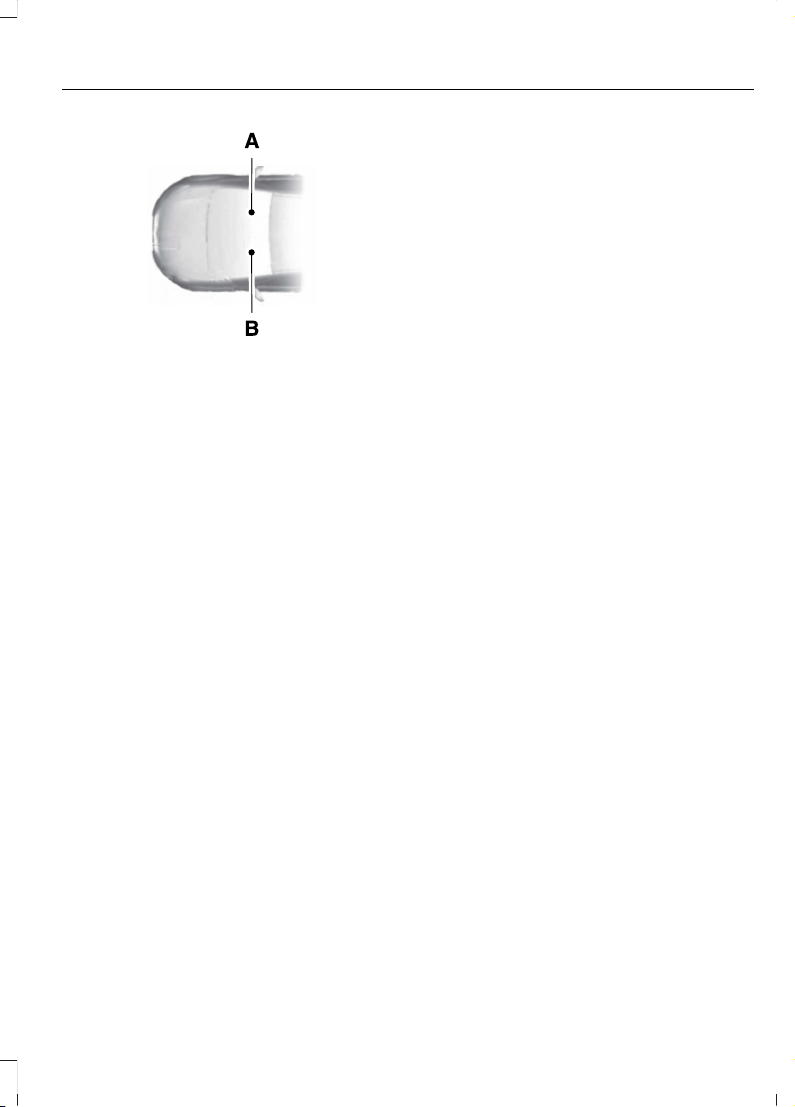
E154903
Right-hand side.A
Left-hand side.B
USING THIS PUBLICATION
To quickly locate information about your
vehicle, use the word search within the
Owner's Manual application.
25
2023 F-150 (TFD) Canada/United States of America, enUSA, Edition date: 202206, DOM
Introduction
Page 30
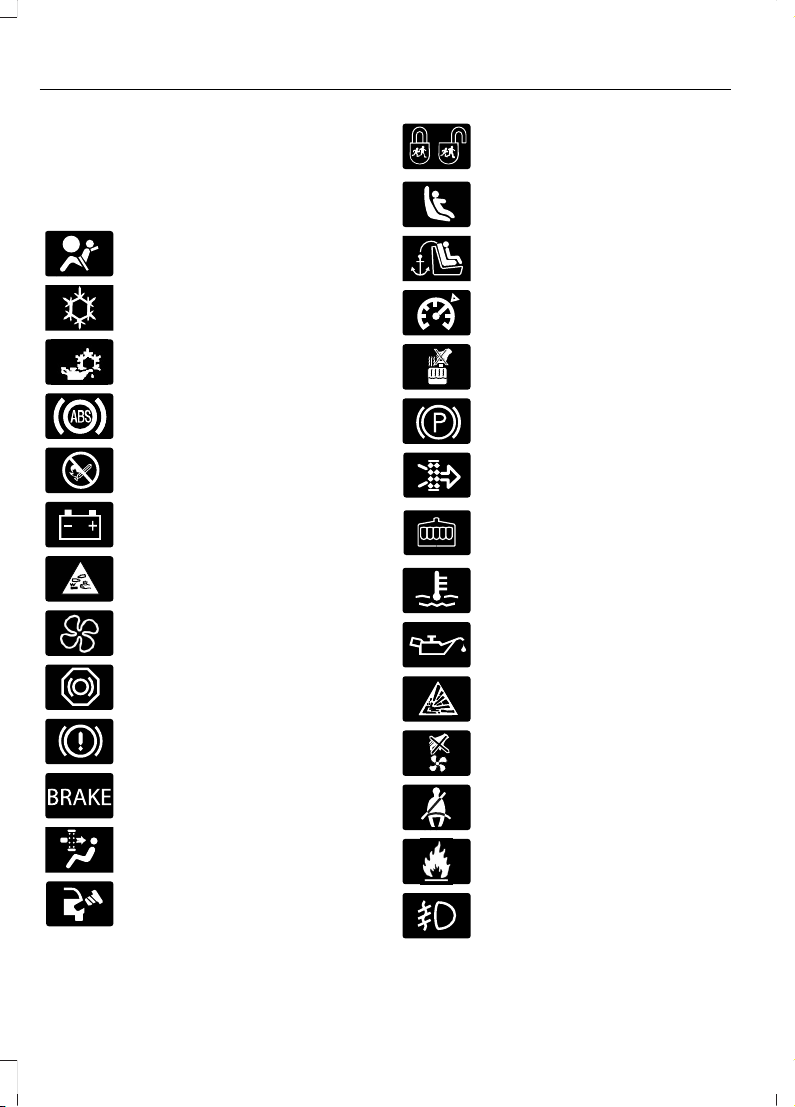
SYMBOLS USED ON YOUR VEHICLE
These are some of the symbols you may
see on your vehicle.
Airbag
E162384
Air conditioning system
E231157
Air conditioning system lubricant
type
E67020
Anti-lock braking system
E139220
Avoid smoking, flames or sparks
E67021
Battery
E139227
Battery acid
Blower motor
E139209
Brake fluid - non petroleum
based
E67024
Brake system
E270480
Brake system
E139223
Cabin air filter
Check fuel cap
Child safety door lock or unlock
E139211
Child seat lower anchor
E141128
Child seat tether anchor
E332905
Cruise control
E139219
Do not open when hot
E139212
Electric Parking brake
Engine air filter
Engine coolant
E103308
Engine coolant temperature
E67022
Engine oil
E139221
Explosive gas
E139228
Fan warning
Fasten seatbelt
E231160
Flammable
Front fog lamps
26
2023 F-150 (TFD) Canada/United States of America, enUSA, Edition date: 202206, DOM
Symbols Glossary
Page 31
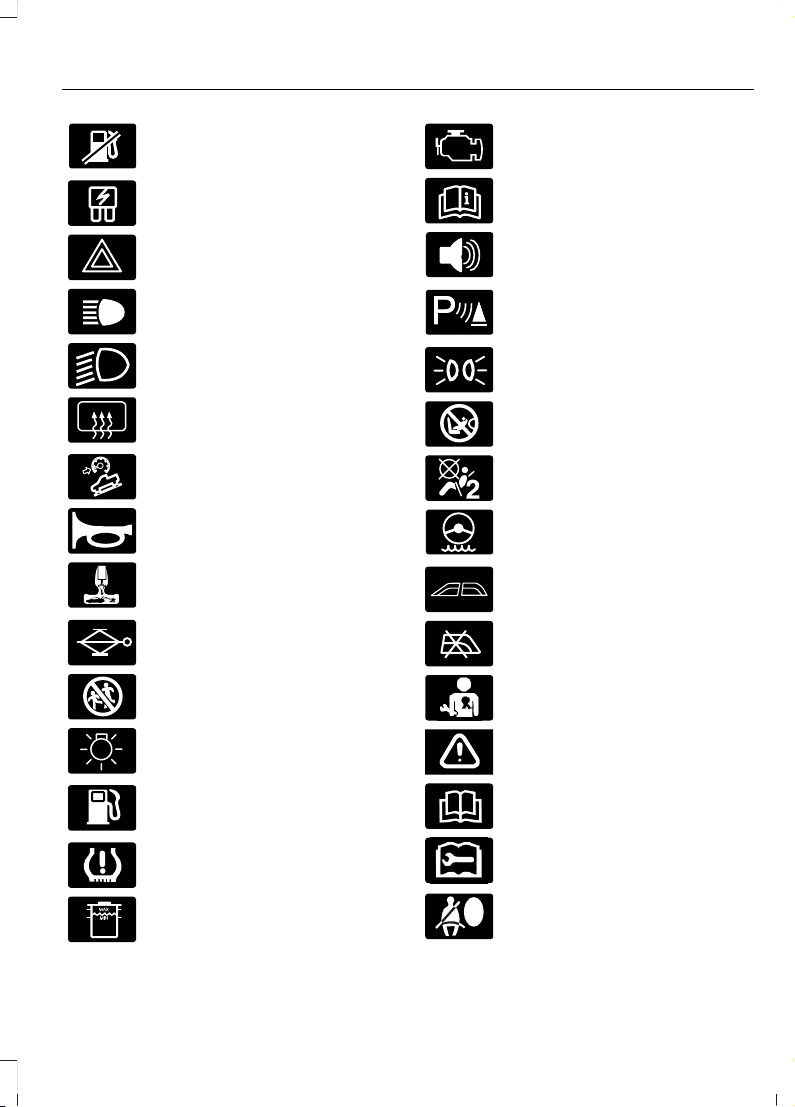
Fuel pump reset
E139214
Fuse compartment
E75790
Hazard flashers
E67019
Headlamp high beams
E270968
Headlamps on
Heated rear window
Hill descent control
E270945
Horn control
Interior luggage compartment
release
E139231
Jack
Keep out of reach of children
Lighting control
Low fuel level
E139232
Low tire pressure warning
E139229
Maintain correct fluid level
E67028
Malfunction Indicator Lamp
(MIL)
E72343
Note operating instructions
Panic alarm
E139213
Parking aid
E71341
Parking lamps
Passenger airbag activated
Passenger airbag deactivated
Power steering fluid
E139216
Power windows front/rear
E139225
Power window lockout
E231159
Requires registered technician
E65963
Safety alert
E72021
See Owner's Manual
E231158
See Service Manual
Side airbag
27
2023 F-150 (TFD) Canada/United States of America, enUSA, Edition date: 202206, DOM
Symbols Glossary
Page 32
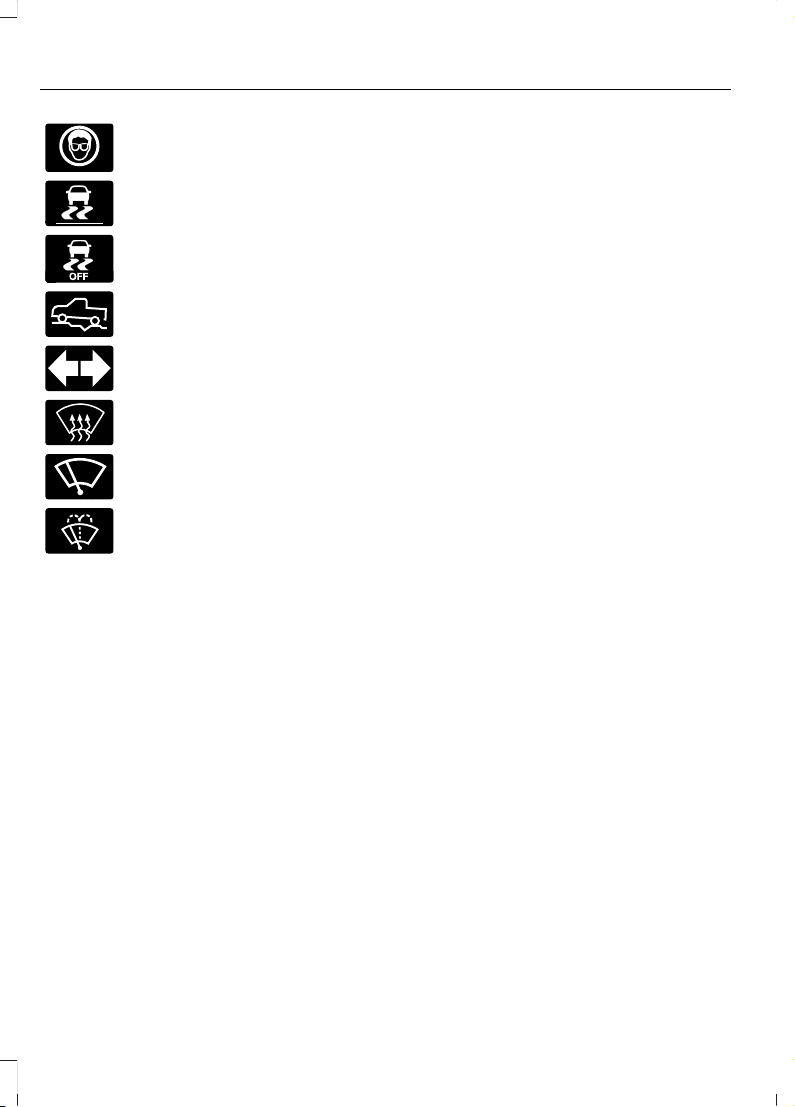
Shield the eyes
E138639
Stability control
E130458
Stability control off
E332910
Trail control
E67018
Turn Signal
E73953
Windshield defrosting system
Windshield wiping system
E270967
Windshield wash and wipe
28
2023 F-150 (TFD) Canada/United States of America, enUSA, Edition date: 202206, DOM
Symbols Glossary
Page 33

WARNING: Do not connect
wireless plug-in devices to the data link
connector. Unauthorized third parties
could gain access to vehicle data and
impair the performance of safety related
systems. Only allow repair facilities that
follow our service and repair instructions
to connect their equipment to the data
link connector.
We respect your privacy and are
committed to protecting it. The
information contained in this publication
was correct at the time of release, but as
technology rapidly changes, we
recommend that you visit the local Ford
website for the latest information.
Your vehicle has electronic control units
that have data recording functionality and
the ability to permanently or temporarily
store data. This data could include
information on the condition and status of
your vehicle, vehicle maintenance
requirements, events and malfunctions.
The types of data that can be recorded are
described in this section. Some of the data
recorded is stored in event logs or error
logs.
Note: Error logs are reset following a service
or repair.
Note: We may provide information in
response to requests from law enforcement,
other government authorities and third
parties acting with lawful authority or
through a legal process. Such information
could be used by them in legal proceedings.
Data recorded includes, for example:
• Operating states of system
components, for example fuel level,
tire pressure and battery charge level.
• Vehicle and component status, for
example wheel speed, deceleration,
lateral acceleration and seatbelt
status.
• Events or errors in essential systems,
for example headlamps and brakes.
• System responses to driving situations,
for example airbag deployment and
stability control.
• Environmental conditions, for example
temperature.
Some of this data, when used in
combination with other information, for
example an accident report, damage to a
vehicle or eyewitness statements, could
be associated with a specific person.
Services That We Provide
If you use our services, we collect and use
data, for example account information,
vehicle location and driving characteristics,
that could identify you. We transmit this
data through a dedicated, protected
connection. We only collect and use data
to enable your use of our services to which
you have subscribed, with your consent or
where permitted by law. For additional
information, see the terms and conditions
of the services to which you have
subscribed.
For additional information about our
privacy policy, refer to the local Ford
website.
Services That Third Parties
Provide
We recommend that you review the terms
and conditions and data privacy
information for any services equipped with
your vehicle or to which you subscribe. We
take no responsibility for services that third
parties provide.
Where equipped, SiriusXM with 360L could
use the modem. To disable, turn off the
SiriusXM with 360L or Vehicle Connectivity
setting. See Enabling and Disabling the
Modem (page 621).
29
2023 F-150 (TFD) Canada/United States of America, enUSA, Edition date: 202206, DOM
Data Privacy
Page 34

SERVICE DATA
Service data recorders in your vehicle are
capable of collecting and storing
diagnostic information about your vehicle.
This potentially includes information about
the performance or status of various
systems and modules in the vehicle, such
as engine, throttle, steering or brake
systems. In order to properly diagnose and
service your vehicle, Ford Motor Company
(Ford of Canada in Canada), and service
and repair facilities may access or share
among them vehicle diagnostic
information received through a direct
connection to your vehicle when
diagnosing or servicing your vehicle.
Additionally, Ford Motor Company (Ford
of Canada, in Canada) may, where
permitted by law, use vehicle diagnostic
information for vehicle improvement or
with other information we may have about
you, for example, your contact information,
to offer you products or services that may
interest you. Data may be provided to our
service providers such as part suppliers
that may help diagnose malfunctions, and
who are similarly obligated to protect data.
We retain this data only as long as
necessary to perform these functions or to
comply with law. We may provide
information where required in response to
official requests to law enforcement or
other government authorities or third
parties acting with lawful authority or court
order, and such information may be used
in legal proceedings. For U.S. only (if
equipped), if you choose to use connected
apps and services, you consent that certain
diagnostic information may also be
accessed electronically by Ford Motor
Company and Ford authorized service
facilities, and that the diagnostic
information may be used to provide
services to you, personalizing your
experience, troubleshoot, and to improve
products and services and offer you
products and services that may interest
you, where permitted by law. For Canada
only, for more information, please review
the Ford of Canada privacy policy at
www.ford.ca, including our U.S. data
storage and use of service providers in
other jurisdictions who may be subject to
legal requirements in Canada, the United
States and other countries applicable to
them, for example, lawful requirements to
disclose personal information to
governmental authorities in those
countries.
EVENT DATA
This vehicle is equipped with an event data
recorder. The main purpose of an event
data recorder is to record, in certain crash
or near crash-like situations, such as an
airbag deployment or hitting a road
obstacle; this data will assist in
understanding how a vehicle’s systems
performed. The event data recorder is
designed to record data related to vehicle
dynamics and safety systems for a short
period of time, typically 30 seconds or less.
The event data recorder in this vehicle is
designed to record such data as:
• How various systems in your vehicle
were operating.
• Whether or not the driver and
passenger seatbelts were
buckled/fastened.
• How far (if at all) the driver was
depressing the accelerator and/or the
brake pedal.
• How fast the vehicle was traveling.
• Where the driver was positioning the
steering wheel.
This data can help provide a better
understanding of the circumstances in
which crashes and injuries occur.
30
2023 F-150 (TFD) Canada/United States of America, enUSA, Edition date: 202206, DOM
Data Privacy
Page 35

Note: Event data recorder data is recorded
by your vehicle only if a non-trivial crash
situation occurs; no data is recorded by the
event data recorder under normal driving
conditions and no personal data or
information (for example name, gender,
age, and crash location) is recorded.
However, parties, such as law enforcement,
could combine the event data recorder data
with the type of personally identifying data
routinely acquired during a crash
investigation.
To read data recorded by an event data
recorder, special equipment is required,
and access to the vehicle or the event data
recorder is needed. In addition to the
vehicle manufacturer, other parties, such
as law enforcement, that have such special
equipment, can read the information if they
have access to the vehicle or the event
data recorder.
BlueCruise Data (If Equipped)
If BlueCruise is active in certain crash or
near crash-like situations, such as an
airbag deployment or hitting a road
obstacle, the system may record driver
attentiveness, based on the direction of
eyes and duration, and photographs of the
driver seat area.
Note: No data is recorded under normal
driving conditions.
SETTINGS DATA
Your vehicle has electronic control units
that have the ability to store data based
on your personalized settings. The data is
stored locally in the vehicle or on devices
that you connect to it, for example, a USB
drive or digital music player. You can delete
some of this data and also choose whether
to share it through the services to which
you subscribe. See Enabling and
Disabling the Modem (page 621).
Comfort and Convenience Data
Data recorded includes, for example:
• Seat and steering wheel position.
• Climate control settings.
• Radio presets.
Entertainment Data
Data recorded includes, for example:
• Music, videos or album art.
• Contacts and corresponding address
book entries.
• Navigation destinations.
CONNECTED VEHICLE DATA EXCLUDING: POLICE
RESPONDER
The modem has a SIM. The
modem was enabled when your
vehicle was built and periodically
sends messages to stay connected to the
cell phone network, receive automatic
software updates and send vehicle-related
information to us, for example diagnostic
information. These messages could
include information that identifies your
vehicle, the SIM and the electronic serial
number of the modem. Cell phone network
service providers could have access to
additional information, for example cell
phone network tower identification. For
additional information about our privacy
policy, visit www.FordConnected.com or
refer to your local Ford website.
Note: The modem continues to send this
information unless you disable the modem
or stop the modem from sharing vehicle
data by changing the modem settings. See
Connected Vehicle (page 621).
31
2023 F-150 (TFD) Canada/United States of America, enUSA, Edition date: 202206, DOM
Data Privacy
Page 36

Note: The service can be unavailable or
interrupted for a number of reasons, for
example environmental or topographical
conditions and data plan coverage.
Note: To find out if your vehicle has a
modem, visit www.FordConnected.com.
MOBILE DEVICE DATA
If you connect a mobile device to your
vehicle, you can display data from your
device on the touchscreen for example,
music and album art. You can share your
vehicle data with mobile apps on your
device through the system. See App
Requirements (page 650).
The mobile apps function operates by your
connected device sending data to us in the
United States. The data is encrypted and
includes, for example, the vehicle
identification number of your vehicle, the
SYNC module serial number, odometer,
enabled apps, usage statistics and
debugging information. We retain it only
as long as necessary to provide the service,
to troubleshoot, for continuous
improvement and to offer you products
and services that may be of interest to you
according to your preferences and where
allowed by law.
If you connect a cell phone to the system,
the system creates a profile that links to
that cell phone. The cell phone profile
enables more mobile features and efficient
operation. The profile contains, for
example data from your phonebook, read
and unread text messages and call history,
including history of calls when your cell
phone was not connected to the system.
If you connect a media device, the system
creates and retains a media device index
of supported media content. The system
also records a short diagnostic log of
approximately 10 minutes of all recent
system activity.
The cell phone profile, media device index
and diagnostic log remain in your vehicle
unless you delete them and are generally
accessible only in your vehicle when you
connect your cell phone or media device.
If you no longer plan to use the system or
your vehicle, we recommend you use the
master reset function to erase the stored
information. See Performing a System
Reset (page 659).
System data cannot be accessed without
special equipment and access to your
vehicle's module.
For additional information about our
privacy policy, refer to the local Ford
website.
Note: To find out if your vehicle has
connectivity technology, visit
www.FordConnected.com.
EMERGENCY CALL SYSTEM DATA
When the emergency call system is active,
it may disclose to emergency services that
your vehicle has been in a crash involving
the deployment of an airbag or activation
of the fuel pump shut-off. Certain versions
or updates to the emergency call system
may also be capable of electronically or
verbally disclosing to emergency services
operators your vehicle location or other
details about your vehicle or crash to assist
emergency services operators to provide
the most appropriate emergency services.
If you do not want to disclose this
information, do not activate the emergency
call system.
Note: You cannot deactivate emergency
call systems that are required by law.
32
2023 F-150 (TFD) Canada/United States of America, enUSA, Edition date: 202206, DOM
Data Privacy
Page 37

UNIQUE FEATURES - 5.2L
Powertrain
• 5.2L Supercharged V8 engine.
• 10R80 10-speed automatic
transmission with paddle shifters and
water to air transmission cooler.
• Torque On Demand™ 2-speed transfer
case with 4 Hi-Loc.
• Rear differential capable of locking in
4A, 4H and 4L.
• 35 spline rear axle shafts for increased
capability.
• 4.10 front and rear axle ratios.
• High flow exhaust with X-pipe and
active valves for acoustic refinement.
• Low temperature radiator fan
assembly for greater cooling at low
speeds.
Chassis
• Cast aluminum lower control arms.
• Forged steel upper control arms.
• Fox Factory 3.1 Live Valve Internal
Bypass front shocks.
• Fox Factory 3.1 Live Valve Internal
Bypass Remote Reservoir rear shocks.
• 24 inch triple rate rear springs.
• Unique underbody shields.
• Heavy duty fully boxed frame.
• Unique 5 link rear suspension.
• Unique cast aluminum knuckle.
• Ride height sensors at each corner.
• Off-road tuned stabilizer bar and
jounce bumpers.
Exterior
• Optional off-road driving lights.
• Modified rear bumper with integrated
rear tow hooks.
• Underbody shields plus front tow
hooks.
• Hood with functional air extractors.
• Front fenders with functional air
extractors.
• Front and rear LED marker lamps.
• 17 x 8.5 aluminum wheels.
• Optional 17 x 8.5 forged beadlock
compatible wheels.
• LT 315/70R17 BF Goodrich All Terrain
TA KO2 tires.
• Optional 37x12.5R17 LT BF Goodrich All
Terrain TA KO2 tires.
Interior
• Unique terrain-mode and trail control
functionality plus six auxiliary switches.
• Premium leather and suede seats.
UNIQUE FEATURES - 3.5L ECOBOOST™
Powertrain
• 3.5L EcoBoost engine.
• 10R80 10-speed automatic
transmission with paddle shifters and
water to air transmission cooler.
• Torque On Demand™ 2-speed transfer
case with 4 Hi-Loc.
• Rear differential capable of locking in
4A, 4H and 4L.
• 35 spline rear axle shafts for increased
capability.
• 4.10 front and rear axle ratios.
• High flow exhaust with X-pipe and
active valves for acoustic refinement.
• Charge air cooler fan assembly for
greater cooling at low speeds.
33
2023 F-150 (TFD) Canada/United States of America, enUSA, Edition date: 202206, DOM
At a Glance - Raptor
Page 38

Chassis
• Cast aluminum lower control arms.
• Forged steel upper control arms.
• Fox Factory 3.1 Live Valve Internal
Bypass front shocks.
• Fox Factory 3.1 Live Valve Internal
Bypass Remote Reservoir rear shocks.
• 24 inch triple rate rear springs.
• Unique underbody shields.
• Heavy duty fully boxed frame.
• Unique 5 link rear suspension.
• Unique cast aluminum knuckle.
• Ride height sensors at each corner.
• Off-road tuned stabilizer bar and
jounce bumpers.
Exterior
• Optional off-road driving lights.
• Modified rear bumper with integrated
rear tow hooks.
• Underbody shields plus front tow
hooks.
• Hood with functional air extractors.
• Front fenders with functional air
extractors.
• Front and rear LED marker lamps.
• 17 x 8.5 aluminum wheels.
• Optional 17 x 8.5 forged beadlock
compatible wheels.
• LT 315/70R17 BF Goodrich All Terrain
TA KO2 tires.
• Optional 37x12.5R17 LT BF Goodrich All
Terrain TA KO2 tires.
Interior
• Unique terrain-mode and trail control
functionality plus six auxiliary switches.
• Optional premium leather and suede
seats.
34
2023 F-150 (TFD) Canada/United States of America, enUSA, Edition date: 202206, DOM
At a Glance - Raptor
Page 39
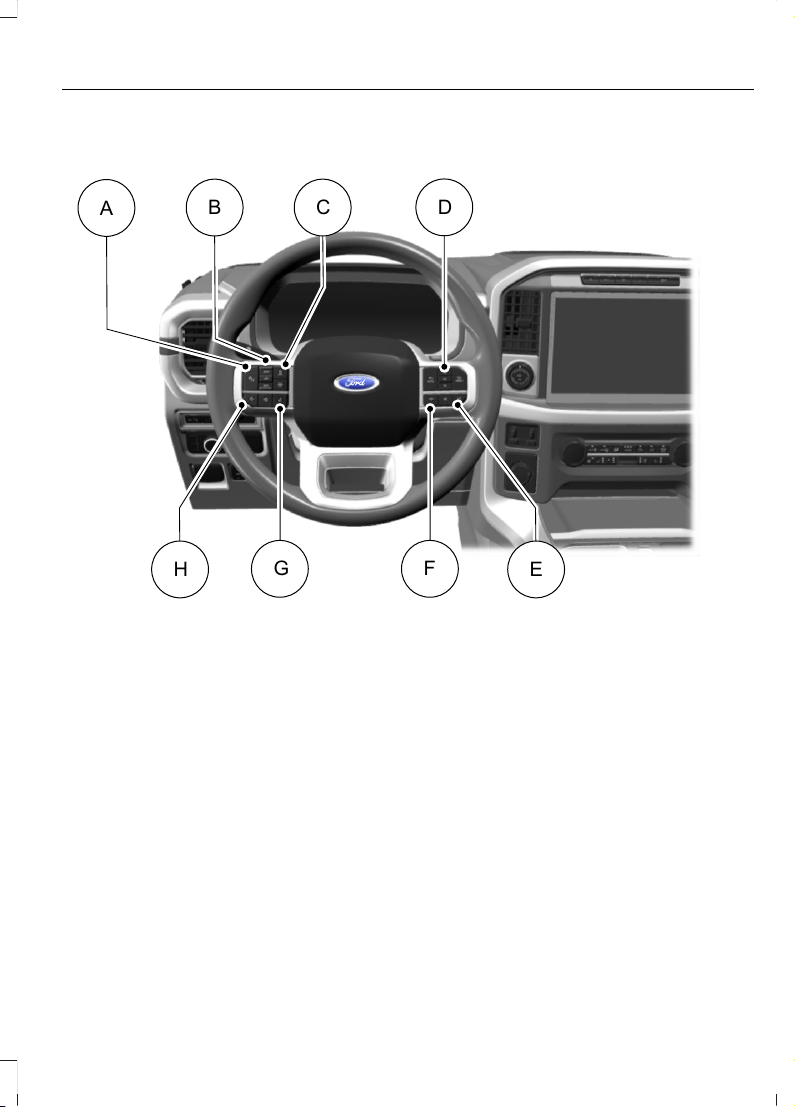
STEERING WHEEL - EXCLUDING: RAPTOR/POLICE RESPONDER
E356893
D
EH
FG
A
CB
See Switching Adaptive Cruise Control On and Off (page 344).A
See Setting the Adaptive Cruise Control Speed (page 345).B
See Setting the Adaptive Cruise Control Gap (page 346).C
See Using the Instrument Cluster Display Controls (page 175).D
See Selecting a Radio Station (page 628).E
See Making and Receiving a Phone Call (page 646).F
See Using Ford Assistant (page 640).G
See Adjusting the Volume (page 627).H
35
2023 F-150 (TFD) Canada/United States of America, enUSA, Edition date: 202206, DOM
Visual Search
Page 40
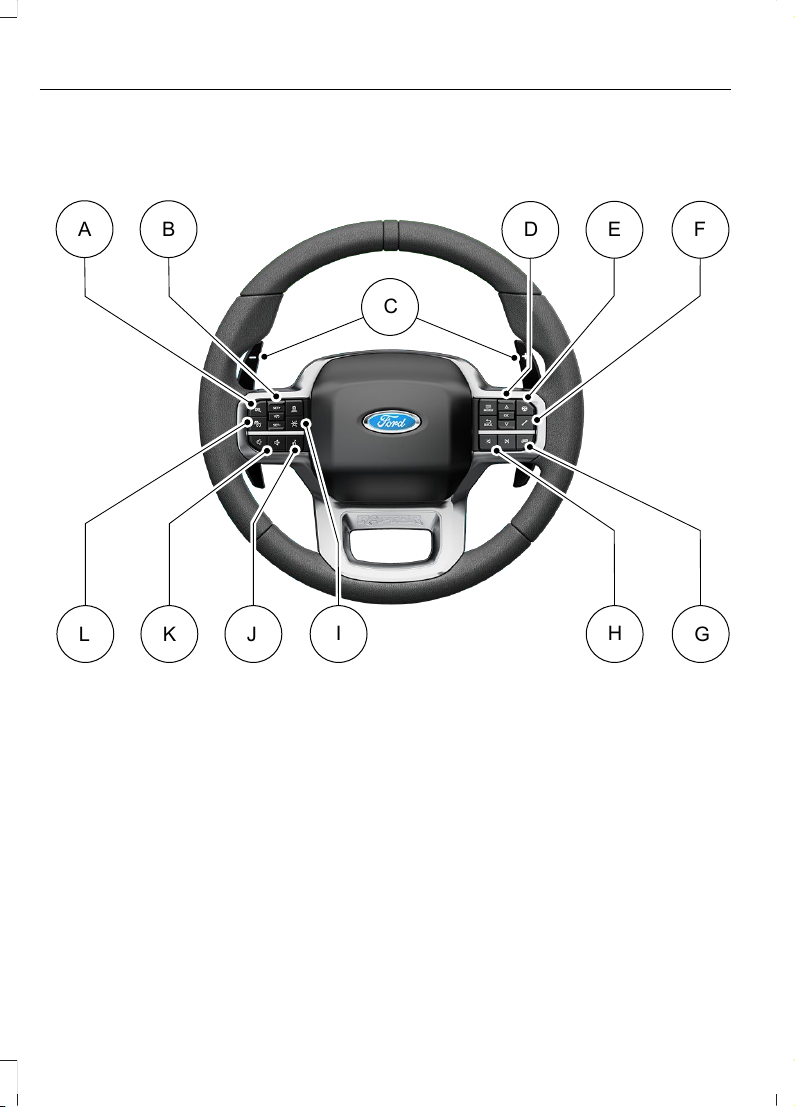
STEERING WHEEL - RAPTOR
A B
FED
L K J
G
HI
E348681
C
See Selecting a Drive Mode (page 364).A
See Setting the Adaptive Cruise Control Speed (page 345).B
See Shifting Using the Paddle Shifters (page 266).C
See Using the Instrument Cluster Display Controls (page 175).D
See Selecting a Drive Mode (page 364).E
See Selecting a Drive Mode (page 364).F
See Selecting a Drive Mode (page 364).G
See Selecting a Radio Station (page 628).H
See Switching Lane Centering On and Off (page 350).I
See Using Ford Assistant (page 640).J
36
2023 F-150 (TFD) Canada/United States of America, enUSA, Edition date: 202206, DOM
Visual Search
Page 41
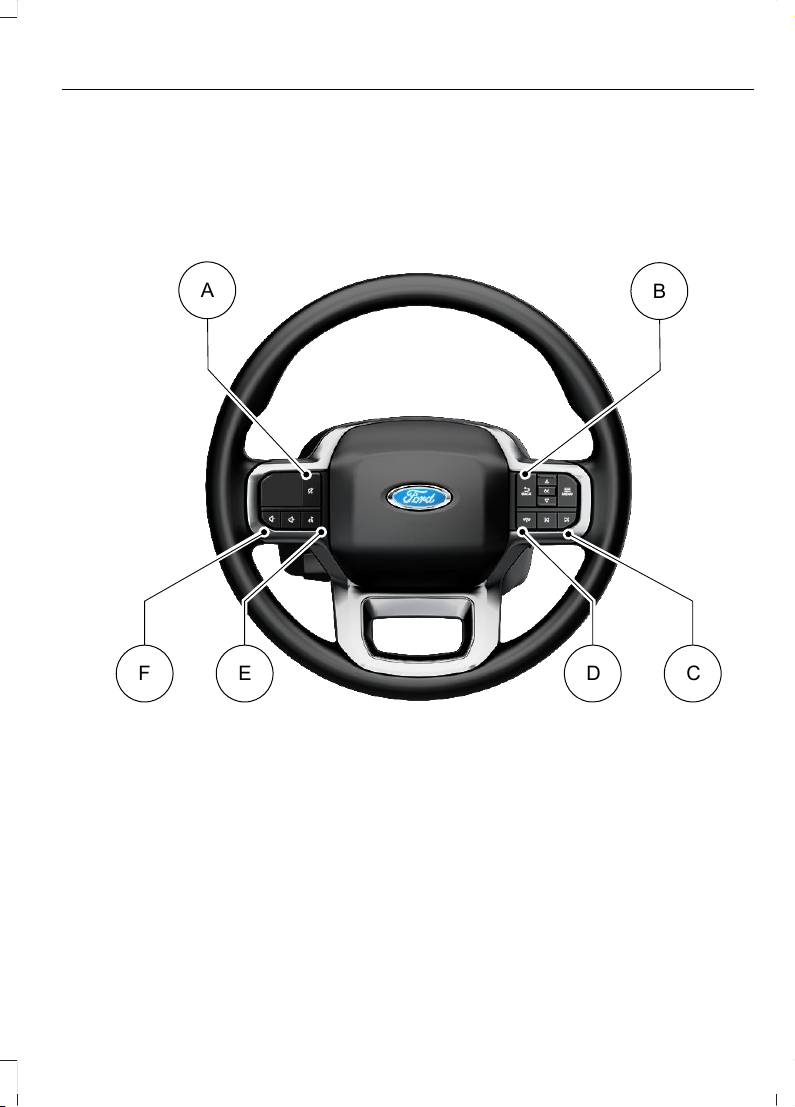
See Adjusting the Volume (page 627).K
See Switching Adaptive Cruise Control On and Off (page 344).L
STEERING WHEEL - POLICE RESPONDER
E343530
A
B
F E D C
See Adjusting the Volume (page 627).A
See Using the Instrument Cluster Display Controls (page 175).B
See Selecting a Radio Station (page 628).C
See Making and Receiving a Phone Call (page 646).D
See Using Ford Assistant (page 640).E
See Adjusting the Volume (page 627).F
37
2023 F-150 (TFD) Canada/United States of America, enUSA, Edition date: 202206, DOM
Visual Search
Page 42
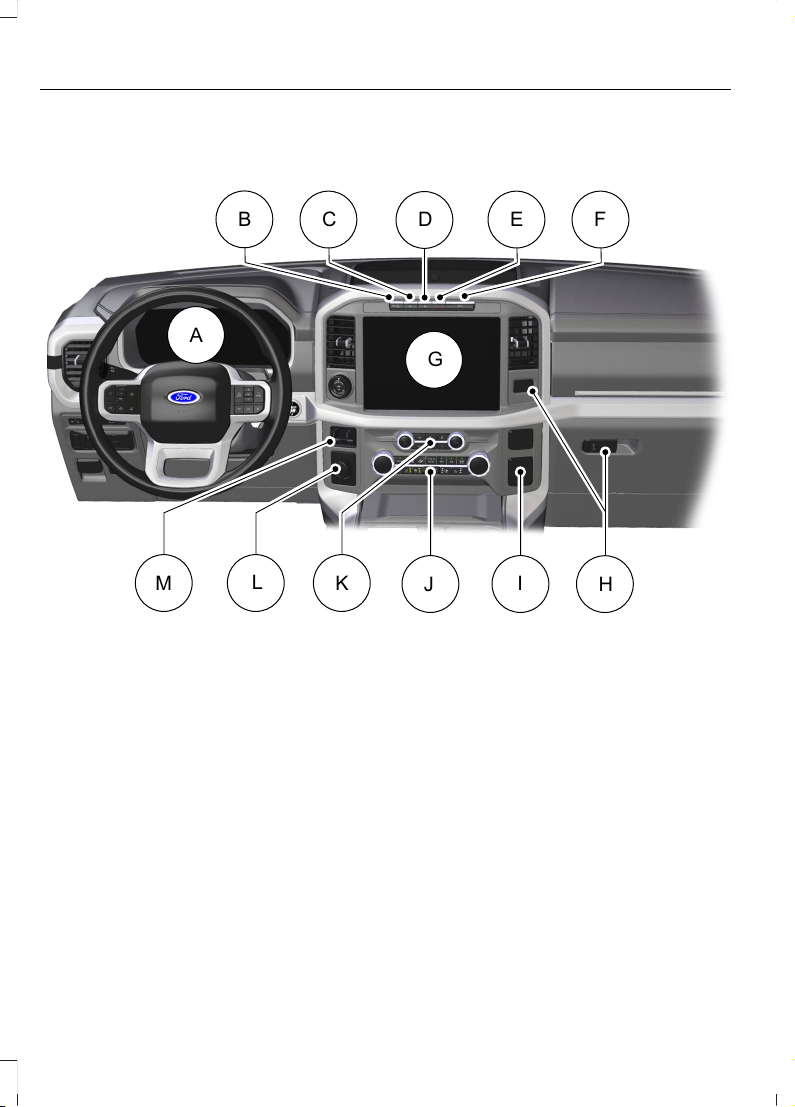
INSTRUMENT PANEL - EXCLUDING: RAPTOR/POLICE
RESPONDER
E328453
A
B
C E F
D
G
I
J
K
L
M
H
See Instrument Cluster Overview (page 170). See Instrument Cluster
Overview (page 169). See Instrument Cluster Overview (page 168).
A
See Switching Traction Control On and Off (page 307).B
See Switching the 360 Degree Camera On and Off (page 334).C
See Switching Active Park Assist On and Off (page 336).D
See Switching the Hazard Flashers On and Off (page 480).E
See Switching Snowplow Mode On and Off (page 477).F
See Feature Bar (page 638).G
See Opening the Glove Compartment (page 229).H
See What Is the Power Outlet (page 216).I
See Identifying the Climate Control Unit (page 184). See Identifying the
Climate Control Unit (page 189).
J
38
2023 F-150 (TFD) Canada/United States of America, enUSA, Edition date: 202206, DOM
Visual Search
Page 43
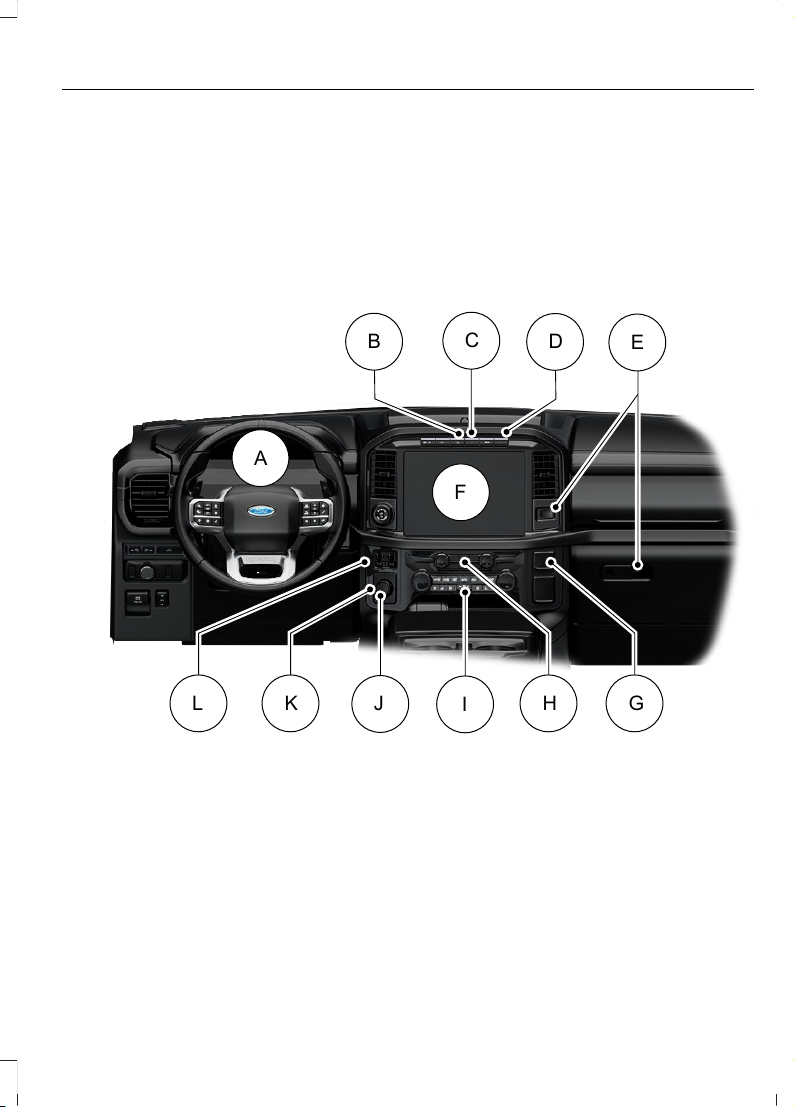
See Switching the Audio Unit On and Off (page 626).K
See Selecting a Four-Wheel Drive Mode (page 276).L
See Using the Integrated Trailer Brake Controller (page 425).M
INSTRUMENT PANEL - RAPTOR
E343518
A
D
F
I
K H G
L
B
E
C
J
See Instrument Cluster Overview (page 170). See Instrument Cluster
Overview (page 169). See Instrument Cluster Overview (page 168).
A
See Switching Active Park Assist On and Off (page 336).B
See Switching the Hazard Flashers On and Off (page 480).C
See Switching Trail Control On and Off (page 312).D
See Opening the Glove Compartment (page 229).E
See Feature Bar (page 638).F
See What Is the Power Outlet (page 216).G
39
2023 F-150 (TFD) Canada/United States of America, enUSA, Edition date: 202206, DOM
Visual Search
Page 44
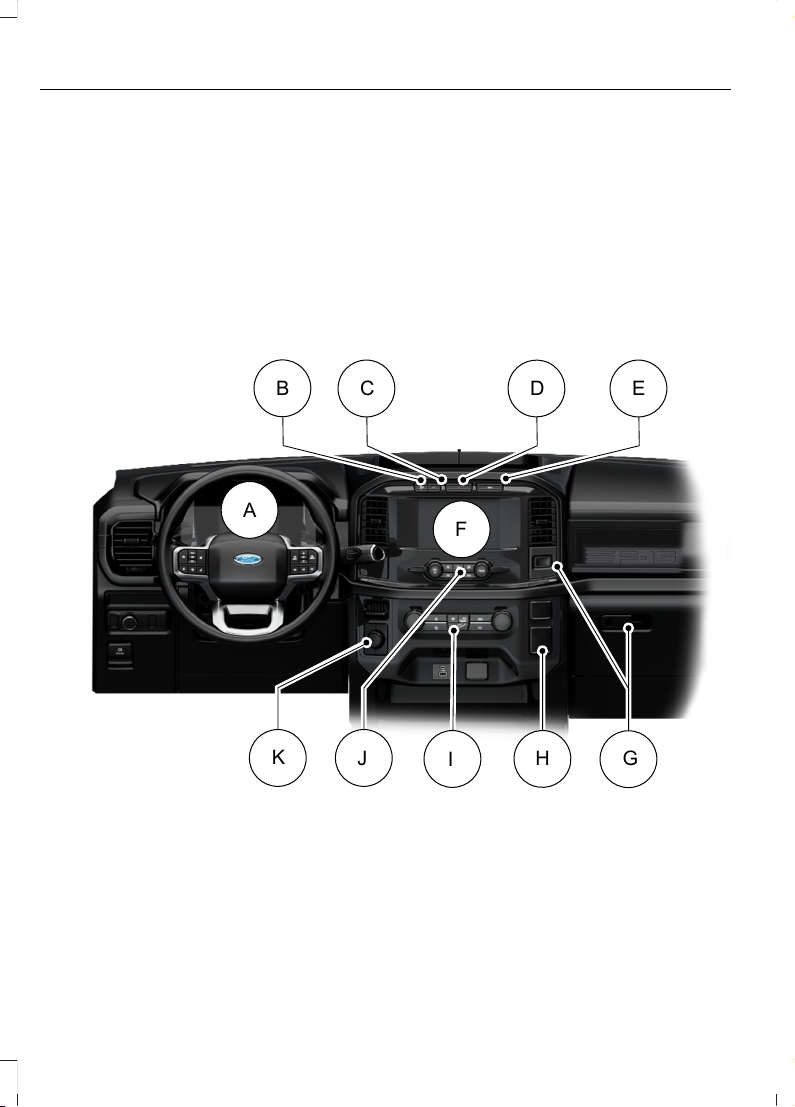
See Identifying the Audio Unit (page 626).H
See Identifying the Climate Control Unit (page 184). See Identifying the
Climate Control Unit (page 189).
I
See Selecting a Drive Mode (page 364).J
See Selecting a Four-Wheel Drive Mode (page 276).K
See Using the Integrated Trailer Brake Controller (page 425).L
INSTRUMENT PANEL - POLICE RESPONDER
E382219
A
B
C D E
F
H
I
J
K
G
See Instrument Cluster Overview (page 170). See Instrument Cluster
Overview (page 169). See Instrument Cluster Overview (page 168).
A
See Switching Traction Control On and Off (page 307).B
See Switching the 360 Degree Camera On and Off (page 334).C
See Switching the Hazard Flashers On and Off (page 480).D
40
2023 F-150 (TFD) Canada/United States of America, enUSA, Edition date: 202206, DOM
Visual Search
Page 45
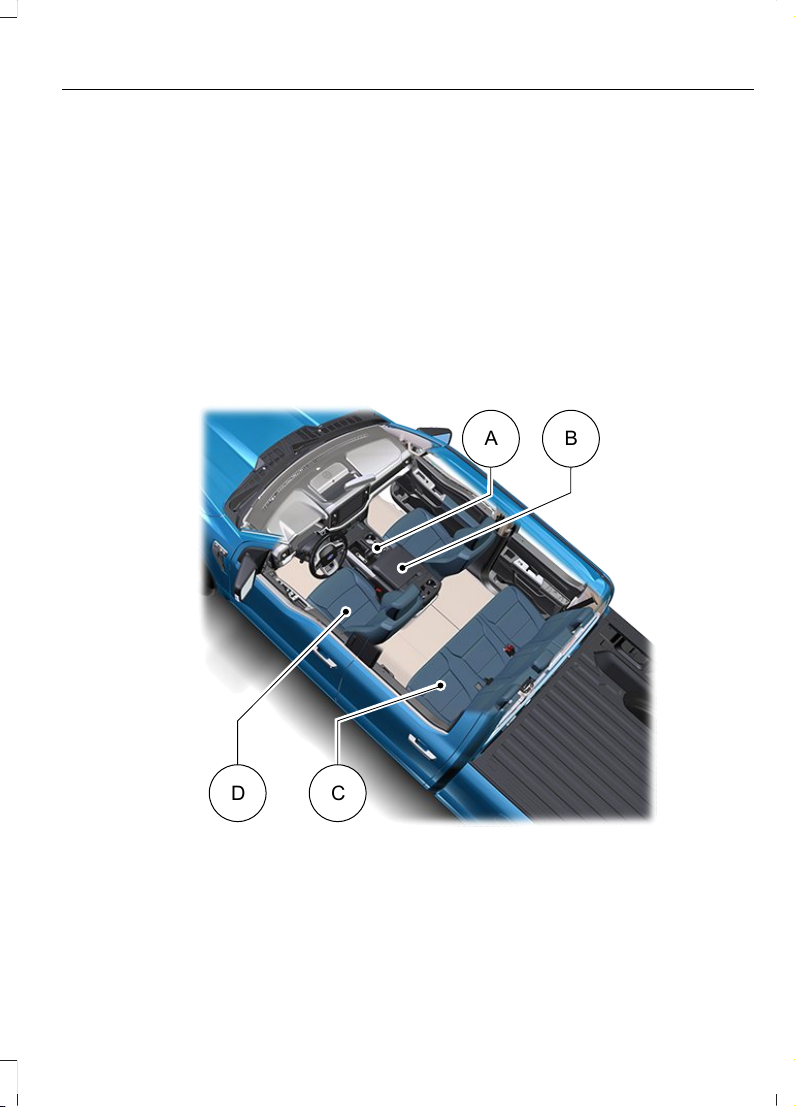
See Switching Active Park Assist On and Off (page 336).E
See Feature Bar (page 638).F
See Opening the Glove Compartment (page 229).G
See What Is the Power Outlet (page 216).H
See Identifying the Climate Control Unit (page 184). See Identifying the
Climate Control Unit (page 189).
I
See Identifying the Audio Unit (page 626).J
See Selecting a Four-Wheel Drive Mode (page 276).K
VEHICLE INTERIOR - EXCLUDING: RAPTOR/POLICE RESPONDER
E320265
A B
CD
See Shifting Using the Buttons on the Selector Lever (page 267).A
See Using the Center Console Work Surface (page 225). See Using the
Center Console Work Surface (page 226).
B
41
2023 F-150 (TFD) Canada/United States of America, enUSA, Edition date: 202206, DOM
Visual Search
Page 46
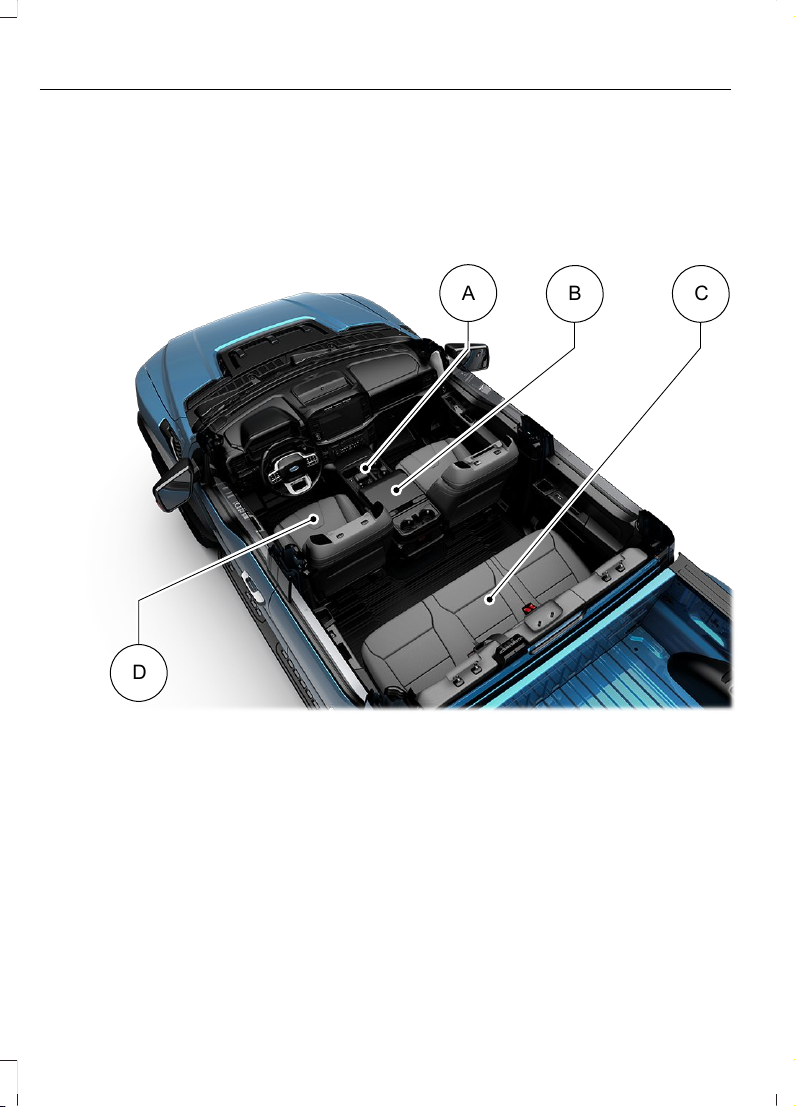
See Folding the Seats (page 202).C
See Sitting in the Correct Position (page 193).D
VEHICLE INTERIOR - RAPTOR
E343519
A
B C
D
See Stowing the Selector Lever (page 270).A
See Using the Center Console Work Surface (page 225). See Using the
Center Console Work Surface (page 226).
B
See Folding the Seats (page 202).C
See Sitting in the Correct Position (page 193).D
42
2023 F-150 (TFD) Canada/United States of America, enUSA, Edition date: 202206, DOM
Visual Search
Page 47
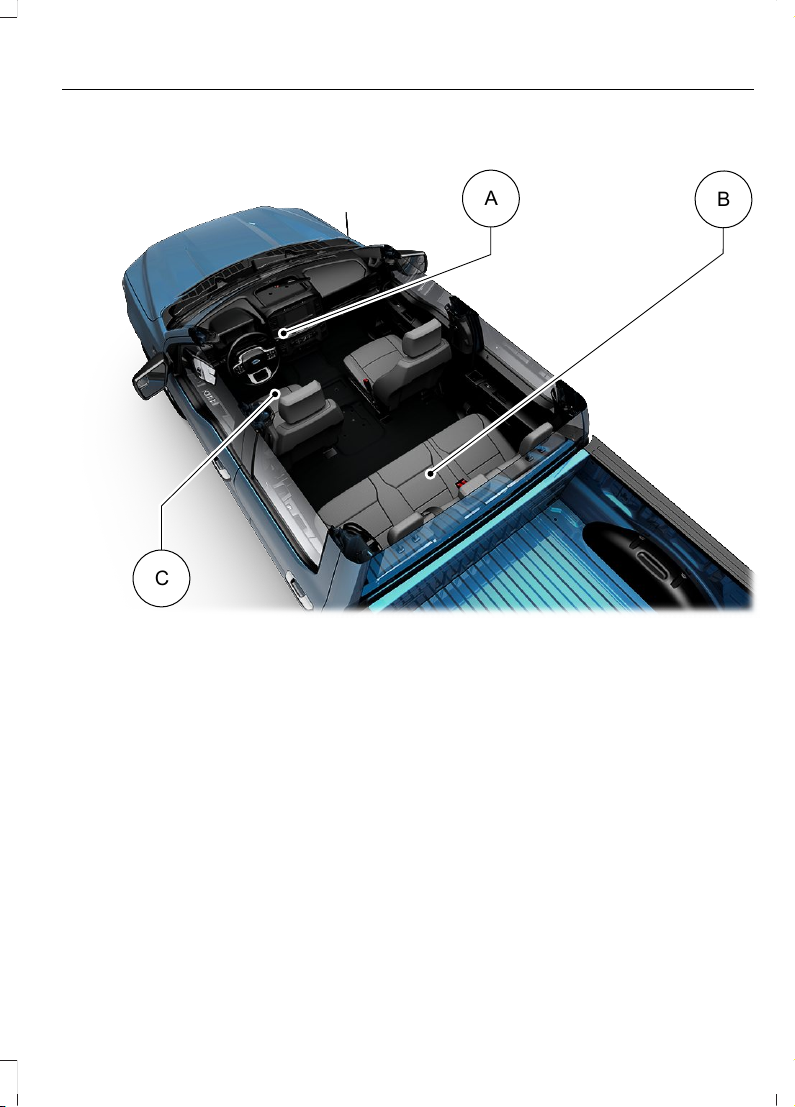
VEHICLE INTERIOR - POLICE RESPONDER
E343532
A
B
C
See Shifting Your Vehicle Into Gear (page 266).A
See Folding the Seats (page 202).B
See Sitting in the Correct Position (page 193).C
43
2023 F-150 (TFD) Canada/United States of America, enUSA, Edition date: 202206, DOM
Visual Search
Page 48
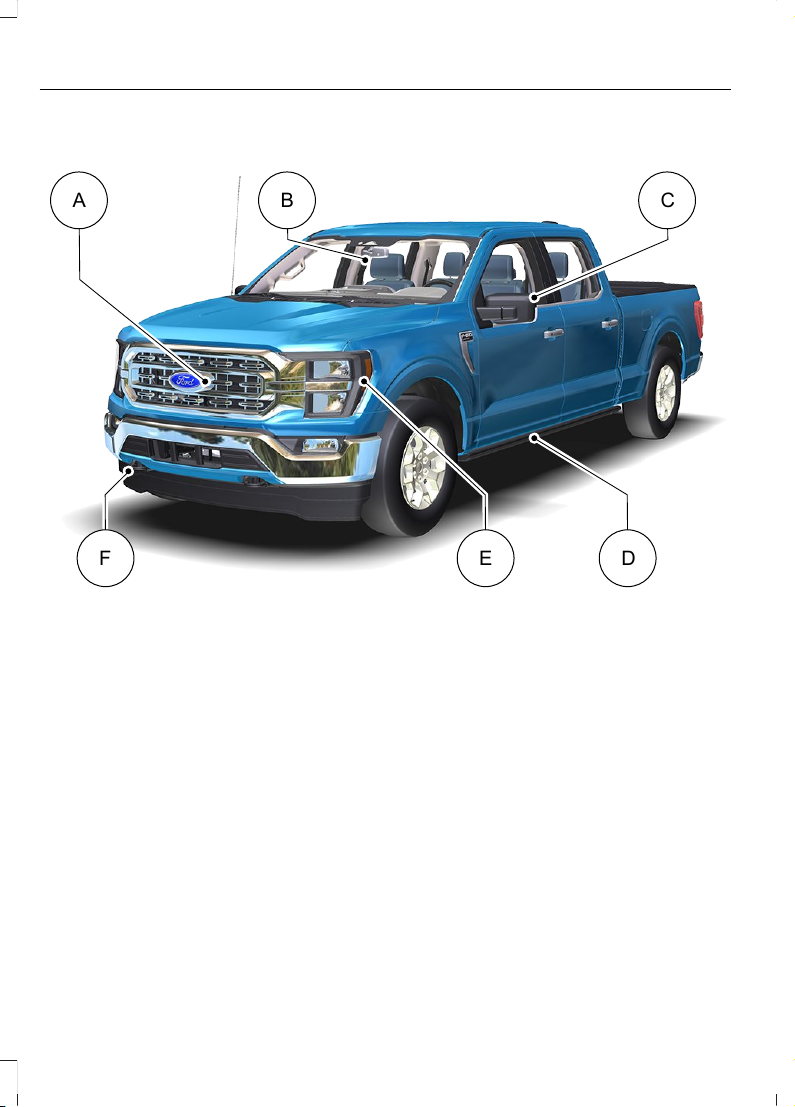
FRONT EXTERIOR - EXCLUDING: RAPTOR/POLICE RESPONDER
E320690
A B C
DE
F
See Locating the 360 Degree Cameras (page 332).A
See How Does the Lane Keeping System Work (page 375).B
See Folding the Exterior Mirrors (page 164).C
See Power Running Board Settings (page 138).D
See Exterior Lighting Control (page 147).E
See Accessing the Front Towing Point (page 483).F
44
2023 F-150 (TFD) Canada/United States of America, enUSA, Edition date: 202206, DOM
Visual Search
Page 49
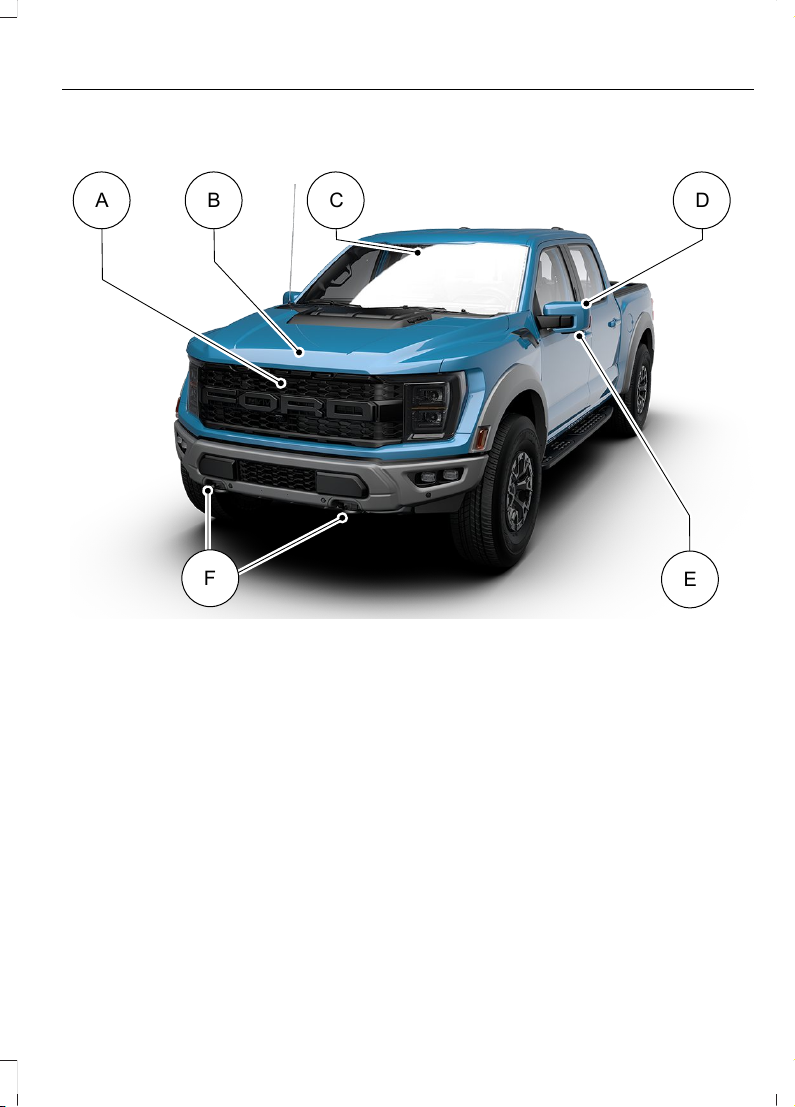
FRONT EXTERIOR - RAPTOR
E343520
A CB D
F
E
See Locating the 360 Degree Cameras (page 332).A
See Opening and Closing the Hood (page 498).B
See How Does the Lane Keeping System Work (page 375).C
See Folding the Exterior Mirrors (page 164).D
See Locating the 360 Degree Cameras (page 332).E
See Accessing the Front Towing Point (page 483).F
45
2023 F-150 (TFD) Canada/United States of America, enUSA, Edition date: 202206, DOM
Visual Search
Page 50
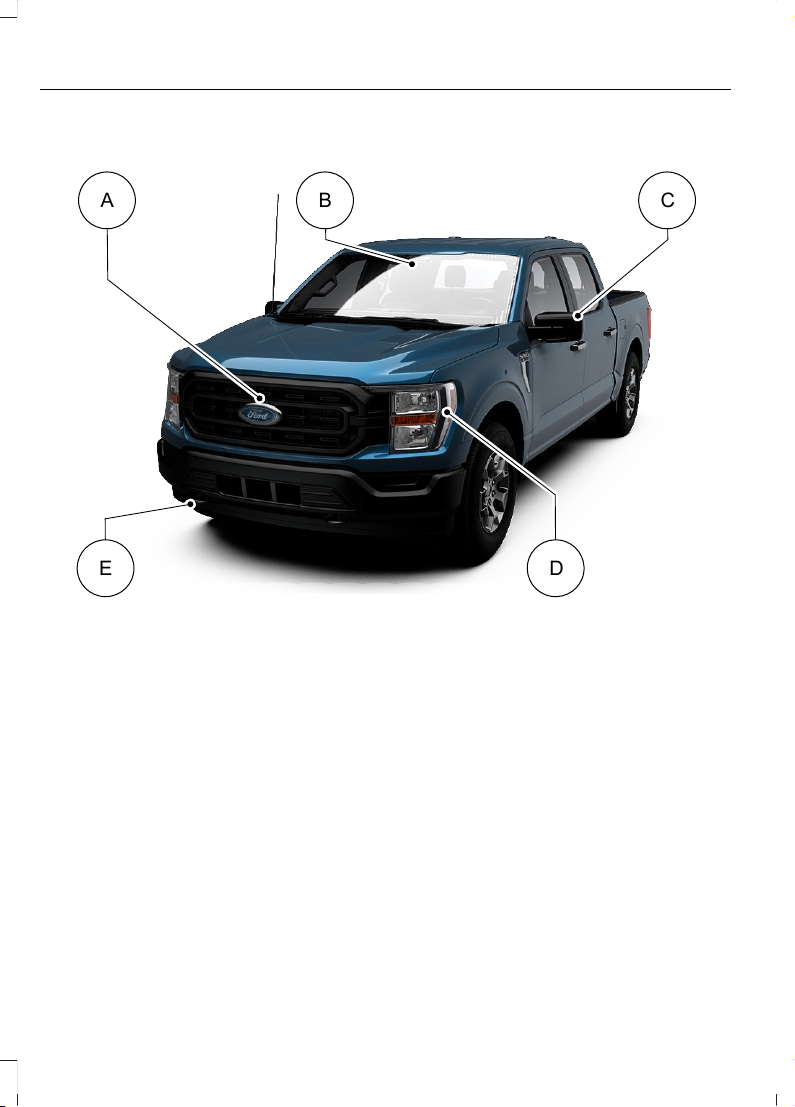
FRONT EXTERIOR - POLICE RESPONDER
E343533
A B C
D
E
See Locating the 360 Degree Cameras (page 332).A
See How Does the Lane Keeping System Work (page 375).B
See Folding the Exterior Mirrors (page 164).C
See Exterior Lighting Control (page 147).D
See Accessing the Front Towing Point (page 483).E
46
2023 F-150 (TFD) Canada/United States of America, enUSA, Edition date: 202206, DOM
Visual Search
Page 51
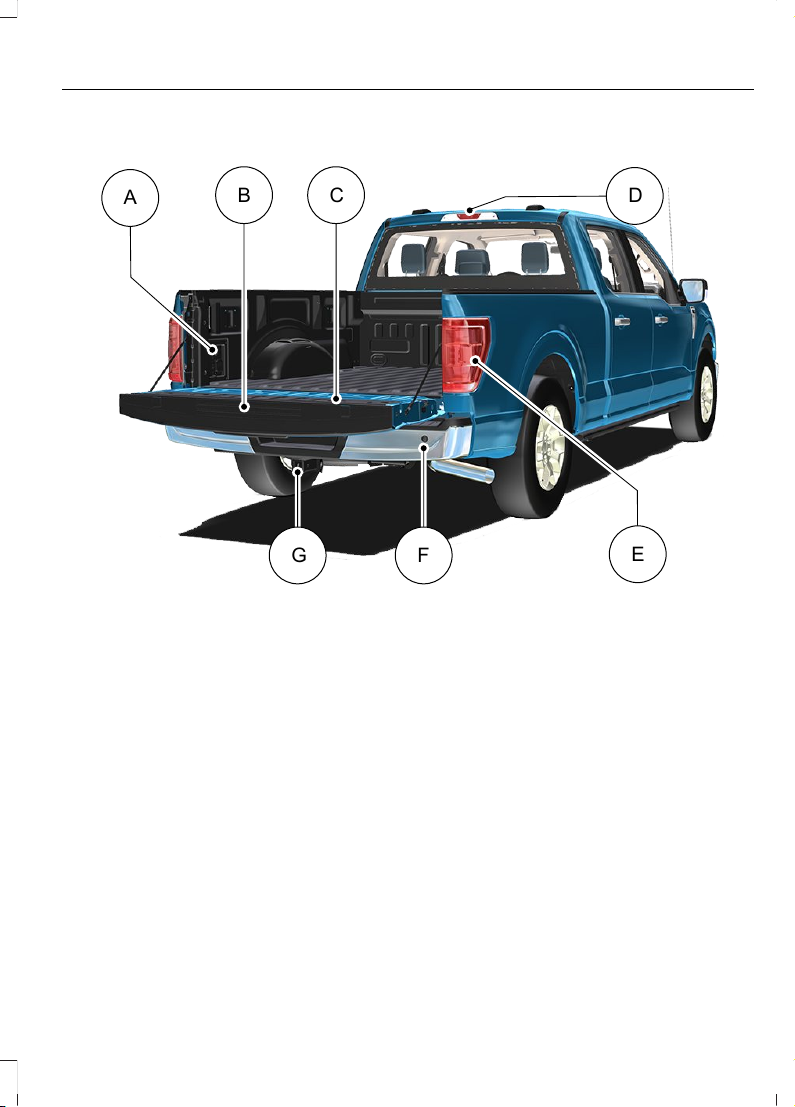
REAR EXTERIOR - EXCLUDING: RAPTOR/POLICE RESPONDER
E320171
A
B C
D
E
FG
See Locating the Power Outlets (page 214).A
See Accessing the Tailgate Step (page 121).B
See Tailgate Work Surface (page 124).C
See Locating the 360 Degree Cameras (page 332).D
See Locating the Blind Spot Information System Sensors (page 383).E
See Locating the Rear Parking Aid Sensors (page 324).F
See Connecting a Trailer (page 414).G
47
2023 F-150 (TFD) Canada/United States of America, enUSA, Edition date: 202206, DOM
Visual Search
Page 52
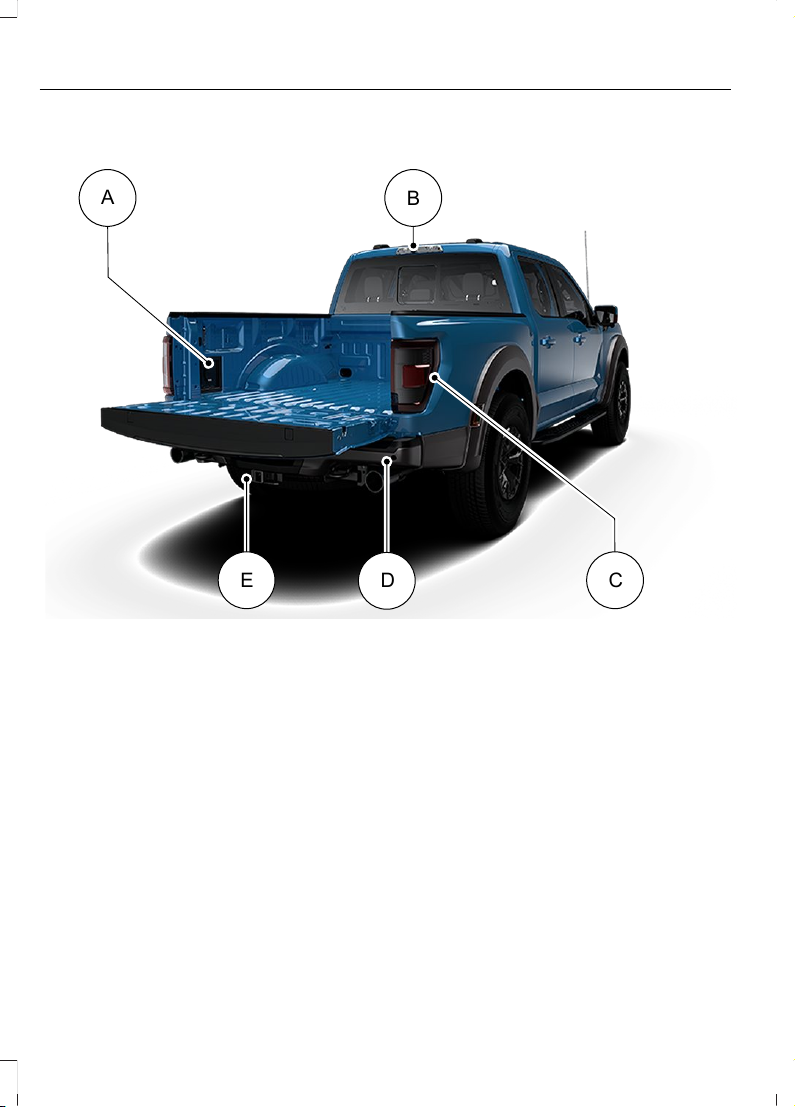
REAR EXTERIOR - RAPTOR
E343521
A
C
D
E
B
See Locating the Power Outlets (page 214).A
See Locating the 360 Degree Cameras (page 333).B
See Locating the Blind Spot Information System Sensors (page 383).C
See Locating the Rear Parking Aid Sensors (page 324).D
See Connecting a Trailer (page 414).E
48
2023 F-150 (TFD) Canada/United States of America, enUSA, Edition date: 202206, DOM
Visual Search
Page 53
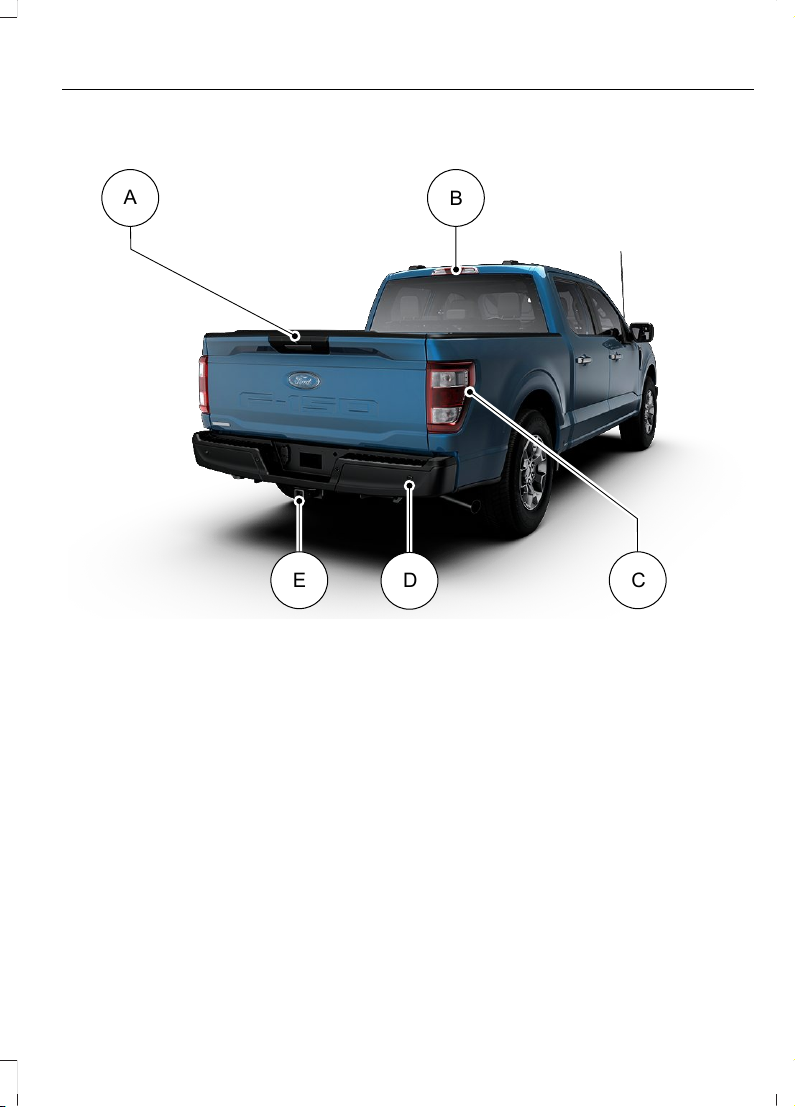
REAR EXTERIOR - POLICE RESPONDER
E343534
A
C
D
E
B
See Opening the Tailgate From Outside Your Vehicle (page 113). See
Opening the Tailgate From Outside Your Vehicle (page 119). See Opening
the Tailgate From Outside Your Vehicle (page 127).
A
See Locating the 360 Degree Cameras (page 332).B
See Locating the Blind Spot Information System Sensors (page 383).C
See Locating the Rear Parking Aid Sensors (page 324).D
See Connecting a Trailer (page 414).E
49
2023 F-150 (TFD) Canada/United States of America, enUSA, Edition date: 202206, DOM
Visual Search
Page 54
CHILD SAFETY PRECAUTIONS
WARNING: Always make sure your
child is secured properly in a device that
is appropriate for their height, age and
weight. Child safety restraints must be
bought separately from your vehicle.
Failure to follow these instructions and
guidelines may result in an increased risk
of serious injury or death to your child.
WARNING: All children are shaped
differently. The National Highway Traffic
Safety Administration and other safety
organizations, base their
recommendations for child restraints on
probable child height, age and weight
thresholds, or on the minimum
requirements of the law. We recommend
that you check with a NHTSA Certified
Child Passenger Safety Technician
(CPST) to make sure that you properly
install the child restraint in your vehicle
and that you consult your pediatrician to
make sure you have a child restraint
appropriate for your child. To locate a
child restraint fitting station and CPST,
contact NHTSA toll free at
1-888-327-4236 or go to
www.nhtsa.dot.gov. In Canada, contact
Transport Canada toll free at
1-800-333-0371 or go to www.tc.gc.ca
to find a Child Car Seat Clinic in your
area. Failure to properly restrain children
in child restraints made especially for
their height, age and weight, may result
in an increased risk of serious injury or
death to your child.
WARNING: On hot days, the
temperature inside the vehicle can rise
very quickly. Exposure of people or
animals to these high temperatures for
even a short time can cause death or
serious heat related injuries, including
brain damage. Small children are
particularly at risk.
WARNING: Do not place a
rearward facing child restraint in front of
an active airbag. Failure to follow this
instruction could result in personal injury
or death.
WARNING: Properly secure
children 12 years old and under in a rear
seating position whenever possible. If
you are unable to properly secure all
children in a rear seating position,
properly secure the largest child on the
front seat. If you must use a forward
facing child restraint on the front seat,
move the seat as far back as possible.
Failure to follow these instructions could
result in personal injury or death.
WARNING: Always carefully follow
the instructions and warnings provided
by the manufacturer of any child
restraint to determine if the restraint
device is appropriate for your child's size,
height, weight, or age. Follow the child
restraint manufacturer's instructions and
warnings provided for installation and
use in conjunction with the instructions
and warnings provided by your vehicle
manufacturer. A safety seat that is
improperly installed or utilized, is
inappropriate for your child's height, age,
or weight or does not properly fit the
child may increase the risk of serious
injury or death.
50
2023 F-150 (TFD) Canada/United States of America, enUSA, Edition date: 202206, DOM
Child Safety
Page 55
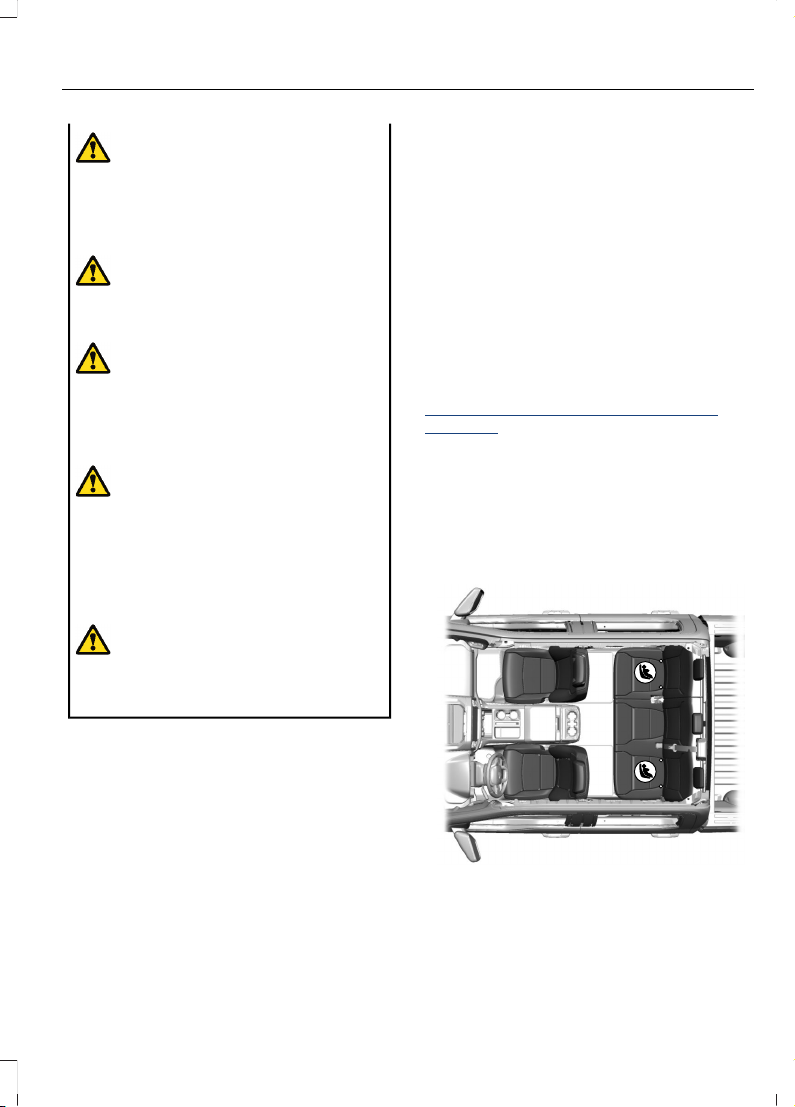
WARNING: Do not allow a
passenger to hold a child on their lap
when your vehicle is moving. Failure to
follow this instruction could result in
personal injury or death in the event of a
sudden stop or crash.
WARNING: Do not use pillows,
books or towels to boost your child's
height. Failure to follow this instruction
could result in personal injury or death.
WARNING: Properly secure child
restraints or booster seats when they are
not in use. They could become projectiles
in a sudden stop or crash. Failure to
follow this instruction could result in
personal injury or death.
WARNING: Do not put the shoulder
section of the seatbelt or allow the child
to put the shoulder section of the
seatbelt under their arm or behind their
back. Failure to follow this instruction
could reduce the effectiveness of the
seatbelt and increase the risk of injury or
death in a crash.
WARNING: Do not leave children
or pets unattended in your vehicle.
Failure to follow this instruction could
result in personal injury or death.
When installing a child restraint with
seatbelts:
• Place the vehicle seat in the upright
position before you install the child
restraint.
• Use the correct seatbelt buckle for that
seating position.
• Insert the belt tongue into the buckle.
Make sure the tongue is securely
fastened in the buckle.
• Keep the buckle release button
pointing up and away from the child
restraint, with the tongue between the
child restraint and the release button,
to prevent accidental unbuckling.
• Put the seatbelt in the automatic
locking mode.
CHILD RESTRAINT ANCHOR POINTS
WHAT ARE THE CHILD RESTRAINT
ANCHOR POINTS
LATCH (Lower Anchors and Tethers for
CHildren)
Anchor points allow you to quickly and
safely install a child restraint.
LOCATING THE CHILD RESTRAINT
LOWER ANCHOR POINTS (If Equipped)
Crew Cab
E308373
Super Cab
51
2023 F-150 (TFD) Canada/United States of America, enUSA, Edition date: 202206, DOM
Child Safety
Page 56
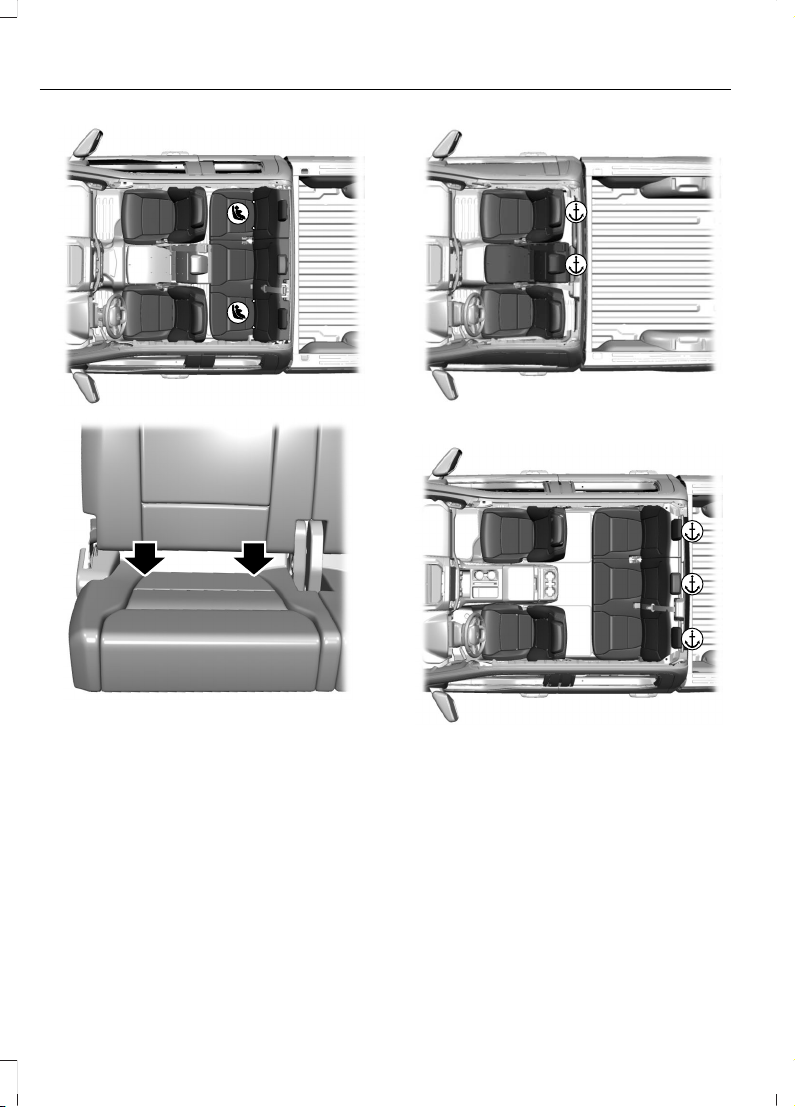
E308385
E312604
The lower child restraint anchors are at the
rear section of the rear seat between the
cushion and seat backrest.
Note: Regular Cab vehicles do not have
lower anchors.
LOCATING THE CHILD RESTRAINT
TOP TETHER ANCHOR POINTS
Regular Cab
E308389
Crew Cab
E308390
Super Cab
52
2023 F-150 (TFD) Canada/United States of America, enUSA, Edition date: 202206, DOM
Child Safety
Page 57
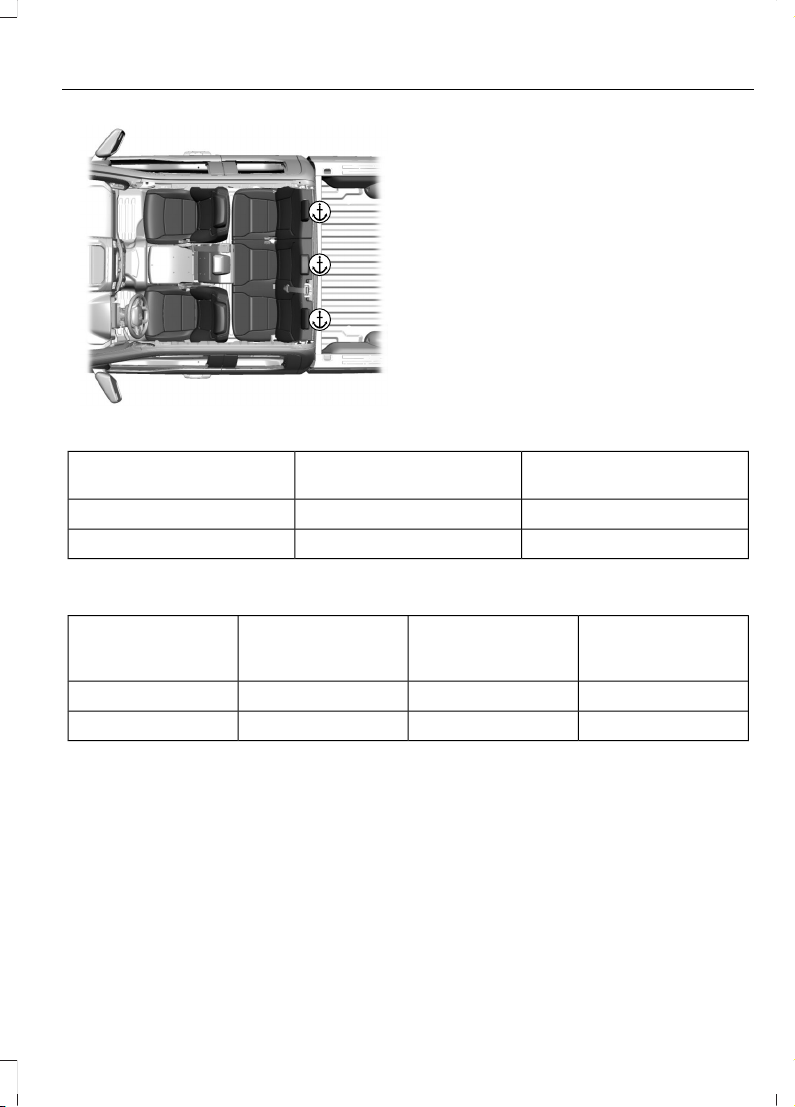
E308396
CHILD RESTRAINTS
CHILD RESTRAINT POSITION
INFORMATION
Install the child restraint tightly against the
vehicle seat. It may be necessary to lift or
remove the head restraint.
Rear Facing Child Restraints
Seatbelt Only
LATCH (Lower Anchors
Only)
Combined Weight of Child
and Child Restraint
XXUp to 65 lb (29 kg)
XOver 65 lb (29 kg)
Forward Facing Child Restraints
Seatbelt and LATCH
(Lower Anchors and
Top Tether Anchor)
Seatbelt and Top
Tether Anchor
LATCH (Lower
Anchors and Top
Tether Anchor)
Combined Weight of
Child and Child
Restraint
XXXUp to 65 lb (29 kg)
XXOver 65 lb (29 kg)
53
2023 F-150 (TFD) Canada/United States of America, enUSA, Edition date: 202206, DOM
Child Safety
Page 58
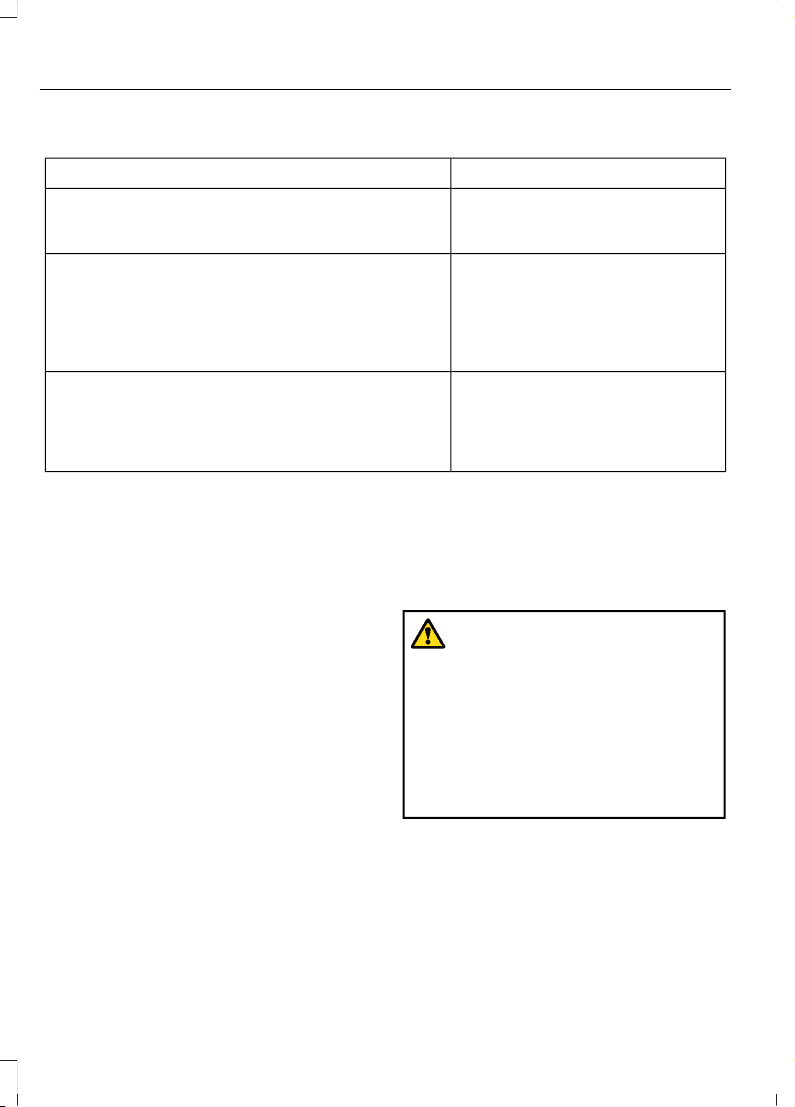
CHILD RESTRAINTS RECOMMENDATION
Recommended Restraint TypeChild Size, Height, Weight, or Age
Use a child restraint (sometimes
called an infant carrier, convertible
seat, or toddler seat).
Children weighing 40 lb (18 kg) or less (generally
age four or younger).
Use a belt-positioning booster
seat.
Children who have outgrown or no longer properly
fit in a child restraint (generally children who are
less than 57 in (1.45 m) tall, are greater than age
four and less than age 12, and between 40 lb (18 kg)
and 80 lb (36 kg) and upward to 100 lb (45 kg) if
recommended by your child restraint manufacturer).
Use a vehicle seatbelt having the
lap belt snug and low across the
hips, shoulder belt centered across
the shoulder and chest, and seat
backrest upright.
Children who have outgrown or no longer properly
fit in a belt-positioning booster seat (generally chil-
dren who are at least 57 in (1.45 m) tall or greater
than 80 lb (36 kg) or 100 lb (45 kg) if recommended
by child restraint manufacturer).
You are required by law to properly use
child restraints for infants and toddlers in
the United States, Canada and Mexico.
Many states and provinces require that
small children use approved booster seats
until they reach age eight, a height of 57 in
(1.45 m) tall, or 80 lb (36 kg). Check your
local and state or provincial laws for
specific requirements about the safety of
children in your vehicle.
When possible, properly restrain children
12 years of age and under in a rear seating
position of your vehicle. Accident statistics
suggest that children are safer when
properly restrained in the rear seating
positions than in a front seating position.
When installing a rear facing child restraint,
adjust the vehicle seats to avoid
interference between the child restraint
and the vehicle seat in front of the child
restraint.
INSTALLING CHILD RESTRAINTS
USING SEATBELTS
WARNING: Depending on where
you secure a child restraint, and
depending on the child restraint design,
you may block access to certain seatbelt
buckle assemblies and LATCH lower
anchors, rendering those features
potentially unusable. To avoid risk of
injury, make sure occupants only use
seating positions where they are able to
be properly restrained.
Note: The following does not apply to the
front center position of Super Cab and Crew
Cab vehicles.
Note: Although the child restraint
illustrated is a forward facing child restraint,
the steps are the same for installing a rear
facing child restraint.
54
2023 F-150 (TFD) Canada/United States of America, enUSA, Edition date: 202206, DOM
Child Safety
Page 59
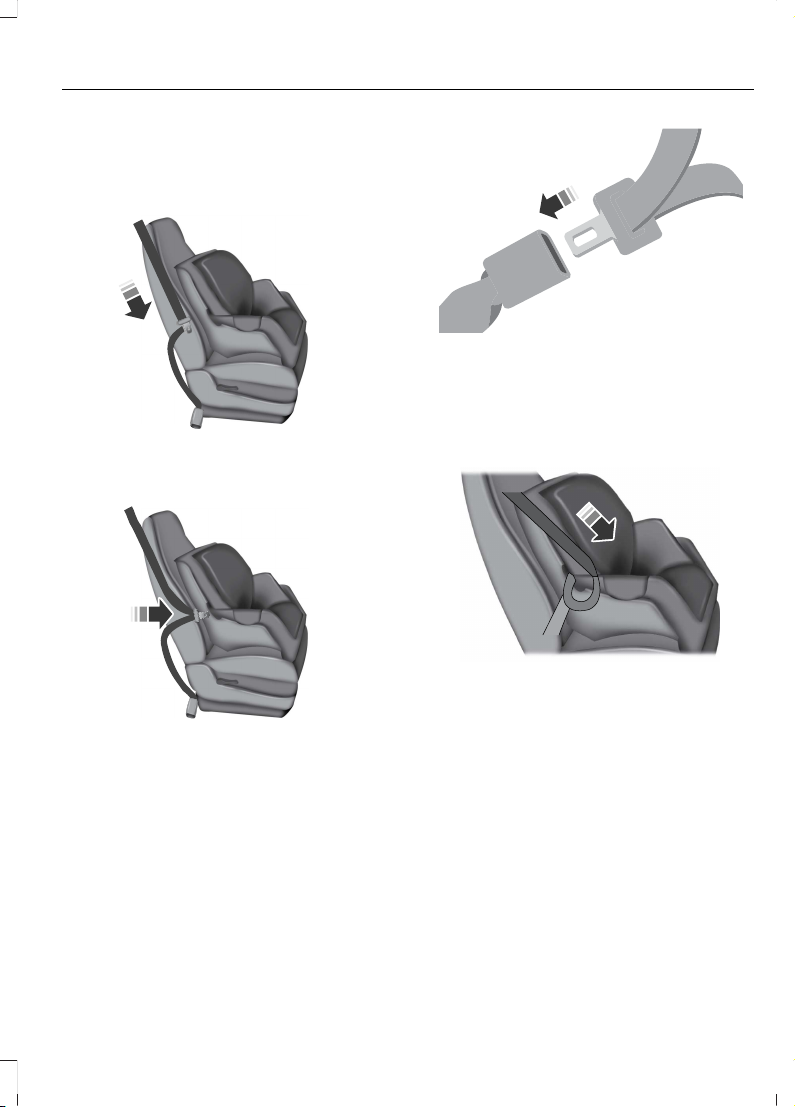
Perform the following steps when
installing a child restraint with seatbelts.
1. Position the child restraint in a seat
with a seatbelt.
E142529
2. Pull down on the shoulder belt and
then grasp the shoulder belt and lap
belt together.
E142530
3. While holding the shoulder and lap belt
portions together, route the tongue
through the child restraint according
to the child restraint manufacturer's
instructions. Make sure you did not
twist the belt webbing.
E142531
4. Insert the belt tongue into the proper
buckle for that seating position until
the latch engages. Make sure the
tongue is latched securely by pulling
on it.
E142875
5. To put the retractor in the automatic
locking mode, grasp the shoulder
portion of the belt and pull downward
until you pull all of the seatbelt out.
Note: The automatic locking mode is
available on the front passenger and rear
seats. This mode is also available on the
center seat of a Regular Cab. This vehicle
does not require the use of a locking clip.
6. Allow the belt to retract to remove
slack. The seatbelt clicks as it retracts
to indicate it is in the automatic locking
mode.
55
2023 F-150 (TFD) Canada/United States of America, enUSA, Edition date: 202206, DOM
Child Safety
Page 60
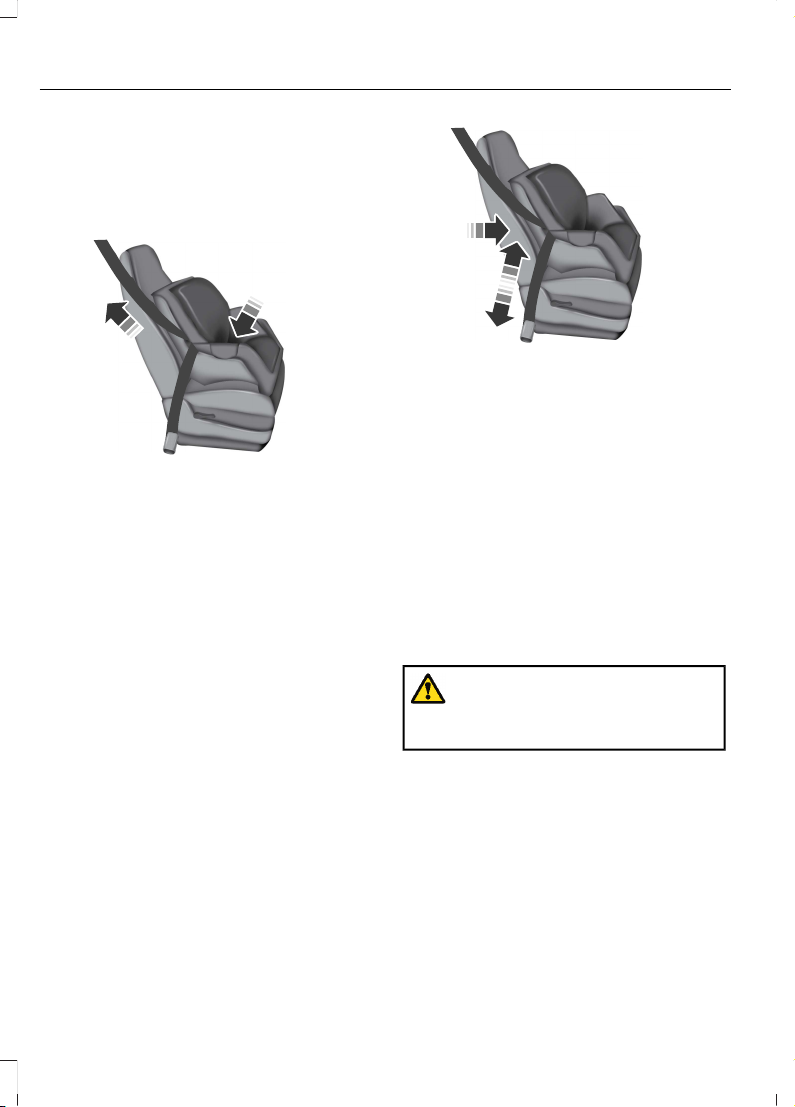
7. Pull the seatbelt out of the retractor to
make sure the retractor is in the
automatic locking mode. You should
not be able to pull more belt out. If the
retractor is not locked, unbuckle the
belt and repeat Steps 5 and 6.
E142533
8. Remove remaining slack from the belt.
Force the seat down with extra weight,
for example, by pressing down or
kneeling on the child restraint while
pulling up on the shoulder belt in order
to force slack from the belt. This is
necessary to remove the remaining
slack that exists once you add the extra
weight of the child to the child restraint.
It also helps to achieve the proper
snugness of the child restraint to your
vehicle. Sometimes, a slight lean
toward the buckle helps to remove
remaining slack from the belt.
9. If the child restraint has a tether strap,
attach it.
E142534
10. Before placing the child in the seat,
forcibly move the seat forward and
back to make sure the seat is securely
held in place.
To check this, grab the seat at the belt path
and attempt to move it side to side and
forward and back. There should be no
more than 1 in (2.5 cm) of movement.
We recommend checking with a NHTSA
Certified Child Passenger Safety
Technician to make certain the child
restraint is properly installed. In Canada,
check with Transport Canada for referral
to a Child Car Seat Clinic.
Using Seatbelts
WARNING: Always use both the
lap and shoulder portion of the seatbelt
in the center seating position.
Note: The following applies to the front
center position of Super Cab and Crew Cab
vehicles.
The seatbelt webbing below the tongue is
the lap portion of the seatbelt. The
webbing above the tongue is the shoulder
belt portion of the seatbelt.
1. Position the child restraint in the front
center seat.
56
2023 F-150 (TFD) Canada/United States of America, enUSA, Edition date: 202206, DOM
Child Safety
Page 61
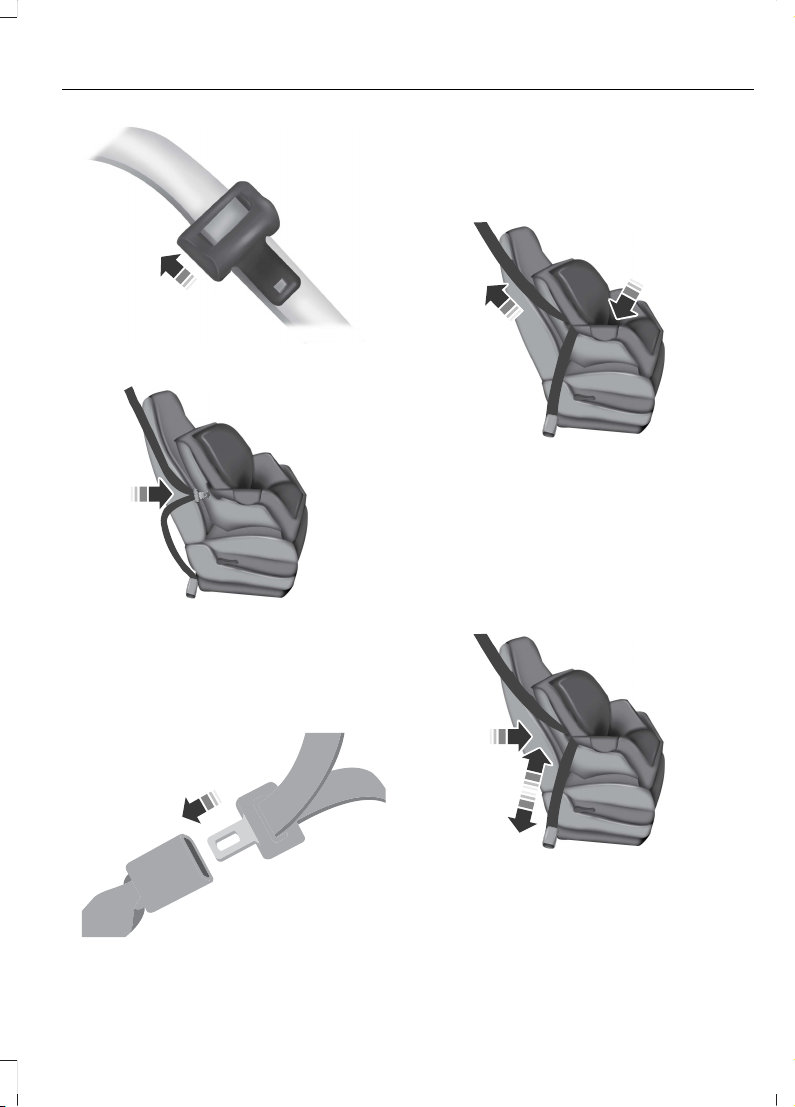
E162708
2. Slide the tongue up the webbing.
E142530
3. While holding both shoulder and lap
portions next to the tongue, route the
tongue and webbing through the child
restraint according to the child restraint
manufacturer's instructions. Make sure
you did not twist the belt webbing.
E142531
4. Insert the belt tongue into the proper
buckle for that seating position until
the latch engages. Make sure the
tongue is latched securely by pulling
on it.
E142533
5. When pushing down with your knee on
the child restraint, pull up on the
shoulder belt portion to tighten the lap
belt portion of the seatbelt.
6. Allow the seatbelt to retract and
remove any slack in the belt to securely
tighten the child restraint in the vehicle.
7. If the child restraint has a tether strap,
attach it.
E142534
57
2023 F-150 (TFD) Canada/United States of America, enUSA, Edition date: 202206, DOM
Child Safety
Page 62
8. Before placing the child in the seat,
forcibly move the seat forward and
back to make sure the seat is securely
held in place. To check this, grab the
seat at the belt path and attempt to
move it side to side and forward and
back. There should be no more than
1 in (2.5 cm) of movement.
9. Check from time to time to be sure that
there is no slack in the lap and shoulder
belt. The shoulder belt must be snug
to keep the lap belt tight during a crash.
We recommend checking with a NHTSA
Certified Child Passenger Safety
Technician to make certain the child
restraint is properly installed. In Canada,
check with Transport Canada for referral
to a Child Car Seat Clinic.
USING LOWER ANCHORS AND
TETHERS FOR CHILDREN
WARNING: Do not attach two child
safety restraints to the same anchor. In
a crash, one anchor may not be strong
enough to hold two child safety restraint
attachments and may break, causing
serious injury or death.
WARNING: Depending on where
you secure a child restraint, and
depending on the child restraint design,
you may block access to certain seatbelt
buckle assemblies and LATCH lower
anchors, rendering those features
potentially unusable. To avoid risk of
injury, make sure occupants only use
seating positions where they are able to
be properly restrained.
The Lower Anchors and Tethers for
Children (LATCH) system has three vehicle
anchor points:
• Two lower anchors where the vehicle
seat backrest and seat cushion meet,
called the seat bight.
• One top tether anchor behind that
seating position.
LATCH compatible child restraints have
two rigid or webbing mounted
attachments. These attachments connect
to the two lower anchors at the LATCH
equipped seating positions in your vehicle.
This type of attachment method
eliminates the need to use seatbelts to
attach the child restraint.
However, you can still use the seatbelt to
attach the child restraint if the lower
anchors are not used. For forward-facing
child restraints, you must also attach the
top tether strap to the proper top tether
anchor if a top tether strap has been
provided with your child restraint.
Follow the instructions later in this chapter
on attaching child restraints with tether
straps.
INSTALLING A CHILD RESTRAINT
IN A CENTER SEAT
WARNING: The standardized
spacing for LATCH lower anchors is 11 in
(280 mm) center to center. Do not use
LATCH lower anchors for the center
seating position unless the child restraint
manufacturer's instructions permit and
specify using anchors spaced at least as
far apart as those in this vehicle.
The lower anchors at the center of the
second row rear seat are spaced 25.7 in
(652 mm) apart. The standardized spacing
for LATCH lower anchors is 11 in (280 mm)
center to center.
58
2023 F-150 (TFD) Canada/United States of America, enUSA, Edition date: 202206, DOM
Child Safety
Page 63
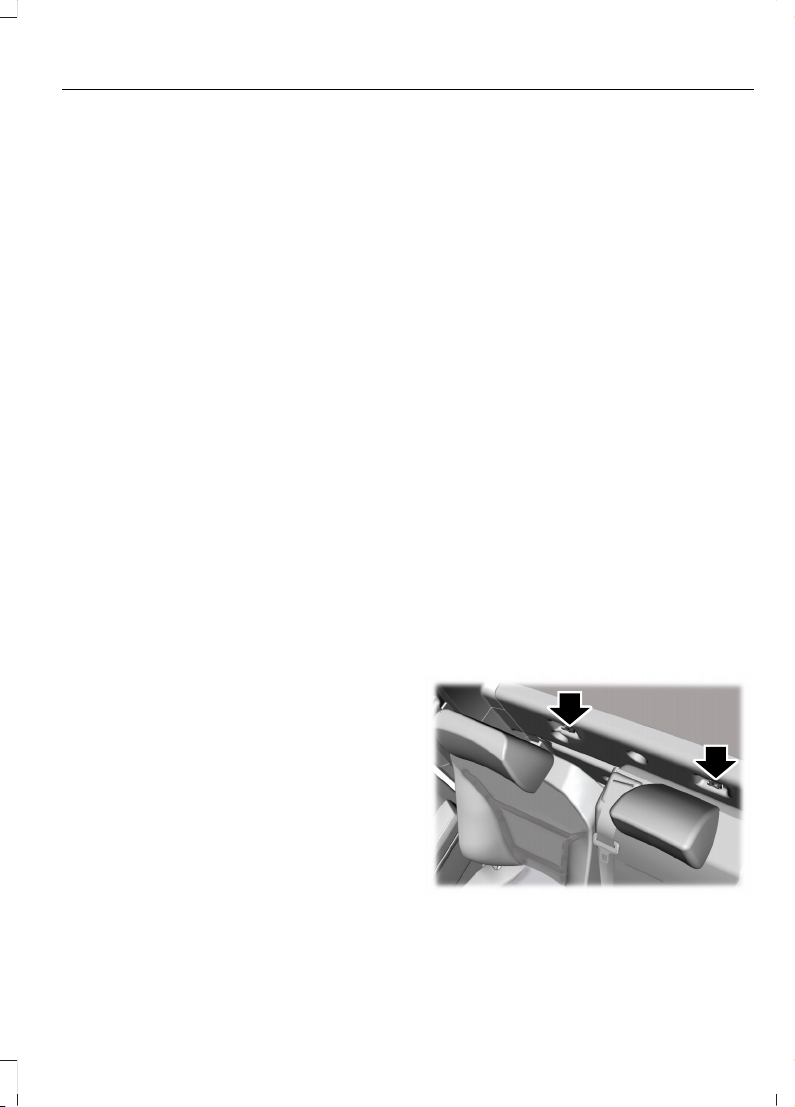
You cannot install a child restraint with
rigid LATCH attachments at the center
seating position. You can only use LATCH
compatible child restraints with
attachments on belt webbing at this
seating position provided that the child
restraint manufacturer's instructions
permit use with the anchor spacing stated.
Do not attach a child restraint to any lower
anchor if another child restraint is attached
to that anchor.
Each time you use the child restraint, check
that the seat is properly attached to the
lower anchors and tether anchor, if
applicable. Tug the child restraint from side
to side and forward and back where it is
secured to the vehicle. The seat should
move less than 1 in (2.5 cm).
If you did not properly anchor the child
restraint, the risk of a child being injured in
a crash greatly increases.
COMBINING THE SEATBELT AND
LOWER ANCHORS FOR
ATTACHING CHILD RESTRAINTS
When used in combination, you may attach
either the seatbelt or the LATCH lower
anchors first, provided a proper installation
is achieved. Attach the tether strap
afterward, if it is included with the child
restraint.
USING TETHER STRAPS
Many forward-facing child restraints
include a tether strap which extends from
the back of the child restraint and hooks
to an anchoring point called the top tether
anchor. Tether straps are available as an
accessory for many older child restraints.
Contact the manufacturer of your child
restraint for information about ordering a
tether strap, or to obtain a longer tether
strap if the tether strap on your child
restraint does not reach the appropriate
top tether anchor in the vehicle.
Attach the tether strap only to the
appropriate tether anchor. The tether strap
may not work properly if attached
somewhere other than the correct tether
anchor.
If you install a child restraint with rigid
LATCH attachments, do not tighten the
tether strap enough to lift the child
restraint off the vehicle seat cushion when
the child is seated in it. Keep the tether
strap just snug without lifting the front of
the child restraint. Keeping the child
restraint just touching the vehicle seat
gives the best protection in a severe crash.
Once you have installed the child restraint
using either the seatbelt, the lower anchors
of the LATCH system, or both, you can
attach the top tether strap.
ATTACHING THE FRONT SEAT
TETHER STRAP
Regular Cab
E175295
1. Route the child restraint tether strap
over the back of the seat and under the
head restraint.
59
2023 F-150 (TFD) Canada/United States of America, enUSA, Edition date: 202206, DOM
Child Safety
Page 64
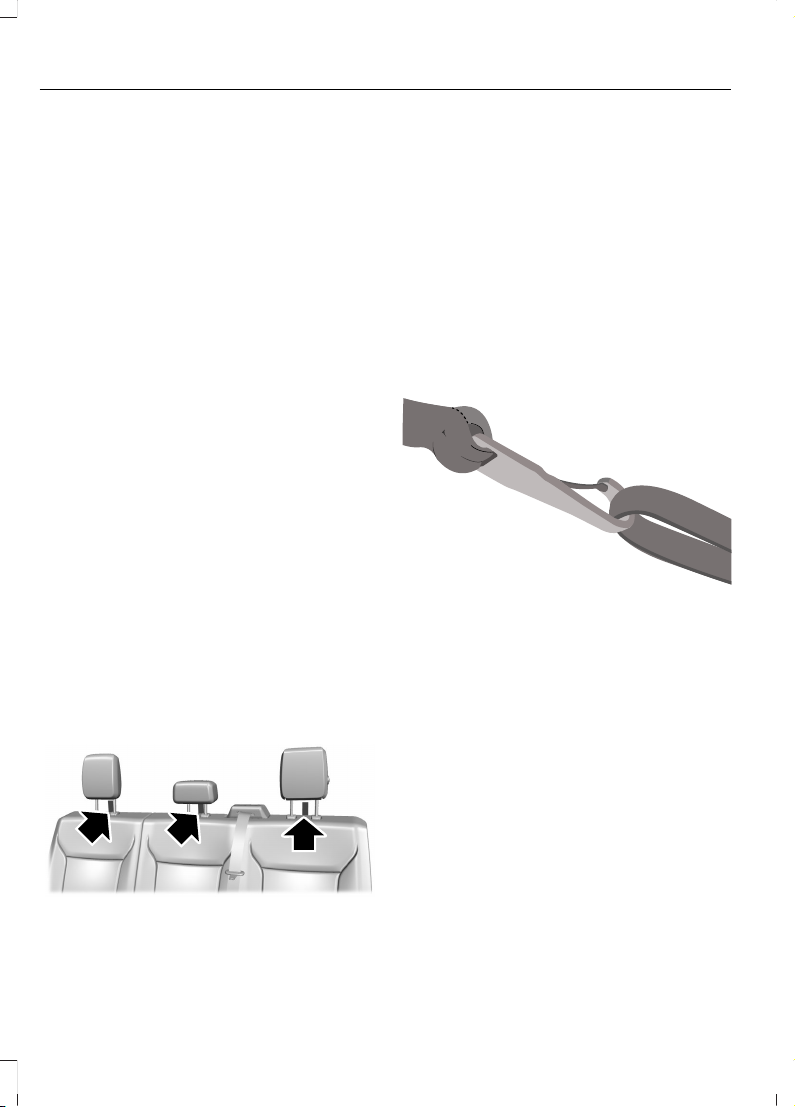
Note: For vehicles with adjustable head
restraints, route the tether strap under the
head restraint and between the head
restraint posts. Otherwise, route the tether
strap over the top of the seat backrest.
2. Locate the correct anchor for the
selected seating position. You may
need to pull the seat backrest forward
to access the tether anchors. Make sure
the seat is locked in the upright position
before installing the child restraint.
3. Clip the tether strap to the anchor.
4. Tighten the child restraint tether strap
according to the manufacturer's
instructions.
If you incorrectly clip the tether strap, the
child restraint may not be retained properly
in the event of a crash.
If you did not properly anchor the child
restraint, the risk of a child being injured in
a crash greatly increases.
If your child restraint system has a tether
strap, and the child restraint manufacturer
recommends its use, we also recommend
its use.
ATTACHING THE REAR SEAT
TETHER STRAP (If Equipped)
Crew Cab and Super Cab
E309318
There are three loops of webbing above
the back of the rear seat. Use these loops
as routing loops and anchor loops for up
to three child restraint tether straps.
For example, you can use the center loop
as a routing loop for a child restraint in the
center rear seat and as an anchoring loop
for child restraints installed in the
outermost rear seats.
Many tether straps cannot be tightened if
the tether strap is hooked to the loop
directly behind the child restraint.
To provide a tight tether strap:
E309384
1. Route the vehicle tether loop between
the head restraint posts, then route the
child restraint tether strap through the
loop, forward of the head restraint.
2. Hook the strap to the vehicle tether
anchor loop in the adjacent seating
position. If using the driver side, pass
the strap behind the shoulder belt for
the center seat. Put the tether strap
through the routing loop. The head
restraint support post holds the child
restraint tightly, but the head restraint
post is not strong enough to hold the
child restraint during a crash.
3. Tighten the tether strap according to
the child restraint manufacturer's
instructions.
60
2023 F-150 (TFD) Canada/United States of America, enUSA, Edition date: 202206, DOM
Child Safety
Page 65
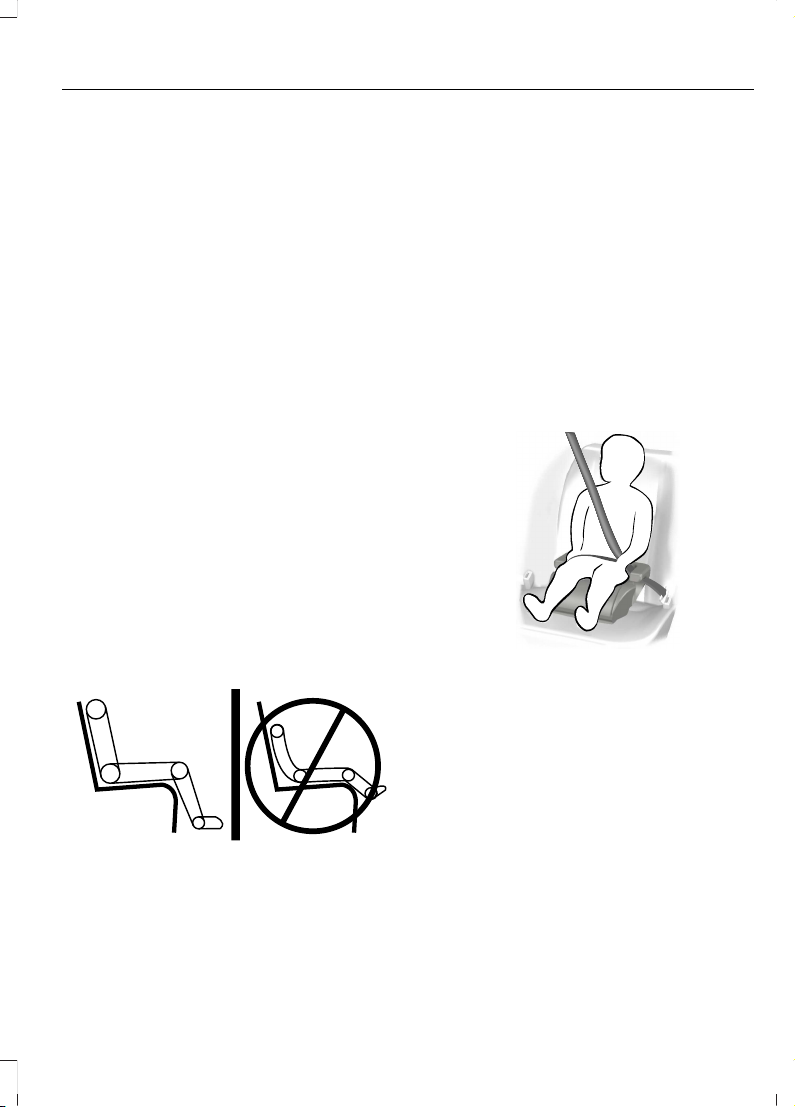
If you did not properly anchor the child
restraint, the risk of a child being injured in
a crash greatly increases.
If your child restraint system has a tether
strap, and the child restraint manufacturer
recommends its use, we also recommend
its use.
BOOSTER SEATS
Use a belt-positioning booster seat for
children who have outgrown or no longer
properly fit in a child restraint and meet
the following criteria.
• Generally children who are less than
57 in (1.45 m) tall.
• Are greater than age four (4) and less
than age twelve (12).
• Are between 40 lb (18 kg) and 80 lb
(36 kg) and upward to 100 lb (45 kg).
Many state and provincial laws require that
children use approved booster seats until
they reach age eight, a height of 57 in
(1.45 m) tall, or 80 lb (36 kg).
Booster seats should be used until you can
answer yes to all of these questions when
seated without a booster seat:
E142595
• Can the child sit all the way back
against their vehicle seat backrest with
knees bent comfortably at the edge of
the seat cushion?
• Can the child sit without slouching?
• Does the lap belt rest low across the
hips?
• Is the shoulder belt centered on the
shoulder and chest?
• Can the child stay seated like this for
the whole trip?
Always use booster seats in conjunction
with your vehicle lap and shoulder belt.
Types of Booster Seats
E68924
• Backless booster seats
If your backless booster seat has a
removable shield, remove the shield.
If a vehicle seating position has a low seat
backrest or no head restraint, a backless
booster seat may place your child's head,
as measured at the tops of the ears, above
the top of the seat. In this case, move the
backless booster to another seating
position with a higher seat backrest or
head restraint and lap and shoulder belts,
or consider using a high-back booster seat.
61
2023 F-150 (TFD) Canada/United States of America, enUSA, Edition date: 202206, DOM
Child Safety
Page 66
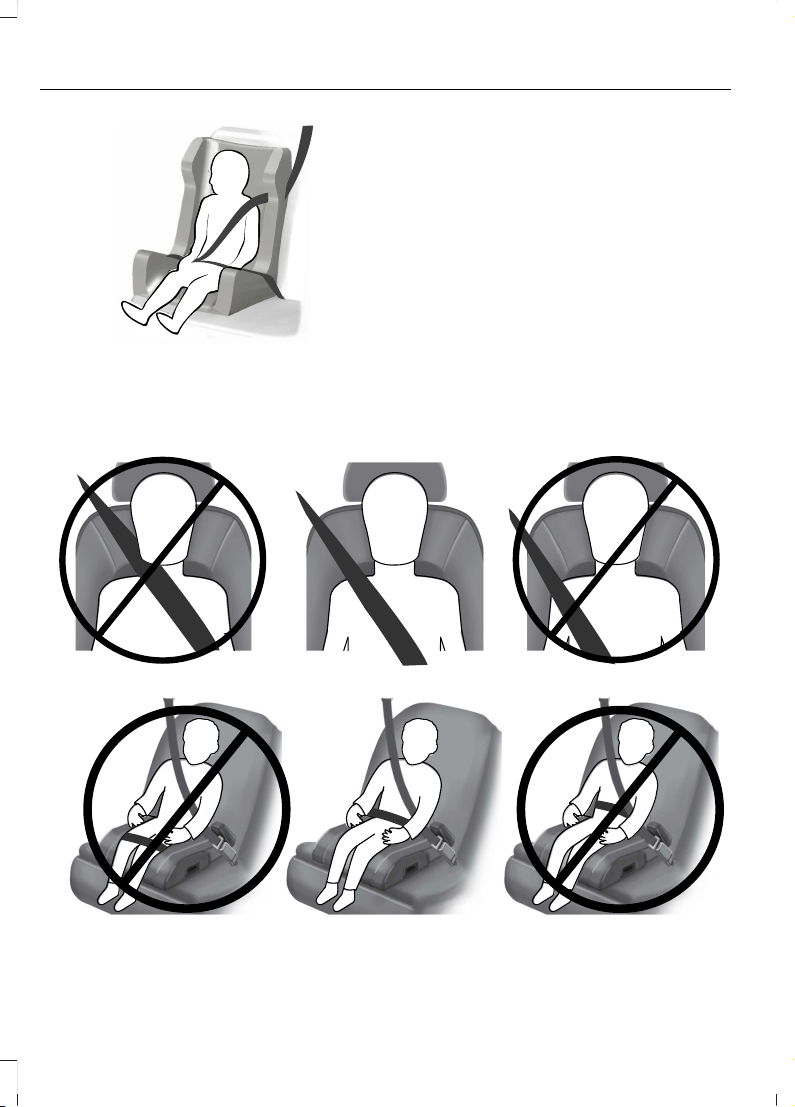
E70710
• High-back booster seats
If, with a backless booster seat, you cannot
find a seating position that adequately
supports your child's head, a high-back
booster seat would be a better choice.
Children and booster seats vary in size and
shape. Choose a booster that keeps the
lap belt low and snug across the hips,
never up across the stomach, and lets you
adjust the shoulder belt to cross the chest
and rest snugly near the center of the
shoulder.
The following drawings compare the ideal
fit to a shoulder belt uncomfortably close
to the neck and a shoulder belt that could
slip off the shoulder. The drawings also
show how the lap belt should be low and
snug across the child's hips.
E142596
E142597
62
2023 F-150 (TFD) Canada/United States of America, enUSA, Edition date: 202206, DOM
Child Safety
Page 67
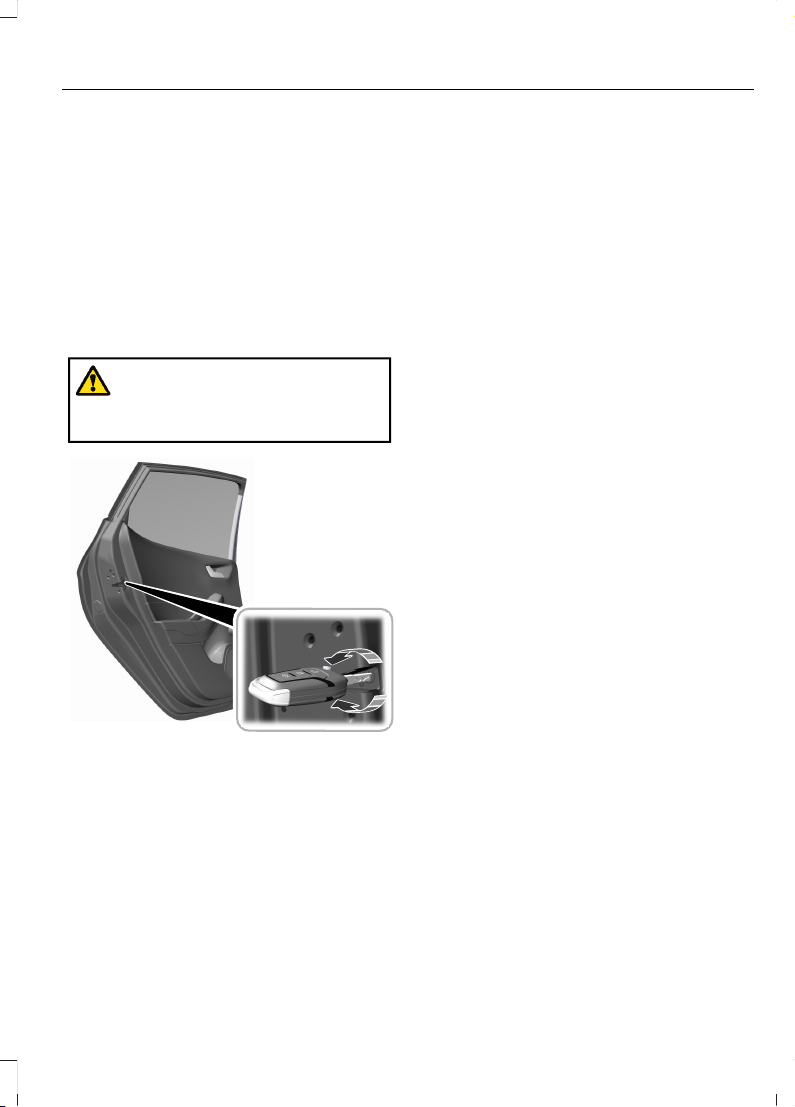
If the booster seat slides on the vehicle
seat upon which it is being used, placing a
rubberized mesh sold as shelf or carpet
liner under the booster seat may improve
this condition. Do not use any item thicker
than this under the booster seat. Check
with the booster seat manufacturer's
instructions.
CHILD SAFETY LOCKS (IF
EQUIPPED)
WARNING: You cannot open the
rear doors from inside if you have put the
child safety locks on.
E238364
A child safety lock is on the rear edge of
each rear door. You must switch the child
safety lock separately on each door.
Left-Hand Side
Turn the key clockwise to switch the child
lock on and counterclockwise to switch it
off.
Right-Hand Side
Turn the key counterclockwise to switch
the child lock on and clockwise to switch
it off.
63
2023 F-150 (TFD) Canada/United States of America, enUSA, Edition date: 202206, DOM
Child Safety
Page 68
SEATBELT PRECAUTIONS
WARNING: Always drive and ride
with your seatback upright and the lap
belt snug and low across the hips.
WARNING: Children must always
be properly restrained.
WARNING: Do not allow a
passenger to hold a child on their lap
when your vehicle is moving. Failure to
follow this instruction could result in
personal injury or death in the event of a
sudden stop or crash.
WARNING: All occupants of your
vehicle, including the driver, should
always properly wear their seatbelts,
even when an airbag supplemental
restraint system is provided. Failure to
properly wear your seatbelt could
seriously increase the risk of injury or
death.
WARNING: It is extremely
dangerous to ride in a cargo area, inside
or outside of a vehicle. In a crash, people
riding in these areas are more likely to be
seriously injured or killed. Do not allow
people to ride in any area of your vehicle
that is not equipped with seats and
seatbelts. Make sure everyone in your
vehicle is in a seat and properly using a
seatbelt. Failure to follow this warning
could result in serious personal injury or
death.
WARNING: In a rollover crash, an
unbelted person is significantly more
likely to die than a person wearing a
seatbelt.
WARNING: Each seating position
in your vehicle has a specific seatbelt
assembly made up of one buckle and
one tongue designed to be used as a pair.
Use the shoulder belt on the outside
shoulder only. Never wear the shoulder
belt under the arm. Never use a single
seatbelt for more than one person.
WARNING: Even with advanced
restraints systems, properly restrain
children 12 and under in a rear seating
position. Failure to follow this could
seriously increase the risk of injury or
death.
WARNING: Seatbelts and seats
may be hot in a vehicle that is in the
sunshine. The hot seatbelts or seats may
burn a small child. Check seat covers and
buckles before you place a child
anywhere near them.
WARNING: If your vehicle is
involved in a crash, have the seatbelts
and associated components inspected
as soon as possible. Failure to follow this
instruction could result in personal injury
or death.
All seating positions in this vehicle have
seatbelts. All occupants of the vehicle
should properly wear their seatbelts, even
when an airbag supplemental restraint
system is provided.
The seatbelt system consists of:
• Lap and shoulder seatbelts.
• A shoulder seatbelt with automatic
locking mode, except driver seatbelt.
• Height adjusters at the front outermost
seating positions.
• Seatbelt pretensioners at the front
outermost and rear outermost seating
positions.
64
2023 F-150 (TFD) Canada/United States of America, enUSA, Edition date: 202206, DOM
Seatbelts
Page 69
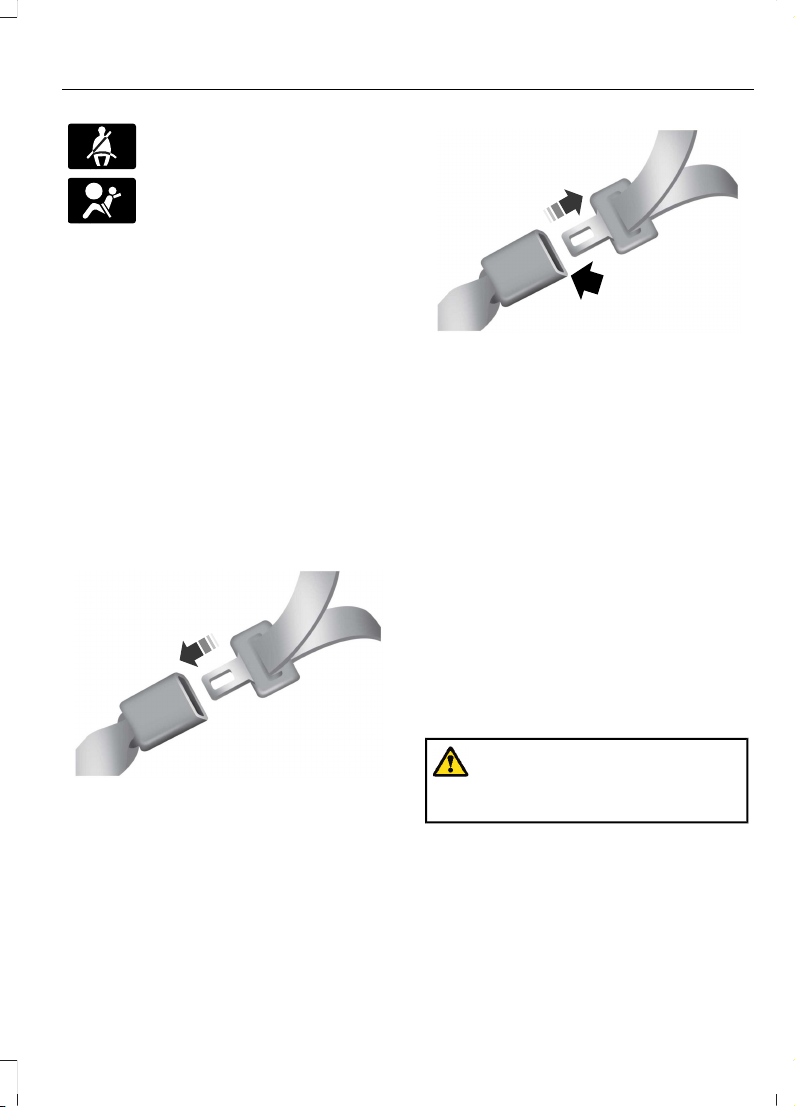
A seatbelt warning light and
chime.
Crash sensors and monitoring
system with readiness indicator.
The seatbelt pretensioners are designed
to tighten the seatbelts when activated. In
frontal and near-frontal crashes, the
seatbelt pretensioners may be activated
alone or, if the crash is of sufficient severity,
together with the front airbags. In side
crashes and rollovers, the pretensioners
will be activated when the Safety Canopy
is activated.
FASTENING AND UNFASTENING THE SEATBELTS
This applies to all seating positions, except
for the front center position of Super Cab
and Crew Cab.
E142587
1. Insert the seatbelt tongue into the
buckle until you hear a snap and feel it
latch.
E142588
2. Press the button to release the
seatbelt.
Using the Seatbelt With Cinch
Tongue
This applies to the front center seating
position of Super Cab and Crew Cab.
The cinch tongue slides up and down the
seatbelt webbing when you stow the
seatbelt or when you put the seatbelts on.
When you buckle the seatbelt, the cinch
tongue allows you to shorten the lap
portion, but pinches the webbing to keep
the lap portion from getting longer. The
cinch tongue is designed to slip during a
crash, so wear the shoulder belt properly
and do not allow any slack in either the lap
or shoulder portions.
Fastening the Cinch Tongue
WARNING: Always drive and ride
with your seatback upright and the lap
belt snug and low across the hips.
1. Pull the seatbelt from the retractor so
that the shoulder belt portion of the
seatbelt crosses your shoulder and
chest.
2. Make sure the belt is not twisted. If the
belt is twisted, remove the twist.
65
2023 F-150 (TFD) Canada/United States of America, enUSA, Edition date: 202206, DOM
Seatbelts
Page 70
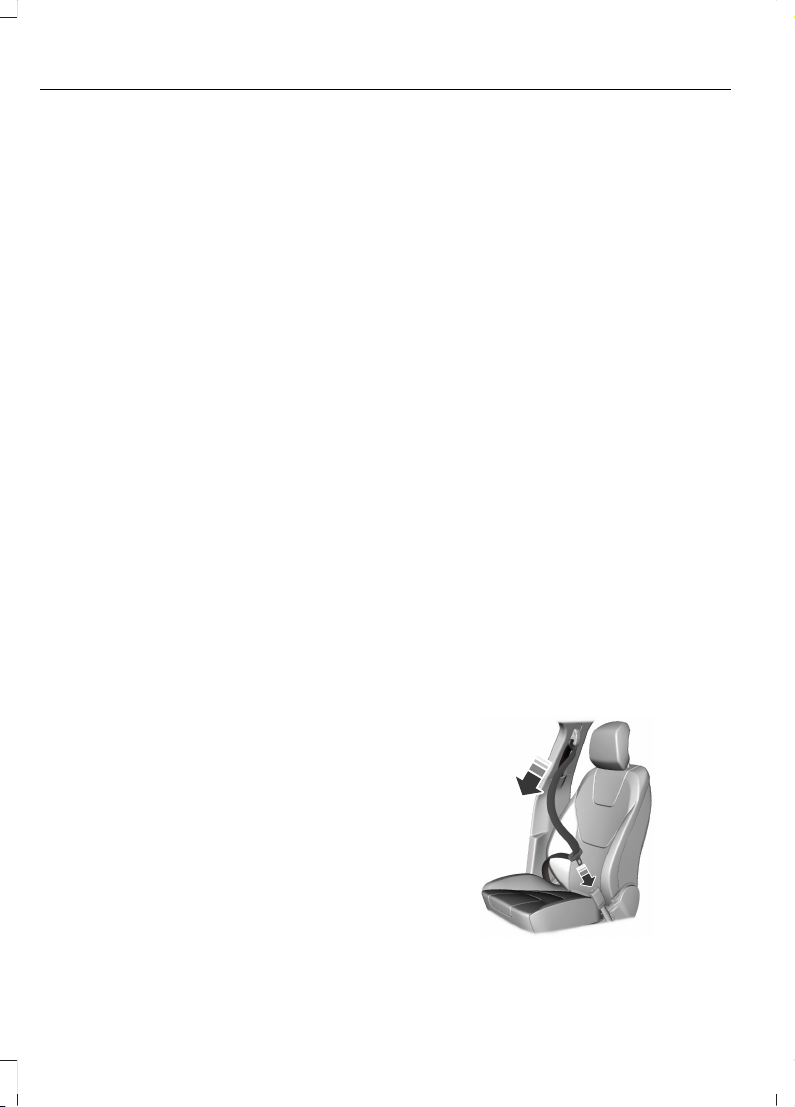
3. Insert the belt tongue into the proper
buckle for your seating position until
you hear a snap and feel it latch.
4. Make sure you securely fasten the
tongue to the buckle by pulling on the
tongue.
While you are fastened in the seatbelt, the
seatbelt with a cinch tongue adjusts to
your movement. However, if you brake
hard, turn hard, or if your vehicle receives
an impact of 5 mph (8 km/h) or more, the
seatbelt locks and helps reduce your
forward movement.
SENSITIVE LOCKING MODE
WHAT IS SENSITIVE LOCKING
MODE
Sensitive locking mode is a seatbelt
retractor feature that allows shoulder belt
length adjustment according to your
movements and locking in response to
vehicle movement.
HOW DOES SENSITIVE LOCKING
MODE WORK
If the driver suddenly brakes, turns a corner
sharply, or the vehicle receives an impact
of about 5 mph (8 km/h) or more, the
seatbelts lock to help reduce forward
movement of the driver and passengers.
In addition, the seatbelt retractor locks if
you pull the seatbelt webbing out too
quickly. If the retractor locks, slowly lower
the height adjuster to allow the seatbelt
to retract.
If the retractor does not unlock, pull the
seatbelt out slowly then feed a small
length of webbing back toward the stowed
position.
For rear seatbelts, recline the rear seat
backrest or push the seat backrest cushion
away from the seatbelt. Feed a small
length of webbing back toward the stowed
position.
AUTOMATIC LOCKING MODE
WHAT IS AUTOMATIC LOCKING
MODE
This feature keeps the seatbelts
pre-locked. The belt still retracts to remove
any slack in the shoulder belt.
WHEN TO USE AUTOMATIC
LOCKING MODE
Use this mode any time you install a child
restraint in a front or rear seating position.
Properly restrain children 12 years old and
under in a rear seat whenever possible. See
Child Safety (page 50).
Note: Automatic locking mode is not
available on the driver seatbelt.
Note: Vehicles with optional front seat
center may not have this function.
ENGAGING AUTOMATIC LOCKING
MODE
E142591
66
2023 F-150 (TFD) Canada/United States of America, enUSA, Edition date: 202206, DOM
Seatbelts
Page 71
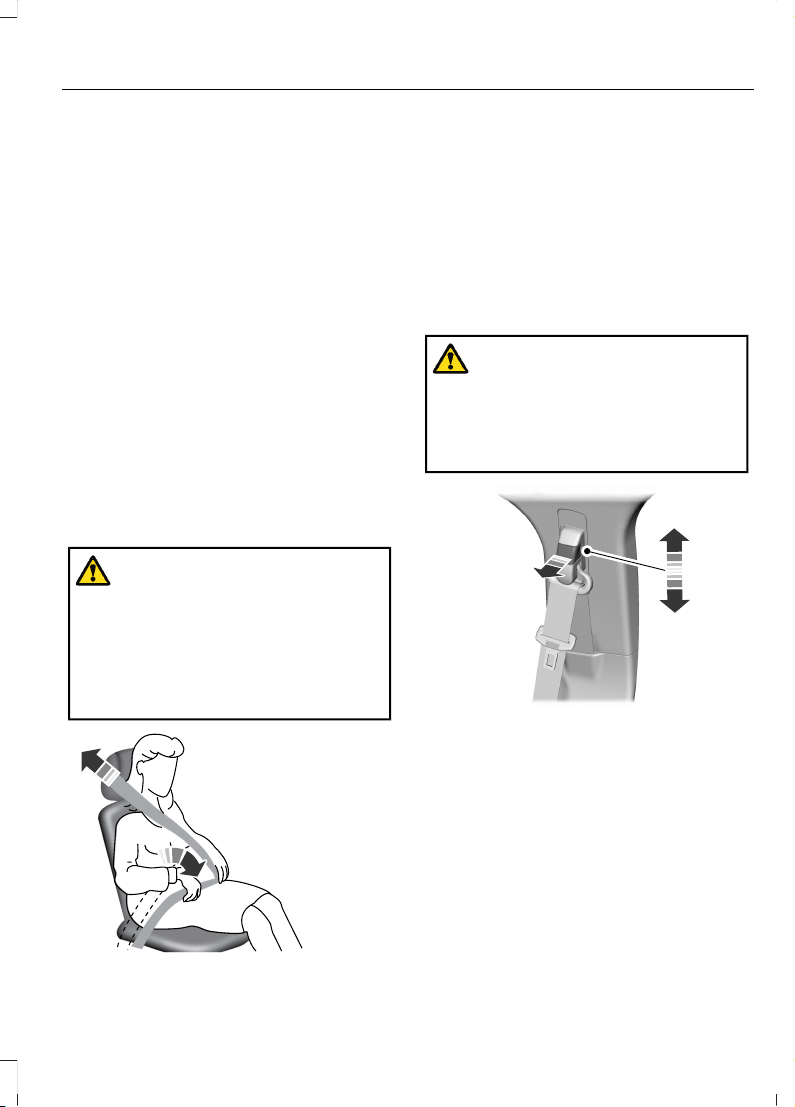
1. Fasten the combination lap and
shoulder belt.
2. Grasp the shoulder portion and pull
downward until you pull the entire belt
out.
3. Allow the belt to retract. As the belt
retracts, you will hear a clicking sound.
This indicates the seatbelt is now in the
automatic locking mode.
DISENGAGING AUTOMATIC
LOCKING MODE
Unbuckle the combination lap and
shoulder belt and allow it to retract
completely to disengage the automatic
locking mode and activate the vehicle
sensitive locking mode.
ADJUSTING THE SEATBELTS DURING PREGNANCY
WARNING: Always ride and drive
with your seatback upright and properly
fasten your seatbelt. Fit the lap portion
of the seatbelt snugly and low across
the hips. Position the shoulder portion of
the seatbelt across your chest. Pregnant
women must follow this practice. See
the following figure.
E142590
Pregnant women should always wear their
seatbelt. Position the lap belt portion of a
combination lap and shoulder belt low
across the hips below the belly and worn
as tight as comfort allows. Position the
shoulder belt to cross the middle of the
shoulder and the center of the chest.
ADJUSTING THE SEATBELT HEIGHT
WARNING: Position the seatbelt
height adjuster so that the seatbelt rests
across the middle of your shoulder.
Failure to adjust the seatbelt correctly
could reduce its effectiveness and
increase the risk of injury in a crash.
E145664
1. Pull the button and slide the height
adjuster up or down.
2. Release the button and pull down on
the height adjuster to make sure it is
locked in place.
67
2023 F-150 (TFD) Canada/United States of America, enUSA, Edition date: 202206, DOM
Seatbelts
Page 72
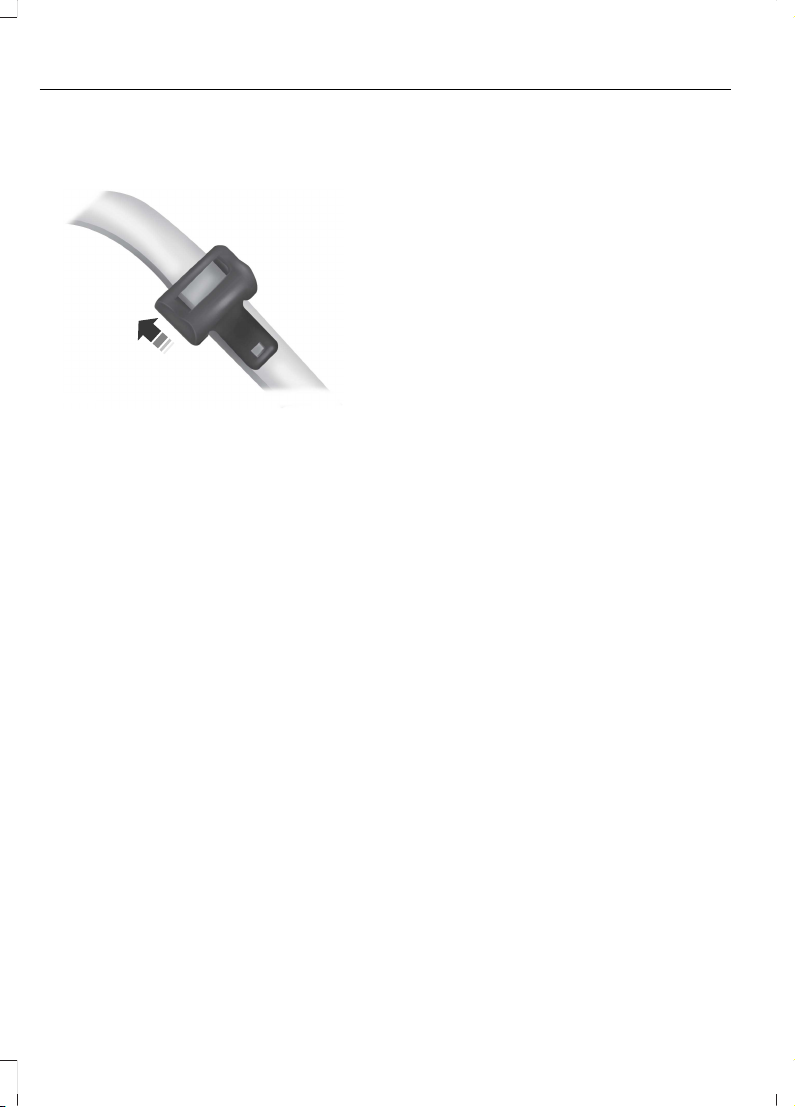
ADJUSTING THE SEATBELT LENGTH
E162708
1. Pull some seatbelt webbing out of the
shoulder belt retractor.
2. While holding the webbing below the
tongue, grasp the metal tip of the
tongue so that it is parallel to the
webbing and slide the tongue up.
3. Provide enough lap belt length so that
the tongue can reach the buckle.
SEATBELT REMINDER
HOW DOES THE SEATBELT
REMINDER WORK
This feature supplements the seatbelt
warning function by providing additional
reminders that intermittently sound a tone
and illuminate the seatbelt warning lamp
when you are in the driver seat or you have
a front seat passenger and a seatbelt is
unbuckled.
The system uses information from the
front passenger sensing system to
determine if a front seat passenger is
present and therefore potentially in need
of a warning. To avoid the system
switching on the Belt-Minder feature for
objects you place on the front passenger
seat, only the front seat passengers receive
warnings as determined by the front
passenger sensing system.
If the Belt-Minder warnings expire
(warnings for about five minutes) for one
passenger (driver or front passenger), the
other passenger can still cause the
Belt-Minder feature to switch on.
68
2023 F-150 (TFD) Canada/United States of America, enUSA, Edition date: 202206, DOM
Seatbelts
Page 73

ThenIf
The Belt-Minder feature will not activate.You and the front seat passenger buckle
your seatbelts before you switch the ignition on or less than 1–2 minutes elapse after
you switch the ignition on...
The Belt-Minder feature activates, the
seatbelt warning lamp illuminates and an
indicator tone sounds for 6 seconds every
25 seconds, repeating for about 5 minutes
or until you and the front seat passenger
buckle your seatbelts.
You or the front seat passenger do not
buckle your seatbelts before your vehicle
reaches at least 6.0 mph (9.7 km/h) and
1–2 minutes elapse after you switch the
ignition on...
The Belt-Minder feature activates, the
seatbelt warning lamp illuminates and an
indicator tone sounds for 6 seconds every
25 seconds, repeating for about 5 minutes
or until you and the front seat passenger
buckle your seatbelts.
The seatbelt for the driver or front
passenger is unbuckled for about 1 minute
while the vehicle is traveling at least
6.0 mph (9.7 km/h) and more than 1–2
minutes elapse after you switch the ignition
on...
69
2023 F-150 (TFD) Canada/United States of America, enUSA, Edition date: 202206, DOM
Seatbelts
Page 74
SEATBELT REMINDER
INDICATORS
A warning lamp illuminates if the ignition
is on, a front seat is occupied and the
seatbelt has not been fastened.
The warning lamp illuminates
until you fasten your seatbelt.
SEATBELT REMINDER AUDIBLE
WARNINGS
A warning tone sounds and the warning
lamp illuminates if you are not wearing
your seatbelt when your vehicle exceeds
a relatively low speed.
The warning tone sounds for a short period
of time or until you fasten your seatbelt.
SWITCHING THE SEATBELT
REMINDER ON AND OFF
WARNING: While the system
allows you to deactivate it, this system
is designed to improve your chances of
being safely belted and surviving an
accident. We recommend you leave the
system activated for yourself and others
who may use the vehicle.
Note: The driver and front passenger
warnings switch off independently. When
you perform this procedure for one seating
position, do not buckle the other position as
this cancels the process.
Note: If you are using MyKey, you cannot
disable the seatbelt reminder. Also, if the
seatbelt reminder has been previously
disabled, it will be re-enabled during the use
of MyKey. See MyKey™ (page 99).
Read Steps 1 - 4 before proceeding with
the programming procedure.
Make sure that:
• The parking brake is set.
• The transmission is in park (P).
• The ignition is off.
• The driver and front passenger
seatbelts are unfastened.
1. Switch the ignition on. Do not start the
engine.
2. Wait about one minute until the
seatbelt warning light switches off.
After Step 2, wait an additional five
seconds before proceeding with Step
3. Once you start Step 3, you must
complete the procedure within 30
seconds.
3. For the seating position you are
switching off, buckle then unbuckle the
seatbelt three times at a moderate
speed, ending in the unbuckled state.
After Step 3, the seatbelt warning light
switches on.
4. When the seatbelt warning light is on,
buckle then unbuckle the seatbelt.
After Step 4, the seatbelt warning light
flashes for confirmation.
This switches the feature off for that
seating position if it is currently on.
This switches the feature on for that
seating position if it is currently off.
CHECKING THE SEATBELTS
Check the seatbelts and child restraints
periodically to make sure they work
properly and are not damaged. Make sure
there are no nicks, tears or cuts. Replace if
necessary.
Check the following seatbelt assemblies
after a crash.
• Retractors.
• Buckles.
• Front seatbelt buckle assemblies.
70
2023 F-150 (TFD) Canada/United States of America, enUSA, Edition date: 202206, DOM
Seatbelts
Page 75
• Shoulder belt height adjusters.
• Shoulder belt guide on seat backrest.
• Child restraint LATCH and tether
anchors.
• Attaching hardware.
Read the child restraint manufacturer's
instructions for additional inspection and
maintenance information specific to the
child restraint.
We recommend that all seatbelt
assemblies in use in vehicles involved in a
crash be replaced. However, if the crash
was minor and an authorized dealer finds
that the belts do not show damage and
continue to operate properly, they do not
need to be replaced. Seatbelt assemblies
not in use during a crash should also be
checked and replaced if either damage or
improper operation is noted.
Properly care for seatbelts. See Cleaning
Seatbelts (page 533).
SEATBELT EXTENSIONS
WARNING: Persons who fit into
the vehicle's seatbelt should not use an
extension. Unnecessary use could result
in serious personal injury in the event of
a crash.
WARNING: Only use extensions
provided free of charge by our dealers.
The dealer will provide an extension
designed specifically for this vehicle,
model year and seating position. The use
of an extension intended for another
vehicle, model year or seating position
may not offer you the full protection of
your vehicle's seatbelt restraint system.
WARNING: Never use seatbelt
extensions to install child restraints.
WARNING: Do not use extensions
to change the way the seatbelt fits
across the torso, over the lap or to make
the seatbelt buckle easier to reach.
If, because of body size or driving position,
it is not possible to properly fasten the
seatbelt over your lap and shoulder, an
extension that is compatible with the
seatbelts is available free of charge from
our dealers. Only use our seatbelt
extensions made by the original equipment
seatbelt manufacturer with our seatbelts.
Ask your authorized dealer if your extension
is compatible with your vehicle restraint
system.
71
2023 F-150 (TFD) Canada/United States of America, enUSA, Edition date: 202206, DOM
Seatbelts
Page 76

WHAT IS THE PERSONAL SAFETY SYSTEM
Personal Safety System
An advanced safety system that protects
occupants in frontal crashes.
HOW DOES THE PERSONAL SAFETY SYSTEM WORK
This system provides an improved level of
frontal crash protection to front seat
occupants and is designed to reduce the
risk of airbag-related injuries. The system
analyzes occupant conditions and crash
severity before activating the appropriate
safety devices. During a crash, the
restraints control module may deploy the
seatbelt pretensioners, and one or both
stages of the dual-stage airbags based on
crash severity and occupant conditions.
PERSONAL SAFETY SYSTEM COMPONENTS
• Driver and passenger dual-stage airbag
supplemental restraints.
• Front seat outermost seatbelts with
pretensioners, energy management
retractors and seatbelt usage sensors.
• Front passenger sensing system.
• Passenger airbag off and on indicators.
• Front crash severity sensors.
• Restraints control module with impact
and safing sensors.
• Restraint system warning light and
tone.
• The electrical wiring for the airbags,
crash sensors, seatbelt pretensioners,
front seatbelt usage sensors, front
passenger sensing system and
indicator lights.
72
2023 F-150 (TFD) Canada/United States of America, enUSA, Edition date: 202206, DOM
Personal Safety System™
Page 77
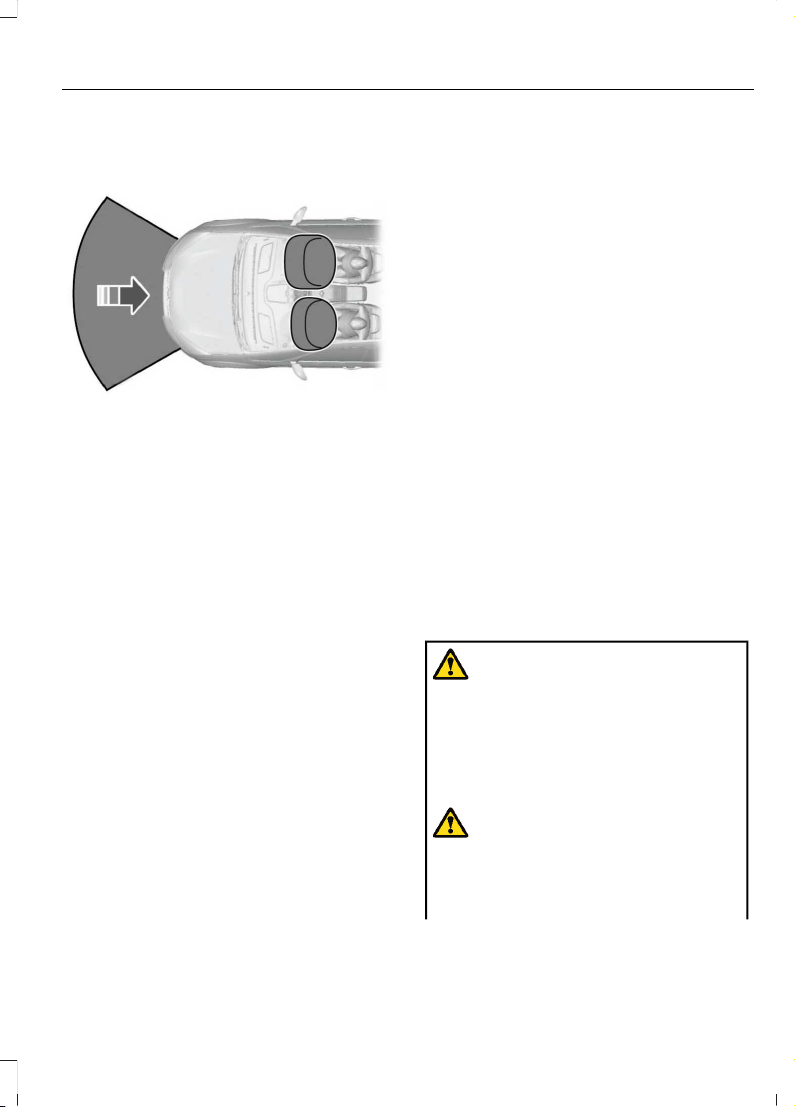
HOW DO THE FRONT AIRBAGS WORK
E151127
The driver and front passenger airbags
deploy during significant frontal and near
frontal crashes.
The driver and passenger front airbag
system consists of:
• Driver and passenger airbag modules.
• Front passenger sensing system.
• Crash sensors and monitoring system
with readiness indicator. See Crash
Sensors and Airbag Indicator (page
80).
The airbags are a supplemental restraint
system and are designed to work with the
seatbelts to help protect the driver and
right front passenger from certain upper
body injuries. Airbags do not inflate slowly;
there is a risk of injury from a deploying
airbag.
Note: You will hear a loud bang and see a
cloud of harmless powdery residue if an
airbag deploys. This is normal.
The airbags inflate and deflate rapidly
upon activation. After airbag deployment,
it is normal to notice a smoke-like, powdery
residue or smell the burnt propellant. This
may consist of cornstarch, talcum powder
(to lubricate the bag) or sodium
compounds (for example, baking soda)
that result from the combustion process
that inflates the airbag. Small amounts of
sodium hydroxide may be present which
may irritate the skin and eyes, but none of
the residue is toxic.
Contact with a deploying airbag may cause
abrasions or swelling. Temporary hearing
loss is also a possibility as a result of the
noise associated with a deploying airbag.
Because airbags must inflate rapidly and
with considerable force, there is the risk of
death or serious injuries such as fractures,
facial and eye injuries or internal injuries,
particularly to occupants who are not
properly restrained or are otherwise out of
position at the time of airbag deployment.
Thus, it is extremely important that
occupants be properly restrained as far
away from the airbag module as possible
while maintaining vehicle control.
Routine maintenance of the airbags is not
required.
HOW DO THE SIDE AIRBAGS WORK
WARNING: Do not place objects
or mount equipment on or near the
airbag cover, on the side of the front or
rear seatbacks, or in areas that may
come into contact with a deploying
airbag. Failure to follow these
instructions may increase the risk of
personal injury in the event of a crash.
WARNING: Accessory seat covers
not released by Ford Motor Company
could prevent the deployment of the
airbags and increase the risk of injuries
in a crash.
73
2023 F-150 (TFD) Canada/United States of America, enUSA, Edition date: 202206, DOM
Airbags
Page 78
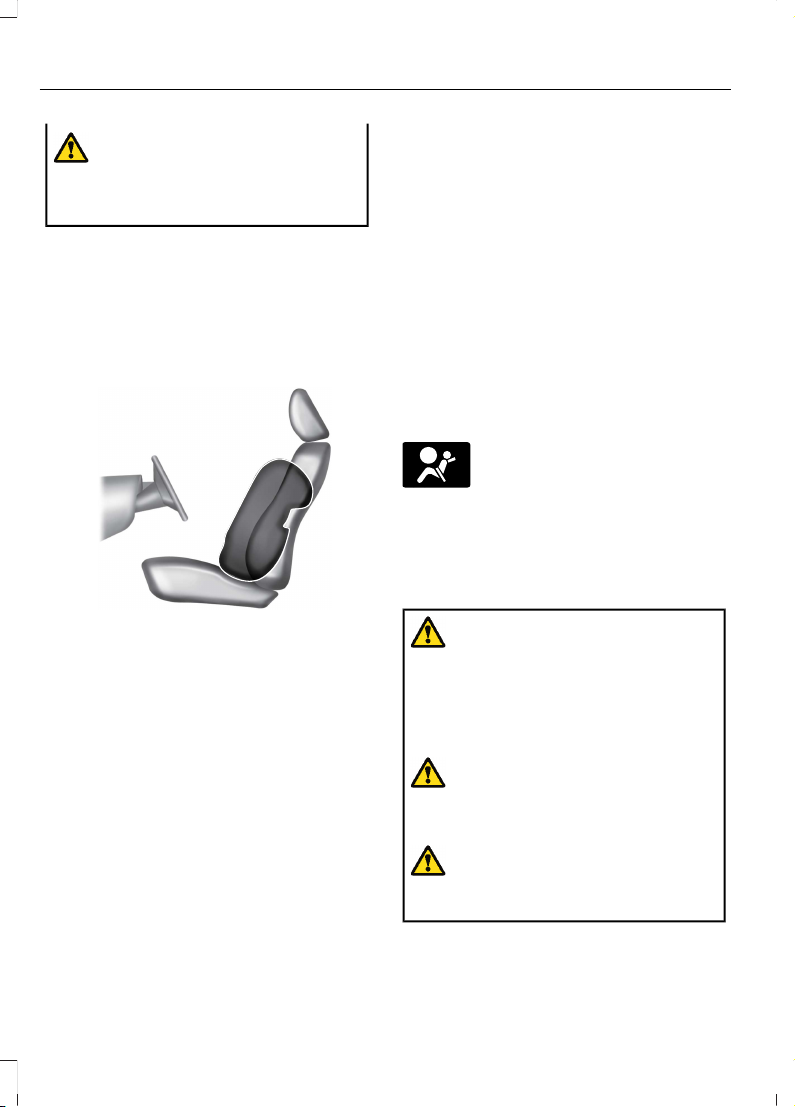
WARNING: Do not lean your head
on the door. The side airbag could injure
you as it deploys from the side of the
seatback.
The side airbags are on the outermost side
of the seat backrests of the front seats. In
certain sideways crashes or rollovers, the
airbags will be inflated. The airbag was
designed to inflate between the door panel
and occupant to further enhance the
protection provided to occupants in side
impact crashes.
E152533
The system consists of the following:
• A label or embossed side panel
indicating that side airbags are fitted
to your vehicle.
• Side airbags inside the driver and front
passenger seat backrests.
• Crash sensors and monitoring system
with readiness indicator. See Crash
Sensors and Airbag Indicator (page
80).
HOW DO THE KNEE AIRBAGS WORK
Driver and passenger knee airbags are
under or within the instrument panel.
During a crash, the restraints control
module may activate the driver and
passenger knee airbags (individually or
both) based on crash severity and
respective occupant conditions. Under
certain crash and occupant conditions, the
driver and passenger knee airbags may
deploy (individually or both) but the
corresponding front airbag may not
activate. It is important to be properly
seated and restrained to reduce the risk of
death or serious injury.
Make sure the knee airbags are
operating properly. See Crash
Sensors and Airbag Indicator
(page 80).
HOW DOES THE SAFETY CANOPY™ WORK
WARNING: Do not place objects
or mount equipment on or near the
headliner at the siderail that may come
into contact with a deploying curtain
airbag. Failure to follow these
instructions may increase the risk of
personal injury in the event of a crash.
WARNING: Do not lean your head
on the door. The curtain airbag could
injure you as it deploys from the
headliner.
WARNING: To reduce risk of injury,
do not obstruct or place objects in the
deployment path of the airbag.
74
2023 F-150 (TFD) Canada/United States of America, enUSA, Edition date: 202206, DOM
Airbags
Page 79
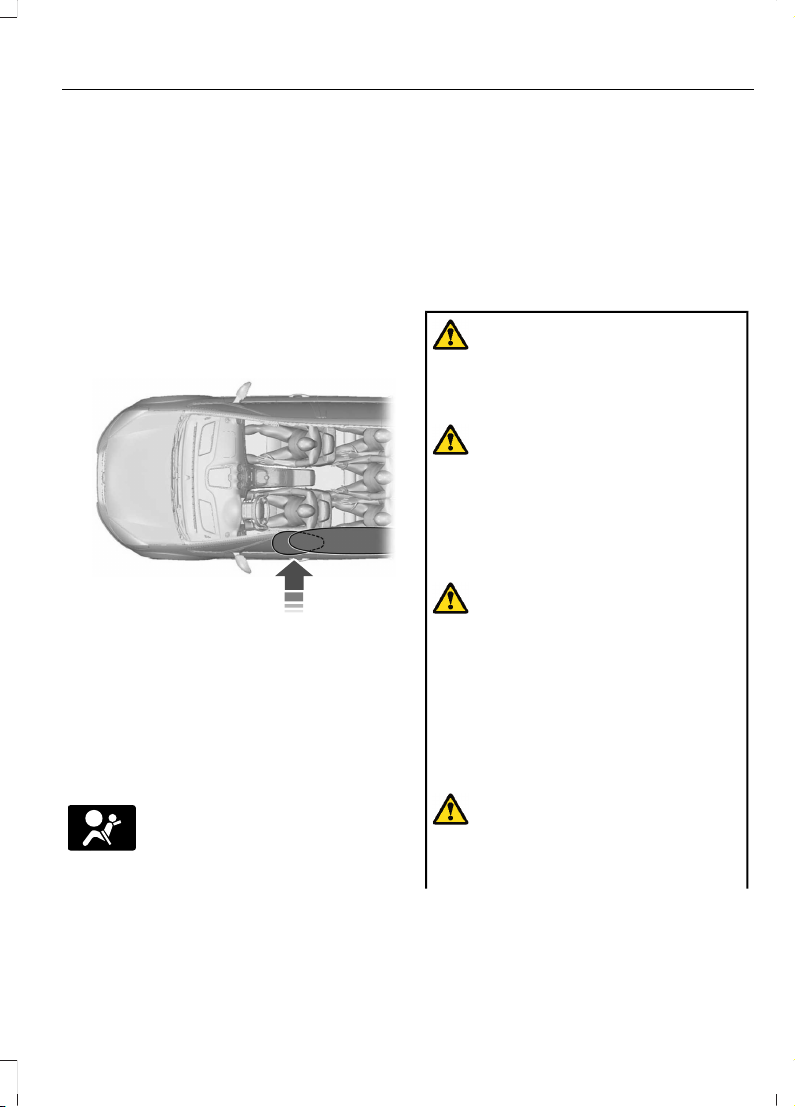
The Safety Canopy deploys during
significant side crashes or when a certain
likelihood of a rollover event is detected
by the rollover sensor. The Safety Canopy
is mounted to the roof side-rail sheet
metal, behind the headliner, above each
row of seats. In certain sideways crashes
or rollover events, the Safety Canopy will
be activated, regardless of which seats are
occupied. The Safety Canopy inflates
between the side window area and
occupants to further enhance protection
provided in side impact crashes and
rollover events.
E75004
The system consists of the following:
• Safety Canopy curtain airbags above
the trim panels over the front and rear
side windows identified by a label or
wording on the headliner or roof-pillar
trim.
• A flexible headliner which opens above
the side doors to allow air curtain
deployment
· Crash sensors and monitoring
system with a readiness
indicator. See Crash Sensors
and Airbag Indicator (page 80).
Properly restrain children 12 years old and
under in the rear seats. The Safety Canopy
will not interfere with children restrained
using a properly installed child or booster
seat because it is designed to inflate
downward from the headliner above the
doors along the side window opening.
AIRBAG PRECAUTIONS
WARNING: Airbags do not inflate
slowly or gently, and the risk of injury
from a deploying airbag is the greatest
close to the trim covering the airbag
module.
WARNING: All occupants of your
vehicle, including the driver, should
always properly wear their seatbelts,
even when an airbag supplemental
restraint system is provided. Failure to
properly wear your seatbelt could
seriously increase the risk of injury or
death.
WARNING: Properly secure
children 12 years old and under in a rear
seating position whenever possible. If
you are unable to properly secure all
children in a rear seating position,
properly secure the largest child on the
front seat. If you must use a forward
facing child restraint on the front seat,
move the seat as far back as possible.
Failure to follow these instructions could
result in personal injury or death.
WARNING: Do not place your arms
on the airbag cover or through the
steering wheel. Failure to follow this
instruction could result in personal injury.
75
2023 F-150 (TFD) Canada/United States of America, enUSA, Edition date: 202206, DOM
Airbags
Page 80
WARNING: Keep the areas in front
of the airbags free from obstruction. Do
not affix anything to or over the airbag
covers. Objects could become projectiles
during airbag deployment. Failure to
follow this instruction could result in
personal injury or death.
WARNING: To reduce risk of injury,
do not obstruct or place objects in the
deployment path of the airbag.
WARNING: Do not place a
rearward facing child restraint in front of
an active airbag. Failure to follow this
instruction could result in personal injury
or death.
WARNING: Do not attempt to
service, repair, or modify the
supplementary restraint system or
associated components. Failure to
follow this instruction could result in
personal injury or death.
WARNING: Several airbag system
components get hot after inflation. To
reduce the risk of injury, do not touch
them after inflation.
WARNING: If a supplementary
restraint system component has
deployed, it will not function again. Have
the system and associated components
inspected as soon as possible. Failure to
follow this instruction could result in
personal injury or death.
PROPERLY ADJUSTING THE DRIVER AND FRONT PASSENGER SEATS
WARNING: National Highway
Traffic Safety Administration (NHTSA)
recommends a minimum distance of at
least 10 in (25 cm) between an
occupant's chest and the driver airbag
module.
To properly position yourself away from
the airbag:
• Move your seat to the rear as far as you
can while still reaching the pedals
comfortably.
• Recline the seat slightly one or two
degrees from the upright position.
After all occupants have adjusted their
seats and put on seatbelts, it is very
important that they continue to sit
properly. Properly seated occupants sit
upright, lean against the seat backrest, and
center themselves on the seat cushion,
with their feet comfortably extended on
the floor. Sitting improperly can increase
the chance of injury in a crash event. For
example, if an occupant slouches, lies
down, turns sideways, sits forward, leans
forward or sideways, or puts one or both
feet up, the chance of injury during a crash
greatly increases.
CHILDREN AND AIRBAGS
WARNING: Do not place a
rearward facing child restraint in front of
an active airbag. Failure to follow this
instruction could result in personal injury
or death.
76
2023 F-150 (TFD) Canada/United States of America, enUSA, Edition date: 202206, DOM
Airbags
Page 81
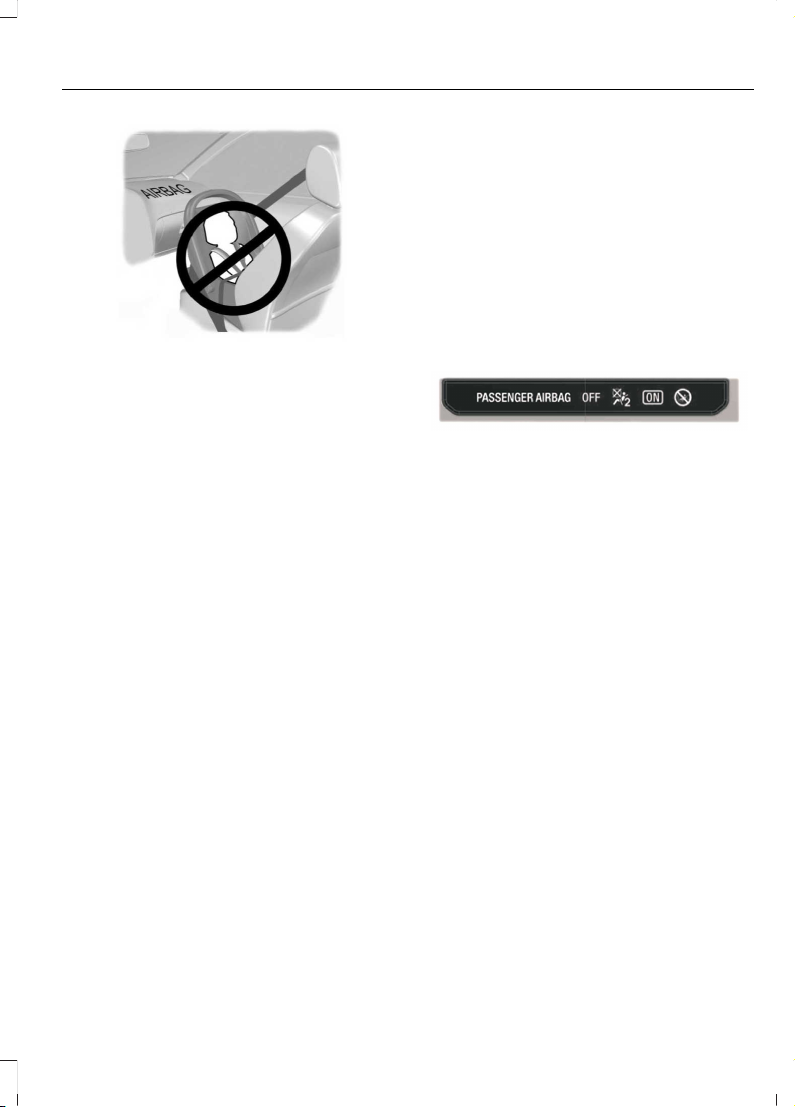
E142846
Children must always be properly
restrained. Accident statistics suggest that
children are safer when properly restrained
in the rear seating positions than in the
front seating position. Failure to follow
these instructions may increase the risk of
injury in a crash.
If two adults and a child occupy a vehicle
without rear seats, properly restrain the
child in the center front seat unless doing
so would interfere with driving your vehicle.
This provides lap and shoulder belt
protection for all occupants, and airbag
protection for the adults. A child or infant
properly restrained in the center front seat
should have a reduced risk to serious injury
from the airbags.
FRONT PASSENGER SENSING SYSTEM
WHAT IS THE FRONT PASSENGER
SENSING SYSTEM
This system detects a properly seated
occupant and determines if the front
passenger airbag should be enabled.
HOW DOES THE FRONT
PASSENGER SENSING SYSTEM
WORK
The system uses a passenger airbag status
indicator which illuminates indicating that
the front passenger frontal airbag is either
enabled or disabled.
Note: When you first switch the ignition on,
the passenger airbag status indicator off
and on lamps illuminate for a short period
to confirm they are functional.
E181984
The indicator lamps are in the overhead
console.
The front passenger sensing system is
designed to disable the front passenger
frontal airbag under these conditions:
• The front passenger seat is
unoccupied.
• The system determines an infant is
present in a child restraint.
• A passenger takes their weight off of
the seat for a period of time.
• If there is a problem with the airbag
system or the passenger sensing
system.
Even with this technology, parents are
strongly encouraged to always properly
restrain children in the rear seat.
77
2023 F-150 (TFD) Canada/United States of America, enUSA, Edition date: 202206, DOM
Airbags
Page 82

• When the front passenger sensing
system disables the front passenger
frontal airbag, the passenger airbag
status indicator illuminates the off
lamp.
• If you have installed the child restraint
and the passenger airbag status
indicator illuminates the on lamp,
switch your vehicle off, remove the
child restraint from your vehicle and
reinstall the restraint following the
child restraint manufacturer's
instructions.
The front passenger sensing system works
with sensors that are part of the front
passenger seat and seatbelt. The sensors
are designed to detect the presence of a
properly seated occupant and determine
if the front passenger frontal airbag should
be enabled.
• When the front passenger sensing
system enables the front passenger
frontal airbag, the passenger airbag
status indicator illuminates the on
lamp.
If a person of adult size is sitting in the front
passenger seat, but the passenger airbag
status indicator off lamp is illuminated, it
is possible that the person is not sitting
properly in the seat. If this happens:
• Switch your vehicle off and ask the
person to place the seat backrest in an
upright position.
• Have the person sit upright in the seat,
centered on the seat cushion, with the
person's legs comfortably extended.
• Restart your vehicle and have the
person remain in this position for about
two minutes. This allows the system
to detect that person and enable the
passenger frontal airbag.
• If the indicator off lamp remains
illuminated even after this, you should
advise the person to ride in the rear
seat.
After all occupants have adjusted their
seats and put on seatbelts, it is very
important that they continue to sit upright,
leaning against the seat backrest, and
centered on the seat cushion, with their
feet comfortably extended on the floor.
Sitting improperly can increase the chance
of injury in a crash event. For example, if
an occupant slouches, lies down, turns
sideways, sits forward, leans forward or
sideways, or puts one or both feet up, the
chance of injury during a crash greatly
increases.
If you think that the state of the passenger
airbag status indicator lamp is incorrect,
check for the following:
• Objects lodged underneath the seat.
• Objects between the seat cushion and
the center console.
• Objects hanging off the seat backrest.
• Objects stowed in the seat backrest
map pocket.
• Objects placed on the occupant's lap.
• Cargo interference with the seat
• Other passengers pushing or pulling on
the seat.
• Rear passenger feet and knees resting
or pushing on the seat.
The listed conditions could cause the
weight of a properly seated occupant to
be incorrectly interpreted by the front
passenger sensing system. The person in
the front passenger seat could appear
heavier or lighter due to the conditions
listed.
Make sure the front passenger
sensing system is operating
properly. See Crash Sensors
and Airbag Indicator (page 80).
If the airbag readiness light is on, do the
following:
78
2023 F-150 (TFD) Canada/United States of America, enUSA, Edition date: 202206, DOM
Airbags
Page 83
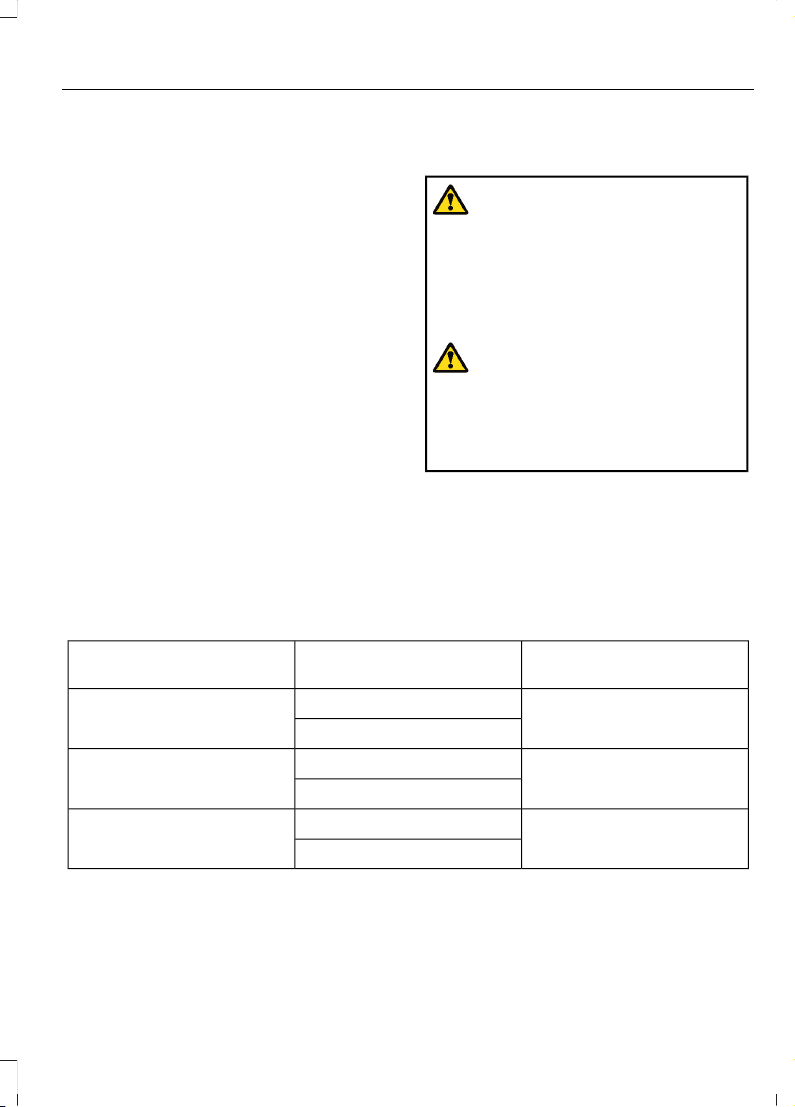
• Pull your vehicle over.
• Switch your vehicle off.
• Check for any objects lodged
underneath the front passenger seat
or cargo interfering with the seat.
• Remove the obstruction if found.
• Restart your vehicle.
• Wait at least two minutes and verify
that the airbag readiness light in the
instrument cluster is no longer
illuminated.
• If the airbag readiness light in the
instrument cluster remains illuminated,
there may be a problem due to the
front passenger sensing system.
Do not attempt to repair or service the
system. Take your vehicle in for service
immediately.
If it is necessary to modify an advanced
front airbag system to accommodate a
person with disabilities, contact your
Customer Relationship Center. See
Contacting Us (page 22).
FRONT PASSENGER SENSING
SYSTEM PRECAUTIONS
WARNING: Sitting improperly, out
of position or with the seatback reclined
too far can take weight off the seat
cushion and affect the decision of the
passenger sensing system, resulting in
serious injury or death in the event of a
crash. Always sit upright against your
seat back, with your feet on the floor.
WARNING: Any alteration or
modification to the front passenger seat
may affect the performance of the front
passenger sensing system. This could
seriously increase the risk of injury or
death.
FRONT PASSENGER SENSING SYSTEM INDICATORS
Passenger AirbagPassenger Airbag Status
Indicator
Occupant
DisabledOFF: IlluminatedEmpty
ON: Not Illuminated
DisabledOFF: IlluminatedChild
ON: Not Illuminated
EnabledOFF: Not IlluminatedAdult
ON: Illuminated
79
2023 F-150 (TFD) Canada/United States of America, enUSA, Edition date: 202206, DOM
Airbags
Page 84
CRASH SENSORS AND AIRBAG INDICATOR
WARNING: Modifying or adding
equipment to the front of your vehicle
could affect the performance of the
airbag system, increasing the risk of
injury. This includes the hood, bumper
system, frame, front body structure, tow
hooks, hood pins, push bar and
snowplows.
Your vehicle has a collection of crash and
occupant sensors. These sensors provide
information to the restraints control
module which activates the following:
• Front seatbelt pretensioners.
• Driver airbag.
• Passenger airbag.
• Knee airbag(s).
• Seat mounted side airbags.
• Safety Canopy.
Based on the type of crash, the restraints
control module deploys the appropriate
safety devices.
The restraints control module also
monitors the readiness of the above safety
devices plus the crash and occupant
sensors. The readiness of the safety
system is indicated by a warning indicator
light in the instrument cluster or by a
backup tone if the warning light is not
working. Routine maintenance of the
airbag is not required.
A difficulty with the system is indicated by
one or more of the following:
The readiness light will not
illuminate immediately after you
switch the ignition on.
• The readiness light either flashes or
stays on.
• You hear a series of five tones. The
tone pattern repeats periodically until
the problem, the light or both are
repaired.
If any of these things happen, even
intermittently, have the supplemental
restraint system serviced immediately.
Unless serviced, the system may not
function properly in the event of a crash.
The fact that the seatbelt pretensioners
or front airbags did not activate for both
front seat occupants in a crash does not
mean that something is wrong with the
system. Rather, it means the restraints
control module determined the accident
conditions (crash severity, seatbelt usage)
were not appropriate to activate these
safety devices.
• The front airbags activate only in
frontal and near-frontal crashes. Front
airbags may activate in rollovers, side
impacts or rear impacts if the crash
causes sufficient frontal deceleration.
• The seatbelt pretensioners activate in
frontal, near-frontal and side crashes,
and in rollovers.
• The knee airbag(s) deploy based on
crash severity and occupant conditions.
• The side airbags inflate in certain side
impact crashes or rollover events. Side
airbags may activate in other types of
crashes if the vehicle experiences
sufficient sideways motion or
deformation.
• The Safety Canopy inflates in certain
side impact crashes or rollover events.
The Safety Canopy may activate in
other types of crashes if the vehicle
experiences sufficient sideways motion
or deformation, or a certain likelihood
of rollover.
80
2023 F-150 (TFD) Canada/United States of America, enUSA, Edition date: 202206, DOM
Airbags
Page 85
CRASH SENSORS AND AIRBAG INDICATOR - POLICE RESPONDER
WARNING: Modifying or adding
equipment to the front of your vehicle
could affect the performance of the
airbag system, increasing the risk of
injury. This includes the hood, bumper
system, frame, front body structure, tow
hooks, hood pins, push bar and
snowplows.
Your vehicle has a collection of crash and
occupant sensors. These sensors provide
information to the restraints control
module which activates the following:
• Front seatbelt pretensioners.
• Driver airbag.
• Passenger airbag.
• Knee airbag(s).
• Seat mounted side airbags.
• Safety Canopy.
Based on the type of crash, the restraints
control module deploys the appropriate
safety devices.
The restraints control module also
monitors the readiness of the above safety
devices plus the crash and occupant
sensors. The readiness of the safety
system is indicated by a warning indicator
light in the instrument cluster or by a
backup tone if the warning light is not
working. Routine maintenance of the
airbag is not required.
A difficulty with the system is indicated by
one or more of the following:
• The readiness light either flashes or
stays on.
• You hear a series of five tones. The
tone pattern repeats periodically until
the problem, the light or both are
repaired.
• The readiness light will not illuminate
immediately after you switch the
ignition on.
If any of these things happen, even
intermittently, have the supplemental
restraint system serviced immediately.
Unless serviced, the system may not
function properly in the event of a crash.
The fact that the seatbelt pretensioners
or airbags did not activate for both front
seat occupants in a crash does not mean
that something is wrong with the system.
Rather, it means the restraints control
module determined the accident
conditions (crash severity, belt usage)
were not appropriate to activate these
safety devices.
• The front airbags activate only in
frontal and near-frontal crashes, not
rollovers, side impacts or rear impacts,
unless the crash causes sufficient
frontal deceleration.
• The seatbelt pretensioners activate in
frontal, near-frontal and side crashes
and in rollovers.
• The side airbags inflate in certain side
impact crashes and in rollovers. Side
airbags may activate in other types of
crashes if the vehicle experiences
sufficient sideways motion or
deformation.
81
2023 F-150 (TFD) Canada/United States of America, enUSA, Edition date: 202206, DOM
Airbags
Page 86
• The knee airbag(s) may deploy based
on crash severity and occupant
conditions.
• The Safety Canopy inflates in certain
side impact crashes or rollover events.
The Safety Canopy may activate in
other types of crashes if the vehicle
experiences sufficient sideways motion
or deformation, or a certain likelihood
of rollover.
Airbags and Police Equipment
WARNING: Do not place objects
or mount equipment on or near the
airbag cover, on the side of the front or
rear seatbacks, or in areas that may
come into contact with a deploying
airbag. Failure to follow these
instructions may increase the risk of
personal injury in the event of a crash.
WARNING: Keep the areas in front
of the airbags free from obstruction. Do
not affix anything to or over the airbag
covers. Objects could become projectiles
during airbag deployment. Failure to
follow this instruction could result in
personal injury or death.
Dual driver and passenger airbags, side
airbags and knee airbags affect the way
police equipment can be mounted in police
vehicles.
Any surfaces that could come into contact
with an airbag, once it has deployed, must
not damage the airbag or alter its
deployment path.
Once the airbag has fully deployed, any
peripheral equipment surfaces that could
come into contact with the airbag, such as
when the airbag deflates with the loading
of an occupant, must not damage the
airbag or alter its deployment path. Sharp
edges, corners or protrusions could
damage the nylon airbag material and
reduce the effectiveness of the airbag.
Some approximate dimensions for airbags,
at full inflation, are provided. These
dimensions are somewhat flexible and
represent free form deployments without
the loading of occupants. The shaded
areas in Figures 8 through 10 represent
available police equipment mounting
zones. These zones are shown for police
vehicles with standard bucket seats. The
zone dimensions provided in Figures 8
through 10 are approximate and will vary
with the loading of occupants in the seats.
All airbag and equipment mounting zone
dimensions are approximate due to
different airbag deployment
characteristics.
Do not mount equipment between the side
of the front seat and the door trim that will
block deployment of the side airbag.
Do not mount equipment between the
seats and the body side as shown in Figure
7 that would prevent the side curtain airbag
from achieving occupant coverage.
82
2023 F-150 (TFD) Canada/United States of America, enUSA, Edition date: 202206, DOM
Airbags
Page 87
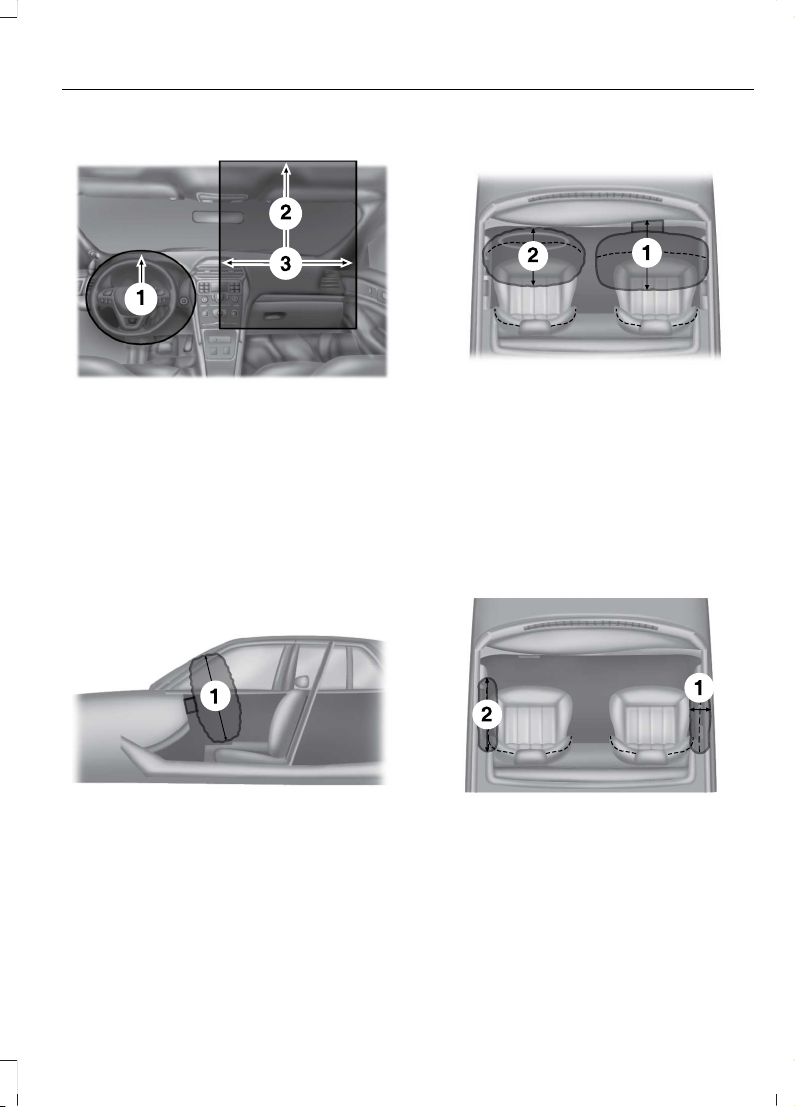
Figure 1 - Driver and Passenger Airbag
Dimensions
E201575
9.5 in (240 mm) from the center
of the emblem.
1.
13.3 in (339 mm) from the center
of the airbag door.
2.
22.5 in (573 mm).3.
Note: Do not place objects between the
airbags due to airbag variability.
Figure 2 - Side View of the Driver Airbag
at Full Inflation
E201576
27.5 in (700 mm).1.
Figure 3 - Top View of the Driver and
Passenger Airbags at Full Inflation
E201577
Front passenger airbag - 25.8 in
(656 mm).
1.
Front driver airbag – 17 in (430
mm).
2.
Note: Do not place objects between the
driver side steering wheel airbag and the
passenger side dash airbag.
Figure 4 -Top View of the Side Airbags
at Full Inflation - if equipped
From the outermost side of the
seat - 8 in (200 mm).
1.
Forward of the seat backrest 15 in (380 mm).
2.
83
2023 F-150 (TFD) Canada/United States of America, enUSA, Edition date: 202206, DOM
Airbags
Page 88
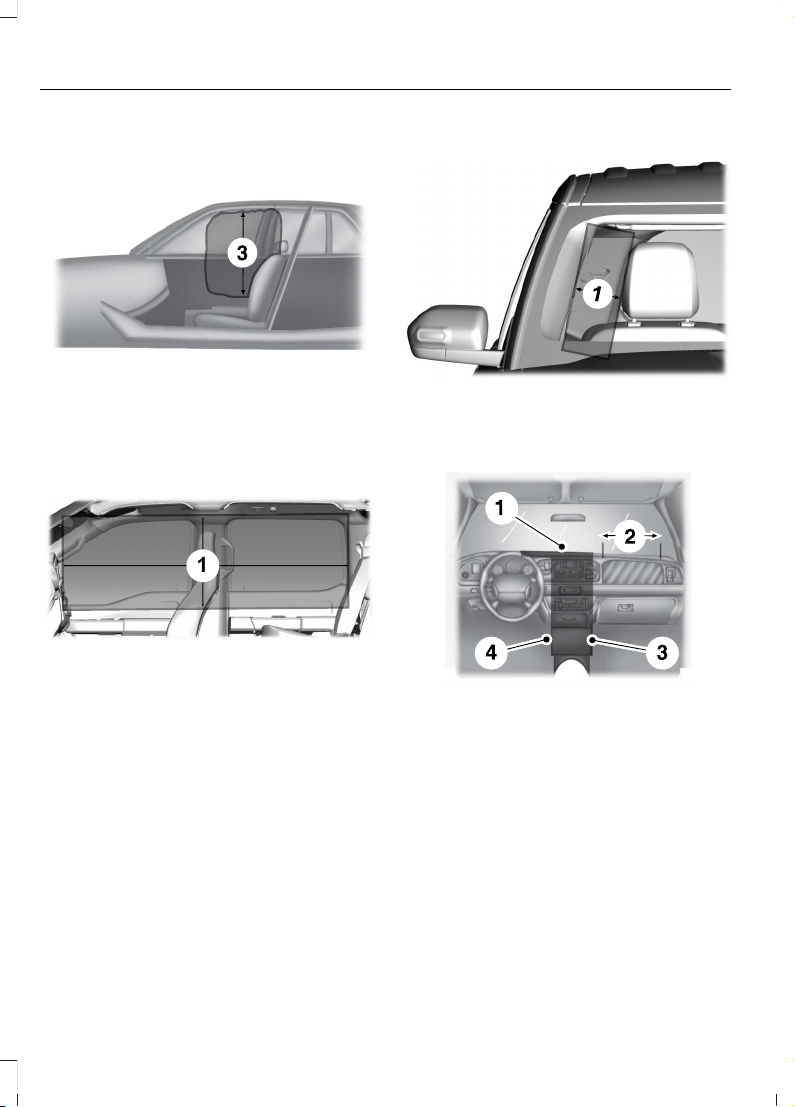
Figure 5 - Side View of the Side Airbag
at Full Inflation- if equipped
Up from the side airbag module
- 27.5 in (700 mm).
3.
Figure 6 - Side View of the Side Curtain
Dimension
E350301
1
Roof rail to 1 in (25 mm) below
the window sill.
1.
Note: Do not place objects on the headliner
or on pillar trims A through C used to
conceal the airbag when stowed.
Figure 7 - Front View of the Side Curtain
at Full Inflation
E301077
6 in (75 mm) from pillar trim (A
through C).
1.
Figure 8 - Equipment Mounting Zones
E201581
Area on top of the instrument
panel. The equipment must not
interfere with driver visibility.
1.
Airbag door must be kept clear
for deployment of the airbag.
2.
Area in front of the center
console from the bottom to the
top of the instrument panel.
3.
Area in front of the electronic
finish panel from the bottom to
the top of the instrument panel.
4.
84
2023 F-150 (TFD) Canada/United States of America, enUSA, Edition date: 202206, DOM
Airbags
Page 89
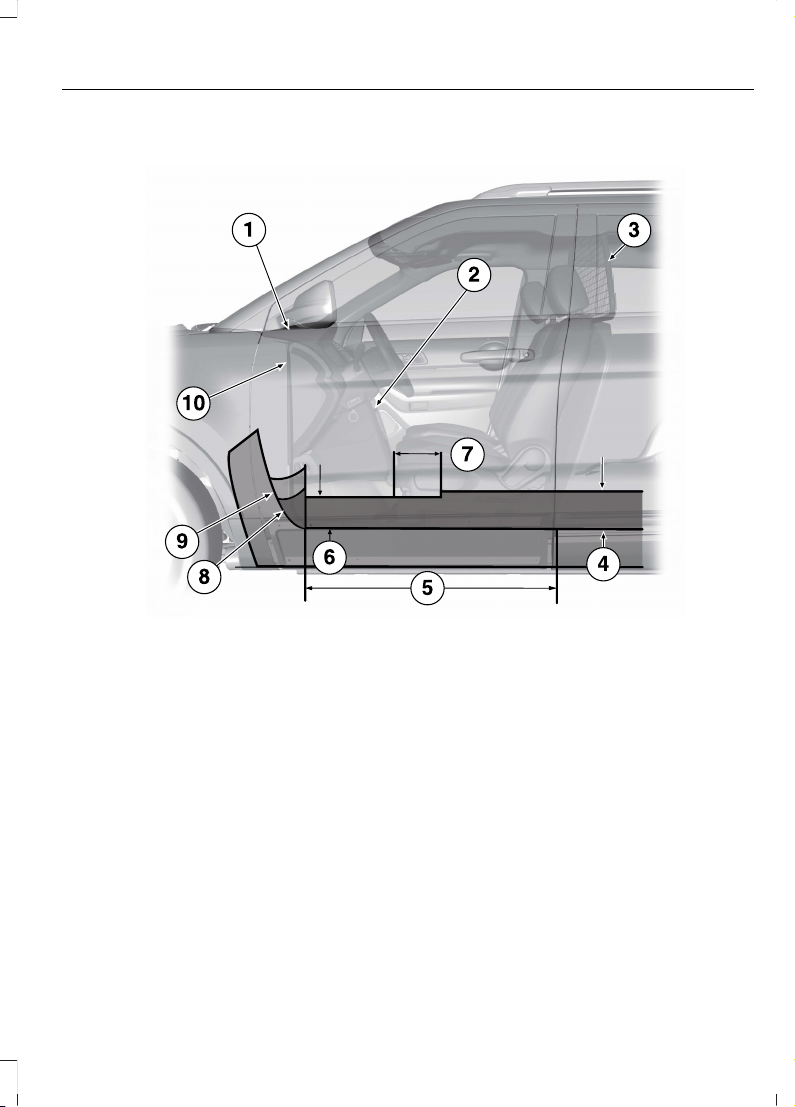
Figure 9 - Equipment Mounting Zones
E206315
Area on top of the instrument panel.1.
Area in front of the center console from the tunnel up to the instrument panel.2.
Prisoner screen, for reference only.3.
10 in (254 mm).4.
Area on tunnel between the seats.5.
Height: 8.5 in (216 mm).6.
12 in (305 mm).7.
Area on the tunnel beneath the center console.8.
Tunnel.9.
Depth: 1.5 in (38 mm).10.
85
2023 F-150 (TFD) Canada/United States of America, enUSA, Edition date: 202206, DOM
Airbags
Page 90
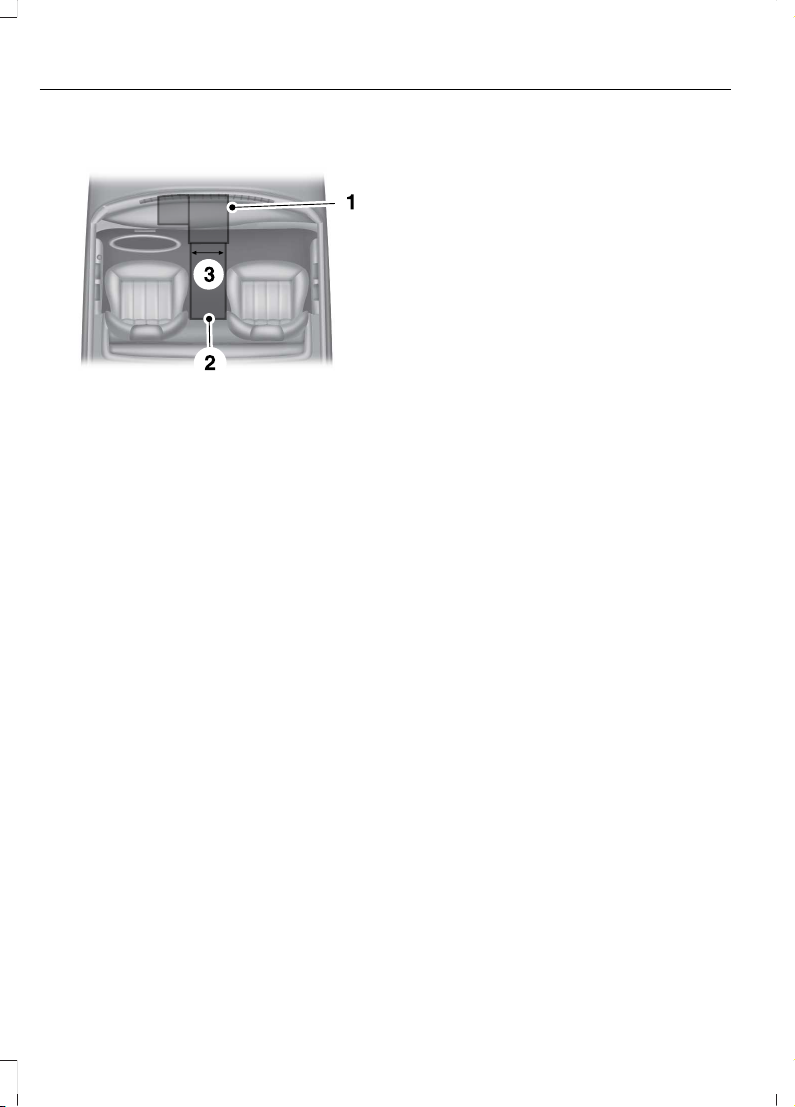
Figure 10 - Top View of the Equipment
Mounting Zones
Area on top of the instrument
panel. The equipment must not
interfere with driver visibility.
1.
Area on tunnel between the
seats.
2.
9 in (229 mm).3.
DISPOSING OF AIRBAGS
Contact your authorized dealer as soon as
possible. Airbags must be disposed of by
qualified personnel.
86
2023 F-150 (TFD) Canada/United States of America, enUSA, Edition date: 202206, DOM
Airbags
Page 91

WHAT IS THE PEDESTRIAN ALERT SYSTEM
Due to the quiet operation of hybrid and
electric vehicles at low speeds, the system
creates a subtle sound to alert pedestrians.
The system is on when your vehicle is
running and not in park (P). Some sound
may be audible in the passenger
compartment.
87
2023 F-150 (TFD) Canada/United States of America, enUSA, Edition date: 202206, DOM
Pedestrian Alert System - Hybrid Electric Vehicle (HEV)
Page 92
WHAT IS 911 ASSIST
911 Assist is a SYNC system feature that
can call for help.
For more information, visit
www.owner.ford.com.
HOW DOES 911 ASSIST WORK
If a crash deploys an airbag, excluding knee
airbags and rear inflatable seatbelts, or
activates the fuel pump shut-off, your
vehicle may be able to contact emergency
services by dialing 911 through a paired and
connected Bluetooth® enabled phone.
Not all crashes deploy an airbag or activate
the fuel pump shut-off. If a connected cell
phone sustains damage or loses its
connection to SYNC during a crash, SYNC
searches for and tries to connect to a
previously paired cell phone. SYNC then
attempts to call the emergency services.
Before making the call:
• SYNC provides about 10 seconds to
cancel the call. If you fail to cancel the
call, SYNC attempts to dial 911.
• SYNC says the following, or a similar
message: SYNC will attempt to call 911,
to cancel the call, press Cancel on your
screen or press and hold the phone
button on your steering wheel.
If you do not cancel the call and SYNC
makes a successful call a pre-recorded
message plays for the 911 operator. The
occupants in your vehicle are able to talk
with the operator. Be prepared to provide
your name, phone number and location
immediately because not all 911 systems
are capable of receiving this information
electronically.
During an emergency call the system
transmits vehicle data to the emergency
service.
EMERGENCY CALL REQUIREMENTS
WARNING: Do not wait for 911
Assist to make an emergency call if you
can do it yourself. Dial emergency
services immediately to avoid delayed
response time which could increase the
risk of serious injury or death after a
crash. If you do not hear 911 Assist within
five seconds of the crash, the system or
phone may be damaged or
non-functional.
WARNING: Always place your
phone in a secure location in your vehicle
so it does not become a projectile or get
damaged in a crash. Failure to do so may
cause serious injury to someone or
damage the phone which could prevent
911 Assist from working properly.
WARNING: Unless the 911 Assist
setting is set on before a crash, the
system will not dial for help which could
delay response time, potentially
increasing the risk of serious injury or
death after a crash.
• SYNC is powered and working properly
at the time of the incident and
throughout feature activation and use.
• The 911 Assist feature must be set on
before the incident.
• You must pair and connect a
Bluetooth® enabled and compatible
cell phone to SYNC.
• A connected Bluetooth® enabled
phone must have the ability to make
and maintain an outgoing call at the
time of the incident.
88
2023 F-150 (TFD) Canada/United States of America, enUSA, Edition date: 202206, DOM
911 Assist
Page 93

• A connected Bluetooth® enabled
phone must have adequate network
coverage, battery power and signal
strength.
• The vehicle must have battery power
and be located in the U.S., Canada or
in a territory in which 911 is the
emergency number.
Note: If any user sets 911 Assist to on or off,
that setting applies for all paired phones. If
911 Assist is off and the phone connected
to SYNC, an icon displays on the status bar.
Note: Every phone operates differently.
While SYNC 911 Assist works with most
cellular phones, some may have trouble
using this feature.
EMERGENCY CALL LIMITATIONS
The SYNC 911 Assist feature only operates
in the U.S., Canada or in a territory in which
911 is the emergency number. The following
are limitations of this feature:
• Your cellular phone or 911 Assist
hardware sustains damage in a crash.
• The vehicle's battery or the SYNC
system has no power.
• The phone(s) thrown from your vehicle
are the ones paired and connected to
the system.
89
2023 F-150 (TFD) Canada/United States of America, enUSA, Edition date: 202206, DOM
911 Assist
Page 94
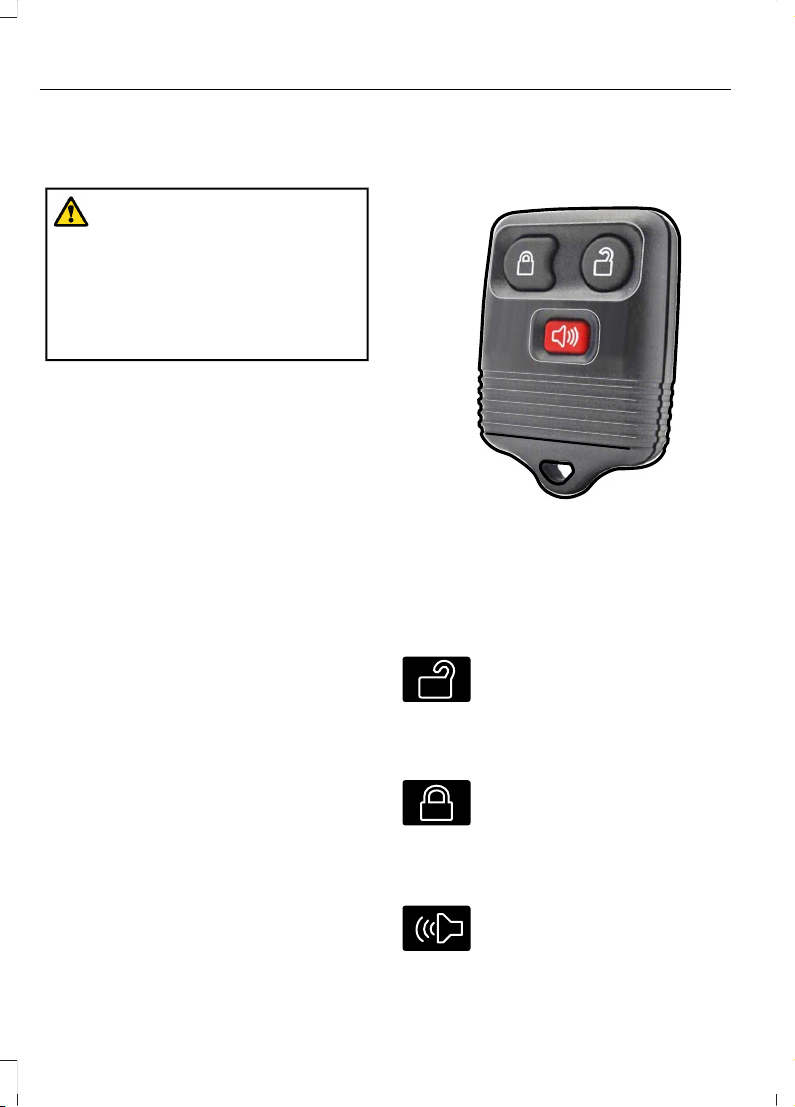
REMOTE CONTROL LIMITATIONS
WARNING: Changes or
modifications not expressively approved
by the party responsible for compliance
could void the user's authority to operate
the equipment. The term "IC:" before the
radio certification number only signifies
that Industry Canada technical
specifications were met.
This device complies with Part 15 of the
FCC Rules and with Industry Canada
license-exempt RSS standard(s).
Operation is subject to the following two
conditions: (1) This device may not cause
harmful interference, and (2) This device
must accept any interference received,
including interference that may cause
undesired operation.
Make sure a valid remote control is within
3 ft (1 m) from the front door handles and
rear of vehicle.
The system may not function if:
• The remote control remains stationary
for about a minute.
• The vehicle battery has no charge.
• The remote control battery has no
charge.
• There is interference causing issues
with the remote control frequencies.
• The remote control is too close to
metal objects or electronic devices, for
example keys or a cell phone.
USING THE REMOTE CONTROL
- POLICE RESPONDER
E203600
Note: If there is a problem with the remote
entry system, make sure to take all remote
controls with you to an authorized dealer in
order to aid in troubleshooting the problem.
Unlock
E138629
Press the button to unlock all
doors. See Unlocking and
Locking the Doors Using the
Remote Control (page 104).
Lock
E138623
Press the button to lock all
doors. See Unlocking and
Locking the Doors Using the
Remote Control (page 104).
Sounding the Panic Alarm (If Equipped)
E138624
Press the button to sound the
panic alarm. Press the button
again or switch the ignition on to
turn it off.
90
2023 F-150 (TFD) Canada/United States of America, enUSA, Edition date: 202206, DOM
Keys and Remote Controls
Page 95
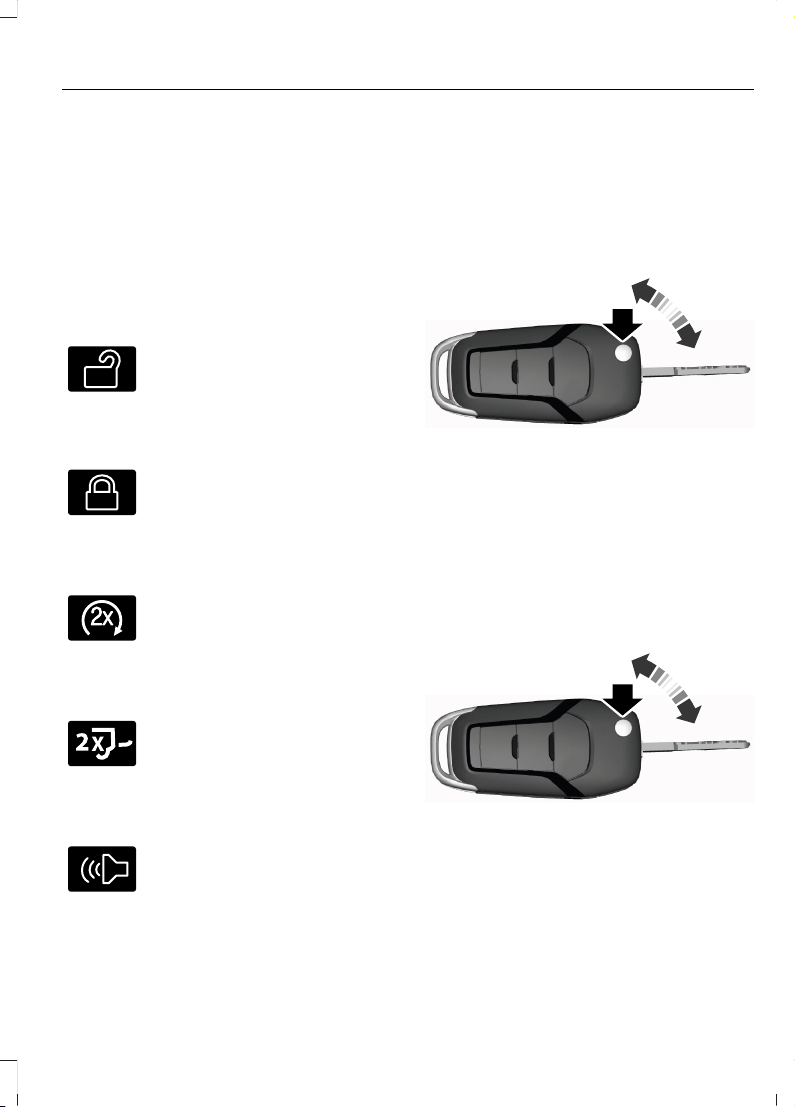
Note: The panic alarm operates regardless
of the ignition position.
USING THE REMOTE CONTROL
Use your remote control to access various
vehicle systems.
Note: The buttons on your remote may vary
depending on the vehicle region or options.
Unlock
E138629
Press the button to unlock all
doors. See Unlocking and
Locking the Doors Using the
Remote Control (page 104).
Lock
E138623
Press the button to lock all
doors. See Unlocking and
Locking the Doors Using the
Remote Control (page 104).
Remote Start (If Equipped)
E138625
Press the button to remote start.
See Remotely Starting and
Stopping the Vehicle (page
181).
Tailgate (If Equipped)
E191530
Press the button to open the
tailgate. See Opening the
Tailgate Using the Remote
Control (page 127).
Panic Alarm (If Equipped)
E138624
Press the button to sound the
panic alarm. See Sounding the
Panic Alarm (page 92).
OPENING AND CLOSING THE FLIP KEY
Opening Your Flip Key
Press the round button on the remote
control to extend the flip key.
E191532
Note: Inspect the key blade for debris.
Periodically clean with a brush.
Closing Your Flip Key
Press and hold the round button on the
remote control to fold the key blade when
not in use.
E191532
91
2023 F-150 (TFD) Canada/United States of America, enUSA, Edition date: 202206, DOM
Keys and Remote Controls
Page 96
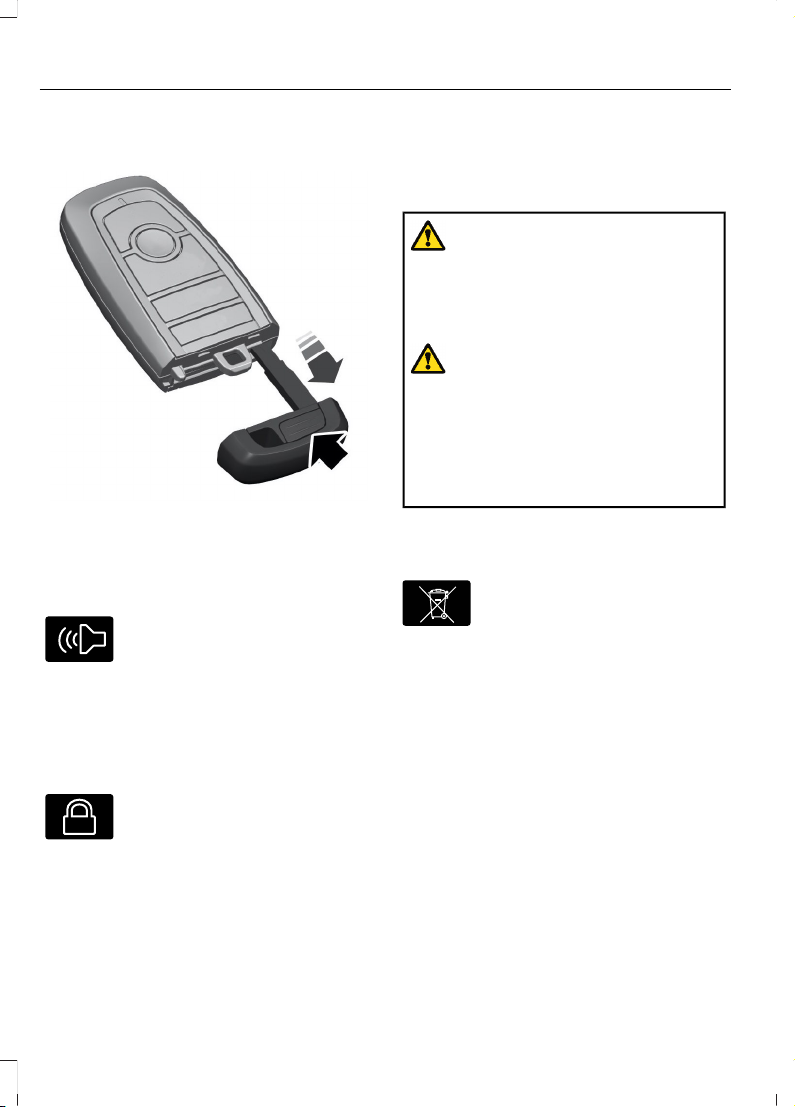
REMOVING THE KEY BLADE
E322866
Push the release button on your passive
key and pull the key blade out.
SOUNDING THE PANIC ALARM
E138624
Press the button to sound the
panic alarm. Press the button
again, or switch the ignition on
to turn it off.
Note: The panic alarm only operates when
the ignition is off.
LOCATING YOUR VEHICLE
E138623
Press the lock button twice
within three seconds. The turn
signal lamps flash.
Note: We recommend you use this method
to locate your vehicle.
CHANGING THE REMOTE CONTROL BATTERY - POLICE RESPONDER
WARNING: Keep batteries away
from children to prevent ingestion.
Failure to follow this instruction could
result in personal injury or death. If
ingested, immediately seek medical
attention.
WARNING: If the battery
compartment does not securely close,
stop using the remote control and
replace it as soon as possible. In the
meantime, keep the remote control away
from children. Failure to follow this
instruction could result in personal injury
or death.
The remote control uses one coin-type
three-volt lithium battery CR2032 or
equivalent.
E107998
Make sure you dispose of old
batteries in an environmentally
friendly way. Seek advice from
local authorities about recycling old
batteries.
92
2023 F-150 (TFD) Canada/United States of America, enUSA, Edition date: 202206, DOM
Keys and Remote Controls
Page 97
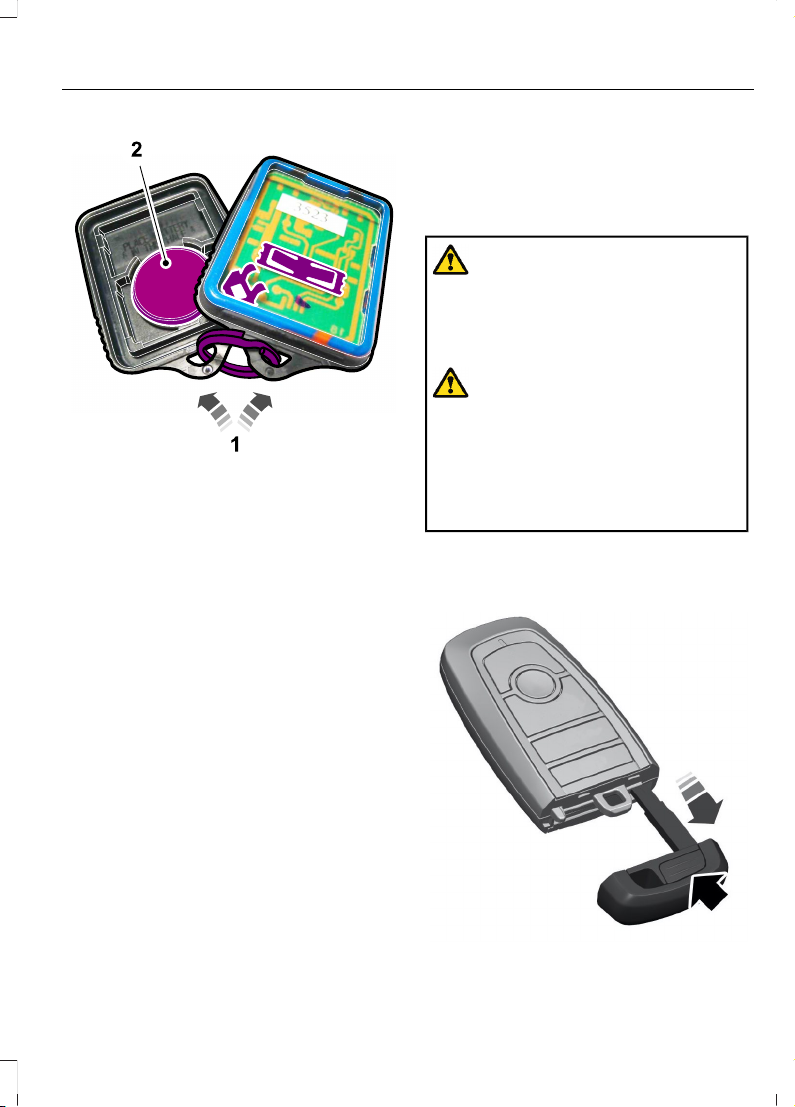
E203601
1. Twist a thin coin in the slot of the
remote control near the key ring to
remove the battery cover.
Note: Do not remove the rubber cover and
circuit board from the front housing of the
remote control.
Note: Do not wipe off any grease on the
battery terminals or on the back surface of
the circuit board.
2. Remove the old battery.
3. Insert the new battery. Refer to the
symbols inside the remote control for
the correct orientation of the battery.
Press the battery down to make sure
you have it fully seated in the housing.
4. Reinstall the battery housing cover
onto the remote control.
Note: Replacing the battery does not erase
the programmed key from your vehicle. The
remote control operates normally.
CHANGING THE REMOTE
CONTROL BATTERY VEHICLES WITH: PUSH
BUTTON START
WARNING: Keep batteries away
from children to prevent ingestion.
Failure to follow this instruction could
result in personal injury or death. If
ingested, immediately seek medical
attention.
WARNING: If the battery
compartment does not securely close,
stop using the remote control and
replace it as soon as possible. In the
meantime, keep the remote control away
from children. Failure to follow this
instruction could result in personal injury
or death.
The remote control uses one coin-type
3-volt lithium battery CR2450 or
equivalent.
E322866
93
2023 F-150 (TFD) Canada/United States of America, enUSA, Edition date: 202206, DOM
Keys and Remote Controls
Page 98
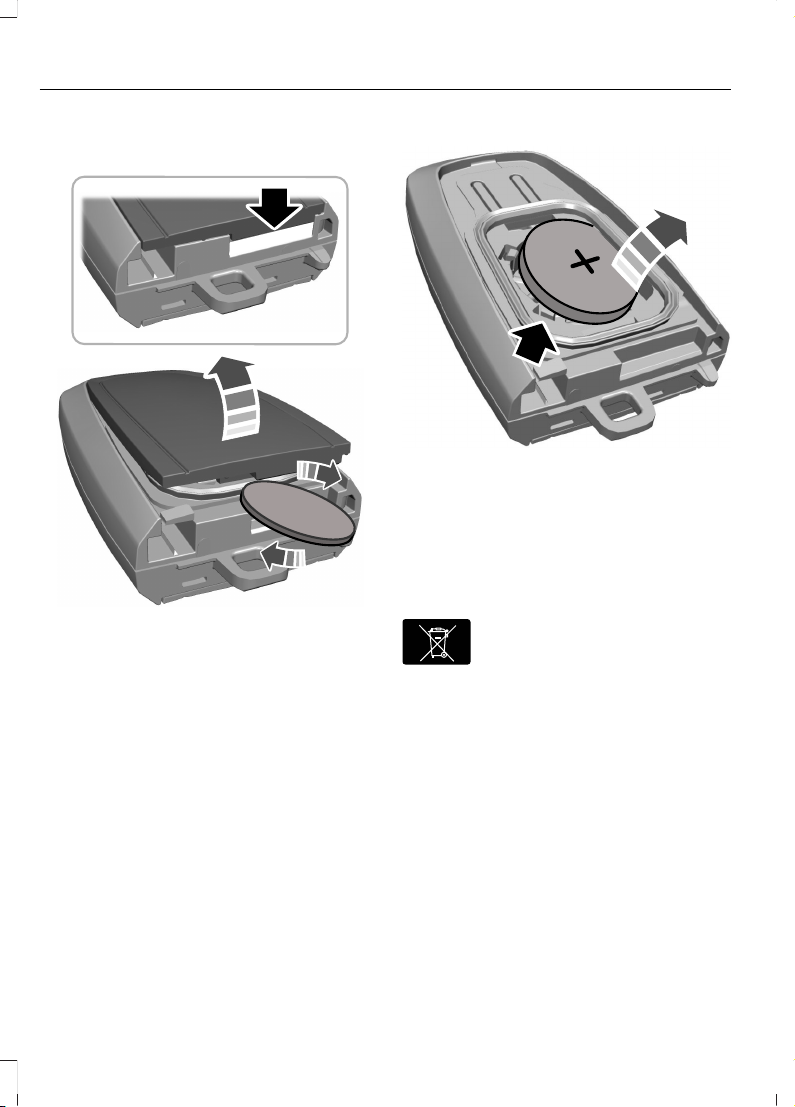
1. Push the release button and pull the
key blade out.
E303824
2. Twist a thin coin under the tab hidden
behind the key blade head to remove
the battery cover.
E218402
3. Insert a screwdriver, and carefully
remove the battery.
4. Install a new battery with the + facing
upward.
5. Reinstall the battery housing cover
onto the transmitter and install the key
blade.
E107998
Dispose of old batteries in an
environmentally friendly way.
Seek advice from your local
authority about recycling old batteries.
Note: Do not wipe off any grease on the
battery terminals or on the back surface of
the circuit board.
Note: Replacing the battery does not erase
the programmed key from your vehicle. The
remote control should operate normally.
94
2023 F-150 (TFD) Canada/United States of America, enUSA, Edition date: 202206, DOM
Keys and Remote Controls
Page 99
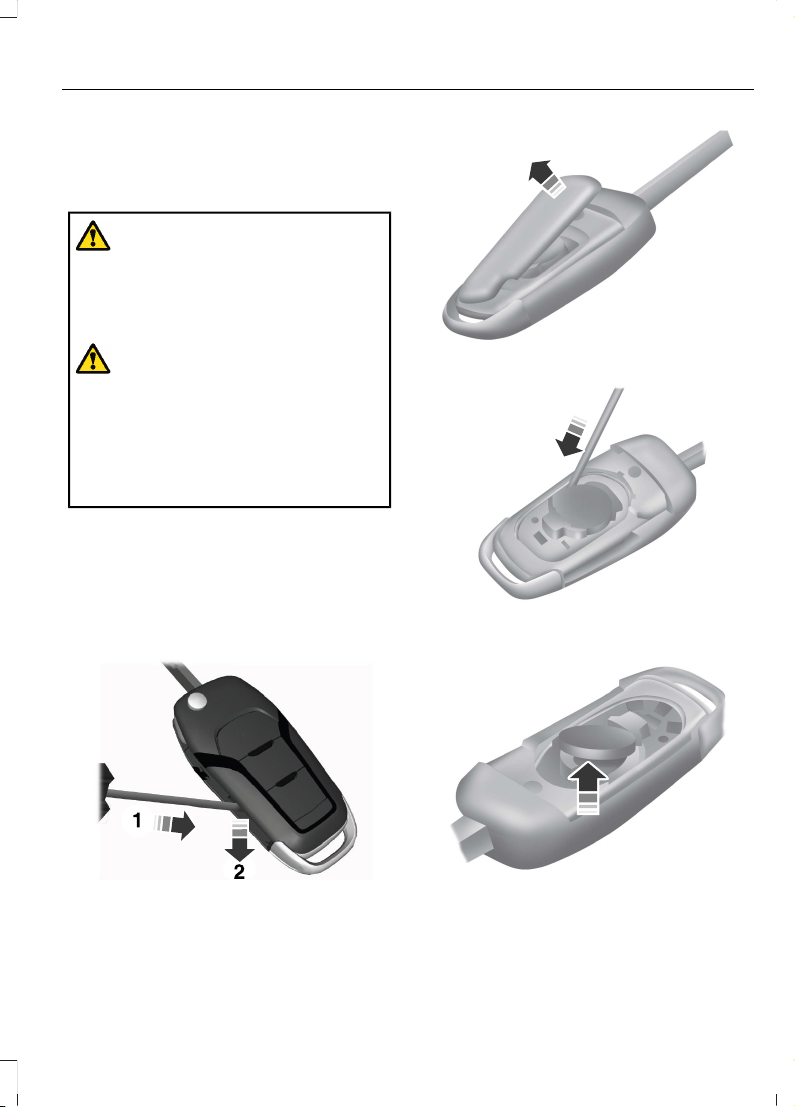
CHANGING THE REMOTE
CONTROL BATTERY VEHICLES WITH: FLIP KEY
WARNING: Keep batteries away
from children to prevent ingestion.
Failure to follow this instruction could
result in personal injury or death. If
ingested, immediately seek medical
attention.
WARNING: If the battery
compartment does not securely close,
stop using the remote control and
replace it as soon as possible. In the
meantime, keep the remote control away
from children. Failure to follow this
instruction could result in personal injury
or death.
Battery Replacement Procedure
The remote control uses one coin-type
3-volt lithium battery CR2032 or
equivalent.
Press the button to release the key blade
before beginning the procedure.
E191533
1. Insert a screwdriver, in the position
shown and gently push the clip.
2. Press the clip down to release the
battery cover.
E151799
3. Carefully remove the cover.
E151800
4. Insert a screwdriver as shown to
release the battery.
E151801
Note: Do not touch the battery contacts or
the printed circuit board with the
screwdriver.
5. Remove the battery.
95
2023 F-150 (TFD) Canada/United States of America, enUSA, Edition date: 202206, DOM
Keys and Remote Controls
Page 100
6. Install a new battery with the + facing
up.
7. Replace the battery cover.
E107998
Dispose of old batteries in an
environmentally friendly way.
Seek advice from your local
authority about recycling old batteries.
Note: Do not wipe off any grease on the
battery terminals or on the back surface of
the circuit board.
Note: Replacing the battery does not erase
the programmed key from your vehicle. The
remote control should operate normally.
REPLACING A LOST KEY OR REMOTE CONTROL
You can purchase replacement keys or
remote controls from an authorized dealer.
Authorized dealers can program remote
controls for your vehicle.
E151795
Note: Your vehicle keys came with a
security label that provides important key
cut information. Keep the label in a safe
place for future reference.
PROGRAMMING THE REMOTE CONTROL - VEHICLES WITH: PUSH BUTTON START
General Information
You must have two previously
programmed remote controls inside your
vehicle and the new unprogrammed
remote controls readily accessible. Contact
an authorized dealer to have the spare
remote control programmed if two
previously programmed remotes are not
available. Make sure that your vehicle is
off before beginning this procedure. Make
sure that you close all the doors before
beginning and that they remain closed
throughout the procedure. Perform all
steps within 30 seconds of starting the
sequence. Stop and wait for at least one
minute before starting again if you perform
any steps out of sequence.
Read and understand the entire procedure
before you begin.
Note: You can program a maximum of four
remote controls to your vehicle.
Note: If your programmed remote controls
are lost or stolen and you do not have an
extra coded remote, you need to have your
vehicle towed to an authorized dealer. Store
an extra programmed remote away from
your vehicle in a safe place to help prevent
any inconvenience. Contact an authorized
dealer to purchase additional spare or
replacement remotes.
Steps for Programming Your Spare
Remote Control
Note: Your vehicle is equipped with one of
the following center consoles.
96
2023 F-150 (TFD) Canada/United States of America, enUSA, Edition date: 202206, DOM
Keys and Remote Controls
 Loading...