

Page 1

Factory Workshop Manual
Ford
Expedition 2wd
V8-5.4L (2009)
Anonymous
1st January 2018
Make
Model
Engine and year
This manual was submitted by
Date
Page 2
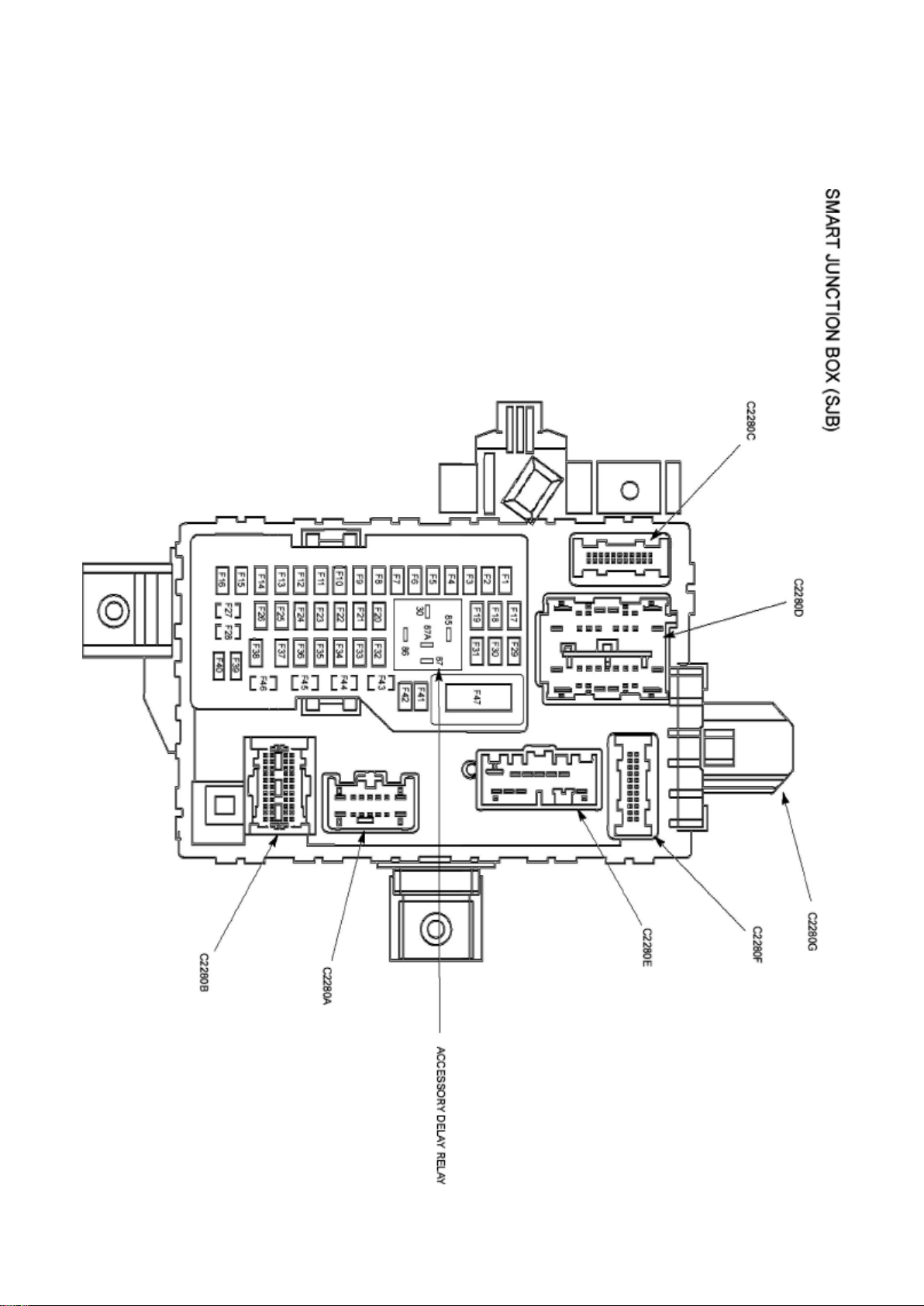
Ford Expedition 2wd Workshop Manual (V8-5.4L (2009))
Ford Workshop Manuals > Relays and Modules > Relays and Modules - Accessories and Optional Equipment > Accessory
Delay Module > Accessory Delay Relay > Component Information > Locations
Page 3

Page 4
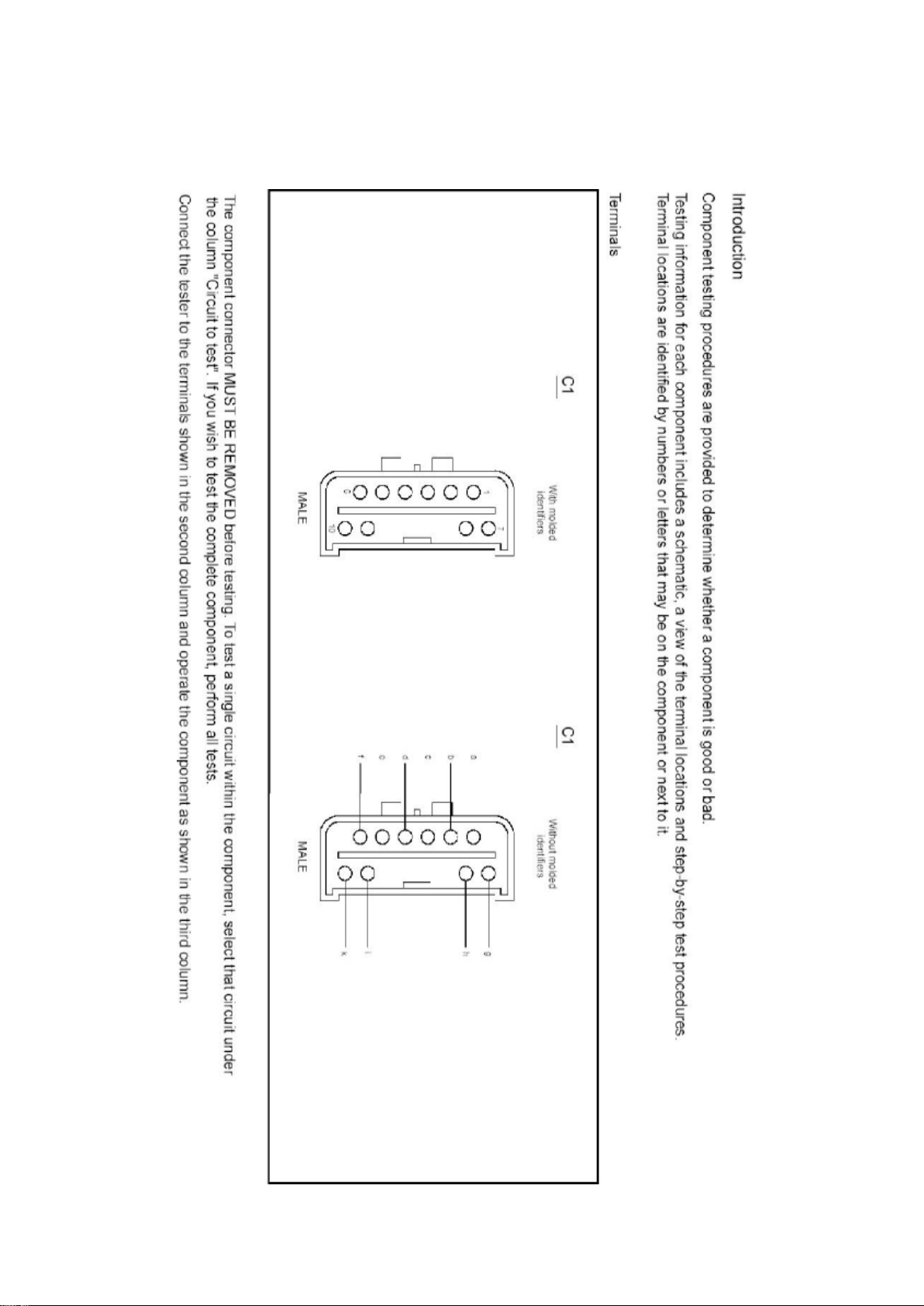
Ford Expedition 2wd Workshop Manual (V8-5.4L (2009))
Ford Workshop Manuals > Relays and Modules > Relays and Modules - Accessories and Optional Equipment > Accessory
Delay Module > Accessory Delay Relay > Component Information > Locations > Page 8
Page 5

Accessory Delay Relay: Testing and Inspection
Page 6
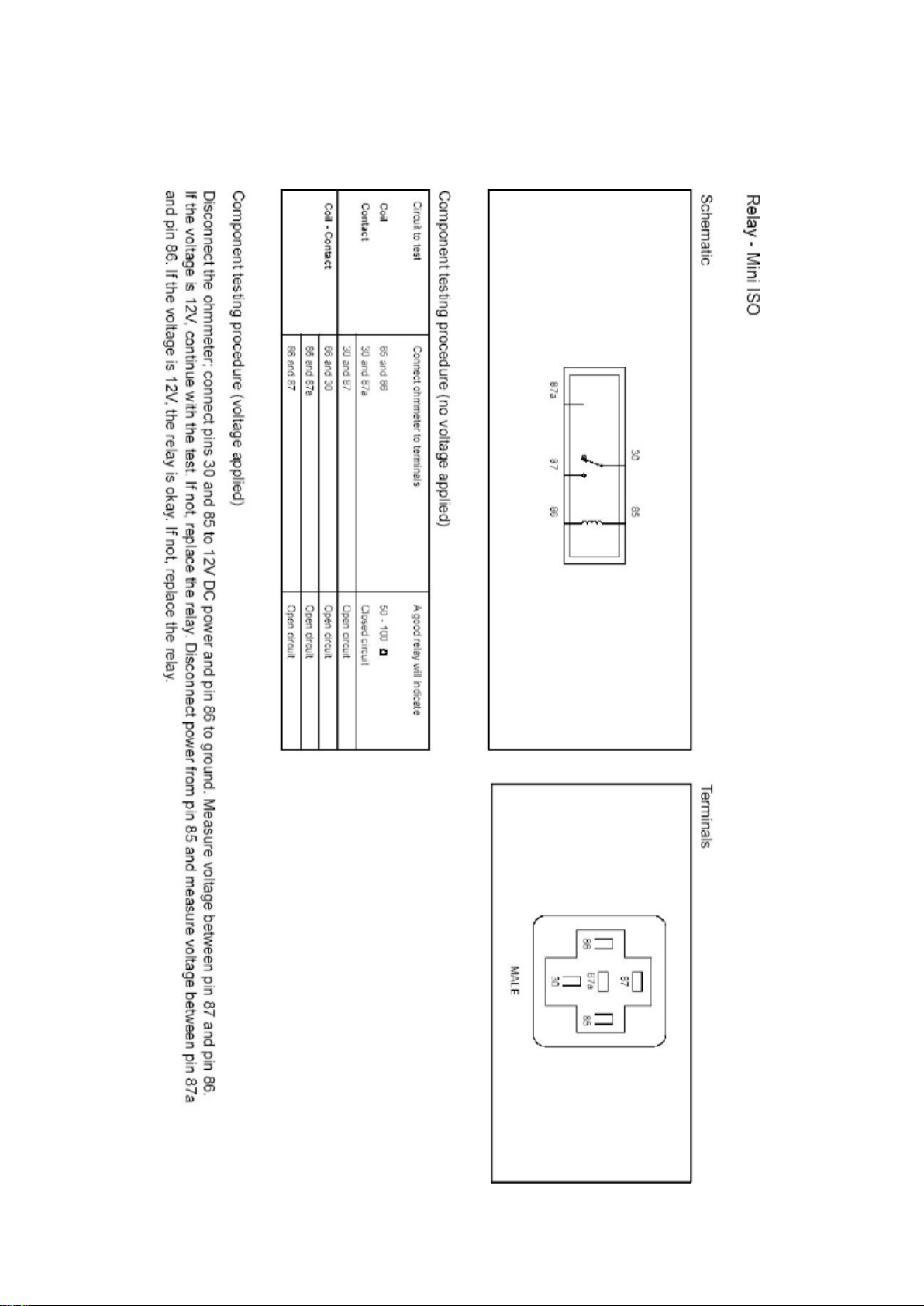
Ford Expedition 2wd Workshop Manual (V8-5.4L (2009))
Ford Workshop Manuals > Relays and Modules > Relays and Modules - Accessories and Optional Equipment > Accessory
Delay Module > Accessory Delay Relay > Component Information > Locations > Page 9
Page 7

Page 8
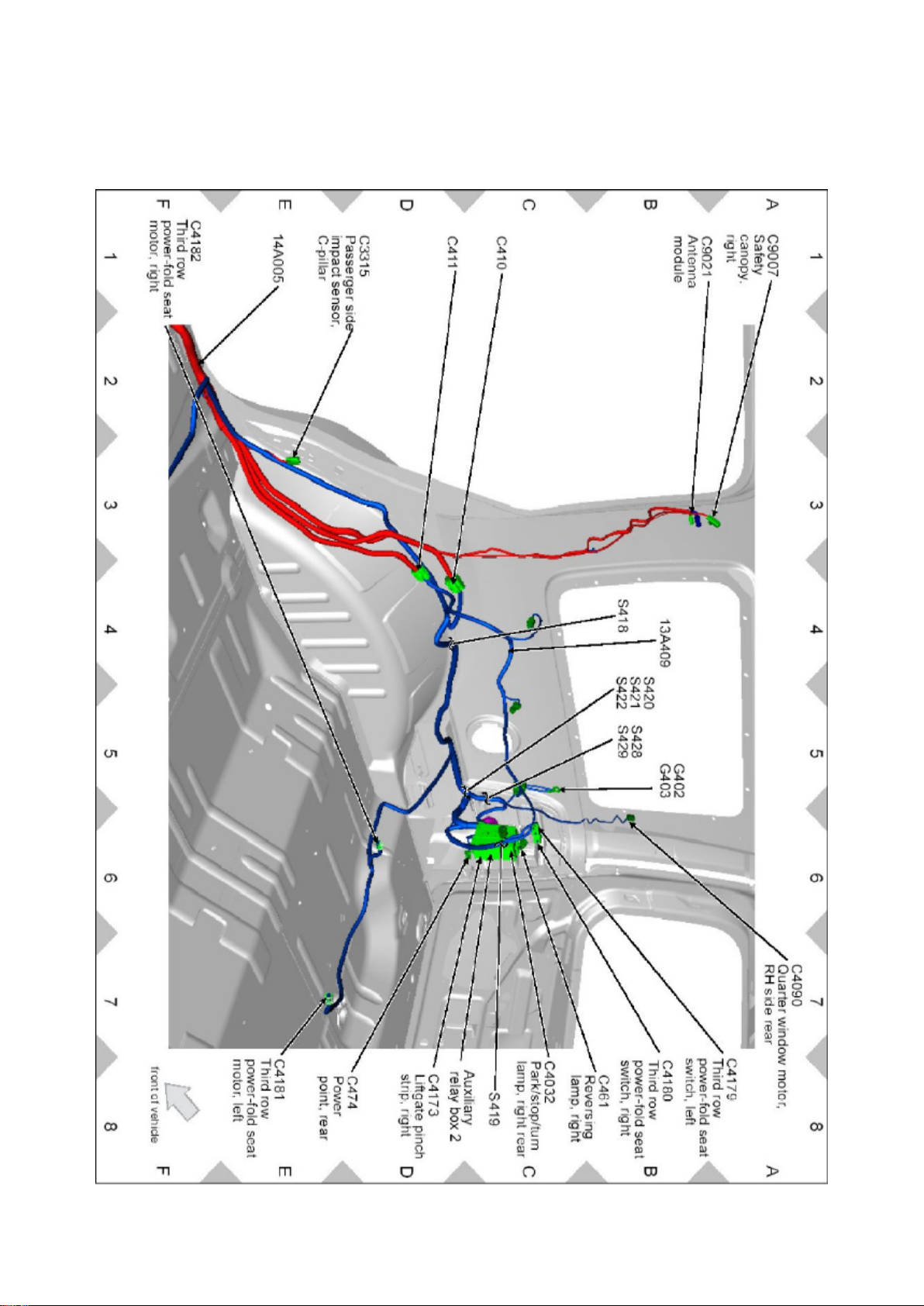
Ford Expedition 2wd Workshop Manual (V8-5.4L (2009))
Ford Workshop Manuals > Relays and Modules > Relays and Modules - Accessories and Optional Equipment > Antenna
Control Module > Component Information > Locations
Page 9

Antenna Control Module: Locations
Page 10
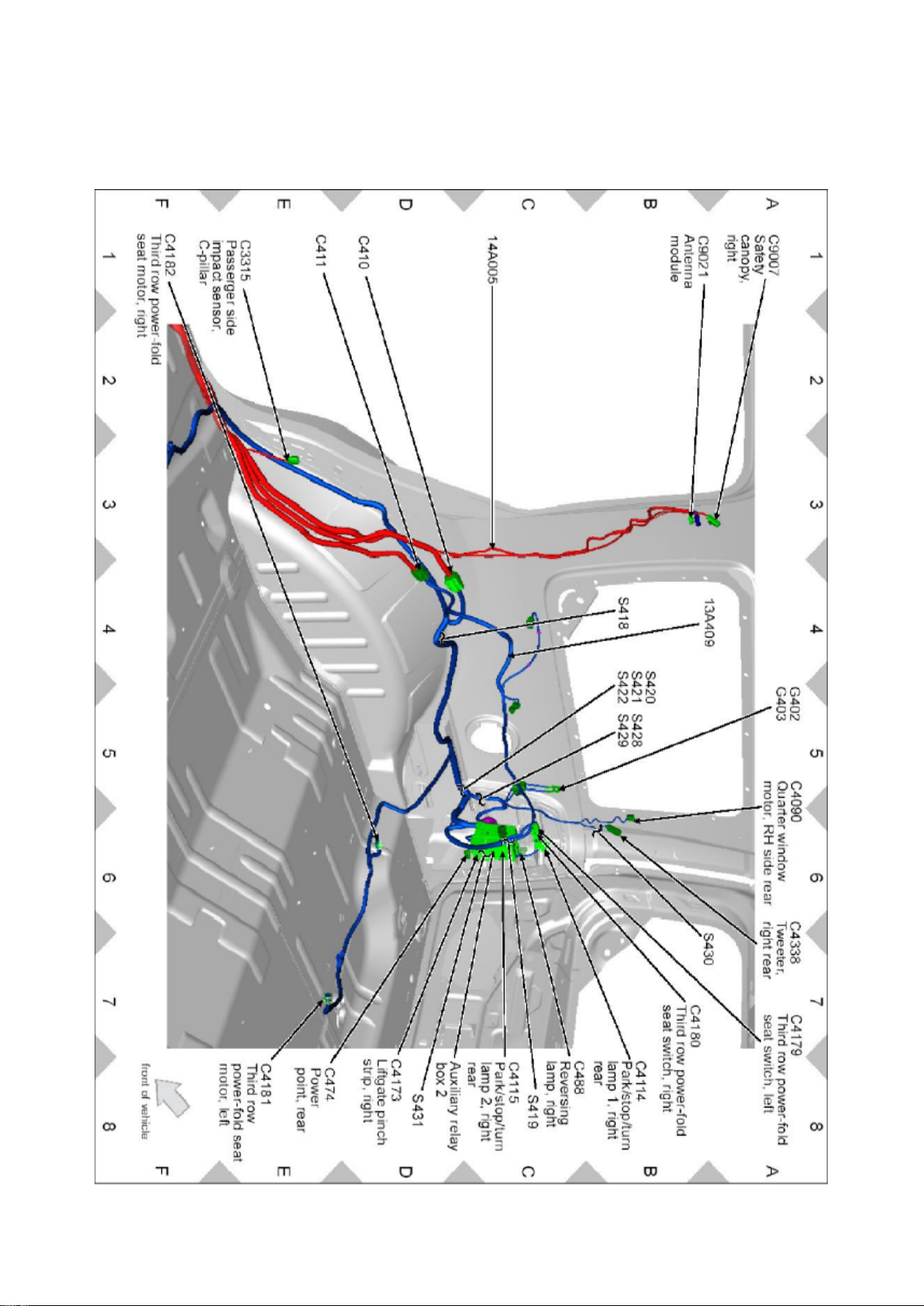
Ford Expedition 2wd Workshop Manual (V8-5.4L (2009))
Ford Workshop Manuals > Relays and Modules > Relays and Modules - Accessories and Optional Equipment > Antenna
Control Module > Component Information > Locations > Page 13
Page 11

Page 12
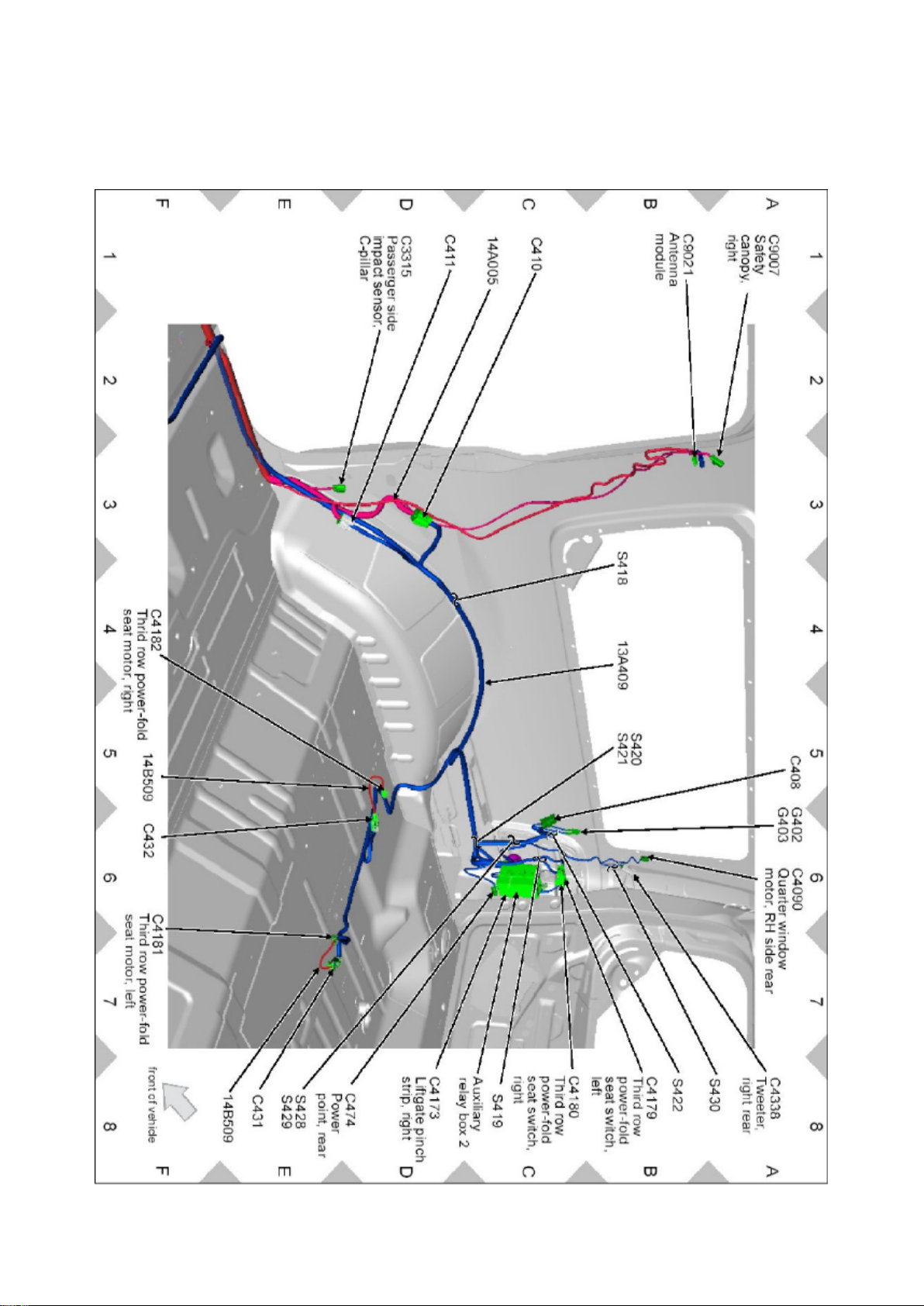
Ford Expedition 2wd Workshop Manual (V8-5.4L (2009))
Ford Workshop Manuals > Relays and Modules > Relays and Modules - Accessories and Optional Equipment > Antenna
Control Module > Component Information > Locations > Page 14
Page 13

Page 14
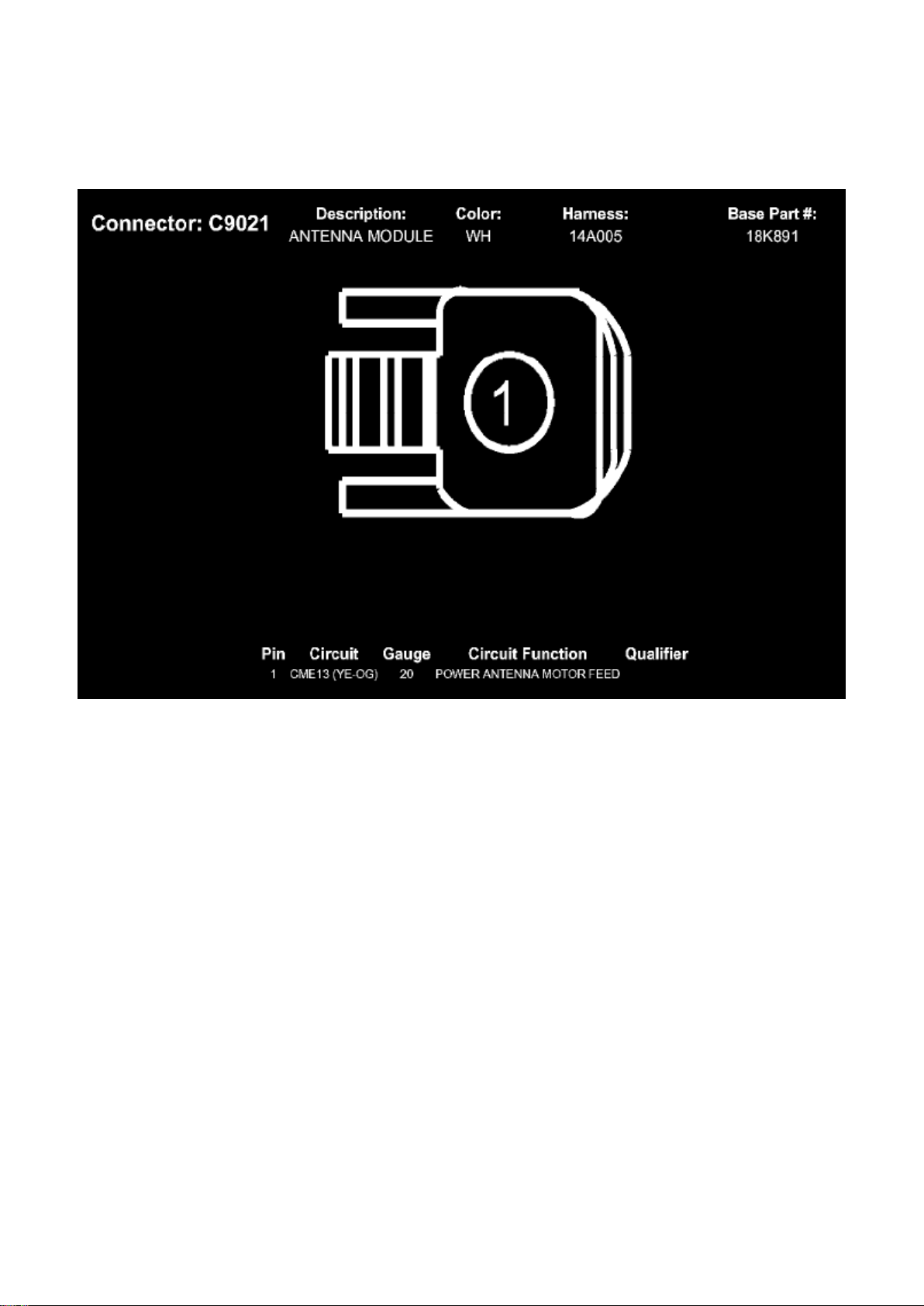
Ford Expedition 2wd Workshop Manual (V8-5.4L (2009))
Ford Workshop Manuals > Relays and Modules > Relays and Modules - Accessories and Optional Equipment > Antenna
Control Module > Component Information > Locations > Page 15
Page 15

Ford Expedition 2wd Workshop Manual (V8-5.4L (2009))
Ford Workshop Manuals > Relays and Modules > Relays and Modules - Accessories and Optional Equipment >
Communications Control Module > Component Information > Technical Service Bulletins > Customer Interest for
Communications Control Module: > 10-2-8 > Feb > 10 > SYNC(R) System - Defaults To 'Privacy Mode'
Communications Control Module: Customer Interest SYNC(R) System - Defaults To 'Privacy Mode'
TSB 10-2-8
02/15/10
SYNC SYSTEM DEFAULTS TO OR STAYS IN PRIVACY MODE, MULTIPLE VEHICLE LINES
FORD: 2008-2009 Taurus X 2008-2010 Focus, Fusion, Mustang, Taurus, Edge, Escape,
Expedition, Explorer Sport Trac, Explorer, F-150, F-250, F-350, F-450 2009-2010 Flex
LINCOLN: 2008-2010 MKZ 2009-2010 MKS 2008 Mark LT 2008-2010 MKX, Navigator 2010 MKT
MERCURY: 2008-2009 Sable 2008-2010 Milan, Mariner, Mountaineer
ISSUE Some customers of 2008-2010 SYNC-equipped vehicles may express concern with their
SYNC paired device defaulting, switching or staying on privacy mode. The customer may not be
able to accept the call through the SYNC system or must answer the call manually on their
personal device.
ACTION Follow the Service Procedure steps to correct the condition.
SERVICE PROCEDURE
1. Set the Privacy mode to Off on the device and recheck Sync operation.
2. If necessary, test the device on another vehicle with the same version SYNC. If the concern is
still present, the device is the concern. Continue with
normal WSM Diagnostics.
NOTE
PRIVACY MODE MEANS THAT THE PHONE IS CONTROLLING THE AUDIO. SYNC ONLY
MAKES REQUESTS TO THE PHONE TO TRANSFER THIS RESPONSIBILITY OR AUDIO TO
SYNC. IF THE PHONE DOES NOT ACCEPT THIS REQUEST OR THERE IS A PROBLEM IN
THE COMMUNICATION TO MAKE THIS HAPPEN, YOU ARE BY DEFAULT IN PRIVACY MODE.
WARRANTY STATUS: Information Only
Disclaimer
Page 16

Ford Expedition 2wd Workshop Manual (V8-5.4L (2009))
Ford Workshop Manuals > Relays and Modules > Relays and Modules - Accessories and Optional Equipment >
Communications Control Module > Component Information > Technical Service Bulletins > Customer Interest for
Communications Control Module: > 09-26-8 > Jan > 10 > SYNC(R) System - Software Update For Various Concerns
Page 17

Communications Control Module: Customer Interest SYNC(R) System - Software Update For
Various Concerns
Page 18

TSB 09-26-8
01/04/10
SYNC SOFTWARE UPDATE - VARIOUS ISSUES
FORD: 2008-2009 Focus, Fusion, Taurus X, Taurus, Edge, Explorer Sport Trac, Explorer 2009
Escape, Expedition, F-150, F-Super Duty, Flex
LINCOLN: 2008-2009 MKZ 2009 MKS 2008-2009 MKX, Navigator
MERCURY: 2008-2009 Milan, Sable, Mountaineer 2009 Mariner
This article supersedes TSB 9-22-14 to update the Service Procedure.
ISSUE Some 2008 and 2009 SYNC® equipped vehicles may exhibit one or more of the following
symptoms:
^ Universal Serial Bus (USB) port inoperative.
^ USB audio muting when using various non-Apple USB devices.
^ Phone book access difficulty on certain 2-digit phone book entries when using voice commands.
^ Excessive background noise and/or poor voice sound quality.
^ Phone book auto download inoperative on supported devices.
^ SYNC steering wheel control (SWC) switches being inoperative intermittently.
ACTION Follow the Service Procedure steps to correct the condition.
SERVICE PROCEDURE
Reprogram the accessory protocol inter[ace module (APIM) to the following consumer inter[ace
processor (CIP) software levels.
^ 9L3T-14D544-AE (vehicles not equipped with SYNC V2, 911 Assist and Vehicle Health Report)
^ 9L2T-14D544-BE (vehicles already equipped with SYNC V2, 911 Assist and Vehicle Health
Report)
Service Pack files may be obtained at www.syncmyride.com.
Reprogram the APIM
Contains software fix updates for the following:
^ Phone book auto download inoperative.
^ USB audio muting.
^ SYNC steering wheel control (SWC) switches being inoperative.
^ Voice recognition on 2-digit entries.
Page 19

Ford Expedition 2wd Workshop Manual (V8-5.4L (2009))
Ford Workshop Manuals > Relays and Modules > Relays and Modules - Accessories and Optional Equipment >
Communications Control Module > Component Information > Technical Service Bulletins > Customer Interest for
Communications Control Module: > 09-26-8 > Jan > 10 > SYNC(R) System - Software Update For Various Concerns >
Page 28
Page 20

^ USB port inoperative with diagnostic trouble code (DTC) B1342.
Page 21

^ Poor call sound quality.
This software update also contains enhancements that will improve the reliability of both Bluetooth
and USB connections to SYNC(R) from various consumer devices, and microphone enhancements
to reduce background noise, and will default Vehicle Health Report (if equipped) to off. The
Bluetooth enhancements improve the stability of hands-free calls, call waiting, caller ID, multiple
call handling and other mobile phone features. The USB enhancements improve support for media
players and the playing of file formats and podcasts.
NOTE
REFERENCE OTHER TECHNICAL SERVICE BULLETINS (TSB) FOR ADDITIONAL SYNC
SOFTWARE PROGRAMMING TIPS.
1. Connect the vehicle communication module (VCM) to the data link connector (DLC).
2. Connect the VCM to the Integrated Diagnostic System (IDS) tool or laptop running IDS software.
3. Turn the ignition key to the on position.
4. Launch IDS tool.
5. If required, update the VCM with the latest software.
6. Close the IDS tool.
7. From the PTS website, run OASIS by pressing the Read VIN & DTC's button. After vehicle
communication is established, press the GO button.
8. From the Vehicle Service Session screen, Select the SYNC button.
9. Press read APIM button.
10. Select software and press program APIM to update the SYNC module.
NOTE
YOU MUST USE A MALE-A TO MALE-A USB CABLE LIKE ROTUNDA PART NUMBER
CCMUSB2-AM-AM-10 TO COMPLETE THIS STEP.
NOTE
DO NOT DISCONNECT THE VCM OR USB CABLES DURING APIM PROGRAMMING.
NOTE
THE SYSTEM MAY PROMPT YOU TO INSTALL SOFTWARE FOR THE USB PORT. FOLLOW
THE ON SCREEN INSTRUCTIONS TO INSTALL THE USB PORT DRIVER ALREADY
INCLUDED IN WINDOWS XP.
11. Program both processors in the APIM (Vehicle Interface Processor (VIP) and CIP).
NOTE
DO NOT USE A MALE-TO-MALE USB DATA TRANSFER TYPE CABLE.
a. Connect the Male-A to Male-A USB cable, Rotunda part number CCMUSB2-AM-AM-10, to the
IDS tool or laptop running IDS software and
to the vehicle USB port.
Page 22

b. Follow the on-screen instructions to program both processors on the Sync module (VIP and
CIP).
12. At the end of the configuration and programming procedure, the programming has been
completed successfully screen will be displayed.
13. Exit PTS, disconnect the VCM and disconnect the USB cable.
OTHER APPLICABLE ARTICLES: 08-21-02
WARRANTY STATUS: Eligible Under Provisions Of New Vehicle Limited Warranty Coverage
IMPORTANT: Warranty coverage limits/policies are not altered by a TSB. Warranty coverage limits
are determined by the identified causal part.
OPERATION DESCRIPTION TIME
092608A 2008-2009 Edge, Explorer, 0.4 Hr.
Page 23

Ford Expedition 2wd Workshop Manual (V8-5.4L (2009))
Ford Workshop Manuals > Relays and Modules > Relays and Modules - Accessories and Optional Equipment >
Communications Control Module > Component Information > Technical Service Bulletins > Customer Interest for
Communications Control Module: > 09-26-8 > Jan > 10 > SYNC(R) System - Software Update For Various Concerns >
Page 29
Mountaineer, Explorer Sport Trac, Focus, Fusion, Milan, MKX, MKZ, Sable, Navigator, Taurus,
Taurus X, 2009 Expedition, Escape, Escape Hybrid, Mariner, Mariner Hybrid, F-150, F-Super Duty,
Flex, MKS: Reprogram The APIM (Do Not Use With Any Other Labor Operations)
DEALER CODING
CONDITION
BASIC PART NO. CODE
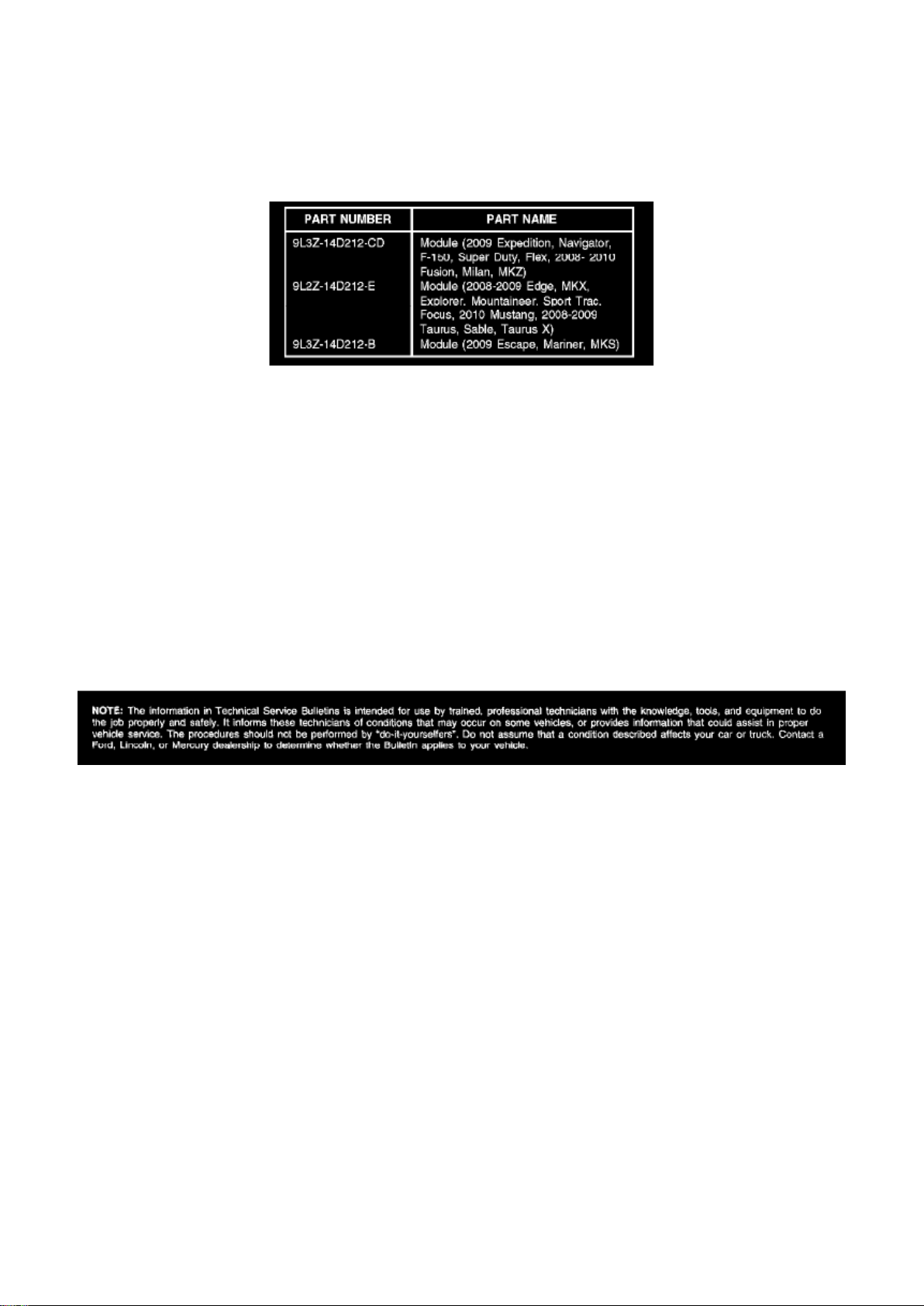
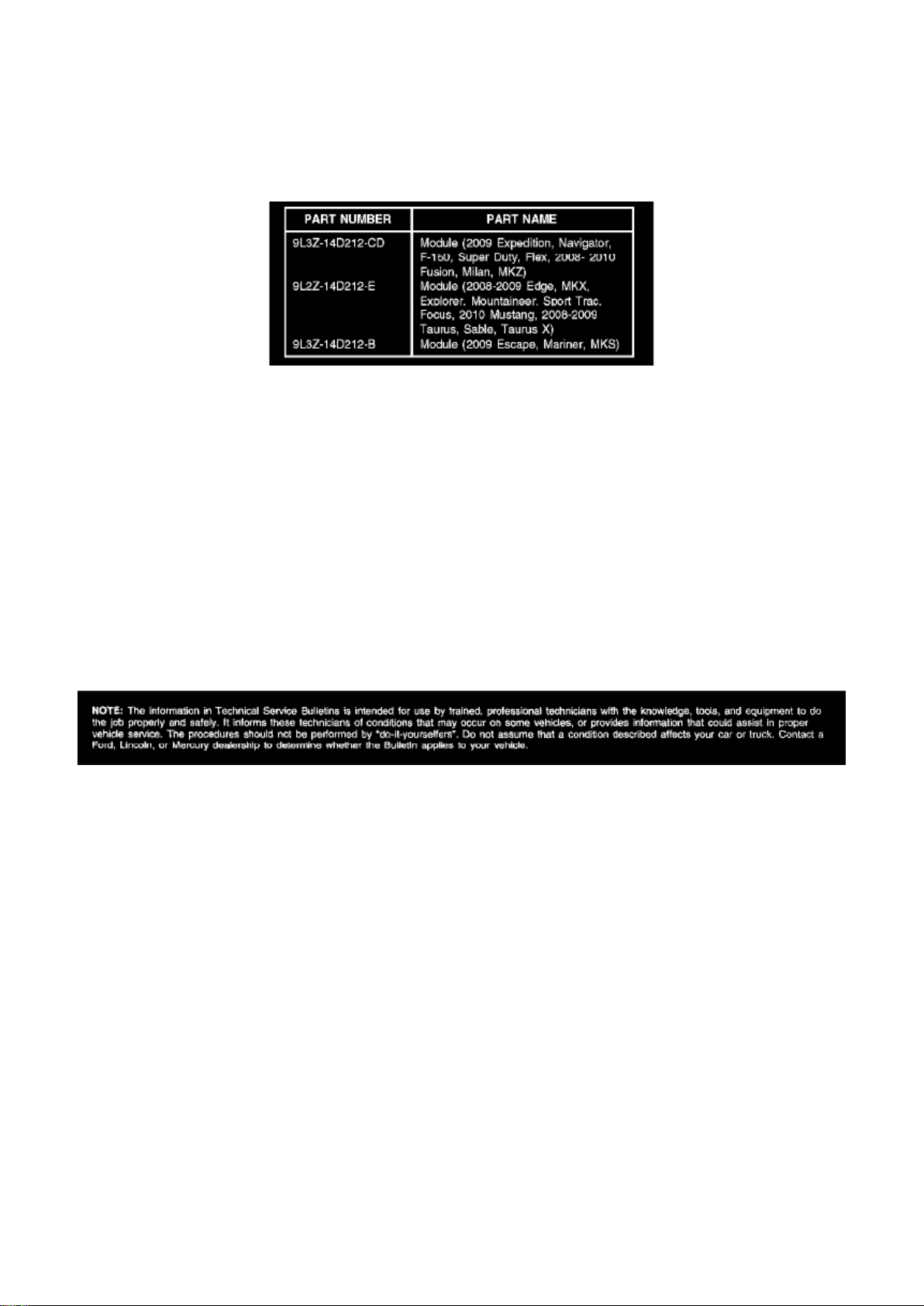
14D212 04
Disclaimer
Page 24

Ford Expedition 2wd Workshop Manual (V8-5.4L (2009))
Ford Workshop Manuals > Relays and Modules > Relays and Modules - Accessories and Optional Equipment >
Communications Control Module > Component Information > Technical Service Bulletins > Customer Interest for
Communications Control Module: > 09-14-3 > Jul > 09 > SYNC(R) System - Functions Inoperative/DTC's Set
Page 25

Communications Control Module: Customer Interest SYNC(R) System - Functions
Inoperative/DTC's Set
Page 26

TSB 09-14-3
07/27/09
SYNC FUNCTIONS INOPERATIVE, DTC U3000-41, U0485, OR U0100, AND/OR BATTERY
DRAW WITH ACCESSORY PROTOCOL INTERFACE MODULE CONNECTED
FORD: 2008-2009 Focus, Taurus X, Taurus 2008-2010 Fusion 2010 Mustang 2008-2009 Edge,
Explorer Sport Trac, Explorer 2009 Escape Hybrid, Escape, Expedition, F-150, F-Super Duty, Flex
LINCOLN: 2008-2009 Zephyr 2008-2010 MKZ 2009 MKS 2008-2009 MKX, Navigator
MERCURY: 2008-2009 Sable 2008-2010 Milan 2008-2009 Mountaineer 2009 Mariner Hybrid,
Mariner
ISSUE Some 2008-2010 vehicles equipped with SYNC version 2 software level, SYNC 911 Assist
and Vehicle Health Report, may exhibit all or most of the following symptoms:
^ Diagnostic Trouble Codes (DTC) U3000-41, U0485, or U0100 in Accessory Protocol Interface
Module (APIM)
^ SYNC display menus/options blank
^ USB port inoperative
^ No SYNC Blue Tooth device connectivity
^ Voice/Phone/OK steering wheel controls inoperative
^ Lack of APIM communication
^ Parasitic battery draw with APIM connected
These symptoms may be triggered by a low battery state of charge, or a recent battery
disconnect/reconnect.
ACTION Follow the service procedure to correct the condition.
SERVICE PROCEDURE
This software upgrade only applies to the following Accessory Protocol Interface Module (APIM)
Vehicle Interface Processor (VIP) and Customer Interface Processor (CIP) software levels:
^ VIP: 9L2T-14D205-AC / CIP: 9L2T-14D544-BC
^ VIP: 9L2T-14D205-AD / CIP: 9L2T-14D544-BD
^ VIP: 9L2T-14D205-AE / CIP: 9L2T-14D544-BD
To determine the current APIM software level, reference the Professional Technician Society (PTS)
website, enter the VIN in OASIS, click the GO
Page 27

Ford Expedition 2wd Workshop Manual (V8-5.4L (2009))
Ford Workshop Manuals > Relays and Modules > Relays and Modules - Accessories and Optional Equipment >
Communications Control Module > Component Information > Technical Service Bulletins > Customer Interest for
Communications Control Module: > 09-14-3 > Jul > 09 > SYNC(R) System - Functions Inoperative/DTC's Set > Page 34
Page 28

button and select the SYNC button.
Page 29

1. Determine if communication can be established with the APIM using IDS.
a. If communication cannot be verified, proceed to Step 2.
b. If communication is present, proceed to Step 3.
2. Reference Workshop Manual, Section 418-00, Module Communication Network to determine if
communication can be established. If not, perform
an APIM power reset by disconnecting and reconnecting the vehicle battery.
a. If communication is now present, proceed to Step 3.
b. If communication still cannot be established, replace the APIM.
3. Reprogram the APIM to VIP software level 9L2T-14D205-AF by following the Service Procedure.
NOTE
SOFTWARE IS AVAILABLE ONLY THROUGH THE PTS WEBSITE, AND NOT AVAILABLE
THROUGH THE SYNCMYRIDE.COM WEBSITE.
NOTE
CONFIGURATION AND PROGRAMMING REQUIRES THE USE OF A SPECIAL PTS
APPLICATION. INSTALLER MUST HAVE ACCESS TO PTS AND HAVE A VALID PTS USER ID
AND PASSWORD.
a. Connect the vehicle communication module (VCM) to the data link connector (DLC).
b. Connect the VCM to the IDS tool or laptop running IDS software.
c. Turn the ignition key to the on position.
d. Launch IDS tool.
e. If required, update the VCM with the latest software.
f. Close the IDS tool.
g. From the PTS website, run OASIS by pressing the Read VIN And DTC's button. After vehicle
communication is established, press the GO
button.
h. From the Vehicle Service Session screen, Select the SYNC button.
i. Press read APIM button.
j. Select software and press program APIM to update the SYNC module.
NOTE
YOU MUST USE A MALE-A TO MALE-A USB CABLE LIKE ROTUNDA PART NUMBER
CCMU5B2-AM-AM-10 TO COMPLETE THIS STEP.
NOTE
DO NOT USE A TRANSFER TYPE CABLE.
NOTE
Page 30

DO NOT DISCONNECT THE VCM OR USB CABLES DURING APIM PROGRAMMING.
NOTE
THE SYSTEM MAY PROMPT YOU TO INSTALL SOFTWARE FOR THE USB PORT. FOLLOW
THE ON SCREEN INSTRUCTIONS TO INSTALL THE USB PORT DRIVER ALREADY
INCLUDED IN WINDOWS XP.
k. Program the processor in the APIM.
l. Connect the Male-A to Male-A USB cable, Rotunda part number CCMU5B2-AM-AM-10, to the
IDS tool or laptop running IDS software, and to the vehicle USB port.
m. Follow the on-screen instructions to program the VIP module.
Page 31
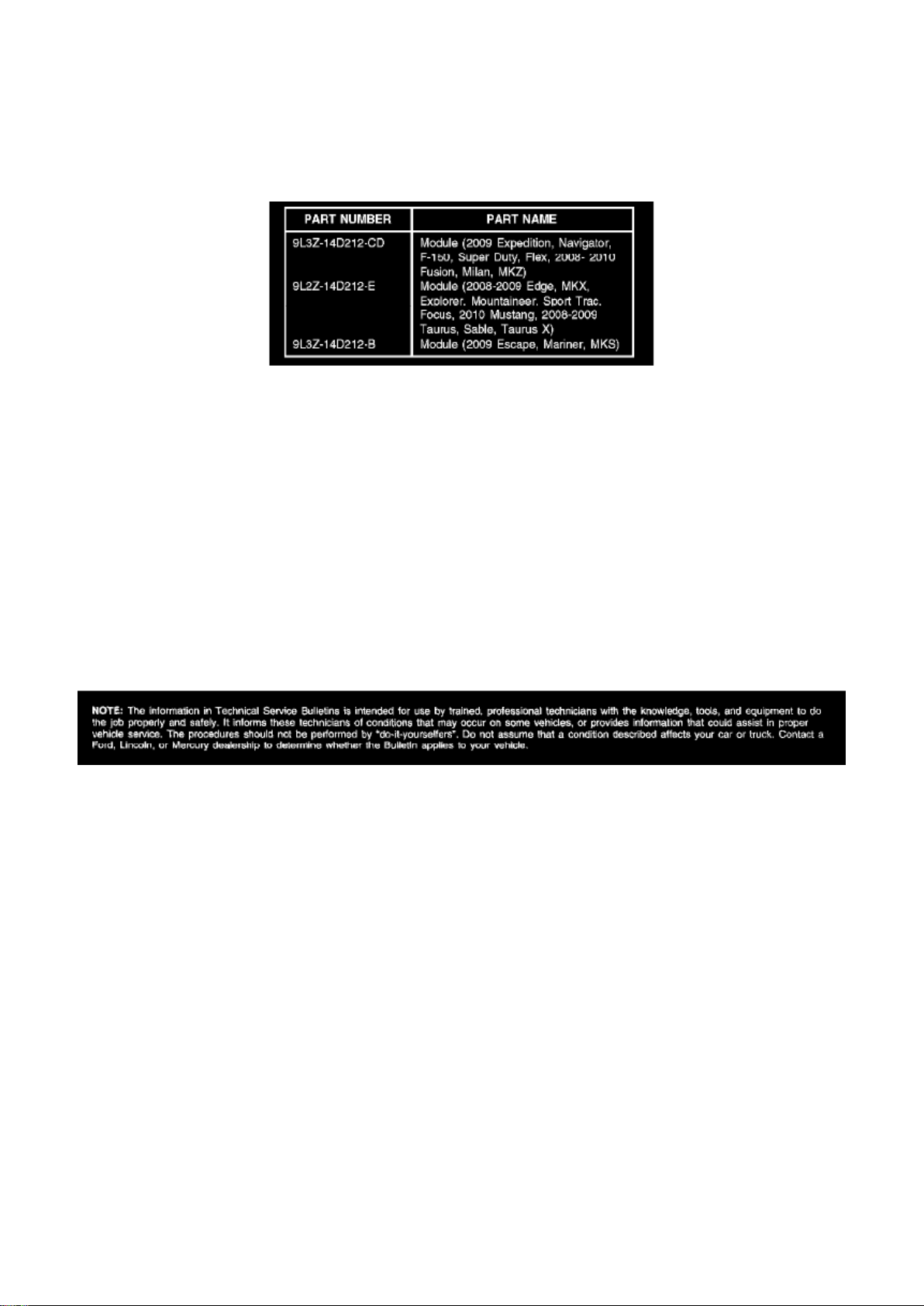
Ford Expedition 2wd Workshop Manual (V8-5.4L (2009))
Ford Workshop Manuals > Relays and Modules > Relays and Modules - Accessories and Optional Equipment >
Communications Control Module > Component Information > Technical Service Bulletins > Customer Interest for
Communications Control Module: > 09-14-3 > Jul > 09 > SYNC(R) System - Functions Inoperative/DTC's Set > Page 35
n. At the end of the configuration and programming procedure, the programming has been
completed successfully screen will be displayed.
o. Exit PTS, disconnect the VCM and disconnect the USB cable.
Parts Block
WARRANTY STATUS: Eligible Under Provisions Of New Vehicle Limited Warranty Coverage
IMPORTANT: Warranty coverage limits/policies are not altered by a TSB. Warranty coverage limits
are determined by the identified causal part.
OPERATION DESCRIPTION TIME
MT091403 Use SLTS Operations If Actual
Available; Claim Additional Time
Diagnosis Or Labor Performed As Actual Time
DEALER CODING
CONDITION
Page 32

BASIC PART NO. CODE
14D212 04
Disclaimer
Page 33

Ford Expedition 2wd Workshop Manual (V8-5.4L (2009))
Ford Workshop Manuals > Relays and Modules > Relays and Modules - Accessories and Optional Equipment >
Communications Control Module > Component Information > Technical Service Bulletins > All Technical Service Bulletins
for Communications Control Module: > 10-2-8 > Feb > 10 > SYNC(R) System - Defaults To 'Privacy Mode'
Communications Control Module: All Technical Service Bulletins SYNC(R) System - Defaults To
'Privacy Mode'
TSB 10-2-8
02/15/10
SYNC SYSTEM DEFAULTS TO OR STAYS IN PRIVACY MODE, MULTIPLE VEHICLE LINES
FORD: 2008-2009 Taurus X 2008-2010 Focus, Fusion, Mustang, Taurus, Edge, Escape,
Expedition, Explorer Sport Trac, Explorer, F-150, F-250, F-350, F-450 2009-2010 Flex
LINCOLN: 2008-2010 MKZ 2009-2010 MKS 2008 Mark LT 2008-2010 MKX, Navigator 2010 MKT
MERCURY: 2008-2009 Sable 2008-2010 Milan, Mariner, Mountaineer
ISSUE Some customers of 2008-2010 SYNC-equipped vehicles may express concern with their
SYNC paired device defaulting, switching or staying on privacy mode. The customer may not be
able to accept the call through the SYNC system or must answer the call manually on their
personal device.
ACTION Follow the Service Procedure steps to correct the condition.
SERVICE PROCEDURE
1. Set the Privacy mode to Off on the device and recheck Sync operation.
2. If necessary, test the device on another vehicle with the same version SYNC. If the concern is
still present, the device is the concern. Continue with
normal WSM Diagnostics.
NOTE
PRIVACY MODE MEANS THAT THE PHONE IS CONTROLLING THE AUDIO. SYNC ONLY
MAKES REQUESTS TO THE PHONE TO TRANSFER THIS RESPONSIBILITY OR AUDIO TO
SYNC. IF THE PHONE DOES NOT ACCEPT THIS REQUEST OR THERE IS A PROBLEM IN
THE COMMUNICATION TO MAKE THIS HAPPEN, YOU ARE BY DEFAULT IN PRIVACY MODE.
WARRANTY STATUS: Information Only
Disclaimer
Page 34

Ford Expedition 2wd Workshop Manual (V8-5.4L (2009))
Ford Workshop Manuals > Relays and Modules > Relays and Modules - Accessories and Optional Equipment >
Communications Control Module > Component Information > Technical Service Bulletins > All Technical Service Bulletins
for Communications Control Module: > 09-26-8 > Jan > 10 > SYNC(R) System - Software Update For Various Concerns
Page 35

Communications Control Module: All Technical Service Bulletins SYNC(R) System - Software
Update For Various Concerns
Page 36

TSB 09-26-8
01/04/10
SYNC SOFTWARE UPDATE - VARIOUS ISSUES
FORD: 2008-2009 Focus, Fusion, Taurus X, Taurus, Edge, Explorer Sport Trac, Explorer 2009
Escape, Expedition, F-150, F-Super Duty, Flex
LINCOLN: 2008-2009 MKZ 2009 MKS 2008-2009 MKX, Navigator
MERCURY: 2008-2009 Milan, Sable, Mountaineer 2009 Mariner
This article supersedes TSB 9-22-14 to update the Service Procedure.
ISSUE Some 2008 and 2009 SYNC® equipped vehicles may exhibit one or more of the following
symptoms:
^ Universal Serial Bus (USB) port inoperative.
^ USB audio muting when using various non-Apple USB devices.
^ Phone book access difficulty on certain 2-digit phone book entries when using voice commands.
^ Excessive background noise and/or poor voice sound quality.
^ Phone book auto download inoperative on supported devices.
^ SYNC steering wheel control (SWC) switches being inoperative intermittently.
ACTION Follow the Service Procedure steps to correct the condition.
SERVICE PROCEDURE
Reprogram the accessory protocol inter[ace module (APIM) to the following consumer inter[ace
processor (CIP) software levels.
^ 9L3T-14D544-AE (vehicles not equipped with SYNC V2, 911 Assist and Vehicle Health Report)
^ 9L2T-14D544-BE (vehicles already equipped with SYNC V2, 911 Assist and Vehicle Health
Report)
Service Pack files may be obtained at www.syncmyride.com.
Reprogram the APIM
Contains software fix updates for the following:
^ Phone book auto download inoperative.
^ USB audio muting.
^ SYNC steering wheel control (SWC) switches being inoperative.
^ Voice recognition on 2-digit entries.
Page 37

Ford Expedition 2wd Workshop Manual (V8-5.4L (2009))
Ford Workshop Manuals > Relays and Modules > Relays and Modules - Accessories and Optional Equipment >
Communications Control Module > Component Information > Technical Service Bulletins > All Technical Service Bulletins
for Communications Control Module: > 09-26-8 > Jan > 10 > SYNC(R) System - Software Update For Various Concerns >
Page 45
Page 38

^ USB port inoperative with diagnostic trouble code (DTC) B1342.
Page 39

^ Poor call sound quality.
This software update also contains enhancements that will improve the reliability of both Bluetooth
and USB connections to SYNC(R) from various consumer devices, and microphone enhancements
to reduce background noise, and will default Vehicle Health Report (if equipped) to off. The
Bluetooth enhancements improve the stability of hands-free calls, call waiting, caller ID, multiple
call handling and other mobile phone features. The USB enhancements improve support for media
players and the playing of file formats and podcasts.
NOTE
REFERENCE OTHER TECHNICAL SERVICE BULLETINS (TSB) FOR ADDITIONAL SYNC
SOFTWARE PROGRAMMING TIPS.
1. Connect the vehicle communication module (VCM) to the data link connector (DLC).
2. Connect the VCM to the Integrated Diagnostic System (IDS) tool or laptop running IDS software.
3. Turn the ignition key to the on position.
4. Launch IDS tool.
5. If required, update the VCM with the latest software.
6. Close the IDS tool.
7. From the PTS website, run OASIS by pressing the Read VIN & DTC's button. After vehicle
communication is established, press the GO button.
8. From the Vehicle Service Session screen, Select the SYNC button.
9. Press read APIM button.
10. Select software and press program APIM to update the SYNC module.
NOTE
YOU MUST USE A MALE-A TO MALE-A USB CABLE LIKE ROTUNDA PART NUMBER
CCMUSB2-AM-AM-10 TO COMPLETE THIS STEP.
NOTE
DO NOT DISCONNECT THE VCM OR USB CABLES DURING APIM PROGRAMMING.
NOTE
THE SYSTEM MAY PROMPT YOU TO INSTALL SOFTWARE FOR THE USB PORT. FOLLOW
THE ON SCREEN INSTRUCTIONS TO INSTALL THE USB PORT DRIVER ALREADY
INCLUDED IN WINDOWS XP.
11. Program both processors in the APIM (Vehicle Interface Processor (VIP) and CIP).
NOTE
DO NOT USE A MALE-TO-MALE USB DATA TRANSFER TYPE CABLE.
a. Connect the Male-A to Male-A USB cable, Rotunda part number CCMUSB2-AM-AM-10, to the
IDS tool or laptop running IDS software and
to the vehicle USB port.
Page 40

b. Follow the on-screen instructions to program both processors on the Sync module (VIP and
CIP).
12. At the end of the configuration and programming procedure, the programming has been
completed successfully screen will be displayed.
13. Exit PTS, disconnect the VCM and disconnect the USB cable.
OTHER APPLICABLE ARTICLES: 08-21-02
WARRANTY STATUS: Eligible Under Provisions Of New Vehicle Limited Warranty Coverage
IMPORTANT: Warranty coverage limits/policies are not altered by a TSB. Warranty coverage limits
are determined by the identified causal part.
OPERATION DESCRIPTION TIME
092608A 2008-2009 Edge, Explorer, 0.4 Hr.
Page 41

Ford Expedition 2wd Workshop Manual (V8-5.4L (2009))
Ford Workshop Manuals > Relays and Modules > Relays and Modules - Accessories and Optional Equipment >
Communications Control Module > Component Information > Technical Service Bulletins > All Technical Service Bulletins
for Communications Control Module: > 09-26-8 > Jan > 10 > SYNC(R) System - Software Update For Various Concerns >
Page 46
Mountaineer, Explorer Sport Trac, Focus, Fusion, Milan, MKX, MKZ, Sable, Navigator, Taurus,
Taurus X, 2009 Expedition, Escape, Escape Hybrid, Mariner, Mariner Hybrid, F-150, F-Super Duty,
Flex, MKS: Reprogram The APIM (Do Not Use With Any Other Labor Operations)
DEALER CODING
CONDITION
BASIC PART NO. CODE
14D212 04
Disclaimer
Page 42

Ford Expedition 2wd Workshop Manual (V8-5.4L (2009))
Ford Workshop Manuals > Relays and Modules > Relays and Modules - Accessories and Optional Equipment >
Communications Control Module > Component Information > Technical Service Bulletins > All Technical Service Bulletins
for Communications Control Module: > 09-14-3 > Jul > 09 > SYNC(R) System - Functions Inoperative/DTC's Set
Page 43

Communications Control Module: All Technical Service Bulletins SYNC(R) System - Functions
Inoperative/DTC's Set
Page 44

TSB 09-14-3
07/27/09
SYNC FUNCTIONS INOPERATIVE, DTC U3000-41, U0485, OR U0100, AND/OR BATTERY
DRAW WITH ACCESSORY PROTOCOL INTERFACE MODULE CONNECTED
FORD: 2008-2009 Focus, Taurus X, Taurus 2008-2010 Fusion 2010 Mustang 2008-2009 Edge,
Explorer Sport Trac, Explorer 2009 Escape Hybrid, Escape, Expedition, F-150, F-Super Duty, Flex
LINCOLN: 2008-2009 Zephyr 2008-2010 MKZ 2009 MKS 2008-2009 MKX, Navigator
MERCURY: 2008-2009 Sable 2008-2010 Milan 2008-2009 Mountaineer 2009 Mariner Hybrid,
Mariner
ISSUE Some 2008-2010 vehicles equipped with SYNC version 2 software level, SYNC 911 Assist
and Vehicle Health Report, may exhibit all or most of the following symptoms:
^ Diagnostic Trouble Codes (DTC) U3000-41, U0485, or U0100 in Accessory Protocol Interface
Module (APIM)
^ SYNC display menus/options blank
^ USB port inoperative
^ No SYNC Blue Tooth device connectivity
^ Voice/Phone/OK steering wheel controls inoperative
^ Lack of APIM communication
^ Parasitic battery draw with APIM connected
These symptoms may be triggered by a low battery state of charge, or a recent battery
disconnect/reconnect.
ACTION Follow the service procedure to correct the condition.
SERVICE PROCEDURE
This software upgrade only applies to the following Accessory Protocol Interface Module (APIM)
Vehicle Interface Processor (VIP) and Customer Interface Processor (CIP) software levels:
^ VIP: 9L2T-14D205-AC / CIP: 9L2T-14D544-BC
^ VIP: 9L2T-14D205-AD / CIP: 9L2T-14D544-BD
^ VIP: 9L2T-14D205-AE / CIP: 9L2T-14D544-BD
To determine the current APIM software level, reference the Professional Technician Society (PTS)
website, enter the VIN in OASIS, click the GO
Page 45

Ford Expedition 2wd Workshop Manual (V8-5.4L (2009))
Ford Workshop Manuals > Relays and Modules > Relays and Modules - Accessories and Optional Equipment >
Communications Control Module > Component Information > Technical Service Bulletins > All Technical Service Bulletins
for Communications Control Module: > 09-14-3 > Jul > 09 > SYNC(R) System - Functions Inoperative/DTC's Set > Page 51
Page 46

button and select the SYNC button.
Page 47

1. Determine if communication can be established with the APIM using IDS.
a. If communication cannot be verified, proceed to Step 2.
b. If communication is present, proceed to Step 3.
2. Reference Workshop Manual, Section 418-00, Module Communication Network to determine if
communication can be established. If not, perform
an APIM power reset by disconnecting and reconnecting the vehicle battery.
a. If communication is now present, proceed to Step 3.
b. If communication still cannot be established, replace the APIM.
3. Reprogram the APIM to VIP software level 9L2T-14D205-AF by following the Service Procedure.
NOTE
SOFTWARE IS AVAILABLE ONLY THROUGH THE PTS WEBSITE, AND NOT AVAILABLE
THROUGH THE SYNCMYRIDE.COM WEBSITE.
NOTE
CONFIGURATION AND PROGRAMMING REQUIRES THE USE OF A SPECIAL PTS
APPLICATION. INSTALLER MUST HAVE ACCESS TO PTS AND HAVE A VALID PTS USER ID
AND PASSWORD.
a. Connect the vehicle communication module (VCM) to the data link connector (DLC).
b. Connect the VCM to the IDS tool or laptop running IDS software.
c. Turn the ignition key to the on position.
d. Launch IDS tool.
e. If required, update the VCM with the latest software.
f. Close the IDS tool.
g. From the PTS website, run OASIS by pressing the Read VIN And DTC's button. After vehicle
communication is established, press the GO
button.
h. From the Vehicle Service Session screen, Select the SYNC button.
i. Press read APIM button.
j. Select software and press program APIM to update the SYNC module.
NOTE
YOU MUST USE A MALE-A TO MALE-A USB CABLE LIKE ROTUNDA PART NUMBER
CCMU5B2-AM-AM-10 TO COMPLETE THIS STEP.
NOTE
DO NOT USE A TRANSFER TYPE CABLE.
NOTE
Page 48

DO NOT DISCONNECT THE VCM OR USB CABLES DURING APIM PROGRAMMING.
NOTE
THE SYSTEM MAY PROMPT YOU TO INSTALL SOFTWARE FOR THE USB PORT. FOLLOW
THE ON SCREEN INSTRUCTIONS TO INSTALL THE USB PORT DRIVER ALREADY
INCLUDED IN WINDOWS XP.
k. Program the processor in the APIM.
l. Connect the Male-A to Male-A USB cable, Rotunda part number CCMU5B2-AM-AM-10, to the
IDS tool or laptop running IDS software, and to the vehicle USB port.
m. Follow the on-screen instructions to program the VIP module.
Page 49
Ford Expedition 2wd Workshop Manual (V8-5.4L (2009))
Ford Workshop Manuals > Relays and Modules > Relays and Modules - Accessories and Optional Equipment >
Communications Control Module > Component Information > Technical Service Bulletins > All Technical Service Bulletins
for Communications Control Module: > 09-14-3 > Jul > 09 > SYNC(R) System - Functions Inoperative/DTC's Set > Page 52
n. At the end of the configuration and programming procedure, the programming has been
completed successfully screen will be displayed.
o. Exit PTS, disconnect the VCM and disconnect the USB cable.
Parts Block
WARRANTY STATUS: Eligible Under Provisions Of New Vehicle Limited Warranty Coverage
IMPORTANT: Warranty coverage limits/policies are not altered by a TSB. Warranty coverage limits
are determined by the identified causal part.
OPERATION DESCRIPTION TIME
MT091403 Use SLTS Operations If Actual
Available; Claim Additional Time
Diagnosis Or Labor Performed As Actual Time
DEALER CODING
CONDITION
Page 50

BASIC PART NO. CODE
14D212 04
Disclaimer
Page 51
Ford Expedition 2wd Workshop Manual (V8-5.4L (2009))
Ford Workshop Manuals > Relays and Modules > Relays and Modules - Accessories and Optional Equipment >
Communications Control Module > Component Information > Locations > Accessory Protocol Interface Module (APIM)
Page 52

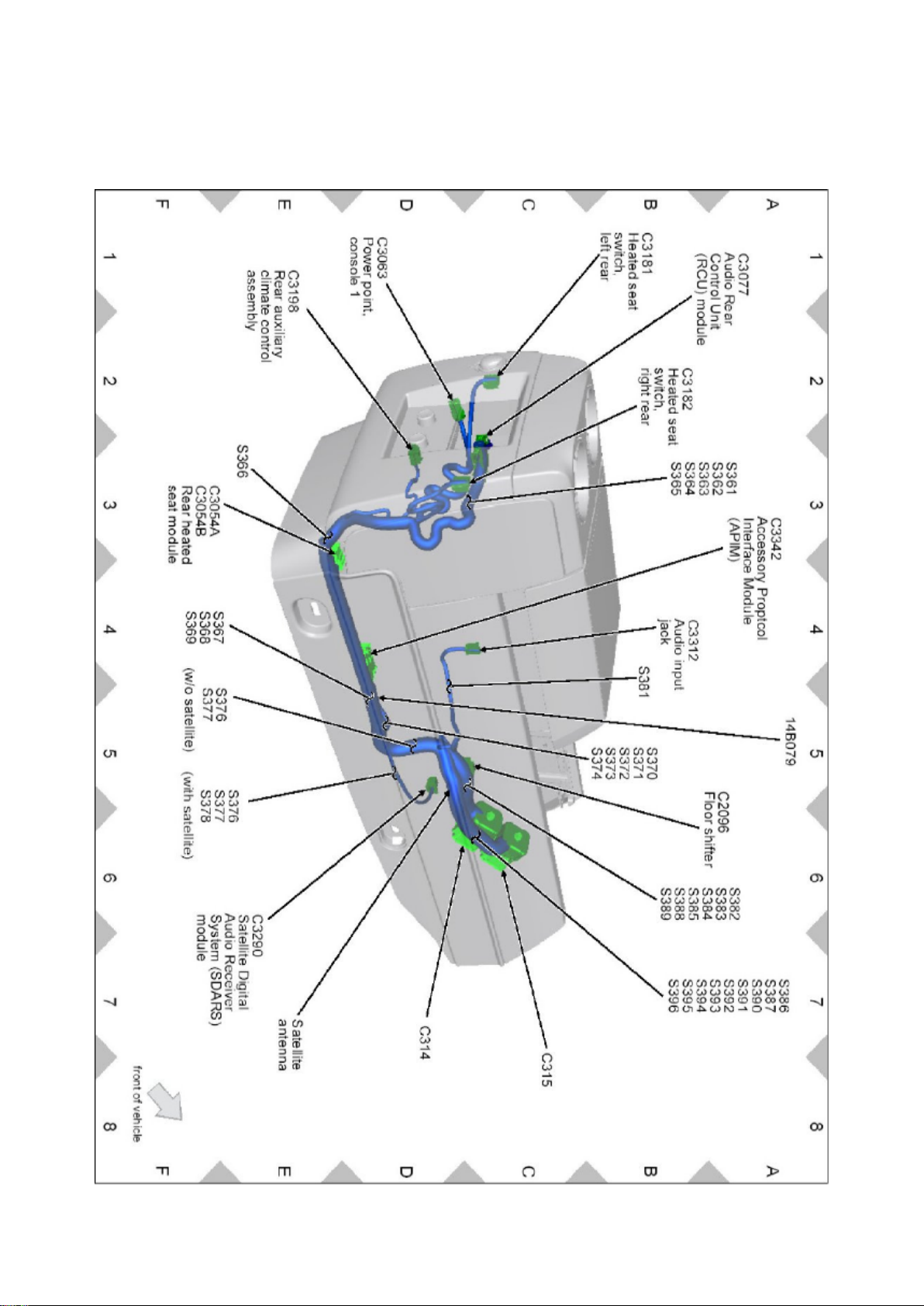
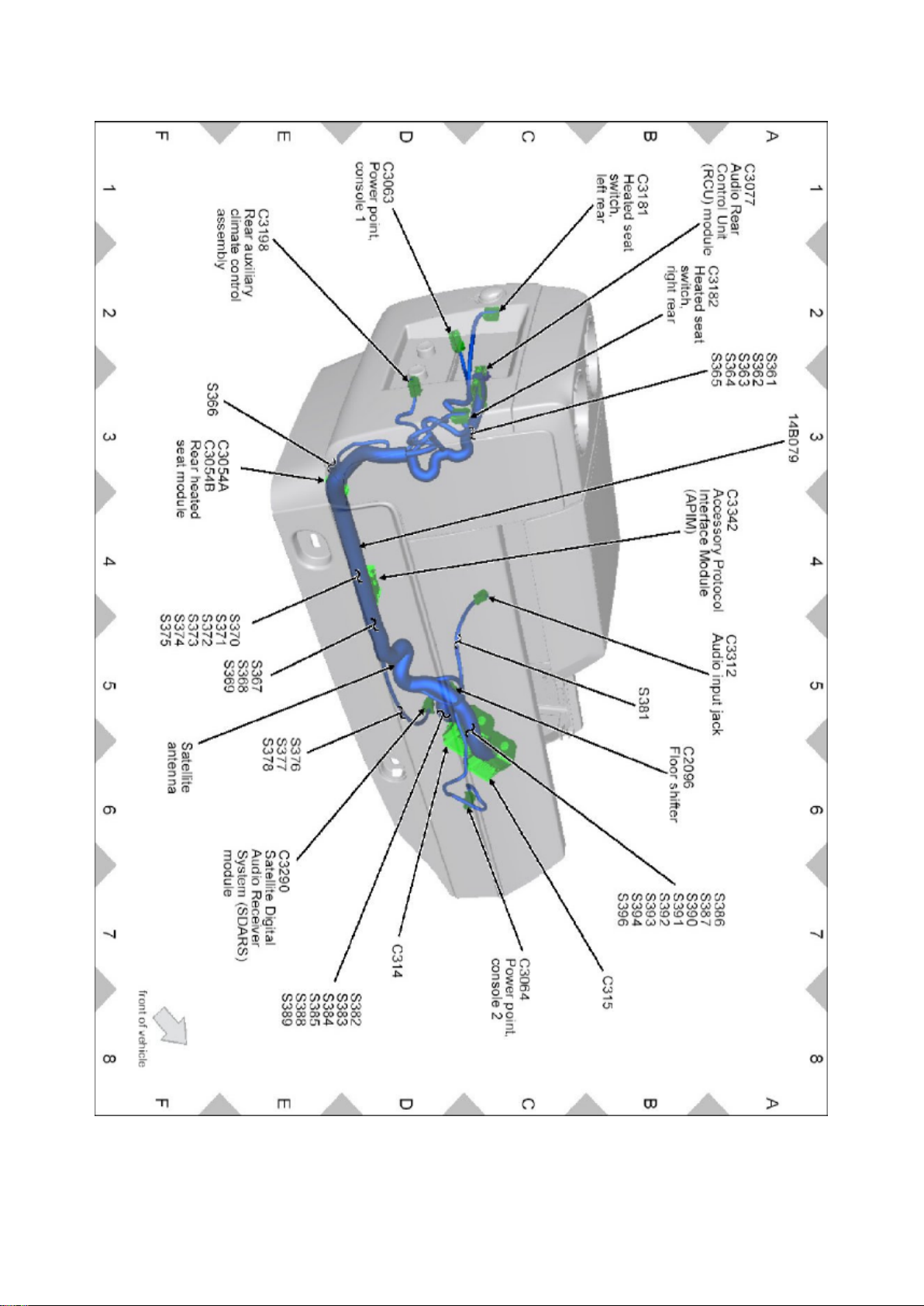
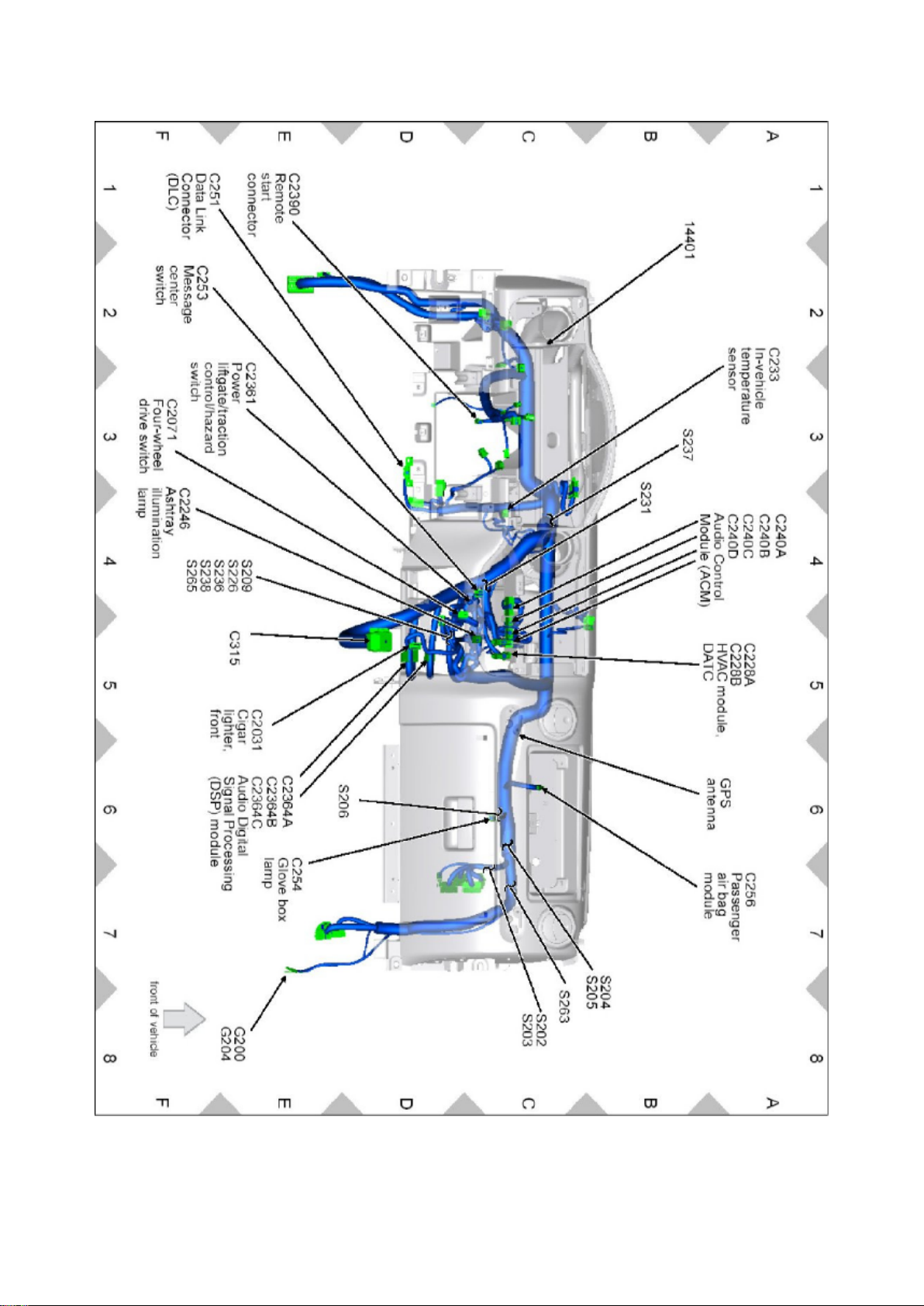
Communications Control Module: Locations Accessory Protocol Interface Module (APIM)
Page 53

Ford Expedition 2wd Workshop Manual (V8-5.4L (2009))
Ford Workshop Manuals > Relays and Modules > Relays and Modules - Accessories and Optional Equipment >
Communications Control Module > Component Information > Locations > Accessory Protocol Interface Module (APIM) >
Page 55
Page 54
Page 55

Ford Expedition 2wd Workshop Manual (V8-5.4L (2009))
Ford Workshop Manuals > Relays and Modules > Relays and Modules - Accessories and Optional Equipment >
Communications Control Module > Component Information > Locations > Accessory Protocol Interface Module (APIM) >
Page 56
Page 56
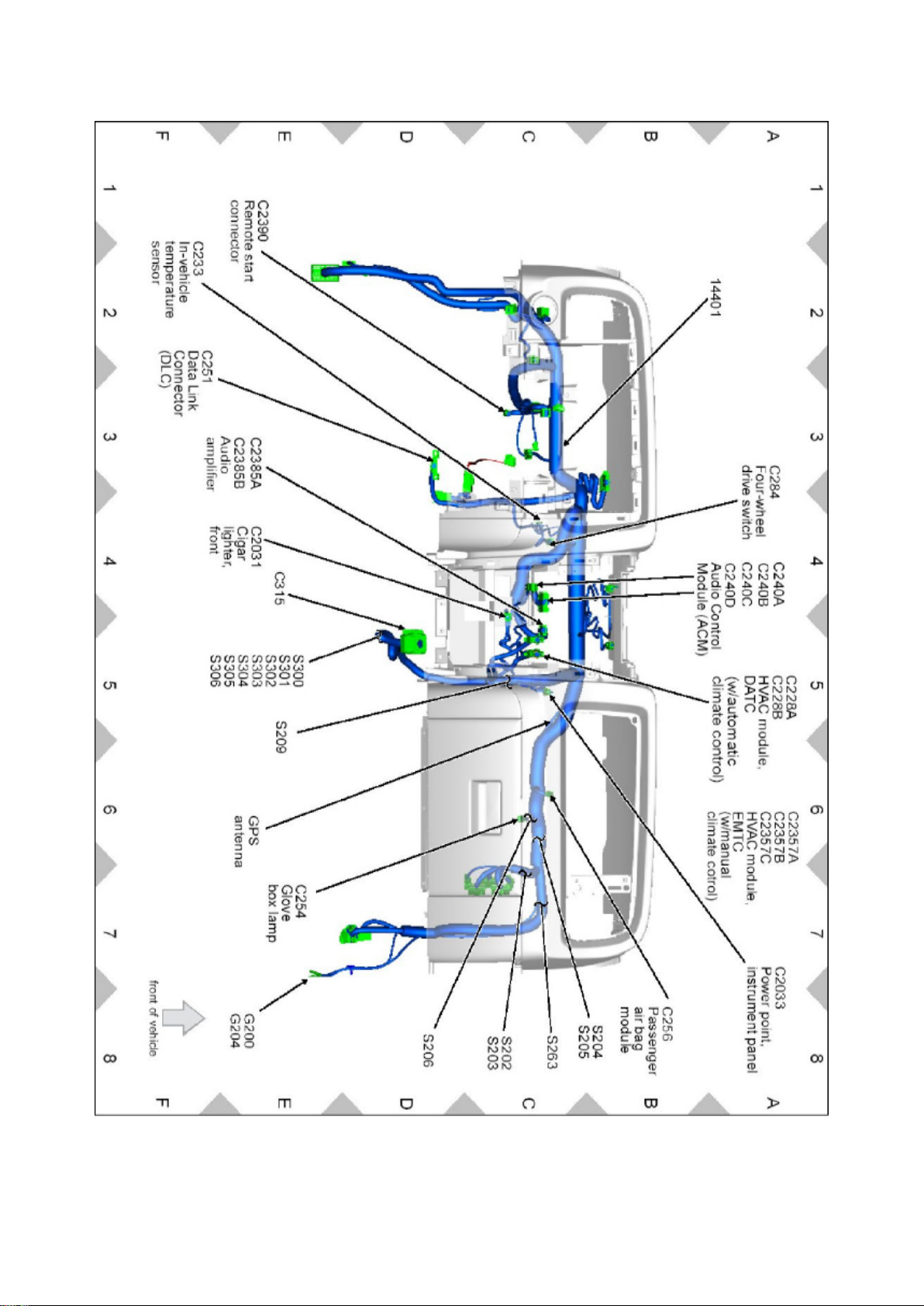
Communications Control Module: Locations Audio Control Module (ACM)
Page 57

Ford Expedition 2wd Workshop Manual (V8-5.4L (2009))
Ford Workshop Manuals > Relays and Modules > Relays and Modules - Accessories and Optional Equipment >
Communications Control Module > Component Information > Locations > Accessory Protocol Interface Module (APIM) >
Page 57
Page 58
Page 59

Ford Expedition 2wd Workshop Manual (V8-5.4L (2009))
Ford Workshop Manuals > Relays and Modules > Relays and Modules - Accessories and Optional Equipment >
Communications Control Module > Component Information > Locations > Accessory Protocol Interface Module (APIM) >
Page 58
Page 60
Page 61
Ford Expedition 2wd Workshop Manual (V8-5.4L (2009))
Ford Workshop Manuals > Relays and Modules > Relays and Modules - Accessories and Optional Equipment >
Communications Control Module > Component Information > Diagrams > Accessory Protocol Interface Module (APIM)
Page 62

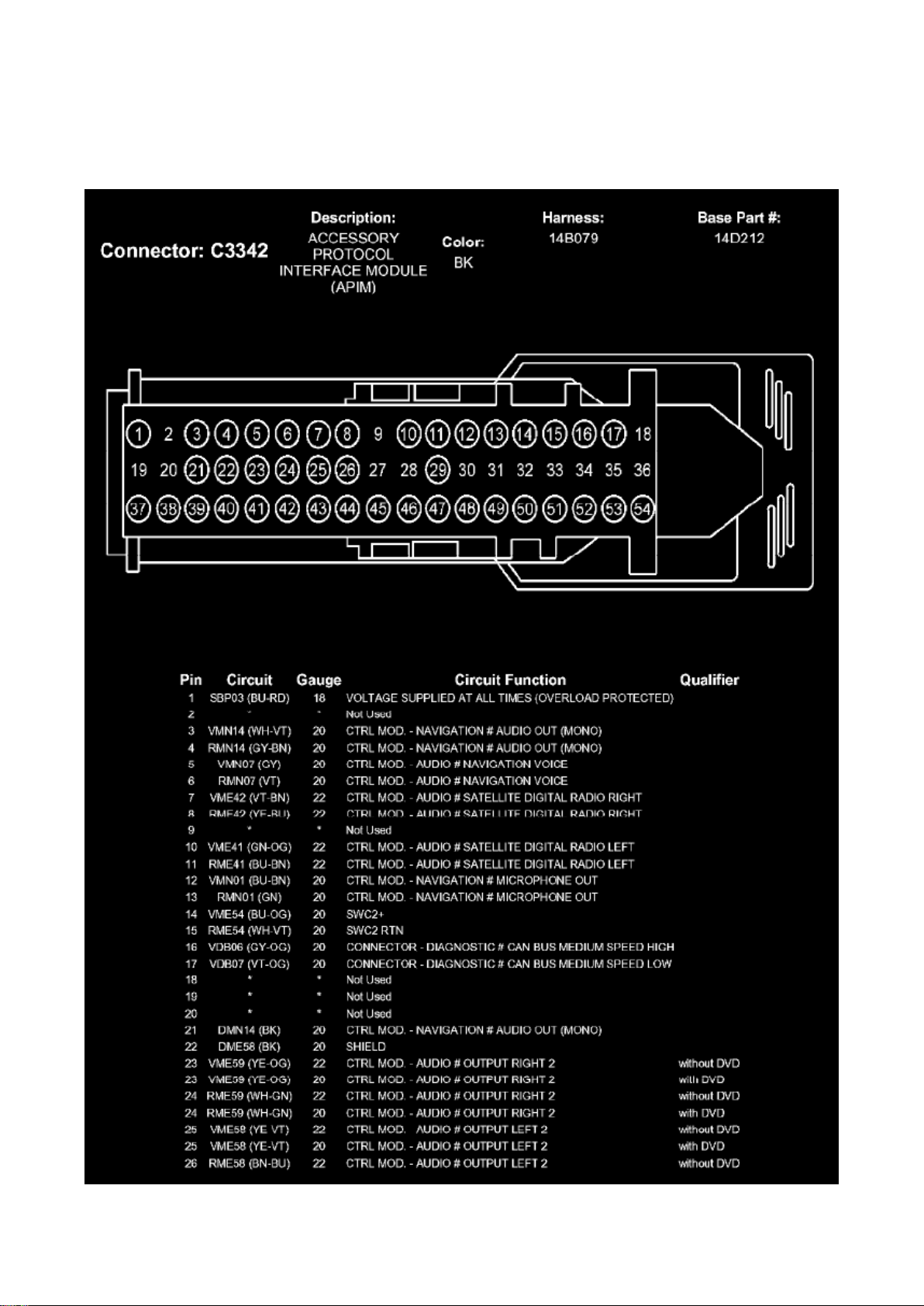
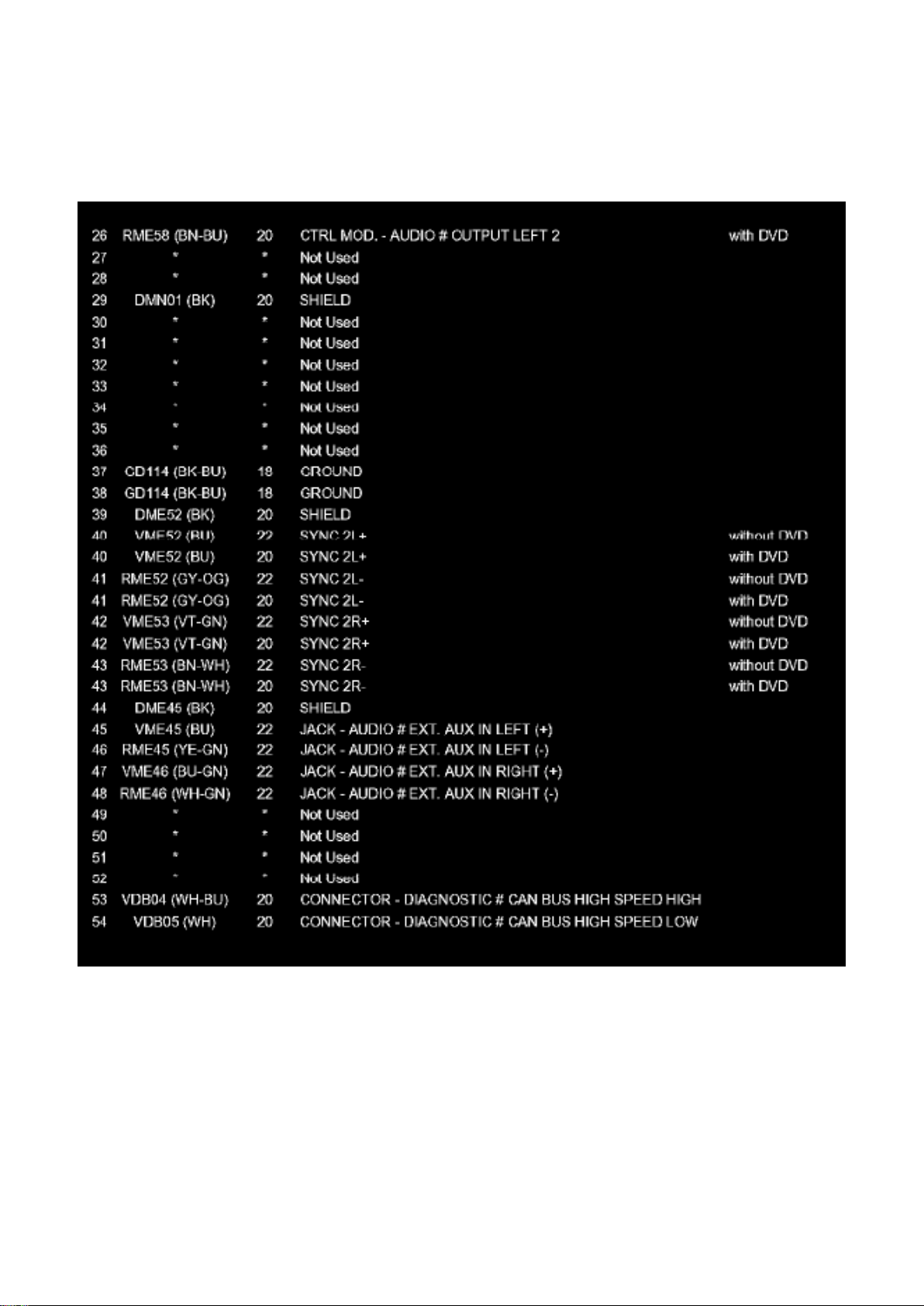
Communications Control Module: Diagrams Accessory Protocol Interface Module (APIM)
Part 1
Page 63
Ford Expedition 2wd Workshop Manual (V8-5.4L (2009))
Ford Workshop Manuals > Relays and Modules > Relays and Modules - Accessories and Optional Equipment >
Communications Control Module > Component Information > Diagrams > Accessory Protocol Interface Module (APIM) >
Page 61
Part 2
Page 64

Ford Expedition 2wd Workshop Manual (V8-5.4L (2009))
Ford Workshop Manuals > Relays and Modules > Relays and Modules - Accessories and Optional Equipment >
Communications Control Module > Component Information > Diagrams > Accessory Protocol Interface Module (APIM) >
Page 62
Page 65
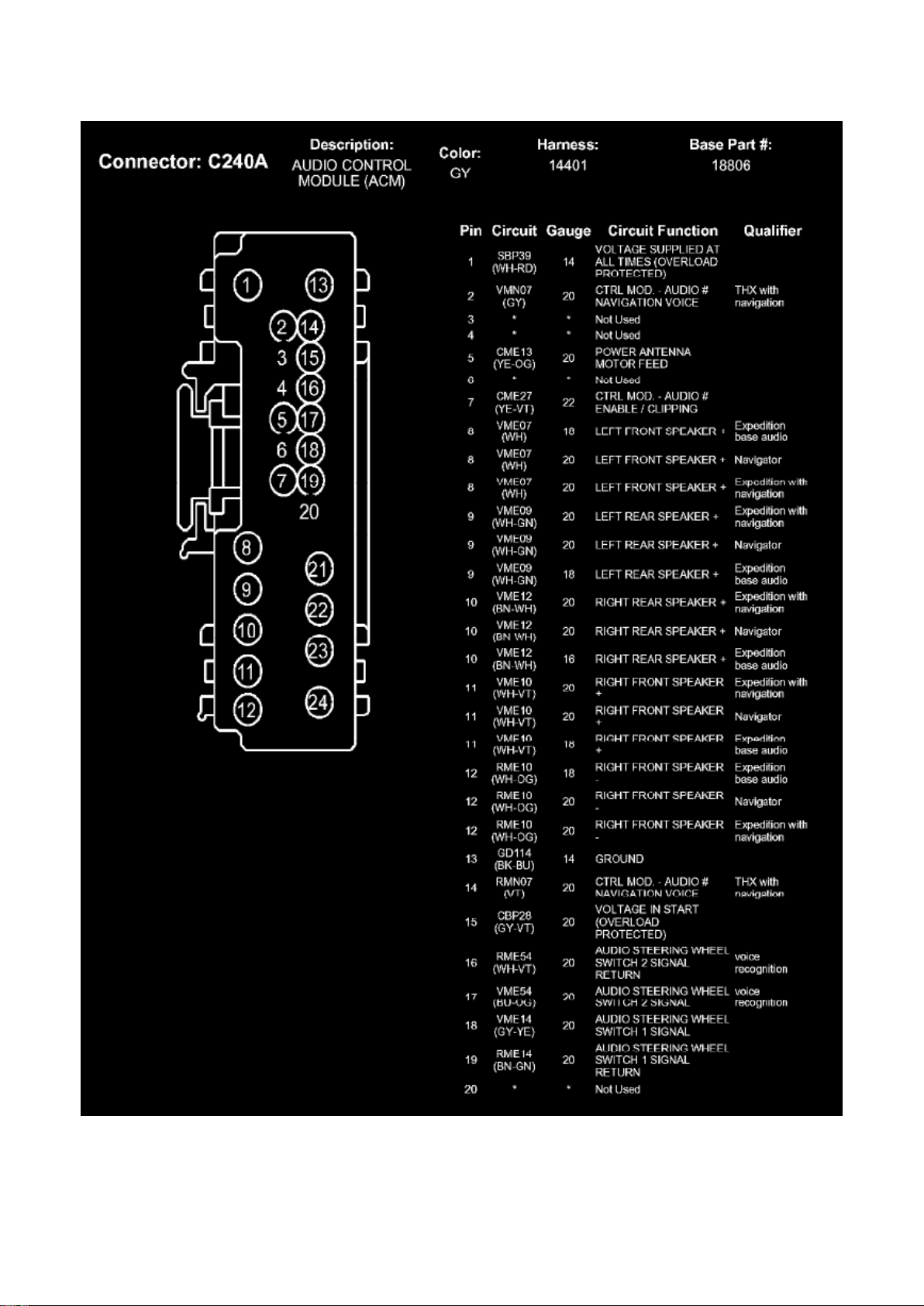
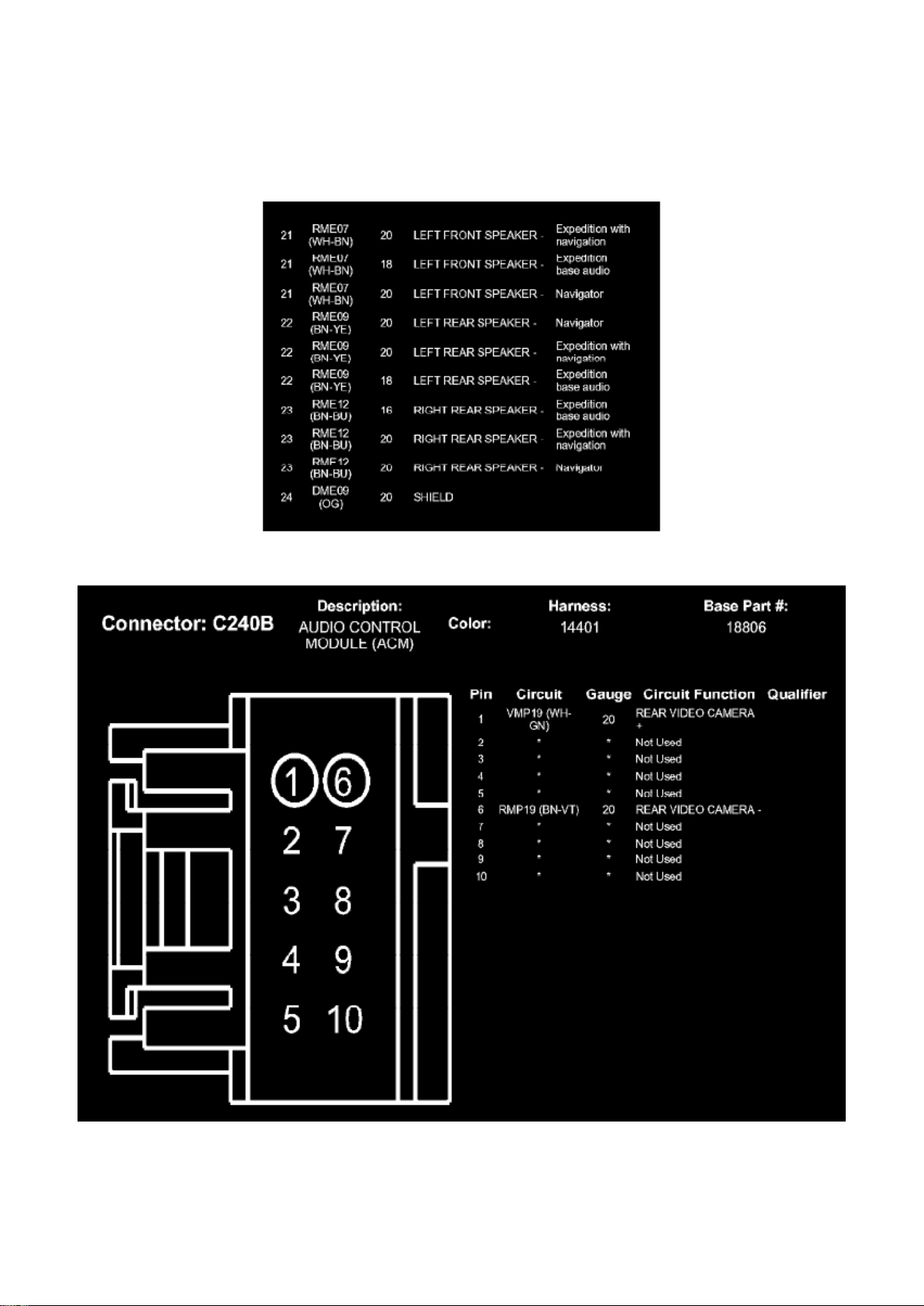
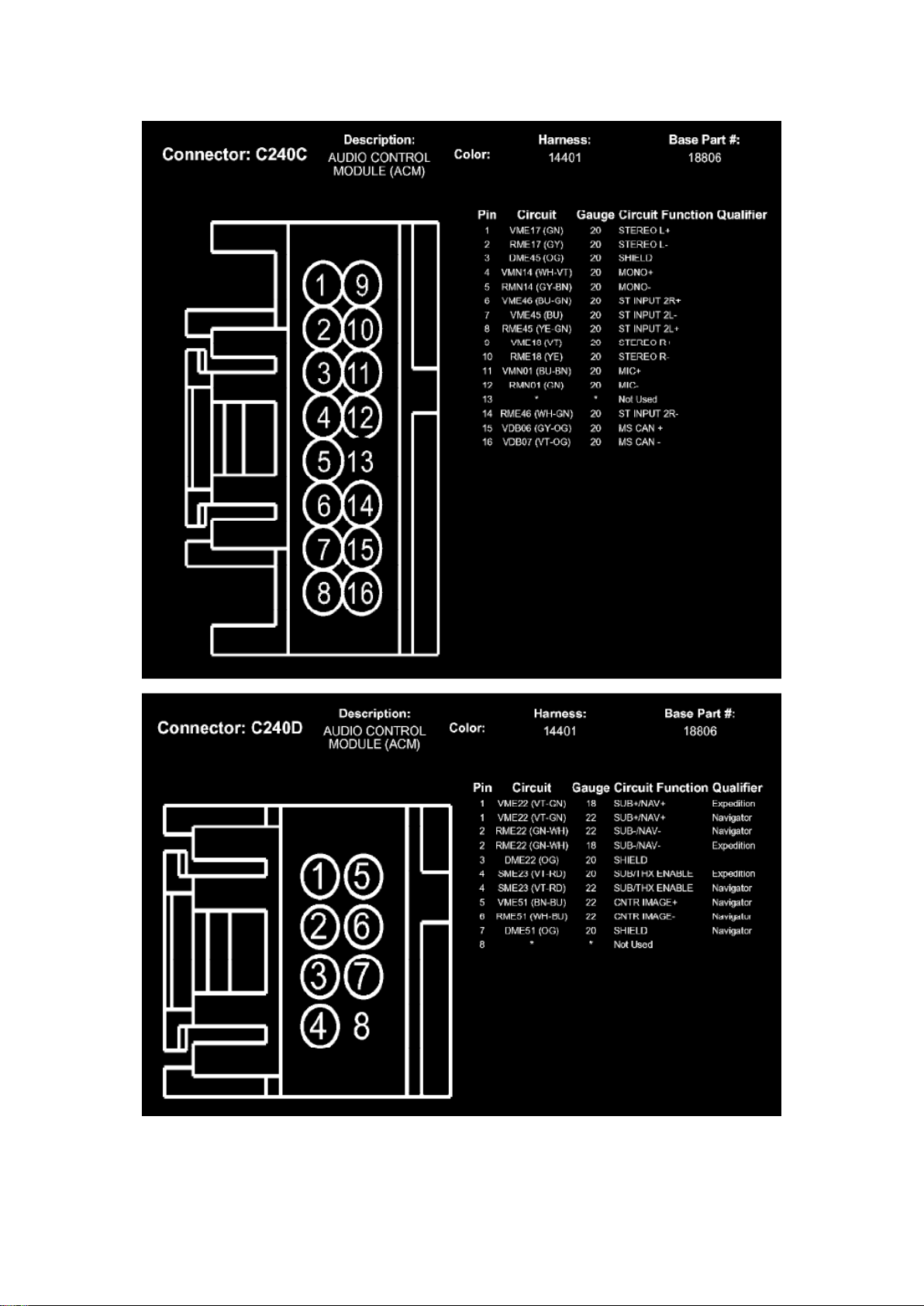
Communications Control Module: Diagrams Audio Control Module (ACM)
Page 66

Part 1
Page 67
Ford Expedition 2wd Workshop Manual (V8-5.4L (2009))
Ford Workshop Manuals > Relays and Modules > Relays and Modules - Accessories and Optional Equipment >
Communications Control Module > Component Information > Diagrams > Accessory Protocol Interface Module (APIM) >
Page 63
Part 2
Page 68

Ford Expedition 2wd Workshop Manual (V8-5.4L (2009))
Ford Workshop Manuals > Relays and Modules > Relays and Modules - Accessories and Optional Equipment >
Communications Control Module > Component Information > Diagrams > Accessory Protocol Interface Module (APIM) >
Page 64
Page 69
Page 70
Ford Expedition 2wd Workshop Manual (V8-5.4L (2009))
Ford Workshop Manuals > Relays and Modules > Relays and Modules - Accessories and Optional Equipment >
Communications Control Module > Component Information > Diagrams > Accessory Protocol Interface Module (APIM) >
Page 65
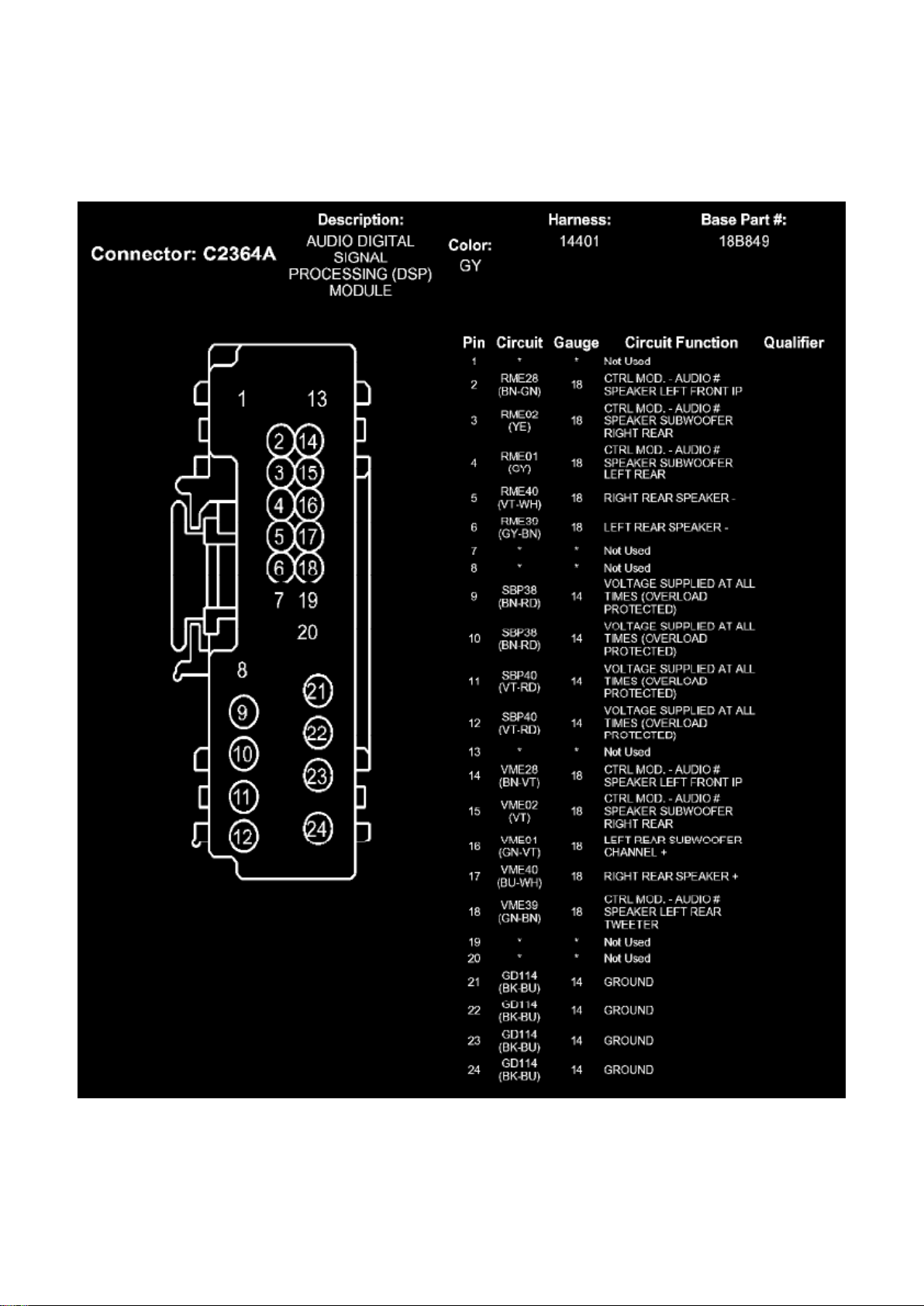
Communications Control Module: Diagrams Audio Digital Signal Processing (DSP) Module
Page 71
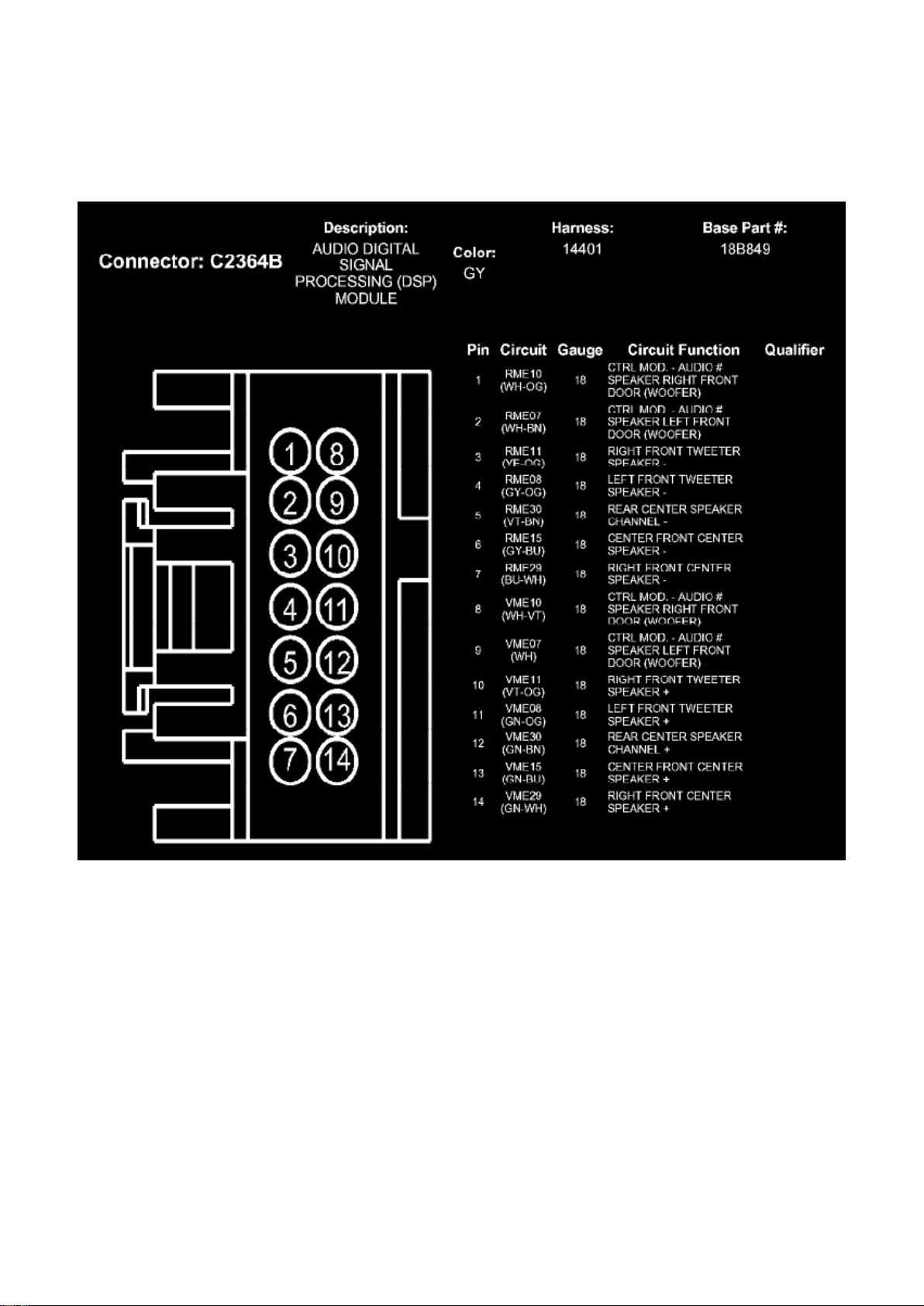
Ford Expedition 2wd Workshop Manual (V8-5.4L (2009))
Ford Workshop Manuals > Relays and Modules > Relays and Modules - Accessories and Optional Equipment >
Communications Control Module > Component Information > Diagrams > Accessory Protocol Interface Module (APIM) >
Page 66
Page 72
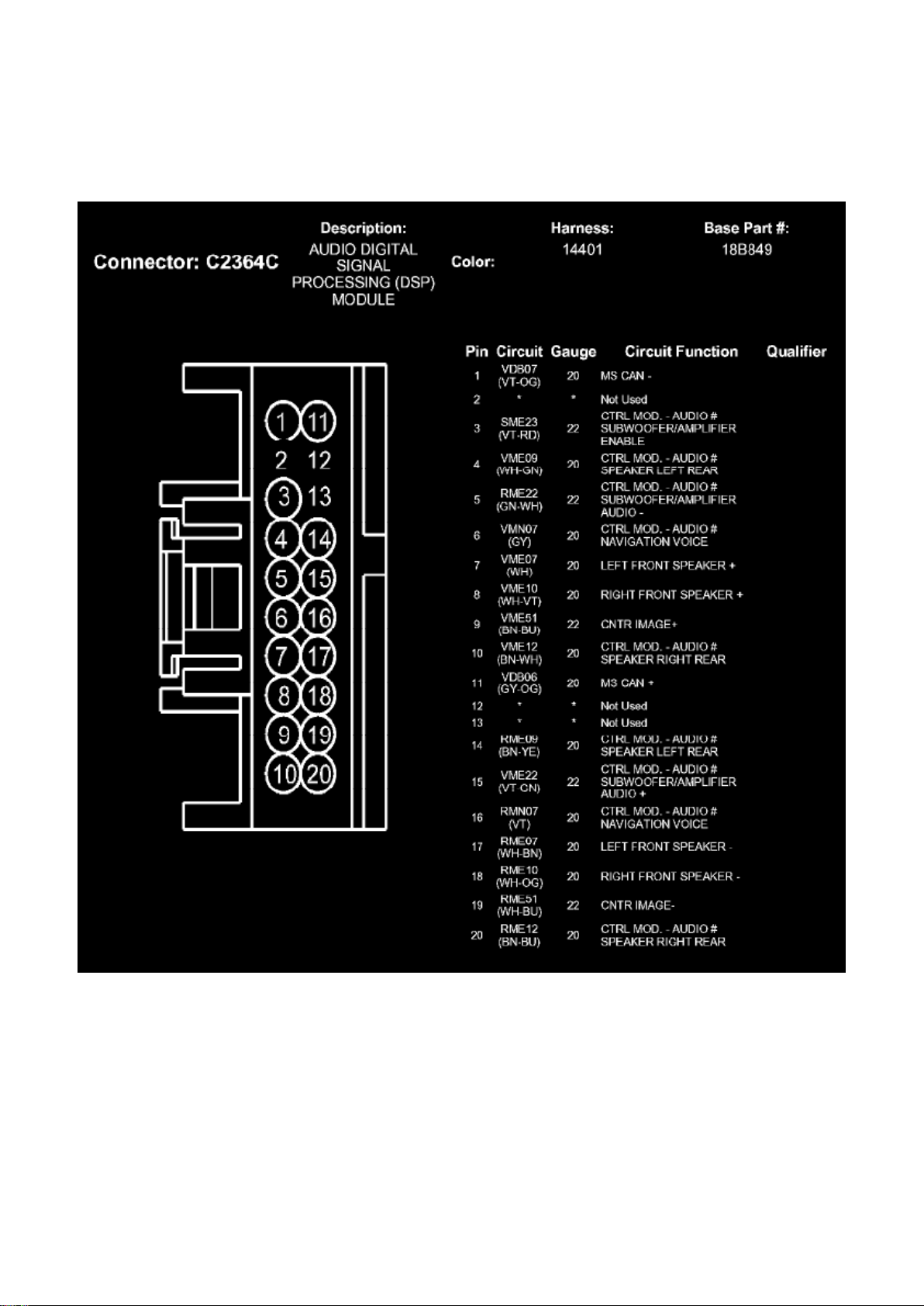
Ford Expedition 2wd Workshop Manual (V8-5.4L (2009))
Ford Workshop Manuals > Relays and Modules > Relays and Modules - Accessories and Optional Equipment >
Communications Control Module > Component Information > Diagrams > Accessory Protocol Interface Module (APIM) >
Page 67
Page 73
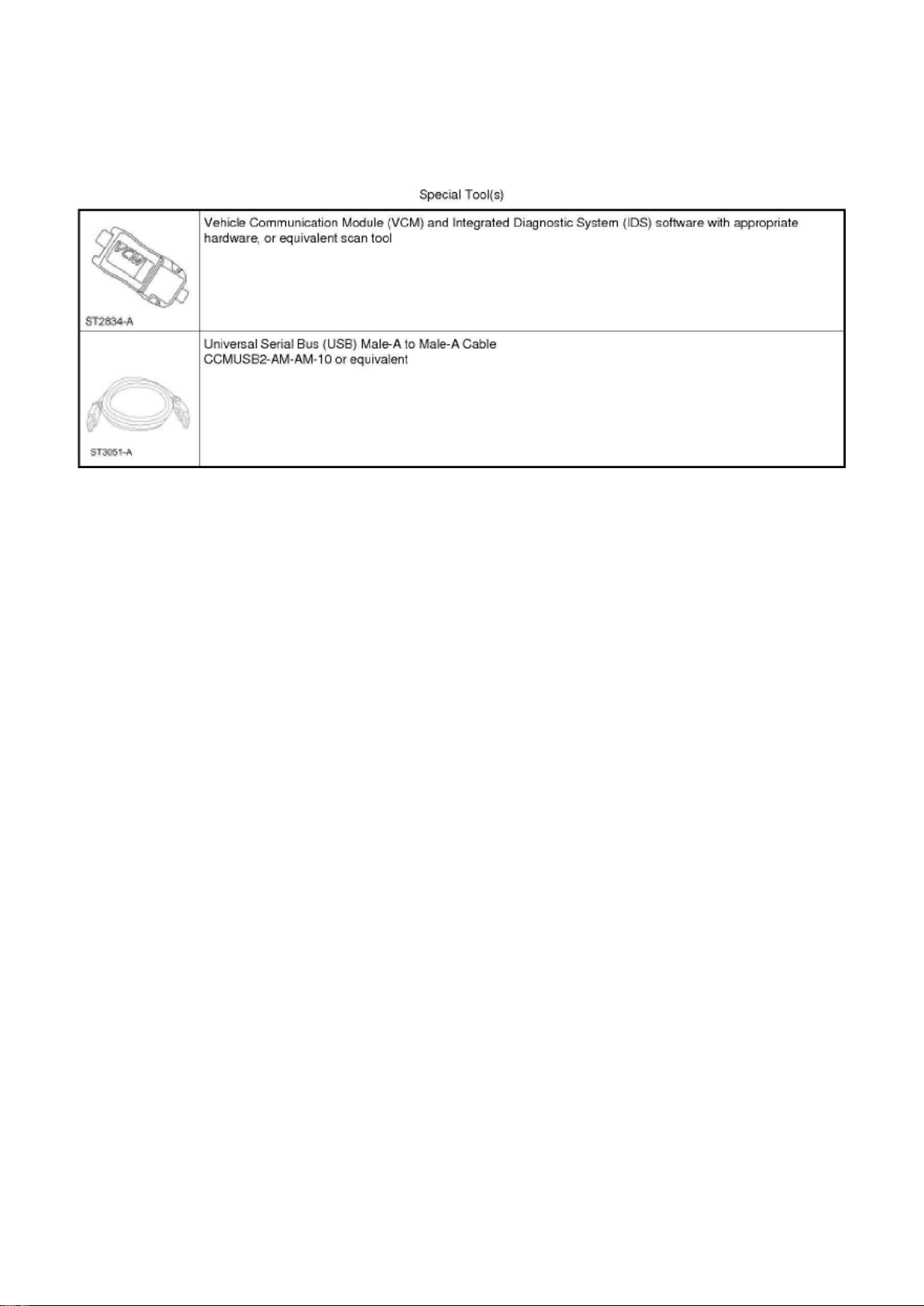
Ford Expedition 2wd Workshop Manual (V8-5.4L (2009))
Ford Workshop Manuals > Relays and Modules > Relays and Modules - Accessories and Optional Equipment >
Communications Control Module > Component Information > Service and Repair > Procedures
Communications Control Module: Procedures
Accessory Protocol Interface Module (APIM) Software Level Check
Accessory Protocol Interface Module (APIM) Software Level Check
NOTE: This procedure applies to checking the Accessory Protocol Interface Module (APIM)
software level. To program the APIM, refer to Accessory Protocol Interface Module (APIM)
Programming in Information Bus. See: Powertrain Management/Computers and Control
Systems/Information Bus/Testing and Inspection/Programming and Relearning/Accessory Protocol
Interface Module (APIM) Programming
1. Turn the Audio Control Module (ACM) on.
2. Connect the scan tool to the Data Link Connector (DLC).
3. Connect one end of the Universal Serial Bus (USB) male-A to male-A cable to the scan tool.
4. Connect the other end of the USB male-A to male-A cable to the vehicle USB port.
5. From the technician service publication website, run On-Line Automotive Service Information
System (OASIS) using Quick Start or by manually
entering the Vehicle Identification Number (VIN).
6. From the OASIS tab, select the "Sync/APIM" bullet.
7. Select the "Read APIM" button to verify the current APIM software level.
- The display shows both the Vehicle Interface Processor (VIP) and Consumer Interface Processor
(CIP) software levels.
8. The scan tool displays the following information:
- Last Recorded State - Hardware VIN: vehicle identification number associated with the current APIM
- Installed date: date the APIM was installed
Page 74

- Radio: currently identified ACM in the vehicle
- HW Part No.: APIM hardware part number
- Un-installed date: date (if any) the APIM was uninstalled
- S/N: APIM serial number
- Last Recorded State - Software Date/Time: date and time of last recorded software installation
- VIP: VIP software that was installed at that time
- CIP: CIP software that was installed at that time
Page 75

Ford Expedition 2wd Workshop Manual (V8-5.4L (2009))
Ford Workshop Manuals > Relays and Modules > Relays and Modules - Accessories and Optional Equipment >
Communications Control Module > Component Information > Service and Repair > Procedures > Page 70
Page 76

- Description: a description of the content of the software revision
- History - Software Date/Time: date and time of any recorded software installation
- VIP: VIP software that was installed at that time
- CIP: CIP software that was installed at that time
- Description: a description of the content of the software revision
- Available Software for Programming Select: allows the software package to be selected
- Lineage: the original software release, if the software available is a revision
- VIP: VIP software level that is available with the selection
- CIP: CIP software level that is available with the selection
- Description: a description of the content of the software revision
9. Click a CIP software level to view the device compatibility list associated with the CIP software
level, if desired.
10. To exit the APIM software level check, disconnect the scan tool from the DLC and the USB
port, or exit the OASIS screen.
Audio Control Module (ACM) Self-Diagnostic Mode
Audio Control Module (ACM) Self-Diagnostic Mode
Audio Systems Without Navigation
1. Turn the Audio Control Module (ACM) on.
2. Operate the audio system in radio tuner (AM/FM) mode.
3. Press and hold preset buttons 3 and 6 for 3 seconds until the speaker walk test begins.
- The display indicates each speaker as it is tested.
4. NOTE: If the speaker walk test is the only test required, this procedure can be stopped after Step
3 by turning the ACM off.
Before the speaker walk test is complete, carry out any of the following actions:
Page 77
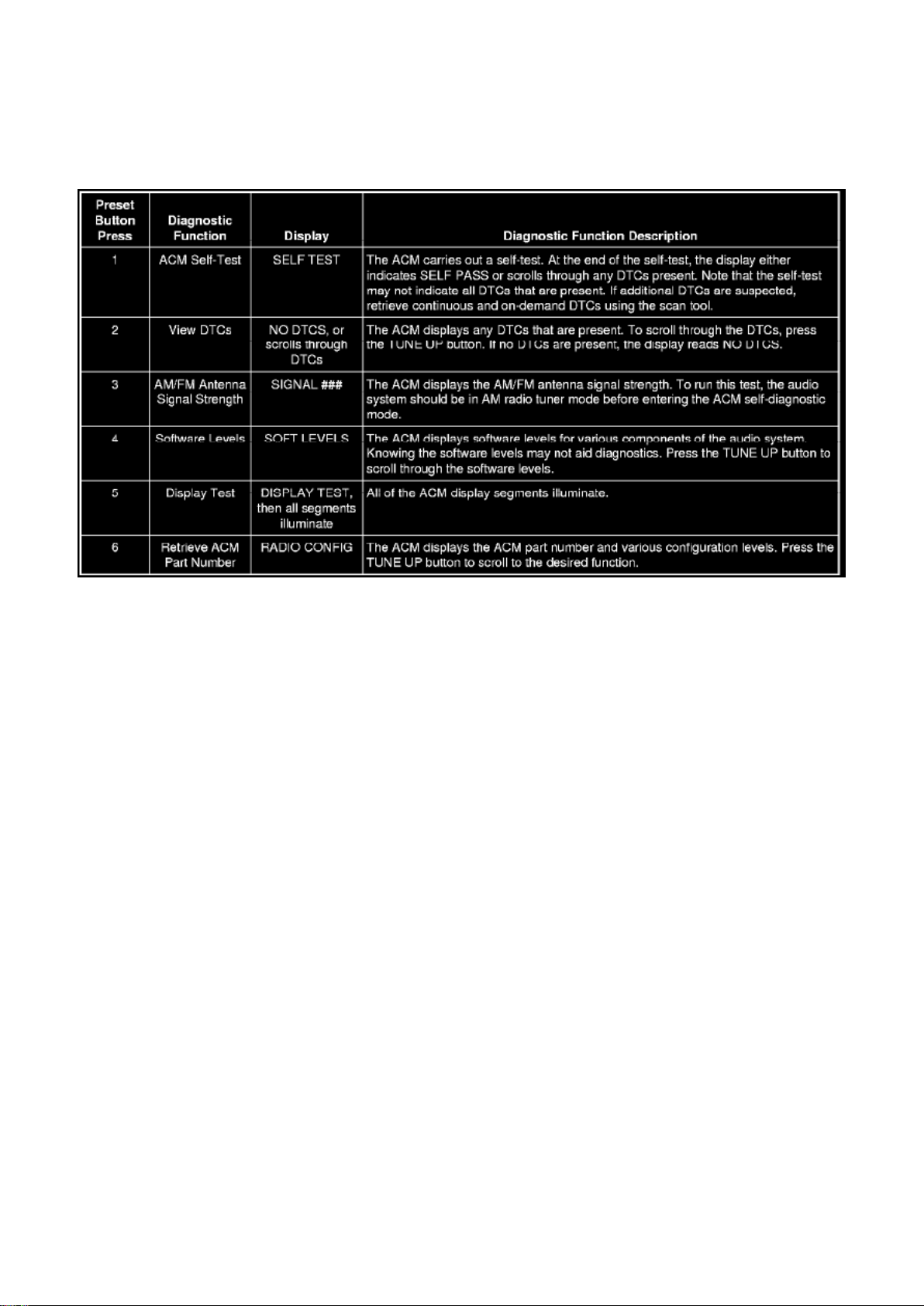
Ford Expedition 2wd Workshop Manual (V8-5.4L (2009))
Ford Workshop Manuals > Relays and Modules > Relays and Modules - Accessories and Optional Equipment >
Communications Control Module > Component Information > Service and Repair > Procedures > Page 71
5. To exit the self-diagnostic mode, turn the ACM off.
Satellite Digital Audio Receiver System (SDARS) Module Electronic Serial Number (ESN) Retrieval
- Vehicles Without Navigation
1. Operate the audio system in satellite radio mode.
2. Press and hold the AUX button and preset button 1, simultaneously.
- The Satellite Digital Audio Receiver System (SDARS) module Electronic Serial Number (ESN)
displays on the screen.
3. Record the SDARS module ESN.
4. Turn the audio system off.
Audio Systems With Navigation
1. Turn the Audio Control Module (ACM) on.
2. Operate the audio system in radio tuner (AM/FM) mode.
3. Press and hold preset buttons 3 and 6 for 3 seconds until the speaker walk test begins.
- The display indicates each speaker as it is tested.
4. NOTE: If the speaker walk test is the only test required, this procedure can be stopped after this
step, or by allowing the speaker walk test to
complete on its own.
Before the speaker walk test is complete, press the "End Test" selection.
Page 78
Ford Expedition 2wd Workshop Manual (V8-5.4L (2009))
Ford Workshop Manuals > Relays and Modules > Relays and Modules - Accessories and Optional Equipment >
Communications Control Module > Component Information > Service and Repair > Procedures > Page 72
Page 79

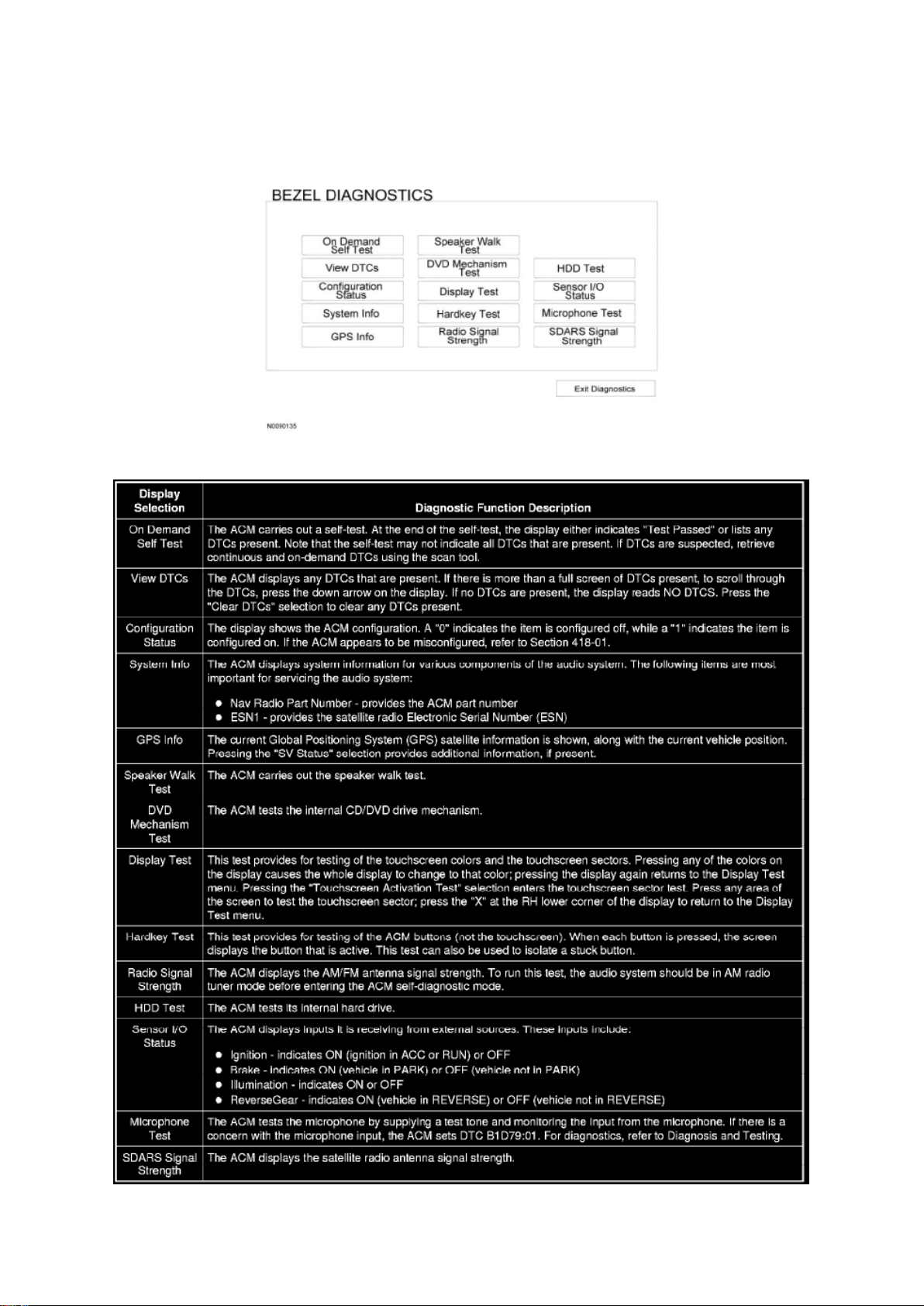
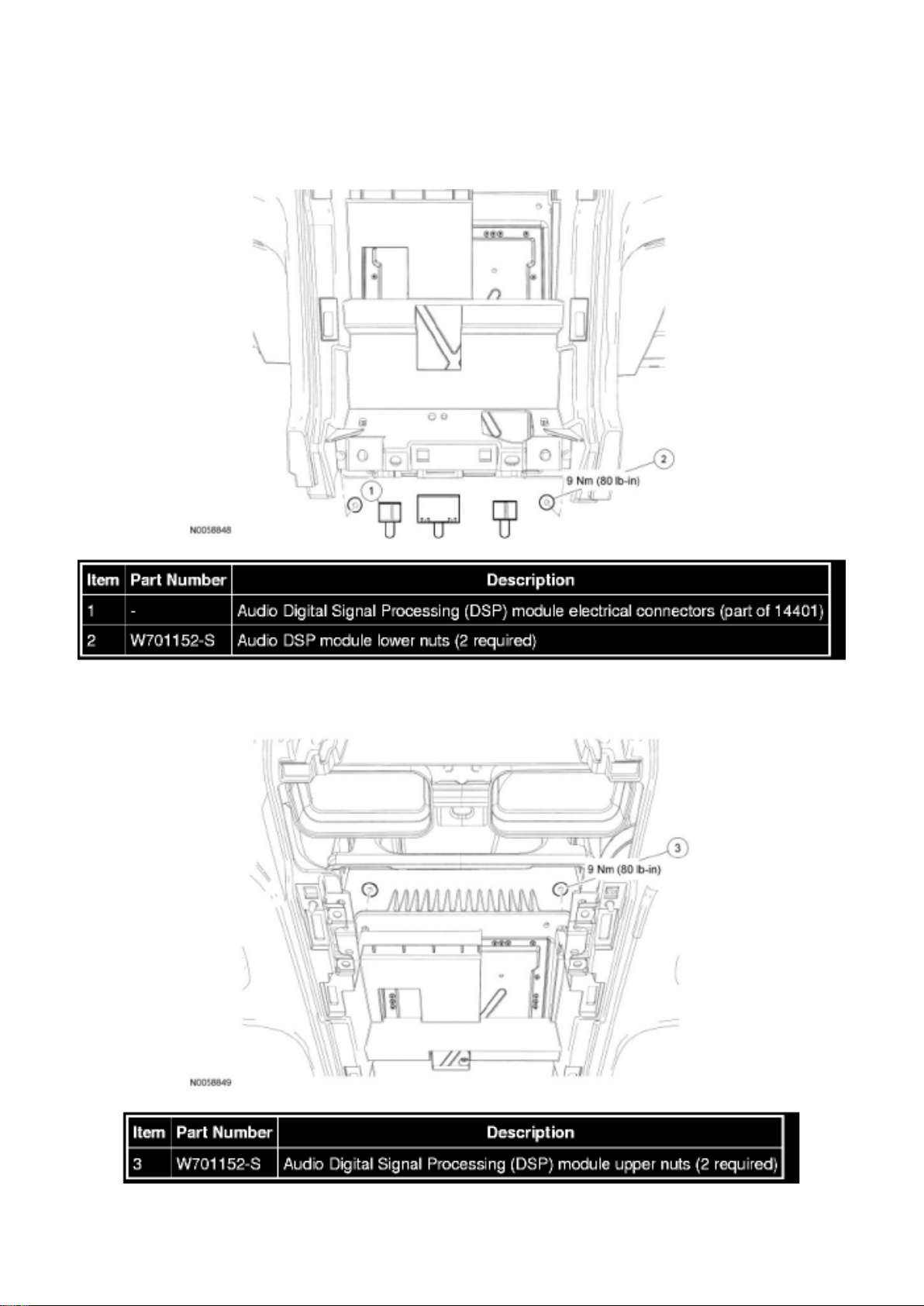
5. The following tests are available through the "BEZEL DIAGNOSTICS" menu:
6. To exit the self-diagnostic mode, press the "Exit Diagnostics" selection from the "BEZEL
DIAGNOSTICS" menu.
Page 80
Ford Expedition 2wd Workshop Manual (V8-5.4L (2009))
Ford Workshop Manuals > Relays and Modules > Relays and Modules - Accessories and Optional Equipment >
Communications Control Module > Component Information > Service and Repair > Procedures > Page 73
Page 81

Communications Control Module: Removal and Replacement
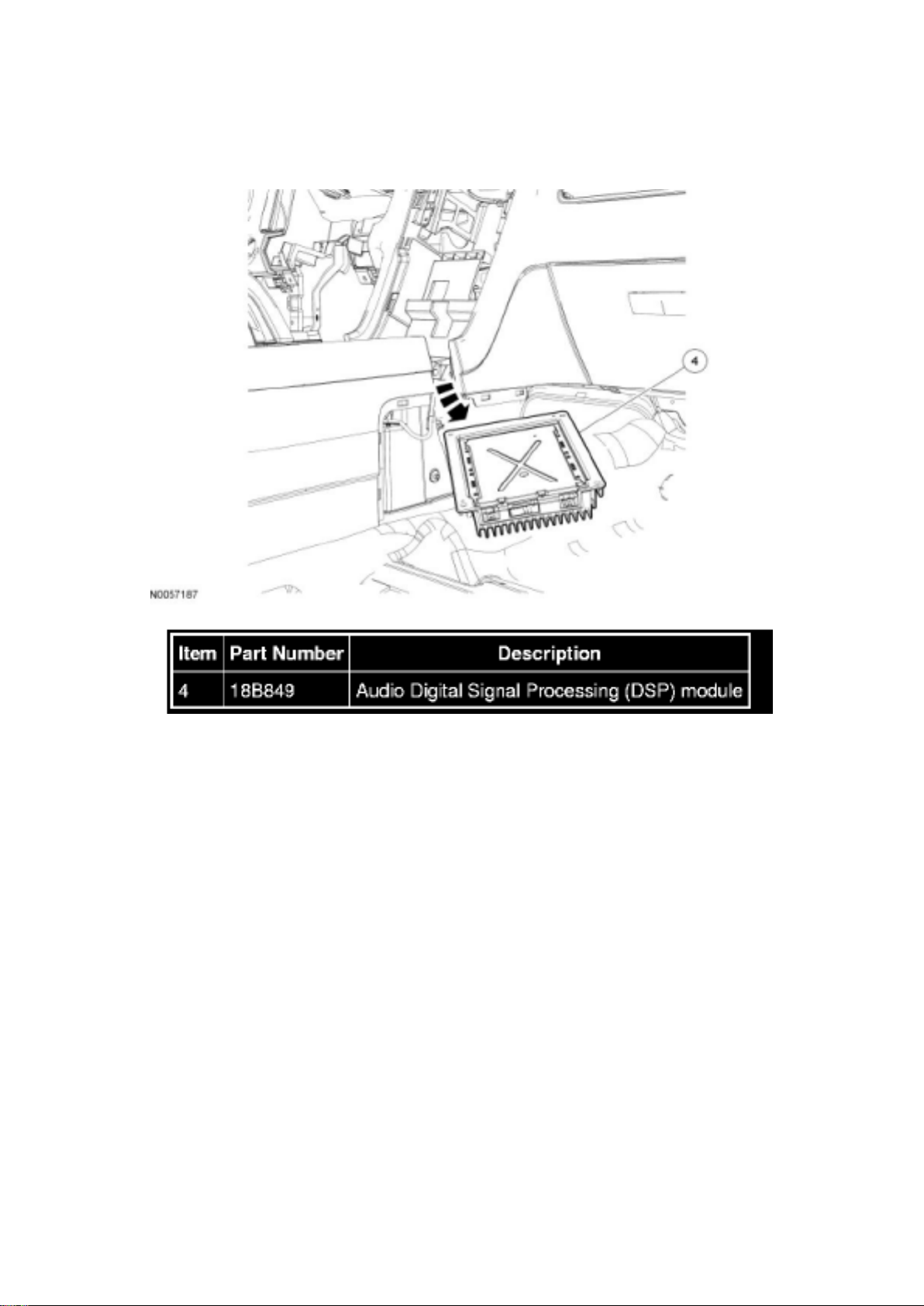
Audio Digital Signal Processing (DSP) Module
Audio Digital Signal Processing (DSP) Module
Audio Digital Signal Processing (DSP) Module Lower Attachment
Audio DSP Module Upper Attachment
Audio DSP Module Removal Routing
Page 82
Ford Expedition 2wd Workshop Manual (V8-5.4L (2009))
Ford Workshop Manuals > Relays and Modules > Relays and Modules - Accessories and Optional Equipment >
Communications Control Module > Component Information > Service and Repair > Procedures > Page 74
Removal and Installation
1. NOTE: Module configuration is required when a new audio Digital Signal Processing (DSP)
module is being installed.
Upload the audio DSP module configuration information to the scan tool.
2. Remove the Audio Control Module (ACM). For additional information, refer to Audio Control
Module (ACM) See: Audio Control Module
(ACM).
3. Remove the necessary attachments and move the center console 5 cm (2.0 in) towards the rear
of the vehicle.
4. Disconnect the audio DSP module electrical connectors.
5. Remove the 2 lower audio DSP module nuts.
- To install, tighten to 9 Nm (80 lb-in).
6. NOTICE: The audio Digital Signal Processing (DSP) module is heavy. Be sure to support the
amplifier during removal, or damage to the
vehicle may occur.
Page 83

Remove the 2 upper audio DSP module nuts.
- To install, tighten to 9 Nm (80 lb-in).
7. Remove the audio DSP module.
- Route the audio DSP module down and towards the passenger side of the vehicle.
8. To install, reverse the removal procedure.
- Download the configuration information to the audio DSP module.
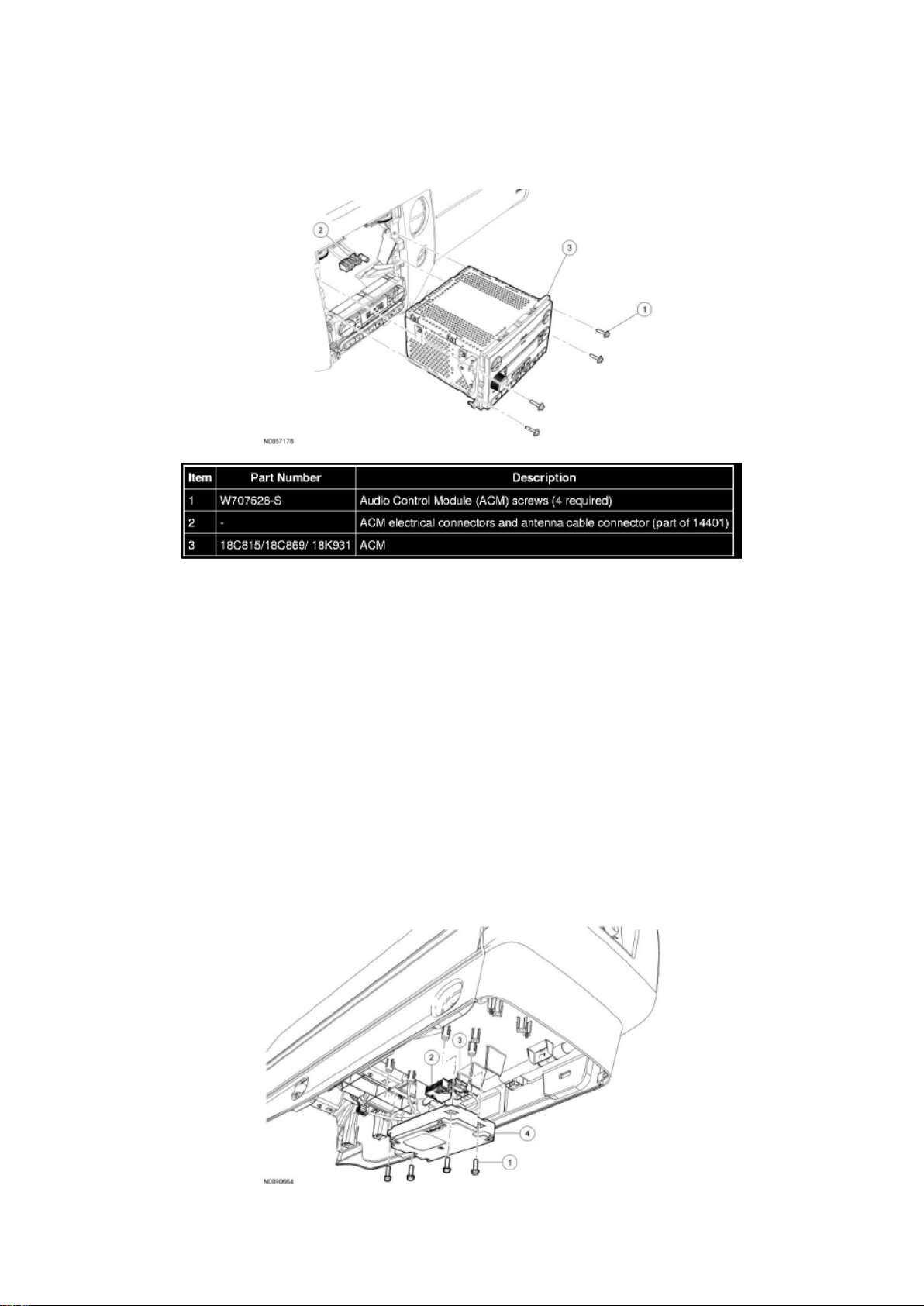
Audio Control Module (ACM)
Audio Control Module (ACM)
NOTE: Expedition without navigation shown, all others similar.
Page 84
Ford Expedition 2wd Workshop Manual (V8-5.4L (2009))
Ford Workshop Manuals > Relays and Modules > Relays and Modules - Accessories and Optional Equipment >
Communications Control Module > Component Information > Service and Repair > Procedures > Page 75
Page 85

Removal and Installation
NOTE: It is not necessary to remove the Audio Control Module (ACM) to retrieve the part number.
For additional information, refer to Audio Control Module (ACM) Self-Diagnostic Mode See:
Procedures/Audio Control Module (ACM) Self-Diagnostic Mode.
1. NOTE: Module configuration is required when a new ACM is being installed.
Upload the ACM configuration information to the scan tool.
2. Remove the instrument panel center finish panel.
3. Remove the 4 screws and the ACM.
- Disconnect the electrical connectors and the antenna cable connector.
4. To install, reverse the removal procedure.
- Download the configuration information to the ACM.
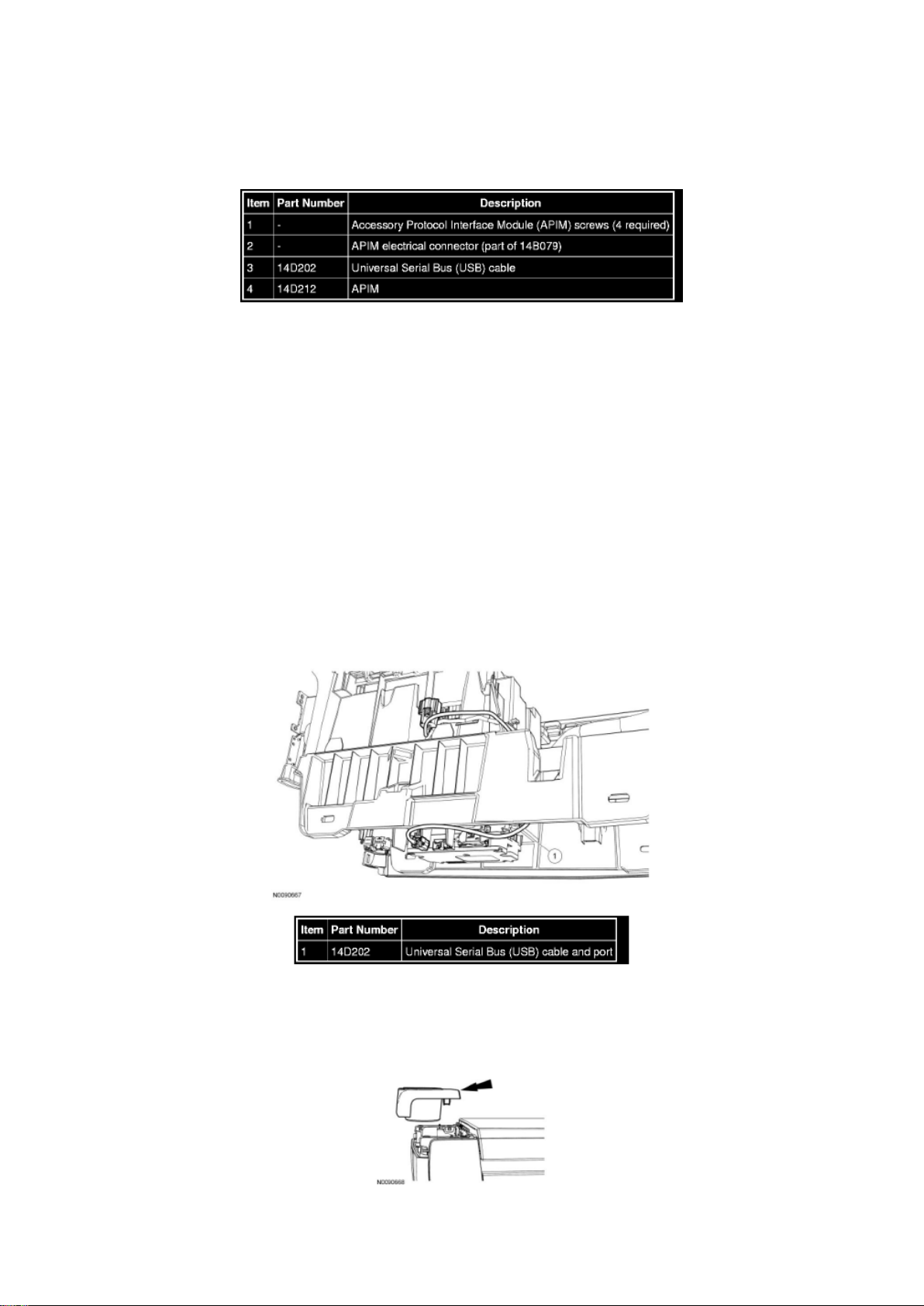
Accessory Protocol Interface Module (APIM)
Accessory Protocol Interface Module (APIM)
Page 86
Ford Expedition 2wd Workshop Manual (V8-5.4L (2009))
Ford Workshop Manuals > Relays and Modules > Relays and Modules - Accessories and Optional Equipment >
Communications Control Module > Component Information > Service and Repair > Procedures > Page 76
Page 87

Removal and Installation
1. NOTE: It is necessary to record the current Accessory Protocol Interface Module (APIM)
software and hardware level when a new APIM is being
installed to make sure that the new component is the same version as the component being
replaced.
Retrieve and record the current APIM software and hardware level. For additional information, refer
to Accessory Protocol Interface Module (APIM) Software Level Check See: Procedures/Accessory
Protocol Interface Module (APIM) Software Level Check.
2. Remove the front floor console.
3. Remove the 4 APIM screws and position the APIM aside.
4. Disconnect the Universal Serial Bus (USB) cable and the electrical connectors, and remove the
APIM.
5. To install, reverse the removal procedure.
- If a new APIM is being installed, program the APIM to the correct software level.
Universal Serial Bus (USB) Cable And Port
Universal Serial Bus (USB) Cable and Port
Removal and Installation
1. Remove the floor console.
2. Remove the rear cupholder trim panel by pulling straight upward to disengage the clips.
Page 88

Ford Expedition 2wd Workshop Manual (V8-5.4L (2009))
Ford Workshop Manuals > Relays and Modules > Relays and Modules - Accessories and Optional Equipment >
Communications Control Module > Component Information > Service and Repair > Procedures > Page 77
Page 89

ERROR: undefined
OFFENDING COMMAND: ‘~
STACK:
Page 90

Ford Expedition 2wd Workshop Manual (V8-5.4L (2009))
Ford Workshop Manuals > Relays and Modules > Relays and Modules - Accessories and Optional Equipment > Emergency
Contact Module > Component Information > Technical Service Bulletins > Customer Interest: > 09-14-3 > Jul > 09 >
SYNC(R) System - Functions Inoperative/DTC's Set
Page 91

Emergency Contact Module: Customer Interest SYNC(R) System - Functions Inoperative/DTC's
Set
Page 92

TSB 09-14-3
07/27/09
SYNC FUNCTIONS INOPERATIVE, DTC U3000-41, U0485, OR U0100, AND/OR BATTERY
DRAW WITH ACCESSORY PROTOCOL INTERFACE MODULE CONNECTED
FORD: 2008-2009 Focus, Taurus X, Taurus 2008-2010 Fusion 2010 Mustang 2008-2009 Edge,
Explorer Sport Trac, Explorer 2009 Escape Hybrid, Escape, Expedition, F-150, F-Super Duty, Flex
LINCOLN: 2008-2009 Zephyr 2008-2010 MKZ 2009 MKS 2008-2009 MKX, Navigator
MERCURY: 2008-2009 Sable 2008-2010 Milan 2008-2009 Mountaineer 2009 Mariner Hybrid,
Mariner
ISSUE Some 2008-2010 vehicles equipped with SYNC version 2 software level, SYNC 911 Assist
and Vehicle Health Report, may exhibit all or most of the following symptoms:
^ Diagnostic Trouble Codes (DTC) U3000-41, U0485, or U0100 in Accessory Protocol Interface
Module (APIM)
^ SYNC display menus/options blank
^ USB port inoperative
^ No SYNC Blue Tooth device connectivity
^ Voice/Phone/OK steering wheel controls inoperative
^ Lack of APIM communication
^ Parasitic battery draw with APIM connected
These symptoms may be triggered by a low battery state of charge, or a recent battery
disconnect/reconnect.
ACTION Follow the service procedure to correct the condition.
SERVICE PROCEDURE
This software upgrade only applies to the following Accessory Protocol Interface Module (APIM)
Vehicle Interface Processor (VIP) and Customer Interface Processor (CIP) software levels:
^ VIP: 9L2T-14D205-AC / CIP: 9L2T-14D544-BC
^ VIP: 9L2T-14D205-AD / CIP: 9L2T-14D544-BD
^ VIP: 9L2T-14D205-AE / CIP: 9L2T-14D544-BD
To determine the current APIM software level, reference the Professional Technician Society (PTS)
website, enter the VIN in OASIS, click the GO
Page 93

Ford Expedition 2wd Workshop Manual (V8-5.4L (2009))
Ford Workshop Manuals > Relays and Modules > Relays and Modules - Accessories and Optional Equipment > Emergency
Contact Module > Component Information > Technical Service Bulletins > Customer Interest: > 09-14-3 > Jul > 09 >
SYNC(R) System - Functions Inoperative/DTC's Set > Page 86
Page 94

button and select the SYNC button.
Page 95

1. Determine if communication can be established with the APIM using IDS.
a. If communication cannot be verified, proceed to Step 2.
b. If communication is present, proceed to Step 3.
2. Reference Workshop Manual, Section 418-00, Module Communication Network to determine if
communication can be established. If not, perform
an APIM power reset by disconnecting and reconnecting the vehicle battery.
a. If communication is now present, proceed to Step 3.
b. If communication still cannot be established, replace the APIM.
3. Reprogram the APIM to VIP software level 9L2T-14D205-AF by following the Service Procedure.
NOTE
SOFTWARE IS AVAILABLE ONLY THROUGH THE PTS WEBSITE, AND NOT AVAILABLE
THROUGH THE SYNCMYRIDE.COM WEBSITE.
NOTE
CONFIGURATION AND PROGRAMMING REQUIRES THE USE OF A SPECIAL PTS
APPLICATION. INSTALLER MUST HAVE ACCESS TO PTS AND HAVE A VALID PTS USER ID
AND PASSWORD.
a. Connect the vehicle communication module (VCM) to the data link connector (DLC).
b. Connect the VCM to the IDS tool or laptop running IDS software.
c. Turn the ignition key to the on position.
d. Launch IDS tool.
e. If required, update the VCM with the latest software.
f. Close the IDS tool.
g. From the PTS website, run OASIS by pressing the Read VIN And DTC's button. After vehicle
communication is established, press the GO
button.
h. From the Vehicle Service Session screen, Select the SYNC button.
i. Press read APIM button.
j. Select software and press program APIM to update the SYNC module.
NOTE
YOU MUST USE A MALE-A TO MALE-A USB CABLE LIKE ROTUNDA PART NUMBER
CCMU5B2-AM-AM-10 TO COMPLETE THIS STEP.
NOTE
DO NOT USE A TRANSFER TYPE CABLE.
NOTE
Page 96

DO NOT DISCONNECT THE VCM OR USB CABLES DURING APIM PROGRAMMING.
NOTE
THE SYSTEM MAY PROMPT YOU TO INSTALL SOFTWARE FOR THE USB PORT. FOLLOW
THE ON SCREEN INSTRUCTIONS TO INSTALL THE USB PORT DRIVER ALREADY
INCLUDED IN WINDOWS XP.
k. Program the processor in the APIM.
l. Connect the Male-A to Male-A USB cable, Rotunda part number CCMU5B2-AM-AM-10, to the
IDS tool or laptop running IDS software, and to the vehicle USB port.
m. Follow the on-screen instructions to program the VIP module.
Page 97
Ford Expedition 2wd Workshop Manual (V8-5.4L (2009))
Ford Workshop Manuals > Relays and Modules > Relays and Modules - Accessories and Optional Equipment > Emergency
Contact Module > Component Information > Technical Service Bulletins > Customer Interest: > 09-14-3 > Jul > 09 >
SYNC(R) System - Functions Inoperative/DTC's Set > Page 87
n. At the end of the configuration and programming procedure, the programming has been
completed successfully screen will be displayed.
o. Exit PTS, disconnect the VCM and disconnect the USB cable.
Parts Block
WARRANTY STATUS: Eligible Under Provisions Of New Vehicle Limited Warranty Coverage
IMPORTANT: Warranty coverage limits/policies are not altered by a TSB. Warranty coverage limits
are determined by the identified causal part.
OPERATION DESCRIPTION TIME
MT091403 Use SLTS Operations If Actual
Available; Claim Additional Time
Diagnosis Or Labor Performed As Actual Time
DEALER CODING
CONDITION
Page 98

BASIC PART NO. CODE
14D212 04
Disclaimer
Page 99

Ford Expedition 2wd Workshop Manual (V8-5.4L (2009))
Ford Workshop Manuals > Relays and Modules > Relays and Modules - Accessories and Optional Equipment > Emergency
Contact Module > Component Information > Technical Service Bulletins > Customer Interest: > 09-13-5 > Jul > 09 >
SYNC(R) System - Poor Cell Phone Sound Quality
Page 100

Emergency Contact Module: Customer Interest SYNC(R) System - Poor Cell Phone Sound Quality
 Loading...