

Page 1

1 | P a g e
Force Protection Video - 130 Iowa Ln Suite 102, Cary, NC 27511 • (855) 746-0245
LE10 Quick Start Notes
1. Fully charge battery upon receiving LE10 Body Camera
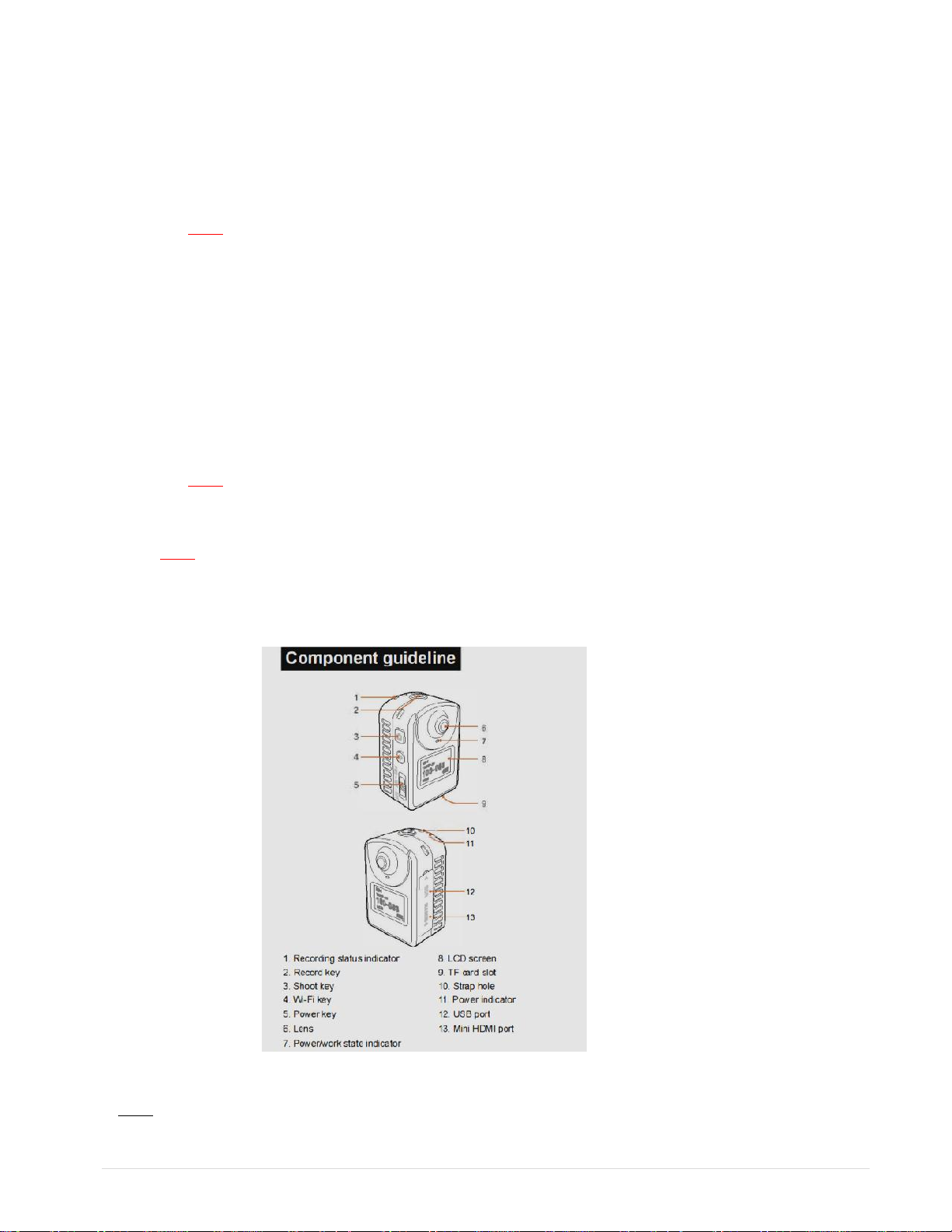
2. Insert provided Micro SD Card into camera (Item 9 on Figure 1. below)
3. Turn the POWER switch on (Item 5 on Figure 1. below)
4. Front LCD Displays:
a. Camera Icon c. Battery Icon
b. 1080P Recording d. Remaining Record Time
5. Snap the LE10 body camera into the enclosed Camera Body Clip Mount
6. Place on uniform or in “Heads-up Mic & Camera Holder”, the LE10 body camera has a 120 degree field
of view, left to right, up and down
7. To START recording; simply push the record button (Green) (Item 2 on Figure 1. below) on top of the
body camera
8. To STOP recording push the button (Green) (Item 2 on Figure 1. below) on top of the body camera again
NOTES:
You must press the record button (Green) to stop recording
Do not press the “Still Picture” button (Item 3 on Figure 1. Below) while doing a video. It will delete
the video file
Do not turn the power off on the LE10 body camera before you stop recording. This can cause the
last recording to be lost.
The battery life on STANDBY is approximately 4-5 hours. The body camera can be recharged via USB
Car/Cellular charging ports – We set default standby to 2 minutes. To activate press (Green) button
Actual recording time will depend on video settings –
16GB X 1080 = 1 HOUR 20 MIN 16GB X 720 = 3 HOURS
Typical videos will be 10 minutes in length
Date and Time have been preset – There is a video on www.forceprovideo.com if you need assistance
on how to reset the date/time
Page 2
2 | P a g e
The LE10 body camera may feel warm to the touch. This is normal with many small body cameras
and is not an indication that the body camera is malfunctioning
9. To DOWNLOAD Video / Pictures
a) Remove the Micro SD card from the bottom of LE10 body Camera
Note: If “red” security Tag is on the bottom of the body camera; plug LE10 into an USB port with
the provided USB cable to your computer. Skip steps b) and c)
b) Place the Micros SD card into the SD Adapter
c) Insert the SD Adapter into the laptop/desktop slot
d) If your computer is Windows based; Windows will automatically
recognize your SD card. Simply follow the screen commands
e) Save the videos to your computer and attach the files to your police report
Note: Each body camera should have its own directory on the computer
Example: \Smith\123456 – Office Name and Serial # of the Body Camera
f) Note: If the Original SD card will be replaced with a new Micro SD card because of evidence; it
should be stored in the supplied Anti-Static Evidence Bag and securely put in your evidence room or
insert back in the bottom slot to continue use
Figure 1.
Note: The LE10 body camera has built in Wi-Fi. You can use your Android phone to take pictures or videos.
 Loading...