

Page 1
USER MANUAL
Visit us online at force1rc.com for product information, replacement parts and ight tutorials.
FOR MORE INFORMATION
F ORC E 1RC.CO M
Page 2

FORCE1 RC
2
CONTENTS
Important Statement & Safety Precautions ································ 3-4
Important Safety Notice for Drone Care ········································4
Guidelines for Li-Po Battery-Powered Devices ·······························5
Drone Battery Charging Instructions ··············································6
Box Contents & Drone Overview ···················································7
Palm Transmitter Overview ························································· 8-9
Quick Start Guide ···································································· 10-11
Video Tutorial ···············································································12
Starting the Drone ········································································13
Palm Directional Controls ························································ 14-15
Command Joystick ·································································· 16-17
Battery Replacement ····································································18
Troubleshooting Guide ·································································20
Product Warranty & Replacement Parts ································· 21-22
FCC Information & Warning ··················································· BACK
Page 3

MONARCH MOTION DRONE User Manual
3
IMPORTANT STATEMENT
SAFETY PRECAUTIONS
Thank you for buying a Force1 drone. Please read this manual carefully before operating the
drone. By reading this manual it is assumed you are accepting all content in this user manual
when using this drone.
(1) Please operate in a safe manner. We undertake no liability for human injury or property dam-
age caused by improper operation, as we have no control over setup, use and operation of
this drone.
(2) This drone is suitable for experienced RC drone users aged 14 years or above.
(3) The ying eld must be legally approved by your local government. Please contact us if you
have any questions about use, operation, technical support, repair, after-sale service, etc.
Force1 does not assume any responsibility for any accidents caused by using non-genuine parts
and accessories. Keep the packaging and user manual for future reference.
Email us at [email protected] for questions, comments or to request spare parts.
This drone is suitable for experienced RC drone users aged 14 years or above. This product
contains small parts, please keep out of reach of children.
Please pay special attention to the following safety procedures:
(1) Keep away from humid environment.
The drone is made of precise electronic components. Humidity or water vapor may damage
electronic components causing accidents.
Page 4

FORCE1 RC
4
SAFETY PRECAUTIONS
(2) Keep away from rotating parts.
Rotating parts can cause serious injury and damage. Keep face and body away from rotating
motors.
(3) Keep away from heat.
The RC drone is made of metal, ber, plastic, electronic components etc. Keep away from
heat and direct sunshine to avoid distortion and damage.
(4) Stay aware while operating this drone.
Avoid areas with sudden changes in elevation, uneven ground or dangerous obstacles.
IMPORTANT SAFETY NOTICE FOR DRONE CARE
• Store the drone in a cool, dry place at a temperature between 5°C/40°F and 27°C/80°F
• Store upright and do not rest objects against the drone
• Inspect the drone for damage after each ight
• Do not use if drone is punctured or damaged
• Do not expose the drone to water
• Do not leave the drone in direct sunlight
• Do not open the battery casing to switch out the battery
• Please use caution when in the presence of children or animals
Page 5

MONARCH MOTION DRONE User Manual
5
• Never overcharge a Li-Po battery
• Do not charge Li-Po batteries near ammable materials or liquids
• Keep Li-Po batteries away from children and animals
• Never use or charge a Li-Po battery that has ballooned or swelled
• Never use or charge a Li-Po battery that has been punctured or damaged
• Heat is a known factor in battery res; if a battery is pushed beyond 60°C/140°F during
discharging or charging, problems could occur due to metallic lithium generation, which
damages the cell
• If the Li-Po battery is pushed beyond its limits, the battery could get hot and performance will
drop
• Store Li-Po batteries at less than full charge if not in use for more than one week
• If the Li-Po battery is removed from the drone, inspect the battery and battery connections;
if you nd damage to the battery, battery pins or contacts, discontinue use and visit force1rc.
com to purchase replacement parts
This drone contains two rechargeable internal lithium-polymer (Li-Po) batteries. Please do not
attempt to disassemble or repair the battery after it no longer holds a charge.
Email us at [email protected] for questions, comments or to request spare parts.
GUIDELINES FOR LI-PO BATTERY-POWERED DEVICES
WARNING:
DO NOT LEAVE BATTERY
CHARGING UNSUPERVISED
Page 6
FORCE1 RC
6
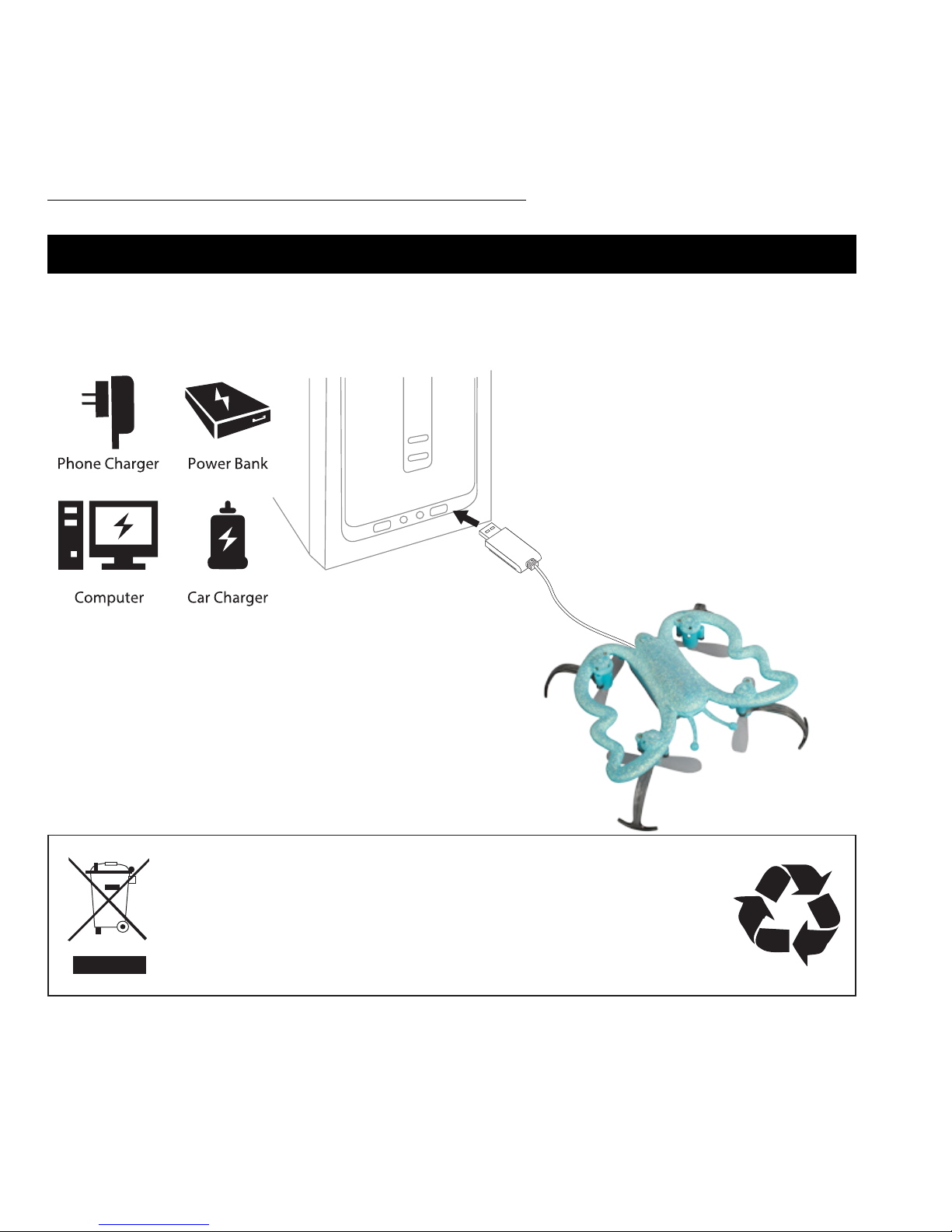
DRONE BATTERY CHARGING INSTRUCTIONS
• Use included USB charger to charge drone only when drone is OFF
• The USB charger light will turn red when charging
• If the charging cord isn’t easily going in, DO NOT FORCE IT
LI-PO BATTERY DISPOSAL & RECYCLING
Lithium-Polymer batteries must not be placed with household trash.
Please contact local environmental or waste agency or
your nearest Li-Po battery recycling center.
Page 7
MONARCH MOTION DRONE User Manual
7
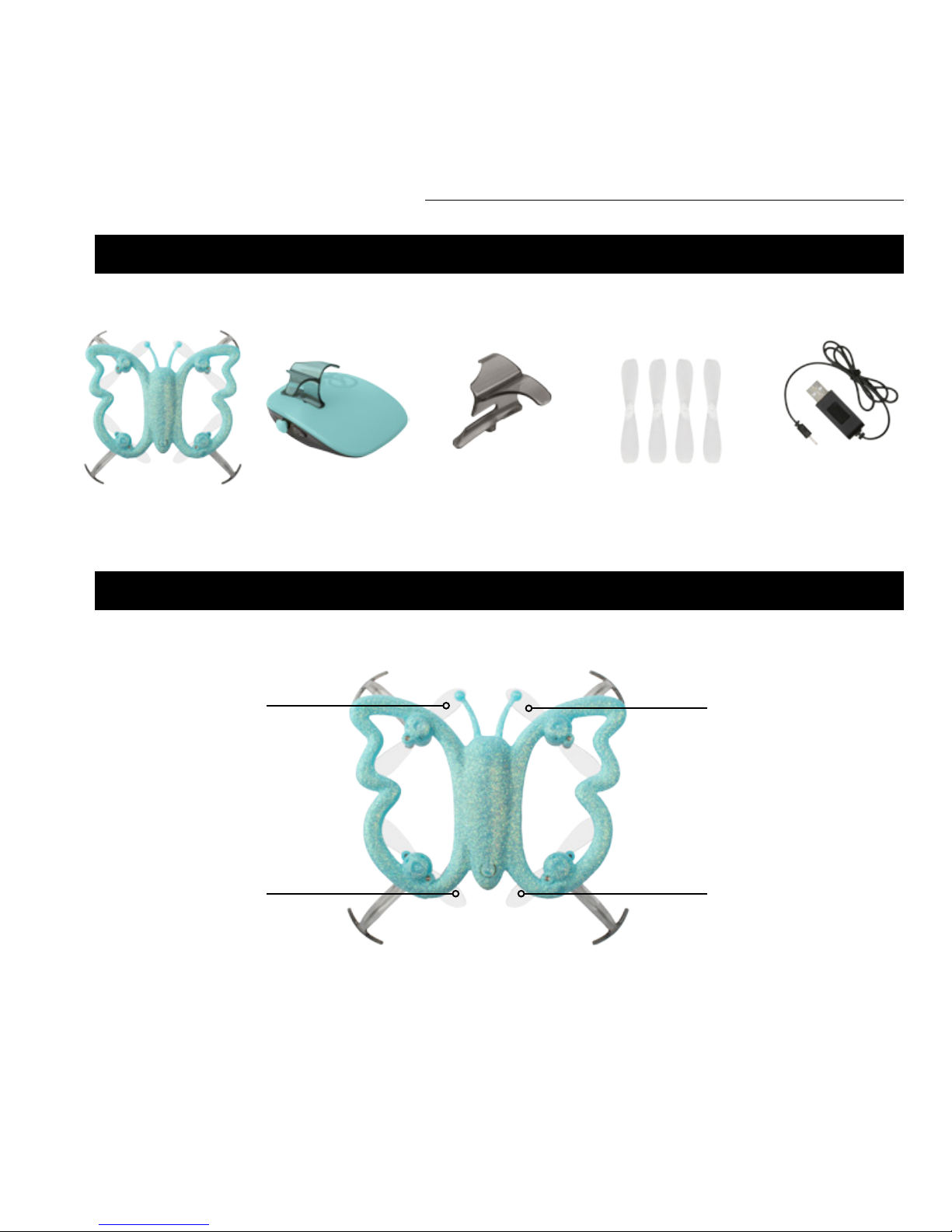
BOX CONTENTS
DRONE EXTRA FINGER GRIPPALM TRANSMITTER SPARE PROPELLERS (4) USB CHARGER CABLE
DRONE OVERVIEW
“A” PROPELLER
COUNTERCLOCKWISE
FRONT
BACK
LEFT RIGHT
“B” PROPELLER
CLOCKWISE
“B” PROPELLER
CLOCKWISE
“A” PROPELLER
COUNTERCLOCKWISE
Page 8
FORCE1 RC
8
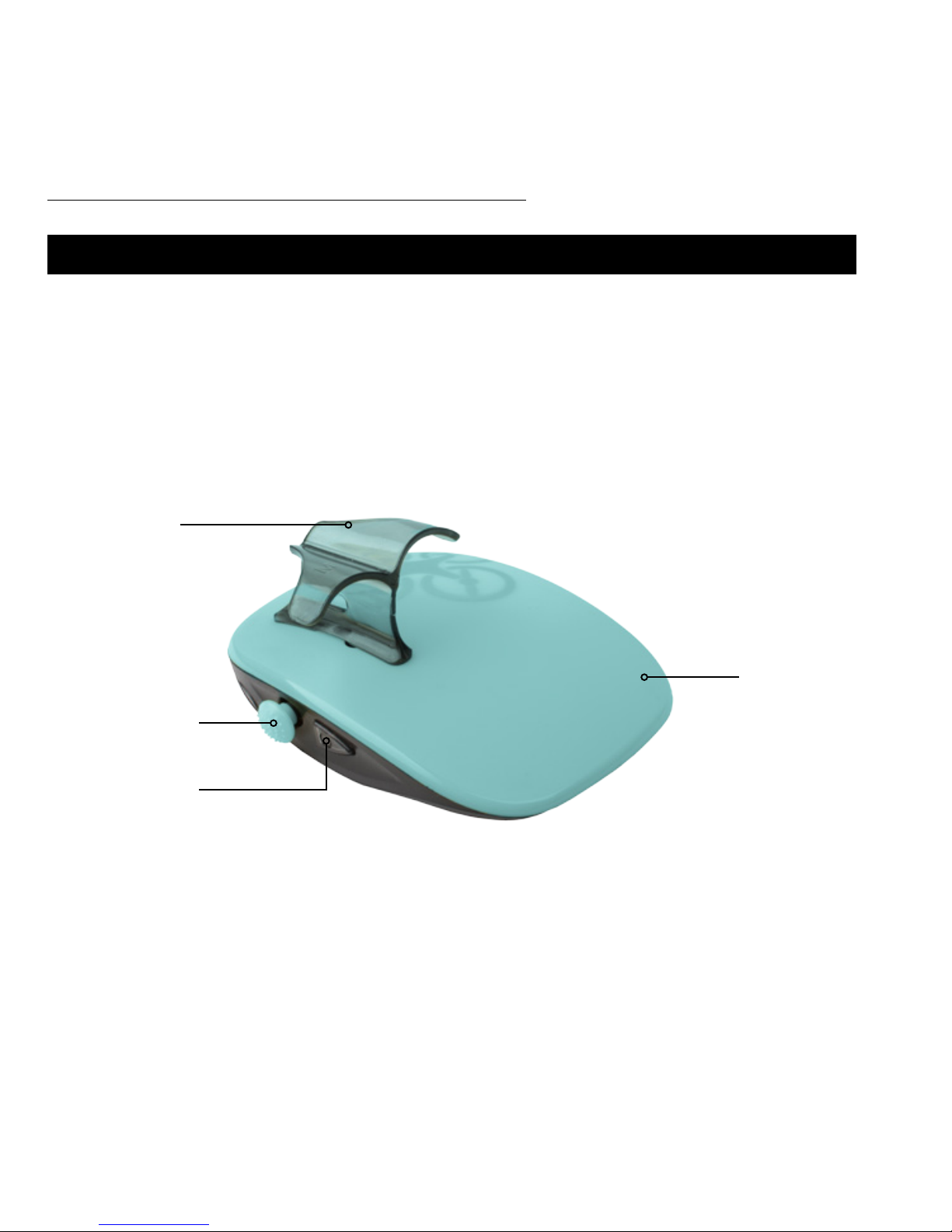
PALM REMOTE OVERVIEW
COMMAND JOYSTICK
MOTION SENSOR
CONTROLLER
POWER SWITCH
FINGER GRIP
PALM REMOTE NOSE
PALM REMOTE OVERVIEW
Page 9
MONARCH MOTION DRONE User Manual
9
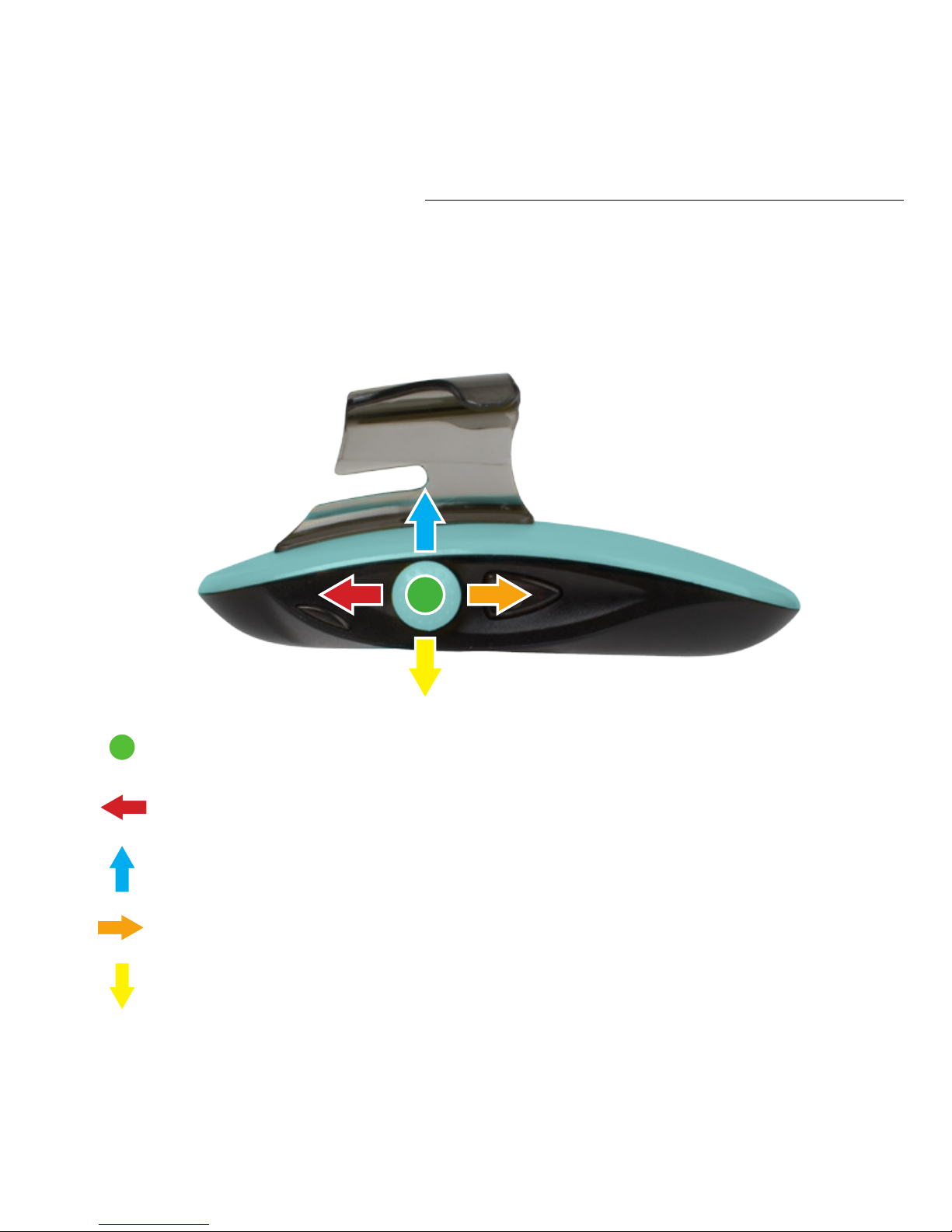
COMMAND JOYSTICK OVERVIEW
1-KEY LIFT/LAND + AUTO HOVER - SEE PAGE 13
SPEED - SEE PAGE 16
360° FLIPS + BARREL ROLLS - SEE PAGE 16
ROTATION - SEE PAGE 17
ALTITUDE CONTROL - SEE PAGE 17
Page 10
FORCE1 RC
10
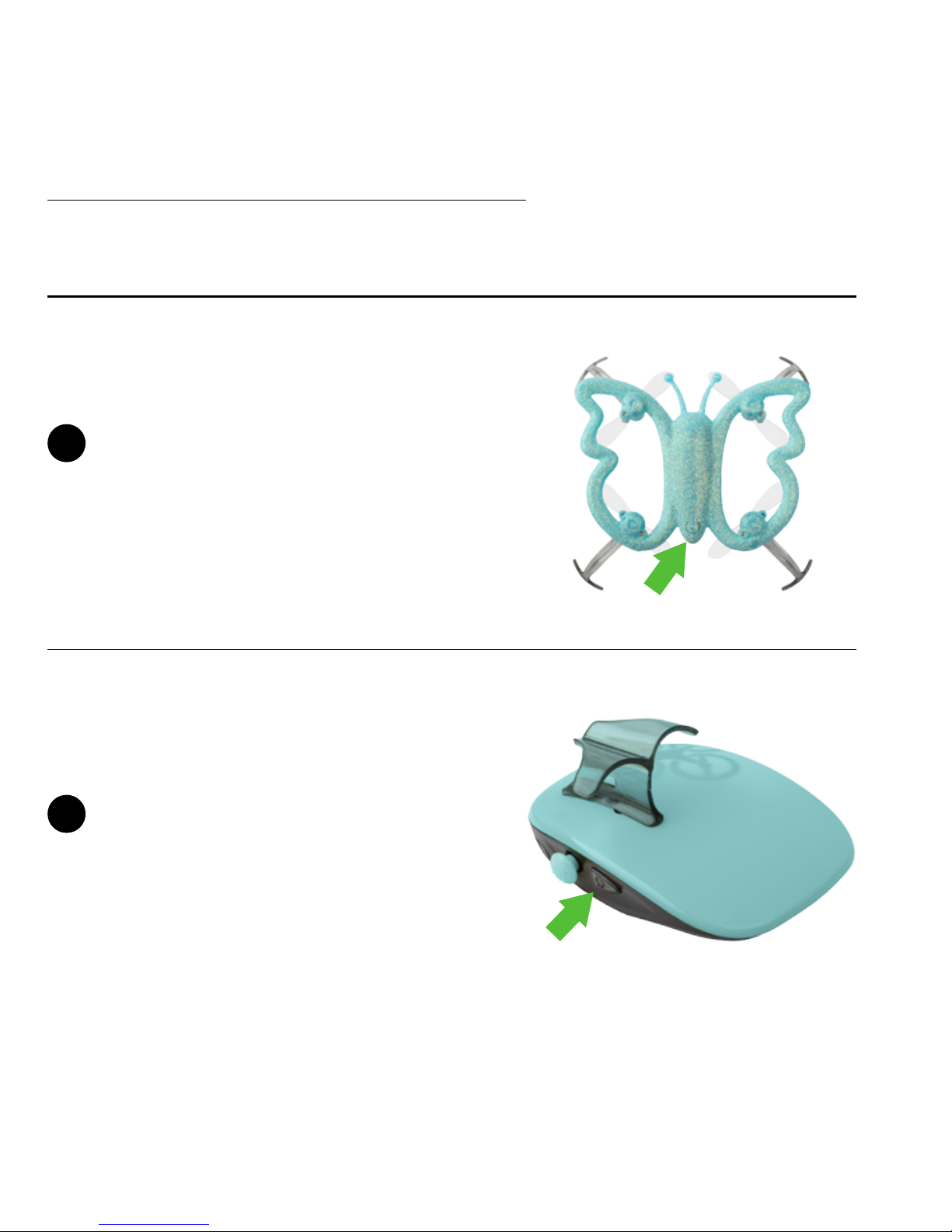
QUICK-START GUIDE
Press button on tail to power on
drone; wings and eyes will blink.
Push the power button on the Palm
Remote; the remote light will blink
red.
1
2
Page 11
MONARCH MOTION DRONE User Manual
11
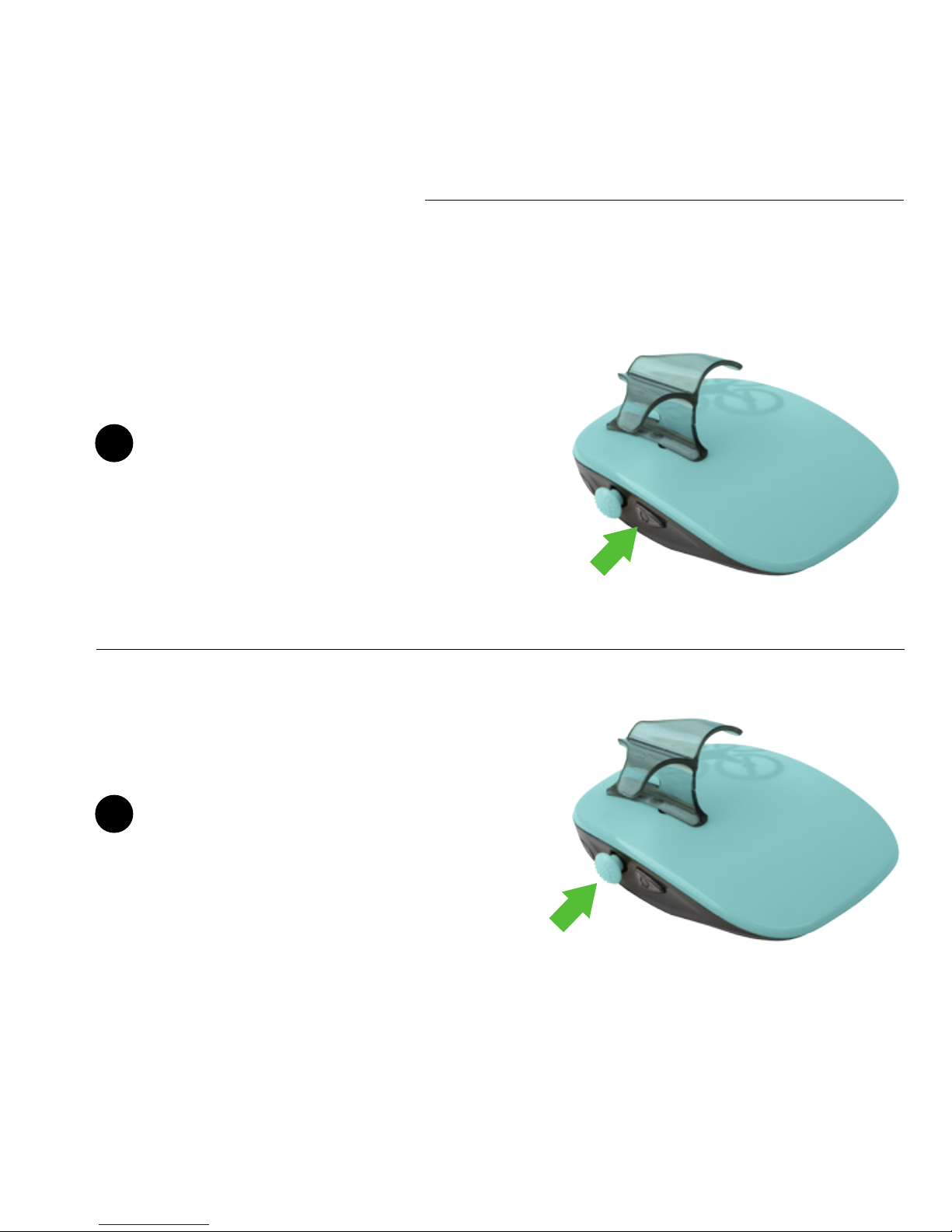
Push the Palm Remote power button
again quickly to pair with the drone;
blinking red eyes will stay solid,
indicating successful pairing.
Press the Master Joystick in to
activate 1-Key Lift. The Monarch
will fly up to 3 ft. and hover, ready
for flight!
3
4
Page 12
FORCE1 RC
12
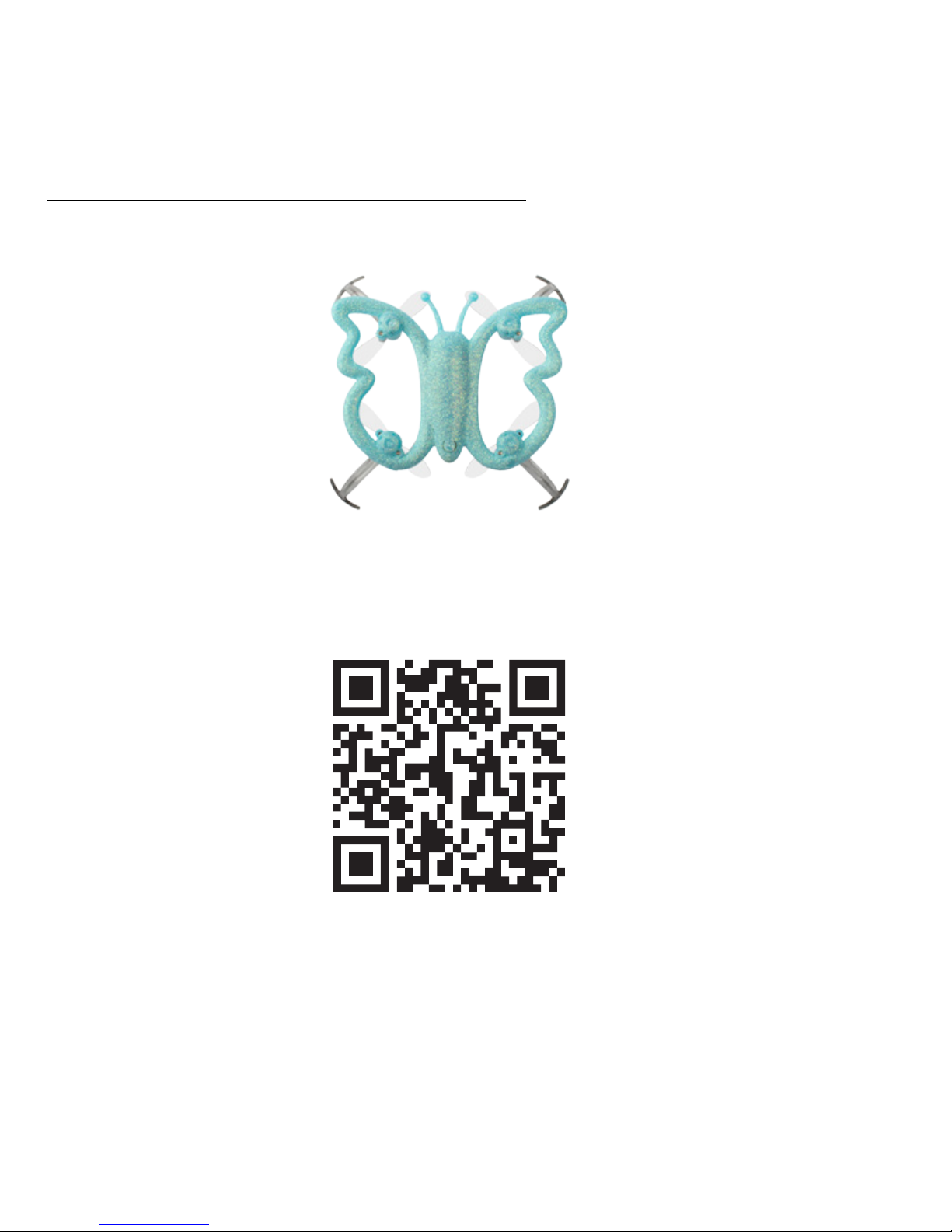
NEED HELP?
WATCH OUR VIDEO TO LEARN MORE!
https://force1rc.com/pages/monarch-video
Page 13
MONARCH MOTION DRONE User Manual
13
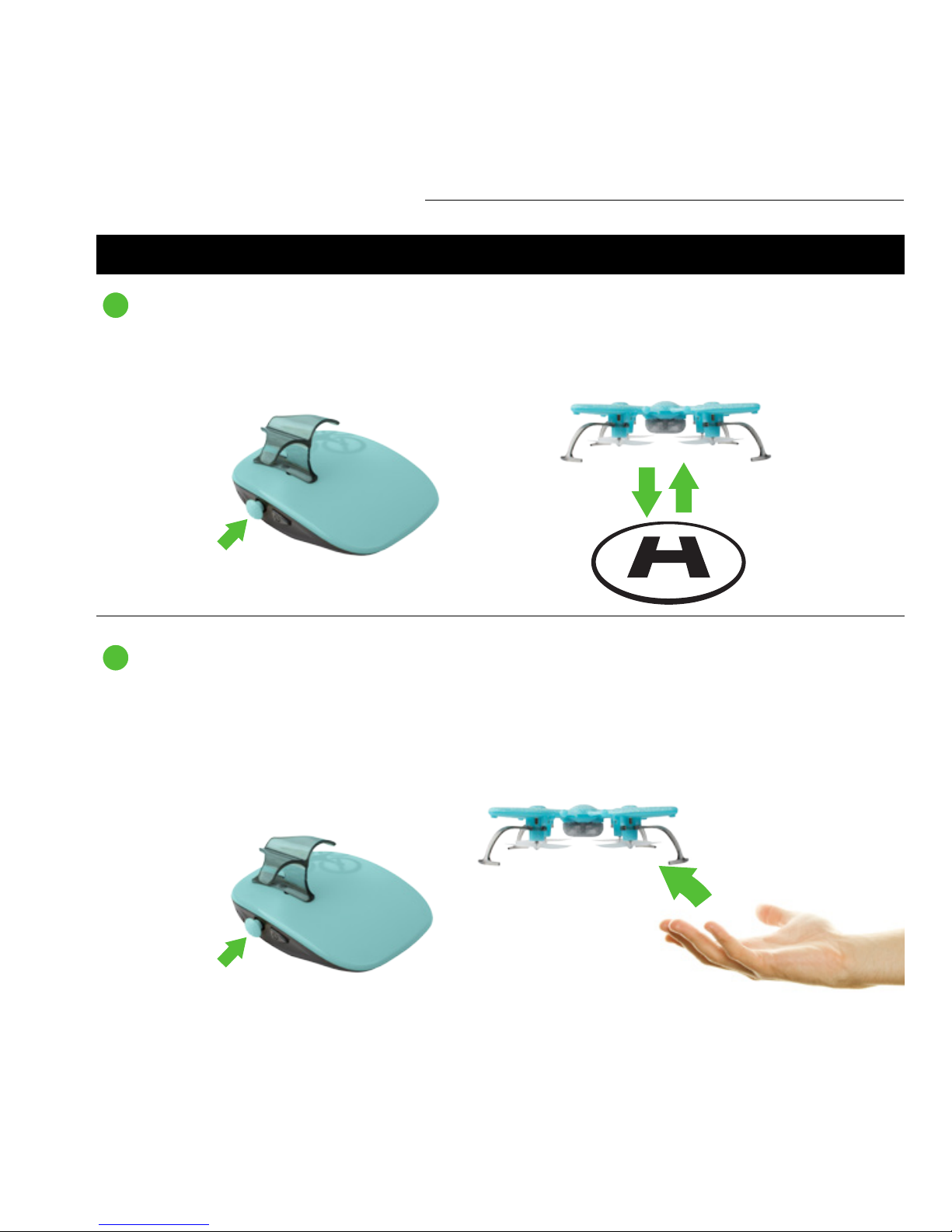
Warning: Make sure the Palm Remote and drone are ON and paired (that the drone’s eyes are
solid red) for this advanced maneuver.
Launch the drone midair by tossing it gently upward, immediately followed by pressing and
holding the Master Joystick IN.
STARTING THE DRONE
Press the Master Joystick IN and the drone will ascend.
The drone will also land by pressing and holding the Master Joystick IN.
1-KEY LIFT/LAND + AUTO HOVER
MIDAIR LAUNCH
Page 14
FORCE1 RC
14
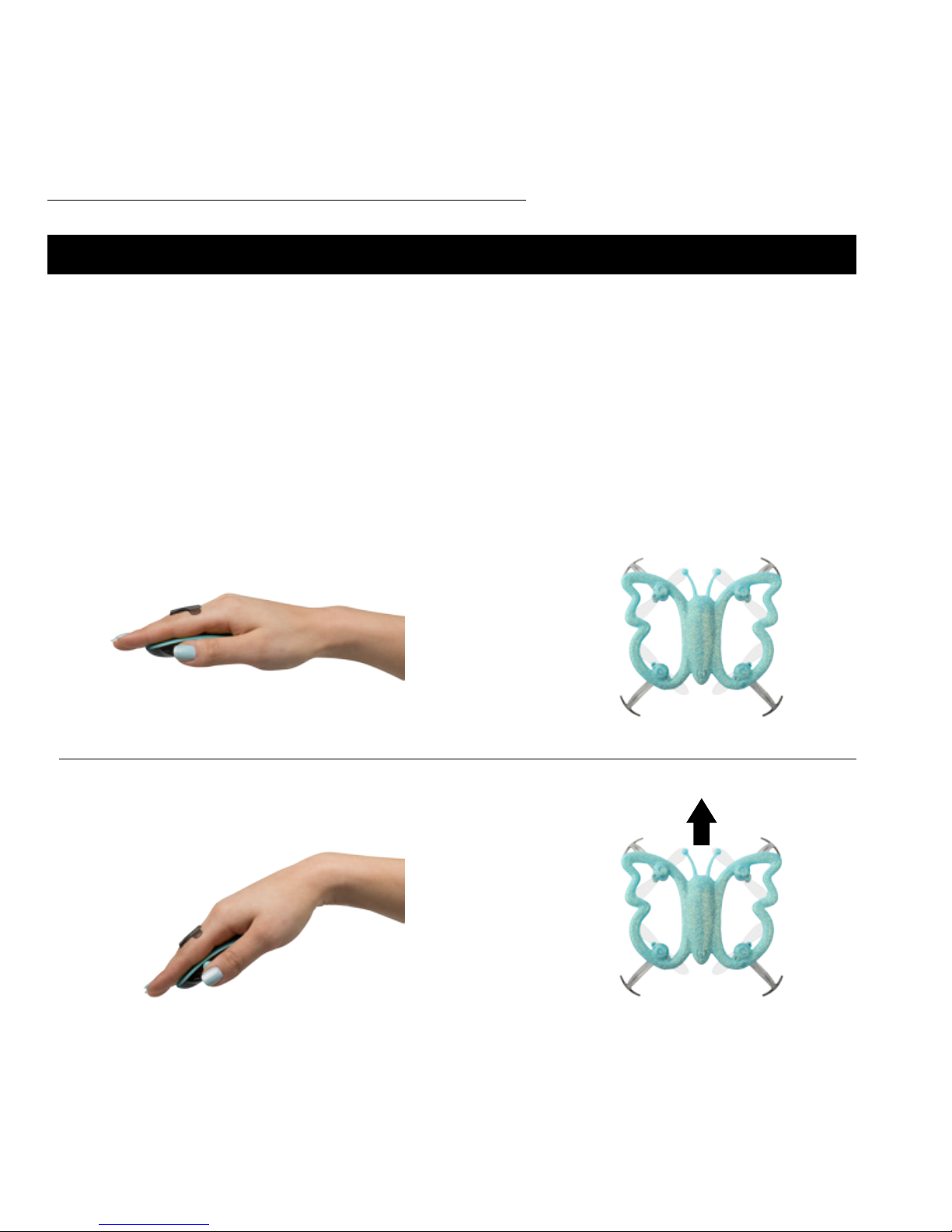
PALM DIRECTIONAL CONTROLS
Tilt the Palm Remote nose down to move the drone forward.
FORWARD
=
The drone will auto hover when hand is in at, neutral position.
HOVER
=
The Monarch is a motion-controlled drone. This means the drone’s ight is
controlled with your hand gestures! The Monarch will perform according
to coordinated hand and palm remote movements. The diverse motioncontrol features are described in this section.
Page 15
MONARCH MOTION DRONE User Manual
15
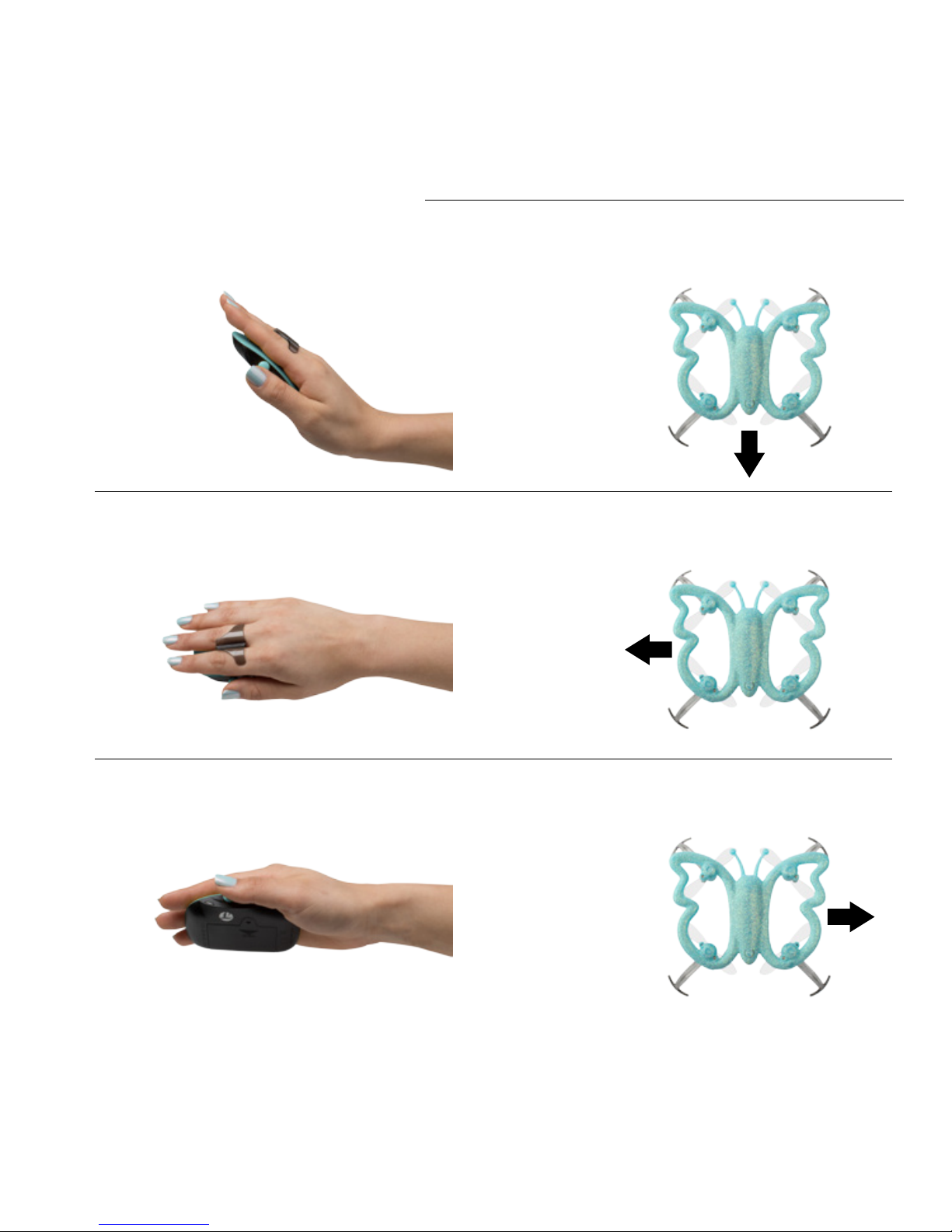
Tilt the Palm Remote to the right to track the drone right.
Tilt the Palm Remote to the left to track the drone left.
RIGHT
LEFT
=
=
Tilt the Palm Remote nose up to reverse the drone.
REVERSE
=
Page 16
FORCE1 RC
16
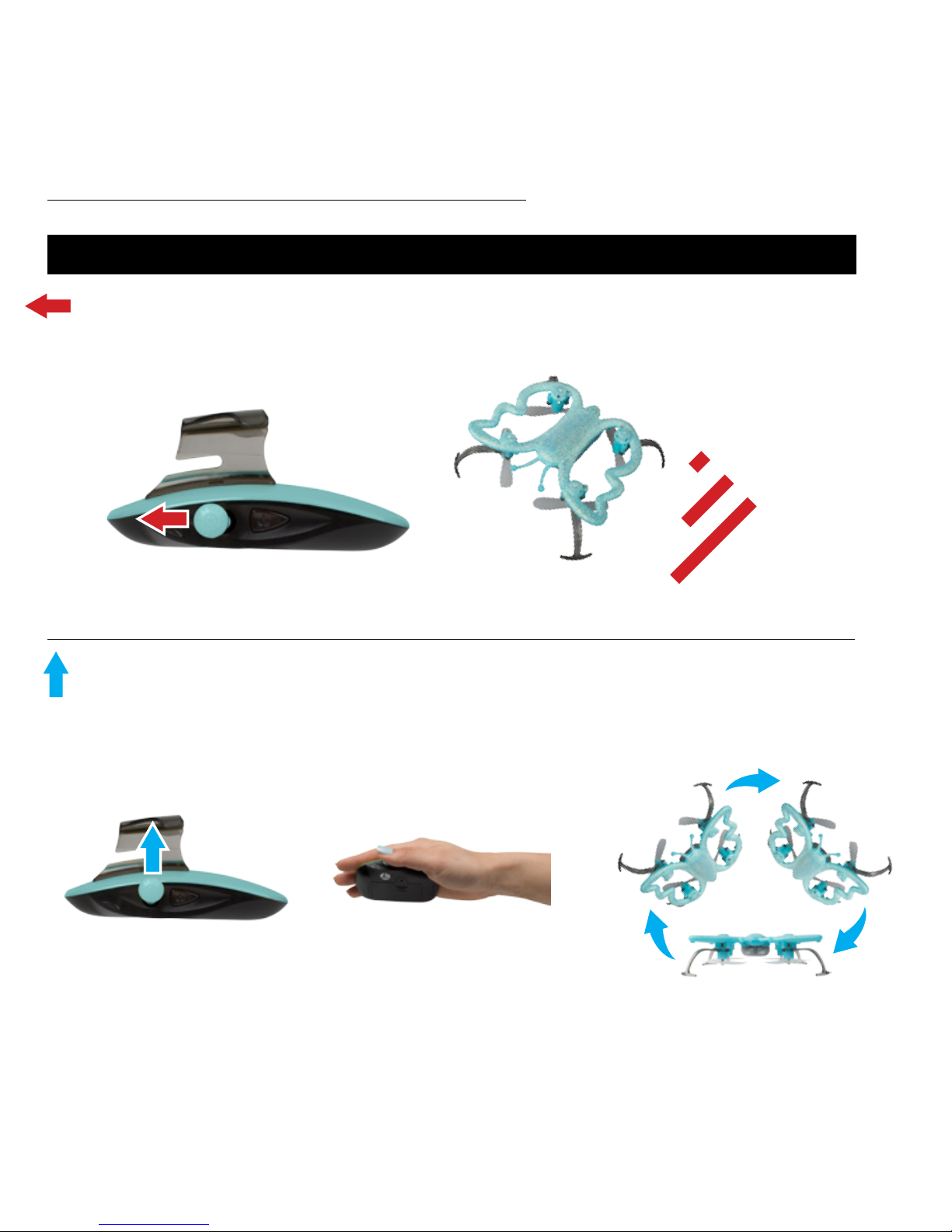
COMMAND JOYSTICK
Shift the Master Joystick forward and release to toggle through low, medium and high speeds.
The drone starts in low speed. Each forward joystick movement cycles through each speed.
Shift the Master Joystick up to make the drone perform a ip or roll. While shifting, tilt Palm
Remote up or down for 360° ips; tilt left or right for barrel rolls.
SPEED
360° FLIPS + BARREL ROLLS
LOW
MEDIUM
HIGH
+ =
Page 17
MONARCH MOTION DRONE User Manual
17
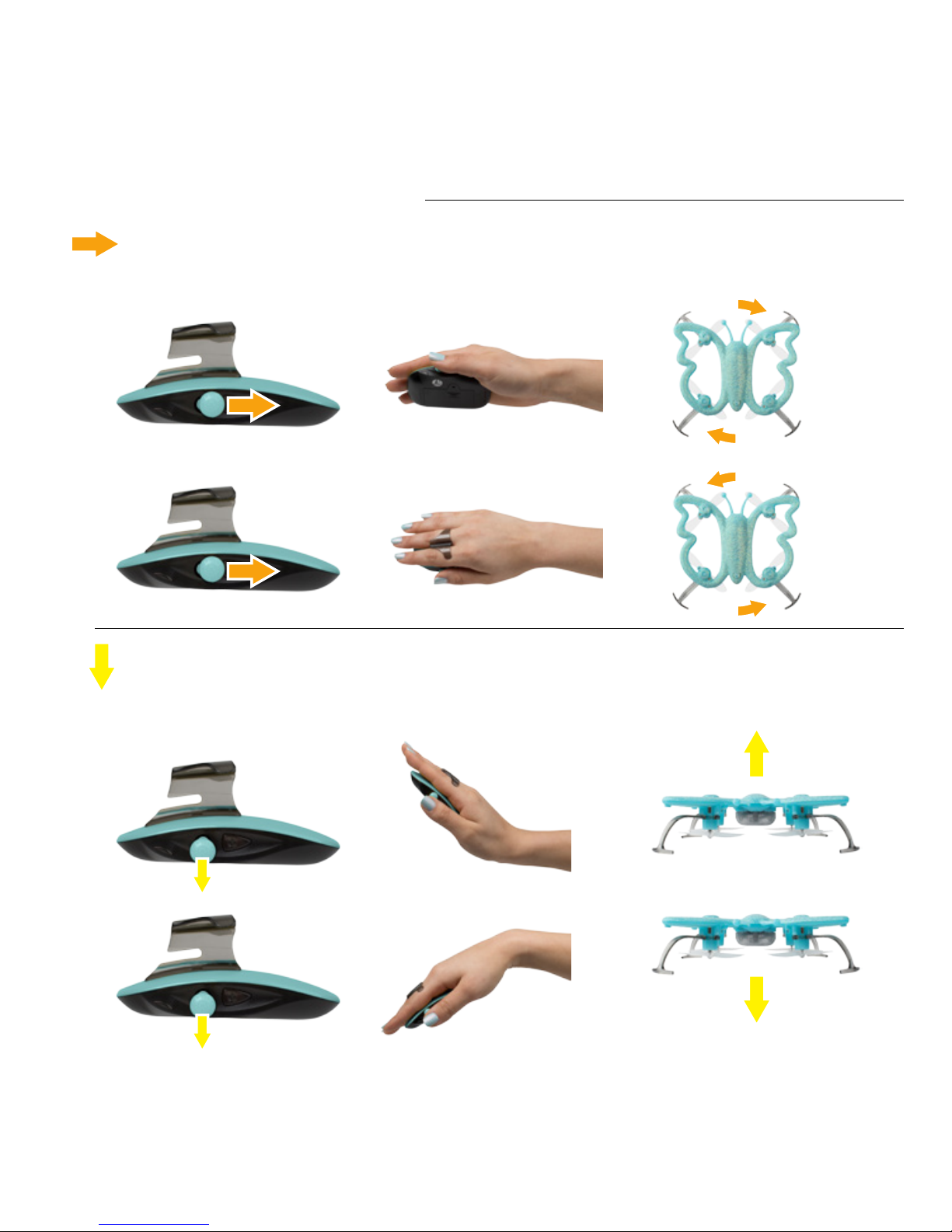
Shift the Master Joystick backward and release to rotate the drone in stages. Shift and hold the
Master Joystick backward for continuous rotation until joystick release.
The drone changes altitudes with coordinated palm and joystick movements. Hold the Master
Joystick downward and tilt the Palm Remote nose up to raise the drone. Hold the Master
Joystick downward and tilt the Palm Remote nose down to lower the drone.
ROTATION
ALTITUDE CONTROL
+
+
+
+
=
=
=
=
Page 18
FORCE1 RC
18
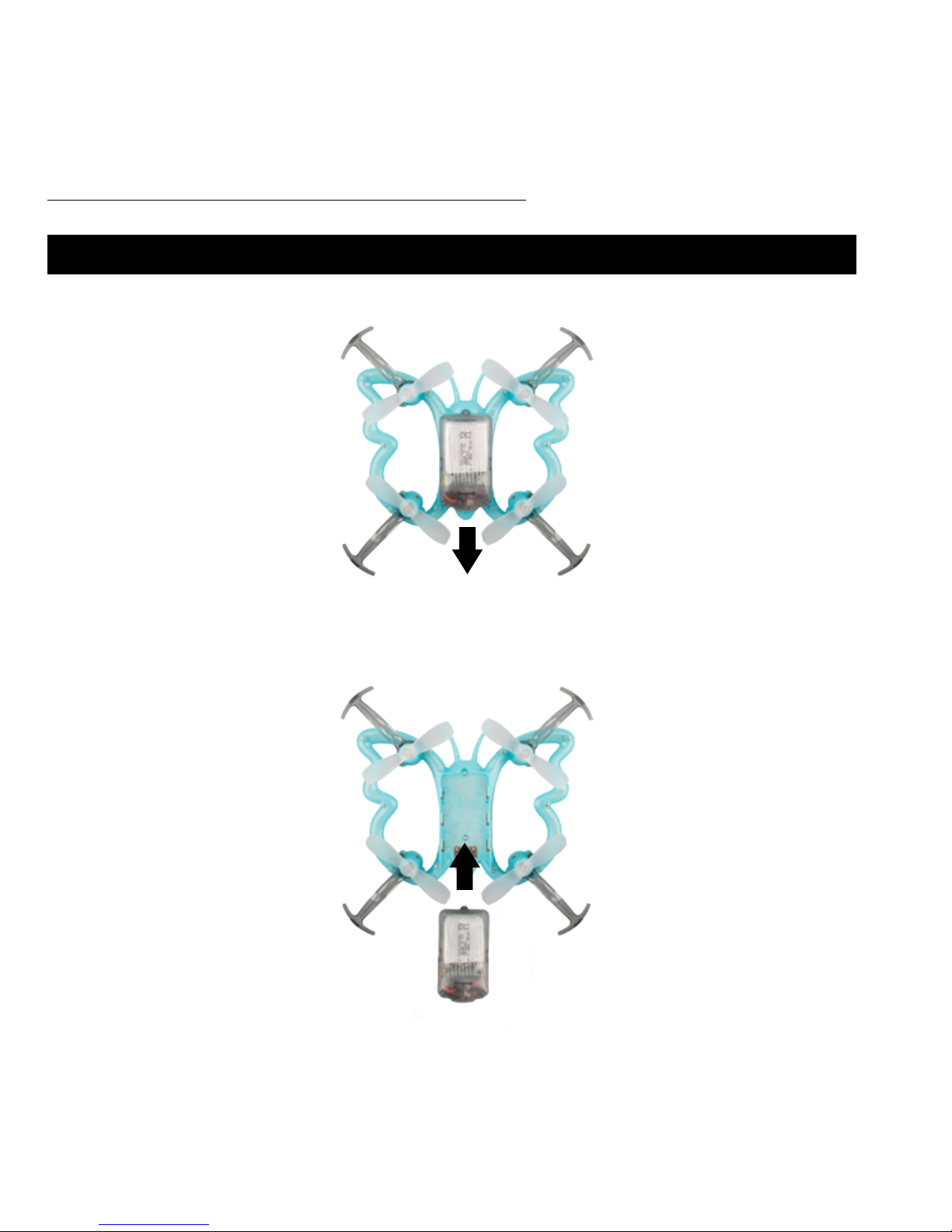
BATTERY REPLACEMENT
Firmly slide the battery backward on the drone until it clicks loose.
Align the new battery with the drone contact points and snap in place.
Page 19
MONARCH MOTION DRONE User Manual
19
FORCE1 WANTS TO KEEP IN TOUCH!
We’d like to share in the fun! Post your photos,
videos and messages on social media.
Share your story with hashtag:
#FLYMONARCH
facebook.com/force1rc/ @force1rc
Page 20

FORCE1 RC
20
Email us at [email protected] for questions, comments or to request spare parts.
TROUBLESHOOTING GUIDE
PROBLEM SOLUTION
I can’t turn the drone on.
The drone won’t charge.
The drone keeps
crashing.
The drone LED lights
ash, but it won’t y.
The drone propellers
spin, but it won’t y.
How tough is the
Monarch?
Carefully review the preight operation sequence. When starting the palm remote,
be sure to hold the power button down longer to start the drone, with a quick push
to pair with the drone. The red light eyes will glow solid red when the drone is
paired with the palm remote.
Make sure the charging cable is connected to USB port. There is a socket in the
battery. The USB plug should display a red light when charging and no light when
fully charged.
Make sure you have plenty of ight space. The Monarch is easier to navigate with
fewer obstacles.
Make sure the palm remote battery is working. Test the buttons on the remote and
the drone to ensure communication is established.
Inspect the propellers for damage and clear any debris if necessary. Try powering
down the drone and palm remote before starting again.
The Monarch drone is quite durable. That said, take care to be gentle when handling
the drone. Assuming you are staying clear of any hazardous spaces, objects or
liquids, the drone should be ready to relaunch again after a crash.
Page 21
MONARCH MOTION DRONE User Manual
21
WARRANTY
LIMITED 90-DAY WARRANTY AND
FREE LIMITED REPLACEMENT PARTS FOR 90 DAYS
Force1rc.com warrants to the original buyer only that its products will be
free from defects in material and workmanship for ninety (90) days from the
date upon which the product is shipped, either directly from Force1rc.com
or from an Authorized Reseller’s location, to the buyer.
The following conditions must be met to be eligible for warranty coverage:
1. During the warranty period product is used as intended by the manufacturer.
2. The Product has not been disassembled or modied.
3. The labels and serial numbers show no signs of tampering or altering.
4. Buyer has a warranty code obtained by registering their product online prior to making a claim.
EXCEPTIONS: THE LIMITED WARRANTY SHALL NOT APPLY TO:
• Damage caused by normal wear and tear
• Accident, negligence, abuse, misuse, misapplication or willful damage by buyer (or its agents), or acts of nature
• Crash or burning caused by non-manufacturing factors
• Damage caused by unauthorized modication or disassembly not authorized by the instruction manual
• Damage caused by incorrect use or operation
• Damage caused by mismatch or misuse of battery or charger
• Failure of the operator to follow the operating instruction or use outside the product’s operating parameters
• Damage caused by operating the product in poor weather (i.e., strong wind, rain, low visibility, etc.)
• Damage caused by operating the product in or around electromagnetic interference (i.e., radio transmitting
tower, high-voltage wire, substation, etc.)
• Damage caused by operating the product where there may be interference caused by other wireless devices
• Operating the product with a load capacity in excess of the safe weight listed in the manual
• Operating the product with aged, damaged or unauthenticated third-party components
• Operating the product with a defective battery
PROCEDURE: Any claims for breach of the foregoing limited warranty shall only be valid if buyer makes such
claim in writing within ninety (90) days of the date of shipment of the product to which the claim relates. To make
a warranty claim, please email [email protected] with your full name, address, phone number, order number,
drone type, part type and purchase date and product issue.
Page 22

FORCE1 RC
22
LIMITED REMEDY: Force1rc.com’s sole liability, and buyer’s sole remedy, for any breach of the foregoing warranty
shall be at Force1rc.com’s option, to (i) exchange the product with a new product or a refurbished product that is
functionally equivalent to the original product, or (ii) issue a credit or refund for the purchase price of the product.
Any replaced products shall be warranted as set forth herein, provided that the period within which buyer may
make further claims shall be limited to the remainder of the original period for the applicable product or 90 days,
whichever is longer (although the warranty period shall be suspended during any period of replacement).
DISCLAIMER: THE WARRANTY AND REMEDIES ARE EXCLUSIVE AND IN LIEU OF ALL OTHER WARRANTIES,
AND FORCE1RC.COM DISCLAIMS ALL OTHER WARRANTIES, EXPRESS OR IMPLIED, INCLUDING WITHOUT
LIMITATION THE IMPLIED WARRANTIES OF MERCHANTABILITY AND FITNESS FOR A PARTICULAR
PURPOSE, NON-INFRINGEMENT AND ANY WARRANTIES ARISING OUT OF COURSE OF DEALING,
COURSE OF PERFORMANCE AND TRADE USAGE. FORCE1RC.COM IS NOT RESPONSIBLE FOR DIRECT,
SPECIAL, INCIDENTAL OR CONSEQUENTIAL DAMAGES RESULTING FROM ANY BREACH OF WARRANTY
OR CONDITION, OR UNDER ANY OTHER LEGAL THEORY, INCLUDING BUT NOT LIMITED TO LOSS OF
USE; LOSS OF REVENUE; LOSS OF ACTUAL OR ANTICIPATED PROFITS (INCLUDING LOSS OF PROFITS ON
CONTRACTS); LOSS OF THE USE OF MONEY; LOSS OF ANTICIPATED SAVINGS; LOSS OF BUSINESS; LOSS
OF OPPORTUNITY; LOSS OF GOODWILL; LOSS OF REPUTATION; LOSS OF, DAMAGE TO, COMPROMISE
OR CORRUPTION OF DATA; OR ANY INDIRECT OR CONSEQUENTIAL LOSS OR DAMAGE HOWSOEVER
CAUSED INCLUDING THE REPLACEMENT OF EQUIPMENT AND PROPERTY, ANY COSTS OF RECOVERING OR
REPRODUCING ANY DATA STORED IN OR USED WITH THE PRODUCT OR ANY FAILURE TO MAINTAIN THE
CONFIDENTIALITY OF INFORMATION STORED IN THE PRODUCT.
Some states do not allow the exclusion or limitation of incidental or consequential damages, so the above
limitation or exclusion may not apply to you. In addition, some states do not allow limitations on how long an
implied warranty lasts, so the above limitation may not apply to you.
FREE REPLACEMENT PARTS FOR 90 DAYS: Force1.com shall also make available any spare part needed for
registered drones free of charge for 90 days from the date of purchase, with the exception of batteries, motors,
circuit boards, cameras and transmitters. Shipping charges may apply. Limit one part type request per registered
drone (e.g., registrants are entitled to one extra set of propellers per registered drone). To request spare parts,
please email [email protected] with your warranty code, drone name/model, current shipping address,
purchase date and part type.
GET YOUR WARRANTY CODE AT force1rc.com/pages/warranty-signup
HAVE YOUR ORDER NUMBER AND/OR DRONE UPC READY
Page 23

Page 24

The equipment may generate or use radio frequency energy. Changes or modifications to this
equipment may cause harmful interference unless the modifications are expressly approved in the
instruction manual. Modifications not authorized by the manufacturer may void user’s authority to
operate this device.
This device complies with part 15 of the FCC Rules. Operation is subject to the following two
conditions:
1. This device may not cause harmful interference, and
2. This device must accept any interference received, including interference that may cause
undesired operation.
force1rc.com
This equipment has been tested and found to comply with the limits for a Class B digital device,
pursuant to part 15 of the FCC Rules. These limits are designed to provide residential protection
against harmful interference in a residential installation. This equipment generates, uses and can
radiate radio frequency energy and, if not Installed and used in accordance with the instructions,
may cause harmful interference to radio communications. However, there is no guarantee that
interference will not occur in a particular installation. If this equipment does cause harmful
interference to radio or television reception. Which can be determined by turning the equipment
off and on, the user is encouraged to try to correct the interference by one or more of the
following measures:
• Reorient or relocate the receiving antenna.
• Increase the separation between the equipment and receiver.
• Connect the equipment into an outlet on the circuit different from that to which the receiver is
connected.
• Consult the dealer or an experienced technician for help.
FCC INFORMATION
FCC WARNING
 Loading...