

Page 1
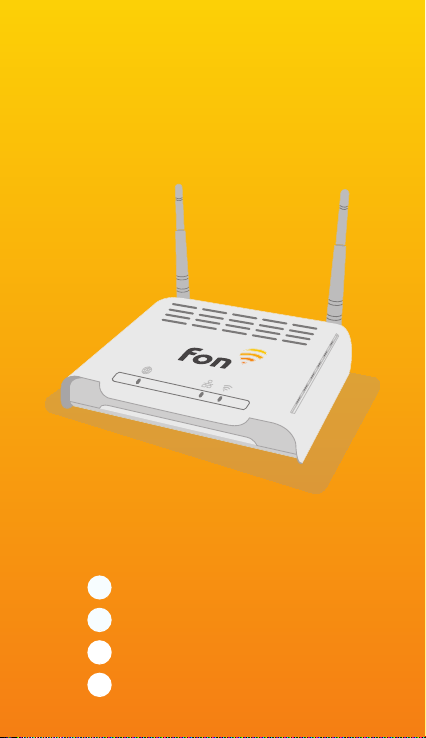
Fonera
EN
Quick Installation Guide
FR
Guide d’Installation Rapide
ES
Guía de Instalación Rápida
DE
Installationsanleitung
Page 2

Page 3
EN
Quick Installation Guide
1. Open any web browser (Firefox, Internet Explorer, Safari, ...)
2. Type http://register.fon.com in the address bar.
3. Then, enter the MAC and PIN CODE numbers found on the device. Follow the steps
on your screen.
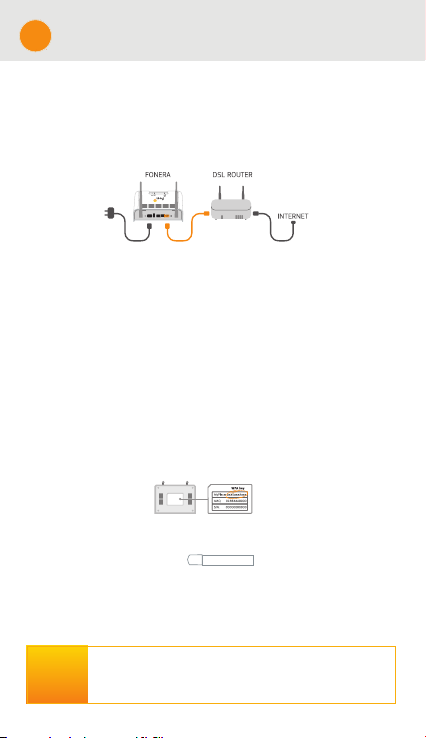
1. Connect your Fonera to the internet.
Please note the Fonera is not a stand-alone device, and it must be
connected to your existing modem/router to work.
Plug in your Fonera.
Then, take the orange cable. Connect one end of it to the orange socket on your
Fonera, and connect the other end to your modem.
2. Connect your Fonera to your computer
or laptop.
Select the MyPlace WiFi signal from your network preferences.
Enter the password printed on your Fonera (same as WPA key)
Don’t have WiFi?
Then, take an ethernet cable and connect one end to your Fonera and the
other to your computer or laptop.
3. Configure your Fonera.
Open any browser (e.g. Firefox)
Type: http://fonera in the address bar to access your Fonera.
Alternatively, you can type your Fonera’s IP address (http://192.168.10.1)
Enter the default password: admin.
Now you can view and modify the technical aspects of your Fonera.
WHAT’S
IN THE
- 1 Fonera
- 1 Ethernet cable
- 1 Power supply
BOX?
- 2 Stickers
FCC CE statement: https://www.fon.com/images/media/common/FCC_CE.pdf
http://fonera
Page 4
Guide d’Installation Rapide
FR
1. Ouvrez un navigateur internet (Firefox, Internet Explorer, Safari...)
2. Dans la barre d’adresse, tapez http://register.fon.com.
3. Puis, saisissez l’adresse MAC et le PIN CODE se trouvant sur la Fonera.
Enfin, veuillez suivre les étapes décrites sur votre écran.
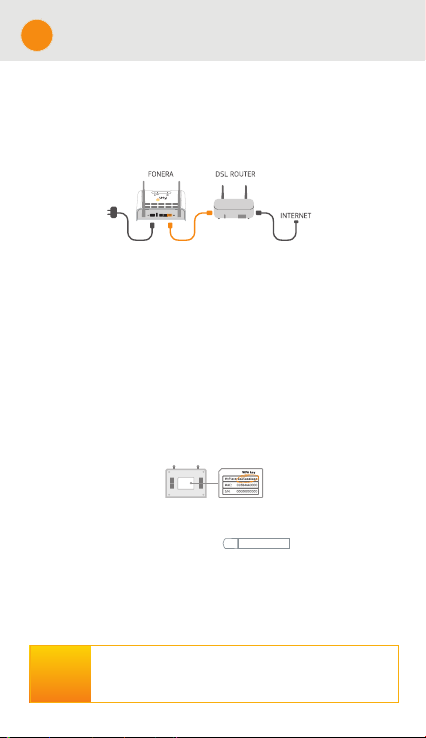
1. Connectez votre Fonera à internet.
Vérifiez que la Fonera est bien connectée à votre modem/box haut débit.
Branchez l’alimentation électrique de la Fonera. En effet, la Fonera ne remplace
pas votre modem/box haut débit.
Par la suite, connectez une extrémité du câble orange fournit à votre Fonera
(prise orange) et l’autre à votre modem.
2. Connectez la Fonera à votre ordinateur..
&KerFKez et V«OeFtionnez SarPi voV r«Veaux :iFi G«teFt«V Oe V ignaO aSSeO« 0\3OaFe
(ntrez Oe Pot Ge SaVVe T ui eVt inVFrit VouV votre Fonera (ForreVSonG ¢ Oa FO« :3$)
9ouV næavez touMourV SaV Ge :iFi "
3uiV FonneFtez\ un F¤EOe (tKernet &onneFtez une extr«Pit« ¢ votre Fonera et
Oæautre ¢ votre orGinateur Ge Eureau ou SortaEOe
3. Configurez et enregistrez votre Fonera.
Ouvrez un navegateur internet (Firefox)
Tapez : http://fonera dans la barre d’addresse afin d’accéder à la console de
gestion de la Fonera. Vous pouvez également taper l’adresse IP de votre
Fonera (http://192.168.10.1).
Entrez le mot de passe par défault : admin.
9ouV Souvez Paintenant voir et P oGičer OeV aVSeFtV teFKniTueV G e votre Fonera
- 1 Fonera
QUE
CONTIENT
LA BOITE?
Déclaration de conformité FCC CE : https://www.fon.com/images/media/common/FCC_CE.pdf
- 1 Câble Ethernet
- 1 Alimentation électrique
- 2 Autocollants
http://fonera
Page 5
ES
Guía de Instalación Rápida
1. Abre cualquier explorador (Firefox, Internet Explorer, Safari…)
2. Escribe http://register.fon.com en la barra de direcciones.
3. Después, introduce los dígitos de la MAC y el PIN CODE que están en la Fonera.
Sigue los pasos que aparecen en la pantalla
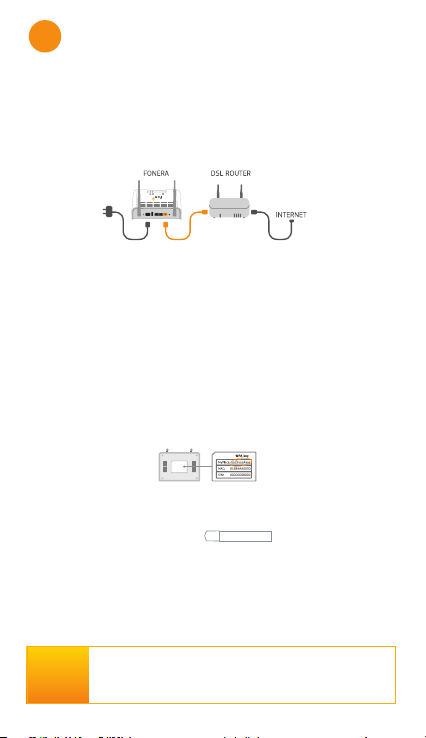
1. Conecta tu Fonera a internet.
$Veg¼rate Tue Oa Fonera eVt£ FoneF taGa aO routerPoGeP G e tu
SroveeGor Ge aFFeVo a internet /a Fonera 6iPSO no V uVtitu\e aO routerPoGeP
&oneFta eO enFKufe Ge tu Fonera a Oa reG eO«FtriFa
&oneFta un extrePo GeO F aEOe naranMa aO Suerto etKernet naranMa de tu Fonera \ eO
otro a tu PodeP router
2. Conecta la Fonera a tu ordenador o portátil.
Selecciona la señal WiFi MyPlace en tus preferencias de red.
Introduce la contraseña impresa en tu Fonera (la misma que la WPA key).
¿No tienes WiFi?
Conecta un cable ethernet y al otro extremo tu ordenador o portátil.
3. Configura y registra tu Fonera.
$Ere un navegador (eMePSOo Firefox)
7eFOea KttSfonera en Oa Earra de direFFioneV Sara aFFeder Oa FonVoOa de
geVtiµn de Oa Fonera 7aPEi«n SuedeV teFOear Oa direFFiµn ,3 de tu Fonera
(KttS)
,ntroduFe Oa FontraVe³a Sor defeF to admin
$Kora SuedeV ver \ modičFar OoV aVSe FtoV t«FniFoV de tu Fonera
http://fonera
QUÉ HAY
- 1 Fonera
- 1 Cable ethernet
EN LA
- 1 Fuente de alimentación
CAJA?
- 2 Pegatinas
Declaración FCC CE: https://www.fon.com/images/media/common/FCC_CE.pdf
Page 6
DE
Installationsanleitung
1. Öffnen Sie einen Web-Browser (Firefox, Internet Explorer, Safari, …)
2. Typ http://register.fon.com in der Adresszeile.
3. Geben Sie dann die MAC- und PIN CODE ein, die sich auf der Rückseite
den Fonera befinden. Befolgen Sie die Schritte auf Ihrem Bildschirm.
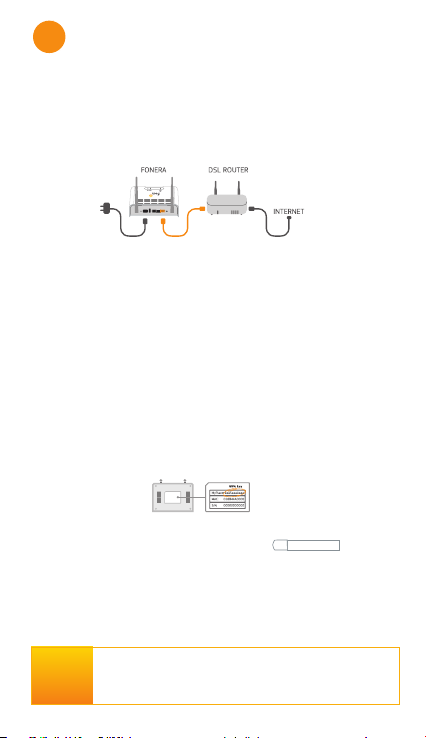
1. Verbinden Sie Ihre Fonera mit dem
Bitte beachten Sie das die Fonera an Ihr bestehendes Modem / Router
Stecken Sie das Fonera Netzteil ein.
Dann nehmen Sie das orangefarbene Kabel und verbinden Sie ein Ende mit Ihrer
Fonera (Orangene-Buchse) und das andere mit Ihrem Modem.
2. Verbinden Sie Ihre Fonera Simpl mit Ihrem
Computer oder Laptop.
Wählen Sie das MyPlace WLAN Signal von Ihren Netzwerk- Einstellungen aus.
Geben Sie das Kennwort ein das auf Ihrer Fonera aufgedruckt ist (das selbe wie
der WPA-Schlüssel).
Haben Sie kein WLAN?
Dann nehmen Sie ein Ethernet-Kabel und verbinden Sie ein Ende mit Ihrer Fonera
und das andere mit Ihrem Computer oder Laptop.
.RQčJXULHUHQXQGUHJLVWULHUHQ6LH,KU)RQHUD
Öffnen Sie einen beliebigen Browser. (z.B. Firefox)
*eEen 6ie KttSfonera in die $dreVVOeiVte ein um auf die Fonera.onVoOe
zuzugreifen $Oternativ N¸nnen 6ie auFK die ,3$dreVVe ,Krer Fonera eingeEen
KttS
Geben Sie das Standard-Passwort admin ein.
6ie N¸nnen nun die teFKniVFKen $VSeNte ,KreV Fonera VeKen und aE¦ndern
WAS IST IN
DER BOX
ENTHALTEN?
- 1 Fonera
- 1 Ethernet Kabel
- 1 Netzteil
- 2 Aufkleber
FCC CE Kennzeichnung: https://www.fon.com/images/media/common/FCC_CE.pdf
http://fonera
Page 7

Page 8
www.fon.com
fon.com
Page 9

FCC statement
Federal Communication Commission Interference Statement
This equipment has been tested and found to comply with the limits for a Class B
digital device, pursuant to Part 15 of the FCC Rules. These limits are designed to
provide reasonable protection against harmful interference in a residential installation.
This equipment generates, uses and can radiate radio frequency energy and, if not
installed and used in accordance with the instructions, may cause harmful interference
to radio communications. However, there is no guarantee that interference will not
occur in a particular installation. If this equipment does cause harmful interference to
radio or television reception, which can be determined by turning the equipment off
and on, the user is encouraged to try to correct the interference by one of the following
measures:
- Reorient or relocate the receiving antenna.
- Increase the separation between the equipment and receiver.
- Connect the equipment into an outlet on a circuit different from that to which the
receiver is connected.
- Consult the dealer or an experienced radio/TV technician for help.
FCC Caution: Any changes or modifications not expressly approved by the party
responsible for compliance could void the user's authority to operate this equipment.
This device complies with Part 15 of the FCC Rules. Operation is subject to the
following two conditions: (1) This device may not cause harmful interference, and (2)
this device must accept any interference received, including interference that may
cause undesired operation.
IMPORTANT NOTE:
FCC Radiation Exposure Statement:
This equipment complies with FCC radiation exposure limits set forth for an
uncontrolled environment. This equipment should be installed and operated with
minimum distance 20cm between the radiator & your body.
This transmitter must not be co-located or operating in conjunction with any other
antenna or transmitter.
The availability of some specific channels and/or operational frequency bands are
country dependent and are firmware programmed at the factory to match the intended
destination. The firmware setting is not accessible by the end user.
This device and it's antennas(s) must not be co-located or operating in conjunction with any other antenna or
transmitter except in accordance with FCC multi-transmitter product procedures.
This device is going to be operated in 5.15~5.25GHz frequency range, it is restricted in indoor environment only.
For product available in the USA/Canada market, only channel 1~11 can be operated. Selection of other channels
is not possible.
Page 10

CE statement
Europe – EU Declaration of Conformity
This device complies with the essential requirements of the R&TTE Directive
1999/5/EC. The following test methods have been applied in order to prove
presumption of conformity with the essential requirements of the R&TTE Directive
1999/5/EC:
EN60950-1: 2006
Safety of Information Technology Equipment
EN 50385: 2002
Product standard to demonstrate the compliance of radio base stations and fixed
terminal stations for wireless telecommunication systems with the basic restrictions or
the reference levels related to human exposure to radio frequency electromagnetic
fields (110MHz - 40 GHz) - General public
EN 300 328 V1.7.1 (2006-10)
Electromagnetic compatibility and Radio spectrum Matters (ERM); Wideband
transmission systems; Data transmission equipment operating in the 2,4 GHz ISM
band and using wide band modulation techniques; Harmonized EN covering essential
requirements under article 3.2 of the R&TTE Directive
EN 301 489-1 V1.8.1 (2008-04)
Electromagnetic compatibility and Radio Spectrum Matters (ERM); ElectroMagnetic
Compatibility (EMC) standard for radio equipment and services; Part 1: Common
technical requirements
EN 301 489-17 V1.3.2 (2008-04)
Electromagnetic compatibility and Radio spectrum Matters (ERM); ElectroMagnetic
Compatibility (EMC) standard for radio equipment and services; Part 17: Specific
conditions for 2,4 GHz wideband transmission systems , 5 GHz high performance
RLAN equipment and 5,8GHz Broadband Data Transmitting Systems.
This device is a 2.4 GHz wideband transmission system (transceiver), intended for use
in all EU member states and EFTA countries, except in France and Italy where
restrictive use applies.
In Italy the end-user should apply for a license at the national spectrum authorities in
Page 11
order to obtain authorization to use the device for setting up outdoor radio links and/or
for supplying public access to telecommunications and/or network services.
This device may not be used for setting up outdoor radio links in France and in some
areas the RF output power may be limited to 10 mW EIRP in the frequency range of
2454 – 2483.5 MHz. For detailed information the end-user should contact the national
spectrum authority in France.
0560
Česky [Czech]
[Jméno výrobce] tímto prohlašuje, že tento [typ zařízení] je ve shodě se základními požadavky a dalšími
příslušnými ustanoveními směrnice 1999/5/ES.
Dansk [Danish]
Undertegnede [fabrikantens navn] erklærer herved, at følgende udstyr [udstyrets typebetegnelse] overholder de
væsentlige krav og øvrige relevante krav i direktiv 1999/5/EF.
Deutsch
[German]
Hiermit erklärt [Name des Herstellers], dass sich das Gerät [Gerätetyp] in Übereinstimmung mit den
grundlegenden Anforderungen und den übrigen einschlägigen Bestimmungen der Richtlinie 1999/5/EG
befindet.
Eesti [Estonian]
Käesolevaga kinnitab [tootja nimi = name of manufacturer] seadme [seadme tüüp = type of equipment]
vastavust direktiivi 1999/5/EÜ põhinõuetele ja nimetatud direktiivist tulenevatele teistele asjakohastele sätetele.
English
Hereby, [name of manufacturer], declares that this [type of equipment] is in compliance with the essential
requirements and other relevant provisions of Directive 1999/5/EC.
Español
[Spanish]
Por medio de la presente [nombre del fabricante] declara que el [clase de equipo] cumple con los requisitos
esenciales y cualesquiera otras disposiciones aplicables o exigibles de la Directiva 1999/5/CE.
Ελληνική [Greek]
ΜΕ ΤΗΝ ΠΑΡΟΥΣΑ [name of manufacturer] ΔΗΛΩΝΕΙ ΟΤΙ [type of equipment] ΣΥΜΜΟΡΦΩΝΕΤΑΙ
ΠΡΟΣ ΤΙΣ ΟΥΣΙΩΔΕΙΣ ΑΠΑΙΤΗΣΕΙΣ ΚΑΙ ΤΙΣ ΛΟΙΠΕΣ ΣΧΕΤΙΚΕΣ ΔΙΑΤΑΞΕΙΣ ΤΗΣ ΟΔΗΓΙΑΣ
1999/5/ΕΚ.
Français [French]
Par la présente [nom du fabricant] déclare que l'appareil [type d'appareil] est conforme aux exigences
essentielles et aux autres dispositions pertinentes de la directive 1999/5/CE.
Italiano [Italian]
Con la presente [nome del costruttore] dichiara che questo [tipo di apparecchio] è conforme ai requisiti
essenziali ed alle altre disposizioni pertinenti stabilite dalla direttiva 1999/5/CE.
Latviski [Latvian]
Ar šo [name of manufacturer / izgatavotāja nosaukums] deklarē, ka [type of equipment / iekārtas tips] atbilst
Direktīvas 1999/5/EK būtiskajām prasībām un citiem ar to saistītajiem noteikumiem.
Lietuvių
[Lithuanian]
Šiuo [manufacturer name] deklaruoja, kad šis [equipment type] atitinka esminius reikalavimus ir kitas
1999/5/EB Direktyvos nuostatas.
Nederlands
[Dutch]
Hierbij verklaart [naam van de fabrikant] dat het toestel [type van toestel] in overeenstemming is met de
essentiële eisen en de andere relevante bepalingen van richtlijn 1999/5/EG.
Malti [Maltese]
Hawnhekk, [isem tal-manifattur], jiddikjara li dan [il-mudel tal-prodott] jikkonforma mal-ħtiġijiet essenzjali u
ma provvedimenti oħrajn relevanti li hemm fid-Dirrettiva 1999/5/EC.
Magyar
[Hungarian]
Alulírott, [gyártó neve] nyilatkozom, hogy a [... típus] megfelel a vonatkozó alapvetõ követelményeknek és az
1999/5/EC irányelv egyéb elõírásainak.
Polski [Polish]
Niniejszym [nazwa producenta] oświadcza, że [nazwa wyrobu] jest zgodny z zasadniczymi wymogami oraz
pozostałymi stosownymi postanowieniami Dyrektywy 1999/5/EC.
Português
[Portuguese]
[Nome do fabricante] declara que este [tipo de equipamento] está conforme com os requisitos essenciais e
outras disposições da Directiva 1999/5/CE.
Slovensko
[Slovenian]
[Ime proizvajalca] izjavlja, da je ta [tip opreme] v skladu z bistvenimi zahtevami in ostalimi relevantnimi
določili direktive 1999/5/ES.
Slovensky
[Slovak]
[Meno výrobcu] týmto vyhlasuje, že [typ zariadenia] spĺňa základné požiadavky a všetky príslušné ustanovenia
Smernice 1999/5/ES.
Suomi [Finnish]
[Valmistaja = manufacturer] vakuuttaa täten että [type of equipment = laitteen tyyppimerkintä] tyyppinen laite
on direktiivin 1999/5/EY oleellisten vaatimusten ja sitä koskevien direktiivin muiden ehtojen mukainen.
Svenska
[Swedish]
Härmed intygar [företag] att denna [utrustningstyp] står I överensstämmelse med de väsentliga egenskapskrav
och övriga relevanta bestämmelser som framgår av direktiv 1999/5/EG.
 Loading...