

Page 1
BT Headset „Nat“
Bedienungsanleitung
Herzlichen Glückwunsch
zum Kauf des Headsets Nat. Das Headset erlaubt Ihnen, drahtlos über
Ihr Mobiltelefon zu kommunizieren.
Lieferumfang:
• Headset Nat
• Ohrbügel
• USB Kabel
• Diese Bedienungsanleitung
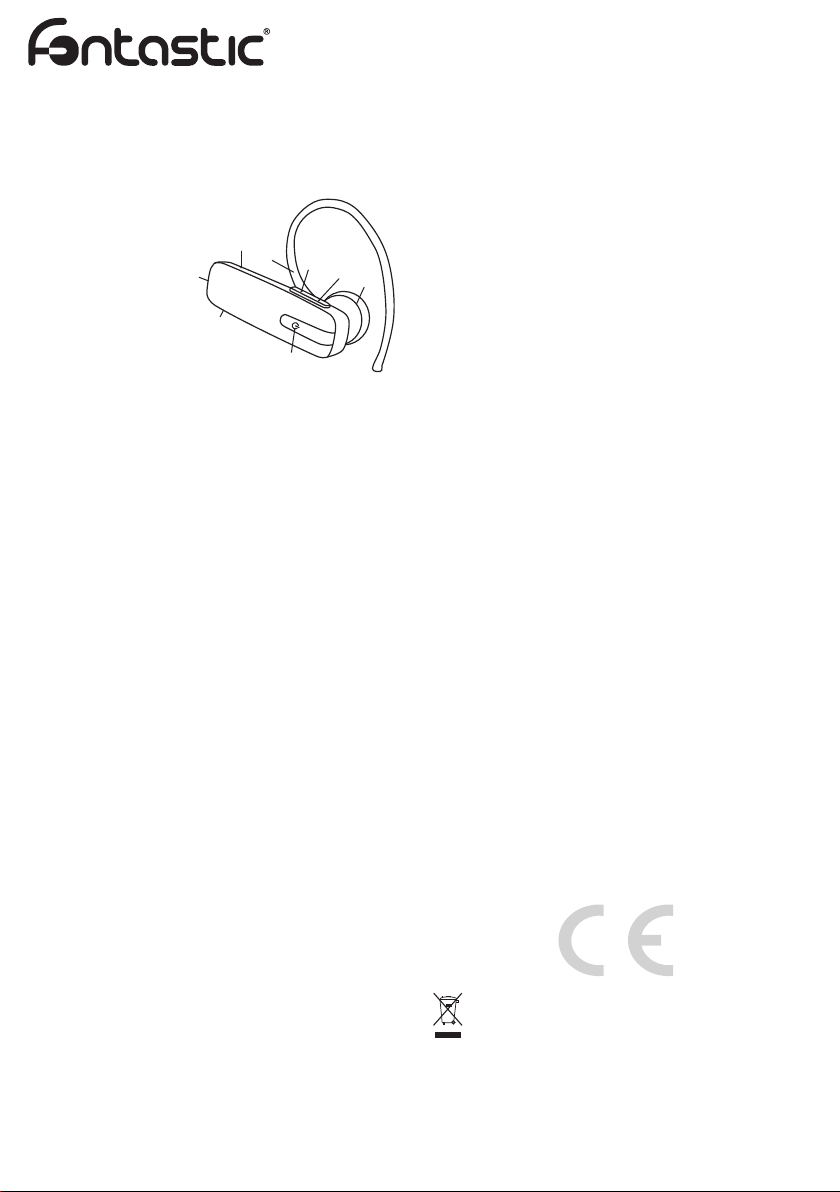
Headset-Funktionen:
1. LED Statusanzeige
2. Ohrbügel
3. Lautstärke -
4. Lautstärke +
5. Ohrhörer
6. Multifunktionstaste
7. Ladeanschluss
8. Mikrofon
Man kann das Headset am linken- oder rechten Ohr tragen. Stecken
Sie den Ohrbügel einfach auf der gewünschten Seite an.
Integrierten Akku laden:
Bevor Sie Ihr Headset benutzen, laden Sie bitte den internen Akku
vollständig auf. So laden Sie den Akku:
1. Verbinden Sie das USB-Ladekabel mit einer USB-Stromquelle
2. Stecken Sie den Ladestecker in den Ladeanschluss des Headsets
3. Beim Laden leuchtet die rote LED und erlischt nach vollständiger
Aufl adung. Sie können das Headset vom Ladekabel trennen.
4. Blinkt die rote LED während des Betriebs, muss das Headset
aufgeladen werden
5. Die Ladezeit beträgt etwa 1,5 bis 2 Stunden.
Headset ein- und ausschalten:
Einschalten:
Halten Sie die Multifunktionstaste ca. 4 Sekunden lang gedrückt, bis
die blaue LED 3 mal blinkt.
Ausschalten:
Halten Sie die Multifunktionstaste für ca. 4 Sekunden gedrückt, bis die
rote LED 3 mal blinkt.
Pairing:
Sie müssen Ihr Headset mit Ihrem Mobiltelefon „pairen“, bevor Sie es
benutzen können. Dieser Vorgang läuft in zwei Schritten ab: Ein Schritt
wird mit dem Headset, der andere mit dem Mobiltelefon ausgeführt.
Hinweis: Bitte beachten Sie, dass bei unterschiedlichen Mobiltelefonen
auch unterschiedliche Pairing-Methoden angewandt werden.
So pairen Sie Ihr Headset:
1. Stellen Sie sicher, dass das Headset ausgeschaltet ist. Drücken und
halten Sie die Multifunktionstaste für ca. 7 Sekunden lang gedrückt.
Zunächst blinkt die Blaue LED 3 mal, halten Sie die Taste weiterhin
gedrückt und lassen Sie diese nicht los bis die LED abwechselnd
Rot und Blau blinkt. Dies zeigt an, dass sich das Headset im Pairing Modus befi ndet.
2. Suchen Sie im Bluetooth® -Menü Ihres Telefons nach verfügbaren
Audiogeräten. Das Telefon sollte nun anzeigen, dass es das „Nat“ Headset gefunden hat. Bestätigen Sie, dass Mobiltelefon und
Headset miteinander gepairt werden sollen.
3. Wenn Sie nach einer PIN gefragt werden, geben Sie „0000“ ein.
Ihr Telefon bestätigt, dass das Pairing erfolgreich war.
Hinweis: Falls Sie nicht sicher sind, wie das Pairing bei Ihrem
Mobiltelefon funktioniert, schauen Sie bitte in der Bedienungsanleitung
des Mobiltelefons nach. Bitte beachten Sie, dass das Pairing gewöhnlich innerhalb einer bestimmten Zeit ausgeführt werden muss.
Telefonieren:
Über das Mobiltelefon anrufen
Wenn Ihr Mobiltelefon mit dem Headset gepairt ist, können Sie Anrufe
ganz normal über das Mobiltelefon erledigen. Der einzige Unterschied
besteht darin, dass Ohrhörer und Mikrofon des Headsets statt Mikrofon
und Lautsprecher am Mobiltelefon genutzt werden.
Einen Anruf annehmen
Wenn Sie angerufen werden, hören Sie einen Klingelton im Headset.
Zum Annehmen des Anrufes drücken Sie die Multifunktionstaste.
1
2
3
8
4
5
7
6
D
Hinweis: Bitte beachten Sie, dass Sie Ihr Mobiltelefon so einstellen
können, dass es Anrufe automatisch annimmt und Sie nicht einmal die
Multifunktionstaste drücken müssen. In der Bedienungsanleitung Ihres
Mobiltelefons erfahren Sie mehr über diese Einstellung.
Gespräch beenden
Zum beenden eines laufenden Gespräches drücken Sie kurz die
Multifunktionstaste. Falls Ihr Gesprächspartner aufl egt, wird der Anruf
automatisch beendet.
Ablehnen von Anrufen
Um ein eingehendes Gespräch abzulehnen drücken Sie die
Mulitfunktionstaste für 3 Sekunden. Es ertönt ein akkustisches Signal.
Sprachwahl
Drücken Sie während sich das Headset im Stand-by-Modus befi ndet
(also kein Gespräch läuft) die Lautstärke- Taste für 3 Sekunden, ein
akkustisches Signal ertönt. Sprechen Sie nun den Anrufnamen aus.
Ihr Telefon wählt nun die gewünschte Nummer.
Hinweis: Damit Sie die Sprachwahl-Funktion Ihres Headsets benutzen
können, muss Ihr Mobiltelefon Sprachwahl unterstützen, entsprechende Sprachmuster müssen im Telefon gespeichert sein.
Wahlwiederholung
Während sich das Headset im Stand-by-Modus befi ndet (also kein
Gespräch läuft), drücken Sie 2 mal die Multifunktionstaste, ein
akkustisches Signal ertönt. Ihr Telefon wählt nun die zuletzt gewählte
Rufnummer erneut.
Hinweis: Diese Funktion arbeitet nur mit Bluetooth
Handsfree-Profi l unterstützen.
Gespräch zwischen Headset und Mobiltelefon übergeben
Während eines Gesprächs können Sie das Gespräch zwischen dem
Headset und Mobiltelefon hin- und her übergeben, indem Sie die
Multifunktionstaste für etwa 3 Sekunden gedrückt halten. Wiederholen
Sie den Vorgang um zum Headset zurückzukehren.
Hinweis: Bitte beachten Sie, dass Ihr Mobiltelefon die Gesprächs-
übergabe unterstützen muss. Falls Sie nicht vom Headset aus das
Gespräch zurückgeben können, verwenden Sie bitte das Handy.
Mikrofon Stummschaltung
Drücken Sie während einem Gespräch die Lautstärke - Taste für 3
Sekunden. Das Mikrofon ist deaktiviert. Wiederholen Sie den Vorgang
um das Mikrofon wieder zu aktivieren.
Lautstärke einstellen
• Zum Erhöhen der Lautstärke drücken Sie die „Lautstärke + Taste“,
bis die gewünschte Lautstärke erreicht ist.
• Zum Vermindern der Lautstärke drücken Sie die „Lautstärke - Taste“,
bis die gewünschte Lautstärke erreicht ist.
Technische Daten:
• BT V.2.1 / Headset und Hands-free Profi le
• Frequenzbereich: 2.402-2.480GHZ, 2.4G ISM band
• Batterie Typ: Wieder aufl adbarer Lithium Polymer Akku 80mAh
• Typische Sprechzeit: Bis zu 4 Stunden
• Typische Standbyzeit: Bis zu 100 Stunden
• Typische Ladezeit: 1,5 - 2 Stunden
Falls Sie Technischen Support benötigen, kontaktieren Sie bitte unser
Support-Team per E-Mail unter der Adresse [email protected].
Hiermit erklären wir, dass dieses Gerät die CE Kennzeichnung gemäß
den Bestimmungen und Vorgaben trägt.Es entspricht somit den grundlegenden Anforderungen der R&TTE- (1999/5/EG), EMV-Richtlinie
2004/108/EG sowie der Niederspannungsrichtlinie 2006/95/EG.
Unter www.fontastic.eu fi nden Sie die komplette Konformitätserklärung.
Hinweis zum Umweltschutz:
Ab dem Zeitpunkt der Umsetzung der europäischen Richtlinie
2002/96/EU in nationales Recht gilt folgendes: Elektrische und
elektronische Geräte dürfen nicht mit dem Hausmüll entsorgt
werden. Der Verbraucher ist gesetzlich verpfl ichtet, elektrische
und elektronische Geräte am Ende ihrer Lebensdauer an den dafür
eingerichteten, öffentli-chen Sammelstellen oder an die Verkaufstelle
zurückzugeben. Einzelheiten dazu regelt das jeweilige Landesrecht.
Das Symbol auf dem Produkt, der Gebrauchsanleitung oder der
Verpackung weist auf diese Bestimmungen hin. Mit der Wiederverwertung, der stoffl ichen Verwertung oder anderer Formen der Verwertung
von Altgeräten leisten Sie einen wichtigen Beitrag zum Schutz unserer
Umwelt. In Deutschland gelten oben genannte Entsorgungsregeln, laut
Batterieverordnung, für Batterien und Akkus entsprechend.
®
-Telefonen, die das
V1_06_15
Page 2
BT Headset „Nat“
User Manual
Congratulations
Congratulations on your purchase of the Nat headset. This headset
allows you to communicate wirelessly through your mobile phone and
includes a built-in microphone and earphone.
Package Contents:
• Headset Nat
• Ear hook
• USB Charger Cable
• User Manual
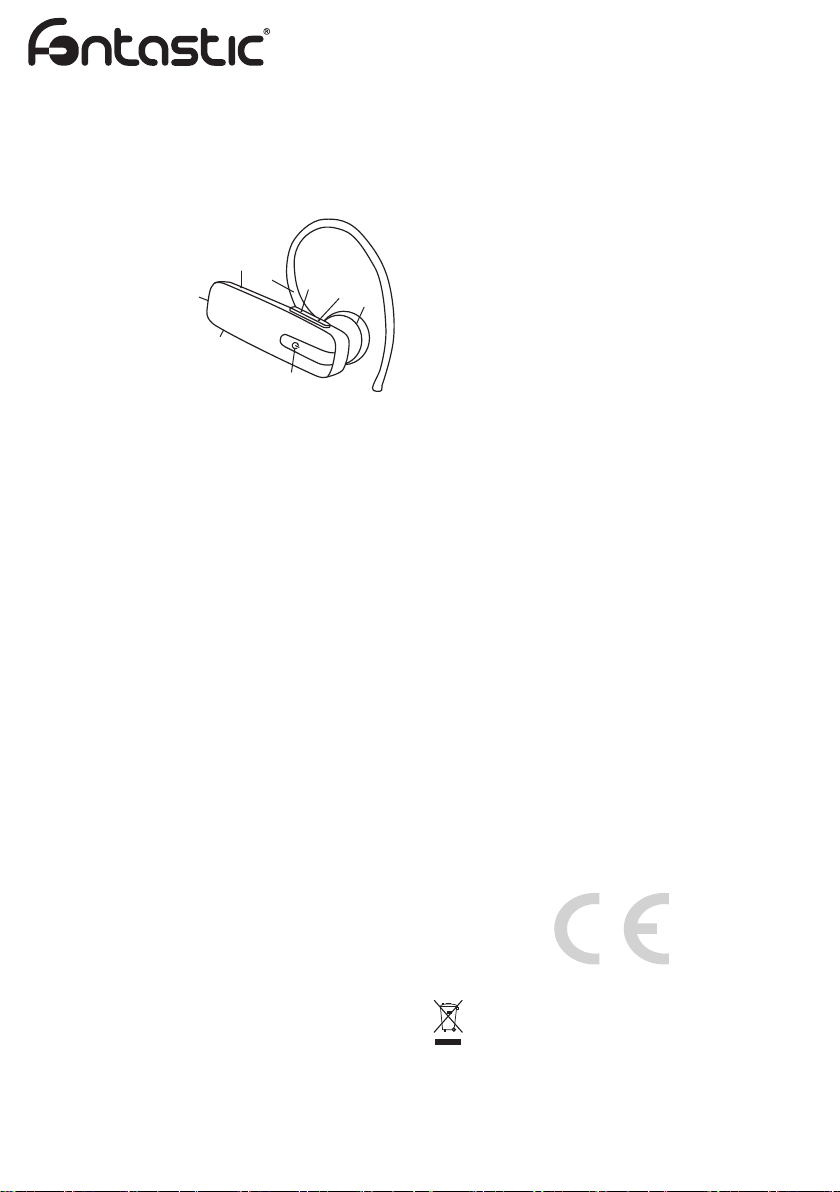
Headset overview:
1. Status LED
2. Ear hook
3. Volume -
4. Volume +
5. Earphone
6. Multifunction key
7. Charging port 8. Microphone
The headset can be worn on either ear. Just clip the ear hook on to the
preferred side.
Charging the internal battery:
Before using your headset, please charge the internal battery
completely.
To charge the battery:
1. Connect the USB Charger to a USB charging port.
2. Plug the adaptor‘s connector into the charging port of Nat
3. While charging, the red LED light will stay on and turn off when
charging is complete. You can then unplug the adaptor‘s connector
from the headset and disconnect the adaptor from the outlet.
4. During normal use you see the red LED blinking, please charge the
Headset
5. Charging time is about 1,5 - 2 hours
Switching the headset on or off:
To switch on:
Press and hold the multifunction key for 4 seconds until the blue LED
fl ashes 3 times.
To switch off:
Press and hold the multifunction key for 4 seconds until the red LED
fl ashes 3 times.
Pairing Procedure:
Your Headset needs to be paired to your Bluetooth® mobile phone
before it can be used. This is a two part process; one part is carried out
on the headset and the other is carried out on the mobile phone.
Note that different mobile phones use different methods of pairing.
To pair your Headset:
1. Make sure that the Headset is powered off. Press and hold the
multifunction key for about 7 seconds. The blue LED will fl ashes
3 times, keep holding down until the LED fl ashes red and blue. This
indicates that the Headset is in pairing mode.
2. Use your phone‘s menu to search for Bluetooth
phone should indicate it has found the „Nat“ headset. Confi rm that
you want to pair your mobile phone and headset together.
3. When asked for a pin key, enter: „0000“. Your phone will confi rm
that pairing has been successful.
Note that there is usually a time limit to pair devices.
If you are unsure how to go through the pairing process on your mobile
phone, please refer to the user manual.
Phone call use
Making a call from the mobile phone
While your mobile phone is paired with your headset, you can use the
mobile phone to make phone calls in the same way as normal. The
only difference will be that the earphone and microphone functions of
the head set will be used instead of the phone‘s.
Answering a call
To answer a call after a ring tone heard in your headset, simply press
the multi-function key.
1
2
3
8
4
5
7
6
®
audio devices. The
GB
Note: You can set your mobile phone to automatically
answer calls, which means you do not even need to press the
multi-function key. Please refer to your mobile phone‘suser guide
for more information about this setting.
Ending a call
During a call, press the multifunction key to hang up. If the other person
hangs up fi rst, then the call will end automatically.
Rejecting Calls
Press the multifunction key for 3 seconds during an incoming phone
(tone appears) call to reject the call.
Voice dialling through the headset
When the headset is in standby mode (not in conversation), press the
Volume- key for 3 seconds. You will hear a short tone.
Speak the voice tag immediately. Your phone will make the call.
Note: To use voice dialling, the corresponding voice profi les must be
stored in your Phone. Your Mobile must also support this function.
Last number redialling
When the headset is in standby mode (not in conversation), double
press the multifunction key, a tone appears and your phone will re-dial
the last number that you called.
Note: This function only works on Bluetooth
Hands-free profi le.
Transferring a single call
During a call, you can press and hold the multifunction key for 3
seconds (tone appears), to switch the conversation between the
headset and the mobile phone. Repeat the operation to return.
Note: Please note that your mobile phone have to support this function.
If your mobile phone does not support it please use it to transfer the
call back to your headset.
Microphone Mute
While talking using the headset press the volume - key 3 seconds to
mute the microphone. Repeat the operation to activate the headsets
microphone.
Adjusting the volume
• To increase the volume, briefl y press the increase volume+ key.
• To decrease the volume, briefl y press the decrease volume- key.
Specifi cation
• BT V 2.1
• Supports Bluetooth Headset and Hands-free Profi le
• RF Frequency: 2.402-2.480GHZ, 2.4G ISM band
• Rechargeable 80mAh Li-Polymer Battery
• Talk time: Up to 4 hours
• Standby time: Up to 100 hours
• Nominal charging time: Max 1.5- 2 hours
In case you need technical support, please contact our support-team
by e-mail under [email protected]
Registration and Safety
Certifi cation/General Information
We hereby declare, that this device carries the CE mark in accordance
with the regulations and standards. It conforms with the fundamental
requirements of the R&TTE- (1995/5/EC), EMC directive 2004/108/EC
as well as the Low Voltage Directive 2006/95/EC.
You can fi nd the complete declaration of conformity under
www.fontastic.eu.
Note on environmental protection:
After the implementation of the European Directive 2002/96/ EU
in the national legal system, the following applies: Electrical
and electronic devices may not be disposed of with domestic
waste.Consumers are obliged by law to return electrical
and electronic devices at the end of their service lives to the public
collecting points set up for this purpose or point of sale. Details of this
are defi ned by the national law of the respective country. This symbol
on the product, the instruction manual or the package indicates that a
product is subject to these regulations. By recycling, re-using the materials or other forms of utilising old devices, you are making an important
contribution to protecting our environment.
®
phones that support the
V1_06_15
 Loading...