

Page 1
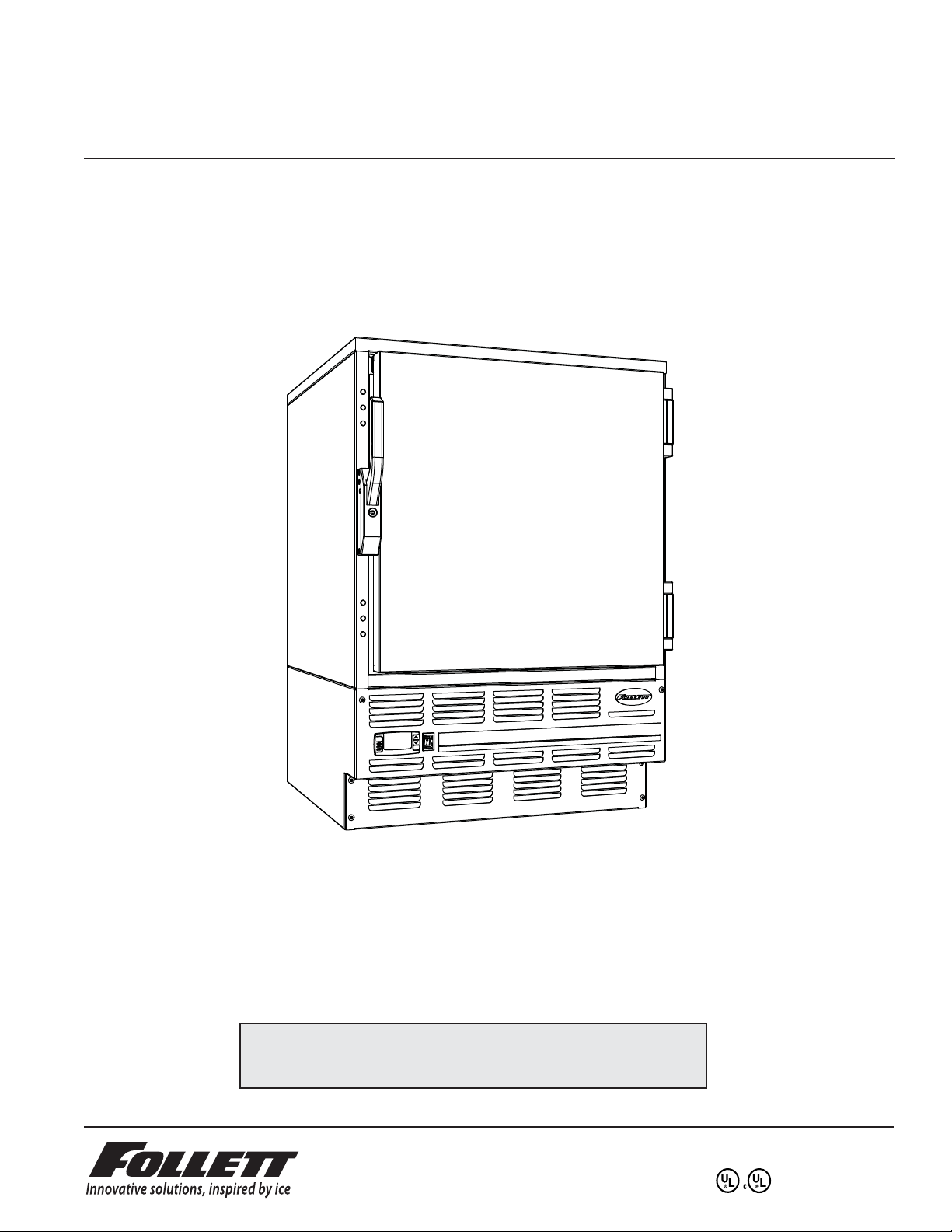
FZR Series
Undercounter Freezer
Order parts online
www.follettice.com
Installation, Operation and Service Manual
Serial numbers C45184 and above
Following installation, please forward this manual
to the appropriate operations person.
801 Church Lane • Easton, PA 18040, USA
Toll free (800) 523-9361 • (610) 252-7301
Fax (610) 250-0696 • www.follettice.com
00193474R00
Page 2

2
Page 3
Welcome to Follett
Follett equipment enjoys a well-deserved reputation for excellent performance, long-term reliability and
outstanding after-the-sale support. To ensure that this product delivers that same degree of service, we ask that
you take a moment to review this manual before beginning the installation. Should you have any questions or
require technical help at any point, please call our technical service group at (800) 523-9361 or (610) 252-7301.
Before you begin
After uncrating and removing all packing material, inspect the equipment for concealed shipping damage. If
damage is found, notify the shipper immediately and contact Follett Corporation so that we can help in the ling
of a claim, if necessary.
Speci cations
Series speci cations
FZR5
34" height for freestanding use or installation below standard 36" (915mm) high counter
4.0 cu ft (usable cubic volume)
FZR4-ADA
31.25" height for freestanding use or installation below 34" (864mm) high ADA-compatible counter
3.3 cu ft (usable cubic volume)
Electrical speci cations
115V, 60Hz, 1 phase
Full load amps: 8.0
Minimum circuit ampacity: 15 amp
Maximum size of branch circuit overcurrent device: 15 amp
Refrigeration speci cations
Refrigerant – R404A
Charge size – 10 oz
Maximum design pressures:
High side – 383psi
Low side – 175psi
Installation speci cations
Ambient temperature must not exceed 100 F (38 C).
The front louvered panel must be kept free of any cabinet trim or obstructions to ensure proper ventilation of the
refrigeration system.
Important cautions
• Equipment must be wired according to local and NEC codes.
• Always disconnect power before servicing freezer.
3
Page 4
Installation
2
1
3
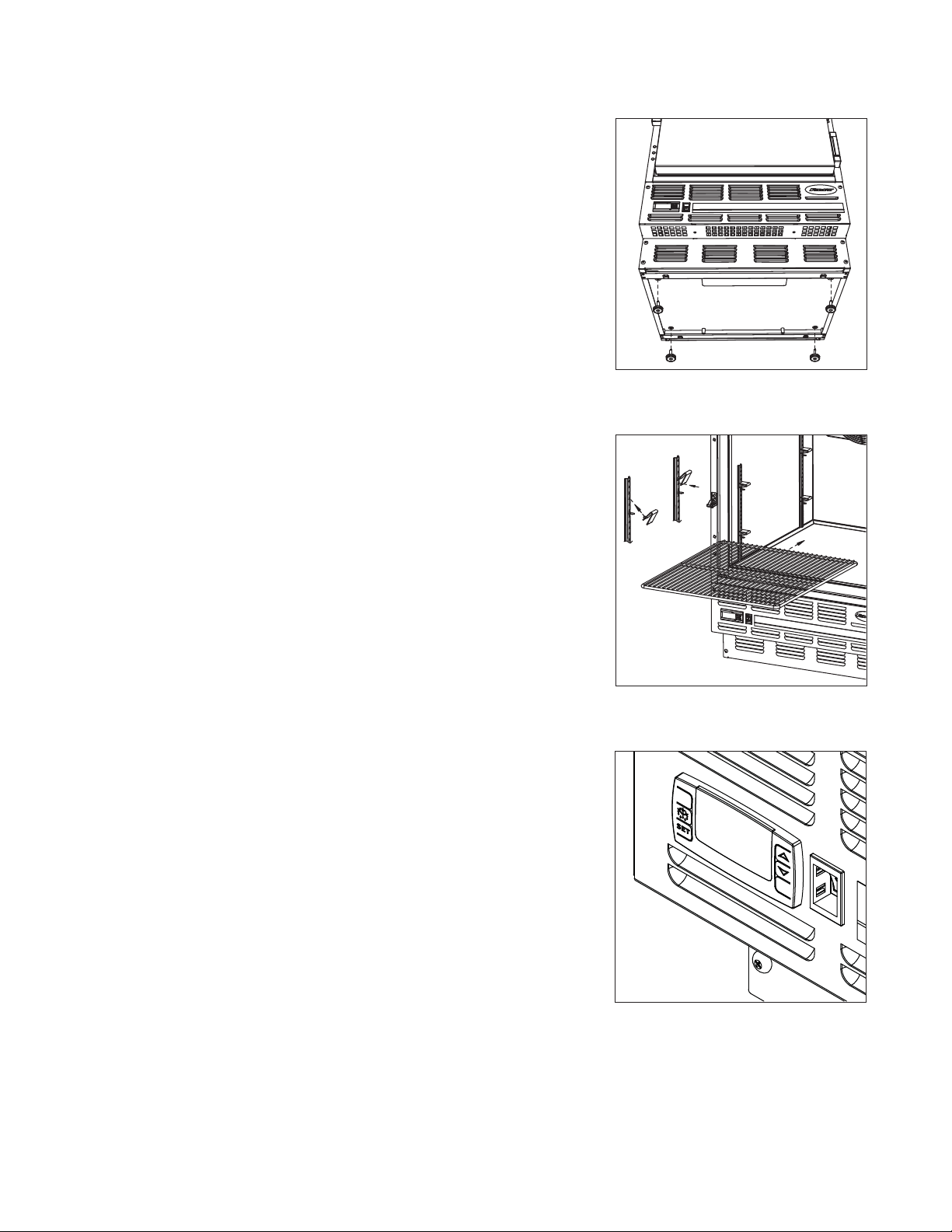
Installing legs – required
1. Remove legs from plastic bag packed inside freezer.
2. Tip freezer back and screw legs in all the way to stop (they will extend
1/8" below base of freezer).
3. Adjust legs as needed to level freezer in both directions. To access
legs, remove the lower front panel. Turn legs clockwise to extend legs.
Installing shelves – required
1. Remove shelves and shelf brackets packed inside freezer.
2. Install shelf brackets in pilasters (insert top tab, squeeze and push in
lower tab).
Fig. 1
Fig. 2
Changing temperature controller settings – optional
Follett’s temperature controller is pre-programmed with a -25 C (-13 F)
set point and degrees C display. The -25 C (-13 F) set point delivers a
temperature range of -23 to -25 C (-9 to -13 F). Follett’s controller set point
can be changed to deliver up to a -15 C (+5 F) temperature for applications
where a lower temperature is not desired (i.e. ice cream). See page 6 to
change controller settings.
Fig. 3
4
Page 5
Reversing the door swing – optional
1
2
1
1
2
NOTICE
When reinstalling latch and hinge screws, 242 blue Loctite* MUST be
applied to screws. Torque screws to 25 in-lbs.
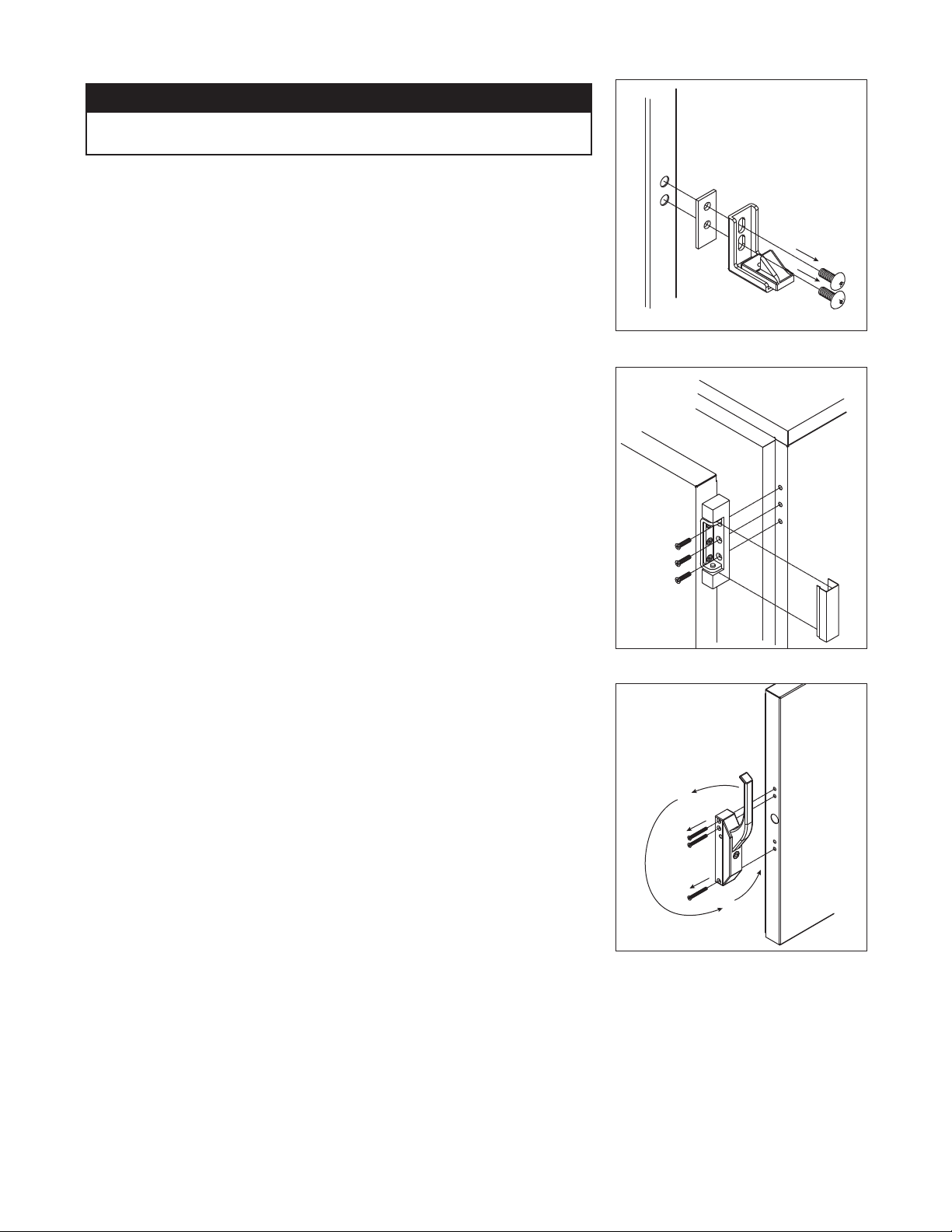
1. Remove screws and latch from refrigerator cabinet (Fig. 4.1).
2. Use at screwdriver to carefully remove (do not scratch) hinge
covers (Fig. 5.1).
Fig. 4
3. Support door and remove screws attaching hinge to refrigerator
cabinet (Fig. 5.2).
4. Cover hinge screw holes with screw hole plugs removed from
opposite side.
5. Reverse door. Apply 242 blue Loctite to hinge screws and reinstall
torqued to 25 in-lbs.
6. Reinstall latch on opposite side.
7. Remove screws and handle from door (Fig. 6.1).
8. Rotate handle (Fig. 6.2).
9. Apply 242 blue Loctite to latch screws and reinstall torqued to 25 in-lbs.
1
2
Fig. 5
Fig. 6
Loctite is a registered trademark of Henkel Corporation in the United States and other countries.
5
Page 6
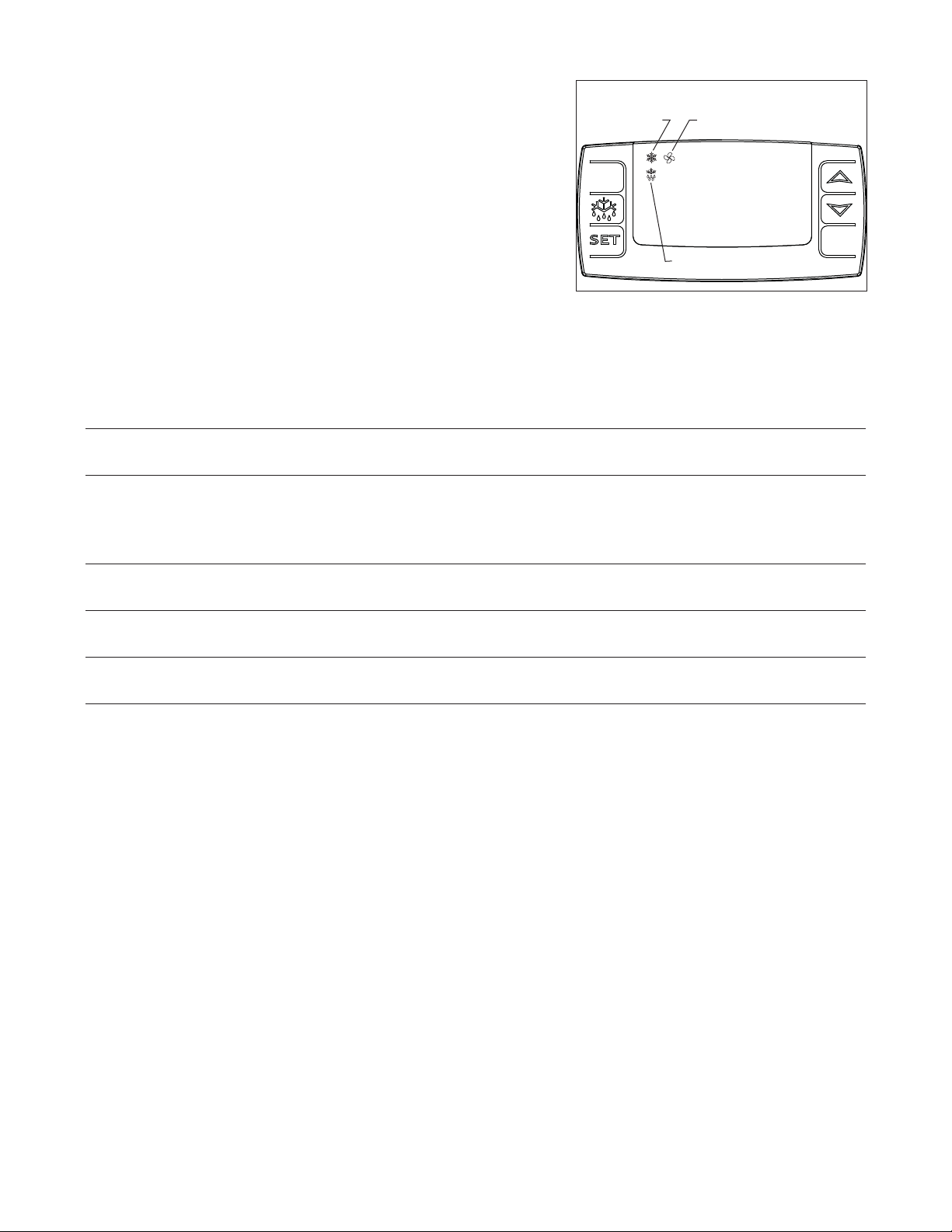
Controller operation
In normal operation the controller displays cabinet temperatures
in degrees C (default) or user-selected degrees F. Degrees C
temperatures are displayed to 1 decimal point.
Fig. 7
refrigeration
system
energized
evaporator
fan
energized
Rocker buttons to the right of the temperature display control all
programming functions.
The controller is pre-programmed with a -25 C (-13 F) set point
which provides a compressor cut-in at -23 C (-9 F) and cut-out at
-25 C (-13 F). The controller set point can be raised to -15 C (+5 F)
for nourishment applications where a lower temperature is not
desired (i.e. ice cream). Follow instructions for changing temperature
cut-out below.
All set points have a 2 C differential. The 2 C differential means that with a -25 C set point, for example, the
compressor will turn off at -25 C (-13 F) and turn on when it reaches -23 C (-9 F).
- 25
defrost
°C
To display temperature cut-out
STEP INPUT DISPLAY
1 Press and release SET Current cut-out temperature will display for approximately 5 seconds.
Display will return to current refrigerator temperature.
To change temperature cut-out
STEP INPUT DISPLAY
1 Press and hold SET for Current cut-out temperature displayed and °C (°F) will ash
3 seconds
2 Press UP or DOWN arrows to New cut-out temperature displayed
desired cut-out temperature
3 Press and release SET New cut-out temperature blinks three times, then current refrigerator
temperature will display
To change temperature display from degrees C to degrees F
Follett includes a programming key (part# 00193375) that changes the display and temperature settings from
degrees C to degrees F.
Programming freezer from a degree F key (download)
1. TURN OFF freezer.
2. Remove 6 screws from panel holding controller to access back of controller.
3. Insert degree F programmed key into 5 PIN receptacle on controller back.
4. TURN ON freezer.
5. Values from key automatically download to freezer (“dol” message blinks followed by “end”).
6. After 10 seconds display returns to current freezer temperature and controller will restart with new values.
7. TURN OFF.
8. Remove key.
9. Reinstall panel.
Note: An “Err” message displays for failed programming. Turn freezer OFF then ON to restart download, or
remove key to abort.
6
Page 7

Controller security
The controller panel can be locked to prevent inadvertent or intentional programming changes. In locked mode,
the controller will display cabinet temperature and cut-out set point only.
To lock the controller
1. Press the UP and DOWN ARROW buttons together for 3 seconds until “PoF” displays (will ash 3 times).
2. Programmer is now locked.
To unlock the controller
1. Press UP and DOWN ARROW buttons together for 3 seconds until “Pon” displays (will ash 3 times).
2. Programmer is now unlocked.
Controller programming key degrees C (optional accessory)
A controller programming key is available from Follett to provide fast and easy reprogramming of factory settings in
degrees C (part# 00193383).
7
Page 8

Operation
The temperature controller and probe indicate when the refrigeration system is required to turn on and off.
The refrigeration system removes heat from the cabinet interior and rejects it to the surrounding room air. When the
cabinet interior temperature reaches +2.2 C (+4 F) above the controller set point, the probe signals the controller to
turn the refrigeration system on. The normally-open controller contacts 4 and 5 close and energize the evaporator
and condenser fan motors, compressor and door heater. The snow ake and fan LED's on the controller will come
on to indicate the refrigeration system is on. The compressor uses a current-style starting relay and a starting
capacitor to start the compressor motor.
When the cabinet interior temperature falls to the set point, the probe signals the controller to turn the refrigeration
system off. The controller contact 5 reopens, which de-energizes the condenser fan motor and the compressor. The
snow ake LED will go out and the fan LED will remain on.
Any accumulated frost on the evaporator coils melts during the defrost cycle. Freezer products will remain at or
below -15 C (-5 F) during the defrost cycle. The condensate drains to a drain pan mounted along the condensing
unit. The heat from the condensing unit evaporates any condensate in the drain pan.
Temperature control
The temperature control system is preset by the factory to maintain a cabinet temperature of -23 C (-10 F). If
desired, the cut-out temperature can be raised as high as -15 C (5 F) by following the instructions on page 6
for changing the temperature set point. The 2 C cut-out differential will be maintained regardless of the controller
set point.
Defrosting
The FZR series undercounter freezers control frost accumulation on the evaporator through automatic timed defrost
cycles. The defrost cycle is initiated by the temperature controller every 4 hours. Contacts 4 and 5 on the controller
open and the refrigeration system is turned off. Contact 2 is closed and the defrost heater is energized. The melting
snow ake LED on the controller will come on, and the temperature display will read: “dEF” to indicate the freezer is
in the defrost cycle.
The heater warms the evaporator coil and drain pan to melt the frost and drain the water to the condensate pan.
The temperature controller monitors evaporator temperature using a probe embedded in the coil. The controller
terminates the defrost cycle when the evaporator temperature reaches +5 C (+41 F) or after 15 minutes of defrost
time, whichever occurs rst. As the defrost cycle terminates, the controller de-energizes the heater and restarts
the compressor and condenser fan. The snow ake LED on the controller will come on to indicate the refrigeration
system is running.
There is a 5 minute delay before the evaporator fan motor is re-energized. The fan LED on the controller will
come on to indicate the fan is running and the temperature display resumes displaying cabinet temperature. A
defrost cycle can be initiated manually at any time by depressing and holding the melting snow ake button for
approximately three seconds. As a safety feature, a temperature safety switch mounted on the evaporator will turn
off the defrost heater if the temperature of the evaporator reaches +27 C (+80 F) regardless of controller operation.
The FZR series freezers have been designed speci cally for the storage temperature–critical medications and
vaccines. Other storage applications may require modi cations of the factory-programmed defrost cycle settings.
Please consult Follett technical service of defrost modi cation is needed.
Cleaning
Use only non-chlorine-based cleaners. Cleaners containing chlorine can cause staining and pitting of the
stainless steel.
!
Interior – Using a sponge or soft cloth, clean unit with a non-abrasive, non-chlorinated, all-purpose detergent.
Exterior – Wipe exterior with a soft cloth in the direction of grain as needed. Stainless steel polish may be used to
enhance the nish of the unit.
8
Page 9

Annual cleaning
1
2
2
0
8
2
6
4
P
r
o
d
u
c
t
M
o
d
u
l
e
N
o
.
S
e
r
v
i
c
e
N
o
.
Easton Pennsylvania
MOTOR COMPRESSOR THER
MALLY PRO
TECTED
DESIGN PRESSURE HIGH SIDE
M
IN
.
B
RAN
CH CIRCUIT AMP
ACITY
MAX. BRANC
H C
IRCUIT FUSE SIZE
SINGLE
PHASE
LOW SIDE
L
THE USA
MA
DE I
N
O
Z
P
S
I
G
R
C
N
S
F
U
L
PART NO
HZ
CHARGE
A
M
P
S
R
A
M
P
S
U
VOLTS
CORPORATION
SERIAL NO
MODEL
FULL LOAD AMPS
REFRIGERANT
1
2
3
1
2
Removal of dust and other particulates from air intake areas
and the condenser is important for proper operation. Some
environments with large amounts of dust may require more
frequent cleaning.
1. Disconnect power to unit by turning switch on the lower
front panel to the OFF position, switching circuit breaker to
OFF position, and removing power cord from receptacle.
2. Remove lower front panel (Fig. 8.1).
Note: Front louvered panel may be completely removed
for easier cleaning by disconnecting the controller wiring
plugs from the freezer.
3. Remove drain pan (Fig. 8.2).
4. Clean drain pan with a non-abrasive, non-chlorinated all-
purpose detergent.
5. Reinstall drain pan.
6. Use a vacuum cleaner with brush attachment to clean
condenser through lower front panel and compressor
motor and related parts through lower rear panel.
7. Reinstall lower front panel.
Service
Fig. 8
Fig. 9
Latch adjustment
To adjust for proper latch engagement
1. Loosen striker plate mounting screws (Fig. 9.1).
2. Move striker plate up or down as required and tighten screws.
3. Test operation of latch.
To adjust for proper gasket seal
1. Loosen striker depth adjustment screw (Fig. 9.2).
2. Adjust stop in or out and tighten screws.
3. Test operation of latch.
Door gasket replacement
1. Remove existing gasket from mounting track.
2. Verify mounting track is free of any remaining gasket material.
3. Align new gasket with mounting track and press rmly in place.
4. Open and close door, checking for proper gasket seal without
pinching against freezer.
5. Adjust latch and or striker as necessary for proper door closure.
Fig. 10
Slide-out compressor tray
Follett’s slide-out compressor tray allows technicians to partially slide
the condensing unit from the freezer back without cutting refrigerant
lines.
1. Remove rear panel (Fig. 10.1).
2. Remove two bolts securing condensing unit to refrigerator base
(Fig. 10.2).
3. Gently slide condensing unit out (Fig. 10.3).
Note: Do not put undue strain on the refrigerant lines.
9
Page 10

Controller replacement
1. Disconnect power to unit.
a. Push front panel rocker switch to OFF position.
b. Disconnect power cord.
2. Remove 6 screws from front panel and slide panel forward to access back of controller.
3. Disconnect front panel and wiring harness from freezer at the 3, 4, and 5 pin connectors and door heater
connector to simplify replacement.
4. Push in on center of side brackets (on controller) to release and slide brackets back and off controller.
5. Push controller and wires out through front of front panel.
6. Using wiring schematic (attached to front panel and below) as a guide, remove wires one at a time from back
of existing controller and connect to corresponding terminals on replacement controller.
7. Insert replacement controller back through front of panel.
8. Slide brackets onto sides of controller and push against back of front panel.
9. Reconnect 3, 4, and 5 pin connectors of wiring harness to freezer.
10. Keeping wiring clear of condenser, replace front panel.
11. Restore power and test operation. Reprogram replacement controller if necessary.
Wiring diagram
120 VAC
1 PHASE
15 AMPS
COMP
BLK
WHT
CONDENSING UNIT
L1
L2
GND
GROUND SCREWS
EVAPORATOR
THERMISTOR
14
1110
1312
SR
FAN
WHT
WHT
WHT
CHAMBER
THERMISTOR
BLU
DOOR
HEATER
RED
GRN
WHT
RED
BLK
SAFETY SWITCH
DEFROST
FAN
EVAPORATOR UNIT
1
2
3
1
2
3
4
1
2
3
4
5
HEATER
DEFROST
BLK
WHT
WHT
1
2
3
1
2
3
4
1
2
3
4
5
WHT
RED
BLK
BLK
BLU
YEL
WHT
WHT
VIO
BLK
BLK
BLK
SUPPLY
VAC
97654321
10
11
12
10
Page 11

Refrigeration system
The FZR series -20 C (-4 F) freezer refrigeration system is designed to give many years of trouble-free service.
Except for routine cleaning of the air-cooled condenser and related parts, the refrigeration system requires no
service or maintenance. The system uses a thermostatic expansion valve and is critically charged. Access ttings
are provided for ease of service. However, the connection of refrigeration service hoses to the ttings will almost
invariably result in a signi cant change in the system charge. This change can adversely affect the performance
of your freezer. Therefore, Follett recommends that if hoses are ever connected to the refrigeration system for
service, the refrigerant should be recovered, the system evacuated, and recharged by weighing in the correct
refrigerant charge.
Note: Do not charge the system by pressures.
Checking refrigeration system pressures
1. Remove the rear access panel (Fig. 10).
2. Turn the power switch to the on position.
3. Following the instructions on page 6 verify that the temperature controller is set to the original factory
cut-in setting of -23 C (-9 F).
4. Allow the freezer to operate and stabilize at least 60 minutes, verifying the cut-out temperature is
being reached.
5. Connect refrigerant hoses to access ttings and measure air temperature at condenser intake grille.
6. Verify correct pressures with the temperature chart below.
7. Troubleshoot refrigeration system as needed.
Condenser inlet air temperature 70 F 80 F 90 F 100 F
Discharge pressure (psi) 197 225 255 285
Suction pressure (psi) 12 13 14 15
Note: Do not attempt to obtain correct refrigeration pressures by adjusting the system charge.
Refrigeration system diagram
COMPRESSOR
10oz. Charge
Low Psi
Vapor
EVAPORATOR FAN
EVAPORATOR
DEFROST HEATER
LOW SIDE
SERVICE PORT
HIGH SIDE
SERVICE PORT
High Psi
Vapor
FA N
Low Psi
Liquid
EVAPORATOR/DEFROST UNIT
HIGH PRESSURE VAPOR LOW PRESSURE VAPORHIGH PRESSURE LIQUID LOW PRESSURE LIQUID
TXV
HEAT EXCHANGE
11
DRYER
High Psi
Liquid
CONDENSING UNIT
Page 12

Freezer troubleshooting guide
Before calling for service
1. Check that unit is plugged in.
2. Test outlet with another appliance to verify power.
Symptom
Freezer does not operate
(no components run).
Compressor does not run.
Compressor and condenser fan do
not run.
Evaporator fan motor does not run.
Freezer does not shut off.
Possible cause
1. Power switch faulty or in OFF
position; loose connection.
2. Freezer not plugged in.
3. No power to cord.
4. Temp controller not energizing
components.
5. Probe not sensing cut in
temperature.
1. Thermal overload open or
defective.
2. Capacitor and/or relay defective.
3. Compressor defective.
1. No power on terminal 5 of
controller (during cooling).
1. No power on terminal 4 of
controller (during cooling).
1. Controller not sensing cut off
temperature.
2. Controller keeping refrigeration
system energized.
Solution
1. Turn power switch to ON position;
check switch and connections.
2. Connect plug.
3. Restore power.
4. Check controller contact terminals for
power. Replace controller if needed.
5. Replace controller and/or probe.
1. Allow to cool or replace.
2. Replace as required.
3. Replace compressor.
1. Replace controller
1. Replace controller.
1. Replace controller and/or probe.
2. Replace controller.
Freezer does not maintain
temperature (all components run).
Evaporator does not defrost.
If problems persist after following this basic troubleshooting guide, call Follett’s
technical service group at (800) 523-9361 or (610) 252-7301.
1. Condenser or evaporator coil
needs cleaning.
2. Faulty door gasket.
3. Excessively high ambient.
4. Refrigerant leak.
5. Incorrect refrigerant charge.
6. Plugged expansion valve.
7. Inefficient compressor.
8. Evaporator coil blocked with ice.
1. Defective defrost heater.
2. Faulty heater safety switch.
3. No power on terminal 2 of
controller (during defrost).
12
1. Clean coils as needed.
2. Replace door gasket.
3. Maximum recommended ambient is
100 degrees F.
4. Locate and repair leak.
5. Recover, evacuate and weigh in
correct charge.
6. Replace expansion valve.
7. Consult technical service.
8. Depress defrost button on controller
to defrost coil.
1. Replace defrost heater
2. Replace switch.
3. Replace controller.
Page 13

Accessories
Dip Switch OFF (factory default setting) ON
1 No alarm delay 45 minute alarm delay
2 Auto reset (alarm stops automatically as Manual reset of alarm (user must press
soon as temperature returns to set range) RESET button to stop audible alarm even if
temperature has returned to set range)
3 & 4 Audible alarm on (no snooze with both off) No audible alarm
3 Enables 5 min alarm “snooze” Enables 45 min alarm “snooze”
when reset button is pressed (3 off with 4 on) when reset button is pressed (3 on with 4 off)
AC
AC
Black
White
Red
NC
NO
Com
Output
Sensor
Power
in
Temperature alarm
Before installing alarm
1. Remove supplied 9-volt back-up battery from packing
box.
2. Remove 2 screws from module face and remove
faceplate.
3. Install back-up battery on battery connector.
4. Locate DIP switches on the back of the faceplate
(Fig. 11).
5. Review the factory DIP switch settings (Fig. 12) and
make any changes required to meet the needs of your
speci c application.
6. Reinstall faceplate.
Fig. 12
Fig. 11
POWER
SENSOR
OFF
OFF
OFF
OFF
OUTPUT
Installing alarm
Fig. 13
1. Mount alarm in desired location with screws (supplied
by others) through back of housing. Do not place
undue strain on probe cable.
Note: Do not modify length of probe wire. Probe will
not measure temperature correctly if wire length is
changed.
2. Plug power cord into 110 outlet.
3. Push center tab of short bottle bracket into top of rear
left pilaster (Fig. 13).
Note: Use longer bottle bracket for FZR5 freezers using
cut-out upper shelf accessory.
4. Fill bottle with glycerin or other liquid to increase
accuracy of readings by simulating the internal
temperature of medications.
5. Insert bottle into bottle bracket.
Fig. 14
6. Route probe through hole in refrigerator back and push
probe down through gasketed bottle top.
Note: Alarm probe must be placed in bottle for
proper system operation. Refer to Fig. 14 if attaching
alarm to central monitoring or central alarm system. A
SPDT 1 amp 24V AC resistive relay is provided for this
connection.
13
Page 14

Setting alarm temperatures
Fig. 15
1. After the installation is complete, allow 30 minutes for the system to
stabilize to ambient temperature.
2. Calibrate temperature alarm to refrigerator display
a. Calibration is best done with the alarm probe removed from the
probe bottle and placed in the vicinity of the temperature controller
probe. Allow at least 15 minutes for the probe temperature to stabilize.
b. Note the temperature value displayed on the refrigerator controller
and subtract the temperature value displayed on the alarm. This value
is the differential.
Example: Temperature controller: 36 F Alarm: 38 F
Controller – Alarm = Differential 36 – 38 = -2
c. Press SET until “CAL” is displayed (Fig. 15.1).
d. Press SET again to display “CAL” value (Fig. 15.1).
2
e. Press top or bottom of ADJUST arrow to display the calculated
differential (-2°F in example above).
3. Set high alarm limit
a. Press SET until “HSP” is displayed (Fig. 15.1).
b. Press SET again to display HSP value (Fig. 15.1).
c. Press top or bottom of ADJUST arrow until desired HSP value is
displayed (Fig. 17.2).
4. Set low alarm limit
a. Press SET until “LSP” is displayed (Fig. 15.1).
b. Press SET again to display LSP value (Fig. 15.1).
c. Press top or bottom of ADJUST arrow until desired LSP value is displayed (Fig. 15.2).
5. Display will return to temperature display in approximately 15 seconds.
6. Place alarm probe back in probe bottle.
1
Viewing high/low log
Follett’s alarm module allows users to view the highest and lowest temperatures recorded since the last time the
RESET button was pressed.
To view high and low log values
1. Press SET button until “HI” appears.
2. Press SET button to view HI log value.
3. Press SET button until “LOW” appears.
4. Press SET button to view low log value.
5. Press RESET button to clear log.
Alarm operation facts
The back-up battery will continue to provide alarm protection during power failure but will alarm ONLY if
temperatures go out of the selected range. During power failure the alarm face will be dark but temperatures can
be read by pressing the RESET button.
Because the temperature alarm display simulates the true temperature of stored medications rather than the air
temperature inside the freezer, we suggest that staff refer to the alarm display to log temperatures for JCAHO
compliance.
Automated medication dispensing and inventory systems interface
(Pyxis*, Omnicell*, MedSelect*, etc.)
Follett refrigerators and freezers are compatible with most major automatic medication and inventory systems.
In some cases a Follett bracket accessory is required. Contact factory for further information.
*Pyxis is a registered trademark of Cardinal Health in the United States and other countries.
*Omnicell is a registered trademark of Omnicell, Inc. in the United States.
*MedSelect is a registered trademark of AmerisourceBergen Technology Group, in the United States.
14
Page 15

Replacement parts
5
1
2
11
10
9
4
3
12
Evaporator
Reference # Description Part #
1 Cover, evaporator, FZR5 (includes 00152892) 00155564
1 Cover, evaporator, FZR4-ADA (includes 00152892) 00155572
2 Fan guard 00152892
3 Fan blade 00152991
4 Bracket, fan motor 00152983
5 Fan motor, evaporator 00104919
6 Defrost heater 00152645
7 Drain pan, evaporator, FZR5 00162511
7 Drain pan, evaporator, FZR4-ADA 00155614
8 Evaporator 00151563
9 Heater safety switch 00153932
10 Expansion valve (includes 00106534) 00155671
11 Insulation, bulb 00106534
12 Evaporator cover guard 00157586
13 Clips, defrost heater (2 needed) 00161554
6
13
8
7
15
Page 16

3
2
4
7
1
8
5
6
Condensing Unit
Reference # Description Part #
Condensing unit 00153874
1 Condenser 00157339
2 Shroud, condenser 00157347
3 Condenser fan blade 00105007
4 Condenser fan motor 00104992
5 Fan motor bracket 00157412
6 Compressor 00157313
7 Starting capacitor 00104968
8 Filter drier 502724
Not shown Cap, starting capacitor 00105627
Not shown Starting relay 00157305
Not shown Overload protector 00104984
16
Page 17

12
1
11
9
1
3
8
10
2
7
6
4
5
Hardware
Reference # Description Part #
1 Latch & striker includes screws 00105023
2 Latch screws, 3 per latch 00103507
3 Door, FZR5 (includes gasket - 21 3/8" x 21 3/8") 00105015
3 Door, FZR4-ADA (includes gasket - 21 3/8" x 18 5/8") 00113910
4 Hinge, each - 2 required, includes screws 00105031
5 Hinge screws, each - 6 per hinge 00105080
6 Gasket, FZR5 00125732
6 Gasket, FZR4-ADA 00127738
7 Strip sealer (set of 4) FZR5 00130138
7 Strip sealer (set of 4) FZR4-ADA 00130146
8 Door heater, FZR4-ADA (includes 00130146) 00155549
8 Door heater, FZR5 (includes 00130138) 00155531
9 Striker screws, each - 2 per striker 502287
10 Shelf 00152876
11 Shelf support, snap in, each 00156240
12 Pilaster, each 00105346
Not shown Thumbscrews, set of 8 00105353
17
Page 18

Hardware & electrical components
4
1
2
3
5
6
Reference # Description Part #
1 Temperature controller 00900092
Not shown Temperature probes & harness 00155705
2 Power switch 00114371
3 Front panel (includes 00114371 and 00105379) 00157669
4 Front panel screws, each - 6 per panel 00105379
Not shown Rear panel, includes screws 00130161
Not shown Rear panel screws, each - 6 per panel 00105387
5 Condensate pan 00155622
6 Evaporator drain line, sold by the foot 203627
Not shown Freezer programming key, degrees F 00193375
Not shown Freezer programming key, degrees C 00193383
Not shown Power cord 00103903
Temperature alarm accessory
Reference # Description Part #
Not shown Bottle kit (includes bottle, bracket and gasket) 00113779
Not shown Controller kit (includes battery, probe and power supply) 00108175
Not shown Gasket, bottle 00112029
Not shown Bracket, bottle 00112011
Not shown Bottle 00112037
Not shown Battery 00112177
Not shown Screws, (includes two for securing cover) 00115063
Not shown Label, controller cover 00115071
Not shown Temperature probe 00115097
18
Page 19

19
Page 20

801 Church Lane • Easton, PA 18040, USA
Toll free (800) 523-9361 • (610) 252-7301
Fax (610) 250-0696 • www.follettice.com
00193474R00
04/08
 Loading...