

Page 1
V3
User Manual & Warranty
Foc.us V3
Multi-function Electrical Brain Stimulator
English
Page 2

INTRODUCTION
This guide will teach you how to use your Foc.us V3 brain stimulator.
If you are new to brain stimulation you may be nervous. Don’t be. Right now your brain is full of
electrical ows.
Stimulation simply lets you alter those ows a little. Read the warning below and provided
you have none of the listed contra-indications the worst case scenario is you may nd brain
stimulation mildly uncomfortable.
Ready? Then let’s take charge.
Important!
You should not use the Foc.us stimulator if you suer from epilepsy, seizures, brain lesions,
bipolar depression, or severe heart disease. Immediately stop using Foc.us if you experience
short short-term negative eects. Foc.us is not a toy and is not intended to be used by anyone
under the age of 18 years old. If using external electrodes, it is not recommended to place
electrodes in patterns that dier from the default Foc.us congurations. Do not position
electrodes in a manner where current may pass through the brainstem. Do not position
electrodes over cuts, grazes, or damaged skin.
Allow at least 48 hours between each use of Foc.us. Always place wet sponges between the
electrodes and your skin when using Foc.us. Do not touch the black silicone electrodes when
using Foc.us as you may get burned. Take extra care if using hydrogels.
Self-administration of brain stimulation puts the safety responsibility squarely in your hands.
Again
Foc.us V3 is designed to be used by healthy adults who do not suer from epilepsy, brain
conditions, have a metallic implant such as a skull plate, or have other implants such as a
cochlear implant or pace-maker. The sole purpose of Foc.us is to improve your brain. You are
responsible for the administration of your tDCS so look after yourself.
WARNING
If you suer from epilepsy, brain lesions, bipolar depression of severe
heart disease you should not use a Foc.us stimulator. If you experience
short term negative eects with Foc.us you should immediately stop
using it. This is not a toy and is not intended to be used by anyone
under the age of 18 years old. Do not position the electrodes over cuts,
grazes or damaged skin. Allow at least 48 hours between usage. Do
not directly touch the electrodes as this can lead to burns. Always use
electrodes with wet sponges.
2
Page 3
YOUR FOC.US V3
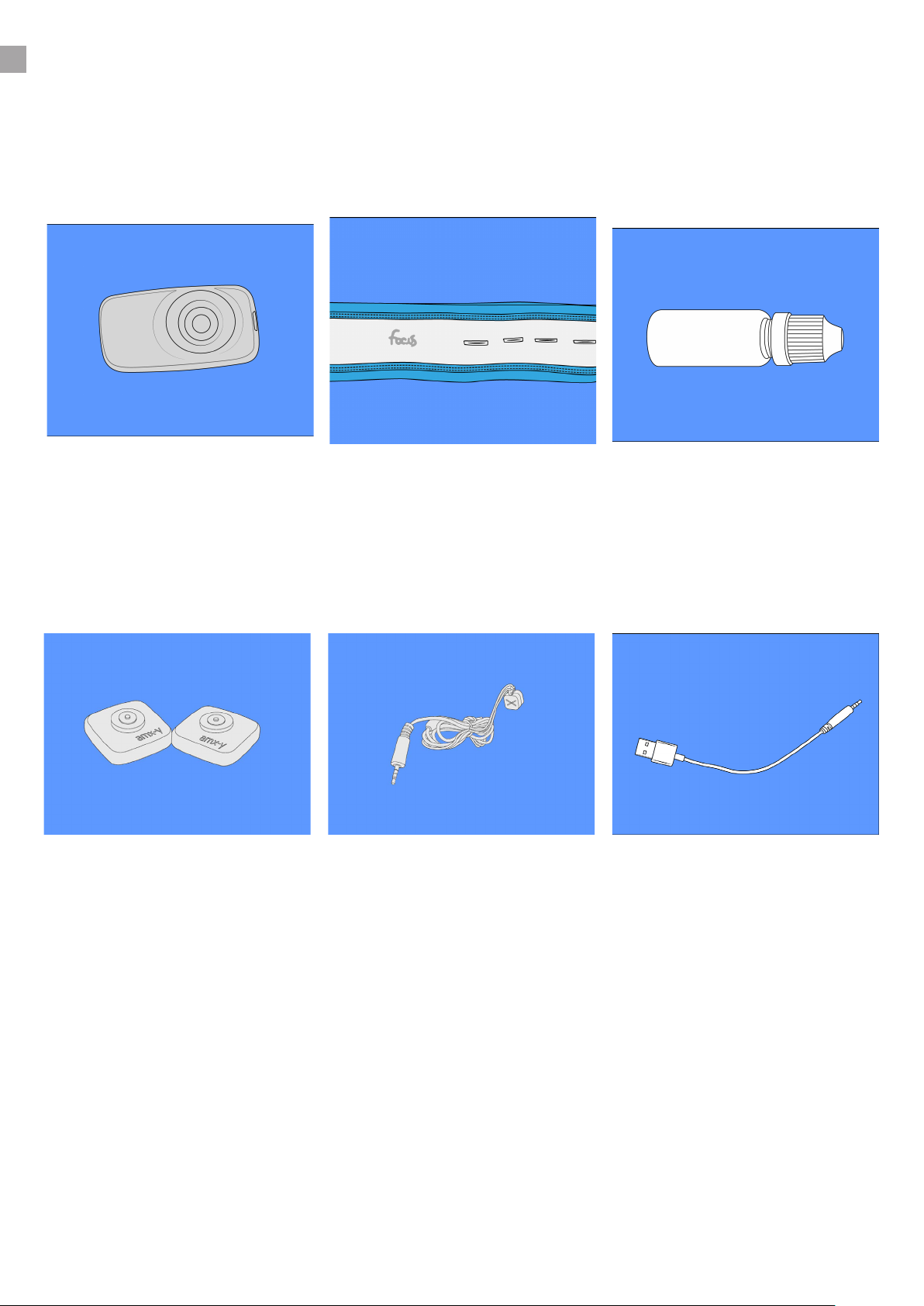
Understand the dierent parts included with your V3 brain stimulator.
V3
This is the V3 electrical brain
stimulator.
amx-y electrodes
This is the amx-y conductive
silicone sponge electrode cjup.
Foc.us Headband
This is the Foc.us headband
with amxy-y electrode holes.
X/Y Magnetic Cables
The magnetic stimulation
electrode cables. X is anode, Y
is cathode by default.
Electrode Water Bottle
Use this small dropper bottle
to hold water for sponges.
USB Charging Cable
Connect to any USB outlet
power source to recharge.
● Always store your V3 in the supplied case when not in use. Squeeze any excess liquid from
the sponges and place them in the electrodes. Ensure the lid of the supplied water bottle is
tightly closed before returning to its place.
● The silicone electrodes can be cleaned with warm water. Do not get the V3 wet.
3
Page 4

CONTENTS
1.
2.
3.
Getting Started
Introduction ................................................................................................................ 2
Included with V3 ......................................................................................................... 3
Navigating your V3 .................................................................................................... 5
Foc.us V3
Foc.us V3 : Multi-function Electrical Brain Stimulator .......................................... 6
Step by step instructions ......................................................................................... 7
Electrode placements ............................................................................................... 8
Electrode setup details .............................................................................................. 9
Stimulating Possibilities
V3 Stimulation Modes ............................................................................................. 10
4.
V3 Programs ............................................................................................................. 11
Experimental Programs .......................................................................................... 13
Addendum
Specications ........................................................................................................... 14
Troubleshooting ....................................................................................................... 14
Warranty & guarantee ............................................................................................. 15
Technical support contacts ..................................................................................... 16
4
Page 5
NAVIGATING YOUR V3
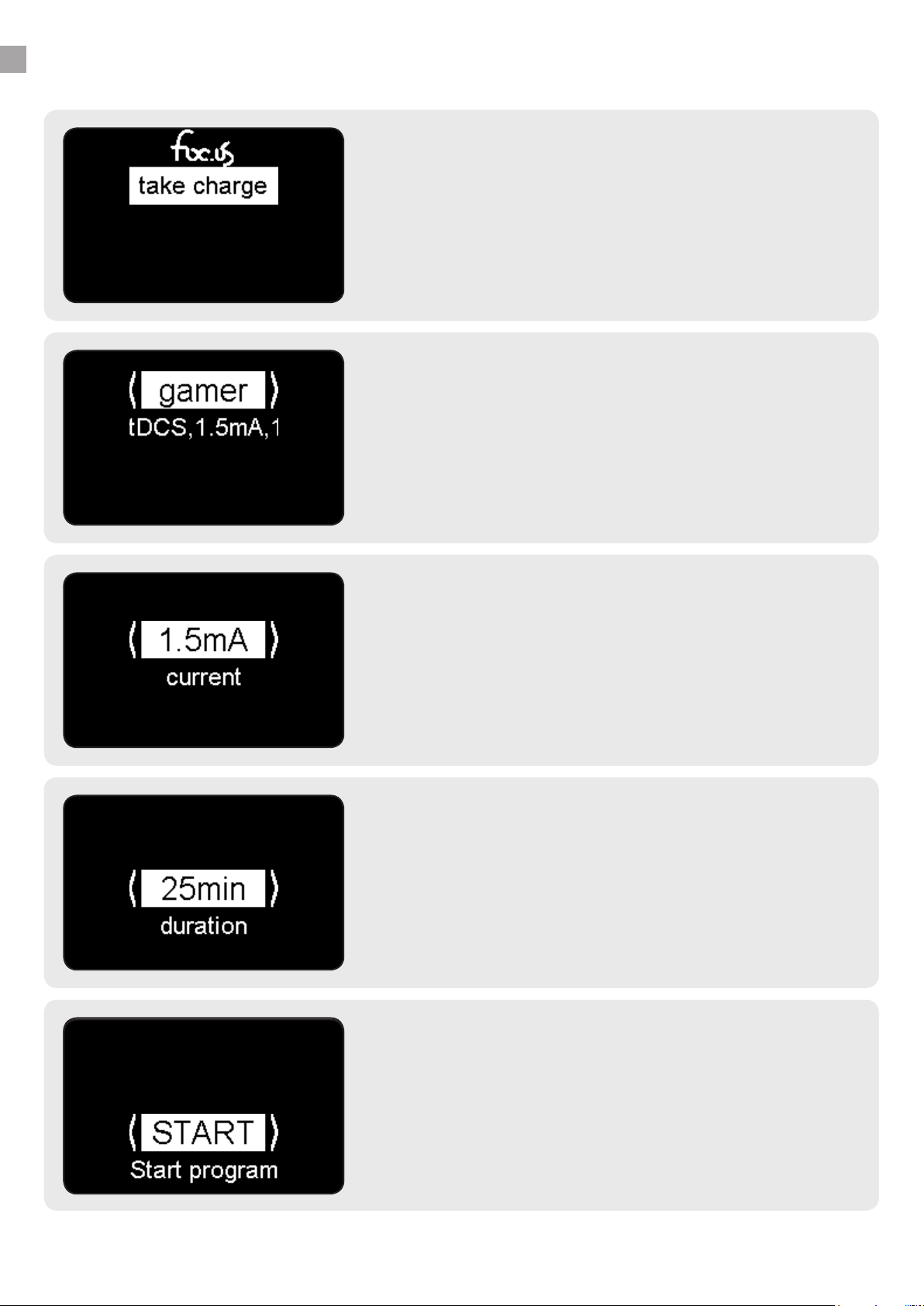
PRESS to turn ON
1.
PRESS the blue joystick to turn on and start.
Navigate your Foc.us V3 with the blue joystick.
Use DOWN to select TAKE CHARGE
PRESS to start your journey
UP LEFT RIGHT DOWN PRESS
2.
Wherever you see < and >, use LEFT and RIGHT to scroll
through the options available.
Then PRESS or DOWN to proceed with gamer program.
Value & Labels
3.
This shows that the current current setting is 1.5mA.
Use LEFT to reduce or RIGHT to increase this value.
Then PRESS or DOWN to proceed to next setting.
Duration
4.
Use LEFT and RIGHT to pick a session duration between
1 and 40 minutes.
Then PRESS or DOWN to proceed.
START or EDIT
5.
Only the minimum settings are presented so that you can
quickly start a session. Hidden settings can be accessed
by pressing RIGHT for the EDIT option.
Then PRESS or DOWN to START.
5
Page 6
V3 ELECTRICAL BRAIN STIMULATOR
Your Foc.us V3 is an electrical neuro-stimulator which will deliver a controlled current to your
brain.
The theory of transcranial Electrical Stimulation (tES) is that by passing a current through
your brain, the excitation levels of your brain cells are altered. The delivered current is small
compared to the current that is already owing in your brain; so the current itself does not
induce your brain cells to re, but does prime some of your brain cells to re more readily
depending on the specic settings that are used. It is therefore important that the right settings
are used to induce the right level of charge. It is recommended that you do not deviate from
prescribed levels of current intensities, current durations and electrode placements. Given the
right settings, the subtly induced changes in brain cell excitation levels can result in signicant
cognitive performance enhancements.
Possible side-eects include visual artifacts (such as white ashes), nausea, headaches, and
fatigue. If you experience any of these side-eects, stop your Foc.us session. If you see white
ashes (known as phosphenes), adjust the position of the Foc.us electrodes away from your
eyes. You may feel tingling, hot, or cold sensations from using Foc.us. If these sensations
become uncomfortable or painful, stop your Foc.us session. Skin redness may appear under
electrodes after use, which will disappear after a short time. Repeated use of Foc.us may lead
to skin irritation. If you exceed the recommended session duration, you increase the risk of
consolidating both the excitatory and inhibitory processes. Always proceed gradually and with
caution.
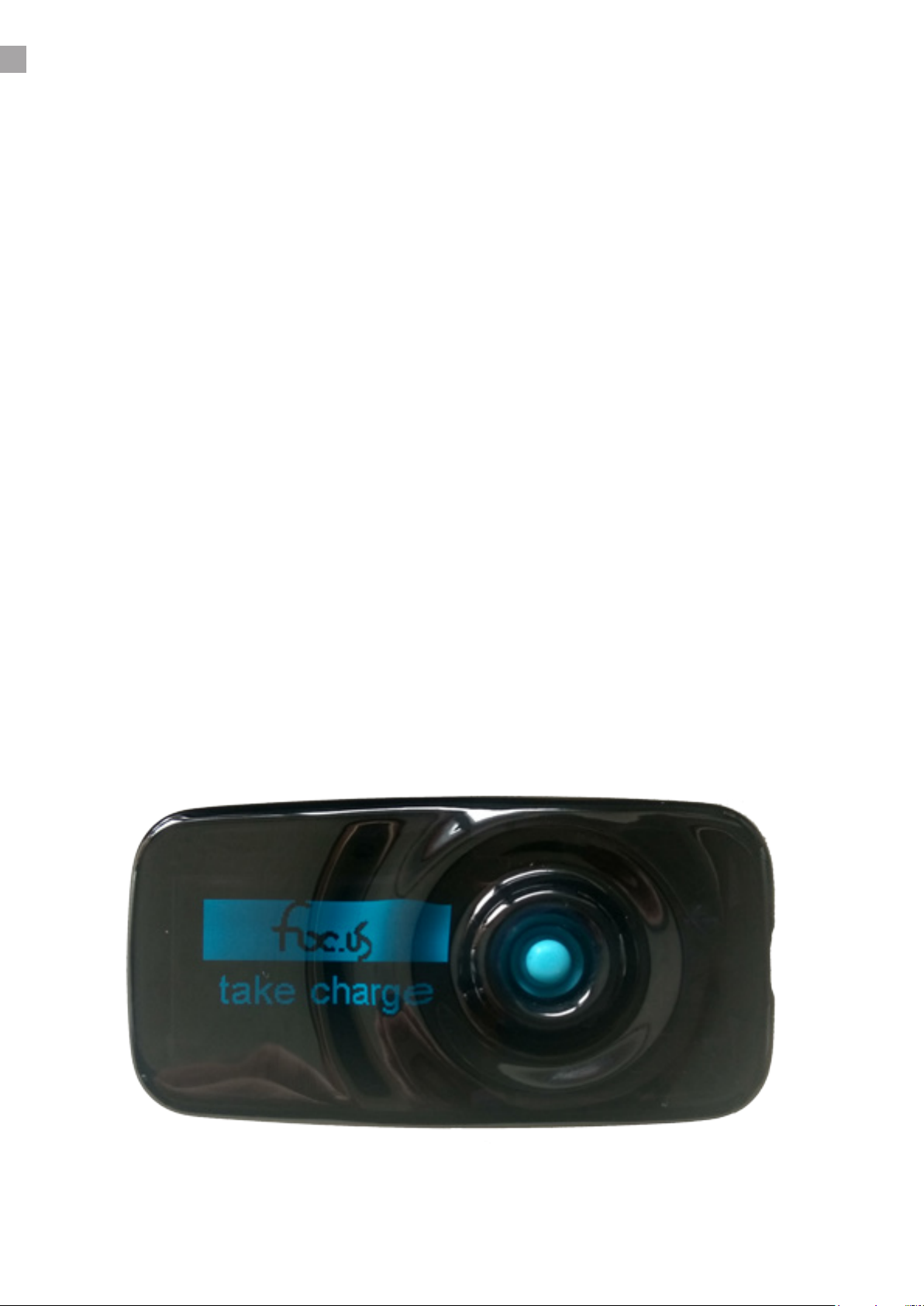
OLED Display
5 Way Joystick
Socket
Foc.us V3
6
Page 7
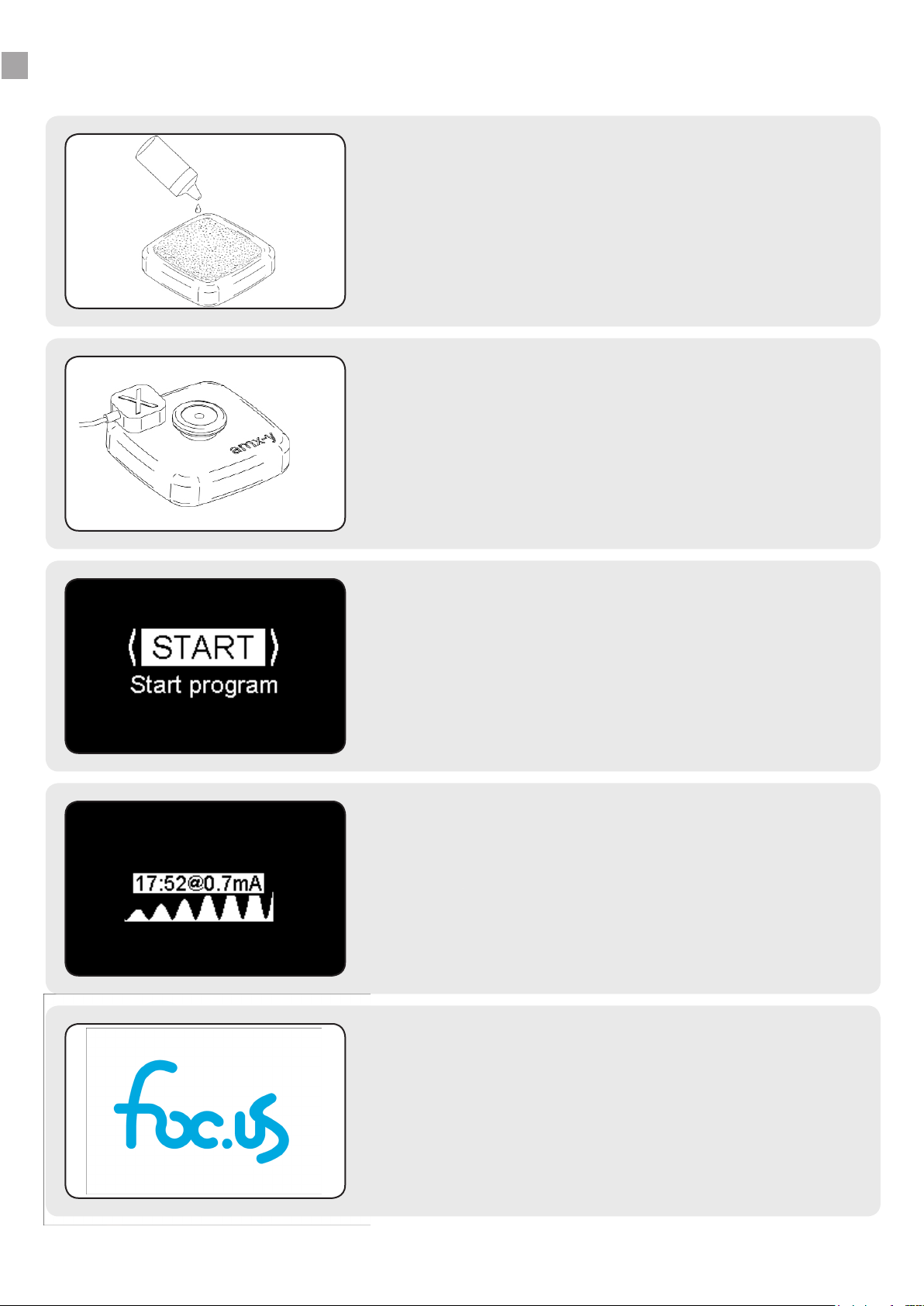
QUICK START GUIDE
1.
Position the amx-y electrodes with wet sponges in the
headband and place headband on head.
Liberally wet the sponges before use.
2.
Connect the magnetic ends to the amx-y electrodes and
the 2.5mm jack to the V3.
Be careful to ensure X (cathode) and Y (anode) if using
tDCS or unipolar stimulation modes.
Prepare Electrodes
Connect everything together
Start a Program
3.
A program denes the target current, duration and
mode settings to be used in a stimulation session.
V3 ships with 7 Programs:
Ripple, 3rd eye, wave, pulse, Noise, eDream & gamer.
take charge
4.
The stimulation will start at 0mA and slowly increase
until reaching the target current
The V3 screen will show you real-time session data.
Because It’s Possible
5.
Your brain cells are now excited, your plasticity is
increased. Go learn, train & focus!
Tip: Test yourself to conrm it’s working
7
Page 8
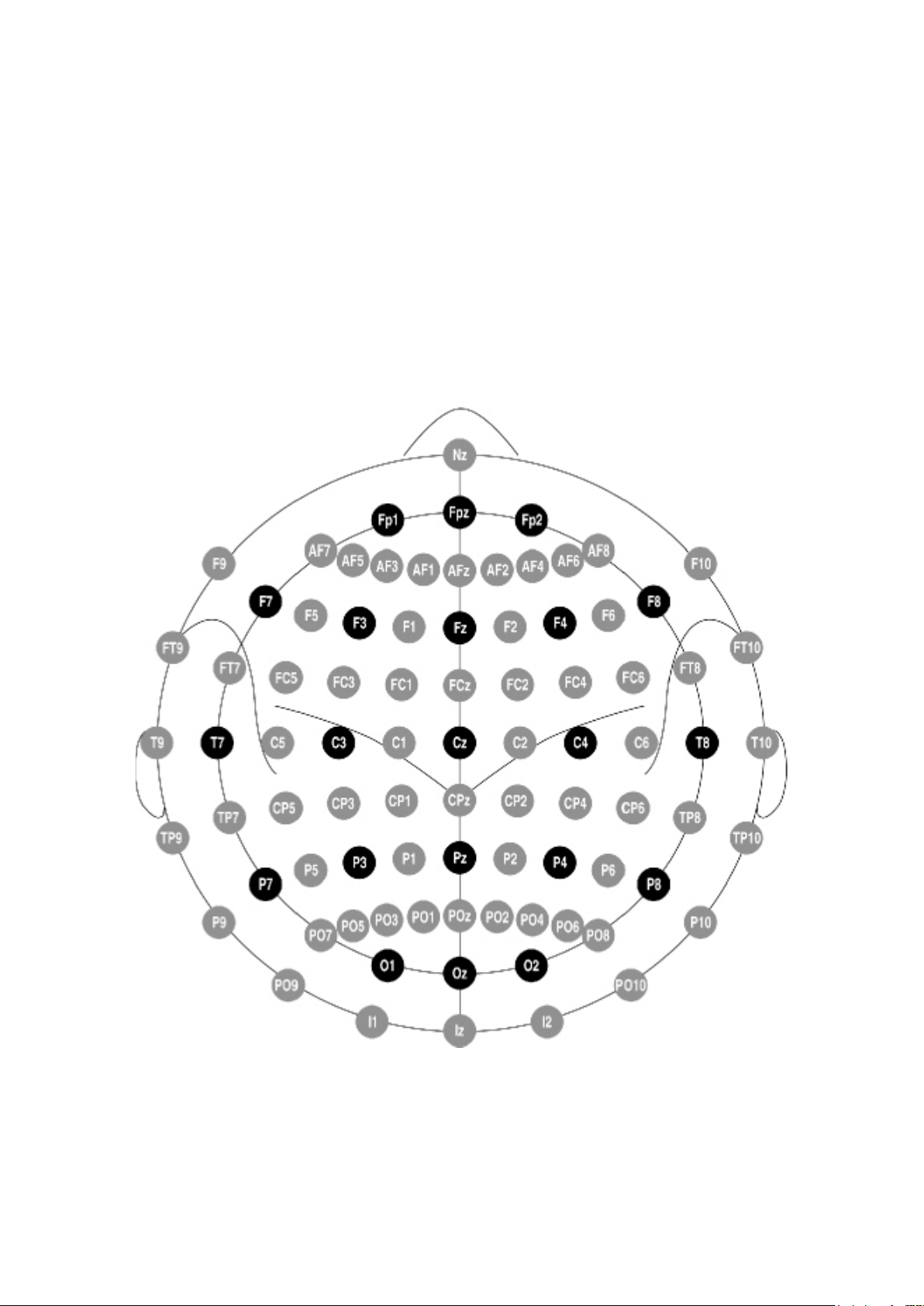
ELECTRODE PLACEMENTS
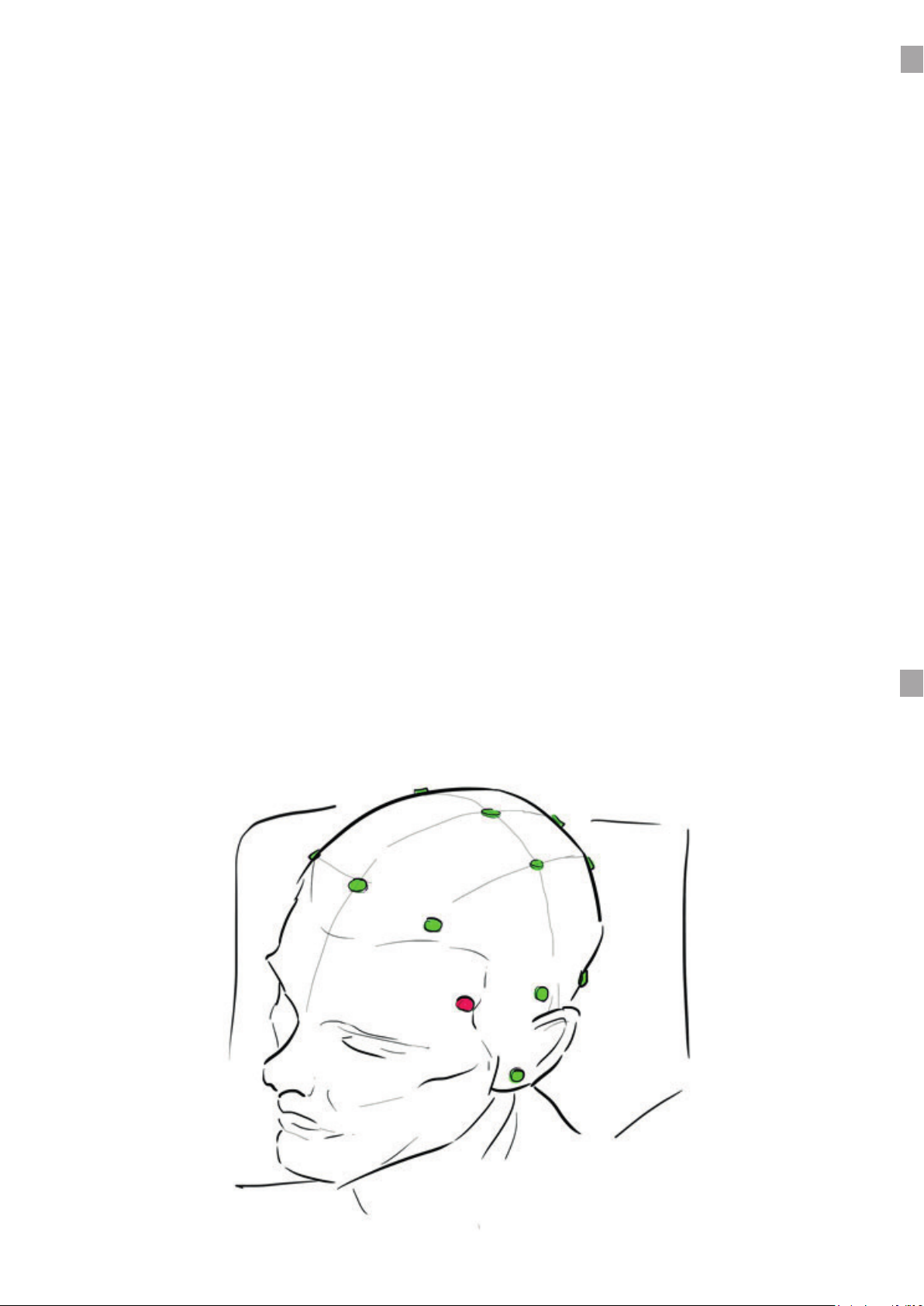
The eects of tES depend on the positioning and polarity of the electrodes. Anodal stimulation
induces an increase in cortical excitability under the X electrode. Cathodal stimulation induces
an increase in cortical inhibition under the Y electrode. When electrodes are placed on the
shoulder or arm, the exact location is less important than when placed on the head, so long as
the correct arm/shoulder is used i.e. left or right.
The most common system for electrode positioning is know as the 10-20 system. This system
involves measuring your head and placing electrodes at the10%, 20%, 20%, 20%, 20% and 10%
positions. This is shown in the dark circles below. The 10-20 system has been further divided
into smaller percentages as shown by the gray circles in the same gure.
The focus headband is not designed to be as precise as the 10-10 system. The best way to nd
accurate electrode placements is to use the montages as a starting guide only. Measure the
results from stimulation and use trial and error to nd the exact location for your personal
physiology.
8
Page 9
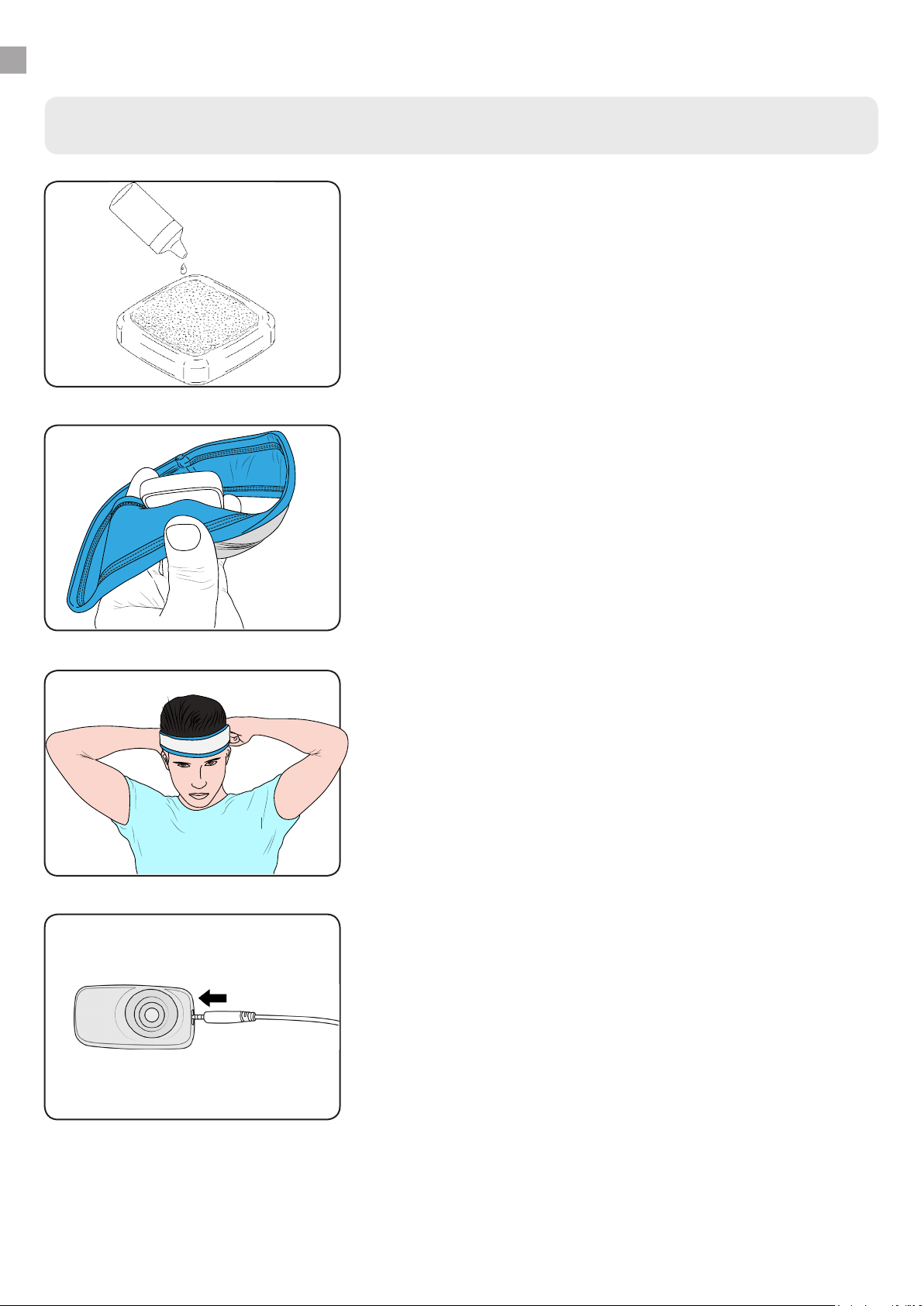
ELECTRODE SETUP DETAILS
Step by step connection instructions
Wet sponges in amx-y
1.
To pass an electric current through your brain an electrical
circuit must be setup between the device, cable, electrodes,
sponges and you.
Sponges should be wet. Use the small water bottle to keep
water handy. Be careful not to touch the black silicone as
this can result in electrical burns.
Amx-y electrodes in place
2.
The amx-y electrode tips are designed to t comfortably
through the headband holes. Get them in place before
putting the headband on your head. It doesn’t matter which
one you use as the polarity is determined by the cable.
Tip: Shoulder placements can be held under clothing.
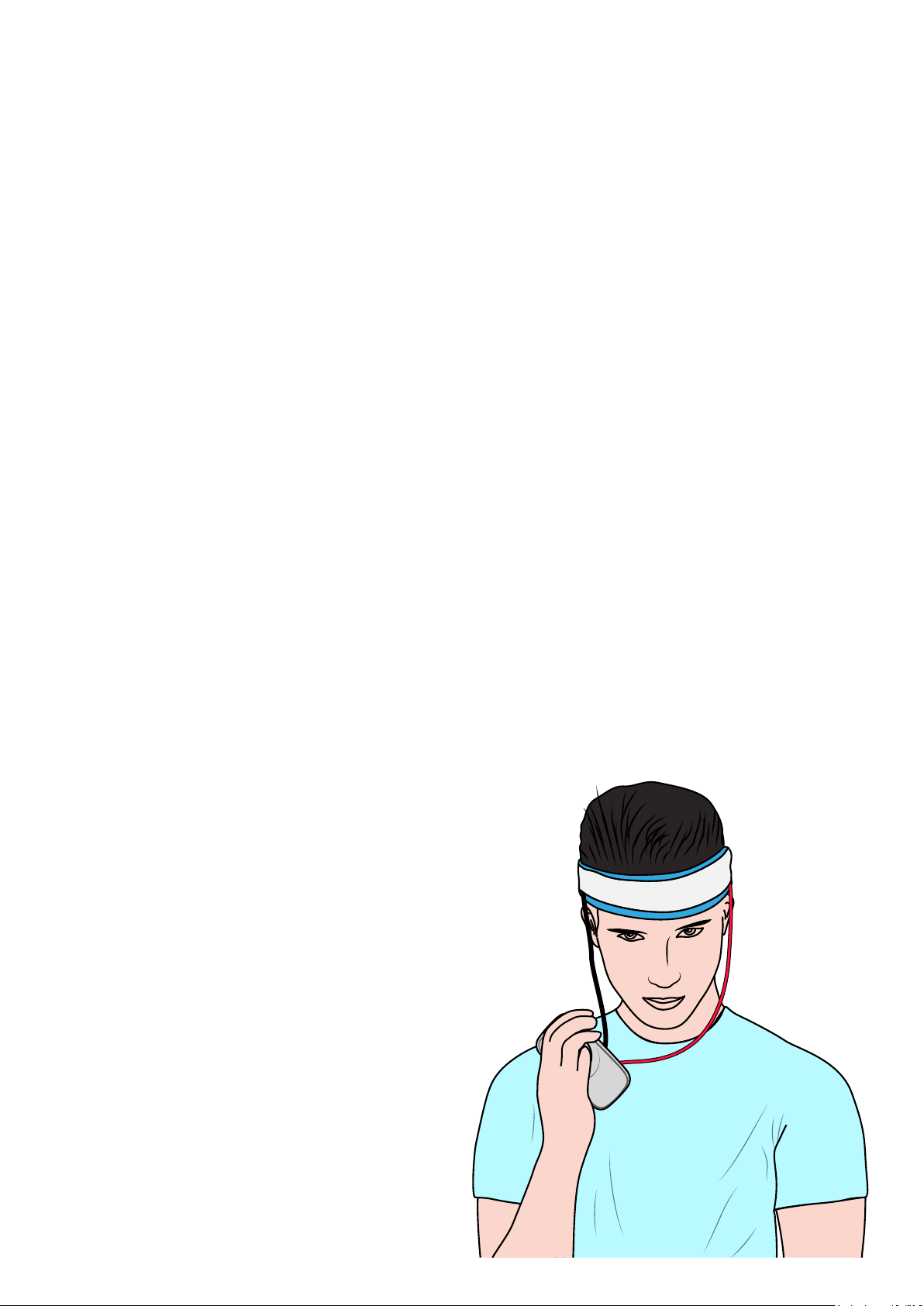
Headband On Head
3.
Place the headband on your head and the ensure everything
is comfortable. Use the magnetic cables to complete the
circuit with the amx-y electrodes.
Tip: X is the anode, Y is the cathode
Connect x/y cable to V3
4.
Insert the 2.5mm 4 pin jack end of the x/y cable into the
socket on the side of the V3 and you are ready to go.
Understand that the electricity will take the path of least
resistance between the X and Y electrodes. This will vary
with the electrodes location and cannot be precisely
controlled. It is your responsibility to ensure that you place
the electrodes consistently to achieve consistent results.
9
Page 10

V3 STIMULATION MODES
What is a mode?
The mode describes the shape of the electrical signal. At a minimum V3 includes tDCS, tACS, sotDCS, tPCS, tRNS and tRCS modes.
Each mode has a set of parameters that control the shape of the electrical output.
During a stimulation session the display of the V3 functions as an oscilloscope. It shows the real-
time current graphed against time. Use it to visualize the ow of the electrical current.
tDCS provides a steady current over a period of time. An initial ramp will slowly increase the
current at 0.1mA/s until the target current is reached. At the end of the session the current
will be tapered o at the same rate. During the stimulation the internal electronics measure
the resistance in the circuit owing through your head 50,000 times per second and adjust the
voltage to maintain a super-accurate current.
tACS is a sine shaped stimulation wave where the current changes as a function of time. Studies
show that stimulating with particular frequencies can entrain brain oscillations.
so-tDCS is a unipolar slow sine wave. Unipolar means the current always ows in the same
direction. It will oscillate between the oset and target current values.
tPCS is a pulsed wave with frequency and duty cycle control.
tRNS generates a random signal i.e. noise. This can be a random frequency, a random current
or both. Please note that this mode can be the most physically uncomfortable due to likelihood
of fast changes in current levels.
tRCS is an exclusive stimulation mode available only from Foc.us. This dynamic tACS mode uses
rippled frequency changes to entrain and increase brain oscillations. The power, intensity and
gradient of this change can be selected.
What is a program?
A program denes the target current, duration and mode settings to be used during stimulation.
Each program allows you to quickly start a session using the most recent program settings.
You can EDIT the program settings to personalize the programs according to your preference by
using the arrow options when you reach the START screen.
All programs include an advanced PLACEBO option. The default is placebo OFF i.e. stimulate.
When set to ON, the current will ramp up to the target current but then ramp down - you can
see this in the real-time current graph. When PLACEBO is set to BLIND the device will decide
whether to stimulate or not at random. If it decides not to stimulate it will ramp up and provide
a fake real-time graph so you cannot visually determine. This allows you to run double blind
tests with yourself.
You can chose to set a maximum voltage for any program. This may limit the devices ability to
hit the target current according to Ohm’s law.
Page 11
V3 PROGRAMS
Ripple Program
Peak alpha is a marker for neural function and correlates with higher memory performance.
Unfortunately memory and peak alpha both decline with age.
tACS stimulation in alpha frequencies have been shown to entrain brainwaves.
Rippled stimulation (tRCS) is designed to entrain your alpha-waves. The stimulation protocol
steps through increasing alpha frequencies to entrain your brainwaves into a higher peak-alpha.
With this mode you have a few settings to experiment with:
Power: controls the max current Low (0.5), Medium (1.0) or High (1.5)
Intensity: the target peak alpha: Gentle (10Hz), Moderate (11Hz), Vigorous (12Hz)
Gradient: how quickly to entrain upwards - Shallow, Moderate or Steep
Or use Ludicrous settings for a 13hz intensity and 2mA of power.
The electrodes should be placed in the occipital region. You can try X & Y on the following
location pairs: Cz & Oz, or P3 & P4 or O1 & O2.
Gamer Program with tDCS
Designed to increase your working memory, focus and vigilance. Place the X over your right eye
and the Y over your left to stimulate the pre-frontal cortex.
Try the included N-Back game to test your working memory before and after stimulation.
Electrical Stimulation
You are creating an electrical circuit with your
head as the “load”.
The resistance of your head is constantly changing. V3 measures the resistance and adjusts the
voltage 50,0000 per second.
This super-fast voltage control is combined with
triple current-locking circuitry to ensure the stimulation signal is always true and safe.
Page 12
EXPERIMENTAL PROGRAMS
eDream Program
Lucid dreaming is an interesting and under-researched phenomenon. In 2014 a study claimed
tACS stimulation could induce lucid dreaming.
The eDream program is designed to let you try and induce lucid dreaming in your sleep.
You start an eDream session before you sleep. Using a combination of a timer and movement
sensor the V3 will decide when to actually start the stimulation.
The timer ensures you get enough sleep before the stimulation will start e.g. 6 hours.
Then the movement sensor will check that you are not moving e.g. deep REM sleep stage.
If both of those conditions are met, the stimulation will start.
Noise, Pulse, Wave and 3rd Eye
These are experimental programs added at the request of Foc.us customers.
• Noise stimulation showed promise in studies about learning maths
• Pulse has been used for vigilance and attention switching tasks
• 3rd eye was an extra high frequency added to target the pineal gland - also known as the 3rd
eye. More information can be found on the website.
If you have a novel stimulation request please post on the Foc.us forums and we will consider
developing it for you.
Page 13

Other Features
● Calibration. This feature lets you nd the stimulation level that is comfortable without being
inuenced by knowing the actual value. Follow the steps on the screen to calibrate your
device. This calibration value will override a programs current value setting.
● N-Back is a simple game to recall a symbol “N” appearances ago. You play by tapping the V3
body whenever you see the character that matches the character N appearances ago. Whilst
playing the game you will see a tick or cross when you tap the device to show if you are right
or wrong.
● Track is an experimental feature that lets you track the devices movement using the on-
board 3-axis accelerometer data.
● BLUET00TH enables you to control your V3 from a compatible mobile app or via the API
● SAFETY allows you to prevent over use by setting a minimum time period between sessions.
● RESET allows you to restore all programs and device settings to factory defaults
What to expect?
● What to expect from brain stimulation
● You may feel a tingling when the stimulation starts. For most people this sensation is
comfortable but if it is not you can try lowering the current level.
● The increased excitation levels of your neurons caused by the stimulation move your brain
into a ready state. This state will naturally wear o so you should look to undertake your
neuronal activity immediately after the stimulation session ends.
● Studies have shown these stimulation montages work. However, there are factors that can
negatively impact your results. By changing the current (both down and up) and duration
on dierent sessions over dierent days, you can nd the best settings for your own unique
brain physiology.
● Electrode placement cannot guarantee the exact path of electrical current ow so results can
vary between sessions.
● tDCS is much less inuential on the brain than drugs or alcohol and should not be combined
with either.
● Studies have shown that time of day can eect stimulation results.
● Check the Foc.us website for new montages and new ways to use your V3.
● Good luck and take charge
13
Page 14

SPECIFICATIONS
Foc.us V3 Specications
Size 58mm x 28mm x 16mm
Weight 21g
Battery 3.7V, 190mAh Lithium Polymer Rechargable Battery Pack
Features • 2.1mA maximum current, 65V maximum output voltage
• 1 to 40 minute duration timer
• BLUET00TH Low Energy 4.1
• Triple current protection
• 0.1mA/s up and down ramping
• Blind Sham Placebo
• 0-1Khz Frequency Range
Problem Solution
Current won’t reach
target current during
session?
Current won’t go
above 0mA?
Device wont turn on
or charge?
Headband doesn’t t Try holding the electrodes via another method.
Painful sensation? If you experience discomfort you should stop using Foc.us
Missing Programs? Use SETUP > Factory reset.
Try increasing the maximum voltage using EDIT program settings.
Check all connections in circuit - cable, electrodes, sponges and
head.
Connect USB charging cable to suitable powered outlet and V3.
Try long press (30 seconds) of blue joystick to reboot V3.
14
Page 15

WARRANTY & GUARANTEE
Foc.us warrants the Foc.us V3 (the “Product”), and only the Product, against defects in materials
and workmanship under normal use for a period of twleve (12) months commencing on the
date of original purchase by the original purchaser (the Warranty Period). This warranty does
not cover damage caused by misuse, accident, abuse, natural and/or external causes (i.e. re,
earthquake, ood, etc.), use other than as intended and described in the Product instruction
manual, nishes, normal wear and tear, tampering, unreasonable use, service performed by
unauthorized service agents, or loss or damage to the battery. Foc.us does not warrant that the
operation of the Product will be uninterrupted or error-free.
Limitation of remedies
● Under this Limited Warranty, Foc.us liability and customer’s exclusive remedy under the
foregoing paragraph will be limited to replacement or repair of the Product by foc.us or its
authorized service centers. A replacement Product or part assumes the remaining warranty
of the original Product or ninety (90) days from the date of replacement or repair, whichever
is longer. To obtain warranty service, contact [email protected] For your security, please return
your Product with an insured carrier (e.g., FedEx, UPS, USPS Parcel Post) and retain your
receipt. Foc.us is not responsible for items damaged or lost in transit. Other than for the
reason of hardware defects, the return freight cost responsibility belongs solely to the
customer.
Limitation of damages
● In no event will Foc.us or any of its aliated or subsidiary companies be responsible for
any special, incidental, or consequential damages resulting from the use of this Product,
or based on any breach of warranty, breach of contract, negligence, tort, or any other legal
theory. Such damages may include, without limitation: loss of savings or revenue; loss of
prot; loss of use; the claims of third parties, including without limitation retailers; any
cost of any substitute equipment or services. Some states do not allow the exclusion or
limitation of incidental or consequential damages, so the above limitation may not apply to
you. The warranty gives specic legal rights, and you may have other legal rights, which vary
from state to state or country to country. This Limited Warranty is valid only in the United
States and Europe for Products sold in the United States and Europe. Resellers, agents, or
employees of Foc.us are not authorized to make any modication, extension, or addition this
Limited Warranty.
FCC
● FCC warning statement: This device complies with Part 15 of the FCC Rules. Operation is
subject to the following two conditions: (1) This device may not cause harmful interference,
and (2) This device must accept any interference received, including interference that may
cause undesired operation. This equipment complies with FCC radiation exposure limits
set forth for an uncontrolled environment. End users must follow the specic operating
instructions for satisfying RF exposure compliance. This transmitter must not be co-located
or operating in conjunction with any other antenna or transmitter. Changes or modications
not expressly approved by the party responsible for compliance could void the user’s
authority to operate the equipment.
15
Page 16
Technical support
Brain Control Co. Ltd. European Engineers
88 Paul St
London EC2A 4NE
UK
Tel.: +44 (0)8432 899833
https://foc.us
1017 El Camino
Redwood CIty 94063
US
Tel.: +1 415 9387831
http://foc.us
SUPPORT
More information is available on the website: https://foc.us/
You can email [email protected] if you have any questions or concerns.
Help can also be found at https://foc.us/forums
Equipment providing body oating protection against electric shock.
Brian Control Co. Ltd. 88 Paul St. London EC2A 4NE, UK
Tel.: +44 (0)8432 899833 ● Fax: +44 (0)8432 899833
[email protected] ● https://foc.us
© foc.us 2019
 Loading...