

Page 1
PROX S Y S M E D I A S E R V E R
ProxSys Media Server
Applications
Broadcast
Digital Media Archiving
Education and Distance Learning
Healthcare
Research and Development
Video Production
With an intuitive browser-based interface, robust features, and scalable configuration options, the ProxSys
®
Media Server from Focus Enhancements makes media asset management simple and cost-effective. By combining the functionality, flexibility, and scalability
of a custom system with the implementation time and ownership cost of an “out of the
box” solution, ProxSys gives you the performance you want for a price you can afford.
ProxSys Media Server
A fully integrated solution, the ProxSys Media Server combines ProxSys Media Asset Management software with professional-grade server hardware to provide a turnkey media asset
management system that can easily grow as your needs evolve. Media stored on ProxSys
is accessed through an intuitive browser-based interface—no proprietary client software is
required.
Media Asset Management
Designed for fast performance, the ProxSys Media Server uses rich metadata to make it easy
to find and retrieve media assets quickly. Low-resolution MPEG-4 proxy video clips of your
HD, HDV, DV, and MPEG footage allow for quick preview, protect high-resolution media
assets, and save network bandwidth.
The browser-based interface provides immediate access to audio, video, images, and
text-based data from any location. Additional features include online and offline usage,
picture-to-clip extract, multi-client support, access rights management, and NLE format
compatibility via the FireStore DV Conversion Suite.
1
2
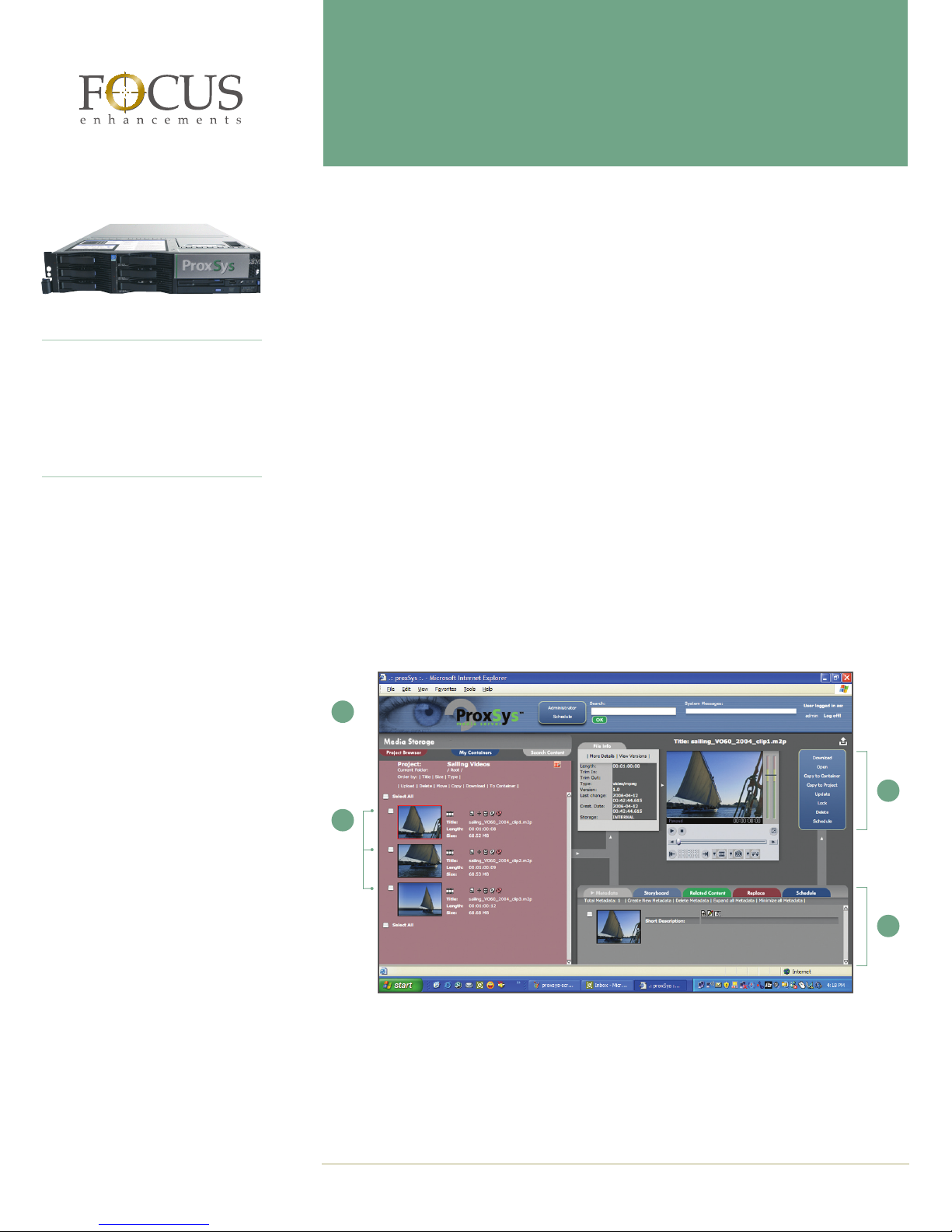
1 Access assets through an intuitive browser-based interface with user-friendly navigation.
2 Manage multiple projects with unique and secure access rights.
3 View proxy files in the integrated player, complete with mark-in and mark-out tools.
4 Search easily using timecode-based metadata.
3
4
PR OX SYS ME DIA SE RV ER Page 1 of 8
www.focusinfo.com 800.338.3348
Page 2
Import
Importing, Tagging, and Organizing Media
Media Import
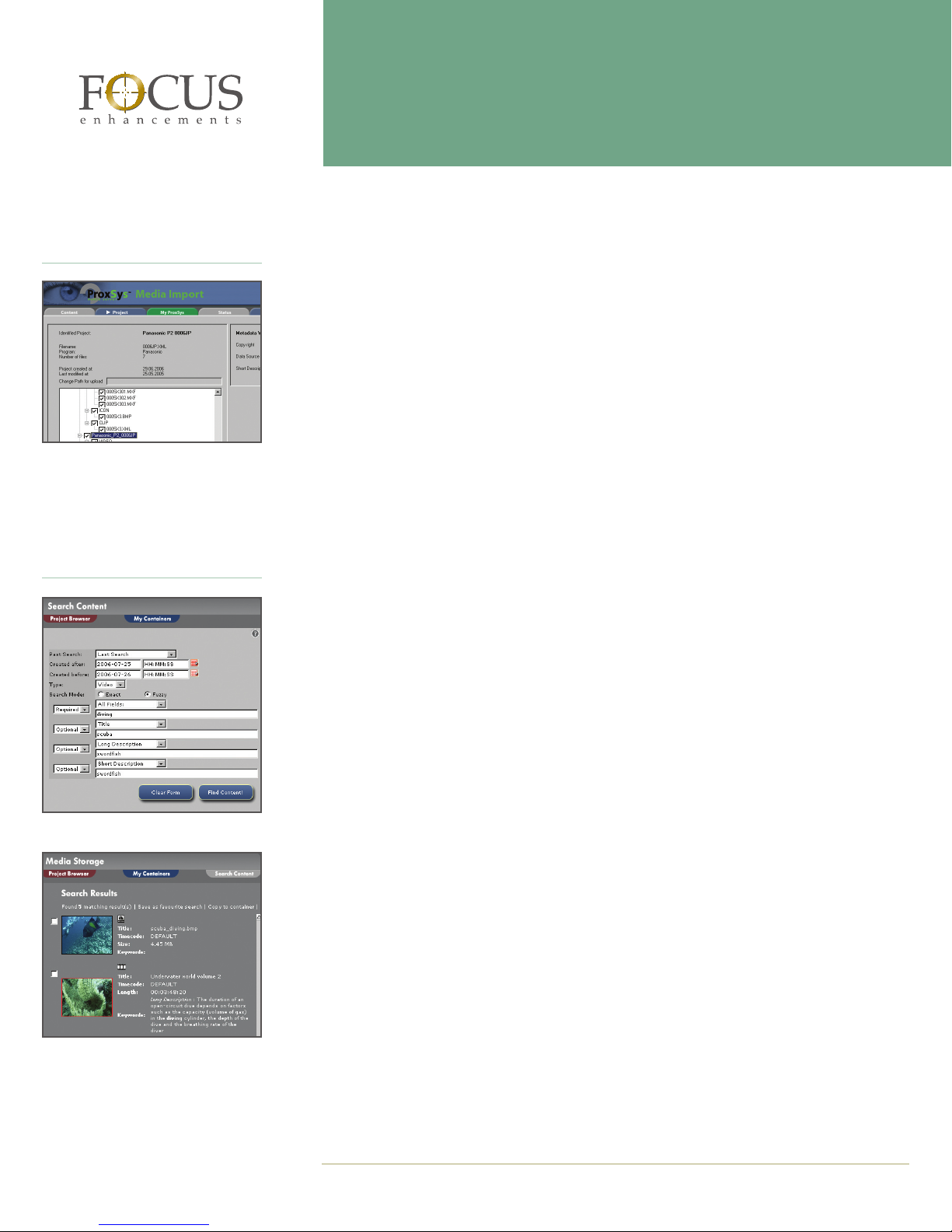
The ProxSys Media Server 5.0 software includes ProxSys Media Import (Figure 1), a feature that enables you to import individual media files or entire folders containing media
files—complete with video clips, audio clips, thumbnails, timecode, and metadata—and
maintain the hierarchy that you’ve already established. Although the ProxSys preview func
tion is designed for video, other files such as images and documents can also be stored on
ProxSys, enabling you to store all related files in one system.
-
Figure 1: ProxSys Import
Search
Figure 2: Search Content
If you’d like to bring video straight from your camera’s recording medium—hard disk, Pana
sonic P2 card, or tape—directly into ProxSys, the ProxSys Ingest Station (sold separately)
automates the process, making ingest fast and efficient.
Camera and Custom-Defined Metadata
ProxSys displays the metadata that your camera provides and allows you to add numerous
custom fields. With its rich metadata capabilities, ProxSys enables you to categorize, track,
search, and find clips—with amazing speed.
Projects
ProxSys uses projects to organize and store media and related files. When you import media, you can either create a new project or assign it to an existing project. Projects can also
have subfolders, allowing you to organize files within a project. Media can be assigned to
projects based on metadata. As a result, the same video clips can be shared by multiple
projects for efficient storage.
Searching and Previewing Clips
Search
With ProxSys and its rich metadata capabilities, you’ll no longer have to thumb through
tapes and DVDs on your shelves, go through folders on your hard disks, or fast-forward
through hours of footage trying to find the exact clip that you need—simply enter your
search criteria (Figure 2), and ProxSys will display the clips that meet your requirements
(Figure 3). It’s that simple. Search results are displayed in containers, and with a ProxSys
Export module or the ProxSys Playout Station (each sold separately), you can easily distrib
ute your media.
-
-
Figure 3: Search Results
Preview
ProxSys protects your footage and conserves network bandwidth by generating low-resolution MPEG-4 proxy video clips for preview. In addition to previewing clips, you can also
download the entire clip or set start and end points and download a specific portion of the
clip for editing or distribution.
Page 2 of 8 PROXSYS MEDIA SE RV ER
www.focusinfo.com 800.338.3348
Page 3
Exporting Media
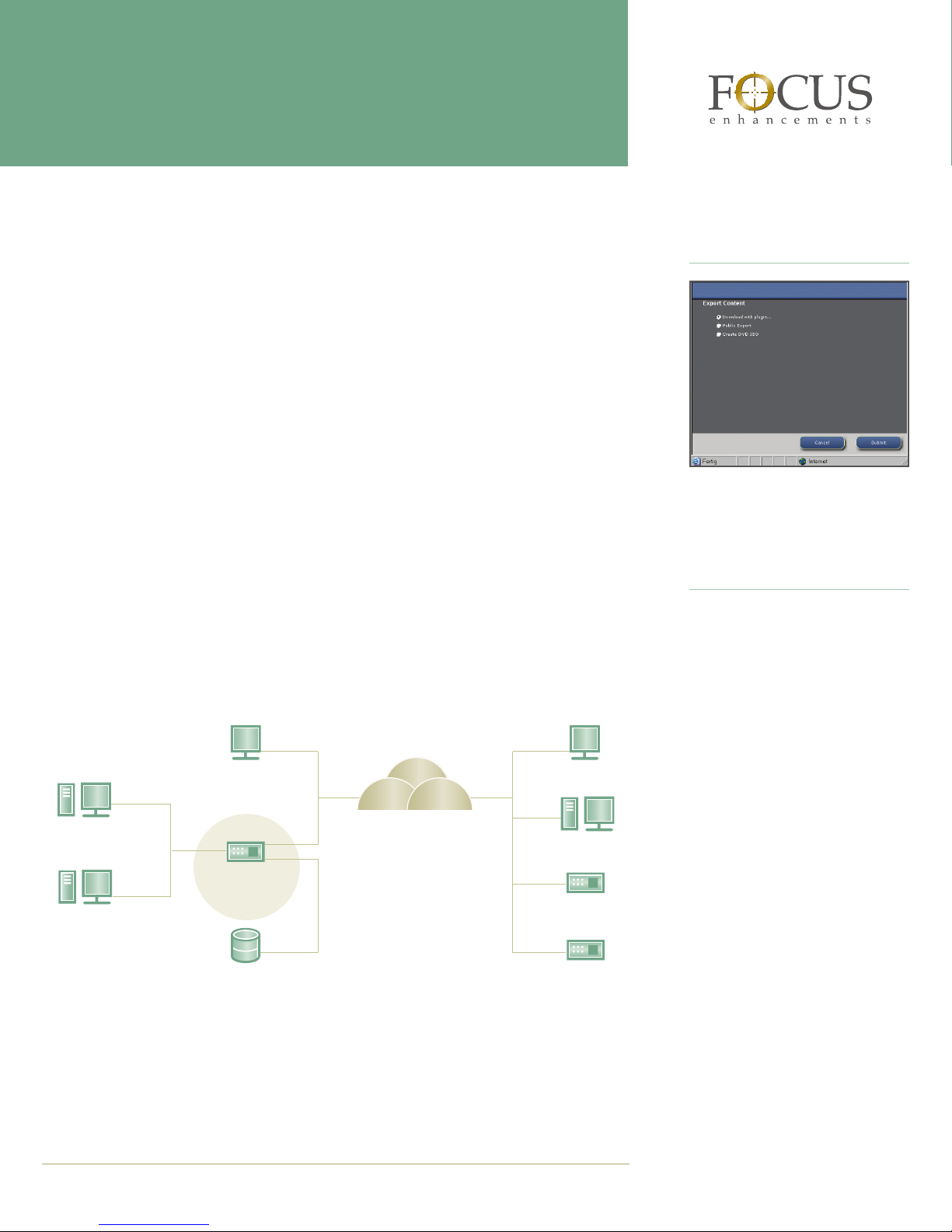
Full-bandwidth media can be saved to a desktop or it can be easily distributed (Figure 4).
ProxSys features a number of export modules (each sold separately) that simplify the distri
bution process. For example, you can upload video from ProxSys to a web server or an FTP
server. When you make video available for download, you can incorporate an order form
to collect information before download can begin, ensuring that you capture information
about those who use your footage. If you’d like to distribute video on DVD, ProxSys features
a module that not only makes it easy to burn DVDs, but also creates menus and labels. And
if you or your clients use Sony DV Station, you can download video from or upload it to the
Sony system—complete with metadata.
Protecting Your Assets
To keep your media assets secure, ProxSys enables you to assign access rights to projects by
workgroup or individual user, ensuring that you maintain complete control over who can
access your footage and files.
Expanding Your System
The ProxSys Media Server is the heart of the ProxSys Media Asset Management system and
enables you to manage media-based data with efficiency and ease. Depending on your
needs, you can expand your media asset management system to include ingest, transcode,
and playout (each sold separately). All components are controlled by and managed through
the ProxSys Media Server, ensuring that your media assets are centralized, secure, and eas
ily accessible.
ProxSys Clients
ProxSys Clients
Export
-
Figure 4: ProxSys Export
Expansion Options
ProxSys Ingest Station
Supporting high-resolution MPEG-2
and DV/DVCAM encoding, the Prox-
-
Sys Ingest Station enhances your
workflow by enabling you to ingest,
index, and upload multiple channels
of analog or digital video to the ProxSys Media Server. Through its intuitive
interface, ProxSys Ingest delivers the
functionality of high-end ingest products without requiring the user to be a
technical expert.
ProxSys Ingest
Station
ProxSys
Media Server
ProxSys Transcode
Station
ProxSys Storage
PR OX SYS ME DIA SE RV ER Page 3 of 8
www.focusinfo.com 800.338.3348
Intranet or Internet
ProxSys Playout
Streaming Video
Video On Demand
Station
ProxSys
ProxSys
ProxSys Transcode Station
With the ProxSys Transcode Station,
you can encode, transcode, or convert video formats and broadcast standards quickly and easily. Support for
numerous video codecs is included.
ProxSys Playout Station
With the ProxSys Playout Station,
you can add 24/7 scheduled program
playout to the ProxSys Media Server
and enjoy seamless playback of highresolution MPEG-2 and DV formats.
ProxSys Playout also includes logo
and banner insertion, closed captioning support, switcher control, the Focus scheduling tool, and redundant
power and storage.
Page 4
Featured Customers
A+M Media
Acord
AVC
The Biodesign Institute at Arizona
State University
Bremen PEG Channel
Bremerhaven PEG Channel
Capital Vision
Cork University
Dortmund PEG Channel
Dublin Central University
Falco Producciones S.L.
Financial News 24
Florian TV
Game TV
German Air Force
ProxSys Media Server Editions
Available in two editions, the ProxSys Media Server features flexible configurations to suit
almost any organization. The Workgroup Edition is ideal for organizations with up to 24 us
ers. If your organization has 25 or more users, the Enterprise Edition is recommended and is
available in four configurations. To obtain more information about selecting the best edition
and configuration for your organization, please contact Focus Enhancements.
Workgroup Enterprise
Components SCSI SCSI Fibre
Redundant
Fibre
Server Software
ProxSys Media Server
Workgroup Edition 5.0
ProxSys Media Server
Enterprise Edition 5.0
1,2
1,2
• — — — —
— • • • •
SUSE Linux 2.6 • • • • •
SQL Server
• • • • •
Utilities
ProxSys Media Import • • • • •
ProxSys Multimedia Tools
Direct File Server
FTP Server
Web Configuration and
• • • • •
• • • • •
• • • • •
• • • • •
Service Tool
Client
Web Browser
3
• • • • •
Server Hardware
IBM eServer x3650 (2U)
Storage Options
4
1 2 2 3 2
SCSI/SATA RAID-5/6 • • — — —
Fibre Channel RAID-5/6
Optical Jukebox
1
Requires ProxSys Media Server
2
Compatible with Windows- and Macintosh-based systems
3
Only a web browser required; no client software needed
4
Storage required (sold separately)
— — • • —
— — — — •
Jukebox
-
Page 4 of 8 PROXSYS MEDIA SE RV ER
www.focusinfo.com 800.338.3348
Page 5
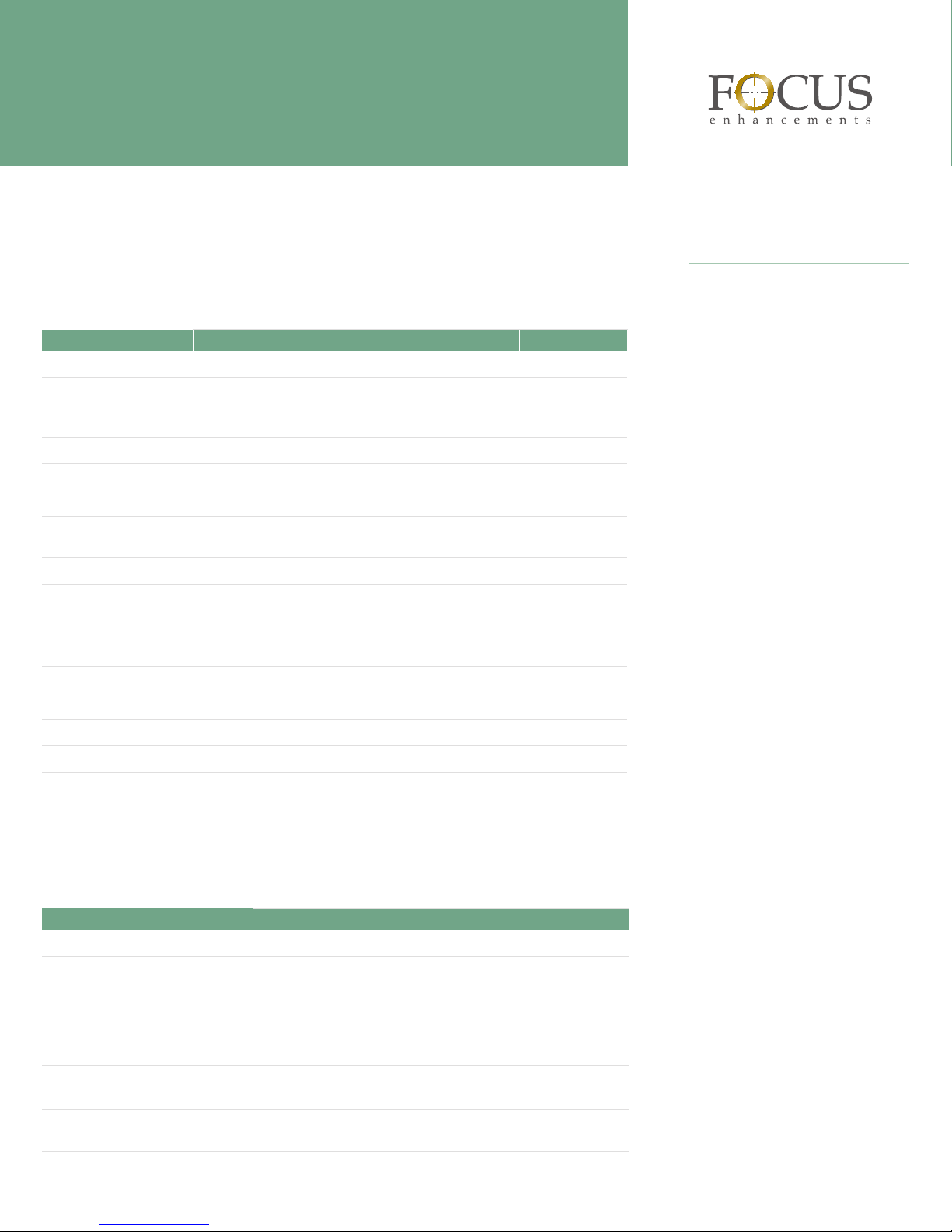
Supported Media Formats
The ProxSys Media Server supports both high- and standard-definition video and generates
MPEG-4 proxy files that make it fast and easy to preview footage. In addition to your media
assets, ProxSys can also store other information that pertains to your media-based projects,
such as proposals, storyboards, supporting documentation, and more.
Format Bit Rate File Type Resolution
High-Definition Video
MPEG -2 10–50 Mbs Program Stream; Transport Stream;
HDV
Panasonic DVCPROHD
Standard-Definition Video
DV and DVCAM
DVCPRO, DVCPRO50
MPEG-1, MPEG-2 1–50 Mbs Program Stream; Transport Stream;
Audio
MPEG Audio Layer 1–2
MPEG-2 32 kHz–48 kHz — —
Graphics
TIF, BMP, PNG, JPEG, GIF
1
Formats soon to be supported: Sony HDCAM, MPEG-4 Part 10/H.264-AVC, JPEG-2000
2
Proxy cuts are not supported in .mov (QuickTime) and Panasonic P2 MXF file formats
1
Elementary Stream; MP@LL, MP@ML,
19/25 Mbs .m2t and .mov2 (Quicktime) 720p; 1080i
100 Mbs P2 MXF2; .mov2 (Quicktime) 720p; 1080i
25 Mbs AVI Type 1; AVI Type 2; RAW;
25/50 Mbs P2 MXF2; .mov2 (Quicktime) 720 x 480/576
Elementary Stream; MP@LL, MP@ML,
32 kHz–48 kHz — —
— — —
MP@H14, 422@ML
2
(Quicktime)
.mov
MP@H14, 422@ML
Up to 1080i
All 18 ATSC
formats
720 x 480/576
720 x 480/576
Featured Customers
Giessen PEG Channel
Hanoi Music Conservatory
Vattikuti Urology Institute
(Henry Ford Hospital)
IQ Digital
Kassel PEG Channel
Magdeburg Police Station
Muenster PEG Channel
Offenbach PEG Channel
Old Dominion University
Oulu University, Kajaani
Polymedia
SAV Production
Tralee University
University of Freiburg
University of Kiel
Export Modules
Optional ProxSys export modules make media export extremely efficient. Simply choose
the module or modules that support your workflow.
Module Function
ProxSys Public Export Module Copies video or image files to a web server via FTP
ProxSys FTP Push Export Module Transfers high-resolution files to an FTP server via FTP
ProxSys Order Form Export Module
ProxSys Microsoft Office Export
Module
ProxSys Rimage DVD Authoring
Export Module
ProxSys Sony DV Station Interface
Module
PR OX SYS ME DIA SE RV ER Page 5 of 8
Includes a customizable form to collect information before to
enabling a user to download files
Takes selected images from clips along with their corresponding
metadata and places them in a Microsoft Word document
Burns selected MPEG-2 video clips to a DVD
Includes DVD menus and label templates
Enables video and metedata to be uploaded to or downloaded from
Sony DV Station–based systems
www.focusinfo.com 800.338.3348
Page 6
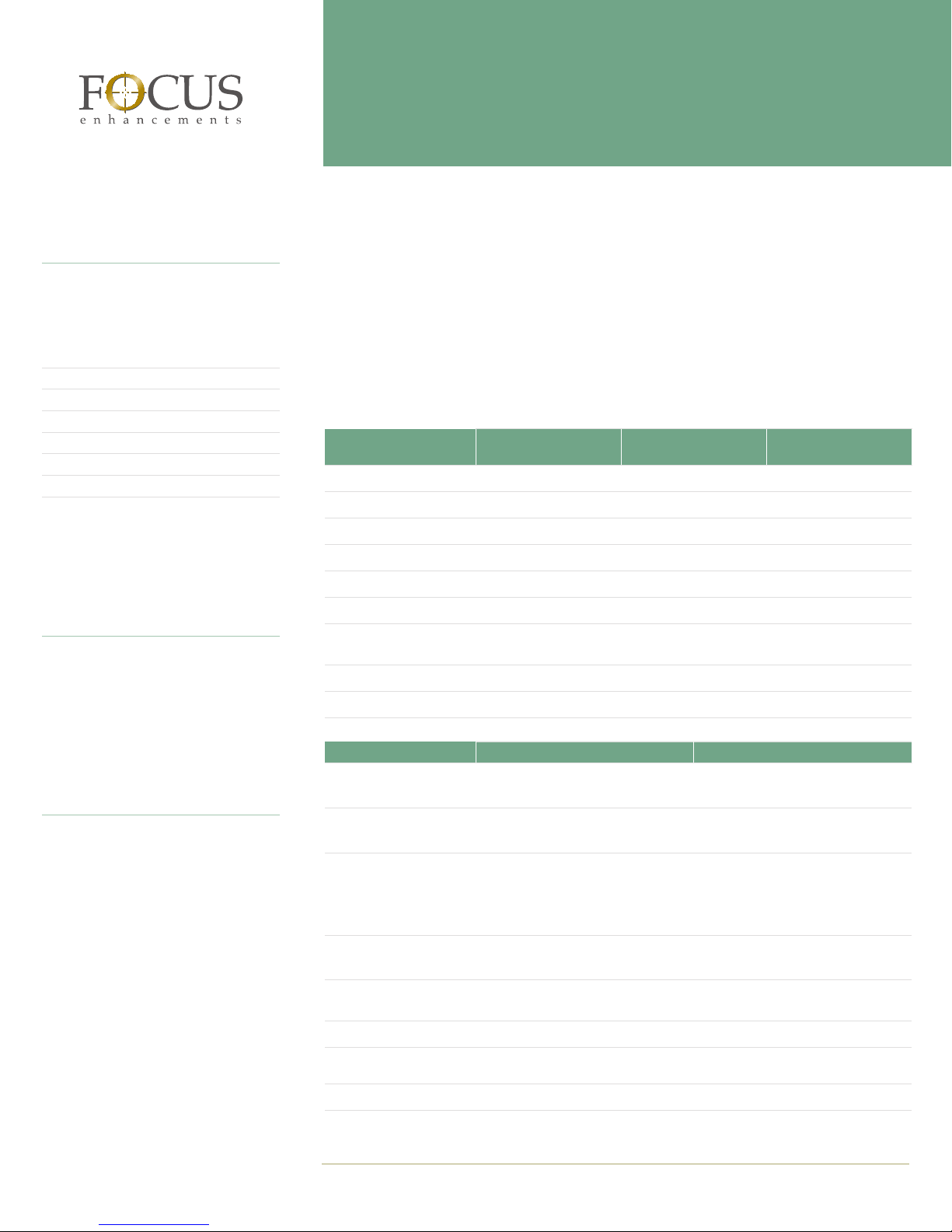
Calculating Storage Requirements
Your Focus representative will help you
calculate how much storage capacity
you need; however, the table below provides a general guideline.
Video Format Hours/TB
DV
HDV
MPEG-2 (4 Mbs) 538
MPEG-2 (6 Mbs) 364
MPEG-2 (10 Mbs) 222
DVCPRO HD (1080i60)
79
90
19
About ProxSys RAID
Ideal for storage requirements of 2TB to
50TB, ProxSys RAID (Redundant Array
of Independent Disks) is a high-capacity
storage system that features multiple, independent hard disk drives that provide
reliable redundant storage and quick access to your media assets.
About Hitachi TagmaStore
Engineered for outstanding performance
in workgroup environments, Hitachi TagmaStore is a scalable storage system that
is especially well suited for data-intensive applications with storage capacity
requirements of 32TB to 332TB.
ProxSys Storage
The ProxSys Media Server supports a wide range of storage options, including disk, optical,
and tape-based systems. By taking a number of factors into consideration, Focus Enhance
ments can help you determine how much storage capacity you need and which storage
option or combination of options will best serve your organization.
Online Storage
Perfect for daily use, online storage provides quick access to your digital media files over
a network. Available in standard and custom configurations, Focus online storage options
feature capacities of up to 332TB.
SCSI/SATA RAID-5
Storage Capacity
Hard Drives 8 x 250GB SATA 12 x 400GB SATA 16 x 400GB SATA
Hard Drive Speed
Ports (SCSI Channel)
Power Source Two hot-swap redundant 460W power supplies; Input: 90–260VAC; 47–63 Hz
Rack-Mount
Dimensions (H x W x D)
Weight
Warranty 1 year 1 year 1 year
Hitachi TagmaStore TagmaStore WMS100 TagmaStore AMS500
Storage Capacity
(maximum)
Hard Drive Options
(SATA)
Hard Drive Options
(Fibre Channel)
Number of Drives 5–105 SATA 5–225 Fibre Channel
RAID Support RAID-1; RAID-1+0; RAID-5; RAID-6 RAID-0 (Fibre Channel only); RAID-1;
Cache
Host Fibre Channel
Connections
Controllers 1 or 2 1 or 2
1
ProxSys
RAID 2000
2TB 4.8TB 6.4TB
7,200 rpm 7,200 rpm 7,200 rpm
2 x Mini U320 2 x Mini U320 2 x Mini U320
2U 2U 3U
3.46" x 17.5"
x 19.1"
47 lbs. 52 lbs. 64 lbs.
42TB SATA 88.5TB SATA Intermix
250GB (7,200 rpm)
400GB (7,200 rpm)
— 73GB (10,000 rpm)
512MB–2GB 512MB–2GB
4 at 1 Gbps or 2 Gbps 4 at 1 Gbps, 2 Gbps or 4 Gbps
ProxSys
RAID 4800
3.46" x 17.5"
x 19.1"
ProxSys
RAID 6400
5.25" x 17.5
x 19.1"
67.5TB Fibre Channel
250GB (7,200 rpm)
400GB (7,200 rpm)
73GB (15,000 rpm)
146GB (10,000 rpm)
300GB (10,000 rpm)
0–210 SATA
RAID-1+0; RAID-5; RAID-6
-
Page 6 of 8 PROXSYS MEDIA SE RV ER
www.focusinfo.com 800.338.3348
Page 7
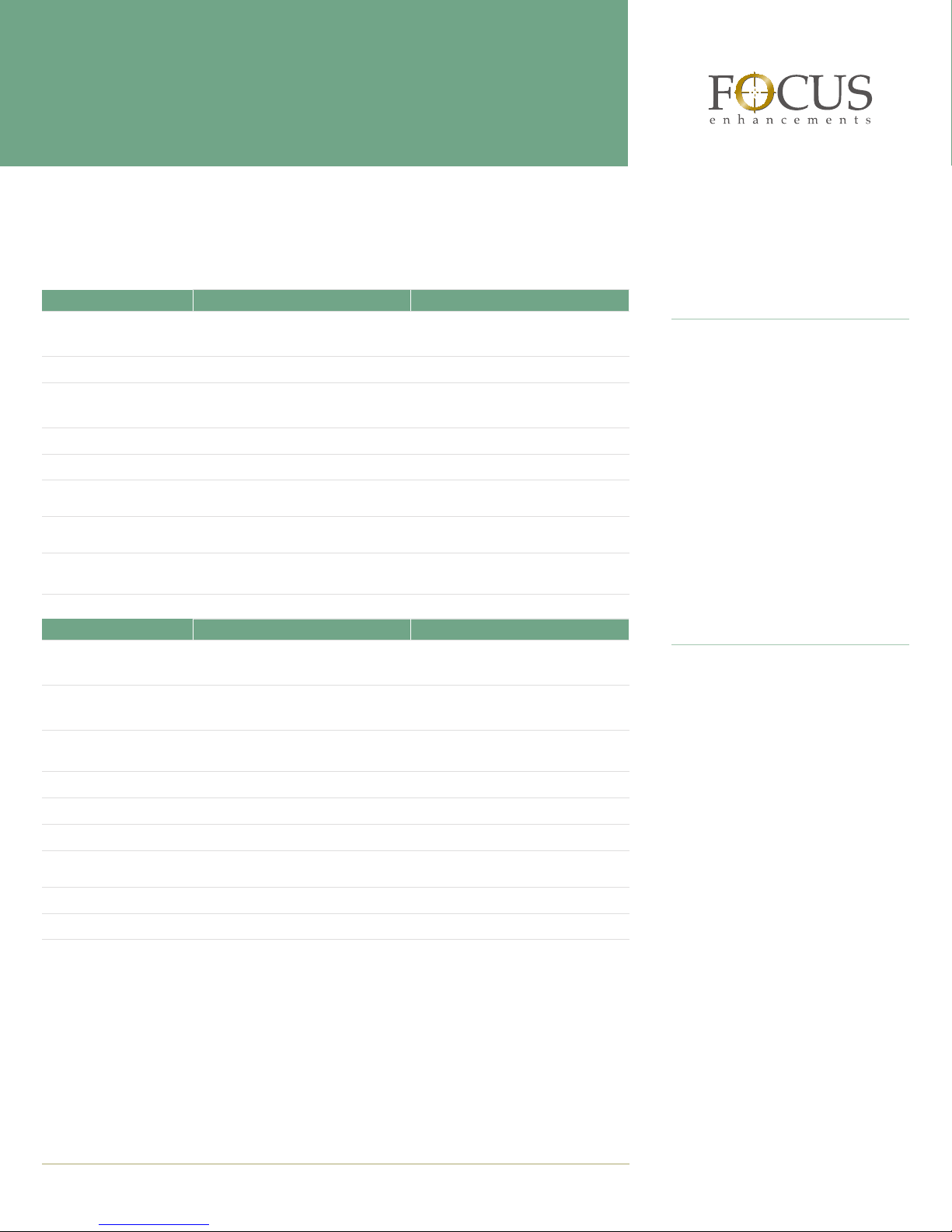
Nearline and Offline Storage
Ideal for media that does not require daily access, nearline and offline storage is less expensive than online storage and provides a number of cost-effective options for archiving media.
Optical Storage JVC Blue-ray JukeBox Plasmon G-Series (Ultra Density Optical)
Storage Capacity 2.5–30TB 218GB–5.8TB (MO)
720GB–19.1TB (UDO)
Slots 50–600 24–638
Drive Options MC-BL10 Blu-ray Sony 5.25" 9.1GB (14x) MO
Plasmon 5.25" 30GB UDO
Number of Drives
Number of Magazines 1–12 (50 discs/magazine)
Sustained Read Transfer
Rate (maximum)
Robotics Average
Exchange Time
Bulk Load 50-disc magazine 10-disc magazine
Tape-Based Storage IBM TS3100 Tape Library Express Overland PowerLoader Tape Library
Storage Capacity per Tape
Library (maximum)
Storage Capacity per
Cartridge (maximum)
Tape Drive/Medium IMB LTO; Ultrium 3 LTO-1/Ultrium 1, LTO-2/Ultrium 2, or
Number of Drives
Data Transfer Rate
Tape Cartridges
Average Cartridge
Exchange Time
Mail Slots 1 —
Form Factor Stand-alone or rack-mount available
4–6 (maximum of 12) 1, 2, 4, 6, 8, 10, or 12
9 Mbps 6.1 Mbps (MO); 8 Mbps (UDO)
2.5–4.5 seconds 6.1, 6.2, 6.3, 6.4, or 8.3 seconds
(not available on all models)
17.6TB (compressed)
8.8TB (native)
800GB (compressed)
400GB (native)
1 1 or 2
Up to 80 Mbps 27–108 Gbph (native)
22 17 (LTO-1 and LTO-2); 15 (SDLT 320)
— Less than 10 seconds
1.7-3.4TB (native)
—
SDLT 320/Super DLTtape 1
4U
About Optical Storage
Ideal for both nearline and offline storage, robotic optical storage solutions enable you to store media on discs. A copy
of the data can be accessed and edited,
or discs can be removed from the system
and shelved. Either way, ProxSys keeps
track of your footage so you can easily
locate and retrive it at any time.
About Tape-Based Storage
Well suited for archiving large amounts of
data, tape-based storage systems feature
tape libraries that contain removable cartridges. Each cartridge holds up to 200GB
of data—for example, one cartridge can
store 50 to 100 hours of standard-definition video, depending on the compression rate. The tape-based storage options
that Focus offers also feature removable
magazines that make it extremely easy to
load and unload media.
PR OX SYS ME DIA SE RV ER Page 7 of 8
www.focusinfo.com 800.338.3348
Page 8

Support
When you purchase ProxSys media asset management solutions from Focus
Enhancements, you not only receive
reliable products that deliver superior performance every day, you also
receive unconditional service and support from a team of seasoned video professionals. All products are backed by
comprehensive warranties and optional
support contracts that cover installation,
training, 24/7 phone support, and priority parts replacement.
Consultation
With extensive experience in designing, configuring, and integrating media
asset management solutions for organizations around the world, the Focus
team can help you select the perfect
combination of components to meet your
specific needs.
PROX S Y S M E D I A S E R V E R
Technical Specifications
ProxSys Media Server
Software
Server Software
Media Asset Management ProxSys Media Server Workgroup Edition 5.0
ProxSys Media Server Enterprise Edition 5.0
Operating System
Database SQL Server
Utilities ProxSys Media Import, ProxSys Multimedia Tools; Direct File Server;
Client Software
Browser (user supplied) Windows: Internet Explorer; Macintosh OS: Safari
Export Modules
ProxSys Export Modules (optional) Public; FTP Push; Order Form; Microsoft Office; Rimage DVD
Hardware
IBM eServer xSeries 346
Processor 3.8-GHz Intel® Xeon™ processor with EM64T
Bus Speed 800-MHz FSB
Cache
Memory (standard/maximum) 1GB/16GB Registered ECC PC2-3200 DDR II SDRAM
Memory Slots 8 DIMM
Hard Drives 2 x 36GB (Gen 3) Hot-Swap 3.5" Ultra320 SCSI HDD
Hard Drive Speed
Disk Bays (total/hot-swap)
Controller Dual-channel Ultra320 SCSI integrated RAID controller supporting
Networking
Power Supply 2 x 625W hot-swap redundant power supply
Form Factor 2U rack-optimized; black
Dimensions 3.36" high by 17.5" wide by 27.5" deep
Weight
SUSE Linux 2.6
FTP Server; Web Configuration and Service Tool
Authoring; Sony DV Station Interface
2MB L2
15,000 rpm
6/6
0, 1 RAID level(s)
2 x Broadcom NetXtreme 5721 Gigabit Ethernet 10/100/1000 Mbps
Embedded
64.0 pounds
Corporate Headquarters
Focus Enhancements
1370 Dell Avenue
Campbell, CA 95008
P 800 338 3348 (toll free)
P 408 866 8300
F 408 866 4859
E [email protected]
E [email protected]
PR OX SYS ME DIA SE RV ER Page 8 of 8
European Headquarters
COMO Computer & Motion GmbH
A Focus Enhancements Company
Lise-Meitner-Str.15
24223 Raisdorf
Germany
P +49 4307 8358 0
F +49 4307 8358 99
E [email protected]
www.focusinfo.com 800.338.3348
©2006. Focus Enhancements, Inc. Specifications
are subject to change. All brand and product
names are trademarks of their respective companies. 8/06 MANL-1049-01
 Loading...