

Page 1
PL-208R
PL-208R
PL-208R
PL-208R Wireless
Wireless
Wireless
Wireless Electronic
Electronic
Electronic
Electronic Switch
Switch
Switch
Switch User
User
User
User Manual
Manual
Manual
Manual
1.
1.
1.
1. Introduction
Introduction
Introduction
Introduction
The series of wireless electronic switch adpots wireless radio frequency control mode. remote non-directional,
without space constraints. It can be wall and compartment remote control. Hundreds of millions of address codes
never repeated. Similar products never string code. Matching remote controller can remote distance at least 100
meters. It has been widely used in many environments. Such as home, factory, warehouse, office room, store and
so on. it is one of your ideal electronic switch. It classied products as wall switch and hand-held remote controller, it
can matched with our wireless alarm control panel to use. normal simple design, electric supply input, and similar to
most of occasions. Easy installation, beautiful design, it can directly embed in the hole or ceiling. Instead of
traditional switch lamps or lights. Easy protability and comfort for Hand-held remote controller, to make you truly
experience the fun of life and convenience. It adopts power saving mode design, battery for remote controller can
use at least 1 year.
2.
2.
2.
2. Specification
Specification
Specification
Specification
Input voltage: 220V AC
Consumed power: 2W
Most loading current: 5A
Most loading voltage: < 500W
Control mode: Wireless remote and manual control
Remote distance: 100 meters(in the open air)
3.
3.
3.
3. Installation
Installation
Installation
Installation
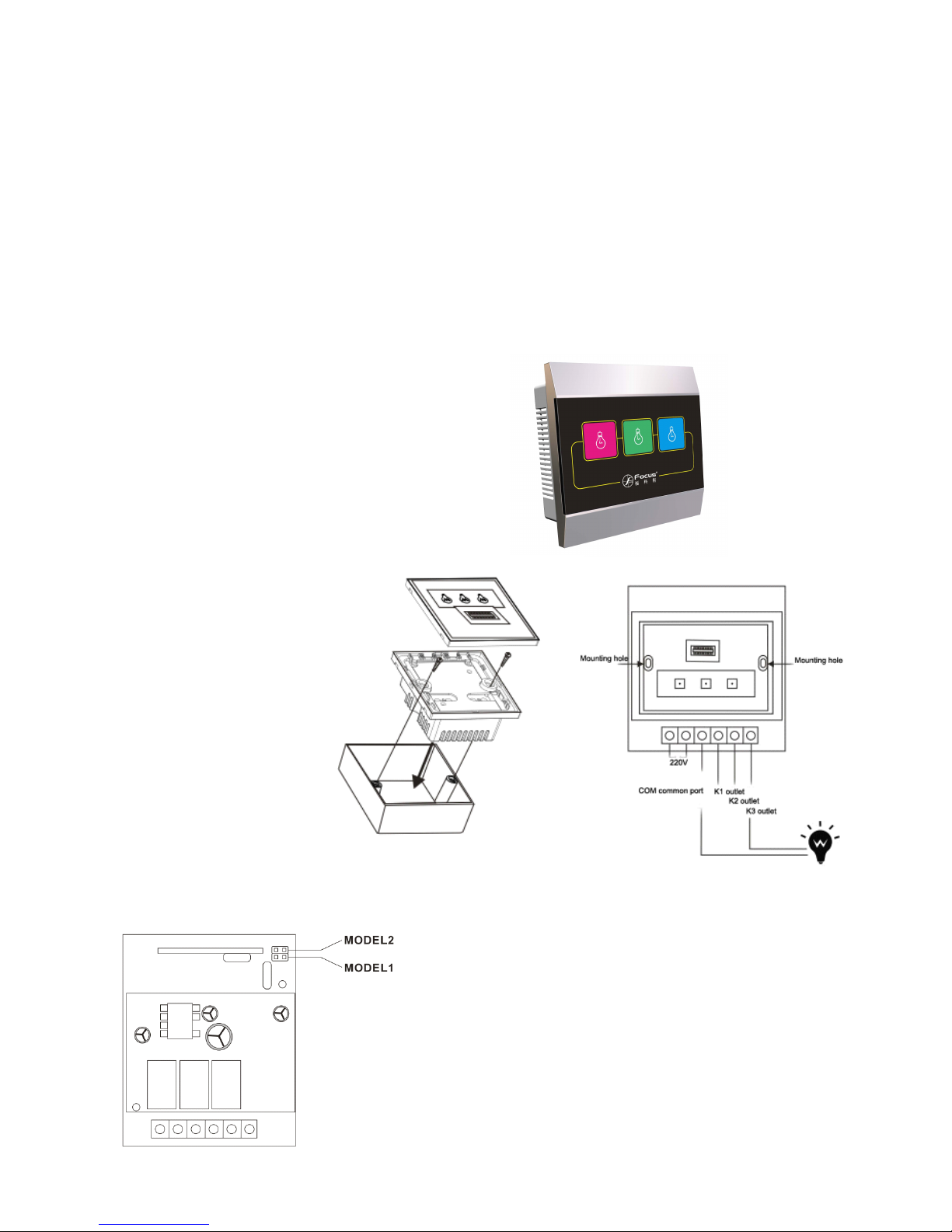
4.Jumper
4.Jumper
4.Jumper
4.Jumper Switch
Switch
Switch
Switch Operation
Operation
Operation
Operation Notice
Notice
Notice
Notice
1]"MODEL 1" jumper pins is mermory function programme switch. Set corresponding 3 channel power-cut memory
A
Mode setting: MODEL 1 is in short circuit condition,
after power on each use, the switch maintains last
time's power-cut condition. (short circuit is factory
default setting.)
Note
Note
Note
Note : After operating the switch delay 5 seconds
without electricity, it will maintains current condition.
B Mode setting: MODEL 1 is in short circuit condition,
the switch maintains off after power on each time.
1)
To
make the shell around
toward its outside and tear
down the shell.
2) Pull up the switch, you will
find two screw mounting
hole.
3) Fine the power line and
connect the line as right
photo dispaly.
4) Put the switch into the
wiring box and use two
screws to fix.
5) Intall the surface shell well.
Page 2
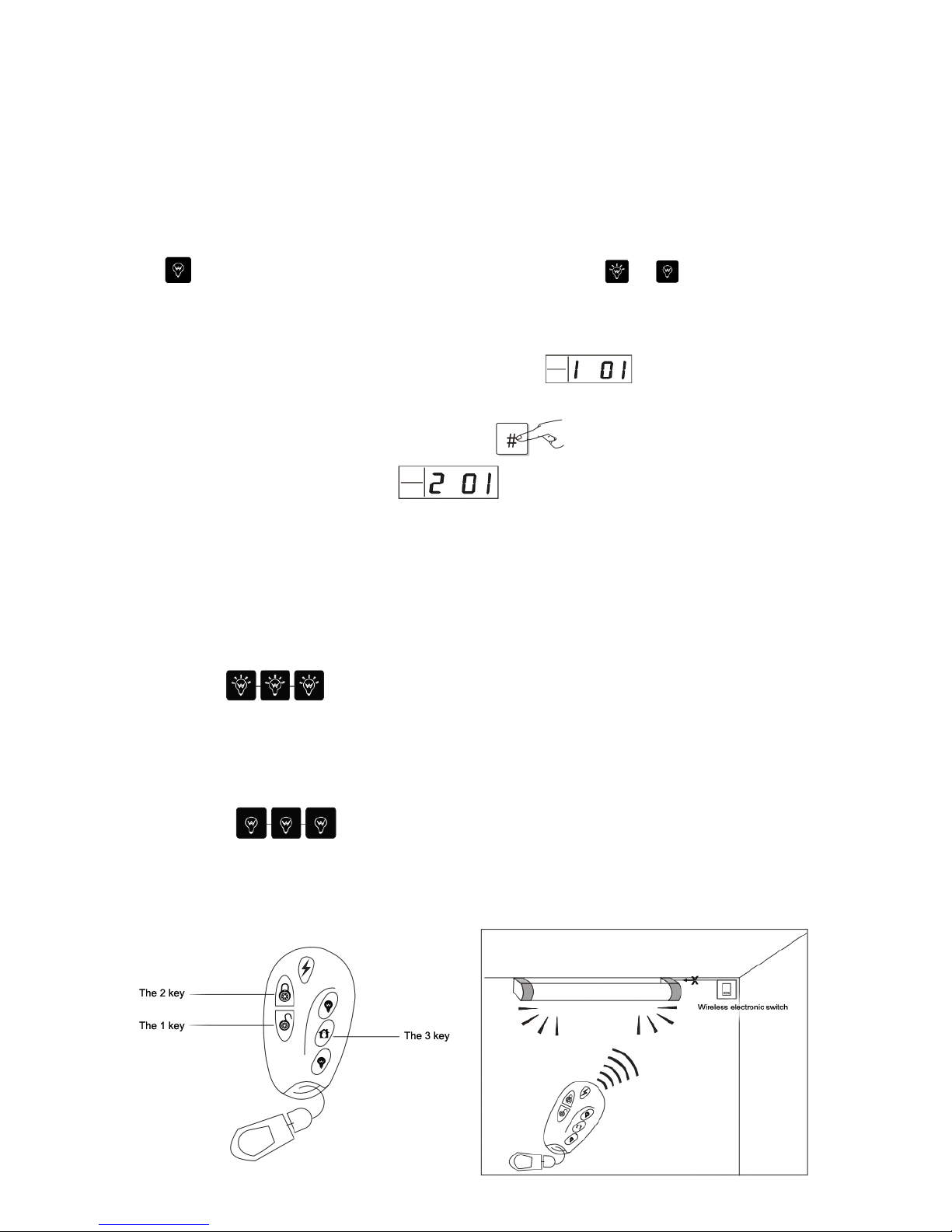
2] Set if it can connect with alarm control panel by MODEL 2.
A. In short circuit condition, electronic switch would not communicate with the alarm control panel. only with remote
controller.
B. In open circuit condition, electronic switch communicate both alarm control panel and remote controller. Factory
default is in open circuit condition.
5.
5.
5.
5. Introduce
Introduce
Introduce
Introduce For
For
For
For 3
3
3
3 Channel
Channel
Channel
Channel Operation.
Operation.
Operation.
Operation.
1. Touch button operation notice
To
touch all the buttons, respectively control the corresponding switch ( off , on )
2. Enroll to the alarm control panel setting. ( MODEL 2 must be in open circuit condition)
Enroll first channel. First enter into the alarm control panel enroll menu, after hear the voice indication from the alarm
control panel, please trigger electronic switch, the LCD will display . Then touch one channel switch
you want to enroll untill its lights on and hold on 15 seconds .Till the touch button light blink every 0.1 seconds. At the
same time use your another hand to confirm button. Press on panel. The panle will give a voice in dication
enroll successfully, and The LCD will dispaly and you can continue to enroll extra two channels by the
same way or press panel's back button to exit.
3. Enroll to our EAVS series alarm control panel setting.
Touch one of channel you want to enroll untill its light on and hold on 15 seonds, till the light blink every 0.1 seconds
frequency. Then the switch will emit the signal. ( more details refer to the manual for the EAVS).
4. Enroll to the remote controller.
Touch three button for 30 seconds until its light. The light will blink every 0.5 seconds at the moment.
Then trigger the any button on the remote controller, the three light will slow blink in one time and long light to exit at
the moment. It means enroll succeed.
5. Delete remote code.
Touch three buttons to off status at the same time, the light will be blink every 0.5 seconds. then
quick blink 5 times and light off. Then delete all the remote.
6. Operation for remote controller.
 Loading...