

Page 1

foc.us gamer
manual & warranty
Page 2

1
Contents
1 Welcome
2 Warning
4 Whats in the box
4 Instructions and intended use
5 Using foc.us
6 Preparing sponges
6 Inser t sponges
7 Positioning headset
7 Activating tDCS
7 Ending tDCS
8 Error
8 tDCS Settings
8 How to change settings
9 Available tDCS modes
Sine-wave current
Constant-current tDCS
Pulsed current with oset
Random-noise current
Sham (Bluetooth control only)
11 Current Settings
11 Howtoconrmsettings
12 Factory Reset
12 Summary of touch sensor
actions
13 Connecting external electrodes
13 Recharging
14 Bluetooth® connection
15 Care and maintenance (expected
service life)
15 Troubleshooting
16 Specications
16 Support
17 Glossary
18 fcc
19 Warranty & Guarantee
19 Limitation of remedies
20 Limitation of damages
Welcome
foc.us is designed to be used by healthy
adults who do not suer from epilepsy,
brain conditions, have a metalicmetallic
implant such as a skull plate, or have
other implant s such as a cochlear
implant or pace -maker. The sole purpose
of foc.us is to improve your video-
gaming.
Page 3

2 3
Warning
You should not use t he foc.us headse t if you
suer from epilepsy, seizures, brain lesions,
bipolar depre ssion, or severe heart disease.
Immediately stop using foc.us if you
experi ence short shor t-term negative
eect s from use.
Foc.us is n ot a toy and is not intended to be
used by anyon e under the age of 18 years
old.
If using external electrodes, it is not
recommen ded to place electro des in
patterns that dier from the default foc.us
congur ation. Do not posit ion electrod es in
a manner where cur rent may pass through
the brainstem. Do not position electrodes
over cuts, grazes, or damage d skin.
Allow at least 4 8 hours betwe en each use
of foc.us .
Always place we t sponges betwee n the
electrodes and your skin when using foc.us.
Do not touch t he metal electro des when
using foc.us, as you may be burned.
What you need to understand
before using foc.us
foc.us is designed to improve your mental gaming skills by exciting and inhibiting
sections of your prefrontal cortex with an electric current.
Possible side-eects include visual artifacts (such as white ashes), nausea,
headaches, and fatigue. If you experience any of these side-eec ts, stop your
foc.us session.
If you see white ashes (known as phosphenes), adjust the position of the foc.us
headset away from your eyes .
You may feel tingling, hot, or cold sensations from using foc .us. If these sensations
become uncomfortable or painful, stop your foc.us session.
Skin redness may appear under electrodes aer use, which will disappear aer a
short time. Repeated use of foc.us may lead to skin irritation.
If you exceed the recommended session duration, you increase the risk of
consolidating both the excitary and inhibitor y processes.
Foc.us should not be used during any activities other than sedentar y gaming.
Page 4
4 5
Using foc.us
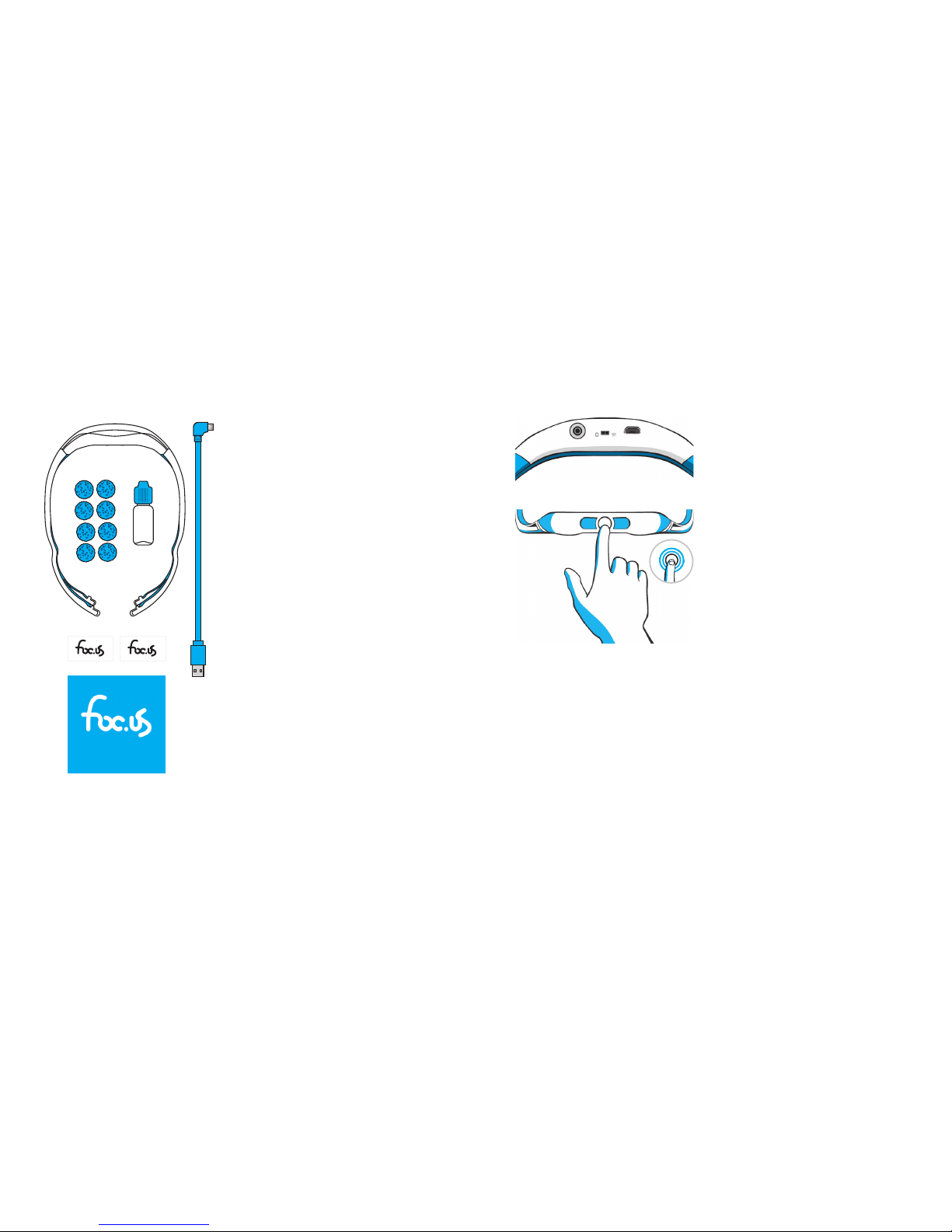
Flick the switch on the bottom of the foc.
us headset to the “W” position to turn o
the headset. The foc.us headset can only
be recharged when turned o .
Flick the switch to the “O” position to
turn the foc.us headset on. The foc.us
headset cannot recharge in this mode.
To switch the foc.us to the “ready state,”
touch the circular sensor and hold for
two seconds. When foc.us switches to the
ready state, the foc.us logo will ash blue
and begin blinking. The foc.us headset is
now ready to pair with a Bluetooth device
or activate.
If you hold the touch sensor for longer
than two seconds, the foc.us headset
will not switch to the ready state. In this
case, the foc.us logo will ash blue and
then red.
Whats in the box
1. foc.us gamer headset
2. foc.us case
3. micro-USB charging cable
4. reusable water bottle
5. 8 × sponges
This Manual & Warranty book and two
vinyl foc.us logo stickers.
Instructions and
intended use
Use foc.us immediately before or at the
beginning of your gaming session.
Manual & Warranty
Page 5
6 7
Preparing sponges
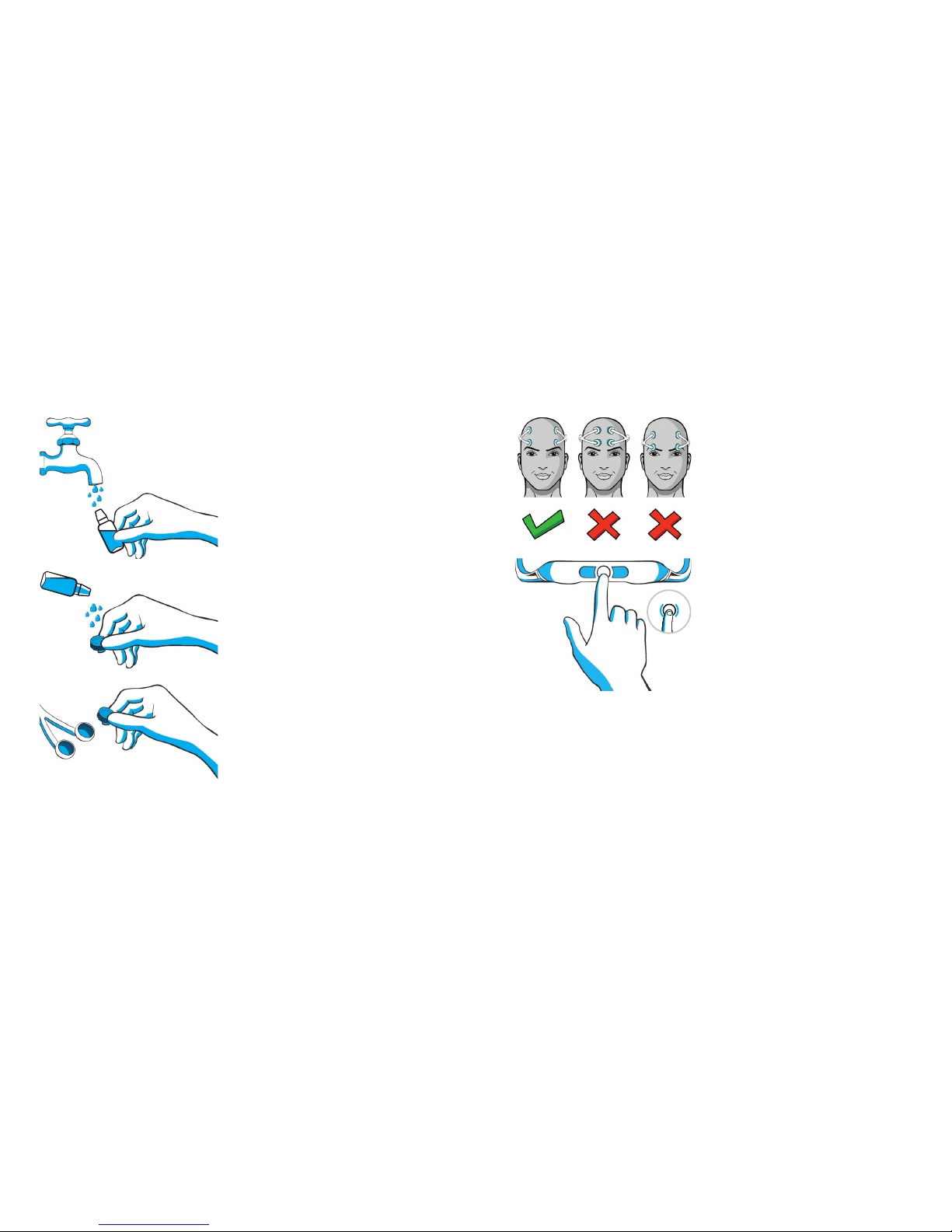
Fill the included reusable bottle with
water. Optionally, add a tiny small
amount of salt to create a saline solution.
Wet the included sponges using the water
bottle until they are saturated but not
dripping.
Insert sponges
Insert the wet sponges into the electrode
cups
Positioning headset
Position the foc.us headset on your head
using the le -most gure as a guide.
Activating tDCS
To begin the tDCS session, touch the
touch sensor.
The headset will buzz a four-second
countdown and will double-buzz when
current is about to ow.
The current will slowly rise from zero up
to the set target current.
Current will automatically stop owing
a er the con gured duration has
elapsed.
Ending tDCS
Tap the touch sensor to deactivate foc.
us. Flick the switch to the “W” position to
turn foc.us o .
Page 6
8 9
Error
If the resistance is too high and the
headset cannot reach the target current,
the logo will ash and the headset will
buzz.
tDCS Settings
How to change settings
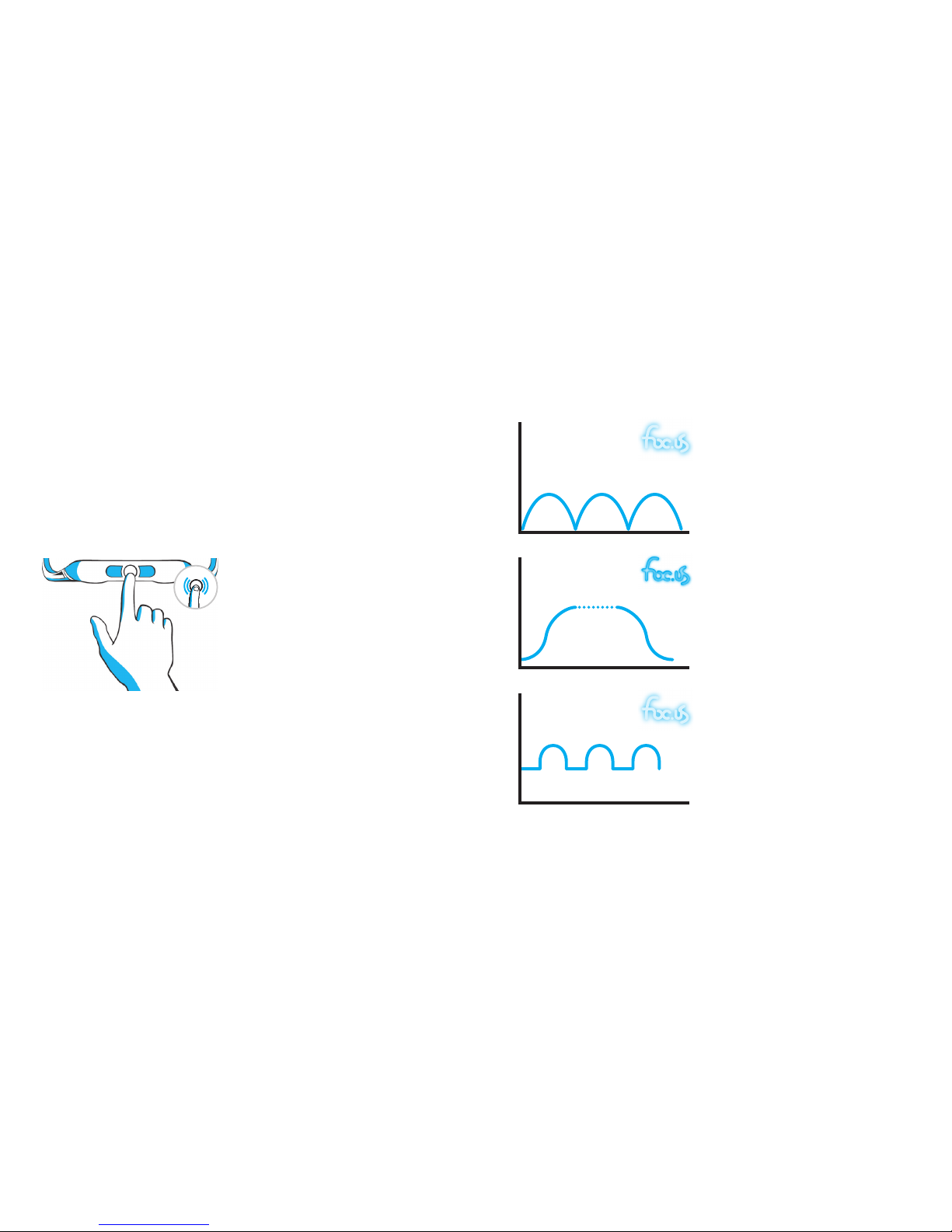
You can change the default set tings of
the foc.us headset by tapping the touch
sensor t wo times.
The headset will cycle through four
modes, each described in the following
section; the logo will ash in a di erent
pattern to denote each mode. Tapping
the touch sensor will select the cur rent
mode in the c ycle.
Once you have selected the mode, you
can then select the current level.
Available tDCS modes
Sine-wave current
Sine-wave current rises and fall s in a
wave-like shape for the duration of the
session.
Logo: The logo brightness will gradually
rise and fall (until the logo is not lit) for
ve se conds.
Constant-current tDCS
Constant current is the default tDC S
behaviour. In this mode, the current
rises to the speci ed current and then
maintains that current for the duration of
the session.
Logo: The logo remains blue at a
constant brightnes s for ve seconds.
Pulsedcurrentwithoff set
Similar to sine-wave current mode, but
the current does not drop below 0. 5 mA.
Logo: the logo brightness will r ise and
fall (the logo always remains lit) for ve
seconds.
Page 7
10 11
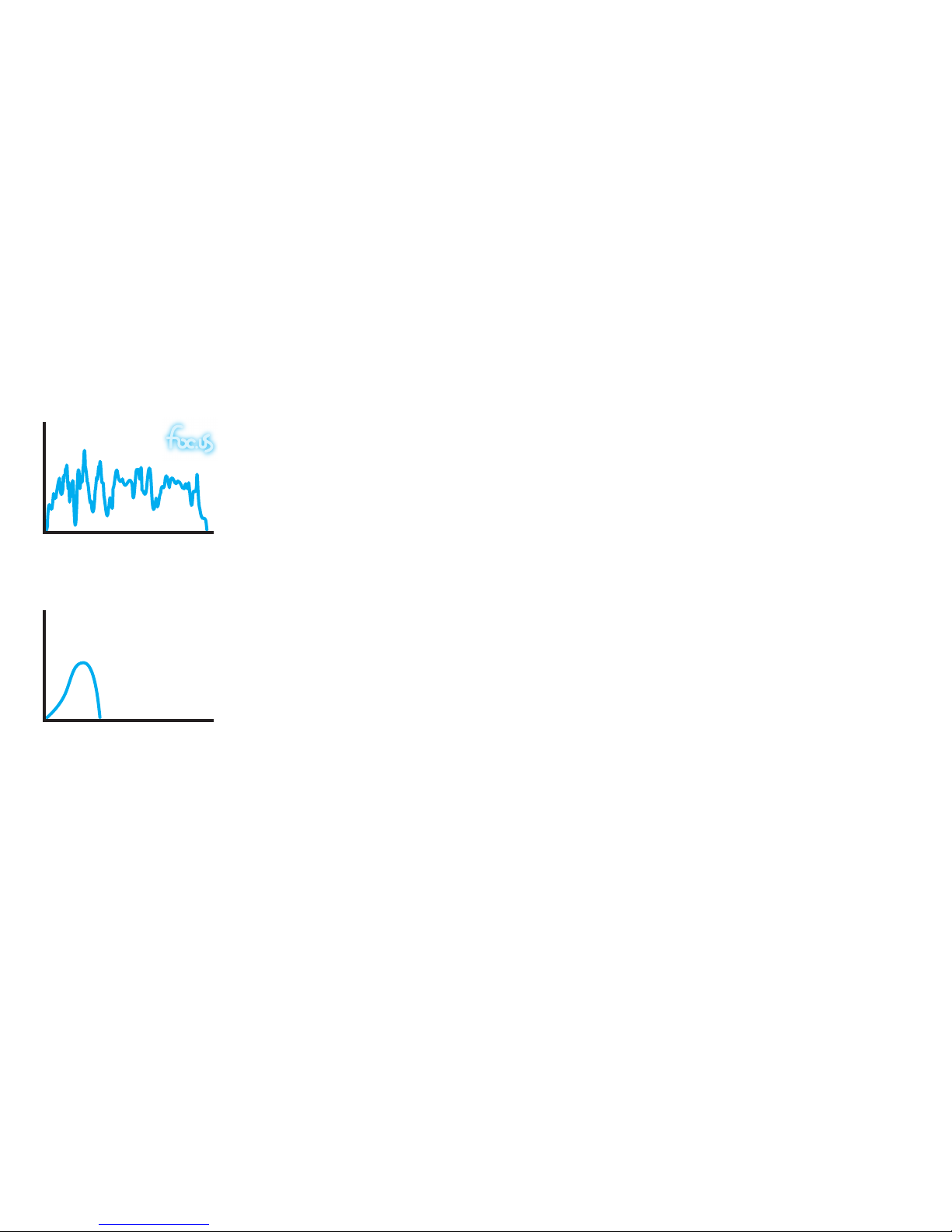
Random-noise current
Random-noise current changes randomly
between 0.5 mA and the speci ed
maximum current for the duration of the
session.
Logo: The logo brightness will change
erratically for ve seconds.
WARNING: Random-noise current
can be the most uncomfor table of the
modes because of the sudden changes
in current.
Sham (Bluetooth control only)
Sham mode is only available via
Bluetooth connection and cannot be set
manually.
In sham mode, the current will ramp up,
but then ramp o . The logo will remain
lit for the duration of the session as if in
constant-current mode.
Current Settings
Once you have selected a mode, you can select the current level.
The logo will glow for three seconds at varying levels of brightness to indicate the
current level. Tapping the touch sensor during the desired mode will select it. The
foc.us headset suppor ts four current levels:
Low, Medium, High, and Maximum.
Low: 0.8 mA
Medium 1.2 mA
High 1.5 mA
Maximum 2.0 mA
Note: Maximum is only available when external electrodes are connected.
Once a current has been selected, the device will return to the ready state.
Howtoconrmsettings
Tap the touch sensor three times; the logo will ash, showing the mode and then
the current level.
Page 8
12 13
Factory Reset
To restore your headset to factory conditions, turn it on and then hold the touch
sensor for 30 seconds .
The lights will ash red and blue; at this point, tap the touch sensor once to con rm
the factory res et.
Summary of touch sensor actions
Hold for two seconds – turn on
Tap once – activate
Tap twice – change settings
Tap three times – show current mode and current level
Hold for 30 seconds – reset to factor y settings
Videos describing how to use foc.us are available on our website:
http://www.foc.us/videos
Connecting external
electrodes
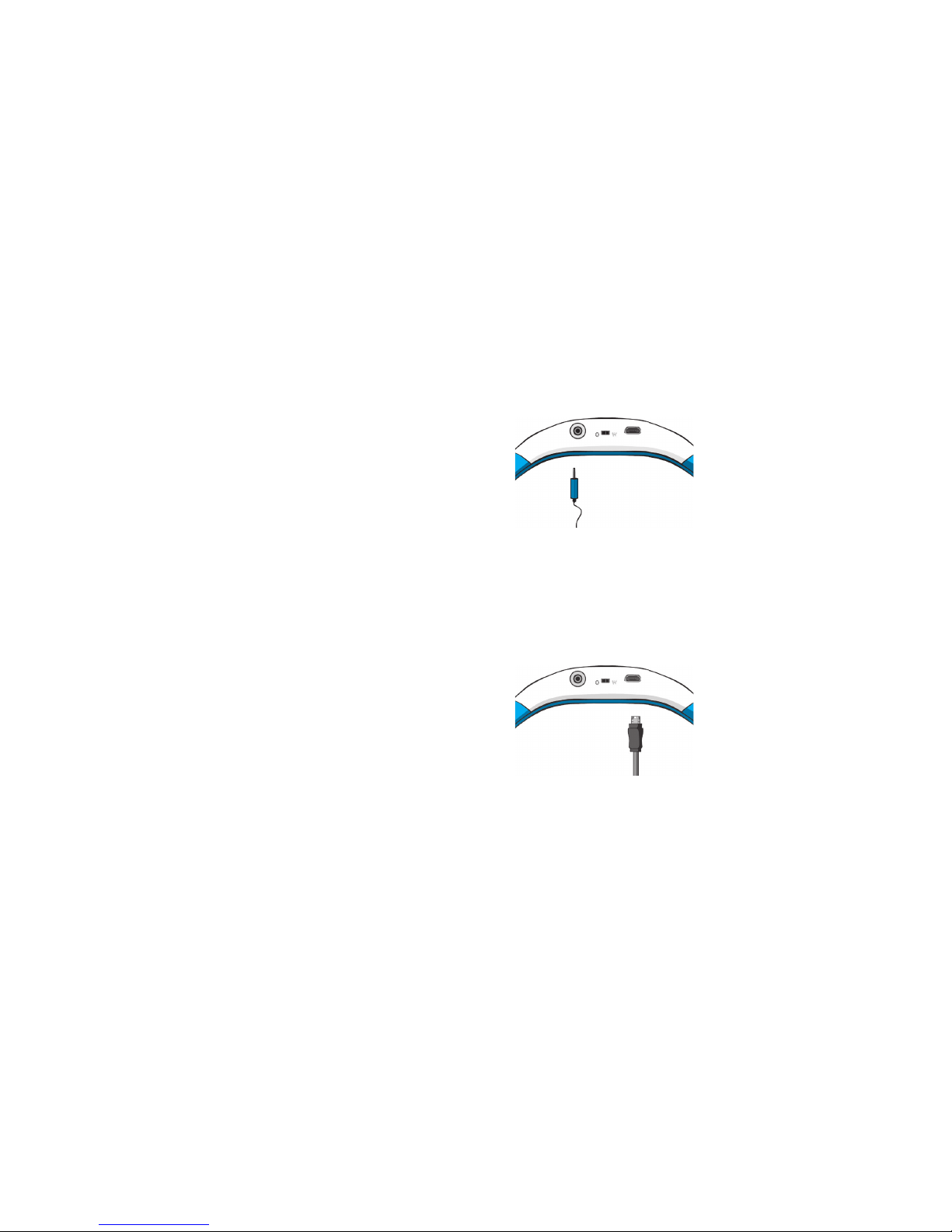
You can connect external electrodes
to the foc.us headset. Only use foc.us
supplied electrodes to ensure correct
polarities and safe use.
Each external electrode pad is marked
with a + to indicate anode or a – to
indicate cathode.
WARNING: Misusing external electrodes
can be dangerous. Ensure that you do not
place electrodes in positions that could
be dangerous, including but not limited
to positions that pass current through
the brains tem.
Recharging
If the logo glows red, the bat tery needs to
be recharged.
To charge the headset, ick the headset
switch to the “ W” position and connect
the supplied micro-USB cable to the
headset.
During charging, the logo will glow green.
Page 9

14 15
Bluetooth® connection
When the headset is rst put into the
ready state, the logo will blink blue ever y
half-second for one minute. During this
period, the headset can be paired to a
suitable Bluetooth® device.
The default pin code is “00 0000”.
When the headset successfully connects
to a Bluetooth device, the logo will blink
blue ever y two seconds.
If the heads et is on in the ready state and
not connected, the logo will blink blue
every ve seconds.
For a list of available foc.us Bluetooth®
apps, go to http://www.foc.us/bluetooth
Care and maintenance (expected service life)
Always store your foc.us headset in the supplied case when not in use.
Squeeze any excess liquid from the sponges when not in us e, and place them in the
case.
Ensure the lid of the supplied water bottle is tightly closed before returning to its
place
The copper electrodes will discolor over time; this behavior is normal and does not
aect their performance.
Be careful when removing the external elec trodes or micro-USB connector.
Troubleshooting
Problem Solution
Cannot turn on Ensure battery is charged
Error mode Ensure sponges are wet
Batter y will not charge Check connection of micro-USB to 5V power source
Page 10

16 17
Specications
Size: 195mm × 150mm × 58mm
Weight: 300g headset
Battery: 3.7V Li-Po 105mAh rechargeable
Max current: 2.05mA – hardware limited
Max voltage: 60V
Sample rate: 2,000 per second
Bluetooth: 4.0 Bluetooth low energ y GATT prole
FCC ID: 2AAH6DLIG1
Support
More information is available on the website: http://www.foc.us/support
You can also email [email protected] if you have any questions or concerns
Glossary
Activate begin the current ow between the electrodes
Active electrode
Anode positive electrode
Cathode negative electrode
Montage positioning of the electrodes
Ready State headset turned on and ready to pair with a Bluetooth device,
change mode, or activate
tDCS transcranial direct-current stimulation
tRNS transcranial random-noise stimulation
phosphenes visual artifacts
sedentary sitting; not physically active
Page 11

18 19
fcc
FCC warning statement:
This device complies with Par t 15 of the FCC Rules.
Operation is subject to the following t wo conditions:
(1) This device may not cause har mful interference, and
(2) This device must accept any interference received, including interference that
may cause undesired operation.
This equipment complies with FCC radiation exposure limits set for th
for an uncontrolled environment. End users must follow the specic
operatinginstructions for satisf ying RF exposure compliance. This transmitter
must not be co -located or operating in conjunction with any other antenna or
trans mitt er.
Changes or modications not expressly approved by the party responsible for
compliance could void the user ’s authority to operate the equipment.
Warranty & Guarantee
foc.us warrants the foc.us headset (the “Product”), and only the Product, against
defects in materials and workmanship under normal use for a period of thirteen
(13) months commencing on the date of original purchase by the original purchaser
(the Warrant y Period). This warranty does not cover damage caused by misuse,
accident, abuse, natural and/or external causes (i.e. re, earthquake, ood, etc.),
use other than as intended and described in the Product instruction manual,
nishes, normal wear and tear, tampering, unreasonable use, service performed
by unauthorised ser vice agents, or loss or damage to the battery. foc.us does not
warrant that the operation of the Product will be uninterrupted or error-free.
Limitation of remedies
Under this Limited Warranty, foc.us liabilit y and customer’s exclusive remedy
under the foregoing paragraph will be limited to replacement or repair of the
Product by foc.us or its authorized service centers . A replacement Product or par t
assumes the remaining warranty of the original Product or ninety (90) days from
the date of replacement or repair, whichever is longer.
To obtain warrant y service, contac t [email protected]
For your security, please return your Product with an insured carrier (e.g., FedEx,
UPS, USPS Parcel Post) and retain your receipt. foc.us is not responsible for items
damaged or lost in transit. Other than for the reason of hardware defect s, the
return freight cost responsibilit y belongs solely to the costumer.
Page 12

20 3
Limitation of damages
In no event will foc.us or any of it s ailiated or subsidiary companies be responsible
for any special, incidental, or consequential damages resulting from the use of this
Product, or based on any breach of warranty, breach of contract, negligence, tor t,
or any other legal theory. Such damages may include, without limitation: loss of
savings or revenue; loss of prot; loss of use; the claims of third parties, including
without limitation retailers; any cost of any substitute equipment or services.
Some states do not allow the exclusion or limitation of incidental or consequential
damages, so the above limitation may not apply to you. The warranty gives specic
legal rights, and you may have other legal rights, which vary from state to state or
country to country.
This Limited Warrant y is valid only in the United States and Europe for Products
sold in the United States and Europe. Resellers, agents, or employees of foc.us
are not authorized to make any modication, extension, or addition this Limited
Warranty.
Page 13

4
www.foc.us
 Loading...