

Page 1

Web: www.fmuser.net Email: [email protected] Skype: rita.cai87 MSN: [email protected]
1 / 11
SDA-15B Operation Instruction
1.Operation Attention:
1. Only professional engineer is allowed to repair the device.
2. Please do lightning protection during bad weather like thunderstorms
3 . Please DON’T touch the antenna after the transmitter is powered on
4. Please DON’T switch on the transmitter without connecting the antenna correctly.
5. Please DON’T use the transmitter in explosive environment (such as gas stations, gas,
steam, etc.
6. Please DON’T use the transmitter in very dusty, damp or hot environment.
7. Please use the transmitter following the local wireless administration regulations.
2.Menu
1. Product feature
2. Product configuration
3. Front/Back Panel
4. Shortcut buttons
5. Operation Guide
6. Technical Specification
7. Common problem solution
8. PC control software
3.Product Feature
SDA-15B is a practical and stable working transmitter of excellent ventilating feature, it
integrates lots of functions and is easy to operate. It has many outstanding feature as below:
1. Output power is continuously adjustable from 0~15watt.
2. Output power auto-locking system.
3. Microphone Reverbing function, can be swtich ON/OFF
4. Mono/Stereo channel is optional
5. With PC control function, easily control the transmitter through the SDA-15B PC Control
software.
6. With DAC function, digital audio transmission, more clear and stable audio effect.
7. VSWR protection function, when the antenna is not or wrongly connected, the automatic
protection will be switched on.
8. Temperature protection: When the transmitter runs with very high temperature, the device
will switch on automatic protection.
9. Shortcut buttons on the panel, easier and faster operation.
Page 2
Web: www.fmuser.net Email: [email protected] Skype: rita.cai87 MSN: [email protected]
2 / 11
4.Product configuration
No.
Item Number Description Qty Unit
Port
1
transmitter SDA-15B 1 pcs NO
2
100% AL antenna 1/4 or 1/2 wave 1 set TNC
3
Power adapter DC15V/4A 1 set 15.0V-4.0A
4
USB line 1 USB male to male 1 pcs PC Control
5
USB line 2 USB to T port(MINI) 1 pcs DAC
6
Audio cable 1 to 2 type 3.5mm 1 pcs LINE IN
7
Microphone 3.5mm port (Electret type)
1 set MIC
8
Manual
Hardware and software
guide
2 pcs NO
*Front/back Panel description
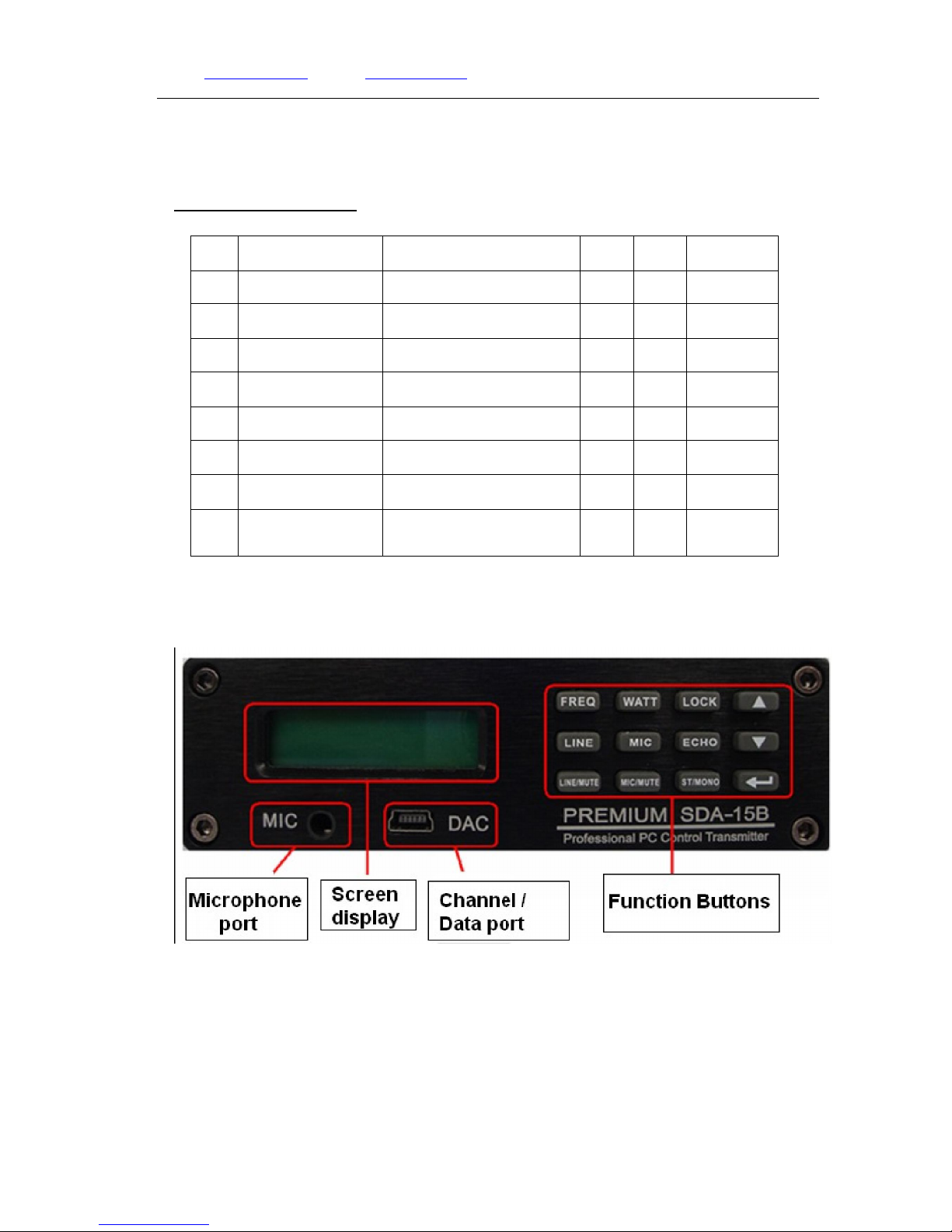
1. Front Panel
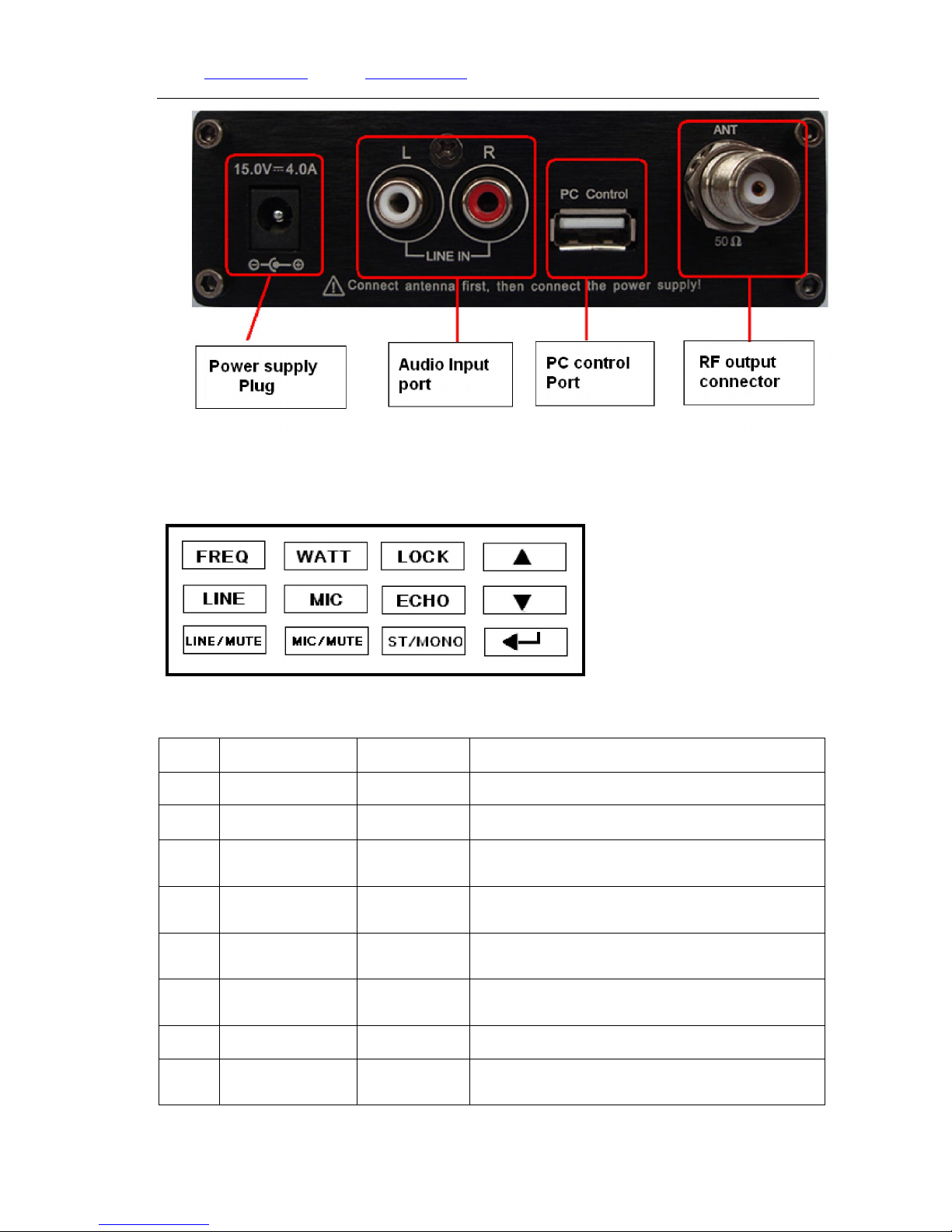
2. Back Panel
Page 3
Web: www.fmuser.net Email: [email protected] Skype: rita.cai87 MSN: [email protected]
3 / 11
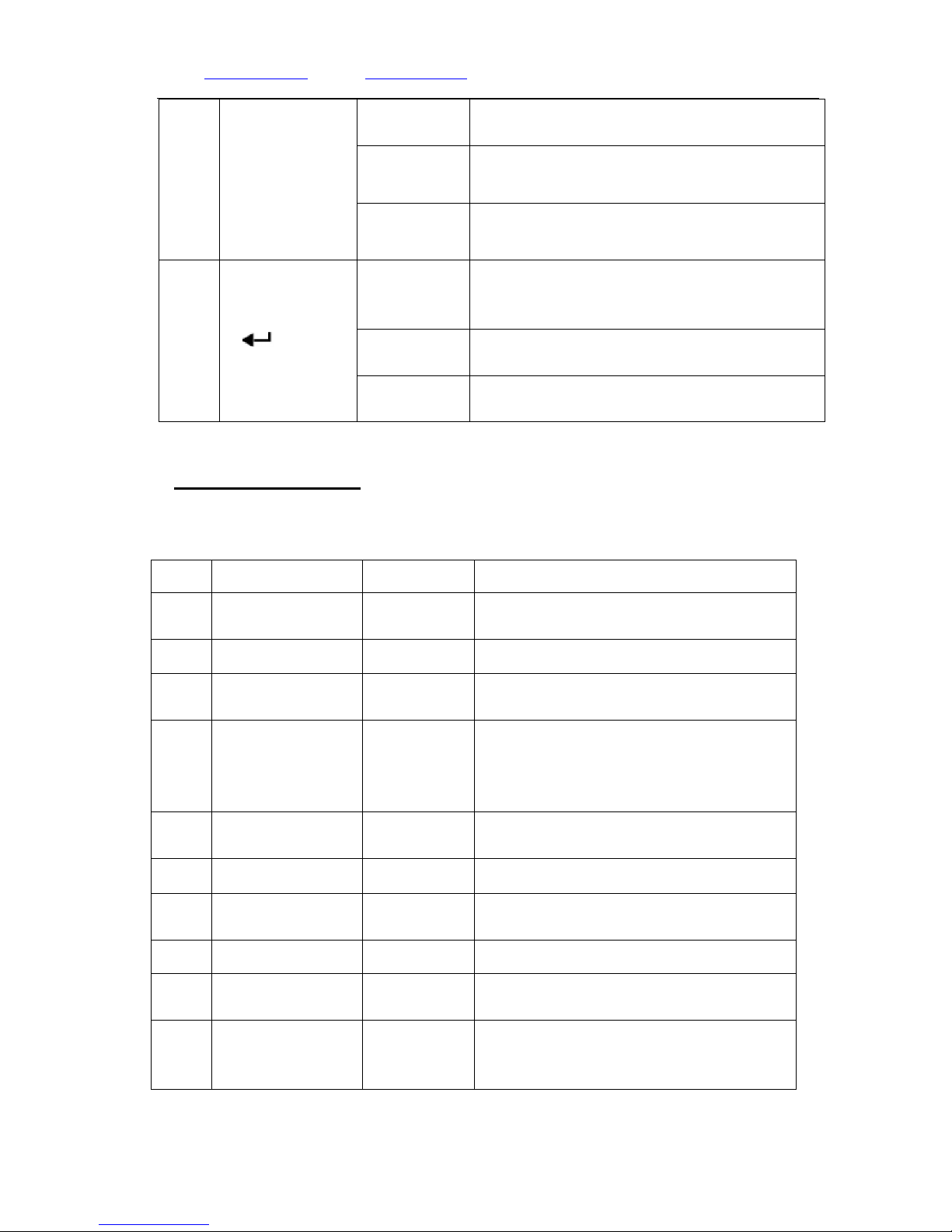
*Shortcut Buttons
1、 Gallery
2、Description
No. Name Defition Description
1
【FREQ】 Frequency Press the button to frequency setting page
2
【WATT】 Power Press the button to power setting page
3
【LOCK】 Lock
Press the button for 3 seconds, then Lock/Unlock
the transmitter
4
【LINE】 Audio Signal
Press the button to the Audio volume setting
page
5
【MIC】 Microphone
Press the button to the microphone volume setting
page
6
【ECHO】 Reverberation
Press the button to Open/Shut the microphone
Reverberation.
7
【LINE/MUTE】 Audio Mute Press the button to Open/Shut audio mute effect.
8
【MIC/MUTE】
Microphone
Mute
Press the button to Open/Shut microphone mute
effect.
Page 4
Web: www.fmuser.net Email: [email protected] Skype: rita.cai87 MSN: [email protected]
4 / 11
9
【▲】/【▼】
Adjust
In the parameter setting pages,【▲ 】means
increase,【▼】means decrease
Change
MONO/STEREO change page, 【▲ 】 means
STEREO,【▼】means MONO.
Turn
In the home page, press【▲】or 【▼】 to enter/exit
the home page/second page.
10
【
】
Exit
In the parameter adjusting pages, press this
button to exit that page and turn back to home
page.
Standby
In the home page, press this button for 3 seconds
to standby status.
Alarm
When VSWR/Temperature is in danger and under
proection, press this button to turn to home page.
5.Operation Explanation
1. Character Display Description
No Character Display
Name Description
1
FMxxx.xMHz
Broadcasting
frequency
The current broadcasting frequency is
xxx.xMHz
2
PWR:xx.xW Output power The current output power is xx.x watt.
3
xx℃
Transmitter
Temerature
The current amplifier tube surface
temperature is xx℃
4
SWRx.x SWR Value
The current SWR value is x.x,(Min.1.0
means no reflection, Maximum value 9.0
means the power are all reflected back.
Smaller value means less power reflection)
5
LOCK Button lock
Means all the buttons has been locked(not
including【LOCK】button)
6
LINE:x x Audio Volume The Volume of Audio input
7
MIC:x x
Microphone
Volume
The Volume of Microphone Input
8
LINE:*** Audio Mute To mute the Audio input
9
MIC:***
Microphone
Mute
To mute the microphone input
10
MIC:x xE
Microphone
Reverberation a E means reverberation ON
Page 5
Web: www.fmuser.net Email: [email protected] Skype: rita.cai87 MSN: [email protected]
5 / 11
11
ST▌==
Volume
dynamic
display
Dynamic displaying of the volume, the higher
volume, the more sign of .
Remark: “x”represents the numerals;“***” represents Mute
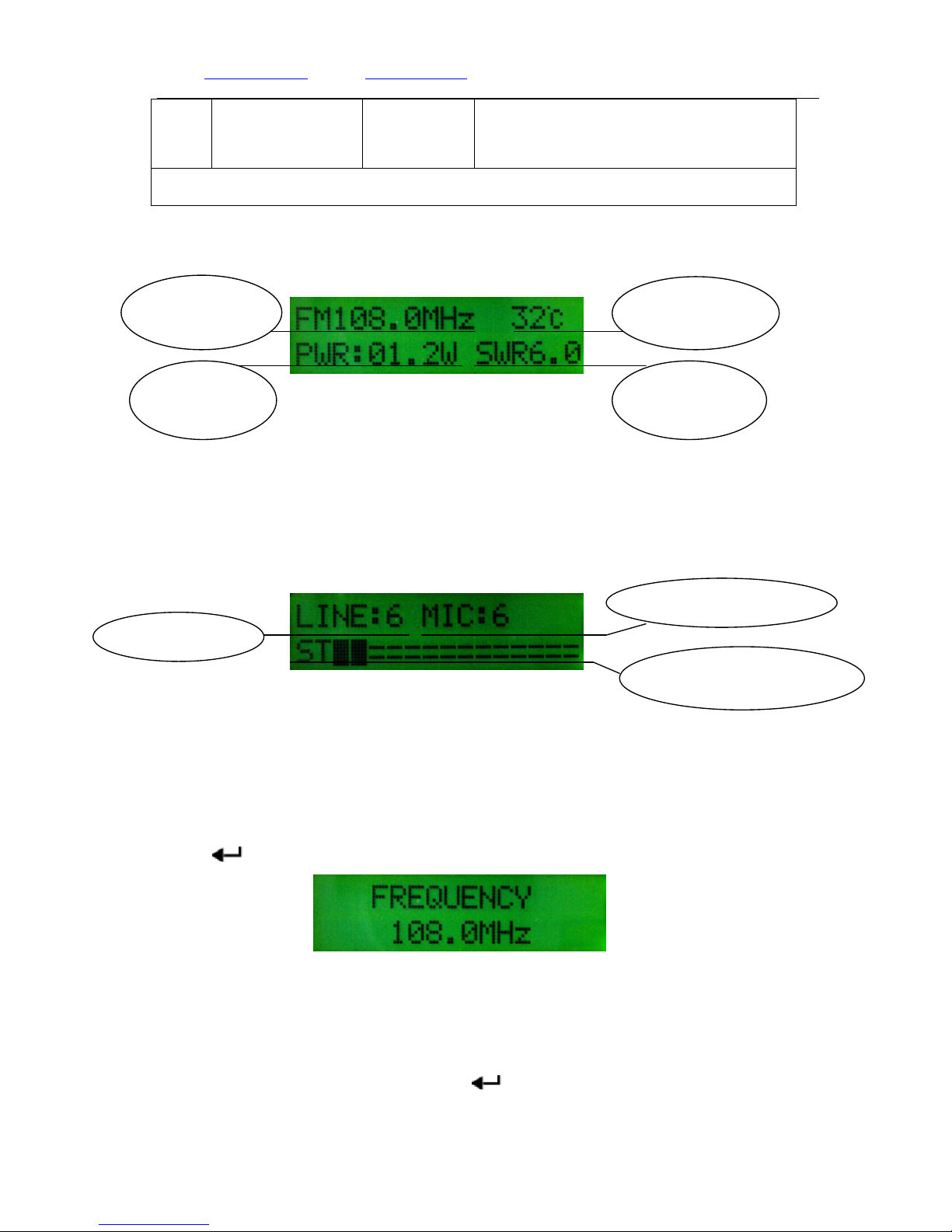
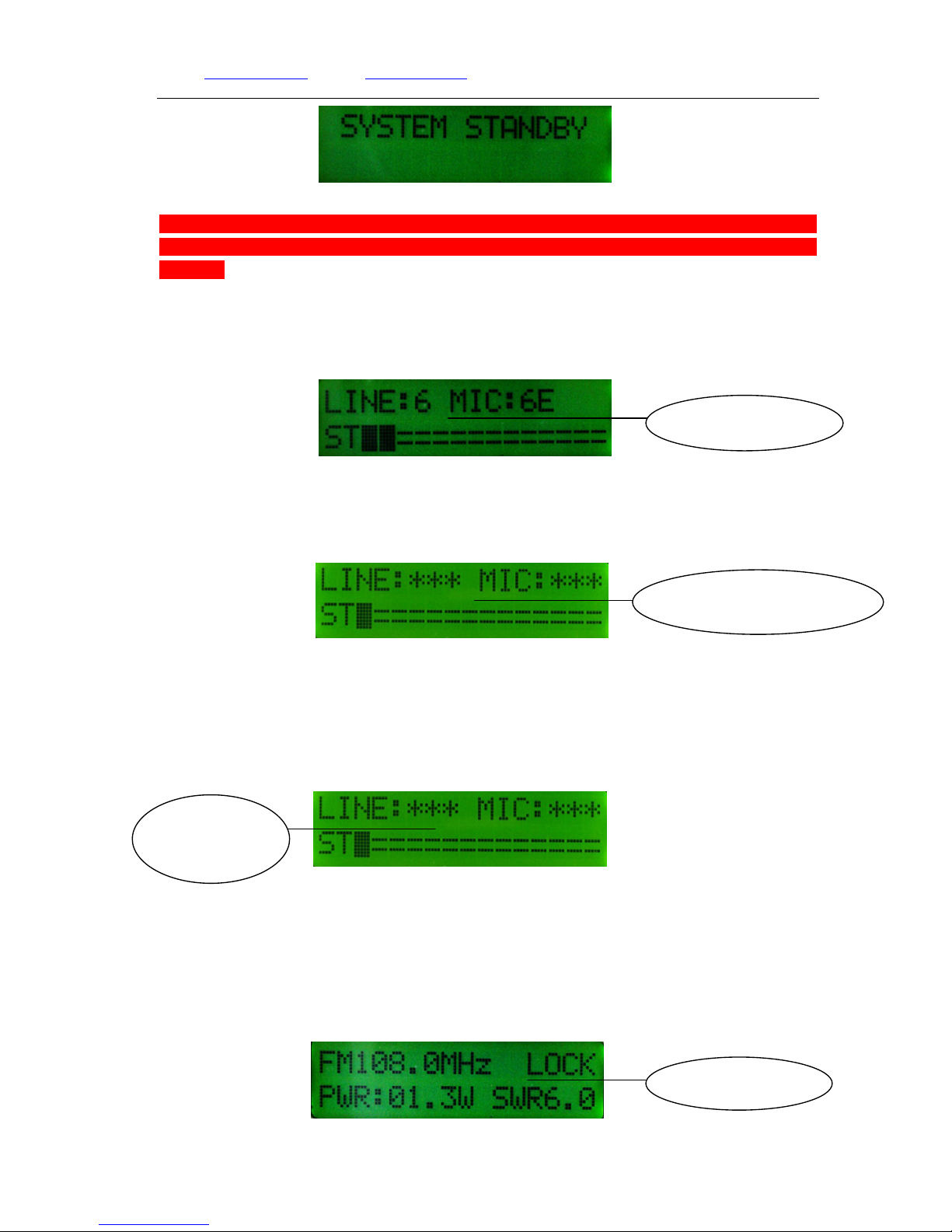
2 Home Page Display 1:
Home Page Display 1
3 Home Page Display 2:
In the Home page, press【▲】or【▼】 button to enter page 2 to check the audio volume and
microphone volume. Press【▲】or【▼】to home page.
Home Page Display 2
Attention: In the parameter setting pages, if there isn’t any operation in 30second, the
interface will automatically go back to Home page.
4. Frequency Adjusting
In the home page, press【FREQ】button to the frequency setting page, then press【▲】or
【▼】button to adjust the value by100khz frequency for each step. After setting, press
【 】to home page.
Frequency setting page
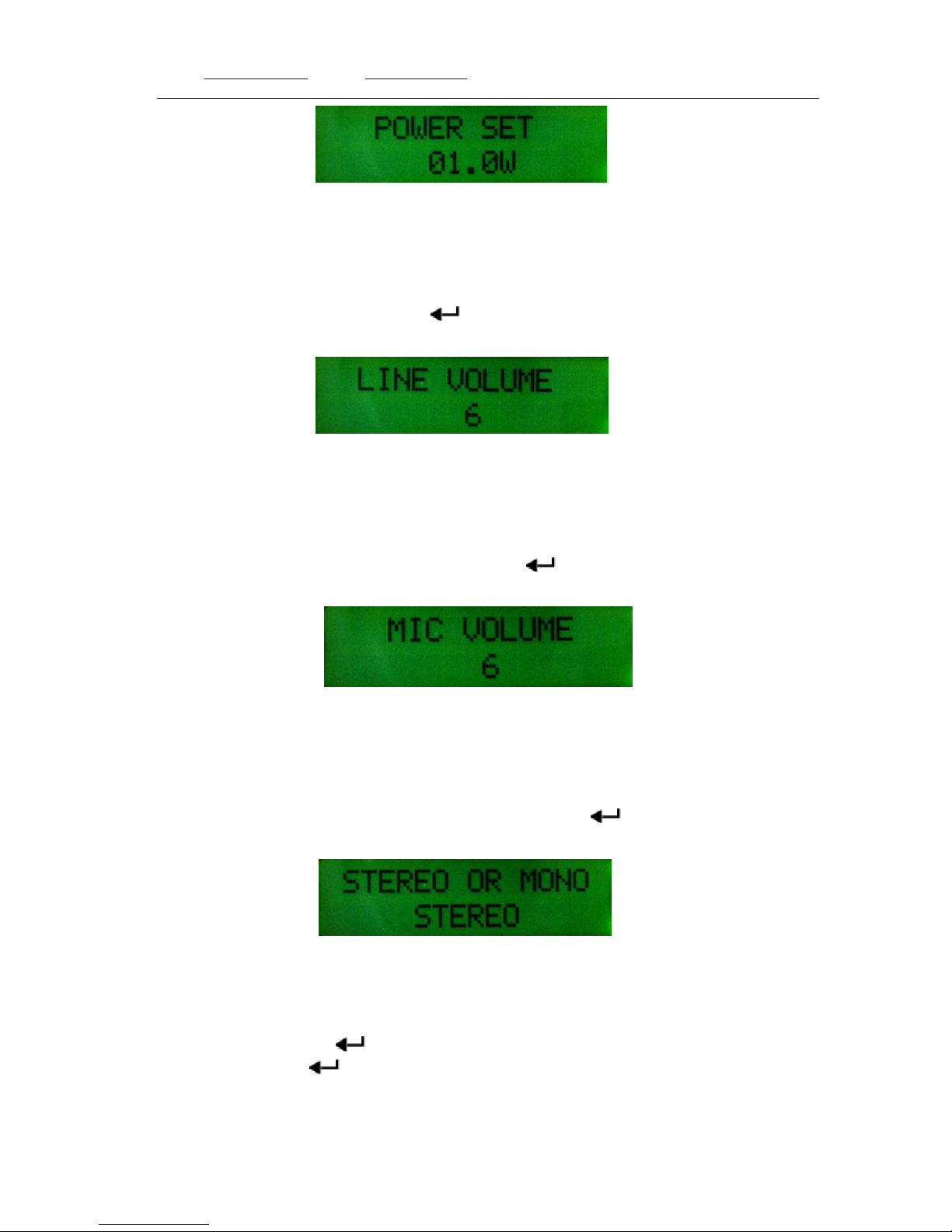
5. Power setting
In home page, press【WATT】button to the power setting page, press【▲】or【▼】 to adjust
the power between 0.2~15watt, then press【 】back to the home page.
SWR value
Machine
Temperature
Broadcasting
frequency
Broadcasting
Power
Microphone Volume:6
Audio Volume:6
Volume dynamic display
Page 6
Web: www.fmuser.net Email: [email protected] Skype: rita.cai87 MSN: [email protected]
6 / 11
Power setting page
6. Audio volume setting
In home page, press【LINE】to the audio volume page, press【▲】or 【▼】 button to adjust
the volume between 1~13, then press【 】button back to the home page.
Audio Volume adjusting page
7. Microphone Volume setting
In home page, press【MIC】 to the microphone volume setting page, press【▲】or【▼】 to
adjust the volume between 1~30, after setting press【 】back to the home page.
Microphone volume adjusting page
8. Mono/Stereo Setting
In homepage, press【ST/MONO】button to the channel setting page, press【▲】to enter Stereo
status, press【▼】button to enter MONO status, then press【 】back to the home page.
Mono/Stereo Setting page
9. Standby or Switch ON.
In home page, press【 】button for 3seconds to the standby page, the transmitter will stop
broadcasting. Press【 】to confirm return to the home page and switch to the previous status
before standby.
Page 7
Web: www.fmuser.net Email: [email protected] Skype: rita.cai87 MSN: [email protected]
7 / 11
Standby page
Attention: If you want to switch on the transmitter after standby at or below 0.2w
broadcasting power, you need to adjust the power to 0.3watt or above to access to power
locking.
10. Reverberation ON/OFF.
In home page, press【ECHO】 to turn ON/OFF the reverberation effect.
Home page Display 2
11.Microphone Mute
In home page, press【MIC/MUTE】 button to turn ON/OFF the microphone.
Home page Display 2
12、Audio Mute
In home page, press【LINE/MUTE】 to turn ON/OFF audio line in volume.
Home page Display2
13. Button Locking
In home page, press 【LOCK】 button for 3 seconds, all the other buttons will be
locked/unlocked.
Reverberation ON
Microphone status: Mute
Audio Volume
status: Mute
Buttons locking
Page 8
Web: www.fmuser.net Email: [email protected] Skype: rita.cai87 MSN: [email protected]
8 / 11
Home page Display1
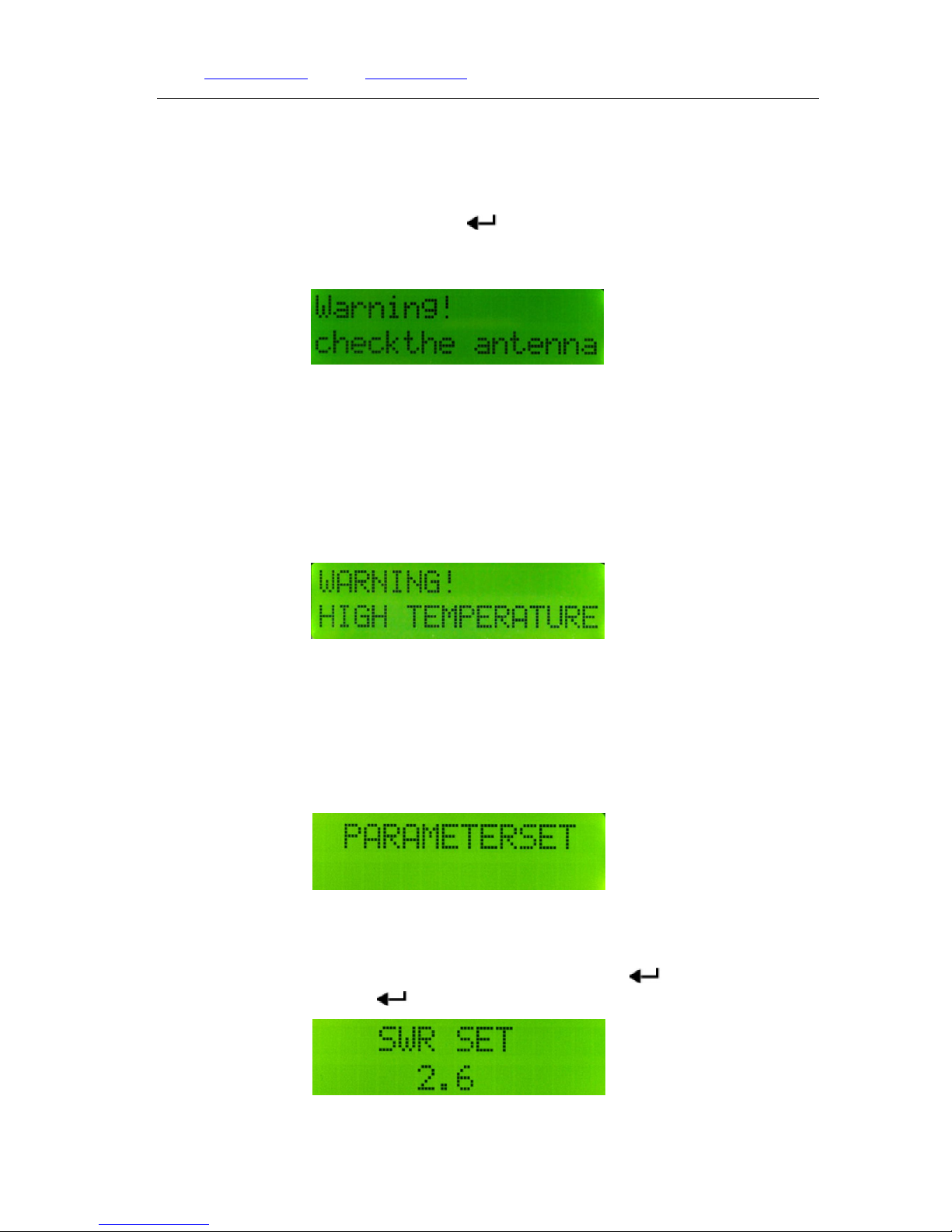
14. SWR Warning
When the SWR value goes beyond the limit, the transmitter will switch on protection
automatically and stop broadcasting. Please solve the problems following our Problem solving
guide and restart the transmitter. Or press【 】to the home page, in this case the power will
automatically decrease to 1watt and you can start setting.
SWR Warning page
Attention: If the transmitter is working above 1watt, please use outdoor antenna.
15. Over-heat Warning
When the working temperature of the transmitter goes too high, the protection will be
automationcally turned on, the transmitter will stop broadcasting. You can solve the problem
following our problem solving guide, then restart the transmitter.
Over-heat warning page
16.SWR and Temperature Protection Setting
Press and hold the【←】button, then connect the power supply, release the button to enter in
protection setting page.
Protection Setting Page
(1)SWR protection
In the protection setting page, press【▲】button to enter in SWR protection setting page,
press【▲】or【▼】to set the value between 2.5~4.0, then press【
】button to go back to
protection setting page. Press【 】again to exit. The transmitter stays in working status.
SWR protection setting page
Page 9
Web: www.fmuser.net Email: [email protected] Skype: rita.cai87 MSN: [email protected]
9 / 11
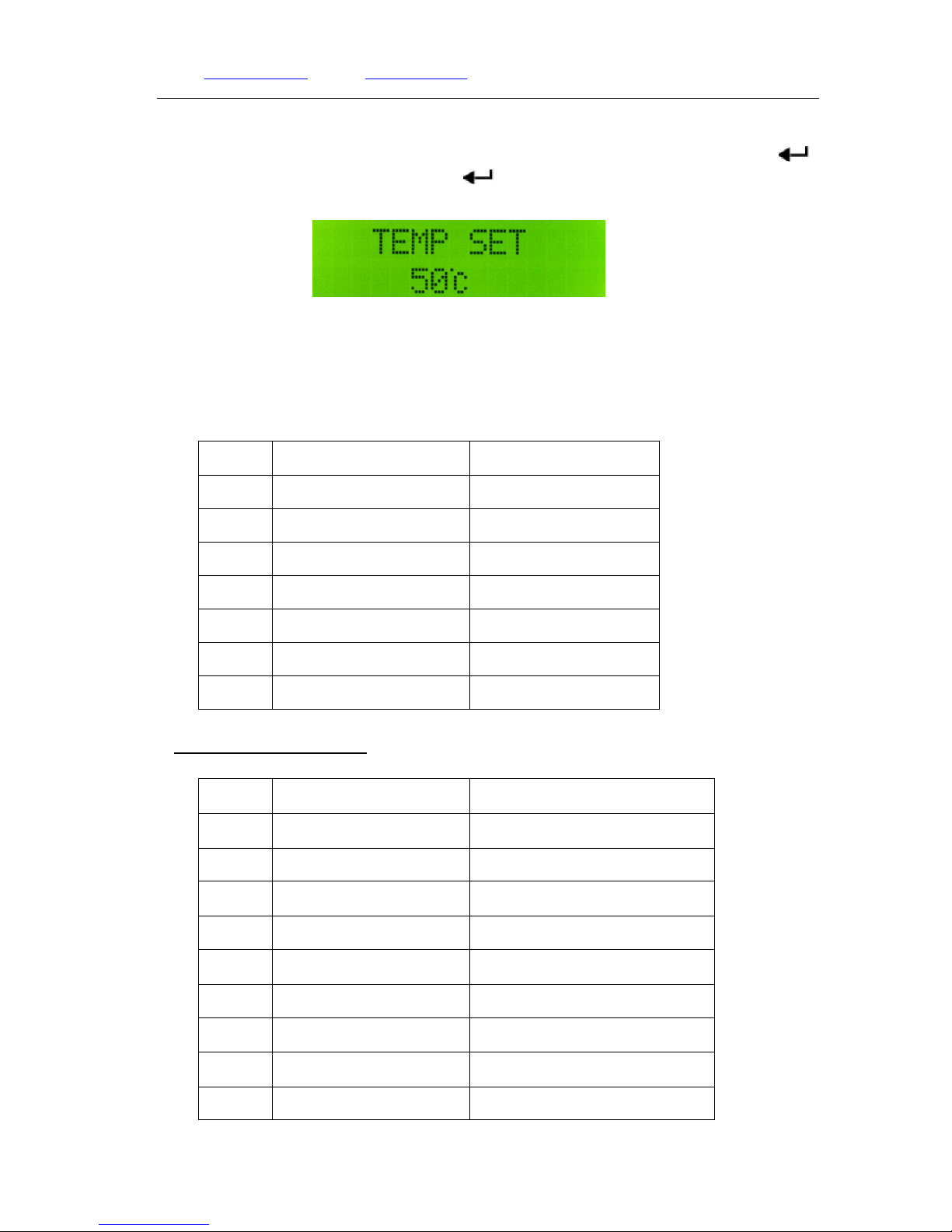
(2)Temperature protection
In the protection setting page, press【▼】button to enter in temperature protection setting
page. Press【▲】or【▼】button to adjust the temperature between 50℃~70℃, then press【 】
back to the protection setting page. Press【
】again to exit. The transmitter stays in working
status.
Temperature Protection Setting page
Remark: The default temperature protection value is 60℃, normally there is no need to change.
17. Reset to factory setting
Press and hold【▲】, then connect the power supply, release the button to enter reset setting.
No. Item EX-Factory Value
1
Frequency 98MHz
2
Power output 5W
3
LINE Volume 05
4
MIC Volume 15
5
MONO/STEREO Stereo(ST)
6
VSWR 2.5
7
Temperature 60℃
8.Technical Specification
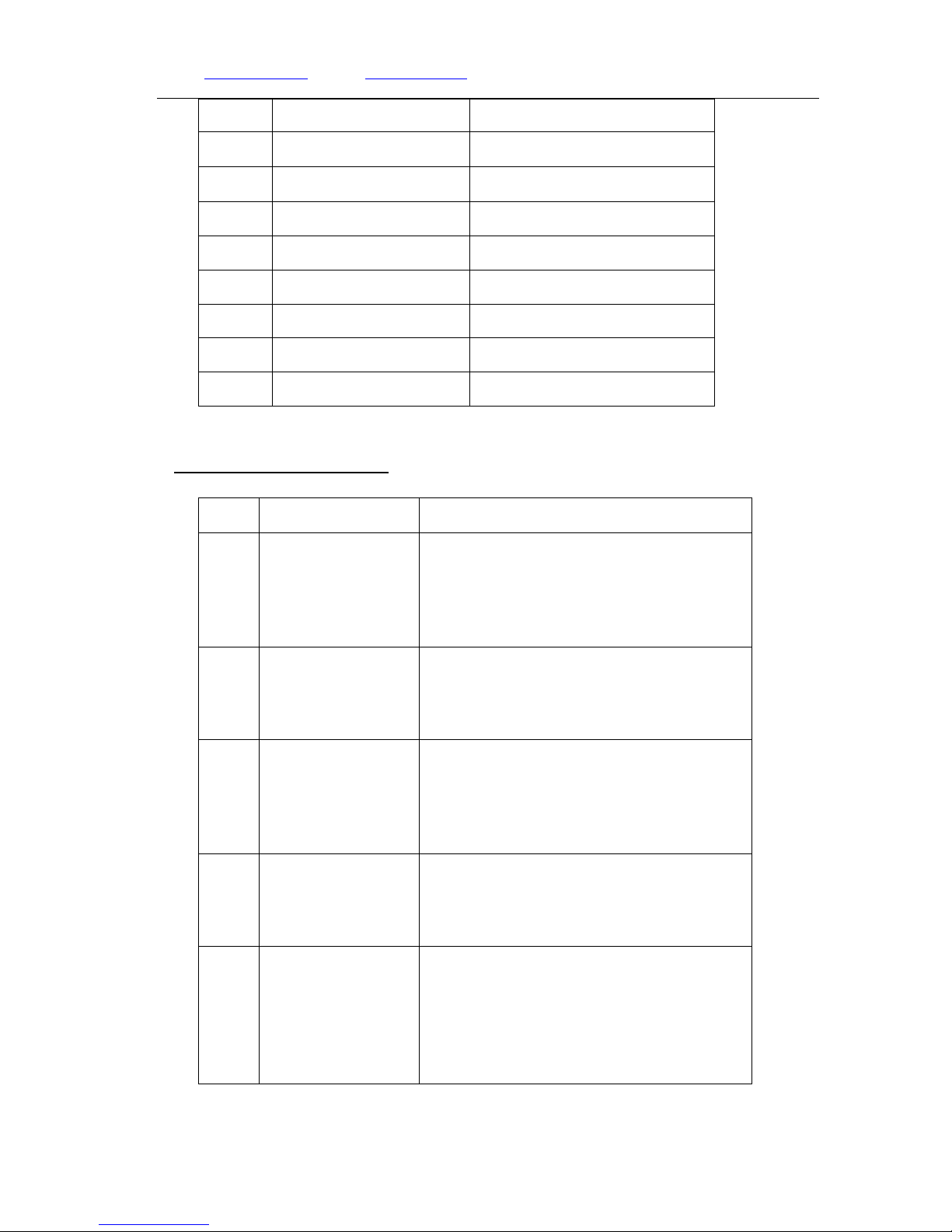
NO. Item Technical Specification
1 Working Voltage DC12V~16V(Rated DC15V)
2 Working Current ﹤3A
3 Frequency Range 87~108MHz
4 Frequency Stability ±10PPM
5 Frequency Stepping 100KHz
6 Environment Temperature -10 ~45℃ ℃
7 Output Resistance 50Ω
8 RF Output Power range 0.2W~15W
9 Harmonics&Spurious ≤-60dB
Page 10
Web: www.fmuser.net Email: [email protected] Skype: rita.cai87 MSN: [email protected]
10 / 11
Radiation
10 Audio distortion 0.2%
11 Frequency Response 50Hz~15000Hz
12 Seperation ≥35 dB
13 Input Electric Level ≤-15 dBV
14 Frequency Modulation ±75KHZ
15 SNR ≥60 dB
16 Transmitter Size 173 ㎜(L)*110㎜(W)*48㎜(H)
17 Weight About 700g
9.Common troubleshotting:
No Trouble Reason
1
Can’t switch on
transmitter
1)If the socket is electricity connected
2)If the power supply has been correctly
connected.
3)If the power supply is matching the
transmitter.
2
SWR Alarming
1)Antenna not correctly connected
2)
Antenna is not matching the transmitter,
this causes the SWR value too big.
3) Too many reflections around the antenna
3
Temperature
Alarming
1)The fan is not working
2)The antenna is not matching the transmitter,
SWR value gets too big and caused over-heat.
3)The ventilating holes are obstructed and air
flow is slow.
4
SWR value is very
big
1)Antenna is wrongly connected;
2)Antenna is not matching transmitter.
3)Too many reflecting objects around the
antenna
5
Broadcasting range
is too short
1)Antenna cable loss is too much;
2)Broadcasting environment is weak;
3)Output power is not big enough;
4)Antenna is not placed high enough.
5)Antenna is not matching transmitter;
6)The receiver has very low sensibility.
Page 11

Web: www.fmuser.net Email: [email protected] Skype: rita.cai87 MSN: [email protected]
11 / 11
6
No power output
1) The power output is not adjusted big
enough
2)Transmitter is in standby status.
7
Audio input no sound
1)The transmitter is in audio mute status;
2)Audio input signal in not normal.
8
Microphone no
sound
1)Microphone is not working
2)Microphone is in mute status;
3)If it’s Pole microphone.
9
Audio effect is weak
1)Microphone is low quality
2)Audio input effect is not good.
3)Antenna is wrongly connected;
4)Audio signal or the machine volume is not
well adjusted.
10.PC control software
In normal working status, connect the transmitter with computer via the USB line(male to
male). Open the .exe file, the buttons on the transmitter panels will be locked, then you can
operate the through the software. (Please download the updated PC control software and
instruction in related websites.)
 Loading...