

Page 1

GUANG ZHOU HAN TING INFORMATION TECHNOLOGY CO.LTD WWW.FMUSER.NET
USER’S MANUAL FOR CZH618F-1000/500C TRANSMITTER
1
CZH618F-1000C
1KW Digital FM Broadcast
Transmitter
User’s Manual
Page 2

GUANG ZHOU HAN TING INFORMATION TECHNOLOGY CO.LTD WWW.FMUSER.NET
USER’S MANUAL FOR CZH618F-1000/500C TRANSMITTER
2
Please notice this:
1. Read safety notice first.
2. A 50Ω dummy load (power rating ≥1KW) or antenna and cable
(VSWR≤1.30) must be connected before turning power on.
3. Please read System Control Logic section to fully understand how
the system works.
4. Please read the Power On Sequence.
Page 3

GUANG ZHOU HAN TING INFORMATION TECHNOLOGY CO.LTD WWW.FMUSER.NET
USER’S MANUAL FOR CZH618F-1000/500C TRANSMITTER
3
Catalogue
Safety Notice
1. Overview------------------------------------------------------------------------------------------------------5
2. Technical Specifications------------------------------------------------------------------------------------6
3. System Structure and Function --------------------------------------------------------------------------7
4. Testing Equipment------------------------------------------------------------------------------------------9
5. Test and Maintenance--------------------------------------------------------------------------------------9
6. Panel Function Description ------------------------------------------------- ---------------------------10
7. Power on Sequence----------------------------------------------------------------------------------------13
8. System Control Logic-------------------------------------------------------------------------------------13
9. Description for software use-----------------------------------------------------------------------------14
10. Indicator light --------------------------------------------------------------------------------------------20
11. Failures Check -------------------------------------------------------------------------------------------21
Page 4

GUANG ZHOU HAN TING INFORMATION TECHNOLOGY CO.LTD WWW.FMUSER.NET
USER’S MANUAL FOR CZH618F-1000/500C TRANSMITTER
4
Safety Notice
1. Please read the following safety points, in order to avoid the accidents and prevent the
connecting machines to be broken.
2. Only the qualified maintenance workers can operate the service.
3. Prevent the fire and the bodily injury.
a. Use the proper wire. If not, it will cause the fire and the bodily injury;
b. Ensure the machine connect the ground. Please confirm whether the machine has connected
the ground, through the wire and the lead, to prevent the electric shock;
c. Use the proper fuse. Please use the stipulated type and rating fuse;
d. Provide good ventilation. This machine adopts the natural convective radiation. Fix it
correctly to keep it radiating well.
4. Please don’t disassemble and repair by yourself when it’s broken down. Please send to the
professional service department to solve the problems.
CAUTION:Please don’t assemble the machine in the moist environment;
Please don’t assemble the machine in the easy exploding environment;
Please don’t repair by yourself.
5 If you have any other questions, please connect with us through [email protected]
Page 5

GUANG ZHOU HAN TING INFORMATION TECHNOLOGY CO.LTD WWW.FMUSER.NET
USER’S MANUAL FOR CZH618F-1000/500C TRANSMITTER
5
1. Overview
CZH618 digital FM broadcast transmitter, combining with audio modulation and 1KW power
amplifier, is an excellent digital product that owns the highest and newest technology.
The whole machine adopts the latest digital signal processing and the direct digital
synthesized technology. This advantage provides us with excellent hearing feature which can
match to CD audio quality.
CZH618 digital FM broadcast transmitter runs with perfect performance. Its technical
specifications like THD; Audio Frequency Response; SNR and Stereo Separation etc. totally meet
the national relevant standards and industry standards of FM transmitter. At the same time as the
brand new high-tech digital products, in a number of their technical specifications is much higher
than the national standards and industry standards.
CZH618 digital FM broadcast transmitter is composed of five parts: Power Supply, Main
Control and Display Cell, Audio Processing and Frequency Synthesizing Cell, Power Control
Center, and Power Amplifier Cell. It is fitted in the 3U, 19 inches standard case. All the output and
input signal is lead from the back panel.
240 *64 liquid crystal as a display unit, displayed page is clear.
CZH618 series has password protected function to protect some important parameters from
accidentally or incidentally changing.
CZH618 digital FM broadcast transmitter provides a serial communication interface, in order
to build a Remote System easily.
CZH618 exciter has analog and AES/EBU audio interface and SCA interface(only two types
are chose in three ).AUDIO INPUT LEVEL -12dBm to +8dBm,Analog audio input impedance
600Ω,AES/EBU Digital audio input impedence110Ω。
RTC function with which transmitter can be power on/off on time are optional.
Page 6

GUANG ZHOU HAN TING INFORMATION TECHNOLOGY CO.LTD WWW.FMUSER.NET
USER’S MANUAL FOR CZH618F-1000/500C TRANSMITTER
6
2. Technical Specifications
Electrical Specification
RF Frequency 87.00MHz~108.00MHz Step 10kHz
Output Power Continuous adjustable to setting power
Power Accuracy <±10%
Power stability <±3%
Output Impedance 50Ω
RF Output connector 7/16” DIN or 7/8” EIA
SFDR <-70dB
Residual Amplitude Modulation <-50dB
Carrier Frequency accuracy ±200Hz
Frequency Stability: 1x10⁻⁶
Modulation Deviation 0~120KHz (100% ±75kHz)
Pilot Frequency 19kHz±0.1Hz
Pilot Amplitude 0~12KHz (10% 7.5K)
Analog Audio Input Impedance 600Ω Balance
Audio Input Level -12dBm~+8dBm, Step 0.1dBm
Digital Audio Input Impedance 110Ω Balance (optional)
Digital Audio Input Level 0.2~10Vpp (optional)
Digital Audio Sample Rate 30kHz~96kHz (optional)
Audio gain -15dB~+15dB step 0.1dB
Pre-emphasis 0µs、50µs、75µs
LR Channel Level Difference <0.1dB(100% Modulation)
Frequency Response <±0.1dB , 30Hz~15000Hz
THD <0.1%, 30Hz~15000Hz
Stereo Separation >50dB(type.), 30Hz~15000Hz
SNR >70dB(type.) , 1kHz 100% Modulation
Power Supply AC180V~AC260 47Hz~63Hz
Heat dissipation Forced ventilation
Page 7

GUANG ZHOU HAN TING INFORMATION TECHNOLOGY CO.LTD WWW.FMUSER.NET
USER’S MANUAL FOR CZH618F-1000/500C TRANSMITTER
7
Physical Specification
Casing Size 3U(484mm×88mm×600mm)、19Inch
Weight 25±0.2kg
Ambient temperature 5℃~+40℃
Relative Humidity <95%
Sea Level Height <4500m
3. System Structure and Function
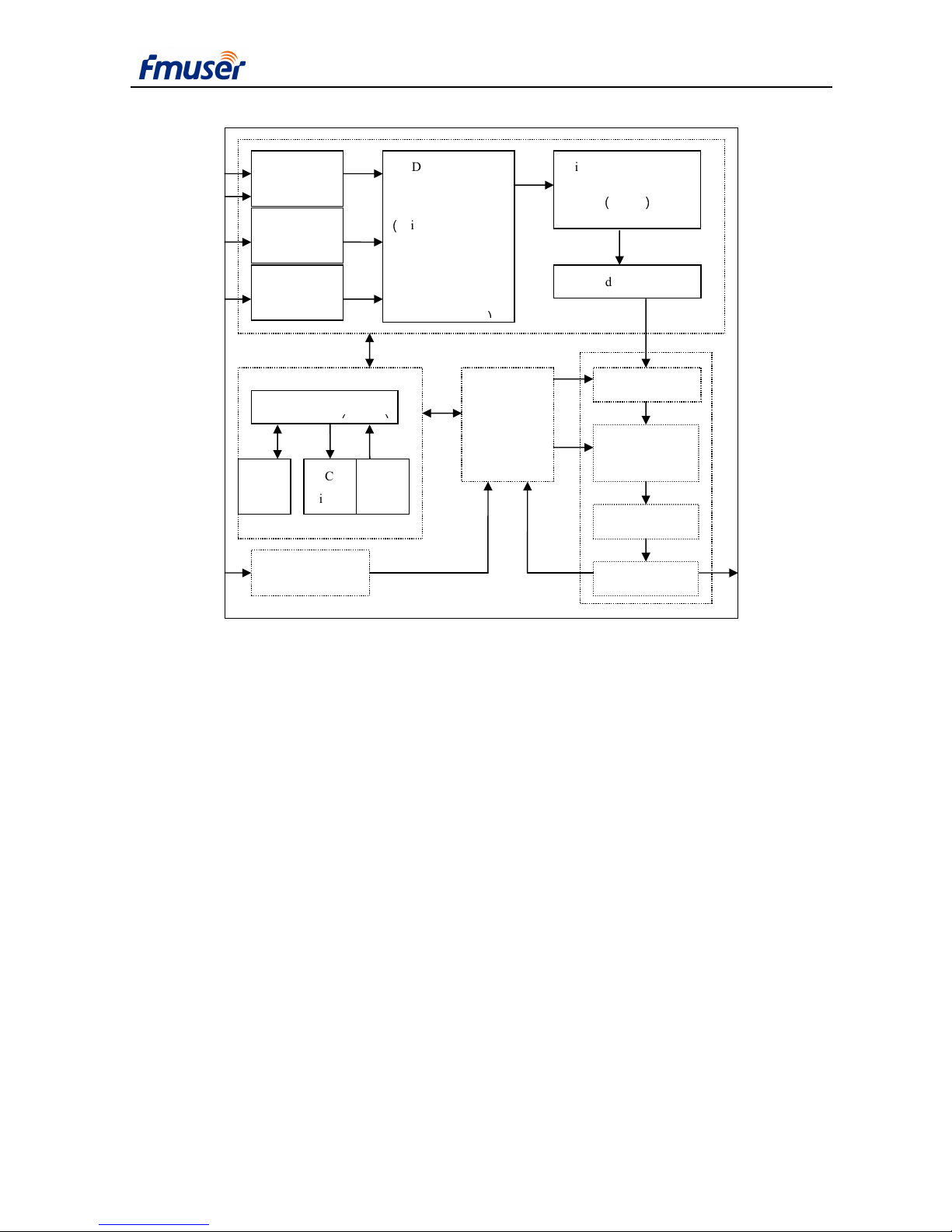
CZH618F-1000C digital FM broadcast transmitter is composed of five parts: Power Supply,
Main Control and Display Cell, Audio Processing and Frequency Synthesizing Cell, Power
Control Center, and Power Amplifier Cell (it is showed by Figure 3-1 ).
The Power Supply changes the 220V AC to all kinds of DC for other parts of transmitter.
Main Control and Display Cell is an interface between users and the machine. It puts all
information about transmitter on the LCD, and users can configure the transmitter via pressing the
key buttons.
Audio Processing and Frequency Synthesizing Cell is the core of the transmitter, This part
does pilot stereo code, pre-emphasis, and audio gain for inputting audio signal which can be analog
or AES or SCA by using digital signal process technology, and meanwhile, it using direct digital
synthesis technology to get frequency which users want.
Power Amplifier Cell contains Driver, Power Distribute, Amplifier, Power Combiner, Filter,
Power Monitor.
Power Control Center Controls output RF power at a value form Main Control and Display
Cell, according as sampling value of power, voltage, current, temperature. At the same time, it
sends sampling value to Main Control and Display Cell to display.
Page 8
GUANG ZHOU HAN TING INFORMATION TECHNOLOGY CO.LTD WWW.FMUSER.NET
USER’S MANUAL FOR CZH618F-1000/500C TRANSMITTER
8
ADC
AES/EBU
Digital Signal
Processing (DSP)
(
Digital Filter, Stereo
code, Digital
Pre-emphasis
direct digital synthesis
(
DDS)
Band-pass Filter
Driver
Power
Amplifier
Filter
Power Supply
LCD
Display
Com
Interface
SCA
Analog L
Input R
Digital
Input
SCA
Input
Figure 3-1 CZH618F-1000C transmitter
structure and function
Power Monitor
RF
Output
Key
Buttons
Power Filter,
Sample,
Power Control
220V AC
Input
Page 9
GUANG ZHOU HAN TING INFORMATION TECHNOLOGY CO.LTD WWW.FMUSER.NET
USER’S MANUAL FOR CZH618F-1000/500C TRANSMITTER
9
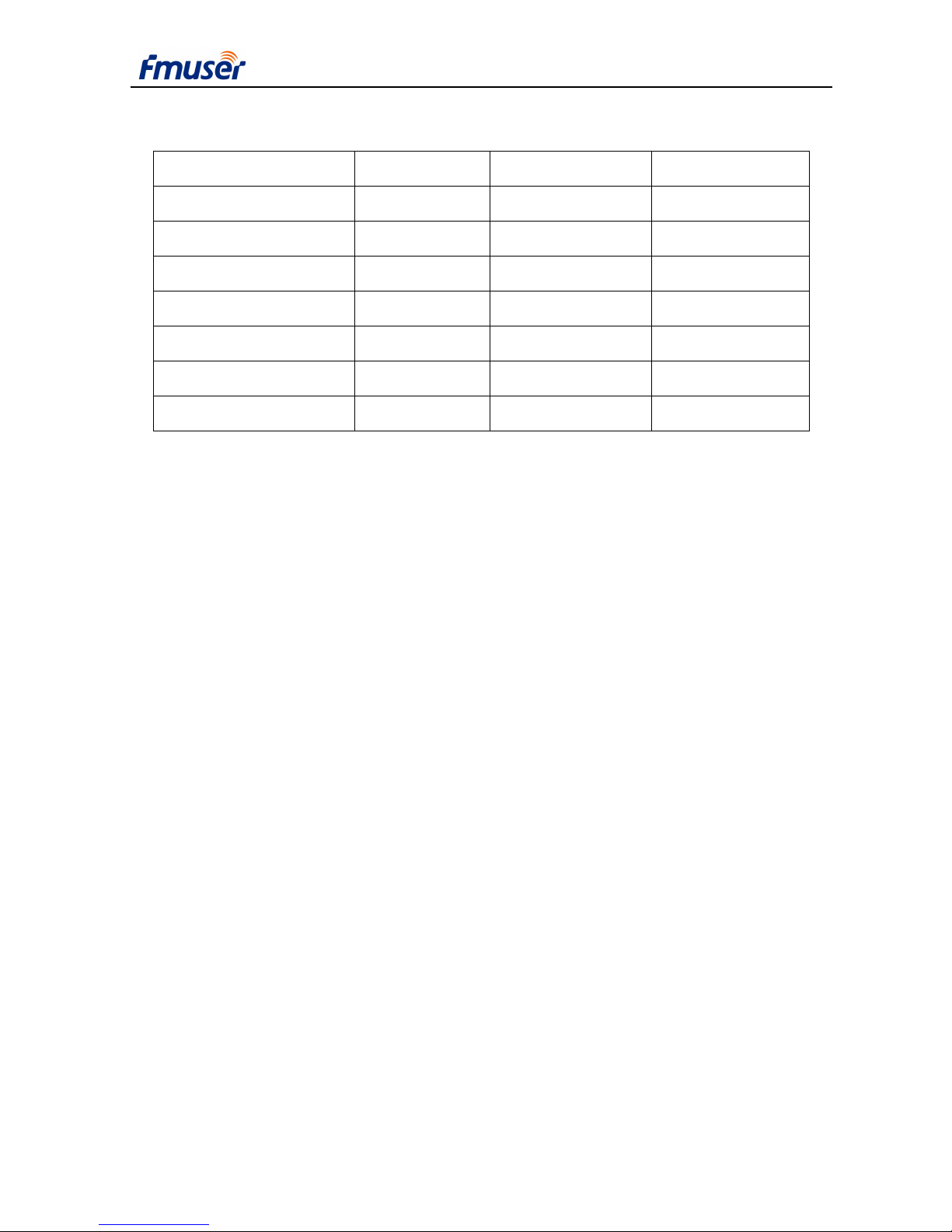
4. Testing Equipment
Name Type Specification Manufacturer
Universal Counter 53132A
225MHz,12 words
Agilent
Spectrum Analyzer 8560E
30Hz~2.9GHz
HP
Digital Oscilloscope TDS2024 200MHz Tektronix
FM Demodulation FMAB 100KHz~5.6GHz RS
Stereo Decoder FMAB 100KHz~5.6GHz RS
Audio Analyzer P1DD Analog and digital Audio Precision
Wattmeter MODEL 43
0~1KW
Bird
Table 4-1 Test instrument for CZH618F-1000C transmitter
5. Test and Maintenance
CZH618F-1000C Digital FM Transmitter is a high performance Transmitter, its Technical
Specifications are complete meet FM Transmitter’s National Standard & Industry Standard, and as
a new type of high-tech Digital Product, a lot of its Technical Specifications are better than
National Standard & Industry Standard.
5.1 Performance Test
CZH618F-1000C Digital FM Transmitter is the Compact product. So it only needs One-Time
Testing of the Entire Machine, if the testing report doesn’t meet its technical specifications by the
same accuracy instrument, please repair it in professional department or original manufacturer.
Page 10
GUANG ZHOU HAN TING INFORMATION TECHNOLOGY CO.LTD WWW.FMUSER.NET
USER’S MANUAL FOR CZH618F-1000/500C TRANSMITTER
10
5.1.1 Audio Performance Test
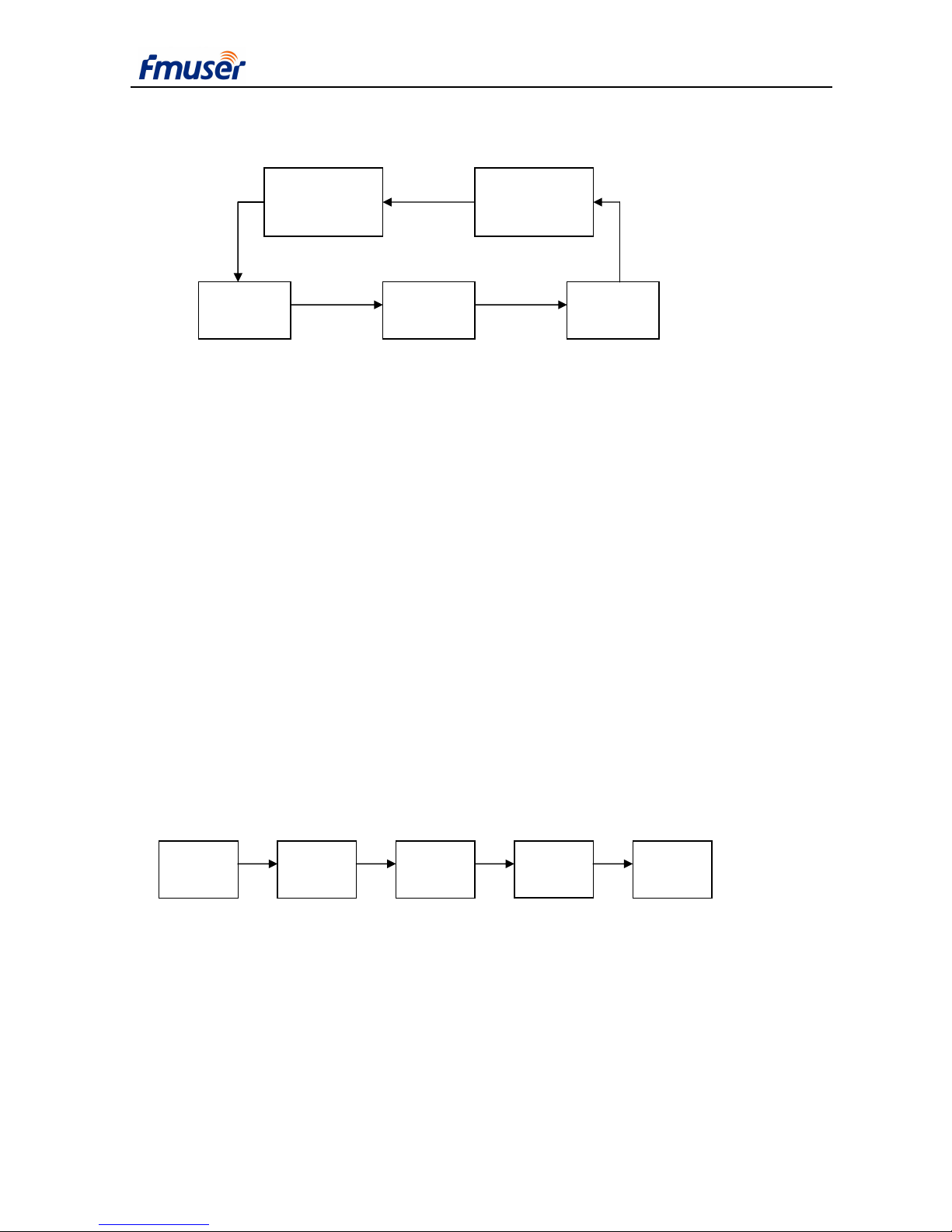
a. Connect transmitter and test Instrument with cable according Figure 5-1.
b. Make audio analyzer output 400Hz, 0dBm;
c. Finely adjust audio output level until demodulation reaches 75KHz (100% modulated);
d. Scan audio output frequency from 30Hz to 15kHz, record frequency response (< ±0.1dB)
and distortion (< 0.1%);
e. Scan audio output frequency from 30Hz to 15kHz, record stereo separation (typical >
50dB);
f. Set audio analyzer to 1kHz, exciter pre-emphasis to 50µs, demodulator to 50µs de-emphasis,
adjust audio analyzer power output until demodulation reaches 75KHz , record mono SNR(>75dB)
and stereo SNR (>70dB).
5.1.2 Carrier Frequency Accuracy Test
a. Connect the test instrument to transmitter according to Figure 5-2;
b. The test carrier frequency accuracy (±200Hz).
Transmitter
Wattmeter
Dummy
Load
Universal
Counter
Attenuator
Figure 5-2 connecting for carrier frequency test
Figure 5-1 connecting for audio analyse
Audio
Analyzer
FM
Demodulation
Transmitter Wattmeter
Dummy
Load
RF
RF
RF
Audio
Audio
Page 11
GUANG ZHOU HAN TING INFORMATION TECHNOLOGY CO.LTD WWW.FMUSER.NET
USER’S MANUAL FOR CZH618F-1000/500C TRANSMITTER
11
5.1.3 Harmonic Suppression
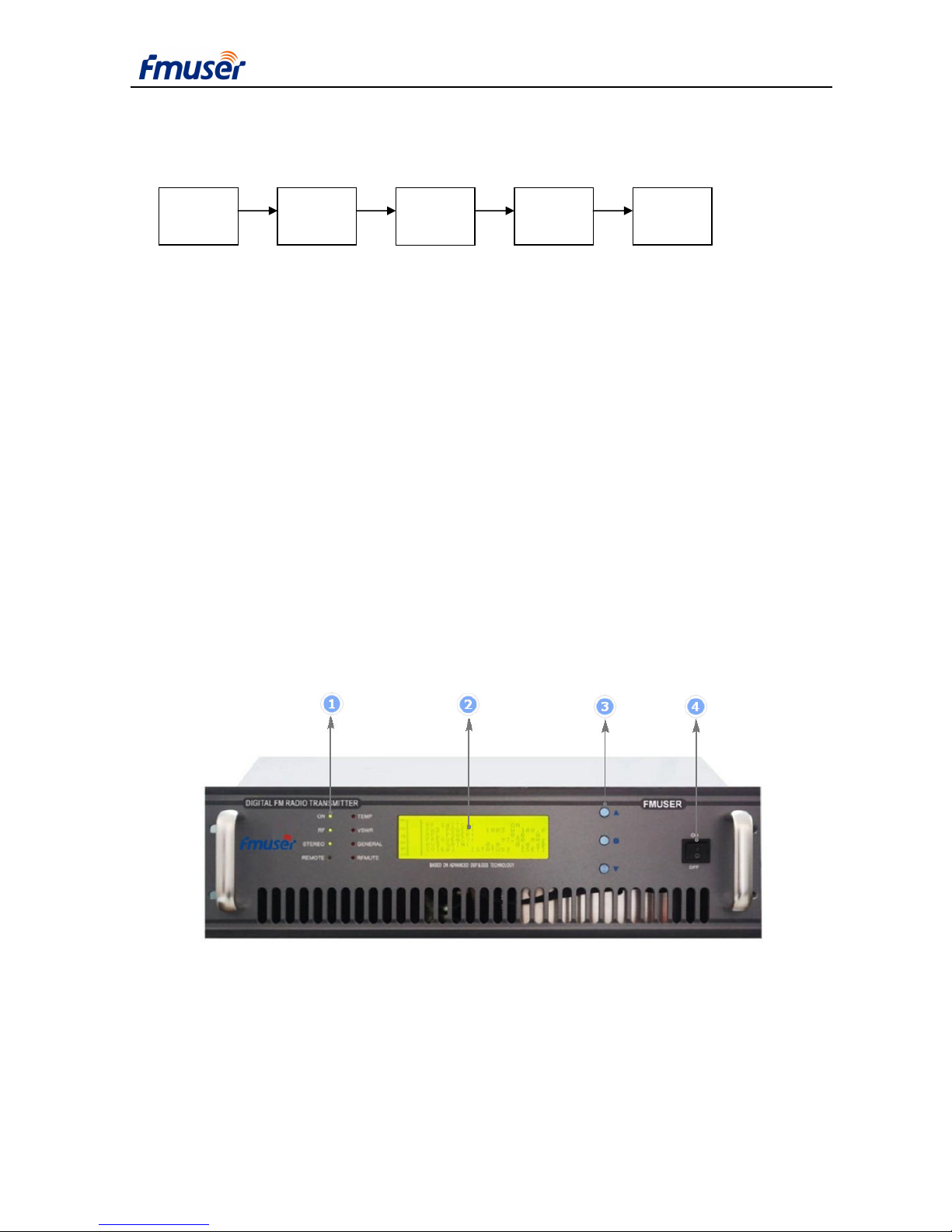
a.Connect the test instrument to transmitter according to Figure 5-3;
b.Record harmonic suppression relative to carrier (<-60dB).
5.2 Maintenance
It needs to use new fans instead of the old ones which have worked more than 15000 hours. If
the digital FM broadcast transmitter works at a very dirty environment, for example a place with
much of dust, it must be to replace fans ahead of schedule.
6. Panel Description
6.1 Front Panel
1—— LED Indicator
ON power supply indicator;
Transmitter
Wattmeter
Dummy
Load
Spectrum
Analyzer
Attenuator
Figure 5-3 connecting for spectrum analyzer
Page 12
GUANG ZHOU HAN TING INFORMATION TECHNOLOGY CO.LTD WWW.FMUSER.NET
USER’S MANUAL FOR CZH618F-1000/500C TRANSMITTER
12
RF. RF power out;
STEREO stereo indicator;
REMOTE remote control is on.
TEMP temperature alarm.
VSWR VSWR is high.
GENERAL PA Voltage or PA Current system alarm;
RF MUTE inter-lock in or excessive forward power or
excessive reflect power.
2 —— LCD display screen
3 —— Operation button
UP: up or increase
ENTER: enter
DOWN: down or decrease
ESC: cancel
4—— Power switch
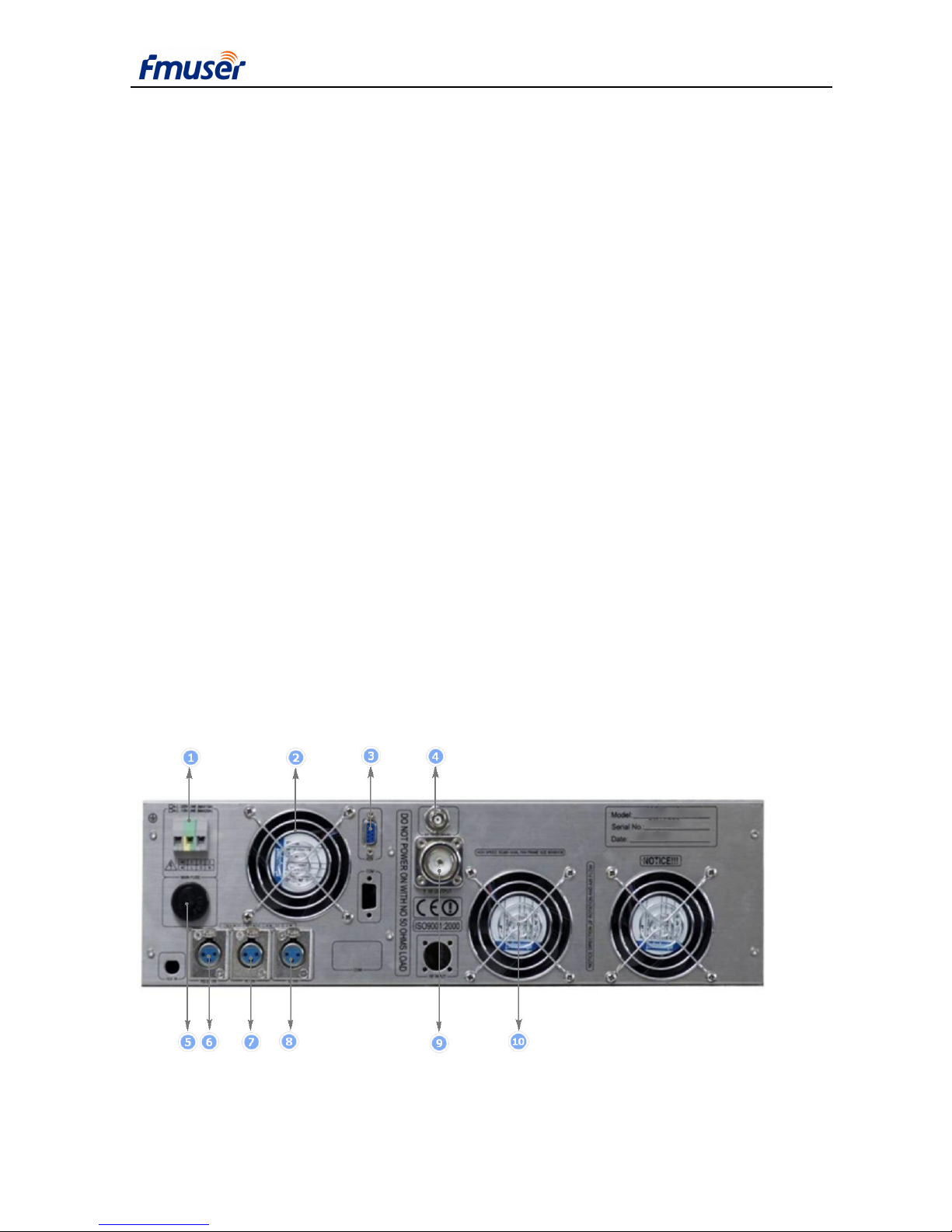
6.2 Back Panel
Back Panel function description:
Page 13

GUANG ZHOU HAN TING INFORMATION TECHNOLOGY CO.LTD WWW.FMUSER.NET
USER’S MANUAL FOR CZH618F-1000/500C TRANSMITTER
13
1. AC Socket
PIN1----L;
PIN2----GND
PIN 3----N;
2. Axial Fan for power supply
3. COM RS232
PIN 2----TX
PIN 3----RX;
PIN 5----GND;
4. RF Test Port
5. Fuse Socket with 25A .
6. Left Analog Audio Input
7. Right Analog Audio Input
8. AES/EBU Input (optional)
9. RF Output
10. Axial Fan for Rf power heat sink
7. Power On Sequence
7.1 Open the package, check appearance, switch, key button, socket, and interface port on front
and back panels.
7.2 Turn power switch on the “OFF” position and connect power cord to power source.
7.3 Connect RF out port to a 50 Ohm dummy load or antenna through a cable.
7.4 Turn power on.
7.5 Set RF logical control (see detail in System Logic Control).
7.6 Set RF power.
7.7 Set parameters such as frequency, digital/analog audio input select, stereo/mono select, audio
gain, modulation deviation, pre-emphasis.
7.8 Turn on RF power.
Page 14

GUANG ZHOU HAN TING INFORMATION TECHNOLOGY CO.LTD WWW.FMUSER.NET
USER’S MANUAL FOR CZH618F-1000/500C TRANSMITTER
14
8. System Control Logic
8.1 RF Output Control
The RF output of CZH618F-1000/500C digital FM broadcast transmitter is controlled by
switches: RF Switch in main menu and period control switch in RTC menu.
RF Switch:
When RF Switch is off, turn off RF power.
When RF Switch is on and Period Control is disabled, turn RF power on to setting power.
When RF Switch is on and Period Control is enabled, RF power is controlled by Period
Control function (see Period Control).
Period Control:
When RF Switch is on and Period Control is enabled, the control method is as follow:
The system reads current time through RTC and check whether current time is falling into any
of the three periods. If yes; turn on RF power to its setting power. Else turn off RF power. A period
is invalid if start time is greater than or equal to end time. Current time will never fall into an
invalid period. If three periods are all invalid, turn RF power off for ever.
8.2 Remote Control
Remote control is set in <SET> menu. When remote control is enabled, remote LED on front
panel is lit and parameters are controlled by remote host and can not be changed locally except
“Remote” flag in <SET> menu. Updated parameters will be automatically stored in EEPROM.
When remote is disabled, remote host can not control over the exciter but locally does.
Updated parameters will be automatically stored in EEPROM.
RS232 or RS485 are used for remote control. Before enabling remote control, baud rate and
device address should be properly set.
8.3 Change RF Frequency
After RF frequency changed, RF power will drop to 0 first, and then increase to its setting
power.
Page 15

GUANG ZHOU HAN TING INFORMATION TECHNOLOGY CO.LTD WWW.FMUSER.NET
USER’S MANUAL FOR CZH618F-1000/500C TRANSMITTER
15
8.4 Time Period Modification
It is suggested that disable Period Control before correcting date and time or changing
period’s start and end time to avoid instantaneous undesired RF power on and off.
8.5 System Protection
In some urgent cases such as exceeded forward power, reflect power, current and over
temperature, system will reboot. If it is failed successive 3 times, the system will automatically
turns off RF power and just acts display function.
System will also shut down when some main parameter can not be set such as frequency,
digital/analog audio select.
9. Direction for Software Use
9.1 General Description
9.1.1 Buttons
UP: Up or increase, when pressed and held for a longer time, it speeds up.
DOWN: Down or decrease, when pressed and held for a longer time, it speeds up.
ENTER: Enter, used to select menu and enter edited parameter.
ESC: Cancel; back to last menu
9.1.2 Menu classification
There are three kinds of menus: display menu is display only menu; select menu used to
select sub menu or goes back to its main menu; edit menu used to enter parameters or configure
the system.
How to enter parameter
Just scroll highlight bar to desired edit item and press ENTER, use UP or DOWN to change
parameter and press ENTER again to save it. Some important parameter or operation may need
further confirmation. In this case, a “Y” or “N” will appear after editing at the end of the edit line.
Use UP or DOWN to select “Y” (confirm) or “N” (cancel) and press ENTER to save updated
parameter or cancel it.
Parameter can not be modified locally when remote is enabled except “Remote” itself.
Page 16
GUANG ZHOU HAN TING INFORMATION TECHNOLOGY CO.LTD WWW.FMUSER.NET
USER’S MANUAL FOR CZH618F-1000/500C TRANSMITTER
16
9.1.3 Return to Main Menu
When there is no operation (press button) for a long time, system will return to its main menu
automatically with LCD backlight off. Not saved updated parameter will be replaced with its old
value.
9.1.4 LCD backlight
LCD backlight will be automatically turned off when there is no operation for a long time and
turned on immediately when any key is pressed.
9.2 Pages Description
9.2.1 System Boot Up
During the system boot up, company logo is displayed and all LED on front panel blinks 4
times (power LED is on). After system booting up, it enters to the page displaying frequency and
power set.
9.2.2 Setting parameter display
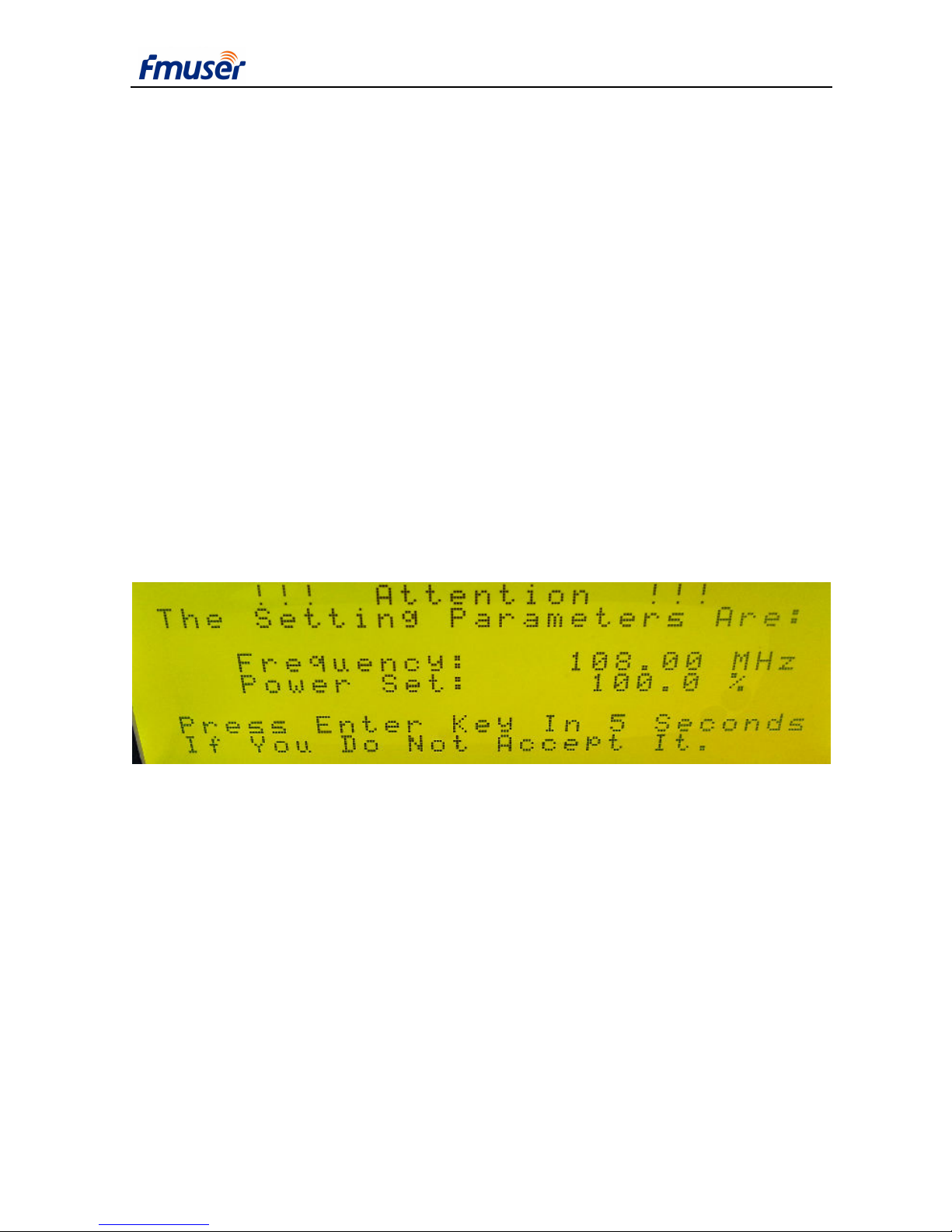
Figure 9-2 The Page displaying setting parameters
Frequency and Power set percent, the most important setting parameters, appear in this page.
after that, when this page is disappeared ,the system will slowly increase output power; if users do
not accept these two parameter, it’s should to keep any of the keys in push more than 5 seconds,
then when it enters the main menu page, in will not to transmit any power.
Page 17
GUANG ZHOU HAN TING INFORMATION TECHNOLOGY CO.LTD WWW.FMUSER.NET
USER’S MANUAL FOR CZH618F-1000/500C TRANSMITTER
17
9.2.3 Main menu page
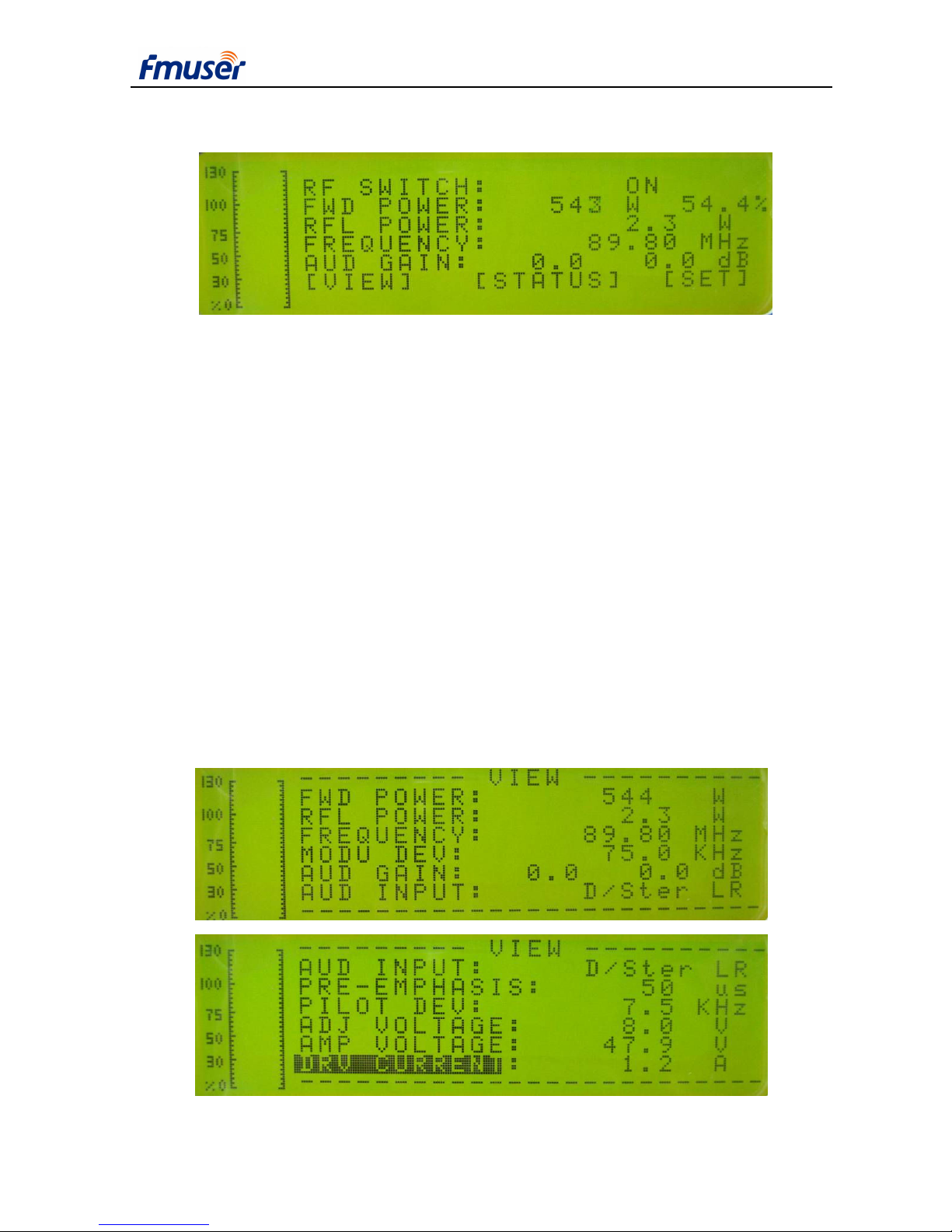
Figure 9-3 Main menu page
Figure 9-3 shows main menu page. The audio bar displays at the left of the page. The scale
means modulation deviation.
This page contains the parameter as following:
RF SWITCH: RF switch control select between ON or OFF.
FWD POWER: forward power display only.
RFL POWER: reflected power display only.
FREQUENCY: RF frequecncy display only.
AUD GAIN: left and right audio gain display only.
[VIEW] parameter data browse menu, see [VIEW] menu.
[STATUS] system running ststus, see[STATUS] menu.
[SET] parameter setting menu, see [STATUS] menu.
9.2.4 Page of VIEW
Page 18

GUANG ZHOU HAN TING INFORMATION TECHNOLOGY CO.LTD WWW.FMUSER.NET
USER’S MANUAL FOR CZH618F-1000/500C TRANSMITTER
18
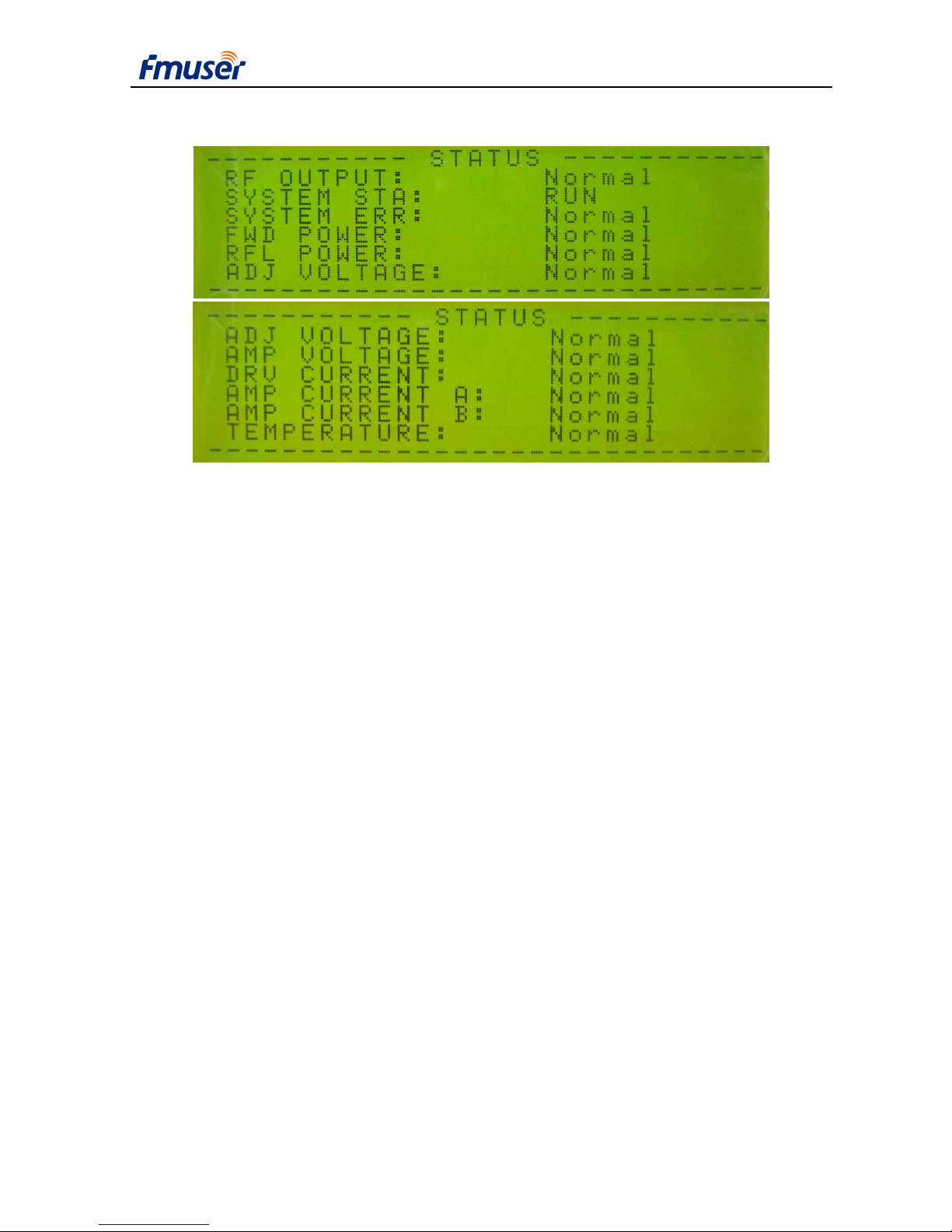
Figure 9-4 Page of VIEW
Figure 9-4 shows the all parameters in the VIEW page. In the VIEW page, users can only
browse the parameters. If users want to modify the parameters, it should to be enter the SET page.
FWD POWER: forward power.
RFL POWER: reflected power.
FREQUENCY: RF frequency.
MODU DEV: modulation deviation.
AUD GAIN: audio gain.
AUDIO INPUT: audio input and modulation mode, see [Set] menu.
PRE-EMPHASIS: pre-emphasis.
PILOT DEV: pilot deviation;
AMP VOLTAGE: amplifier voltage (48V in normally).
DRV CURRENT: current of driver amplifier.
AMP CURRENT A: current of amplifier module A.
AMP CURRENT B: current of amplifier module B.
TEMPERATURE: temperature of amplifier
BAUDRATE: baud rate used for serial communication.
ADDRESS: device address used for remote control.
REMOTE: remote control switch.
DATE: date
TIME: time.
PERIOD CTRL: period control.
[EXIT] return to its parent menu.
Page 19
GUANG ZHOU HAN TING INFORMATION TECHNOLOGY CO.LTD WWW.FMUSER.NET
USER’S MANUAL FOR CZH618F-1000/500C TRANSMITTER
19
9.2.5 Page of STATUS
Figure 9-5 Page of STATUS
Two pictures in Figure 9-5 show the status of all parameters, users can find out the system is
running normally or not.
RF OUTPUT: Normal/OFF/Drop; Refer to control logic section.
Normal: RF output is in normal status.
OFF: RF power is off.
Drop: RF power can not achieve to its setting power.
SYSTEM: Normal/Error
Indicate system errors. Contact equipment provider when error happens.
FWD POWER: Normal/Warning/Protect
Normal: forward power is normal.
Warning: forward power is higher than setting power.
Protected: forward power is too high, RF power is turned off.
RFL POWER: Normal/Warning/Protect/Protect H
Normal: reflect power is normal.
Warning: reflect power is high, may cause RF power drop.
Protected: reflect power is too high, RF power is turned off.
AMP VOLTAGE: Normal/Warning/Protect
Normal: amplifier voltage is normal.
Page 20

GUANG ZHOU HAN TING INFORMATION TECHNOLOGY CO.LTD WWW.FMUSER.NET
USER’S MANUAL FOR CZH618F-1000/500C TRANSMITTER
20
Warning: amplifier voltage is high, may cause RF power drop.
Protected: amplifier voltage is too high, RF power is turned off.
DRV CURRENT: Normal/Warning/Protect
Normal: amplifier driver current is normal.
Warning: amplifier driver current is high, may cause RF power drop.
Protected: amplifier driver current is too high, RF power is turned off.
AMP CURRENT A: Normal/Warning/Protect
Normal: amplifier module A current is normal.
Warning: amplifier module A current is high, may cause RF power drop.
Protected: amplifier module A current is too high, RF power is turned off.
AMP CURRENT B: Normal/Warning/Protect
Normal: amplifier module B current is normal.
Warning: amplifier module B current is high, may cause RF power drop.
Protected: amplifier module B current is too high, RF power is turned off.
CUR BALANCE: Normal/Warning/Protect, status of unbalance current between 4 amplifier
modules.
Normal: unbalance current is normal.
Warning: unbalance current is big, may cause RF power drop.
Protected: unbalance current is too big, RF power is turned off.
TEMPERATURE: Normal/Warning/Protect
Normal: temperature is normal.
Warning: temperature is high, may cause RF power drop.
Protected: temperature is too high, RF power is turned off.
[EXIT] return to its parent menu.
Page 21
GUANG ZHOU HAN TING INFORMATION TECHNOLOGY CO.LTD WWW.FMUSER.NET
USER’S MANUAL FOR CZH618F-1000/500C TRANSMITTER
21
9.2.6 PASSWORD CHECK
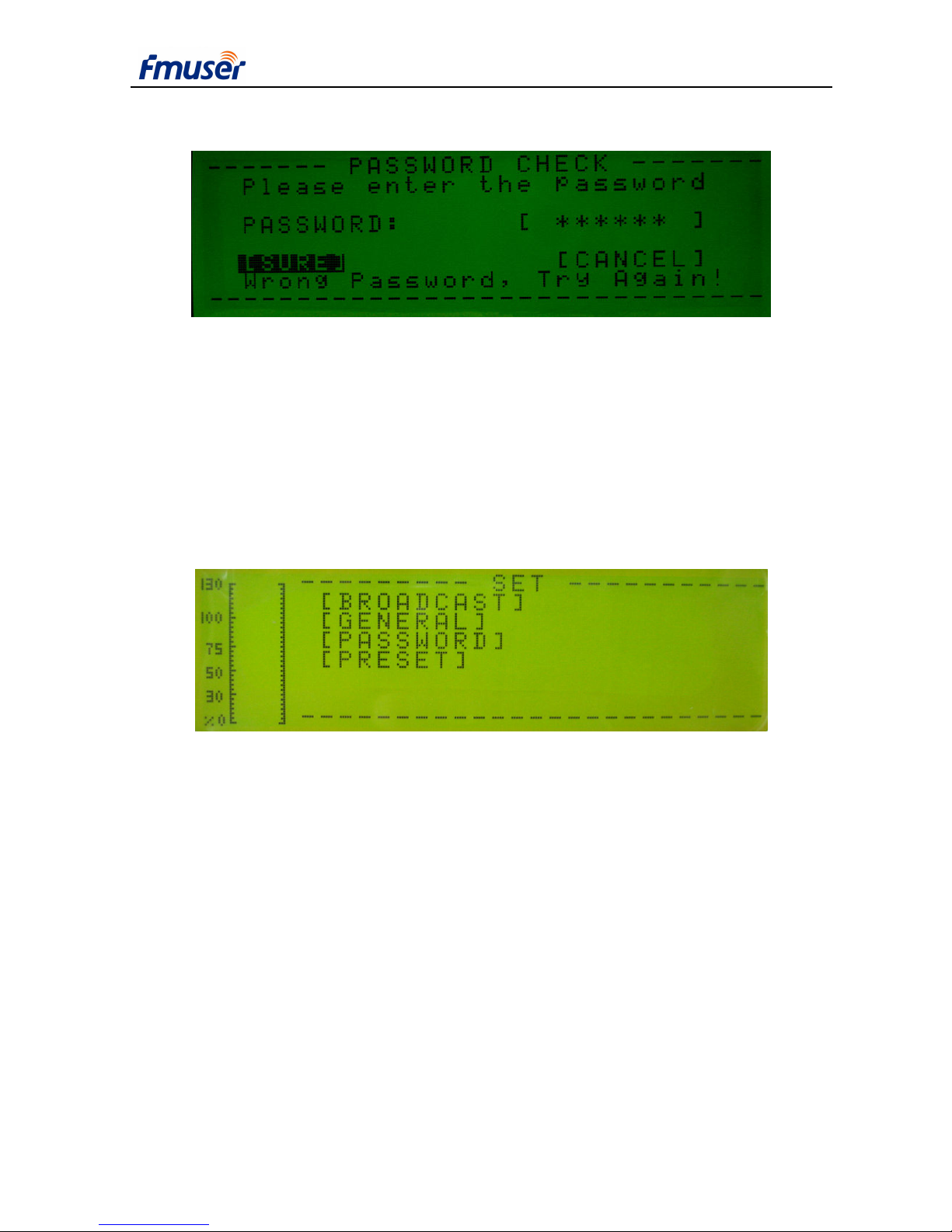
Figure 9-6 Page of password check
Check password before entering [Set] and [Preset] menu When Password Check is enabled. Enter
password in “Password” first, and then select [Sure]. If correct password is entered, it will enter to
desired menu. Else it will display “Wrong password, try again”.
Select [Cancel] to give up password enter and return to its previous menu.
The initial password is “000000”, if need a new password, refer to “Password” menu.
9.2.7 SET Menu
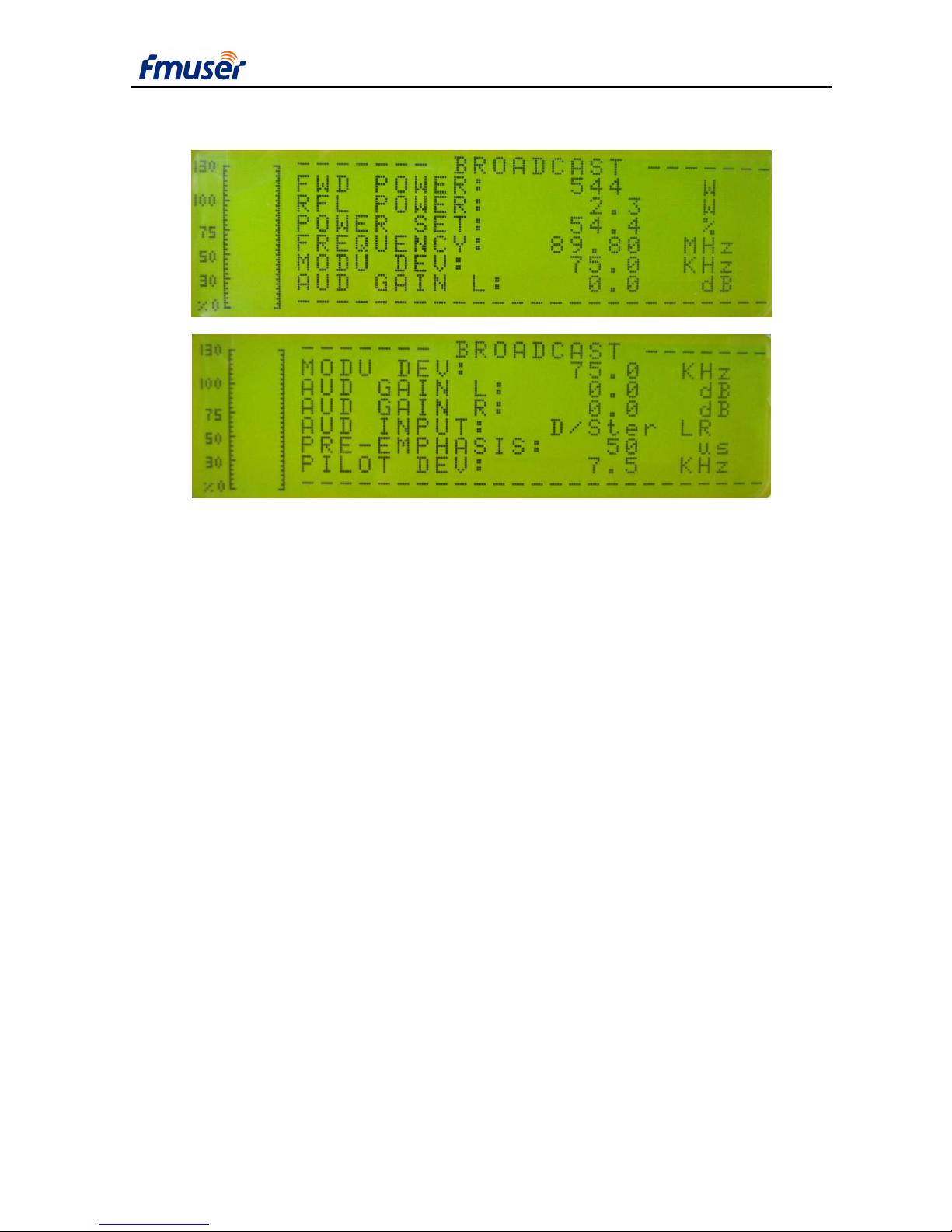
Figure 9-7 SET menu
Audio bar is located on the left side of the screen, it indicates dynamic modulation deviation.
100% denotes 75KHz modulation.
Broadcast: broadcast parameter setting, see “Broadcast” menu.
General: system parameter setting, see “General” menu.
RTC: date, time and period control setting menu, see “RTC” menu.
Password: change password menu, see “Password” menu.
Preset: load default parameters, see “Preset” menu.
[EXIT] return to its parent menu.
Page 22
GUANG ZHOU HAN TING INFORMATION TECHNOLOGY CO.LTD WWW.FMUSER.NET
USER’S MANUAL FOR CZH618F-1000/500C TRANSMITTER
22
9.2.8 BROADCAST Menu
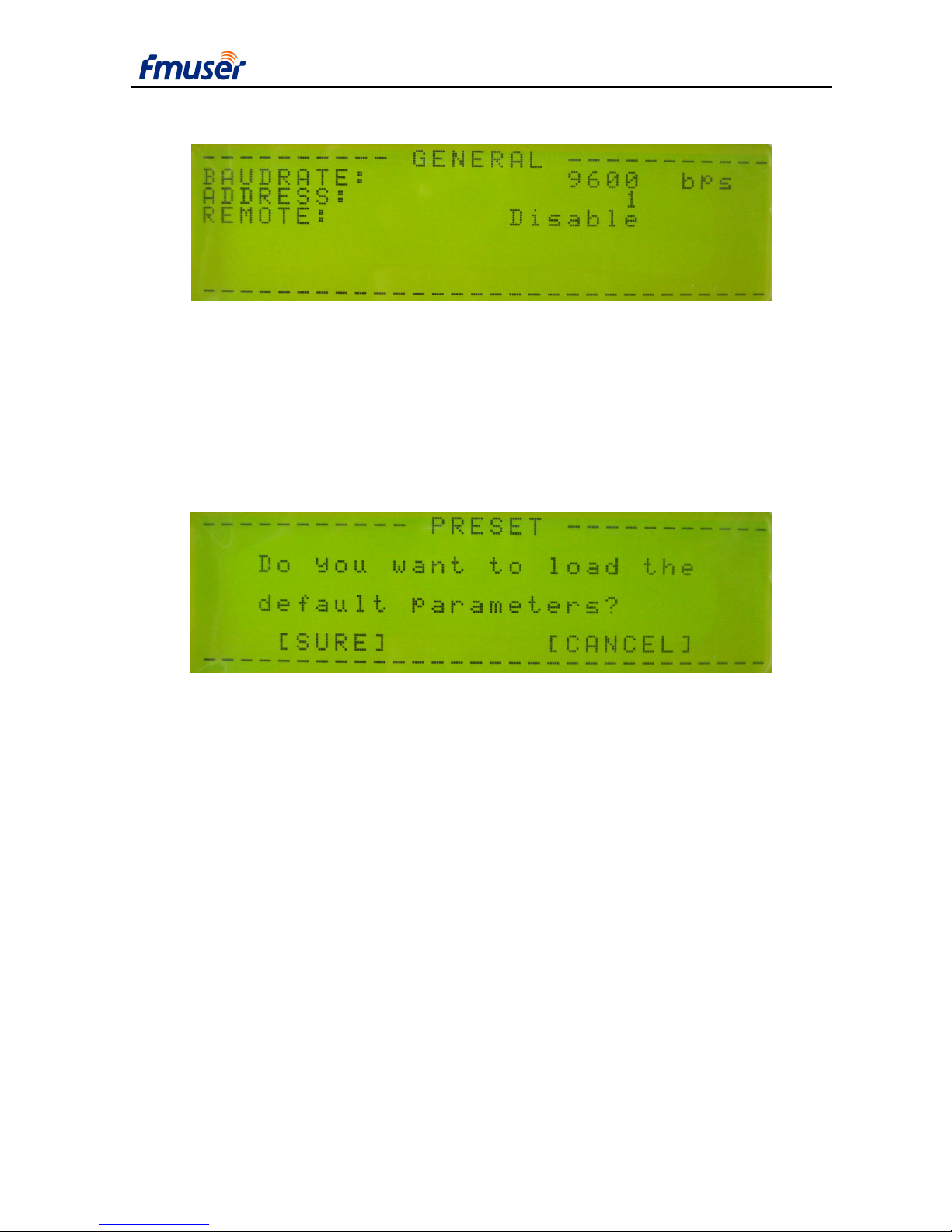
Figure 9-8 Page of BROADCAST Menu
FWD Power: forward power, display only, used to watch real output power when adjusting
output power percentage.
RFL Power: forward power, display only, used to watch real output power when adjusting
output power percentage.
Power Set: set the percentage of output power.
Frequency: set RF frequency.
Modu Dev: set modulation deviation.
Aud Gain L: set left audio gain.
Aud Gain R: set right audio gain.
Audio Input: D/Mono mono modulation, audio from left digital channel.
A/Mono mono modulation, audio from left analog channel.
D/Ster stereo modulation, audio from digital channel.
A/Ster stereo modulation, audio from analog channel.
Pre-emphasis: select pre-emphasis.
Pilot Dev: set pilot deviation.
[EXIT] return to its parent menu.
Page 23
GUANG ZHOU HAN TING INFORMATION TECHNOLOGY CO.LTD WWW.FMUSER.NET
USER’S MANUAL FOR CZH618F-1000/500C TRANSMITTER
23
9.2.9 GERNERAL Menu
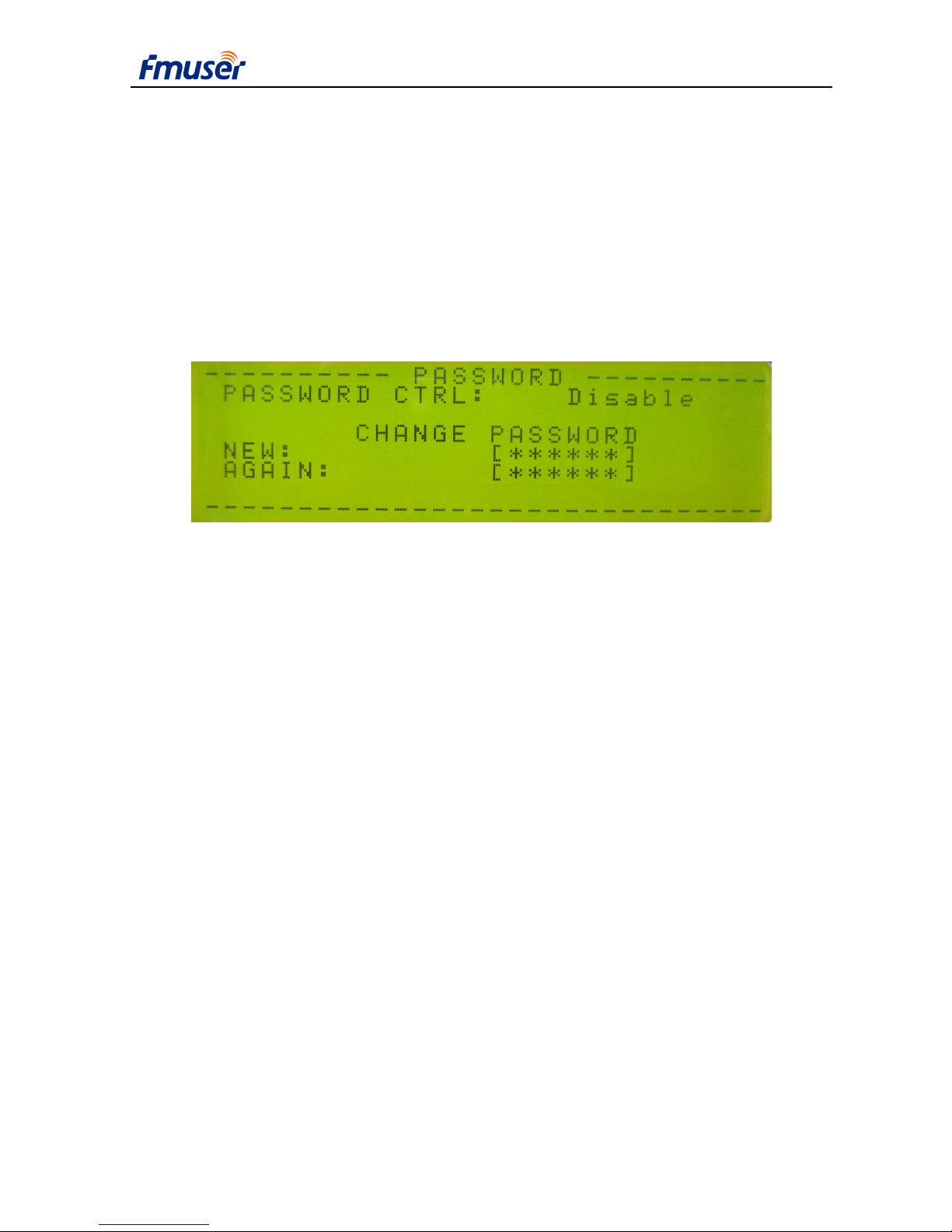
Figure 9-9 Page of GERNERAL Menu
Baud Rate: select baud rate for remote control.
Address: set device address for remote control.
Remote: enable or disable remote control.
[EXIT] return to its parent menu.
9.2.10 PRESET Menu
Figure 9-11 Page of PRESET Menu
[Preset] menu is used to load default parameters. Make sure that some parameters may need
to be adjusted after Preset according to your broadcasting requirement.
Select [Sure] to load default parameters. Select [cancel]to return to Main menu.
Preset default parameters:
Frequency: 97.50 MHz
Power Percentage: 0.0%
Audio Gain: 0 dB
Audio Input: Digital audio, Stereo modulation.
Pre-emphasize: 50 us
Modulating deviation: 75.0 KHz
Pilot deviation: 7.5 KHz
Page 24
GUANG ZHOU HAN TING INFORMATION TECHNOLOGY CO.LTD WWW.FMUSER.NET
USER’S MANUAL FOR CZH618F-1000/500C TRANSMITTER
24
AGC: enable
Baud rate: 9600 bps
Address: 0
Remote: OFF
Period Control: OFF
Password: 000000
9.2.12 PASSWORD Menu
Figure 9-12 Page of Password set
Change password: enter new password in “New” edit box, and enter the same new password
again in “Again” box. If two enters are the same, it will display “change password successful”, else
display “Different password, try again!”. Just select [EXIT] if do not want change password. The
initial password is “000000”.
Password Control:Enter [Set] and [Preset] menu need password checking when Password
Control is “ON”; there is no password check when Password Control is “OFF”.
[EXIT] return to its parent menu.
10. Indicator light
At the left side of the front panel, there are 8 LED lamps used to indicate all kind of system
status. Three of them are green, one is yellow, and the other four is red. If one of the red lamp is
light, it means that there is something wrong, users can find out the problem at the [STATUS]
menu.
10.1 Lamp for Power on
When it is power on, the voltage of 5V is supplied normally, this green lamp is luminous.
Page 25

GUANG ZHOU HAN TING INFORMATION TECHNOLOGY CO.LTD WWW.FMUSER.NET
USER’S MANUAL FOR CZH618F-1000/500C TRANSMITTER
25
10.2 Lamp for RF
When the RF SWITCH in the main menu is set to ”ON”, and the POWER SET percent is
more than 0,this green lamp is light.
10.3 Lamp for AUDIO
If the audio input mode is set to be the stereo, the lamp is light.
10.4 Lamp for REMOTE
In the page of General Set, if Remote is enabled, this yellow light is illuminant.
10.5 Lamp for TEMP
When the amplifier temperature is higher than 65℃, the red lamp is light; higher than 70℃,
to decrease temperature, and to protect amplifier, the system will try to decrease output power; if
temperature exceeds 75℃,it will power off immediately.
10.6 Lamp for VSWR
If reflected power is higher than 5% of rated power, the lamp is light; higher than 7% of
power, it will decrease output power to decrease reflected power; when it is higher than 100W, it
may happen that: the software power off the output, or the hardware circuit switch off the power
supply, then power on again.
10.7 Lamp for GENERAL
If this lamp is light, it may happen that: forward power is more than 105% of rated power,
voltage of power supply is higher than 53V or lower than 45V, driver current is higher than 2.2A,
at least one amplifier's current is higher than 18A,and one amplifier has no current.
When the lamp is light, and accompanied by a power decreases,it shows that the reflection
power is too big.In a certain period of time, reduce power still can not get out of this state, the
system will shut down and restart the amplifier.
If forward power exceeds 120% of rated power, the system will shut down the amplifier
immediately, and then restart it.
Users can enter【STATUS】page to check the alarm status of FWD POWER,ADJ VOLTAGE,
AMP VOLTAGE,DRV CURRENT,AMP CURRENT A,AMP CURRENT B.
Page 26

GUANG ZHOU HAN TING INFORMATION TECHNOLOGY CO.LTD WWW.FMUSER.NET
USER’S MANUAL FOR CZH618F-1000/500C TRANSMITTER
26
10.8 Lamp for RF MUTE
It means nothing for this mode of equipment.
11. Failure Check
11.1 Turn on the power supply, but the equipment doesn’t work
it may:
The fuse is broken: change the fuse;
The plug is not inserted tightly or contacted fault: insert the plug tightly.
11.2 No audio output
The source of audio signal is not connected: check the wire to ensure it has been connected
correctly.
Choose the wrong source of the signal: please choose the correct source of signal, digital or
analog.
11.3 Other Failure
If there is any other problem that can not be solved, please contact with us through email at
 Loading...