

Page 1
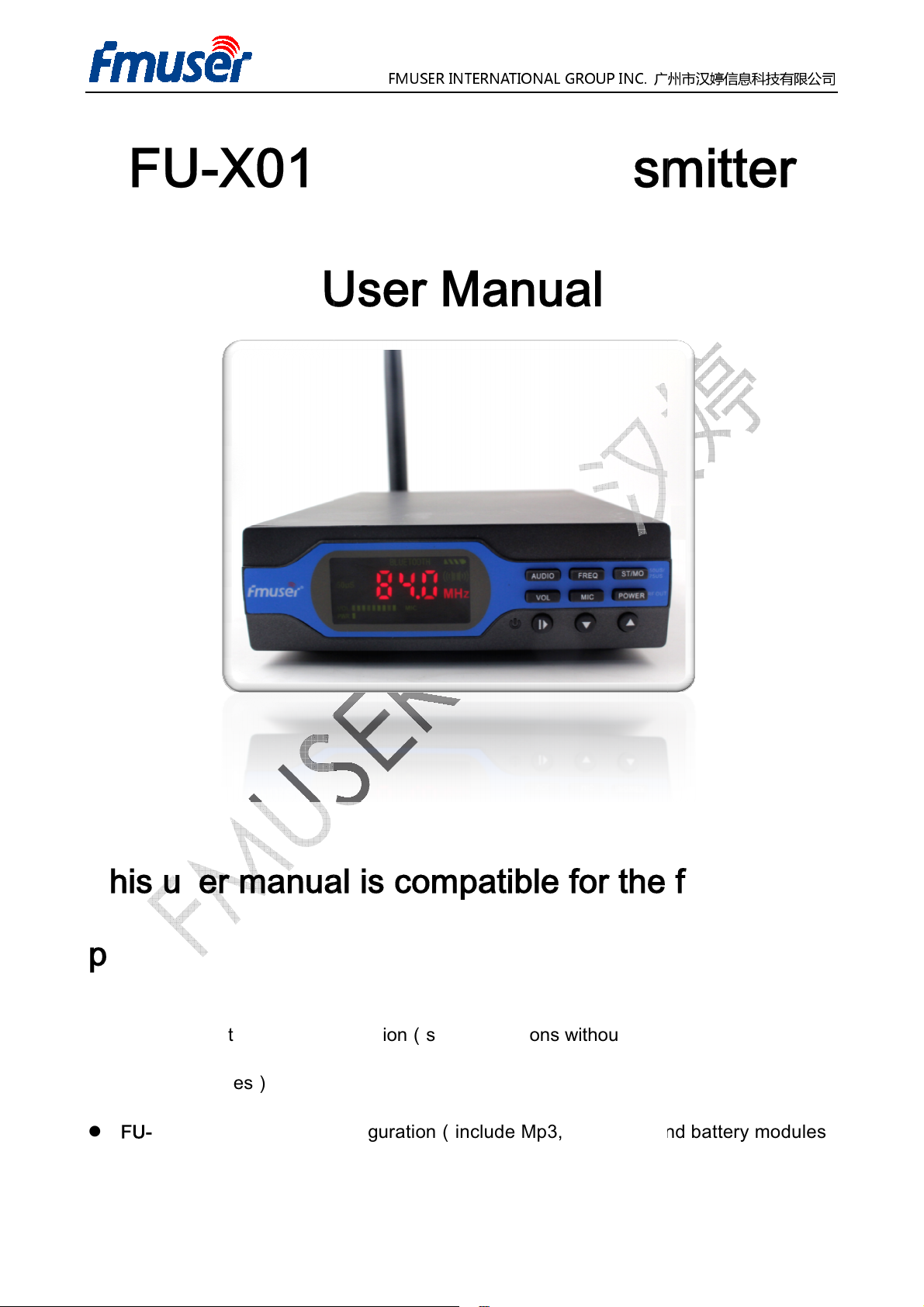
1W FM
User Manual
user manual
Standard Configuration
Intermediate Configuration
FMUSER INTERNATIONAL GROUP INC.
广州市汉婷
ransmitter
the following
Mp3,
include Mp3, Bluetooth and battery modules
1 / 16
信息科技有限公司
FU-X01
T
This
products:
FU-X01A
battery modules)
—
is compatible for
(simple functions without
Bluetooth and
FU-X01B
—
(
)
Page 2
Advanced Configuration
battery
FMUSER International Group INC.
included in th
the
the related responsibilit
Using this transmitter please
Parties of using the machine
Using this wireless FM transmitter must comply with the regulations of the local
government. Improper use may violate the law;
Do not use wireless FM transmitter in a flammable, explosive environment;
Do not use the wireless FM transmitter with
Please do not expose wireless FM transmitter to long periods of direct sunlight or put it
If there are any odors or smoke, please
FMUSER INTERNATIONAL GROUP INC.
广州市汉婷
include Mp3, Bluetooth and battery modules, TF
change and modify
X01 Technical Description
of this publication.
laws and regulations of r
will assume the
no responsibility of this.
shut off the electrical power immediately
2 / 16
信息科技有限公司
FU-X01C
—
card and rechargeable
specifications and contents
Including but not limited to
FMUSER will not assume
management departments.
(
)
reserves the right to
is FU-
printer errors and other relevant errors
y.
abide by the local related
the
without notices.
adio
resulting legal
responsibilities. Our company
in near heating devices;
and dealers will assume
Attentions
damaged antenna;
.
Page 3
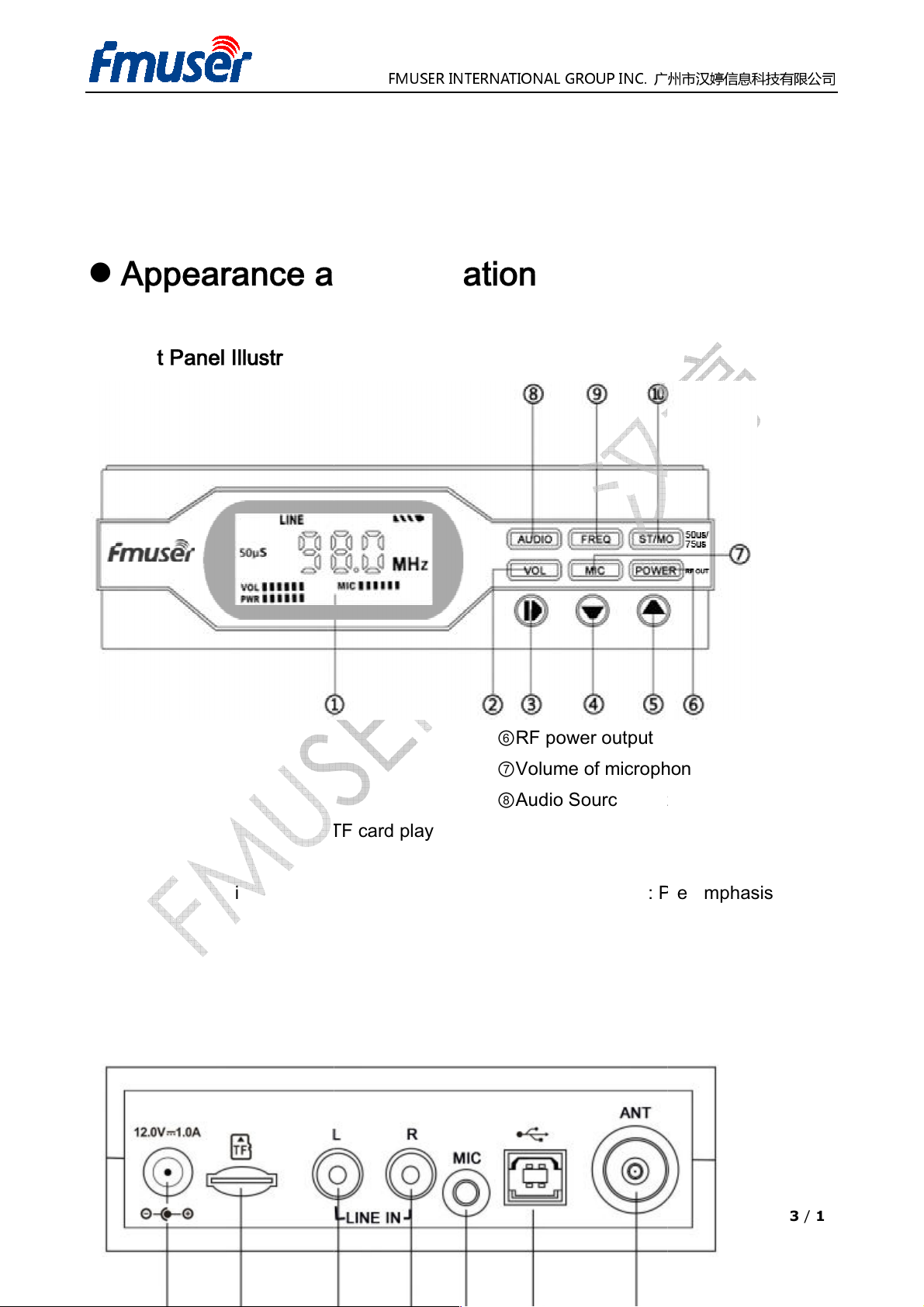
Appearance and Illustration
TF
FMUSER INTERNATIONAL GROUP INC.
广州市汉婷
Volume of microphone
Audio Source Switching
egulation
Stereo/Mono
Pre
3 / 16
信息科技有限公司
1. Front Panel Illustration
①LED panel
⑥RF power output
②Volume
③Press and Hold--On/Off
Press-- Play/Pause (under
mode)
④Decrease, Previous
(under TF card play mode)
⑤Increase, Next
(under TF card play mode)
2. Rear Panel Illustration
card play
⑦
⑧
⑨Frequency R
⑩Press:
Press and Hold :
75us/50us
-emphasis
Page 4
1A
Playing Song
(TF card mode)
(Bluetooth mode)
FMUSER INTERNATIONAL GROUP INC.
广州市汉婷
3.5mm
Data Communication
Interface
4 / 16
信息科技有限公司
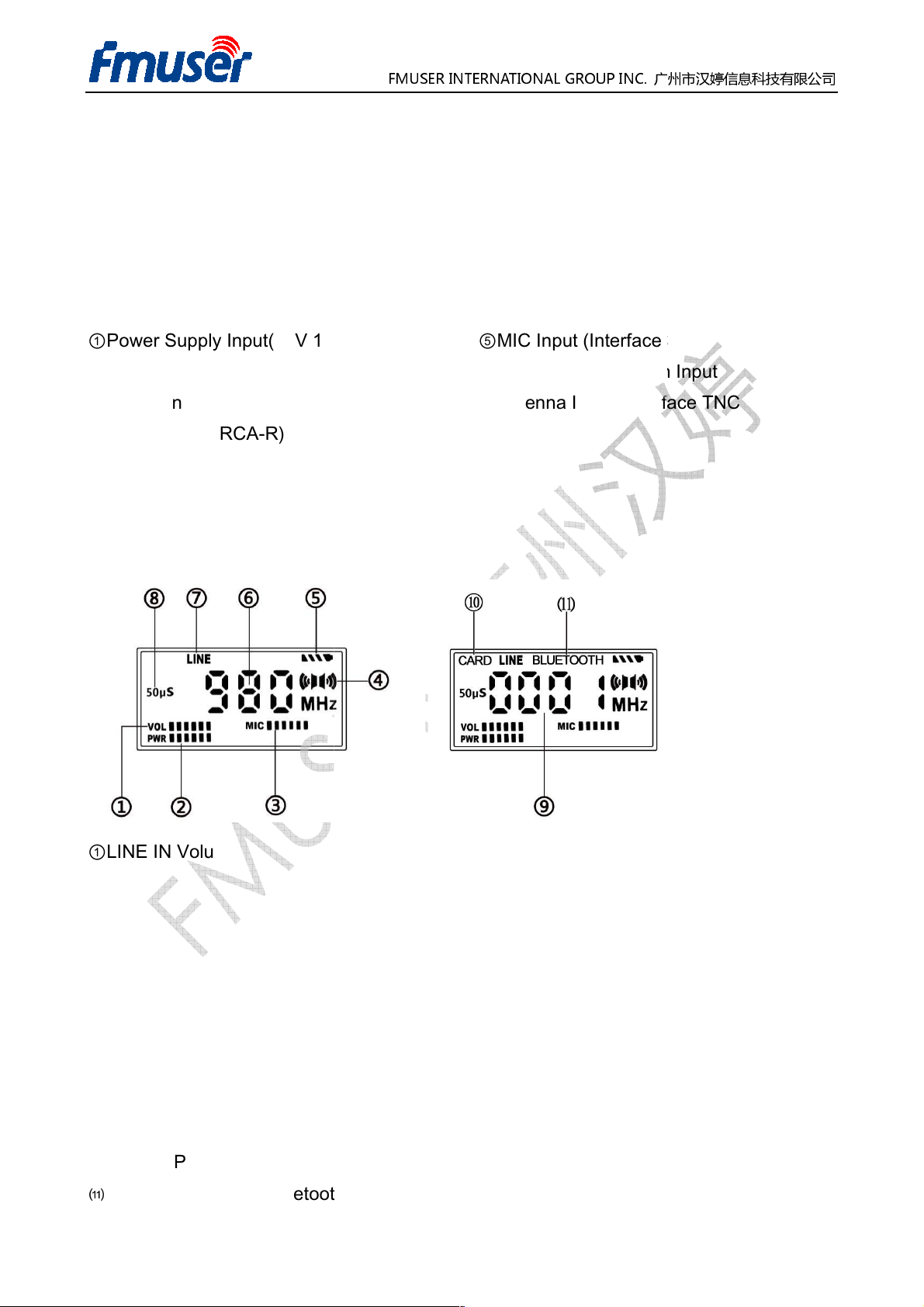
①Power Supply Input(12V
②TF Card Slot
③Stereo Input (RCA-L)
④Stereo Input (RCA-R)
3. LCD Panel
,2. 1mm)
⑤MIC Input (Interface
⑥
⑦Antenna Input (
)
Input(USB-B)
TNC-J)
①LINE IN Volume
②RF Power Output
③MIC Volume
④Stereo/Mono
⑤Battery Power
⑥Current Frequency
⑦Audio Input
⑧Pre-emphasis
⑨Serial Number of
card play mode)
⑩Current Play Mode
⑾
Current Play Mode
(under TF
Page 5
1. RF output power is adjustable from 0~1w by 10 levels.
switchable
switchable
4. Microphone input volume will be tu
main volume will be tuned down automatically.
there is
the device is powered by battery
mum brightness after 30 seconds
Current settings
from
audio play through TF card, memory up to 32G.
format
Key Functions and
the transmitter to the power adapter, press the button and it will light
the screen
and hold
light off as the device is turned off.
Bluetooth
广州市汉婷生物技术开发有限公司
voice
the LED panel will automatically
of power output and broadcast frequency
communication
starting showing contents as the device starts working.
during working status, the screen
to pause or play
Key Features
FMUSER INTERNATIONAL GROUP INC.
2. Audio pre-emphasis is
3. Mono and stereo are
5. Auto power off when
6. Battery Saving: When
reduce to the mini
7. Save Setting:
next start-up.
8. Support of inputting audio
distance is about 8 meters.
9. Support
10. Support up to 1000 MP3
between 50US/ 75US.
.
rned up in priority when there is
no audio input within 5 minutes.
,
to save energy.
external Bluetooth device, effective
songs.
input, while the
will be saved for
1.
Button
1) Power ON: Connect
up. At the same time,
2) Power OFF: Press
will be
3) Play/Pause: Under
audio files.
Operation
the button for 2 seconds
or TF card play mode, press the
5 / 16
Page 6
2.
requency, Volume, MIC volume or
requency, volume, MIC volume or
or increase by one level
1MHZ stepping.)
Next,
Next,
his button
increase or decrease the
confirm setting. The valid adjusting period is within 15 seconds from the twinkle of icon
every time you press the or
The icon will stop blinking when switch to other setttings from the VOL adjustment during
his button,
increase or decrease the
again to confirm setting. The valid adjusting period is within 15 seconds from the twinkle of
广州市汉婷生物技术开发有限公司
Press and hold the and
blinking
volume, press the VOL button again to
blinking
volume, press the
and
Buttons
FMUSER INTERNATIONAL GROUP INC.
Adjust F
To adjust f
decrease
increase continually(at
MP3 play mode:
Bluetooth play mode:
3. VOL Button
Main volume Adjustment
Introduction:Press t
Power Output
power output, press the
at a time.
Previous
, the VOL icon on LED screen starts
previous
and to
to decrease or
, press
or now to
the setting peiod.
4. MIC Button
MIC Volume Adjustment
Introduction:Press t
main
button.
the MIC icon on LED screen starts
, press
or now to
microphone
MIC button
6 / 16
Page 7
icon every time you press the or button.
when swit
his button,
increase or decrease the
to confirm setting. The valid adjusting period is within 15 seconds from the twinkle of icon
every time you press the or button.
The icon will stop blinking when switch
The icons of CARD, LINE OR BLUETOOTH on LED screen lights up steadily during their
status respectively. When the icons of CARD twinkles, it means the play is paused,
or the card is not reading correctly. Press the play button to check, if there is still no audio
out, take out the TF card and insert into the device to try again. If the p
please check if the card status or the file formats in the TF card. Please refer to TF card
format instructions in this manual for more details about this checking part.
FMUSER INTERNATIONAL GROUP INC.
广州市汉婷生物技术开发有限公司
adjustment during
on LED screen starts
POWER
to other setttings from the POWER
roblem is not solved,
The icon will stop blinking
the setting peiod.
5. POWER Button
Power Adjustment Function
Introduction:Press t
or now to
ch to other setttings from the MIC
the POWER icon
power output, press the
blinking, press
button again
adjustment
during the setting peiod.
6. AUDIO Button
Working Status Switching
working
7 / 16
Page 8
Frequency Regulation Function
his button,
increase or decrease the
confirm setting. The valid adjusting period is within 15 seconds from the twinkle of
every time you press the or button.
The icon will stop blinking when switch to other setttings from the FREQ adjustment during
to switch audio output mode
to switch pre
Specifications
76~108MHZ
100KHZ
:
Audio frequency response
广州市汉婷生物技术开发有限公司
blinking
press the FREQ button again to
STEREO.
50US and
Frequency deviation: +
SNO Rate: > =60dB
50/75US
Antenna Impedance
:
253*183*70mm
7. FREQ Button
FMUSER INTERNATIONAL GROUP INC.
Introduction:Press t
or now to
the setting peiod.
8. ST/MO Button
1. Press the button
2. Press and hold the button
the FREQ icon on LED screen starts
frequency,
between MONO and
-emphasis between
, press
icon
75US.
Technical
Voltage: 12V
1
Current: <0.4
2
Frequency range:
3
Frequency stepping:
4
Working temperature
5
6
50Hz~15000Hz
-10~45
:
12
13
14
15
16
17
Pre-emphasis:
Product dimension
Package size:
-75KHZ
switchable
: 50 Ohm
162*120*40MM
8 / 16
Page 9
Operation Instruction for Play part
Insert the blank TF card
into card reader and connect it with computer.
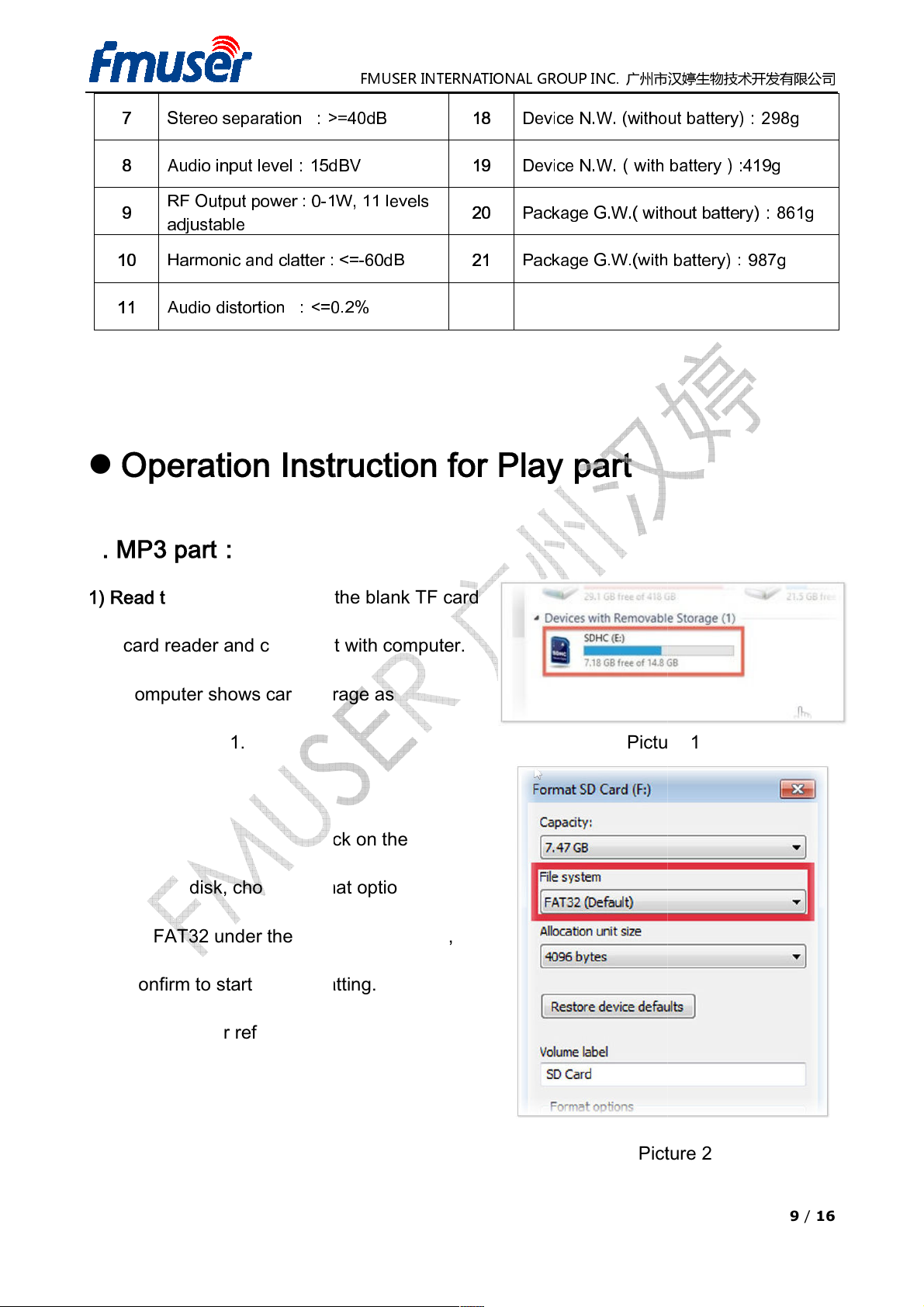
The computer shows card storage as
shown in Picture 1.
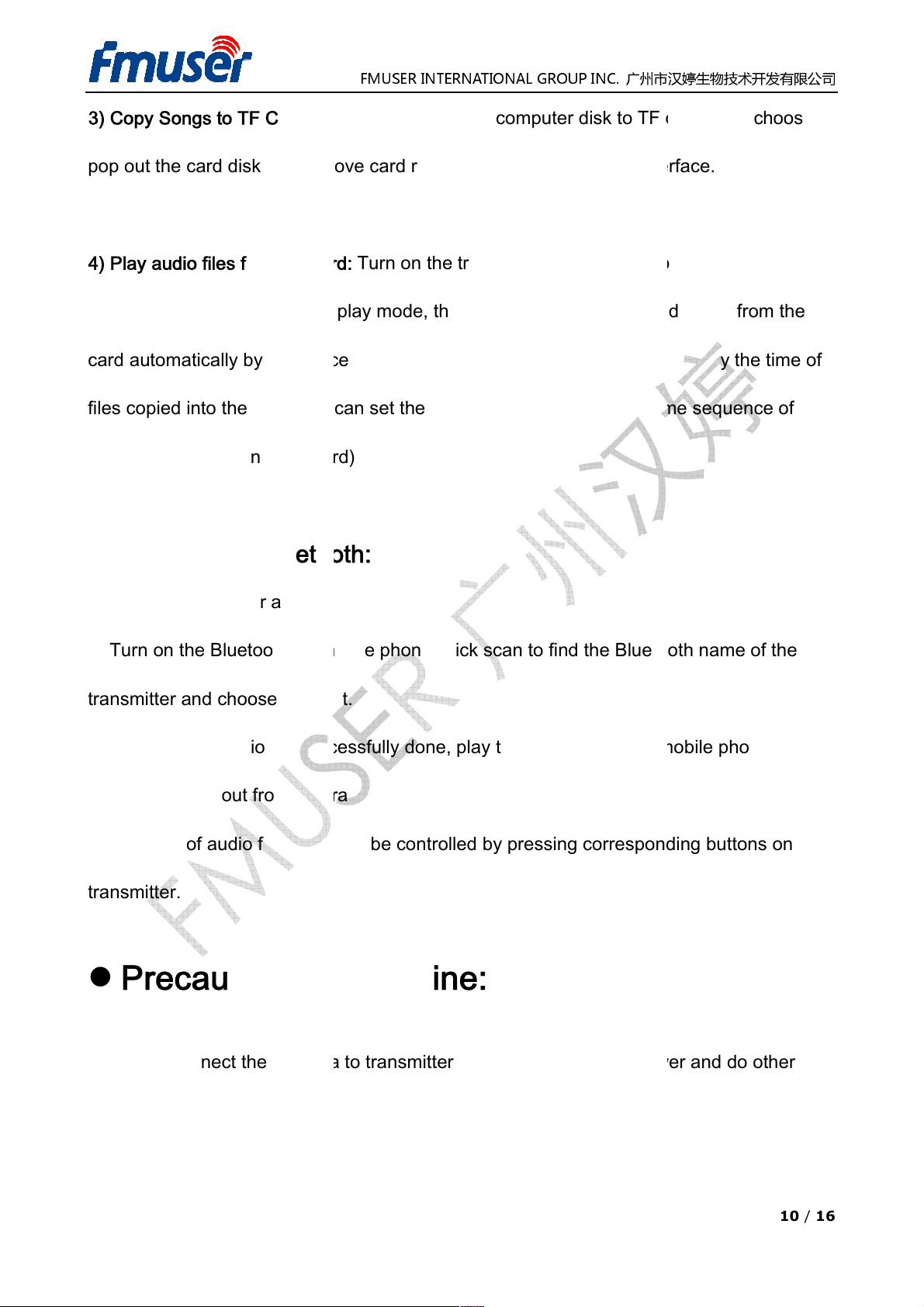
Right click on the
chooseFormat option, then
choose FAT32 under the File system option,
formatting
>=
15dBV
1W, 11 levels
: <=
0.2%
FMUSER INTERNATIONAL GROUP INC.
广州市汉婷生物技术开发有限公司
Picture 1
Picture
(without
with batt
without
(with
Stereo separation :
7
Audio input level:
8
RF Output power : 0-
9
adjustable
10
11
Harmonic and clatter
Audio distortion :<=
1. MP3 part:
40dB
-60dB
18
19
20
21
Device N.W.
Device N.W.(
Package G.W.(
Package G.W.
battery):298g
ery):419g
battery):861g
battery):987g
1) Read the TF Card:
2) Format TF Card:
icon of card disk,
click confirm to start the
(see Picture 2 for reference )
.
2
9 / 16
Page 10
Copy audio files from computer disk
pop out the card disk and remove card reader from computer USB interface.
) Play audio files from TF card
transmitter to switch to CARD play mode, then the transmitter plays audio files from the
card automatically by sequence in loop. (The default sequen
copied into the card, you c
files into the card)
Bluetooth:
Connect the power and turn on the transmitter.
2) Turn on the Bluetooth on mobile phone, click scan to find the
and choose connect
successfully
be broadcasted out from the transmitter.
The play of audio files can also be controlled by pressing corresponding buttons on
of Machine:
antenna
FMUSER INTERNATIONAL GROUP INC.
广州市汉婷生物技术开发有限公司
to TF card, then
, press Audio button
ce is classified by the
arranging time
Bluetooth
play the audio files from mobile phone, they
to transmitter first, then turn on the power and do other
3) Copy Songs to TF Card:
4
files
copying audio
2. Operation of
Turn on the transmitter
:
an set the playing order by
sequence of
choose
on the
time of
1)
transmitter
3) After the connection is
4)
transmitter.
Precautions
name of the
.
done,
’ll
1. Please connect the
operations afterwards.
10 / 16
Page 11
of the transmitter
damaged if the voltage is higher or lower than 12V.
of
card play mode
card slot when the transmitter is at OFF status.
strongly recommended that
using on the transmitter.
file format allowed on the TF card is MP3 format, otherwise the files can
played through the transmitter. If the transmitter suddenly shut down
please turn off
files and restart the transmitter
out the TF card when the power is
If the transmitter suddenly shut down because of the wrong operation of TF card,
ease press the power button to turn on the transmitter again
up to 100
to avoid harming the transmitter.
of Bluetooth
, please
transmitter in case they affect the receiving
FMUSER INTERNATIONAL GROUP INC.
广州市汉婷生物技术开发有限公司
otherwise the transmitter could be
MP3 file
ed
because
and take out the TF card, and then
ON, or the transmitter might be
please do not exceed the number
electric metallic substance
2. The working voltage
Precautions
1. Before using the
into the
2. It is
before
3. The only
must be 12V,
card play operation:
, make sure the TF card included
the new TF card should be format
s is inserted
by FAT32 format
’t be
audio file format,
the wrong
4. Please do not take
damaged.
pl
5. The TF card can support
Precautions
the transmitter
.
0 quantity of songs,
of the wrong
delete
.
operation:
1. Before using the Bluetooth
keep the
distance of Bluetooth.
s away from the
11 / 16
Page 12
the mobile phone can not connect to the Bluetooth of
mobile phone and connect again.
transmission distance is
far from the transmitter in case the signal fails to connect. If the audio play is OFF due to the
far distance between mobile phone and transmitter, keep
nection is failed, please connect again.
Trouble
Malfunction
Possible
o power electricity in the
TF card
Power source faulty
ower
connected
TF card
1)Poor
environment
Low power for output
Antenna too close from
4)Low
sensitivity
Output power
Wrong frequency
FMUSER INTERNATIONAL GROUP INC.
广州市汉婷生物技术开发有限公司
, please reboot the
limited, please do not keep the mobile phone
them close can re
Reasons
Corresponding
1)Check if the power
Check if the TF card is
and the audio file
Replace with another
if the problem is
solved.
1)Check if the power
Check if the TF card is
and the audio file
3)Check if the TF card is damaged
transmission
of receiver
Place the transmitter to a high and
FM radio
Adjust to higher power
Increase the output power
Adjust the frequencies of radio to
the same as transmitter
Solution
source
is
well
source
is
well
.
2. If
3. The Bluetooth
play. If the Bluetooth con
Common
1)N
socket
2)
3)
1
shows start
Screen
failed
very
Shooting
faulty.
.
transmitter
ing
connected.
2)
format
format.
3)
source to check
store the
FAT32
s are MP3
12V power
The Machine
2
3
4
restart
repeatedly
Very short
transmission
distance
No signal
received on
receiver
1)P
2)
2)
3)
ground.
1)
2)
cord not well
faulty
.
at 0 level
connected.
2)
format
format.
1)
open place
2)Use car
signals for testing.
3)
1)
2)
FAT32
s are MP3
to receive the
for output
’s.
12 / 16
Page 13
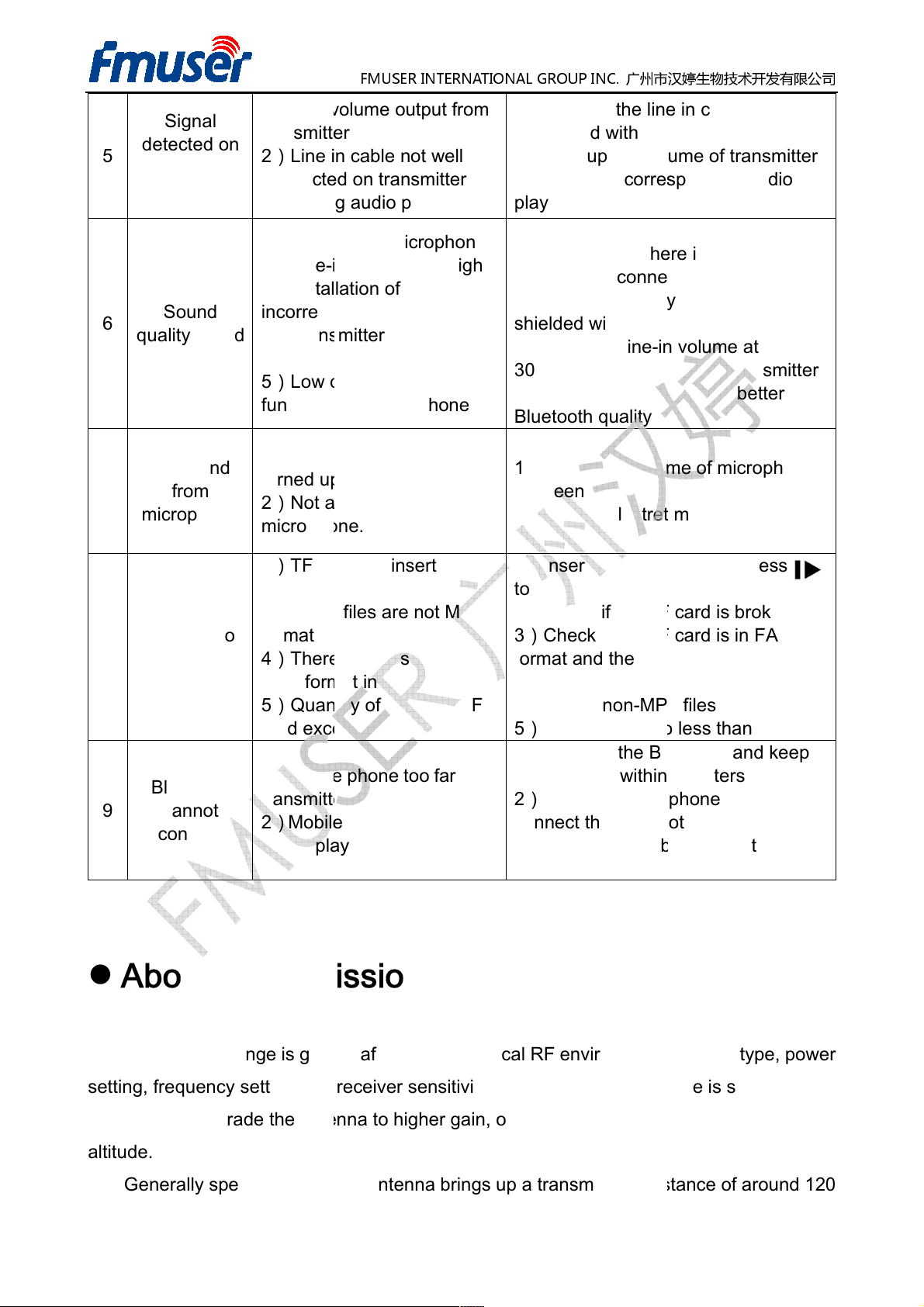
Low volume output from
transmitter
Line in cable not well
connected on transmitter
Wrong
is bad
Low quality microphone
in volume too high
nstallation
Transmitter volume too
Low quality
function on mobile phone
olume of microphone not
up
Not a
microphone.
1)TF card
TF card
Audio files are not MP3
There are files of non
MP3 format in TF
Quantity
card exceeds 1000.
Mobile phone too far from
transmitter
Mobile phone is not in
music play mode.
Transmission
Transmission range is greatly affected by the local RF environment,
setting and receiver
the antenna to higher gain, or install the antenna on places at
a rubber antenna brings up a transmission distance of around 120
FMUSER INTERNATIONAL GROUP INC.
广州市汉婷生物技术开发有限公司
Check if the line in cable is well
connected with transmitter.
the volume of transmitter
to corresponding
1)Set the microphone volume at
minimum when there is no
microphone connected.
Use high quality microphone with
in
input into
mobile phone
Bluetooth
quality.
Adjust the volume of microphone
between 30% to 70%
electret
not inserted
1)I
nsert TF card
and then press
Check if the TF card is broken.
Check if the TF card is in FAT32
format and the audio file
MP3 files
5)Delete
songs
to
1)Connect the
Bluetooth
the distance within 3 meters
mobile phone
Bluetooth
mobile phone to
play
mode
antenna type, power
transmission range is short, you
less than
1000.
and keep
antenna type, power
detected on
5
receiver but
no sound
6
quality
No sound
7
microphone
Signal
Sound
from
1)
2)
3)
1)
2)Line3)I
incorrect
4)
high
5)
1)V
turned
2)
audio play mode
of antenna is
Bluetooth
electret
1)
2)Turn up
3)Switch
play mode.
2)
shielded wire.
3)Keep the line30%-50% when
4)Use
1)
2)Use an
audio
volume at
transmitter
with better
microphone
MP3 cannot
8
9
About
play
Bluetooth
cannot
connect
2)
3)
format
4)
5)
1)
2)
faulty
card.
of songs in TF
Distance
to play.
2)
3)
format.
4)Delete non-
2)Reboot
the
connect the
3)Switch the
s are MP3
and try to
over 9 times.
stereo
setting, frequency
may need to upgrade
altitude.
Generally speaking,
sensitivity. If the
higher
13 / 16
Page 14
receiving
about 100 meters distance. Please contact us for more and better transmission proposals.
quality
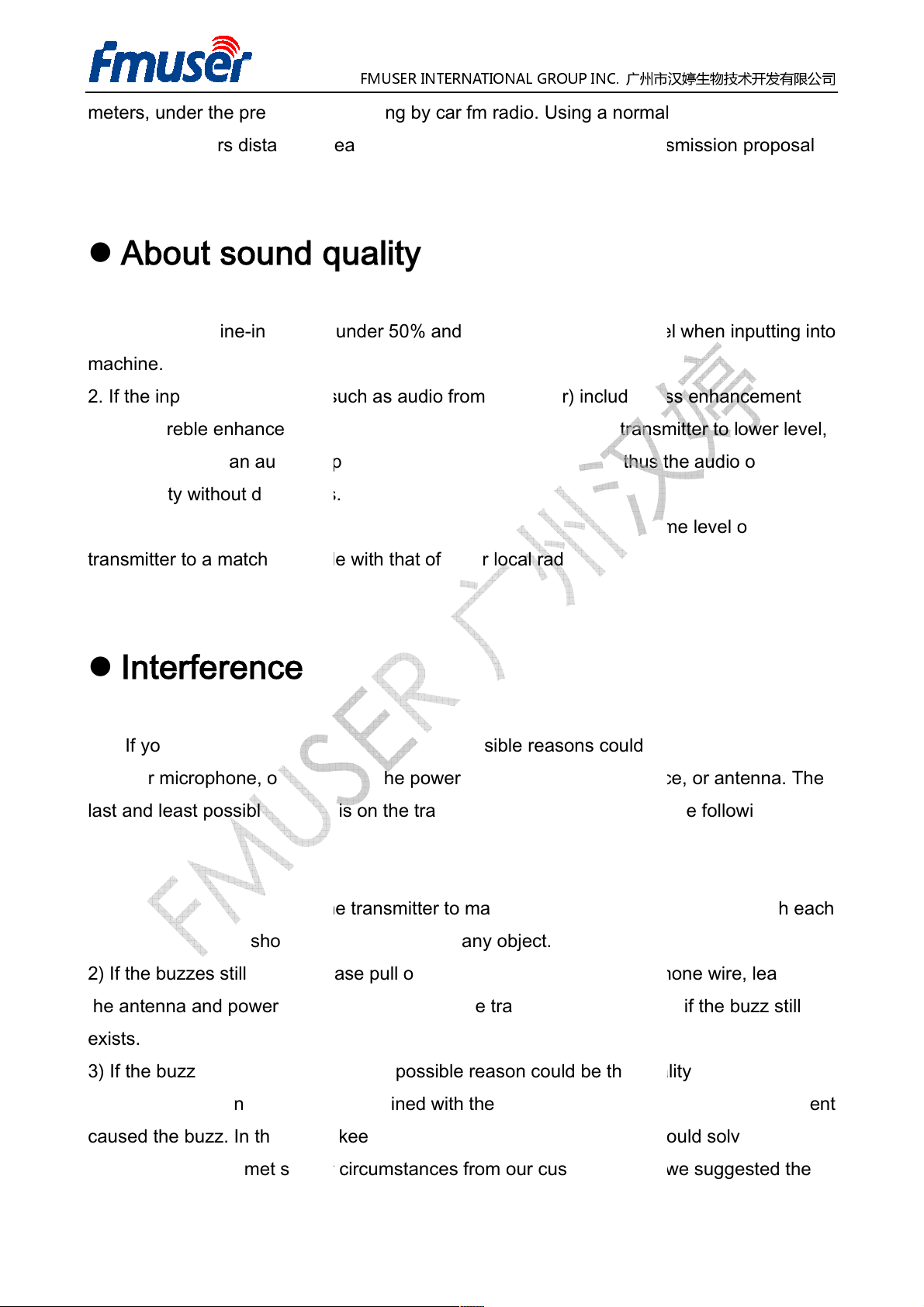
in volume under 50% and adjusted to a proper level when
sources (such as audio
mode,
because there is an audio amplifier built
distortions
listening experience, please adjust the output volume
to a matching grade with that of other local radio stations.
es from the transmitter,
cable or microphone, or it could be the power source,
last and least possible reason
Sort out all the cables on the t
not be blocked by any object.
, please pull out the line
to be connected with the transmitter, then
after step 2
in cable was intertwined with the power cord, or the audio input equi
caused the buzz. In this case, keep
We have met similar circumstances
FMUSER INTERNATIONAL GROUP INC.
广州市汉婷生物技术开发有限公司
by car fm radio. Using a normal FM radio might get
bass
please adjust the volume of transmitter to lower level,
the audio output is of
s could be fro
audio input device, or
is on the transmitter. Please check from
ransmitter to make sure they are not inter
in cable and Microphone wire, leave only
check if
could be the quality of the line
should
from our customers and we suggested the
meters, under the premise of
About sound
1. Please keep line-
machine.
2. If the input audio
mode or treble enhancement
high quality without
3. To ensure better
transmitter
.
from computer) include
-in inside the transmitter, thus
inputting into
enhancement
level of
Interference
If you hear buzz
aspects to solve this problem:
1)
other. The antenna should
2) If the buzzes still exists
the antenna and power
exists.
possible reason
-
m the line-in
antenna. The
the following
twined with each
the buzz still
3) If the buzzes stop
cable, or the line-
problem.
, the possible reason
the wires apart from each other
solve the
-in
pment
14 / 16
Page 15
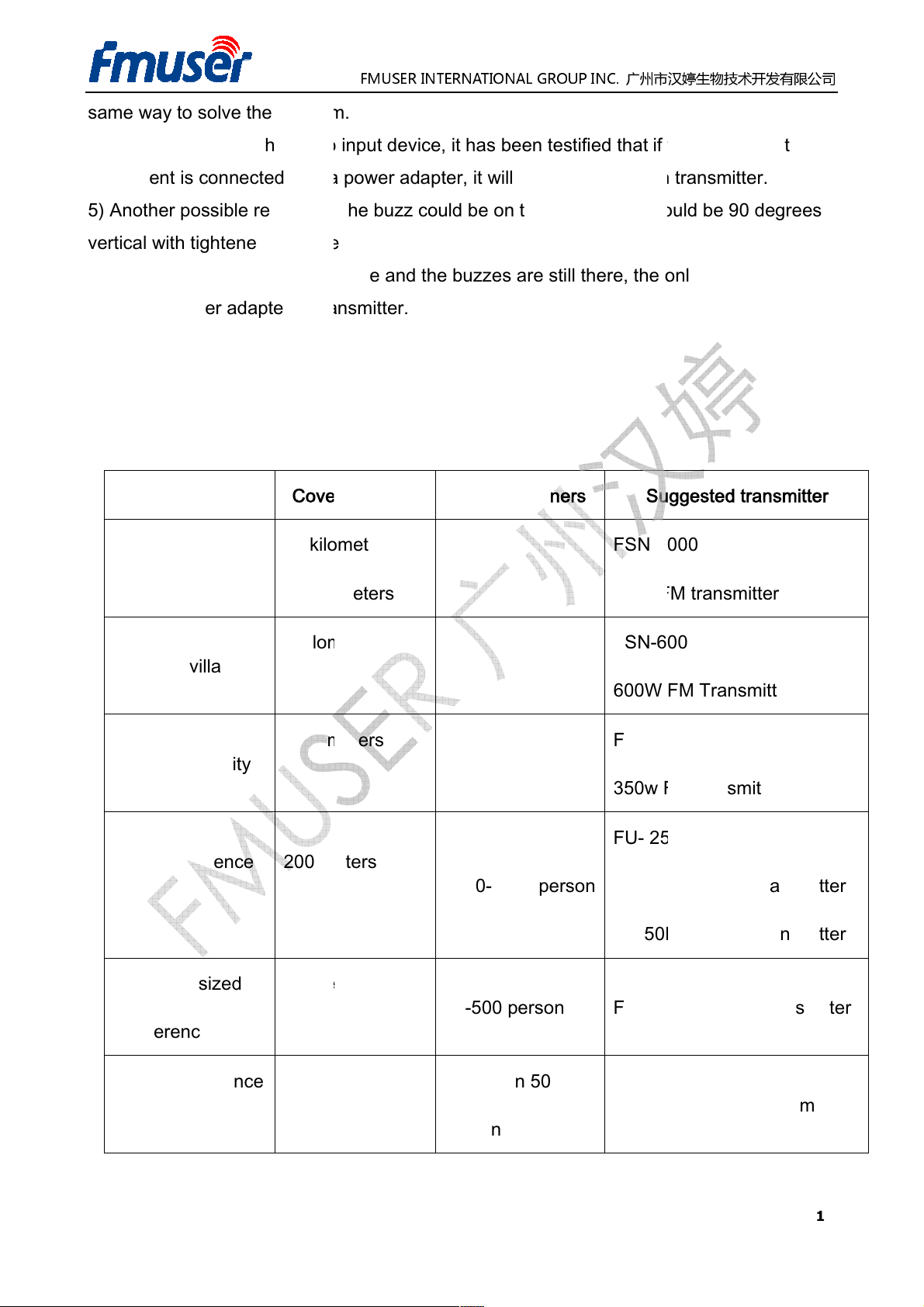
same way to solve the problem.
Or you can check the audio input device, i
with a power adapter, it will cause the buzz on
Another possible reason for the buzz could be on the antenna, it should be 90 degrees
vertical with tightened onto the
all checks were done as above and
be on the power adapter of transmitter.
Recommended Packages
Cover Distance
kilometer
kilometer
kilometer
kilometer
kilometer
kilometer
meters
meters
meters
meters
meters
meters
FMUSER INTERNATIONAL GROUP INC.
广州市汉婷生物技术开发有限公司
been testified that if the audio input
the only
uggested transmitter
1000
1KW FM trans
600
600W FM Transmitter
350
350w FM transmitter
25A
30B
50B
25A
15A
4)
equipment is connected
5)
6) If
Applications
Small city
10
15
transmitter.
the buzzes are still there,
Qty.of Listeners S
s -
s
t has
transmitter.
reason should
FSN-
mitter
Small village
Big community
Big Conference
Room
Middle-sized
Conference Room
Small Conference
Room
5
3
200
500
50
50
s -10
s
s X5
s
X
1000-1500 person
X 150
50-500 person FU-
X 50 Less than 50
person
FSN-
FSN-
FU-
FU-
FU-
FU-
25W FM transmitter
30W FM transmitter
50W FM transmitter
25W FM transmitter
15W FM transmitter
15 / 16
Page 16
meters
meters
meters
meters
meters
meters
meters
meters
meters
meters
meters
meters
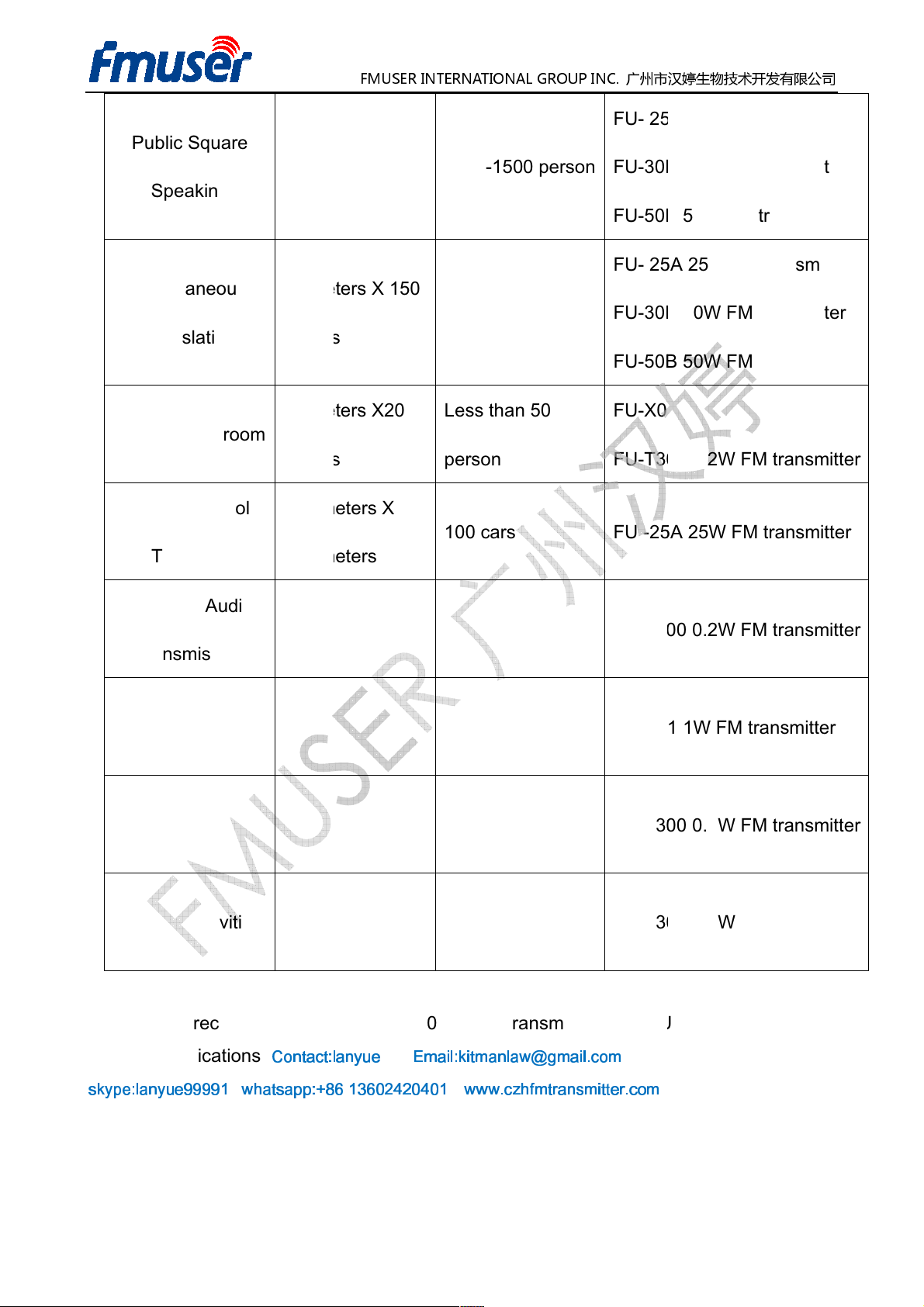
recommend to use the FU
Contact:lanyue Email:kitmanlaw@gmail.com
whatsapp:+86 13602420401
FMUSER INTERNATIONAL GROUP INC.
广州市汉婷生物技术开发有限公司
25A
30B
50B
25A
30B
50B
X01
T300
25A
T300
X01
T300
T300
X01 series transmitters with FU
Public Square
Speaking
Simultaneous
Translation
School Classroom
Driving School
Teaching
500
1000
50
10
200
500
X
X 150
X20
X
FU-
1000-1500 person
FU-
FU-
FU-
FU-
FU-
Less than 50
person
FU-
FU-
100 cars FU -
25W FM transmitter
30W FM transmitter
50W FM transmitter
25W FM transmitter
30W FM transmitter
50W FM transmitter
1W FM transmitter
0.2W FM transmitter
25W FM transmitter
Car MP3 Audio
Transmission
Home Wireless
Audio System
Travel Guide
Outdoor activities
We highly
practical applications.
50
50
X 50
X 50
FU-
FU-
FU-
FU-
-
0.2W FM transmitter
1W FM transmitter
0.2W FM transmitter
0.2W FM transmitter
-R01 FM receiver in
skype:lanyue99991
www.czhfmtransmitter.com
16 / 16
 Loading...