

Page 1

Flyron Technology Co., Ltd. 20 Channel MP3 Sound Board
1
20 Channel MP3 Sound Board
User’s Manual
Model: FN-BC20
Contents
1. Overviews ………………………………………………………………………………… 2
1.1. Brief introduction ………………………………………………………………………………………... 2
1.2. Features …………………………………………………………………………………………………. 2
1.3. Technical parameters .................................................................................................................. 2
2. Connections ..........................................................................................…….......... 2
3. Button Control Mode .................................................……………………………… 3
3.1. One-on-one folder triggering control ........................................................................................... 3
3.2. One-on-one sound file triggering control …………………………………………………... ……….. 5
3.3. Trigger mode s election ……………………………………………………………………................... 6
4. Serial Control Mode …………………………………………………………………….. 7
4.1. Command Form at …..………………………………………………………………………………….. 7
4.2. About Checks um ………………………………………………………………………………..……… 7
4.3. Serial Communication Commands .............................................................................................. 8
4.4. Returned Data from Module ………….…………………………………………………….…………. 12
4.5. Detailed Annotation of Control Commands ................................................................................. 14
4.6. Detailed Annotation of Query Commands .................................................................................. 18
4.7. About Delay of Serial Programming ............................................................................................. 19
Page 2

Flyron Technology Co., Ltd. 20 Channel MP3 Sound Board
2
1. Overviews
1.1. Brief Introduction
FN- BC20 is a high quality MP3 sound board developed by Flyron Technology Co., Ltd. Equipped with an on-
board 2x 15 W class D amplifier, the sound board can be controlled by 20 separate buttons hooked up to the
„one-on-one‟ inputs terminals, R232 serial port and RS485 s erial port. Great audio output, industry-grade
design and strong anti-jamming capability make it possible to be used for many different applications.
1.2. Features
1) Built-in a high quality 24bit of audio decoder with stereo audio output.
2) Supports to play audio files of MP3 and WAV formats.
3) On-board a high quality 2x15 Watt class D amplifier to directly connect with two 8 ohm speakers of 15
Watts or more, for left channel and right channel.
4) Uses SD card or USB flash drive for sound file storage devices.
5) Supports maximum 32GB SD card or 32GB USB flash drive.
6) Supports button control mode for RS232 and RS485 serial control mode.
7) In button control mode, playback of the „one-on-one' associated audio files are triggered by negative pulse
to any of the 20 input terminals.
8) In button control mode, possible playback of 255 MP3/WAV audio files per 20 „one-on-one‟ associated
folders through negative trigger.
9) In button control mode, Four Selectable triggering modes are provided.
10) Supports audio output to an external amplifier through the RCA audio jacks.
11) Separate volume control for each sound channel (only for on-board amplifier).
12) On-board relay used to control on/off to external equipment during playback.
13) Wide range for power input DC (12V - 24V).
14) Industry-grade design and strong anti-jamming capability.
15) PCB size: 135mm x 75 mm (5.315 Inches x 2.953 inches).
1.3. Technical Parameters
Power input: DC12V - 24V
Rated output: 15W×2 (RL= 8 Ω d =1%)
Noise Voltage: ≤50m V
Frequency response: 20-20KHz
SNR: ≥ 90dB
2. Connections
K1 through K20 are representing Normally Open (N.O.) manual buttons. Please refer to the connection example
below.
Notes:
There are two „GND‟ connecting terminals for convenient connections on the both sides of the 20 input
connection terminals for the buttons.
The volume potentiometer “VOL_L” associates with “SPK1” while the volume potentiometer “VOL_R”
associates with “SPK2”.
The on-board amplifier shuts down automatically, when the on-board RCA audio jacks are connected to an
external amplifier. This is achieved though voltage sensing of the pre-amp audio source.
The relay is triggered (activated) only during playback.
Page 3

www.flyrontech.com
E-mail:[email protected]
Flyron Technology Co., Ltd. 20 Channel MP3 Sound Board
3
Speaker 1 Speaker 2
Left Channel Right Channel
Relay connectors
RS232 & RS485
Control Ports
RCA audio pre-amp
Outputs
DC12-24 V
Input
K1 K2 K3 K4 K5 K6 K7 K8 K9 K10 K11 K12 K13 K14 K15 K16 K17 K18 K19 K20
GND GND
3. Button Input Control Mode
In order to meet different needs, we added „one-on-one‟ folder triggering control except for the traditional „One -on-one‟ triggering
of sound files. „One-on-one‟ folder triggering control is used for random playback of the sound files in the ass ociated folder. In
other words, each of 20 input triggers can play multiple sound files in the corresponding folders in random order. The traditional
„one-on-one‟ triggering control mode is that each of the 20 input triggers can only activate a single corresponding sound file.
Both of these two triggering control modes can‟t co-exist. Users can only choose one type to use. See more details as below on
how to use both of them.
3.1. ‘One-on-one’ folder triggering control (for random playback of the sound files in the
associated folder)
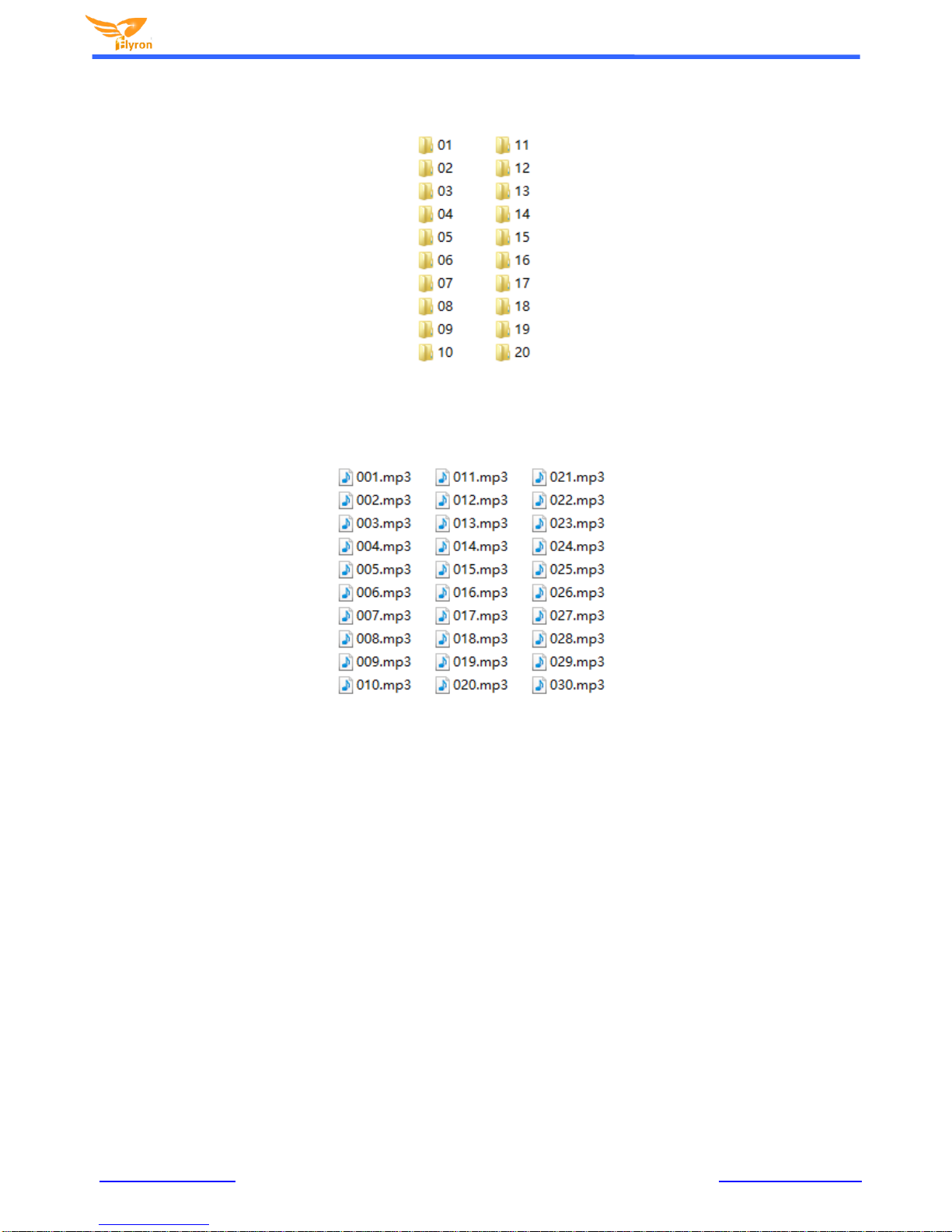
The SD/USB memory devices that will contain the audio files must be formatted to FAT32 before loading files and folders. After
formatting is complete, build 20 folders and renam e them from “01” to “20” in the root directory of SD card or USB flas h drive as
below. The input “K1” associates with folder “01”, the input “K2” associates with folder “02”...... the input “K20” associates with
folder “20”.
Page 4
www.flyrontech.com
E-mail:[email protected]
Flyron Technology Co., Ltd. 20 Channel MP3 Sound Board
4
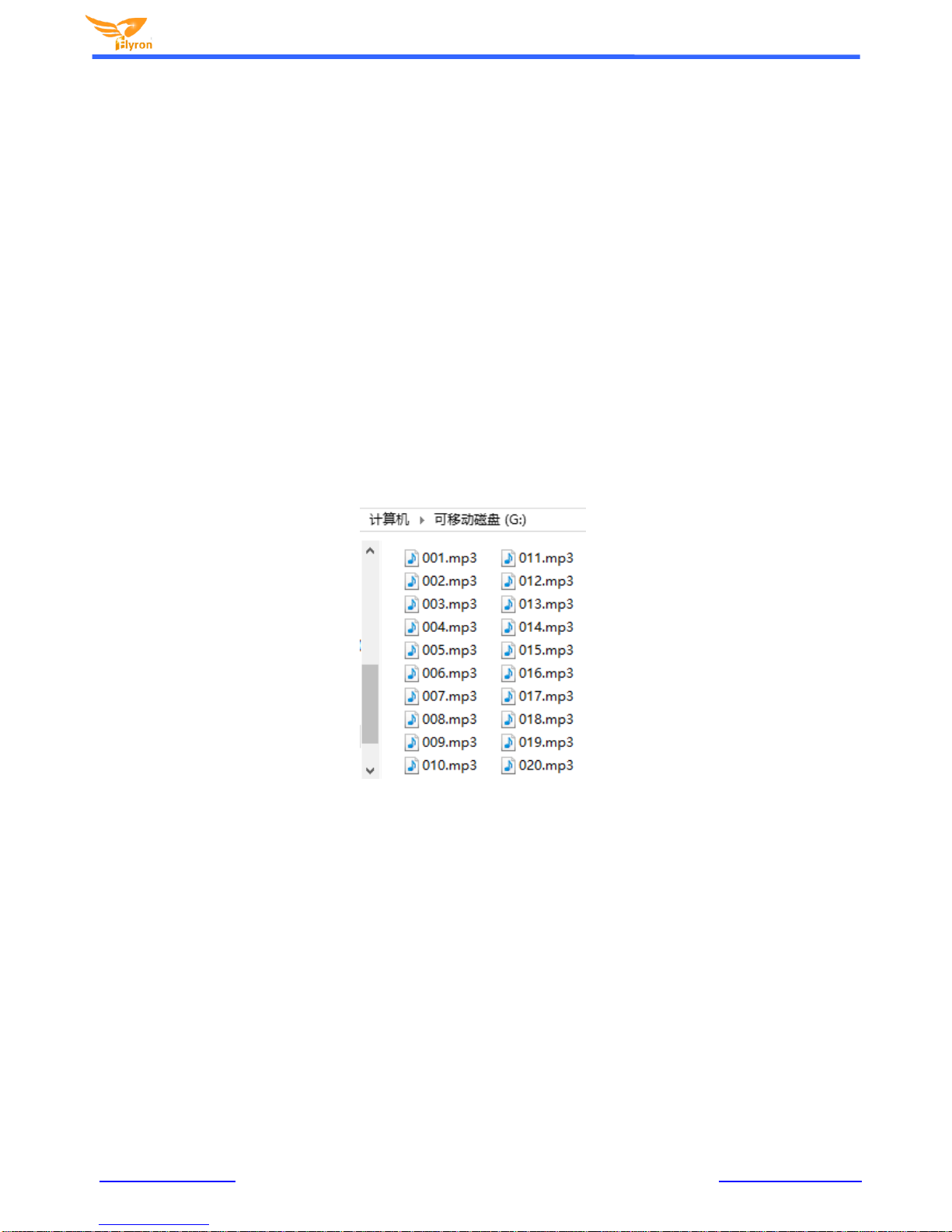
Put the sound files in each folder, which can contain maximum 255 sound files. Each folder must contain all Mp3 OR Wav audio
files. Mp3 and Wav cannot co-exist within each folder. Rename them “001.mp3/wav” to “255.mp3/wav” as shown below. For the
quickest timely response once triggered; we suggest that no more than 100 sound files in each folder.
After everything is done as above, remove the SD card or USB flash drive from computer and insert it in to the board. Power it on
and push any of the 20 buttons to play a sound randomly in the associated folder. For example, by pushing the button associated
with input “K7”. It will randomly play a sound file from the associated folder “07” and stop; push it again, it will randomly play
another s ound file from the associated folder “07” and stop, etc.
Note: When both the SD card and USB drive is plugged/inserted into the sound board. Only audio files from the SD card will be
played.
Page 5
www.flyrontech.com
E-mail:[email protected]
Flyron Technology Co., Ltd. 20 Channel MP3 Sound Board
5
3.2. ‘One-on-one’ sound file triggering control (for direct playback of the associated sound file)
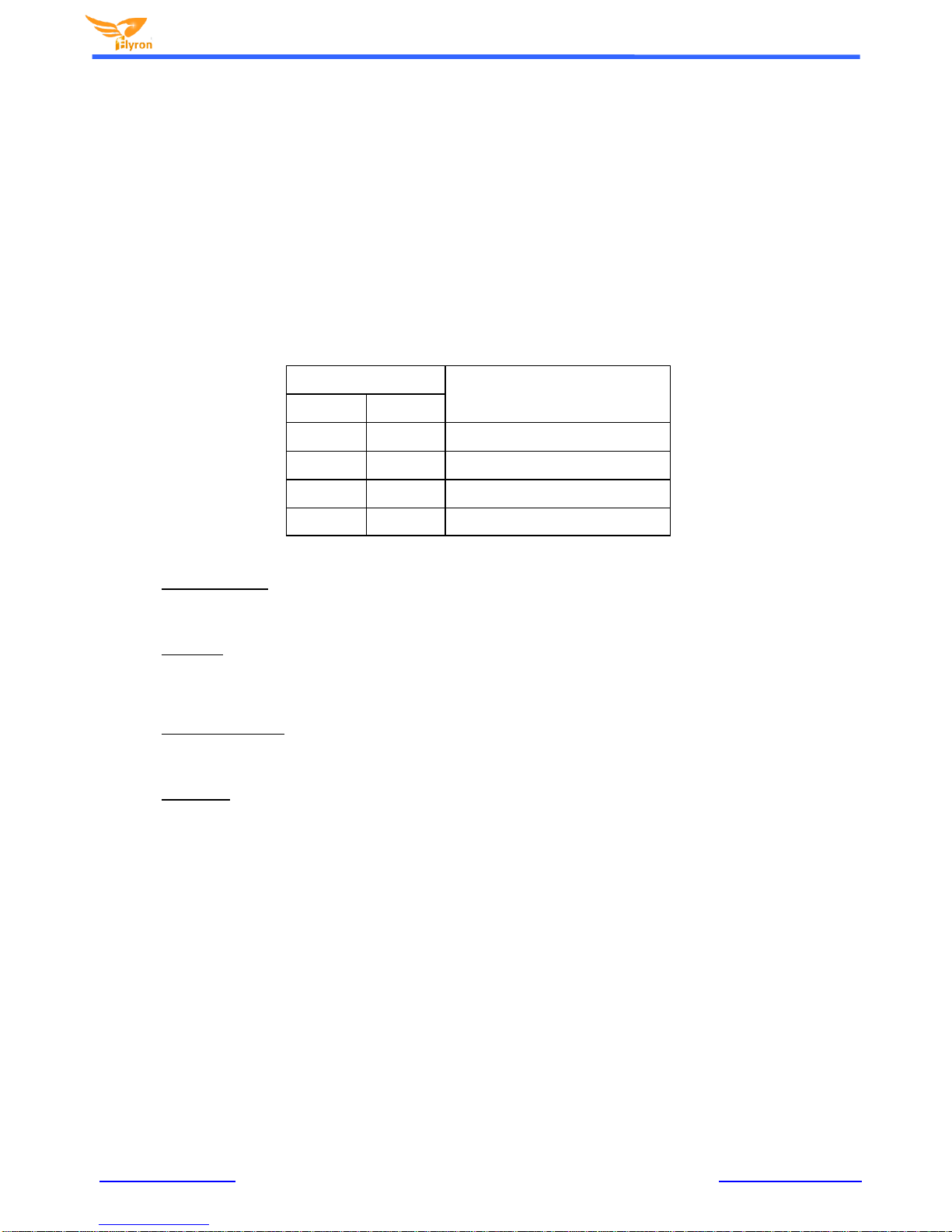
The 20 sound files need to be directly stored in the root directory of the SD card or USB flash drive being used. No other folders
can be in the „root directory‟. The arrangements of the sound files are managed by a physical indexing sequence. In other wor ds,
the file that is to be loaded first in the s torage device will be associated with input “K1”. The last file to be loaded in the storage
device will be associated with input “K20”. In order to guarantee a correct „one -on-one‟ order, please refer to the following s teps.
1) Build a new folder on the computer and put 20 sound files in this new folder.
2) Rename the audio files from 001.mp3/wav to “020.mp3/wav”, and make sure they are ranked from “001.mp3/wav” to
“020.mp3/wav” in order.
3) Plug in your SD card or USB flash drive on computer (make sure i t is empty).
4) Format SD card or USB drive into „FAT32‟.
5) Select all the sound files in the folder.
6) Right click on the first file (001.mp3/wav) and choose "Send to removable disk".
7) This should send the 20 sound files to the SD card or USB flash drive in a correct sequence as below.
8) Once the files transfer is complete, safely remove the SD card or USB flash drive from computer and insert it onto the
sound board.
9) Apply power to the sound board and push any of 20 buttons to play a corresponding sound.
10) For example, push button “K1”, it will play the s ound file “001.m p3/wav” and stop; push button “K7”, it will play the sound
file “007.m p3 /wav” and stop, etc.
Page 6
www.flyrontech.com
E-mail:[email protected]
Flyron Technology Co., Ltd. 20 Channel MP3 Sound Board
6
3.3. Triggering Mode Selection
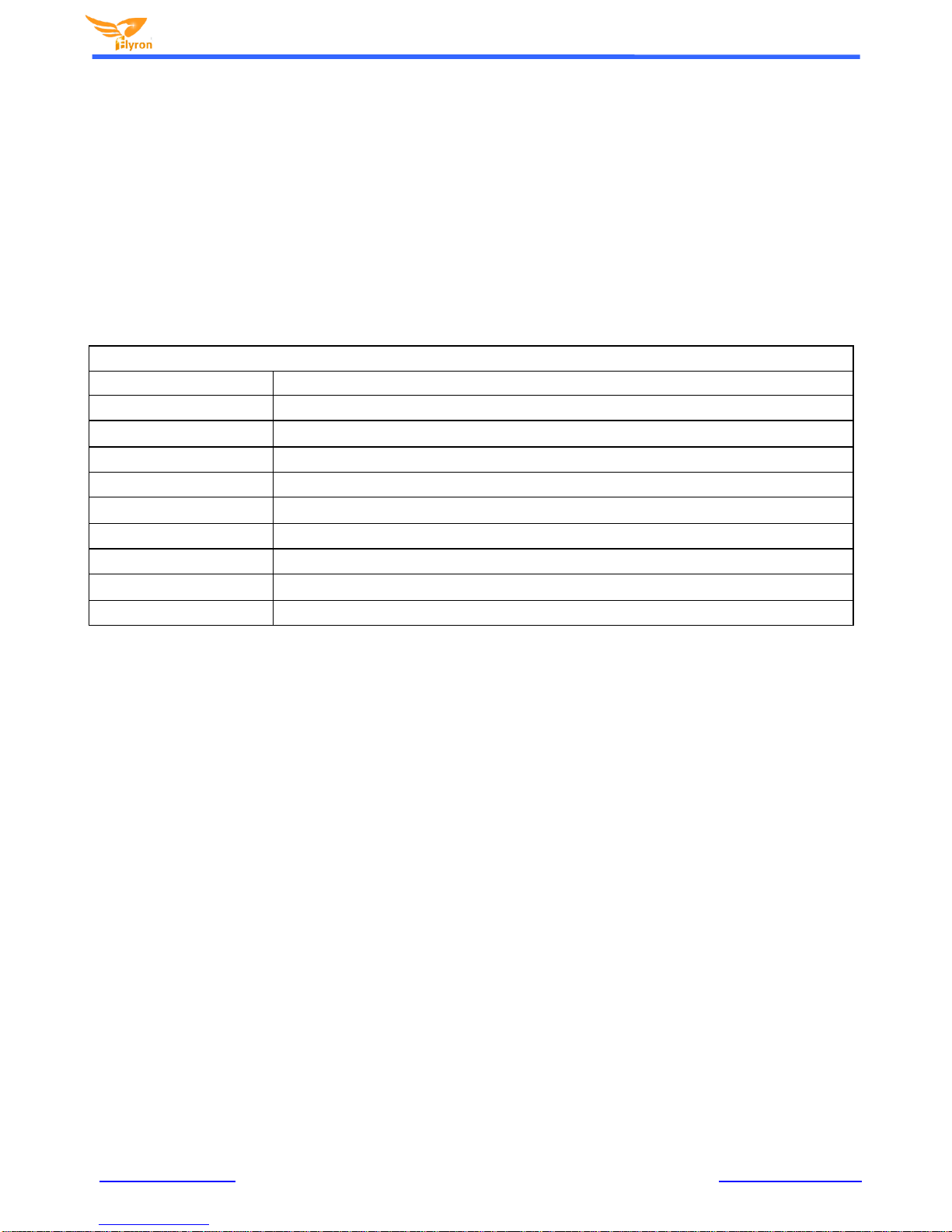
By using the on-board DIP switches, users have 4 triggering modes to choose from:
Pulse interruptible
Level hold
Pulse Uninterruptible
Play/Pause
The DIP switches are placed in the center of circuit board and a truth table for the DIP switch is a printed on the circuit board just
right of the DIP switches. The truth table is also shown below.
DIP Switch Stat us
Triggering Mode
No.1
No.2
OFF
OFF
Pulse Interruptible
ON
OFF
Level Hold
OFF
ON
Pulse Uninterruptable
ON
ON
Play/Pause
Pulse interruptible: In this mode, a single negative pulse will start and stop playback. It is possible to
interrupt the playback by pressing the same button used to activate it. Once playback is stopped, pressing
the button again will restart the sound file. (If more than one audio file is in the folder. The next audio file to
be played will be picked/chosen at random.)
Level hold: In this mode, the negative pulse must be held/maintained to the sound board trigger for audio
file to complete. The audio file will only playback while button, or negative pulse, is held/maintained during
playback. Once the button being held, or negative pulse, is removed, the playback will be
stopped/cancelled. (If more than one audio file is in the folder. The next audio file to be play will be
picked/chosen at random. Regardless if the last/previous audio file was completed.)
Pulse Uninterruptible: In this mode, it's not possible to interrupt the playback. Once an audio file is triggered.
The audio file will not be able to be stopped/cancelled during playback. The playback will only end when
the audio file has played in its entirety. (If more than one audio file is in the folder. The next audio file to be
play will be picked/chosen at random.)
Play/Pause: In this mode, a single negative pulse will start and pause the playback. Once an audio file is
triggered. Pushing the same button, or reapplying a negative pulse, that triggered the playback, will pause
playback; pushing the same button, or reapplying a negative pulse, will to continue the original audio file
playback.
Note: The factory default triggering mode is “pulse interruptible". After you shift to another triggering mode, you need to power
cycle the board on-off-on, then the new DIP switch setting will be executed.
Page 7
www.flyrontech.com
E-mail:[email protected]
Flyron Technology Co., Ltd. 20 Channel MP3 Sound Board
7
4. Serial Control Mode
Supports RS232 and RS485 serial control modes. Both of these two control modes share the same
communication protocols as below. Regarding RS485, we employed half-duplex communication standard.
4.1. Command Format
Communication baud rate: 9600 bps
Data bits: 1
Checkout: none
Flow Control: none
Format: $S / Ver. / Number / Command / Feedback / Param_MSB / Param_LSB / Check_MSB / Check_LSB / $O
$S
Start byte 0x7E
Ver.
Version byte, 0xFF by default
Number
Number of bytes from version info to Check_LSB, typically 0x06 (checks um not counted)
Command
Command byte
Feedback
0x01: Need feedback --send confirmation back to MCU; 0x00: No need feedback
Param_MSB
Most significant byte of parameter
Param_LSB
Least significant byte of parameter
Check_MSB
Most significant byte of checksum
Check_LSB
Least significant byte of checksum
$O
End byte 0xEF
For example, if we s pecify playback of SD card, we need to send the command “7E FF 06 09 00 00 02 FF F0 EF”. The num ber
is 6 bytes , and these 6 bytes are “FF 06 09 00 00 02”. Start byte, end byte and checks um are not counted.
4.2. About Checksum
Regarding to calculating checksum, set your 16 bit checks um value to 0. For each byte from the Version byte until the
Param_LSB byte, subtract the byte from the checksum.
Normally it‟s okay whether users choose to use checksum or not, our module can receive serial data with or without checksum,
but some of users may use a MCU without crystal oscillator, so if so we strongly suggest users to add checksum to make sure
the communication stability.
Page 8
www.flyrontech.com
E-mail:[email protected]
Flyron Technology Co., Ltd. 20 Channel MP3 Sound Board
8
4.3. Serial Communication Commands
4.3.1 Control commands
Command
Function
Remarks
0 x01
Play Next
0 x02
Play Previous
0 x03
Specify playback of a track
See 4.5.1 for details
0 x04
Increase volume
0 x05
Decrease volume
0 x06
Specify volume
See 4.5.2 for details
0 x07
N/A (reserved)
0 x08
Specify single repeat playback
See 4.5.3 for details
0 x09
Specify playback of a device
See 4.5.4 for details
0 x0 A
Set sleep mode
See 4.5.5 for details
0 x0B
Awake from sleep
0 x0C
Reset
0 x0D
Play
0 x0E
Pause
0 x0 F
Specify playback of a track in a folder
See 4.5.6 for details
0 x13
Inter-cut an advertisement
See 4.5.7 for details
0 x14
N/A (reserved)
0 x15
Stop playing inter-cut advertisement
See 4.5.8 for details
0 x16
Stop
0 x17
Specify repeat playback of a folder
See 4.5.9 for details
0 x18
Set random playback
See 4.5.10 for de tails
0 x19
Set repeat playback of current track
See 4.5.11 for de tails
0 x21
Combination playback (playback of a group)
See 4.5.13 for de tails
0 x22
Specify playback of a track with a specific volume level
See 4.5.14 for de tails
Page 9

www.flyrontech.com
E-mail:[email protected]
Flyron Technology Co., Ltd. 20 Channel MP3 Sound Board
9
4.3.2 Examples of sending control commands
Command Description
Serial Commands
[with checksum]
Serial Commands
[without checksum]
Notes
Play Next
7E FF 06 01 00 00 00 FE FA EF
7E FF 06 01 00 00 00 EF
Play Previous
7E FF 06 02 00 00 00 FE F9 EF
7E FF 06 02 00 00 00 EF
Specify playback of a track
(under the root directory)
7E FF 06 03 00 00 01 FE F7 EF
7E FF 06 03 00 00 01 EF
Specify playback of the 1st track
7E FF 06 03 00 00 02 FE F6 EF
7E FF 06 03 00 00 02 EF
Specify playback of the 2nd track
7E FF 06 03 00 00 0 A FE EE EF
7E FF 06 03 00 00 0 A EF
Specify playback of the 10th track
Increase volume
7E FF 06 04 00 00 00 FE F7 EF
7E FF 06 04 00 00 00 EF
Decrees e volume
7E FF 06 05 00 00 00 FE F6 EF
7E FF 06 05 00 00 00 EF
Specify volume e
7E FF 06 06 00 00 1 E FE D7 EF
7E FF 06 06 00 00 1 E EF
Specified volume is level 30
Specify single repeat
playback (under the root
directory)
7E FF 06 08 00 00 01 FE F2 EF
7E FF 06 08 00 00 01 EF
Repeatedly play the 1st track
7E FF 06 08 00 00 02 FE F1 EF
7E FF 06 08 00 00 02 EF
Repeatedly play the 2nd track
7E FF 06 08 00 00 0 A FE E9 EF
7E FF 06 08 00 00 0 A EF
Repeatedly play the 10th track
Specify playback of a
7E FF 06 09 00 00 01 FE F1 EF
7E FF 06 09 00 00 01 EF
Specified device is USB flash disk
device
7E FF 06 09 00 00 02 FE F0 EF
7E FF 06 09 00 00 02 EF
Specified device is SD card
Set sleep mode
7E FF 06 0 A 00 00 00 FE F1 EF
7E FF 06 0 A 00 00 00 EF
Awake from sleep
7E FF 06 0B 0 0 0 0 00 FE F0 EF
7E FF 06 0B 0 0 0 0 00 EF
Reset
7E FF 06 0C 00 00 00 FE EF EF
7E FF 06 0C 00 00 00 EF
Play
7E FF 06 0D 00 00 00 FE EE EF
7E FF 06 0D 00 00 00 EF
Pause
7E FF 06 0E 0 0 0 0 00 FE ED EF
7E FF 06 0E 0 0 0 0 00 EF
Specify playback of a track
in a folder
7E FF 06 0 F 00 01 01 FE E A EF
7E FF 06 0 F 00 01 01 EF
Specify track "001" in the folder “01”
7E FF 06 0 F 00 01 02 FE E9 EF
7E FF 06 0 F 00 01 02 EF
Specify track "002" in the folder “01”
Inter-cut an advertisement
7E FF 06 13 00 00 01 FE E7 E F
7E FF 06 13 00 00 01 EF
Inter-cut track "0001" in the folder
“ AD VERT”
7E FF 06 13 00 00 02 FE E6 EF
7E FF 06 13 00 00 02 EF
Inter-cut track "0002" in the folder
“AD VERT”
7E FF 06 13 00 00 FF FD E9 EF
7E FF 06 13 00 00 FF EF
Inter-cut track "0255" in the folder
“AD VERT”
Stop playing inter-cut
advertisement
7E FF 06 15 00 00 00 FE E6 EF
7E FF 06 15 00 00 00 EF
Go back and continue to play the
music interrupted
Stop
7E FF 06 16 00 00 00 FE E5 EF
7E FF 06 16 00 00 00 EF
Stop all playback tasks
Specify repeat playback of a
folder
7E FF 06 17 00 02 00 FE E2 EF
7E FF 06 17 00 02 00 EF
Specify repeat playback of the folder
“02”
7E FF 06 17 00 01 00 FE E3 EF
7E FF 06 17 00 01 00 EF
Specify repeat playback of the folder
“01”
Set random playback
7E FF 06 18 00 00 00 FE E3 EF
7E FF 06 18 00 00 00 EF
Random playback of the whole
device
Page 10

www.flyrontech.com
E-mail:[email protected]
Flyron Technology Co., Ltd. 20 Channel MP3 Sound Board
10
4.3.2 Examples of sending control commands (Continued)
Command Description
Serial Commands
[with c heck sum]
Serial Commands
[without c heck sum]
Notes
Set repeat playback of
current track
7E FF 06 19 00 00 00 FE E2 EF
7E FF 06 19 00 00 00 EF
Turn on single repeat playback
7E FF 06 19 00 00 01 FE E1 EF
7E FF 06 19 00 00 01 EF
Turn off single repeat playback
Specify playback of a track
with a specific volume level
7E FF 06 22 00 1 E 01 FE B A EF
7E FF 06 22 00 1 E 01 EF
Play 1st track with volume level 30
7E FF 06 22 00 0 F 02 FE C8 EF
7E FF 06 22 00 0 F 02 EF
Play 2nd track with volume level 15
4.3.3 Query commands
Command
Function
Rem arks
0 x3F
Query current online storage device
See 4.6.1 for details
0 x40
Module returns an error data with this command
0 x41
Module reports a feedback with this command
0 x42
Query current status
See 4.6.2 for details
0 x43
Query current volume
0 x44
N/A (Reserved)
0 x45
N/A (Reserved)
0 x46
N/A (Reserved)
0 x47
Query total track numbers in USB flash disk
0 x48
Query total track numbers in SD Card
0 x4B
Query current track in USB flash disk
by physical sequence
0 x4C
Query current track in SD Card
by physical sequence
0 x4E
Query total track numbers in a folder
See 4.6.3 for details
0 x4F
Query total folder numbers in the storage device
See 4.6.4 for details
Page 11
www.flyrontech.com
E-mail:[email protected]
Flyron Technology Co., Ltd. 20 Channel MP3 Sound Board
11
4.3.4 Examples of sending query commands
Command Description
Serial Commands
[with c heck sum]
Serial Commands
[without c heck sum]
Notes
Query current online storage
device
7E FF 06 3F 00 00 00 FE BC EF
7E FF 06 3F 00 00 00 EF
Query current status
7E FF 06 42 00 00 00 FE B9 EF
7E FF 06 42 00 00 00 EF
Query current volume
7E FF 06 43 00 00 00 FE B8 EF
7E FF 06 43 00 00 00 EF
Query total track numbers in USB
flash disk
7E FF 06 47 00 00 00 FE B4 EF
7E FF 06 47 00 00 00 EF
Total file numbers of
current device
Query total track numbers in SD
card
7E FF 06 48 00 00 00 FE B3 EF
7E FF 06 48 00 00 00 EF
Total file numbers of
current device
Query current track in USB flash
disk
7E FF 06 4B 00 00 00 FE B0 EF
7E FF 06 4B 00 00 00 EF
Query the track being
Query current track in SD card
7E FF 0 6 4C 00 00 00 FE AF EF
7E FF 06 4C 00 00 00 EF
Query the track being
played
Query total track numbers in a
folder
7E FF 06 4E 00 00 01 FE AC EF
7E FF 06 4E 00 01 00 EF
Query total folder numbers in
current storage device
7E FF 06 4F 00 00 00 FE AC EF
7E FF 06 4F 00 00 00 EF
SD card or USB flash
disk
Page 12

www.flyrontech.com
E-mail:[email protected]
Flyron Technology Co., Ltd. 20 Channel MP3 Sound Board
12
4.4. Returned Data from Module
4.4.1 Returned data after the module is powered on
1) After the module is powered on, normally it needs about no more than 500ms to 1500m s (depending on the actual track
quantities in the storage device) initialization time. Once the initialization is done, the module returns a data to MCU. If it
does not return a data after more than the initialization time, it means there is an error for initialization, and please che ck
the hardware connections.
2) The returned data from module after initialization means the current effective s to rage device /online equipment. For
example, the module returns 7 E FF 06 3 F 00 00 03 xx xx EF. 0x3F is the returned command by module, and 0x03
represents USB flash and SD card are effective online at the sametime. See the details as below.
Online Equipment Re turned Da ta
USB flash online
7E FF 06 3 F 00 00 01 xx xx EF
SD car d online
7E FF 06 3F 00 00 02 xx xx EF
PC online
7E FF 06 3F 00 00 04 xx xx EF
USB flash and SD card online
7E FF 06 3F 00 00 03 xx xx EF
3) MCU cannot send commands to control the module until the initialization of the module is done and a data is returned,
otherwise the commands sent by MCU will be ignored and also this will effect initializing of the module.
4.4.2 Returned data after a track is finished playing
Track Played
Returned Data
1st track is finished playing in US B flash
7E FF 06 3C 00 00 01 xx xx EF
2nd track is finished playing in U SB flash
7E FF 06 3C 00 00 02 xx xx EF
1st track is finished playing in SD card
7E FF 06 3D 00 00 01 xx EF
2nd track is finished playing in SD card
7E FF 06 3D 00 00 02 xx xx EF
1) There is a returned data after a track is finished playing. For example, the returned data is 7E FF 06 3C 00 00 01 xx xx EF.
0x3C represents USB flash and 0x3D represents SD card. 0x00 and 0 x01 represents the 1st track. 0x01 and 0xF4 represents
the 500th track (0x01F4=500).
2) Because all of the files (tracks) in the storage device are read in physical sequence, the returned data still follow the physical
sequence, which needs to be noted.
Page 13

www.flyrontech.com
E-mail:[email protected]
Flyron Technology Co., Ltd. 20 Channel MP3 Sound Board
13
4.4.3 Returned data of feedback from module
Module returns ACK 7E FF 06 41 00 00 00 xx xx EF
1) In order to enhance stability between data communication, the function of a feedback from module is added. Once there is a
feedback to MCU from the module, it means the module has successfully received the command that MCU sent out. 0x41 is
the returned command by module.
2) Users are free to choose this feedback or not. It‟s also fine not to choose this function.
4.4.4 Returned data of errors
Returned Data of Errors
Meaning Description
7E FF 06 40 00 00 01 xx xx EF
Module busy (this info is returned when the initialization
is not done)
7E FF 06 40 00 00 02 xx xx EF
Currently sleep mode (supports only specified device in
sleep mode)
7E FF 06 40 00 00 03 xx xx EF
Serial receiving error (a frame has not been received
completely yet)
7E FF 06 40 00 00 04 xx xx EF
Checksum incorrect
7E FF 06 40 00 00 05 xx xx EF
Specified track is out of current track scope
7E FF 06 40 00 00 06 xx xx EF
Specified track is not found
7E FF 06 40 00 00 07 xx xx EF
Inter-cut error (an inter-cut operation only can be done
when a track is being played )
7E FF 06 40 00 00 08 xx xx EF
SD card reading failed (SD card pulled out or damaged)
7E FF 06 40 00 00 0A xx xx EF
Entered in to sleep mode
When the module is powered on, it reads SD card first and if SD card is not available it goes to USB flash drive.
4.4.5 Returned data after a storage device is plugged in or pull out
Stat us
Re turned Da ta
USB flash is plugged in
7E FF 06 3A 00 00 01 xx xx EF
SD card is plugged in
7E FF 06 3A 00 00 02 xx xx EF
USB cable connected to PC is plugged in
7E FF 06 3A 00 00 04 xx xx EF
USB flash is pulled out
7E FF 06 3B 00 00 01 xx xx EF
SD card is pulled out
7E FF 06 3B 00 00 02 xx xx EF
USB cable connected to PC is pulled out
7E FF 06 3B 00 00 04 xx xx EF
0x3A represents a device is plugged in while 0x3B represents a device is pull out. 0x01, 0x02, 0x04 represent
USB flash, SD card and USB cable connected to PC respectively.
Page 14

www.flyrontech.com
E-mail:[email protected]
Flyron Technology Co., Ltd. 20 Channel MP3 Sound Board
14
4.5. Detailed Annotation of Control Commands
4.5.1 Specify playback of a track (under the root directory of the storage device)
The available selectable tracks are from 1stto 3000th under the root directory of the storage device. Actually it can support more, but
if we make it support more, the operation speed will become slow. Usually most of applications do not need to support much more
files. Normally if the total track quantity is under 1,000 in the storage device the response speed of the module is quicker than
50ms. If the total track quantity is more than 1000 the response speed is a little slower than 100ms.
1) For example, if set the first track to be played, send the command 7E FF 06 03 00 00 01 FE F7 EF
7E -- - Start byte
FF -- - Version Information
06 --- Number of bytes
03 --- Actual command (specify playback of a track)
00 --- 0 x01 : need feedback ; 0 x00 : no need feedback
00 --- Most significant byte of the track (MSB of Parameter)
01 --- Least significant byte of the track (LSB of Parameter) FE --- Most significant byte of checksum
(MSB of checksum) F7 - -- Least significant byte of checksum (LSB of checksum ) EF --- End byte
0xEF
2) Regarding track selection, if the 100th song (track) is selected to be played, firstly convert 100 to
hexadecimal. It is double-byte by default, i.e. 0 x006 4. MS B=0 x00 ; LS B=0 x64
4.5.2 Specify volume
1) Our system power-on default volume is level 30, if you want to set the volume, then directly send the
corresponding command.
2) For example, if specify the volume to level 15, send the command 7E FF 06 06 00 00 0F FF D5 EF.
3) MSB=0x00; LSB=0x0F, 15 is converted to hexadecimal 0x000 F.
4.5.3 Specify single repeat playback (under the root directory of the storage device)
Repeatedly play 1s t track
7E FF 06 08 00 00 01 xx xx EF
Repeatedly play 2ndtrack
7E FF 06 08 00 00 02 xx xx EF
Repeatedly play 3r d track
7E FF 06 08 00 00 03 xx xx EF
During single repeat playback, you can still normally execute the operations Play/Pause, Previous, Next, Volume +/and repeat playback. Users can specify single track playback or send the stop command to turn off single repeat
playback status.
Page 15
www.flyrontech.com
E-mail:[email protected]
Flyron Technology Co., Ltd. 20 Channel MP3 Sound Board
15
4.5.4 Specify playback of a device
Specify playback of USB flash
7E FF 06 09 00 00 01 FE F1 EF
Specify playback of SD card
7E FF 06 09 00 00 02 FE F0 EF
1) The module supports two types of playback devices (USB flash and SD card). The device must be on-line
so it can be specified playback. It automatically detects if a device is on-line or not.
2) It automatically enters into the standby status after specifying a device, waiting MCU to specify a track to
play. It takes about 200ms from specifying device to the module finishes initialization of file system. Please
wait for 200ms and then send the specified command to play a track.
4.5.5 Set sleep mode, awake from sleep and reset
Set sleep mode
7E FF 06 0A 00 00 00 FE F1 EF
Awake from sleep
7E FF 06 0B 00 0 0 00 FE F0 EF
Reset 7E FF 06 0C 00 00 00 FE EF EF
1) After set the module enter into sleep mode, there is also other two ways other than sending the command
to awake the module.
a. Specify playback of the storage device, either USB flash or SD card.
b. Pull out the storage device and re-plug it in.
2) The reset is a soft reset. The reset time is 5-8 seconds. This allows the reset command under any status.
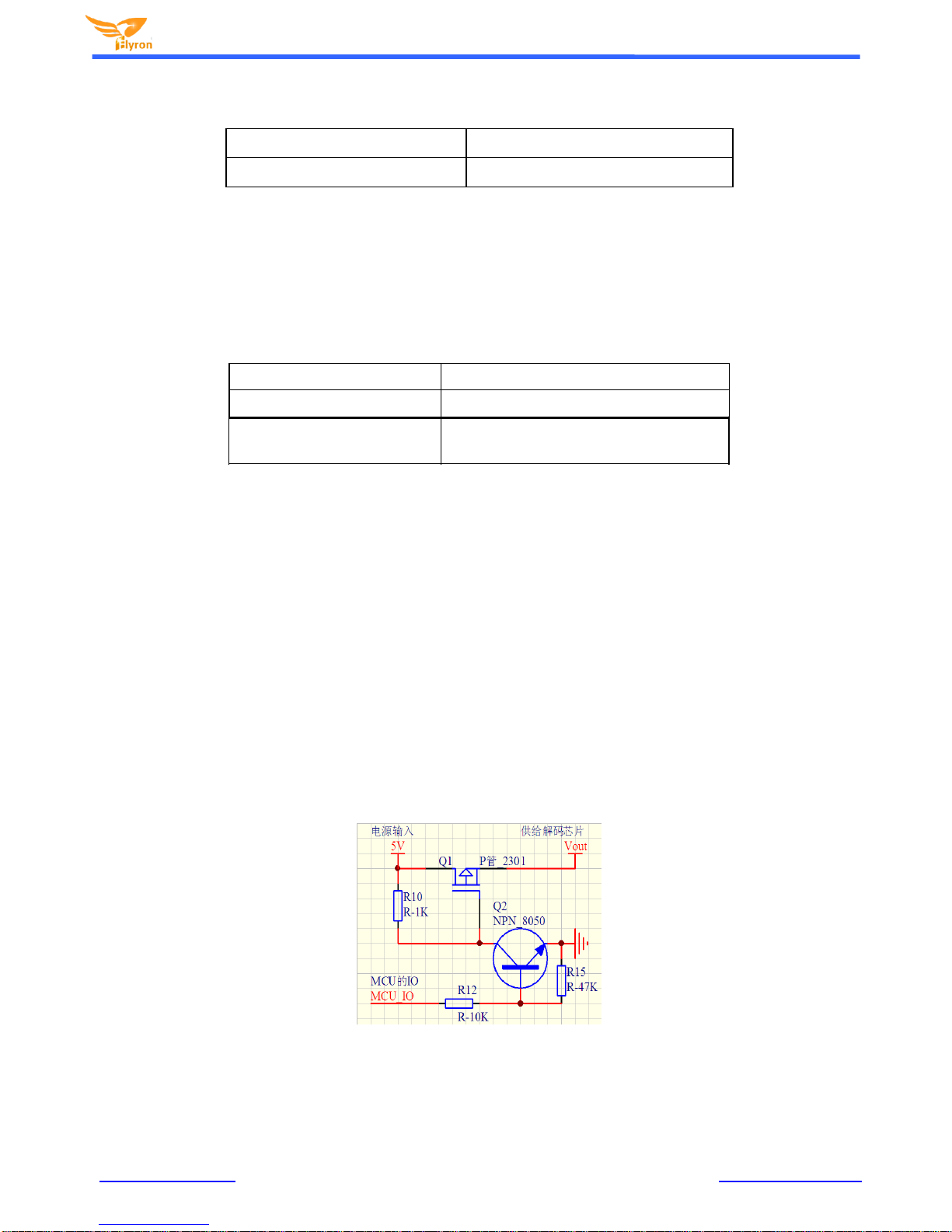
Note: When the module enters into the sleep mode, the standby power consumption is about 10mA. If users are very strict
to the power consumption, you can use a MOS and a transistor to control power supply of the module. It is possible to cut
off the power supply completely when standby is not necessary. Please refer to theschematic as below.
Page 16

www.flyrontech.com
E-mail:[email protected]
Flyron Technology Co., Ltd. 20 Channel MP3 Sound Board
16
4.5.6 Specify playback of a track in a folder
Specify playback of track 001 in the folder 01
7E FF 06 0F 00 01 01 xx xx EF
Specify playback of track 100 in the folder 11
7E FF 06 0F 00 0B 64 xx xx EF
Specify playback of track 255 in the folder 99
7E FF 06 0F 00 63 FF xx xx EF
1) The default folders are named as "01", "11", and “99” in this way. In order to be with better system s tability,
it is made to support maximum 99 folders and maximum 255 tracks in each folder. For example:
If s pecify to play “100.m p3” in the folder "01", send the command 7E FF 06 0F 00 01 64 xx EF MSB:
represents the name of the folder, maximum supports 99 folders from 01 - 99. LSB: represents the
track, maximum supports 255 tracks from 0x01 to 0xFF
You must specify both the folder and the file name to target a track. This feature supports MP3 and
WAV audio formats.
The following two images illustrate naming method of folders and files.
4.5.7 Inter-cut an advertisement
Inter-cut track "0001" in the folder “ADVERT”
7E FF 06 13 00 00 01 FE E7 EF
Inter-cut track "0002" in the folder “ADVERT”
7E FF 06 13 00 00 02 FE E6 EF
Inter-cut track "0255" in the folder “ADVERT”
7E FF 06 13 00 00 FF FD E9 EF
Inter-cut track "1999" in the folder “ADVERT”
7E FF 06 13 00 07 CF FE 12 EF
Inter-cut track "3000" in the folder "ADVERT”
7E FF 06 13 00 0B B8 FE 25 EF
1) This module supports inter-cut advertisements during playback of a track, so that it can meet some special
needs for some applications.
2) After sending the command 0x13, the system will save the ID V3 information of the track being played and
pause, and then it will play the specified inter-cut track (advertisement). When the inter-cut track is finished,
the system will go back and continue to play the track that was interrupted until to the end.
3) The setting method is build a folder named “ADVERT” in the storage device and put the tracks (ads) you
need in the folder and name the files as “0001 .mp3/wav”, 0002.mp3/wav.
4) If you send an inter-cut command when the module is at Pause status or Stop status, it will not work and
there will be returned error information. In the course of an inter-cut, you can continue to intercut the other
tracks (ads). When the last inter-cut track goes to the end, the systems till goes back to the ID V3 position
saved at the first time.
Page 17
www.flyrontech.com
E-mail:[email protected]
Flyron Technology Co., Ltd. 20 Channel MP3 Sound Board
17
4.5.8 Stop
Stop playing inter-cut advertisement
7E FF 06 15 00 00 00 FE E6 EF
Stop
7E FF 06 16 00 00 00 FE E5 EF
During playback of the module, there are two modes to stop. One is to stop playing the inter-cut advertisement, and go back and
continue to play the music interrupted and the other mode is to stop all playback (stop decoding). For example, suppose the
module is playing an inter-cut advertisement and now if send a stop command 0x16, it will stop all playback tasks.
4.5.9 Specify repeat playback of a folder
Specify repeat playback of the folder “02”
7E FF 06 17 00 00 02 FE E2 E F
Specify re pea t playback of the folder “01”
7E FF 06 17 00 00 01 FE E3 E F
The folder names must be 01- 99, and no more than 99. After sending the command, it repeatedly plays the tracks in the specific
folder and it will not stop until it receives a command to stop.
4.5.10 Set random playback
Random playback of the whole s to rage de vice 7E FF 06 18 00 00 00 FE E3 EF
This command is used to randomly play all of the tracks in the storage device according to physical sequence and no matter if
there is a folder or not in the device.
4.5.11 Set repeat playback of current track
Turn on single repeat playback
7E FF 06 19 00 00 00 FE E2 EF
Turn off single repeat playback
7E FF 06 19 00 00 01 FE E1 EF
During playback, send the turn-on command, and it will repeatedly play the current track. If the module is at Pause or Stop status,
it will not respond to this command. If you need to turn off repeat playback, just send the turn-off command.
4.5.13 Combination playback (playback of a group)
1) We added this function to meet s ome users‟ special need that when users need to send only one frame data to play
multiple tracks one by one without pause. It supports maximum 15 tracks together for combination playback. All of the
sound files used for combination playback need to be put in folders (folder 01 -folder 99).
2) If MCU sends a frame data as 7E FF 15 21 01 0201 0301 0401 0501 0602 0103 0504 0705 09 EF, see the
analysis as below.
Command: 0x21
Number of bytes : 0x15=21 bytes - -- FF 15 2 1 01 0201 0301 0401 0501 0602 0103 0504 0705
09(two parameters for one track, i.e. the folder number and the track number)
The module will play track 002 in folder 01, track 003 in folder 01, track 004 in folder 01, track 005 in
folder 01, track 006 in folder 01, track 001 in folder 02, track 005 in folder 03, track 007 in folder 04 ,
and track 009 in folder 05 .
Page 18
www.flyrontech.com
E-mail:[email protected]
Flyron Technology Co., Ltd. 20 Channel MP3 Sound Board
18
3) During combination playback, it is allowed to Play/Pause and set volume, but not allowed to set previous
and next. If need stop, just direct send the Stop command. And it is not allowed to play another group of
combination during it is working. Users need to send the stop command to stop the current combination
playback before start another group of combination playback.
4) If a track specified to be played in combination is not in the folder, it will stop playing at this track position,
so please make sure the track specified to play must be available in the folder.
5) If users are very strict to the combination playback, please edit the sound sources with some audio edit
software like Adobe Audition or GoldWave to cut off the silence at the beginning and end of the sound file.
4.5.14 Specify playback of a track with a specific volume level (under the root directory)
Play 1st track at volume level 30
7E FF 06 22 00 1E 01 FE BA EF
Play 2nd track at volume level 15
7E FF 06 22 00 0F 02 FE C8 EF
1) This function is added to meet some users‟ needs to play a track at a specific volume level wi th one
command only, but this only can be executed for the tracks under the root directory of the storage device.
The command is 0x22.
2) For normal operations, users still need to send the volume command first and then specify playback of a
track with the corresponding command like most of MP3 players.
4.6. Detailed Annotation of Query Commands
4.6.1 Query current online storage device
Query current online storage device 7E FF 06 3F 00 00 00 FE BC EF
When the module is working, users can use the command as above (0x3F) to query the status of the online storage devices. For
example, if the module returns the data 7E FF 06 3F 00 00 0A xx xx EF, LSB 0x0A (0000 1010) represents SD card online. If LSB
is 0x1F (0000 1111), it represents all of USB flash, SD card and PC online (PC online means module is connecting with PC via a
USB cable).
4.6.2 Query current status
Query current online storage device 7E FF 06 42 00 00 00 FE B9 EF
1) There are 4 status (playing, paused playing, stopped playing and in sleep) that can be queried during the
module is decoding. Users can query the current status via sending the command as above (0 x42).
Page 19

www.flyrontech.com
E-mail:[email protected]
Flyron Technology Co., Ltd. 20 Channel MP3 Sound Board
19
2) Interpretation of returned data
Returned Data Status
7E FF 06 42 00 01 01 xx xx EF
USB flash is being played
7E FF 06 42 00 02 02 xx xx EF
SD card is paused playing
7E FF 06 42 00 01 00 xx xx EF
USB flash is stopped playing
7E FF 06 42 00 10 00 xx xx EF
Module in sleep
3) MSB and LSB Representations
MSB Representation
LSB Representation
0x01
USB flash
0x00
Stopped
0x02
SD card
0x01
Playing
0x10
Module in sleep mode
0x02
Paused
4.6.3 Query total track numbers in a folder
Query total track numbers in folder 01
7E FF 06 4E 00 00 01 FE AC EF
Query total track numbers in folder 11
7E FF 06 4E 00 00 0B FE A2 EF
If the folder queried is empty without any files, the module will report an error and the data 7E FF 06 40 00 00 06 FE B5 EF will be
returned.
4.6.4 Query total folder numbers in current storage device
Query total folder numbers in current storage device 7E FF 06 4 F 00 00 00 FE AC EF
Users can query the total folder numbers of the current storage device through sending the command above. This just supports to
query the folder numbers under the root directory of the device. Not possible to query the sub-folder numbers (Please do not build
any sub-folders under a folder).
4.7. About Delay of Serial Programming
1) After the module is powered on, it needs about 500ms to 1500ms (depending on the track quantities in the
storage device) to initialize. After that, some data related to initialization returns to MCU. Users can choose to
ignore these data.
2) After specifying playback of a device (SD card or USB flash), it needs 200ms delay before s ending the
command to execute the relative operation.
3) The module processes a serial data per 10ms, so when MCU continuously sends commands one by one,
20ms delay must be added before sending next command, otherwise the command MCU sends out will not
be executed.
4) If specifying playback of a track in a folder, the delay must be longer than 40ms, as it needs time to target a
track in a folder. And even so song as sending the commands related to query a track or a folder, 40ms delay
is required.
 Loading...