

Page 1
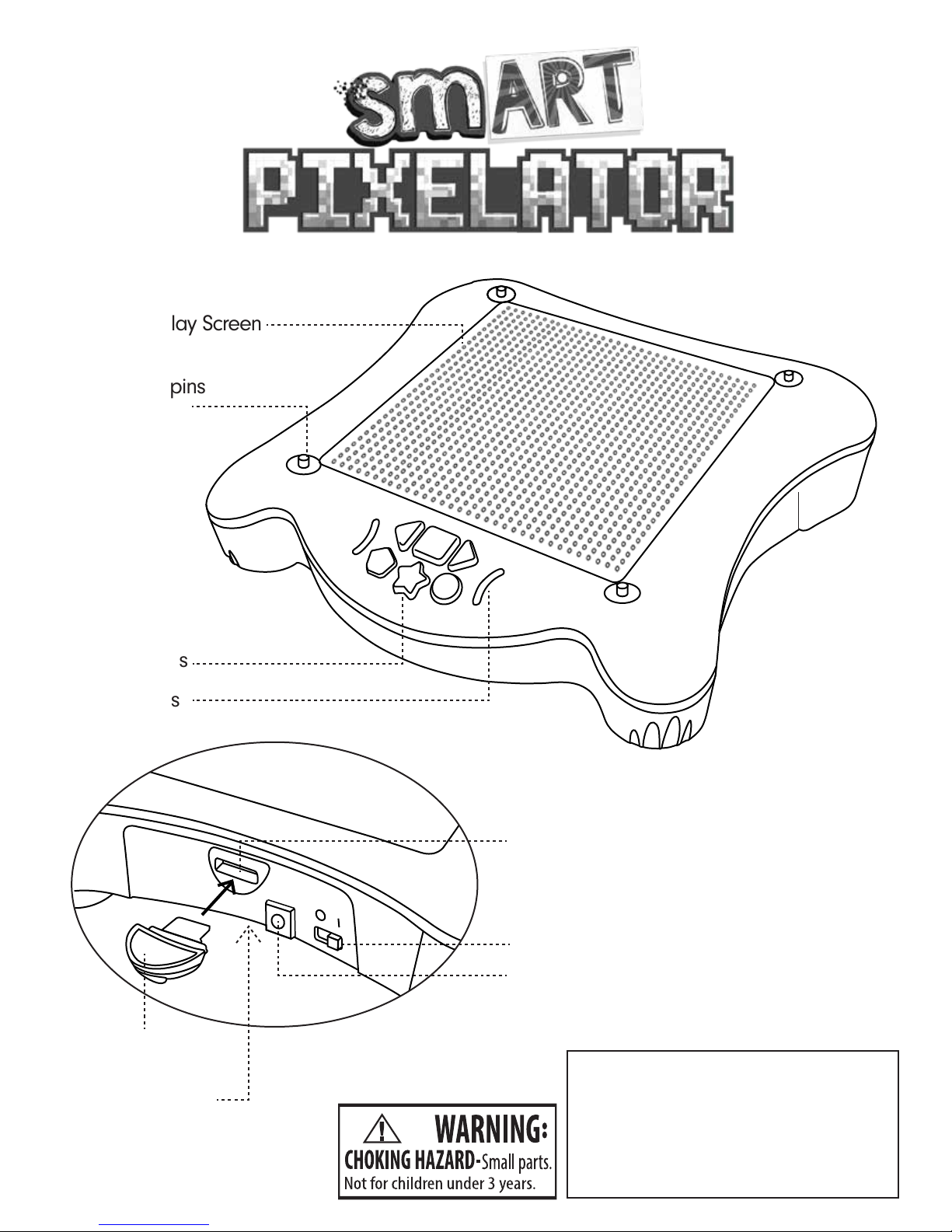
On/Off Switch (back)
Power Jack (back)
* 2 Battery Compartment
(bottom)
Content Card Slot
Not recommended for children under
3 years of ages. As with all electric
products, precautions should be
observed during handling and use to
prevent electric shock.
AC adapter output: 6V, 1A
CAUTION–ELECTRIC TOY:
60 Hz
Content Card Slot
Packing/instruction sheet has to be kept
since it contains important information.
Control Buttons
Activites Display Screen
Tray holding pins
LED Indicators
™
Page 2
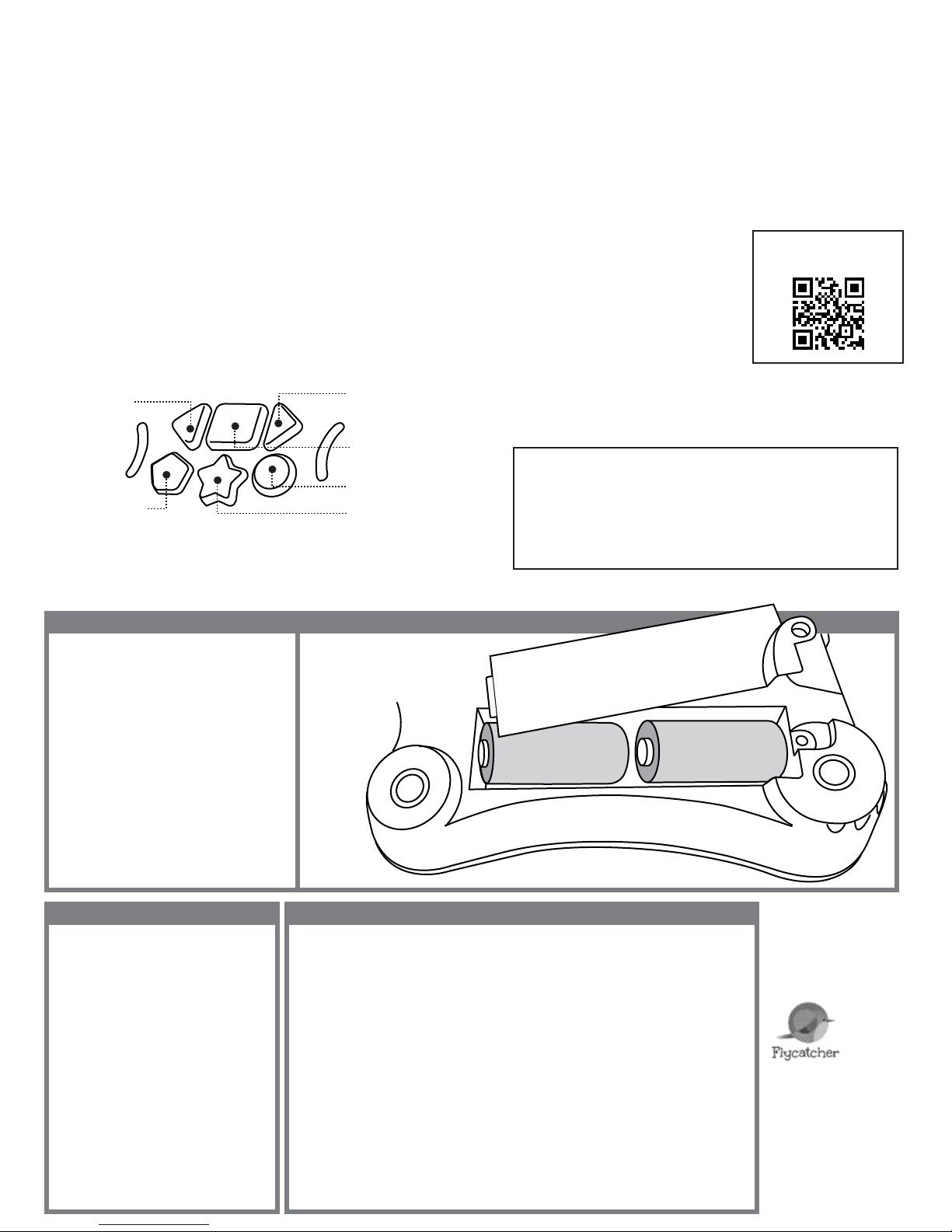
Insert 4 C batteries (not included) or plug-in the
smART pixelator™ AC Adapter (included).
Flip the switch on the back to turn on the tablet.
Insert the pre-loaded activity pack into the back
of the tablet.
After 10 minutes with no activity the tablet light
will automatically turn off. Reactivate the light by
using the buttons in the app or on the tablet.
1.
2.
3.
4.
SIMPLE SET UPSIMPLE SET UP QUICK STARTQUICK START
CONTROL BUTTONSCONTROL BUTTONS
SAFETY INFORMATIONSAFETY INFORMATION
2
C SIZE BATTERY
Requires Android 5.0+
Requires Apple iOS 8.0+
Download the “smART pixelator” app on your mobile
device or tablet.
Turn on your Bluetooth and connect to the pixelator by
clicking on the“connect” button at the top right of your
screen.
Choose your pixel: use Pixel Beads or Pixel Pegs or
Pixel Sequnies.
Pick a design:
- Choose from 50 projects
Customies it:
- Change the color
Animate it:
- Bring finished projects to life
Create an Original !
- Engineer your own projects withe the smart device
and a FREE app.
1.
2.
3.
4.
5.
6.
7.
Go to Home / Animate
Go Back a Step
Go Forward a Step
Next Drawing
In exceptional circumstances batteries may leak fluids that
can cause a chemical burn injury or ruin your product.
To avoid battery leakage:
To insert or change the batteries, twist
the screw counter-clockwise to loosen.
Remove old batteries and in sert 4 C
batteries with the correct polarity.
Replace the screw and twist clockwise
to close.
Transformers / charger used with the toy are to be
regularly examined for damage to the cord, plug,
enclosure and other parts, and that, in the event of
such damage, the toy must not be used with this
transformer/charger until the damage has been
repaired.
The toy is not intended for children under 3 years old;
This device complies with Part 15 of the FCC
Rules and Industry Canada’s license-exempt
RSSs. Operation is subject to the following
two conditions:
(1) this device may not cause harmful
interference, and
(2) this device must accept any interference
received, including interference that may
cause undesired operation.
Warning: Changes or modifications to this
unit expressly approved by the party
responsible for compliance could void the
user's authority to operate the equipment.
Note:
This equipment has been tested and found to comply with the limits
for a Class B digital device, pursuant to part 15 of the FCC Rules.
These limits are designed to provide reasonable protection against
harmful interference in a residential installation. This equipment
generates, uses and can radiate radio frequency energy and, if not
installed and used in accordance with the instructions, may cause
harmful interference to radio communications. However, there is no
guarantee that interference will not occur in a particular
installation. If this equipment does cause harmful interference to
radio or television reception, which can be determined by turning
the equipment off and on, the user is encouraged to try to correct
the interference by one or more of the following measures:
- Reorient or relocate the receiving antenna.
- Increase the separation between the equipment and receiver.
- Connect the equipment into an outlet on a circuit different from
that to which the receiver is connected.
- Consult the dealer or an experienced radio/TV technician for help.
1)
2)
3)
4)
The toy shall only be used with a transformer for toys
The model number XY06J-0601000Q-EW/
XY06J-0601000Q-BW/
XY06S-0601000Q-UW/XY06S-5901000Q-UW/
XY-0601000-A or specification of Input Voltage:
AC 100-240V 50-60 Hz, Output Voltage: DC 6V, 1A,
transformer for use with the toy
The transformer is not a toy;
Toys liable to be cleaned with liquid are to be
disconnected from the transformer
before cleaning.
Non-rechargeable batteries are not to be recharged.
Rechargeable batteries are to be removed from the toy
before being charghed.
Rechargeable batteries are only to be charged under
adult supervision.
Do not mix alkaline, standard (carbon-zinc), or
rechargeable (nickel-cadmium) batteries.
Do not mix old and new batteries.
Only batteries of the same or equivalent types as
recommended to be used.
Batteries are to be inserted with correct polarity.
Exhausted batteries are to be removed from the product.
The supply terminals are not to be short circuited.
Dispose of battery(ies) safely.
Do not dispose of this product in a fire.
The batteries inside may explode or leak.
BATTERY INSTALLATION
AC ADAPTER:
RADIO STATEMENT
BATTERY SAFETY INFORMATION
For more detailed instructions,
questions or problems, please
visit www.smartpixelator.com
smART pixelator™ is a
trademark of Flycatcher Inc.
Copyright © 2018
Flycatcher Inc.
All rights reserved.
Visit us at:
www.smARTpixelator.com
C SIZE BATTERY
1
2 TRAYS EACH TRAY
HOLDS
2 C BATTERIES
Previous Drawing
Repeat Last Step/AutoPlay
For more fun, additional Creativity and
Learning Packs are available at:
www.smartpixelator.com
FCM-IMPX-01 rev. A
 Loading...