

Page 1
Functi on s and AV operation
Auto:Touch (SCAN)bu tt on on operation
screen to auto scan f re qu ency. When
channel signal is f ou nd , the search will
auto stop. Pres s th is b utton to search
for next frequenc y.
3. iPod Co nt rol
When iPod in the setu p pa ge i s “ON”, iPod is
connected.Cli ck o n th e iPod icon in main
menu to access to the f ol lo wing page:
( TRACK0010/1000 ):Total curren tl y
playing songs .
( 00'34" ) Tim e el apsed in song list.:
( ):Single song rotation (control le d
by RPT button).
( ):Random playback ( wi th out this
mark, playback is i n or de r).
( 1'45~5'45 ):Songs playback ti me li ne.
( ):Press it to play pr ev io us song or
track.
( ):Press it to play next song or track.
( ):When playing, p re ss i t to pause,
re-press it to resu me n or mal
playback.
( Display bar): 3 bars a re f or d isplaying
song name, singer a nd
album name.
20
Page 2
( RPT ) Press it to switch to r ot ating
:
( Shuffle ) Press it to switch to r an do m
( Search ): Click it to acce ss t o pl ayback
list.
"Song navigatio n ":Pr es s(Prev)
(Next)button to t ur n th e page.
As following pict ur e:
“ ”:Return to iPod fo ld er p age.
“ Back ”: Return to pa ge s et up .
playback mode.
:
play back mode.
Functi on s and AV operation
( Video ):Pre ss i t to a ccess to video page .
( ): Press it to play prev io us s ong or
track.
( ):Fast backward c on tr ol.
( ):When the Disc is in se rt ed, press it
to start playba ck ; wh en i n playback
mode, press it to pau se . Wh en it’s
paused or stopped , pr es s it to
resume normal pla yb ac k.
21
Page 3
Functi on s and AV operation
( ):Fast forward co nt ro l.
( ):Press it to play ne xt t ra ck o r song.
( SETUP ):The same as D VD o pe ra tion.
4.MP 3 Pl ay er Control
Click(Mp3 )button to access toMP 3
play er c ontrol screen, as fol lo wing
pictur e:
( USB or SD ):In(Playlist) s el ec t one
playback device . The icon on it will
corresponding ly c ha nge to blue, indica ti ng
playing the music o r im ag e in the device.
( TRACK1 ):Currentl y pl ay ing track No.
( 00'34" ):Display elapse d pl ay in g time.
( Display bar ):3 bar s ar e fo r displaying
song name, singer a nd a lb um name.
( 1'45)( 6'45 ):Song playing time li ne .
( ):Press it to play prev io us s ong or
track .
( ):Press it to play ne xt s on g or
track.
( ):In playback mode, pr ess it to
pause,Press it ag ai n to r esume
normal playback .
( RPT ):Press it to switc h to r ot ating
playback mode.
( Shuffle ):Press it to switch to r an do m
playback mode.
( Playlist ):Pres s it t o ac ce ss to next screen
displaying all tr ac ks a nd songs in
the Disc.
22
Page 4

( Prev )(Next ):Choos e so ng , use the middle
slidingbar to nav ig at e, as
following pictu re :
5.Na vi ga tion system
Click on (Navigat io n) icon in main screen to
access to Navigat io n
control screen:
(Run Navigation ):Cl ic k on the map
software in the p at hw ay,
as follows:
Functi on s and AV operation
( Browse ):Click it to se e th e ma p, as
follows:
23
Page 5

Functi on s and AV operation
( OK ):Click on it to selec t re le vant pathway.
( Cancel):Click on it t o ca nc el pathway.
Keys operatio n:
Press (NAVI) k ey o n the panel to access t o
above navigatio n so ft ware selection sc re en .
Navigation no te s
lGlobalPositio nS ys tem (GPS) is develo pe d
and operated by US Mi ni st ry of Defense,
who is entirely in ch ar ge o f the accuracy and
maintenance of th e pr oj ect. Any alteratio n
made by this unit may a ffect the accur ac y
and performance o f GP S de vices.
lPlease use this GPS n av ig ation system
prudently. This system pr ov id es w ith
navigation refe re nc e. DO NOT use t hi s
system for accura te m ea surement of
direction, dist an ce , location and terr ai n.
lWhen firstly ta ki ng G PS satellite
positioning, pl ea se s tay at the same
location, where i s pr ef erable open
space,without s hi el d above.
lFirst positio ni ng m ay n eed over 3 minutes,
subject to curren t en vi ronment and satel li te
signal.
lDO NOT oper at e th e navigation syst em
while driving, so a s to e ns ure safe driving.
To avoid accident, pl ea se o perate this
system after sa fe ly p ulling over the vehic le .
Wireless commun ic at ion product (e.g.
mobile phone, spe ed a la rm etc.) may
interfere with th e re ce iving of satellit e
signal, leading t o in co nsistent signal
received.
lIf any insulati on f il m or e xplosion-proo f
membrane is insta ll ed i n your vehicle,
satellite signa l ma y be i nterfered with.
24
Page 6

Functi on s and AV operation
Caution:
lThe traffic uni ts i n al l areas will adju st
property of roa d (o ne -way street, left t ur n
forbidden etc .) a cc ording to local t ra ff ic
condition. Pl ea se b e sure to obey the
local traffic i ns tr uctions. If the roa d
condition dif fe rs w ith what the map
shows, please m ak e yo ur own judgment
if this road shou ld b e ta ken.
Map
lAs with rapid urban c on st ruction and town
and country highw ay t ra ffic deve lo pm ent,
traffic r eg ul ation informati on o f ci ty streets
keeps changing co ns ta ntly. After l au nc hing
for some time, th e pr od uc t may provide
traffic i nf or mation not exactl y ma tc hing
actual practice . Dr iv er should be aware of
actual traffi c condition, so as to a vo id g oing
against traff ic rules.
lAs with the change of t ra ffic regula ti on o r
temporary road co nt ro l, the instructiv e
route provided by t hi s na vigator may not
be matching actua l pr ac tice. Please driv e
as per actual traffic control or reg ul at ion.
lThe navigation ro ut es p rovided by this
device are for driv in g re ference only. Fo r
example, in drive r’s fami li ar a rea, it may be
more effe ct iv e when choosing rou te s on h is
own, rather tha n fo ll ow ing planned route s.
Receive satelli te s ignal
Normally, as l on g as receiving the si gn al
fromover 3 sate ll it es,the navigation sys te m
can accurately lo ca te y our position, but
sometimes the sig na l re ceived may be
affecte d by w ea ther or skyscrape rs .
25
Page 7
Functi on s and AV operation
6.Blue to oth telephone control
Click on the Blueto ot h fu nctional key in mai n
menu, as follows:
( Pair ):Click to mat ch B lu etooth mobile
phone.
( Handheld ):Chan ge t o re ceive by mobile
phone.
( Hands Free ):At han d fr ee m ode.
( Bluetooth ON ):Gr ay i nd icator turns
yellow meanwhil e “ ”t ur n
blue indicating
Bluetooth is on, cl ic k( Pair).
Otherwise, it ’s off and no t fo r ma tching
mobile.
( ):Receive or dial cal l ke y, when in
process, the butt on t ur ns green.
( ):Hang up. In talki ng , th e button is in
red Press. this but to n to hand up,
meanwhile it turn s gr ey.
Del
( ):Delete error numb er.
( Records ):Click o n th is b utton to see the
following pictu re:
26
Page 8

Functi on s and AV operation
( Back ) :Return to up pe r me nu.
( Received call s) a nd ( D ialed calls):
Preserve the most r ec en t 20 received
or dialed calls.
( )&( ) :See call record s.
( Clear all ):Clear a ll r ec ei ved and dialed
call record.
( Bt Records):Cli ck t o se e the following
picture:
( CarRecords ):Jump t o ve hi cle record
page.
( Missed Calls ):Mi ss ed c al l list.
( Received Call s ):Re ce iv ed call list.
( Dialed Calls ):Dialed call list.
(SIM Contacts):As it states.
( Phone Contacts ):As it stat es .
7.Blu et ooth music control
Play the music in mob il e ph one via Bluetooth
27
Page 9

Functi on s and AV operation
):Press it to play pre vi ou s song.
(
):When mobile phon e is c on nected,
(
press it to start pla yb ac k.
):In playback mode , pr es s it topause.
(
):Press it to stop pla yi ng .
(
):Press it to play nex t so ng .
(
Back):Return to upp er s et up page.
(
8.Se tu p fu nction control
Press (Settings ) bu tton on main menu,
to access to the fi rs t pa ge of
(Settings)p ag e:
Auto Switch to GP S ( ON )、( O FF ):
When it’s ( O N ), a nd 1 0 seconds after
operation in othe r pa ge . it will auto switch
to navigation pag e Wh en i t’s (OFF) ,t his
function is tur ne d off.
GPS Voice ( ON )、( O FF ) :
When it’s ( O N ),tu rn o n GPS voice.
When it’s ( O FF ),t ur n off GPS voi ce .
Rearview Camera ( O N )、( OF F ):
When it’s ( O N ),ca me ra will capture the
28
Page 10

reversing live vi de o on to the monitor.
car
When it’s o ff, no such live vi de o wi ll b e
provided. It rema in s th e original operat io n
screen.
Caution:
This function i s va li d for the cars with
l
CAN BUS control o nl y.
Auto Dimmer(O N) :
Day/night mode bu tt on i n menu
disappears.
may control the d ay m od e an d night
mode of screen. Whe n tu rn ing on the
head lamp, the scre en w il l be in night
mode.When tur ni ng o ff the head lam p,
it’s in day /n ig ht mode.
Auto Dimmer(O FF ):
When day/nigh t mo de b utton appears in
main menu, press it t o ad ju st the day
mode and night mode o f th e sc reen.
Tur ni ng vehicle light on/o ff
Functi on s and AV operation
Brake Override ( ON )、( O FF ) :
When it’s O N, D VD o r video picture fro m
auxiliary input c an ’t b e shown until takin g
stopping brake. B ut a ud io is not aff ec te d
by this setting . Wh en i t’s OFF, you may
access to DVD or vide o pi ct ure from
auxiliary input a t an y ti me.
Information:C li ck t o display the relev an t
info about MCU,iP od ,B arcode,Blueto ot h,
MPEG andUUID, as fo ll ow ing picture:
29
Page 11

Functi on s and AV operation
Tire pres su re:D isplay vehicle & se t up
relevant in-car i nf o.
Style:Click on(St yl e) i con, as follows:
(Colour Set): Per so na lize page color, as
following pictu re :
"-””+”:Add or reduce RGB co lo r va lue.
Including: "B lu e" , "Orange", "Gr ee n" ,
For quick switc hi ng s ys tem color,user may
"Yellow".
use R, G, B tocusto mi ze c ol or style,
press and hold the de fi ni tion to
save it.
( System Style ):Clic k bu tt on(Set) to open
style setup page, w it h a variety of style
available, as fol lo ws:
30
Page 12
Functi on s and AV operation
“Default”:Click on the d ef au lt style.
“Apply”:Click to app ly t he s elected style.
“Cancel”:Click to ca nc el t he selected
style.
“Next”:Jump to the nex t st yl e setup page.
“ Back ”:Return to the s et up p age of
upper level.
( Language):Use ( ) &( ) t o sw itch
language.
Press (Next) butt on t o 2n d (Settings)
page,As followi ng p ic ture:
( TV):WhenTV setup is ( ON ), turn on TV
function; whe n TV setup is (OFF) ,
convert to XM Radio ( fo r us e out of
China only).
24 Hour Clock( ON )、( OFF ):
When it’s ( O N ),th e time is in 24-hour
system; When it’s ( OFF ),the time is in
12-hour system.
( Turn On Vol ume ): Use ( )& ( )to adju st
volume output.
( Button Back Lig ht in g ):
Use( ) &( )keys to se tu p th e
brightness of pan el i nd icators, in
consistent with o th er keys.
(Turner Re gi on ): U se( )&( ) keys to
select the radio ch an ne l of your desired
nation.
Time Set:Cl ic k (Time Set) bu tt on t o setup,
as following pict ur e:
31
Page 13
Functi on s and AV operation
“ ”and“ ”:Set up relevant ti me :
parameters of the system.
“ Back ”:Press it to return to setuppage.
Screen verifyin g:Wh en touch screen
becomes insensi ti ve o r with drifting
sign, it’s ne ed ed to verify the touc h
screen area, in fol lo wi ng steps:
Start up the syst em , “n otes” page
appears, when see in g “a gree” button,
press and hold the sc re en f or 3
seconds. A white page a pp ea rs, follow
the text prompt o n th e sc reen, slightly
and accurately use finger or touch pen
to hit the center of cross cursor in order.
After successfully verifying, cross cursor
disappears, 30 seconds count-down starts
at the center of screen. In such time hit on
the screen to confirm the verify data,
Otherwise the verification is invalid, as
follows:
(Next): Return to up pe r se tup page, press
(Next) button to ac ce ss t o page 3 of
(Settings) pa ge , as f ollowing picture:
32
Page 14
Functi on s and AV operation
( Timezone):Use ( ) & ( ) buttons to
select your desired time zone.
( Steering Wheel to Select):When steering
wheel study is(ON),you may then
use( ) & ( ) to select steering wheel .
( Steering Whee l Cu st om):When it’s
(OFF), turn off s teering wheel stu dy,
steering wheel be co me s default.
When it’s ( ON ), c lick to access to
(study) operati on p ag e, as follows:
"Mode":Click to highlight it, and click the
corresponding key in steering wheel,
and click apply to successfully set up
your desired shortcut key. Other key
functions are the same as those of
“mode” operation.
(System Reset ):Click on system reset key to
restart the mainframe CPU and GPS
system.
( System Update ):Product software update.
“ Back ”:Press it to return to setup page.
33
Page 15
Option al f unction
Optional function
Back LCD
Click on (Back LCD) t o ac ce ss to setup
page,as followi ng p ic ture:
( DVD Mode):Press it to select playing Disc.
):
( Press it to play previous song or track.
):
( When Disc is in, press it to start
playback;When the Disc is
playing,press it to pause.When it’s
paused and press it resume
normal playback.
stopped,
( ): Press it to stop pl ay in g Di sc.
( ):Press it play nex t tr ac k or song.
( Ba ck ) Ret ur n to m ain menu setup.
Wat ch T V program
Click on the (TV) but to n on the main menu to
see following pic tu re :
( Scan ) :Click to aut o se ar ch TV channel .
( Setup ) :The same as (DV D) s et up(see
for reference).
:
P-13
34
Page 16

( Menu ) :Program setup menu.
Program :Press it to watch the preset TV
( )
Prev :Choose previous c ha nn el.
( )
( )
Next :Choose next channe l.
( )
Stop/Back :Ca nc el /return to an opera ti on .
channel.
Option al f unction
: In (TV)page, us e th is b utton
to move the cursor fr om a ll
directions, pre ss ( OK ) button
to select it.
(Hint: / may adju st
volume).
TPMS setup
In main menu, press ( Tp ms ) button to acces s
to the management p ag e as f ollows:
( Pair ) :Match tire pressure and
sensor.
Press (TPMS Set) button to access to setup
page:
temperature
35
Page 17

Option al f unction
Click( )&( ) to set u p re la ted parameters.
Press(Next) but to n, to enter the follo wi ng
l
picture:
( ) ( )button can set up tire pressure
&
alarm type.(OFF
WARNING
、RING、TEXT
).
( Back) :Press to return to previous
operation page.
(Clear) :Click(clear)button to see the
following page, And press(Yes)
key to clear related tire pressure
matching information.
12cm /d ouble si des
1 sid e2 sides
36
Page 18
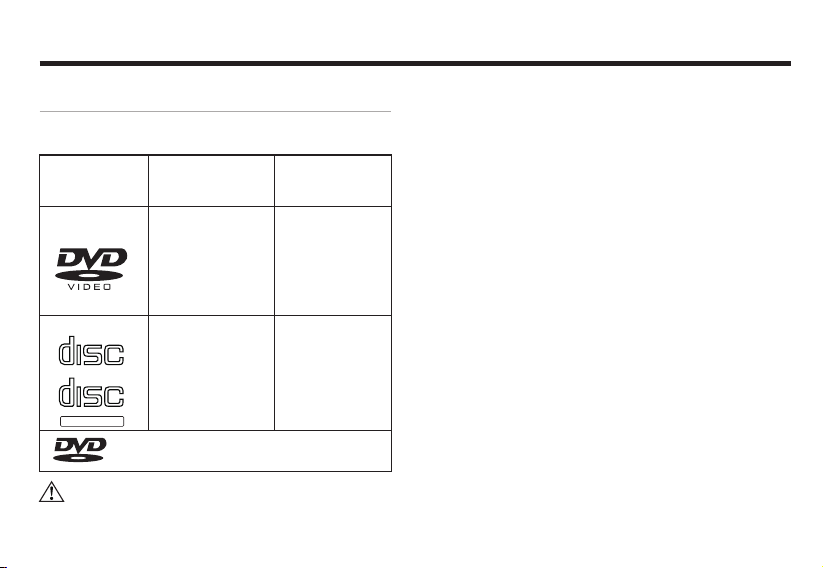
Play ab le D isc type
Playable Disc type
Disc label side, pa ck ag e box and package
bag have the follow in g ma rks.
Playa bl e Disc
type and mar k
DVD DVD
CD
COMPA CT
DIGI TAL AUDIO
COMPA CT
DIGI TAL AUDIO
TEX T
TM
Cautio n:
Size/sides
12cm/ si nge side
1 side2 sid es
TM
Longe st pl aying
(MPEG 2f ormat )
133min
240min
266min
484min
CD
12cm/ si ngle sid e
Is a reis te red r em ark of DV D Forma t/
Logo li ce nsing C orpor ation
74min
lPart of functio ns c an ’t be used in DVD/CD
Disc.
l
DVD-R/RW di sc i s for playing the fil es i n
Vid-eo fo rm at .
l
Files in VR forma t ca n’ t be played in DVDRW Disc.
l
For playing the Dis c bu rn t by PC, but
sometimes it can’ t be p la yed subject to
application set ti ng o r environment. Tit le o r
other text info rm at ion may not be displaye d
in this machine.
l
DVD-R/RW Di sc b urnt in video forma t an d
music CD or PC-burn t CD -R /CD-RW ma y
not be able to play in th is m ac hine, due to
scratch, stai n or i nt er nal lens dirt or dew.
l
Sometimes, due to d ir ec t sunlight or high
temperature or ab no rm al condition in
vehicle,CD-R/ RW Disc may not sta rt t o pl ay.
l
Unable to play any CD -R /RW Disc burn t in
DDCD (Double Dens it y CD ) format, and
unverified CD-R /RW, DVD-R/RW Di sc. Only
the Discs with abov e la be ls can be played in
37
Page 19

Use of the m on itor
Use the monitor correctly
1. Not es o f us e
DO NOT expo se t he m onitor under dire ct
l
sunlight or high te mp er ature area,
otherwise, LCD fa il ur e may happen.
When not using th is m ac hi ne, please avoid
l
exposing the moni to r to d irect sunlight.
Use the monitor wit hi n th e following
l
temperature ran ge :
Temp. range of use:-1 0 ~+5 0
Temp. range of preser va ti on : -20 ~+80
l
For easy watching i n ve hi cle, LCD monitor
sticks out. Ple as e DO N OT press with L CD
monitor surfa ce w it h strength, as it cou ld
lead to failure. Wh en s li ghtly touching th e
monitor, except ve ri fy ing the coordinat or,
please make sure us in g fi nger to softly
touch it, other wi se , it maybe damaged or
sticking with dir t.
In vehicle instal le d wi th the likes of safeair
l
bag, please not e DO N OT hinder the
℃ ℃
℃ ℃
working of safety d ev ic e.
2. About LCD scre en
l
The LCD monitor som et im es may be with a
black dot or a flashi ng d ot ( bright dot). Th is
is a unique phenome na o f LC D monitor,
rather than fai lu re .
l
When using it in cold a re a, a fte connecting
to power, the screen m ay b e di m initially.
After a while, th e br ig ht ness will resume
normal.
l
If with direct su nl ig ht on LCD monitor, the
screen may be uncle ar d ue t o light
reflection.
3. About mainte na nc e
When cleansing th e di rt o n screen, please
l
turn off po we r an d use soft cloth to wip e it .
When wiping monit or, p le ase avoid
l
scratching by fin ge rn ail.
DO NOT use we t cl ot h, volatile oil or
l
diluents.
Page 20
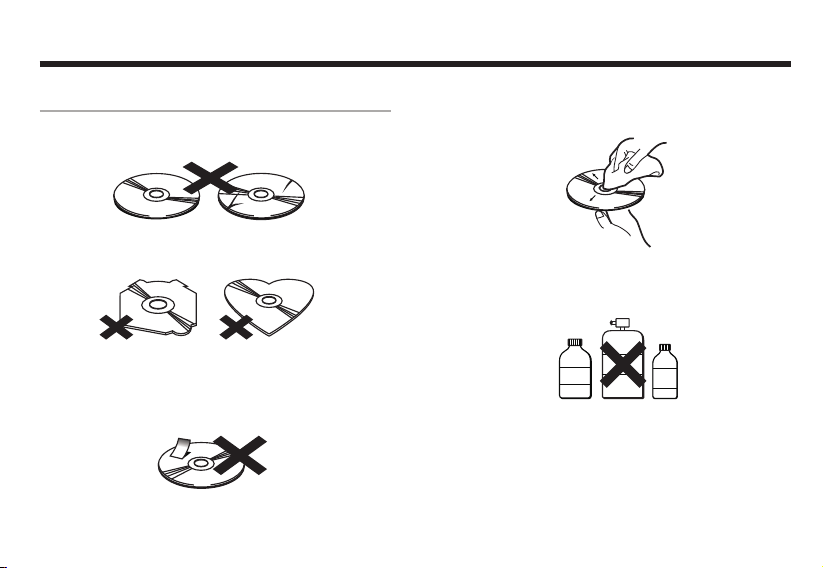
How to use D is c
How to use Disc
1,Notes of handli ng D is c
l
DO NOT use an y Di sc w ith crack or stain, o r
bended.
l
DO NOT use ab no rm al (non-perfect
rounded) Disc, so a s no t to c ause failure.
DO NOT touc h th e in fo side (with gloss ) of
l
the Disc when handl in g it . DO NOT hurt t he
Disc.
DO NOT stic k pa pe r or label on the Disc.
l
2,About mainten an ce
If the Disc is cove re d wi th d irt, please use
l
clean soft cloth to w ip e the Disc from inside
out.
lDO NOT adhe re v ol atile or diluents di lu ent
onto the Disc. Be si de s, D O NOT use the
cleaner for analo gu e re corder or antista ti c
agent.
Re co rde r
Cl ea ner
Di lue nts
Volatile
Oil
3,Notes of preser va ti on
DO NOT expo se t he D isc under direct
l
sunshine or where i s at h ig h temp.
Keep the Disc in box, s o as t o av oid
l
bending.
3938
Page 21
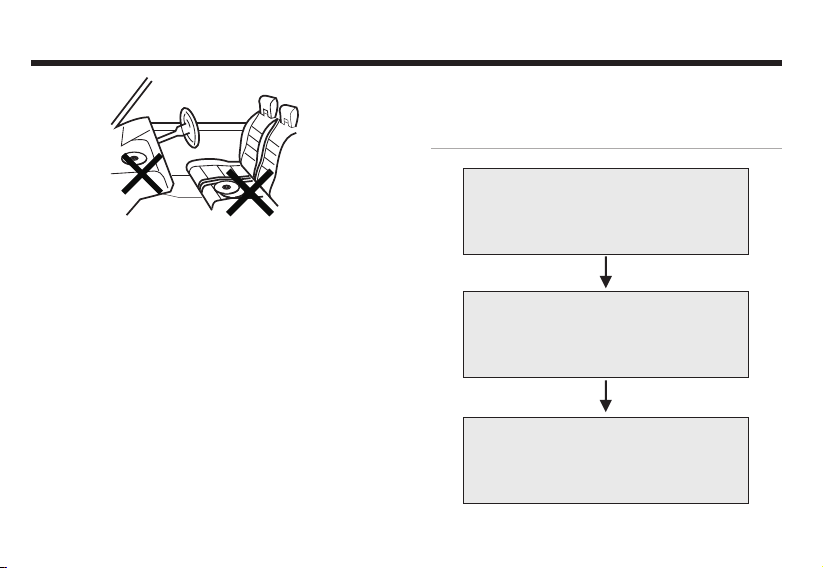
Trouble s ho oting
4. About Disc Pla yb ac k Pnvironment
While driving, Di sc d at a can’t be correctl y
l
read due to vibrati on .
In low temp environment, please play
l
the Disc upon turning on heater. Due to
lens or Disc player could be with
moisture condensation (condensation
effect), normal playback may not be able
to start . At this time, wait for about a
hour, until the dew is evaporated, and
then use soft cloth to wipe out the dew
remained on the Disc.
When temperatur e ri se s, protection
l
function will be tr ig ge red, and some funct io ns
will be stopped.
Trouble shooting
When with troub le
Please refer to the f ol lo wing table
before sending to m ai nt enance
Unable to fix it af te r ch ecking
Reset the machine a s fa ct ory
default
Still unable to f ix i t
Please consult wi th t he c ustomer
services depart me nt o f the
manufacturer
40
Page 22
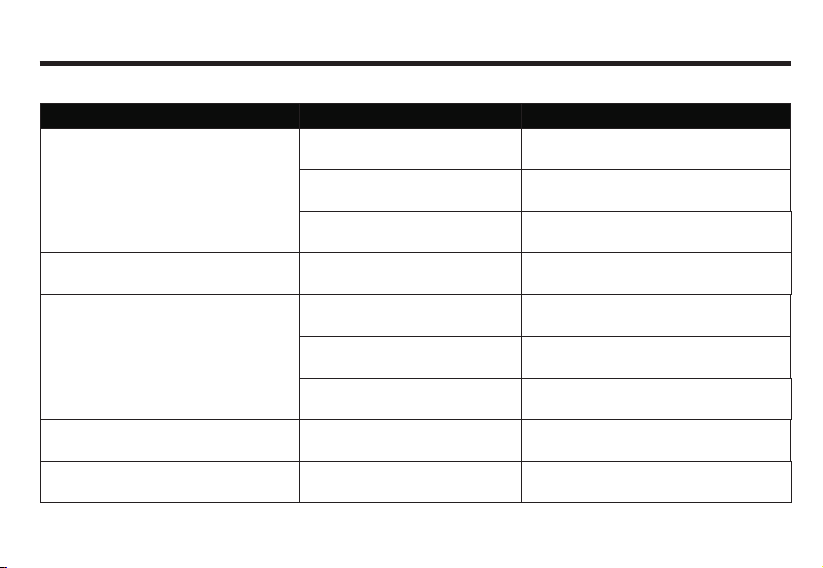
Comm on p ro blems
Trouble
Unable to power on.
Not working.
No response to touc h key on screen ,
or being insensitive.
Trouble s ho oting
Reason
All leads and conne ctor s
are not cor rectly conne cted .
Blown f us e.
For noise reason, built -in
computer error.
Touch key shifting over actual
reaction location.
Disc wi th d irt. Clean the dirt on Disc.
Recon fi rm stab le conn ectio n.
Check reason of b lown fuse, and replace
it with the fuse of the same specification.
Press r es et butt on.
Condu ct Tou ch
scree n coo rd ina te
verif yin g.
Solution
Unabl e to p lay.
Turn on the ACC of vehicl e(start
engine) , with engi ne sound.
Black dot or bright dot on LCD screen.
Unacceptable Disc type.
With wrong Disc sid e up.
Confirm the Disc is inserted . Norma l worki ng .
Unique LCD phenomena,
rather than failure.
Confirm Disc.
Insert Disc with label side up.
41
Page 23

Trouble s ho oting
Dark LCD picture.
No sound.
No image display.
No navigation system image display.
No sound from front or rear speaker
No sound from left or right speaker.
Improper Brightne ss adjustment.
Too cold in the vehicle.
Volume is 0.
Connection erro r.
Not connect to park in g
brake line.
No parking brake.
Tur n off monitor.
Not being switched to navigation.
Im prope r volume ad justm en t in
.
fro nt or rea r spe ak er.
Im proper vo lu me ad ju st me nt
in le ft or rig ht sp ea ke r.
42
Adjust brightne ss .
Low surrounding t emp leads to dark monitor.
Use heater to warm up the interior vehi cle.
Increase volume .
Confirm correct c on ne ction.
Connect to parkin g br ak e and
execute it.
Press POWERke y or t ou ch the
screen.
Switc h th e image i nto nav igati on
syste m.
Correct adjustm en t an d setup.
Page 24
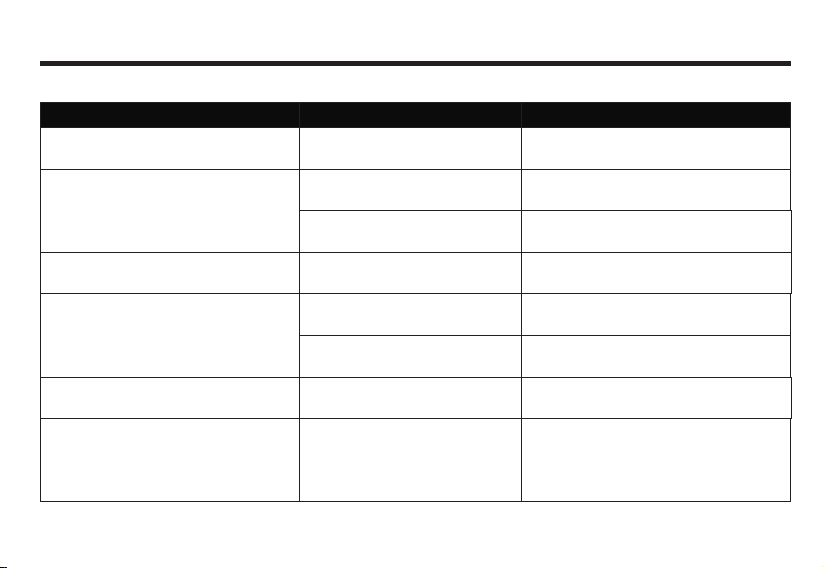
DVD Video
Trouble
Unable to play.
No image display.
No sound.
Unable to switch audio and
subtitle language.
Unable to execute initi al setup audio
and subti tle lang uage .
When playing Disc, picture chaos
or dim.
Reason
The Disc inserted can only be
played from Disc menu.
Vehicle is driving .
Access to n av igation p ic ture.
Standstill picture, in slow motion.
The DVD is recorded with 1
language soundtrack only.
Limited switching from Disc
menu only.
The DVD isn ’t recor ded with
initial setup language.
The Disc is recorded with
copy-forbidden signal.
(It may be recorded subject to Discs).
43
Trouble s ho oting
Solution
Play from Disc menu .
When bra ke cable is detected ON, no ima ge can
be played whi le driving, but with mus ic only.
Press (AV) but ton to sw itch pi ct ure.
Standstill picture and slow playbac k
are witho ut sound accompanied.
Unable to switch over the Disc rec orded
with 1 language soundtrack only.
Switch over Disc me nu .
Such DVD is u nabl e to switch to the
selected language .
As the syst em is with function of
preven ting fro m analogu e copying ,
when pla ying Dis c recorde d with
copy -forb idden sig nal, som e monitor s
may appe ar horiz ontal str ipes, This is not
failure.
Page 25
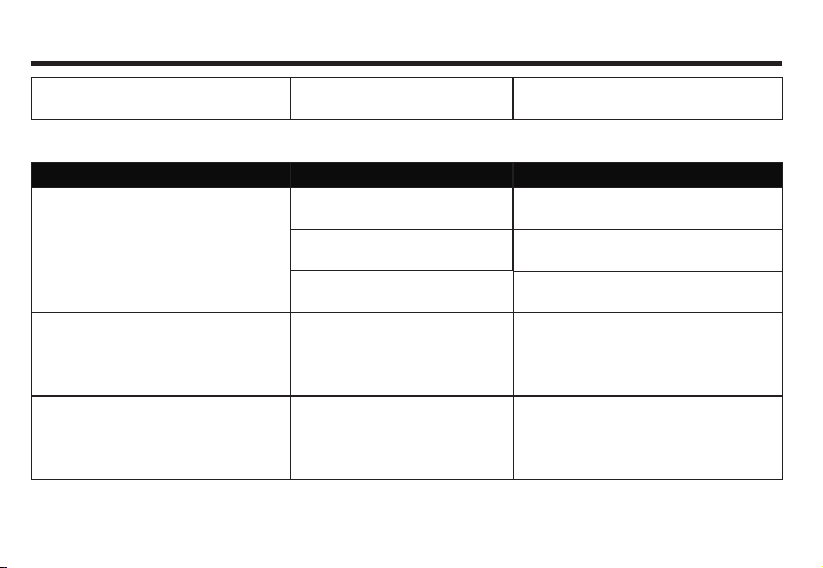
Trouble s ho oting
Pictures tagnant, unable to oper ate.
CD/M P3 Disc
Trouble
With mass noise whi le playing CD;
suddenly comes to a st op while playing.
Mass noise or no sound while
playing MP3 file.
M P3 files are played in a different
sequence to burning.
Unable to read data when
playing Disc.
Reason
Scrat ch ing or be nding t he Disc .
Disc is v er y dir ty.
The Disc is s tick ing with mist
or water drop.
Non-MP3 file is a ttac hed with
[.mp3] extension name.
M P3 files some time s aren’t pla yed
as per the burning sequence.
44
Wipe out the dirt and play aga in.
Solution
Change to another Disc, if improve, it
proves that it’s Disc pro blem .
Wipe off the dirt.
Wipe out the mist or water dro p.
Please replace the Disc (Don’t attach
[.mp3] extension name to non-MP3 file).
Some files with nam es like **01, **02…
can be play ed as per set seque nce.
Page 26

Terms Definitio n
Terms Definition
1. CD/MP3 Disc
CD-D A
Abb rev iat ion for “ Com pac t Disk Dig ita l Audio”, mea ns
unc omp res sed common C D.
MP3(MP EG Au dio Layer3)
“MPE G A udi o Laye r3” means MP3 ,so und compression
for mat sp eci fie d by Mov ing Pi ctu re Expert Gro up(MP EG)
of ISO (in ter nat ional stan dar d orga niz ati on) .MP 3 could
comp res s the soun d to 1/10 of ori gin al data co nte nt
ISO966 0 Fo rmat
Ac cor di ng to in terna tiona l sta ndard of CD-R OM fi le and
fol der logi ca l format . ISO 9660 for ma t is lim ited by
fo llo wi ng le vel :
Le vel 1:File na me is 8. 3 typ e (co mpr is ing of capita l
Eng lish let te rs and numb er, an d “-”,w ith name less
tha n 8 c ha racte rs,e xte ns ion name less th an 3
ch ara ct ers),al l fol ders hav e no mor e tha n 8 l ev els.
Le vel 2:File na me is wi th up to 31 char acter s
(I ncl ud ing sepa ra ting cha ra cter," -“ an d extens io n name),
Al l file folders are with no more than 8 levels.
Exten si on form at:
Jo li er :M ax .6 4 ch ar ac te rs in fil e name
Ro meo: Max .1 28 c ha ra ct er s in fi le name
Multi- segment writing
Mul ti-segment burning is a data written way to supply
add itional data . When burning CD-ROM, CD-R and
CD- RW, the pro ces s from beginnin g to endin g one
burn ing makes a segm ent . Mult i-s egm ent bu rni ng is
to burn mor e than two segments of dat a on one Disc .
Id3 Tag
An approach to embed the rel evant info of a song into
MP3 file . The info for embe ddi ng comp ris es of song
nam e, artist name, albu m name, device typ e, prod ucti on year a nd comment e tc. The content can be edited by soft ware with ID3 Tag e diting fun cti on. Usu all y
it is l imited by character number. When playi ng song s,
the info can b e seen.
Byte rat e
It is the data provided in 1 second, with unit of bps (bits
per second). The larger number means more playable
information for music, so the larger number means the
better music quality.
45
Page 27

Terms Definitio n
VBR(Variable Bi t Ra te)
“Var i ab le Bit Ra te ” is s ho rt for VB R, c om mo-
nl y kn o wn C BR(C ons ta n t bi t ra te). W he n
co mp r es sin g au di o ,b it rate is va ri abl e as per
co mpr ess io n co ndi tio n.
Pack et Write
Li k e us in g flo pp y dis k an d ha r d di sk , wri te t he
de s ir ed fi le i nt o the lik es of CD- R.
m3u
Ex te nsion fi le nam e of playa bl e file(.m3 u),
atta ch in g to th e pl ay back fil e li st mad e by WI NA MP.
2. DVD Video
Title
DV D ha s ma ss con te nt— 1 Disc ca n ho ld sev era l
mo vie s. For exa mpl e, ther e ar e 3 movi es in
it --- mov 1,m ov2 , mo v3. Al l fi le name s ca n be
in qu i re d.
Chap te r
DV D titled co nt en t is di vi de d into se ve ra l
se gm en ts with ide nt if ie rs, fo r cha pter inq ui ry.
Multi-angle
Typi cally, TV c ame ra shoots program at c ert ain
angles, wit h only 1 angle i n playback. Some DVDs
comprise of all sho oti ng angles for vie wer s to choos e
Multi-soundtrack
DVD may c omprise of mul tip le soundtracks,
for you to choose language.
Multi-subtitle(Subheading)
DVD may c omp rise of s ubtitles up to 3 2 language s.
Viewer may sel f-d efine his own languag e.。
Area Code
DVD play er an d DVD Disc are wi th diffe ren t pla ying
area cod es fo r every sal es area. If th e Disc does n’ t
compr is e of the code in the pl ayer, pla yback ca n’ t be
start ed . The are a code of this ma chine is (6 ).
46
Page 28

Spec if ic ation
Specification
(As the product keep s im pr oving, if with
change of specifi ca ti on, please forgiv e th at
we won’t have separ at ed n otice)
Universal
lMax current consu mp ti on:10.0A.
PowerDC14.4V( Us able11V~16 V) .
Grounding:Negat iv e po le grounding.
External image in pu t le vel:1V p-p(75 Ω
load).
External audio ma x in pu t level1.5V/22K Ω.
Image output le ve l:1V p-p(75Ω load)
(white100%outpu t /w he n playing DVD).
GPS
lApproach:L1、C/A code GPS
SPSstandard. po si ti oning service.
Receiving way:12 ch an ne ls.
Receiving frequ en cy:1 5 75.42MHz.
Sensitivity:-13 0d Bm.
47
Amplifier and a ud io p arts
lRated power outpu t: 22 W X 4(10%T.H.D).
Max. power output :4 5W X 4 .
Load impedance: 4Ω.
DVDplayer par ts
lSupport Disc: DV D- RO M、DVD-VIDEO、
DVD-R(video mod e) / RW (video mod e)、
CD-ROM 、CD-DA 、CD-R/ RW .
Area No.:6 .
Signal format(Sam pl in g rate)
(DVDvalue):48/96 K
(CDvalue):44.1 K
Signal format(qua nt iz ation B it)
(DVDvalue):16/20 /2 4B i t line
(CDvalue):16B it lin e
Frequency respo ns e:20Hz~20KHz(±3 )
Audio SNR:≥65dB .
hz
hz
dB
Page 29

Spec if ic ation
Channel separat io n:≥50dB.
Audio distortio n pl us n oise:≤ .
Video out pu t le vel: ±
1.0 0 .3Vpp.
Line synchronou s am pl itude: ±
0.03%
0.3 0 .1Vpp.
FM tuner parts
l
Frequency band:87.5 ~ ).
Practical sensitivity:≤
Locking sensitivity 35dBμV.
MHz 108MHz
12dBμV.
:
SNR: Over 50dB(IHF-A network).
THD:0.3%.
Frequency response:≥
Stereo crosstalk:≥
2KHz.
27dB.
AM tuner parts
lReceived freque nc y ba nd:
Hz Hz Hz
531k ~1602k (9 k ).
Hz Hz H z
530k ~1604k (1 0k ).
Practical sensi ti vi ty:≤28dB
Locking sensiti vi ty 45 μV.
:≤ dB
μV.
Monitor part
lScreen size:6.5 in ch、6 .95inch、8.0inch .
Display area:14 4X 78 .4、158X83.6、
177.64X100.35 .
Pixel resolutio n:80 0x 480.
Approach: TFT active matri x, t ra nsparent.
Edge illuminati on:C ol d cathode L tube.
Color system:NTSC /PALcompatib le .
Temperature range f or w or king:
-10 ℃~ ℃ .
+50
Temperature range f or p re serving:
+80
-20 ℃~ ℃ .
Touch screen:Resist an ce i nduction
analog(film + glass).
GPS antenna
Antenna: Microw av e tr ansmission with f la t
l
plane antenna/R ig ht c ircular. polariz at io n
wave antenna cabl e le ng th:3.0m.
48
Page 30

Dimension and s iz e
lInstallatio n si ze o f na vigation system
mainframe:
178(W) x 100(H) x16 5 (D )m m.
GPSAntenna:
39(W) x 15.5(H) x 48 .5 ( D)mm.
lTotal weight:abou t 2. 5k g.
Spec if ic ation
49
Page 31
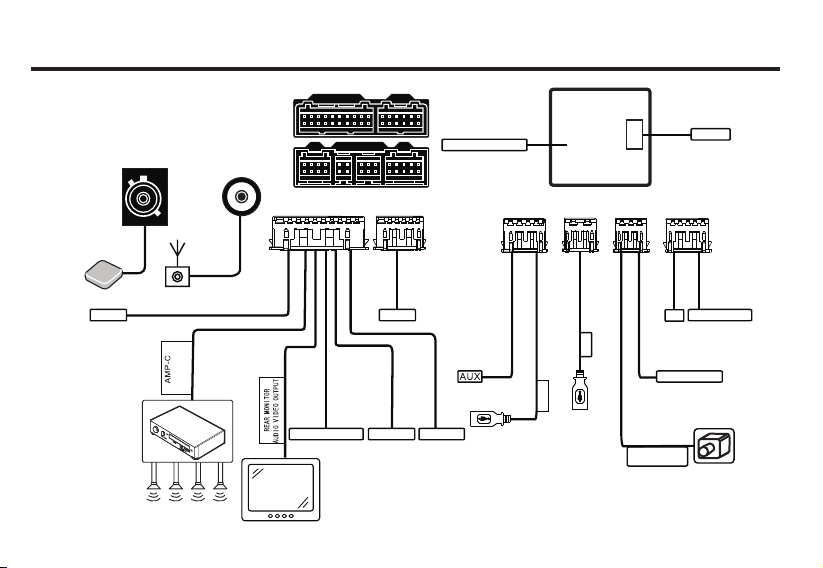
Quick installation guide. Before installat io n, p le as e re ad t hr ou gh a ll i ns tr uc ti on s.
advised to entrust profess io na l au to mo bi le H i- Fi d ea le r to i ns ta ll t hi s ma ch in eIt’s
A B
GPS an tenna
OBD
GPS an tenna
Vehi cle amp lifie r
Radi o anten na
Radi o autom atic
ante nna
Ampl ifier
cont rol
Digi tal aud io outp ut
Rear LC D
D E
C
A B
Rese rved
Bass o utput
F
Lin co ntrol
Orig inal an tenna p ort
10A fu se
D
C
USB
USB
E
Car re versi ng
vide o input
F
Tire p ressu re
TV
Reve rse tri gger
Page 32

FCC Caution.
§ 1 5 . 1 9 L a b e l l i n g r e q u i r e m e n t s .
This de vice co mplies wi th pa rt 15 of the FCC
Rules. Operation is subj ec t to the fo ll owing
two conditions: (1) This devi ce may not cause
harmful interfere nc e, a nd (2) this devi ce mus t
accept any interfer en ce r eceived, includin g
int e rfe r e nce th a t m a y c ause un d e sir e d
operation.
§ 15.21 Changes or modification warning
Any Chan ge s or modi fi ca tions not expressly
app r o ved by the part y r e s pon s i ble for
compliance could v oi d the u ser's a ut ho ri ty to
operate the equip me nt .
§ 1 5 . 10 5 I n f or m a ti o n t o t h e u se r.
Note: Thi s eq uipment has bee n te sted and
found to c omply with t he l im its for a Cl as s B
digital device, pur su an t t o p ar t 1 5 o f t he FCC
Rules. These lim its a re desig ne d to provide
reasonab l e p rotection a g a inst h a r m f u l
interference in a re sidential i ns tallation. This
equipment gener at es u ses and can radiate
radio fre qu en cy energy and , if not in stalled
and u sed i n a cc ordance with the instructi on s,
ma y ca us e harmful interfere nc e to r ad io
comm u n i c ation s . How e v e r, ther e is n o
guarantee that in te rference will not oc cu r i n a
particular installati on . If this eq uipment does
cau s e h a rmfu l i n t erf e r enc e to ra d i o o r
television rece pt io n, w hich can be determined
by tu rn in g the equipment off and on , the u ser
i s e n co ur a g ed t o t r y t o c o rr e c t t h e
interference by one or more of the following
measures:-Reo ri en t or relocate the receiv in g
antenna.
- I n c r e a s e t h e s e p a r a t i o n b e t w e e n
theequipment an d re ce iver.
-Connect th e equ ip me nt into an out le t on a
circuit diffe re nt f ro m th at to which the receiver
is connected.
-Co n sult th e de a ler or a n e xper i enc e d
radio/TV tech ni ci an f or help.
* R F w a r ni n g f o r P o r t a bl e d e v i c e :
The device ha s be en evaluated to m ee t
gen e r al RF e xpo s u re r equ i r eme n t . T he
device c an b e used in portable exposure
condition witho ut r es triction.
Page 33

Manufacture r:Fl ya udio Corporatio n
Address:No.16 Mingzhu Road,
Economical & Technology
Development Zone, Guangzhou
Customer servic es h ot line: 400-700-8180
http://www. fl ya ud io .c n/
※ If there would be any c ha ng e of address or telep ho ne
number, please for gi ve t hat we won’t have sep ar at ed
notice.
Printed in China
 Loading...