

Page 1

( Prev )(Next ):C ho ose song, use t he middle
slidingba r to n avigate, as
following p ic ture:
5.Navigation sys te m
Click on (Nav ig ation) ic on i n main screen t o
access to Nav ig ation
control scr ee n:
(Run Naviga ti on):Click o n th e map
software in t he p athway,
as follows:
Functions and AV operation
( Browse ):Clic k it to see the map , as
follows:
23
Page 2

Functions and AV operation
( OK ):Click on it to s el ect relev an t pathway.
( Cancel):Cli ck o n it to cance l pa thway.
Keys operat ion:
Press (NAVI) key on the pan el t o access to
above navig at ion softw ar e selection s cr een.
Navigatio n notes
lGlobalPos it ionSystem ( GPS) is devel op ed
and operate d by U S Ministr y of D efense,
who is entire ly i n charge of the a ccuracy and
maintenan ce o f the project . Any alterati on
made by this un it m ay affe ct t he accuracy
and perform an ce of GPS dev ic es.
lPlease use th is G PS navigati on system
prudently. This s ys tem provide s wi th
navigatio n re ference. DO N OT use th is
system for ac cu rate meas ur ement of
direction , di stance, l oc ation and ter ra in.
lWhen firstl y taking GPS sa te llite
positioni ng , please stay a t the same
location, w he re is prefe ra ble open
space,wit ho ut shield a bo ve.
lFirst posit io ning may ne ed o ver 3 minutes ,
subject to cu rr ent environ ment and sate ll ite
signal.
lDO NOT op er ate the navig at ion syste m
while drivi ng , so as to ensure s afe driving .
To avoid accide nt , please oper ate this
system afte r safely pull in g over the vehi cl e.
Wireless co mm unicati on p roduct (e.g .
mobile phon e, s peed alarm et c.) may
interfere w it h the recei vi ng of satelli te
signal, lea di ng to inconsi stent signa l
received.
lIf any insula ti on film or ex pl osion-pro of
membrane is i ns talled in you r vehicle,
satellite s ig nal may be inte rfered with .
24
Page 3

Functions and AV operation
Caution:
lThe traffic u nits in all are as w ill adjus t
property of r oad (one-wa y st reet, left tu rn
forbidden e tc.) accord in g to local tr af fic
condition . Please be sur e to o bey the
local traff ic instruct io ns. If the ro ad
condition d iffers with w ha t the map
shows, plea se make your ow n ju dgment
if this road sh ould be taken .
Map
lAs with rapid u rb an construc tion and town
and country h ig hway traffic develop ment,
traff ic r egulation i nformatio n of c ity streets
keeps chang in g constantl y. After la un ching
for some time , the product m ay p rovide
traff ic i nformatio n no t exactly m at ching
actual prac ti ce. Drive r sh ould be aware o f
actual traffic condi tion, so as to av oi d going
against tra ffic rule s.
lAs with the cha ng e of traffi c regulat io n or
temporary r oa d control , th e instructi ve
route provi de d by this navig ator may not
be matching a ct ual practic e. Please dri ve
as per actual t ra ffic co ntrol or regu la tion.
lThe navigat io n routes pr ov ided by this
device are fo r dr iving refer ence only. For
example, in d ri ver’s familia r ar ea, it may be
more effe ctive when ch oo sing routes o n his
own, rather t ha n followi ng p lanned rout es .
Receive sat el lite sign al
Normally, as long as rece iv ing the signa l
fromover 3 sa te llites,th e na vigation sy st em
can accurat el y locate your p osition, bu t
sometimes t he s ignal recei ved may be
affec te d by weather or s ky scrapers.
25
Page 4
Functions and AV operation
6.Bluetooth telephone co nt ro l
Click on the Bl ue tooth fun ct ional key in ma in
menu, as foll ow s:
( Pair ):Click to m atch Blueto ot h mobile
phone.
( Handheld ):Ch ange to recei ve b y mobile
phone.
( Hands Free ):At h and free mode .
( Bluetooth O N ):Gray indica to r turns
yellow mean wh ile “ ”turn
blue indica ti ng
Bluetooth i s on , click(P ai r).
Otherwise , it’s off and not for mat ching
mobile.
( ):Receive or di al c all key, whe n in
process, th e bu tton turn s gr een.
( ):Hang up. In tal king, the but to n is in
red Press. th is b utton to ha nd u p,
meanwhile i t tu rns grey.
Del
( ):Delete erro r nu mber.
( Records ):Cli ck on this butt on t o see the
following p ic ture:
26
Page 5

Functions and AV operation
( Back ) :Return t o upper menu.
( Received ca lls) and ( Dial ed c alls):
Preserve th e mo st recent 2 0 re ceived
or dialed cal ls .
( )&( ) :See call re co rds.
( Clear all ):Cle ar all receiv ed a nd dialed
call record .
( Bt Records):C lick to see the f ol lowing
picture:
( CarRecord s ):Ju mp to vehic le r ecord
page.
( Missed Call s ):Missed call l is t.
( Received Ca lls ):Receive d ca ll list.
( Dialed Calls ):Dialed cal l list.
(SIM Contacts):As it states.
( Phone Contact s ):As i t states .
7.Bluetooth m us ic c on tr ol
Play the musi c in m obile phone v ia Bluetoot h
27
Page 6

Functions and AV operation
):Press it to pl ay p revious son g.
(
):When mobil e ph one is connec ted,
(
press it to sta rt p layback .
):In playbac k mo de, press it to pa use.
(
):Press it to st op p laying.
(
):Press it to pl ay n ext song.
(
Back):Retur n to u pper setup pa ge.
(
8.Setup function contr ol
Press (Sett in gs) butto n on m ain menu,
to access to th e first page of
(Settings )page:
Auto Switch t o GPS ( ON )、( OFF ):
When it’s ( O N ), and 10 secon ds a fter
operation i n ot her page. it wi ll auto switc h
to navigati on p age When it ’s (OFF), th is
function is t ur ned off .
GPS Voic e ( ON )、( O FF ):
When it’s ( O N ),turn on GPS voi ce.
When it’s ( O FF ),turn off G PS voice.
Rearview Ca me ra ( ON )、( OFF ):
When it’s ( O N ),camera will c ap ture the
28
Page 7

reversing l iv e video onto th e monitor.
car
When it’s o ff, no su ch l ive video wil l be
provided. I t re mains the o ri ginal opera ti on
screen.
Caution:
This functi on is valid for t he cars with
l
CAN BUS contr ol only.
Auto Dimmer (ON):
Day/night m od e button in m en u
disappear s.
may control t he d ay mode and n ig ht
mode of scree n. W hen turni ng o n the
head lamp, th e sc reen will be in n ight
mode.When t ur ning off th e head lamp,
it’s in d ay /night mode .
Auto Dimmer (OFF):
When day/ni gh t mode butt on a ppears in
main menu, pr es s it to adjust th e day
mode and nigh t mo de of the scree n.
Tur ni ng vehicl e li ght on/off
Functions and AV operation
Brake Overr id e ( ON )、( OFF ):
When it’s O N, DVD or video p ic ture from
auxiliary i np ut can’t be sho wn until taki ng
stopping br ak e. But audi o is n ot affe ct ed
by this setti ng. When it’s OFF, you may
access to DVD o r vi deo pictu re f rom
auxiliary i np ut at any tim e.
Informati on:Click to dis pl ay the releva nt
info about MC U, iPod,Ba rc ode,Bluet oo th,
MPEG andUUI D, a s followi ng p icture:
29
Page 8

Functions and AV operation
Tire pr es sure:Displa y ve hicle & set u p
relevant in -c ar info.
Style:Click o n( Style) icon , as follows:
(Colour Set ): P ersonaliz e page color, as
following p ic ture:
"-””+”:Add or red uc e RGB color val ue.
Including : "Blue", "Or ange", "Gre en ",
For quick swi tc hing syst em c olor,user ma y
"Yellow".
use R, G, B tocus to mize colo r st yle,
press and hol d th e definitio n to
save it.
( System Styl e ):Cl ick butto n( Set) to open
style setup p ag e, with a var ie ty of style
available , as f ollows:
30
Page 9
Functions and AV operation
“Default”:Cl ic k on the defaul t st yle.
“Apply”:Clic k to a pply the sele cted style.
“Cancel”:Cli ck t o cancel the se le cted
style.
“Next”:Jump to t he n ext style set up page.
“ Back ”:Retur n to t he setup page o f
upper level .
( Language):U se ( )&( ) to switc h
language.
Press (Next ) bu tton to 2nd ( Se ttings)
page,As fol lo wing pictur e:
( TV):WhenTV se tu p is (ON), tu rn o n TV
function; w hen TV setu p is (OFF),
convert to XM R ad io (for use out o f
China only) .
24 Hour Clock ( ON )、( OFF ):
When it’s ( O N ),the time is in 24 -hour
system; Whe n it ’s ( OFF ),th e time is in
12-hour sys te m.
( Turn On Volume ): Use ( )& ( )t o ad just
volume outp ut .
( Button Back L ighting ):
Use( ) &( )keys t o se tup the
brightnes s of p anel indica tors, in
consisten t wi th other ke ys .
(Turne r Re gion ): Use( )&( ) k ey s to
select the ra di o channel of yo ur desired
nation.
Time Se t:Cl ick (Ti me S et) button to s etup,
as followin g pi cture:
31
Page 10
Functions and AV operation
“ ”and“ ”:Set up relev ant time:
parameter s of the system .
“ Back ”:Press it to return to setuppage.
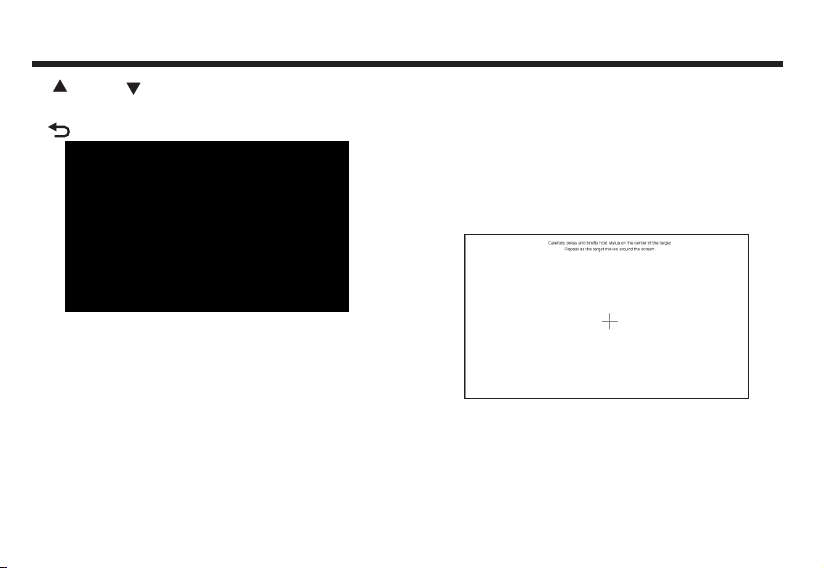
Screen veri fy ing:When to uc h screen
becomes ins en sitive or wit h drifting
sign, it’s needed to ver if y the touch
screen area , in f ollowing st eps:
Start up the sy stem, “note s” p age
appears, wh en s eeing “agre e” button,
press and hol d th e screen for 3
seconds. A white page ap pe ars, follow
the text prom pt on the scree n, s lightly
and accurately use finger or touch pen
to hit the center of cross cursor in order.
After successfully verifying, cross cursor
disappears, 30 seconds count-down starts
at the center of screen. In such time hit on
the screen to confirm the verify data,
Otherwise the verification is invalid, as
follows:
(Next): Retu rn to upper set up p age, press
(Next) butt on t o access to p ag e 3 of
(Settings ) pa ge, as foll ow ing picture :
32
Page 11
Functions and AV operation
( Timezone):Use ( ) & ( ) buttons to
select your desired time zone.
( Steering Wheel to Select):When steering
wheel study is(ON),you may then
use( ) & ( ) to select steering wheel .
( Steering Wh eel Custom):W he n it’s
(OFF), turn o ff steeri ng wheel stud y,
steering wh ee l becomes def ault.
When it’s ( ON), click to a ccess to
(study) ope ra tion page , as f ollows:
"Mode":Click to highlight it, and click the
corresponding key in steering wheel,
and click apply to successfully set up
your desired shortcut key. Other key
functions are the same as those of
“mode” operation.
(System Reset ):Click on system reset key to
restart the mainframe CPU and GPS
system.
( System Update ):Product software update.
“ Back ”:Press it to return to setup page.
33
Page 12
Optional function
Optional function
Back LCD
Click on (Bac k LC D) to access to s etup
page,as fol lo wing pictur e:
( DVD Mode):Press it to select playing Disc.
):
( Press it to play previous song or track.
):
( When Disc is in, press it to start
playback;When the Disc is
playing,press it to pause.When it’s
paused and press it resume
normal playback.
stopped,
( ): Press it to sto p playing Dis c.
( ):Press it play n ext track or so ng .
( Ba ck) Return to main me nu s etup.
Wat ch T V program
Click on the (T V) b utton on th e ma in menu to
see followi ng p icture:
( Scan ) :Click to a uto search TV channel.
( Setup ) :The sam e as ( DVD) setup(se e
for referen ce).
:
P-13
34
Page 13

( Menu ) :Program setup menu.
Program :Press it to watch the preset TV
( )
Prev :Choose prev io us channel.
( )
( )
Next :Choose next ch an nel.
( )
Stop/Back :Cance l/return to a n op eration.
channel.
Optional function
: In (TV)pa ge , use this butt on
to move the cur so r from all
direction s, p ress (OK) b ut ton
to select it.
(Hint: / may ad just
volume).
TPMS setup
In main menu, p re ss (Tpms) b ut ton to access
to the manage me nt page as fo ll ows:
( Pair ) :Match tire pressure and
sensor.
Press (TPMS Set) button to access to setup
page:
temperature
35
Page 14

Optional function
Click( )&( ) to s et up related p ar ameters.
Press(Nex t) b utton, to e nt er the follow in g
l
picture:
( ) ( )button can set up tire pressure
&
alarm type.(OFF
WARNING
、RING、TEXT
).
( Back) :Press to return to previous
operation page.
(Clear) :Click(clear)button to see the
following page, And press(Yes)
key to clear related tire pressure
matching info rmation.
12cm /doub le sides
1 sid e2 sides
36
Page 15
Playable Disc ty pe
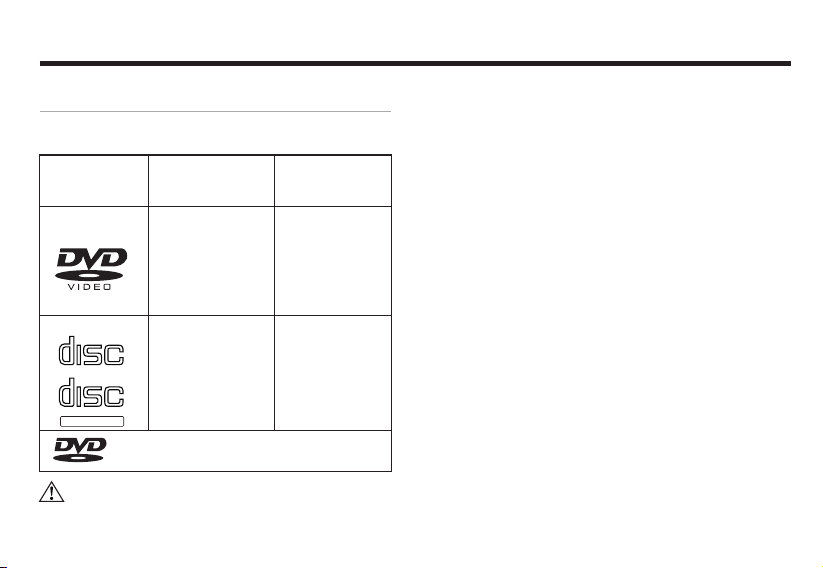
Playable Disc type
Disc label si de , package box a nd package
bag have the fo ll owing marks .
Playa ble Disc
type and mar k
DVD DVD
CD
COMPA CT
DIGI TAL AUDIO
COMPA CT
DIGI TAL AUDIO
TEX T
TM
Caution:
Size/side s
12cm/ singe si de
1 side2 sid es
TM
Longe st playi ng
(MPEG 2form at)
133min
240min
266min
484min
CD
12cm/ singl e side
Is a reis tered r emark o f DVD For mat /
Logo li censi ng Corp orati on
74min
lPart of funct io ns can’t be u se d in DVD/CD
Disc.
l
DVD-R/RW disc is for pla yi ng the files in
Vid-e o fo rmat.
l
Files in VR for ma t can’t be pl ay ed in DVDRW Disc .
l
For playing t he D isc burnt by PC , but
sometimes i t ca n’t be play ed s ubject to
applicati on s etting or e nv ironment. Ti tl e or
other text in formation m ay n ot be display ed
in this machi ne .
l
DVD-R/RW Disc burnt in v id eo format and
music CD or PC- bu rnt CD-R/CD -RW may
not be able to pl ay i n this mach in e, due to
scratch, st ai n or intern al l ens dirt or dew.
l
Sometimes , du e to direct s un light or high
temperatu re o r abnormal co ndition in
vehicle,C D- R/RW Di sc m ay not star t to p lay.
l
Unable to pla y an y CD-R/RW D isc burnt in
DDCD (Doubl e De nsity CD) for mat, and
unverifie d CD -R/RW, D VD -R/RW D is c. Only
the Discs wit h ab ove labels ca n be played in
37
Page 16

Use of the monitor
Use the monitor correctly
1. Notes of use
DO NOT ex po se the monito r un der direct
l
sunlight or h ig h temperatu re area,
otherwise , LC D failure m ay h appen.
When not usin g th is machin e, p lease avoid
l
exposing th e mo nitor to di re ct sunlight .
Use the monit or w ithin the f ol lowing
l
temperatu re r ange:
Temp. range of us e:-10 ~+50
Temp. range of pr es ervation : -2 0 ~+80
l
For easy watc hi ng in vehicle , LCD monitor
sticks out. P le ase DO NOT pr ess with LC D
monitor sur fa ce with str en gth, as it coul d
lead to failu re . When slig ht ly touching t he
monitor, exc ep t verifyi ng t he coordina to r,
please make s ur e using finge r to softly
touch it, oth erwise, it ma yb e damaged or
sticking wi th d irt.
In vehicle in st alled with th e likes of safe air
l
bag, plea se n ote DO NOT hi nder the
℃ ℃
℃ ℃
working of sa fe ty device .
2. About LCD sc reen
l
The LCD monit or s ometime s ma y be with a
black dot or a fl as hing dot (b ri ght dot). This
is a unique phe no mena of LCD mon itor,
rather than f ai lure.
l
When using it i n co ld area, af te c onnecting
to power, the sc re en may be dim ini tially.
After a while , th e brightn es s will resume
normal.
l
If with direc t sunlight on L CD m onitor, the
screen may be u nc lear due to lig ht
reflectio n.
3. About main tenance
When cleans in g the dirt on s cr een, please
l
turn off po wer and use sof t cl oth to wipe i t.
When wiping m on itor, please a void
l
scratchin g by f ingernail .
DO NOT us e we t cloth, vola tile oil or
l
diluents.
Page 17
How to use Disc
How to use Disc
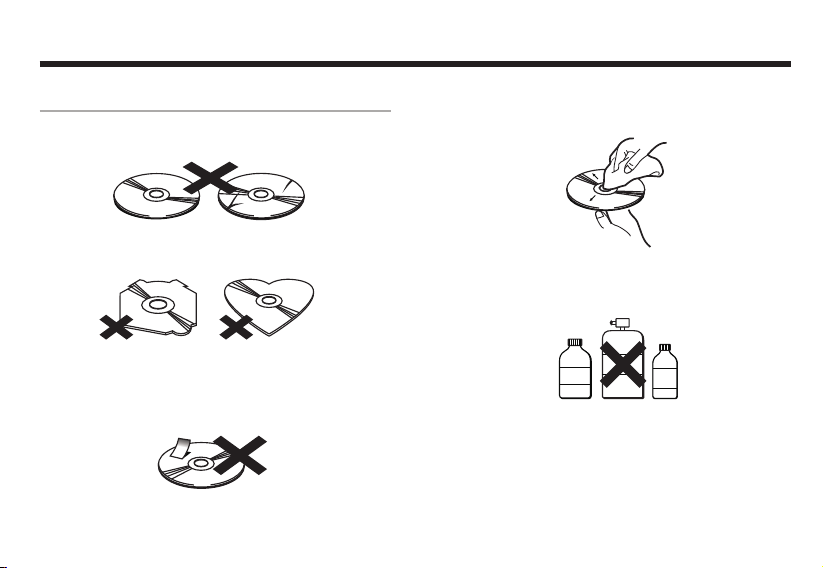
1,Notes of hand ling Disc
l
DO NOT us e an y Disc with cra ck o r stain, or
bended.
l
DO NOT us e ab normal (non -p erfect
rounded) Di sc , so as not to caus e failure.
DO NOT to uc h the info side ( wi th gloss) o f
l
the Disc when h an dling it. DO NO T hurt th e
Disc.
DO NOT st ic k paper or labe l on t he Disc.
l
2,About maint enance
If the Disc is co ve red with di rt , please use
l
clean soft cl ot h to wipe the D is c from inside
out.
lDO NOT ad he re volatile o r di luentsdil uent
onto the Disc . Be sides, DO N OT use the
cleaner for a na logue recor der or antist at ic
agent.
Re cor de r
Cl ean er
Di lue nts
Volatile
Oil
3,Notes of pres er vation
DO NOT ex po se the Disc und er d irect
l
sunshine or w he re is at high tem p.
Keep the Disc i n bo x, so as to avo id
l
bending.
3938
Page 18
Trouble shooting
4. About Disc P layback Pnv ir onment
While drivi ng , Disc data c an ’t be correct ly
l
read due to vib ra tion.
In low temp environment, please play
l
the Disc upon turning o n he ater. Du e to
lens or Disc player c ou ld be with
moisture cond en sation (condensation
effect), normal pla yback may not be able
to start. At this time, wai t for about a
hour, unti l th e dew is evaporated, and
then use soft cloth to wipe out the dew
remained on the D is c.
When temper at ure rises , pr otection
l
function wi ll b e trigger ed , and some func ti ons
will be stopp ed .
Trouble shooting
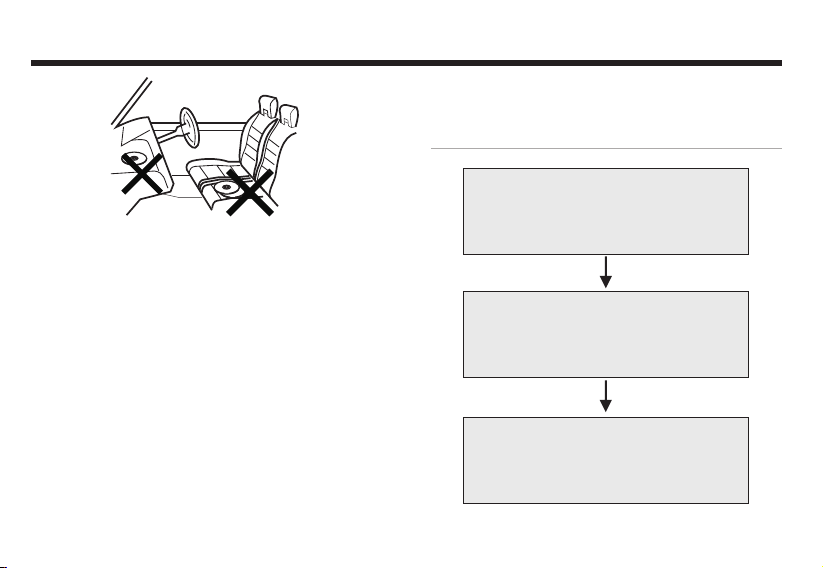
When with tro uble
Please refe r to t he follow in g table
before send in g to mainte na nce
Unable to fix i t after check in g
Reset the mac hi ne as facto ry
default
Still unabl e to fix it
Please cons ul t with the cu st omer
services de pa rtment of t he
manufactu re r
40
Page 19
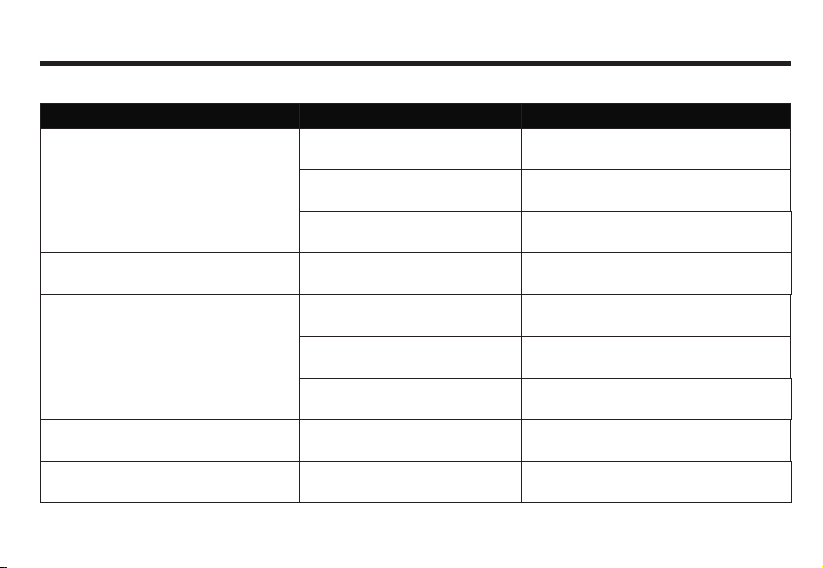
Common problems
Trouble
Unable to power on.
Not working.
No response to touc h key on screen,
or being insensitive.
Trouble shooting
Reason
All leads and conne ctors
are not cor rectly connected.
Blown f use.
For noise reason, built-in
computer error.
Touch key shifting over actual
reaction location.
Disc wi th dirt . Clean the dirt on Disc.
Recon firm st able co nnect ion.
Check reason of blown fuse, and replace
it with the fuse of the same specificati on.
Press r eset bu tton.
Condu ct Tou ch
scree n coo rdi nate
verif yin g.
Solution
Unabl e to play.
Turn on the ACC of vehicl e(start
engine), with engine sound.
Black dot or bright dot on LCD screen.
Unaccept able Dis c type.
With wrong Disc side up.
Confirm the Disc is i nserted. N ormal w orkin g.
Unique LCD phenomena,
rather than failure.
Confirm Disc.
Insert Disc with label side up.
41
Page 20

Trouble shooting
Dark LCD picture.
No sound.
No image disp la y.
No navigation system image display.
No sound from front or rear speaker
No sound from left or right speaker.
Improper Brightn ess adju stment.
Too cold in the vehicle.
Volume is 0.
Connectio n er ror.
Not connect t o pa rking
brake line.
No parking br ak e.
Tur n off monit or.
Not being switched to navig ation.
Im prope r volum e adj us tment i n
.
fro nt or rea r spe aker.
Im prope r volume ad justm en t
in le ft or right sp ea ker.
42
Adjust brig ht ness.
Low surrounding temp leads to dark monito r.
Use heater to wa rm up th e interior vehicl e.
Increase vo lu me.
Confirm cor re ct connec ti on.
Connect to pa rk ing brake and
execute it.
Press POWER key or touch th e
screen.
Switc h the ima ge into n aviga tion
syste m.
Correct adj us tment and s et up.
Page 21
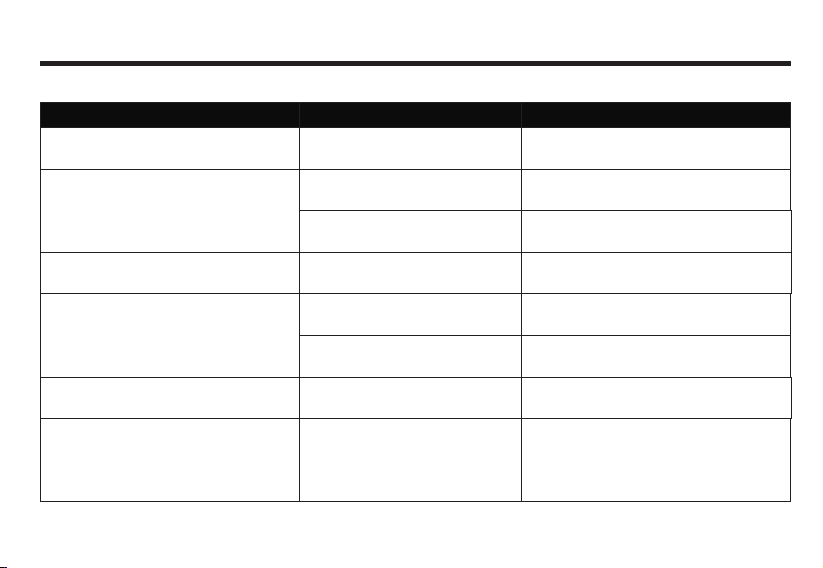
DVD Vid eo
Trouble
Unable to pla y.
No image disp la y.
No sound.
Unable to switch audio and
subtitle language.
Unable to execute initial setup aud io
and subti tle lang uage.
When playing Disc, picture chaos
or dim.
Reason
The Disc inserted can only be
played from Disc menu.
Vehicle is dri vi ng.
Access to n aviga ti on pict ure.
Standstill picture, in slow motion.
The DVD is recorded with 1
language soundtrack only.
Limited switchin g from Disc
menu only.
The DVD isn ’t recor ded with
initial setup language.
The Disc is recorded with
copy-forbidden signal.
(It may be recorded subject to Discs).
43
Trouble shooting
Solution
Play from Dis c me nu.
When bra ke cable is dete cted ON, no image can
be played whi le drivin g, but with musi c only.
Press (AV) b utton t o switc h pictu re.
Standsti ll pictu re and slow playback
are witho ut sound accompa nied.
Unable to switch over the Disc recorded
with 1 language soundtrac k only.
Switch over D is c menu.
Such DVD is unab le to switch to the
selected languag e.
As the syst em is with functi on of
preven ting from an alogu e copying ,
when pla ying Disc re corde d with
copy -forb idden sig nal, some mon itors
may appe ar horizo ntal str ipes, This is not
failure.
Page 22
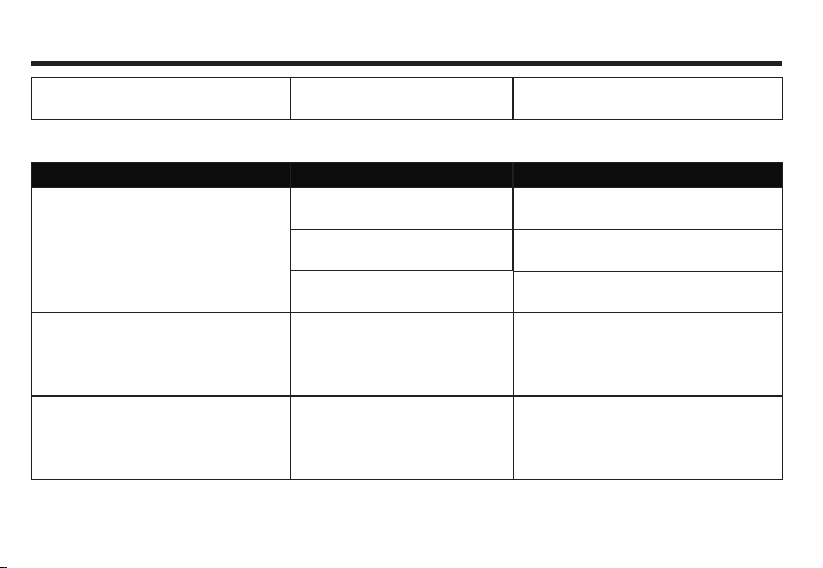
Trouble shooting
Pictures tagnant , unable to operate.
CD/MP3Disc
Trouble
With mass noise while playing CD;
suddenly comes to a s top whil e playin g.
Mass noise or no s ound whi le
playing MP3 file.
M P3 files are played in a d ifferent
sequence to burning.
Unable to read data when
playing Disc.
Reason
Scrat ching o r bendi ng the Di sc.
Disc is v ery dir ty.
The Disc is s ticking with mis t
or water drop.
Non-MP3 file is attached with
[.mp3] extension name.
M P3 files some times aren’t played
as per the burning sequence.
44
Wipe out the dir t and play again.
Solution
Change to another Disc, if improve, it
proves that it’s Disc pro blem.
Wipe off the dirt.
Wipe out the mis t or water drop.
Please replace the Disc (Don’t attach
[.mp3] extension name to non-MP3 file).
Some files with names like **01, **02…
can be play ed as per set sequence.
Page 23

Terms Definition
Terms Definition
1. CD/MP3 Dis c
CD-DA
Abb rev iation for “Compa ct Disk D igi tal Audi o”, mea ns
unc omp ressed com mon CD.
MP3(MPEG Audi o La ye r3)
“MPE G A udi o Layer 3” mea ns MP3, sou nd compressio n
for mat sp ecified by Moving Pic tur e Expert Grou p(MPE G)
of ISO (internati ona l standard org ani zat ion ).MP3 coul d
comp res s the soun d to 1/1 0 of original da ta content
ISO9660 Format
Ac cor di ng to inter natio nal stan da rd of CD-RO M file and
fol der logi cal form at . ISO9 66 0 format is li mi ted by
fo llo wi ng lev el :
Le vel 1:Fi le na me is 8. 3 type (com prisi ng of ca pital
Eng lis h let ters and nu mb er, and “-”,wi th na me less
tha n 8 c ha rac te rs,ex te nsi on na me less tha n 3
ch ara ct ers ),al l fold er s have no more than 8 lev el s.
Le vel 2:Fi le na me is wi th up to 31 ch aract ers
(I ncl ud ing se pa rat in g charac ter,"- “ and ex ten si on name),
Al l file folder s are wi th no mo re th an 8 lev els.
Exten sion fo rmat:
Jo li er :M ax .6 4 cha ra ct er s in fi le name
Ro meo: Max .1 28 ch ar ac te rs in fil e name
Multi-segm en t wr it in g
Mul ti- seg men t burn ing is a data written way to supply
add iti ona l data . When bur nin g CD-ROM, CD-R and
CD- RW, the pro ces s from beg inn ing to ending one
burn ing makes a segm ent . Multi-segment bur nin g is
to burn mor e than two seg men ts of data on one Disc.
Id3 Tag
An approac h to emb ed the relevant info of a son g into
MP3 file . T he info f or embe ddi ng comp ris es of song
nam e, arti st name, album n ame , devic e type, producti on year and com men t etc. The content can be edited by soft ware wit h ID3 Tag e diting fun ction. Usually
it is l imited by char act er numb er. When playin g songs ,
the info can b e seen.
Byte rate
It is the data provided in 1 second, with unit of bps (bits
per second). The larger number means more playable
information for music, so the larger number means the
better music quality.
45
Page 24

Terms Definition
VBR(Variable Bit Rate)
“Var i ab le B it R at e” is sh ort for VBR , co mm o-
nl y kn own CBR(C on sta nt b it r at e).Wh en
co mp res si ng audi o, bit rat e is var ia ble as p er
co mpr es sio n co nd iti on .
PacketWrite
Li k e us in g fl opp y di sk and hard d is k, writ e th e
de s ir ed file int o th e li kes of CD-R .
m3u
Ex te ns ion fi le nam e of pl ay ab le fil e(.m 3u),
atta ch in g to th e play ba ck file lis t ma de by WIN AM P.
2. DVD Vide o
Title
DV D ha s ma ss conte nt —1 D is c ca n hold se veral
mo vi es. For examp le, the re are 3 m ovi es in
it --- mov 1, mov 2, mov3 . All f il e na mes can be
in qu ire d.
Chapter
DV D title d co nt en t is divided int o sev er al
se gm en ts wi th i de ntifiers, for chapte r in qu iry.
Multi-angle
Typi cally, TV camera sho ots pro gra m at c ert ain
angles, wit h only 1 angle in pla yback. Som e DVDs
comprise o f all shoo ting ang les for vie wer s to c hoo se
Multi-soundtrack
DVD may comprise of multiple sou ndt rac ks,
for you to choose language.
Multi-subtitle(Subh eading)
DVD may c omprise o f subti tles up to 32 langu age s.
Viewer may sel f-defin e his own lang uage.。
Area Code
DVD play er and DVD Dis c are with differ ent play ing
area cod es for ever y sales are a. If the Di sc doe sn’t
compr ise of the cod e in the playe r, playba ck can’t be
start ed. T he area cod e of this mach ine is (6).
46
Page 25

Specification
Specification
(As the produc t ke eps improvi ng, if with
change of spe ci ficatio n, p lease forgi ve t hat
we won’t have s ep arated noti ce)
Universal
lMax current c on sumptio n: 10.0A.
PowerDC14 .4 V(Usabl e11V~16V).
Grounding:N eg ative pole gr ounding.
External im ag e input level :1V p-p(75Ω
load).
External au di o max input lev el1.5V/22 KΩ .
Image outpu t le vel:1V p- p( 75Ω load)
(white100%o ut put /when p la ying DVD).
GPS
lApproach:L1、C /A co de GPS
SPSstanda rd . positio ni ng service.
Receiving w ay:1 2 channels.
Receiving f re quency:1 575. 42MHz.
Sensitivi ty:-130dBm.
47
Amplifier a nd audio part s
lRated power o ut put:22W X 4(1 0%T.H. D).
Max. power ou tp ut:45W X 4.
Load impeda nc e:4Ω.
DVDplayer p ar ts
lSupport Dis c:DVD-ROM、DVD -VIDEO、
DVD-R(vid eo m ode) /RW (v ideo mode)、
CD-ROM 、CD-D A 、CD- R/RW .
Area No.:6 .
Signal form at(S ampling rat e)
(DVDvalue):4 8/ 96 K
(CDvalue):44 .1 K
Signal form at(q uantizati on B it)
(DVDvalue):1 6/ 20/24B it lin e
(CDvalue):16 B it l ine
Frequency r es ponse:2 0H z~20KHz(±3 )
Audio SNR:≥65 dB.
hz
hz
dB
Page 26

Specification
Channel sep ar ation:≥50 dB .
Audio disto rt ion plus nois e:≤ .
Video o ut put level: ±
1.0 0 .3Vpp.
Line synchr on ous amplitu de: ±
0.03%
0.3 0 .1Vpp.
FM tuner part s
l
Frequency band:87.5 ~ ).
Practical sensitivity:≤
Locking sensitivity 35dBμV.
MHz 108MHz
12dBμV.
:
SNR: Over 50dB(IHF-A network).
THD:0.3%.
Frequency response:≥
Stereo crosstalk:≥
2KHz.
27dB.
AM tuner parts
lReceived fr eq uency band:
Hz Hz Hz
531k ~1602k (9k ).
Hz Hz Hz
530k ~1604k (10k ).
Practical s en sitivity:≤2 8dB
Locking sen si tivity 45 μV.
:≤ dB
μV.
Monitor par t
lScreen size :6 .5inch、6.95 inch、8.0inc h.
Display are a: 144X78.4、15 8X83.6、
177.64X10 0. 35.
Pixel resol ut ion:800x480 .
Approach: TFT ac ti ve matrix, tr an sparent.
Edge illumi na tion:Cold cat hode L tu be.
Color syste m:NT SC/PAL co mpatibl e.
Temperature r an ge for workin g:
-10 ℃~ ℃ .
+50
Temperature r an ge for preser ving:
+80
-20 ℃~ ℃ .
Touch screen:Re si stance indu ction
analog(film + g la ss).
GPS antenna
Antenna: Mi cr owave tra ns mission wit h fl at
l
plane anten na /Right ci rc ular. polari za tion
wave antenn a ca ble length:3. 0m.
48
Page 27

Dimension a nd size
lInstallat io n size of nav ig ation syste m
mainframe:
178(W) x 100( H) x 165 (D)mm .
GPSAntenn a:
39(W) x 15.5( H) x48.5 (D)m m.
lTotal weight:ab out 2.5kg.
Specification
49
Page 28
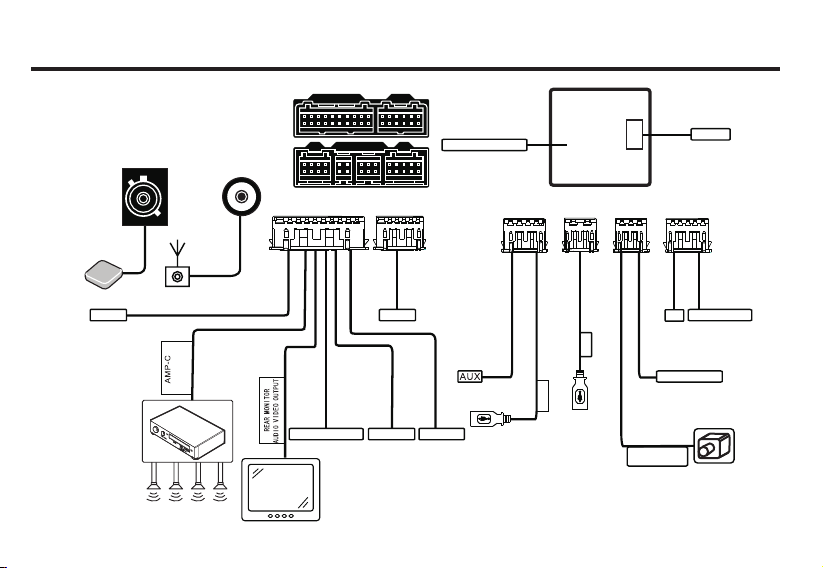
Quick installation guid e. B ef ore installation, please read t hr ou gh all instructions.
advised to entrust profes si on al a utomobile Hi-Fi dealer to ins ta ll t his machineIt’s
A B
GPS an tenna
OBD
GPS an tenna
Vehi cle amp lifie r
Radi o anten na
Radi o autom atic
ante nna
Ampl ifier
cont rol
Digi tal aud io outp ut
Rear LC D
D E
C
A B
Rese rved
Bass o utput
F
Lin co ntrol
Orig inal an tenna p ort
10A fu se
D
C
USB
USB
E
Car re versi ng
vide o input
F
Tire p ressu re
TV
Reve rse tri gger
Page 29

FCC Caution.
§ 1 5 . 1 9 L a b e l l i n g r e q u i r e m e n t s .
This device complie s w it h p ar t 1 5 of the FCC
Rules. Opera ti on is subject t o the following
two condition s: ( 1) This device may not caus e
harmful inter fe rence, and (2) this dev ic e mu st
accept any in te rference re ce ived, inclu di ng
int e rfe r enc e t h at may ca u se und e sir e d
operation .
§ 15.2 1 Chan ge s or modificati on w ar ning
Any Ch an ges or mod ification s not e xpressly
app r ove d by th e pa r ty res p o nsi b le for
complianc e could void the us er's au thority to
operate the e qu ipment.
§ 1 5 . 10 5 I n f o rm a t i on t o t he u se r.
Note: Thi s equipme nt h as been tes ted and
found to comply with the limit s fo r a Cl ass B
digital devi ce, pursuant to pa rt 15 of the FCC
Rules. These limits are designed to pro vi de
reaso n a b l e pr o t e c t i on a g a i n st h a r m ful
interfere nc e in a res id ential installat io n. This
equipment g en erates uses a nd can radiat e
radio fre quency en er gy and, if not ins talled
and used in accord an ce with the instru ct ions,
ma y ca us e ha rm fu l in te rf er en ce t o ra di o
comm u n icat i o n s. H o weve r, t here is n o
guarantee th at interfe re nce will no t o ccur in a
particula r in st allation. If this equipmen t does
cau s e h armf u l i nte r fer e nce to rad i o o r
televisio n re ception, wh ic h can be determin ed
by tu rn ing t he eq ui pment o ff and o n, th e user
i s e n c our a g ed t o t r y t o c or re c t t h e
interfere nc e by one or m ore of the followin g
measures: -R eorient o r relocate th e receiving
antenna.
- I n c r e a s e t h e s e p a r a t i o n b e t w e e n
theequipm en t and receive r.
-Connect the equ ipment into an outl et on a
circuit different from that to which the recei ve r
is connecte d.
-Co n sul t t h e d e ale r o r a n ex p eri e nce d
radio/TV te ch nician fo r he lp.
* R F w a r n i n g f o r P o r t a b l e d e v i c e :
The devic e ha s been eval ua ted to meet
gen e ral RF exp o sur e re q uir e men t . T he
device can b e used in portable expos ur e
condition w it hout rest ri ction.
Page 30

Manufactu re r:Flyaudi o Co rporati on
Address:No. 16 Mingzhu Road,
Economical & Technology
Development Zon e, G uangzhou
Customer se rv ices hotl in e: 400-700-8180
http://www.flyaudio.cn/
※ If there woul d be a ny change o f ad dress or tele ph one
number, plea se f orgive th at w e won’t have se pa rated
notice.
Printed in Ch in a
 Loading...