

Page 1
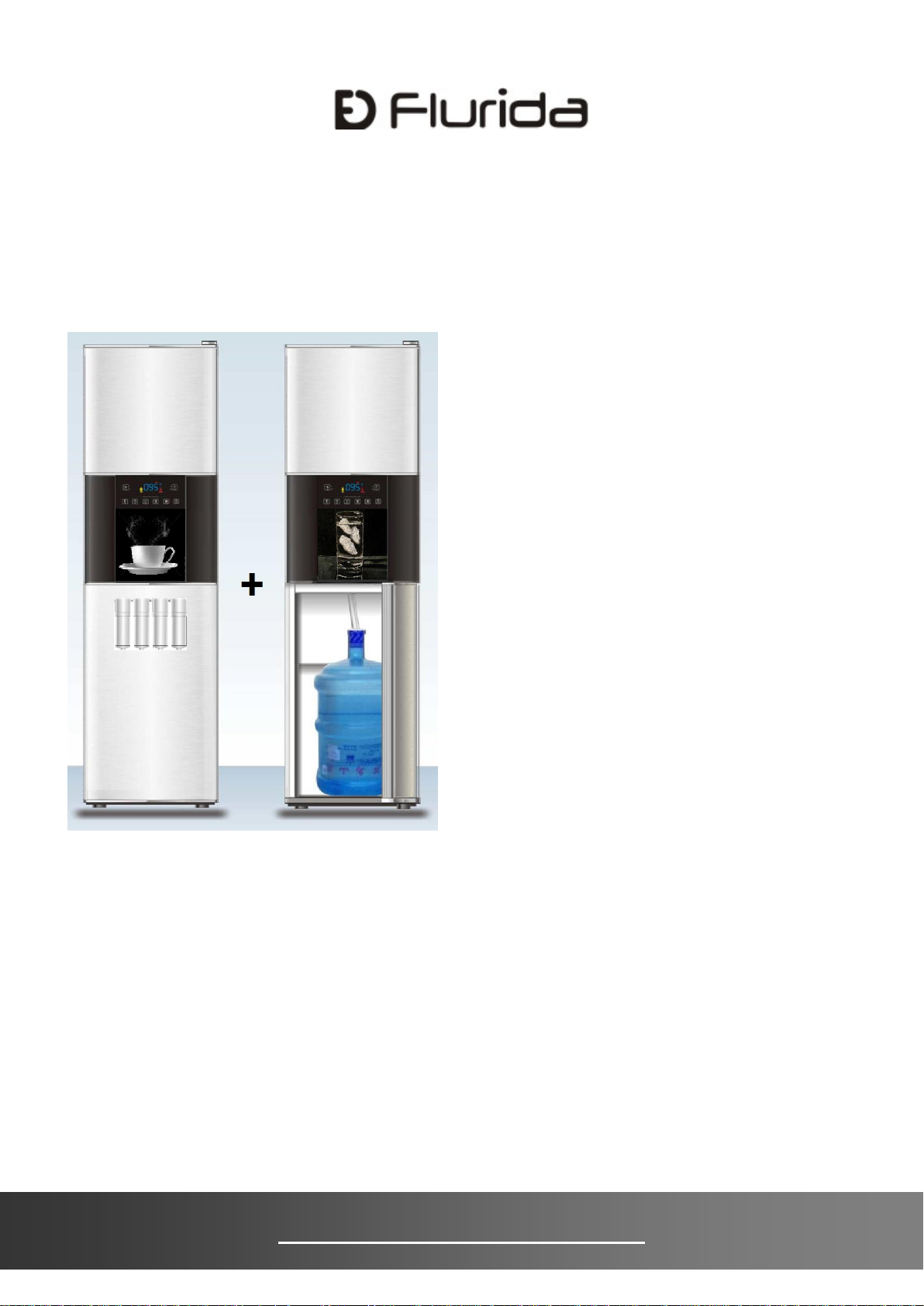
U S E R I N S T R U C T I O N S
F D F B 1 0 5 0 1
I c e + W a t e r D i s p e n s e r
SAFETY INSTRUCTIONS -------------------2
INSTALLATION IN S T R U C TIONS ---- - - -----4
FEATU R E S & SPECIFIC A T IONS ------- - ----9
DI S P E N S E R & CO N T R O L USE -------- - 1 1
DISPENSER CA R E -------------- - ----------15
TROUB L E S HOOTING S ---------------- - - --17
SERVIC E & IM P O RTAN T NOT I C E - -------20
G E N E R A L O P E R A T I N G I N S T R U C T I O N
Read these instructions before use and save them for future
reference.
Let the unit rest and unplugged for 24 hours before use.
Remove all external and internal packaging materials. Be sure that all parts
have been included before discarding any packaging materials. You may
want to keep the packaging materials for use at a later date.
Upon receipt and inspection of the unit, the power cord must be replaced if
it is damaged.
Contact our customer service at 1-310-5130888 or info@flurida.com.
w w w . f l u r i d a . c o m
Page 2
2
SAFETY INSTRUCTIONS
DANGER
Improper use of the power cord plug can result in the risk of
electrical shock, property damage and personal injury or death.
DANGER
This unit can dispense hot water. Hot water can scald your hands
and body and cause serious injury.
Electrical Safety
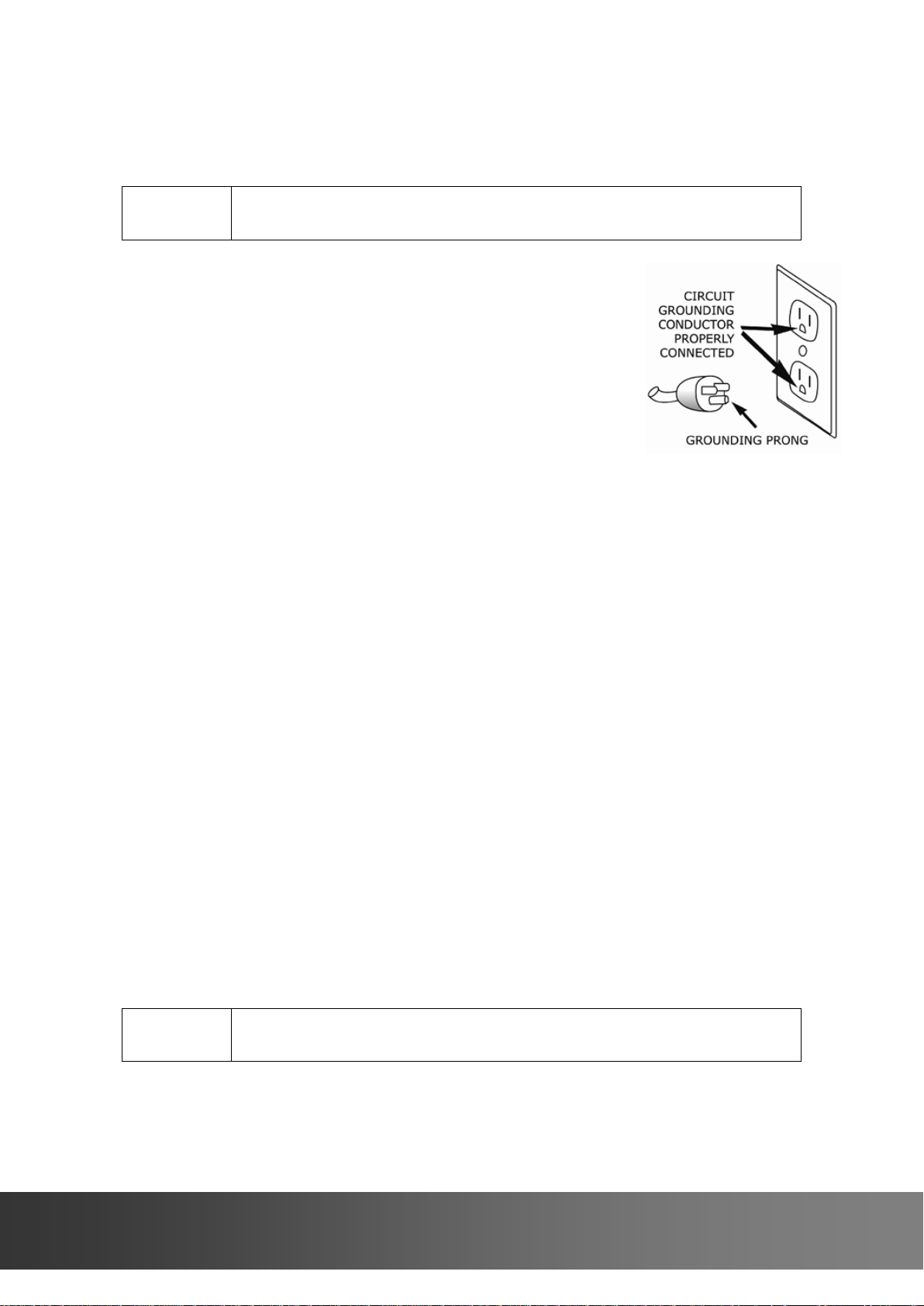
This appliance is equipped with a 3-prong grounding-
type plug, and shall be plugged into a properly
connected grounding-type outlet.
It is required to use a 3–prong grounding-type
electrical outlet properly grounded in accordance with
the National Electrical Code and local codes and
ordinances.
A separate adequately fused and grounded circuit
shall be used for this appliance. The voltage rating
must match the rating label on the unit.
Don not use an adapter or an extension cord.
Do not under any circumstances cut or remove the third ground prong from
the power cord.
Never unplug the appliance by pulling the power cord. To disconnect the
unit, always grip the plug firmly and pull straight out from the wall outlet.
Do not operate the appliance if the appliance housing is removed or
damaged.
Do not attempt to repair or replace any part of your appliance unless it is
specifically recommended in this manual. All other servicing shall be
referred to a qualified technician.
To protect against electric shock, do not immerse appliance, plug or cord
into water or other liquids.
Child Safety
Exercise caution and use reasonable supervision when appliance is used
near children. Never allow children to operate, play with or crawl inside the
unit. Keep packing materials away from children.
Keep fingers out of pinch point areas and be careful when closing doors if
children are around.
Hot Water Safety
To avoid hot water spilling, always put a cup under the dispenser before
you press the button to dispense hot water.
i n f o @ f l u r i d a . c o m
Page 3
3
Cleaning
DANGER
To reduce the risk of injury when using, cleaning or moving your
appliance, follow these basic precautions.
DANGER
When disposing of refrigerated appliances, special handling is
often required. It is the consumer’s responsibility to comply with
federal and local regulations when disposing of this product.
Unplugged the appliance or disconnected power before performing any
maintenance or cleaning.
Do not clean appliance with flammable fluids. Do not store or use gasoline
or other flammable vapours or liquids in the vicinity of this or any other unit.
The fumes can create a fire hazard or explosion.
Do not use solvent-based cleaning agents or abrasives on the interior or
exterior of the appliance. These cleaners may damage or discolor the
appliance.
Do not operate the appliance with wet hands, while standing on a wet
surface or while standing in water.
Moving
Exercise caution when moving and installing the appliance. The unit is
heavy, to prevent strain or injury, it may require two or more people to
move the unit.
Must remove all ice, empty water and secure all loose shelves before you
transport the unit. Use protective materials to prevent the glass shlves from
being damaged.
Disposing
Keep the carton, plastic bags and any exterior wrapping materials in s safe
place where children cannot reach them. If you don’t need these materials,
destroy or recycle them. These items may cause children’s suffocation.
To avoid entrapment and suffocation, before you throw away this appliance,
remove the doors and leave the shelves in place, so that children may not
climb inside.
2 4 4 1 2 M a i n S t . S u i t e 1 0 5 , C a r s o n , C A 907 4 5
Page 4
4
INSTALLATION INSTRUCTIONS
CAUTION
This unit is designed for indoor use only.
Use the rear wheels to move the unit around.
CAUTION
This unit is designed for free-standing installation only.
DANGER
It is required that you connect this unit only to a GFCI protected
receptacle. It is strongly recommended that you do not use an adapter
or an extension cord to connect this unit because of potential safety
hazards.
Location
Place the unit away from direct sunlight and heat sources.
Do not install the unit in moist areas.
Do not install the unit in garage.
Do not install the unit where the ambient temperature range will be
below 50 °F or above 90 °F. Otherwise, the compressor will not be able
to maintain proper temperature.
The unit must be placed in a properly ventilated location to prevent heat
build-up generated by the refrigeration system. Failure to do so will
prevent the unit from cooling properly, and may result in damage to unit
components as well as its contents.
The unit must be installed on a floor that is level and strong enough to
support a fully loaded unit up to 200 lb.
Clearance
Allow for minimum 4” clearance on each side, 4” on the back and 12” at
the top for proper air circulation.
If the unit is installed next to a fixed wall on the right side, leave 6”
minimum clearance to allow the door to swing.
Adjust the levelling legs to level the unit at a height that allows the door
to be opened and closed properly.
Electrical Requirements
A dedicated 115V, 60Hz, 15 or 20A fused, grounded electrical supply is
required. It is recommended that a separate circuit serving only your
refrigerator be provided.
Connect to properly polarized outlets only.
Use outlets that cannot be turned off by a switch.
Plug the unit into a grounded 3 prong outlet.
i n f o @ f l u r i d a . c o m
Page 5
5
How to Use Push-to-Connect Fittings
NOTE
Use 3, 4 or 5 gallon bottled purified water only. Drain is not required.
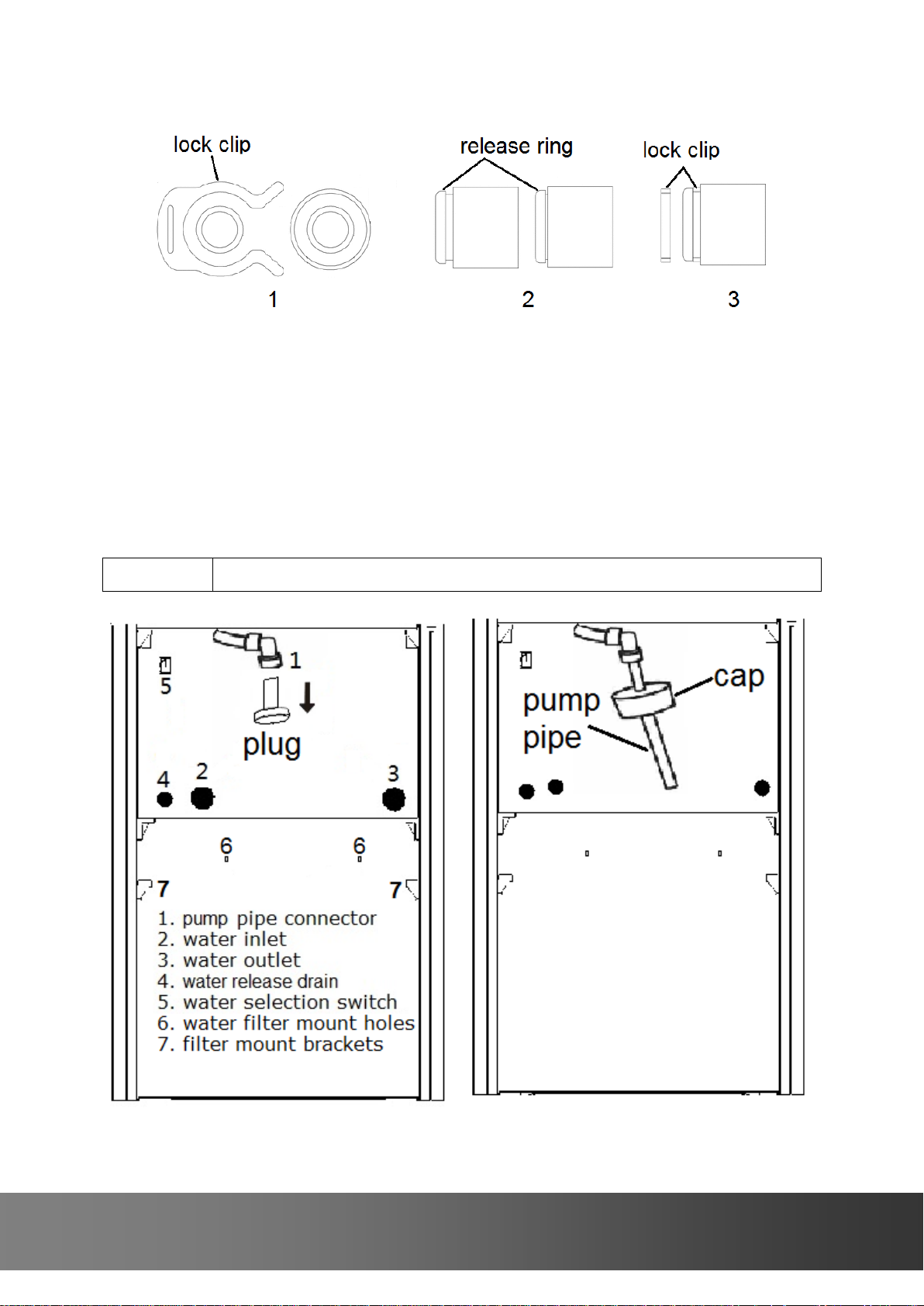
Insert or remove a tube or plug
1. Remove the lock clip first.
2. Push the release ring down then insert or remove a tube or plug.
3. Install the lock clip.
If You Use Bottled Purified Water
Water bottle and pump pipe installation
2 4 4 1 2 M a i n S t . S u i t e 1 0 5 , C a r s o n , C A 907 4 5
Page 6
6
NOTE
A municipal water supply or other potable water with water pressure
between 15 and 120 psig is required to operate this unit. Drain is not
required. Parts are sold separately as the water filter accessories.
Open the storage door more than 90 degrees (close the door after
installation).
Check if the water inlet (2) and outlet (3) are closed with plugs or
connected with tubes. They cannot be open.
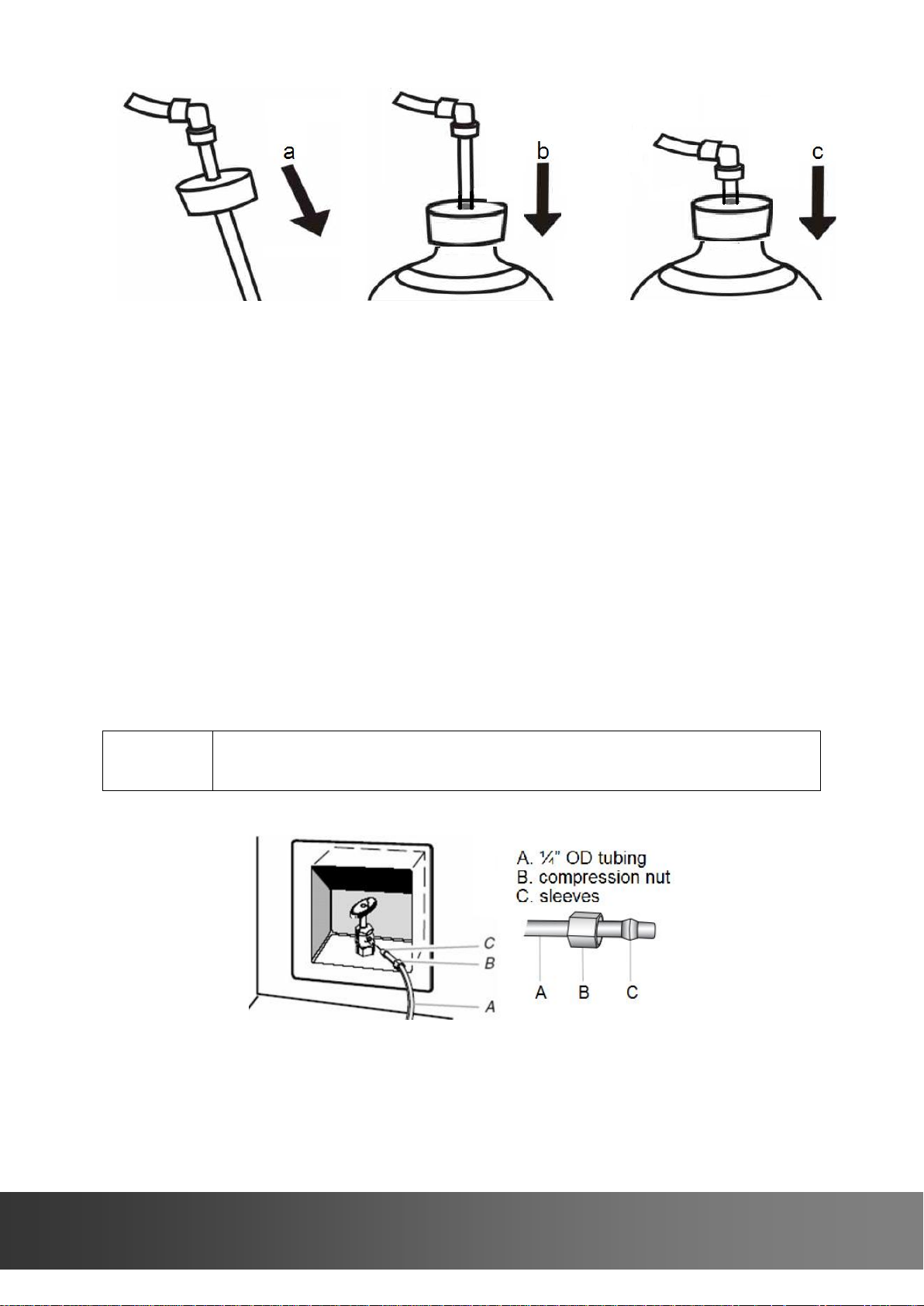
Remove the plug of the pump pipe connector (1).
Insert the pump pipe into the pump pipe connector (1).
Place the bottle onto the loading area.
Use the following steps as described to complete the installation.
a. Hold the pipe connector (1) to insert the pump pipe into the bottle.
b. Place the cap onto the bottle neck tightly
c. Hold the pipe connector and push the pipe until it stops
Turn the water selection switch (5) as indicated to use bottled water
The unit must be unplugged to restart.
If You Use Plumbed Filtered Water
Water line and water filters installation
i n f o @ f l u r i d a . c o m
Page 7
7
NOTE
To get the best quality drinking water, A 4 stage water filter system is
used. Parts are sold separately as the water filter accessories.
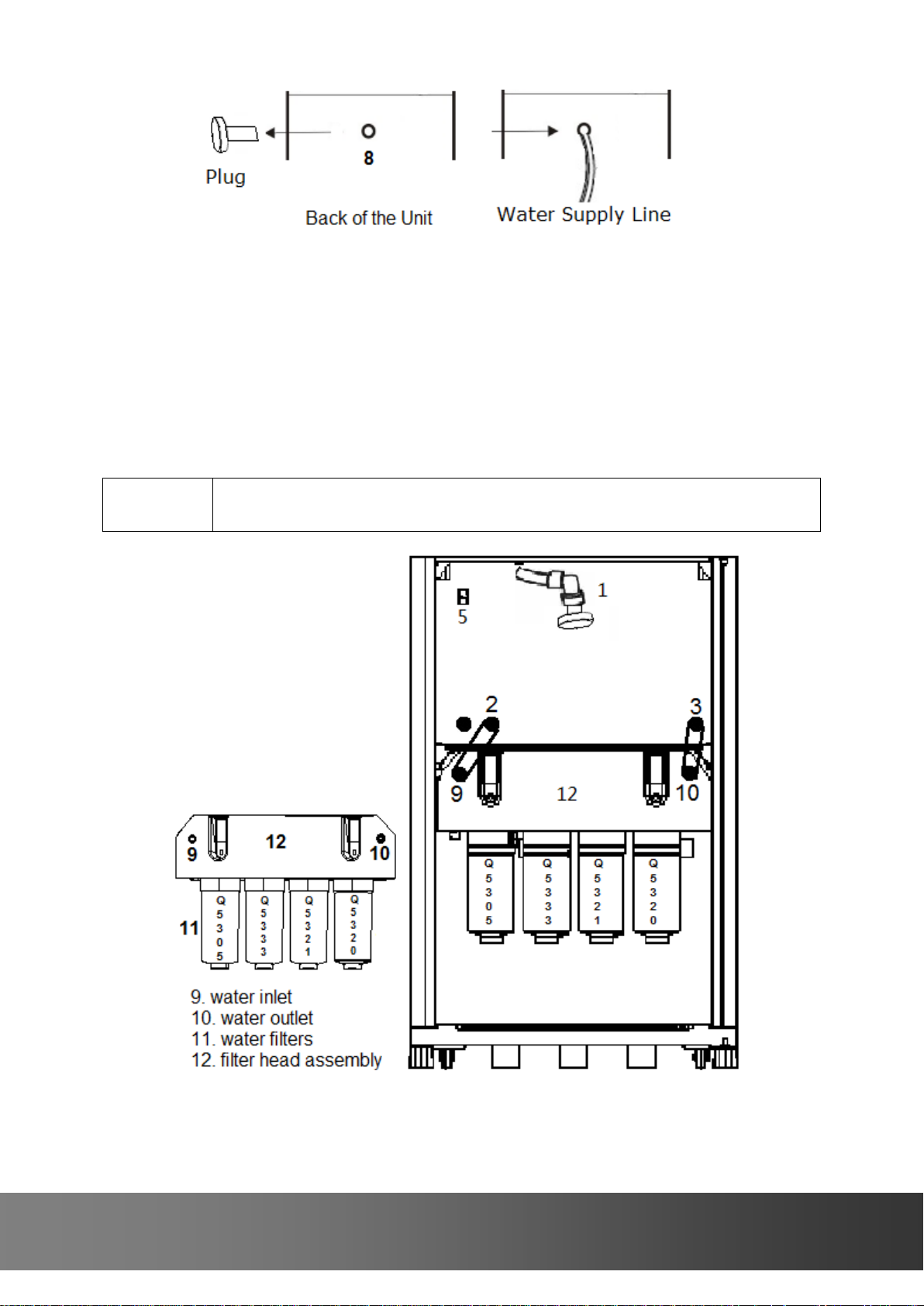
Prepare a water supply line using ¼” OD tubing (A) with a compression
nut (B) and sleeves (C) on one end. Connect the tubing to the shutoff
valve by screwing the compression nut.
Place the free end of the tubing in a container or sink and turn the
shutoff valve on to flush the tubing until water is clear. Then turn the
shutoff valve off.
Remove the plug of the water line connector (8), which is located at the
back of the unit. Insert the free end of the tubing into the water line
connector (8).
Open the storage door more than 90 degrees (close the door after
installation).
2 4 4 1 2 M a i n S t . S u i t e 1 0 5 , C a r s o n , C A 907 4 5
Page 8

8
Check if the pump pipe is disconnected and the pump pipe connector (1)
NOTE
Parts are sold separately as the water filter accessories.
NOTE
Parts are sold separately.
Description
Part No
Quantity
1/4" OD Water Line W/ Compression
Nut & Sleeves
0111700700
1
1/4" OD Filter Line
0111700700
2
Water Filter Head Assembly
0111600840
1
Head Cover (installed at the factory)
0111600850
1
#8-32 Mounting Screw
50094010 2 Upper Shelf
0122001100 1 Lower Shelf
0122001200 1 Door Bin
0111001000
2
Water Filter Q5305
0182000000
1
Water Filter Q5333
0182000100
1
Water Filter Q5321
0182000200
1
Water Filter Q5320
0182000300
1
is closed with a plug.
Remove the plugs of the water inlet (2) and outlet (3).
Remove the plugs of the water inlet (9) and outlet (10) on the filter head
assembly.
Place the water filter head assembly (12) on the side brackets, then
mount it to the holes (6) using two #8 screws provided. Head cover is
already installed at the factory.
Connect the two water inlets (2 & 9) using ¼” OD tubing provided.
Connect the two water outlets (3 & 10) using ¼” OD tubing provided.
Turn the shutoff valve on and make sure there are no water leaks.
Turn the water selection switch (5) as indicated to use plumbed water.
The unit must be unplugged to restart.
Door bin and glass shelf installation
Install 2 door bins and 2 glass shelves on the storage door and
compartment.
Water filter accessories
i n f o @ f l u r i d a . c o m
Page 9

9
FEATURES & SPECIFICATIONS
Overview
This is a great appliance to help you prepare cold beverages and drinks, or
make hot teas and chocolates. The FDFB10501 ice and water dispenser is an
innovative design that combines cubed and crushed ice with hot and roomtemperature water in a single compact product. The freezer keeps ice cubes
cold, not melting and available anytime. The dual bottled purified or plumbed
filtered water system creates the flexibility to place it anywhere in the office,
break room, hotel, home, boat or RV. Stainless look doors with silver accents
give a modern look and sleek design.
Features and Parts
1. Freezer Door
2. Ice Maker (located inside)
3. Ice Bin (located inside)
4. Control Panel
5. Ice and Water Dispenser
2 4 4 1 2 M a i n S t . S u i t e 1 0 5 , C a r s o n , C A 907 4 5
Page 10

10
6. LED light
Model No
FDFB10501
Ice Type
Cubed and Crushed
Ice Production Rate
Crescent Ice 11 lb / 24 h
Ice Bin Capacity
10 lb
Water Type
Hot and Room-Temperature
Hot Water Temperature
190 °F
Hot Water Capacity
2 L
Ambient Temperature
50~90 °F
Water Supply
Bottled Purified Water or
Plumbed Filtered Water
Storage Capacity
3.5 cu ft
Electrical Rating
115V/60HZ/5.6A
Unit Dimensions
18 1/8”W x 20 1/8”D x 58 5/8”H
Depth w/o Door
18 3/16”
Depth w/ Door Open 90 Degree
37”
Height w/o Top Hinge
58 1/4”
Net Weight
120 lb
7. Storage Door
8. Back Cover
9. Water Line Connector
10. Power Cord
The dispenser allows you to enjoy cubed or crushed ice and hot or room-
temperature water with the touch of a button.
The two-evaporator cooling system and the ice freezer keep ice from
melting and produce ice quicker and colder.
The dual water supply design makes it perfect for all applications. Bottled
purified water or our four stage water filtration system provides you with
clean and great tasting water.
Stainless look doors with silver accents give a modern look and sleek design.
Touch control brings you the simplicity to select and dispense your
preferred types of ice and water.
Blue display and bright LED lights make it easy to use anytime and
attractive to display anyplace.
On/Off buttons saves energy and gives you the flexibility whether to use ice
and hot water.
Automatic alerts for bottles and filters guarantee it never runs out of water
and never leaves water contaminated.
Child safety design protects your children from burning and scalding.
Specifications and Dimensions
i n f o @ f l u r i d a . c o m
Page 11

11
DISPENSER & CONTROL USE
DANGER
Hot water can scald your hands and body and cause serious injury.
CAUTION
Do not store food and drink in the ice freezer and bin.
NOTE
Allow 24 hours to produce the first batch of ice. Discard the first
three batches of ice produced for the first time use.
NOTE
For the first time use or after connecting a plumbed water source or
after replacing the water filters, flush the water system by
dispensing several cups of water, then discarding them. Do this
until water is clear.
NOTE
Dispensing button will be stopped automatically when it has been
pressed for more than 20 seconds.
Do not press buttons hard.
Button and Indicator Functions
Water heater indicator
Low water level indicator
Hot water temperature display
2 4 4 1 2 M a i n S t . S u i t e 1 0 5 , C a r s o n , C A 907 4 5
Page 12

12
Use of the dispenser
NOTE
Normally the hot water function should be turned off to save
energy.
Once the unit is powered, the ice and hot water functions will be turned
on and “ON” green LEDs will light accordingly.
When bottled water is used, the water pump works immediately to pump
water from the bottle to the water tank. When plumbed water is used,
the water valve opens immediately to let water flow into the water tank.
Once the water tank is full, the ice maker and water heater will start
working immediately. If the water tank is not filled full within 4 minutes,
the “Low” indicator will light, and then the water pump or water valve,
water heater, ice maker and water dispenser will stop working.
While the water heater is on, the “Heating” indicator will stay on and the
water temperature will be displayed.
The cooling system will start working in 5 minutes. The cooling system
will stop working automatically when ice is being ejected.
Turning the ice maker on/off
Ice maker function button
Press the “Ice” button once to turn the ice maker off and the “OFF” red
LED will light; press the button again to turn it on and the “ON” green
LED will light.
Turning the hot water function on/off
Hot water function button
Press the “Hot” button once to turn the hot water off and the “OFF” red
LED will light; press the button again to turn it on and the “ON” green
LED will light.
Using the temperature display, you can turn on the water heater when
you need it or turn it off when you don’t.
i n f o @ f l u r i d a . c o m
Page 13

13
Turning the light on/off
NOTE
When the “Low” indicator is lit: check water selection switch; if
bottled water is used, check if the water bottle is empty or the water
pump is broken; if plumbed water is used, check if the water supply
line is broken or the water valve is defective; check all water tubes;
then press and hold “Lamp/Reset” button for 3 seconds to activate the
water pump and wait until “Low” indicator turns off.
NOTE
If the “Hot” button is pressed without unlocking, continuous short
beep sounds will be heard. The “Hot” button will be locked
automatically when it has been pressed for more than 20 seconds or
once the button is released.
NOTE
Ice dispenser will stop working while the freezer door is open.
If ice cubes haven’t been used for days, they may freeze together
and unable to dispense. If this happens, pull out the ice bin and
shake it, then push it in.
Lamp & Reset button
Press the “Lamp/Reset” button once to turn the light on. The light will
automatically turn off in 5 minutes; press the button again to turn it off.
Dispensing Water
Dispensing Hot Water
Hot water dispensing button
Hot water unlocking button
Place a cup under the water dispenser.
Press the “Hot Water Unlock” button once. You will hear a long beep
indicating the “Hot” button is unlocked.
Then press and hold “Hot” button within 5 seconds to dispense hot water.
Repeat the steps above to dispense more hot water if it is needed.
Dispensing Room-Temperature Water
Room-temperature water dispensing button
Place a cup under the water dispenser.
Press and hold the “Ambient” button to dispense room-temperature
water.
Dispensing Ice
2 4 4 1 2 M a i n S t . S u i t e 1 0 5 , C a r s o n , C A 907 4 5
Page 14

14
Dispensing Cubed Ice
CAUTION
All water filters must be replaced at the same time.
Model No
Q5305
Q5333
Q5321
Q5320
Descriptions
Polypropylene depth
filtration
Reduction of sediment
down to 5 microns
Protection of down
line equipment
AWGAC
Reduction of taste,
odor & chlorine
Post RO
Block GAC
Reduction of taste,
odor & chlorine
Polyphosphate GAC
Reduction of taste,
odor & chlorine
Cyst reduction
Scale inhibitor
Cubed ice dispensing button
Place a cup under the ice dispenser.
Press and hold the “Cubed” button to dispense cubed ice.
Dispensing Crushed Ice
Crushed ice dispensing button
Place a cup under the ice dispenser.
Press and hold the “Crushed” button to dispense crushed ice.
Replacing Water Bottle
When the “Low” indicator is lit, water dispensing valves and water pump
will stop working automatically.
Check if the water bottle is empty, then replace it.
After a new bottle has been installed, press and hold “Lamp/Reset”
button for 3 seconds, a long beep will sound to activate the water pump.
The “Low” indicator will turn off automatically once the water tank is full.
Replacing Water Filters
When “FLr” is blinking, replace the water filters immediately. The filters
should be replaced at least once a year.
Open the storage door to access the filters.
The water filters Q5305, Q5333, Q5321 and Q5320 are installed from
left to right.
Turn the filter counter-clockwise to remove (a small amount of water
may leak); to reinstall turn the filter clockwise until it stops.
Reset the “FLr” display by pressing and holding “Lamp/Reset” button for
3 seconds, a long beep will sound.
Dispense several cups of water to flush the system until water is clear.
i n f o @ f l u r i d a . c o m
Page 15

15
DISPENSER CARE
DANGER
Unplug the unit or disconnect power before performing any
maintenance.
CAUTION
If ice cubes block the feeler arm, clear the ice cubes before pull out the
ice bin. Move the feeler arm up and keep it above the ice bin. Otherwise
the feeler arm may be damaged if it is obstructed by the ice bin.
While away from your place
Turn off the ice maker and hot water functions or unplug the unit.
Empty the ice bin completely.
Let the freezer defrost and dry.
Release the remaining water.
Emptying Ice Bin
Use the instructions below to remove the ice bin when emptying ice or
cleaning the ice bin.
2 4 4 1 2 M a i n S t . S u i t e 1 0 5 , C a r s o n , C A 907 4 5
Page 16

16
Push the ice bin back until the auger is engaged in the auger coupler. If
it is stuck, rotate the auger 1/8 turn, then push it in again.
Releasing water
Use the water release drain located in the storage compartment to
release the water left in the unit.
Removing Condensate
The unit is operated with automatic defrost cycle. The water collects in a
water tray that is located at the compressor compartment. Normally, the
water evaporates by the hot gas tubing.
In very high humidity conditions, empty water if the tray is full.
Manually defrosting
If heavy frost builds up in the ice freezer
Unplug the unit.
Remove the ice bin.
Use a hair dryer with warm or cold air to melt frost.
Wipe up water and dry the freezer.
Put the ice bin back.
Plug in the unit.
Normal Operating Sounds
You may hear a boiling, rattling or gurgling sound produced by flow of
refrigerant through the evaporator.
You may hear air being forced through the unit by the evaporator fan.
You may hear air being forced through the condenser by the condenser
fan.
You may hear a clicking sound produced by the refrigerant valve and
dispensing valve.
You may hear a water dripping sound during automatic defrost cycle.
You may hear a high pitched hum or pulsating sound produced by the
compressor.
i n f o @ f l u r i d a . c o m
Page 17

17
TROUBLESHOOTINGS
Complaint
Possible Causes
Response
Unit is not
working and
display is not
lit
a. Power cord is unplugged
b. No power
c. Power cord wiring
d. Control PCB is defective or
wiring problems
e. Display PCB is defective or
wiring problems
a. Plug in the power cord
b. Check for outlet and breaker or
fuse
c. Call for service
d. Call for service
e. Call for service
“Low”
indicator is lit
(to reactivate
the water
pump, press
and hold
“Lamp/Reset”
button for 3
seconds)
a. The water selection switch
is not set correctly
b. The water bottle is empty
c. The plumbed water supply
line is broken
d. The water tank is being
refilled and not full yet
e. Water tubes are kinked or
broken
f. The water pump or water
valve is broken or wiring
problems
a. Make sure if it is bottled or
plumbed water supply
b. Change it
c. Fix it
d. Reactivate the water pump and
wait until “Low” indicator turns off
e. Straighten or change them
f. Call for service
Ice maker is
not producing
ice
a. The ice maker is not
turned on
b. Ice cubes are jammed
c. The water selection switch
is not set correctly
d. Water tubes are kinked
and the ice mould is not
filled with water
e. The water fill tube freezes
f. The water filters are
clogged
g. The ice maker water pump
is broken or wiring
problems
h. The ice maker is not
working or wiring problems
i. Cooling system is not
working
a. Turn the ice maker on
b. Clear the ice cubes
c. Check if it is bottled or plumbed
water
d. Straighten them
e. Unplug the unit and remove the
ice bin;plug in again until the
tube is free of ice.
f. Remove the water filters and
check if ice quality improves
g. Call for service
h. Call for service
i. Call for service
Ice maker is
not producing
enough ice
a. The water supply line is
kinked and the ice mould is
not filled with sufficient
water
b. Water filters are clogged
c. The freezer door is not
sealed
d. The ice maker is not
a. Straighten it
b. Remove the water filters and
check if ice quality improves
c. Check for door seal and door
opening
d. Call for service
2 4 4 1 2 M a i n S t . S u i t e 1 0 5 , C a r s o n , C A 907 4 5
Page 18

18
working properly
e. Cooling system is not
working properly
e. Call for service
Ice cubes are
hollow or small
a. The water shutoff valve is
not fully open
b. The water line is kinked
c. Water filters are clogged
d. Water fill time is not
enough
e. The ice maker thermostat
is defective
a. Turn the valve fully open
b. Straighten it
c. Remove the water filters and
check if ice quality improves
d. Call for service
e. Call for service
Ice cubes are
frozen together
a. If ice cubes haven’t been
used for a long period of
time, they may freeze
together
b. Ice cubes are produced
continuously because the
feeler arm is blocked up
c. The ice mould is overfilled
because undersized ice
cubes are left
a. Pull out the ice bin and shake it
b. Clear ice cubes around the feeler
arm
c. Improve water pressure
Crushed ice is
not dispensed
a. There are not enough ice
cubes in the ice bin
b. Ice cubes are frozen
together on one side of ice
bin
c. The freezer door is open
d. The magnetic switch is
defective
e. The auger motor is broken
f. The flapper motor is
broken or wiring problems
g. Control PCB is defective or
wiring
h. Display PCB is defective or
wiring problems
a. see Ice maker is not producing
ice & Ice maker is not
producing enough ice
b. Pull out the ice bin and shake it
c. Close it
d. Replace it
e. Call for service
f. Call for service
g. Call for service
h. Call for service
Cubed ice is
not dispensed
a. The solenoid is defective
a. Call for service
Hot water is
not hot
a. The hot water function is
not turned on
b. The water heater stops
working when “Low”
indicator is lit
c. The water heater is broken
d. The Thermostat is
defective
a. Turn the hot water function on
b. See “Low” indicator is lit
c. Call for service
d. Call for service
Hot water is
not hot enough
a. The thermostat is defective
a. Call for service
Hot water
heater smells
burning
a. The hot water tank is dry
a. Call for service
Water
a. Water dispensing valve is
a. See “Low” indicator is lit
i n f o @ f l u r i d a . c o m
Page 19

19
dispenser is
not working
automatically closed when
“Low” indicator is lighting
b. Water selection switch is
not selected correctly
c. Water tubes are kinked
d. The hot or room
temperature water
dispensing valve is broken
e. Control or display PCB is
defective or wiring
problems
b. Check if it is bottled or plumbed
water
c. Straighten them
d. Call service
e. Call service
Water is
leaking
a. The dispenser drip tray is
full
b. Ice is being melted
because of high freezer
temperature
c. The water tank is leaking
d. Water tank level sensor is
defective
e. The hot or room
temperature water
dispensing valve is broken
a. Empty it
b. Check evaporator fan or wiring
c. Call for service
d. Call for service
e. Call for service
Both freezer
and ice maker
evaporators
are iced
a. The defrost solenoid valve
is broken or wiring
problems
b. The defrost drip tray
heater is broken or wiring
c. Evaporator fan is broken
a. Call for service
b. Call for service
c. Call for service
Freezer
evaporator is
iced
a. The defrost solenoid valve
is broken or wiring
problems
a. Call for service
2 4 4 1 2 M a i n S t . S u i t e 1 0 5 , C a r s o n , C A 907 4 5
Page 20

20
SERVICE & IMPORTANT NOTICE
The manufacturer has a policy of continuous improvement on its products and
reserves the right to change materials and specifications without notice.
Contact us with any questions at 1-310-5130888 or info@flurida.com
Or visit 24412 Main St. Suite 105 Carson, CA 90745 and www.flurida.com
FD is a registered trademark of Flurida Group Inc. All products, features, and services are subject to
change without notice. We cannot guarantee the accuracy of the contents of this document. We disclaim
liability for errors, omissions, or future changes.
Copyright©2015 Flurida Group Inc. All rights reserved.
i n f o @ f l u r i d a . c o m
Page 21

21
TERMS OF SALE AND WARRANTY:
Flurida Group Inc. (“Seller”) and the person or entity that acquires these goods from Seller (“Purchaser”) hereby fully
agrees to the following terms and conditions of the sale: Shipping fees are the responsibility of the Purchaser whether
freight prepaid or freight collect. Seller assumes no responsibility for the goods sold to the Purchaser once the goods
have left the Seller’s premises, including, but not limited to, late delivery by the moving carrier, or for events caused
by any difficulty carrier incurs in attempting to fit the goods into the Purchaser’s place of business or residence due to
the size of the goods or otherwise. Purchaser assumes all responsibility for delivery, payment of freight, access,
measurement, installation, hook-up, wiring, moving and storage of the goods. The transportation of all goods is
subject to the terms and conditions which the moving carrier imposes on Purchaser including, but not limited to,
additional charges imposed per flight of stairs, and/or additional charges resulting from the carrier’s inability to safely
and/or adequately use the building elevator to lift the goods to an upper floor. Any claim for damages incurred during
shipment by the carrier of the goods are insured and handled directly with the carrier. Any damages due to
manufacture defects will be handled directly with Flurida Group Inc., subject to the limited warranty.
All sales are final, and unless authorized in writing by the Seller, Purchaser may not return the goods, under any
circumstance. If Purchaser refuses to accept the goods, under any circumstance, the Purchaser is liable for the return
and cost of freight both ways, and if Seller does take back the goods, there will be a restocking charge that is 30% of
the purchase price of the goods. Purchaser must notify Seller of non-conforming goods within four days of delivery,
after which time all goods are deemed accepted. If an order has been placed and production has started, cancellation
of your order will be a 15% charge.
If Purchaser tenders payment with a check that has insufficient funds (NSF), or stops payment on a check or credit
card for any reason, Purchaser agrees to pay for all costs associated with the Seller’s connection or litigation of such a
claim, including without limitation extra damages, court costs and attorneys’ fees. Finance charges begin the date of
invoice. Collection fees plus NSF fee of $50 will be added to your invoice, which you agree to promptly pay. Title to
the goods does not pass until payment is received in full by Seller and Seller retains a security interest in the goods
until they are paid for in full.
LIMITED WARRANTY: Seller warrants that the goods will be free of defects in materials and workmanship for a
period of 12 (twelve) months from date of sale, removal and re-installation of unit is not included in warranted labour.
For a scratch and dent or refurbished unit, warranty is 3 months from your dated invoice (parts for function only, not
cosmetic). There is no warranty on parts purchased separately. Purchaser’s exclusive remedy is limited, at Seller’s
option; to repair or replace defective part[s] with either new or factory reconditioned part[s]. Purchaser is responsible
for shipping the unit pre-paid to designated facility and Seller will pay return shipping charges in the continental
United States for items repaired under warranty within 12 (twelve) months from date of sale. Improper placement of
the unit will void the warranty. This limited warranty does not cover damage due to such things as accident, misuse,
abuse, mishandling, neglect, acts of God, fires, earthquakes, floods, high winds, government, war, riot or labour
trouble, strikes, lockouts, delay of carrier, unauthorized repair, or any other cause beyond the control of the Seller,
whether similar or dissimilar to the foregoing. Seller is not responsible for any damages caused to Seller’s property
resulting from the good. This limited warranty applies only inside the Continental US. (Alaska, Puerto Rico and Hawaii
are not warranted.)
Seller is not responsible for incidental or consequential damages, and there are no warranties, expressed or implied,
which extend beyond the Limited Warranty described above. The implied warranties of merchantability and of fitness
for a particular purpose are hereby expressly disclaimed. Some states do not allow the exclusion of incidental or
consequential damages, or a waiver of the implied warranties of fitness and/or merchantability, so the above
limitations may not apply to you. This warranty gives you specific legal rights and you may also have other rights
which vary from state to state. In the event of any dispute between Seller and Purchaser arising out of or relating to
these terms and conditions or to the goods sold generally, Purchaser must first file a written claim with Seller within
ten days of the occurrence giving rise to the claim and wait an additional thirty days for a response before initiating
any legal action. The sale and all terms are subject to Nevada law. Any legal proceeding arising out of or relating to
these terms and conditions or to the goods sold generally shall be brought solely and exclusively in the City of Las
Vegas. In no event may Purchaser initiate any legal proceeding more than six months after the occurrence of the
event giving rise to the dispute.
The above terms and conditions are the only ones governing this transaction and Seller makes no oral representations
of any kind. These Terms and Conditions can only be modified in writing, signed by both Purchaser and Seller.
2 4 4 1 2 M a i n S t . S u i t e 1 0 5 , C a r s o n , C A 907 4 5
 Loading...