

Page 1
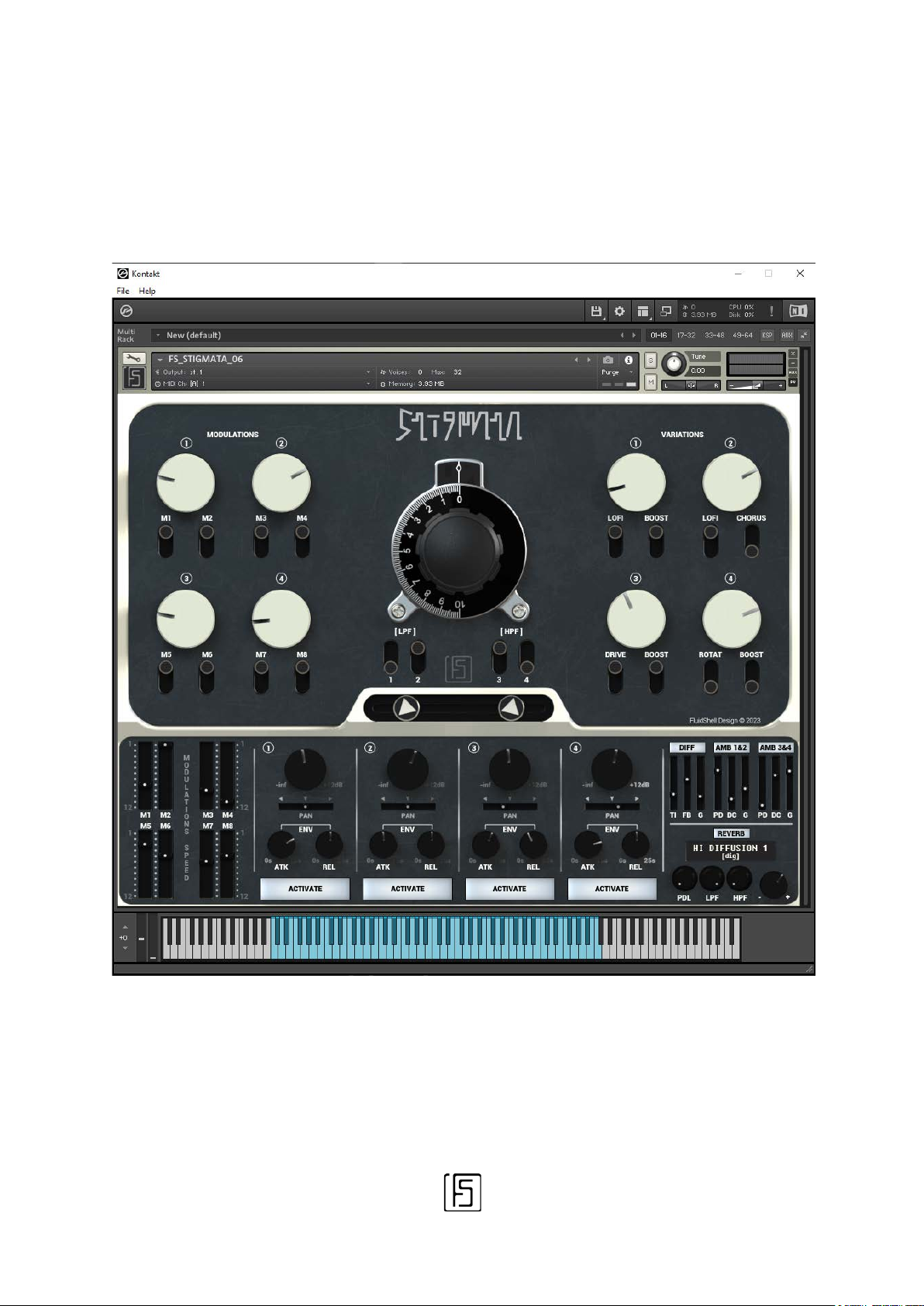
STIGMATA
User Manual [EN]
1
STIGMATA 1.0 | © FLUIDSHELL DESIGN 2023
Page 2

Welcome !
Thank you for purchasing STIGMATA. We hope you will enjoy using this instrument
and find it inspiring.
STIGMATA is a software synthesizer combining two forms of synthesis: sample
playback and wavetables. It was designed as a generator of both melodic and noisy
soundscapes for all your musical creations and sound illustration projects.
Many Kontakt instruments offer this kind of combinations that are often associated
with "Ambient" music. What makes our proposal different is that it is meant to be
simple, without being completely "turnkey".
STIGMATA is not a bank of prefabricated samples. Its modulation capacities, its
complex filtering network and its specifically adjusted processing make it a fullyfledged instrument.
Once the desired sound has been obtained, STIGMATA allows you to modify it in real
time using a few controls chosen by you, via a MIDI controller or the automations of
your sequencer. By assigning even the big central rotary controller to a
potentiometer on your MIDI controller or to a modulation wheel, you can modify the
presence of the 4 sources at will.
It's not just a regular low pass filter, it's a set of filters that work in sync.
Speaking of synchronization, you should know that the modulations of the
STIGMATA automatically follow the tempo of your sequencer.
Now you know almost enough to start using it. But nothing prevents you from
continuing to read this manual…
2
STIGMATA 1.0 | © FLUIDSHELL DESIGN 2023
Page 3
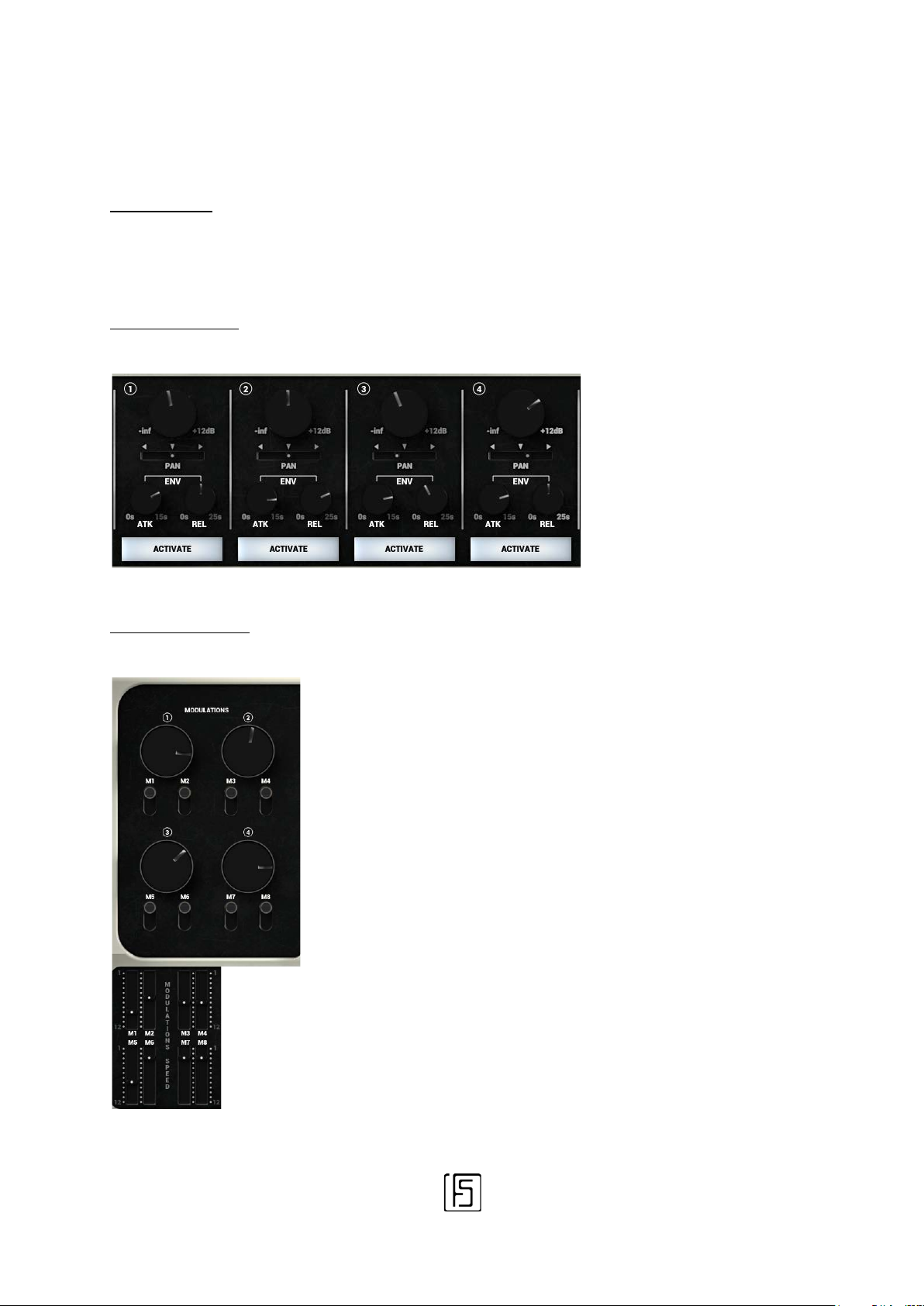
This part of the interface
This part of the interface lets you control
Architecture
STIGMATA includes 5 groups of functions.
1/ The SOURCES
2/ MODULATIONS
gives access to the global
functions of each Source:
Gain, Panoramic (PAN),
Envelope (ENV),
Activation/Deactivation of
the Source (Activate).
everything related to the temporal changes
of the Sources.
The rotary knobs control the amount of
modulation, the vertical switches determine
whether the modulation is active or not, the
vertical sliders below adjust the speed with
which a modulation operates.
STIGMATA 1.0 | © FLUIDSHELL DESIGN 2023
3
Page 4
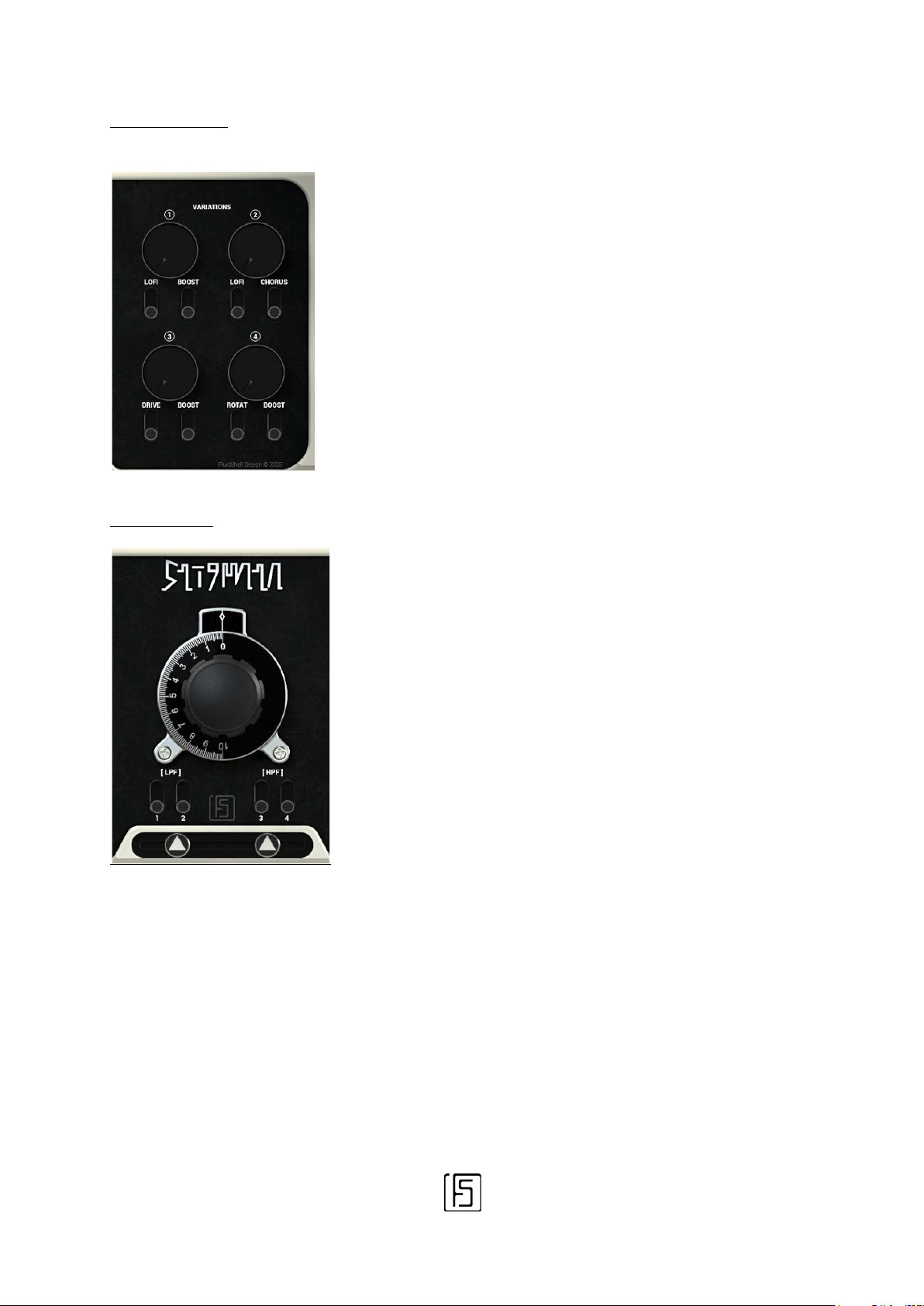
3/ VARIATIONS
This central portion of the interface is where
These are the specific treatments for each
source: reduction of the sampling quality,
chorus, overdrive, boost, etc.
4/ FILTERING
By clicking on the “FS” logo, you will activate the ‘EASY MIX’ function.
This function makes it possible to give more thickness to the instrument so that it takes
more space in a composition. If you want to make adjustments that are either more precise
or simply more in line with your tastes, it is advised not to activate it.
‘EASY MIX’ is active when the logo is brighter.
the various combined filters operate.
The central rotary allows you to modify the
frequency. Each Source has a combination
of filters and all are driven by this rotary.
In addition to the combined filters, it is
possible to activate a final filter separately
for each Source: two LPFs for Sources 1 & 2,
two HPFs for sources 3 & 4.
The horizontal strip, containing two disks
with white triangles, is used to determine
the stereo width of the output.
4
STIGMATA 1.0 | © FLUIDSHELL DESIGN 2023
Page 5
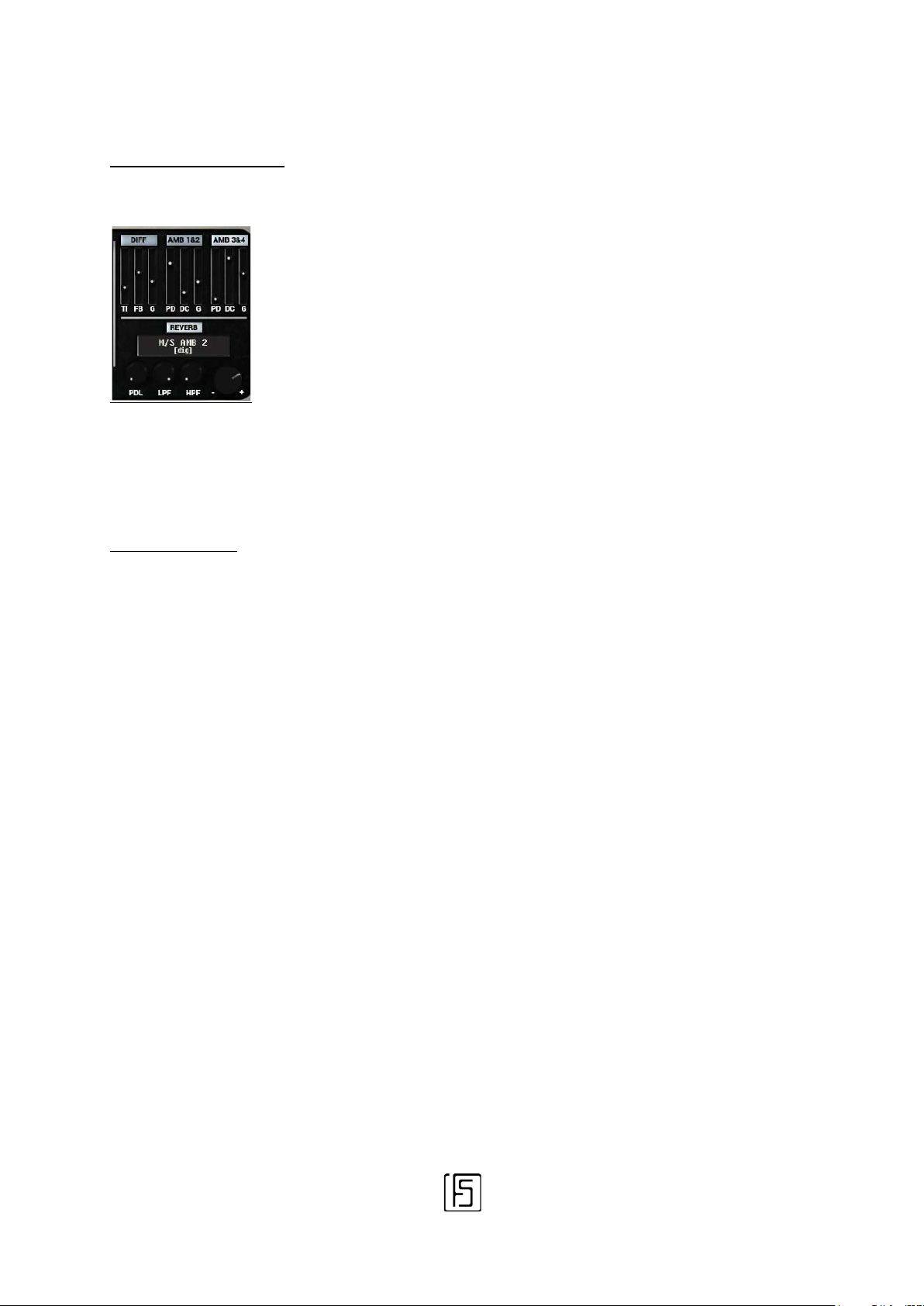
These effects play an important role in the
5/ REVERBS & DELAYS
presence of STIGMATA in a musical
composition.
The DIFFUSION effect is common to all
Sources. AMBIENCE 1&2 is assigned to
Sources 1&2, AMBIENCE 2&3 only applies to
Sources 2&3.
REVERB applies to all Sources after they are
mixed. This reverb works with IR files
specifically designed for the STIGMATA.
Basic concepts
STIGMATA is an instrument with 4 simultaneous sources. These 4 sources are capable of
producing sounds that evolve over time thanks to modulations.
Each source has classic controls:
- Source volume
- Panoramic (PAN)
- Envelope (ENV), with attack and release parameters (ATK & REL)
- Activation/Deactivation of the source (ACTIVATE)
MODULATIONS can be used on top of these controls in order to make the sound fluctuate.
As a general rule, two parameters are used for each modulation: one of them controls the
speed of the modulation, and the other its dosage. The parameters in STIGMATA are
grouped into MACROS, i.e. a single visible adjustment will modify a predefined number of
grouped parameters.
This choice was made so as to avoid cluttering the graphical interface.
5
STIGMATA 1.0 | © FLUIDSHELL DESIGN 2023
Page 6

For example, Modulation 1 at the top left of the interface is used to set the two modulations
M1 and M2 that can be activated using the vertical switches below. The speed of M1 and
M2 can be adjusted using the vertical sliders located below, on the left side.
Please note that the values of the vertical sliders are reversed. Indeed, these are temporal
subdivisions: 12 represents 12 x time base, while 1 is 1 x time base.
12 is therefore a “slow” period while 1 is a “fast” period.
In addition to the MACROS that are used to drive Modulations, STIGMATA uses other
MACROS to adjust the behavior for each source.
These macros are grouped at the top right in the VARIATIONS category.
In each STIGMATA instrument, sources have been selected to fulfill at least one role in the
soundscape. This is why you will always find 4 sources with identical VARIATIONS from one
STIGMATA instrument to another.
Since VARIATIONS are macro-based, their use is very simple.
For example, for source 3, there are two vertical switches: LO-FI and CHORUS. When the
LO-FI switch is in the upper position, the variation is active and can be measured using the
large rotary adjustment knob. For instance, turning the rotary adjustment to the left will
increase the variation. If you now activate the CHORUS, it will intensify when the knob is
pushed to the right. If both VARIATIONS are active at the same time, the knob controls both
at the same time.
In depth
Some VARIATIONS are fixed. This is the case with BOOST.
This variation is a little special because it acts on the volume of the source, but also on its
thickness. This VARIATION was designed specifically to highlight the designated source,
and must be used in conjunction with the source volume control. This choice was made to
avoid saturating the instrument.
6
STIGMATA 1.0 | © FLUIDSHELL DESIGN 2023
Page 7

Let's take a closer look at the VARIATIONS of the other sources.
Source 1 has two vertical switches: LO-FI and BOOST.
Unlike the LO-FI of source 2, this variation is used to measure the amount of noise present
in source 1. Once the variation is active, it is possible to obtain more or less noise since the
sound degradation of track 1 is predefined.
For the second VARIATION, source 1 is provided with a BOOST. Similar to Sources 3 and 4,
BOOST is a preset “thickening” of the sound and should be used with the Source 1 volume
control.
Source 3 is slightly more complex.
Although BOOST works exactly as described above, the DRIVE variation reacts to the rotary
knob normally. It is a distortion of the sound (more like an overdrive). Nothing too strange
so far. Except that source 3 is equipped with a variation that is always active: a combined
filtering (Lowpass + Highpass) whose VARIATION knob permanently controls the frequency
range.
Source 4 is more simple: it comes with a BOOST as described above, and a rotary speaker
effect whose speed and depth are controlled by the adjustment knob.
Right in the middle…
The "play" functions are installed in the center for easy access.
Let's start with a hidden function. Don't worry, it's the only one.
Clicking on the "STIGMATA" logo activates the Sustain.
Some MIDI keyboards and pad controllers do not have a "sustain" function or a pedal. This
function makes it possible to sustain the notes played as long as it is activated.
7
STIGMATA 1.0 | © FLUIDSHELL DESIGN 2023
Page 8
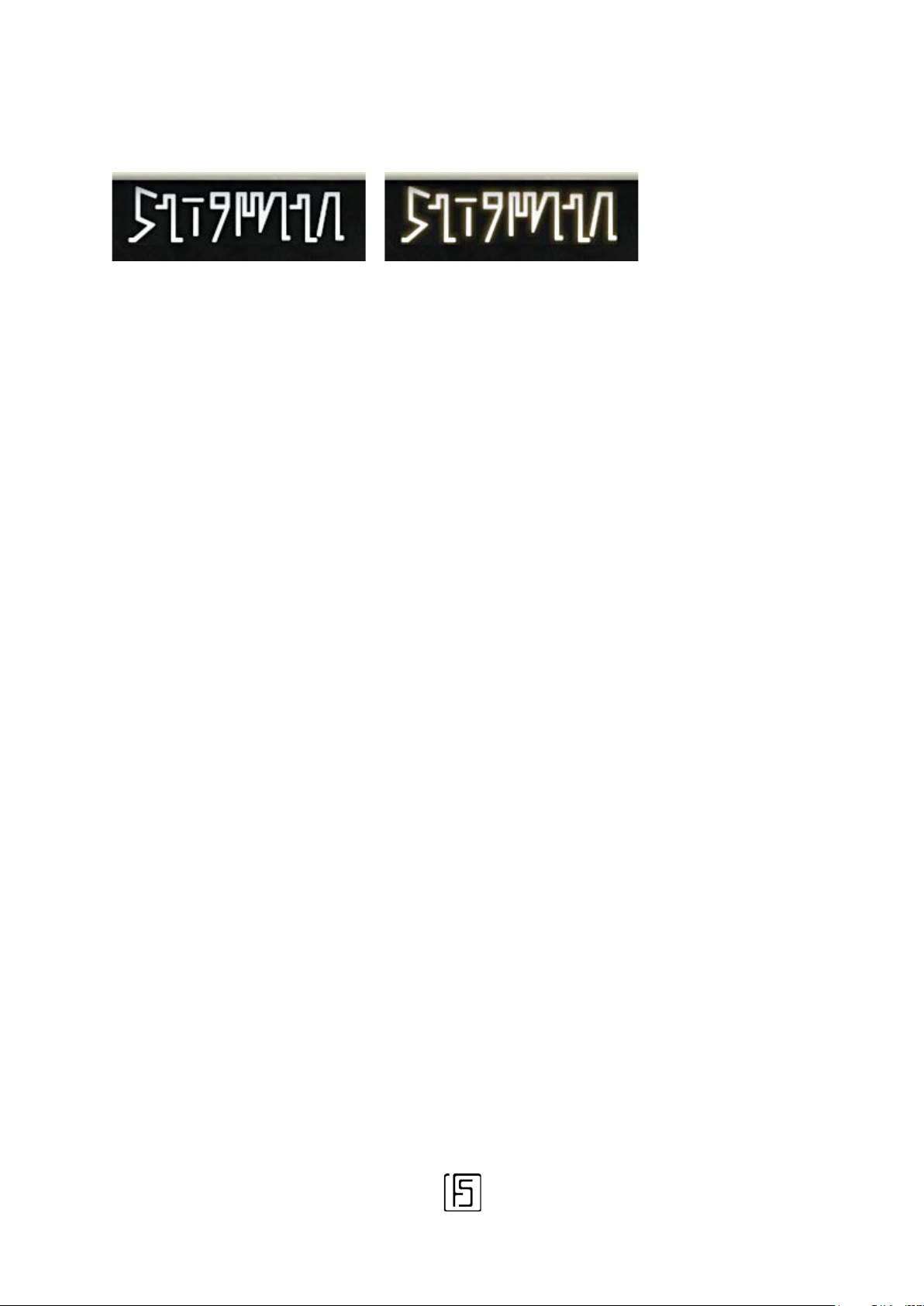
When sustain is active, the STIGMATA logo lights up slightly.
Sustain not active (default)
Sustain active
You can strike a chord and activate the sustain, or activate it first and play the notes as your
composition evolves. The previous notes will remain sustained.
Attention, STIGMATA can require a lot of resources (especially CPU). It is therefore not
recommended to maintain too many notes at the same time. Remember that the STIGMATA
architecture consists of 4 Sources. You don’t have to activate all four of them at the same
time.
By activating the necessary source(s) first, you can both save resources and avoid
cluttering the output.
Using the Sustain function while enabling Sources one by one will allow you to improve the
sound definition.
The activation of a source is not a "mute" function. It is comparable to a radio: when you
turn on the radio, you do not hear the sounds that were emitted previously but only the ones
that reach the antenna after the device is turned on. Activating a Source works the same
way.
Below the STIGMATA logo is the main Filter control.
As described above, STIGMATA uses a network of simple and complex filters to modify the
sound of the instrument in real time. This is a technique often appreciated by musicians
using a modular synthesizer system.
Unlike most synthesizers with a fixed architecture, a modular synthesizer allows you to
connect an almost unlimited number of modules to each other, including filters. Although
this is worth a try and gives access to different-sounding output, it quickly becomes quite
expensive, especially since you have to multiply the number of modules by the number of
notes when you want to play several notes at the same time.
STIGMATA uses this complex filtering principle.
8
STIGMATA 1.0 | © FLUIDSHELL DESIGN 2023
Page 9
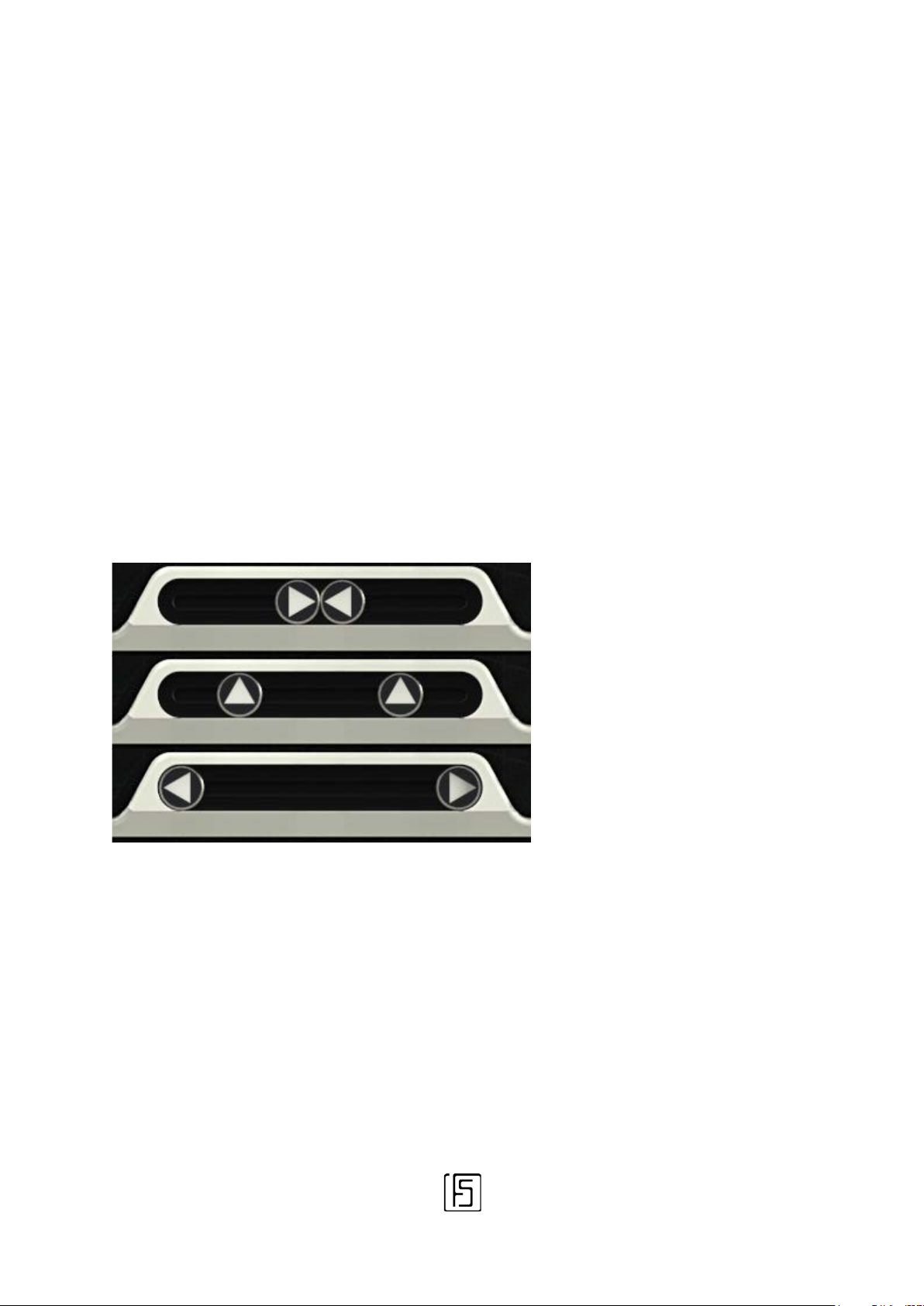
The output sound of the
“Normal” setting.
Maximum: The output sound is
Each Source is equipped with several filters with a fixed resonance and an adjustable
frequency.
The dimmer in the middle allows you to act on the frequency of each filter simultaneously.
The four vertical switches allow additional filters to be activated.
A pair of Low Pass Filters (LPF) for Sources 1 & 2 and a pair of High Pass Filters (HPF) for
Sources 3 & 4 will change the tonal balance of the overall output. Think of it as a mixing
tool. The best way to understand its purpose is to try it out!
The last control in the middle of the interface is the Stereo processor.This progressive
setting allows you to go from a Mono sound to a very wide sound.
STIGMATA is reduced to Mono.
overly wide.
This parameter, together with the effects of the spatial processors (DIFF, AMB1, AMB2 and
REVERB) makes for an incredibly large background. This is precisely what the next section
is about…
9
STIGMATA 1.0 | © FLUIDSHELL DESIGN 2023
Page 10

Dimensional processing
This is probably the subject of a fierce debate between opponents of effects integrated into
instruments and aficionados of the genre.
You will have the freedom to decide as you wish. Yet the STIGMATA has an advanced
spatial effects section specifically selected for it.
First in the order of things is the DIFFUSER or (DIFF).
It is a very long delay, very "lush", very specific also to musical genres such as ambient.
Three settings are available:
TI : Time period between two repetitions
FB : Feedback
G : Gain, effect output volume
The second spatial processing is the dual processor AMBI 1&2 / AMBI 3&4
These are relatively short "plate" reverberations (Plate reverb) that allow for better
placement of the two pairs of sources 1-2 and 3-4 in space. By playing with the available
parameters, it is possible to have a set that is both complex and intelligible. Or not.
PD : PreDelay, amount of time before the reverb hits its maximum depth
DC : Decay, duration of the reverberated sound
G : Gain, effect output volume
Last effect, and not least: the REVERB.
Common to all sources, arriving after all the previous treatments, it is a convolution reverb
using one of the 7 IRs specifically designed for the STIGMATA, e.g. 7 atmospheres
particularly suited to the instrument:
- SPRING, a custom spring reverb, old school
- M/S AMB 1, a reverb created from scratch with a very particular Mid/Side placement
- M/S AMB 2, another complex, bespoke reverb with specific Mid/Side placement
- STAGE LRG, a custom "concert" reverb
- HI DIFFUSION 1, wide, very "digital", still Mid/Side-processed
- HI DIFFUSION 2, two reverbs in one, hybrid
- HI DIFFUSION 3, two reverbs in one, hybrid too, another kind
10
STIGMATA 1.0 | © FLUIDSHELL DESIGN 2023
Page 11

There are also three simple controls, in addition to the reverb type:
PDL: PreDelay, the time before the reverb builds up
LPF: LowPass filter, reduces the amount of treble in the reverb sound
HPF: HighPass filter, reduces the amount of bass in the reverb sound
A Reverb Output Volume control is present. You will notice that it has a maximum value at
0dB in order to avoid saturating the sound of the instrument. So you can push it all the way
without too much fear.
Special Considerations
STIGMATA is an instrument designed with experimentation in mind.
The many accessible modulations, those using randomness, the chosen treatments : all this
makes it possible to obtain sounds between complex pads and special noises. In some
cases it is possible that "glitches" or noises appear. This is completely normal and
intentional. Mod cycles can create clicks, as can envelopes and moving loop points in a
sample.
Despite extensive testing on several computers with different configurations, it is not
possible to certify that STIGMATA will work smoothly on all existing machines, PC and MAC.
In fact, it is even very likely that it can sometimes get stuck.
Yes, STIGMATA can be greedy: some processing like DIFF and convolution REVERB are
quite CPU-intensive. This is why each effect can be bypassed. Also remember that when
you press a note on your keyboard, it can trigger 4 depending on the number of active
Sources. A “small” 3-note chord will play up to 12 if all sources are active.
Depending on the computing power of your machine, you can limit the number of voices in
Kontakt's options, or even use STIGMATA in monophony (a single note) and the 4 Sources
will still play their role. Simply put: if you set long attack times on the envelopes, do not
hesitate to greatly increase the buffer of your audio interface. This will not solve all the
problems, but it can help.
We hope you will enjoy using this instrument!
11
STIGMATA 1.0 | © FLUIDSHELL DESIGN 2023
Page 12

Legal terms
STIGMATA is an instrument designed and developed by FluidShell Design.
FluidShell Design has no relationship or affiliation with Native Instruments.
The Native Instruments brand is only mentioned in this manual because it is the publisher
and owner of the host software, Kontakt.
FluidShell Design uses the technologies of the host software in the context of the creation
of instruments dedicated to this software, according to the terms specific to the Kontakt
user license.
STIGMATA is covered by the laws governing intellectual property, the entire instrument is
concerned.
FluidShell Design does not authorize the reuse of graphic elements, scripts and samples for
the production of third-party software.
Redistribution, paid or free, of this software is prohibited. Any provision not granted by
FluidShell Design of this instrument is contrary to the terms of this user agreement.
The user license granted by these provisions only authorizes the use of the instrument for
the purposes of producing musical works or sound illustrations on all available
supports/media.
12
STIGMATA 1.0 | © FLUIDSHELL DESIGN 2023
 Loading...