

Page 1

This device complies with Part 15 of the FCC Rules. Operation is subject to the
following two conditions: (1) this device may not cause harmful interference, and (2)
this device must accept any interference received, including interference that may
cause undesired operation.
FCC Compliance Statement
Changes or modifications not expressly approved by the party responsible for
compliance could void the user’s authority to operate the equipment.
This equipment has been tested and found to comply with the limits for a Class B
digital device, pursuant to Part 15 of the FCC Rules. These limits are designed to
provide reasonable protection against harmful interference in a residential
installation. This equipment generates, uses and can radiate radio frequency energy
and, if not installed and used in accordance with the instructions, may cause harmful
interference to radio communications. However, there is no guarantee that
interference will not occur in a particular installation.
If this equipment does cause harmful interference to radio or television reception,
which can be determined by turning the equipment off and on, the user is
encouraged to try to correct the interference by one or more of the following
measures:
-- Reorient or relocate the receiving antenna.
-- Increase the separation between the equipment and receiver.
-- Connect the equipment into an outlet on a circuit different from that to which the
receiver is connected.
-- Consult the dealer or an experienced technician for help.
Page 2
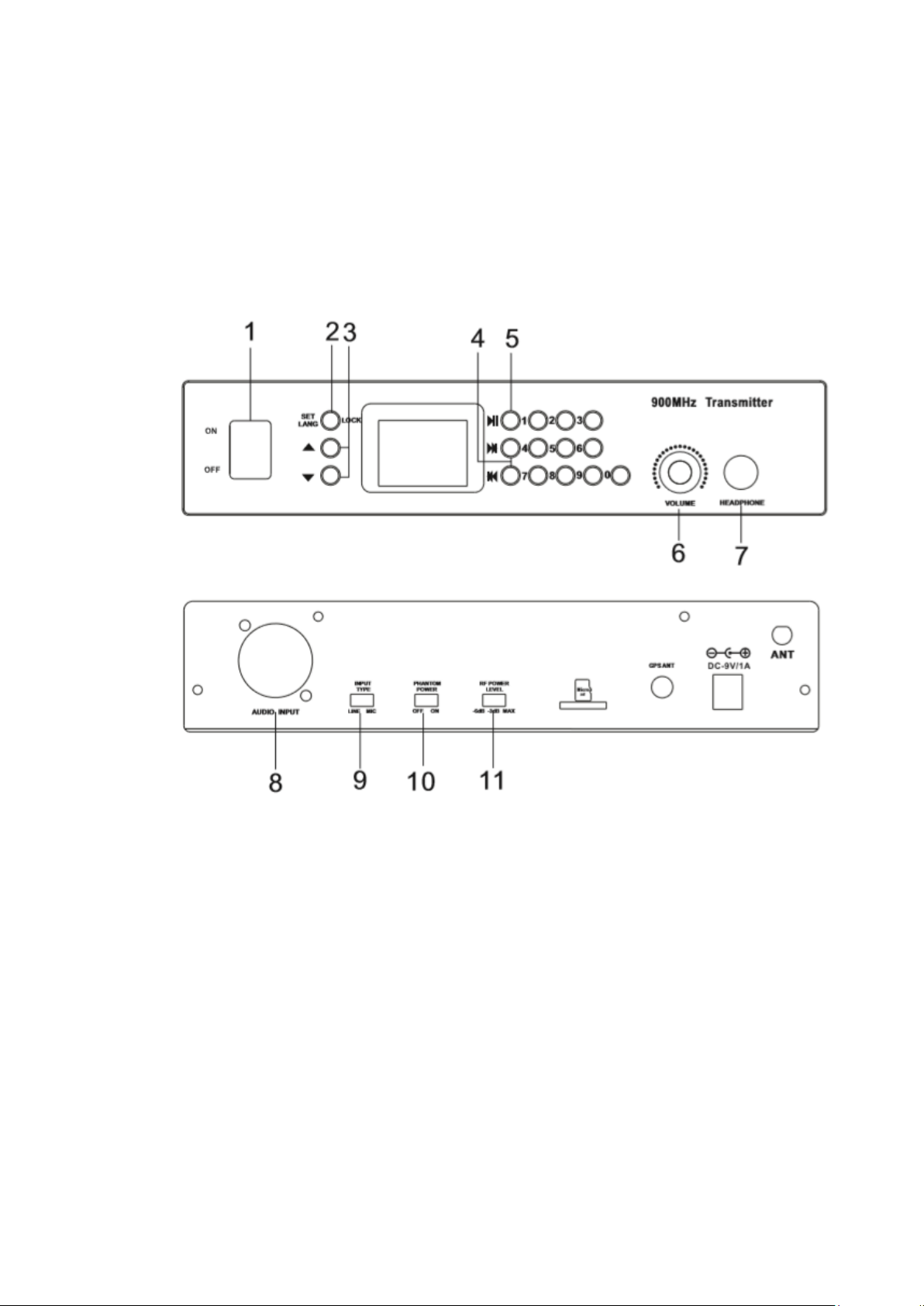
900MHz STATIONARY AUDIO GUIDE TRANSMITTER
Thanks for purchasing our Stationary Audio Guide Transmitter. It allows the user to
transmit the audio wirelessly in a certain range, up to 32G memory capacity for audio
files storage. Connect the audio source to the bal./unbal. Input on the back of the
transmitter. Hook up the antenna to the rear antenna jack. You can monitor the audio
via the headphone jack in front of the panel. Save the GPS stations to free your hands.
1. ON/OFF SWITCH
2. LOCK BUTTON
3. CHANNEL UP/CHANNEL DOWN
4. BACKWARD/FORWARD
5. PLAY/PAUSE
6. VOLUME CONTROL FOR MONITORING
7. HEADPHONE OUTPUT
8. AUDIO INPUT
9. LINE/MIC SWITCH
10. PHANTOM POWER SWITCH
11. RF LEVEL SWITCH
Page 3

OPERATIONS
1. POWER ON
Switch to ON. It takes a few seconds for the transmitter to read the mp3 files. After
reading the mp3 files, the display will show the current mp3 file number then you
may start use the transmitter. In case the GPS is turned on, then it takes 3 to 5
minutes for the GPS to do the positioning (there is a digit 1 ahead of GPS). If there
are stations stored and the transmitter is sitting in one of the station, the display
will show the station number and play the file number that is saved under this
station.
2. NORMAL SETUP (under lock status)
Press the LANGUAGE button to scroll through the language list.
Press the ▲ or ▼button to adjust the mp3 volume (00-16).
Press digits 0-9 to input the mp3 number (001-999).
Press the >II (play/stop) button to play or stop a mp3 file.
Press the>>I or I<<(forward or backward) button to forward or backward.
3. GPS Setup (under unlock status)
Turn on the GPS function on the transmitter in unlock status. Connect the GPS
antenna to the transmitter and make sure that the external GPS antenna receiver
is in the open air (best on top of the boat or buildings).
Press and hold the “LOCK” button and switch on the transmitter. Wait till the GPS
positioning is done, which takes about 3 to 5 minutes. There will be a digit 1 icon
shown on the display right in front of the icon “GPS”, otherwise it is not successful.
To save or rewrite a station needs to receive the GPS signal, erasing the stations
doesn’t need it.
Press digit 7 or 8 to edit station number (max. can save 50 stations, the station
number needs to match the mp3 file number so we need to save the files that need
to be saved in the stations in the number from 001 to 050. If there are more than
50 files in the mp3, for the files that are played manually, we can number it from
051.). Press digit 9 to save or rewrite the current station. There will be “ok” icon
that flashes once on the display.
With the movement of transmitter, the user can save and rewrite other stations (It
will save the latest GPS data if it is rewritten).
To delete stations, press digit 9 to rewrite the station and then press digit 6 to
delete, and there will be “ERASE OK” icon that flashes once on the display after
five seconds.
If you want to delete all stations, press digit 3 to delete, and there will be “ERASE
OK” icon that flashes once on the display after five seconds.
Page 4

Troubleshooting
1) When there is STATIC INTERFERENCE or NO SOUND, please go through the
following procedures to eliminate the problems.
a. Make sure that the transmitter and receiver are set on the same channel.
b. Check whether two transmitters are set at the same channel. Avoid two
transmitters to be on the same channel.
c. Sound level on the line input source may be too high.
2) When a NOISY SOUND occurs, please go through the following procedures to
eliminate the problems.
a. Make sure that the transmitter and receiver are within the distance range.
b. Make sure that the sound level on the transmitter and audio sources are set at
a reasonable level.
c. Try changing the transmitter to a different frequency to see if the sound quality
improves.
In case the problem persists, please consult your dealer or FLUENT AUDIO.
Technical Specifications
Frequency Range: 903MHz – 927MHz
Modulation: GFSK
Audio sampling: 24bit/32KHz up to mp3 file type
Frequency Response: 20Hz-16KHz
SNR: >90dB
THD at 1KHz: <1%
Channels: 25
Channel spacing: 1MHz
Current Draw: 260mA
 Loading...