

Page 1

Fi70
ok
slOo
TIME
on
ok
time
sloo
ok
slOo
TIME
on
ok
time
sloo
slOo
TIME
on
alm
Fm
am
buzz
OR
OR
am
Fm
OR
buzz
am
on
time
on
am
Fm
OR
am
on
ok
slOo
MEM
TIME
on
alm
Fm
am
buzz
OR
OR
am
Fm
OR
ok
mem
alm
buzz
am
on
time
sloo
bt
am
PM
OR
am
ok
slOo
MEM
TIME
on
alm
Fm
am
buzz
OR
OR
am
Fm
OR
ok
mem
alm
buzz
am
on
time
sloo
bt
bt
am
PM
OR
am
Quick Start Guide
1
ASSEMBLING THE STAND
TO THE CABINET
Attach pole to the base
(washers and large screws)
1
POWERING THE UNIT
2
Attach pole to the bracket
(small screws)
2
3
Attach assembled stand to the
cabinet (bolts)
3
Plug power adapter into an outlet and into
1
SETTING UP BLUETOOTH
your cabinet
bt
2
Flip power switch on
Press the
3
button on the remote or cabinet
FLUANCE Fi70
Press the
button until you see “bt” on
the led screen
If you require further assistance please consult the manual: fluance.com/support
Connect to fluance fi70 from your mobile
device’s bluetooth settings
Play music
Page 2

ok
slOo
MEM
TIME
on
alm
Fm
am
buzz
OR
OR
am
Fm
OR
ok
mem
alm
buzz
time
sloo
slOo
TIME
on
alm
Fm
am
buzz
OR
OR
am
Fm
OR
alm
buzz
TIME
on
Fm
am
buzz
OR
OR
am
Fm
OR
buzz
am
on
am
Fm
OR
am
Fi70
Quick Start Guide
OPTIONAL CABLE SET UP
AUX: Mobile devices for music
Optical: To TV
USB: Charging mobile devices
If you require further assistance please consult the manual: fluance.com/support
AM/FM antenna: Radio listening
Page 3
TIME
on
on
ok
slOo
TIME
on
on
time
sloo
ok
slOo
MEM
TIME
on
alm
Fm
am
buzz
OR
OR
am
Fm
OR
ok
mem
alm
buzz
am
on
time
sloo
bt
bt
am
PM
OR
am
ok
slOo
MEM
TIME
on
alm
Fm
am
buzz
OR
OR
am
Fm
OR
ok
mem
alm
buzz
time
sloo
slOo
TIME
on
on
time
Fi70
Quick Start Guide
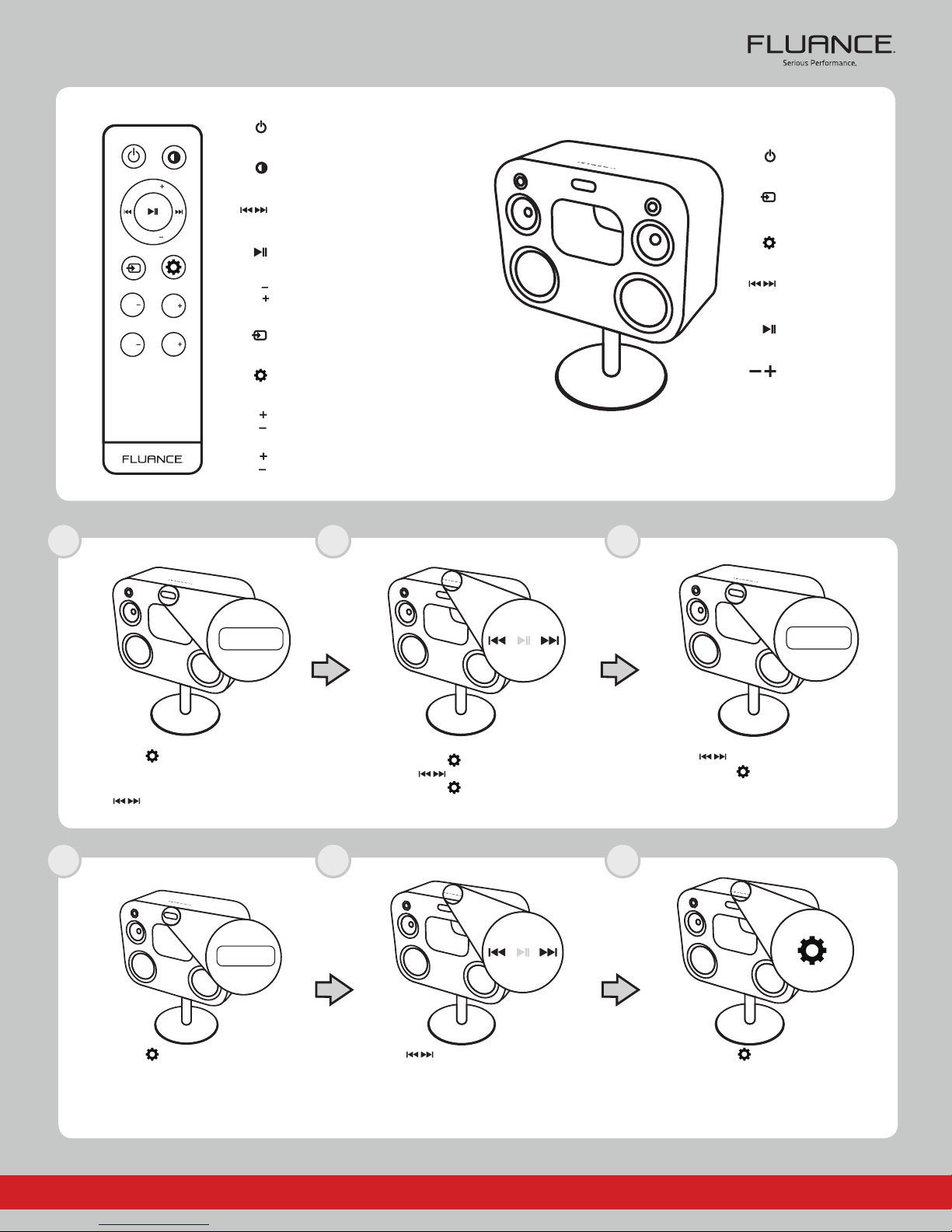
REMOTE BUTTONS
Power
Display
VOL
Forward/Back*
VOL
Play/Pause
TREBLE
TRE
TRE
BASS
BAS
BAS
1 2 3
SET TIME
VOL
VOL
TRE
TRE
BAS
BAS
Volume
Source
Settings
Treble
Bass
CABINET BUTTONS
*NOTE: Previous Track/Next Track (when on Bluetooth); Previous radio
station/Next radio station (when on radio source)
Power
Source
Settings
Forward/Back*
Play/Pause
Volume
time
Press the
Use the buttons to cycle between both settings.
1 2 3
SET SLEEP TIMER
button until you see “TIME”
displayed on the LED screen
You will now see either AM or PM
sloo
Press the buttons to select the hour
Press the button to confirm
Press the
button to confirm
ok
Press the
Press the
“OK” will now be displayed on the LED screen
buttons to select the minutes
button to confirm
Press the
or a combination of SL and two other
button until you see “SL00”
digits (ex. SL15)
If you require further assistance please consult the manual: fluance.com/support
Press the
minutes to pass before entering sleep mode
NOTE: The sleep timer can be set in 5min Intervals
buttons to select the amount of
(5, 10, 15, 20 etc.)
Press the
“OK” will now be displayed on the LED screen
button to confirm
Page 4
slOo
TIME
on
alm
Fm
am
buzz
OR
OR
am
Fm
OR
buzz
am
on
time
sloo
ok
slOo
MEM
TIME
on
alm
Fm
am
buzz
OR
OR
am
Fm
OR
ok
mem
alm
buzz
time
sloo
am
PM
OR
on
am
Fm
OR
on
TIME
on
Fm
am
buzz
OR
OR
am
Fm
OR
am
on
time
ok
slOo
MEM
TIME
on
alm
Fm
am
buzz
OR
OR
am
Fm
OR
ok
alm
buzz
am
on
time
sloo
ok
slOo
TIME
on
on
time
sloo
Fi70
Quick Start Guide
1
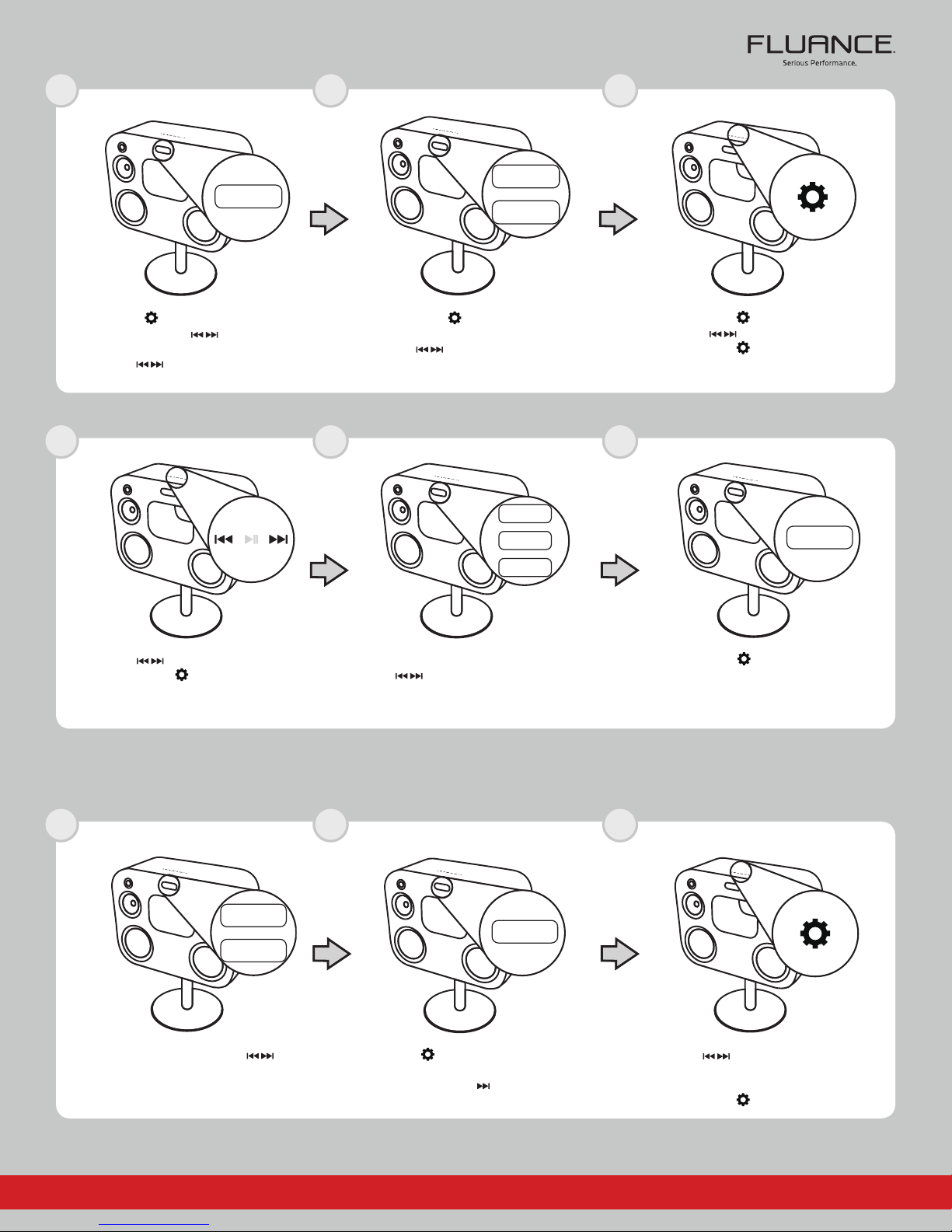
SET ALARM
alm
Press the button until you see “ALM”
Press the
You will now see either “ON” or “OFF”
Use the buttons to select “ON” to
enable the alarm
4
button
2
am
Press the
You will now see either AM or PM
Use the buttons to cycle between
5
button to confirm
both settings
buzz
3
Press the
Press the buttons to select the hour
Press the
6
button to confirm
button to confirm
ok
Press the buttons to select the minutes
Press the
1
SET RADIO PRESETS
On the AM or FM input, press the
to select the radio station you wish to save to
the selected pre-set channel
button to confirm
am
buttons
You will now see either “AM”, FM” or “BUZZ”
Use the
sound when the alarm is activated (Buzzer, FM
2
Press the
buttons to select which mode will
Radio, AM Radio)
mem
button until you see “MEM”
displayed on the LED screen
Press the button
Press the
“OK” will now be displayed on the LED screen
3
Press the
Channel that the radio station will be saved to
Wait until the LED begins flashing
Press the
button to confirm
buttons to select the pre-set
button to confirm
If you require further assistance please consult the manual: fluance.com/support
Page 5

Fi70
Quick Start Guide
FAQ
WHAT DOES THE “DISPLAY” TOGGLE DO?
The display toggle will cycle between 3 modes. Time, Source, and Display OFF
HOW DO I ADJUST THE VOLUME / CHANGE THE BASS OR TREBLE?
Select the equalizer using the settings button on the touch panel or using the BASS/TREBLE EQ buttons on the remote. Use the +/buttons to increase or decrease volume accordingly. The range of the BASS/TREBLE is -1 to 10 and the range of volume is 0 to 40.
WHAT IS “AUTO-PAIRING” AND HOW DOES IT WORK?
Auto-Pairing is a convenient connection feature implemented into all fluance bluetooth enabled speakers. If the connected Bluetooth
enabled device leaves the connection range of the Fi70 and returns at a later time, the device will automatically connect. If the device’s
Bluetooth function is disabled and then enabled at a later time, the device will automatically connect as well. Please note that the Fluance
Fi70 will only auto-pair to the last device that it was connected to and if the Fi70 is set to its Bluetooth input.
WHAT IS THE PURPOSE OF THE USB PORT ON THE BACK PANEL?
The USB port is designed to charge any of your devices such as smartphones, tablets, music players, etc., however, it cannot be used for
playing audio files with the Fi70.
I CAN’T CONNECT MY DEVICE TO THE FI70.
Please ensure Bluetooth is enabled on your device and attempt to re-pair with the Fi70. Please consult the included Quick Start Guide. If
more troubleshooting is needed consult the full instruction manual which is located at Fluance.com/Support.
ANOTHER DEVICE IS CONNECTED TO THE FI70 AND I WISH TO CONNECT MY DEVICE.
You can reset any Bluetooth connection by pressing and holding the “Play/Pause” button on the remote/touch panel. The Fi70 will
be available to connect to any new device for the next 30 seconds. If no device is found, the Fi70 will auto-pair back to the previously
connected device. Please note only one device can be paired at a time.
WHAT IS THE RANGE OF THE BLUETOOTH CONNECTION?
The Fi70 operates with Power Class 2 Bluetooth devices, which have a range of approximately 33’ feet (line of sight).
WHAT IS THE BREAK-IN PERIOD FOR FLUANCE SPEAKERS?
The break in period for our speakers is about 10 hours of playing time at normal listening volumes. After this period the drivers will have
had enough movement to perform at their peak level.
If you require further assistance please consult the manual: fluance.com/support
Page 6
Fi70
Quick Start Guide
SAFETY INFORMATION
This device complies with part 15 of the FCC Rules. Operation is subject to the following two conditions:
(1) This device may not cause harmful interference.
(2) This device must accept any interference received, including interference that may cause
undesired operation.
FCC WARNING
This equipment has been tested and found to comply with the limits for a Class B digital device, pursuant to Part 15 of the FCC Rules. These
limits are designed to provide reasonable protection against harmful interference in a residential installation.
This equipment generates, uses and can radiate radio frequency energy and, if not installed and used in accordance with the
instructions,may cause harmful interference to radio communications. However, there is no guarantee that interference will not occur in
a particular installation. If this equipment does cause harmful interference to radio or television reception, which can be determined by
turning the equipment off and on, the user is encouraged to try to correct the interference by one or more of the following measures:
• Reorient or relocate the receiving antenna.
• Increase the separation between the equipment and the receiver.
• Connect the equipment into an outlet different from that to which the receiver is connected.
• Consult the dealer or an experienced radio/TV technician for help.
IC STATEMENT:
This device complies with Industry Canada license-exempt RSS standard(s).
Operation is subject to the following two conditions:
(1) this device may not cause interference, and
(2) this device must accept any interference, including interference that may cause undesired
operation of the device.
This equipment complies with IC radiation exposure limits set forth for an uncontrolled environment .This equipment should be
installed and operated with minimum distance 20cm between the radiator& your body. This transmitter must not be co-located or
operating in conjunction with any other antenna or transmitter.
If you require further assistance please consult the manual: fluance.com/support
 Loading...