

Page 1
Instruction Manual / Manuel d'instruction (Français, page 11)
Fi30 High Performance Wireless Bluetooth Wood Speaker System
Fi30 Système haut-parleur sans fil Bluetooth performant en bois
fluance.com/support
Page 2

FCC STATEMENT
This device complies with part 15 of the FCC rules. Operation is subject to the
following two conditions:
(1) this device may not cause harmful interference, and
(2) this device must accept any interference received, including interference that may
cause undesired operation
WARNING:
This equipment has been tested and is found to comply with the limits for a Class B digital device, pursuant
to Part 15 of the FCC Rules. These limits are designed to provide reasonable protection against harmful
interference in a residential installation. This equipment generates, uses and can radiate radio frequency
energy and, if not installed and used in accordance with the instructions, may cause harmful interference
to radio communications. However, there is no guarantee that interference will not occur in a particular
installation. If this equipment does cause harmful interference to radio or television reception, which can be
determined by turning the equipment off and on, the user is encouraged to try to correct the interference by
one or more of the following measures:
• Reorient or relocate the receiving antenna
• Increase the separation between the equipment and receiver
• Connect the equipment into an outlet on a circuit different from that to which the receiver is connected
• Consult the dealer or an experienced radio/TV technician for help
WARNING:
Changes or modifications not expressly approved by the party responsible for compliance with the FCC Rules
could void the user’s authority to operate this equipment.
IC STATEMENT / CAN ICES-3 (B)/NMB-3(B)
Industry Canada Statement
Operation is subject to the following two conditions:
(1) this device may not cause interference, and
(2) this device must accept any interference, including interference that may cause undesired operation of
the device.
- 2 -
Page 3
SAFETY INFORMATION
1. Read all instructions.
2. Keep these instructions.
3. Heed all warnings.
4. Follow all instructions.
5. Do not use this apparatus near water.
6. Clean only with a dry cloth.
7. Do not block any ventilation openings. Install in accordance with the manufacturer’s instructions.
8. Do not install near any heat sources such as radiators, heat registers, stoves, or other apparatus
(including amplifiers) that produce heat.
9. Do not defeat the safety purpose of the polarized or grounding-type plug. A polarized plug has two blades
with one wider than the other. A grounding type plug has two blades and a third grounding prong. The
wide blade or the third prong are provided for your safety. If the provided plug does not fit into your outlet,
consult an electrician for replacement of the obsolete outlet.
10. Protect the power cord from being walked on or pinched particularily at plugs, convenience receptacles,
and the point where they exit from the apparatus.
11. Only use attachments/accessories specified by the manufacturer.
12. Unplug this apparatus during lightning storms or when unused for long periods of time.
13. Refer all servicing to qualified service personnel. Servicing is required when the apparatus has been
damaged in any way, such as power-supply cord or plug is damaged. Liquid has been spilled or objects
have fallen into the apparatus, the apparatus has been exposed to rain or moisture, does not operate
normally, or has been dropped.
14. Apparatus shall not be exposed to dripping or splashing, and that no objects filled with liquids, such as
vases, shall be placed on the apparatus.
15. The battery shall not be exposed to excessive heat such as sunshine, fire or the like.
16. The direct plug-in adapter is used as disconnect device, the disconnect device shall remain readily operable.
17. WARNING: To reduce the risk of fire or electric shock, do not expose this apparatus to rain or moisture.
This device complies with part 15 of the FCC Rules. Operation is subject to the following two conditions:
(1) This device may not cause harmful interference, and
(2) This device must accept any interference received, including interference that may cause undesired operation.
This Class [B] apparatus complies with Canadian ICES-003.
This marking indicates that this product should not be disposed with other household wastes
throughout North America. To prevent possible harm to the environment or human health
from uncontrolled waste disposal, recycle it responsibly to promote the sustainable reuse of
material resources. To return your used device, please use the return and collection systems
or contact the retailer where the product was purchased. They can take this product for
environmental safe recycling.
- 3 -
Page 4
TABLE OF CONTENTS
FCC Statement ...................................................................................................................................................................... 2
IC Statement ......................................................................................................................................................................... 2
Safety Information ............................................................................................................................................................... 3
What’s Included .................................................................................................................................................................... 4
Features ................................................................................................................................................................................. 4
Buttons and Connections .................................................................................................................................................... 5
Setup ...................................................................................................................................................................................... 6
For Bluetooth® enabled Smartphones .................................................................................................................. 6
Using a 3.5mm Auxiliary Audio Cable .................................................................................................................... 6
Operation ............................................................................................................................................................................... 7
Pairing multiple devices ........................................................................................................................................... 7
Reconnecting your device ........................................................................................................................................ 7
Out of Range or Lost Signal ..................................................................................................................................... 7
USB Input .................................................................................................................................................................... 8
Reset Pairing .............................................................................................................................................................. 8
Troubleshooting .................................................................................................................................................................... 9
Specifications ........................................................................................................................................................................ 9
FLUANCE Warranty ............................................................................................................................................................. 10
Manuel d'instruction FLUANCE ........................................................................................................................................ 11
WHAT’S INCLUDED
• High performance wireless Bluetooth wood speaker
• 6 ft 3.5mm Auxiliary Audio Cable
• Quick Start Guide
• 2 Year Parts and Labor Warranty
FEATURES
• Room filling, high fidelity sound.
• Wirelessly stream music from any Bluetooth device
• Audio grade MDF wood cabinetry
• Powered by aptX enhanced audio technology
• Lifetime Customer Support
DISCLAIMERS
Maximum line of sight for Bluetooth transmission range is 33 feet. Obstacles may decrease transmission distance.
Certain Bluetooth features, including those listed, may not be supported by all compatible Bluetooth-enabled devices, and/or
the functionality of such features may be limited in certain devices, or by certain wireless carriers.
We reserve the right to change models, configuration, or specifications without notice or liability. Product may not be exactly
as shown.
©2013 FLUANCE®. FLUANCE®, the FLUANCE® logo, and any other FLUANCE® marks may be registered. All other trademarks
are property of their respective owners.
- 4 -
Page 5

BUTTONS AND CONNECTIONS
G
1
2
USB CHARGIN
DC 5V 2.1A
1. SPEAKERS
2. POWER LED
3. USB CHARGING
4. AUXILIARY AUDIO INPUT
3 6 754
AUX IN
RESET PAIRING
POWER
ON
OFF
5. RESET PAIRING BUTTON
6. POWER ON/OFF SWITCH
7. AC POWER CORD
- 5 -
Page 6
SETUP
POWER
ON
OFF
POWER
ON
OFF
AUX IN
RESET PAIRING
1
USB CHARGING
DC 5V 2.1A
POWER
AUX IN
RESET PAIRING
ON
OFF
2a
Bluetooth®
2b
AUX
BLOOP!
FLUANCE Fi30
Fluance Fi30
Optimal Audio Performance
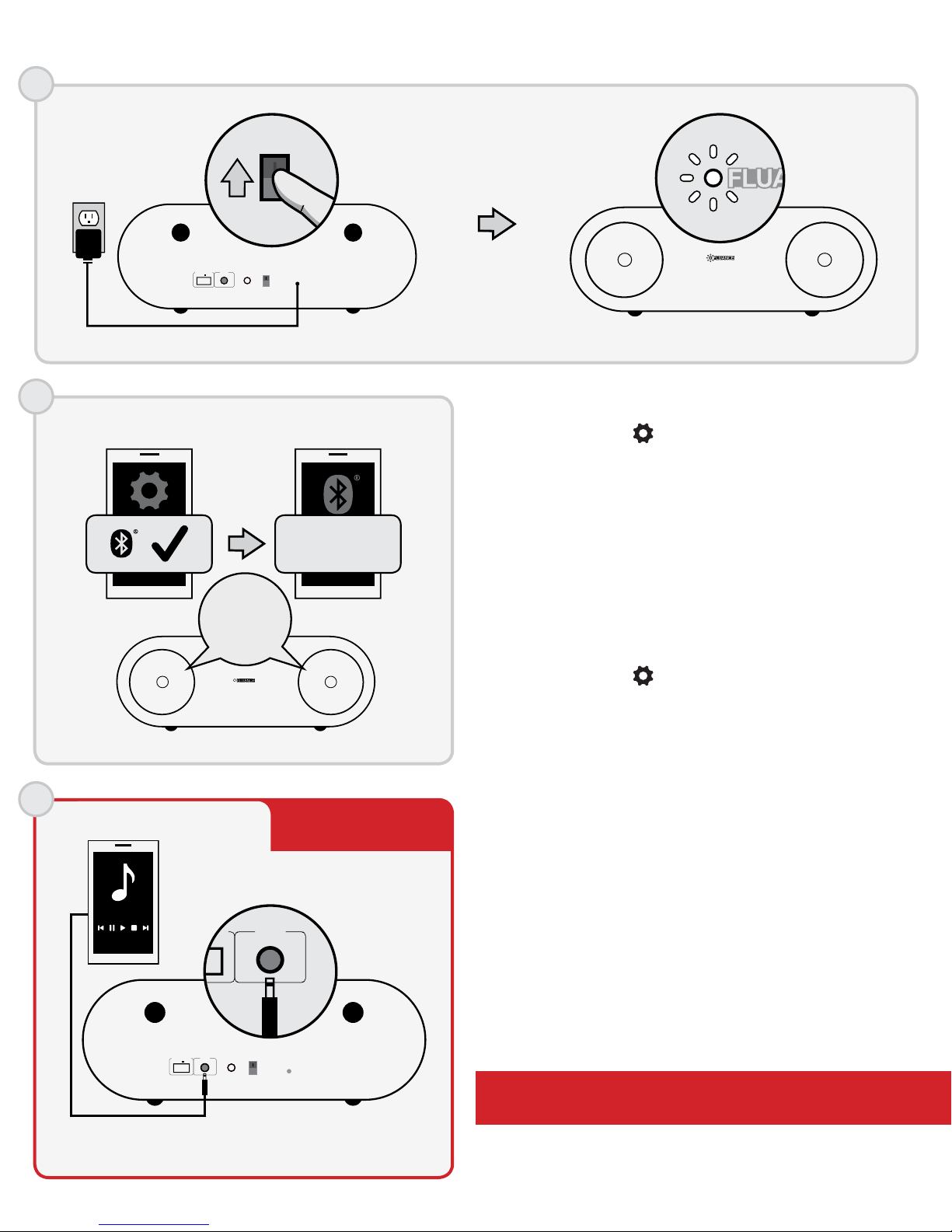
For Bluetooth® enabled Smartphones
1. Go to SETTINGS to turn on Bluetooth.
2. A list of Bluetooth devices will appear.
3. Select "Fluance Fi30".
4. Click YES if asked to connect.
5. You will hear "BLOOP!" when connected and the
Power LED will glow brightly.
6. You can now control your music using your
Smartphone. The "Bluetooth Active" icon will appear
on the main screen when connected.
TO DISCONNECT
1. Go to SETTINGS then to your Bluetooth settings.
2. A list of Bluetooth devices will appear.
3. Select "Fluance Fi30".
4. Select YES if asked to disconnect.
5. You will hear "BLOOP!" when disconnected.
Using a 3.5mm Auxiliary Audio Cable
1. Connect one end of the 3.5mm Auxiliary Audio Cable
to the AUX IN input on the Bluetooth
Music Receiver.
2. Connect the other end of the 3.5mm Auxiliary Audio
Cable to the Headset Input on your Smartphone/
Audio Device.
3. The Power LED will glow brightly.
4. You can now control your music using your
Smartphone/Audio Device.
RESET PAIRING
POWER
ON
OFF
AUX IN
USB CHARGING
DC 5V 2.1A
*Bluetooth is disabled when 3.5mm Auxiliary Audio Cable is plugged into
AUX IN input
The Power LED glows dimly when not
connected to an audio device.
- 6 -
Page 7

SETUP
3
Maximum line of sight for Bluetooth transmission range is 33 feet. Obstacles may decrease transmission distance.
OPERATION
How you access your Bluetooth Settings may vary from one manufacturer to another.
Pairing multiple devices
Although the Fluance Fi30 can only play music from one device at a time, it can memorize up to 8 device profiles.
Switching from one device to another:
1. Access the SETTINGS and turn Bluetooth function of the device OFF.
2. The Fluance Fi30 can now be connected to a different device.
3. Follow the "For Bluetooth® enabled Smartphones" instructions to pair a new device.
Reconnecting your device
If you move out of range or turn off the Bluetooth feature on your device, the Fluance Fi30 will disconnect from
your device. To reconnect, simply turn the Bluetooth feature back on or move within 33 feet (line of sight) of the
Fluance Fi30.
Unit will auto-pair if it was the last device connected. If not, please refer to the pairing instructions.
Out of Range or Lost Signal
If the music device is out of range (beyond 33 feet) of the Fluance Fi30 or if there is something blocking the
Bluetooth signal, the Power LED will glow dimly to indicate that the
Bluetooth connection with the music device has been lost. To avoid a lost connection:
1. Move the music device back into range (within 33 feet), and/or make sure there’s a clear line of sight and
that there are no obstructions between the Fluance Fi30 and the device.
2. Within 15 seconds, the connection will automatically be reestablished and the LED light will turn on.
3. If the connection is lost for more than 15 seconds, the connection will need to be reestablished. Follow the
instructions in the "Reconnecting your device" section.
- 7 -
Page 8

OPERATION
POWER
ON
OFF
AUX IN
DC 5V 2.1A
USB CHARGING
RESET PAIRING
RESET PAIRING
USB CHARGING
USB Input
The USB input allows for quick and easy charging of
your smartphone or tablet while still enjoying
your music.
1. Connect one end of the USB Cable to the 2.1 A USB
Charging Input on the Fluance Fi30.
2. Connect the other end of the USB Cable to your
Smartphone/Audio Device.
3. You can continue to enjoy your music using your
Smartphone/Audio Device while it is charging.
USB CHARGING
DC 5V 2.1A
USB CHARGING
DC 5V 2.1A
RESET PAIRING
POWER
ON
OFF
AUX IN
Reset Pairing
The Reset Pairing button is used to unpair another
paired device, allowing you to connect a new device to
the Fluance Fi30.
1. Press the Reset Pairing button on the Fluance Fi30 to
break any existing Bluetooth connections.
2. The unit will search for a new device for 30 seconds.
After 30 seconds, if no new connection is made, it
will autopair back to the previous device.
POWER
AUX IN
RESET PAIRING
ON
OFF
3. You can also unpair the connection directly from your
Smartphone by disabling the Bluetooth connection.
- 8 -
Page 9
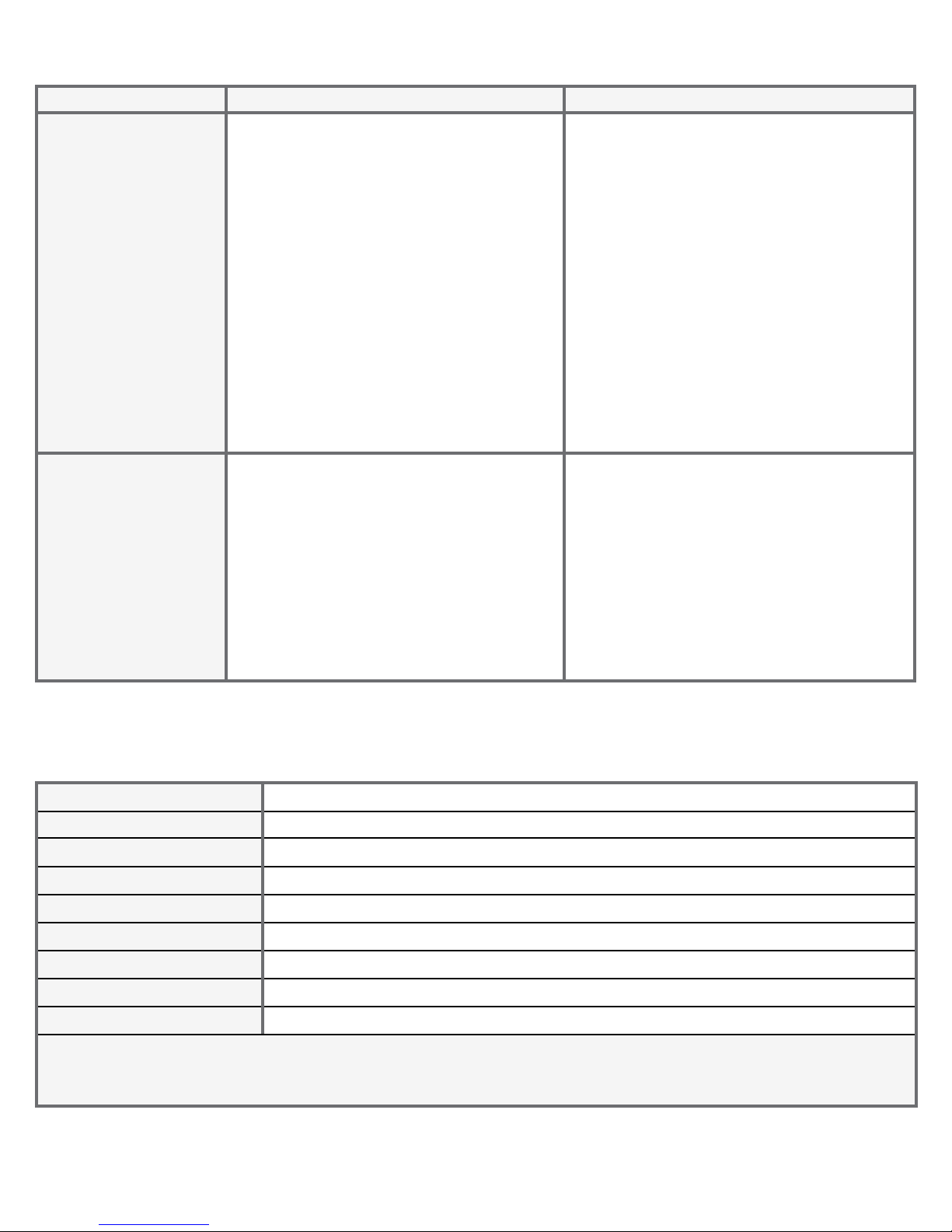
TROUBLESHOOTING
Issue Device Fluance Fi30
No music from
Fluance Fi30
speakers using
Bluetooth
No music from
Fluance Fi30
speakers using
Auxiliary Audio Cable
• Confirm that your Smartphone/
Audio Device is powered ON
• Confirm that the Bluetooth function
is ON
• Confirm you are connected via
Bluetooth with the Fluance Fi30
• Confirm you are playing music from
your Smartphone/Audio Device
• Confirm that the volume is set to a
comfortable listening level
• Confirm you are within range of the
Fluance Fi30
• Confirm that the Auxiliary Audio
Cable is NOT connected to the
Headset Input of your device
• Confirm that your Smartphone/
Audio Device is powered ON
• Confirm that the Auxiliary Audio
Cable is correctly and firmly
connected to the Headset Input of
your device
• Confirm you are playing music from
your Smartphone/Audio Device
• Confirm that the volume is set to a
comfortable listening level
• Confirm that the Fluance Fi30 is
powered ON
• Confirm you are within range of the
Smartphone/Audio Device
• Confirm that the Auxiliary Audio Cable
is NOT connected to the AUX IN input
of the Fluance Fi30
• Confirm that the Fluance Fi30 is
powered ON
• Confirm that the Auxiliary Audio Cable
is correctly and firmly connected to
the AUX IN input of the Fluance Fi30
SPECIFICATIONS
System Type Full Range 2 Driver Bluetooth Music System with Integrated Amplifier
Woofer Dual 3" Woven Fiberglass Drivers with Butyl Rubber Surrounds
Input 3.5mm Auxiliary Audio Input, 2.1 A USB Charging Input
Frequency Response 65Hz - 20KHz
Amplifier Power (RMS) 6 Watts Continous Average Output (x 2 channels)
Enclosure Tuned Rear Port Bass Reflex Design
Cabinet Precision Crafted MDF Internally Braced
Dimensions 16.5 x 5.5 x 5.5 in (420 x 140 x 140 mm)
Weight 8.3 lbs (3.8kg)
Specifications are subject to change without notice. Measurements and weights may vary slightly.
- 9 -
Page 10

FLUANCE® WARRANTY
Thank you for choosing FLUANCE® Speaker Products!
FLUANCE
from a dealer authorized by FLUANCE®. FLUANCE® warrants that each new product, under normal use, is
free from defects, subject to the terms and conditions set forth. If a defect should occur within the warranty
period, repairs will be made free of charge for parts and labor when such defects are determined by us to be
attributable to faulty materials or workmanship at time of manufacture.
®
gives the following warranty to the original customer of each new FLUANCE® product purchased
WARRANTY PERIOD: The FLUANCE
®
products listed below are warranted for parts and labor for the stated
period from the date of original purchase and are subject to the terms and conditions of the warranty.
HOME AUDIO PASSIVE SPEAKERS: LIFETIME WARRANTY
ACTIVE/POWERED SPEAKERS: 2 YEAR WARRANTY
WARRANTY EXCLUSIONS: Products purchased from a dealer not authorized by FLUANCE
®
. Products with the
serial number defaced, altered or missing. Defects resulting from disaster, accident, abuse, misuse, lightning,
power surges, neglect, unauthorized modification or water damage. Defects or damage as a result of repairs
performed by a person or party not authorized by FLUANCE®. Defects or damage occurring during shipping
(claims should be made with the shipping company).
To Obtain Warranty Service: Should your FLUANCE
®
product need warranty service, please contact your
FLUANCE® Authorized Dealer and send your product, fully insured and freight prepaid to the nearest FLUANCE®
authorized service center. Before sending to FLUANCE®, you will be required to get a Return Authorization
Number from your dealer. Products shipped without a valid Return Authorization Number will be refused. To
avoid possible shipping damage, make sure the product is properly packaged and well protected. Include a
copy of your original bill of sale (including date of purchase and invoice number), serial number, your name,
email address, home and/or work telephone number(s), a complete return address and a detailed description
of the faults. Products repaired within warranty will be returned freight prepaid. When applying for warranty
repairs, you must present the original copy of your bill of sale.
TO OBTAIN THE NAME AND ADDRESS OF THE NEAREST AUTHORIZED FLUANCE
MORE INFORMATION ON THIS WARRANTY
• Contact FLUANCE
®
Support by Email: [email protected]
• Visit www.FLUANCE.com
• Mail your inquiry to: FLUANCE Customer Service, 4080 Montrose Road, Niagara Falls, ON L2H 1J9
• Call toll free 1.888.61.SOUND (1.888.617.6863)
FLUANCE
®
is a registered trademark of Circus World Displays Limited
- 10 -
®
SERVICE CENTRE OR FOR
01.2014
Page 11

Manuel d'instruction / Instruction Manual
Fi30 Système haut-parleur sans fil Bluetooth performant en bois
Fi30 High Performance Wireless Bluetooth Wood Speaker System
fluance.com/support
- 11 -
Page 12

DÉCLARATION DE LA FCC
Cet appareil répond aux normes prescrites au chapitre 15 des règles édictées par la FCC.
Son fonctionnement est assujetti aux deux conditions suivantes:
(1) cet appareil ne doit en aucun cas être la source d’interférence préjudiciable, et
(2) il doit pouvoir fonctionner normalement en dépit de l’interférence auquel il pourrait
être soumis
AVERTISSEMENT:
Cette unité a été testée et il a été déterminé qu’elle se conforme aux normes stipulées par l’article 15 des
règlements de la FCC pour un appareil numérique de catégorie B. Ces normes sont établies afin d’offrir une
protection raisonnable contre toute possibilité de brouillage préjudiciable dans une installation résidentielle.
Cette unité produit, utilise et peut émettre une énergie radioélectrique, et si elle n’est pas installée et utilisée
conformément aux instructions, pourrait causer un brouillage préjudiciable à la radiocommunication. Il est
toutefois impossible de garantir qu’il n’y aura pas de brouillage préjudiciable dans une installation donnée. Si
cette unité cause un brouillage préjudiciable à la réception radio ou télévisuelle, ce qui peut être déterminé en
activant ou désactivant l’appareil, l’utilisateur est encouragé à tenter de corriger le brouillage en prenant l’une
ou plusieurs des mesures proposées suivantes :
• Réorienter ou déplacer l’antenne de réception
• Augmenter la distance entre l’appareil et le récepteur
• Branchez l’appareil dans une prise de courant CA différente de celle utilisée par le récepteur
• Consulter le revendeur ou un technicien spécialisé dans le service des radios/téléviseurs pour obtenir
de l’aide.
AVERTISSEMENT:
Tout changement ou toute modification n’étant pas autorisée de façon explicite par l’organisme responsable
de la conformité aux règles de la FCC est en droit de refuser l’autorisation de l’utilisateur à utiliser ce produit.
DÉCLARATION IC / CAN ICES-3 (B)/NMB-3(B)
Son fonctionnement est soumis aux deux conditions suivantes:
(1) Cet équipement ne doit pas causer d’interférences, et
(2) Cet équipement doit accepter toute interférence, y compris les interférences capables de causer un
mauvais fonctionnement de l’appareil.
- 12 -
Page 13

INFORMATIONS DE SÉCURITÉ
1. Lisez ces consignes.
2. Gardez ces consignes.
3. Conformez-vous à tous les avertissements.
4. Suivez toutes les consignes applicables.
5. N’utilisez pas cet appareil près de l’eau.
6. Nettoyez uniquement à I’aide d’un chiffon sec.
7. N’obstruez jamais les orifices d’aération de l’appareil et installez-le en conformité avec les instructions
du fabricant.
8. N’installez pas l’appareil à proximité d’une source de chaleur telle que radiateurs, registres de chaleur,
poêles ou autre appareil (y compris les amplificateurs) qui produisent de la chaleur.
9. N’allez pas à l’encontre de I’objectif de sécurité de la fiche polarisée ou avec mise à la terre. Une fiche
polarisée a deux lames, une étant plus large que I’autre. Une fiche avec mise à la terre a deux lames et une
troisième broche de terre. La lame large ou la troisième broche est destinée à vous protéger. Si la fiche
fournie ne s’insère pas dans votre prise, contactez un électricien pour faire remplacer la prise désuète.
10. Empêchez Ie cordon d’être piétiné ou pincé, surtout aux fiches, prises de courant, et au point de leur sortie
de I’appareil.
11. Utilisez uniquement les accessoires précisés par Ie fabricant.
12. Débranchez cet appareil durant des orages électriques ou lorsqu’il n’est pas utilisé pendant des
périodes prolongées.
13. Confiez toutes réparations de cet appareil à un personnel qualifié. Une réparation peut être requise
lorsque l’appareil a éte endommagé de quelque manière que ce soit, tel qu’un cordon ou une fiche
endommagé, du liquide déversé ou des objets tombés dans I’appareil, I’appareil a été exposé à la pluie ou
à I’humidité, un appareil qui ne fonctionne pas normalement ou qui est tombé.
14. L’appareil ne doit pas être exposé à des égouttements d’eau ou des éclaboussures, et de plus aucun
objet rempli de liquide, tel que des vases, ne doit être placé sur I’appareil.
15. La pile ne doit pas être exposée à la chaleur excessive tel que le soleil, le feu ou de toute autre source.
16. L’adaptateur est utilisé comme dispositif de déconnexion, le dispositif de déconnexion doit rester
facilement accessible.
17. AVERTISSEMENT: Pour réduire le risque de incendie ou d’électrocution, n’exposez pas cet appareil à
la pluie ou à l’humidité.
Cette marque indique que ce produit ne doit pas être jeté avec les autres déchets ménagers
en Amérique du Nord. Pour prévenir les dommages possibles à l’environnement ou à la santé
humaine par l’élimination non contrôlée de déchets ou autres matières, recyclez-le de façon
responsable afin de promouvoir la réutilisation durable des ressources matérielles. Pour
retourner votre appareil utilisé, s’il vous plaît utiliser les systèmes de reprise et de collecte ou
communiquez avec le détaillant où le produit a été acheté. Ils peuvent prendre ce produit pour
le recyclage sécuritaire pour l’environnement.
- 13 -
Page 14

TABLE DES MATIÈRES
Déclaration de la FCC .......................................................................................................................................................... 12
Déclaration IC .......................................................................................................................................................................12
Informations de sécurité .................................................................................................................................................... 13
Ce qui est inclus ................................................................................................................................................................... 14
Caratéristiques ....................................................................................................................................................................14
Boutons et connexions ....................................................................................................................................................... 15
Configuration .......................................................................................................................................................................16
Téléphones intelligents compatibles au Bluetooth
Utiliser un câble audio auxiliaire de 3,5 mm .......................................................................................................16
Fonctionnement
Jumeler plusieurs appareils ....................................................................................................................................17
Reconnecter votre appareil ..................................................................................................................................... 17
Hors de portée du signal ou signal perdu ............................................................................................................. 17
Entrée USB ................................................................................................................................................................18
Réinitialiser le jumelage .......................................................................................................................................... 18
Dépannage ...........................................................................................................................................................................19
Spécifications .......................................................................................................................................................................19
Garantie FLUANCE ...............................................................................................................................................................20
MD
CE QUI EST INCLUS
• Haut-parleurs de haute performance sans fil
Bluetooth en bois
• Câble audio auxiliaire de 3,5 mm (6 pi)
• Guide de démarrage rapide
• Garantie de deux ans des pièces et de la main d'œuvre
• Soutien à la clientèle à vie
CARACTÉRISTIQUES
• Son puissant et qualité audio exceptionnelle
• Diffusez la musique sans fil à partir de tout
appareil Bluetooth
• Boîtier construit en bois MDF de qualité audio
• Optimisé par la technologie audio améliorée aptX
AVIS DE NON-RESPONSABILITÉ
La visibilité directe maximum pour la portée d'émission du Bluetooth est de 10 m (33 pi). Les obstacles peuvent réduire la
distance d'émission.
Certaines caractéristiques Bluetooth, y compris celles énumérées, peuvent ne pas être supportées par les appareils compatibles
Bluetooth et/ou leur fonctionnalité peut être limitée pour certains appareils ou par certains fournisseurs de services sans fil.
Nous nous réservons le droit de modifier les modèles, la configuration ou les caractéristiques sans préavis ou sans
responsabilité. Le produit peut différer des illustrations.
FLUANCE
autres marques déposées sont la propriété de leurs propriétaires respectifs.
MD
2013©. FLUANCEMD, le logo FLUANCEMD et toutes autres marques FLUANCEMD peuvent être déposées. Toutes les
- 14 -
Page 15
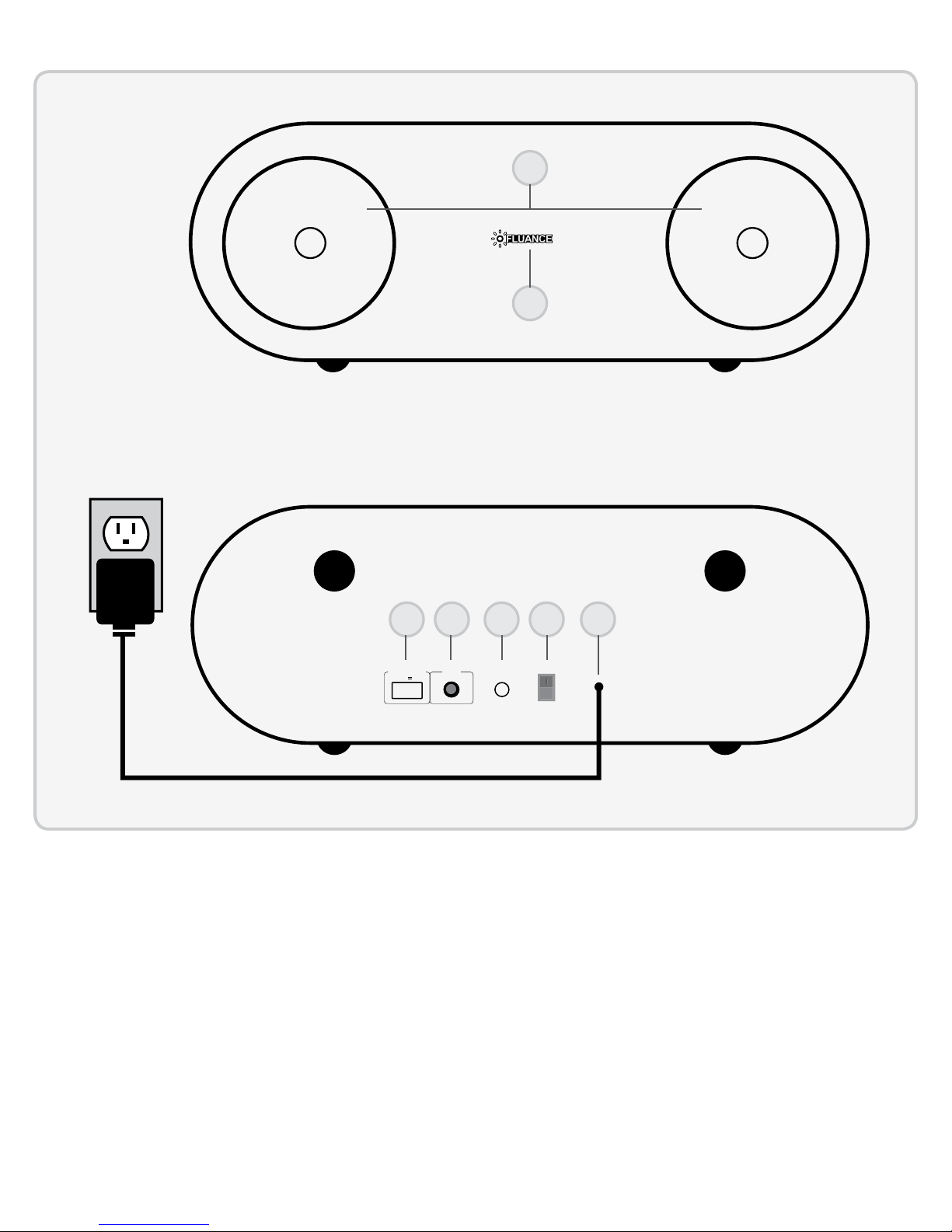
BOUTONS ET CONNEXIONS
G
1
2
3 6 754
USB CHARGIN
DC 5V 2.1A
1. HAUT-PARLEURS
2. DEL DE MISE SOUS TENSION
3. CHARGEMENT USB
4. ENTRÉE AUDIO AUXILIAIRE
AUX IN
RESET PAIRING
POWER
ON
OFF
5. BOUTON DE RÉINITIALISATION
DU JUMELAGE
6. INTERRUPTEUR MARCHE/ARRÊT
7. CORDON D'ALIMENTATION C.A.
- 15 -
Page 16

CONFIGURATION
POWER
ON
OFF
POWER
ON
OFF
AUX IN
RESET PAIRING
1
USB CHARGING
DC 5V 2.1A
POWER
AUX IN
RESET PAIRING
ON
OFF
2a
Bluetooth
2b
AUX
AUX
MD
Téléphones intelligents compatibles au Bluetooth
MD
1. Accédez à la section « SETTINGS » (PARAMÈTRES)
pour activer Bluetooth.
2. Une liste d’appareils Bluetooth s’affichera.
3. Sélectionnez «Fluance Fi30».
4. Cliquez sur « YES » (oui) si l'on vous demande si vous
voulez vous connecter.
FLUANCE Fi30
Fluance Fi30
5. Vous entendrez «BLOOP!» quand vous serez
connecté et la DEL de mise sous tension brillera
avec éclat.
6. Vous pouvez maintenant contrôler votre musique
BLOOP!
via votre téléphone intelligent. L'icône « Bluetooth
Active » apparaîtra sur l'écran principal quand vous
serez connecté.
SE DÉCONNECTER
1. Accédez à la section « SETTINGS » (PARAMÈTRES)
pour vos paramètres Bluetooth.
2. Une liste d’appareils Bluetooth s’affichera.
3. Sélectionnez «Fluance Fi30».
4. Sélectionnez « YES » (oui) si on vous demande de
vous déconnecter.
Performance audio optimale
5. Vous entendrez «BLOOP!» quand vous
serez déconnecté.
RESET PAIRING
POWER
ON
OFF
AUX IN
USB CHARGING
DC 5V 2.1A
* Le Bluetooth est désactivé lorsque le câble audio auxiliaire 3,5 mm est
branché à l'entrée « AUX IN ».
Utiliser un câble audio auxiliaire de 3,5 mm
1. Connectez un bout du câble audio auxiliaire 3,5 mm à
l'entrée « AUX IN » du récepteur Bluetooth.
2. Connectez l’autre bout du câble audio auxiliaire
3,5 mm à l'entrée du casque d'écoute sur votre
téléphone intelligent/dispositif audio.
3. La DEL de mise sous tension brillera avec éclat.
4. Vous pouvez maintenant contrôler votre musique via
votre téléphone intelligent/dispositif audio.
La DEL de mise sous tension émet un signal lumineux faible
lorsqu'elle n'est pas connectée à un appareil audio.
- 16 -
Page 17

CONFIGURATION
3
L'accès aux paramètres Bluetooth est différent d'un fabricant à un autre. La visibilité directe maximum pour
la portée d'émission du Bluetooth est de 10 m (33 pi). Les obstacles peuvent réduire la distance d'émission.
FONCTIONNEMENT
Jumeler plusieurs appareils
Bien que le Fluance Fi30 peut mémoriser jusqu’à 8 profils de périphériques, cependant, il ne peut jouer la
musique d’un périphérique à la fois.
Passer d'un appareil à un autre :
1. Accédez à la section SETTINGS et désactivez la fonction Bluetooth de l'appareil.
2. Le Fluance Fi30 peut maintenant être connecté à un périphérique différent.
3. Suivez les instructions « Téléphones intelligents compatibles au BluetoothMD » pour jumeler un
nouveau dispositif.
Reconnexion de votre appareil
Si vous sortez du périmètre ou vous avez désactivé la fonction Bluetooth sur votre appareil, le Fluance Fi30
sera déconnecté de votre appareil. Pour se reconnecter, allumer simplement à nouveau la fonction Bluetooth
ou se tenir à moins de 10 m (33 pi) (ligne droite) du Fluance Fi30.
L'unité va se connecter automatiquement au dernier appareil détecté. Si non, veuillez vous référer aux instructions de jumelage.
Hors de portée du signal ou signal perdu
Si l'appareil musical est hors de portée du signal (au-delà de 10 m (33 pi) du Fluance Fi30 ou si quelque chose
bloque le signal Bluetooth, la DEL de mise sous tension émettra un signal lumineux faible pour indiquer que la
connexion Bluetooth avec l'appareil musical a été perdue. Pour éviter de perdre la connexion :
1. Déplacer l'appareil musical à portée (moins de 10 m (33 pi), et/ou s'assurer qu'il y a bien une visibilité
directe et qu'il n'y a aucun obstacle entre le Fluance Fi30 et l'appareil.
2. La connexion se rétablira automatiquement dans les 15 secondes et la lumière de la DEL s'allumera.
3. Si la connexion prend plus de 15 secondes, la connexion devra être rétablie manuellement. Suivre les
instructions dans la section « Reconnexion de votre appareil ».
- 17 -
Page 18

FONCTIONNEMENT
POWER
ON
OFF
AUX IN
DC 5V 2.1A
USB CHARGING
RESET PAIRING
RÉINITIALISATION
DU JUMELAGE
CHARGEMENT USB
USB CHARGING
DC 5V 2.1A
Entrée USB
L'entrée USB permet une recharge rapide et facile de
votre téléphone intelligent ou de votre tablette tout en
vous permettant de profiter de votre musique.
1. Brancher une extrémité du câble USB à l'entrée du
chargement USB 2,1 A sur le Fluance Fi30.
2. Brancher l'autre extrémité du câble USB à votre
téléphone intelligent/dispositif audio.
3. Vous pouvez continuer à profiter de votre musique
via votre téléphone intelligent/dispositif audio
pendant qu'il se recharge.
RESET PAIRING
POWER
ON
OFF
AUX IN
Réinitialiser le jumelage
Le bouton de réinitialisation du jumelage est utilisé
pour déconnecter un appareil, vous permettant de
connecter un nouvel appareil au Fluance Fi30.
USB CHARGING
DC 5V 2.1A
1. Appuyer sur le bouton dde réinitialisation du
jumelage du Fluance Fi30 pour couper toute
connexion au Bluetooth.
2. L'appareil cherchera un nouvel appareil pendant
30 secondes. Après 30 secondes, si aucune nouvelle
POWER
AUX IN
RESET PAIRING
ON
OFF
connexion n'a eu lieu, il se reconnectera à
l'appareil précédent.
3. Vous pouvez également couper la connexion
directement depuis votre téléphone intelligent en
désactivant la connexion Bluetooth.
- 18 -
Page 19

DÉPANNAGE
Problème Appareil Fluance Fi30
Aucune musique n'est
émise par les hautparleurs Fluance Fi30
lors de l'utilisation du
Bluetooth
Aucune musique n'est
émise par les hautparleurs Fluance Fi30
lors de l'utilisation du
câble audio auxiliaire
• Confirmez que votre téléphone
intelligent/dispositif audio est allumé
• Confirmez que la fonction Bluetooth
est activée
• Confirmez que vous êtes connecté
via le Bluetooth au Fluance Fi30
• Confirmez que votre téléphone
intelligent/dispositif audio diffuse de
la musique
• Confirmez que le volume est réglé à
un niveau d'écoute confortable
• Confirmez que vous êtes à portée du
signal du Fluance Fi30
• Confirmez que le câble audio
auxiliaire n'est PAS connecté à
l'entrée du casque d'écoute de
votre appareil
• Confirmez
intelligent/dispositif audio est allumé
• Confirmez que le câble audio
auxiliaire est correctement et
fermement branché à l'entrée du
casque d'écoute de votre appareil
• Confirmez que votre téléphone
intelligent/dispositif audio diffuse de
la musique
• Confirmez que le volume est réglé à
un niveau d'écoute confortable
que votre téléphone
• Confirmez que le Fluance Fi30
est allumé
• Confirmez que vous êtes à portée
du signal du téléphone intelligent/
dispositif audio
• Confirmez que le câble audio
auxiliaire n'est PAS branché à
l'entrée « AUX IN » du Fluance Fi30
• Confirmez que le Fluance Fi30
est allumé
• Confirmez que le câble audio
auxiliaire est correctement et
fermement branché à l'entrée
« AUX IN » du Fluance Fi30
SPÉCIFICATIONS
Type de système Système de musique Bluetooth à moteur de haut-parleur à gamme complète
2 avec amplificateur intégré
Haut-parleur de grave Deux amplificateurs 7,5 cm (3 po) en fibres de verre avec bordure en
caoutchouc butyle
Entrée Entrée audio auxiliaire 3,5 mm, entrée de chargement USB 2,1 A
Réponse de fréquence 65 Hz - 20K Hz
Puissance de
l'amplificateur (RMS)
Boîtier Conception réflexe grave port arrière syntonisé
Coffret MDF renforcé intérieurement
Dimensions 420 x 140 x 140 mm (16,5 x 5,5 x 5,5 po)
Poids 3,8 kg (8,3 lb)
6 watts de sortie moyenne en continue (x 2 canaux)
Les spécifications sont sujettes aux changements sans préavis.
Les dimensions et poids peuvent varier légèrement.
- 19 -
Page 20

GARANTIE FLUANCE®
Merci d’avoir choisi la gamme de produits haut-parleurs FLUANCE®!
FLUANCE
revendeur autorisé par FLUANCE®. FLUANCE® garantit que chaque nouveau produit, sous une utilisation
normale, est exempt de défauts, sous réserve des modalités et conditions énoncées. Si un défaut survient dans
la période de garantie, les réparations seront effectuées sans frais pour les pièces et la main-d’œuvre lorsque
de tels défauts sont déterminés par nous d’être imputable aux matériaux ou à la fabrication.
PÉRIODE DE GARANTIE: Les produits FLUANCE® énumérés ci-dessous sont garantis, pièces et main-d’œuvre,
pour la période indiquée à partir de la date d’achat originale et sont soumis aux termes et conditions de
la garantie.
HAUT-PARLEURS PASSIF AUDIO MAISON: GARANTIE À VIE
HAUT-PARLEURS ACTIF ALIMENTÉ: GARANTIE DEUX ANS
®
accorde la garantie suivante à l’acheteur initial de chaque nouveau produit FLUANCE® auprès d’un
EXCLUSIONS DE GARANTIE: Les produits achetés auprès d’un revendeur non agrée par FLUANCE®. Les
produits avec le numéro de série dégradé, altéré ou manquant. Défauts résultant d’une catastrophe, d’un
accident, d’abus, de mauvais usage, par la foudre, les surtensions, la négligence, les modifications non
autorisées ou les dégâts des eaux. Les défauts ou dommages en conséquence de réparations effectuées
par une personne ou un parti non autorisé par FLUANCE®. Les défauts ou dommages survenus pendant
l’expédition (les réclamations doivent être faites avec l’expéditeur).
POUR OBTENIR LE SERVICE DE GARANTIE: Si votre appareil FLUANCE® a besoin de service de garantie, veuillez
contacter votre revendeur agrée FLUANCE® et envoyez votre produit entièrement assuré et frais de transport
payés au centre de service agrée FLUANCE® le plus proche. Avant de l’envoyer chez FLUANCE®, vous devez
obtenir un numéro d’autorisation de retour auprès de votre revendeur. Les produits expédiés sans un numéro
d’autorisation valide seront refusés. Pour éviter des dommages possibles durant le transport, assurez-vous de
bien emballer et protéger votre produit. Inclure une copie de votre facture originale (qui indique la date d’achat
et le numéro de facture), le numéro de série, votre nom, votre adresse courriel, numéro (s) de téléphone (s) à
domicile et/ou au travail, une adresse de retour complète et une description détaillée de la panne. Les produits
réparés pendant la garantie du produit seront retournés port payé. En faisant une demande des réparations
pendant la garantie, vous devez présenter la copie originale de votre preuve d’achat. Pour obtenir le nom et
l’adresse du centre de service FLUANCE® autorisé le plus près de chez vous ou pour plus de renseignements
sur cette garanti :
• Contactez le service de soutient FLUANCE
• Visitez www.FLUANCE.com
• Postez votre demande à:
FLUANCE -service à la clientèle, 4080 Montrose Road, Niagara Falls, ON L2H 1J9
• Composez le numéro sans frais : 1.888.61.SOUND (1.888.617.6863)
FLUANCE
®
par courriel: [email protected]
®
est une marque déposée de Circus World Displays Limited
01.2014
- 20 -
 Loading...