

Page 1

Fluance Fi20 User Manual
User Manual
Fi20 - Portable Bluetooth® Speaker
1
Page 2
Fluance Fi20 User Manual
Important Safety Instructions
1. Read these instructions.
2. Keep these instructions.
3. Heed all warnings.
4. Follow all instructions.
5. Do not use this apparatus near water.
6. Clean only with dry cloth.
7. Do not block any ventilation openings . Install in accordance with the manufacturer’s
instructions.
8. Do not install near any heat sources such as radiators, heat registers, stoves, or other
apparatus (including ampliers) that produce heat.
9. Do not defeat the safety purpose of the polarized or grounding-type plug. A polarized
plug has two blades with one wider than the other. A grounding type plug has two
blades and a third grounding prong. The wide blade or the third prong are provided for
your safety. If the provided plug does not t into your outlet, consult an electrician for
replacement of the obsolete outlet.
10. Protect the power cord from being walked on or pinched particularly at plugs,
convenience receptacles, and the point where they exit from the apparatus.
11. Only use attachments/accessories specied by the manufacturer.
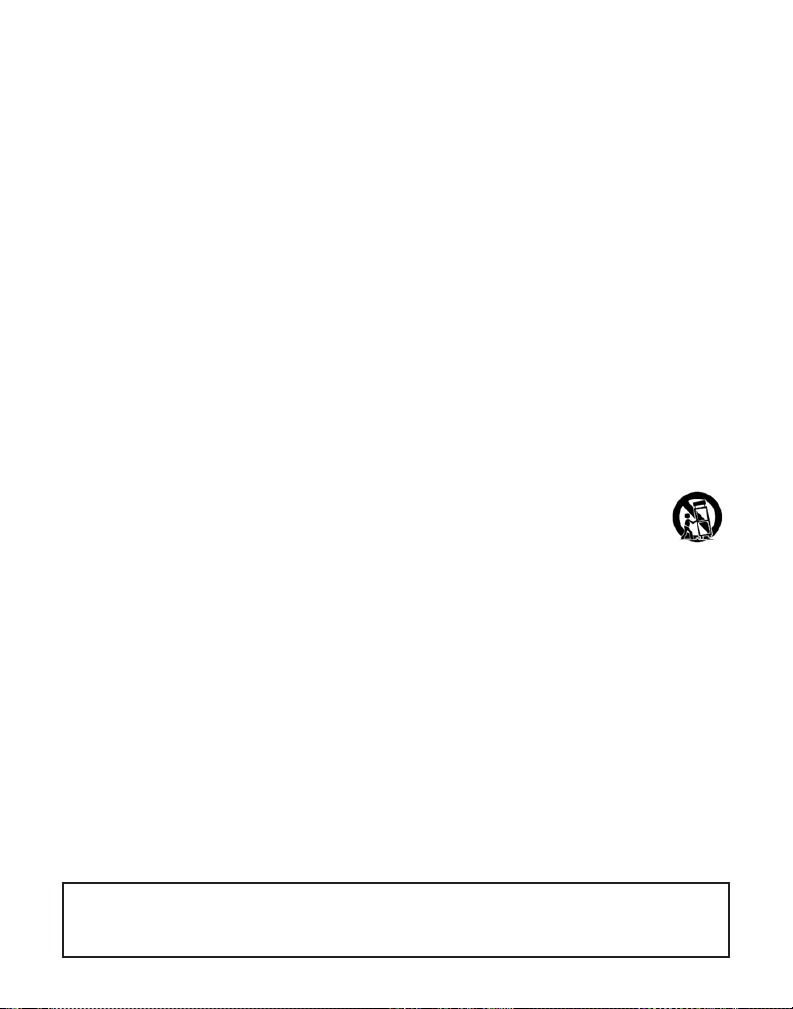
12. Use only with the cart, stand, tripod, bracket, or table specied by the manufacturer, or sold with the apparatus . When a cart is used, use caution when moving
the car t/apparatus combination to avoid injury from tip-over.
13. Unplug this apparatus during lightning storms or when unused for long periods of time.
14. Refer all servicing to qualied service personnel. Servicing is required when the
apparatus has been damaged in anyway, such as power supply cord or plug is damaged,
liquid has been spilled or objects have fallen into the apparatus, the apparatus has been
exposed to rain or moisture, does not operate normally, or has been dropped.
15. Do not place open ame sources on or near the unit.
16. Batteries must be disposed of in accordance with local environmental regulations.
Please recycle batteries!
17. Minimum 5cm around the apparatus for sufcient ventilation.
18. The ventilation should not be impeded by covering the ventilation openings with items,
such as newspapers, table-cloths, curtains, etc.
19. The use of apparatus in tropical climates.
20. The Power adapter is used as the disconnect device, the disconnect device shall remain
readily operable.
21. To reduce the risk of re or electric shock, do not expose this apparatus to rain or
moisture.
22. The battery shall not be exposed to excessive heat such as sunshine, re or the like.
CAUTION
Danger of explosion if batter y is incorrectly replaced.
Replace only with the same or equivalent type.
2
Page 3
Fluance Fi20 User Manual
Introduction
Fluance has successfully revolutionized the home audio industry. Fluance develops a broad
line of high-delity products based on ve key aspects: Sound Quality, Solid Construction,
Performance, Style , and Value. These distinctive points make Fluance the most reliable and
respected name among our fans and ensure your music is heard the way your favorite artist
intended.
Today, Fluance expands on this vision and takes its approach to a new level. With our
dedicated team, Fluance assures its products meet the most stringent marks of qualit y
control - overseeing each step from design to manufacturing - and has raised the industry
bar in customer experience and quality to be second-to-none.
Break-in Period
Our speakers have a Butyl rubber ring surrounding the cone. The break-in period allows
the rubber to loosen and stretch, allowing the cone a larger range of movement, which
gives a bet ter sound reproduction. We recommend 10 -12 hours of play at moderate volume
to achieve this.
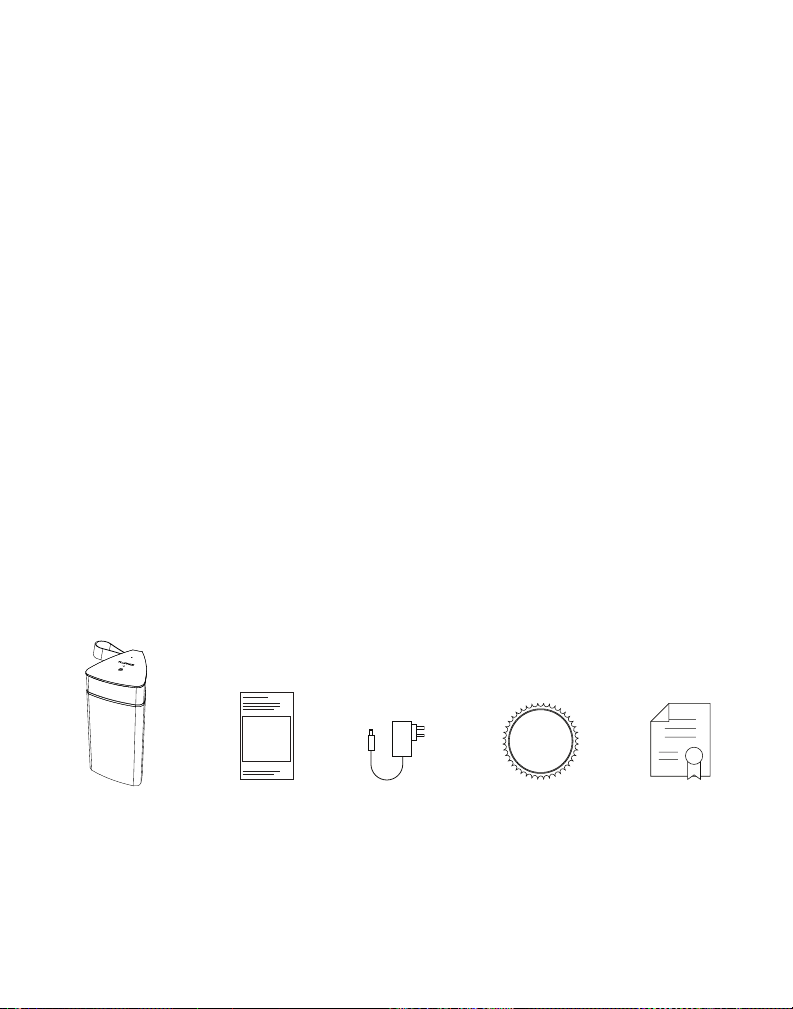
What’s Included
LIFETIME
Customer Support
Fi20
Speaker
For how-to videos and other helpful resources please visit www.uance.com
User
Manual
Power
Adapter
Lifetime
Customer Support
2 Ye ar
Warranty
3
Page 4
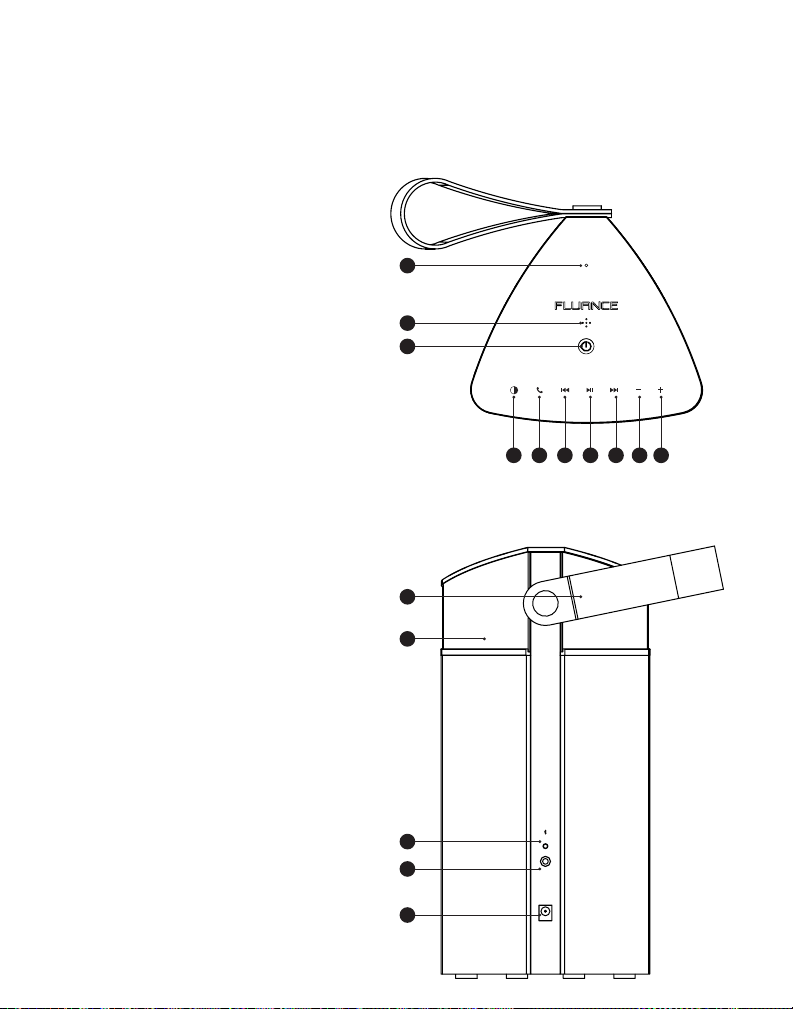
Top & Back Panel Layout
Top
1. Status LED
2. Microphone
3. Power Button
Hold: ON/OFF
Tap: Battery Check
4. Light - ON/OFF
5. Speakerphone
6. Back
7. Play/Pause
8. Forward
9. Volume Down
10. Volume Up
Back
11. Handle
12. LED Accent Light
13. Bluetooth® Reset Button
14. Aux Input
15. Power Input
Fluance Fi20 User Manual
1
2
3
4 5 6 7 8 9 10
11
12
13
14
15
4
RESET
AUX IN
POWER
Page 5
Fluance Fi20 User Manual
First Time Use
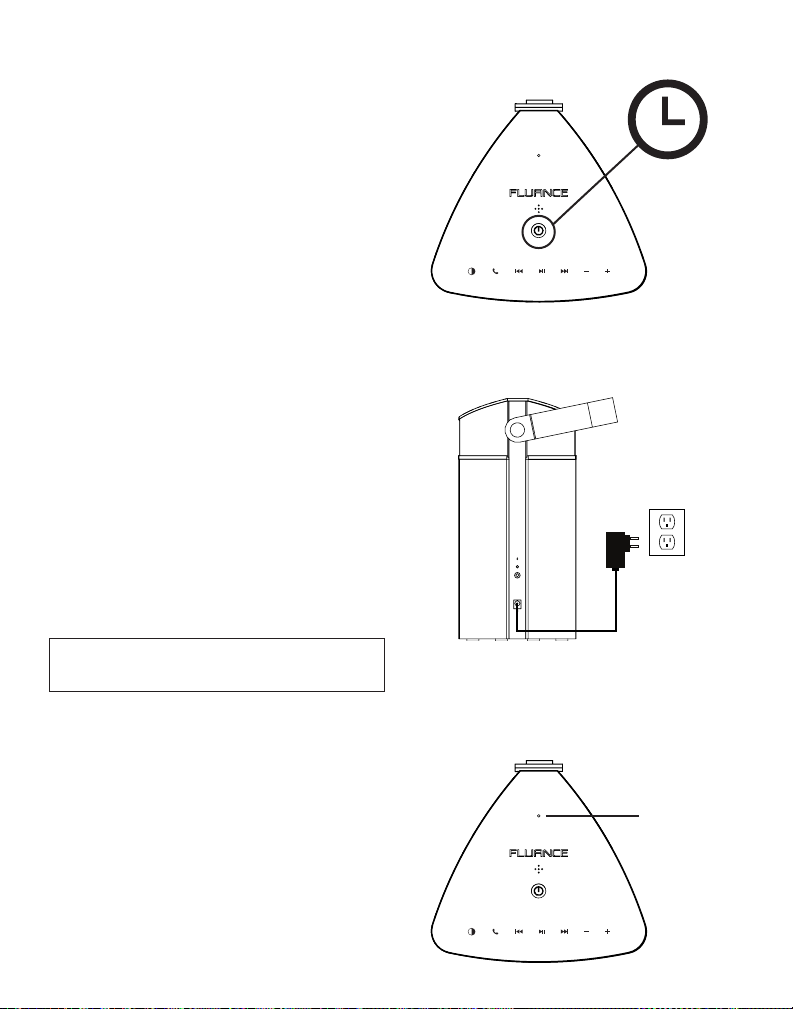
Power ON
Press and Hold the Power Button for
2 seconds to turn On/Off.
Unit will automatically turn off after 15
minutes of inactivity to preserve batter y.
Charging the Battery
Connect to wall outlet using included Power
Adapter. The Status LED will ash Green
when Power Adapter is connected.
Tap the Power Button to check on the
batter y charging status.
• When charging the Status LED will
ash green
• When fully charged the Status LED
will be solid green
The Fi20 has a charge time of 3.5 hours.
For the rst tim e charg ing it is r ecomm ended to
charge for 8 hours for best battery performance.
Checking the Battery
2 Sec.
RESET
AUX IN
POWER
Tap the Power Button to check the battery
when the unit is on and not connected to
power.
• G reen: 1 00% - 40%
• Yellow: 39% - 15%
• Red: 14% - 0%
The Fi20 has 24 hours of batter y life when
playing music at moderate volume. The Status
LED will turn red to let you know when the
batter y level is critical.
Battery
Indicator
5
Page 6
Fluance Fi20 User Manual
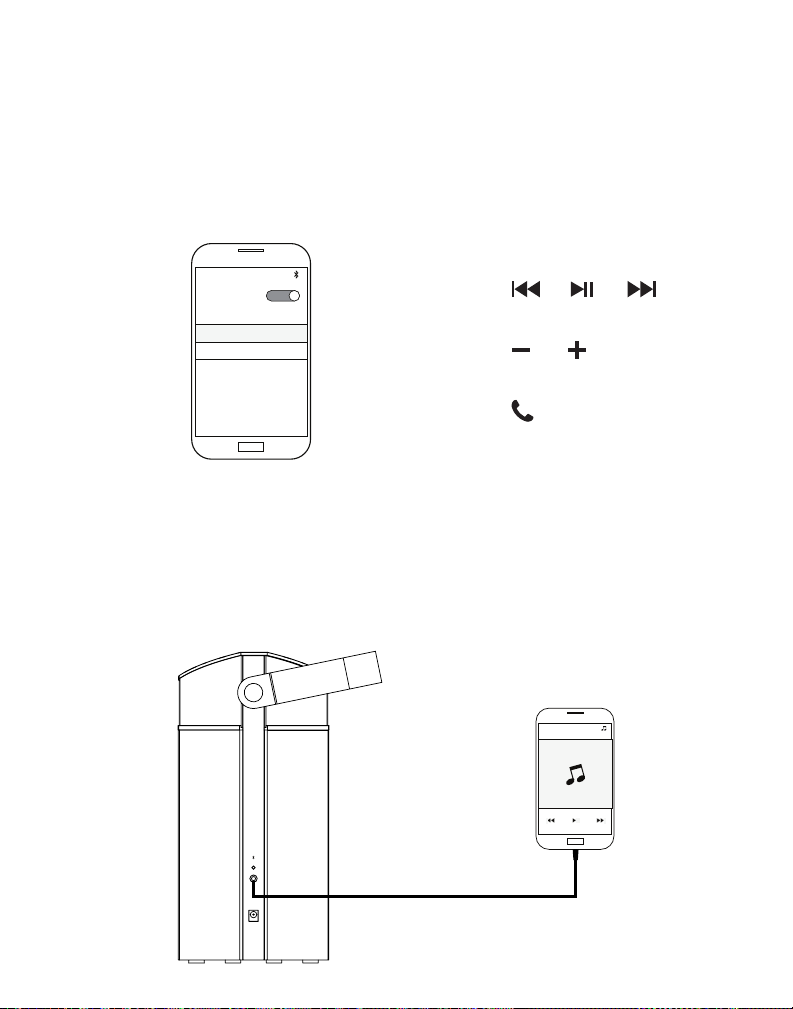
Connecting Bluetooth
®
Turn on the Fi20 and pair to “ Fluance Fi20” on your source device.
If unable to connect you can reset the Bluetooth® function on the Fi20 using the Bluetooth®
Reset button on the back of the unit.
Settings
Bluetooth
MY DEVICES
Fluance Fi20
Music Playback
Volume Control
Speakerphone
Aux Playback
Connect to audio source using a 3.5mm aux c able (not included)
Connecting an Aux cable will override the Bluetooth® function. To use Bluetooth®, the Aux
cable must be disconnected.
Playback
RESET
AUX IN
POWER
6
Page 7
Fluance Fi20 User Manual
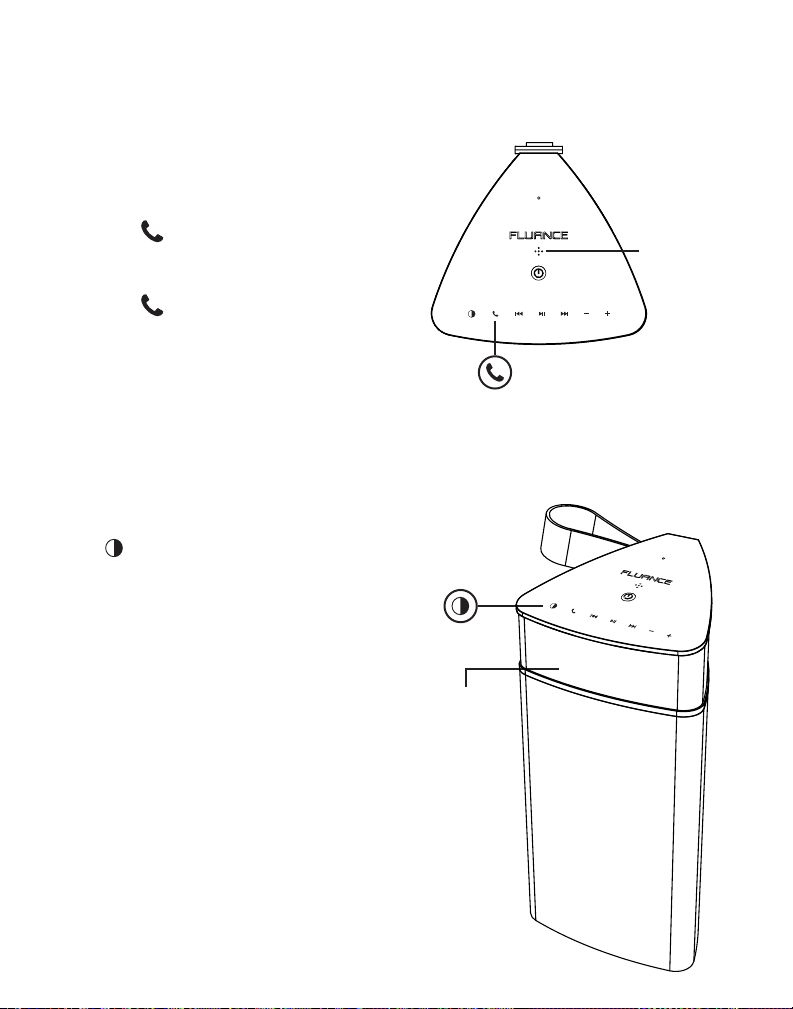
Speakerphone
When the Fi20 is paired to a smar tphone or
similar Bluetooth device it can function as a
speakerphone.
• Press to answer a call on the Fi20
• Talk towards the microphone located on
top of the Fi20
• Press to end the call
For best microphone performance it is
recommended to be within 2 meters (6. 5 feet)
of the Fi20 when using speakerphone.
Accent Light
Press to turn The LED Accent Light On/Of f
The LED Accent Light requires that the unit is
turned on to operate . If the speaker is not
in use the Fi20 will shutof f after 15 minutes .
Microphone
LED Accent
Light
7
Page 8

Fluance Fi20 User Manual
Frequently Asked Questions
What does the Status LED’s color/behavior mean?
Bluetooth
• White (Flashing): Bluetooth® Pairing mode
• White (Solid): Bluetooth® Paired or Aux Connected
Battery Charging
• G reen (Flashing): Batter y Charging when unit is on
• G reen (Pulsing): Battery Charging when unit is off
Battery Check (power adapter not connected)
• G reen (Solid): 100% - 40 % Battery Level
• Yellow (Solid): 39% - 15% Battery Level
• Red (Solid): 14% - 0% Battery Level
Another device is connected to the Fi20 and I wish to connect my device.
You can reset the Bluetooth® connection by pressing the Bluetooth® Reset button on the
back of the Fi20. Please note only one device can be paired at a time.
The Fi20 is not showing as an available device on my Bluetooth® device.
Ensure the Fi20 is not paired to another device. You can reset Bluetooth® using the
Bluetooth® Reset button on the back of the Fi20. Next turn Bluetooth® off and back on in your
device’s Bluetooth® settings. If the Fi20 is still not available you can reboot your device and
check again.
What is t he range of the Bluetooth® Connection?
The Fi20 operates with Power Class 2 Bluetooth® devices, which have a range of approximately
33 feet (line of sight).
What is “auto-pairing” and how does it work?
Auto-Pairing is a convenient conne ction feature implemented into all Fluance Bluetooth®
Speakers. When the Fi20 is turned on it will automatically connect to the last device that it was
connected to. If the connected Bluetooth® enabled device leaves the connection range of the
Fi20 and returns at a later time, the device will automatically connect.
Note: The Fluance Fi20 will only Auto-Pair to the last device that it was connected to.
How do I adjust th e Volume settings?
Use the +/- buttons on the top of the Fi20 to increase or decrease the volume of the Fi20.
There are 25 volume steps on the Fi20. You can also adjust the volume of your source device.
8
Page 9

Fluance Fi20 User Manual
Can I use the Fi20 outdoors?
The Fi20 can be used outdoors but it is not waterproof and should avoid all contact with
water. When not in use it is advised to store the Fi20 in a dry indoor environment.
Can I pair more than one Fi20 together?
The Fi20 can only pair to one device at a time and does not support simultaneous playback
from multiple Fi20 speakers.
Is the handle designed to rotate?
The handle on the Fi20 is designed to be positioned up for carrying or down for stationary
playback. The handle should rotate freely.
Can the handle be removed?
The handle on the Fi20 is not designed to be removed . If the handle is removed it may not be
as secure when reinstalled.
Can the battery be replaced?
The battery is replaceable by the user but should only be replaced with the ofcial Fi20
batter y pack. If you require a replacement battery please visit www.uance.com/contact
for fur ther assistance.
9
Page 10

Fluance Fi20 User Manual
Certification Information
FCC Statement
This equipment has been tested and found to comply with the limits for a Class B digital
device, pursuant to Part 15 of the FCC Rules. Th ese limits are designed to provide reasonable
protection against harmf ul interference in a residential installation. This equipment generates
uses and can radiate radio f requency energy and, if not installed and used in accordance with
the instructions, may cause harmful interference to radio communications . However, there is
no guarantee that interference will not occur in a particular installation. If this equipment does
cause harmful interference to radio or television reception, which can be determined by
turning the equipment of f and on, the user is encouraged to try to correct the interference
by one or more of the following measures:
• Reorient or relocate the receiving antenna.
• Increase the separation between the equipment and receiver.
• C onnect the equipment into an outlet on a circuit different from that to which the
receiver is connected.
• C onsult the dealer or an experienced radio/TV technician for help.
This device complies with part 15 of the FCC Rules. Operation is subject to the following two
conditions:(1) This device may not cause harmful interference, and (2) this device must accept
any interference received , including inter ference that may cause undesired operation.
Changes or modications not expressly approved by the party responsible for compliance
could void the user ’s authority to operate the equipment. This equipment complies with FCC
radiation exposure limits set forth for an uncontrolled environment. This equipment should be
installed and operated with minimum distance 20cm between the radiator & your body.
IC Warning
This device complies with Industry Canada license-exempt RSS standard(s). Operation is
subject to the following two conditions: (1) This device may not cause interference, and (2)
This device must accept any interference, including interference that may cause undesired
operation of the device.
CAN ICES-3(B)/NMB-3(B)
This equipment complies with IC radiation exposure limits set for th for an uncontrolled
environment. This equipment should be installed and operated with minimum distance 20cm
between the radiator & your body.
Déclaration d’ICLe présent appareil est conforme aux CNR d’Industrie Canada applicables
aux appareils radio exempts de licence. Son fonctionnement est soumis aux deux conditions
suivantes :(1)l’appareil ne provoquera pas d ’interférences nuisibles,et(2) il doit accepter les
interférences reçues , y compris celles pouvant provoquer un fonctionnement non désiré.
Cet équipement doit être installé et utilisé à une distance minimale minimale de 20 cm entre
le ra di at eu r.
10
Page 11

Fluance Fi20 User Manual
Warranty Information
Thank you for choosing Fluance! We guarantee your investment in our products is a solid one.
High performance components combined with quality craftsmanship allow us to maintain the
highest possible production standards.
All items are guaranteed against defects in materials and craftsmanship. Fluance has outstanding quality control; if something should go wrong with any of our products, we will
repair it free of charge within the warranty period. If the product cannot be repaired, we will
replace the product. If the product has been discontinued, we will replace the product with
either the newest version of said product or current equivalent. In the event that Fluance
replaces a product under warranty, the replacement would only carry the original warranty
from the original date of purchase.
Warranty Period
The Fluance products below are warrantied for parts and labor for the stated period from
date of original purchase, and are subject to the terms and conditions of the warranty. Any
refurbished products that are discontinued hold a 9 0 day warranty from the date of original
purchase. Fluance warranties are valid for the original owner and are non-transferable.
• H ome Audio Passive Speakers: Lifetime Warranty
• Active or Powered Speakers: Two Year Warranty
• H iFi Turntables: Two Year Warranty
• B atteries (For Powered Speakers): One Year Warranty
Warranty Exclusions:
• Product s purchased from a dealer not authorized by Fluance.
• Product s with the serial number defaced, altered, or missing.
• D efects resulting from disaster, accident, abuse, misuse, lightning, power surges ,
neglect, unauthorized modication or water damage.
• D efect or damage as a result of repairs performed by a person or party not
authorized by Fluance.
• D efects of damage occurring during shipping (claims should be made with the
shipping company).
To Obtain Warranty Service
Should your product require warranty ser vice, please contact us at w ww.uance.com/contact
or call us at 1-888 -617-6863 to set up a Return Authorization. Products returned without a
valid Return Authorization number will be refused.
Fluance products must be returned in their original packaging. Our products are packaged
specially to protect them from any damage during shipping, and without this packaging the
return shipment could get damaged.
This warranty does not cover the shipping cost, insurance, or any other incidental charges .
Products shipped for warranty service must be pre-paid by the customer, and Fluance will
cover the cost to ship the repaired or replaced product back to the customer.
11
Page 12
Fluance Fi20 User Manual
Thank you for your purchase of this Fluance
We hope you enjoy your experience.
Questions?
Give us a chance to help, we’re just a click away.
Fluance.com/resources
Fluance.com/videos
Fluance.com/support
Fluance.com/contact
Don’t forget to register your product with us!
®
product.
Fluance.com/registration
12
 Loading...