

Page 1
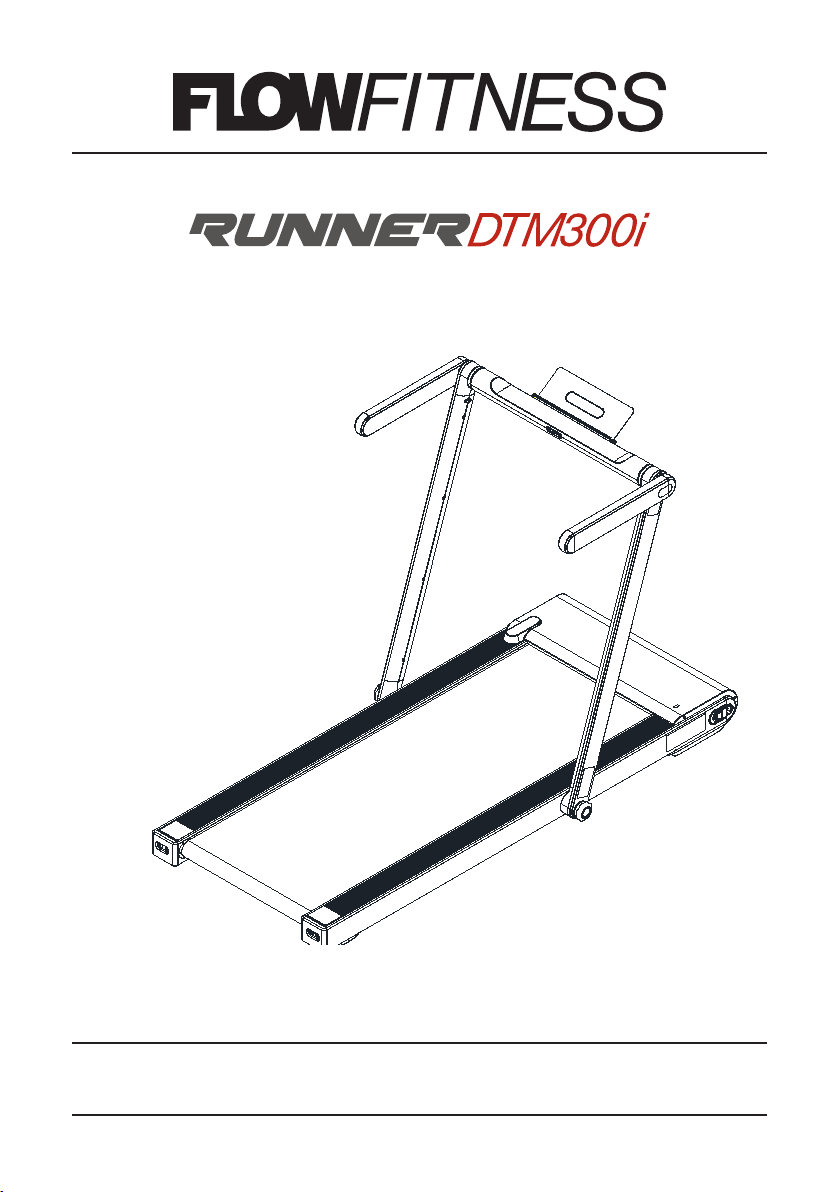
Gebruiksaanwijzing / Manual
www.flowfitness.com
Page 2
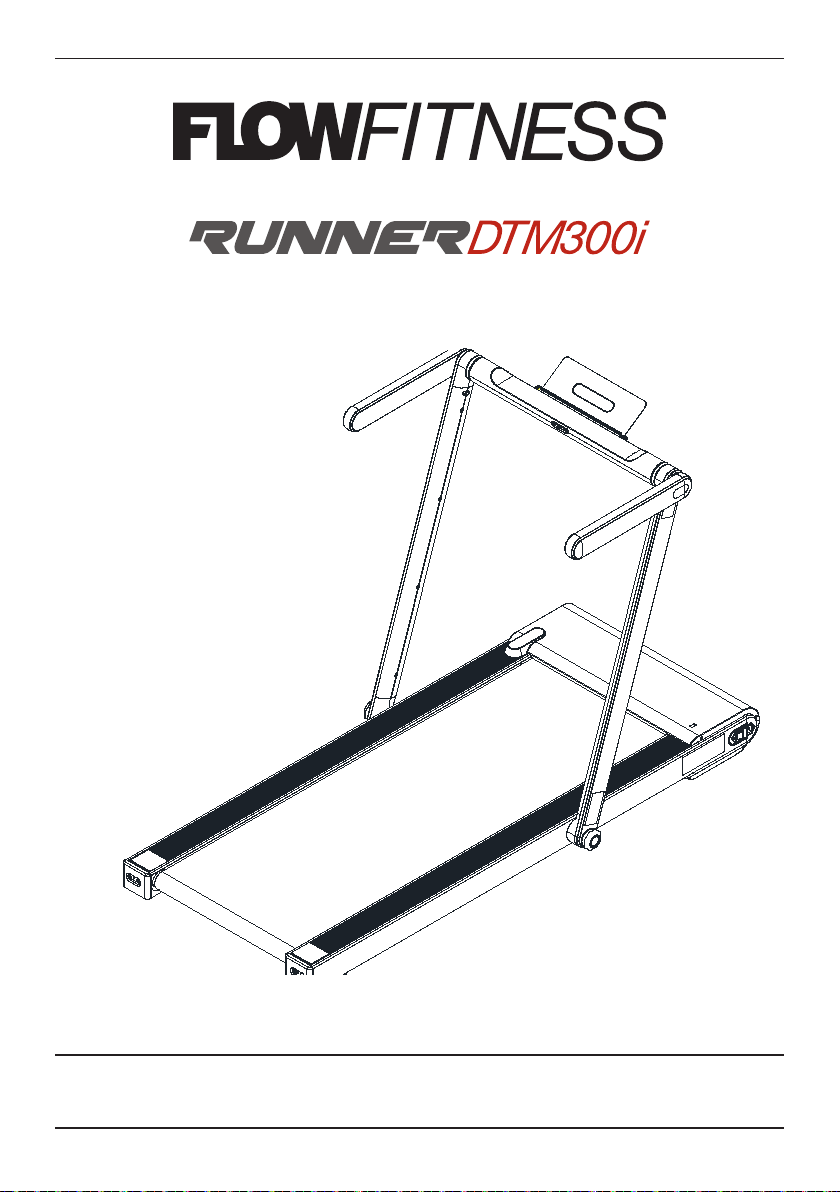
Runner DTM300i Treadmill
Handleiding (Nederlands)
Manual (English)
3 - 31
32 - 64
Copyright © Flow Fitness.
Alle rechten voorbehouden. Niets uit deze gebruiksaanwijzing mag worden gebruikt of
gereproduceerd in welke vorm of op welke wijze dan ook zonder voorgaande schriftelijke
toestemming van Flow Fitness.
All rights reserved. Nothing in this instruction manual may be used or reproduced in any
form or way without the express written permission of Flow Fitness.
Page 3
1. Belangrijke informatie 4
1.1 Gezondheid 4
1.2 Veiligheid 4
2. Introductie 6
2.1 Inhoud verpakking 7
2.2 Belangrijke onderdelen 8
2.3 Specificaties 9
3. Fitness 10
3.1 Trainen op hartslag 10
3.2 Warming up en cooling down 12
4. Gebruik 13
4.1 Montage 13
4.2 Opbergen / in gebruik nemen 17
4.3 Gebruik computer 18
4.4 Trainen met de FitShow-app 19
4.5 Onderhoud 24
5. Algemene informatie 26
5.1 Trainingsschema’s 26
5.2 Exploded view 28
5.3 Probleemoplossen 30
Inhoud
6. Garantie 31
5.4 Garantie 31
Gebruiksaanwijzing Runner DTM300i Treadmill - 3
Page 4
1. Belangrijke informatie
1.1 Gezondheid
- Belangrijk:
Lees eerst deze handleiding en volg de instructies nauwkeurig op voordat u het product
gaat gebruiken.
- Raadpleeg een deskundige om het trainingsniveau te bepalen dat voor u het best
geschikt is.
- Indien u tijdens het trainen last krijgt van duizeligheid, misselijkheid of ander lichamelijk
ongemak, stop dan direct met trainen en raadpleeg een arts.
- Houd tijdens het trainen uw hartslag in de gaten en stop onmiddellijk bij afwijkende
waarden.
- Wij adviseren u warming up en cooling down oefeningen te doen gedurende vijf tot tien
minuten voor en na gebruik van het product. Zo kan uw hartslag geleidelijk toe- en
afnemen en voorkomt u spierpijn.
1.2 Veiligheid
- Controleer voor gebruik of het product juist functioneert. In geval van storing of defect
stoppen met trainen en direct contact opnemen met uw dealer.
- Gebruik het product nooit als deze defect is.
- Dit product is alleen bedoeld voor thuisgebruik en dient op een vlakke ondergrond te
staan.
- Dit product mag door maximaal één persoon tegelijk worden gebruikt.
- Het product is geschikt voor personen met een lichaamsgewicht tot 100 kilogram.
- Zorg ervoor dat er altijd minimaal één meter vrije ruimte in alle richtingen rondom het
product is, wanneer u aan het trainen bent.
- Steek geen voorwerpen in openingen van het product.
- Houd kinderen en huisdieren uit de buurt van het product.
- Personen met een handicap moeten medische goedkeuring hebben en begeleiding
krijgen bij gebruik van dit product. Plaats geen handen en voeten onder het product.
- Houd nooit uw adem in tijdens het trainen. Uw ademhaling moet op een normaal tempo
zijn, afhankelijk van de intensiviteit van uw training.
- Begin uw trainingsprogramma langzaam en bouw dit geleidelijk op.
4 - Gebruiksaanwijzing Runner DTM300i Treadmill
Page 5

1. Belangrijke informatie
- Draag altijd geschikte kleding wanneer u aan het trainen bent. Draag geen te wijde
kleding, die tussen bewegende delen van het product kan komen.
- Gebruik voor het verplaatsen van het product altijd daarvoor geschikte tiltechnieken om
rugklachten te voorkomen.
- Controleer regelmatig of schroeven en bouten goed vastzitten en draai ze indien nodig
aan.
- De eigenaar van dit product is er verantwoordelijk voor dat alle gebruikers op de hoogte
zijn van de waarschuwingen en voorschriften zoals vermeld in deze gebruiksanwijzing.
- Dit product is bedoeld voor gebruik in een schone, droge omgeving. Opslag in koude en /
of vochtige ruimtes zou tot problemen in het product kunnen leiden.
- Dit product is niet geschikt voor therapeutische ondersteuningen of het
professioneel gebruik ervan in de fysiotherapie.
Laat uw conditie controleren door een arts voordat u begint met trainen. Dit is extra
WAARSCHUWING
belangrijk voor personen ouder dan 35 jaar of personen met gezondheidsproblemen.
Lees alle instructies voor gebruik. Flow Fitness is niet verantwoordelijk voor per-
soonlijk letsel of schade aan bezittingen veroorzaakt door gebruik van dit product.
Dit product is niet geschikt voor verhuur of gebruik in een commerciële of
institutionele omgeving.
Gebruiksaanwijzing Runner DTM300i Treadmill - 5
Page 6
2. Introductie
Flow Fitness dankt uw vriendelijk voor uw keuze voor de Runner DTM300i Treadmill. We
zijn ervan overtuigd dat het product zal voldoen aan uw verwachtingen.
Wij adviseren u voor het gebruik van de Runner DTM300i treadmill eerst deze handleiding
aandachtig te lezen, zodat het product optimaal en veilig kan worden gebruikt.
Flow Fitness wenst u veel succes en plezier met trainen.
6 - Gebruiksaanwijzing Runner DTM300i Treadmill
Page 7
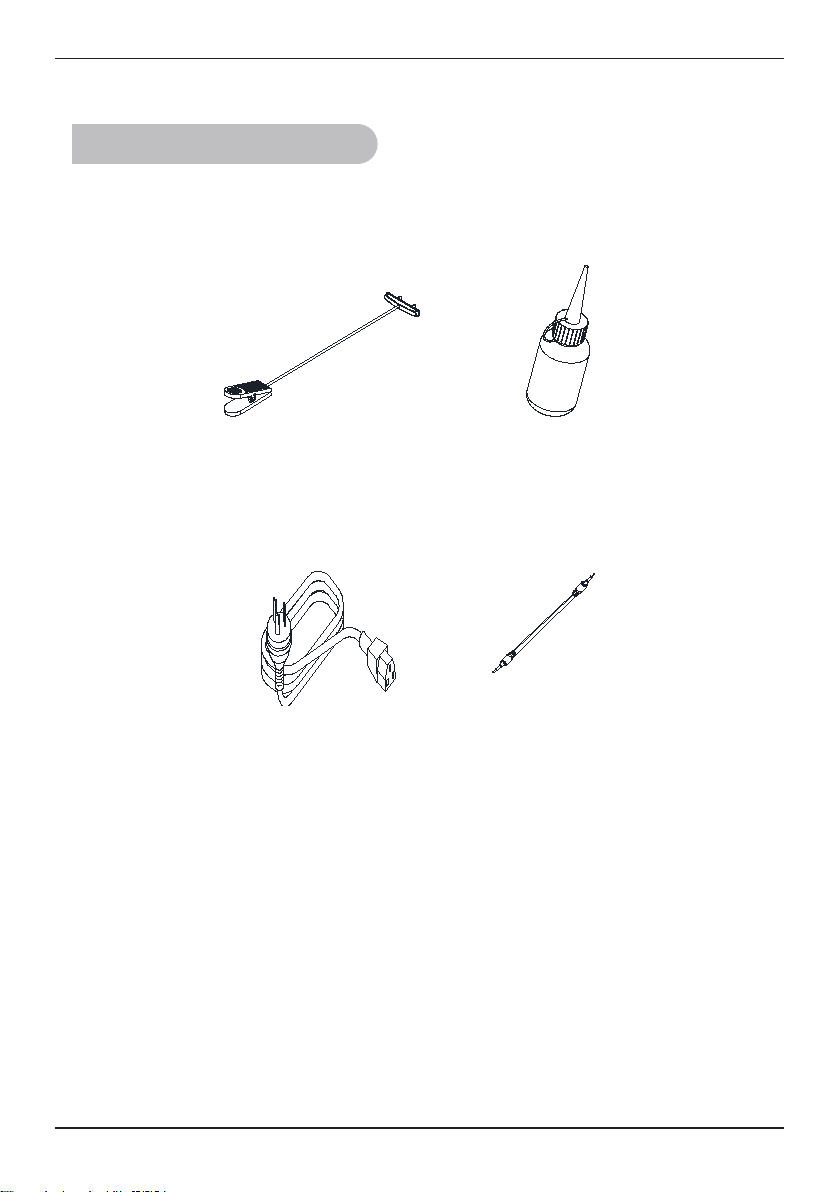
2.1 Inhoud verpakking
Safety key Smeermiddel
2. Introductie
Netstroomkabel AUX-kabel
Gebruiksaanwijzing Runner DTM300i Treadmill - 7
Page 8
2. Introductie
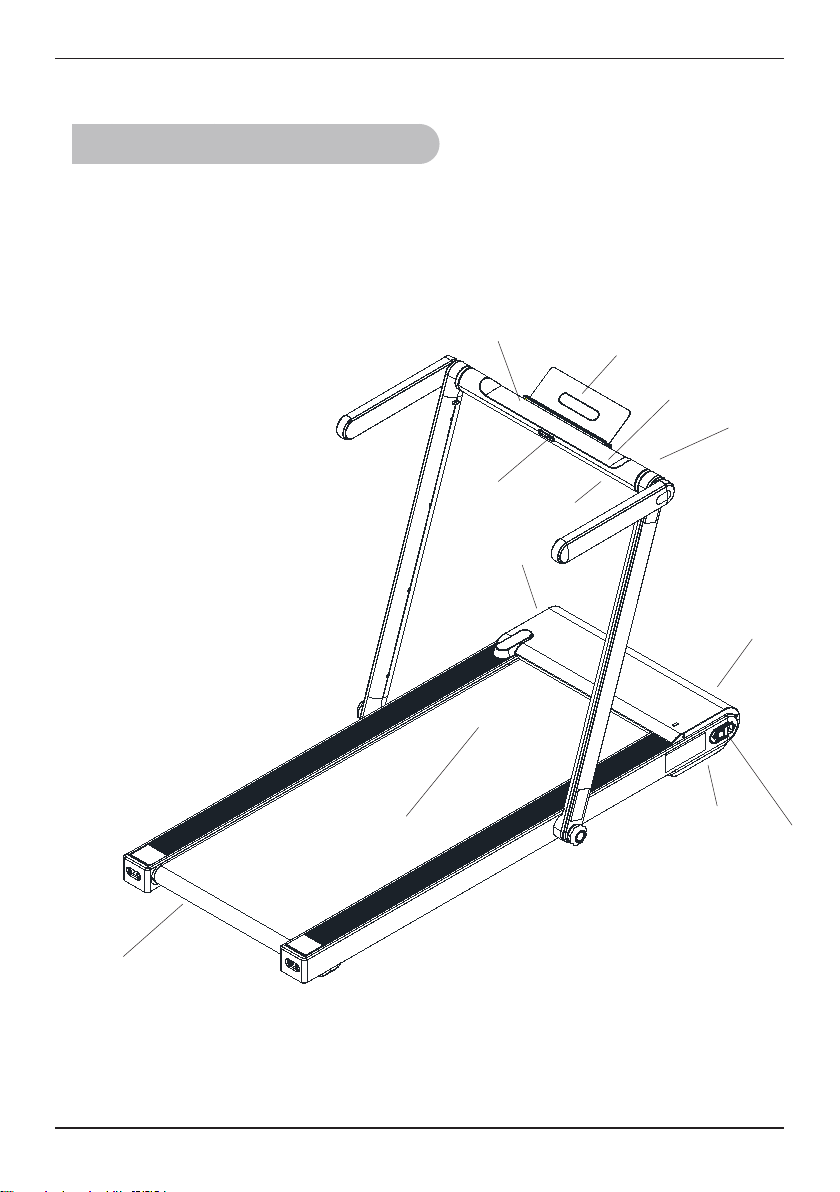
2.2 Belangrijke onderdelen
Toetsen Snelheid
Safety Key
Motorkap
loopvlak
Tablet houder
Computer
Aux-aansluiting
Speaker
Transportwielen voor
zijdelingse verplaatsing
Transportwielen
Ingang netstroomkabel en
Aan/Uit-knop
Hendel voor
het opklappen
8 - Gebruiksaanwijzing Runner DTM300i Treadmill
Page 9
2.3 Specificaties
2. Introductie
Computer
- Manueel programma
- Bluetooth & trainen met de Fit Show app
Hartslagmeting
- Bluetooth band in Fitshow app
Afmetingen
Lengte: 151,5 cm
Hoogte: 101 cm
Breedte: 77 cm
Gewicht: 49,5 kg
Afmetingen opgeklapt
Lengte: 151,5 cm
Hoogte: 13,8 cm
Breedte: 77 cm
Techniek
- Motor 1,25 PK 2,5 Peak PK
- Snelheid 1-12 KM/U
- Speed keys voor snelheid
- Loopvlak (lxb) 125 x 45 cm
- 100 kg maximaal gebruikersgewicht
Extra
- Audio AUX- aansluiting
- Speakers
- LED- display
Gebruiksaanwijzing Runner DTM300i Treadmill - 9
Page 10
3. Fitness
3.1 Trainen op hartslag
Wat is fitness? In het algemeen is een fitnessoefening te omschrijven als een activiteit
die er voor zorgt dat uw hart meer zuurstof via het bloed van uw longen naar uw spieren
pompt. Hoe zwaarder de training, hoe meer brandstof (zuurstof) de spieren nodig hebben
en hoe harder het hart moet werken om zuurstofrijk bloed naar de spieren te pompen.
Als u in een goede conditie bent, kan uw hart met elke hartslag meer bloed pompen. Het
hart hoeft dan niet zo vaak te pompen om de noodzakelijke zuurstof naar uw spieren te
transporteren. Uw rusthartslag en hartslag bij inspanning gaan omlaag.
Bij het trainen is het dus belangrijk om uw hartslag in de gaten te houden. De hoogte van
uw hartslag is namelijk bepalend voor het resultaat van de training. Wat voor u de beste
hartslag is om op te trainen, hangt ten eerste af van uw leeftijd en aan uw trainingsdoel. Als
uw trainingsdoel is om gewicht te verliezen dan kunt u het beste op 60% van uw maximale
hartslag trainen. Wanneer uw trainingsdoel is om de conditie te verbeteren dan is dat 80%
van uw maximale hartslag.
Het lichaam slaat energie op in twee vormen; koolhydraten en vetten. Bij een inspanning
gebruiken we een combinatie van deze twee engergievoorraden. Wanneer de in
spanningsintensiteit hoog is, kiest het lichaam grotendeels voor snel verbrandbare energie,
te weten koolhydraten. Aangezien hiervan maar een beperkte hoeveelheid is, zal dit slechts
korte tijd worden volgehouden. Bij trainingen op lage intensiteit zal het lichaam grotendeels
kiezen voor een langdurige en energievoorraad te weten vet. Aangezien dit in grote
hoeveelheden in het lichaam is opgeslagen, is dit langer vol te houden.
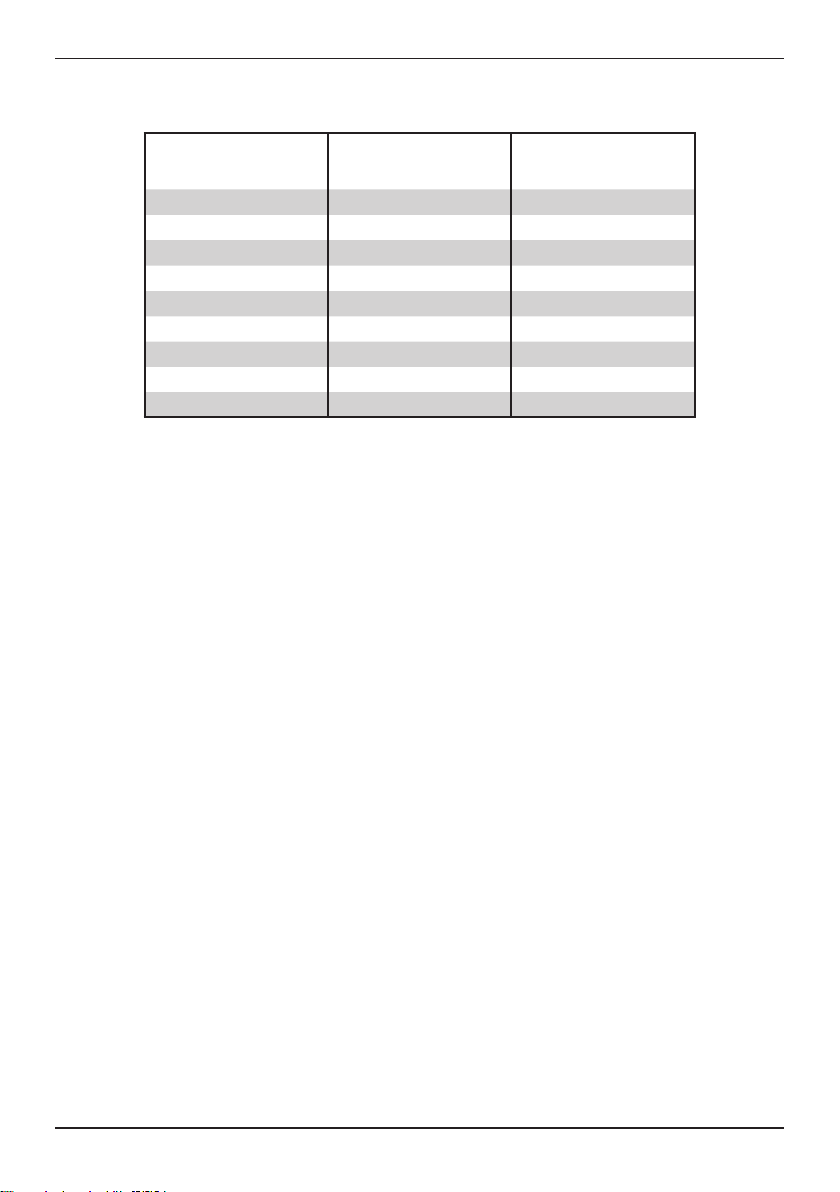
Hieronder is een schema weergegeven waarin u kunt aflezen wat voor u de beste
hartslag is om mee te trainen. In dit schema is per leeftijdscategorie een hartslaggebied
aangegeven waarbinnen uw hartslag moet liggen tijdens de training. In de middelste kolom
staan de waarden vermeld die u moet aanhouden als u gewicht wilt verliezen. Indien u uw
conditie wilt verbeteren dient u de waarden in de rechterkolom aan te houden.
10 - Gebruiksaanwijzing Runner DTM300i Treadmill
Page 11
3. Fitness
Leeftijd
20 -24 118 - 120 167 -170
25 - 29 115 -117 163 - 166
30 - 34 112 - 114 158 - 162
35 - 39 109 - 111 154 - 157
40 - 44 106 - 108 150 - 153
45 - 49 103 - 105 145 - 147
50 - 54 100 - 102 141 - 144
55 - 59 97 - 99 137 - 140
60 en ouder 94 - 96 133 - 136
Gewicht verliezen
(slagen per minuut)
60%
Conditie verbeteren
(slagen per minuut)
85%
De beste manier om te beginnen met trainen is per persoon verschillend. Als u ongetraind
bent of overgewicht heeft, moet u rustig aan beginnen en uw trainingsarbeid geleidelijk
opvoeren.
In het laatste hoofdstuk van deze gebruiksaanwijzing (zie: 5.Algemene informatie) staan
verschillende trainingsschema’s weergeven. Deze schema’s kunt u gebruiken bij het
bereiken van uw trainingsdoel. Het programma is verdeeld in twee fasen. De eerste fase
bestaat uit zes weken en is een goede richtlijn voor beginners of personen die sinds lange
tijd weer gaan trainen. Gedurende deze fase wordt de intensiteit van de training langzaam
opgebouwd. Na zes weken begint de tweede fase. U kunt dan kiezen voor een trainingsschema om gewicht te verliezen of om uw conditie te verbeteren.
Gebruiksaanwijzing Runner DTM300i Treadmill - 11
Page 12
3. Fitness
3.2 Warming up en cooling down
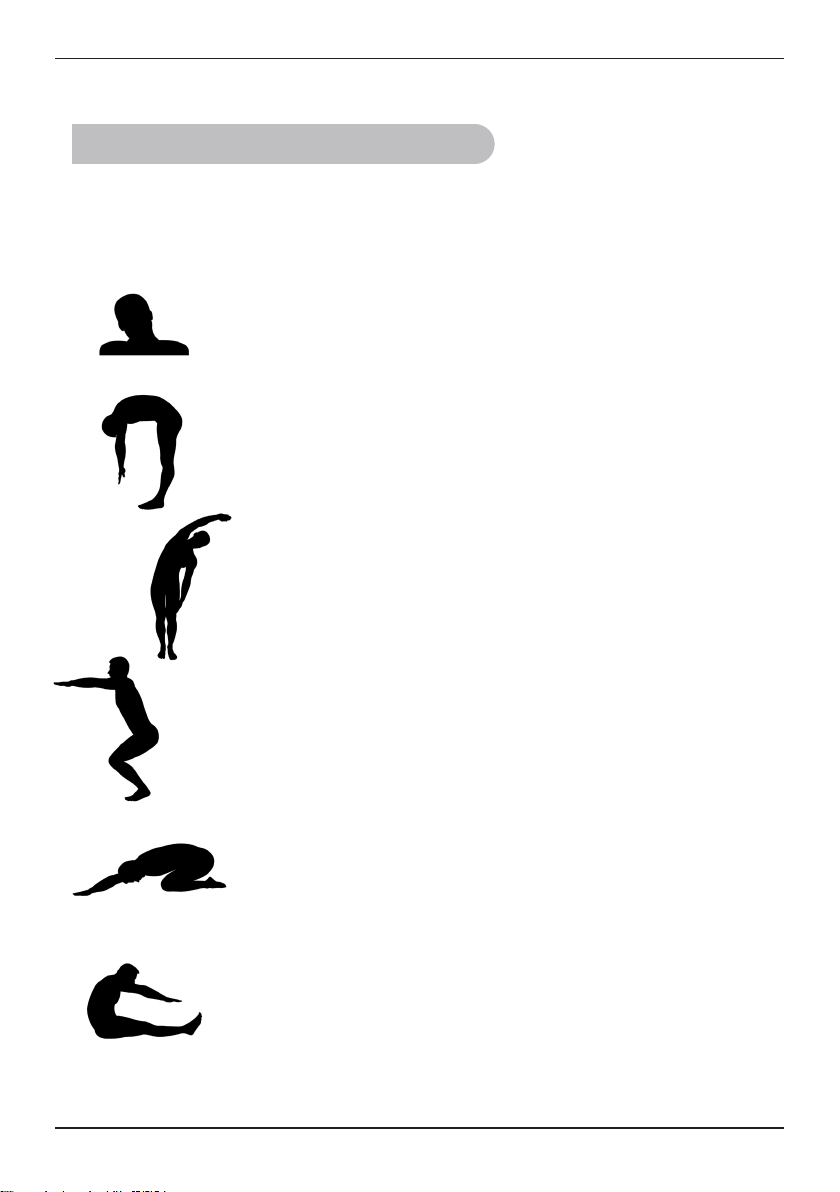
Een goed trainingsprogramma begint met een warming up en eindigt met een cooling down. Hiermee
kunnen spierpijn en blessures worden voorkomen. Hieronder vindt u een aantal geschikte oefeningen.
Head Roll
Kantel uw hoofd naar rechts. Hou dit één tel vast, zodat u de linkerkant
van uw nek licht voelt trekken. Doe dezelfde beweging naar links, naar
voren en naar achteren. Herhaal dit twee tot drie keer.
Toe Touch
Buig langzaam voorover met ontspannen armen en rug. Doe dit zover u
kunt en houd dit tien seconden vast. Herhaal dit twee tot drie keer.
Side Stretch
Steek uw rechterarm in de lucht en rek met uw arm zo hoog als u
kunt. Buig naar links, zodat uw rechterzijde wordt gestrekt. Houd dit
gedurende één seconde vast. Ontspan en doe vervolgens dezelfde
beweging met uw linker arm. Herhaal dit drie tot vier keer.
Knee bend
Plaats uw voeten op schouwder breedte en strek uw handen voor uw
uit. Buig nu langzaam door uw knieën, niet meer dan 10 centimeter.
Kom rustig omhoog en herhaal deze oefening een aantal keren.
Lower back stretch
Begin met uw knieën en voeten op de vloer. Stek uw armen voor u uit
richting de grond. Plaats uw bekken boven uw voeten en leun naar
achteren en voel de spanning uw onderrug.
Hamstring Stretch
Ga op de vloer zitten met uw rechterbeen gestrekt en plaats uw
linkervoet plat tegen de binnenkant van uw rechter bovenbeen. Buig
voorover richting uw rechtervoet en houd dit gedurende tien seconden
vast. Ontspan en doe dit vervolgens met uw linkerbeen gestrekt. Herhaal
dit twee tot drie keer.
12 - Gebruiksaanwijzing Runner DTM300i Treadmill
Page 13
4.1 Montage
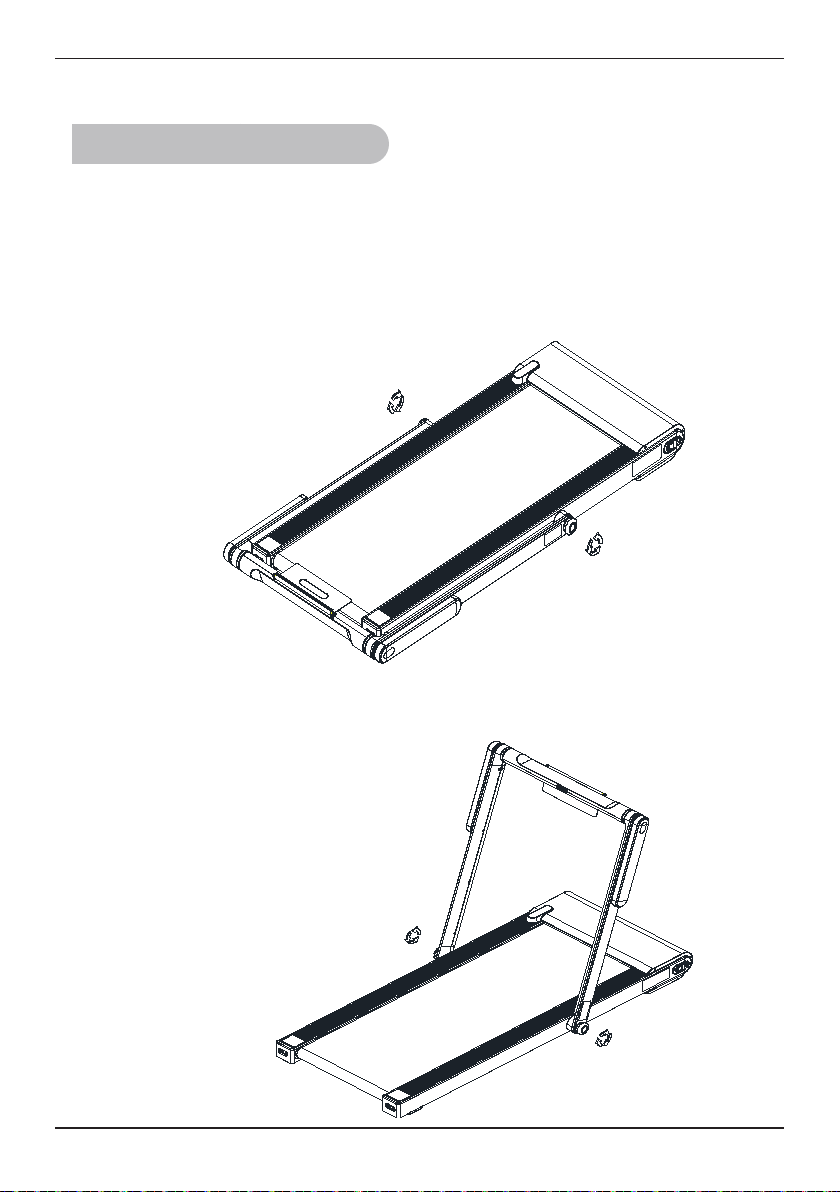
In dit hoofdstuk wordt beschreven hoe de loopband gemonteerd dient te worden. Haal alle
onderdelen uit de doos en zorg dat er voldoende ruimte beschikbaar is om de loopband te
monteren.
Stap 1:
Draai beide knoppen tegen de klok in los, zoals aangegeven op onderstaande afbeelding.
4. Gebruik
Stap 2:
1. Til de computer nu omhoog. Draai de computer omhoog totdat deze niet verder kan en draai beide
knoppen weer goed vast. U kunt de armen van achteren naar voren draaien om deze in de juiste
stand te krijgen.
Gebruiksaanwijzing Runner DTM300i Treadmill - 13
Page 14
4. Gebruik
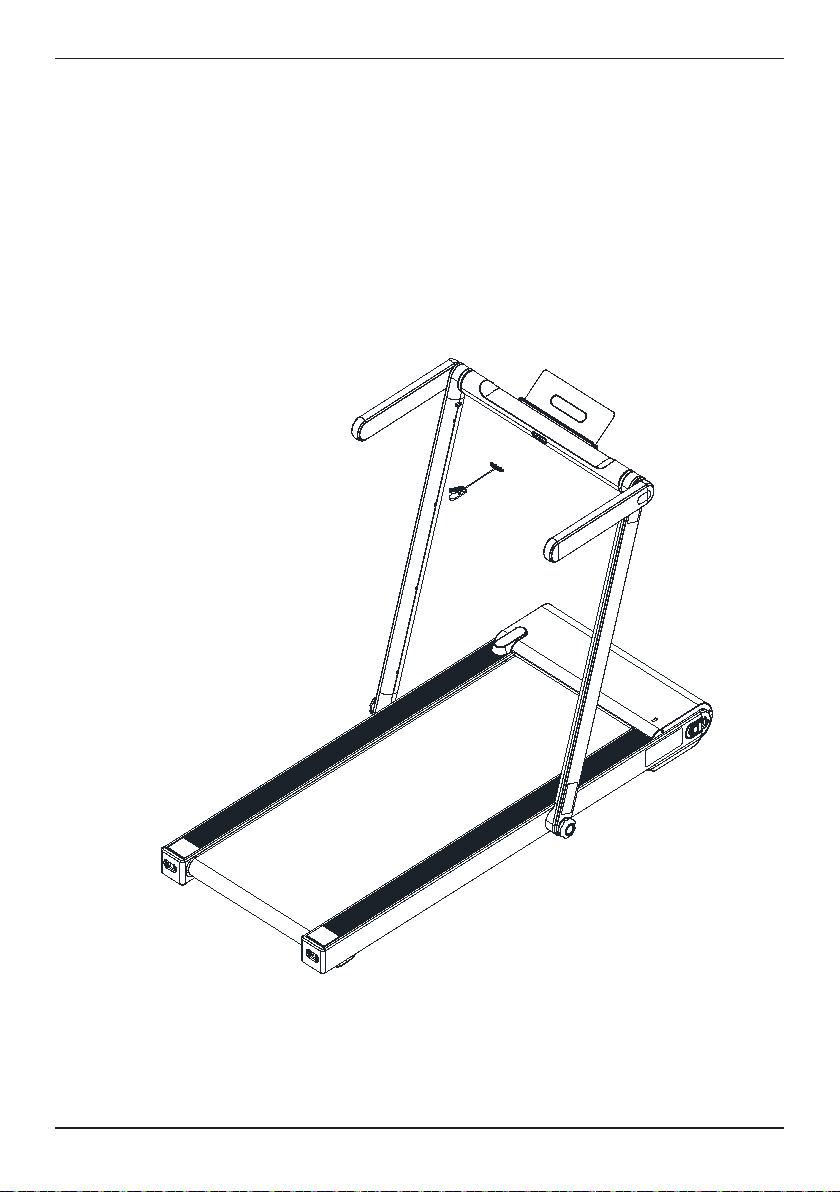
Stap 3: Plaatsen van de safety key
Plaats de safety key in de daarvoor bestemde plek in het midden van de computer.
Bevestig voor een trainingssessie, om veiligheidsredenen, altijd de clip aan het uiteinde van
de key aan uw kleding. Wanneer de safety key tijdens een trainingssessie verwijderd wordt
zal de loopband een noodstop maken.
Wanneer het display “-----” aangeeft betekent dit dat de safety key niet geplaatst is.
Zonder de safety key kan de computer niet in werking gesteld worden.
14 - Gebruiksaanwijzing Runner DTM300i Treadmill
Page 15
4. Gebruik
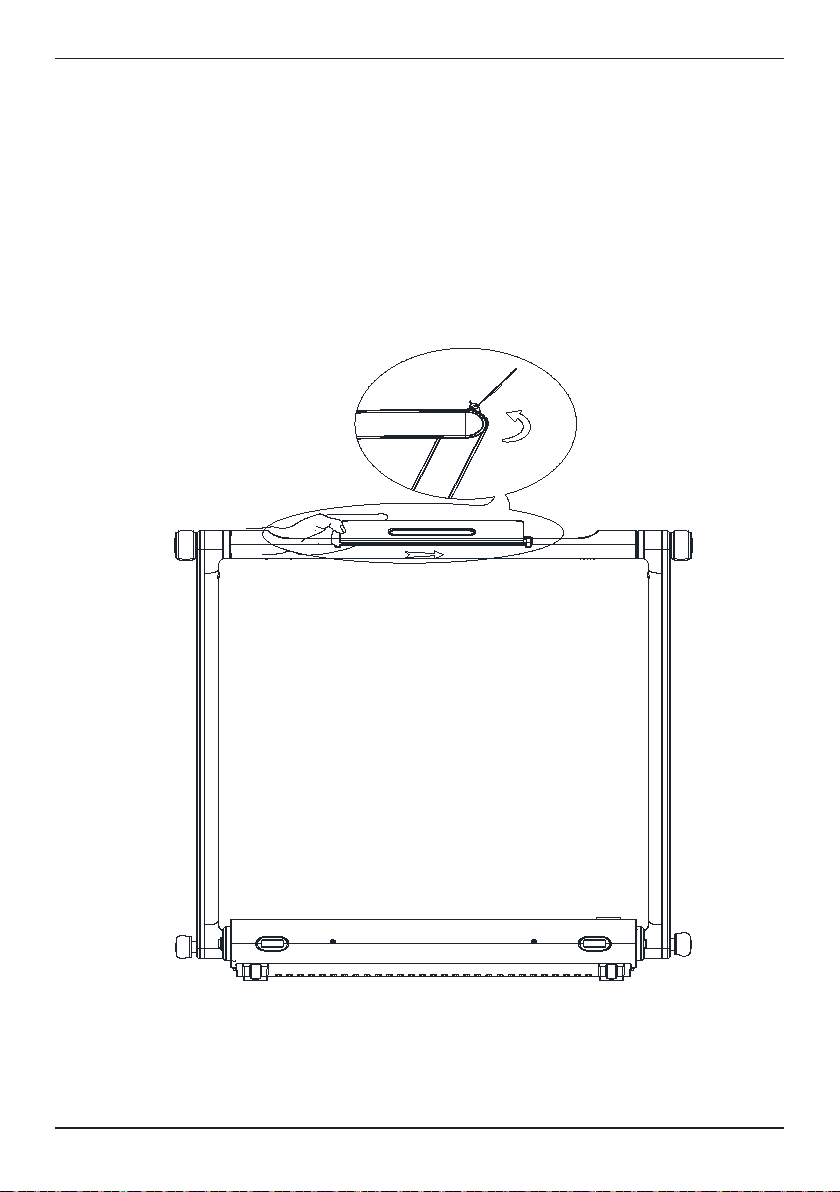
Tablethouder uitklappen
Draai de tablethouder aan de achterzijde van de computer omhoog.
Tablethouder inklappen
Om de tablethouder in te klappen dient u deze eerst naar links te schuiven en vervolgens
naar achteren te draaien.
Gebruiksaanwijzing Runner DTM300i Treadmill - 15
Page 16
4. Gebruik
Stroomvoorziening
Voordat u kunt beginnen met trainen dient u de loopband van stroom te voorzien.
Plaats het netsnoer in de loopband en in het stopcontact. Daarna kunt u de aan/uit-knop op
“1” drukken om de loopband in te schakelen. De aansluiting voor het netsnoer en de aan/
uit-knop bevinden zich aan de achter/onder-zijde van de motorkap.
LET OP: voor uw eigen veiligheid is het belangrijk om gebruik te maken van een geaard stopcontact.
16 - Gebruiksaanwijzing Runner DTM300i Treadmill
Page 17
4.2 Opbergen / in gebruik nemen
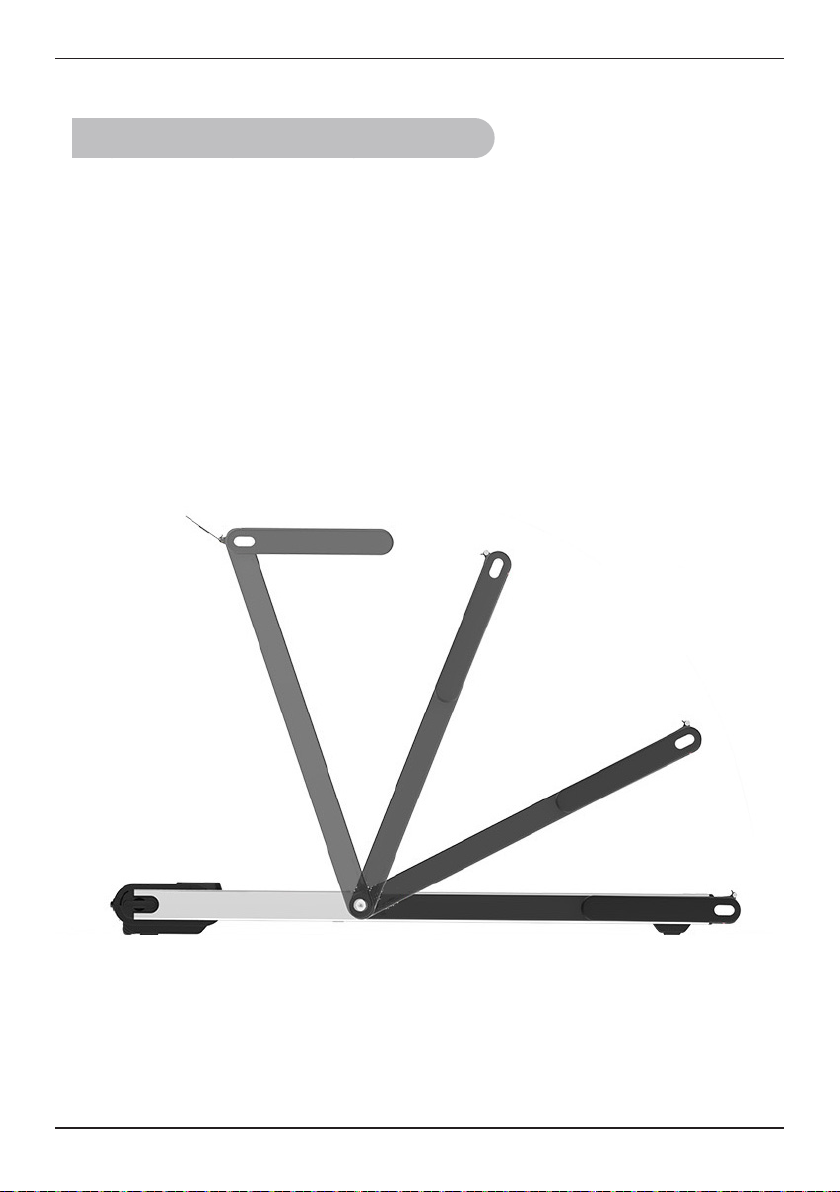
Opklappen & Opbergen
1. Klap als eerste de tablet houder in en trek de voedingkabel uit het stopcontact en uit de
loopband.
2. Klap de armen in door deze naar achteren te draaien.
3. Draai beide knoppen tegen de klok in los en kantel het display naar voren.
4. Draai beide knoppen weer vast.
5. Til de loopband aan het einde van loopvlak op om deze te verplaatsen. U kunt de
loopband plat of rechtopstaand opbergen. U kunt de extra transportwielen gebruiken om
de loopband zijdelings te verplaatsen. Laat de loopband tegen de muur aan leunen bij
rechtopstaand opbergen.
4. Gebruik
Gebruiksaanwijzing Runner DTM300i Treadmill - 17
Page 18
4. Gebruik
4.3 Gebruik computer
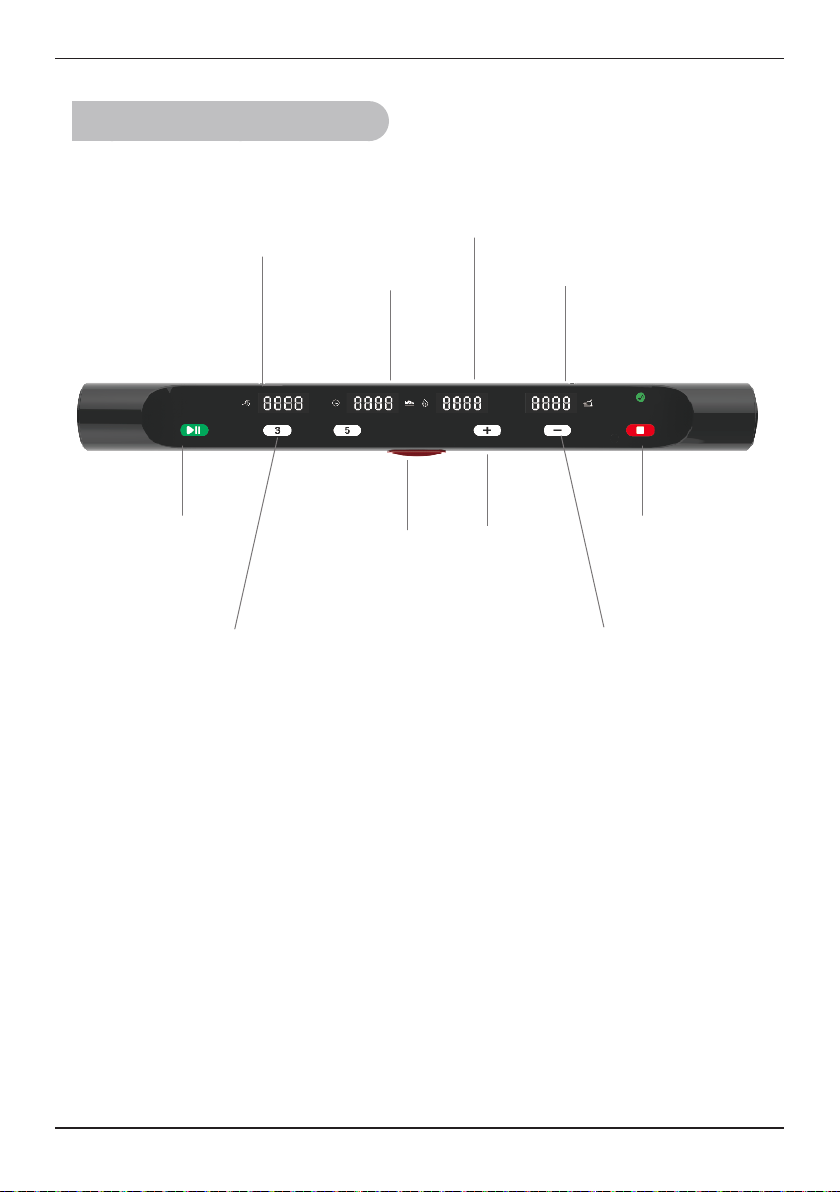
Afstand
Deze waarde geeft de gelopen
afstand weer.
Deze waarden geven het aantal
stappen en de verstreken tijd
Tijd / Stappen
weer.
Calorie
Deze waarde geeft de
verbranden kilocalorieën
weer.
Snelheid
Deze waarde geeft de huidige
snelheid weer.
Starten en pauzeren van een
Start/Pauze
trainingssessie.
Snelheid-sneltoetsen
Druk op de 3 of 5 om direct naar
deze snelheid te gaan.
Standby
Na 4 minuten van inactiviteit zal de computer automatisch in standby modus gaan. Druk op
een willekeurige knop om de computer weer uit standby modus te halen.
Training beëindigen
U kunt een training beëindigen door op STOP te drukken of door een noodstop maken door
de safety key te verwijderen.
Manueel - Quick start
Druk op de START toets. De computer telt nu 3 seconden af voordat er een geluidssignaal
klinkt en de band met 1.0 KM/U en hellingsniveau 0 begint te draaien. U kunt nu beginnen
met trainen. Alle waarden op de computer zullen oplopen.
Safety key
Safety key ingang.
+ toets
Gebruik deze om de snelheid te
verhogen.
- toets
Gebruik deze om de snelheid
te verlagen.
Stop
Een trainingsessie vroegtijdig
stoppen.
18 - Gebruiksaanwijzing Runner DTM300i Treadmill
Page 19
4.4 Trainen met de FitShow-app
Bedien uw Runner DTM300i loopband met uw smartphone of tablet met de FitShow
app. Volg een manueel programma, ren uw favoriete route, stel fitnessdoelen en leg uw
resultaten vast.
Download de FitShow App door in de iOS App Store te zoeken naar ‘iFitShow’ of in de Play
Store te zoeken naar ‘FitShow’ of volg een van de onderstaande links
Apple iOS App Store
https://itunes.apple.com/US/app/id1099080595?mt=8
Google Android Play Store
https://play.google.com/store/apps/details?id=com.fitshow&hl=en
4. Gebruik
Gebruiksaanwijzing Runner DTM300i Treadmill - 19
Page 20
4. Gebruik
Het verbinden van de app
Wanneer u de app op uw smartphone of tablet heeft gedownload volgt u onderstaande stappen om
verbinding te maken.
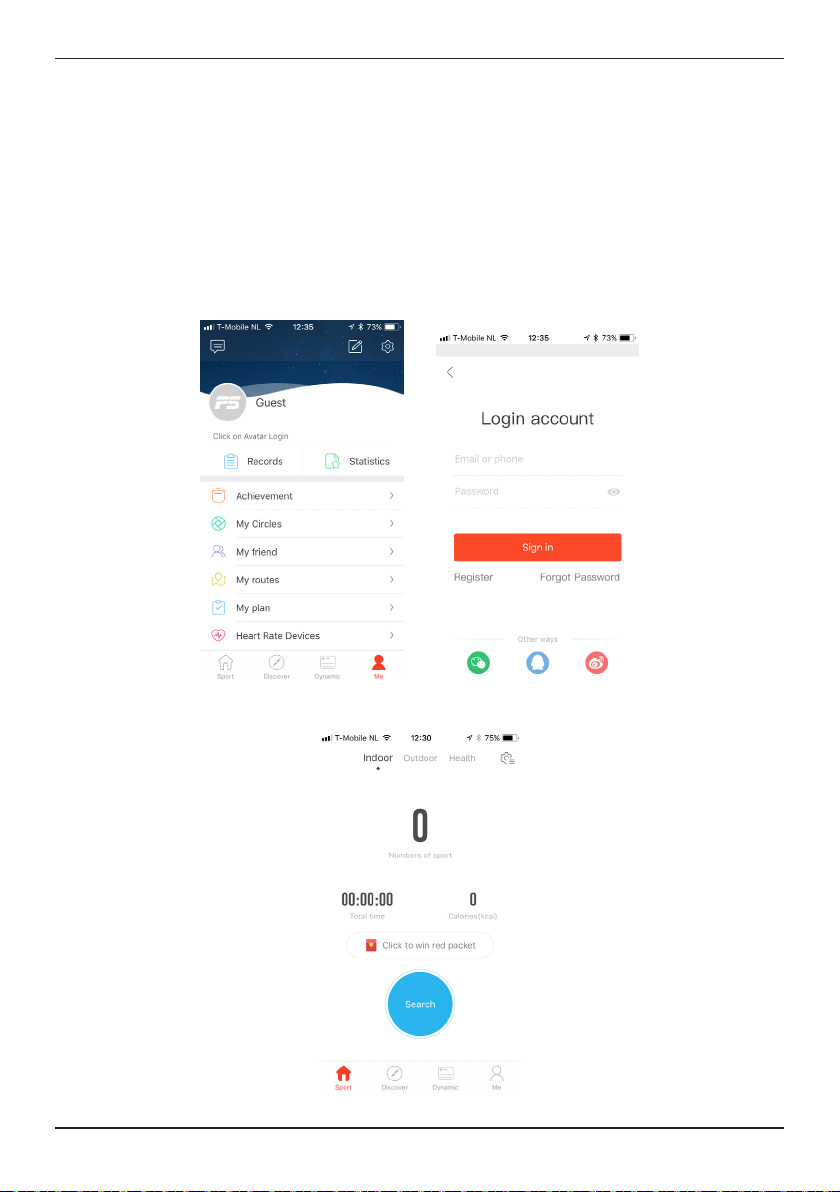
1. Ga naar de optie instellingen van uw smartphone of tablet en zet de bluetooth-functie aan.
2. Open de FitShow-app.
3. Om de app volledig te gebruiken dient u eerst een account aan te maken bij FitShow. Druk
onderaan de app op ME. Druk vervolgens op de avatar om een account aan te maken. Vul uw
gegevens in en bevestig uw account. Log vervolgens met uw zojuist aangemaakte account in.
Deze stap hoeft u slechts eenmalig uit te voeren.
4. Ga hierna onderin naar SPORTS en druk vervolgens op de blauwe knop SEARCH.
20 - Gebruiksaanwijzing Runner DTM300i Treadmill
Page 21
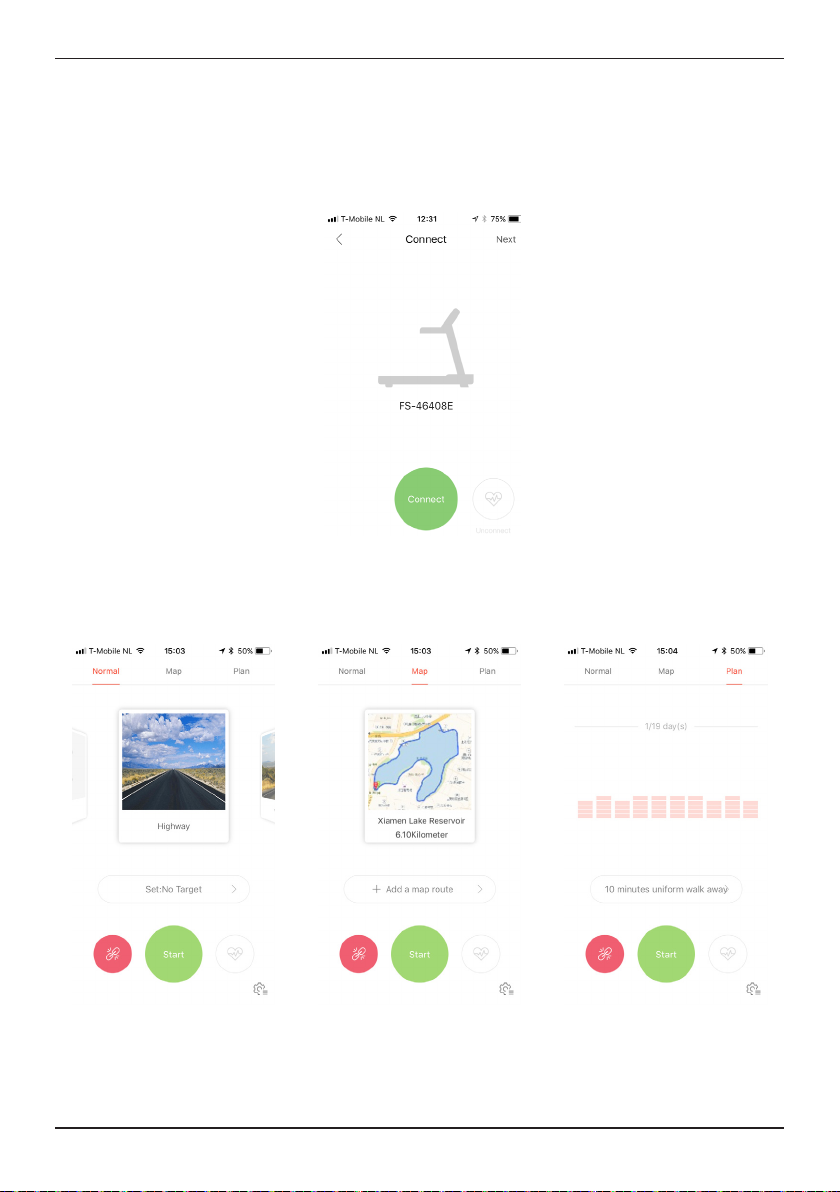
5. Uw loopband verschijnt nu in beeld. Druk vervolgens op de groene knop CONNECT.
6. Selecteer de gewenste training; Normal, Map of Plan.
7. Druk vervolgens op START om de training te starten.
4. Gebruik
Gebruiksaanwijzing Runner DTM300i Treadmill - 21
Page 22
4. Gebruik
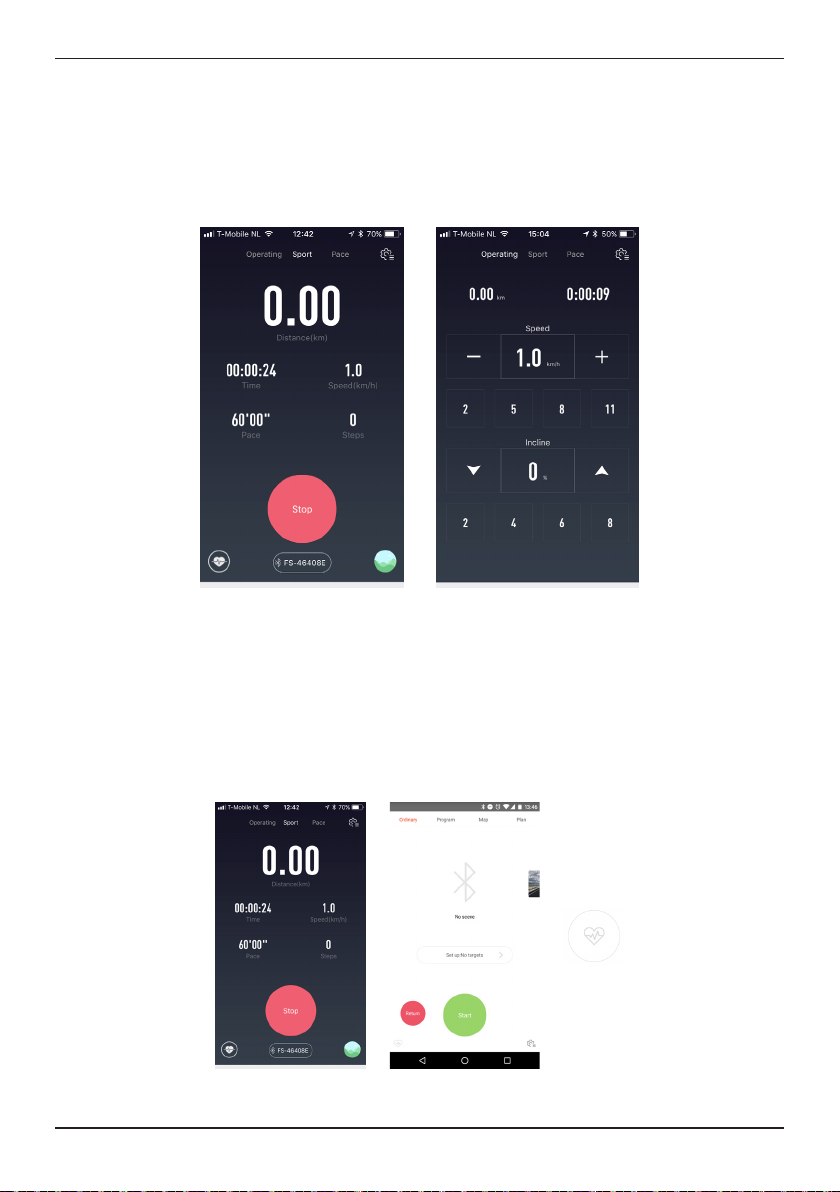
8. Tijdens de trainingssessie kunt u de loopband bedienen in het Operating menu. In het Sport menu
kunt u uw prestatie volgen en zelf kiezen welke waarde daar zichtbaar zijn. In het Pace menu kunt
u uw tempo volgen. Wanneer u de training vroegtijdig wilt beëindigen druk u op de STOP knop in de
FitShow-app of op de computer van de loopband. Voor een noodstop gebruikt u de safety key.
Trainen met hartslagband
Het is mogelijk om binnen de FitShow-app te trainen met een optionele Flow Fitness
bluetooth hartslagband. Hiervoor dient u de hartslagband in de app te verbinden. Volg de
onderstaande stappen.
1. Doe de optionele Flow Fitness Bluetooth hartslagband om. Deze zal automatisch
opstarten. U kunt de sensoren bevochtigen voor een betere connectie.
2. Druk tijdens een training of bij het opzetten van een training in de FitShow-app op het
hartslag-icoon.
iOS FitShow -App Android FitShow-App
22 - Gebruiksaanwijzing Runner DTM300i Treadmill
Hartslag
icoon
Page 23
4. Gebruik
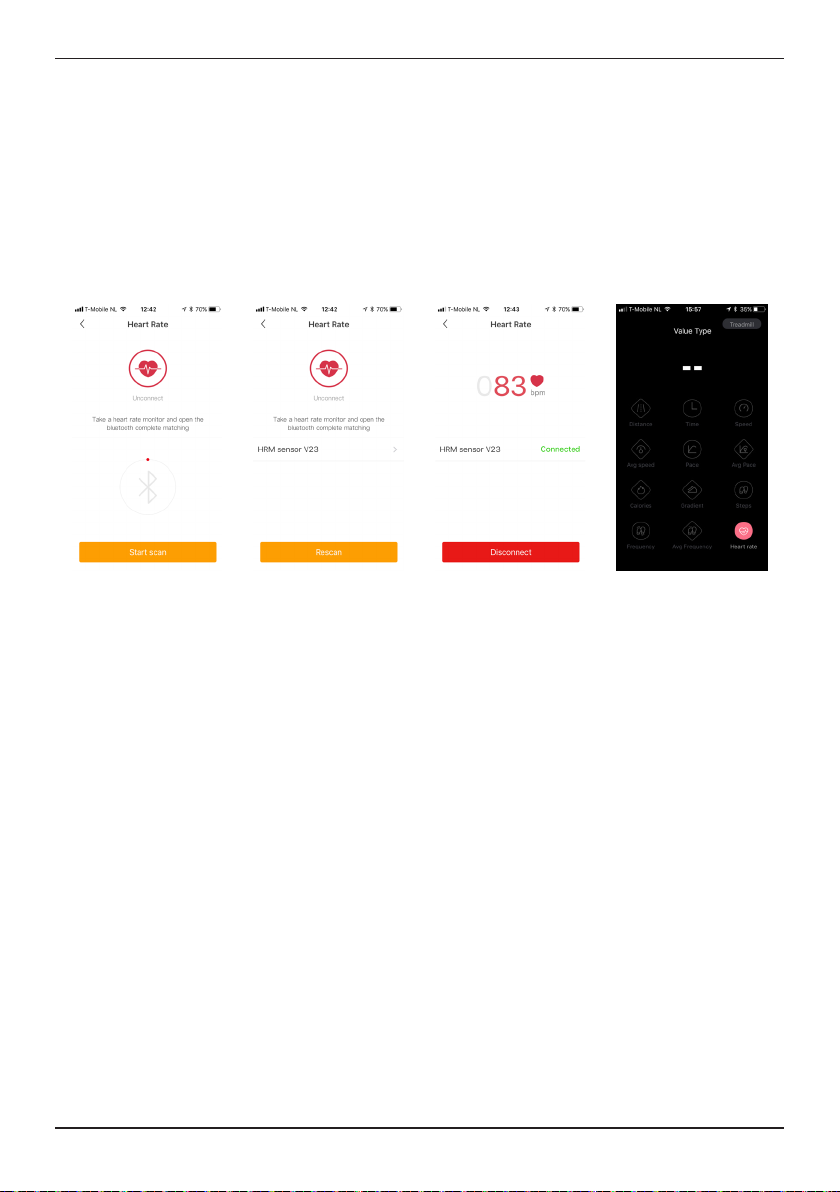
3. Het hartslagband-menu opent nu. Druk op START SCAN en wacht tot de hartslagband in
de lijst verschijnt. Druk vervolgens op de hartslagband om deze te verbinden. Wanneer er
CONNECTED verschijnt kunt u met de pijl linksboven in beeld weer terug gaan naar het
menu. In het Sports menu kunt u de hartslag toevoegen zodat deze gedurende de training
zichtbaar is.
Voor de nieuwste volledige video-handleiding van de FitShow-app gaat u naar
www.flowfitness.com/nl/handleidingen/fitshow.html
Gebruiksaanwijzing Runner DTM300i Treadmill - 23
Page 24
4. Gebruik
4.5 Onderhoud
Glijvlak onderhouden
U wordt aangeraden om elke 1 tot 2 maanden of na 50 uur gebruik
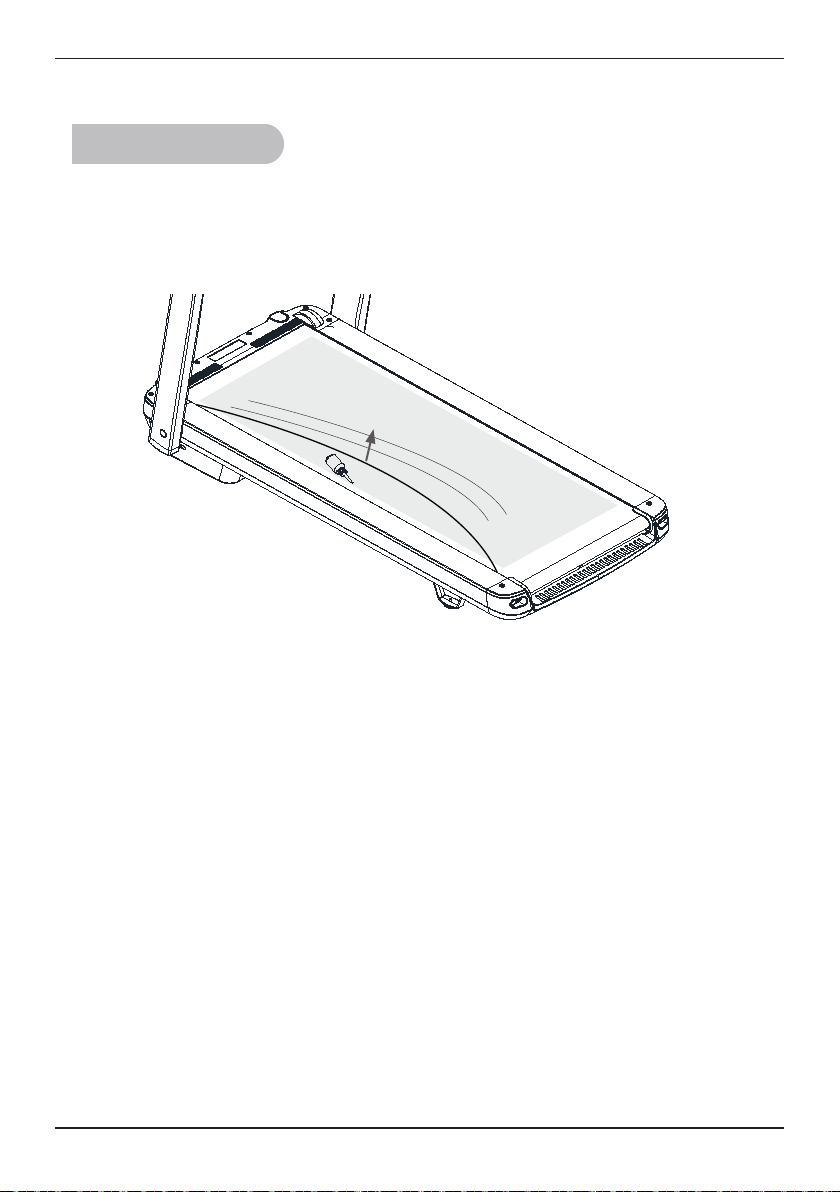
het glijvlak onder het loopvlak in te smeren met de het bijgevoegde glijmiddel. Zorg dat er
geen stroom meer op de loopband staat en draai de stelbouten van de achterrol los. Smeer
vervolgens wat glijmiddel op het glijvlak en verdeel dit gelijkmatig. Wanneer u klaar bent,
kunt u de stelbouten weer vastdraaien en de band opnieuw centreren zoals op de volgende
pagina is beschreven.
Flow Fitness adviseert om periodiek de bouten en moeren van de scharnierpunten
te controleren en indien nodig aan te draaien. Gebruik hiervoor het meegeleverde
gereedschap. U kunt het gereedschap aan de zijkant van de loopband vinden. Zie de zwarte
hendel.
Veeg tevens na iedere training het eventuele zweet van alle onderdelen. Hiermee voorkomt
u dat het zweet kringen of zelfs corrosie veroorzaakt.
De metalen en kunststof onderdelen zijn met standaard schoonmaakmiddelen te reinigen.
Zorg er echter wel voor dat alle onderdelen goed droog zijn, voordat deze weer worden
gebruikt.
Om slijtage te voorkomen moet de loopband uitsluitend binnenshuis en in een droge
omgeving worden gebruikt.
24 - Gebruiksaanwijzing Runner DTM300i Treadmill
Page 25
4. Gebruik
Loopband spannen
In de eerste weken dat u de loopband gebruikt, kan het voorkomen dat u het loopvlak
opnieuw moet centreren. Dit kan als u bijvoorbeeld meer met uw linkervoet afzet dan met
uw rechter.
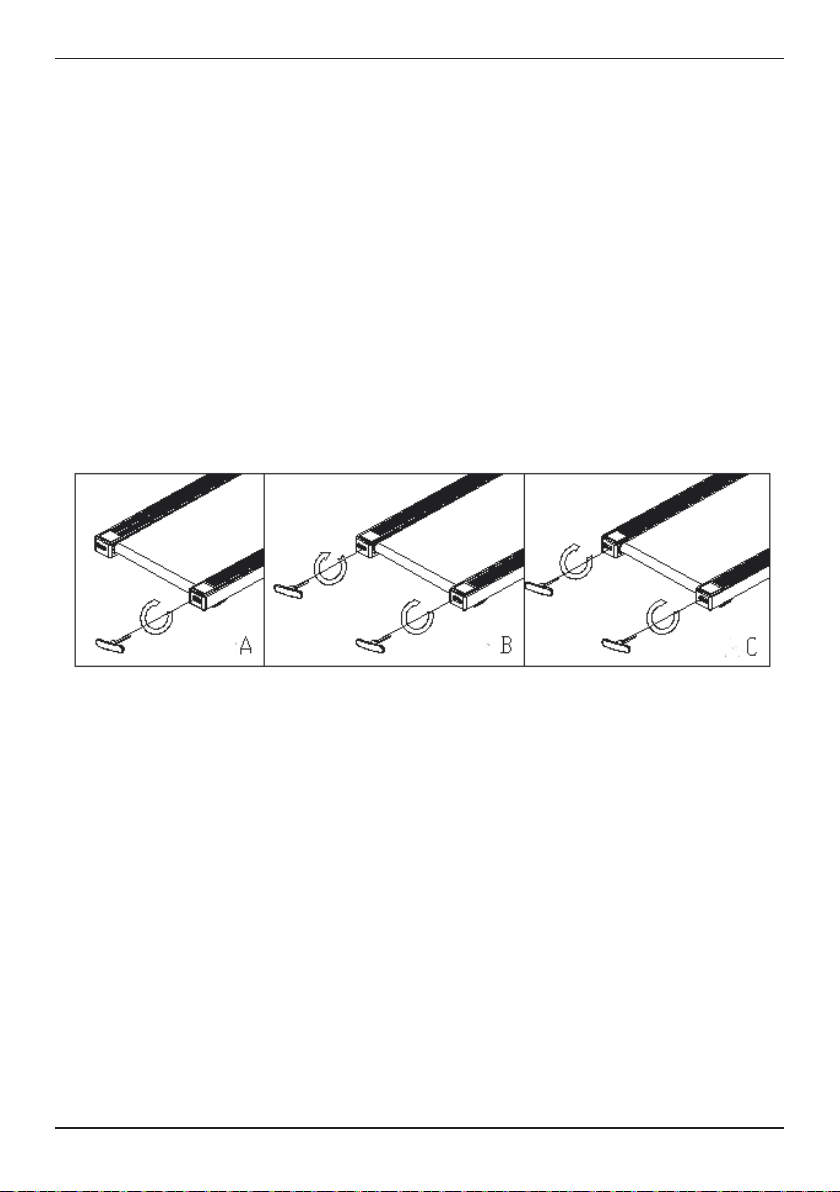
Zorg dat de loopband met een snelheid tussen de 3 en 5 km/u draait. Aan de achterkant
van het frame zitten 2 inbus stelbouten. Hiermee kunt u de achterste roller afstellen. In
het geval dat de loopband naar rechts loopt, dient u de stelbout aan de rechterkant een
1/4 slag aan te draaien. In het geval dat de loopband naar links loopt, dient u de stelbout
aan deze kant 1/4 slag aan te draaien. In het geval dat dit niet voldoet, dient u dezelfde
bout nog een keer aan te draaien. U kunt het gereedschap aan de zijkant van de loopband
vinden. Zie de zwarte hendel.
Zorg ervoor dat het loopvlak zo goed mogelijk gecentreerd is.
Gebruiksaanwijzing Runner DTM300i Treadmill - 25
Page 26
5. Algemene informatie
5.1 Trainingsschema’s
Introductie trainingsschemas
Trainingsschema week 1 en 2
Train op 60% van uw maximale hartslag.
Maximaal 3 keer per week.
Warming up 5 - 10 minuten.
Train 4 minuten.
Rust 1 minuut.
Train 2 minuten.
1 minuut rustig bewegen.
Cooling down 5 minuten.
Trainingsschema week 5 en 6
Train op 60% van uw maximale hartslag.
Maximaal 5 keer per week.
Warming up 5 - 10 minuten.
Train 6 minuten.
Rust 1 minuut.
Train 4 minuten.
3 minuut rustig bewegen.
Cooling down 5 minuten.
Trainingsschema week 3 en 4
Train op 60% van uw maximale hartslag.
Maximaal 4 keer per week.
Warming up 5 - 10 minuten.
Train 5 minuten.
Rust 1 minuut.
Train 3 minuten.
1 minuut rustig bewegen.
Cooling down 5 minuten.
Na het volbrengen van het zes
weken durende introductie
trainingsschema, kunt u een keuze
maken uit vervolgtrainingen. U kunt
kiezen tussen een trainingsschema
om gewicht te verliezen of een
trainingsschema om conditie te
verbeteren.Beide trainingsschema’s
staan weergeven op de volgende
pagina.
26 - Gebruiksaanwijzing Runner DTM300i Treadmill
Page 27
Trainingsschema om conditie te verbeteren
(vervolg op introductie trainingsschema)
5. Algemene informatie
Trainingsschema week 7 en 8
Train op 80% van uw maximale hartslag.
Maximaal 6 keer per week.
Warming up 5 - 10 minuten.
Train 7 minuten.
Rust 1 minuut.
Train 5 minuten.
1 minuut rustig bewegen.
Cooling down 5 minuten.
Trainingsschema om gewicht te verliezen
(vervolg op introductie trainingsschema)
Trainingsschema week 7 en 8
Train op 60% van uw maximale hartslag.
Maximaal 6 keer per week.
Warming up 5 - 10 minuten.
Train 7 minuten.
Rust 1 minuut.
Train 5 minuten.
1 minuut rustig bewegen.
Cooling down 5 minuten.
Trainingsschema week 9 en verder
Train op 80% van uw maximale hartslag.
Maximaal 6 keer per week.
Warming up 5 - 10 minuten.
Train 10 minuten.
Rust 1 minuut.
Train 10 minuten.
Herhaal training 2 a 3 keer.
1 minuut rustig bewegen.
Cooling down 5 minuten.
Trainingsschema week 9 en verder
Train op 60% van uw maximale hartslag.
Maximaal 6 keer per week.
Warming up 5 - 10 minuten.
Train 10 minuten.
Rust 1 minuut.
Train 10 minuten.
Heraal training 2 a 3 keer.
1 minuut rustig bewegen.
Cooling down 5 minuten.
Gebruiksaanwijzing Runner DTM300i Treadmill - 27
Page 28
5. Algemene informatie
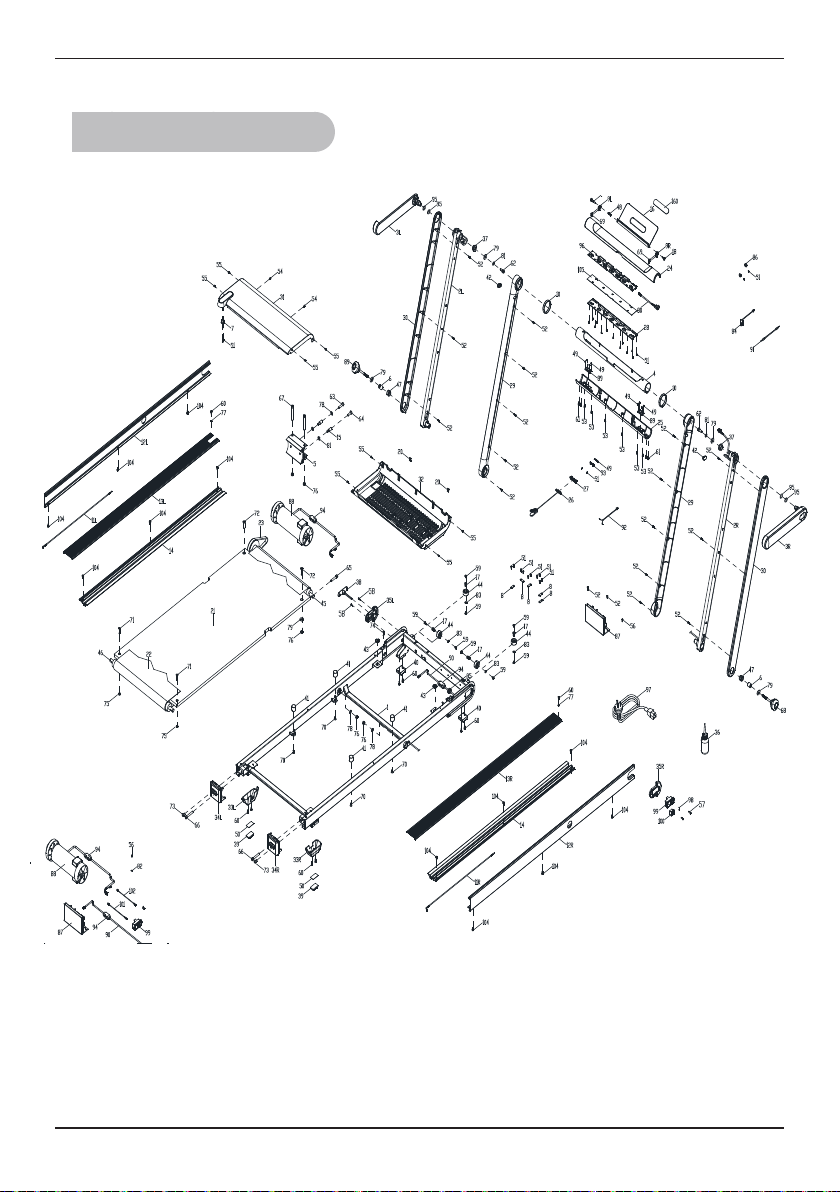
5.2 Exploded view
28 - Gebruiksaanwijzing Runner DTM300i Treadmill
Page 29
5. Algemene informatie
Nr. Onderdeel Aantal Nr. Onderdeel Aantal
1 Hoofdframe 1
2L/R Computer mast 2
3L/R Foam handrail 2
4 Computer behuizing 1
5 Motor beugel 1
6 Afstandsbus 2
7 Bevestiging Motorkap 1
8 Kabelhouder 5
9L/R Tablet holder beugel 2
10 Decoratieve ring 2
11L/R Fixeer beugel 2
12L/R Aluminium side rail 2
13L/R Side rail belt 2
14 Rand side rail 2
15 Motor stelschroef 12*M8*34.5L 2
16 Tablet holder 1
17 Wiel as 4
18 Schroef tablet holder rechts 1
19 Schroef tablet holder links 1
20 Bevestigingsclip 2
21 Plank 1
22 Band 1
23 V-Snaar 1
24 Computer kap boven 1
25 Computer kap onder 1
26 Safety key 1
27 Safety key houder 1
28 Beugel computerprint 1
29 Kap binnenkant computermast 2
30 Kap buitenkant computermast 2
31 Bovenkant motorkap 1
32 Onderkant motorkap 1
33L/R Afdekkap voet L/R 2
34L/R Eindkap L/R 2
35L/R Kap zijkant 2
36 Smeermiddel 1
37 Afstandsbus 2
38 Stel sleutel 1
39 Rubberen voet achter 2
40 Rubberen voet voor 2
41 Demping 4
42 Rubberen afstandsbus 2
43 Demping plank 2
44 Zij transportwiel 4
45 Rolas voor 1
46 Rolas achter 1
47 Drukveer 2
48 Drukveer 1
49 Schroef M2.5*5 12
50 Bevestiging rubberen voet 2
51 Schroef M3*8 28
52 Schroef M4*15 18
53 Schroef M4*12 6
54 Schroef M4*15 2
55 Schroef M4*10 8
56 Schroef M4*8 1
57 Schroef M4*15 2
58 Schroef M4*10 2
59 Schroef M5*8 8
60 Schroef M5*10 10
61 Schroef M6*10 4
62 Schroef M8*20 2
63 Schroef M8*25 1
64 Schroef M8*40 1
65 Schroef M8*45 1
66 Schroef M8*55 2
67 Schroef M8*70 2
68 Schroef M8*80 2
69 Schroef M4*8 4
70 Schroef M6*12 4
71 Schroef M6*27 2
72 Schroef M8*35 2
73 Schroef M8*12 2
74 Schroef M6*30 1
75 Moer M6 2
76 Moer M8 6
77 Golfring 5.5*12*1.2 2
78 Golfring 9*16*t1.6 3
79 Golfring 9*23*t1.6 4
80 Computerkabel boven 1
81 Ring 8.1*12.3*t2.1 2
82 Ring 4.1*4.4*t1.0 1
83 Borgring 10 4
84 Audio input print 1
85 Ringkern 1
86 Afdekkapje schroef 2
87 MCB 1
88 DC Motor 1
89 Speaker + wire 2
90 Computerkabel onder 1
91 AUX kabel 1
92 Interne kabel safety key 1
93 Interne houder safety key 2
94 Magnetische ring 2
95 Opvulring 4
96 PCB 1
97 Stroomkabel 1
98 Zekering 1
99 Stroom module 1
100 Tuimelaarschakelaar 0/1 1
101 Kabel rood 200mm 1
102 Kabel zwart 200 mm 1
103 Aarde kabel 400mm 1
104 Schroef M5*10 12
105 Computer front 1
106 Bevesting computer 1
Gebruiksaanwijzing Runner DTM300i Treadmill - 29
Page 30
5. Algemene informatie
5.3 Probleemoplossen
Probleem
Oplossing
Probleem
Oplossing
Probleem
Oplossing
Probleem
Oplossing
Het display van de loopband gaat niet aan.
1. Controleer of stekker in een geaard stopcontact zit.
2. Controleer of de schakelaar op ON of I staat. De schakelaar zit bij de
uitgang van het netsnoer.
3. Controleer de zekering bij de schakelaar. Als deze is verbroken, neem
dan contact op met uw dealer.
Segmenten in het display lichten niet meer op.
LEDs van het display zijn beschadigd; neem contact op met uw dealer.
Het display geeft “-----“ weer
De Safety key ontbreekt. Plaats de sleutel om de loopband te gebruiken.
Mijn iOS of Android apparaat krijgt geen verbinding met de DTM300i.
1. Sluit alle apps die u gebruikt om verbinding te maken met de DTM300i.
2. Zet de DTM300i uit met 1/0 knop aan de achterzijde van motorkap.
Wacht 5 seconden en zet de loopband weer aan.
3. Ga naar de bluetooth instellingen van uw smartphone of tablet en voer
de optie “Forget this device”of “Vergeet dit apparaat”uit. Zet hierna uw
bluetooth uit.
4. Herhaal de bluetooth connectie stappen uit deze handleiding.
Indien uw probleem niet is opgelost of niet staat beschreven,
raadpleeg dan de fitnessdealer waar u het product heeft gekocht.
30 - Gebruiksaanwijzing Runner DTM300i Treadmill
Page 31
5.4 Garantie
Flow Fitness verleent een garantie aan huis op onderdelen, voorrijkosten en uurloon, te
rekenen vanaf de datum van aankoop. De garantietermijn van uw Flow Fitness product is te
vinden op https://www.flowfitness.com/nl/support/. De garantie heeft uitsluitend betrekking
op materiaal- en/of productiefouten.
Indien u optimaal gebruik wilt maken van deze garantie, registreer dan uw Flow Fitness
product op:
https://www.flowfitness.com/nl/registreer-uw-product/
Indien het product defect is, neem dan contact op met de fitnessdealer bij wie u het
product heeft gekocht en meld het defect. Omdat Flow Fitness uitsluitend met gespecialiseerde en ervaren dealers samenwerkt, kan deze in veel gevallen het defect verhelpen.
Indien nodig neemt de dealer contact op met Flow Fitness. Vervolgens zal Flow Fitness in
samenwerking met de dealer het defect naar eigen inzicht verhelpen. Indien het defect
binnen de garantietermijn valt, zal dit kosteloos gebeuren.
De garantie vervalt wanneer:
· er gebreken zijn ontstaan aan het product door een onjuiste montage van het toestel
dan wel wanneer er sprake is van het niet juist opvolgen van de instructies zoals
beschreven in deze handleiding,
6. Garantie
· reparaties aan het product zijn verricht door anderen dan door Flow Fitness
aangewezen personen of zonder haar schriftelijke toestemming,
· het product naar het oordeel van Flow Fitness is verwaarloosd dan wel
onvoorzichtig
en/of ondeskundig is gebruikt, behandeld en/of onderhouden, en/of sprake is van
normale slijtage,
· het product op andere wijze is gebruikt dan in deze gebruiksaanwijzing is
beschreven,
· het product onder andere omstandigheden is gebruikt dan in deze
gebruiksaanwijzing in beschreven.
· defecten zijn ontstaan door overige factoren van buitenaf.
De garantietermijn wordt niet verlengd of vernieuwd door uitvoering van garantiewerkzaamheden, met dien verstaande dat de garantie op uitgevoerde werkzaamheden drie
maanden bedraagt.
Gebruiksaanwijzing Runner DTM300i Treadmill - 31
Page 32
Manual
www.flowfitness.com/en
Page 33
1. Important information 34
1.1 Health 34
1.2 Safety 34
2. Introduction 36
2.1 Contents of package 37
2.2 Important parts 38
2.3 Specifications 39
3. Fitness 40
3.1 Training by Heart Rate training 40
3.2 Warming up and cooling down 42
4. Use 43
4.1 Assembly 43
4.2 Storage / Prepare for use 47
4.3 Use of the computer 48
4.4 Connect the Fit Hi Way app 49
4.5 Maintenance 54
5. General information 56
5.1 Training schedule 56
5.2 Exploded view 58
5.3 Troubleshooting 60
Content
6. Warranty 61
6.1 Warranty 61
Manual Runner DTM300i Treadmill - 33
Page 34
1. Important information
1.1 Health
- Consult an expert to determine the training level that is most suitable for you.
- If you experience any dizziness, nausea or any other physical discomfort while training,
cease the training immediately and consult a physician.
- Watch your heart beat during the training and immediately stop training when values are
inconsistent.
- We advise you to do warming up and cooling down exercises during five to ten minutes
before and after use of the product. This way your heart rate can increase and decrease
gradually and you can prevent painful muscles.
1.2 Safety
- Only use this product as described in this instruction manual.
- Before using this product check that the product functions as it should. In case of
malfunction or a defect stop training immediately and contact your vendor.
- Do not use the product when there is a malfunction.
- The product is only meant for use in the home and it has to be positioned on a flat
surface.
- The product can only be used by one person at the time.
read this instruction manual first and follow the instructions
Important:
carefully before using the product.
- The product can be used by persons with a body weight of up to 100 kilos.
- Always make sure that there is at least one meter of free space in all directions around
the product when you are training.
- Don’t stick any objects in any opening of the equipment.
- Keep children and pets away from the product.
- Handicapped persons should get consent from a medical expert and follow their
directions for training with the product.
- Do not place hands or feets under the product.
34 - Manual Runner DTM300i Treadmill
Page 35
1. Important information
- Never hold your breath during a training session. Your breathing should be at a normal
interval depending on the intensity of the training.
- Start your training schedule slowly and build it up gradually.
- Always wear appropriate clothing during training. Don’t wear anything that’s too loose
and can get caught between moving parts of the equipment.
- When moving the equipment always use the appropriate lifting techniques to prevent
back injury.
- Check screws and bolts regularly and fasten them if they are loose.
- The owner of the product is responsible for all users to be aware of the warnings and
instructions as mentioned in this instruction manual.
- This product is intended for use in a clean and dry environment. Storage in cold and / or
moist areas could lead to problems with the product.
- This product is not suitable for therapeutic supports / or professionally use in physical
therapy.
Have your physical condition checked by a licensed physician before you start
WARNING
training. This is particularly important for persons over 35 years old or persons who
have any problems with their health. Read all instructions before using the equip-
ment. Flow Fitness is not responsible for any personal injury or damage to property
This product is not suited for rental or use in a commercial or
caused by the use of this equipment.
professional environment.
Manual Runner DTM300i Treadmill - 35
Page 36
2. Introduction
Thank you for purchasing the Runner DTM300i Treadmill.
This manual contains all information necessary for the use and operation of the treadmill.
This guide also contains tips and advice on how to train.
Flow Fitness wishes you successful and enjoyable training sessions.
36 - Manual Runner DTM300i Treadmill
Page 37
2.1 Contents of package
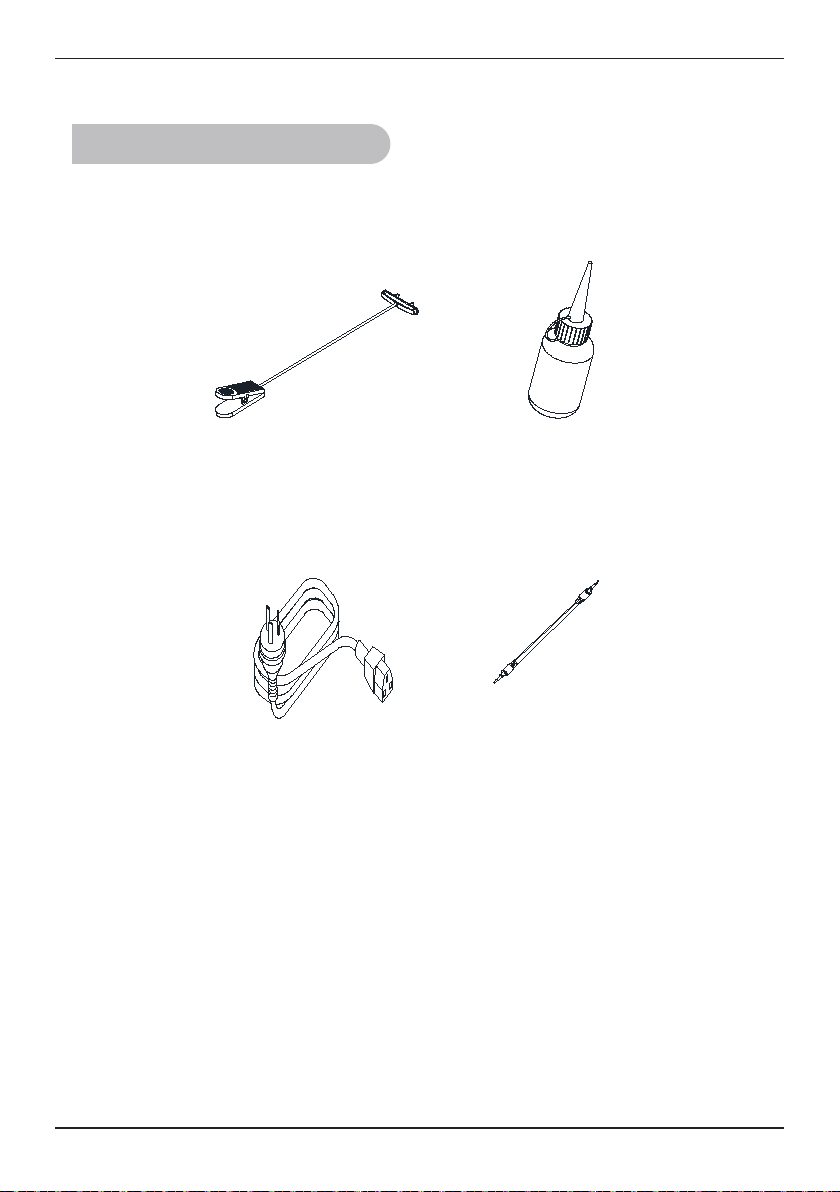
Safety key Lube
2. Introduction
Powercord AUX cable
Manual Runner DTM300i Treadmill - 37
Page 38
2. Introduction
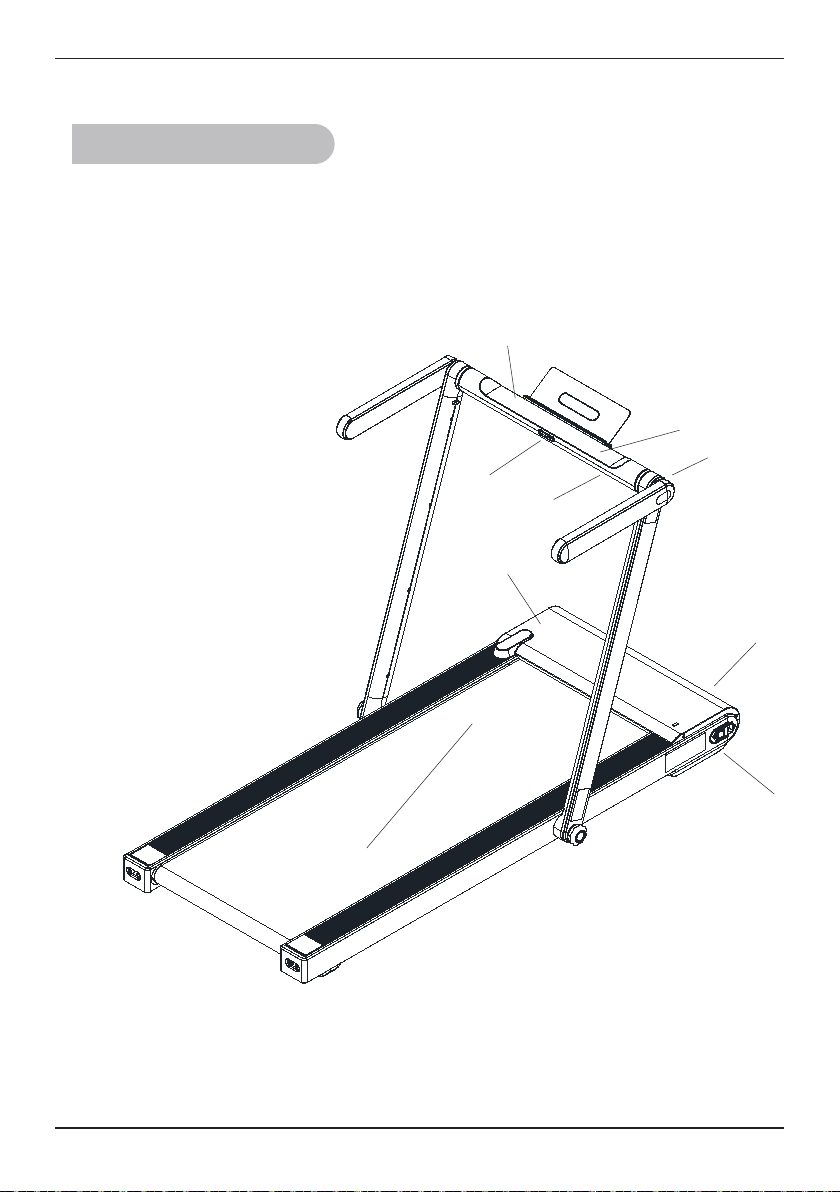
2.2 Important parts
Speed Keys
Console
Aux input
Safety Key
Speaker
Engine cover
Transporting wheel for
Sideways transport.
Running deck
Transporting wheels
38 - Manual Runner DTM300i Treadmill
Page 39
2.3 Specifications
2. Introduction
Console
- Manual program
- Bluetooth: train with the Fitshow app
Heart rate reception
- Bluetooth chest belt in combination with
the Fitshow app
Size
Length: 151.5 cm
Height: 101 cm
Width: 77 cm
Weight: 49.5 kg
Size folded
Length: 151.5 cm
Height: 13.8 cm
Width: 77 cm
Technical
- Motor 1.25 HP Continious 2.5 HP PEAK
- Speed 1-12 KPH
- Quick keys for speed
- Running Deck (LxW) 125 x 45 cm
- 100 kg max user weight
Extra
- Audio AUX input
- Speakers
- Led display
Manual Runner DTM300i Treadmill - 39
Page 40
3. Fitness
What is fitness? In general a fitness exercise can be described as an activity that makes
your heart pump more oxygen from your lungs to your muscles by means of circulating the
blood. The more strenuous the training, the more fuel (oxygen) the muscles need and the
more work the heart has to do to pump oxygen rich blood to the muscles. If you are in good
physical shape your heart can pump more blood to the muscle with each contraction. This
means the heart doesn’t have to contract as many times to transport the necessary oxygen
to your muscles. Your resting heart beat and heart beat when exercising will therefore
decrease.
3.1 Training by Heart Rate training
While training it is important to monitor your heart rate. The heart rate is essential for
the result of your training. Your best training heart rate depends firstly on your age. Your
maximum heart beat can be determined by this. Secondly the most effective heart rate
depends on your training goals. If your training goal is to lose weight, then the most
effective training is at 60% of your maximum heart rate. If your training goal is to improve
your stamina, then you should train at 80% of your maximum heart rate.
The body stores energy in two forms: carbohydrates and fat. When we exercise we use a
combination of these two energy supplies. If the training intensity is at a high level the body
will mostly choose the energy that burns fast: carbohydrates. Since there is a limited supply
of these carbohydrates you can’t continue this for a long period of time. When training at a
low intensity the body will mostly choose to use a long lasting source of energy: fat. Since
this is stored in large quantities in the body, you can continue this kind of training for a
longer time.
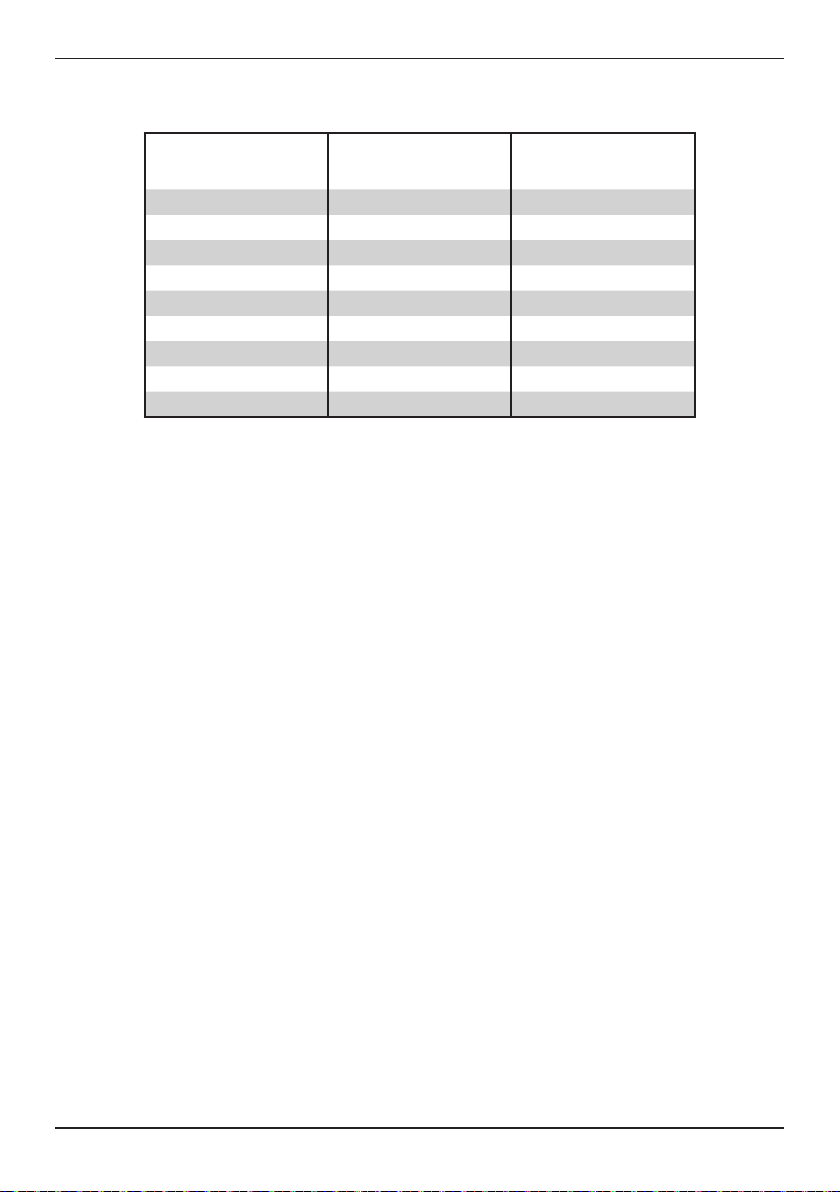
Below you will find a schedule allowing you to calculate the best heart rate for your
training. In this schedule each age category has a range that your heart rate should be in
during your training. The middle column has the values you should try to maintain if you
want to lose weight. If you want to improve your stamina you should try to maintain the
rates in the right column.
40 - Manual Runner DTM300i Treadmill
Page 41
3. Fitness
Age
20 -24 118 - 120 167 -170
25 - 29 115 -117 163 - 166
30 - 34 112 - 114 158 - 162
35 - 39 109 - 111 154 - 157
40 - 44 106 - 108 150 - 153
45 - 49 103 - 105 145 - 147
50 - 54 100 - 102 141 - 144
55 - 59 97 - 99 137 - 140
60 and older 94 - 96 133 - 136
Weight lost
(beats per minute)
60%
Improve stamina
(beats per minute)
85%
For each individual the best way to start training is different. If you have not exercised in
some time or are overweight, you should start your training schedule slowly and gradually
increase the level of activity.
In the last chapter of this instruction manual you will find several different training
schedules (chapter 5. general information). You can use these schedules to reach your
training goals. The schedules are divided in two phases. The first phase can be used for
beginners or persons who start training after a long period of inactivity. During this phase
the level of intensity is built up gradually. After six weeks the second phase begins. You can
then choose a training schedule to lose weight or improve your stamina.
Manual Runner DTM300i Treadmill - 41
Page 42
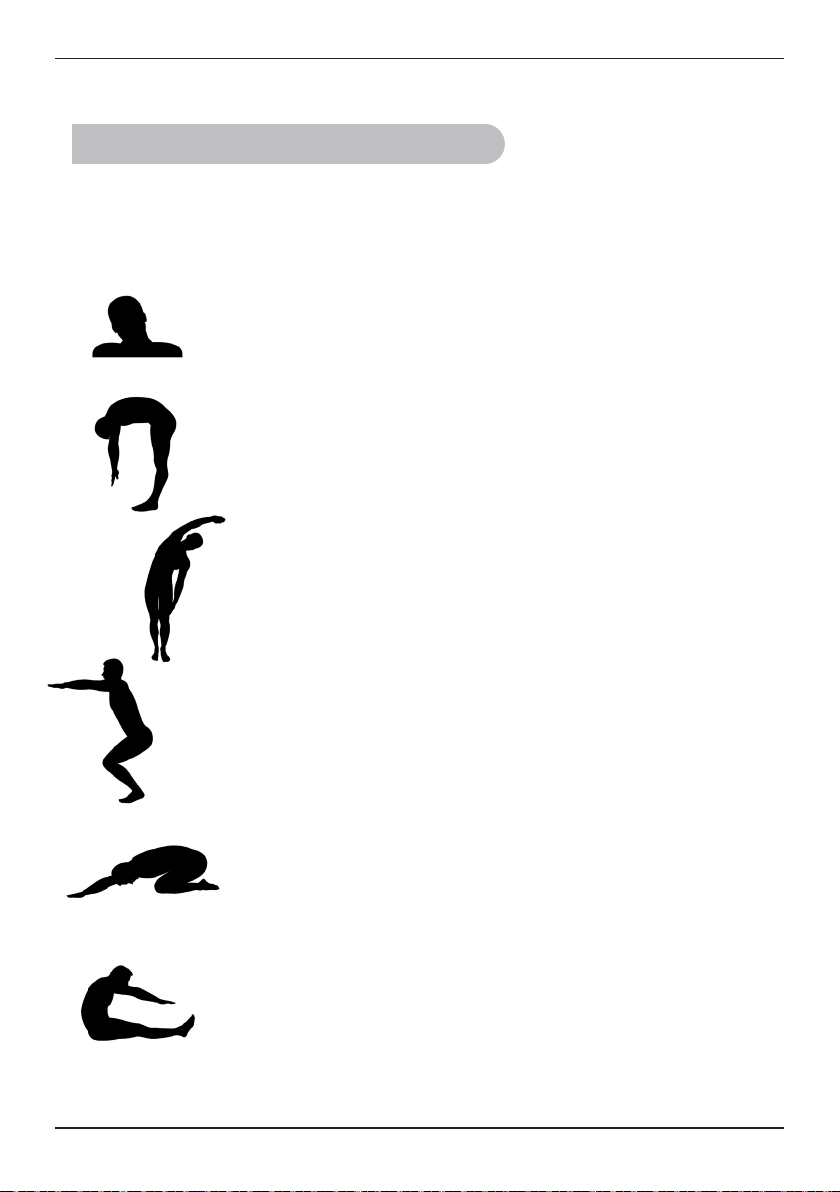
3. Fitness
3.2 Warming up and cooling down
A good training schedule starts with a good warming up and ends with a cooling down of
the muscles. This will prevent painful muscles and injury. Below you will find some suitable
exercises.
Head Roll
Tilt your head to the right. Hold this for one second, so that you feel a
little pull in the muscles on the left side of your neck. Do the same for the
other side, front and back. Repeat two or three times.
Toe Touch
Slowly bend forward with your back and arms relaxed. Bend as far as you
can and hold the position for ten seconds. Repeat this two or three times.
Side Stretch
Extend both your arms up in the air and reach as high as you can with
your right arm. Lean a bit to the left so that the muscles in the right side
of your torso are stretched. Hold this position for one second. Relax and
make the same motion on the other side of your body. Repeat this three
or four times.
Knee bend
Set your feet shoulder-width apart and your stretched your hands out.
Lower yourself no more than 10cm by bending your knees. Come back
up again and repeat several times.
Lower back stretch
Begin on all fours. Stretch your arms out in front of you, allowing your
face to lower to a position near the floor. Gently sit back. Rest your glutes
just above your heels. Ease back and feel the gentle stretch in your lower
back.
Hamstring Stretch
Sit down on the floor with your right leg extended in front of you and
place the sole of your left foot on the inside of your right upper leg. Bend
forward in the direction of your right foot and hold this position for ten
seconds. Relax and then do the same with your other leg. Repeat two or
three times.
42 - Manual Runner DTM300i Treadmill
Page 43
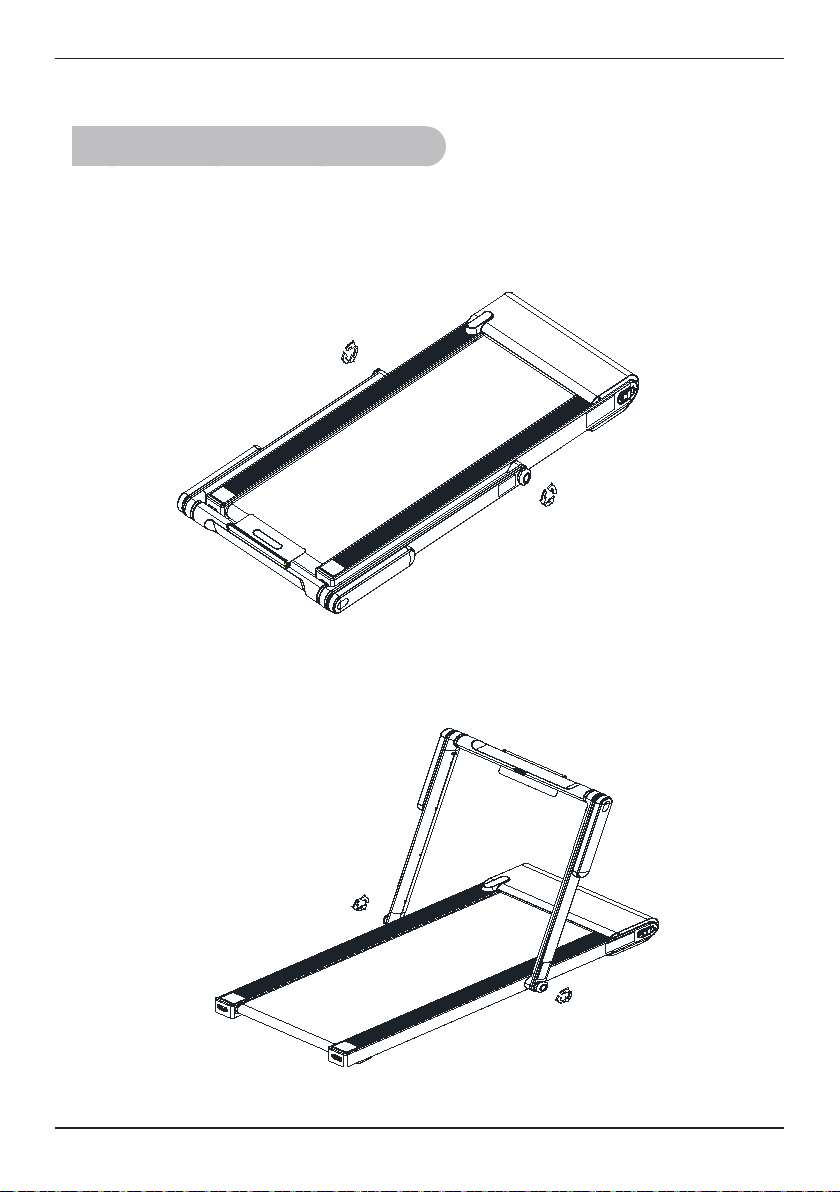
4.1 Assembly
This chapter describes how to assemble the DTM300i treadmill. Before assembling remove
all parts from the box and make sure there is enough space available for assembly.
Step 1:
1. Loosen both knobs by turning counterclockwise. See the image below.
4. Use
Step 2:
1. Raise the computer. Turn the computer up until it is fixed into place and tighten both
knobs again.
2. Rotate the arms from the back to the front to get them in the right position.
Manual Runner DTM300i Treadmill - 43
Page 44
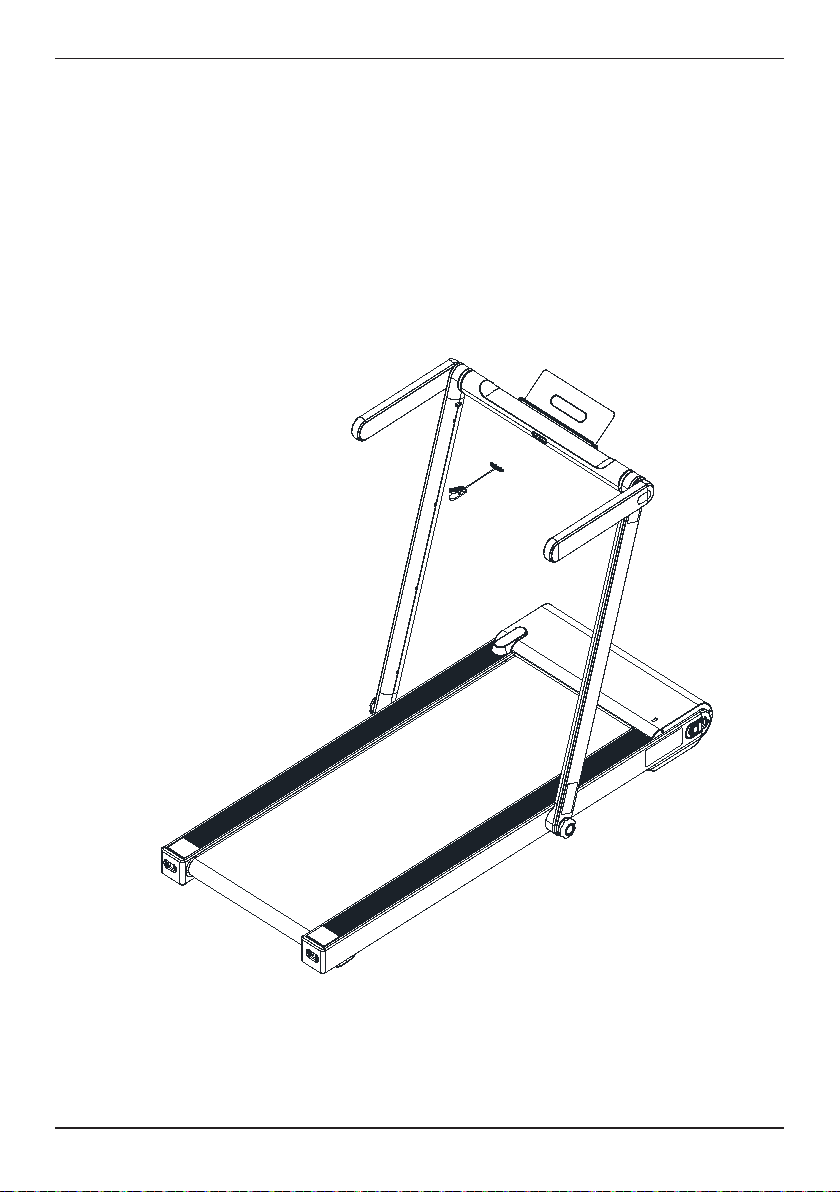
4. Use
Step 3: Placing the safety key
Place the safety key inside the safety key holder in the middle of the computer. For security
reasons it is important to fasten the clip on the end of the safety key rope to your clothing.
When the safety key is removed from the holder the treadmill will make an emergency stop.
When the display shows “-----” it indicates that the safety key is not placed or not placed
correctly. Without correct placement of the safety key the computer cannot start a training
session.
44 - Manual Runner DTM300i Treadmill
Page 45
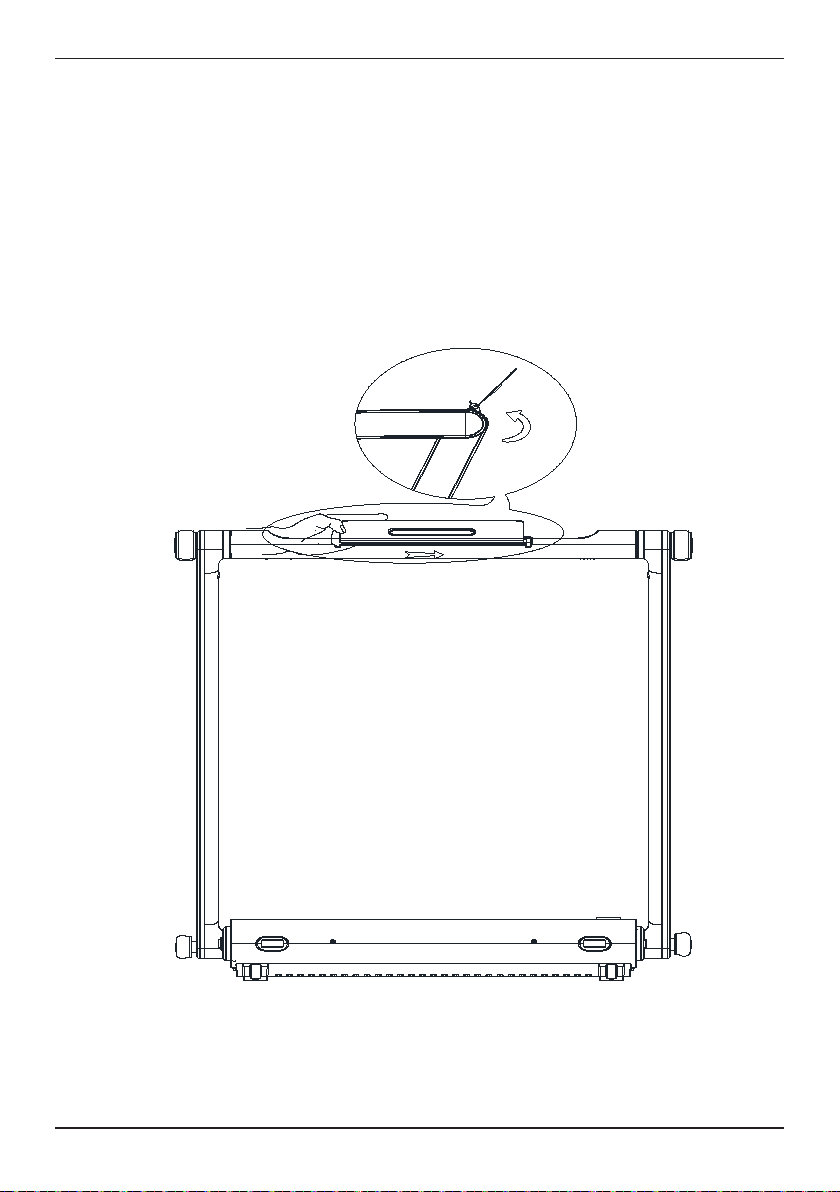
4. Use
Unfold the tablet holder
Turn the tablet holder at the back of the computer upwards until it is fixed into place.
Fold the tablet holder
Before folding press the tablet holder to the left to unlock the folding mechanism. Then fold
the tablet holder back.
Manual Runner DTM300i Treadmill - 45
Page 46
4. Use
Power Supply
Before you start exercising, you must turn on the treadmill. Make sure the powercord is
plugged in and the On/Off switch is switched to “I”. The On/Off switch is located at the
back of the treadmill underneath the motor cover.
For your own safety it is important that the power cord is plugged into a grounded
outlet!
46 - Manual Runner DTM300i Treadmill
Page 47
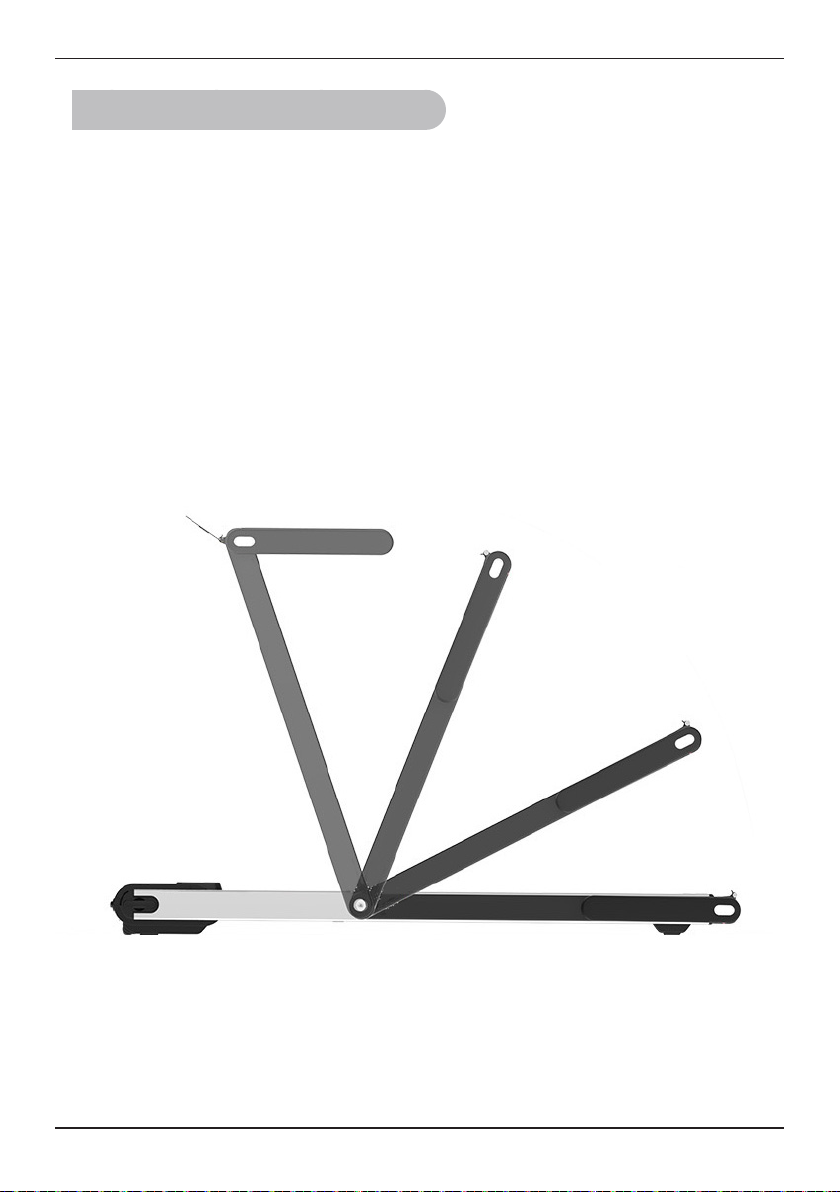
4.2 Storage / Prepare for use
Folding and storage
1. Before folding the treadmill remove the power cable and fold down the tablet holder.
2. Fold the arms by turning them backwards.
3. Loosen both knobs by turning counterclockwise.
4. Lower the console all the way down and tighten the knobs by turning them.
5. Lift the end of the running deck to transport the treadmill. It is possible to store the
treadmill flat or upright. You can use the additional transport wheels to move the
treadmill sideways. Allow the treadmill to lean against the a wall when standing upright.
4. Use
Manual Runner DTM300i Treadmill - 47
Page 48
4. Use
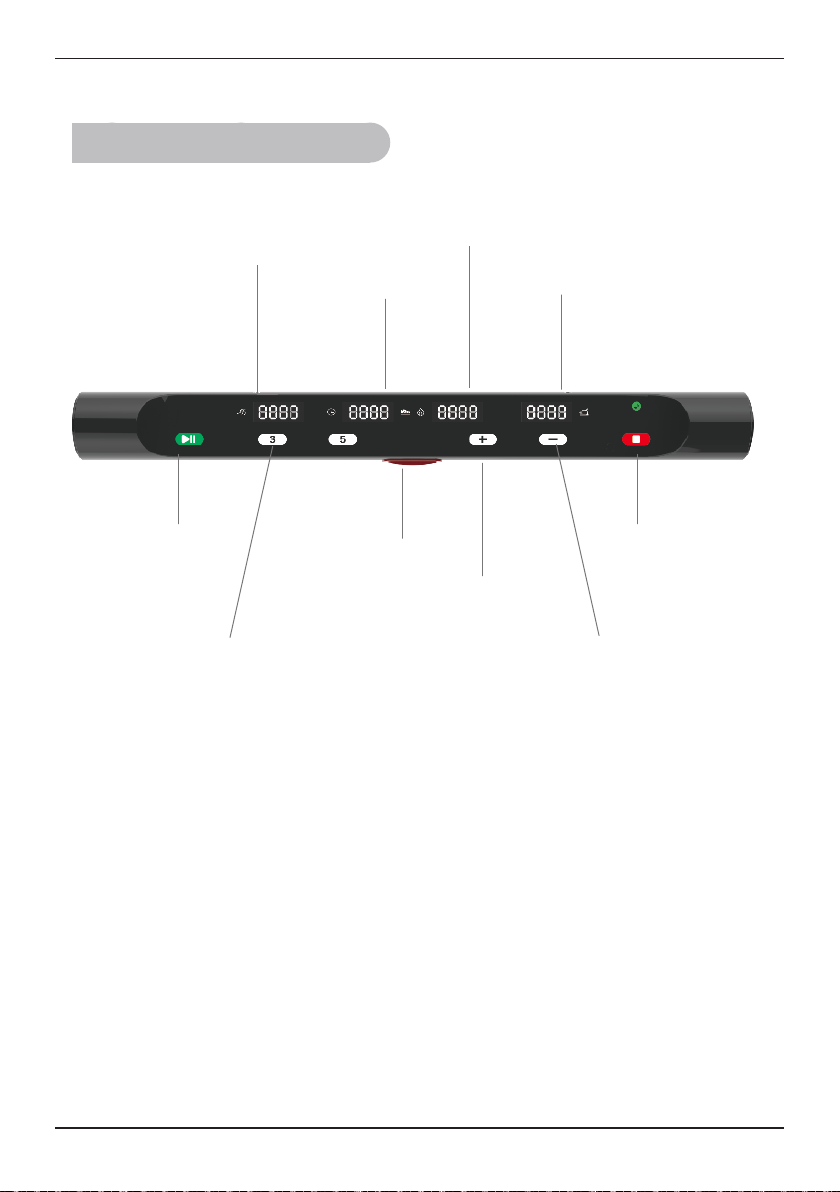
4.3 Use of the computer
Distance / Mode
This values shows the current
distance in KM
Use this key to start or pause a
Speed quick keys
Press on the 3 or 5 key to directly
set this speed level
Start/pause
training program
Standby
After 4 minutes of inactivity the computer will automatically switch to standby mode. Press
either the SPEED or INCLINE key to wake the computer from standby.
This value shows the current
Time / Steps
time and total steps
Safety key
Safety key insert
+ press
this key to increase the speed
This value shows your
Calories
burned Calories
Speed
This value shows the current
speed
Stop
Press this key to directly stop a
training session.
- press
this button to lower the speed
Ending training session
During an exercise you are able to stop the training by pressing the STOP key on the
computer or pulling out the safety key.
Manual - Quick start
Press the START key. The computer will countdown from 3 to 0. The computer will them
give a sound signal and the running belt starts turning at 1.0 KPH. You can start your
training. All values on the computer will increase.
48 - Manual Runner DTM300i Treadmill
Page 49
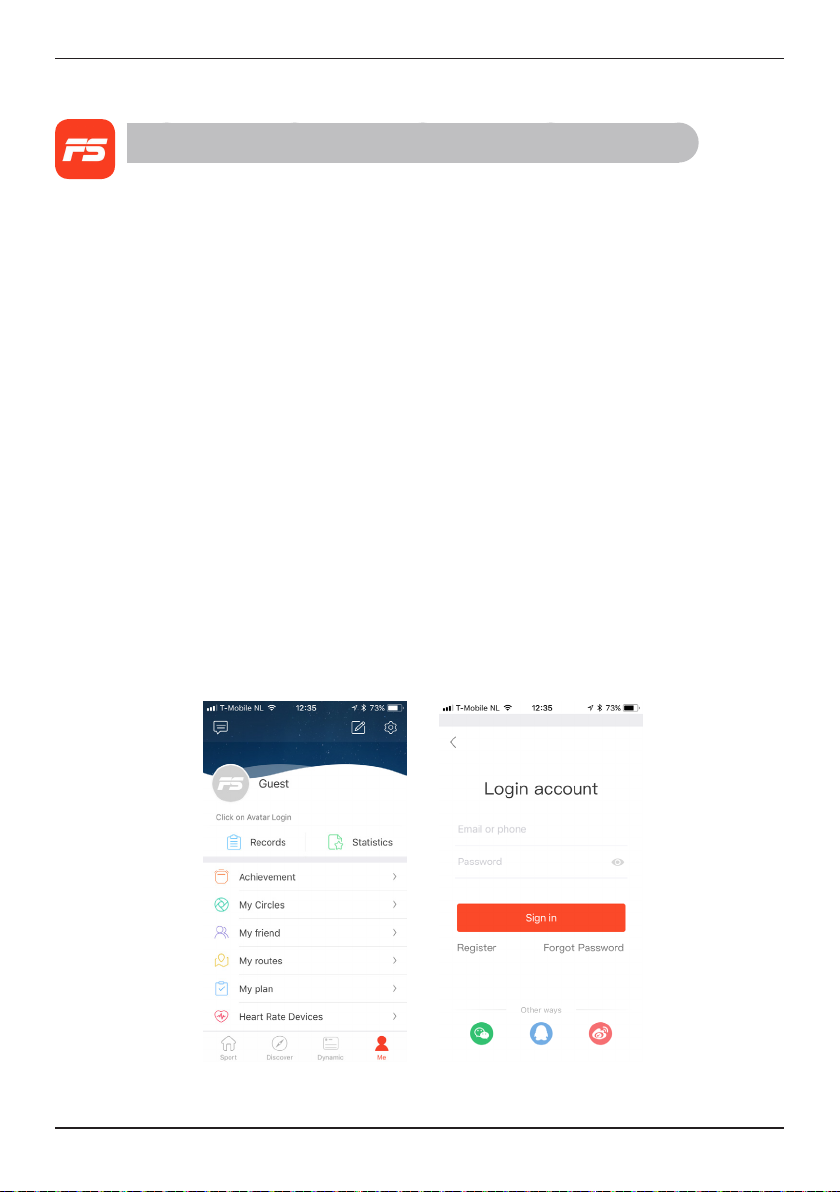
4.4 Connect the Fit Hi Way app
Operate your Runner DTM300i treadmill with your mobile device trough the FitShow app.
Control a manual program in the app, run your favorite route with street view, set fitness
goals and log your results.
Download the FitShow app by searching ‘iFitShow; in the Apple iOS App store or search for
‘FitShow’ in the Google Android Play Store. You can also follow one of the links below:
Apple iOS App Store
https://itunes.apple.com/US/app/id1099080595?mt=8
Google Android Play Store
https://play.google.com/store/apps/details?id=com.fitshow&hl=en
Connecting the app
When you have download the app to your device and follow the steps below to connect the app to
the DTM300i treadmill.
1. Go to the settings of your mobile device and check if the bluetooth function is on. If not turn
bluetooth on.
2. Open the FitShow app.
3. To make full use of this app you are required to create a FitShow account. Press the ME icon in
the bottom right of the screen. Press on the avatar and then on register to make a new account.
Enter your personal information and confirm your account. After your account has been created
log into the account with the previously entered user name and password. You will only need to
complete this step once.
4. Use
Manual Runner DTM300i Treadmill - 49
Page 50
4. Use
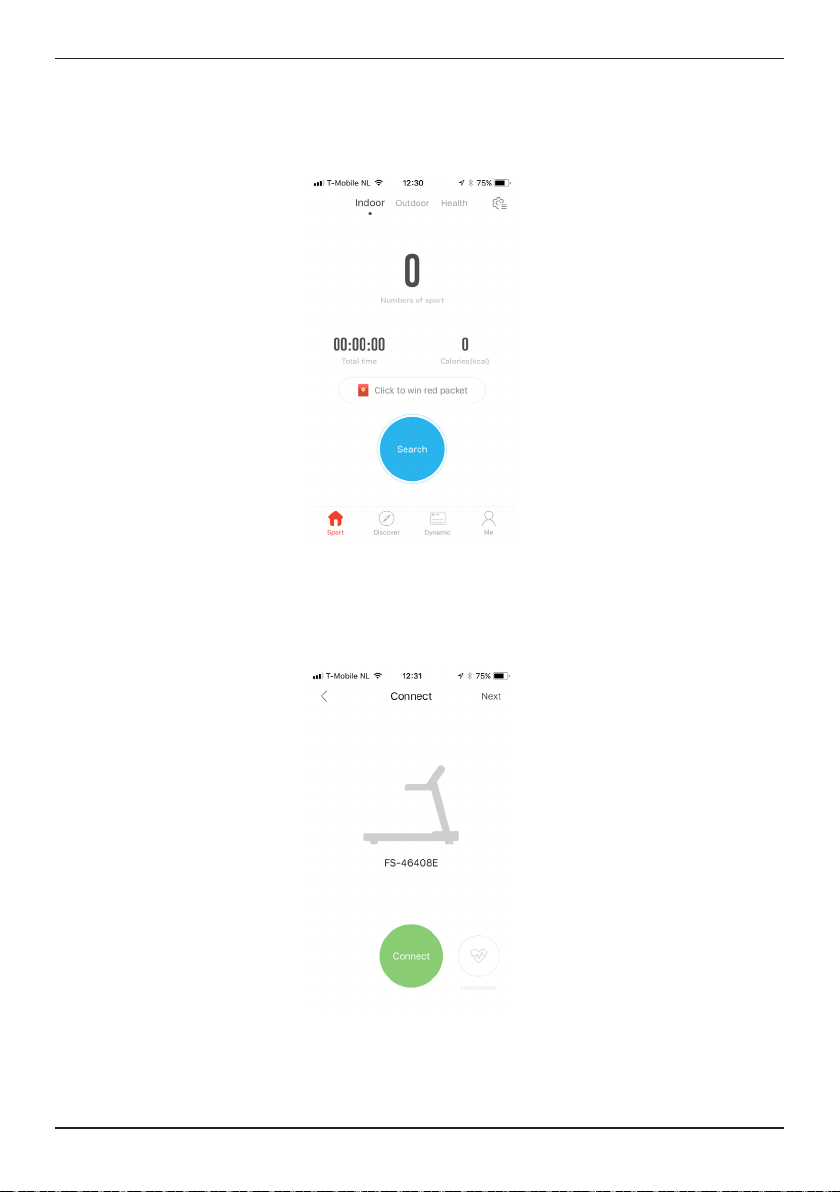
4. After logging into the account press the SPORTS icon in the bottom left of the screen.
5. Press the blue SEARCH button.
6. The treadmill will now appear on the screen. Press the green CONNECT button.
50 - Manual Runner DTM300i Treadmill
Page 51
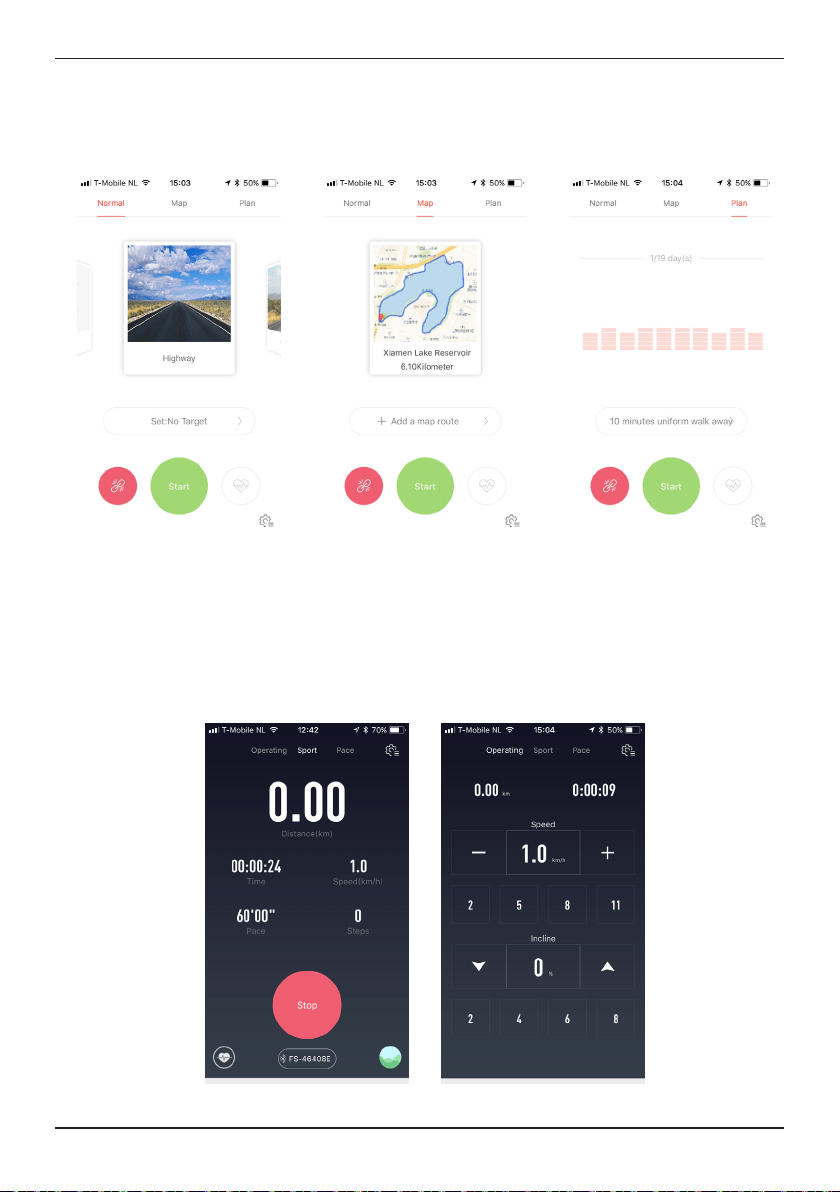
7. Select the preferred workout session: Normal, Map or Plan. Then press the green START
button to start the training session.
8. During the training session you can operate the treadmill in the operation menu. With the sport
menu you are able to check your performance by viewing four selected values. Press onto the
values to change them. In the pace menu you can see your current pace. When you want to
quit your exercise press the red STOP button on your device or on the treadmill’s computer. For
an emergency stop you can pull the safety key.
4. Use
Manual Runner DTM300i Treadmill - 51
Page 52
4. Use
Training with a chest belt
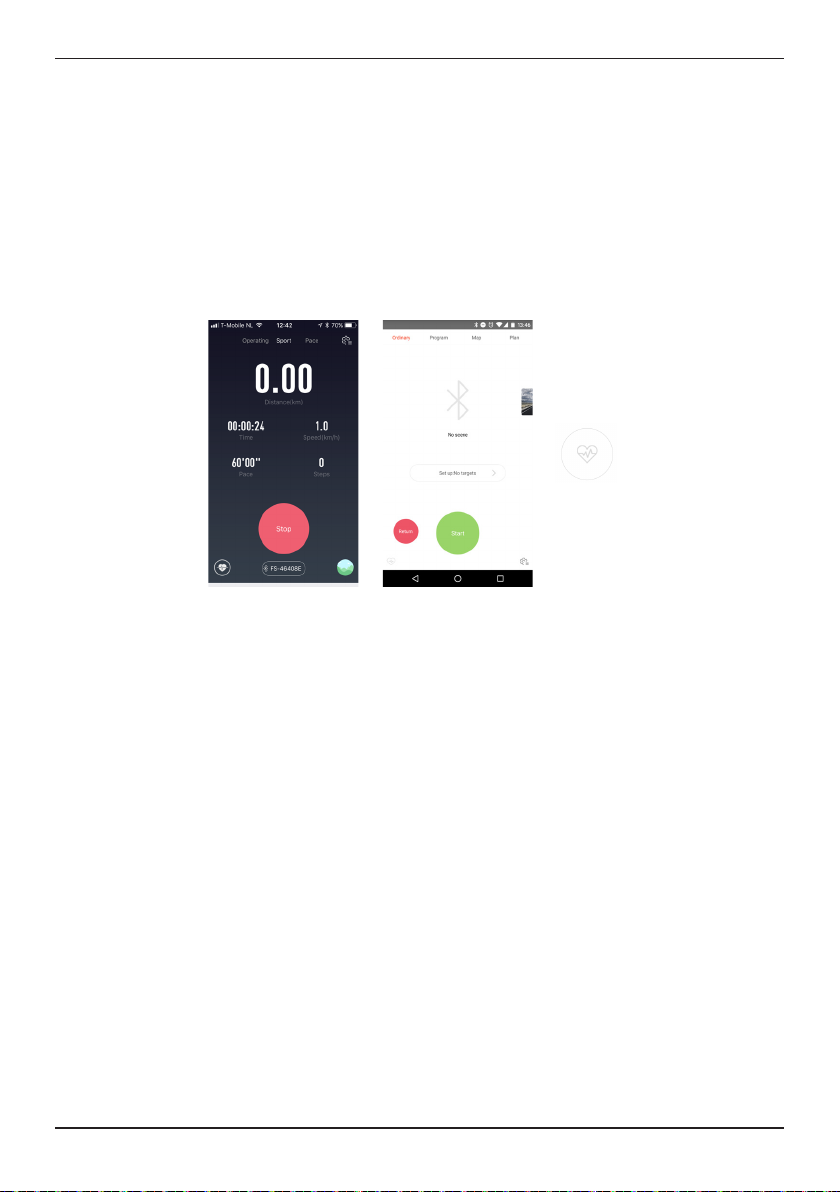
With the FitShow app it is possible to train with the optional Flow Fitness Bluetooth Chest
Belt. Follow the steps below to connect the app to the chest belt.
1. Wear the optional Flow Fitness Bluetooth Chest belt. The chest belt will automatically
turn on.
2. Press the heart rate icon during a training exercise or when setting up a training session.
Heart Rate
Icon
iOS FitShow App Android FitShow App
52 - Manual Runner DTM300i Treadmill
Page 53
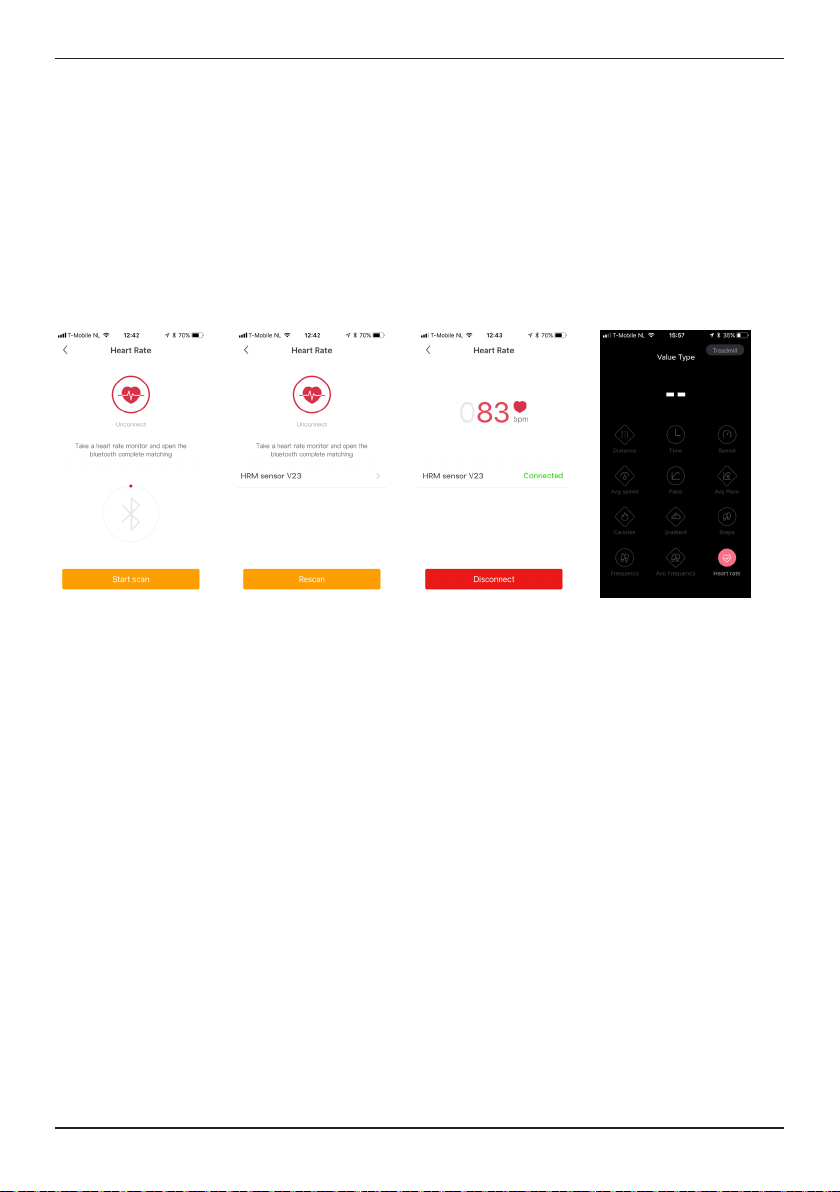
3. The heart rate menu will open. Press START SCAN and wait until the chest belt
appears in the list. Press the HRM sensor to connect the chest belt. Wait until
CONNECTED appears. Then use the back arrow in the top left corner of the screen
to go back to the menu or training session. Within the sports menu you are able to
add heart rate as a visible value.
For the newest FitShow app full video manual visit
www.flowfitness.com/en/manual/fitshow.html
4. Use
Manual Runner DTM300i Treadmill - 53
Page 54
4. Use
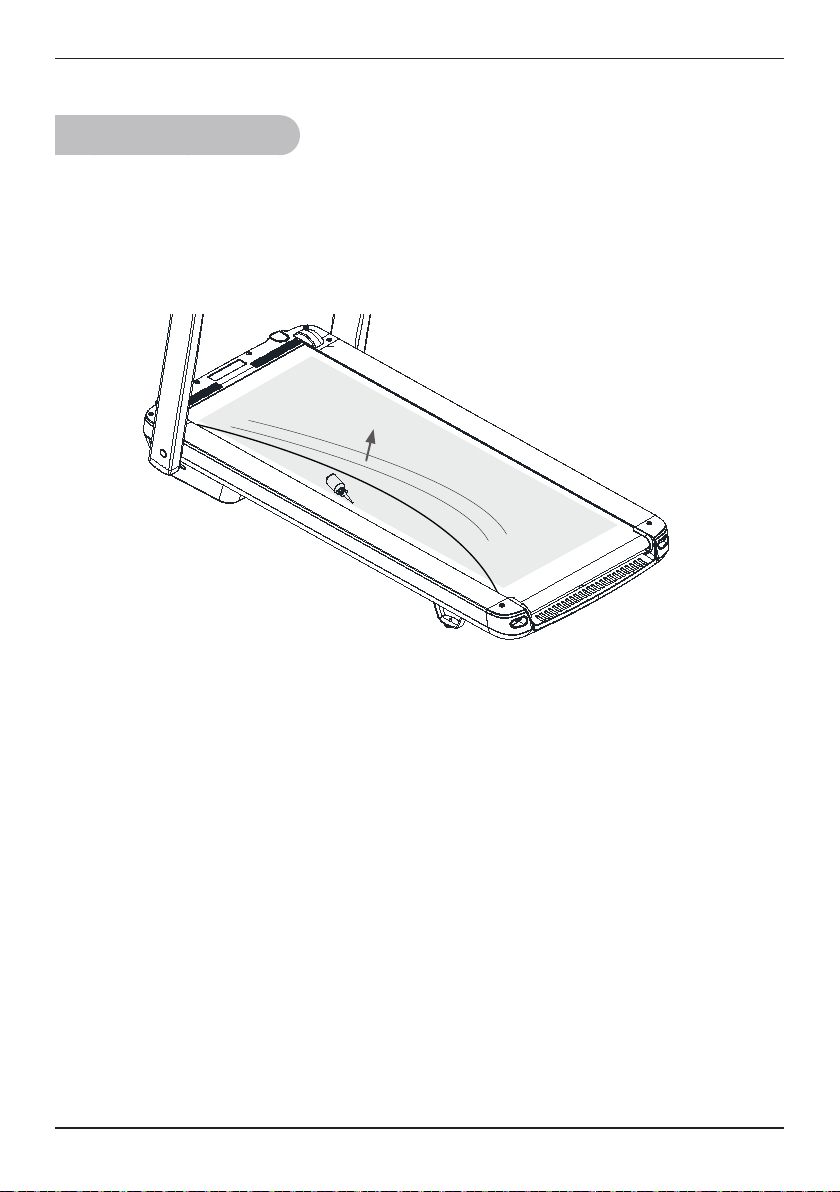
4.5 Maintenance
Maintaining the sliding surface
Every 1 or 2 months (even if the treadmill is not in use) or every 50 hours of use, the sliding
surface under the running belt needs to be lubricated with the included silicone lubricant.
Make sure that the power is disconnected and loosen the adjusting bolts of the rear roller.
Lubricate the surface, distribute the silicone lubricant evenly. When you are finished fasten
the adjustment bolts of the rear roller. Center the treadmill again as described on the next
page
Cleaning
The metal and plastic parts of the product can be cleaned by using standard cleaning
products. However, make sure that all parts are completely dry before using the product
again.
Flow Fitness advises to fasten nuts and bolts, check and fasten pivot points once every six
weeks. For fastening use the tool supplied with the product.
To prevent unnecessary wear, the product may only be used indoors and in a dry
environment.
54 - Manual Runner DTM300i Treadmill
Page 55
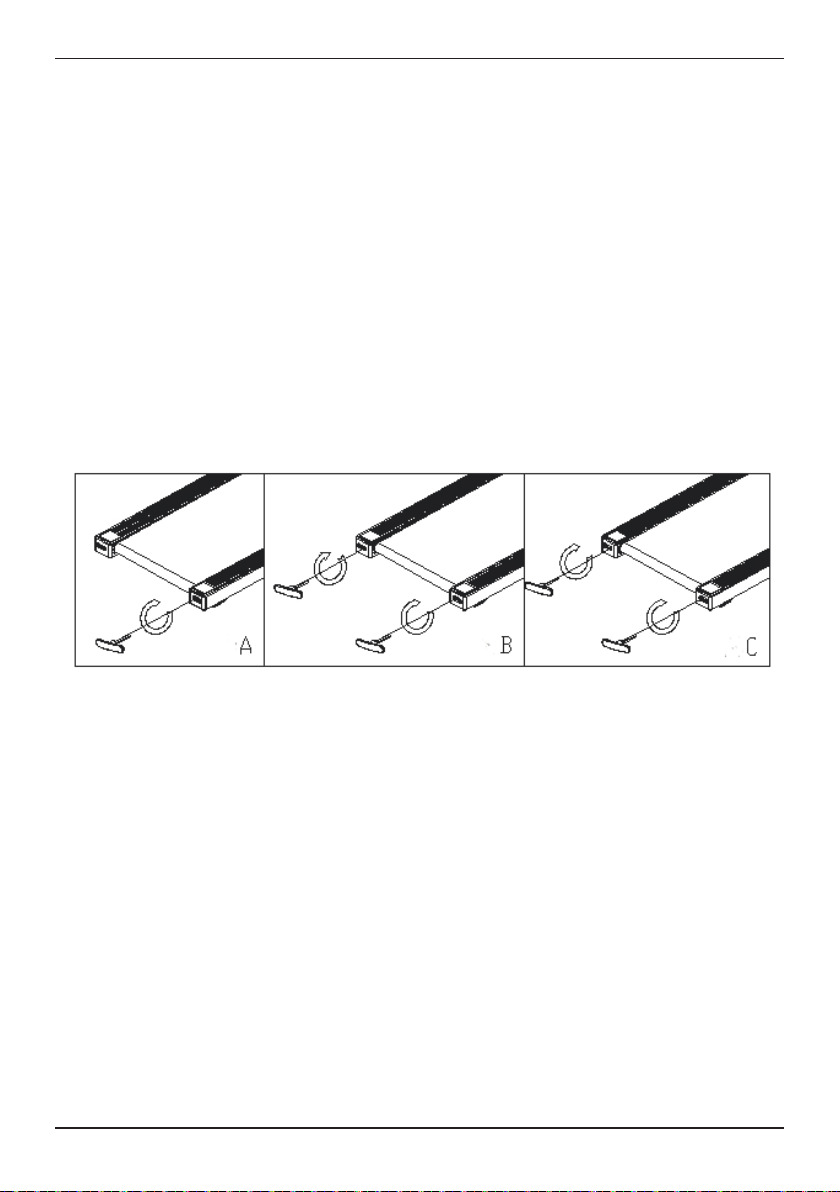
Centering and tensioning the belt
Within the first weeks of using the treadmill, it is possible that you need to centre the belt.
For example this can happen when applying more pressure to the left foot over the right.
Make sure the treadmill is running with a speed between 3 and 5 KPH. At the back of the
frame there are two adjustment bolts. These bolts allow you to adjust the rear roller. When
the treadmill is running to the left, you need to turn the left adjusting bolt clockwise and the
right adjusting bolt counter clockwise. Went the treadmill is pulling to the right, you have to
turn the left adjusting bolt counter-clockwise and the right adjusting screw clockwise. Make
sure the belt stays well tensioned and is not waving.
4. Use
Manual Runner DTM300i Treadmill - 55
Page 56
5. General information
5.1 Training schedule
Introduction schedule
Schedule week 1 and 2
Train at 60% of your maximum heart rate.
Max. 3 times a week.
Warming up 5 - 10 minutes.
Train 4 minutes.
Rest 1 minute.
Train 2 minutes.
Calmly train 1 minute.
Cooling down 5 minutes.
Schedule week 5 and 6
Train at 60% of your maximum heart rate.
Max. 5 times a week.
Warming up 5 - 10 minutes.
Train 6 minutes.
Rest 1 minute.
Train 4 minutes.
Calmly train 3 minutes.
Cooling down 5 minutes.
Schedule week 3 and 4
Train at 60% of your maximum heart rate.
Max. 4 times a week.
Warming up 5 - 10 minutes.
Train 5 minutes.
Rest 1 minute.
Train 3 minutes.
Calmly train 1 minute.
Cooling down 5 minutes.
After completing the introduction
training schedule for six weeks, you
can choose the follow-up training
schedule that is best suited to your
needs. You can choose a schedule
that will maximize your weight
loss, or one that will improve your
stamina. Both training schedules are
on the next pages.
56 - Manual Runner DTM300i Treadmill
Page 57
Training schedule to improve stamina
(follow-up to introduction training schedule)
5. General information
Schedule week 7 and 8
Train at 80% of your maximum heart rate.
Max. 6 times a week.
Warming up 5 - 10 minutes.
Train 7 minutes.
Rest 1 minute.
Train 5 minutes.
Calmly train 1 minute.
Cooling down 5 minutes.
Training schedule to lose weight
(follow-up to introduction training schedule)
Schedule week 7 and 8
Train at 60% of your maximum heart rate.
Max. 6 times a week.
Warming up 5 - 10 minutes.
Train 7 minutes.
Rest 1 minute.
Train 5 minutes.
Calmly train 1 minute.
Cooling down 5 minuten.
Schedule week 9 and beyond
Train at 80% of your maximum heart rate.
Max. 6 times a week.
Warming up 5 - 10 minutes.
Train 10 minutes.
Rest 1 minute.
Train 10 minutes.
Repeat training 2 or 3 times.
Calmly train 1 minute.
Cooling down 5 minutes.
Schedule week 9 and beyond
Train at 60% of your maximum heart rate.
Max. 6 times a week.
Warming up 5 - 10 minutes.
Train 10 minutes.
Rest 1 minute.
Train 10 minutes.
Repeat training 2 or 3 times.
Calmly train 1 minute.
Cooling down 5 minutes.
Manual Runner DTM300i Treadmill - 57
Page 58
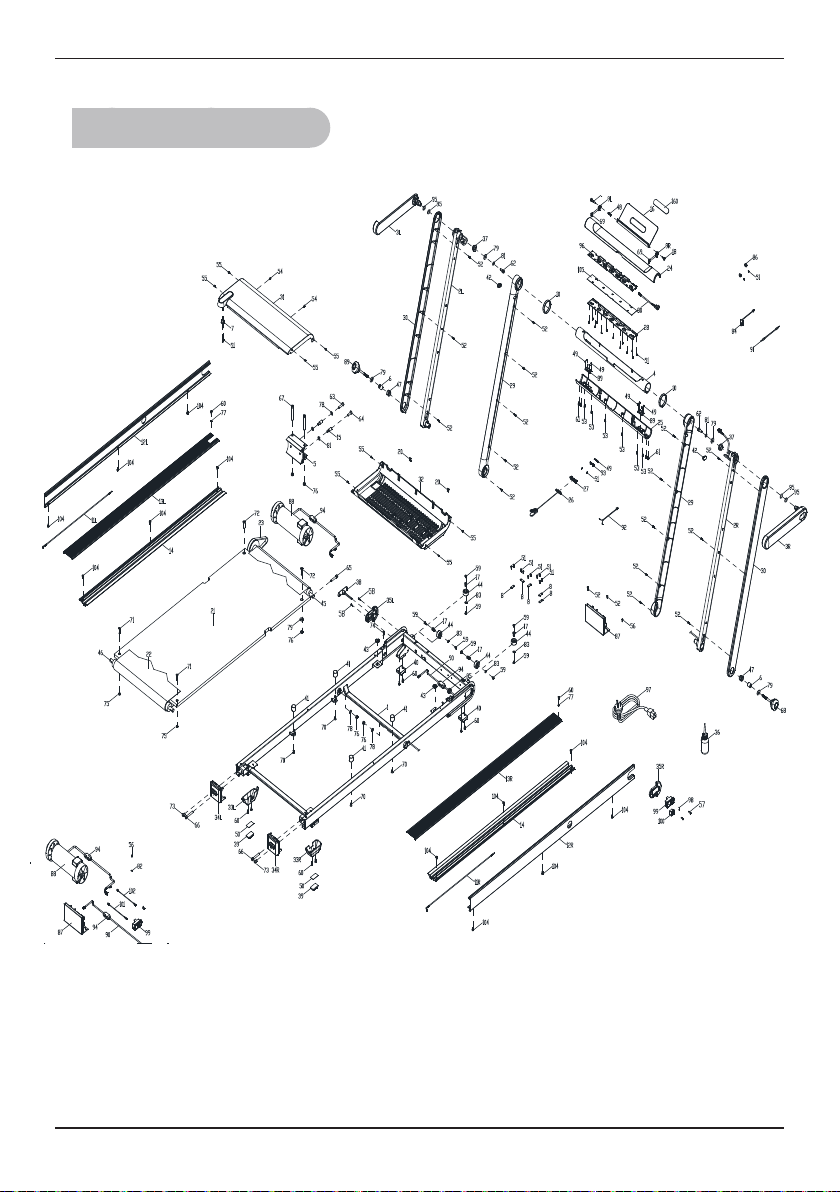
5. General information
5.2 Exploded view
58 - Manual Runner DTM300i Treadmill
Page 59
5. General information
No. Part QTY No. Part QTY
1 Main frame 1
2L/R L/R Upright 2
3L/R Foam handrail 2
4 Bracket horizontaltube 1
5 Motor seat 1
6 Spacer 2
7 Motor cover fixed plate 1
8 Cable press sheet 5
9L/R Pad connecting seat 2
10 Meter ring 2
11L/R Edging fixing hook 2
12L/R Aluminium alloy side edging 2
13L/R Edging insert sheet 2
14 Edging 73.9*16.7*1218L 2
15 Motor adjusting screw 2
16 Pad bracket 1
17 Supporting wheel axis 4
18 Pad bracket fixing screw right 1
19 Pad bracket fixing screw left 1
20 M4 nut clip plate 2
21 Running board 1
22 Running belt 1
23 Multi-groove belt 1
24 Meter upper cover 1
25 Meter under cover 1
26 Safety key 1
27 Safety key seat 1
28 PC board light bracket 1
29 Upright inner side cover 2
30 Upright outter side cover 2
31 Upper motor cover 1
32 Motor under cover 1
33L/R Supporting foot pad cover L/R 2
34L/R Rear end cover 2
35L/R Edging decorative stopple L/R 2
36 Silicon oil 1
37 Sleeve 2
38 Wrench 1
39 Bracket rear supporting pad 2
40 Bracket front supporting pad 2
41 cushion 4
42 Rubber spacing cushion 2
43 Running board shock absorber 2
44 Supporting transporting wheel 4
45 Font roller 1
46 Rear roller 1
47 Compression spring 2
48 Compression spring 1
49 Screw M2.5*5 12
50 Rear supporting foot pad 2
51 Screw M3*8 28
52 Screw M4*15 18
53 Screw M4*12 6
54 Screw M4*15 2
55 Screw M4*10 8
56 Screw M4*8 1
57 Screw M4*15 2
58 Screw M4*10 2
59 Screw M5*8 8
60 Screw M5*10 10
61 Screw M6*10 4
62 Screw M8*20 2
63 Screw M8*25 1
64 Screw M8*40 1
65 Screw M8*45 1
66 Screw M8*55 2
67 Screw M8*70 2
68 blossom knobM8*80 2
69 Screw M4*8 4
70 Screw M6*12 4
71 Screw M6*27 2
72 Screw M8*35 2
73 Screw M8*12 2
74 Screw M6*30 1
75 Nut M6 2
76 Nut M8 6
77 Washer 5.5*12*1.2 2
78 Washer 9*16*t1.6 3
79 Washer 9*23*t1.6 4
80 Upper wire 1
81 Wrench 8.1*12.3*t2.1 2
82 Wrench 4.1*4.4*t1.0 1
83 C-shape Snap Rings 4
84 Audio signal input 1
85 Ring wire plug 1
86 Module fixing cap 2
87 Controller 1
88 DC motor 1
89 Loudspeaker 2
90 wLower wire 1
91 Mp3 line 1
92 Safety lock connecting wire 1
93 Bronze plate seat 2
94 Magnetic ring 2
95 O shape ring 4
96 Meter keyboard 1
97 Power cord 1
98 Fuse 1
99 Power swit ch 1
100 Switch 1
101 Single wire(red) 200mm 1
102 Single wire(Black) 200mm 1
103 Single grounding wire 400mm 1
104 Screw M5*10 12
105 Panel sticker 1
106 Pad bracket single-tape 1
Manual Runner DTM300i Treadmill - 59
Page 60
5. General information
5.3 Troubleshooting
Problem
Solution
Problem
Solution
Problem
Solution
Problem
Solution
The computer of the treadmill is not switching on.
1. Check if the plug is connected to a grounded outlet
2. Check the switch near the adapter cable is set to ON or I.
3. Check if the fuse near the switch . If the fuse is broken contact your
reseller.
Segments of the screen do not light up.
The screen LEDS are damaged, contact your reseller.
The screen shows “------”.
The safety key is not placed (correctly). Place the safety key into the
designated area on the treadmill.
My iOS or Android device is not connecting to the DTM300i.
1. Turn off any app used for connecting to the DTM300i.
2. Turn off the treadmill with the 1/0 switch. Wait 5 seconds, and turn the
treadmill back on again.
3. Enter the bluetooth settings menu of your mobile device. Choose the
option “Forget this device” and turn off the bluetooth.
4. Repeat the bluetooth connection steps described in this manual.
In case if your problem is not resolved or not described, consult the
fitness reseller where you purchased this product.
60 - Manual Runner DTM300i Treadmill
Page 61
6.1 Warranty
The warranty is provided by the Flow Fitness distributor of your country and the reseller
where you have purchased your product. Please check https://www.flowfitness.com/en/
dealers/ for contact information.
6. Warranty
Manual Runner DTM300i Treadmill - 61
Page 62
Notities / Notes
62 - Runner DTM300i Treadmill
Page 63
Notities / Notes
Runner DTM300i Treadmill - 63
Page 64

Runner DTM300i Treadmill
www.flowfitness.com
 Loading...