

Page 1
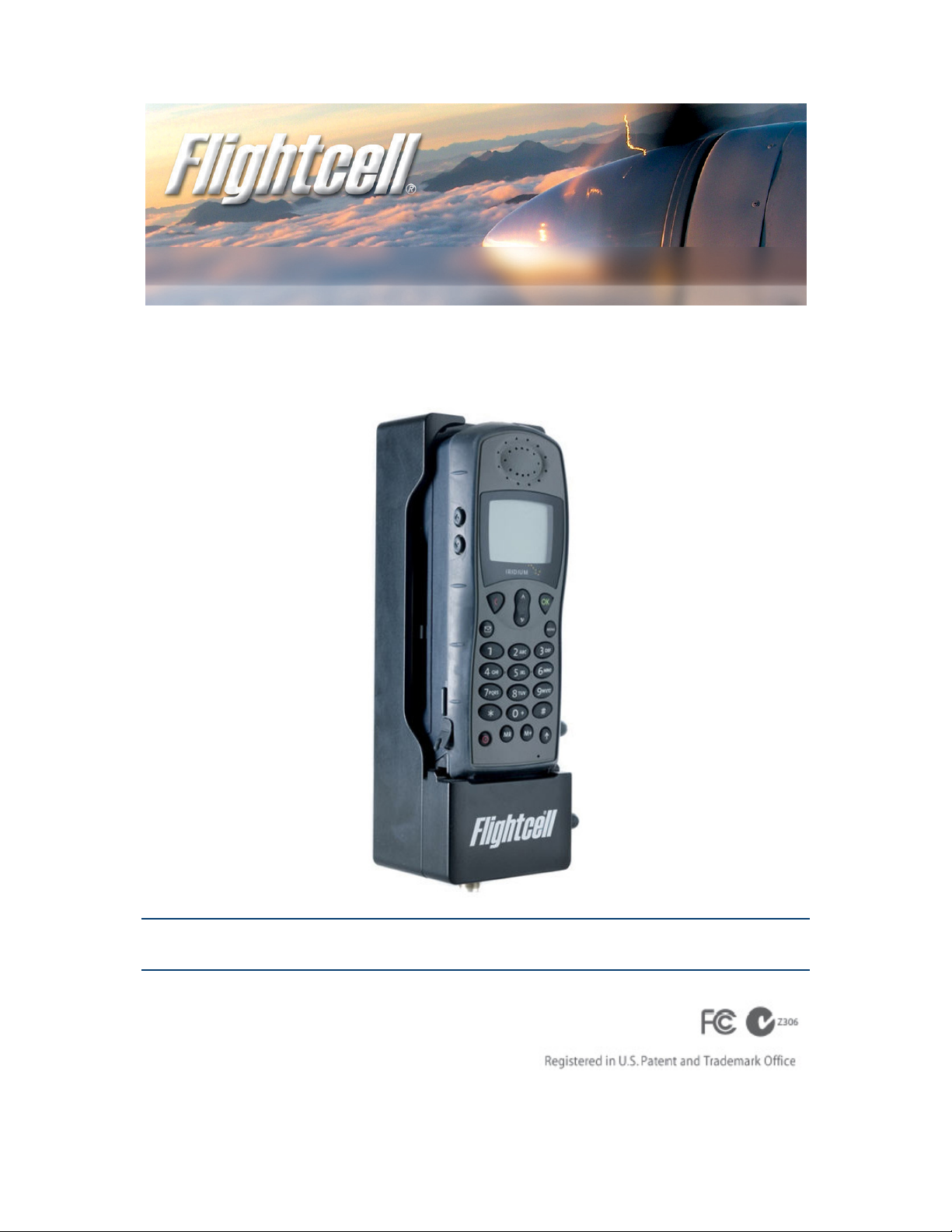
Flightcell® Iridium 9505/9505A Phone Cradle
Installation Manual
www.flightcell.com
Page 2

| Version history |
Version history
Issue Date Author Description
Issue 1 11 Nov 2006 J. Glasgow Document created.
Issue 2 22 Nov 2006 J. McKirdy
Issue 3 21 Feb 2007 J. Glasgow
Issue 4 22 Feb 2008 A. Whitlock General update.
Issue 5 22 Jul 2009 A. Whitlock General update.
Issue 6 08 Sep 2009 A. Whitlock General update and terminology changes.
Issue 7 – Current 05 May 2010 J. Mace FCN0074 Update specification
Insert drawings and part number for
FC9505AGPSM3 version of cradle
| Flightcell® Iridium Phone Cradle (Mark 3 ) Installation Manual Page 2 of 15 |
Page 3

| Contents |
Contents
Version history ......................................................................................................................................................................... 2
Contents .................................................................................................................................................................................... 3
Introducing the Flightcell® Iridium Phone Cradle ................................................................................................................ 4
Optional accessories.............................................................................................................................................................. 4
About this installation manual............................................................................................................................................... 4
Other useful resources........................................................................................................................................................... 4
Technical specifications ........................................................................................................................................................... 5
Installing your Flightcell® Iridium Phone Cradle ................................................................................................................. 6
Mounting the phone cradle within your aircraft or vehicle ................................................................................................... 6
Dimensions and mounting points: D25 connector type......................................................................................................... 6
Dimensions and mounting points: D38999 connector type................................................................................................... 7
Dimensions and mounting points: D25 type for 9505A with GPS module ........................................................................... 7
Audio connection .................................................................................................................................................................. 8
Electronic connections .......................................................................................................................................................... 8
D25 connector....................................................................................................................................................................... 9
D38999 connector ................................................................................................................................................................. 9
Wiring to the phone cradle.................................................................................................................................................. 10
Antenna connector .............................................................................................................................................................. 11
Power supply to the Iridium phone ..................................................................................................................................... 11
Automated power on and off............................................................................................................................................... 11
Using the Iridium phone with the Flightcell® Iridium Phone Cradle ................................................................................ 12
Placing your Iridium satellite phone into the phone cradle ................................................................................................. 12
Overriding antenna lock...................................................................................................................................................... 13
Controlling satellite phone audio volume............................................................................................................................ 13
Warranty and contact details ................................................................................................................................................ 14
Limited Warranty for your Flightcell® Iridium Phone Cradle............................................................................................. 14
Flightcell® International contact details .............................................................................................................................. 14
User notes................................................................................................................................................................................ 15
| Flightcell® Iridium Phone Cradle (Mark 3 ) Installation Manual Page 3 of 15 |
Page 4

| Introducing the Flightcell® Iridium Phone Cradle |
Introducing the Flightcell® Iridium Phone Cradle
The Flightcell® Iridium Phone Cradle is used to install an Iridium 9505 or 9505A satellite phone in an aircraft or vehicle. The
phone cradle provides secure mounting for the Iridium handset and interfaces all necessary electrical, antenna, voice and data
connections.
Flightcell® has designed this product to enable integration of the phone into existing voice systems, or as part of the built-in
Flightcell® DZM or DZM2 voice, data and tracking system.
Installed with the Flightcell® DZM, your Iridium satellite phone can be mounted anywhere on the aircraft or vehicle, as it is
controlled remotely from the Flightcell® DZM user interface.
Optional accessories
Retaining bracket
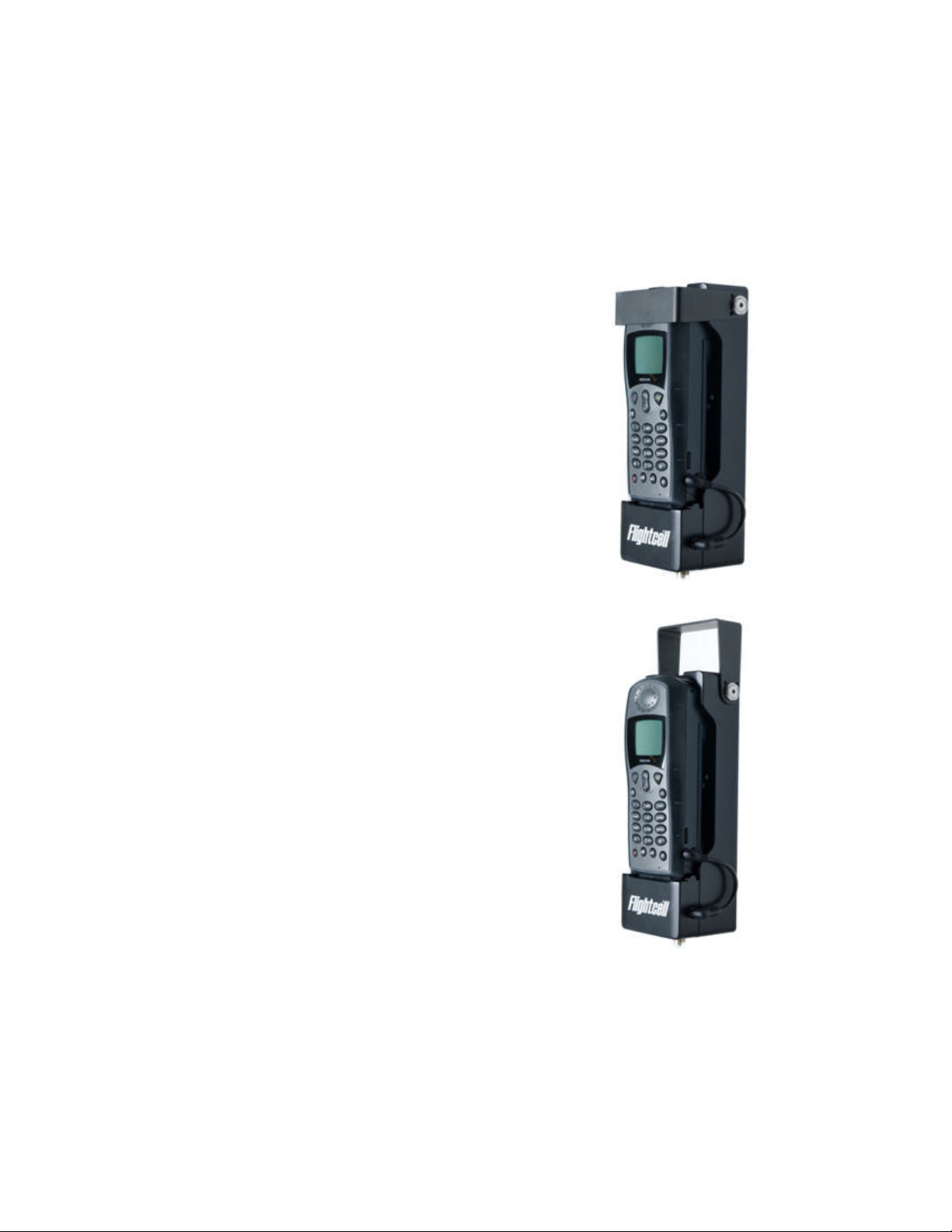
The Flightcell® Iridium Phone Cradle can be supplied with an optional retaining bracket which rotates down over the phone
(refer to the image on page 12). As this is factory fitted, it must be specified at time of order.
RAM mount
The phone cradle is normally fastened to a bulkhead or other flat surface in an aircraft of vehicle. However, if it is to be
installed in a non-flat or angled location, an optional RAM mount can be supplied. This uses the same mounting points on the
phone cradle, so may be ordered separately from Flightcell® International or your Flightcell® dealer.
About this installation manual
This manual is intended for use by engineers installing and maintaining the Flightcell® Iridium 9505 or 9505A Phone Cradle.
It describes the physical, mechanical and electrical characteristics and installation requirements for this product.
For further assistance, please contact Flightcell® International Ltd.
Other useful resources
Find further information on installing and operating all Flightcell® products from the Flightcell® website at
http://www.flightcell.com/downloads.aspx, or contact Flightcell® International Ltd directly. Contact details are provided at
the end of this document.
| Flightcell® Iridium Phone Cradle (Mark 3 ) Installation Manual Page 4 of 15 |
Page 5

| Technical specifications |
Technical specifications
Part number
Material
Input voltage
Power supply current
Output voltage (to Iridium Phone)
MIC audio
SPKR audio
Satphone data
Width
Depth
Excluding retaining clamp 72.3mm 2.85”
Including retaining clamp 83.0mm 3.27”
Including audio lead 92.5mm 3.64”
Excluding retaining clamp and phone 61.5mm 2.42”
FC9505/AD25M3M
FC9505/A38999M3M
FC9505AGPSM3
Machined from aluminium 6061
12-32 V DC
1ms inrush <=10.0A
100ms inrush <=250mA
Operating current 250mA max
4.2-4.6V, firmware controlled
Sensitivity as per satphone
Level as per satphone
RS-232 levels, 9600bps
Height
Weight
Main connector on cradle
Iridium connector
Excluding retaining clamp 66.2mm 2.61”
Including retaining clamp 68.3mm 2.69”
206.5mm 8.13”
795grams 28.04oz
DB25 male (8FTM25P-30N1-FEC)
TNC
| Flightcell® Iridium Phone Cradle (Mark 3 ) Installation Manual Page 5 of 15 |
Page 6
| Installing your Flightcell® Iridium Phone Cradle |
Installing your Flightcell® Iridium Phone Cradle
Mounting the phone cradle within your aircraft or vehicle
Attaching the phone cradle:
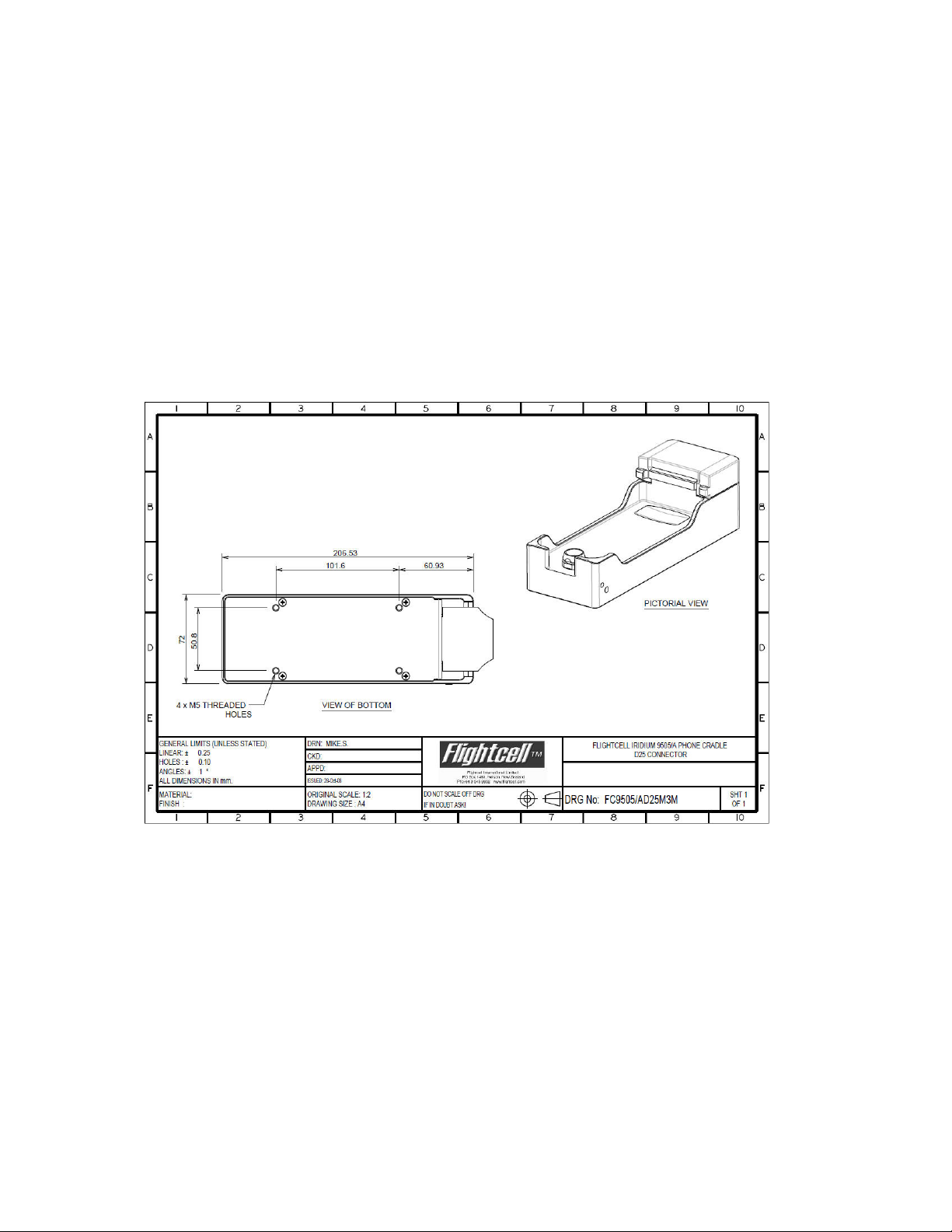
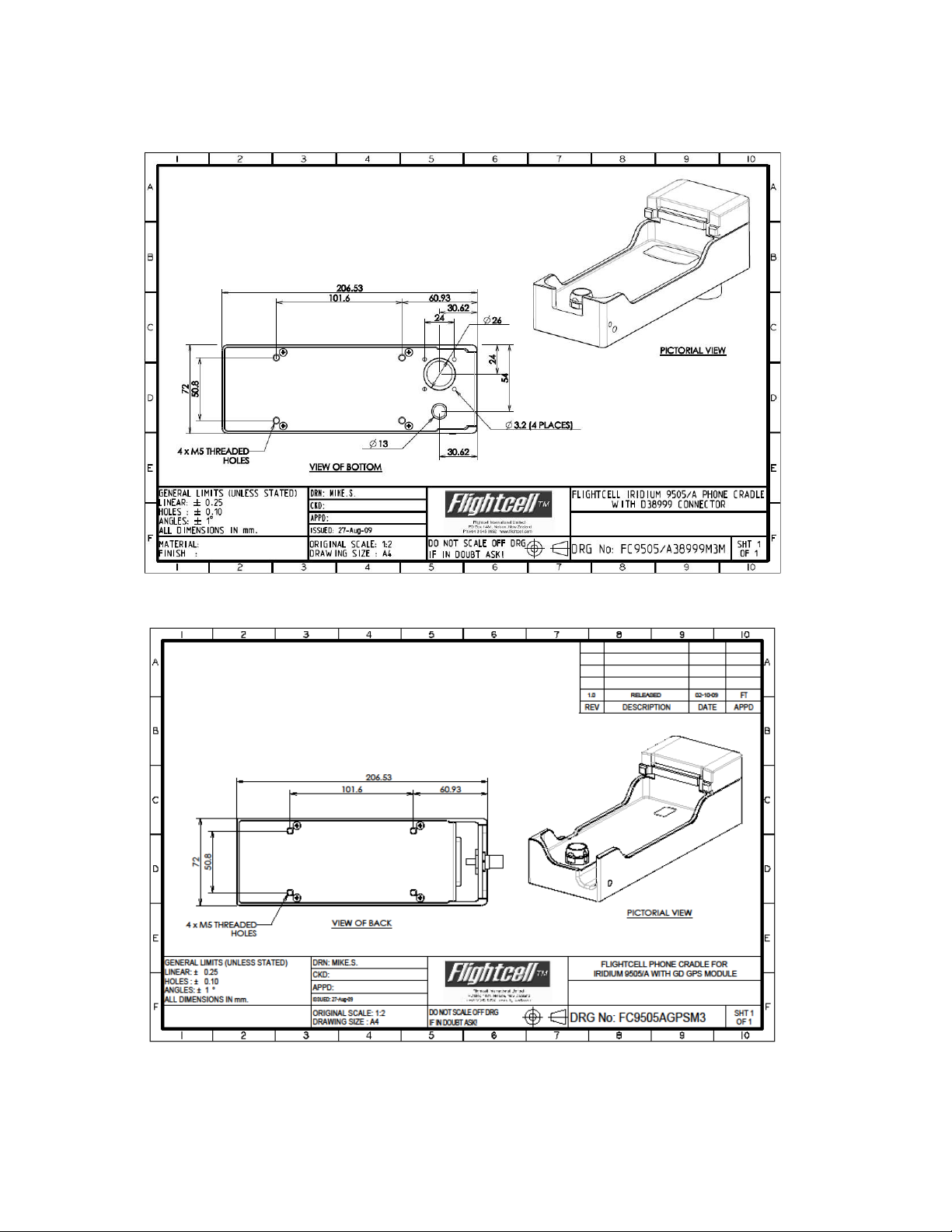
Use 4 x M5 bolts at the four mounting points on the back of the phone cradle. These bolts are fastened in to the back of
the phone cradle through a bulkhead or other similar mounting point.
The length of the bolts should be the thickness of the mounting surface plus 10-15mm.
The diagrams below show dimensions and locations of mounting points for each connector type.
Dimensions and mounting points: D25 connector type
| Flightcell® Iridium Phone Cradle (Mark 3 ) Installation Manual Page 6 of 15 |
Page 7
| Installing your Flightcell® Iridium Phone Cradle |
Dimensions and mounting points: D38999 connector type
Dimensions and mounting points: D25 type for 9505A with GPS module
| Flightcell® Iridium Phone Cradle (Mark 3 ) Installation Manual Page 7 of 15 |
Page 8

| Installing your Flightcell® Iridium Phone Cradle |
Audio connection
Audio is passed between phone cradle and phone using a lead with a 3.5mm and a 2.5mm plug on the two ends. These plug
into the right side of the phone cradle and phone respectively.
Replacement leads are available from Flightcell® International Ltd.
Electronic connections
The Flightcell® Iridium Phone Cradle has integrated electronics that supplies aircraft power to the phone and provides all
necessary voice and data connections.
The phone cradle also contains isolating transformers to reduce intrusion of aircraft power supply noise into the audio
system.
The phone cradle comes in two versions; one with a D25 main connector, the other with a milspec D38999 connector.
| Flightcell® Iridium Phone Cradle (Mark 3 ) Installation Manual Page 8 of 15 |
Page 9
| Installing your Flightcell® Iridium Phone Cradle |
D25 connector
The main and antenna connectors are recessed into the base of the phone cradle.
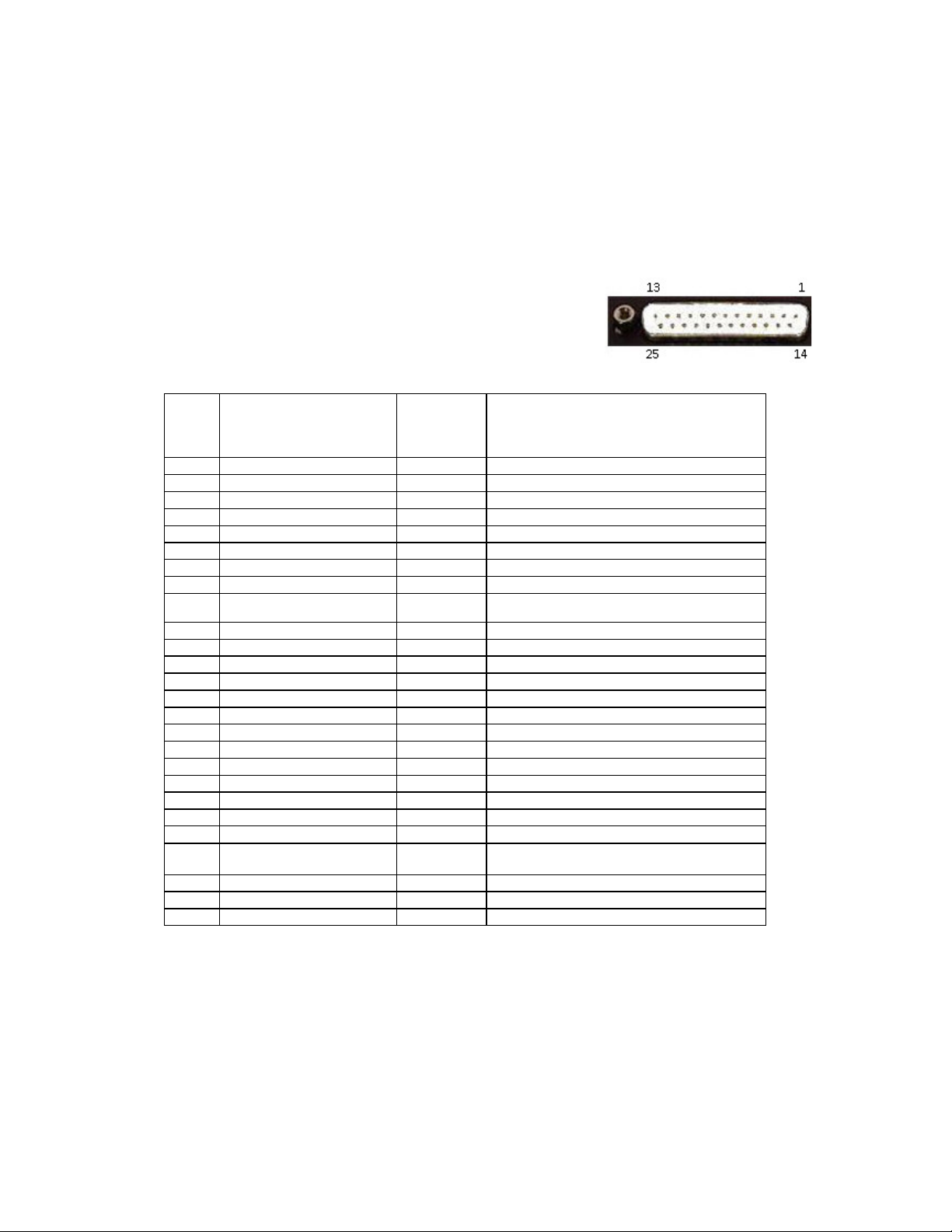
The D25 connector contains all required I/O connections to charge the satellite phone and access the serial port and audio
connection.
Connector specifications:
Cradle main connector (D25 male) part number - Multicomp
8FTM25P-30N1-FEC (or equivalent)
Mating connector (D25 female) part number - Multicomp 550225SA-01-F1 (or equivalent)
Connector pinouts:
Pin numbering for D25 female
connector:
Pin Function
1
2
3
4
5
6
7
8
9
10
11
12
13
14
15
16
17
18
19
20
21
22
23
24
25
Shell
Input to/output
from phone
Notes
cradle
Do not connect
Do not connect
Do not connect
Do not connect
RI Output
Power - Input
GND Signal GND
Data RX Output
DTR Input Flow control
RTS Input Flow control
GND GPO Output
MIC + Input
SPK + Output
Do not connect
Do not connect
DCD Output RS232 flow control
Do not connect
DSR Output RS232 flow control
PWR + Input
GND DATA
SAT TX Input
CTS Output
GPO
General Purpose Output; this is used as an output
in custom applications of the phone cradle.
MIC Input
SPK - Output
Chassis ground
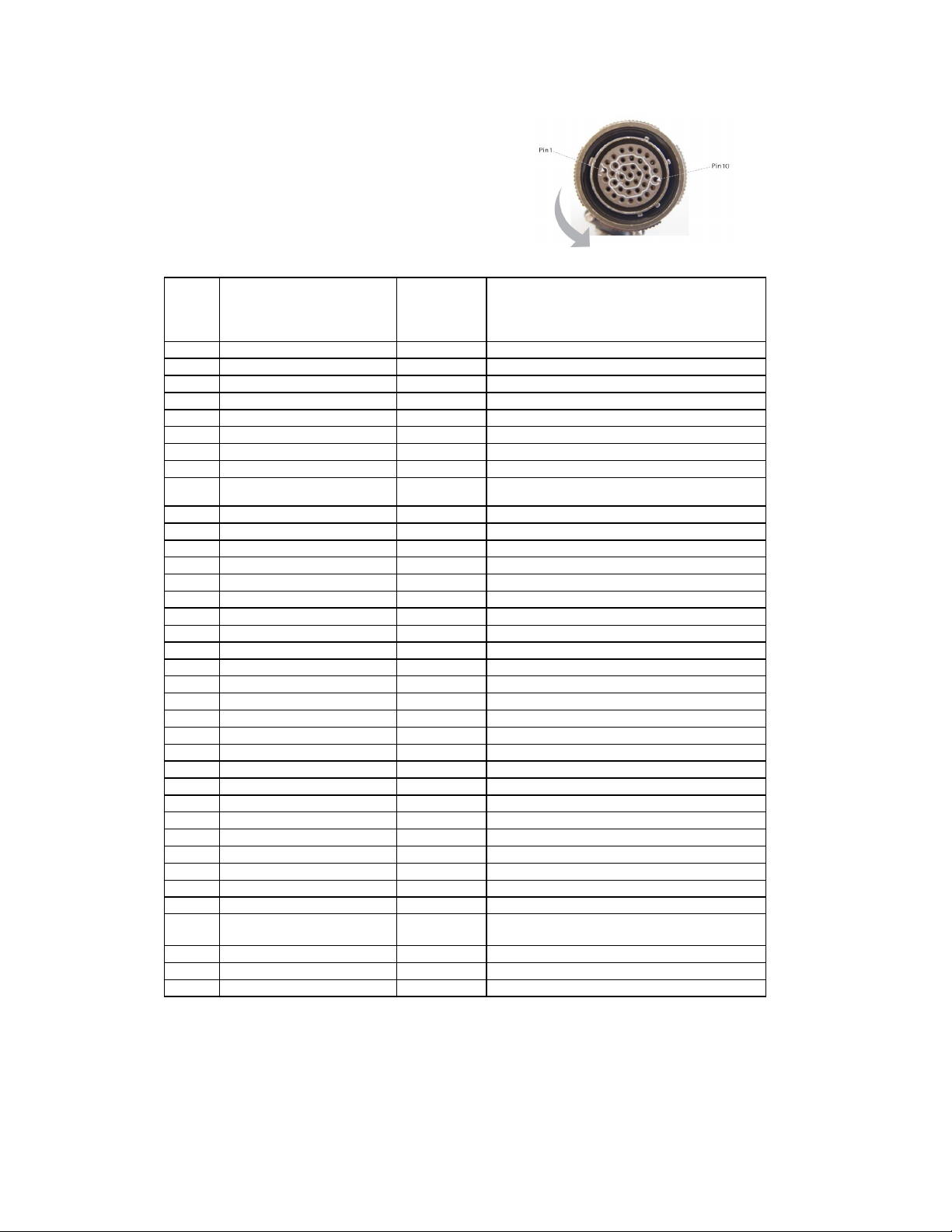
D38999 connector
A phone cradle with D38999 connector is available for applications where a military specification connector is required.
Connector specifications:
| Flightcell® Iridium Phone Cradle (Mark 3 ) Installation Manual Page 9 of 15 |
Page 10
| Installing your Flightcell® Iridium Phone Cradle |
Cradle connector part number - D38999/20WD35PN
Mating connector part number - D38999/26WD35SN
Connector pinouts:
Pin Function
1
2
3
4
5
6
7
8
9
10
11
12
13
14
15
16
17
18
19
20
21
22
23
24
25
26
27
28
29
30
31
32
33
34
35
36
37
Input to/output
from phone
Notes
cradle
Power ground
MIC + Input
DZM RI Output Flow control
SPK + Output
Speaker shield
DSR Output Flow control
Do not connect
Data Tx Input RS232 data transmit
Data Rx Output RS232 data receive
DCD Output Flow control
RTS Input Flow control
CTS Output Flow control
DTR Input Flow control
Spare GND
Do not connect
Spare GND
Do not connect
PWR + Input
MIC - Input
SPK - Output
Do not connect
Do not connect
Do not connect
GND Data Ground data shield
Spare GND
Spare Ground
Do not connect
Do not connect
Do not connect
Do not connect
Shield
Do not connect
GPO GND
GPO
General Purpose Output; this is used as an output
in custom applications of the phone cradle.
Do not connect
Do not connect
Do not connect
Wiring to the phone cradle
Where appropriate, the Flightcell® standard wiring harness is recommended. For installations where the standard harness is
unsuitable, the following guidelines should be followed:
| Flightcell® Iridium Phone Cradle (Mark 3 ) Installation Manual Page 10 of 15 |
Page 11

| Installing your Flightcell® Iridium Phone Cradle |
Power cables should be 22AWG stranded. For example, M22759/34-22-9
Other cables may be 22 or 24AWG stranded, screened where indicated. For example, M27500/-24SB2T14
Screened pairs should be used for:
MIC +/-
SPK +/-
RS232 Tx/Rx
The other flow control lines RTS, CTS, DSR, DTR, RI, DCD can utilise either screened or unscreened cables in any
groupings. Where screened cable is used, we recommend that it be grounded at one end only to minimize ground loops.
Where the GPO signal is used we recommend using a single screened cable, with GPO GND connected to the screen and
GPO connected to the core.
Antenna connector
The Flightcell® Iridium Phone Cradle has a single TNC antenna connector to connect the phone to an approved Iridium
antenna. Please contact Flightcell® International for more information on antenna options.
Power supply to the Iridium phone
Powering and charging the phone
The Iridium Phone Cradle contains a power supply that manages voltage and current supplied to the phone, to levels required
to safely charge and operate the phone. Power is supplied via the connector on the base of the Iridium phone.
This power supply can operate and charge either 9505 or 9505A Iridium satellite phone models.
The Iridium 9505A phone was designed to be powered and charged via a power jack on the left side. However, the
Flightcell® Iridium Phone Cradle charges the phone via its main connector instead of the charging jack. This removes the
requirement for a power lead from phone mount to handset.
NOTE! When an Iridium 9505A handset is in the cradle, the phone display will not show charging status, even though
the battery is being charged.
Automated power on and off
The Iridium phone cradle is designed to power the Iridium phone on and off when the aircraft or vehicle is powered up or
down. This is done to ensure the phone is always on when the aircraft is operating, and the phone is always off (and batteries
not being run down) when no power is being supplied from the aircraft.
| Flightcell® Iridium Phone Cradle (Mark 3 ) Installation Manual Page 11 of 15 |
Page 12
| Using the Iridium phone with the Flightcell® Iridium Phone Cradle |
Using the Iridium phone with the Flightcell® Iridium
Phone Cradle
Placing your Iridium satellite phone into the phone cradle
STEP 1 - Installing the satellite phone into the phone cradle:
Rotate the retaining clamp (if fitted) on the phone cradle upwards to
allow the satellite phone to fit into the phone cradle.
Slide the satellite phone downwards into the phone cradle, aligning the
two electrical connector lugs on the phone cradle with the slots on the
satellite phone base.
While pressing the antenna release button (on the top of the phone
handset), push the satellite phone back onto the antenna connector until
it is firmly mated. Then release the antenna release button.
Rotate the retaining clamp on the phone cradle downwards.
Plug the audio cable on the right side of the phone cradle to the 2.5mm
audio socket on the right side of the satellite phone.
STEP 2 - Releasing your satellite phone from the phone cradle:
Remove the audio cable from the satellite phone.
Rotate the retaining clamp (if fitted) on the phone cradle upwards to
allow the satellite phone to be removed from the phone cradle.
Push the antenna release button (on the top of the phone handset) while
pulling the satellite phone outwards from the phone cradle.
| Flightcell® Iridium Phone Cradle (Mark 3 ) Installation Manual Page 12 of 15 |
Page 13
| Using the Iridium phone with the Flightcell® Iridium Phone Cradle |
Overriding antenna lock
Some early versions of the 9505 satellite phone will not operate unless the antenna is locked in the 10 o'clock or 2 o'clock
position. If you receive an antenna alert when the handset is installed in the Iridium phone cradle, you will need to override
this setting.
Overriding the 9505 antenna lock:
Enter the code *#92# into the satellite phone. "ANTENNA ALERT OFF" displays.
Power the satellite phone off and re-start for the override code to take effect. Once the satellite phone has been poweredon again it will not require the antenna to be rotated.
NOTE! For the 9505 satellite phone, the override code function operates in handsets operating firmware version
LAC0307. For the 9505A satellite phone, the override code function operates in handsets operating firmware versions
LAC0307, ISO5004 or ISO6004. Enter the code *#91# to identify the firmware version of your handset.
If your 9505 phone is using firmware versions earlier than LAC0307, you will need to return the phone to an
approved Iridium service center for a firmware upgrade.
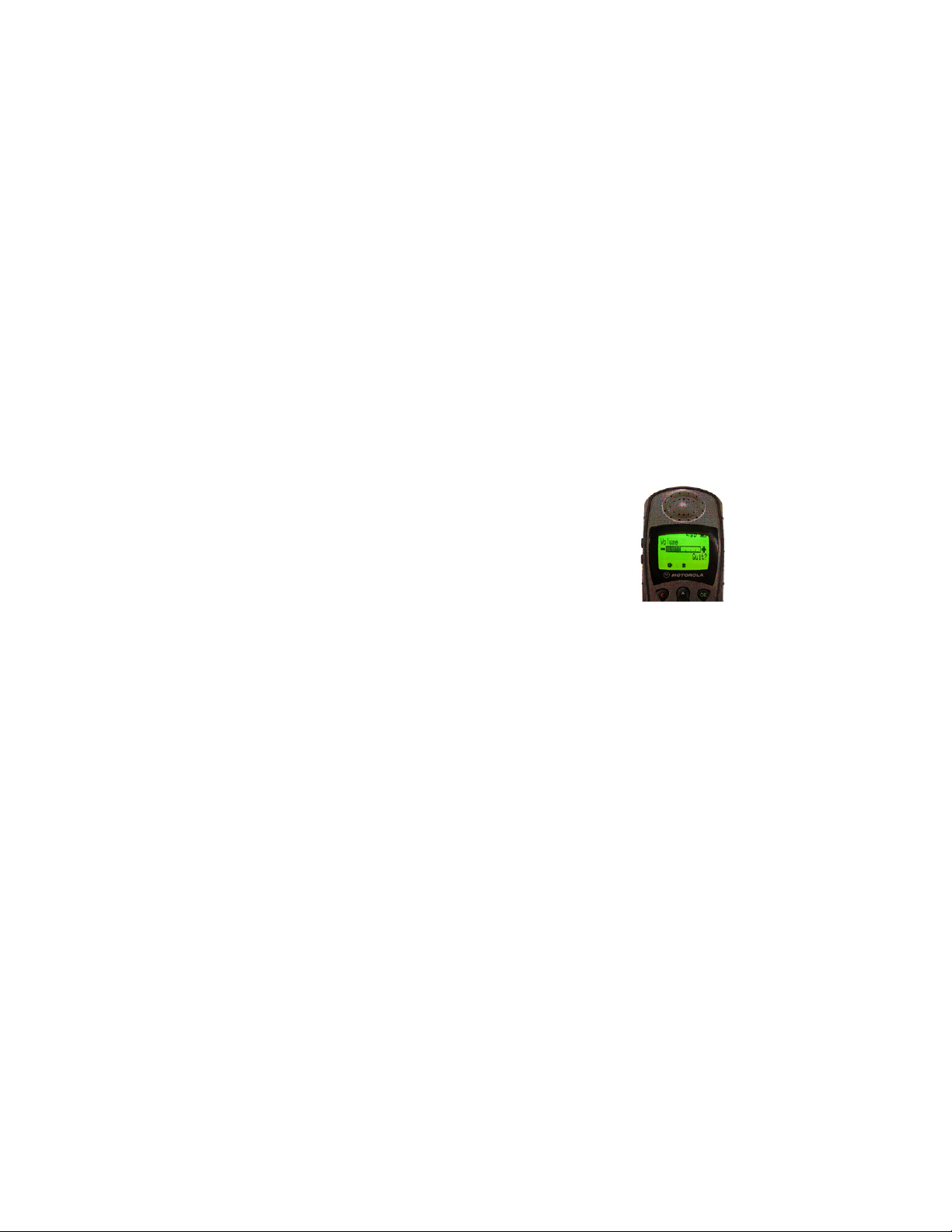
Controlling satellite phone audio volume
Altering the satellite phone audio volume on the handset:
For best performance, set the volume on the satellite phone handset to 3.
NOTE! Undesirable echo occurs when volume on the handset is set
to above halfway.
| Flightcell® Iridium Phone Cradle (Mark 3 ) Installation Manual Page 13 of 15 |
Page 14

| Warranty and contact details |
Warranty and contact details
Limited Warranty for your Flightcell® Iridium Phone Cradle
Flightcell® International Ltd's quality products are proudly designed and manufactured to the highest standards in New
Zealand.
Your Flightcell® Iridium Phone Cradle is warranted for 5 years from date of sale.
The warranty is void if any labels are removed or if it is determined that your Flightcell® DZM has been:
Connected to a power supply delivering more than 32 Volts;
Connected with reverse polarity;
Installed in direct contravention to the guidelines outlined in the technical installation manual;
Physically damaged, or a fault has occurred due to the product being used beyond what is considered normal use, causing
unusual deterioration of the product.
If the product is deemed to be faulty or in need of repair, please contact Flightcell® International Ltd to obtain a Returned
Materials Authorization.
Flightcell® International contact details
Flightcell® International Ltd
PO Box 1481
98 Vickerman Street
Nelson 7010
New Zealand
Telephone +64 3 5458651
Fax +64 3 5488091
Website http://www.flightcell.com
| Flightcell® Iridium Phone Cradle (Mark 3 ) Installation Manual Page 14 of 15 |
Page 15

| User notes |
User notes
| Flightcell® Iridium Phone Cradle (Mark 3 ) Installation Manual Page 15 of 15 |
 Loading...