

Page 1

FW1177 User’s Manual
FW1177 User’s Manual
(Product Guide)
Version 4.14(Rev.E)
April 13, 2012
Class A Digital Device (industrial & commercial environment)
This equipment has been tested and found to comply with the limits for a Class A digital device, pursuant to CE and
FCC Rules. These limits are designed to provide reasonable protection against harmful interference when the
equipment is operated in a commercial environment. This equipment generates, uses and can radiate radio
frequency energy and, if not installed and used in accordance with the instruction manual, may cause harmful
interference to radio communications. Operation of this equipment in a residential area is likely to cause harmful
interference in which case the user will be required to correct the interference at his own expense.
M4042-04 1 Seyeon Tech Co., Ltd
Page 2

FW1177 User’s Manual
FW1177 User’s Manual
Document Part Number: M4042-04
Document Version: 4.14(Rev.E)
Revised: April 13, 2012
About This Document
This document is prepared for users of FW1177 supplied by Seyeon Tech Co., Ltd. It is assumed that the
users are familiar with Microsoft Windows operating systems and Web browsers such as Internet Explorer.
It is also assumed that the users are well aware of how to install and use the network equipment such as
LAN, Hub, router, and having basic knowledge of network terminologies. If you have any questions
regarding network installations, please contact your network equipment vendor or network administrator
or Internet service providers.
For updated contents, detailed features and other applications from Seyeon Tech, please refer to the user’s
manual in CD-ROM provided with the product you purchased, or visit Seyeon Tech’s Internet homepage at
http://www.flexwatch.com/.
Copyright Notice
Copyright © 2012 Seyeon Tech Co., Ltd. All rights reserved.
No part of this document may be reproduced in any form or by any means without the prior written
permission of Seyeon Tech Co., Ltd.
Disclaimer
Seyeon Tech Co., Ltd. (Seyeon Tech) Makes no representations or warranties with respect to the contents
hereof. In addition, information contained herein is subject to change without notice. Every precaution has
been taken in the preparation of this manual, nevertheless, Seyeon Tech assumes no responsibility for
errors or omissions or any damages resulting from the use of the information contained in this document.
Trademarks
FlexWATCH® and FlexWATCH® Logo are trademarks of Seyeon Tech Co., Ltd.
Windows and Internet Explorer are a trademark of Microsoft Corporation.
All other trademarks belong to their respective owners.
Technical Support
For technical support call, email, or visit our web site.
Telephone: +82-2-2192-6840~1
Email: [email protected]
Web site: http://www.flexwatch.com or http://www.seyeon.co.kr
M4042-04 2 Seyeon Tech Co., Ltd
Page 3

FW1177 User’s Manual
Contents
1. PRODUCT OVERVIEW ......................................................................................................................... 4
1.1. FW1177 .......................................................................................................................................................................... 4
1.2. K
1.3. T
1.4. FW1177 P
EY FEATURES
ECHNICAL SPECIFICATION
................................................................................................................................................................. 5
ACKING LIST
................................................................................................................................................ 9
........................................................................................................................................... 6
2. HARDWARE DESCRIPTION .............................................................................................................. 10
2.1. FW1177-DE ................................................................................................................................................................ 10
2.2. FW1177-FP ................................................................................................................................................................. 11
3. FW1177 INSTALLATION AND BASIC SETUP ................................................................................. 12
3.1. B
3.2. F
3.3. I
EFORE INSTALLATION
ACTORY DEFAULT SETTINGS
NSTALLING
FW1177 .................................................................................................................................................. 12
................................................................................................................................................. 12
..................................................................................................................................... 12
M4042-04 3 Seyeon Tech Co., Ltd
Page 4
FW1177 User’s Manual
1. Product Overview
1.1. FW1177
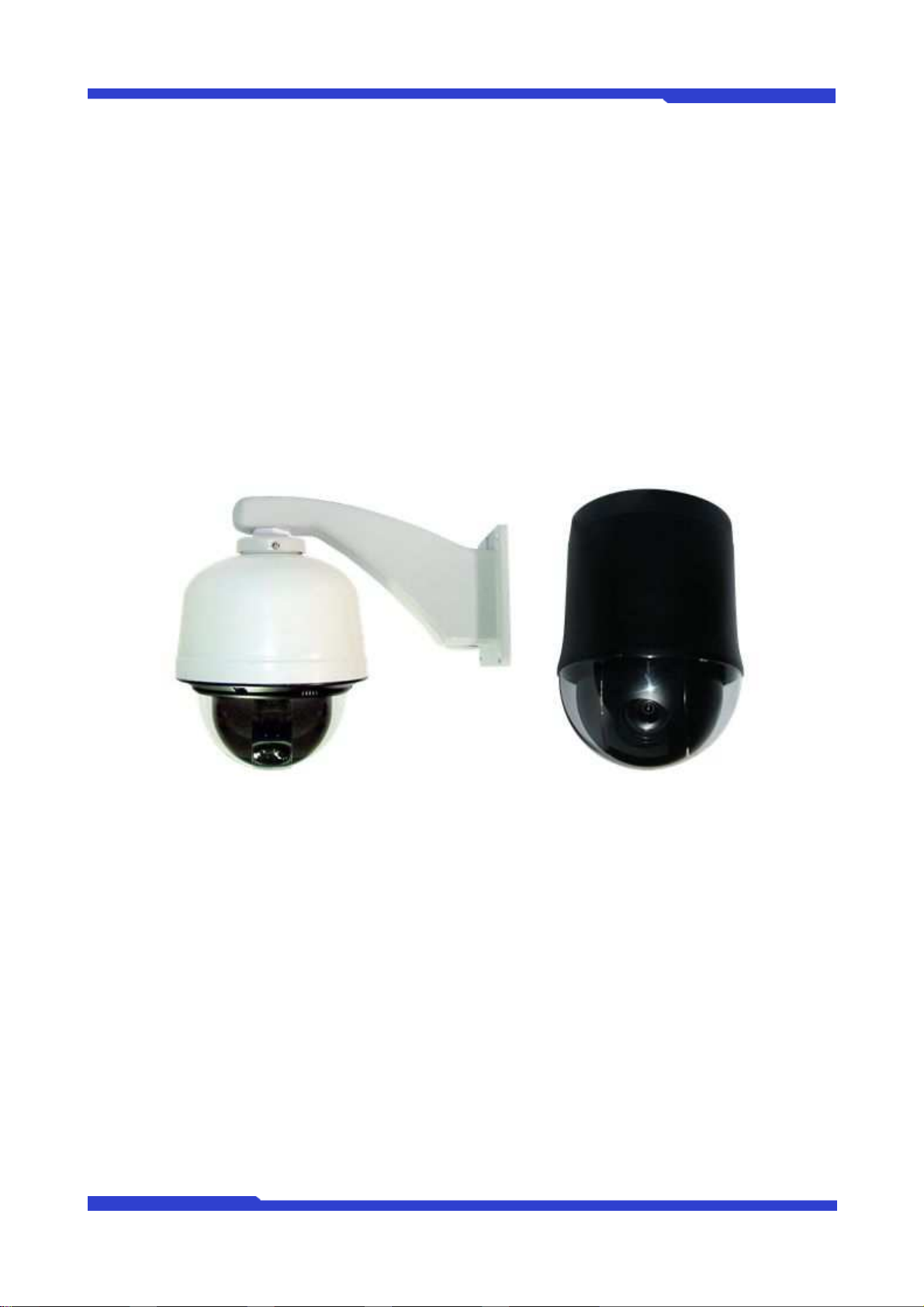
FlexWATCH® 1177 is a stand-alone device transmitting video from built-in PTZ camera over IP
network. There is one type of FW1177 model: DE and FP.
It can transmit up to 30fps@D1(DE)/2M(FP) over the existing network. You can monitor video of FW1177
through web browser(ie. MS Internet Explorer), if FW1177 is connected to network. FW1177 supports video
compression both MJPEG and H.264 simultaneously so that user can choose appropriate video compression
for the purpose. For both MJPEG and H.264, FW1177 provides 6 levels of video quality.
Picture 1 : FW1177-DE Picture 2 : FW1177-FP
M4042-04 4 Seyeon Tech Co., Ltd
Page 5

FW1177 User’s Manual
1.2. Key Features
Standalone device built-in web server
10M/100M Auto-Sensing Ethernet
Configuring and controlling through Web browser
Max 30/25 fps transmission rate at maximum resolution
Effective Bandwidth & Bit-rate Control (VBR/CBR) by H.264
Supports Dual Stream (MJPEG & H.264)
Built-in 2 way Audio transmission (1ch A-in, 1 A-out)
Support Dynamic IP network by IPCCTVDNS server
Support PTZ (Pan/Tilt/Zoom) function
Support Sensor Input, Digital Output
Support Transparent Mode
Support SNMP function
Encryption function by user authentication
Image transmission function via FTP and Email
Support both ONVIF/PSIA
M4042-04 5 Seyeon Tech Co., Ltd
Page 6

FW1177 User’s Manual
1.3. Technical Specification
FW1177-DE FW1177-FP
32bit Embedded CPU
Hardware
NAND Flash 128Mbytes / DDR2: 128Mbytes
Linux version 2.6.xx operating system
Battery backed up real-time clock
Image sensor
Lens
Minimum illumination
Video related special
functions
1/4”Sony 410K Super HAD CCD
Resolution: 520 TV Lines
[Detail]
S/N ratio: 50dB or more (AGC OFF)
Electronic shutter speed :
1/60 ~ 1/100,000 sec (NTSC)
1/50 ~ 1/100,000 sec (PAL)
White Balance: ATW
(1,800K~10,500K),AWC,MWB
IRIS control : Auto & Manual
f=3.5 mm wide to 115.5 mm tele
Color : 0.4 Lux (F1.6)
B/W : 0.01 Lux (F1.6)
DSS : 0.00004 Lux (F1.6)
DIS (Digital Image Stabilizer) - protection
from variation
AGC (Auto Gain Control)
DSS (Digital Slow Shutter)
BLC (Back Light Compensation)
ICR (Day & Night)
SSNR (Noise Reduction at Low Light)
1/2.8” progressive scan CMOS
Active pixels 2080H x 1553V, 3.23M
Effective pixels 2096H x 1561V, 3.27M
Pixel size : 2.5 (H) µm × 2.5 (V) µm
Color filter Bayer arrangement of primary
colors: R, G, B
Bit number of internal ADC: 10/12 bits
Parallel output: 37.125 MHz, 10/12 bits
Maximum frame rate in all-pixel scan
mode: 60 fps
IRIS control : Auto & Manual
f=4.7 mm wide to 94.0 mm tele
Color : 0.3 Lux (F1.6)
B/W : 0.002 Lux (F1.6)
Focus (Mode, Sensitivity, Limit)
Whie Balance
Exposure (Mode, Slow Shutter, Day&Night,
Brightness, Back Light, WDR)
Sharpness
Digital Zoom
View Angle (Flip, Tilt)
Video compression
Resolution
Frame rate
(each channel)
Video Streaming
Image setting
Pan/Tilt /Zoom
MJPEG
H.264
720x480,
704x480,
352x240,
176x112
Up to 30 fps @ 4CIF
(Other Stream at QCIF)
MJPEG and H.264 Dual Streaming (Simultaneously)
Controllable frame rate and bandwidth
Compression levels: 6 (MJPEG, H.264)
Color: color, black & white
Zoom : x33 (Optional: x27, x37), digital x12
Max Speed : 360°/sec
Rotation Angle : Pan 360°(endless), Tilt:
92° (auto flip)
32 Preset Positions
Swing, Group, tour, 16 privacy zone
1920x1080,
1280x720
640x352,
320x176,
160x96
Up to 30 fps @ 1080p
(Other Stream at QCIF)
Zoom : x20, digital x12
Max Speed : 420°/sec
Rotation Angle : Pan 360°(endless), Tilt:
180° (auto flip)
248 Preset Positions
Swing, Group, tour, 8 privacy zone
M4042-04 6 Seyeon Tech Co., Ltd
Page 7

FW1177 User’s Manual
Audio
LAN interface 10/100BaseT Ethernet auto sensing
Alarm I/O Interface 1 Photo-coupled inputs and 1 Relay output
Audio Input(MIC)
Audio Output(SPK)
Power Over Ethernet None Option
Serial Interface
Security features
Advanced Service
8 bit PCM (G.711-u-low), Sampling rates 8KHz, Mono Audio
1ch in & 1ch ou
Input Impedence : 4 KOhm
Pantom Power : 3.3 Volt
Gain : 20 dB
Jack : 3.5mm Mono
Output Impedence : 160 Ohm
Output Power : 50 mWatt
Output Voltage : Peek To Peek 1 Volte
Jack : 3.5mm Stereo
Two serial ports for console, serial input/output device, PTZ
COM Port is RS-232,
Max Baudrate : 115200 bit/s
Multi user level protection for amera access
PTZ, Alarm I/O
Up to 5.6M memory for Pre/Post alarm buffer
E-Mail, FTP, IP notification, Alarm Notification to e-mail
CGI Call by event or schedule
Built-in Motion detections
PTZ & UART Control
Support
Management
Developer support
PWR Supply
PWR Consumption AC 24V, 18W DC 12Volt 3A at max
Operating Environment
Miscellaneous
Simultaneous users Live-cast for up to 16 clients
Installation, management
and maintenance
Video access from Web
browser
Accuracy : 12x12=144 blocks
Motion Sensitivity : -100 ~ 100 : 100 is hypersensitive
Built-in PTZ device is controled through AUX
UART control X10 device
Dial in/out via PSTN or GSM modem
Configurable by serial, web or telnet
Remote system update via telnet, FTP OR web browser
Provides HTTP CGI API
ActiveX control development kit
Transformer
Input : 100~240VAC, 1A
Output : AC 26V, 1.5A
Temperature : 32° ~ 122°F (0° ~ 50°C)
Humidity : 20 ~ 80% RH(non-condensing)
Work with Smart NVR(CMS software)
Dynamic IP support through IPCCTVDNS Server
Installation CD and web-based configuration
Firmware upgrades over HTTP, telnet & FTP, firmware available at homepage
Video access from Web browser
SMPS
Input: 100~240VAC, AC 50/60Hz, 1.2A
Output : DC 12 Volt, 3A
M4042-04 7 Seyeon Tech Co., Ltd
Page 8

FW1177 User’s Manual
Pentium 4, 2 GHz, 2GB(RAM) or higher
Minimum Web browsing
requirements
System integration
support
Video Card: 256MB RAM, 1024x768 resolution or higher
100Mbps Network Adaptor or faster
Windows XP Pro or later
Internet Explorer 6.x or later
Powerful API for software integration available at http://www.flexwatch.com, including
Simple Viewer API, FlexWATCH Control SDK, event trigger data in video stream,
embedded scripting and access to serial port peripherals over HTTP/TCP
User can be installed user program daemon for event notification or sending image
Embedded operating system: Linux 2.6
Supported protocols
Approvals
Dimensions (HxWxD)
and weight (1lbs = 454g)
HTTP, RTP/RTSP, TCP/IP, FTP, Telnet, RARP, PPPoE, SNMP, PAP, CHAP, DHCP,
NTP, SMTP client
KCC
FCC : Class A
CE : Class A
RoHS, IP66
216.8Ø x 289.2(H) (in mm)
About 5.5kg without power supply and
brackets
* All specifications are subject to change without prior notice.
144Ø x 210(H) (in mm)
About 2.0kg without power supply and
brackets
Table 1 : FW1177 Data Sheet
M4042-04 8 Seyeon Tech Co., Ltd
Page 9
FW1177 User’s Manual
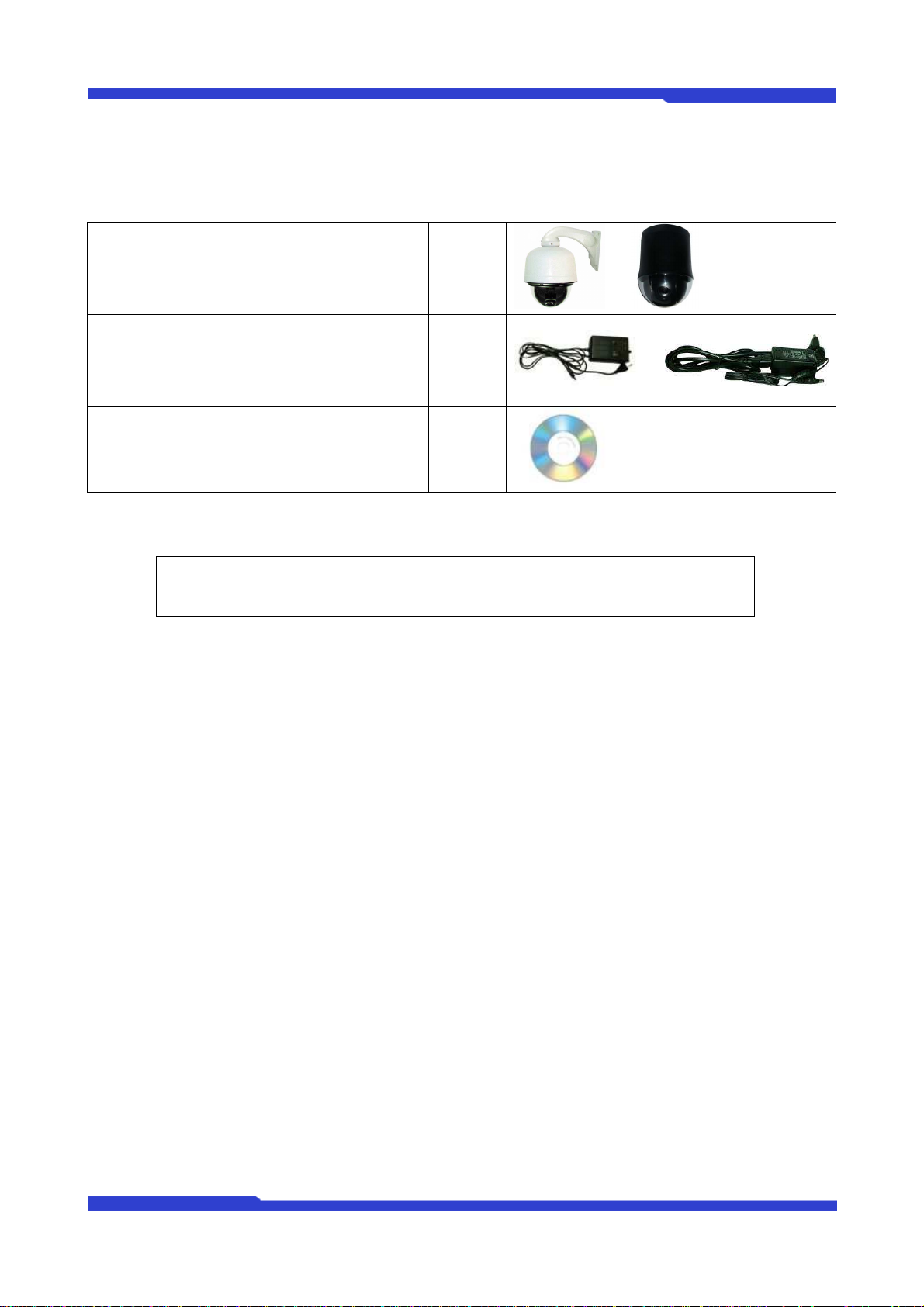
1.4. FW1177 Packing List
FW1177 (Bracket Separate) 1ea
Power Supply Unit
(24V AC Power Cord)
or
(Power Cable & SMPS DC12V 3A Adapter)
CD (User’s Manual, IP Installer and etc) 1ea
Table 2 : FW1177 Packing List
or
1ea
or
Note:
Please check all the listed items are included in your package. For any missing items,
please contact your local distributor.
M4042-04 9 Seyeon Tech Co., Ltd
Page 10
FW1177 User’s Manual
2. Hardware Description
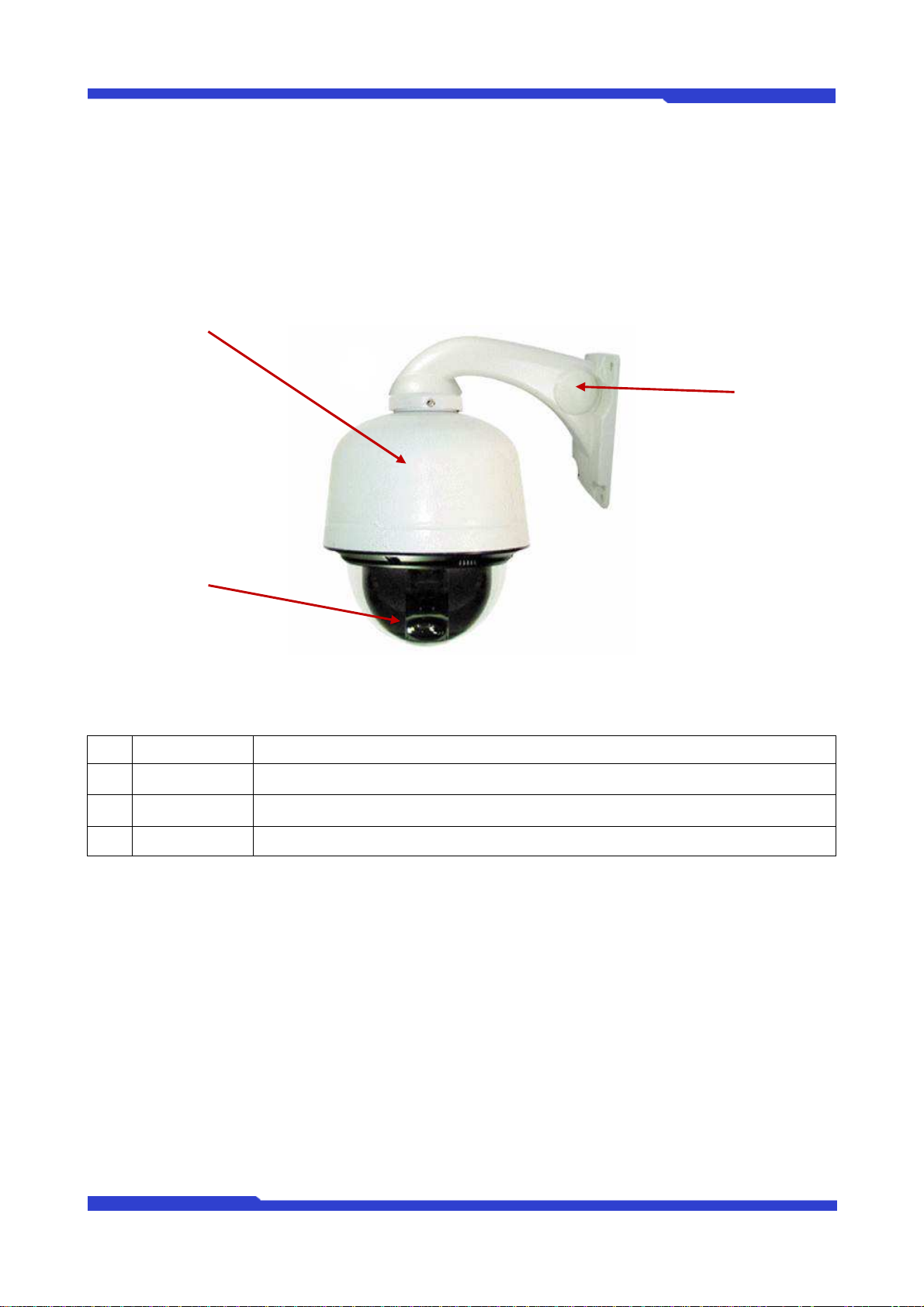
2.1. FW1177-DE
Picture 2 : FW1177-DE
Name Description
A
PTZ Camera Camera supporting PTZ(Pan/Tilt/Zoom)
B
BODY Frame Body Frame for Camera
C
Bracket Wall Mount Bracket (Separate)
Table 3 : FW1177-DE
M4042-04 10 Seyeon Tech Co., Ltd
Page 11
FW1177 User’s Manual
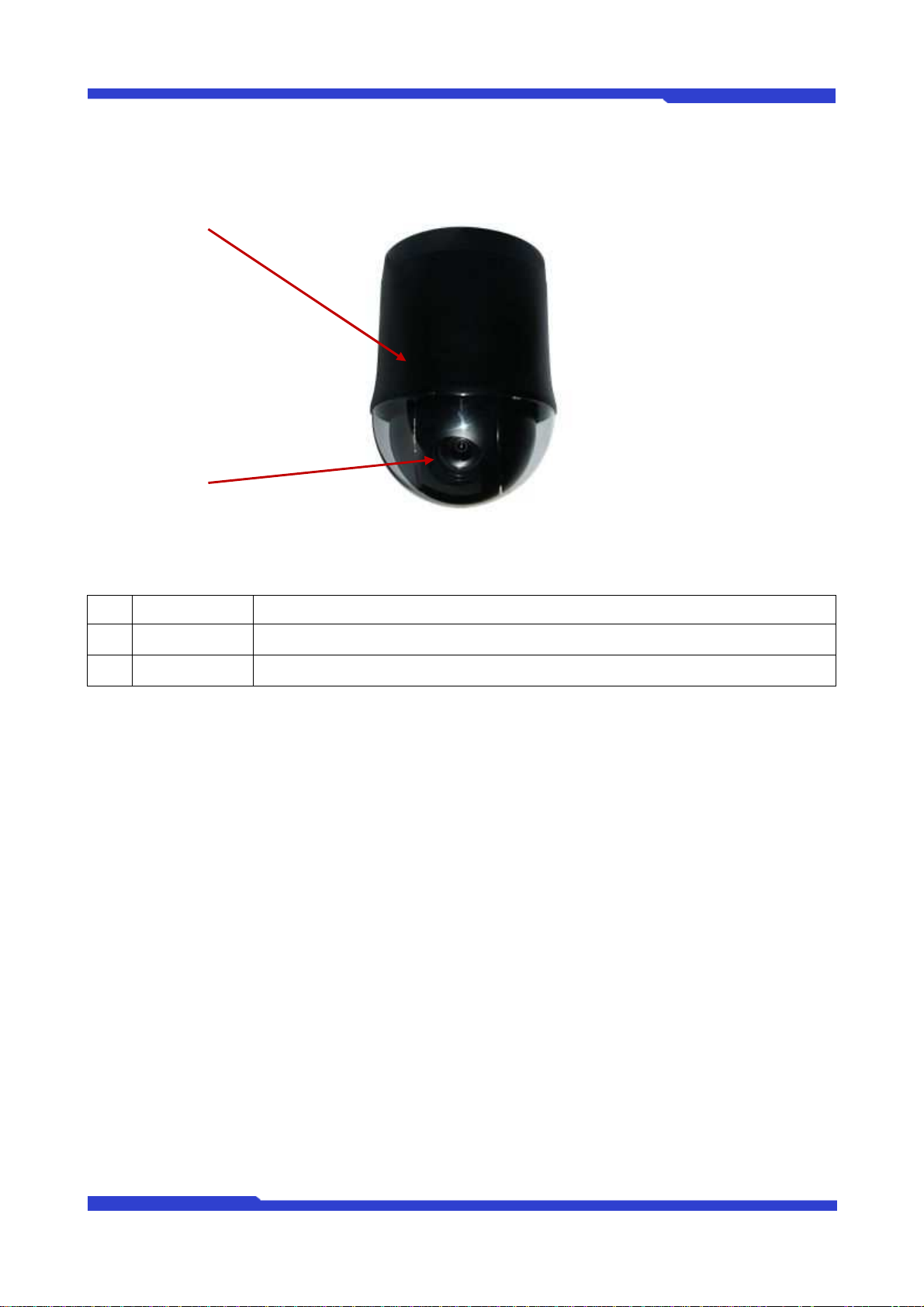
2.2. FW1177-FP
Picture 3 : FW1177-FP
Name Description
A
PTZ Camera Camera supporting PTZ(Pan/Tilt/Zoom)
B
BODY Frame Body Frame for Camera
Table 4 : FW1177-FP
M4042-04 11 Seyeon Tech Co., Ltd
Page 12

FW1177 User’s Manual
3. FW1177 Installation and Basic Setup
3.1. Before Installation
Read carefully User's Manual.
Check User’s Network (IP Address, Network Mask and default gateway)
Secure IP address for FW1177.
3.2. Factory Default Settings
The following table shows the factory default condition. Please refer to this when you need to change
the values on admin menu.
Factory Default
Admin ID root
Admin password root
IP address 10.20.30.40
Network mask 255.255.255.0
Gateway 10.20.30.1
Wireless LAN (Option) Disabled
Table 5 : Factory Default
Note:
Factory default Admin ID and Password are all lower case letters. You can change the
password with Capital letters.
3.3. Installing FW1177
Following steps are the physical installation process for FW1177.
1.
Fix the FW1177 in place
2.
Connect the FW1177 to the Internet cable through the LAN port.
3.
Connect the power supply of FW1177.
After that, you need to follow the steps below.
Network Configuration: Refer to “IP Installer User’s Manual”
Camera Configuration: Refer to “FlexWATCH Admin Menu User’s Manual”
Service Configuration: Refer to “FlexWATCH Admin Menu User’s Manual”
M4042-04 12 Seyeon Tech Co., Ltd
 Loading...