

Page 1
1
32
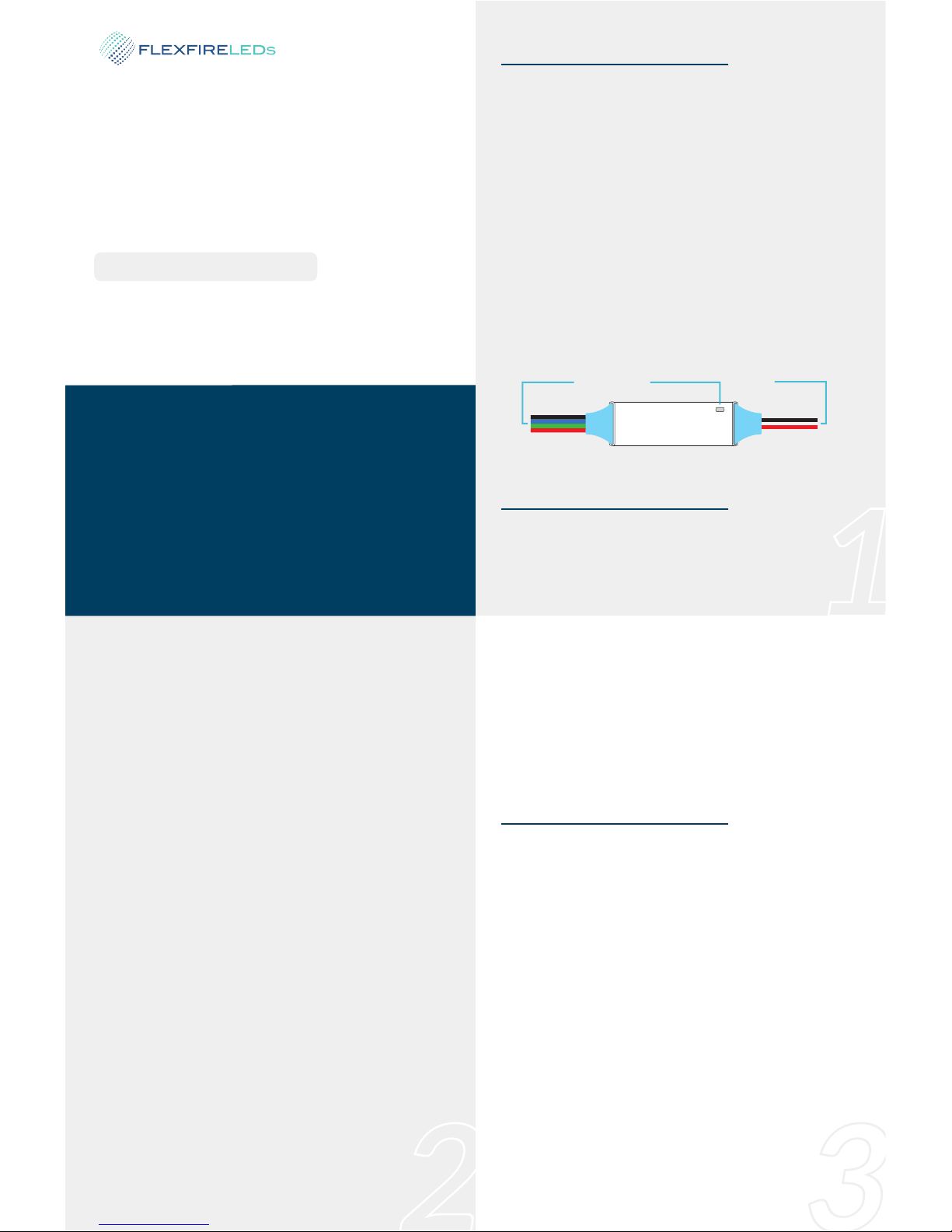
Signal Output Status Indicator
Power input
The Juno™Series Smartphone RGB LED controllers are designed to drive constant voltage RGB
output strip lights running on 6-24VDC. It allows
you to control your LED strip lights from your
smartphone via a Bluetooth connecon. Simply
download and connect the ‘ColorEasy3 Plus’ app
on iOS or Android smartphones to control your
lights. Stac colors or dynamic modes can be
conveniently chosen from a smartphone. The
included RF remote control can be used for easy
power on/off and choosing previously saved RGB
sengs in the smartphone app. With a PWM
frequency of 8KHz, it is flicker free for video and
photography uses.
FF-JUN-APP-RGB-COMBO
Introducon
Installaon
Juno™ RGB LED
Smartphone Controller
• Auto Circuit Protecon
• Support iOS & Android
• Bluetooth Connecon
• Waterproof
• Ultra-Slim Design
• High Power Output
• RF Remote Included • 6-24V Voltage Range
Bluetooth Controlled with addional RF Remotes
2. Connecng the Receiver to your Lights
This bluetooth controller is only compable with
constant voltage LED products. The black wire on
the output side is the DC + and must be connected to the posive (+) channel on the strip light.
The green, red, and blue wires connect to their
corresponding color channels on the LED strip.
Securely connect all the wires as instructed and
double check that the polaries are matching
before turning on the power.
Tip when using solderless connectors with your
RGB strips: Follow the indicated channel markings
printed on the LED strip to the connected wires to
verify which wire correlates to the respecve R,
G, B, and + channels.
3. Status Indicator Light
The full color status indicator displays all working
states of the controller indicang different events
as follows:
Blue fast flash: Starng up.
Blue/yellow fast flash: Waing for bluetooth
pairing.
This bluetooth RGB LED controller can run on
6-24VDC. The red input power wire should be
1. DC Power Input
Operaon
• The Juno™ RGB LED Controller connects to the
smartphone app via bluetooth. Scan the QR code
on this sheet to find the app in the store and
download it to your phone. You must pair your
smartphone to the app to control your lights.
• Once the receiver is powered on, the controller
will enter pairing mode for 90 seconds and the
indicator will flash blue and yellow. During this
period, you can search for bluetooth devices on
the smartphone bluetooth seng page. Connect
to ‘LED-XXX’; the X is the serial number of the
controller. The unpaired smartphone can only
discover a controller in this 90-second period. To
enter the pairing mode again, the controller must
be turned off and turned back on again.
1. Bluetooth Pairing
connected to the power supply's DC posive
channel and the black input wire to DC negave.
Be sure the power supply voltage is the same as
the LED load voltage and the power is large
enough for the waage load.
Blue with short yellow flash: Bluetooth connected.
Steady blue: Bluetooth disconnected.
White flash 3 mes: New RF remote paired.
Short single white flash: New command received.
Red flash: Overload short circuit.
Yellow flash: Overheat short circuit.
User’s Manual
Juno™ Series
Page 2
4 5
6
7
Name of App ColorEasy3 Plus
PWM frequency 8000 Hz (8KHz)
RF Remote Yes
RF Remote Frequency 433.92MHz
Working Voltage 6-24VDC
Bluetooth Control Distance >10m in open area
Rated Output Current 3x5A
IP Grade IP68
Auto Circuit Protecon
Overload/Overheat/
Short Circuit/Overcurrent
2. Bluetooth Auto Reconnecng
The default seng of the receiver enables an
auto-reconnecng feature. The controller will
automacally connect to the latest paired
smartphone when in range. However, if auto-re-
connect is not desired, it can be disabled in the
app’s setup page when the controller is connected
to the smartphone. When the auto-reconnecng
feature is set to off, the user can sll manually
connect to the controller at any me by tapping
the controller bluetooth device name on the
smartphone’s bluetooth seng page when the
controller is powered on.
3. Using the Included External RF Remote
The hand held remote (FF-JUN-HAND) and the
wall switch type (FF-JUN-WALL) RF wireless
remote control are included with the Juno™ Series
LED controllers. These RF remote controls can be
used to turn the LED controller on/off and switch
between the previously saved scenes in the app.
The RF remote controls need to be paired to the
main unit before use with the following steps:
1. Ensure the remote control funcon is
enabled on the app seng page while the LED
controller is paired to the smartphone.
2. Power off the LED controller for more than 5
seconds and power on again.
3. Within 5 seconds of LED controller powering
Flexfire LEDs, Inc.
www.FlexfireLEDs.com
1-844-FLEXFIRE
QR Links to Download App
on, press on/off key and downward key together on the remote controller.
4. The indicator on the LED controller will flash
white 3 mes to show the remote control is
recognized. A maximum of five remote controls
can be paired to one LED controller and can be
used at the same me.
The preset color scenes or dynamic mode sets
saved within the smartphone app can be selected
by pressing the up/down key on the remote
control. These preset scenes can be customized
within the smartphone app. The RF remotes offer
simplified control of the RGB lights. For full
funconality, the app must be used.
Other Features
These controllers have full protecon against
output short circuits, overloads, and overheang.
The indicator flashes red due to overload or
electrical short circuit, and flashes yellow if
overheang. The controller will automacally
recover when the fault is corrected. Please ensure
the LED loads are within the rated voltage range,
not shorted and protected against overheang.
Automac Circuit Breakers
Voltage Range
This controller can work on 6-24VDC. Be sure the
input signal, power supply and LED load are all
using the same voltage. The controller cannot
work with different voltage input and output. Also,
the wrong voltage may damage the LEDs. e.g. Do
not use 12V LEDs with a 24V power supply.
Environmental Protecon
This waterproof version is designed with the IP68
standard and can be used underwater up to a
depth of 100 (30 meters). When installing under
water, make sure the cable connecons are
waterproof.
Note: The bluetooth connecon and RF remote
control sensivity is decreased when the LED
controller is installed in a wet environment or
under water.
Specificaons
Model FF-JUN-APP-RGB-COMBO
Dynamic Mode 42 modes
Stac Color 16 vivid colors
Connecon Method Bluetooth V2.1/4.0 Class 2
Smartphone OS iOS or Android
V.2018.09.17
 Loading...