

Page 1
www.flash-butrym.pl Page 1
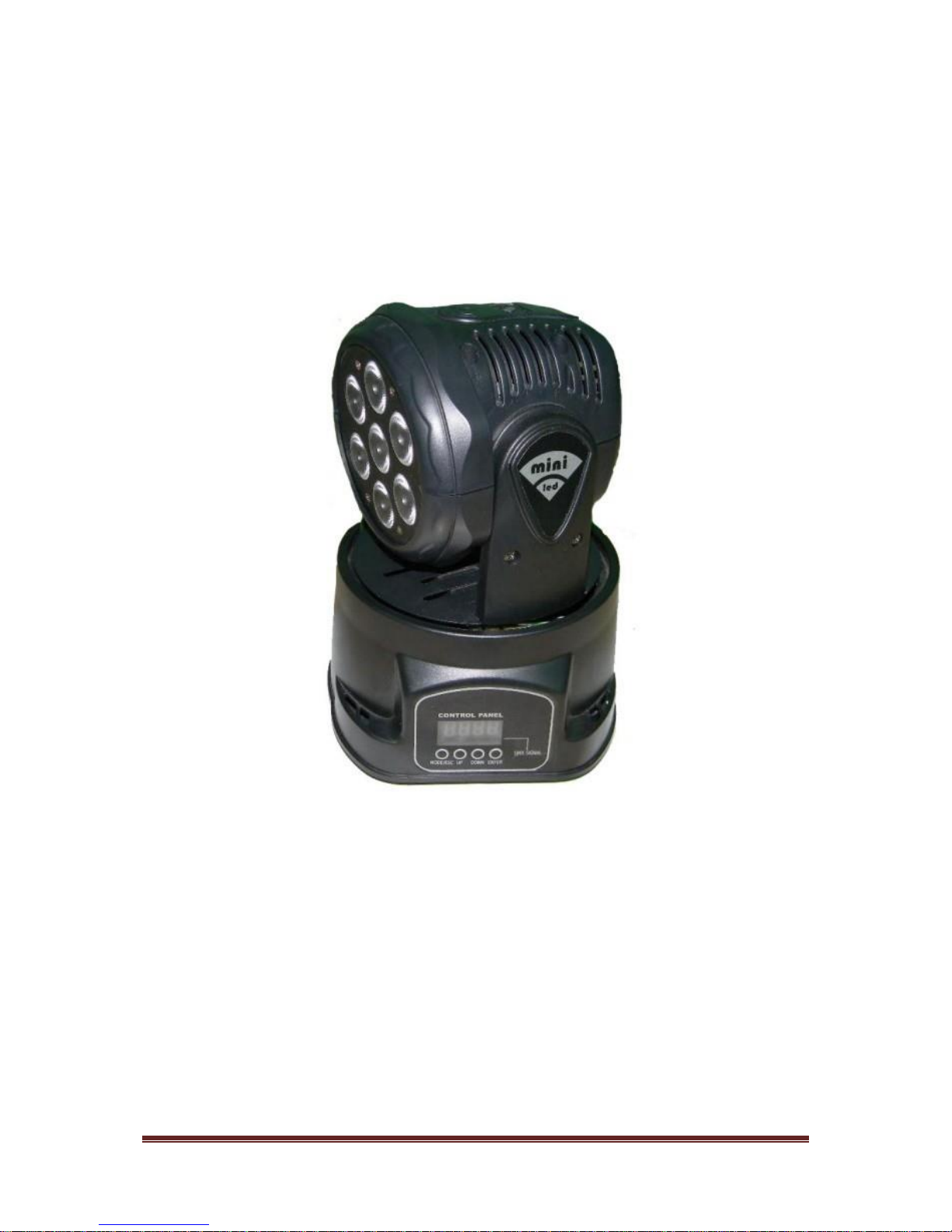
LED MOVING HEAD 7*10W
User’s Manual
Please use the product before carefully read the product description save product
brochures
Page 2
www.flash-butrym.pl Page 2
Maintenance
1. Please keep the light in dryness and avoiding use in wet place.
2. Using intermittently can be extended the life
3. Attention to clean the fan and lens usually in order to get the ventilating effects and lighting
effects better
4. Please do not wipe the crust using organic menstruum for avoid to damaged the product
Statement
The product has well capability and intact packing when leave factory. All of the user should
comply with above warning item and manual, any misuse cause of the damages are not included
in our guarantee, and also can’t be responsible for any malfunction & problem owing to ignore the
manual.
Please forgive that we will not be notice for technical change
Attention Item
1. For guarantee the life of product, please don’t put it on the wet place and also not use it in the
place over 40 degree.
2. Please don’t lay the product on the unfixable or shakable place.
3. Ask for the professional to maintain the product in order to avoid the danger of get an electric
shock.
4. Power supply should not be changed over +/- 10% while the light is using, it will be decreased
the life of lamp if the power is too high, but it will be influenced the luminosity if the power is too
low
5. After power off, if it is need used again, please cool down over 20 minutes.
6. Please look round the manual for ensure the product can be used normally.
Product Introduction
● Power Supply AC90-230V, 50Hz-60Hz
● Power consumption: 80W
● Fixing lamp: LED 7pcs*10W RGBW
● DMX-Control-channels: 7 or 12, select from control board
● Color: RGBW Color-mixture
● Shuttle: Flash rate: 0-10Hz
● Dimmer: 0-100% mechanic dimmer
● Maximum PAN-movement: 540o
● Maximum TILT-movement: 270o
● Master/Slave activated by sound at pre-programmed function
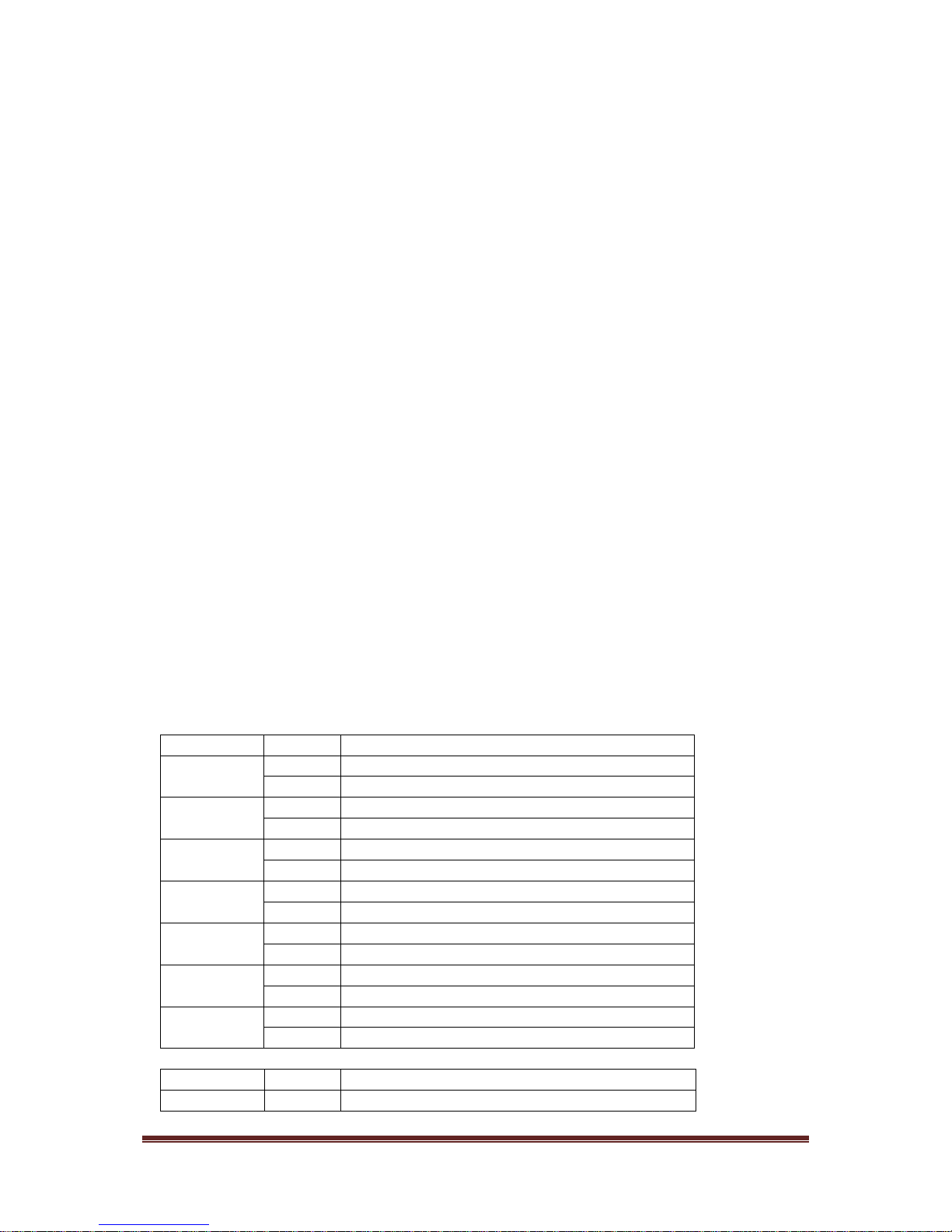
DMX Channel Summary- 7 Channels Mode
CHANNEL
VALUE
FUNCTION
1
0
Stop
1~255
Adjust Pan motor movement
2
0
Stop
1~255
Adjust Tilt motor movement
3
0~10
Close
11~255
All dimming adjustment from dark to bright
4
0
Close
1~255
Red color adjustment from dark to bright
5
0
Close
1~255
Green color adjustment from dark to bright
6
0
Close
1~255
Blue color adjustment from dark to bright
7
0
Close
1~255
White color adjustment from dark to bright
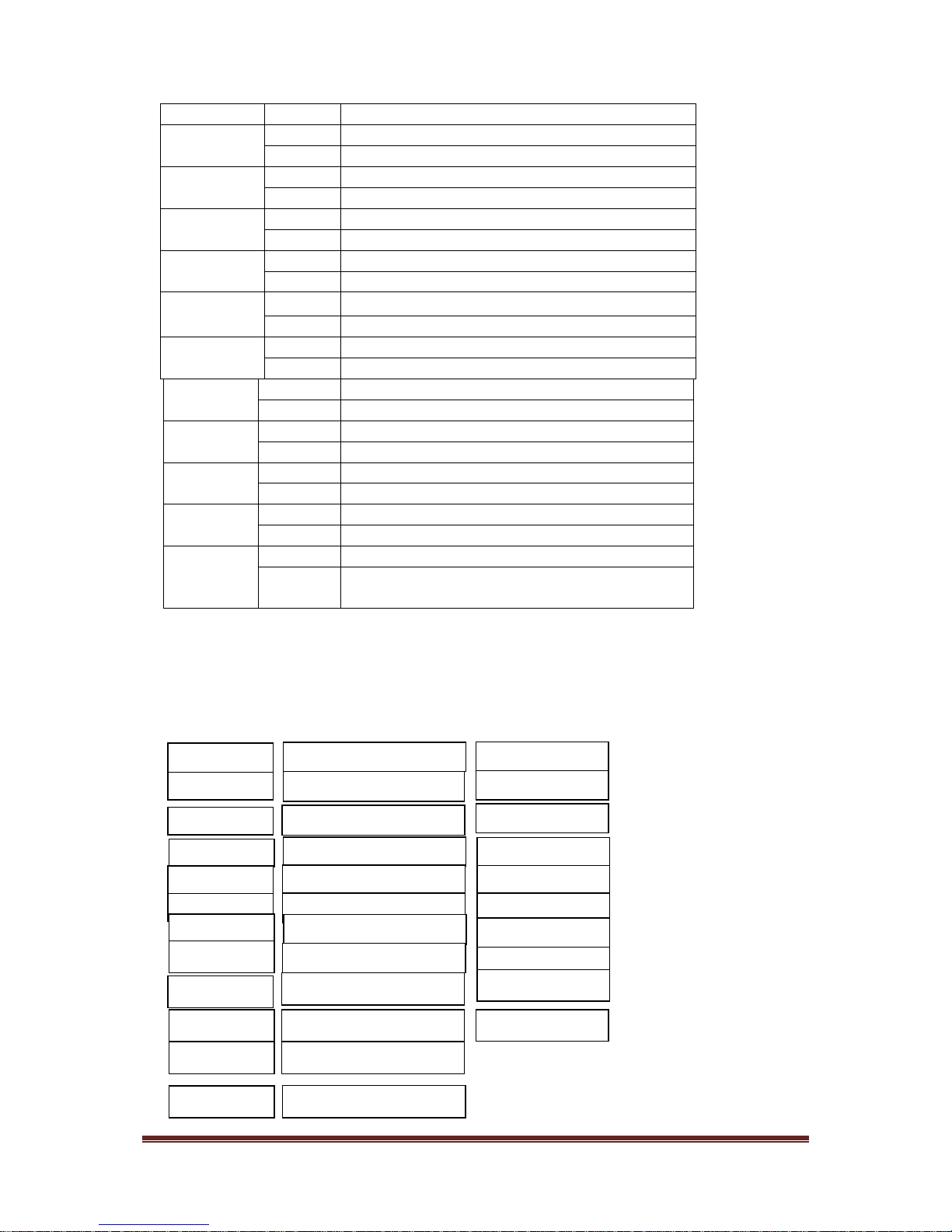
DMX Channel Summary- 12 Channels Mode
CHANNEL
VALUE
FUNCTION
1
0
Stop
Page 3
www.flash-butrym.pl Page 3
1~255
Adjust Pan motor movement
2
0
Stop
1~255
Adjust Pan motor fine
3
0
Stop
1~255
Adjust Tilt motor movement
4
0
Stop
1~255
Adjust Tilt motor fine
5
0~10
Close
11~255
All dimming adjustment from dark to bright
6
0
Close
1~255
Red color adjustment from dark to bright
7
0
Close
1~255
Green color adjustment from dark to bright
8
0
Close
1~255
Blue color adjustment from dark to bright
9
0
Close
1~255
White color adjustment from dark to bright
10
0~9
Close
10~255
Adjust mixed color
11
0~9
No strobe
10~255
Adjust strobe from slow to fast
12
0~127
Close sound active
128~25
5
Open sound active
Display Control Instruction
Press "Menu" to enter into menu to selection mode,then button "Enter" key
5 minutes after,enter into white balance adjust menu (BALA).Display board
show strobe status,Then button "Enter" one more again to enter into White
balance adjustment,RED(0-255),GREE(0-255),BLUK(0-255),WHIT(0-255)
ADDR
DMX Address
A001-A512
CHND
Channel Mode
7CH/12CH
SLND
Master/Slave
NAST/SL1/SL2
SOUN
Sound Sensitivity
0-100
AUTO
Auto Mode
NO/YES
NO/YES
STBY
Boot Pause Mode
PAN
X motor forward/reverse
NO/YES
TILT
Y motor forward/reverse
NO/YES
LED
Digital display On/Off
ON/OFF
DISP
Digital display
ON/OFF
TEST
Function self-checking
HOUR
Machine time record
 Loading...