

Page 1

BlueTone™ BTHF080 User Manual
Bluetooth Headset User Manual
Model:BlueTone™ BTHS080
. 1
Page 2

BlueTone™ BTHF080 User Manual
Declaration:
Without written permission from original manufacturer, reproduction, transfer, distribution or storage of
part or all of the contents in this document in any form is prohibited。
The company reserves rights to make any changes and improvements to the product described in this
document without prior notice.
Notice :
Please make sure your mobile phone supports bluetooth profiles and network operator supports the
functions described in this manual, otherwise the relative functions can not be realized on this Headset
device.
Safety
Use the charger that comes with package.
Check the laws and regulations on the use of mobile phones and headset equipment in the areas where you
drive. Always give full attention to driving, pull off the road and park before making or answering a call if
driving conditions require.
Do not allow children to play with your Bluetooth headset since it contains small parts that could become
detached and create a choking hazard
This device contains a Li-polymer battery. Please keep it away from fire anytime (including discarding the
device) or the battery may explode
The headset, especially the embedded battery must be properly disposed or may be recycled, contact your local
recycling centers for disposal methods.
. 2
Page 3

BlueTone™ BTHF080 User Manual
Certification and Safety Approvals
This product has been tested and found to comply with part 15 of FCC rules, R&TTE Directive(99/5/EC)
or CE marked requirements.
Warning:Users should not make changes or modify the device in any way. Changes or modifications
without expressly approved by the party responsible for compliance could void the user’s authority to
operate the device.
This device complies with part 15 of the FCC Rules. Operation is subject to the following two conditions: (1)
This device may not cause harmful interference, and (2) this device must accept any interference received,
including interference that may cause undesired operation.
FEDERAL COMMUNICATIONS COMMISSION INTERFERENCE STATEMENT
This equipment has been tested and found to comply with the limits for a Class B digital device, pursuant to
part 15 of the FCC Rules. These limits are designed to provide reasonable protection against harmful
interference in a residential installation. This equipment generates, uses and can radiate radio frequency
energy and, if not installed and used in accordance with the instructions, may cause harmful interference to
radio communications. However, there is no guarantee that interference will not occur in a particular
installation. If this equipment does cause harmful interference to radio or television reception, which can be
determined by turning the equipment off and on, the user is encouraged to try to correct the interference by
one or more of the following measures:
-Reorient or relocate the receiving antenna.
-Increase the separation between the equipment and receiver.
-Connect the equipment into an outlet on a circuit different from that to which the receiver is connected.
-Consult the dealer or an experienced radio/ TV technician for help.
CAUTION:
Any changes or modifications not expressly approved by the grantee of this device could void the user's
authority to operate the equipment.
RF exposure warning ·
The equipment complies with FCC RF exposure limits set forth for an uncontrolled environment.
The equipment must not be co-located or operating in conjunction with any other antenna or transmitter.
. 3
Page 4

BlueTone™ BTHF080 User Manual
1. INTRODUCTION.................................................................................................................................5
1.1 BLUETOOTH TECHNOLOGY ..................................................................................................................5
1.2 PRODUCT FEATURES ............................................................................................................................5
1.3 PACKAGE CONTENT .............................................................................................................................5
1.4 OVERVIEW ...........................................................................................................................................6
1.5 KEY PRESS DURATION DEFINITIONS....................................................................................................6
2. USING YOUR HEADSET....................................................................................................................7
2.1 BATTERY CHARGING AND USAGE ........................................................................................................7
2.1.1 Battery Charging .........................................................................................................................7
2.1.2 Battery Information.....................................................................................................................7
2.2 WEARING YOUR HEADSET.................................................................................................................... 7
2.3 TURN ON/OFF HEADSET ......................................................................................................................8
2.4 PAIRING/CONNECTING YOUR HEADSET WITH BLUETOOTH EQUIPMENT...............................................8
2.4.1 Pairing your Headset with Bluetooth Handset.............................................................................8
2.4.2 Pairing your Headset with Other Bluetooth Equipment..............................................................8
2.4.3 Quit paring with Bluetooth Equipment........................................................................................9
2.4.4 Connecting/Disconnecting your Headset with Bluetooth Equipment..........................................9
2.5 CALL FUNCTIONS.................................................................................................................................9
2.5.1 Call ..............................................................................................................................................9
2.5.2 Adjusting Headset Volume........................................................................................................10
2.5.3 Mute...........................................................................................................................................10
2.5.4 Transferring Calls to/from Your Handset..................................................................................10
3. QUICK USER GUIDE........................................................................................................................11
4. IMPORTANT MESSAGES AND FREQUENTLY ASKED QUESTIONS...................................14
5. MAINTENANCE................................................................................................................................15
. 4
Page 5

BlueTone™ BTHF080 User Manual
1. Introduction
1.1 Bluetooth Technology
Bluetooth is an internationally standardized technology supporting short distance wireless communications. Any
two Bluetooth-compatible equipments, such as mobile phone, PDA, PC, headset, mouse, keyboard, printer, etc. can
wirelessly communicate with each other via Bluetooth connection. To ensure worldwide compatibility, Bluetooth
operates on the globally available ISM (Industrial Scientific and Medical) frequency band. Within 2.4 GHz and
2.48 GHz, Bluetooth transmits data up to either 10 meters (CLASS II mode) or 100 meters (CLASS I mode) using
79 frequency hopping channels.
Though line-of-sight is not required, Bluetooth connections could subject to interferences from obstructions such as
walls, human bodies, and other electronic devices. In addition, due to variations on product implementation, it is
likely that Bluetooth equipments from different manufactures have interoperability issues. In that case, you may
consult with manufactures to check product compatibility.
Note that, there could be some restrictions imposing on using Bluetooth devices in some countries. Please check
with your local authorities.
1.2 Product Features
Bluetooth v 1.2 compliant,
Class II , operating range up to 10 meters
Compatible with all Bluetooth-enabled devices, such as cellular phones, PDAs, and notebooks
Crystal clear voice quality without echoes
Voice security ensured by using 128-bit encryption
Support Voice Chat via an Online Messenger or VoIP software
Low power consumption, up to 7.5 hours talking time and 300 hours standby time
Stable, accurate and sensible search of devices in range
Rechargeable Lithium Polymer battery
Portable, stylish, lightweight, and mini-sized design
Removable Ear-Hook fit either ear
1.3 Package Content
BlueTone™ BTHS080
Removable ear hook
1
1
100-240V AC/DC travel charger
User Manual
. 5
1
1
Page 6
BlueTone™ BTHF080 User Manual
k
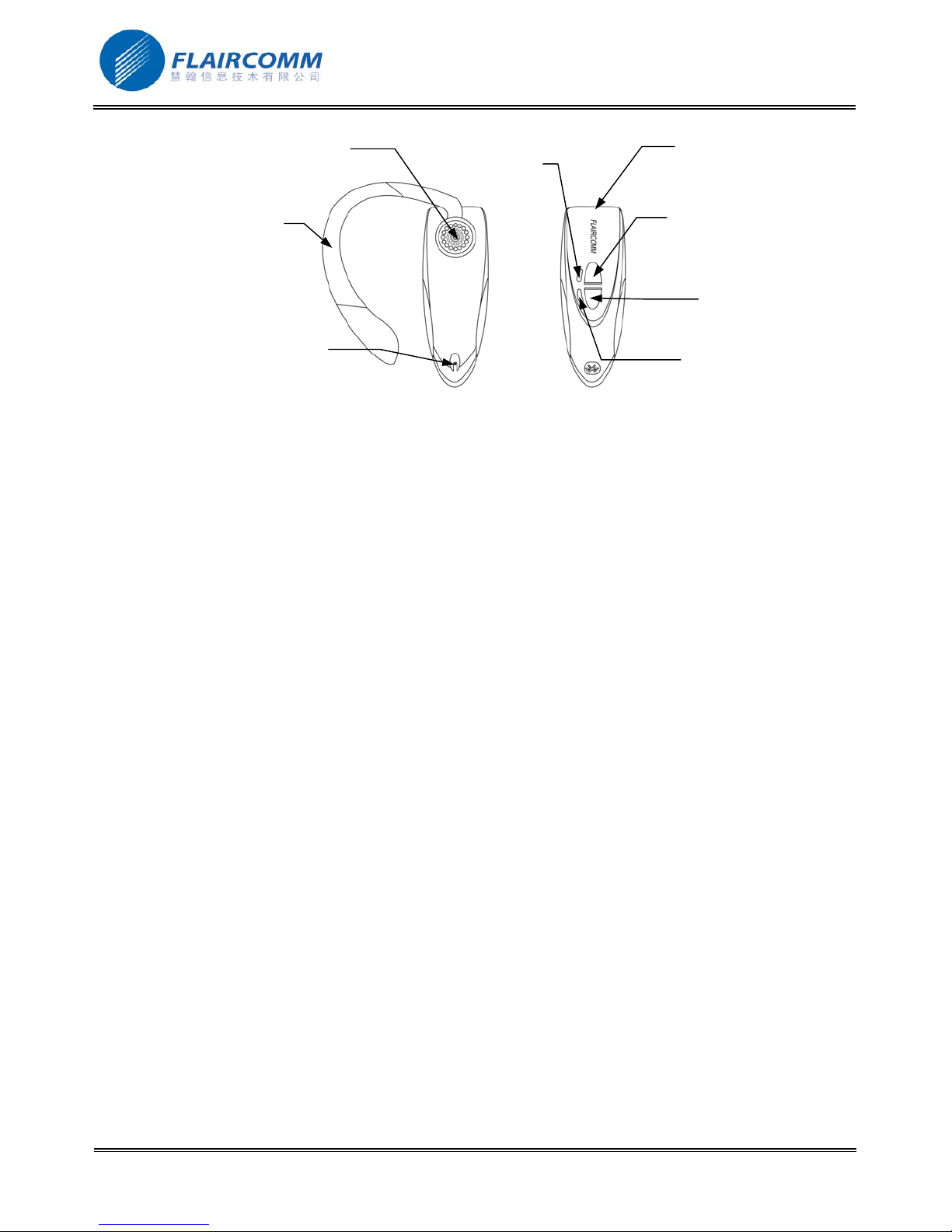
1.4 Overview
8. Removable Ear hoo
4. Microphone
7. Earphone
6. Blue LED
Figure 1 Headset Overview
1. Charging port
2. Button K1
3. Button K2
5. Red LED
1. 4-PIN mini USB charging port, for connecting to the travel charger to charge headset battery
2. Button K1, for turning on/off headset, paring, receive call, volume up, etc. control functions
3. Button K2, for reject call, call termination, redial, volume down, etc. control functions
4. Microphone, for picking up your voice
5. Red LED Indicator, for indicating headset status
6. Blue LED Indicator, for indicating headset status
7. Earphone, for playing caller’s voice
8. Removable Ear hook, for wearing the headset more comfortable and firmly
1.5 Key Press Duration Definitions
Short press (SP): press and release a button quickly.
Long press (LP): press and hold a button for at least 3 seconds, then release.
Very long press (VP): press and hold a button for at least 6 seconds, then release.
. 6
Page 7
BlueTone™ BTHF080 User Manual
2. Using Your Headset
2.1 Battery Charging and Usage
2.1.1 Battery Charging
This device contains a rechargeable Li-Polymer battery. First-time charging time is about 4 hours. Later-on
recharging time is around 2-3 hours. Detailed charging procedures as follows:
1. Connect the travel charger to the power outlet.
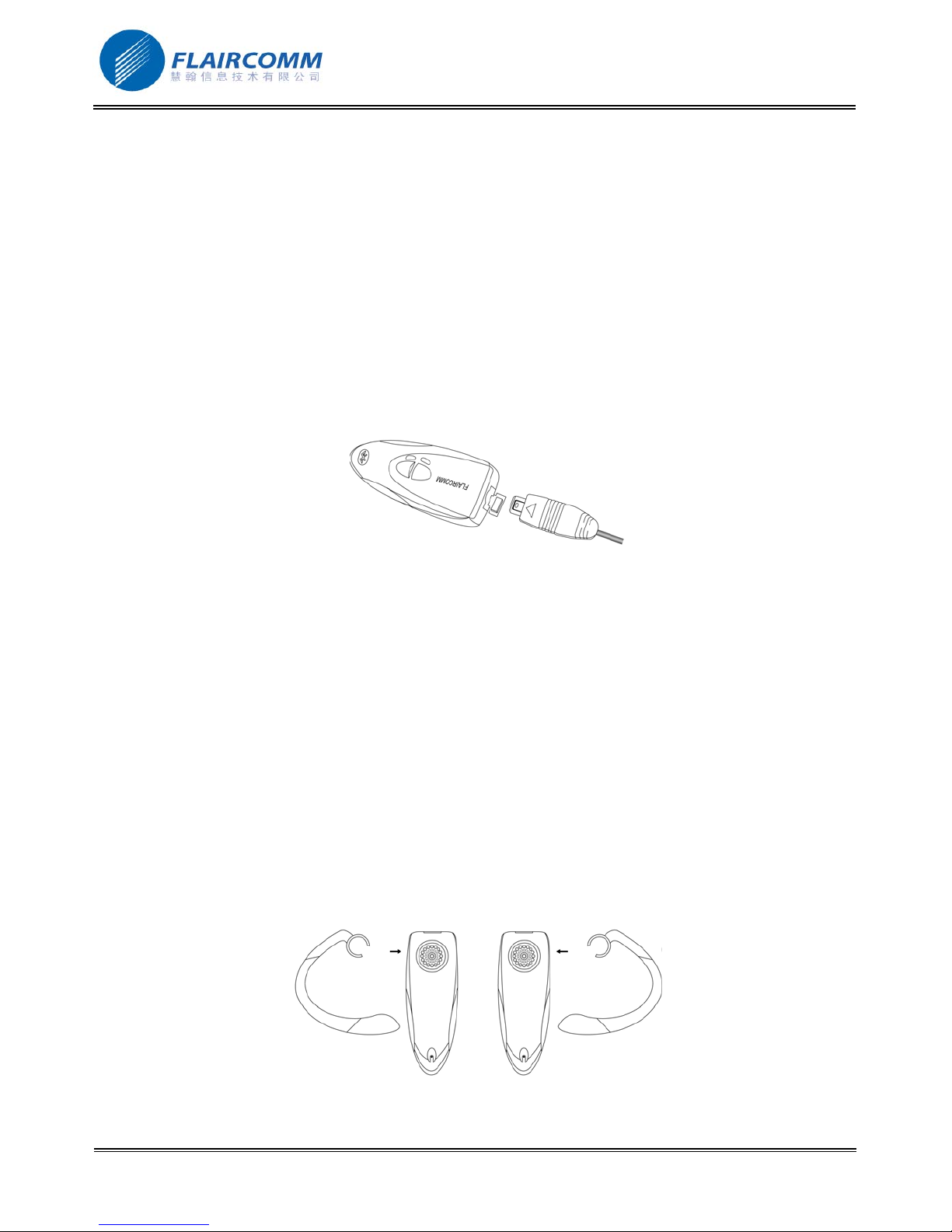
2. Referring to Figure 2, plug the mini USB connector of the charger to headset’s charging port to start charging.
Both the Red and Blue LEDs will be on during charging. Once the Red LED turns off, the battery is fully
charged and you should disconnect the charger from the headset and the power outlet.
Figure 2 Battery Charging
2.1.2 Battery Information
1. Once fully charged, the battery supports continuous talk time up to 7.5 hours and standby (i.e. the device is
power on but without connection) time about 300 hours
2. When the battery is low, the headset beeps once every 20 seconds and Red LED will flash according to
previous status, Blue LED is off. Charge the battery as described above
Note that, over-charging will reduce battery life. If a fully charged battery is left unused
time. Extreme temperature (either too hot or too cold) will also affect its ability to charge, capacity, and lifetime.
,
it will lose power over
2.2 Wearing your Headset
This device comes with a removable ear-hook and a necklace hook. You can:
1. Directly wear the headset over either your left or right ear.
2. Properly installed the ear hook and then wear the headset over either your left or right ear ( see Figure 3 below)
. 7
Figure 3:How to Use Ear Hook
Page 8

BlueTone™ BTHF080 User Manual
Note: To get the best performance, you need to wear your headset and Bluetooth phone on the same side of your
body and ensure there are no obstructions (including parts of your body) between them.
2.3 Turn On/Off Headset
Turn on the Headset: Long press K1, you will hear 2 sharp tones, and Blue LED gives 5 quick blinks following
by 1 blink per 3 seconds. Red LED is off. This indicates the headset is power on.
Turn off the Headset: Long press K1, you will hear 2 low tones, and Red LED gives 5 quick blinks and then turns
off. This indicates the headset is power off.
2.4 Pairing/Connecting your Headset with Bluetooth Equipment
2.4.1 Pairing your Headset with Bluetooth Handset
Before making and answering calls, you must pair your headset and phone. Paring sets up a unique relationship
between your headset and your handset. The handset will memorize the headset’s unique ID (or passkey). This
ensures that a unique and encrypted wireless link between your headset and handset will be used during calls.
Detailed operation procedures are as follows:
1. Place your headset close to your Bluetooth handset, ensure your headset is power off and your handset is power
on.
2. Press and hold K1 for at least 6 seconds until the Blue and Red LEDs flash alternatively. You will hear
tones to indicate that the headset has successfully entered the paring mode
3. Following your phone user guide to active Bluetooth device search on the phone side, on your phone screen
you will see a list of Bluetooth equipments found by the phone at the end of the searching process.
4. Select this Bluetooth headset ‘BTHS080’ from the list and initiate pairing following handset’s on-screen
prompts.
5. Continue to follow on-screen prompts to enter passkey “0000” and confirm to pair the headset with your
handset. Your headset ID is now stored in the handset’s memory. When Blue LED either blinks 3 times every 3
seconds (with connection) or blinks once every 3 seconds (no connection), it indicates pairing is completed.
Note
:
1. If pairing is successful, headset’s Red LED is off. The Blue LED will blinks once per 3 seconds after a few
quick flashes. If paring is failed
need to go back to above steps 3-5 to repeat the paring process.
2. Your headset will remain in the pairing mode for about 2 minutes. If paring cannot be finished within 2
minutes, the headset will enter into the standby mode (without Bluetooth connection in this case). You need to
repeat the above steps 2-5 to restart the pairing process.
,
the Blue and Red LEDs alternate continuously (for about 2 minutes). You
2 sharp
2.4.2 Pairing your Headset with Other Bluetooth Equipment
In addition to Bluetooth phone, your headset can also pair with other Bluetooth equipment for realizing short
distance wireless communications. Similar pairing procedures described in the previous section 2.4.1 can be used.
You can follow the user guide of the Bluetooth equipment to complete paring operations on the equipment side.
. 8
Page 9

BlueTone™ BTHF080 User Manual
This headset can paired with up to 8 Bluetooth equipments (including mobile handsets). The corresponding 8 sets
of pairing information are recorded in a table maintained by the headset. Each paired equipment can wireless
communicated with the headset after setting up a Bluetooth connection. Please check section 2.4.4 on procedures to
set up a Bluetooth connection.
2.4.3 Quit paring with Bluetooth Equipment
When headset in the paring mode, short press K1, it will quit from paring mode. At this time, Blue LED starts
blinking once every 3 seconds.
2.4.4 Connecting/Disconnecting your Headset with Bluetooth Equipment
When the headset communicates with a Bluetooth equipment with Handsfree Profile, the Bluetooth connection
between two equipments shall be established in advance. If two Bluetooth equipments have been paired recently,
you can simply reconnect them.
Connecting your Headset with Bluetooth Handset:
Initiating a request from either the handsfree or the handset can set up Bluetooth connection.
Place the headset close to the Bluetooth handset:
1. Initiating connection request form the headset: Short press K1.
2. Initiating connection request form the Bluetooth handset: Follow the handset user guide to find the headset and
send connection request.
If successful, you will hear one sharp tone, and Blue LED blinks 3 times every 3 seconds; if the connection is failed,
you will hear one low tone.
Disconnecting your Headset with Bluetooth Handset:
When headset connected with Bluetooth handset, you can disconnect them as follows: Refer to handset’s manual to
initiate the disconnection from the handset side. After disconnecting, Blue LED blinks once every 3 seconds, Red
LED is off.
2.5 Call Functions
Table 1: Call Functions
2.5.1 Call
Before dialing, both your headset and handset must be power on. And you also need to ensure your headset and
handset has been linked with Bluetooth connection.
Answer Call: Short press K1. (For the mobile handset using Headset Profile only, Long press K2 or short press K2
to receive the phone call.)
Reject Call: Long press K2 or K1.
functions.)
(For the mobile handset using Headset Profile only, it has no available
End Call: Long press K2.
Redial: Long press K2. (For the mobile handset using Headset Profile only, it has no available functions.)
. 9
Page 10

BlueTone™ BTHF080 User Manual
2.5.2 Adjusting Headset Volume
In the talking mode,you can short press K1/K2 to increase/decrease your headset volume. You can repeat the
above operation to headset volume to a desirable level.
2.5.3 Mute
You can mute or un-mute an ongoing call by press K1 and K2 simultaneously.When you mute an ongoing call, you
can hear key tone, and Blue LED gives 4 quick blinks per 3 seconds.
2.5.4 Transferring Calls to/from Your Handset
Transferring calls to your handset: Long press K1, Blue LED blinks 3 every 3 seconds.
Transferring calls from your handset: Long press K1, Blue LED gives 4 quick blinks per 3 seconds.
Note: For the mobile handset using Headset Profile only, it has no available functions.
. 10
Page 11
BlueTone™ BTHF080 User Manual
3. Quick User Guide
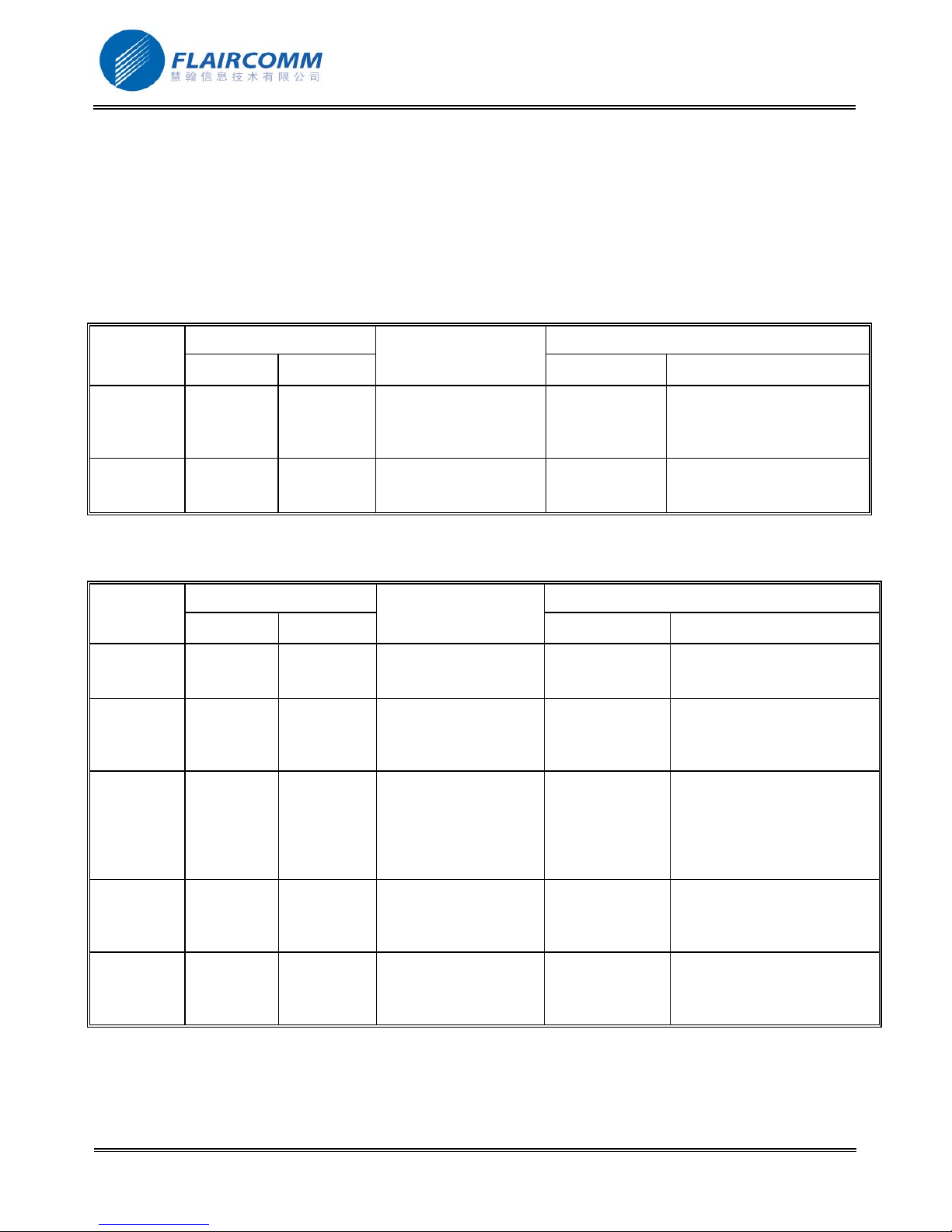
You can follow the instructions listed in Table 1-5 below to operate your headset. (Please refer section 1.4 and 1.5
for details of key and key press duration definitions.)
Note: your handset can only talk to paired Bluetooth handsets. For handsets supporting HFP only, you also need
to establish Bluetooth connection between your headset and your phone before making and answering calls.
Table 1: Power on/off
FUNCTION
Turn On
CURRENT STATUS HEADSET INDICATOR
HANDSET HEADSET
Power Off Long press K1 2 sharp tones Blue LED gives 5 quick
headset
Turn off
Standby Long press K1 Key tone then 2
headset
Table 2: Pairing/Connections
FUNCTION
Enter
CURRENT STATUS HEADSET INDICATOR
HANDSET HEADSET
Power Off Very long press K1 Key tone then 2
pairing
mode
Quit from
Paring Mode Short press K1 Key tone Stop alternative flashing. Blue
pairing
mode
Pair headset
Power on Paring mode Follows your handset
with handset
Connect
(headset
with
Standby
(disconnect
ed)
Standby
(disconnecte
d)
handset)
Disconnect Standby
(connect)
Standby
(connect)
OPERATION
OPERATION
user guide to complete
pairing procedure.
Passkey is ‘0000’
Short press K1 or set up
connection via
operating the handset
Refer to handset’s
manual to initiate the
connection from the
handset side.
AUDIO TONE LED INDICATOR
blinks following by 1 blink
per 3 seconds, The Red LED
is off.
Red LED gives 5 quick
low tones
AUDIO TONE LED INDICATOR
blinks and then turns off.
Red and Blue LEDs flash
sharp tones
alternatively
LED starts blinking once
every 3 seconds and Red LED
is off.
Stop alternative flashing, Blue
LED either blinks 3 times
every 3 seconds (with
connection) or blinks once
every 3 seconds (no
connection). Red LED is off.
One sharp/low
tone for
connection
If successful, Blue LED blinks
3 times every 3 seconds. Red
LED is off.
successful/fail
Low tone Blue LED blinks once every 3
seconds. Red LED is off.
. 11
Page 12
BlueTone™ BTHF080 User Manual
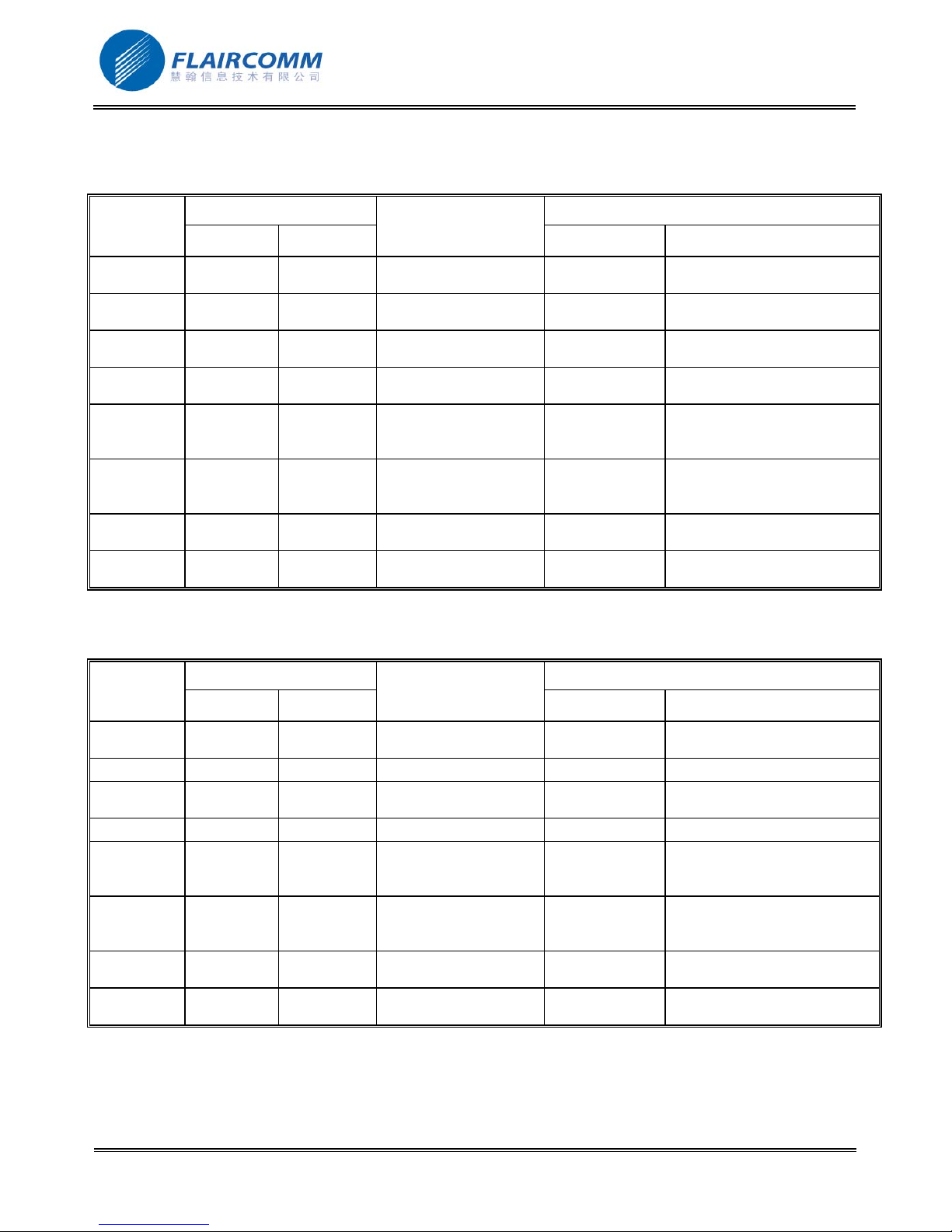
Table 3: Call Functions
For the mobile handset using Handsfree Profile:
FUNCTION
Answer call Standby
Reject call Standby
CURRENT STATUS HEADSET INDICATOR
HANDSET HEADSET
Standby
(connect)
(connect)
Standby
(connect)
(connect)
OPERATION
AUDIO TONE LED INDICATOR
Short press K1 Key Tone Blue LED blinks 4 times every
3 seconds. Red LED is off.
Long press K2 or K1 Key Tone Blue LED blinks 3 times every
3 seconds. Red LED is off.
End call Talk Talk Long press K2 Key Tone Blue LED blinks 3 times every
3 seconds. Red LED is off.
Redial Standby
(connect)
Volume up Talk Talk Short press K1 Volume of Key
Standby
(connect)
Long press K2 Key Tone then
dial tone
Tone gradually
Blue LED blinks 4 times every
3 seconds. Red LED is off.
Blue LED blinks 4 times every
3 seconds. Red LED is off.
increase
Volume
down
Talk Talk Short press K2 Volume of Key
Tone gradually
Blue LED blinks 4 times every
3 seconds. Red LED is off.
decrease
Mute Talk Talk Press K1 and K2
simultaneously.
Un-mute Talk Mute Press K1 and K2
simultaneously.
Key Tone Blue LED blinks 4 times every
3 seconds. Red LED is off.
Key Tone Blue LED blinks 4 times every
3 seconds. Red LED is off.
For the mobile handset using Headset Profile only:
FUNCTION
Answer call Standby
CURRENT STATUS HEADSET INDICATOR
HANDSET HEADSET
Standby
(connect)
(connect)
OPERATION
Long press K2 or short
press K2
AUDIO TONE LED INDICATOR
Key Tone Blue LED blinks 4 times every
3 seconds. Red LED is off.
Reject call None None None None None
End call Talk Talk Long press K2 Key Tone Blue LED blinks 3 times every
3 seconds. Red LED is off.
Redial None None None None None
Volume up Talk Talk Short press K1 Volume of Key
Tone gradually
Blue LED blinks 4 times every
3 seconds. Red LED is off.
increase
Volume
down
Talk Talk Short press K2 Volume of Key
Tone gradually
Blue LED blinks 4 times every
3 seconds. Red LED is off.
decrease
Mute Talk Talk Press K1 and K2
simultaneously.
Un-mute Talk Mute Press K1 and K2
simultaneously.
Key Tone Blue LED blinks 4 times every
3 seconds. Red LED is off.
Key Tone Blue LED blinks 4 times every
3 seconds. Red LED is off.
. 12
Page 13
BlueTone™ BTHF080 User Manual
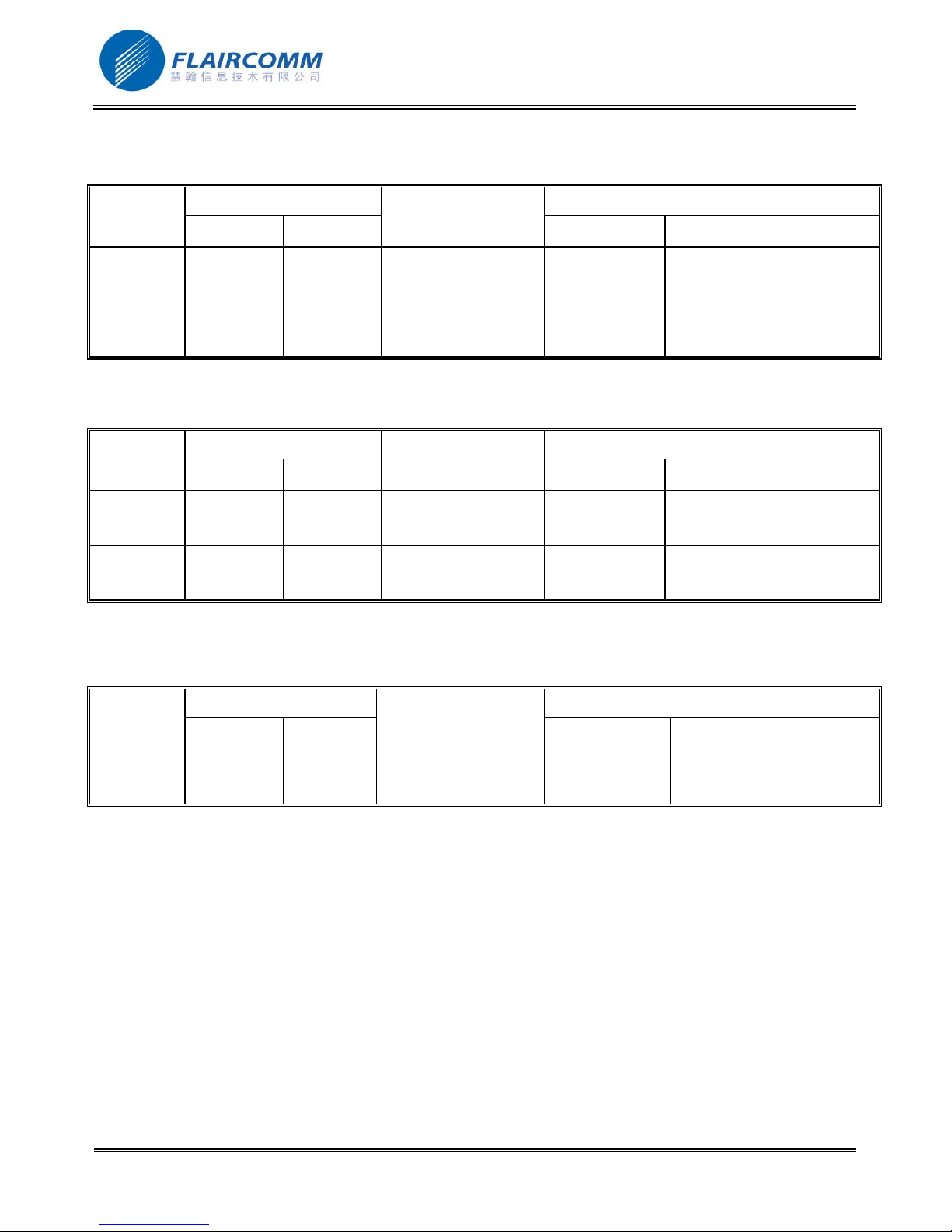
Table 4: Transfer Functions
For the mobile handset using Handsfree Profile:
FUNCTION
Call transfer
CURRENT STATUS HEADSET INDICATOR
OPERATION
HANDSET HEADSET
Talk Talk Long press K1 Key Tone Blue LED blinks 3 every 3
(headset to
handset)
Call transfer
Talk Talk Long press K1 Key Tone Blue LED blinks 4 times every
(handset to
headset)
For the mobile handset using Headset Profile only:
FUNCTION
Call transfer
CURRENT STATUS HEADSET INDICATOR
OPERATION
HANDSET HEADSET
None None None None None
(headset to
handset)
Call transfer
None None None None None
(handset to
headset)
AUDIO TONE LED INDICATOR
seconds. Red LED is off.
3 seconds. Red LED is off.
AUDIO TONE LED INDICATOR
Table 5: Low Power Indication
FUNCTION
Low power
warning
CURRENT STATUS HEADSET INDICATOR
HANDSET HEADSET
Except
power off
OPERATION
AUDIO TONE LED INDICATOR
Beep every 20
seconds
Red LED will flash according
to previous status, Blue LED
is off
. 13
Page 14

BlueTone™ BTHF080 User Manual
4. Important Messages and Frequently Asked Questions
1. Except handsets, what kind of devices can the headset communicate with:
Besides pairing with a handset for receiving and making phone calls, the headset can also communicate with
PDA and computer that equipped with Bluetooth。 For examples, when communicating with a computer
(through a USB Dongle) users can chat and/or listen music over the Internet.
2. Red LED blinking:
Low battery indicator; please recharge your battery as soon as possible.
3. Can't power up the device after charging more than 20 minutes:
For the first time, the device should be charged at least 40 minute prior tuning on. It is recommended that the
battery should be fully charged before using the device.
4. Without charging indicator:
When the battery runs off or the headset has not been used for a while, the Red LED may take a while to light
up after the charger connected.
5. Can't hear anything on headset: you should check the followings
Headset is power on
Headset has paired with a Bluetooth device
Headset should connected with a Bluetooth device (except the handset only supports Headset Profile)
Headset and Bluetooth device are within 10m
Headset and Bluetooth device should have good single strength
6. Headset can not be found when a Bluetooth device tries to pair with it:
Your headset may not be in the pairing mode, please refer section 2.4.1 for details.
7. Do the paired headset or the paired Bluetooth device need to be repaired power off:
No. Please note that for the Bluetooth device supports handsfree profile, the headset and the handset must be
connected first, refer section 2.4.4 for details。
8. Voice dialing does not work:
First check the handset supports voice dialing function; make sure you have recorded the voice tag. Please note
that noisy environment will affect voice dialing。
9. Can’t realize any functions
Connect the charger to the power outlet, plug the mini USB connector of the charger to headset’s charging port
to start charging for a few seconds. Then disconnect the charger from the headset and the power outlet, and
turn on the headset to do anything which you want.
. 14
Page 15

BlueTone™ BTHF080 User Manual
5. Maintenance
BlueTone™ BTHS080 is a well-designed communications device, careful maintenance and proper use will extend
the product life and keep its elite performance in delivering voice. Following maintenance procedures may be
helpful to you:
Always turn off power and keep your headset in a safe place when it is not in use
Keep the device dry, away from water, precipitation, humidity, moisture, and various liquids that may corrode
electronic circuits. If your device gets wet, turn it off immediately and wait until the device gets dry completely
before using it
Keep the device away from dusty and dirty places. Otherwise, the mechanic and electronic parts could be
damaged
Do not store the device in high temperatures. Extreme high temperature could degrade performance, reduce
battery lifetime, and wrap or melt the certain plastics.
Do not store the device in too cold place. Moisture could form inside the device when you take it to a warm
place. This could damage the internal electronic circuits.
Avoid dropping, knocking, and shaking the device. The mechanical parts and the internal electronic circuits
could be broken.
Avoid using hash chemicals, cleaning solvents, and any other strong detergent to clean the device. You may
use a clean and slightly damp cloth to clean the device
Always take the device to the nearest authorized service facility for repairing if it is malfunctioning.
Disassembling, modifying, and replacing components yourself could degrade product performance, cause
damages, and terminate warranty
. 15
 Loading...