

Page 1
Machine Battery
USER MANUAL
2020
Page 2

INDEX
Safety Notice
Intro
Overview
Features
Getting Started
Additional Information
Troubleshooting
3
4
5
6
7
8
9
Page 3
USER MANUAL
SAFETY NOTICE
TECHNICAL DATA
CLASS III SYMBOL
A Class III appliance is designed to be supplied from a separate/safety extralow voltage (SELV) power source. The voltage from a SELV supply is low
enough that under normal conditions a person can safely come into contact
with it, without the risk of electrical shock. The extra safety features built
into Class I and Class II appliances are, therefore, not required. For medical
devices, compliance with Class III is not considered sufcient protection,
and further more-stringent regulations apply to such equipment.
Operating Voltage: 5-12 V DC
Current: UP TO 1.5 A
Ambient Temperature: +10 to +35 °C
Relative Humidity: 30 to 75%
Dimensions (Ø X L): H56 x W49 X L27 mm
Weight: Approx. 58g (2oz)
Charging Port: USB-C
BARRIER PROTECTING YOUR MACHINE
We strongly suggest the use of barrier products to protect your machine. For a visual demonstration
of barrier protection methods, please visit our YouTube channel FK Irons.
“This device is not to be used by persons (including children) with reduced physical, sensory or mental capabilities, or
lack of experience and knowledge”
3
Page 4
USER MANUAL
LIGHTNING INTRO
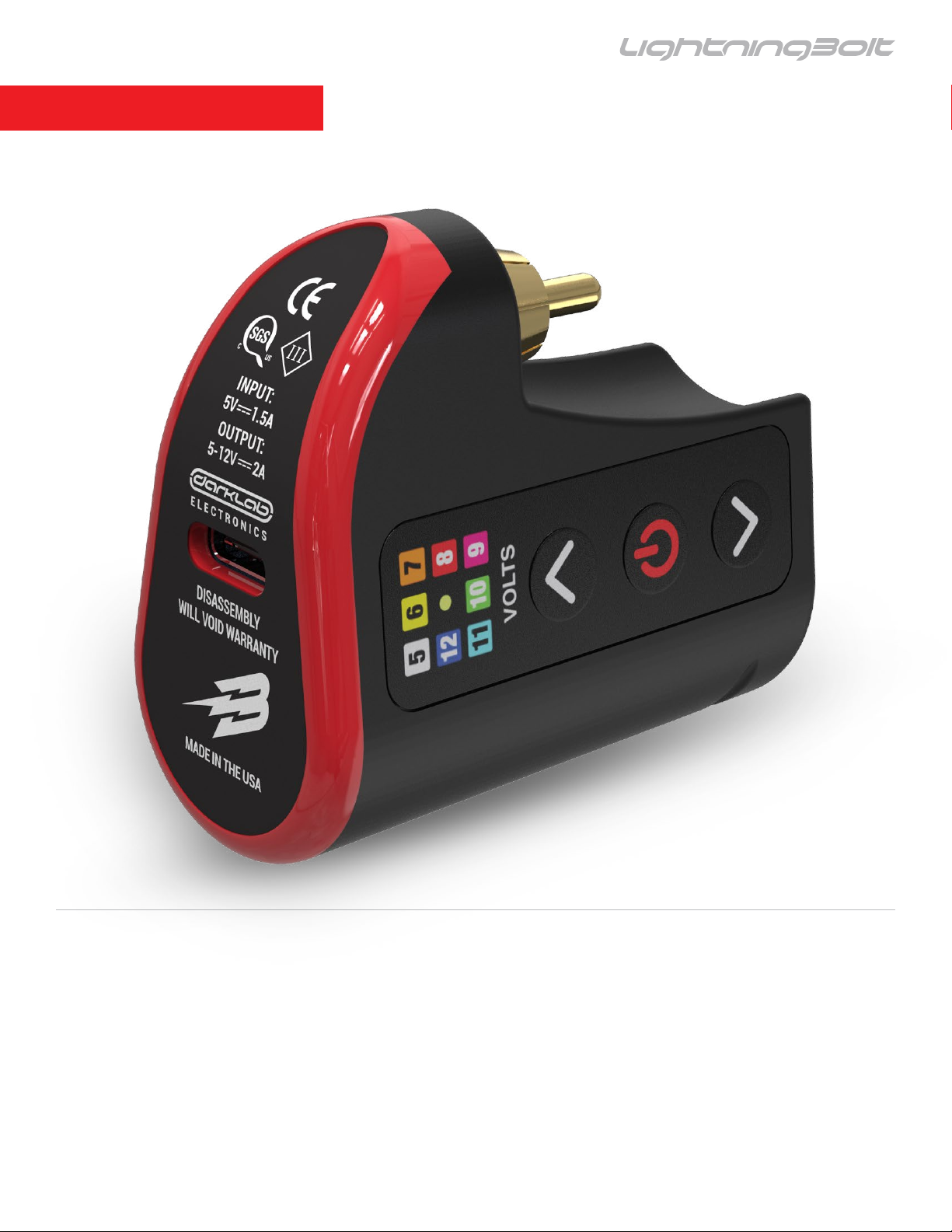
THE LIGHTNING BOLT
Unleash Your Power
The rst wireless battery featuring complete Bluetooth
connectivity, and a whole new sense of freedom.
4
Page 5
USER MANUAL
OVERVIEW
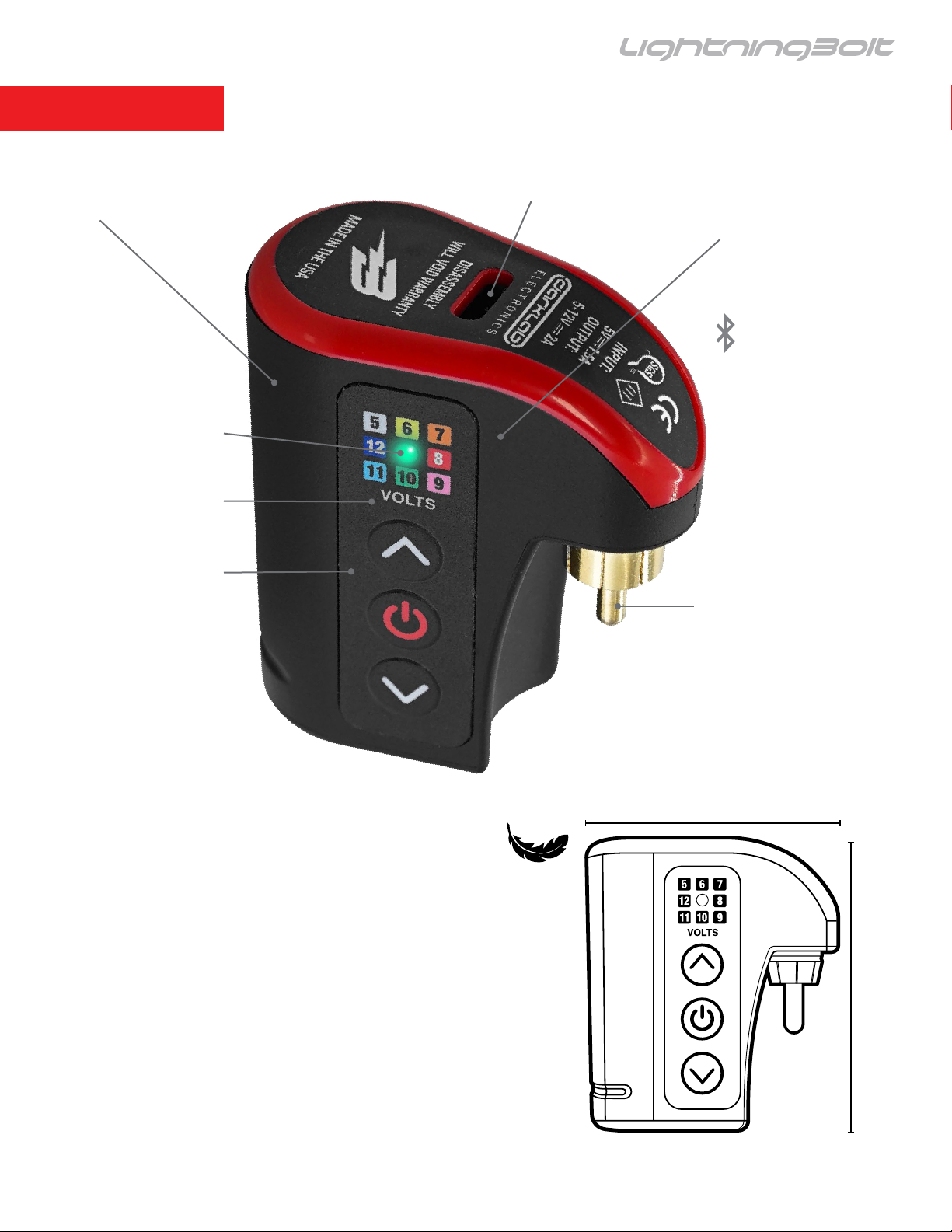
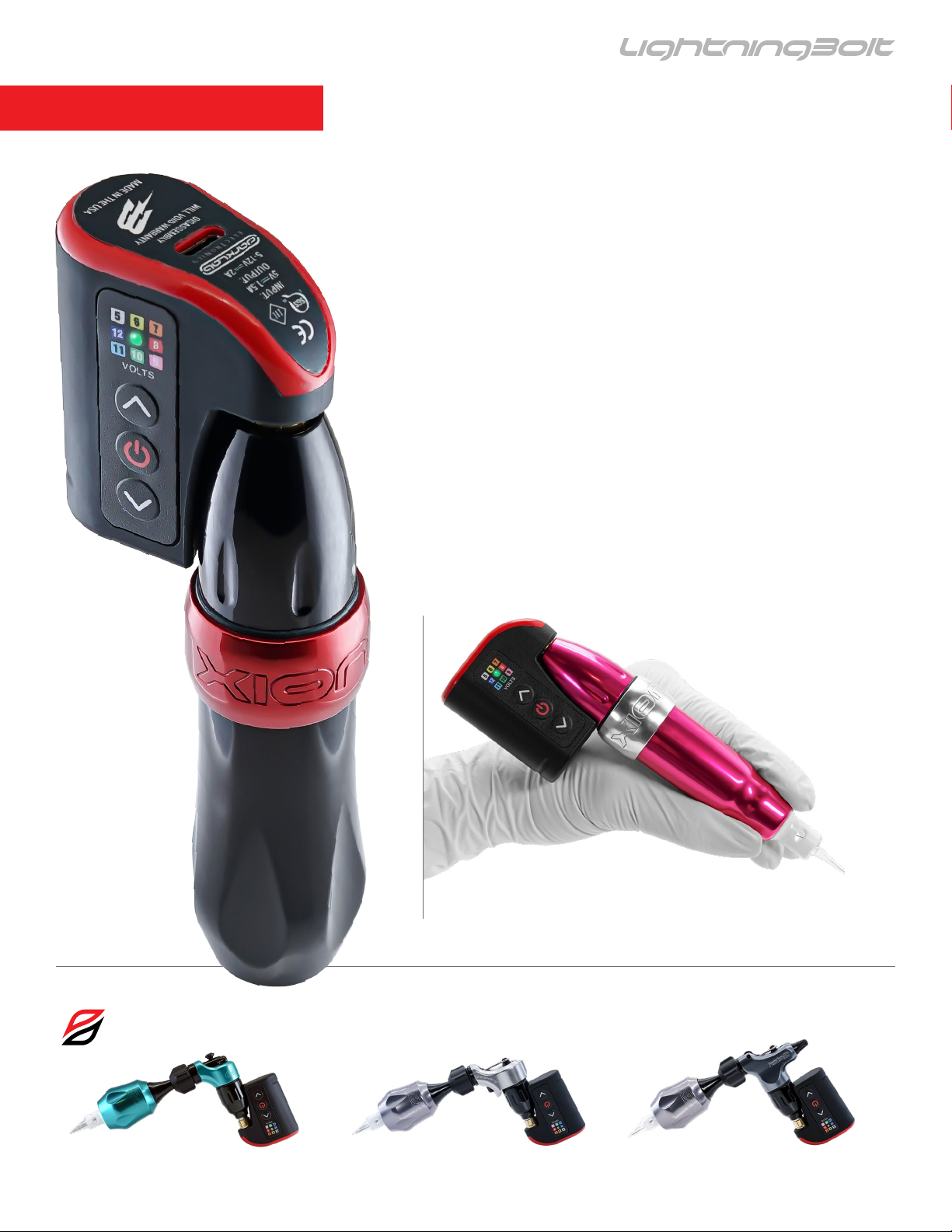
Dynamic Power Path Management
USB-C Li-ion Battery
LED Indicator
Voltage Guide
Control Buttons
USB-C Port
Compact Battery Housing
Bluetooth Enabled:
Pair with Darklab app
RCA Connector
SPECIFICATIONS
• Output Voltage: 5 – 12 V
• Increment/decrement voltage interval: 0.5 V
• Maximum output current: 1 A
• Charger Input: USB-C / 1.5 A
• Size: H56mm x W49mm x L27mm
• Weight: 58g (2 oz)
• Battery Life: ~ 6-10 Hours
(based on operating parameters)
49 mm
2oz
56 mm
5
Page 6
USER MANUAL
FEATURES
Features:
• Higher energy density to provide high reliability and stability
• Dynamic power path management: USB-C Li-Ion battery
• Auto shutdown (State of Charge (SoC) < 3%)
• Automatic jumpstart feature
• Fast charging speed: up to 1.5 A
• Extremely compact, convenient to carry
• Compatible with FK Irons and Darklab products
• Bluetooth enabled, pair with Darklab app
• Device rmware update functionality via app
• Shipping mode functionality
• Software reset
Compatible with Xion, Xion S and Xion G.
Compatible with all FK Irons Spektra machines.
6
Page 7
USER MANUAL
GETTING STARTED
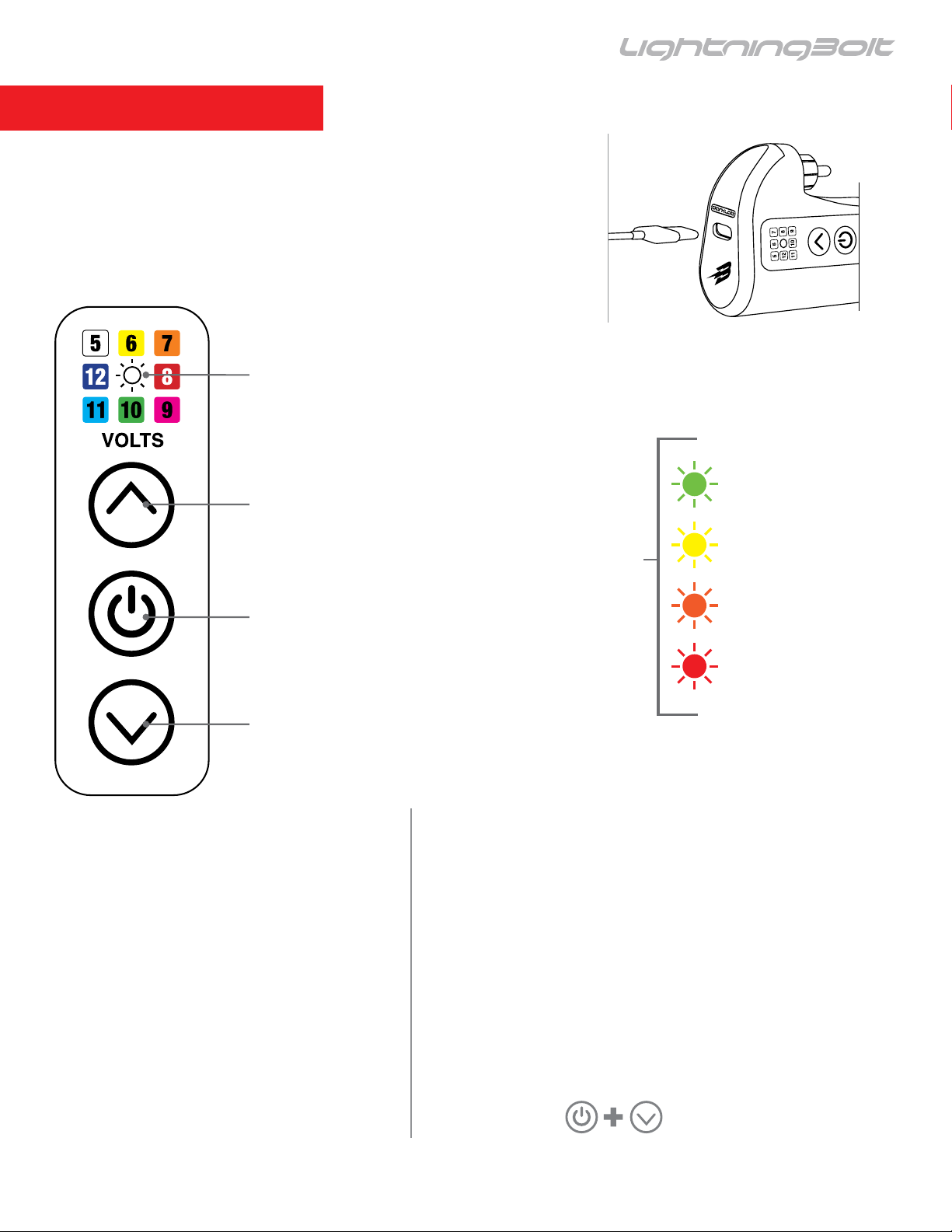
For your safety, this power unit has been shipped disabled.
To activate, plug into a USB-C power source and charge
completely until the LED light remains solid green. It’s
important to charge for a minimum of 3 hours prior to rst use.
LED indicator
LED Indicator:
Single blink = Whole Value
Double blink = Half Increment
Ex. Solid green indicates 10V
Flashing green indicates 10.5V
Voltage Up
Battery Level Check:
Press and hold power button
till white. On release color = %
Power Button
Note:
LED flashes while
USB-C
ELE C
TR
O
N
IC
S
DISASSEMBLY
WILL VOID WARRANTY
MADE IN
TH
E USA
100 - 60%
VOLTS
59 - 40%
39 - 15%
battery charges. Once < 15%
is reached, a red light will blink
Voltage Down
alternately with voltage.
Automatic Fault Detection:
Overcharge Detection (OVP)
Over-Discharge Detection (UVP)
Charge Overcurrent Detection (OCC)
Discharge Overcurrent Detection (OCD)
Load Short-Circuit Detection (SCP)
14 - 0%
Menu Modes: Press and hold power button.
Bluetooth on: Hold the power button until the LED
indicator turns blue, then release the power button.
Bluetooth off: Hold the power button until the LED
indicator turns yellow, then release the power button.
Hard shut off: Hold the power button until the
LED indicator is red, battery is now disabled.
To re-activate the battery, plug into any USB-C
power source.
Device reset:
7
Page 8
USER MANUAL
E-GIVE
E-GIVE ADJUSTMENT
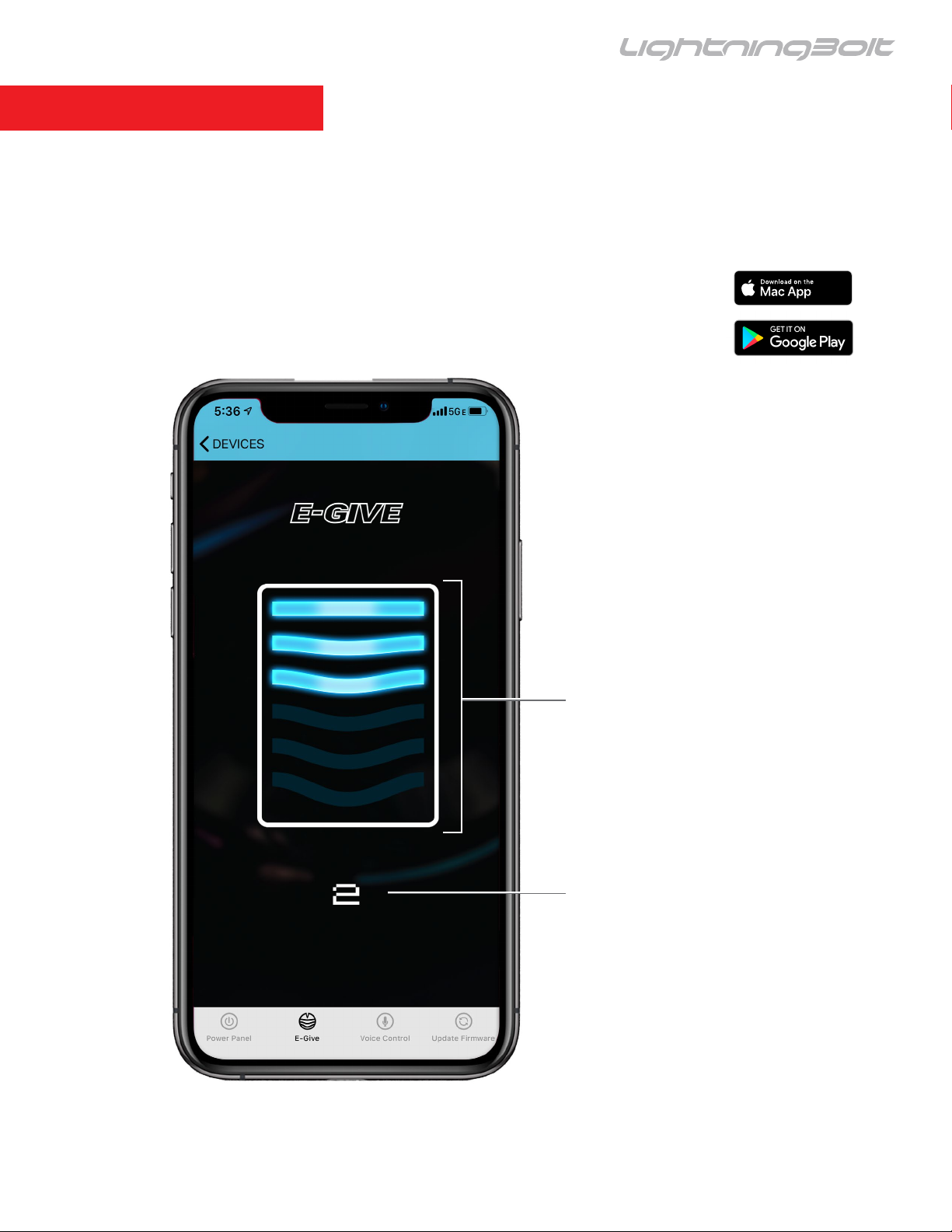
With this feature you’ll be able to control the amount of “give” or resistance of the needle upon
impact with the skin. This enables the artist to take advantage of the softness or hardness of hit to
achieve specic results. 0 no effect, 5 maximum amount of E-give.
SETTING E-GIVE
There are 6 settings for E-give,
0 through 5. Change the setting
by swipping down and up on
the bars. The higher the setting
the higher the amount of give.
0 = no give, 5 = maximum give.
E-GIVE INDICATOR
The number displayed is the
current E-give setting.
8
Page 9

USER MANUAL
ADDITIONAL INFORMATION
VOLTAGE PARAMETERS
While voltage is a parameter that will vary from artist to artist, the LightningBolt has been tested
to operate at a minimum voltage of around 5-Volts with a maximum voltage of 12-Volts.
Depending on the type of needle conguration, or brand you use, feel free to adjust the voltage to
obtain the desired performance. NOTE: Some machines require a minimum voltage to operate
correctly, please check your machine manufacturer’s requirements.
WARRANTY
Darklab warrants that the device will perform efciently when used as intended. Should this product
prove to be defective due to manufacturing issues, Darklab will repair/replace the device - free of
charge. This warranty will be void if the device shows signs of having been tampered, disassembled,
handled roughly, dropped, overexposed to moisture or damage resulting in compromised functionality.
HANDY TIPS
The following tips will help you get the most out of your LightningBolt and avoid potential issues:
• Do not exceed the suggested voltage.
• Use only quality cables. A good connection will ensure consistent performance.
• Use only FDA-approved cold sterilization solutions for disinfection.
• NOT AUTOCLAVABLE.
9
Page 10

USER MANUAL
ADDITIONAL INFORMATION
TROUBLESHOOTING
1.- Machine Manufacturer
FK Irons: 1771 NW 79th Avenue, Doral, Florida 33126
2.- Servicing Your Machine
As for any mechanical device, FK Irons strongly suggests that you service your device once a
year to ensure all working parts are working as expected. This ensures the optimal condition of
all working parts including internal machine clean up and fresh lubrication. Routine servicing will
ensure that your machine remains functioning like the very rst day. Service is subject to fees.
3.- Warning
Disconnect machine from any power before making any adjustments.
For service inquiries, please contact [email protected].
For additional tips and tutorials, please visit Youtube.com/fkirons
10
 Loading...