

Page 1

Page 2
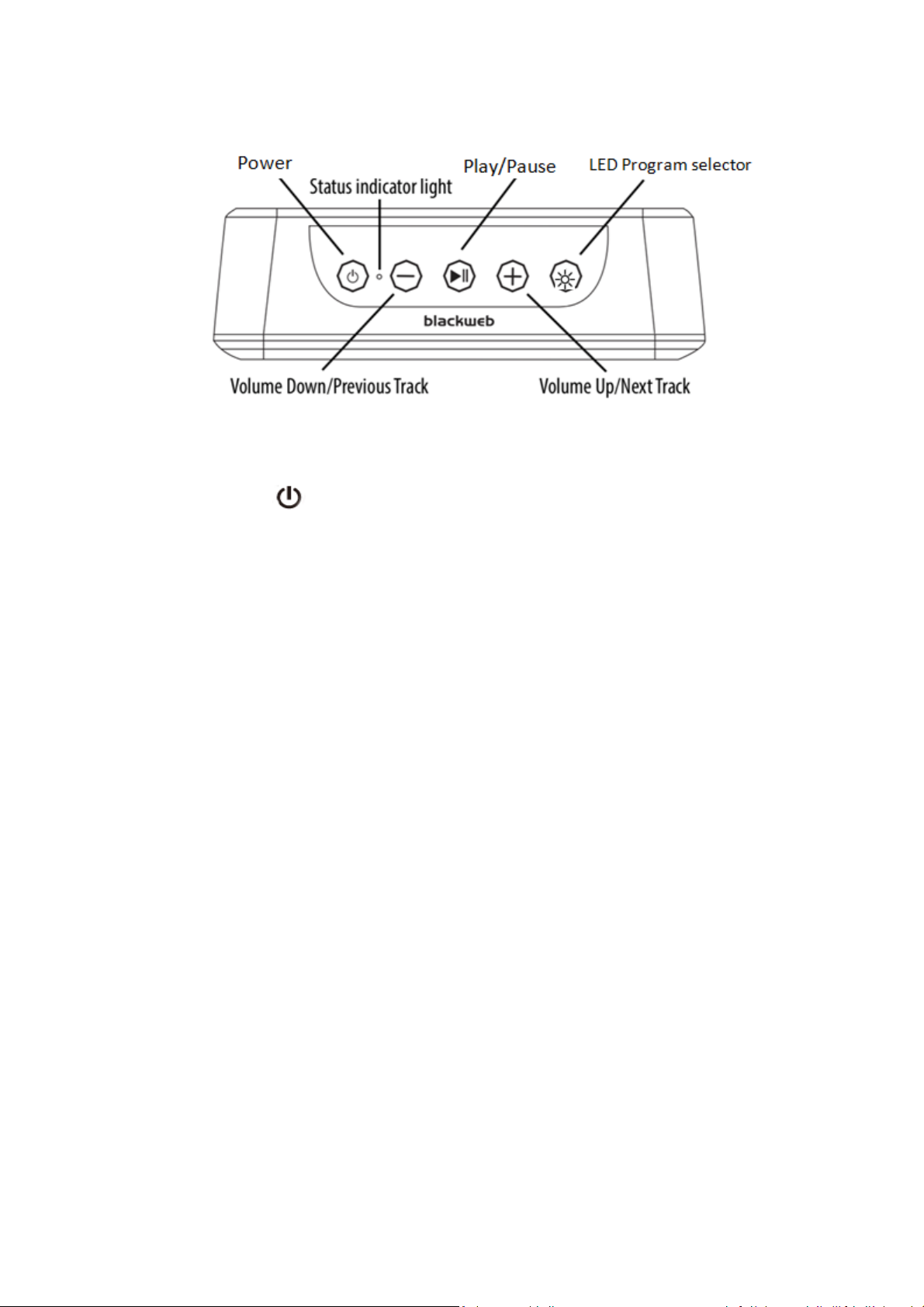
POWER:
Press and hold the Power button for 2 seconds to turn device on or off.
VOLUME +:
Short press (< 0.5s) the Volume Up + button to turn up volume. Press and hold the + button (3s)
to go to the next track.
VOLUME - :
Short press (< 0.5s) the Volume Down – buttons to turn down volume. Press and hold (3s) the –
button to go to previous track.
INDICATOR LIGHT STATUS:
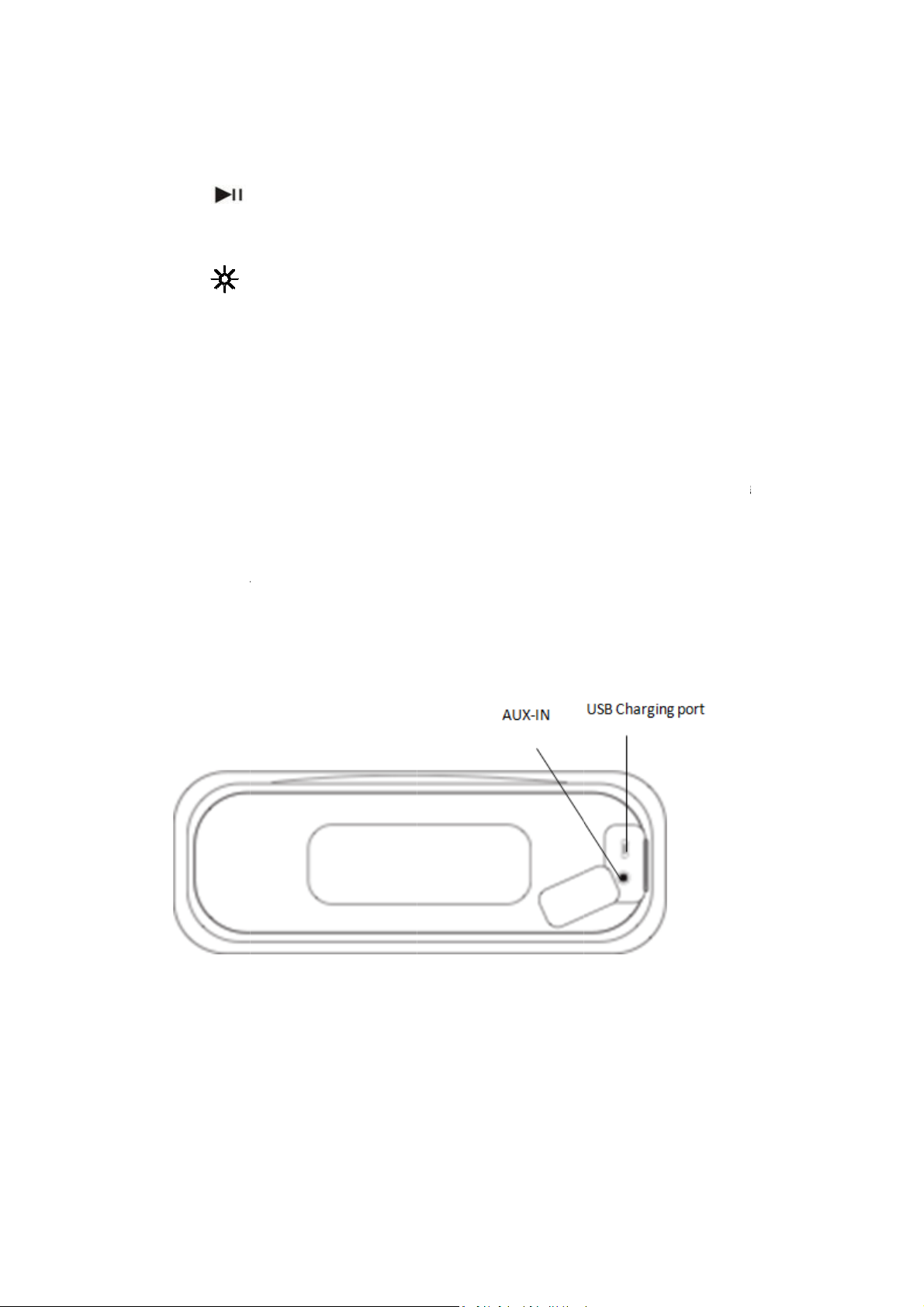
Power on – When the speaker is turned on, a solid blue light will appear momentarily.
Bluetooth pairing indicator – When the speaker is turned on, a flashing blue and red light
indicates the speaker is ready to pair. Once paired, the light will turn solid blue, then turn off.
Power Off - when the speaker is turned off, the indicator light will momentarily turn solid blue,
then turn off.
Battery charging – when speaker is charging, the indicator light will turn solid red. Once the
speaker is fully charged, the light will turn off.
SPEAKER PAIRING:
To pair the speaker:
1. Make sure the smartphone, tablet, or computer you’re using with the speaker has Bluetooth.
2. Turn on the speaker (press and hold the power button for 3 seconds) and look for the small
blinking light.
3. Find the BW LED SPK M speaker in your device’s Bluetooth list, and select.
The device and Bluetooth will find each other every time, so long as the speaker is set to
Bluetooth and your device’s Bluetooth is on. If you’re connecting to a computer, consult with your
owner’s manual on how to sync your computer to Bluetooth.
Auto-off: If the speaker is on but is not connected to Bluetooth, it will shut down after 2 minutes.
Page 3
Onc
e
m
C
s
H
s
g
g
g
g
R
X
T
e
o
G
e
M
b
r
r
e
T
s
n
t
i
e
P
T
a
h
a
o
e
b
e
a
t
o
c
e
d
h
h
t
w
c
o
e
o
n
a
+
t
s
r
e
r
a
o
h
h
n
p
t
e
m
e
p
d
h
e
i
g
s
e
g
paired, the
15
inutes or m
DIS
ONNECTIN
Pre
s the
into
pairing mod
LIG
T PROGRA
Pre
s the
speaker will
re.
DEVICE:
button for u
.
S
utton to cyc
automaticall
p to 3 secon
le through t
y shut down
s to discon
e light progr
if paused fo
ect the spe
ms.
ker from th
device and
nter
Pro
ram 1: Slow
Pro
ram 2: Colo
Pro
ram 3: Colo
Pro
ram 4: Mov
PAI
2 FOR PAR
1. Turn on
2. It will ta
3. To unpa
lights bli
speaker
will tur
paired. I
fade color tr
change.
select. St
to the beat.
Y MODE:
both speak
nk red and
have enter
ke up to 15
solid blue
will be foll
r 2 speakers,
nsition.
ps on the cu
rs. Press an
lue (up to 2
d into searc
seconds for
nd a tone
wed by left
press and h
rrent color
d hold the
seconds). Yo
mode.
he speaker
ith voice p
hannel and
ld the + and
and - butt
u will hear t
to find eac
rompt will i
ight channel
- buttons (u
ns on each
e voice pro
other. Onc
dicate that
voice prom
to 3 secon
speaker unt
pt indicatin
paired, the
the speaker
ts.
s).
l the
the
light
are
AU
-IN MODE:
1. Plug on
device.
(NO
E: The spe
auxi
liary cable, t
end of the
ress play.
ker must b
e music will
ord into the
On in ord
only play fr
speaker and
r to play. If
m the devic
the other in
you are in
it is hooked
o the headp
party mode
up to.)
one jack on
and you us
your
the
Page 4
L
O
wMov
a
e
s
amay
r
r
u
d
B
:
e
n
s
d
n
h
q
a
q
h
t
t
s
h
R
m
:
l
d
e
t
i
g
n
i
t
m
d
r
a
c
N
p
a
a
u
m
t
n
s
a
o
t
c
s
e
e
e
C
a
u
r
p
e
e
n
d
t
a
o
n
u
t
a
c
V
d
e
e
m
x
o
p
p
m
e
q
n
v
e
o
t
n
t
s
o
t
h
e
n
e
h
h
l
t
e
r
o
p
m
e
t
d
t
e
r
c
h
i
g
c
r
USB
CABLE:
25 c
m micro-US
CAL
HANDLING
INC
MING CALL
Ans
ering and
button to a
e call from
spe
ker to your
Rej
ct an incomi
FCC
WARNING:
This
equipment
pur
uant to Part
nst harmful i
agai
radi
te radio fre
cause harm
inte
ference will
inte
ference to r
by t
rning the e
one
or more of t
• Reorien
• Increase
• Connect
• Consult
changes or
Any
d void the u
coul
This
device com
con
itions: (1) T
any
interference
FCC
RF EXPOSU
• This equ
receiver
environ
cable.
:
nding a cal
swer the cal
peaker to
evice, press
g call – To r
as been tes
15 of the FC
nterference
uency ener
ful interfere
not occur
dio or televi
uipment off
e following
or relocate
the separati
the equip
is connecte
he dealer o
modification
er’s authorit
plies with P
is device m
received, in
E STATEME
ipment com
ent. This tr
– When sp
l. To end a c
evice – If yo
the play/pa
ject an inco
ed and fou
C Rules. The
n a residenti
y and, if not
ce to radio
n a particul
sion recepti
and on, the
measures:
he receiving
on between
ent into an
.
an experien
s not expre
y to operate
rt 15 of th
ay not caus
luding interf
T:
lies with FC
nsmitter m
eaker is pai
ll, press the
u are on th
se but
ing call, pr
d to comply
e limits are
al installatio
installed an
communica
r installati
n, which ca
user is enco
antenna.
he equipme
outlet on
ed radio/T
sly approve
the equipm
FCC Rules.
harmful int
rence that
radiation e
st not be c
ed to your
lay/pause
call and wi
ton (3s).
ss the play/
with the lim
designed to
. This equip
used in acc
ions. Howev
n. If this e
be determi
raged to try
nt and recei
circuit diff
technician f
by the par
nt.
Operation is
rference, a
ay cause un
posure limi
-located or
hone, pres
button.
sh to move
ause b
its for a Clas
provide reas
ent genera
ordance wit
r, there is
uipment do
ed
to correct t
er.
rent from t
r help.
y responsib
subject to
d (2) This d
desired ope
s set forth f
operating in
the play/
the call fro
utton (3s).
s B digital d
nable prote
es, uses, an
the instruc
o guarante
s cause ha
e interferen
at to whic
e for compl
he followin
vice must a
ation.
r an uncont
conjunction
ause
the
vice,
ction
can
ions,
that
mful
e by
the
ance
two
cept
olled
with
Page 5

any other antenna or transmitter.
ISEDC CAUTION:
• This device complies with Innovation, Science, and Economic Development Canada
license exempt RSS standard(s). Operation is subject to the following two conditions: (1)
This device may not cause interference, and (2) This device must accept any interference,
including interference that may cause undesired operation of the device.
ISEDC RF EXPOSURE STATEMENT:
• The device is in compliance with RF exposure guidelines, users can obtain Canadian
information on RF exposure and compliance.
SPLASH PROOF (IPX4 RATING):
IPX4 rating means this speaker is splash proof. Water being splashed on the speaker from any
direction will not cause any harm to the speaker or affect its performance.
CLEANING:
Use a soft, dry towel to clean the speaker. Using water, harsh cleaners, or anything else may
cause harm to the mechanics inside. Remember to keep the charging and aux flap flush with the
speaker for the best protection.
IMPORTANT LEGAL INFORMATION
IMPORTANT SAFEGUARDS:
When using an electrical product, basic precautions should always be followed, including the
following:
READ ALL INSTRUCTIONS BEFORE USING
• WARNING: Listen responsibly. To avoid hearing damage, make sure the volume on your
device is turned down before connecting to the speaker. After turning on your speaker,
gradually turn up the volume until you reach a comfortable listening volume.
• Use this product only for its intended use as described in this manual. Do not use
attachments not recommended by Blackweb.
• Blackweb is not liable for any damage caused to smartphones, iPod/MP3 players, or any
other device.
• Do not place or store this product where it can fall or be dropped into a tub or sink.
• Do not place or drop into water or any other liquid.
• Not for use by children. THIS IS NOT A TOY.
• Never operate this product if it has a damaged cord, plug, cable, or housing.
• Keep away from heated surfaces.
• Only set on dry surfaces. Do not place on surfaces wet from water or cleaning solvents.
A MESSAGE FROM THE ENVIRONMENT
WARNING: This product has an internal, non-replaceable lithium battery. Please
dispose of in accordance with your local, state, province, and country guidelines. This
product contains small parts that may present a choking hazard for young children.
CAUTION: All servicing of this product must be performed by authorized audio Service
personnel only.
Page 6

Blackweb is a trademark of Walmart Stores, Inc. Bluetooth® word mark and logos are registered
trademarks owned by Bluetooth SIG, Inc., and any use of such marks by Blackweb is under license.
Distributed by Walmart Stores, Inc., Bentonville, AR 72716. © 2019 Walmart Stores, Inc. All rights
reserved.
Walmart.com
IB-WM1903
 Loading...