

Page 1

With col
o
W
LED
lights
r-changing
B
D19AAS12
Ver.01 Rev.12/05/2018
Page 2
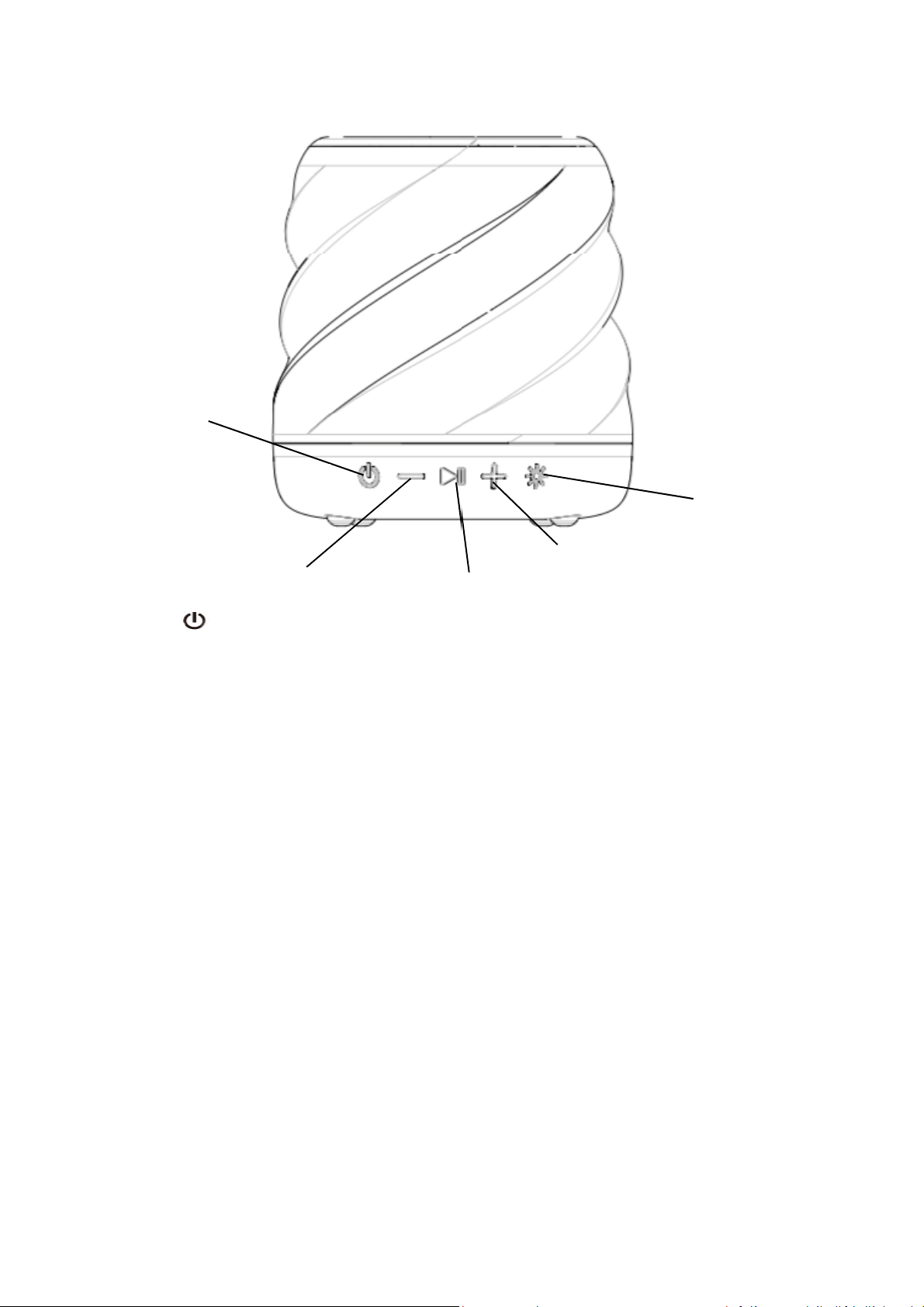
Power
P
t
n
k
LED Program selector
k
Volume Down/
POWER:
Previous Trac
Press and hold the. Power button for 2 seconds
VOLUME +:
Short press (< 0.5s) the Volume Up + button to tur
to the next track.
VOLUME - :
Short press (< 0.5s) the Volume Down – buttons to
button to go to previous track.
INDICATOR LIGHT STATUS:
Power on –When the speaker is turned on, a solid
Bluetooth pairing indicator – When the speaker is t
speaker is ready to pair. Once paired, the light will
every 5 seconds.
Power Off - when the speaker is turned off, the ind
turn off.
Play/
Volume Up/
ause
o turn device on or off.
up volume. Press and hold the + button (2s) to go
turn down volume. Press and hold (2s) the –
blue light will appear momentarily.
urned on, a flashing blue light indicates the
turn solid blue momentarily, then slowly blink
icator light will momentarily turn solid blue, then
Next Trac
Battery charging – when speaker is charging, the in
fully charged, the light will turn off.
dicator light will turn solid red. Once the speaker is
Page 3

SPEAKER PAIRING:
y
u
py
y
e
h
m
w
r
P
flick
y
,
h
To pair the speaker:
1. Make sure the smartphone, tablet, or computer
ou’re using with the speaker has
Bluetooth
.
2. Turn on the speaker (press and hold the power b
light.
3. Find the BW COLORSPK S speaker in your devic
The device and
and your device’s
manual on how to sync your computer to
suggest deleate this sentence. because not all co
)
Auto-off: If the speaker is on but is not connected t
Once paired, the speaker will automatically shut do
DISCONNECTING DEVICE:
Press the
pairing mode.
LIGHT PROGRAMS
Press the button to cycle through the light p
Bluetooth
Bluetooth
button
for up to 2 seconds to disco
will find each other ever
is on. If you’re conn
Bluetoot
tton for 2 seconds) and look for the small blinking
e’s
Bluetooth
time, so long as the speaker is set to
cting to a computer, consult with your owner’s
. (AOK: in order to pass PPT easy . we
puter can syn with speaker. it easy to mis-lead ITS
o
Bluetoot
n if paused for 15 minutes or more.
nnect the speaker from the device and enter into
ograms.
list, and select.
Bluetooth
, it will shut down after 2 minutes.
Program 1: Slow fade color transition.
Program 2: Fast Color change.
Program 3: Color select. Stops on the current color
Program 4: Move to the beat.
rogram 5: Candle
Program 6: Off
er.
displayed.
Page 4
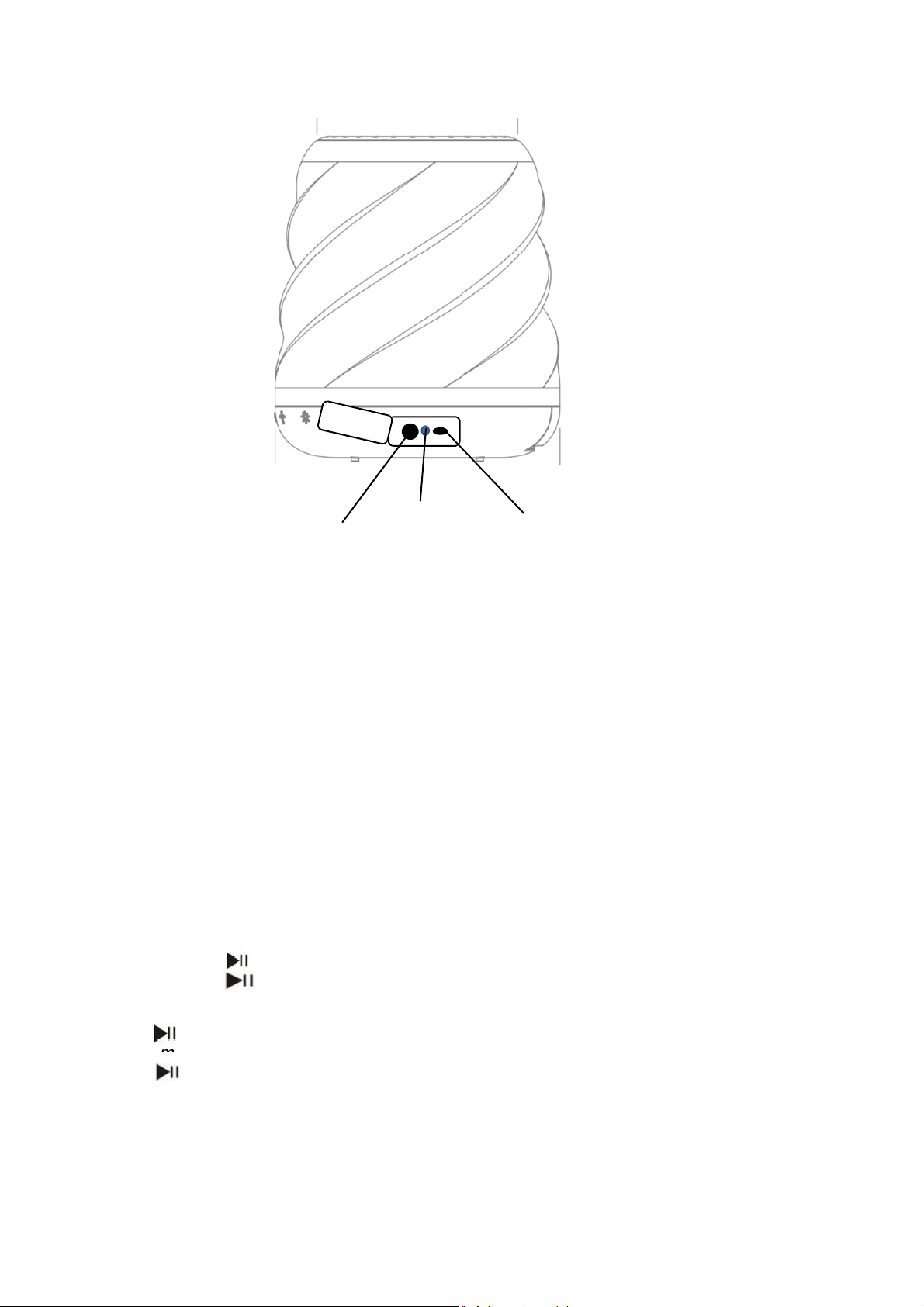
AUX-IN MODE:
t
(
NOTE:
The speaker must be on
t
o
h
Reject an incoming call
–
To reject an incoming call, pre
order to play.)
the
AUX-IN
Indicator li
ght
USB Charging
port
1. Plug one end of the cord in
into the headphone jack on
USB CABLE:
25 cm micro-USB cable.
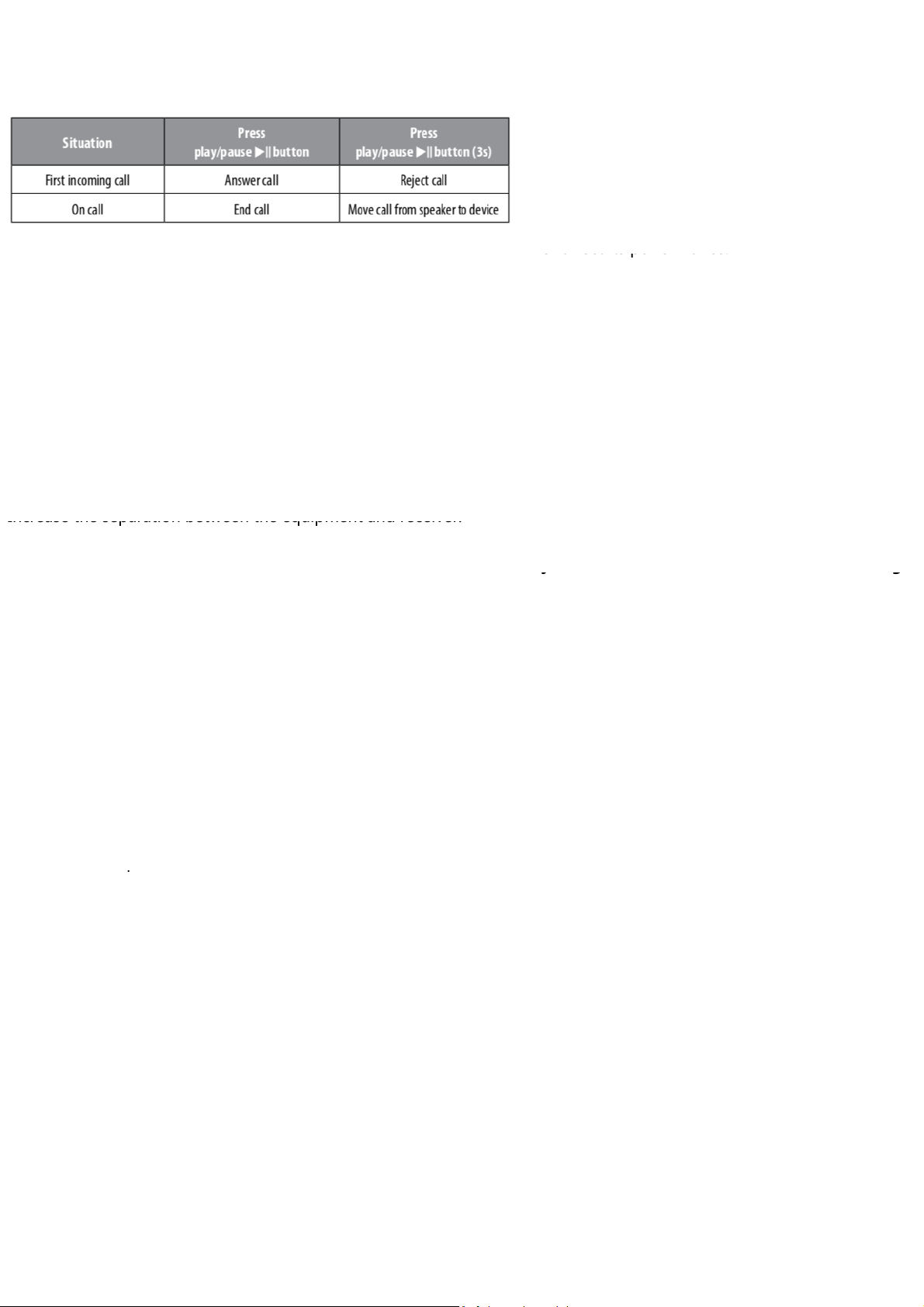
CALL HANDLING:
INCOMING CALL:
Answering and ending a call
press the play/ pause button to answer the call. T
press the play/pause button.
Move call from speaker to device
move the call from the speaker to your device, press t
play/pause button (3s).
play/pause button (3s)
– When speaker is paired
– If you are on the ca
o the speaker and the other
your device. Press play.
in
o your phone,
end a call,
ll and wish to
e
Page 5
FCC WARNING:
e
Increase the separation between the equipment and receiver.
o
o
h
n
must accept any interference received, including interference t
s
n
p
p
o
r
h
b
l
7
e
o
9
or affect its performance.
IMPORTANT LEGAL INFORMATION
y
yg
device
small parts that may present a choking hazard
This equipment has been tested and found to comply with th
limits for a Class
B digital device, pursuant to Part 15 of the FCC
Rules. These limits are designed to provide reasonable protection
against harmful interference
equipment generates, uses, and can
and, if not installed and used in
may cause harmful interference to radio cammunications. However,
residential installation. This
in a
radiate radio frequency energy
accordance with the instructions
there is no guaratee that interference will not occur in a particular
installation. If the equipment does cause harmful interference to
radio or television
reception, which can be determined by turning
the equipment off and on, the user is encouraged to try to correct
measures:
•Reorient or relocate the receiving antenna.
•
•Connect the equipment into an outlet on a circuit different fr
m
that to which the receiver is connected.
•Consult the dealer or an experienced radio/TV technician for
•Any changes or modifications not expressly approved by the
responsible for compliance could void the user’s authority t
operate the equipment. This device complies with Part 15 of t
FCC Rules. Operation is subject to the following two conditio
This device may not cause harmful interference, and (2) This d
help.
party
e
s: (1)
evice
may cause undesired operation.
•FCC RF EXPOSURE STATEMENT:
•This equipment complies with FCC radiation exposure limits
forth for an uncontrolled environment. This transmitter must
be co-located or operating in conjunction with any other ante
et
ot
nna
or transmitter.
•ISEDC CAUTION:
•This device com
Development Canada license exempt RSS standard(s). Operati
subject to the following two conditions: (1) This device may n
lies with Innovation, Science, and Economic
on is
t
cause interference, and (2) This device must accept any
interference, including interference that may cause undesired
operation of the device.
•ISEDC RF EXPOSURE STATEMENT:
•The device is in compliance with RF exposure guidelines, use
s can
obtain Canadian information on RF exposure and compliance.
Blackweb is a trademark of Walmart Stores, Inc. Bluetoot
word mark and logos are registered trademarks owned
Bluetooth SIG, Inc., and any use of such marks by Blackwe
under license. Distributed by Walmart Stores, Inc., Bentonvi
AR 72
© 2019 Walmart Stores, Inc. All rights reserv
Walmart.c
®
by
is
le,
16
d.
m
SPLASH PROOF (IPX4 RATING):
IPX4 rating means this speaker is splash proof.
Water being splashed on the speaker from any
direction will not cause any harm to the speaker
CLEANING:
Use a soft, dry towel to clean the speaker. Using
water, harsh cleaners, or anything else may cause
harm to the mechanics inside. Remember to keep
the charging and aux flap flush with the speaker
for the best protection.
IMPORTANT SAFEGUARDS:
When using an electrical product, basic
precautions should always be followed, including
the following:
READ ALL INSTRUCTIONS BEFORE USING
• WARNING: Listen responsibly. To avoid
hearing damage, make sure the volume on
our device is turned down before connecting
to the speaker. After turning on your speaker,
gradually turn up the volume until you reach a
comfortable listening volume.
• Use this product only for its intended use as
described in this manual. Do not use attachments
not recommended by Blackweb.
• Blackweb is not liable for any damage caused to
martphones, iPod/MP3 players, or any other
.
• Do not place or store this product where it can
fall or be dropped into a tub or sink.
• Do not place or drop into water or any other
liquid.
• Not for use by children. THIS IS NOT A TOY.
• Never operate this product if it has a damaged
cord, plug, cable, or housing.
• Keep away from heated surfaces.
• Only set on dry surfaces. Do not place on
surfaces wet from water or cleaning solvents.
• A MESSAGE FROM THE ENVIRONMENT
WARNING: This product has an internal, nonreplaceable lithium battery. Please dispose of
in accordance with your local, state, province,
and country guidelines. This product contains
for young children.
• CAUTION: All servicing of this product must
be performed by authorized audio Service
personnel only.
IB-WM1
00
 Loading...