

Page 1
90 mm
USER MANUAL
JAXJOX smart Heart rate monitor
This product is a sensor type heart rate monitor that will
detect heart rate, store and send heart rate data to the
Smart phone.
IMPORTANT
only and it is not meant to replace any medical
advice.
This manual contains important safety and care
information, and provides step by step instructions for
using this product. Read it thoroughly, and keep the
manual in a safe place in case you need to refer to it
later.
This product is for sport purposes
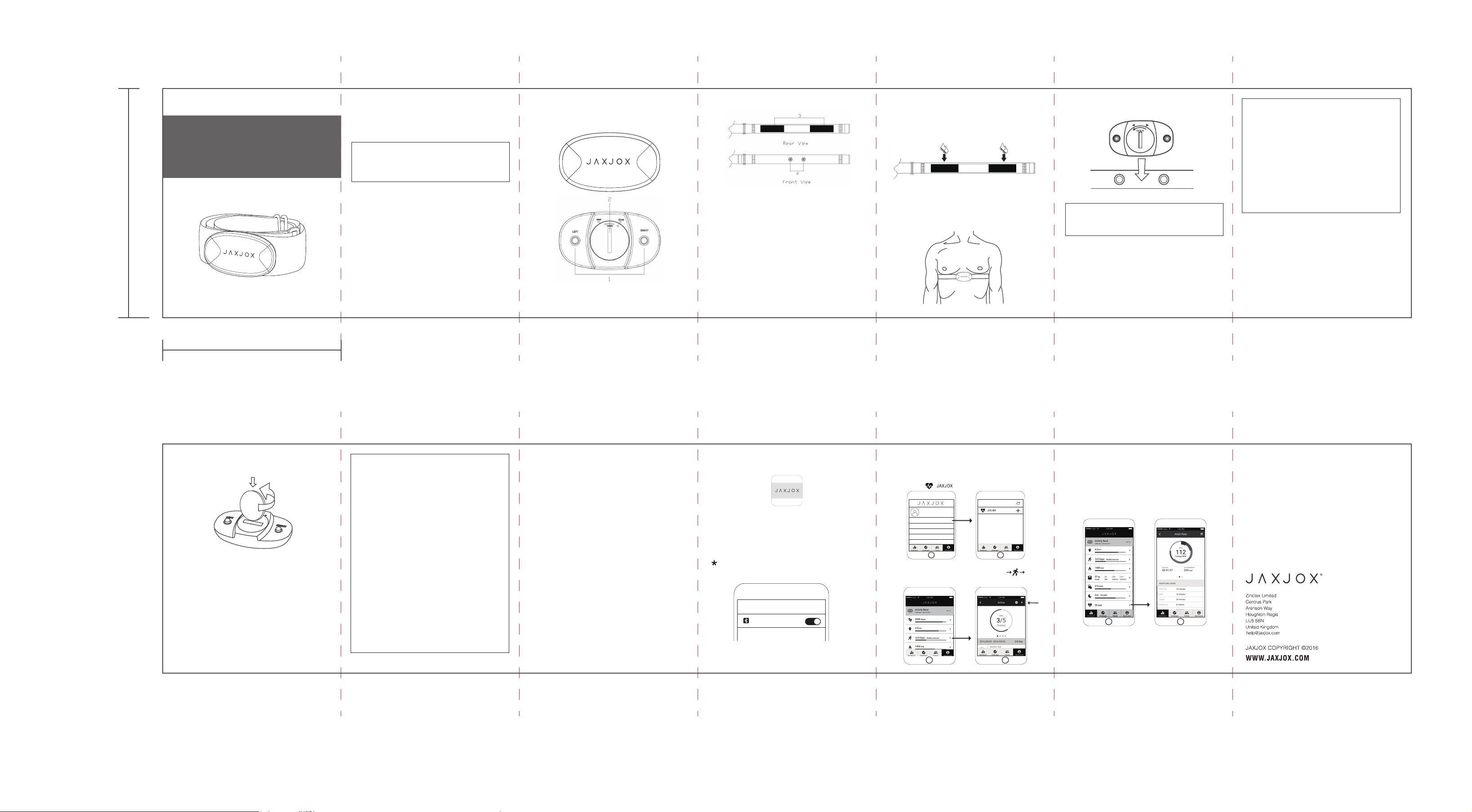
DEVICE OVERVIEW:
A. Heart Rate Transmitter
a. Front View
b.Rear View
1.Left & Right wearing directions
2.Battery Door
1
B. Heat Rate Chest Strap
3.Electrodes
4.Fastening buttons
C. Smart phone (Sold separately)
B. To wear chest strap
a. Wet the conductive pads on the rear of the chest belt
with a few drops of water, Saliva or conductive gel to
ensure solid contact.
b. Strap the heart rate chest belt across your chest. To
ensure an accurate heart rate signal, adjust the strap
until the belt fits securely below your (chest) pectoral
muscles.
GETTING STARTED
A. Unpacking the product
In this box, you will find:
a.Heart rate transmitter
b.Adjustable elastic belt
c.CR2032 battery – already installed
d.User manual
2 3 4 5 6
c. Attach the transmitter to the strap, marked ‘LEFT’
towards left.
LEFT RIGHT
IMPORTANT
detected if the device is worn in wrong directions.
Inaccurate heart rate data will be
C. To run software on smart phone, receive the
heart rate data.
IMPORTANT
a.Cleaning of transmitter and strap in a washing
machine or dryer is strongly prohibited.
b.Before hand washing the device, detach the
transmitter of Heart Rate Monitor where electrodes
are located, this part is not washable.
c.While washing the straps, make sure water is no
higher than 30℃.
d.Ironing, bleaching or heating is prohibited.
BATTERIES
The transmitter uses 1 x CR2032 3V battery. The battery
is already installed. The battery typically lasts one year.
70 mm
A. Using a coin, twist the battery door counter
clockwise until it clicks out of place.
B. Remove the old battery and insert the new
battery with the +side upwards.
C. Replace the battery door by twisting it clockwise
until it is firmly in place.
IMPORTANT
1. Non-rechargeable and rechargeable batteries
must be disposed of properly. For this purpose,
special containers are provided for
non-rechargeable and rechargeable battery
disposal at communal collection centers.
2. Keep batteries and small articles away from
children. If a battery has been swallowed seek
immediate medical advice.
3. The batteries supplied must not be recharged,
reactivated by any other means, dismantled, put
into fire or short-circuited.
Storage
*When the device is initiated, the device will record heart
rate data every 2 seconds
*If the workout time does not exceed 2 minutes, the data
will be discarded
*The stored heart rate data can only be transmitted via
Bluetooth – please download the JAXJOX application
*The device has a memory space for 13 hours of use.
Once the data goes beyond this point, the oldest
workout data will be removed
CAUTION
RISK OF EXPLOSION IF BATTERY IS
REPLACED BY AN INCORRECT TYPE.
DISPOSE OF USED BATTERIES ACCORDING TO
THE INSTRUTIONS
7 8 9 10 11 12
App Operation Instruction
Supported Devices
iOS devices: iPhone5, iPad, iPad Mini or higher
Android devices: Android 4.3 or higher with Bluetooth
4.0 or higher with devices memory no less than 1GB
How to install the JAXJOX APP
Search “JAXJOX” in the App store or Google Play
JOXJOX APP icon
Connect to the App
First Time Connection
1. Turn on the Bluetooth: Setup - Bluetooth - Turn on the Bluetooth
Do not try to find or pair with the device on this page.
>
Setup
Bluetooth
2. Open the App, register an account for the 1st time
use, fill in your personal profile, enter My Account page,
click: Add device+, enter the searching page, select the
found device:
>
New Device
Leah Martin
Device List
3.Start a new training session: Dashboard page Active
page, select up right corner “+” icon
>
Add Devicer +
4. Offline data: Wear the heart rate monitor normally,
and make sure that the device is functioning properly.
The data collected will be uploaded to the application.
Please note that once the data has been sent to the
application, it will be removed from the transmitter and
will not be transmitted a second time.
Page 2

FCC Warning
This device complies with Part 15 of the FCC Rules. Operation is subject to the following two
conditions:
(1) This device may not cause harmful interference, and (2) this device must accept any
interference received, including interference that may cause undesired operation.
NOTE : Any changes or modifications to this unit not expressly approved by the party responsible
for compliance could void the user's authority to operate the equipment.
 Loading...