

Page 1
Bike Speed&Cadence
sensor
RPM sensor
speed
transmitter
This Bike Speed&Cadence Sensor consists of a separate Cadence Sensor wired to a
Speed+Distance Sensor that has a battery hatch and a buletooth4.0 transmitter. The sensor includes
two magnets to activate the sensors and cable ties for installation.
9. Ref er to t he APP instruct ions to pair and calibrat e i t with Bik e Speed& Cadence S ensor
and to display its data on the APP.
10. Periodically chec k the cable ties and spoke screw to make sure that they are secure.
BATTERIES
The transmitter use 1pc CR2032 3V battery. The battery already installed. The battery typically
last one year. We highly recommend that you contact the retailer or our customer service
department if you need to replace them.
1. Using a coin, twist the battery door counter clockwise until it clicks out of place.
2. Remove the old battery and insert the new battery with the +side upwards.
1
2
3
B
Bike Speed+
Distance
Sensor
A
Bike Cadence Sensor
Spoke Magnet
D
Cadence Magnet
E
C
Rubber Pad
INSTRUCTIONS
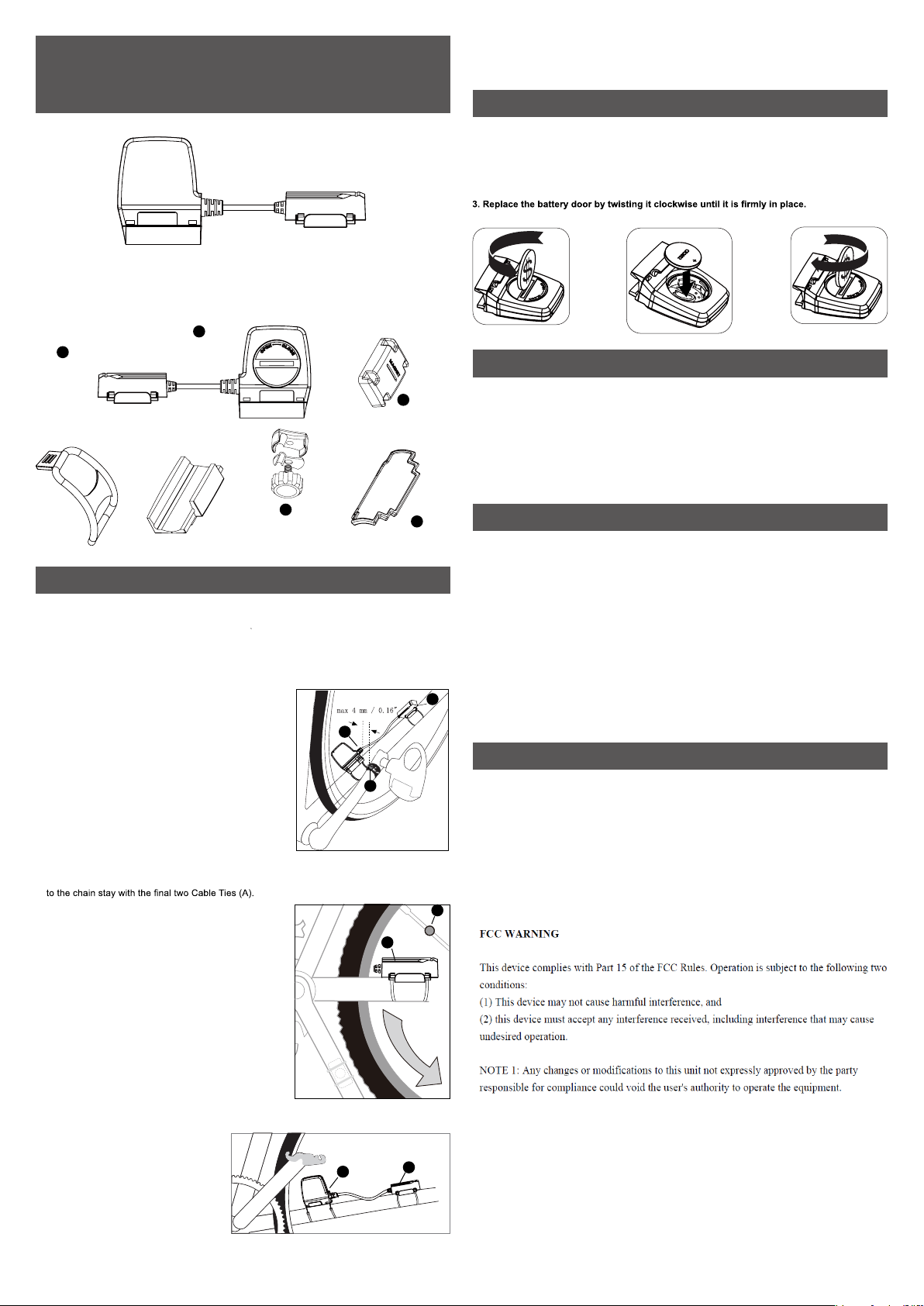
This Bike S peed&Cadence Sens or is mounted to the non-drive c hainstay – the s ide of the
bicycle opposite from the chain.
1. Using t wo Cable Ties, loosely hang the Cadence S ensor (A ) from t he underside o f
the chainsta y.
2. Wit h the bare side of the Cadence Magnet (D) placed against the backside of the crank
arm, loosely attach the Cadence Magnet to t he crank arm using a Cable Tie (F) .
-See picture.
3. Align t he magnet so t he molded ridge between
"CA DENCE MAGNET" passes by the symbol "RPM"
printed. Make sure the Cadence Magnet passed
within 3 /8" (10 mm) of the Cadence Sensor.
NOTE: Magnet placement on t he crank arm may
depend upon the Cadence Sensor placement,
the bic ycle type and/or t he drive chain type.
4. Tighten the Cable Tie for the Cadence Magnet, remove
the adhesive covers on the Cadenc e Sensor, and tighten
its Cable Ties
NOTE: B icycles with triple chainring c rankset s and/
or S-bend chainstays may require eit her the Cadenc e
Magnet or the Cadence S ensor to be shimmed in order
to get both pieces wit hin correct prox imity.
CAUTION: Be caref ul not to damage the covered wire between the connected sensors.
5. Place t he rubber pad (C) on the bottom of the Speed+Distanc e Sensor (B), and loosely attach it
Make sure the battery hatch faces away from the
wheel for easy access.
6. Remove the screw f rom the Spok e Magnet (E), place
the part onto a rear wheel spoke so the bare magnet
side pas ses within 3/8” (10 mm) of the c enter of the
Speed+Dist ance Sensor.
7. Install t he screw, align the Spok e Magnet, and
tighten t he screw on t he spoke. Mak e sure t hat it is
still aligned wit h the S peed+Distanc e Sens or.
NOTE: Locat ion of the S peed+Distance Sens or on the
chainstay may depend on Spoke Magnet plac ement,
the bicyc le type, and/or t he drive chain type, or the
posit ion of the attached Cadenc e Sensor.
NOTE: B icycles with t riple chainring crankse ts and/
or S-bend chainstays may require the c anting o f the
Speed+Dist ance Sensor toward t he Spoke Magnet in
order to get both pieces wit hin correct prox imity.
CAUTION: Be
the covered wire between t he
connected sensors.
8. Tight en the Cable Ties for the
Speed+Dist ance Sensor, and trim t he
ends of all the cable t ies with a scissor
or diagonal cutte r.
NOTE: B icycles with t riple chainring
cranksets and/or S -bend chainstays may
require the canting of the Speed+Distance
Sensor toward t he Spoke Magnet in order
to get both pieces wit hin correct prox imity.
.
careful not to damage
A
D
A
B
E
B
B
IMPORTANT
1. Non-rechargeable and rechargeable batteries must be disposed of properly. For this
purpose, special cont ainers are prov ided for non-rechargeable and rechargeable battery
disposal at communal collection cent ers.
2. Batteries are extremely dangerous when swallowed! Therefore, keep batteries and small
artic les away from c hildren. If a battery has been swallowed s eek immediate medical
advice.
3. T he batteries supplied must not be recharged, reacti vat ed by any other means,
dismantled, put into f ire or short -circ uited.
SUPPORTED DEVICE
A. This device is a B luetooth Smart and ANT+ device compatible with many smart
Phones including:
a) iP hone 4S and newer
b) New iP ad and newer
c) iP ad mini
d) iP od Touch5 and newer
e) GALAXY A3,A5,S4,S5,Note3,etc
f) Xperia E3,Z3,C3,T3,X8,5L.etc
B. In addit ion, this device is als o rec ommended to work with the following APPs:
a) Wahoofi tness
b) Strava
c) MapMyRide
* All brand names and trademark s are properties o f their respect ive owners.
TROUBLESHOOTING
Why my App cannot connect to the Speed&Cadence sensor?
1. Please conf
2. If you are not using an APP, please confirm the Ap p you us ing can support Bluetooth
Smart/ANT+.
3. The Bike S peed & Cadence Sensor Bluet ooth/ANT+ syn c function will be aut omatic ally shut
down when there is no B luetooth/ANT+ c onnection
sensor and launch the connection, the sensor will be on f or 1 min after benign waked up, if
there is no connect ion from the App during the time, the sensor will go into sleep mode.
4. Please confirm th e dist ances f rom t he sensor and your mobile phone is within 2 meters.
5. Please check the battery installed in the sensor, exchange th e battery if it
irm t he Bluetoot h/ANT+ and t he Speed & Cadence funct ion i n your App is open.
, please rot ate the crank to turn on t he
is dead.
 Loading...