

Page 1
U
SER MANUAL
Page 2
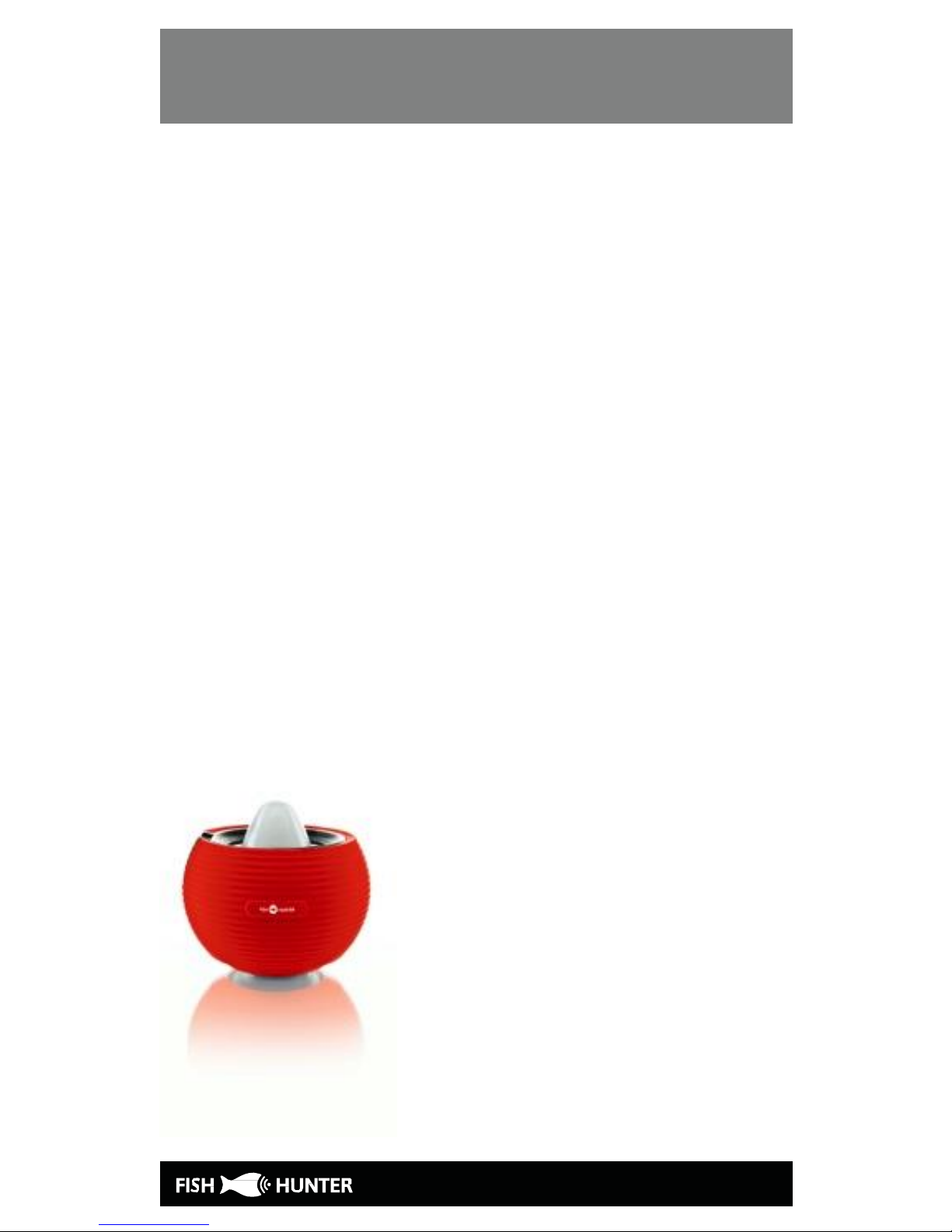
The Fishfinder Sonar
Thank you for purchasing a FishHunter.
This quick start guide will tell you the
main things you need to know to start using
our product.
If you would like more information you can
also go directly to our web site where we
have video’s and additional content.
www.fishhunter.com
Page 3

The Fishfinder Sonar
A military grade fishfinder
Engineered with military grade technology,
FishHunter is a powerful sonar fishfinder for
Apple and Android phones and tablets. The
sonar floats on the top of the water and tracks
water temperature, depth and fish locations.
The FishHunter sonar connects to your
smartphone/tablet via Bluetooth by using our
free APP, so you don’t need to have a cell tower
connection to use your new fishfinder.
Using our Free app, you will also have the ability
to access and store critical fishing info like
you’re favorite fishing spots, your catch details,
share with friends and enter one of our many
free contests.
You can download our free app from the either
the Google Play store for android users or the
Apple App store for IOS users.
Page 4

CHARGING YOUR FISHFINDER
Using your new FishHunter can be easy you
just need to charge it up!
Step 1: Connect the sonar to the charging
base
Step 2: Connect USB cable to the charging
base
Step 3: Connect USB cord into the charger
Step 4: Check to see 2 charging lights are on.
Step 5: Download app to smartphone/tablet
Step 6: Pair your charged sonar with
phone/Tablet.
Step 7: Turn on your sonar using the app
Page 5
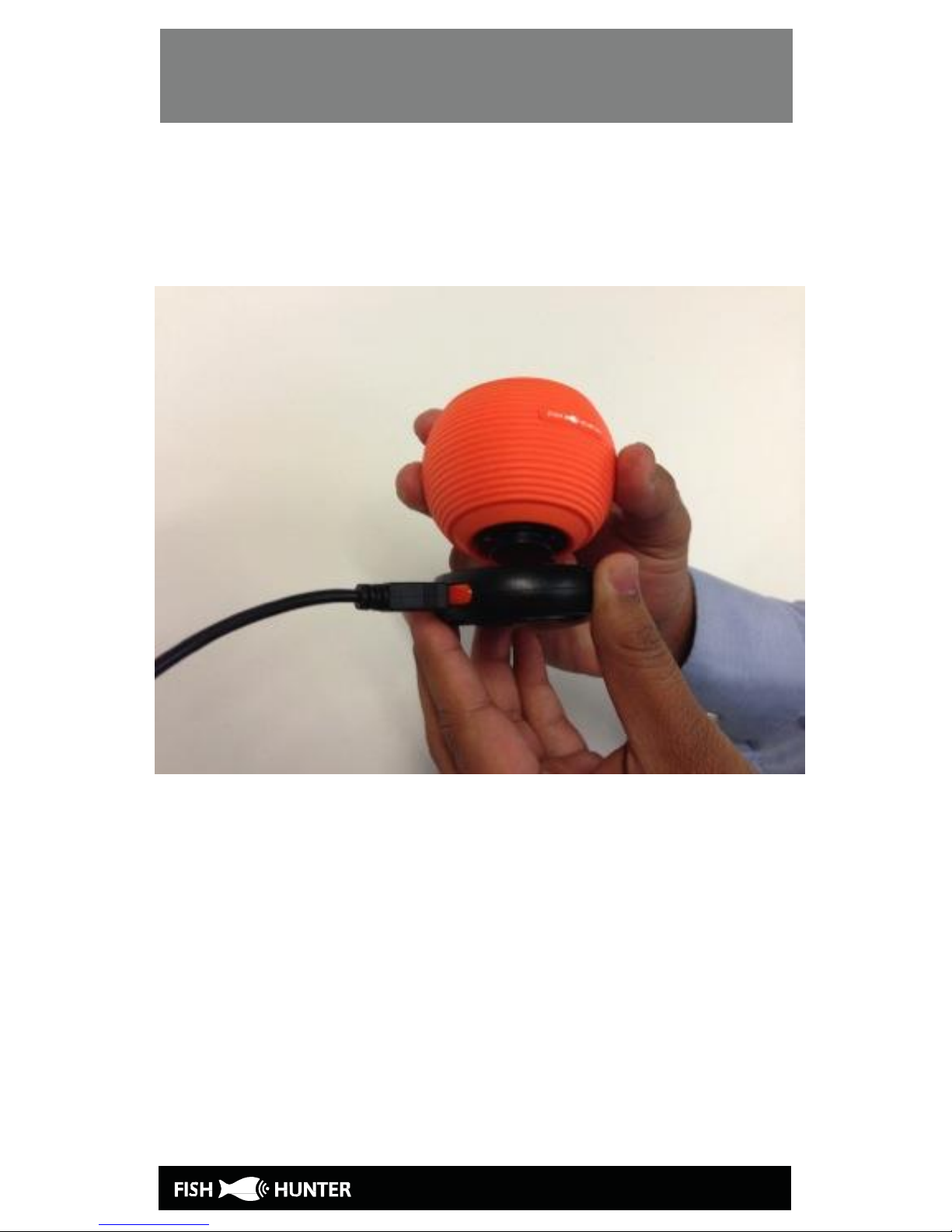
CHARGING YOUR FISHFINDER
Step 1: Connecting the sonar and the
charging base
Page 6
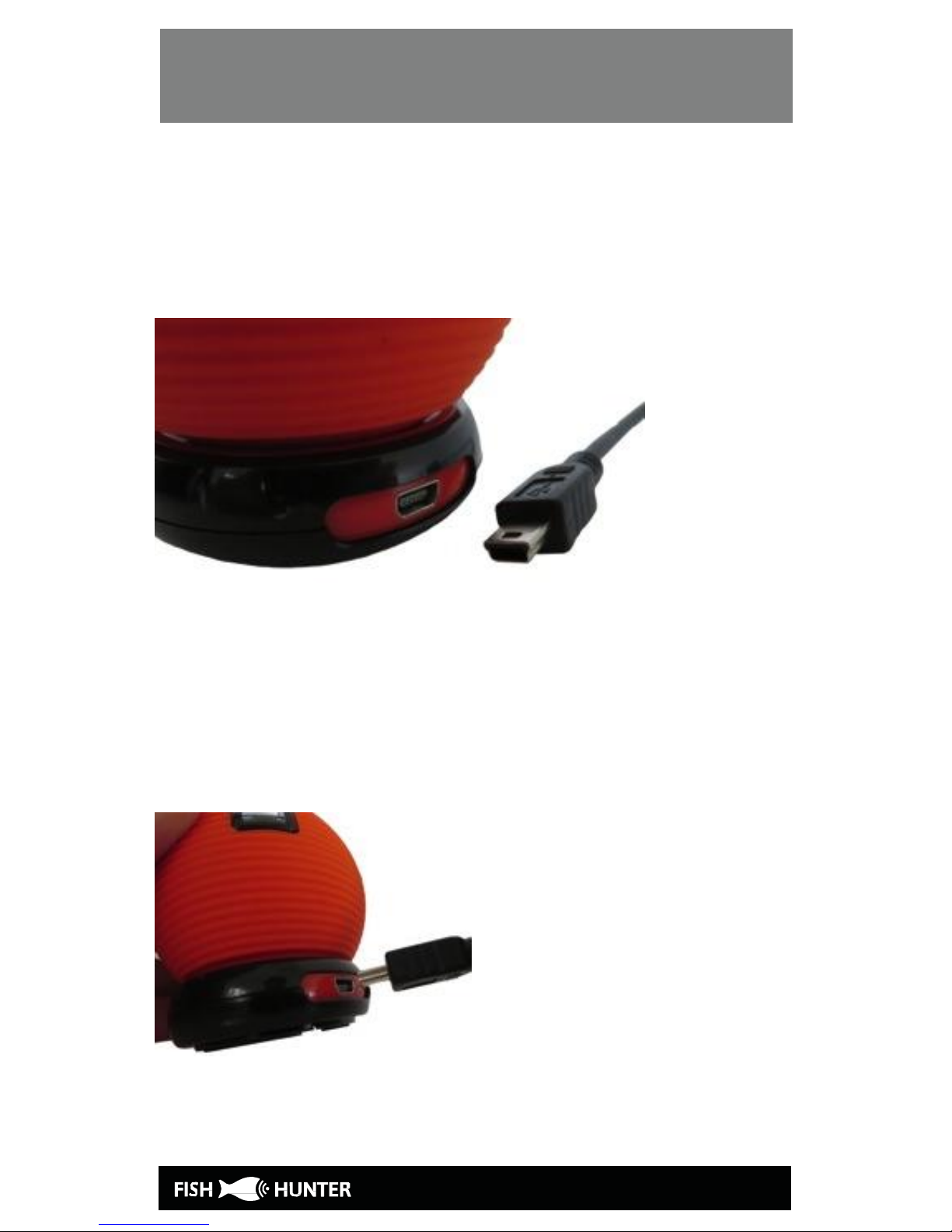
CHARGING YOUR FISHFINDER
Step 2: Connecting the USB Cable to the
charging base
The connection between USB-mini cable and the
charging base is shown below:
Connect the charging base and USB cord by
inserting the cord into the opening on the
charging base as shown below:
Page 7
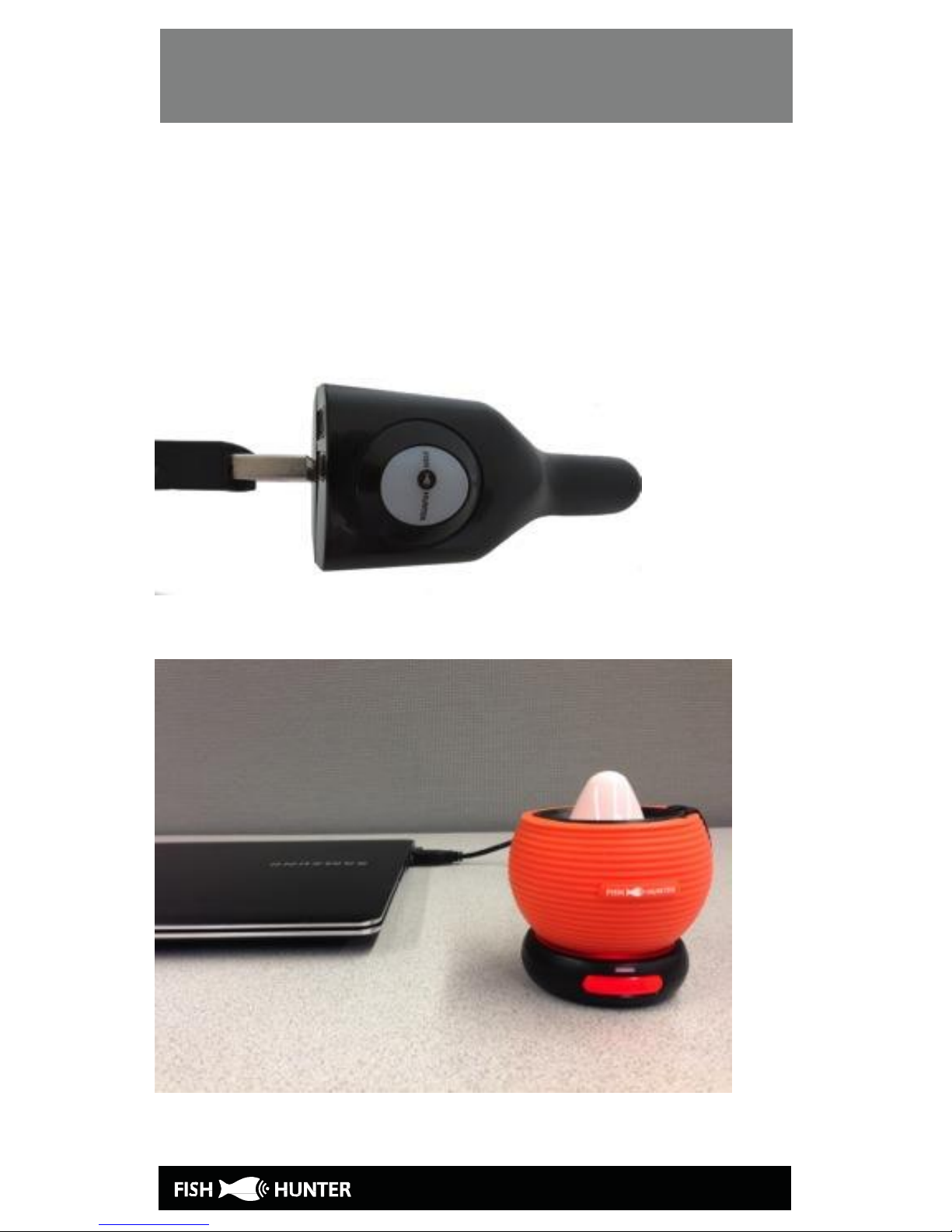
CHARGING YOUR FISHFINDER
Step 3: Connect USB cord into the charger
Connect the other end of the USB cord to the
computer or a USB charger.
Page 8
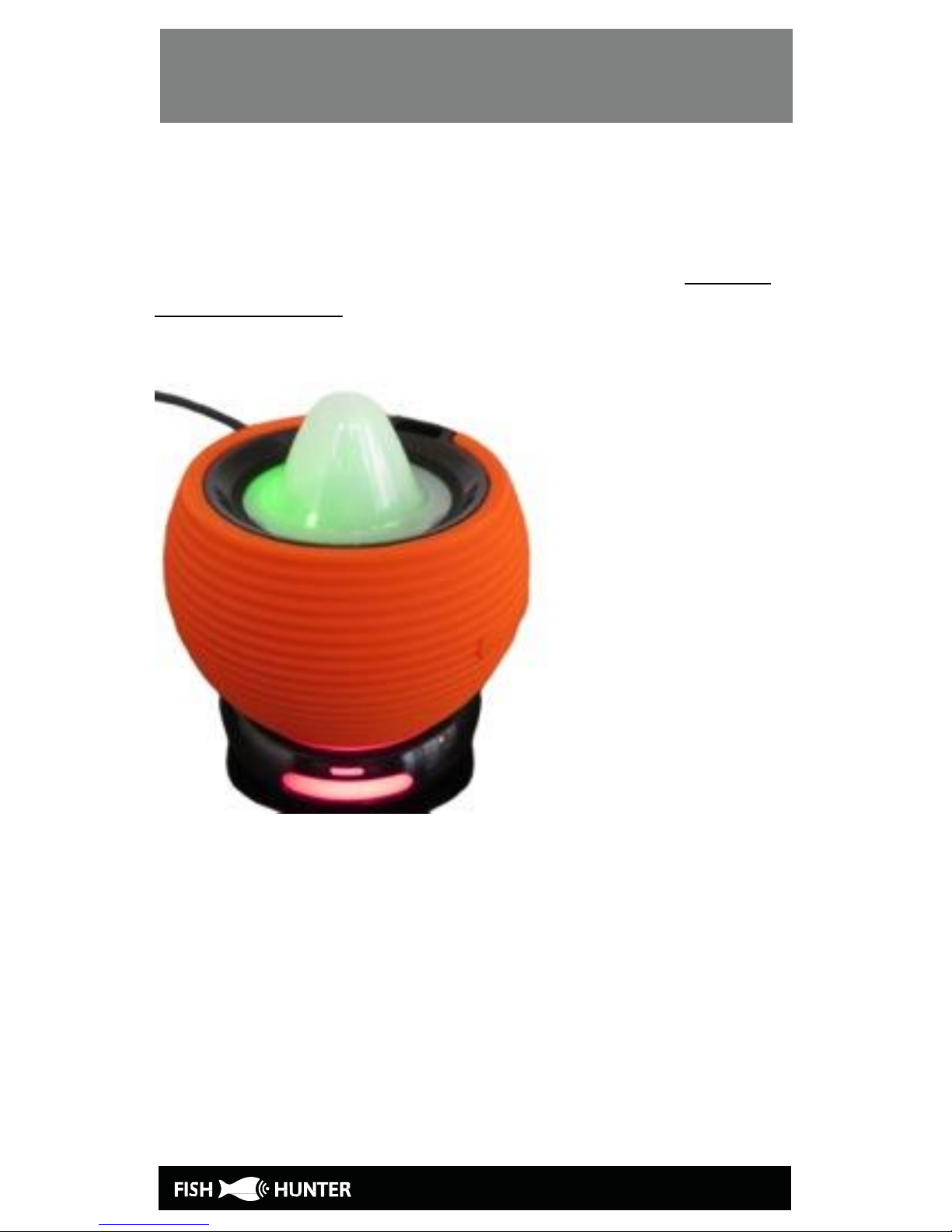
CHARGING YOUR FISHFINDER
Step 4: Check to see both charging lights are
on
You will notice that a red light appears on the
charging base which means that the base has
power and is ready to charge the sonar.
Page 9
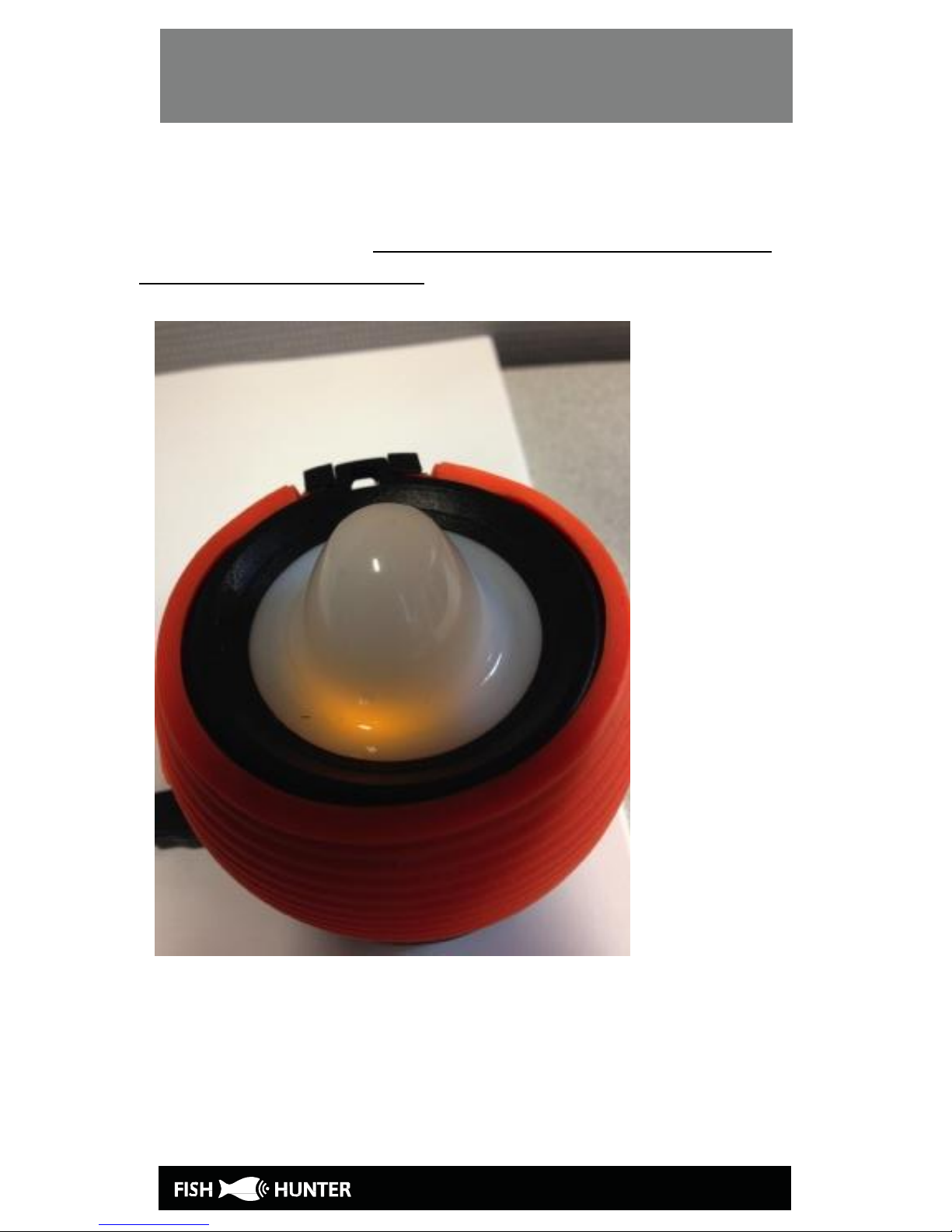
CHARGING YOUR FISHFINDER
When the sonar is attached to the charging base,
the sonar body will lit up yellow while charging is
in progress. This light will turn green when the
charging is complete.
Step 5. Download the “FishHunter Pro” app
to your smartphone/tablet
Page 10
BLUE TOOTH PAIR WITH APP
6. BLUE TOOTH PAIR THE APP WITH SONAR
Important reminders:
- It takes about 2 hours to fully charge your
FishHunter sonar.
- Your fishfinder body does not operate in air; it
only works when it is placed on the water
surface. Please deploy it in water before you
begin the following Bluetooth connection
process.
- Your fishfinder connects to your mobile device
using Bluetooth connection. The fishfinder
broadcasts a signal that your phone will pick up
and connect with.
Step 1:
Ensure your fishfinder is fully charged by
following the charging instructions above.
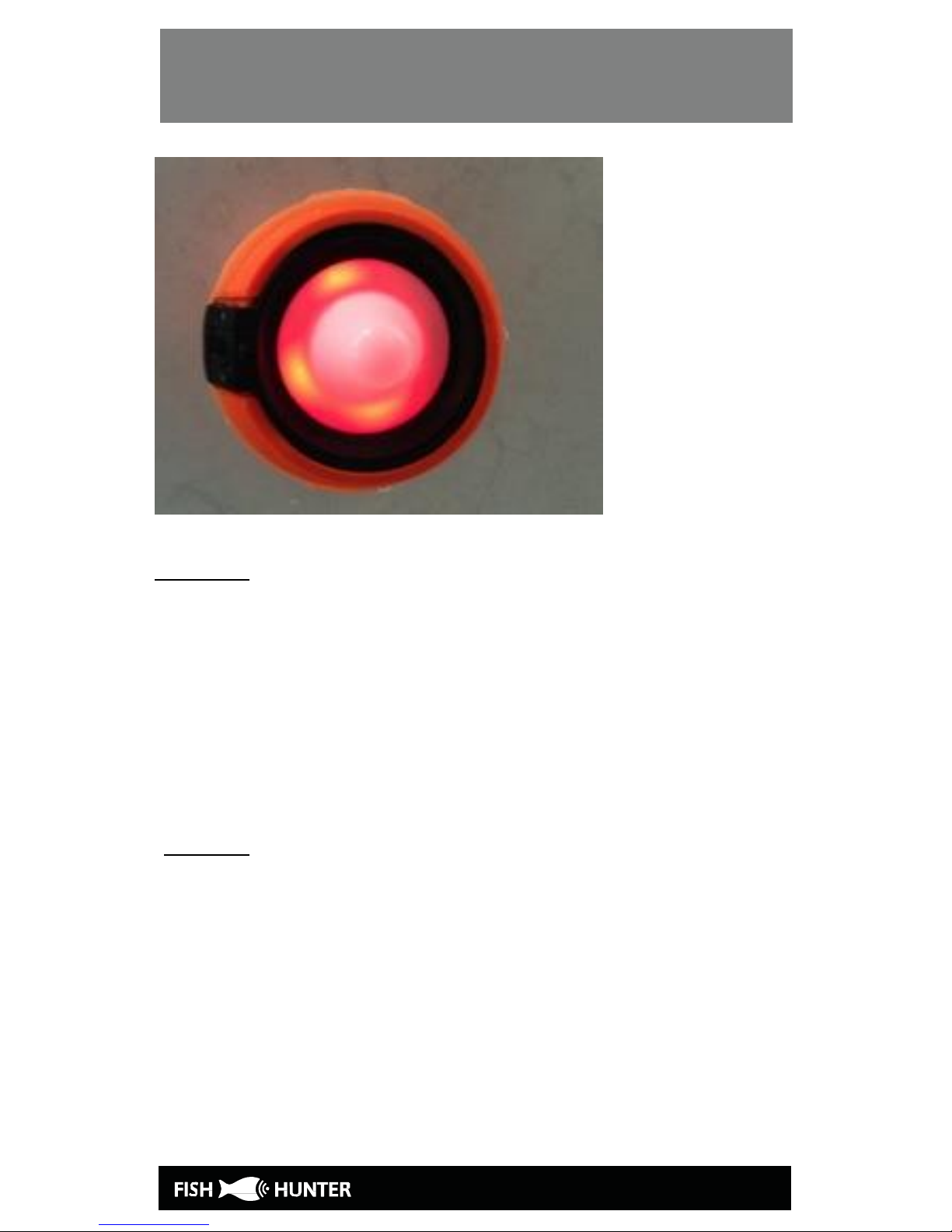
Step 2: Place your sonar into water. You will see
that the sonar’s red lights are blinking fast and
eventually stay lit to indicate that the sonar is
“waking up.” If the red light is not on, the sonar
is OFF.
Page 11
BLUE TOOTH PAIR WITH APP
Step 3: Open the FishHunter app. If this is the
first time you have opened the app, you will
need to login. Please login.
If you have already logged in, then please go to
the bottom menu and select sonar by pressing
on the fish icon labeled “Sonar”
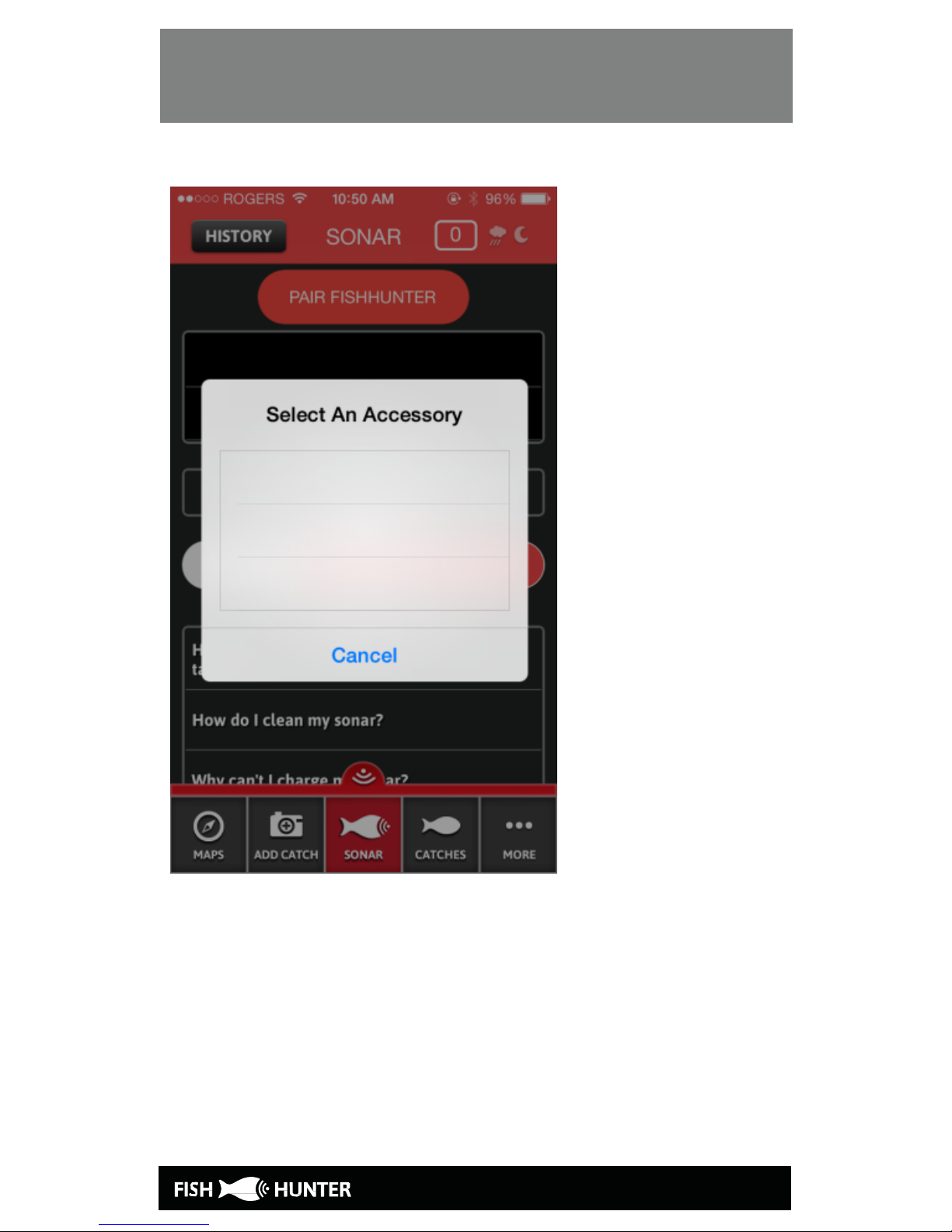
Step 4: Select the “PAIR FISHHUNTER” option.
Please note that the app may prompt you to
turn on your Bluetooth. You should do so
before you continue this process.
Page 12
BLUE TOOTH PAIR WITH APP
Page 13
BLUE TOOTH PAIR WITH APP
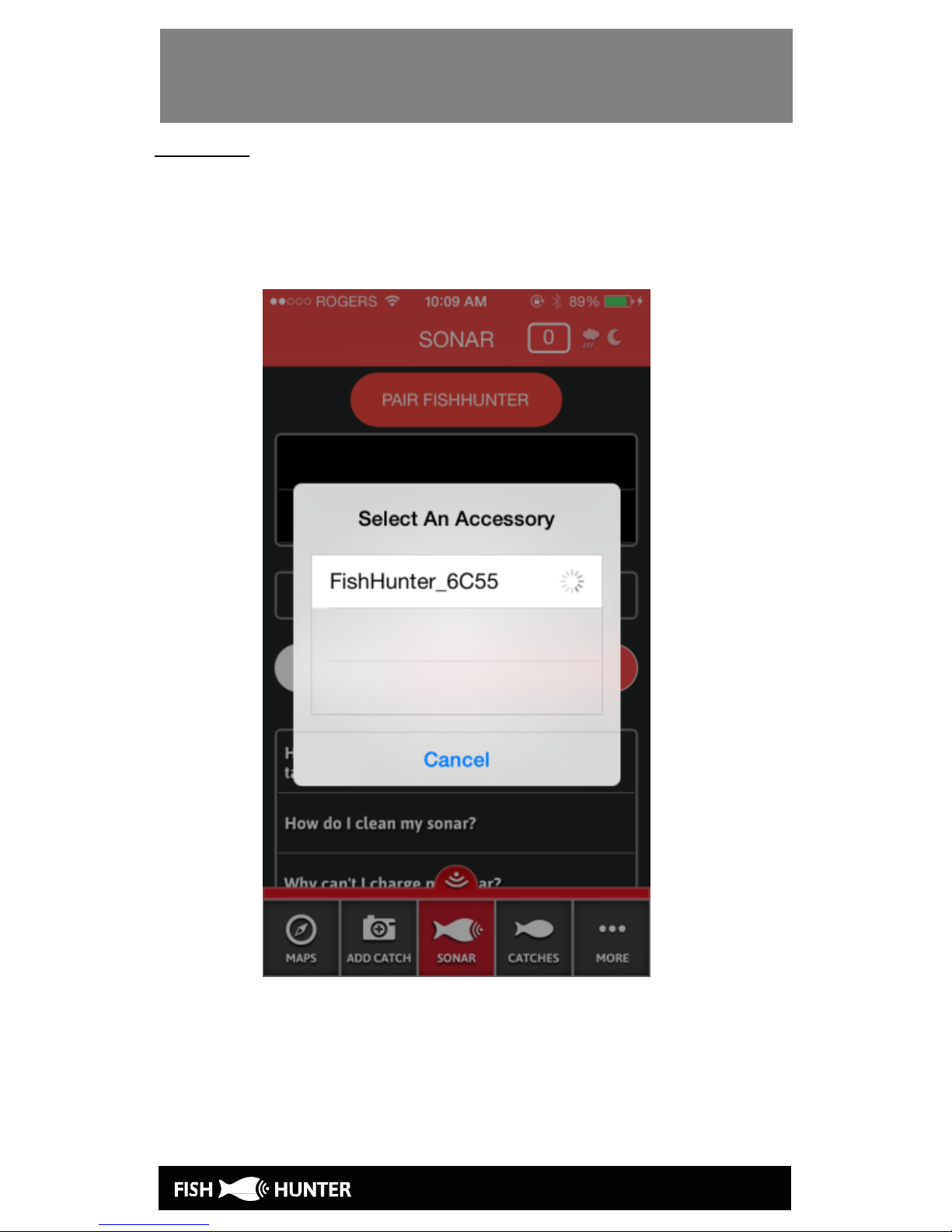
Step 5: The app will scan for available
FishHunter fishfinders within blue tooth range.
This step may have to be repeated a few times
depending on your phone or tablet.
Page 14
BLUE TOOTH PAIR WITH APP
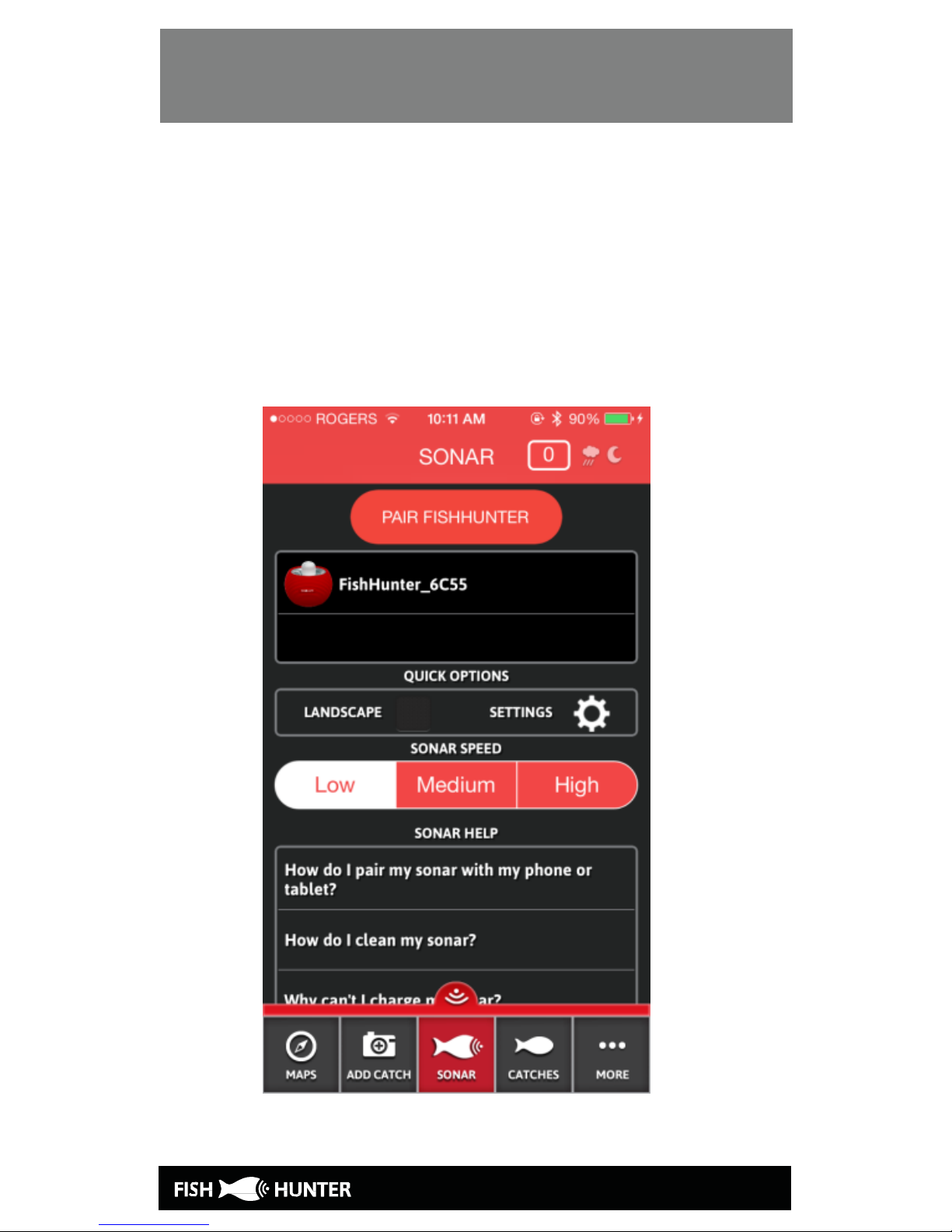
Once your phone finds the FishHunter, it will
populate the app with the device name and
number. Select your FishHunter hardware by
pressing on the screen where you see the name
listed. After the pairing is complete your
FishHunter will appear on the “PAIR SONARS”
list.
Page 15
BLUE TOOTH PAIR WITH APP
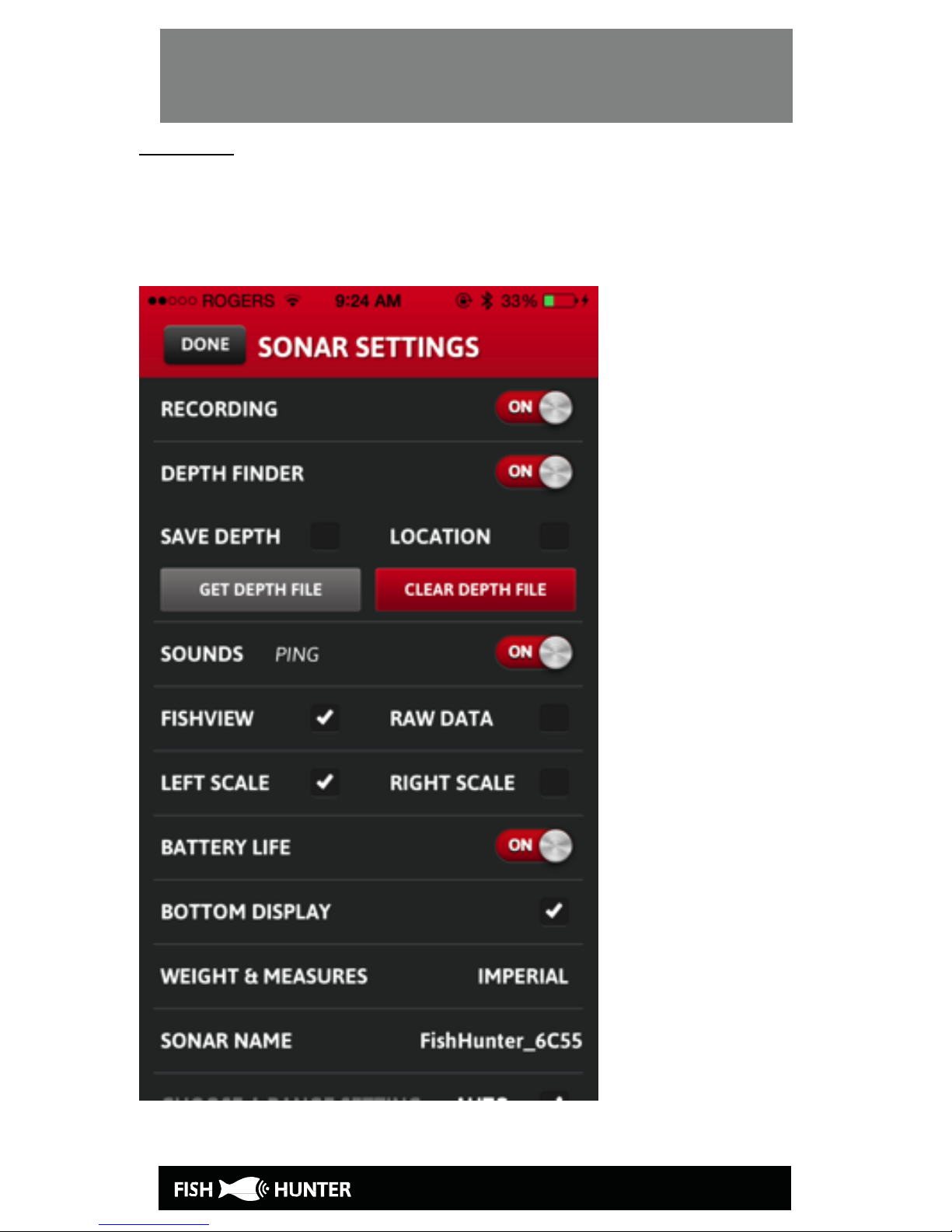
Step 6: Click on your fishfinder name and our
app will open the “SONAR SETTINGS” screen. The
“Sonar Settings” screen will allow you to change
the settings to your preference.
Page 16
UNDERSTANDING THE DISPLAY – RAW
Page 17

UNDERSTANDING THE DISPLAY – RAW
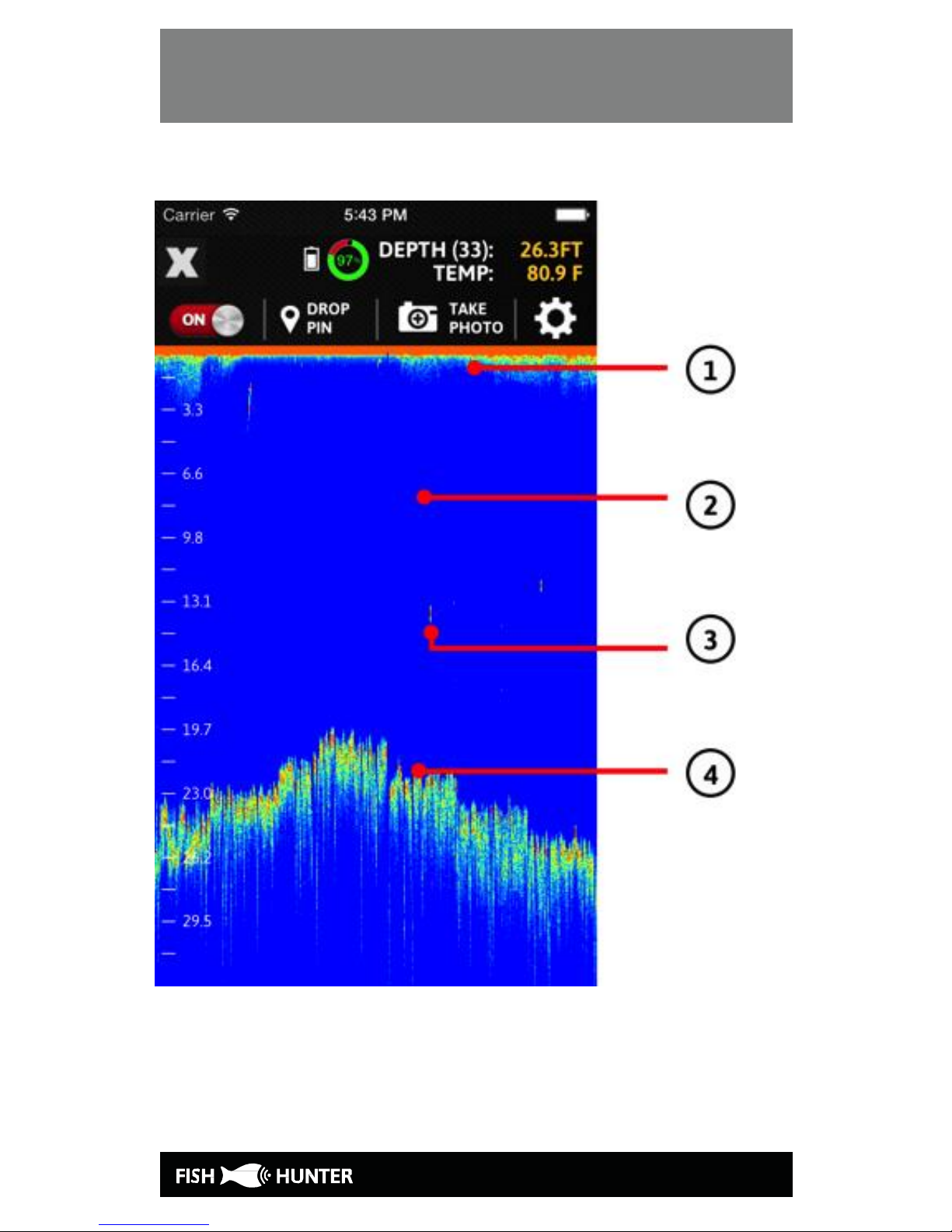
How to read raw sonar screen?
When Reading sonar data output you are generally
interpreting color variations. In simple terms, the
sonar will display more dense material with darker
colors.
We have provided you with a sample screen on the
left here that shows the surface, the water body, a
small “disturbance/object” in the center of the
screen and the bottom contour.
1. Ultrasound transmission line. On the screen,
this would be considered the water surface.
2. BLUE - The color blue means that there is
nothing (no object) there to reflect sound and
therefore is a light color.
3. GREEN - All colors except blue (such as green,
yellow or red) indicate that there is something in
that space. Darker the color the more dense the
material the sonar is picking up.
4. This shows the variation of color which indicates
a variation of the density of the material being
seen. In this case it is the bottom of the water.
Page 18
UNDERSTANDING THE DISPLAY – RAW
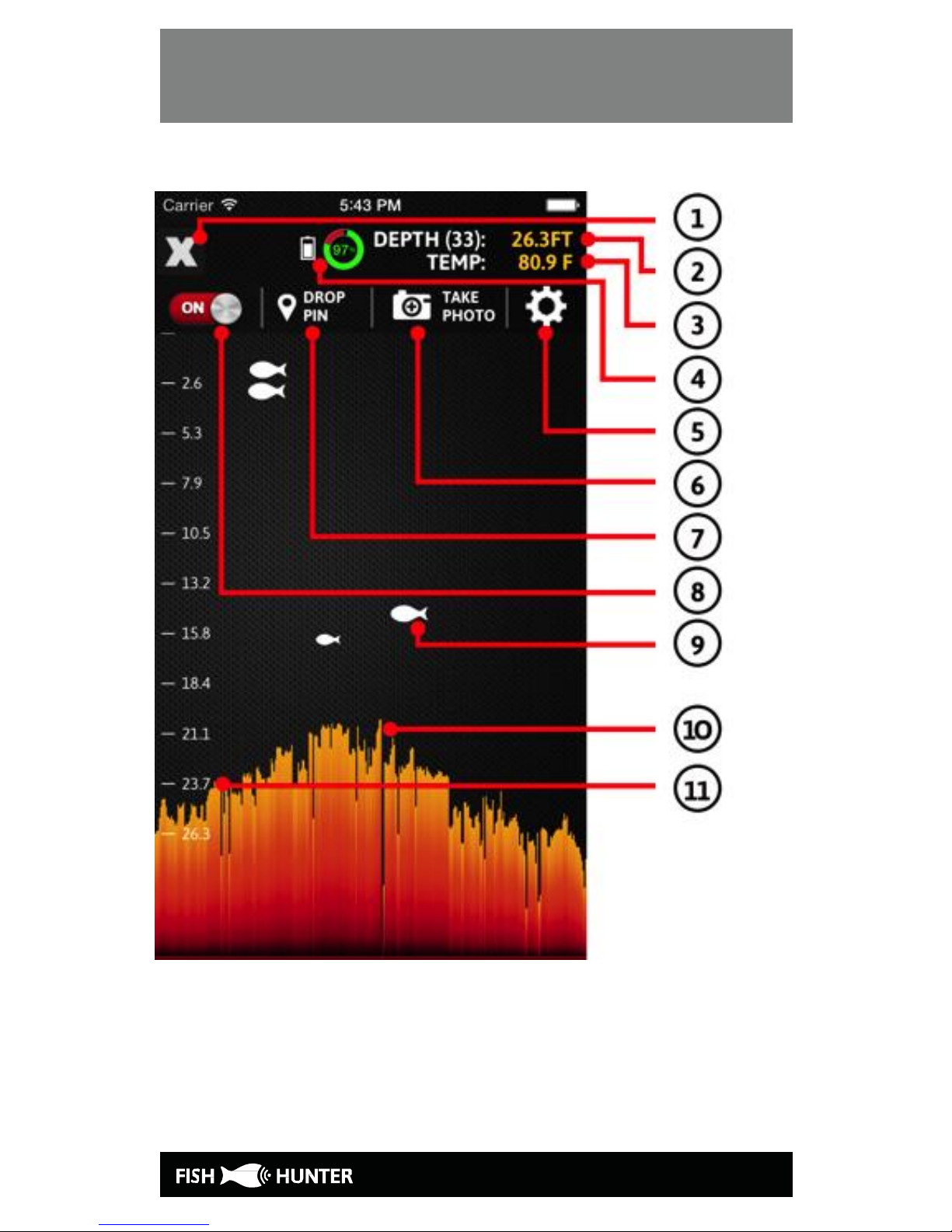
How to read fishview sonar screen:
Page 19

UNDERSTANDING THE DISPLAY – RAW
1. The “X” button lets you go back to the previous
screen (iOS device only).
2. This indicates the water depth.
3. This indicates the water temperature.
4. This shows the battery life of the sonar.
5. Clicking on this button allows you to adjust
recording, depth, sounds, left scale/right scale, raw
data/fishview mode, battery life indicator, bottom
display, and unit of measurement settings.
6. The “Take Photo” option allows you to take a
screenshot of the sonar data on the screen.
7. The “Drop Pin” button allows you to drop a pin on
the map.
8. The “ON” button indicates that the sonar has been
turned on. Click on it to turn it off.
9. The fish symbol means that there could
potentially be a fish in the indicated area.
10. This area indicates the mapped bottom of the
water body.
11. This ruler helps you determine the depth of each
fish.
Page 20

FISHHUNTER FISHFINDER CARE
Please operate this device where the temperature
is between -30ºC and 40º C (-22ºF to 104º F).
Extreme low or high temperature conditions
might temporarily shorten battery life or cause
the device to alter its behavior to regulate its
temperature.
Store the device where the temperature is
between -5ºC and 30º C (23ºF to 86º F). Don’t
leave the device in your car, because
temperature in parked cars can exceed this
range.
Taking Care of the Sonar:
1. After retrieving the sonar from the water,
simply pull up the rubber skin with your
hands/fingers so that it is back to its original
place. Since the sonar is wet, it should be easy
to pull the skin up.
2. Next, rinse the sonar with fresh water
(especially if the sonar has been deployed in
salty water).
3. Make sure the 3 tiny stainless steel pads on
the bottom of the sonar are completely clean and
shiny, and do not have any salt residues on
them.
Page 21

FISHHUNTER FISHFINDER CARE
4. Dry the sonar completely with a dry towel
before charging or putting it in storage.
Page 22

WARRANTY
FishHunter Limited Warranty
This product has been manufactured and tested
to the highest quality standards by FishHunter
Inc. This Limited Warranty offered by
FishHunter Inc. covers defects in material or
workmanship in new FishHunter Inc. products.
This warranty extends to the original purchaser
only and is non-transferable. Only consumers
purchasing FishHunter Inc. products from
authorized FishHunter Inc. retailers or resellers
or through the FishHunter Inc. website may
obtain coverage under our limited warranties.
What is covered?
FishHunter Inc. warrants this product against
defects in material or workmanship as follows:
FishHunter Inc. will replace at no charge for
parts only or, at its option, replace any product
or part of the product that proves defective
because of improper workmanship and/or
material, under normal installation, use, service
and maintenance. If FishHunter Inc. is unable to
provide a replacement and repair is not practical
or cannot be made in a timely fashion,
FishHunter Inc. may elect to refund the
purchase price in exchange for the return of the
product.
Page 23

WARRANTY
How Long Does The Coverage Last?
Our warranty periods are 3 months from the
documented date of purchase, depending on the
type of product and where it was purchased.
What Our Warranty Does Not Cover?
Our warranties do not cover any problem that is
caused by:
A. Conditions, malfunctions or damage not
resulting from defects in material or
workmanship.
B. Conditions, malfunctions or damage
resulting from normal wear and tear, improper
installation, improper maintenance, misuse,
abuse, negligence, accident or alteration.
C. Accessories, connected materials and
products, or related products not manufactured
by FishHunter Inc.
This limited warranty is void if a product is
returned with removed, damaged or tampered
labels or any alterations (including removal of
any component or external cover).
How to File a Claim?
FishHunter Inc. will not provide any warranty
coverage unless claims are made in compliance
with all terms of the controlling warranty
Page 24

WARRANTY
statement included with your product, and you
follow proper return procedure. To request
warranty service, you will need to provide:
1. The sales receipt or other evidence of the date
and place of purchase.
2. A description of the problem.
3. Delivery of the product or the defective part,
postage prepaid and carefully packed and
insured, to FishHunter Inc., 5520 Explorer
Drive, 4th Floor, Mississauga, ON L4W 5L1
When warranty service is completed, any
repaired or replacement product or part will be
returned to you postage prepaid.
Customers who have a claim can provide
information related to the problem on the
Contact page. The company may request that a
customer provide evidence supporting the claim.
Page 25

WARRANTY
REPAIR OR REPLACEMENT (OR, IN LIMITED
CIRCUMSTANCES, REFUND OF THE
PURCHASE PRICE) AS PROVIDED UNDER THIS
WARRANTY IS THE EXCLUSIVE REMEDY OF
THE PURCHASER.
FISHHUNTER INC. NEITHER ASSUMES NOR
AUTHORIZES ANY PERSON TO CREATE FOR IT
ANY OTHER OBLIGATION OR LIABILITY IN
CONNECTION WITH THIS PRODUCT.
The laws of Toronto, in the Province of Ontario
Canada govern FishHunter Inc. and this
warranty.
Page 26

CONTACT
5520 Explorer Drive, 4th Floor,
Mississauga, ON L4W 5L1
P. 416-695-1246
F. 416-695-0246
info@fishhunter.com
www.fishhunter.com
 Loading...