

Page 1
Need Assistance? Visit service.mattel.com or call 1-800-524-8697
SERVICE
©2011 Mattel, Inc. All Rights Reserved.
Mattel, Inc., 636 Girard Avenue, East Aurora, NY 14052, U.S.A.
Consumer Relations 1-800-524-8697. Mattel U.K. Ltd., Vanwall
Business Park, Maidenhead SL6 4UB. Helpline 01628 500303. Mattel
Australia Pty., Ltd., Richmond, Victoria. 3121. Consumer Advisory
Service - 1300 135 312. Mattel East Asia Ltd., Room 1106, South
Tower, World Finance Centre, Harbour City, Tsimshatsui, HK, China.
Diimport & Diedarkan Oleh: Mattel SEA Ptd Ltd.(993532-P) Lot 13.5,
13th Floor, Menara Lien Hoe, Persiaran Tropicana Golf Country
Resort, 47410 PJ. Tel:03-78803817, Fax:03-78803867.
16
© Disney/Pixar
CONSUMER INFORMATION
(US and Canada only).
SERVICE.MATTEL.COM
V3638-0920
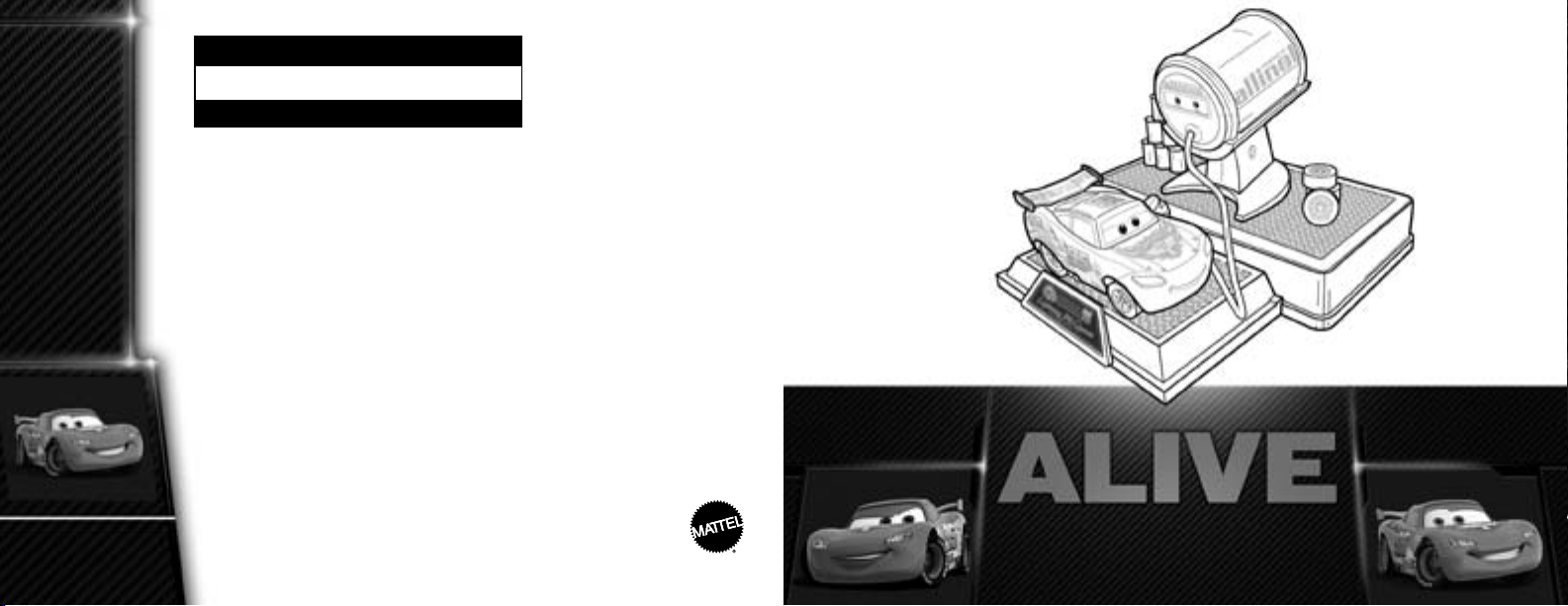
OWNER’S MANUAL
LIGHTNING McQUEEN
THE FIRST-EVER 1:55 SCALE
FULLY ANIMATED
TALKING RACE CAR!
FOR THE ADULT
COLLECTOR
Page 2
PARTS ...................................... 3
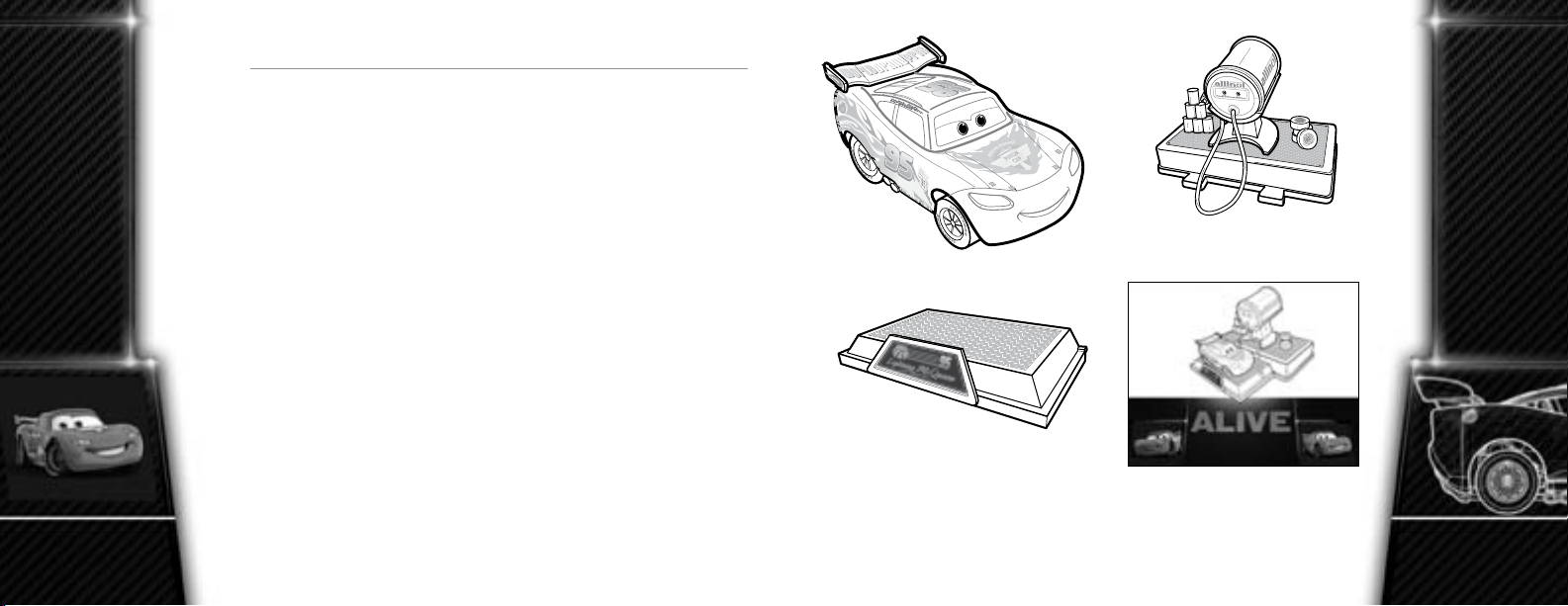
PARTS
TABLE OF
CONTENTS
2
VEHICLE SPECIFICATIONS ...................... 4
OPERATING SYSTEM: OVERVIEW. . . . . . . . . . . . . . . . . 6
FUELING UP ................................. 8
DRIVE MODE 1: SHORT-DISTANCE DRIVING ....... 10
DRIVE MODE 2: TEST DRIVE .................... 11
DRIVE MODE 3: LONG-DISTANCE DRIVING ........ 12
MAINTENANCE .............................. 13
SERVICE ................................... 16
GAS STATION
LIGHTNING McQUEEN
COLLECTOR DISPLAY
STAND
Remove everything from package and compare to parts shown here.
If any items are missing, call 1-888-892-6123.
Keep this Owner’s Manual for future reference as it contains important information.
CHARGER BASE
OWNER’S MANUAL
3
Page 3
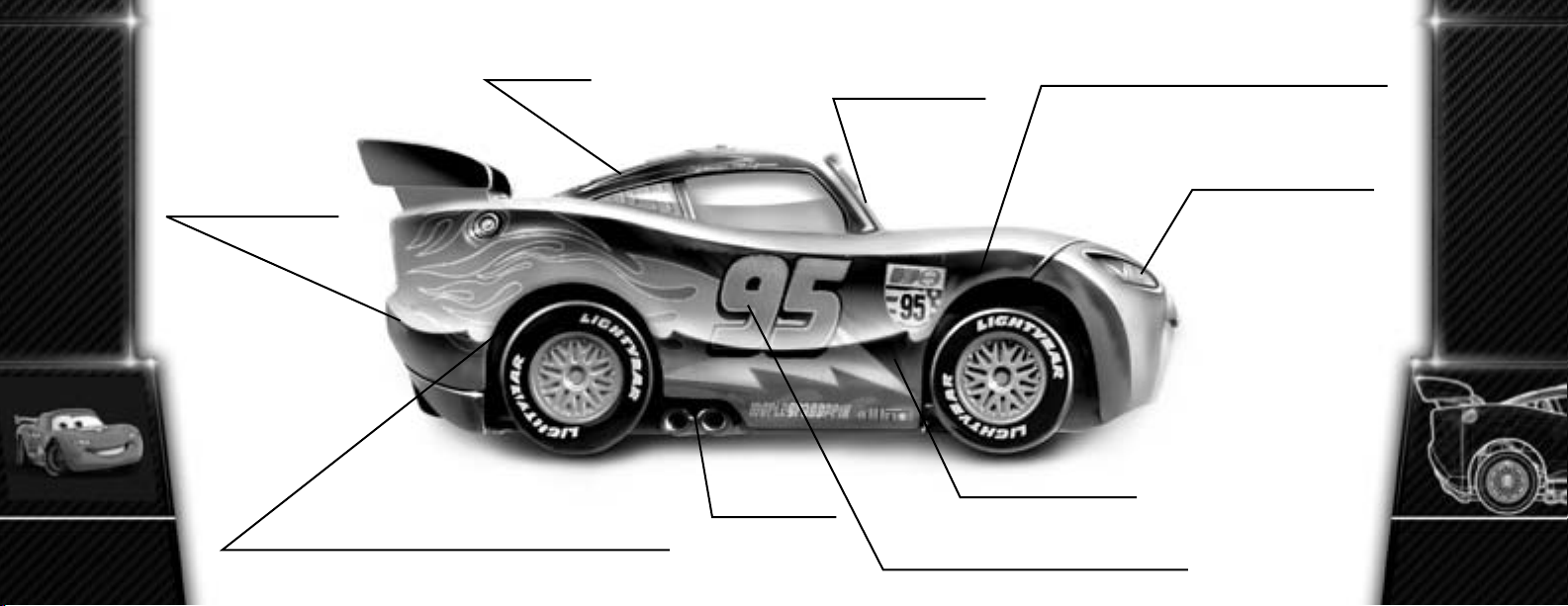
SPEAKER
MOVING EYES
MOTOR 3
POWERS LIFE-LIKE MOVING MOUTH
VEHICLE
SPECIFICATIONS
VEHICLE
SPECIFICATIONS
4
RECHARGEABLE
BATTERY
MOTOR 1
POWERS FORWARD / REVERSE DRIVING
AMPLIFIER
ROCKING BODY
MOTOR 2
POWERS EYES / BODY / STEERING
LED HEADLIGHTS
5
Page 4

SELECT MODE BUTTON
RED LIGHT
ON / OFF SWITCH
OVERVIEW
OPERATING SYSTEM:
OPERATING SYSTEM:
OVERVIEW
6
O
I
“GAS” TANK
ON / OFF SWITCH
GREEN LIGHT
INTERACTIVE
TOUCH SENSOR
BATTERY
COMPARTMENT
DISPLAY STAND
“GAS” PUMP
7
Page 5

CHARGING YOUR VEHICLE
FUELING UP
FUELING UP
8
Your LIGHTNING McQUEEN ALIVE race car is powered by a
LiPo battery that is permanently installed. The vehicle must be
charged before you take it for a drive. To charge, rst make sure
you have installed 6 AA alkaline batteries in the charger base
(see Battery Installation, page 13). Then follow these easy steps.
1. Switch vehicle OFF (0).
I = ON
O = OFF
2. To begin charging, switch charger
base ON (I). Green light will go on
to indicate charger is on.
O
O
I
I = ON
I = ON
O = OFF
I
O = OFF
3. Connect “Gas” Pump to vehicle.
Make sure the connection is secure.
Red light will go on if car is “empty”.
4. Charging process takes up to 30
minutes. Red light will go off when
charging is complete.
5. When vehicle is fully charged,
switch charger base OFF (0) and
disconnect the “Gas” Pump.
TIP: Always hold the “Gas” Pump plug
when disconnecting. NEVER pull on
the wire to disconnect; this may cause
the wire to break.
NOTE: TURN CHARGER BASE OFF
WHEN NOT IN USE OR BATTERY
WILL BE DRAINED.
CHARGING CHARGING
FULLY
CHARGED
9
Page 6

SHORT-DISTANCE DRIVING
DRIVE MODE 2
TEST DRIVE
DRIVE MODE 1
10
Cruise around Radiator Springs!
1. Switch vehicle ON (I). You
will hear “KA-CHING”
which indicates the vehicle
is in Mode 1.
2. Put the vehicle down in an
open oor space free of
obstacles.
3. Tap the Touch Sensor to
activate the rst animated
driving sequence in Mode 1.
4. There are 7 animated driving
sequences. To see the next
sequence, tap the Touch
Sensor again when the vehicle
stops moving.
No other race car has more personality than
LIGHTNING McQUEEN ALIVE!
O
I
1. To switch to Mode 2, press the Select Mode Button while
vehicle is in Mode 1.
2. You will hear “LIGHTNING IS READY” which indicates the
vehicle is in Mode 2.
3. Put the vehicle down in an open oor space free of obstacles.
4. Tap the Touch Sensor to activate the rst animated sequence in
Mode 2.
5. There are 4 animated sequences. To see the next sequence,
tap the Touch Sensor again when the vehicle stops moving.
TIP: When the vehicle is stationary, you can move
between Mode 1 and Mode 2 at any time by pressing the
Select Mode Button.
11
Page 7

LONG-DISTANCE DRIVING
Practice Piston Cup Champion maneuvers!
MAINTENANCE
For best performance, regular maintenance is essential. Replace batteries
in charger base when vehicle slows in speed or if time to re-charge the
vehicle exceeds 35 minutes, whichever comes rst. Just follow these
battery guidelines.
1. To switch to Mode 3, press and
hold the Select Mode Button for
two seconds and then tap the
Touch Sensor while vehicle is in
Mode 2.
2.
You will hear a double beep
sound and “LET’S GO!” which
indicates the vehicle is in Mode 3.
DRIVE MODE 3
3. Put the vehicle down in an open
oor space free of obstacles.
Tap the Touch Sensor again to
watch it race away.
4. There is only 1 animated
sequence in Mode 3. To see it
again, tap the Touch Sensor
when the vehicle stops
12
moving.
BATTERY INSTALLATION
Charger base requires 6 AA alkaline batteries,
not included.
Vehicle powered by permanently installed LiPo
battery, included. DO NOT REMOVE LiPo
battery from vehicle, until it is necessary for
safe disposal (see page 15).
• Remove battery cover with a Phillips head
screwdriver (not included).
• Install 6 new AA alkaline batteries
in the orientation (+/-) shown.
• Replace battery cover and tighten screw.
BATTERY SAFETY INFORMATION
In exceptional circumstances batteries may leak
uids that can cause a chemical burn injury or ruin
your product.
To avoid battery leakage:
• Non-rechargeable batteries are not to be charged.
• Rechargeable batteries are not to be removed from the product
before charging.
13
Page 8

MAINTENANCE
14
• Rechargeable batteries are only to be charged under adult supervision.
• Do not mix alkaline, standard (carbon-zinc), or rechargeable
(nickel-cadmium) batteries.
• Do not mix old and new batteries.
• Only batteries of the same or equivalent type as recommended are
to be used.
• Batteries are to be inserted with the correct polarity.
• Exhausted batteries are to be removed from the product.
• The supply terminals are not to be short-circuited.
• Dispose of battery(ies) safely.
• Do not dispose of this product in a re. The batteries inside may
explode or leak.
PERFORMANCE TIPS:
• For best performance, use regular or high-performance alkaline
batteries. Battery life may vary depending on battery brand.
• Works best on at, level, hard surfaces.
• This product is not recommended for use on carpet, loose dirt or
wet surfaces.
CAUTION:
CAUTION:
wet. Do not operate vehicle through water or snow.
To prevent entanglement, keep all hair away from the wheels.
Surfaces may become hot and cause burns if electronics get
Protect the environment by not disposing of this product with
household waste (2002/96/EC). Check your local authority for
recycling advice and facilities.
TO ENSURE TROUBLE-FREE OPERATION
• THE VEHICLE SWITCH MUST BE IN THE “OFF” POSITION TO
PROPERLY RECHARGE ITS BATTERY.
• ALWAYS HOLD THE “GAS” PUMP PLUG WHEN DISCONNECTING.
NEVER PULL ON THE WIRE TO DISCONNECT; THIS MAY CAUSE THE
WIRE TO BREAK.
• DO NOT RECHARGE THE VEHICLE IF IT FEELS HOT. ALLOW IT TO
COOL BEFORE RECHARGING.
• DO NOT ATTEMPT TO USE OR CHARGE THE VEHICLE IF IT SHOWS
SIGNS OF LEAKAGE OR CORROSION.
• DO NOT DISASSEMBLE THE VEHICLE’S PERMANENTLY INSTALLED
LiPo (Lithium Polymer) BATTERY. THE LiPo BATTERY IS A SEALED
LiPo BATTERY.
• IF THE VEHICLE AND/OR CHARGER BASE ARE WET, THOROUGHLY
DRY BEFORE USING OR CHARGING.
• REGULARLY EXAMINE ALL WIRES AND CONNECTORS. IN THE
EVENT OF DAMAGE, DO NOT USE.
• WHEN EXPOSED TO AN ELECTROSTATIC SOURCE OR THE VEHICLE
MALFUNCTIONS, TURN THE POWER OFF AND ON AGAIN. THIS
SHOULD RESET YOUR VEHICLE AND LET YOU RESUME NORMAL
OPERATION.
• REMEMBER TO TURN VEHICLE SWITCH TO THE “OFF” POSITION
DURING EXTENDED STORAGE OR DISPLAY.
Vehicle is to be charged using only the charger base supplied. Do not
charge the LiPo vehicle battery in any other battery charger.
To remove LiPo battery for safe disposal, unscrew the chassis.
IMPORTANT NOTE: This action will destroy the vehicle and should
be done ONLY when discarding the vehicle.
MAINTENANCE
15
Page 9

FCC statement flyer
size: 138 x 175 (mm)
For product sold in USA
This device complies with Part 15 of the FCC Rules.
Operation is subject to the following two conditions:
(1) This device may not cause harmful interference, and (2) this device must accept any interference
received, including interference that may cause undesired operation.
• This equipment has been tested and found to comply with the limits for a Class B digital device,
pursuant to part 15 of the FCC rules. These limits are designed to provide reasonable protection
against harmful interference in a residential installation. This equipment generates, uses and can
radiate radio frequency energy and, if not installed and used in accordance with the instructions,
may cause harmful interference to radio communications. However, there is no guarantee that
interference will not occur in a particular installation. If this equipment does cause harmful
interference to radio or television reception, which can be determined by turning the equipment
off and on, the user is encouraged to try to correct the interference by one or more of the
following measures:
• Reorient or relocate the receiving antenna.
• Increase the separation between the equipment and receiver.
Connect the equipment into an outlet on a circuit different from that to which the receiver is connected.
•
• Consult the dealer or an experienced radio/TV technician for help.
NOTE:
Changes or modifications not expressly approved by the manufacturer responsible
for compliance could void the user’s authority to operate the equipment.
For product sold in Canada • Pour les produits vendus au Canada
THIS CLASS B DIGITAL APPARATUS COMPLIES WITH CANADIAN ICES-003.
CET APPAREIL NUMÉRIQUE DE LA CLASSE B EST CONFORME À LA NORME NMB-003 DU CANADA.
(VALID FOR CANADA ONLY • VALABLE AU CANADA SEULEMENT)
Operation is subject to the following two conditions :
(1) this device may not cause interference, and (2) this device must accept any interference,
including interference that may cause undesired operation of the device.
L’utilisation de ce dispositif est autorisée seulement aux conditions suivantes :
(1) Il ne doit pas produire de brouillage et (2) il doit pouvoir tolérer tout brouillage radioélectrique reçu,
même si ce brouillage est susceptible de compromettre son fonctionnement.
00007-1849G6
 Loading...