

Page 1
J8234
K4075
™
www.fisher-price.com
Page 2
Battery
Battery Safety
Replacement
For best performance, we recommend
replacing the batteries that came with
this toy with three, new “AA” (LR6)
alkaline batteries.
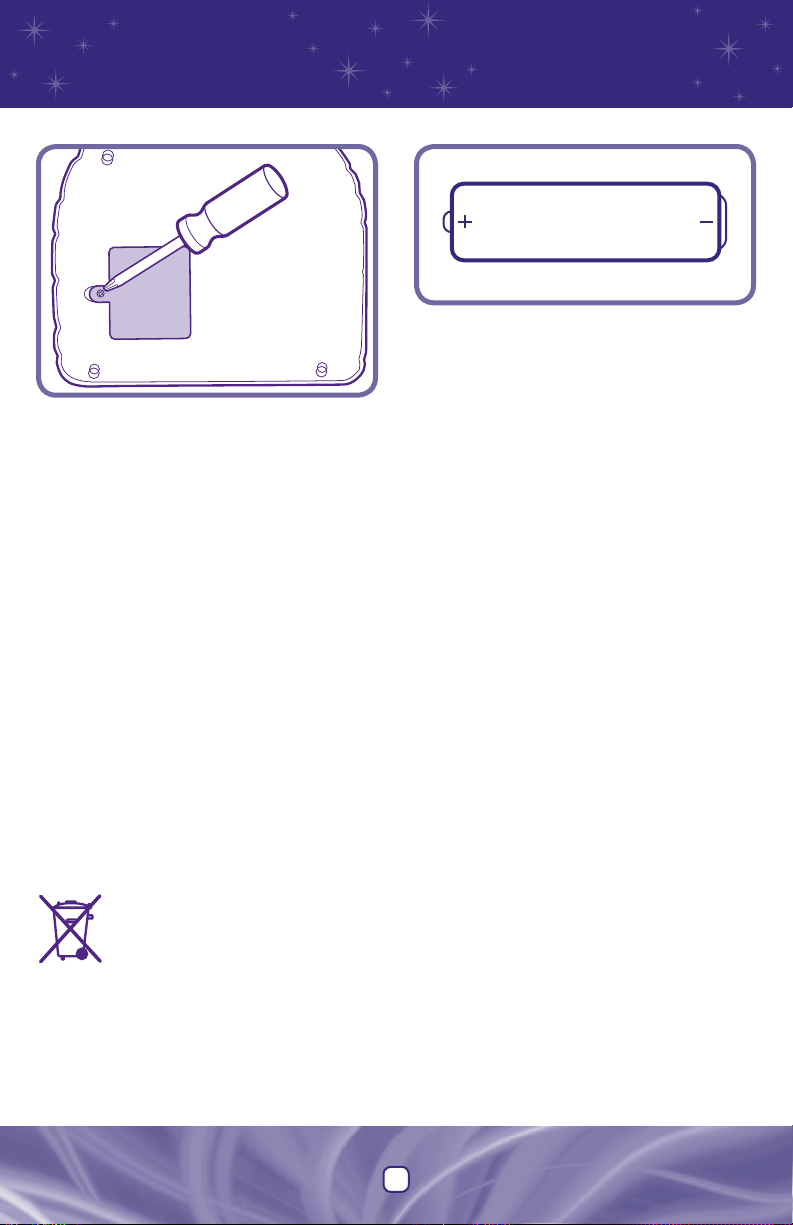
• Locate the battery compartment on the
bottom of the toy.
• Loosen the screw in the battery compartment door with a Phillips screwdriver.
Remove the battery compartment door.
Remove the worn batteries and throw
them away.
• Insert three “AA” (LR6) alkaline batteries, as
indicated inside the battery compartment.
Hint: We recommend using alkaline
batteries for longer battery life.
• Replace the battery compartment door
and tighten the screw with a Phillips
screwdriver. Do not over-tighten.
• When sounds or the lights become faint or
stop or the "crystal ball" stops working, it's
time for an adult to change the batteries!
• Protect the environment by not
disposing of this product with
household waste (2002/96/EC).
Check your local authority for
recycling advice and facilities
(Europe only).
Information
1.5V x 3
"AA" (LR6)
Shown Actual Size
In exceptional circumstances, batteries may
leak fluids that can cause a chemical burn
injury or ruin your product. To avoid battery
leakage:
• Do not mix old and new batteries or
batteries of different types: alkaline,
standard (carbon-zinc) or rechargeable
(nickel-cadmium).
• Insert batteries as indicated inside the
battery compartment.
• Remove batteries during long periods of
non-use. Always remove exhausted
batteries from the product. Dispose of
batteries safely. Do not dispose of this
product in a fire. The batteries inside may
explode or leak.
• Never short-circuit the battery terminals.
• Use only batteries of the same or
equivalent type, as recommended.
• Do not charge non-rechargeable
batteries.
• Remove rechargeable batteries from the
product before charging.
• If removable, rechargeable batteries are
used, they are only to be charged under
adult supervision.
3
Page 3

Before
First-Time Use
CAUTION
Please keep small parts
such as plastic tabs out of
children’s reach. Throw the
plastic tab away.
Note: A plastic tab is attached to the
toy for in-store demonstration purposes.
While the tab may have already been
removed, check the toy to be sure.
Open the fasteners on the back of the
toy. Pull and remove the plastic tab from
the toy. Throw the plastic tab away.
Care
• Wipe this toy with a clean cloth dampened
with a mild soap and water solution. Do
not immerse this product.
• Keep water, sand and dirt off this product.
• This toy has no consumer serviceable
parts. Please do not take this toy apart.
4
Page 4

Power/Volume Switch
Slide the switch to either
on with low volume
on with high volume
.
or off
;
3 Super-Fun Ways
Magic
Mirror
Mode
Switch
Fact
Fact
• Slide the mode switch to Fact.
• Slide any card into the "magic mirror" to learn facts about the
card. The giraffe is standing on four legs!
• Quizard asks if you want to learn more facts. If you do, press
yes. If you don't, remove the card and try another one.
Hint: When no cards are inserted, press the "yes" or "no" button
to learn facts and letters.
5
Hint
Page 5

to Play and Learn!
Find
Find
With demo cards (included)
• Slide the mode switch to Find.
• Quizard asks you to find a card. Find the wild animal that begins with "z".
• Slide the correct card into the "magic mirror" to learn a cool fact.
• If you are not sure, press the hint
• If you guess wrong, Quizard asks you to try again and the "magic mirror" gives a hint.
Using Card Pack Cards (sold separately)
• If you are using cards from a card pack (sold separately), insert
the "book" cartridge into the slot in Quizard's base before you
begin "Find."
• Quizard asks you to find a card from your card pack.
• Be sure to use the "book" cartridge that matches the color
of your cards.
? button at any time and the "magic mirror" will give you a hint.
Read
Read
Your Mind
Your Mind
With demo cards (included)
• Slide the mode switch to Read Your Mind.
• Quizard asks you to pick any card.
• Push Quizard's hat down over his eyes so he can't see. Pick a wild animal card, any
wild animal card!
• Quizard asks questions about the card you chose. Does your wild animal have stripes?
• Press the "yes" button if the answer is yes. Press the "no" button if the answer is no.
• If you're not sure of the answer, press the hint
card into the mirror. He'll give you a hint so you can answer. Remove the card from the "mirror."
• Lift up Quizard's hat so he can see if he was right. Try another card.
Using Card Pack Cards (sold separately)
• If you are using cards from a card pack (sold separately), insert the "book" cartridge into the
slot in Quizards base before you begin "Read Your Mind."
• Quizard tries to guess a card you've chosen from your card pack.
• Be sure to use the "book" cartridge that matches the color of your cards.
? button. The "magic mirror" asks you to put your
6
Page 6

Consumer
Information
FCC Statement
United States Only
• Please keep this instruction sheet for
future reference, as it contains
important information.
• Requires three “AA” batteries (included).
• Adult assembly is required for
battery replacement.
• Tool needed for battery replacement:
Phillips screwdriver (not included).
Visit us on-line at
www.service.fisher-price.com.
Call our Consumer Relations Department, toll-free
at 1-800-432-5437, 9 AM - 7 PM EST Monday
through Friday and 11 AM - 7 PM EST Saturday.
Hearing-impaired consumers using TTY/TD
equipment, please call 1-800-382-7470.
Write to us at:
Fisher-Price
®
Consumer Relations
636 Girard Avenue
East Aurora, New York 14052
For countries outside the United States:
CANADA: Questions? 1-800-432-5437. Mattel Canada Inc.,
6155 Freemont Blvd.,Mississauga, Ontario L5R 3W2; www.
service.mattel.com.
GREAT BRITAIN: Mattel UK Ltd, Vanwall Business Park,
Maidenhead SL6 4UB. Helpline: 01628 500303;
www.service.mattel.com/uk
AUSTRALIA: Mattel Australia Pty. Ltd., 658 Church Street,
Locked Bag #870, Richmond,Victoria 3121 Australia.
Consumer Advisory Service 1300 135 312.
NEW ZEALAND: 16-18 William Pickering Drive,
Albany 1331, Auckland.
ASIA: Mattel East Asia Ltd, Room 1106, South Tower, World
Finance Centre, Harbour City, Tsimshatsui, HK, China.
This equipment has been tested and found
to comply with the limits for a Class B digital
device, pursuant to Part 15 of the FCC Rules.
These limits are designed to provide reasonable protection against harmful interference
in a residential installation. This equipment
generates, uses and can radiate radio
frequency energy and, if not installed and
used in accordance with the instructions,
may cause harmful interference to radio
communications. However, there is no guarantee that interference will not occur in a
particular installation. If this equipment does
cause harmful interference to radio or
television reception, which can be determined by turning the equipment off and on,
the user is encouraged to try to correct the
interference by one or more of the
following measures:
• Reorient or relocate the receiving antenna.
• Increase the separation between the
equipment and receiver.
• Consult the dealer or an experienced
radio/TV technician for help.
Note: Changes or modifications not
expressly approved by the manufacturer
responsible for compliance could void
the user's authority to operate
the equipment.
Fisher-Price, Inc., a subsidiary of Mattel, Inc. East Aurora, New York 14052, U.S.A. J8234pr-0920
©2006 Mattel, Inc. All Rights Reserved. ® and ™ designate U.S. trademarks of Mattel, Inc. PRINTED IN CHINA
 Loading...