

Page 1
Owner’s Manual
DinoRapter
DinoRapter
Owner’s Manual
C6503
®
Page 2
2
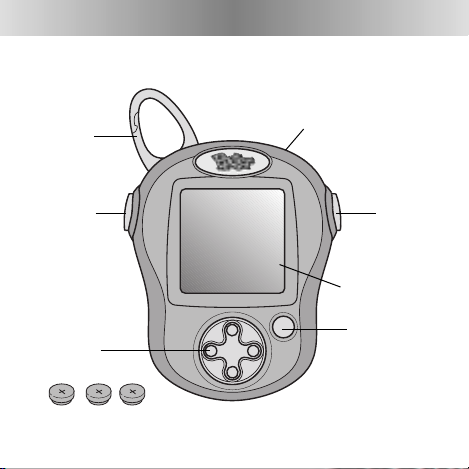
Pocket Pixter
®
Clip
Main Menu
Button
Control
Pad
Screen
Action
Button
On/Off Switch
3 Extra LR44
Button Cell Batteries
Action
Button
Page 3

3
Getting Started
• Please keep this manual for future reference,as it
contains important information.
• Adult assembly is required to replace batteries.
• Tool needed for battery replacement:Small Phillips
Screwdriver (not included).
• Requires three, LR44 alkaline button cell batteries
(included).
• We’ve included three, extra LR44 alkaline button cell
batteries.These batteries are for adult use only.
• Replace batteries when:
- Display on the screen becomes difficult to see.
- Toy functions erratically.
- Sounds become faint or there are no sounds at all.
• Extreme cold or heat may make the screen turn
black or white (you will not be able to see images).
If this happens, wait until the toy returns to room
temperature.The screen should function properly.
Page 4
4
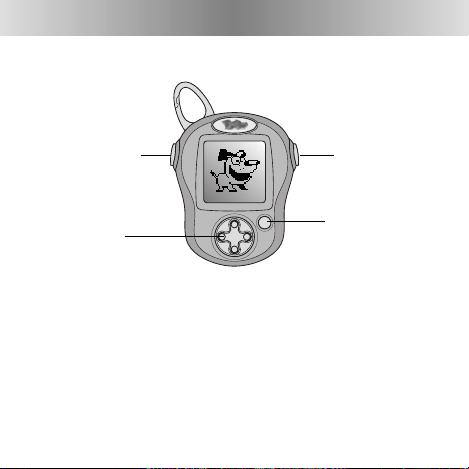
Main Menu
Button
Control
Pad
Action
Button
Action
Button
Contrast Control
• You can increase or decrease the contrast on the screen.
• Press and hold the main menu button and an action
button at the same time for about five seconds.When Pix
the dog appears, you can release the buttons.
• Now,press the top of the control pad to increase contrast;
press the bottom of the control pad to decrease contrast.
• Press and hold the main menu button and an action button at the same time for about five seconds.Pix disappears.
Page 5
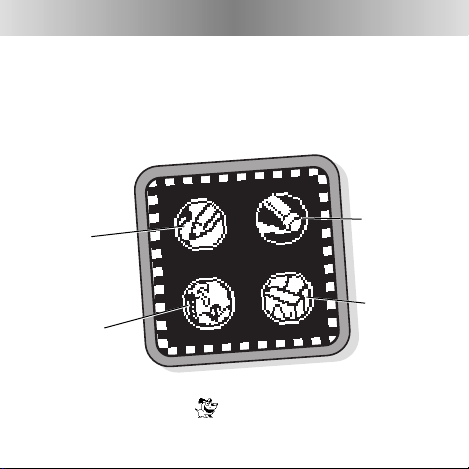
Awesome Activities
To choose an activity, use the control pad
to highlight an activity.Now,press either
action button to select!
Freestyle
Drawing
Erase
Scene
Starters
Stampers
5
Hint: You can find the hidden game in any of the activities.
Watch for Pix the dog and press either action button.
Page 6
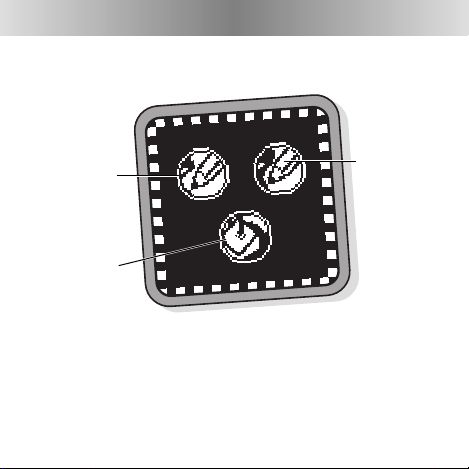
Freestyle Drawing
6
• Use the control pad to highlight regular pencil, thick
pencil or paint bucket. Press either action button.
Regular Pencil
Thick Pencil
Paint Bucket
Page 7

Regular Pencil
7
• Press and hold either action button while moving
the cursor using the control pad.
Hint: If you’d like to start over,erase a part of your creation,
or add to your creation using the stampers, press the main
menu button.
Cursor
Page 8
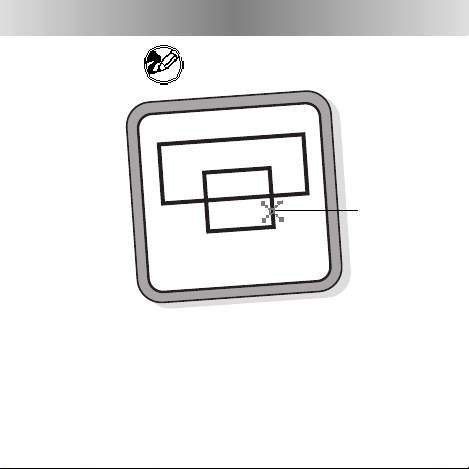
Thick Pencil
8
• Press and hold either action button while moving the
cursor using the control pad.
Hint: If you’d like to start over,erase a part of your creation,
or add to your creation using the stampers, press the main
menu button.
Cursor
Page 9

Paint Bucket
9
IMPORTANT! Use this tool to "fill" shapes.
• Use the control pad to move the cursor inside the shape
you would like to fill.
• Press either action button to fill!
Hint: If you’d like to start over,erase a part of your creation, or add
to your creation using the stampers, press the main menu button.
Cursor
Page 10

Eraser
10
• Use the control pad to highlight regular eraser, thick
eraser or full screen erase. Press either action button.
Regular
Eraser
Thick
Eraser
Full Screen
Erase
Page 11

Regular Eraser
• Press and hold either action button while moving the
cursor using the control pad. Look, you’re erasing!
Hint: After erasing, if you’d like add to your creation using the
freestyle drawing or stampers, press the main menu button.
11
Page 12

Thick Eraser
• Press and hold either action button while moving the
cursor using the control pad. Look, you’re erasing!
Hint: After erasing, if you’d like add to your creation using the
freestyle drawing or stampers, press the main menu button.
12
Page 13

Full Screen Erase
• Watch and listen as your drawing disappears!
• You’re back to freestyle drawing.
Hint: If you’d like to go to a different activity, press the
main menu button.
13
Page 14

• Use the control pad to scroll through different backgrounds.When you find one that you like, press
either action button.
Hint: If you’d like to start over,erase a part of your creation,
add to your creation using stampers or freestyle drawing,
press the main menu button.
14
Scene Starters
Page 15

Stampers
• Use the control pad to scroll through different
stampers . When you find one that you like, press
either action button.
15
Page 16

• Use the control pad to position your stamper on the
screen. Now, press either action button to place it.
You can repeat this procedure to select and place more
stampers if you’d like!
Hint: If you’d like to start over,erase a part of your creation or
add to your creation using freestyle drawing, press the main
menu button.
16
Page 17

Magical Matching
Object of the Game: Find all six matches in record time!
17
• Look at the blinking box on the screen.When you press
an action button, you’ll reveal a dinosaur picture in the
blinking box. Now, try to find the matching one.
Page 18

18
• Move the blinking box using the control pad.
Page 19

19
• Press an action button. Did you find a match?
Page 20

20
• If you find a match, great job! You have one match.
Look at the reward on the screen. It’s time to find
another one.
Reward
Page 21

21
• After six matches, look at your time!
• It’s time for a new game!
• If you don’t want to play again,press
the main menu button. Choose a
new activity.
Page 22

Battery Replacement
Battery Compartment
22
SHOWN ACTUAL SIZE
1.5V x 3
LR44 or equivalent
Page 23

23
• Locate the battery compartment on the back of the toy.
• Loosen the screw in the battery compartment door with
a Phillips screwdriver.
• Lift to remove the battery compartment door.
• Remove and throw away the worn button cell batteries.
• Insert three LR44 alkaline button cell batteries as
indicated inside the battery compartment.
Hint: We recommend using alkaline batteries for longer
battery life.
• Replace the battery compartment door and tighten the
screw with a Phillips screwdriver. Do not over-tighten.
Page 24

Battery Safety Information
Batteries may leak fluids that can cause a chemical burn
injury or ruin your toy.To avoid battery leakage:
• Do not mix old and new batteries or batteries of different
types: alkaline,standard (carbon-zinc) or rechargeable
(nickel-cadmium).
• Insert batteries as indicated inside the battery
compartment.
• Remove batteries during long periods of non-use.
Always remove exhausted batteries from the toy.
Dispose of batteries safely.Do not dispose of batteries
in a fire.The batteries may explode or leak.
• Never short-circuit the battery terminals.
• Use only batteries of the same or equivalent type,
as recommended.
• Do not charge non-rechargeable batteries.
• Remove rechargeable batteries from the toy
before charging.
• If removable,rechargeable batteries are used, they are
only to be charged under adult supervision.
24
Page 25

Care
• Keep water,sand and dirt off of this toy.
• Keep this toy away from direct sunlight and
excessive heat.
• Wipe this toy with a clean cloth dampened with a mild
soap and water solution. Do not immerse this toy.
• This toy has no consumer serviceable parts. Please do
not take this toy apart.
• Do not drop this toy on a hard surface.
25
Page 26

Consumer Information
Questions? We’d like to hear from you!
Call Fisher-Price® Consumer Relations,toll-free at
1-800-432-(KIDS) 5437, 8 AM- 6 PM EST Monday through
Friday.Hearing-impaired consumers using TTY/TDD equipment, please call 1-800-382-7470.Or, write to:
Fisher-Price®
Consumer Relations
636 Girard Avenue
East Aurora, New York 14052
For other countries,outside the United States:
Canada: call 1-800-567-7724, or write to:Mattel Canada Inc,6155 Freemont
Blvd., Mississauga,Ontario L5R 3W2.
G
reat Britain: telephone 01628 500302.
Australia: Mattel Australia Pty.Ltd., 658 Church Street, Locked Bag #870,
Richmond,Victoria 3121 Australia. Consumer Advisory Service 1300 135 312.
New Zealand: 16-18 William Pickering Drive,Albany 1331, Auckland.
26
Page 27

27
FCC Statement (United States Only)
This equipment has been tested and found to comply with the limits for a Class
B digital device, pursuant to part 15 of the FCC rules.These limits are designed
to provide reasonable protection against harmful interference in a residential
installation.This equipment generates, uses and can radiate radio frequency
energy and, if not installed and used in accordance with the instructions, may
cause harmful interference to radio communications. However,there is no guarantee that interference will not occur in a particular installation. If this equipment does cause harmful interference to radio or television reception, which
can be determined by turning the equipment off and on, the user is encouraged
to try to correct the interference by one or more of the following measures:
- Reorient or relocate the receiving antenna.
- Increase the separation between the equipment and receiver.
- Connect the equipment into an outlet on a circuit different from that to
which the receiver is connected.
- Consult the dealer or an experienced radio/TV technician for help.
Note: Changes or modifications not expressly approved by the manufacturer
responsible for compliance could void the user's authority to operate
the equipment.
Page 28

One (1) Year Limited Warranty
Fisher-Price,Inc., 636 Girard Avenue,East Aurora, New York 14052 warrants
Pocket Pixter® is free from all defects in material and workmanship when used
under normal conditions for a period of one (1) year from the date of purchase.
Should the product fail to perform properly,we will repair or replace it at our
option, free of charge.Purchaser is responsible for shipping the product to
Consumer Affairs at the address indicated above and for all associated freight
and insurance cost. Fisher-Price, Inc.will bear the cost of shipping the repaired
or replaced item to you.This warranty is void if the owner repairs or modifies
the product. This warranty excludes any liability other than that expressly stated
above including but not limited to any incidental or consequential damages.
SOME STATES DO NOT ALLOW THE EXCLUSION OR LIMITATION OF INCIDENTAL
OR CONSEQUENTIAL DAMAGES, SO THE ABOVE LIMITATION OR EXCLUSION MAY
NOT APPLY TO YOU.
THIS WARRANTY GIVES YOU SPECIFIC LEGAL RIGHTS, AND YOU MAY ALSO HAVE
OTHER RIGHTS WHICH MAY VARY FROM STATE TO STATE.
Fisher-Price,Inc., a subsidiary of Mattel, Inc.,
East Aurora, NY 14052 U.S.A.
©2004 Mattel, Inc.All Right Reserved.® and ™ designate
U.S. trademarks of Mattel,Inc.
PRINTED IN CHINA C6503pr-0920
 Loading...