

Page 1
D
i
s
c
o
v
e
r
w
h
a
t
’
s
p
o
s
s
i
b
l
e
™
…
Please keep this instruction sheet for future reference,
as it contains important information.
Requires three “AA” batteries (included).
Adult assembly is required for battery replacement.
Tool needed for battery replacement: Phillips screwdriver
(not included).
B1981
Page 2
Before First-Time Use
2
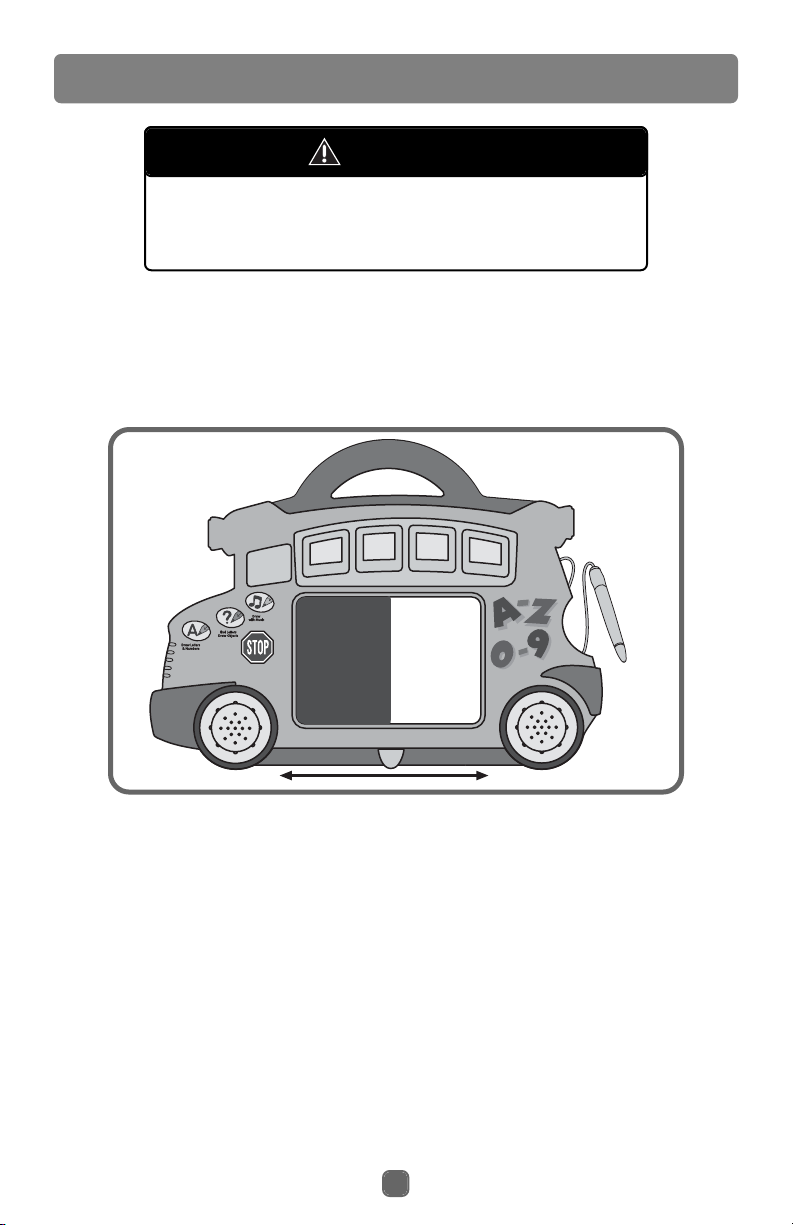
Note: A plastic tab is attached to the back of this toy for in-store
demonstration purposes. Pull and remove the plastic tab from the back of
the toy. Throw the plastic tab away.
Please keep small parts such as
plastic tabs out of children’s reach.
Throw the plastic tab away.
CAUTION
IMPORTANT! Before first-time use, completely darken the drawing screen with
the magnetic pen. Slide the eraser lever slowly from side to side to clear the
drawing screen. Repeat this procedure several times to enable the drawing
screen to create the clearest, darkest images.
Page 3
3
Battery Replacement
Battery
Compartment
Door
For best performance, we recommend replacing the batteries that
came with this toy with three, new
“AA” (LR6) alkaline batteries.
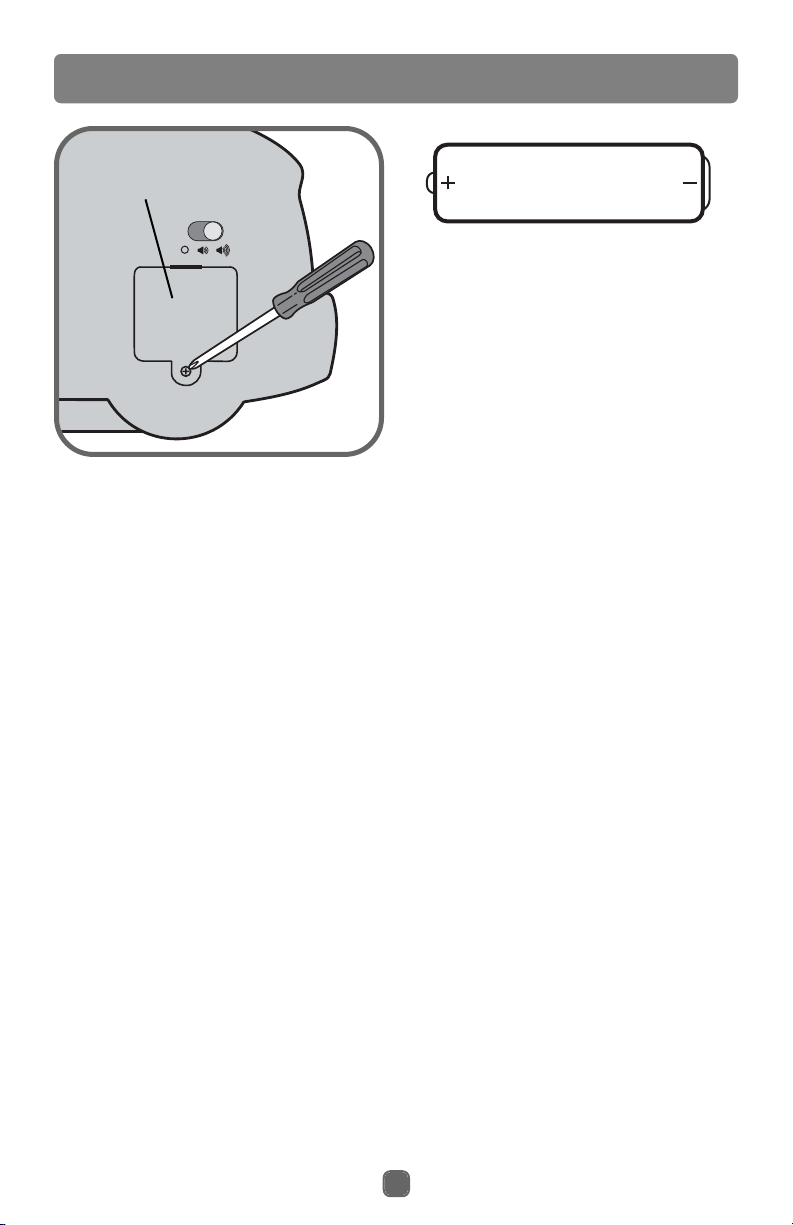
• Locate the battery compartment on
the back of the toy.
• Loosen the screw in the battery
compartment door with a Phillips
screwdriver. Remove the battery
compartment door. Throw the
exhausted batteries away.
•Insert three “AA” (LR6) alkaline
batteries, as indicated inside the
battery compartment.
Hint: We recommend using alkaline
batteries for longer battery life.
• Replace the battery compartment
door and tighten the screw with
a Phillips screwdriver. Do not
over-tighten.
• When sounds or lights from this toy
become faint or stop, it's time for an
adult to change the batteries!
1.5V x 3
"AA" (LR6)
Shown Actual Size
Battery Safety Information
Batteries may leak fluids that can
cause a chemical burn injury or ruin
your toy. To avoid battery leakage:
• Do not mix old and new batteries
or batteries of different types:
alkaline, standard (carbon-zinc) or
rechargeable (nickel-cadmium).
•Insert batteries as indicated inside
the battery compartment.
• Remove batteries during long periods of non-use. Always remove
exhausted batteries from the toy.
Dispose of batteries safely. Do not
dispose of batteries in a fire. The
batteries may explode or leak.
•Never short circuit the battery
terminals.
• Use only batteries of the same or
equivalent type, as recommended.
• Do not charge non-rechargeable
batteries.
• Remove rechargeable batteries
from the toy before charging.
• If removable, rechargeable batteries are used, they are only to be
charged under adult supervision.
Page 4
4
Getting Started
L
e
t
t
e
r
s
A
-
D
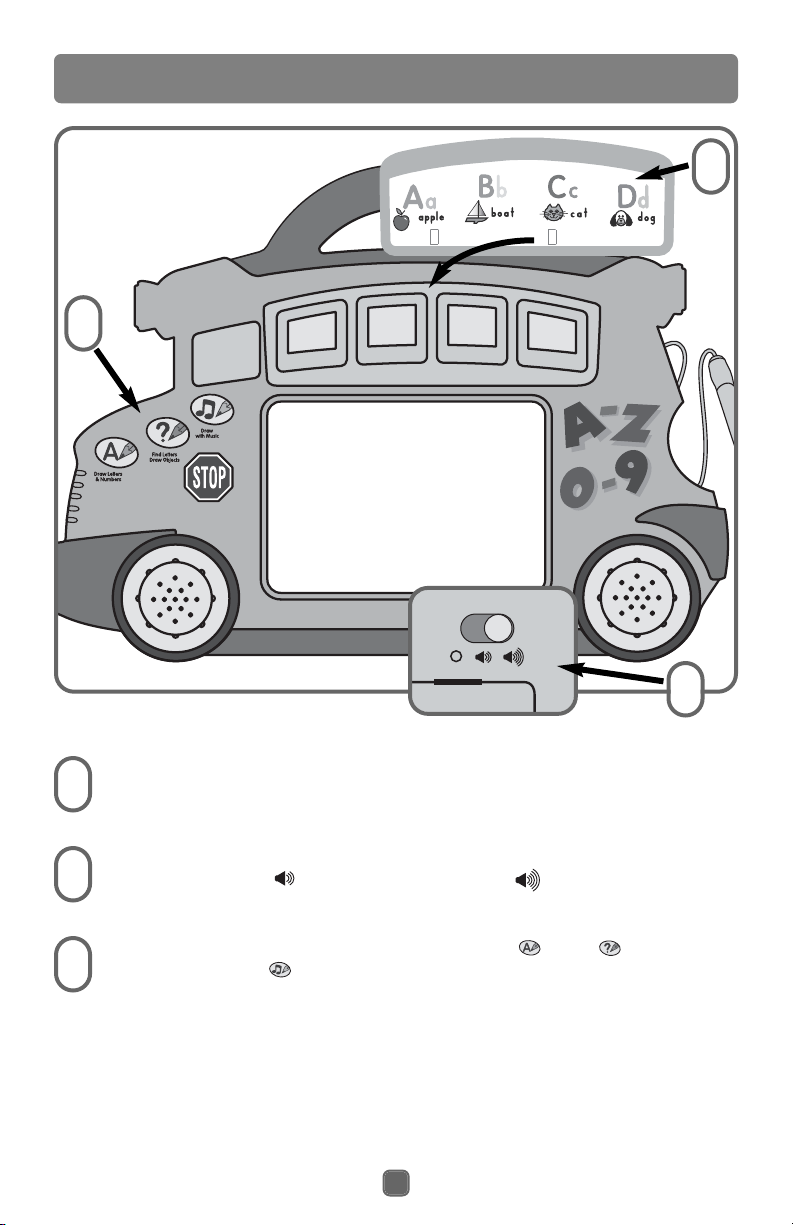
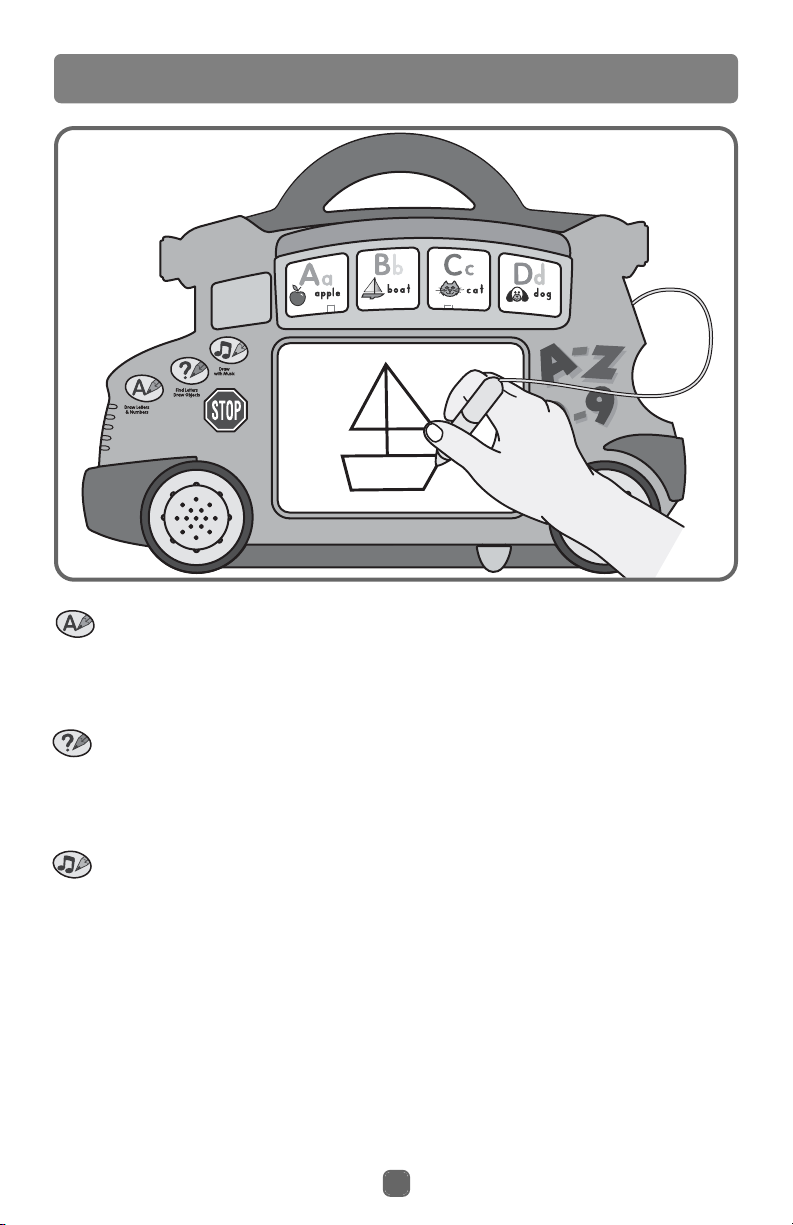
Insert one of the two-sided learning cards into the slot at the top
of the bus.
Press one of the three mode buttons: Learning , Quiz or
Musical Free Draw .
Slide the power/volume switch on the back of the toy to either
on with low volume;or on with high volume .
1
1
1
1
2
2
3
3
3
3
2
2
Page 5
5
Learning and Drawing Fun!
Letters A-D
Learning
A friendly voice invites you to touch a letter or number in the bus windows.
Press the letter or number in the window to hear it identified. You are then
asked to draw the letter. When you’re finished touch the stop sign and you
can try again with another number or letter.
Quiz
A friendly voice asks you to find a number or letter. Press the correct letter
or number in the bus windows and you’ll hear a positive response. You’ll
then be asked to draw a picture. When you’re finished touch the stop sign to
try again.
Musical Free Draw
Press any of the letters or numbers in the bus windows to hear it identified.
Then draw along to a fun song. Press another number or letter to hear a
different song.
D
-
A
s
r
e
t
t
e
L
Page 6
6
All Finished
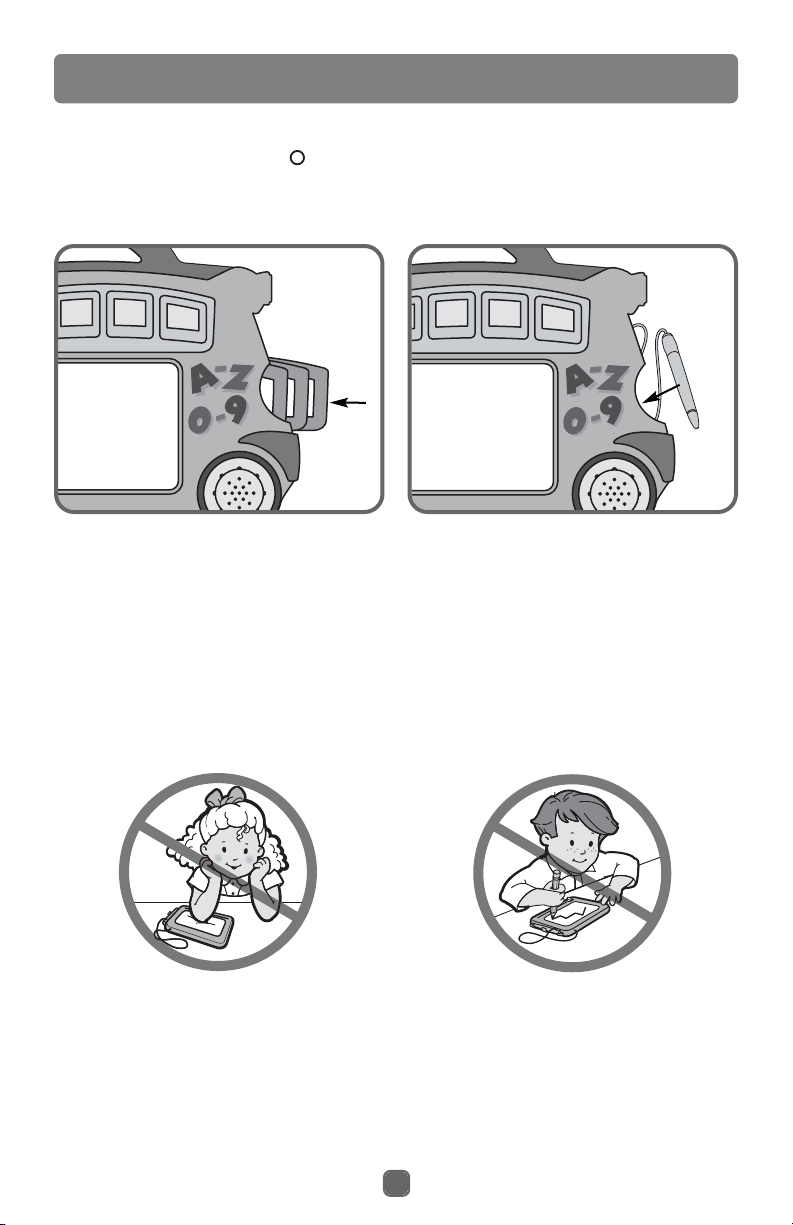
Store the learning cards in the slot
in the side of the toy.
Press to “snap” the pen into the
groove on the side of the toy.
• When your child is finished playing with this toy, slide the power/volume
switch to the off position .
Hint: This toy turns off automatically (sleep mode) if your child is not
actively playing with it. Press any of the mode buttons to turn it back on.
IMPORTANT! To avoid damage to the drawing screen:
• Use only the magnetic pen included.
• Do not use regular pencils, pens, crayons, or markers.
•Keep Electronic Learning Bus away from extreme heat sources such as
ovens, heaters, radiators and hot vehicles.
Do not apply heavy pressure or
force to the drawing screen. Heavy
pressure is not necessary and could
damage the drawing screen. A light
touch makes a black line.
Use only the special, magnetic pen
included. Do not use any other
object on the drawing screen.
Page 7

Consumer Information
FCC Note (United States Only)
Note: This equipment has been tested and found to comply with the limits for
a Class B digital device, pursuant to Part 15 of the FCC Rules. These limits
are designed to provide reasonable protection against harmful interference in
a residential installation. This equipment generates, uses and can radiate
radio frequency energy and, if not installed and used in accordance with the
instructions, may cause harmful interference to radio communications.
However, there is no guarantee that interference will not occur in a particular
installation. If this equipment does cause harmful interference to radio or
television reception, which can be determined by turning the equipment off
and on, the user is encouraged to try to correct the interference by one or
more of the following measures:
• Reorient or relocate the receiving antenna.
• Increase the separation between the equipment and receiver.
• Consult the dealer or an experienced radio/TV technician for help.
Note: Changes or modifications not expressly approved by the manufacturer
responsible for compliance could void the user's authority to operate the
equipment.
Questions? We'd like to hear from you!
Call Fisher-Price
®
Consumer Relations, toll-free at 1-800-432-5437,
8 AM - 6 PM EST Monday through Friday. Hearing-impaired consumers using
TTY/TTD equipment, please call 1-800-382-7470. Or, write to: Fisher-Price
®
Consumer Relations, 636 Girard Avenue, East Aurora, New York 14052.
7
Page 8

Fisher-Price, Inc., a subsidiary of Mattel, Inc., East Aurora, NY 14052 U.S.A.
© 2003 Mattel, Inc. All Rights Reserved. ® and ™ designate U.S. trademarks of Mattel, Inc.
Magna Doodle® trademark and patent rights used under license from Pilot Pen Corporation of America.
Printed in China B1981pr-0920
For other countries outside the United States:
CANADA Questions? 1-800-567-7724. Mattel Canada Inc., 6155 Freemont Blvd., Mississauga, Ontario
L5R 3W2.
GREAT BRITAIN Mattel UK Ltd, Vanwall Business Park, Maidenhead SL6 4UB, Helpline: 01628 500302.
AUSTRALIA Mattel Australia Pty. Ltd., 658 Church Street, Locked Bag #870, Richmond, Victoria 3121
Australia. Consumer Advisory Service 1300 135 312.
NEW ZEALAND 16-18 William Pickering Drive, Albany 1331, Auckland.
ASIA Mattel East Asia Ltd, Room 1106, South Tower, World Finance Centre, Harbour City, Tsimshatsui,
HK, China.
 Loading...