

Page 1

BattPAT
Battery Powered
Portable Appliance Tester
User Manual
Issue 2
Page 2

CONTENTS
SAFETY 3
GETTING STARTED 4
INTRODUCTION 5
FEATURES 6
PLANNING THE TESTS
Determining the Class of construction 8
Type of equipment 8
Type of environment 9
Frequency of visual inspection and testing 9
Equipment Register 9
FORMAL VISUAL INSPECTION
Cable 10
Appliance 10
Plug external 11
Plug internal 11
Fuse rating 12
OPERATION
Testing Class I equipment 13
Class I Earth Connection 14
Testing Class II equipment 15
Testing IEC leads 16
Testing mains extension leads 17
Protection from accidental mains connection 18
Testing 110 V appliances 18
Testing 3-phase appliances 18
SPECIFICATION 19
APPENDIX I
Suggested Frequency of Inspection & Testing of Equipment 20
CARING FOR YOUR BATTPAT 22
LIFETIME WARRANTY CONDITIONS
(INSIDE BACK COVER)
BattPAT Issue 2.
Page 3

FIRST STOP SAFETY 3
SAFETY
Please read this manual carefully to make you familiar with the
capabilities and functions of the BattPAT before attempting to
use it.
1. This manual contains all the information necessary to carry out in-service
testing of all electrical appliances. If after reading this manual you are still
not confident about carrying out the tests then please consider either:
Attending one of our “Demystifying Portable Appliance Testing” courses
held around the UK or studying our Distance Learning Package on
Portable Appliance Testing. See our website www.firststopsafety.co.uk
for details.
2. The unit is designed to be powered from a rechargeable 9V NiMH
battery. This is built into the unit and is not designed to be a user
replaceable item.
3. The IEC socket provided is for the testing of IEC leads. Take great care
not to plug an IEC lead into the mains and then into this socket.
However, if this should happen accidentally the unit is protected internally.
4. A battery charger rated at 12V and 500mA is provided with the BattPAT.
There is no mains power-on switch. To isolate the unit from the mains,
either switch off at the mains socket or disconnect the battery charger.
5. There are no user serviceable parts in this unit. Under no circumstances
should the user attempt to open the unit. If opened, the warranty will
be invalidated.
6. The BattPAT is guaranteed for one year from the date of purchase. Please
keep your invoice as proof of purchase. Should the unit require a
service, repair or calibration, please return it to the address at the
back of this user manual.
When returning the unit, please contact the Sales Department to
receive a Returns Number. The owner will be advised of any costs
prior to work commencing.
BattPAT Issue 2.
Page 4
FIRST STOP SAFETY 4
GETTING STARTED
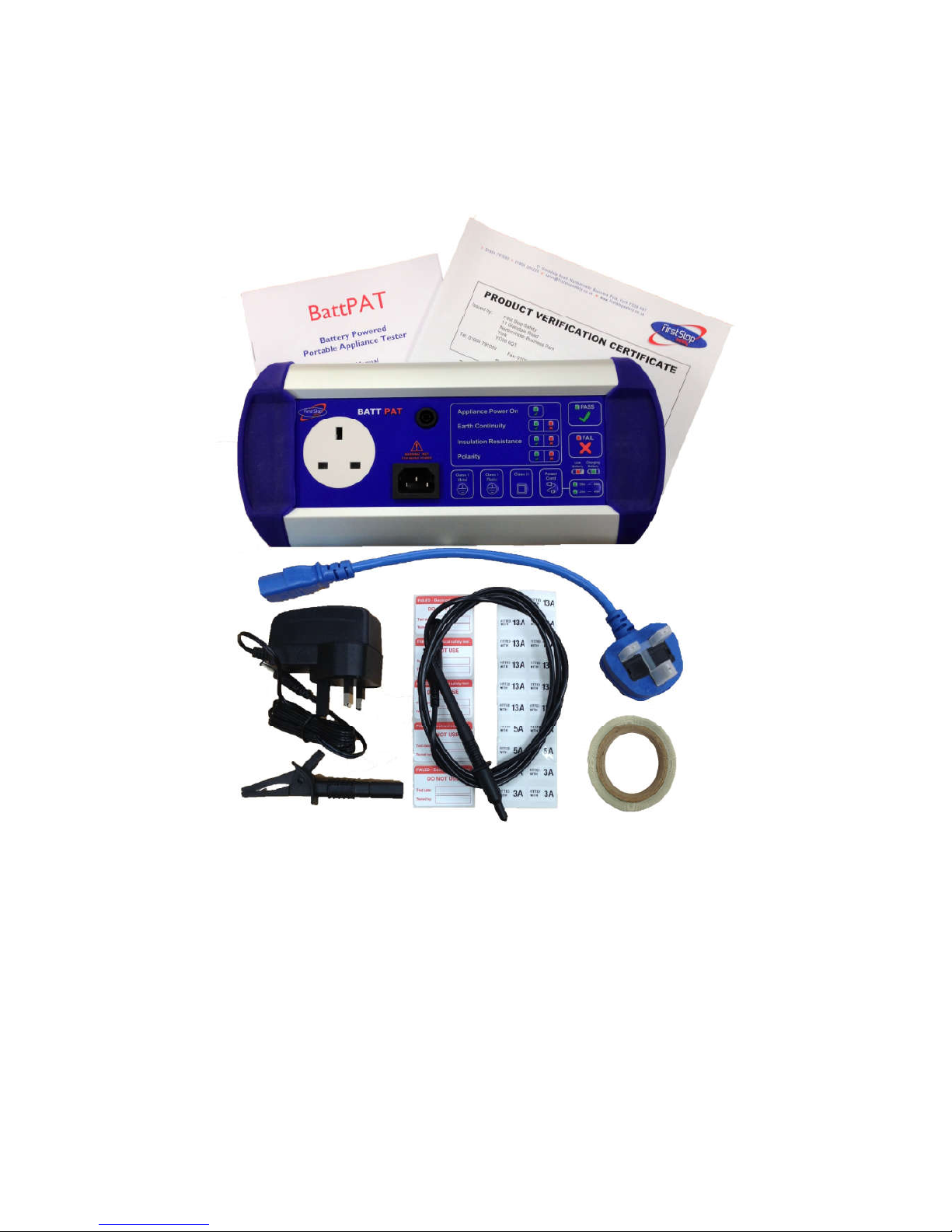
Before using the BattPAT please check that the following items have been
included in the shipment:
BattPAT unit
Battery charger
Earth test lead
Short IEC lead
User manual
Equipment Register form
Test Record form
100 Tested, 5 Failed and 50 Fuse labels.
Check for any damage in transit. If there is any sign of damage, please report
it to your supplier and do not attempt to repair the unit.
BattPAT Issue 2.
Page 5

FIRST STOP SAFETY 5
INTRODUCTION
The Electricity at Work Regulations 1989 (EAW) places certain requirements on
employers, designed to control risks that can arise from the use of
electricity. In practice, this means that all electrical appliances at work need
to be inspected and tested.
The BattPAT is a compact battery powered Portable Appliance Tester, and
can be used to test PCs, monitors, kettles, desk lights, drills, hairdryers etc. If
an appliance has a plug it can be tested on BattPAT.
The clear controls and displays make this instrument very easy to use. The
instructions, labels and sample records supplied make it very easy for anyone to
undertake safety testing on all electrical appliances.
The user has only to decide whether the equipment to be tested is built to a
Class I or Class II construction. The supplied test clip is connected and the
appropriate button pressed.
Before any PAT Testing is carried out, it is very important to inspect the
appliance. Many faults, e.g. a wrong value fuse or a wrongly wired plug,
can only be found by careful inspection. This user manual sets out how
this can be carried out.
Also included are master forms that can be used for managing PAT
Testing in the workplace. These can be copied as many times as required.
BattPAT Issue 2.
Page 6
FIRST STOP SAFETY 6
FEATURES
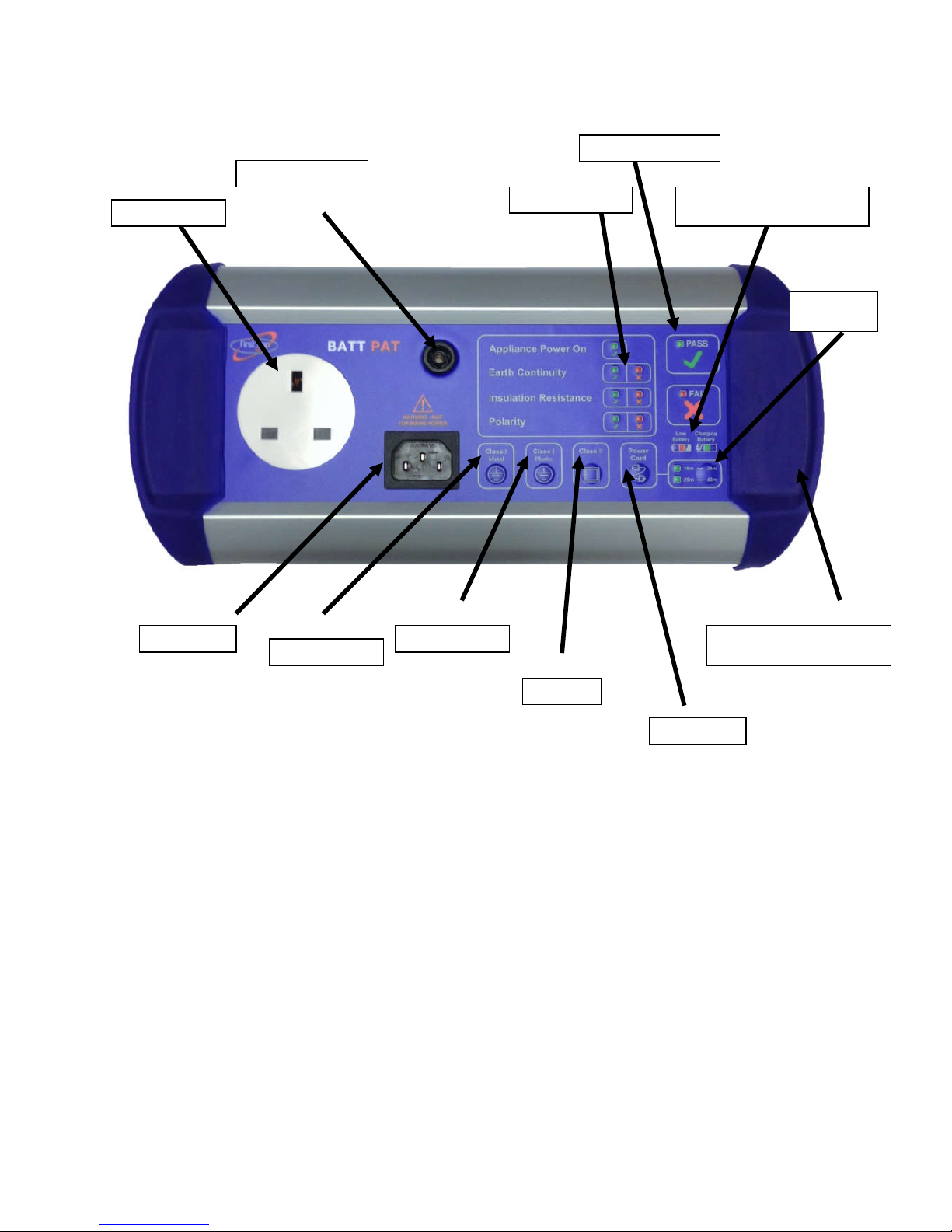
CLASS I METAL TEST
When this button is pressed, the unit will test Earth Continuity and
Insulation Resistance showing the results for each test and an overall PASS
or FAIL.
CLASS I PLASTIC TEST
When this button is pressed, the unit will test Insulation Resistance showing
the result for the test and an overall PASS or FAIL.
CLASS II TEST
When this button is pressed, the unit will test Insulation Resistance showing
the result for the test and an overall PASS or FAIL.
APPLIANCE POWER ON TEST
When any of the above 3 tests are carried out, the BattPAT first checks
that the appliance power switch is turned ON.
BattPAT Issue 2.
Mains Socket
IEC Socket
Class I metal
Class I plastic
Class II
Power cord
Long lead
Battery charging & status
Overall Pass/Fail
Test Pass/Fail
Test lead socket
Charger socket (on side)
Page 7

FIRST STOP SAFETY 7
POWER CORD
When this button is pressed, the unit will carry out an Earth Continuity,
Insulation Resistance and a Polarity test showing the results for each test
and an overall PASS or FAIL.
LONG LEAD
This is used when appliances and power cords exceeding 10m in length
are being tested. With this function, the BattPAT can test appliances and
power cords up to 40m in length.
BATTERY CHARGING
When the battery capacity is low, a battery Low LED will start to flash
warning the user to recharge at the next available opportunity. If the
battery charge is too low, the unit will not operate.
When the charger is first plugged in a fast charge is applied for two hours.
During this period, the charge LED flashes. After this the battery is
charged at a lower rate for another 6 hours. The charge LED is on steady
during this time. The BattPAT can be powered using the charger if the
battery is flat.
SHORT IEC LEAD
This allows mains extension leads to be tested easily.
SAMPLE FORMS
An “Equipment Register” and a “Equipment Test Record” form is
included. These can be copied and used as often as required. The user
manual refers to this under the relevant sections.
LABELS
100 ‘tested’ labels, 5 ‘failed’ labels and 50 fuse labels are supplied with
each unit. Additional labels are available to purchase separately.
SELF TEST
The BattPAT has a built in self test feature. If the test voltages or currents
are outside the expected range, then it will not carry on with the testing.
The overall PASS and FAIL LEDs will flash to indicate a problem. If this
were to happen, then contact your supplier.
BattPAT Issue 2.
Page 8

FIRST STOP SAFETY 8
PLANNING THE TESTS
Before commencing testing, it is advisable to take a few minutes to plan. First
of all work out whether the equipment is Class I or II. Then the type of
equipment and the environment it is going to be used in. This will help to
determine how often the inspection and testing has to be carried out. The
Equipment Register then needs to be prepared. Once this is completed, one is
ready to commence Inspection and Testing.
Class of construction
All equipment that uses mains electricity are either Class I or Class II. Knowing
the Class of the equipment is important when planning the testing.
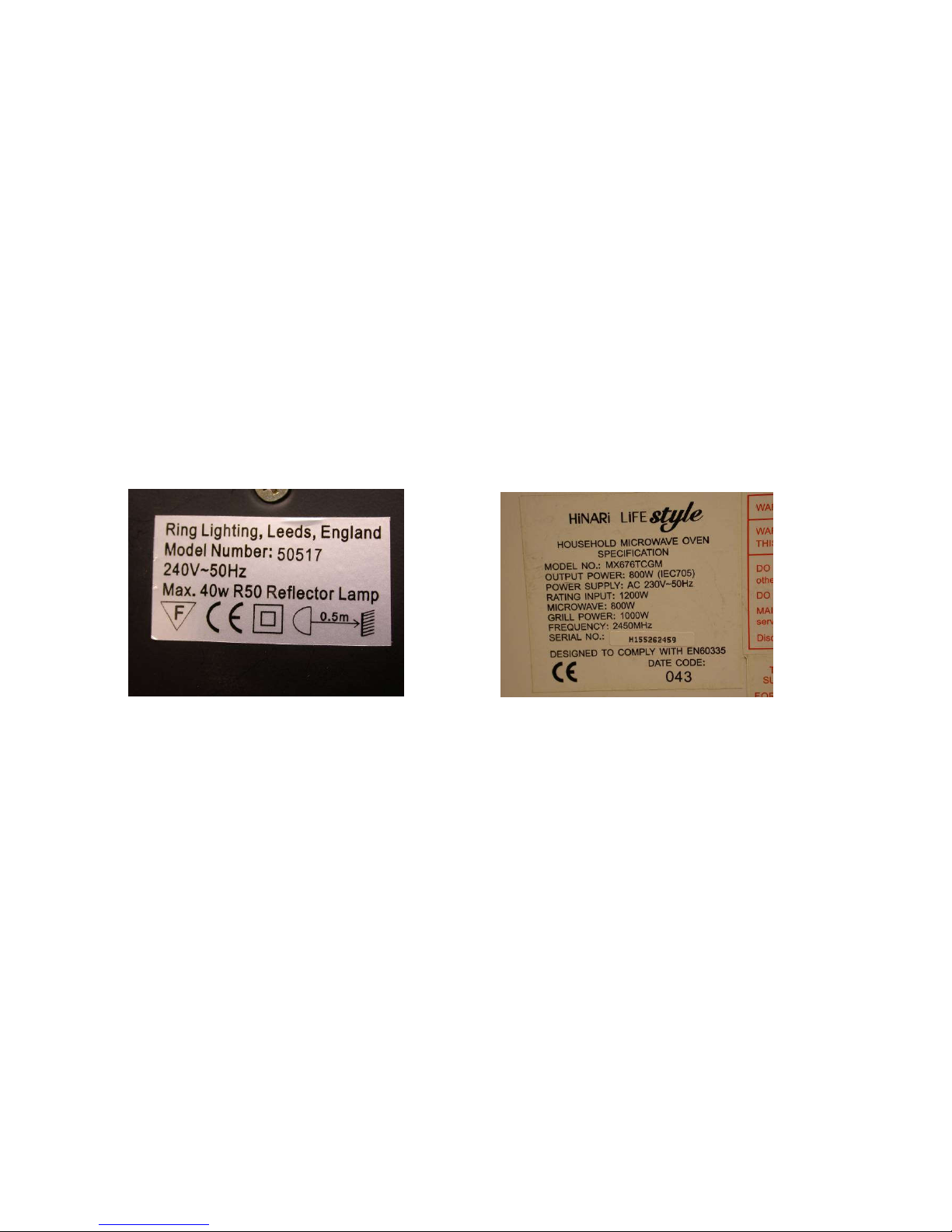
If the symbol is present on the rating plate the equipment is Class II. If the
symbol is missing, assume that the equipment is Class I. Mains extension
leads and IEC leads are treated as Class 1 appliances.
Type of equipment
For the purpose of planning, electrical equipment is categorized into 5 types as
shown below. In general, the easier it is to move an appliance, the higher the
chances of damage to it and the more frequently it has to be tested.
Stationary equipment: Refrigerators and washing machines are examples.
Information Technology equipment: This includes computers, VDUs,
data terminals, telephones, printers, fax machines and photocopiers.
Movable (transportable) equipment: Items that are moved
occasionally, like fans and fires would fit in this category.
Portable appliance: These are appliances such as vacuum cleaners, toasters
and kettles which can easily be moved whilst connected to the mains.
Handheld appliance: This is equipment intended to be held in the hand
during normal use like a hair dryer or drill.
BattPAT Issue 2.
Page 9

FIRST STOP SAFETY 9
Environment
The location of equipment will have a bearing on the frequency of testing.
For example an item that is used in a low-risk environment such as an office
will have a much lower risk of damage than an item used on a construction
site. Please see below for various examples.
Low risk: Offices, shops, hotels and nursing homes
Medium risk: Schools
High risk: Factories, commercial kitchens and equipment used by the public.
Very high risk: Construction sites
Frequency of visual inspection and testing
It is not essential to carry out inspecting and testing every year. Table 1 below
gives some intervals that are recommended in low risk environments, such as
offices, shops, hotels, and nursing homes. (Timescales for other environments
can be found in Appendix I)
Class I
Class II
Type
Inspection
Insp. & test
Inspection
Insp. & test
Stationary
24 months
60 months
24 months
none
IT
24 months
60 months
24 months
none
Movable
12 months
24 months
24 months
none
Portable
12 months
24 months
24 months
none
Hand-held
12 months
24 months
12 months
none
Table 1: Frequency of inspection and testing in low risk environments
Equipment Register
This form is used to list all the electrical equipment in the business.
Information, such as Class I or II, type of equipment and frequency of test is
recorded. A blank form is supplied, and this can be photocopied and used if
additional sheets are required. As new equipment is purchased, this needs to be
added to the register.
BattPAT Issue 2.
Page 10
FIRST STOP SAFETY 10
FORMAL VISUAL INSPECTION
Once the above preparation work has been carried out, the visual inspection is
quite straightforward. It is important to prepare a Test Record for each piece
of equipment. A sample form is provided that can be photocopied and
used as required. This form will be used to record the history of visual
inspection and testing.
Formal Visual Inspection is a very important part of making sure that
appliances are safe to use. In fact, the majority of faults can only be found by a
good visual inspection of the appliance. The following is a list of faults to look
for:
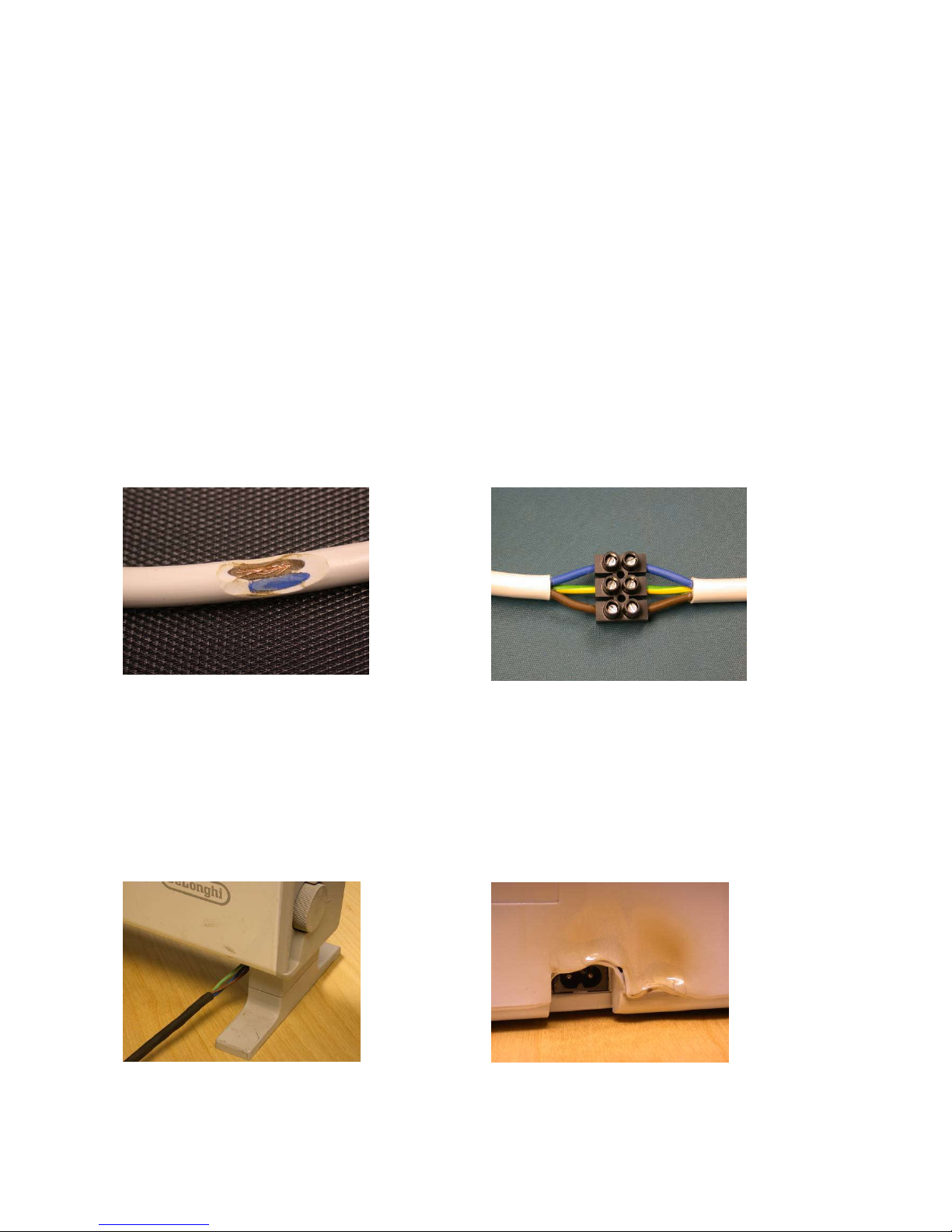
Cable
Damage to power cable sheath. Any non-standard joints.
Appliance
Signs that the equipment has been subject to conditions for which it is not
suitable, e.g. wet or excessively rusty.
Cable not being gripped. Damage to external casing.
BattPAT Issue 2.
Page 11
FIRST STOP SAFETY 11
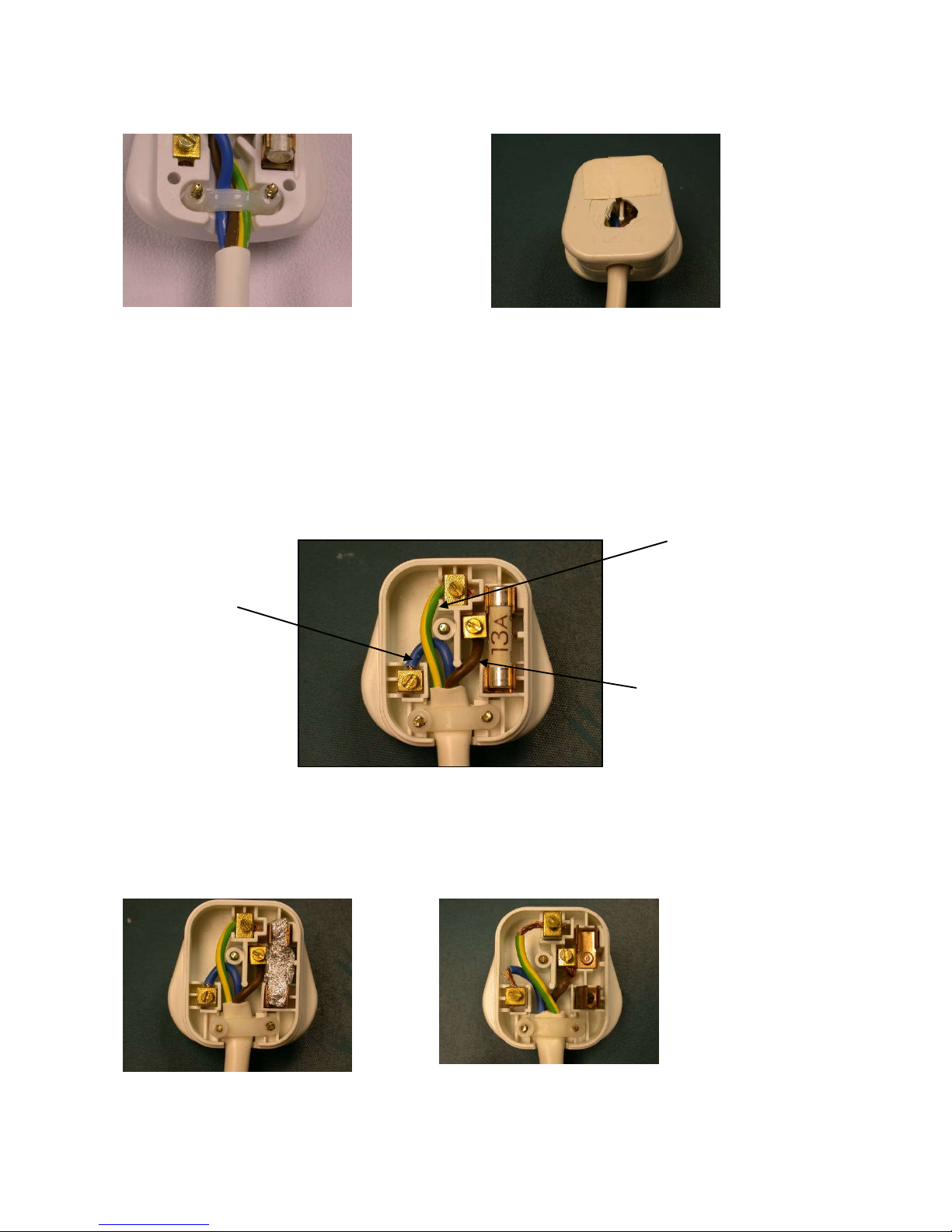
Plug external
Cable not being gripped. Damage to mains plug.
Plug internal
In addition to the above, the plug cover (if it is not molded) needs to be
taken off and check that the cable terminations are correct.
Examples of faults:
Fuse not being used. Bare wires visible.
BattPAT Issue 2.
EARTH WIRE: Green/Yellow
LIVE WIRE: Brown
NEUTRAL WIRE: Blue
Page 12
FIRST STOP SAFETY 12
Fuse rating
Check fuse rating. If possible, refer to manufacturer's user guide. Otherwise
follow guidelines below:
3A or 5A fuse fitted: NO action.
13A fuse fitted: Then check power rating.
If power is less than 700 W then fit 3 Amp Fuse.
If power is more than 700 W then NO action.
Examples:
40W rating, requires 3A fuse. 1200W rating, requires 13A fuse.
If the equipment fails on any of the above points, then it must be taken out of
service, a "DO NOT USE" label applied and not used again until it has been
properly repaired and tested.
Under no circumstances must one proceed with the testing
stage, if a failure is found during the Formal Visual Inspection
stage.
BattPAT Issue 2.
Page 13
FIRST STOP SAFETY 13
OPERATION
Testing Class I equipment
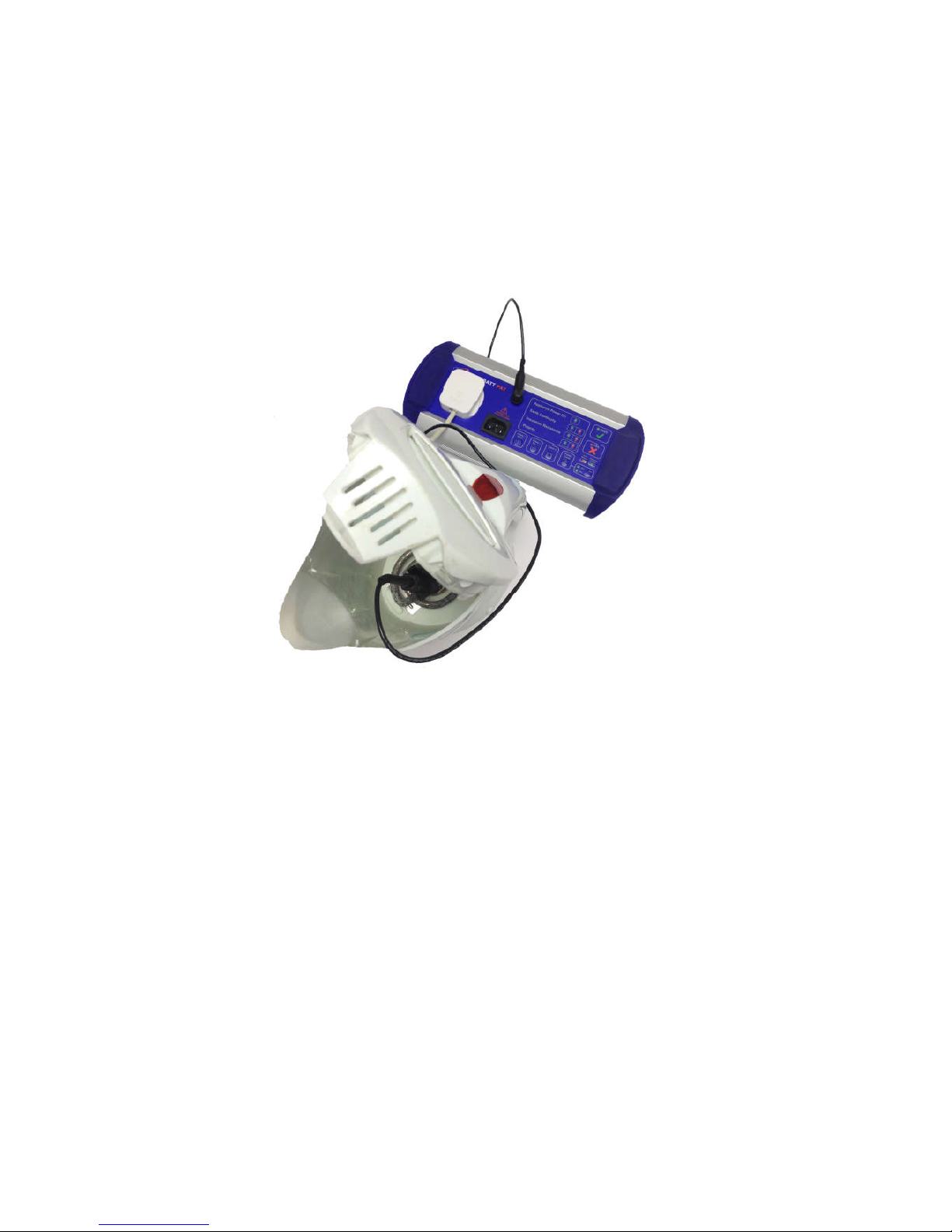
The equipment to be tested is plugged into the mains socket on the BattPAT.
The test clip is connected to any exposed metal on the equipment. For
example on a kettle this will be the element. On a PC it will be the metal case.
Press the Class I (metal) button. If the appliance power switch is turned ON, the
green LED will be ON steady and the test will now run and the display will show
the result for the Earth Continuity and Insulation Resistance tests as well as an
overall Pass or Fail.
If the appliance Power switch is turned OFF then the green LED will flash as a
reminder to the user. If the user turns the switch ON within 5 seconds the
test will continue and the green LED will be ON. Otherwise the test will
continue after 5 seconds BUT the green LED will be OFF.
Note 1: When the tests are performed, it is important to flex the power lead
to make sure that any loose connections are stressed and are picked up by the
test. The Earth Continuity test is repeated automatically to look for this.
Note 2: On some appliances, paint, rust or scale will prevent a good earth. It is
important to persevere and try and get a good earth connection when carrying
out this test,
BattPAT Issue 2.
Page 14
FIRST STOP SAFETY 14
Some Class I appliances (eg electric fans, vacuum cleaners) may not have any
exposed metal to connect the test clip to. If this is the case, then use the
Class I plastic button The Insulation Resistance will be tested and a Pass or
Fail will be displayed.
Once the testing is complete, record the results on the Test Record.
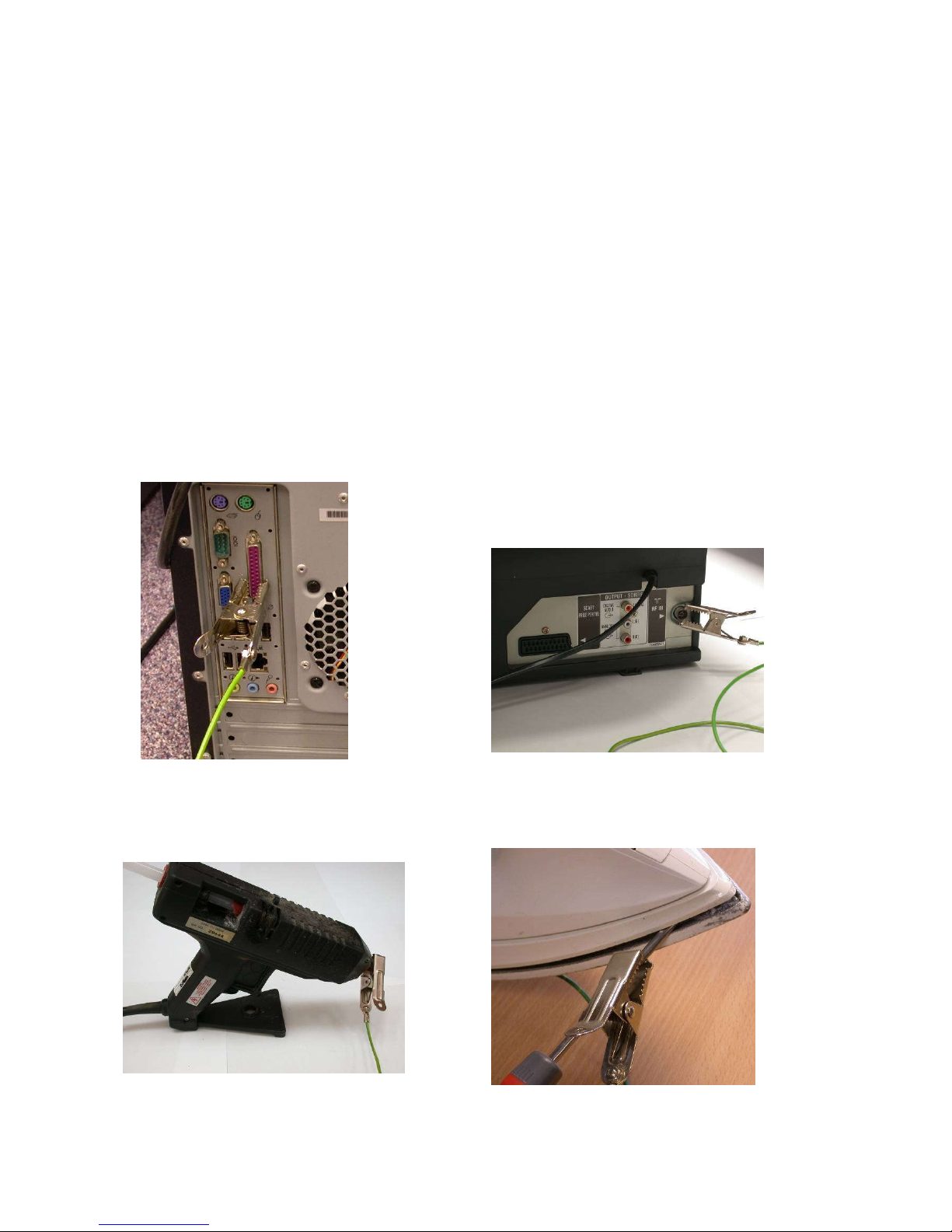
Class I Earth Connection
Finding a good earth on Class I appliances comes with experience. To
help you identify where to connect the test lead, we have provided a few
examples below.
PC: Case or connector Television: Aerial
Hot melt gun: nozzle Iron: Behind plate
BattPAT Issue 2.
Page 15
FIRST STOP SAFETY 15
Testing Class II equipment
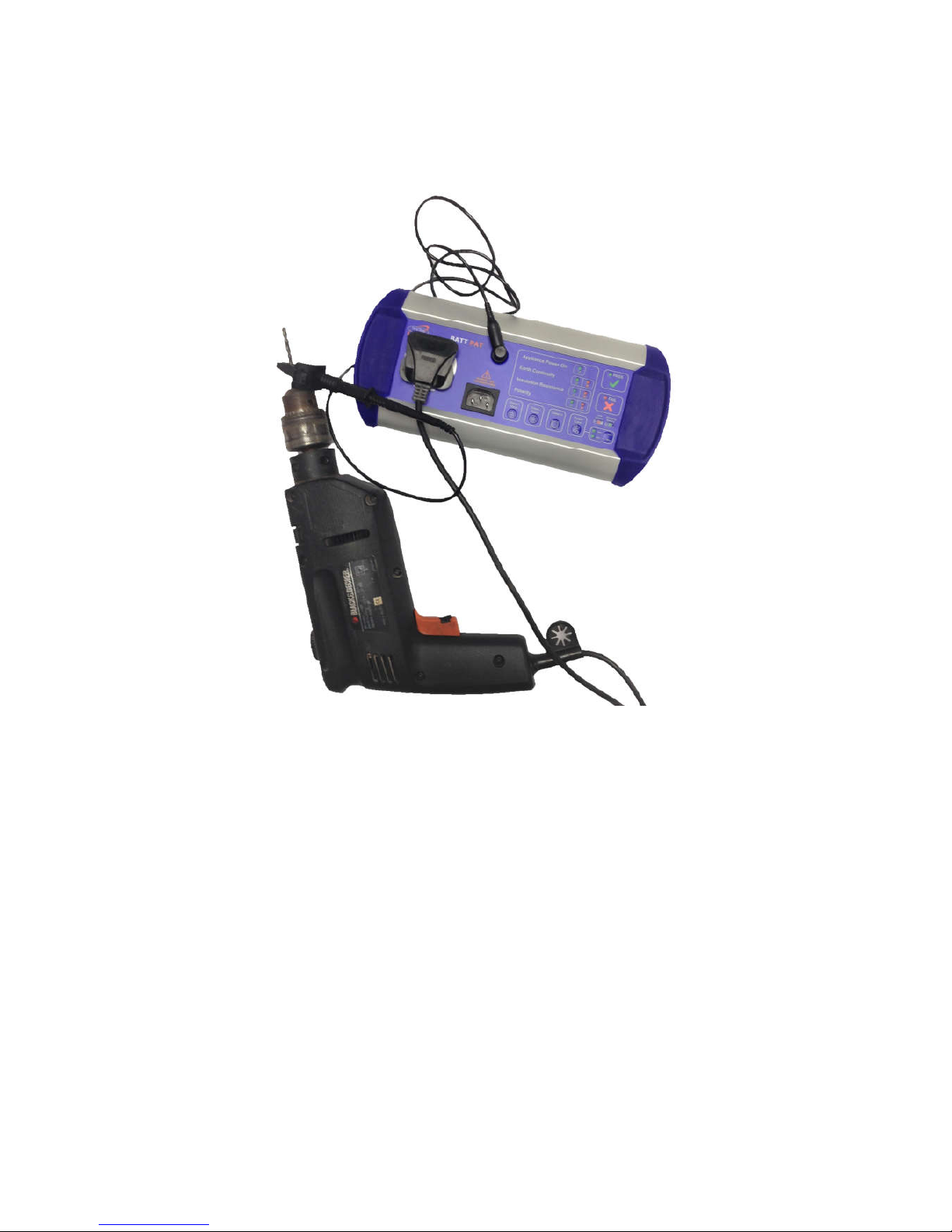
The equipment to be tested is plugged into the mains socket on BattPAT.
The test clip is connected to any exposed metal on the equipment, if present.
Press the Class II button. If the appliance power switch is turned ON, the
green LED will be ON steady and the test will now run and the display will
show the result for the Insulation Resistance as well as an overall Pass or Fail.
If the appliance Power switch is turned OFF then the green LED will flash as
a reminder to the user. If the user turns the switch ON within 5 seconds
the test will continue and the green LED will be ON Otherwise the test will
continue after 5 seconds BUT the green LED will be OFF.
Note: On Class II appliances, such as hair driers where there is no exposed
metal, the test lead can be left unconnected.
Once the testing is complete, record the results on the Test Record.
BattPAT Issue 2.
Page 16
FIRST STOP SAFETY 16
Testing IEC leads
When testing IT equipment with detachable IEC leads, it is important to test
these as individual items.
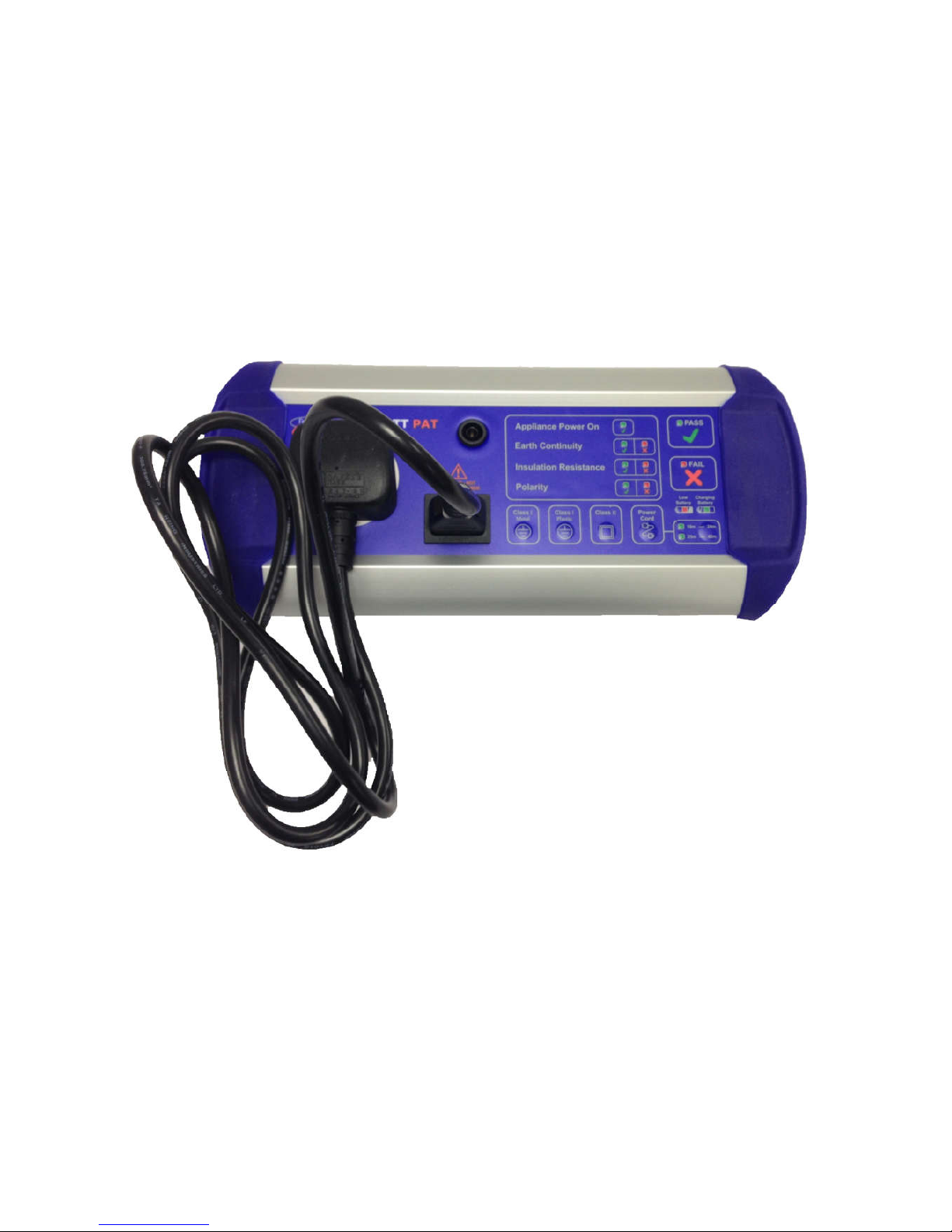
Plug both ends of the IEC lead into the BattPAT. One end into the mains
socket and the other end into the IEC socket. Press the Power cord button.
The test will be run and the result for Earth Continuity, Insulation Resistance
and Polarity will be displayed as well an overall Pass or Fail.
Once the testing is complete, it is important to label the leads.
BattPAT Issue 2.
Page 17
FIRST STOP SAFETY 17
Testing mains extension leads
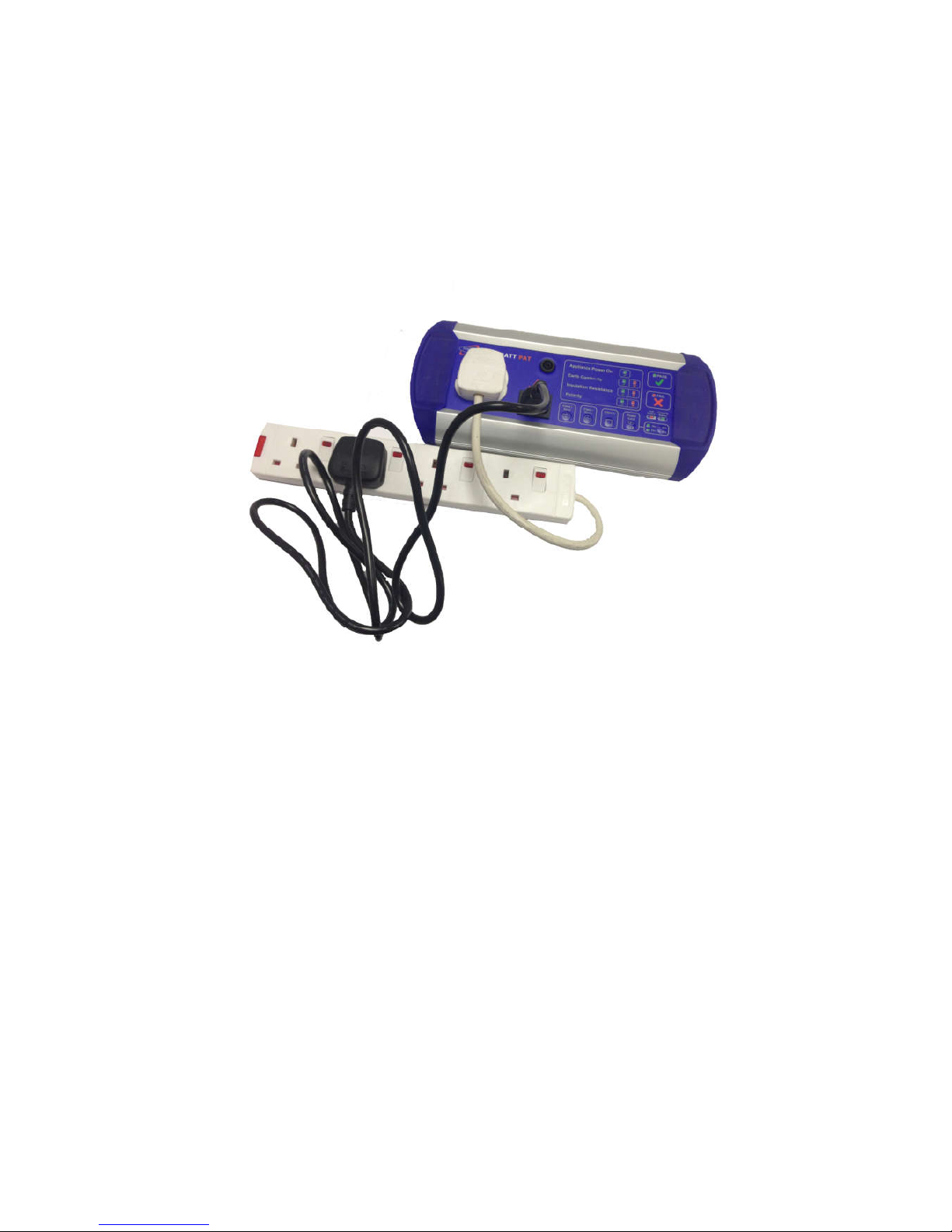
This short IEC lead allows the testing of mains extension leads. Plug the
extension lead into the BattPAT. Plug the adaptor into one of the sockets of
the extension lead and also into the IEC testing socket on the BattPAT.
Press the Power cord button to test Earth Continuity, Insulation Resistance
and Polarity.
Note 1: On a multi-way mains extension lead, make sure that you check all the
socket outlets.
Note 2: The Insulation Resistance test is carried out at 360V. This means that
surge-protected mains extensions will pass when this test is carried out on the
BattPAT.
Note 3: The BattPAT is designed to pass leads with lengths up to 10 metres.
When testing leads of length 10 to 24 metres press the long lead button once.
The LED for this range of lengths will light up. The test can now be carried out
by pressing the Power Lead button.
When testing leads of length 25 to 40 metres press the long lead button twice.
The LED for this range of lengths will light up. The test can now be carried out
by pressing the Power Lead button.
Once the testing is complete, it is important to label the leads.
BattPAT Issue 2.
Page 18
FIRST STOP SAFETY 18
Protection from accidental mains connection
The BattPAT can detect when mains voltage is accidentally connected to either
the mains socket or the IEC socket. If the user tries to carry out a test under
these conditions the three red fail LEDs will flash and the test will not be done.
Testing 110 V appliances
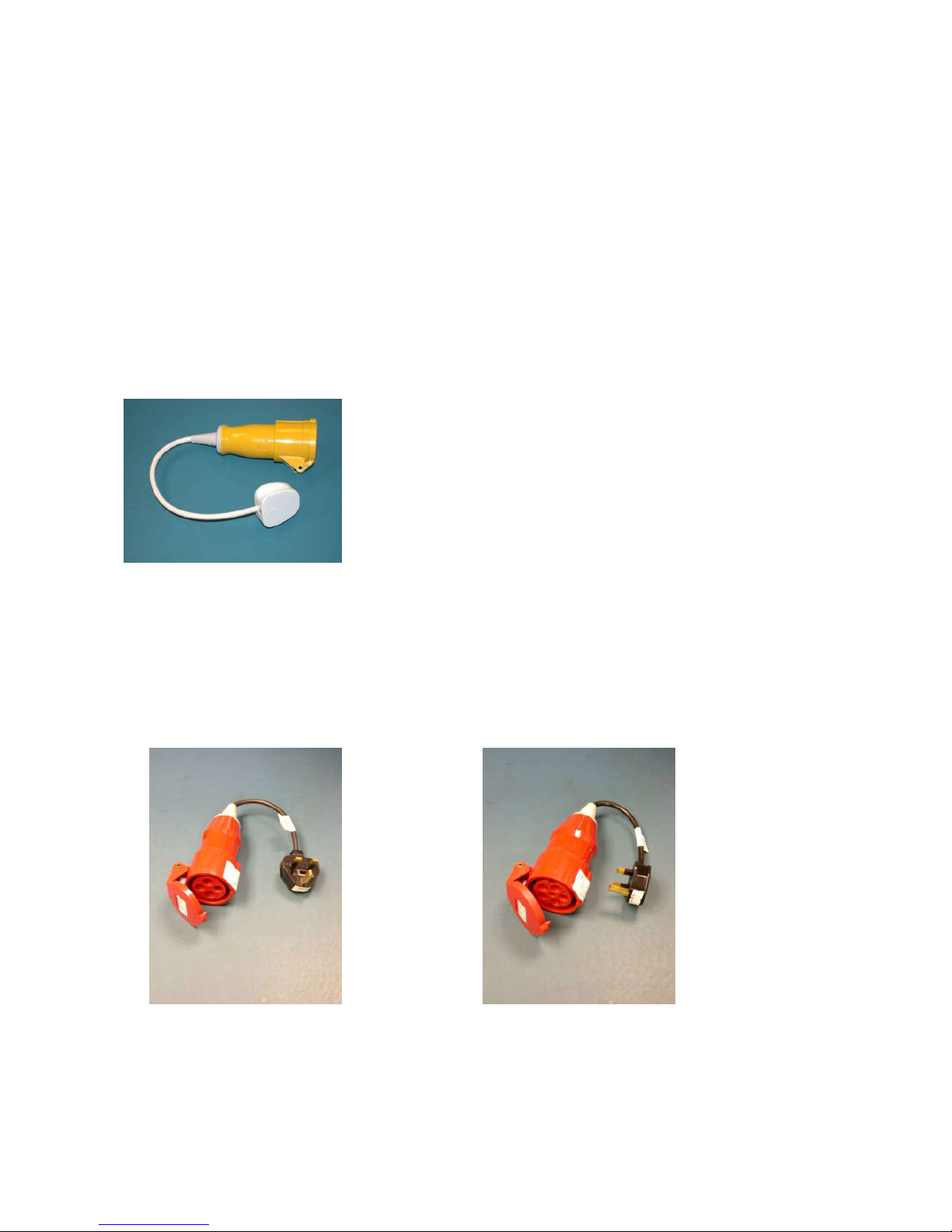
This requires a 110 V adaptor. Just plug the adaptor into the BattPAT and
connect the appliance to be tested into the yellow 110 V socket. Then use the
BattPAT as normal.
Testing 3-phase appliances
This requires a 3-phase adaptor (Various models available). Just plug the adaptor into
the BattPAT and connect the appliance to be tested into the 3-phase socket.
Then use the BattPAT as normal.
These adaptors are designed to be used only with the BattPAT
for testing purposes; under no circumstances are they to be
connected to a mains outlet.
BattPAT Issue 2.
Page 19

FIRST STOP SAFETY 19
SPECIFICATION
EARTH CONTINUITY TEST
CURRENT 150 mA
OC VOLTAGE 9 V
TOLERANCE 5% + 20 mΩ
FAIL THRESHOLD (Normal Lead up to 10m) > 250 mΩ
FAIL THRESHOLD (Long Lead up to 25m) > 500 mΩ
FAIL THRESHOLD (Long Lead up to 40m) > 800 mΩ
INSULATION TEST
TEST VOLTAGE 360 V
SC CURRENT < 3 mA
TOLERANCE 5% + 0.1V
FAIL THRESHOLD CLASS I < 2 MΩ
FAIL THRESHOLD CLASS II < 4 MΩ
POLARITY TEST
TEST VOLTAGE 5 V
SC CURRENT 0.5 mA
WORKING LOAD >30 kΩ
BATTERY & CHARGING
BATTERY 9 V, NiMH
LIFE 700 operations
FAST CHARGE 60mA, 2Hr
TRICKLE CHARGE 20 mA, 6Hr
CHARGER DC 12V, 500mA
DIMENSIONS
HEIGHT 45 mm
WIDTH 285 mm
DEPTH 130 mm
WEIGHT 1.1 Kg
BattPAT Issue 2.
Page 20

FIRST STOP SAFETY 20
APPENDIX I
Suggested Frequency of Inspection & Testing of
Equipment
SCHOOLS
Class I
Class II
Type
Inspection
Insp. & test
Inspection
Insp. & test
Stationary
None
12 months
12 months
48 months
IT
None
12 months
12 months
48 months
Movable
6 months
12 months
12 months
48 months
Portable
6 months
12 months
12 months
48 months
Hand-held
6 months
12 months
12 months
48 months
EQUIPMENT USED BY THE PUBLIC
Class I
Class II
Type
Inspection
Insp. & test
Inspection
Insp. & test
Stationary
monthly
12 months
12 months
24 months
IT
monthly
12 months
12 months
24 months
Movable
weekly
6 months
6 month
12 months
Portable
weekly
6 months
6 month
12 months
Hand-held
weekly
6 months
6 month
12 months
FACTORIES, COMMERCIAL KITCHENS
Class I
Class II
Type
Inspection
Insp. & test
Inspection
Insp. & test
Stationary
None
24 months
None
24 months
IT
None
24 months
None
24 months
Movable
6 month
12 months
6 months
24 months
Portable
6 month
12 months
6 months
12 months
Hand-held
6 month
12 months
6 months
12 months
BattPAT Issue 2.
Page 21

FIRST STOP SAFETY 21
CONSTRUCTION SITES (110V equipment)
Class I
Class II
Type
Inspection
Insp. & test
Inspection
Insp. & test
Stationary
1 month
3 months
1 month
3 months
IT
N/A
N/A
N/A
N/A
Movable
1 month
3 months
1 month
3 months
Portable
1 month
3 months
1 month
3 months
Hand-held
1 month
3 months
1 month
3 months
Source: The Institute of Electrical Engineers; Code of Practice for Inservice Inspection and Testing of Electrical Equipment.
Note: The above are suggested initial periods. If during inspection and
testing items are always passing, then it is acceptable to reduce the
frequency of testing. Conversely, if many items are found to fail, then it is
important to test more frequently till any particular problems are
identified and corrected.
BattPAT Issue 2.
Page 22

FIRST STOP SAFETY 22
CARING FOR YOUR BATTPAT
Annual calibration
Your BattPAT tester is an accurate instrument and it is important to make
sure that it is continuing to measure correctly. A faulty tester could fail to
pick up any faults with electrical appliances and result in passing them. To
prevent this and ensure the accuracy of your BattPAT, we recommend that
calibration is carried out annually. We will send you an annual reminder by
e-mail or letter.
When you return the BattPAT to us we check it out thoroughly and:
Calibrate it with traceability back to National Standards.
Refurbish the unit and upgrade it if required. Pre-emptively change the battery
Carry out a PAT test on the tester.
Issue a Calibration Certificate.
Collection & Delivery Service
We can arrange for the BattPAT to be collected for calibration and
delivered back to you. The turnaround is 5 working days from receipt of the
tester. All you have to do is to order on-line or send us a completed order form.
Lifetime Warranty
As long as your BattPAT is calibrated annually by First Stop Safety we
provide a Lifetime Warranty. Should the BattPAT fail for any reason
between annual calibrations please give us a call. We will repair it and ship it
back to you free of charge. By calibrating your tester annually your Lifetime
Warranty will cover your BattPAT for many years.
Booking a calibration
This couldn’t be easier. You can request your calibration in a number of
ways.
Download a booking form from our website www.firststopsafety.co.uk
Send us an e-mail to [email protected]
Ring us on 01904 529054
Remember: All you have to do is to send us the order.
We will do everything else.
BattPAT Issue 2.
Page 23

FIRST STOP SAFETY
Lifetime Warranty Conditions
First Stop Safety have complete confidence in our BattPAT testers
enabling us to provide a Lifetime Warranty free of charge.
To retain the validity of the Lifetime Warranty the unit must be returned
to First Stop Safety annually for a calibration.
Note: If the calibration is allowed to expire, the Lifetime Warranty is
invalidated.
You have a one month grace period with regards to your calibration date.
This means that you have one calendar month after the calibration expiry
date in which to book your tester in for calibration.
The Lifetime Warranty covers the BattPAT unit only, not accessories.
If your unit develops a fault we repair it free of charge as long as your
units Lifetime Warranty has been maintained.
What is not covered by the Lifetime Warranty
If the unit has been water damaged. For example soaked in water or
submerged in water or any other fluid.
If the unit has been physically damaged beyond fair wear and tear or
has not been used for its intended purpose.
Repairs if the unit has not been returned for annual calibration.
Repairs to accessories. For example repairs to adaptor leads such as
the 110V adaptors.
The cost of the annual calibration.
Page 24

© 2016
First Stop Safety
11 Glaisdale Road
Northminster Business Park
York YO26 6QT
 Loading...