

Page 1
FI RST PA CK GR OUP
Thank you for purchasing First Pack’s Power Pack. Before operating this unit please familiarize yourself with the
following equipment included with this product and read the operating instructions and assembly details carefully.
D E S I G N :
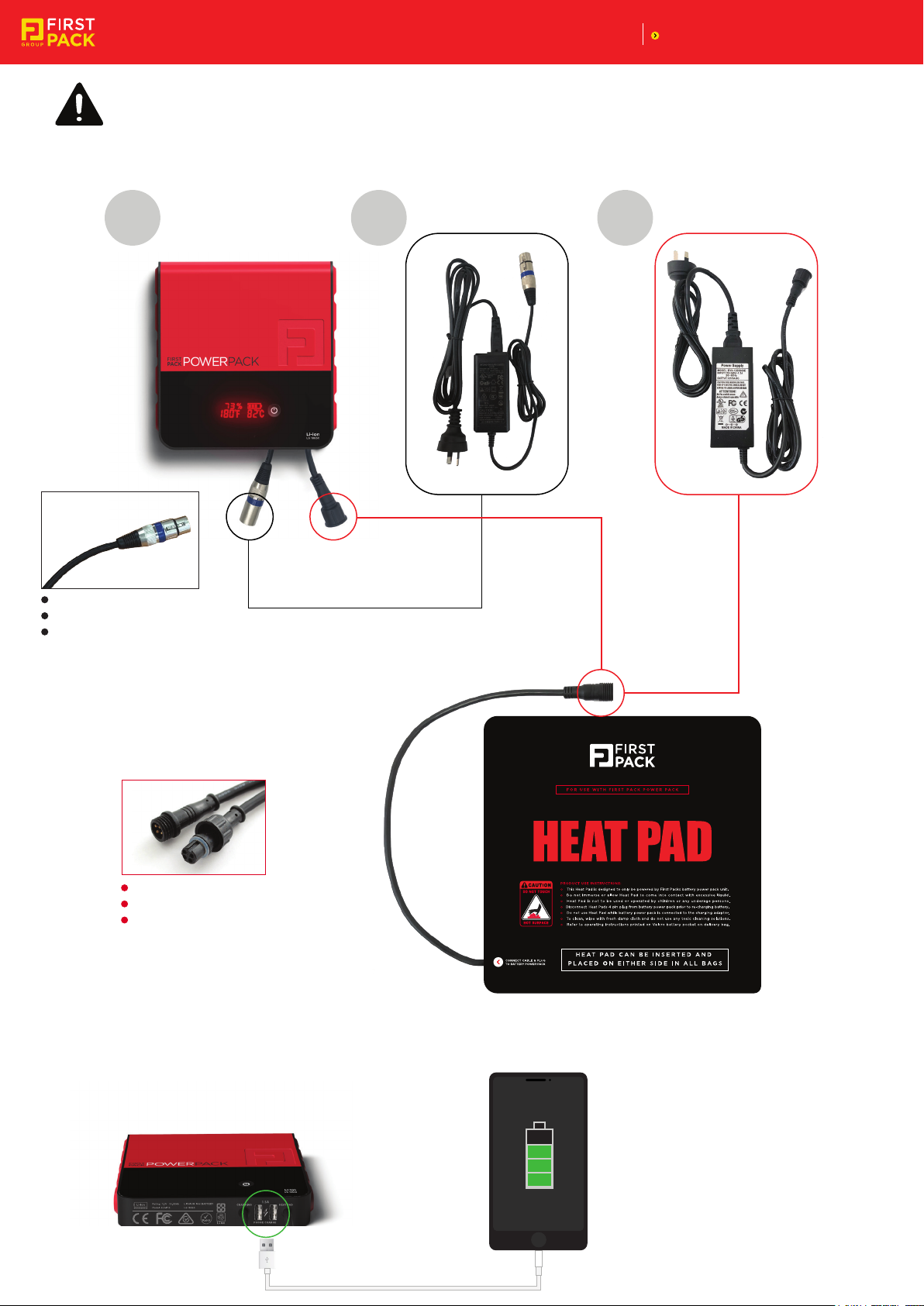
POWER PACK
POWER PACK:
1
PLUG TYPE TO CHARGE BATTERY:
CONNECTS DIRECTLY TO CHARGING ADAPTOR
HEAVY DUTY METAL CANON JACK
CABLE LENGTH INCLUDING PLUG - 400mm
Power Pack Li Battery
2
Battery charging adaptor Heat Pad AC charging booster
3
HEAT PAD:
CABLE AND PLUG TYPE FOR THIS HEAT PAD:
CONNECTS DIRECTLY TO BATTERY OR AC WALL POWER
WATER PROOF BLACK SMART PLUG - 4 PIN
CABLE LENGTH INCLUDING PLUG - 400mm
USB FEATURE:
Battery Powered Heat Pad
(Comes with an AC power Adaptor to pre-heat bag to save battery life)
Power Pack can also be used for
charging mobile phones via 2
handy USB ports built into battery.
1.
Page 2
FUNCTION AND PURPOSE:
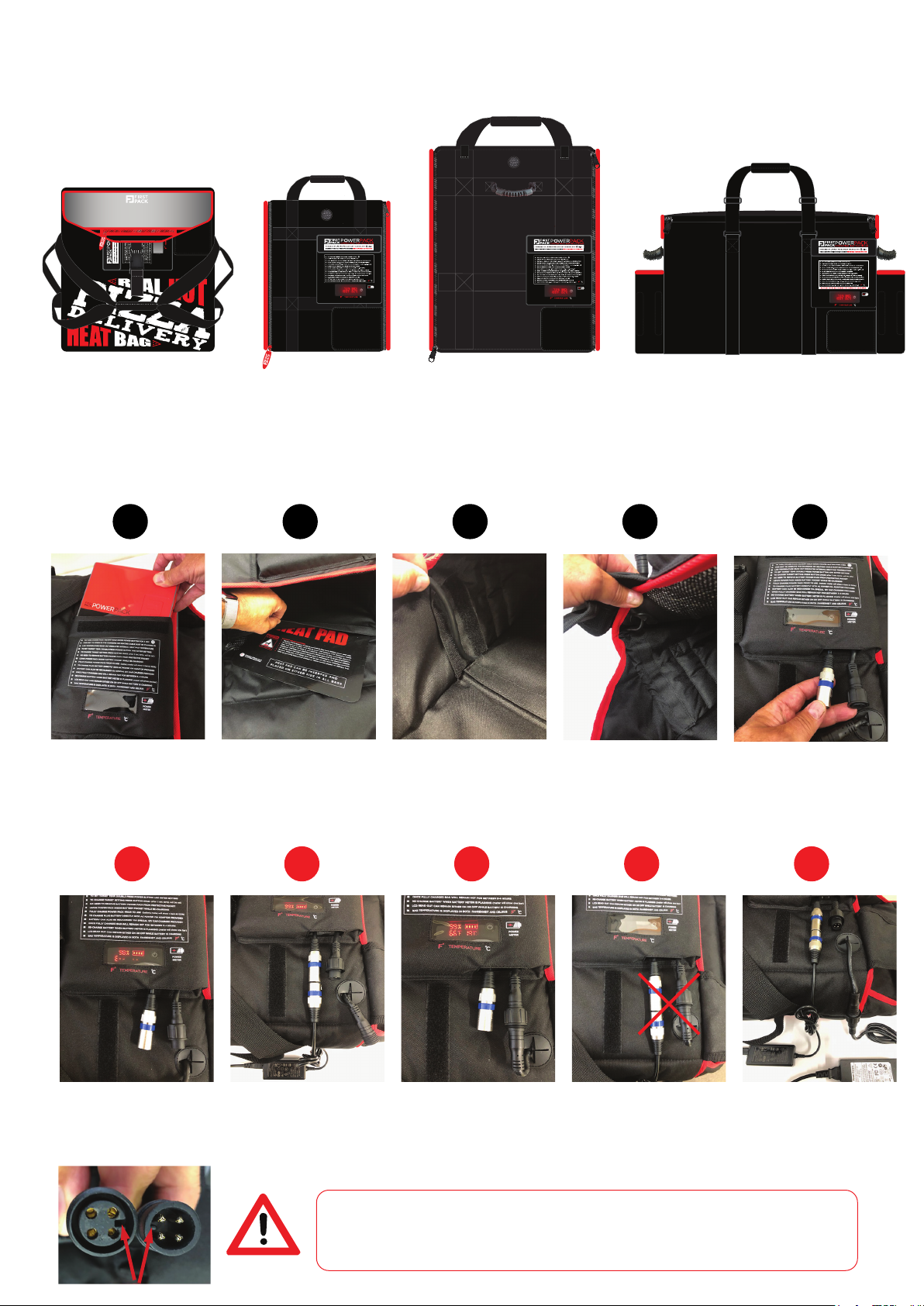
Power Pack has been designed to fit neatly into the special Velcro battery pocket that is built into the following First Pack
delivery bag products.
SIDE VIEW
SIDE VIEW
Meter
Power
Battery
CABLE
FLAP
Battery
Power
Meter
Battery
Power
Meter
Velcro
Velcro
BACK VIEW
Battery
Power
meter
FOOD BAGHEAT BAG TOWER BAG CATERING BAG
When plugged together the Power Pack is designed to power the Heat Pad so the delivery bags keep food hot while transporting.
ASSEMBLY INSTRUCTIONS:
1
2
3 4 5
Velcro
Velcro
Place Power Pack into the
special battery pocket
built into the bags.
Position the Heat Pad in the
Velcro pocket inside the bag.
Feed the Heat Pad cable
through the Velcro flap
leading to the cable port.
(only Heat Bag has cable flap)
CHARGING POWER PACK:
1
The LED display on the
Power Pack will display the
error message (E-- --)
when no cables are
connected or in use.
SLOTS MUST BE ALIGNED AS SHOWN
To charge Power Pack plug
the metal canon jack into
the matching AC adaptor
then plug charger into power
source. The LED will display the
% charged level when connected.
WARNING
2 3 4 5
To begin heating bag connect
the Heat Pad black plug with
the black rubber battery plug.
The LED on the Power Pack
will then display the current
Temperature level.
WHEN CONNECTING THE BLACK RUBBER HEAT PAD CABLE PLUG TO THE CORRESPONDING BLACK PLUG
COMING FROM THE POWER PACK, PLEASE ENSURE THE PINS ARE PLUGGED INTO THE CORRECT HOLES
BY CHECKING THE GUIDE NIBS SHOWN IN THIS IMAGE.
DO NOT TRY AND JAM THE PLUGS TOGETHER INCORRECTLY BECAUSE IF THE WRONG PINS ARE CONNECTED
AND TOUCH THE WRONG HOLES THE BATTERY COULD SHORT CIRCUIT AND VOID THE WARRANTY
Secure cable with Velcro
flap and thread cable plug
through rubber cable port.
DO NOT plug the charging
and Heat Pad plugs in at
the same time as this may
damage the equipment and
void the Power Pack warranty.
Power Pack cable plugs and
Heat Pad cable plug all sit
under velcro cover flap.
The Heat Pad can be used for
pre-heating bags via the AC
charging booster to save on
battery life. The Power Pack
can also be left to charge via an
AC Adaptor at the same time.
2.
Page 3
OPERATION DETAILS / INSTRUCTIONS:
NOTE:
THE FOLLOWING OPERATING INSTRUCTIONS ARE ALSO PRINTED
Battery
1. ONLY USE THE CHARGING ADAPTORS AND EQUIPMENT SUPPLIED WITH POWER PACK, AS OTHER CHARGERS MAY DAMAGE UNIT.
2. TO TURN POWER PACK ON OR OFF PRESS AND HOLD DOWN MAIN POWER BUTTON FOR A FEW SECONDS.
3. THE RED LED DISPLAY READ OUT WILL SHOW 100% WHEN POWER PACK IS FULLY CHARGED - FULLY CHARGE PRIOR TO USE.
4. TO SET TARGET TEMPERATURE DOUBLE PRESS POWER BUTTON AND ENTER DESIRED SETTING - THE DISPLAY WILL BEGIN FLASHING
5. TO CHANGE TARGET TEMP. SETTING PRESS POWER BUTTON ONCE - AFTER WAITING 3 SECONDS THE TARGET TEMP. WILL BE SET.
6. POWER PACK CAN REMAIN IN THE SPECIALLY DESIGNED VELCRO BATTERY POCKET WHILE RECHARGING.
7. ONCE THE BAGS START TO GET HOT PLACE CONTAINERS OR BOXES OF HOT FOOD INSIDE BAGS.
8 TIP: TO SAVE CHARGE AND EXTEND THE BATTERY LIFE, TURN POWER PACK OFF OR TO LOW TEMP. AFTER FOOD HAS BEEN DELIVERED.
9. MONITOR THE POWER METER & RE-CHARGE POWER PACK WHEN LED BATTERY METER BEGINS FLASHING AND % READING IS VERY LOW.
ON BACK OF POWER PACK AND ON HEAT BAG POCKET.
Power
Meter
10. BAG TEMPERATURE IS DISPLAYED IN BOTH FAHRENHEIT AND CELSIUS (F° °C)
NOTE:
POWER PACK’S CHARGING TIME IS SIMILAR TO MOST MOBILE PHONES
IT IS ADVISED TO CHARGE POWER PACK OVER NIGHT BY CONNECTING
TO MAINS WALL POWER VIA THE CHARGING ADAPTOR AND CABLE SUPPLIED.
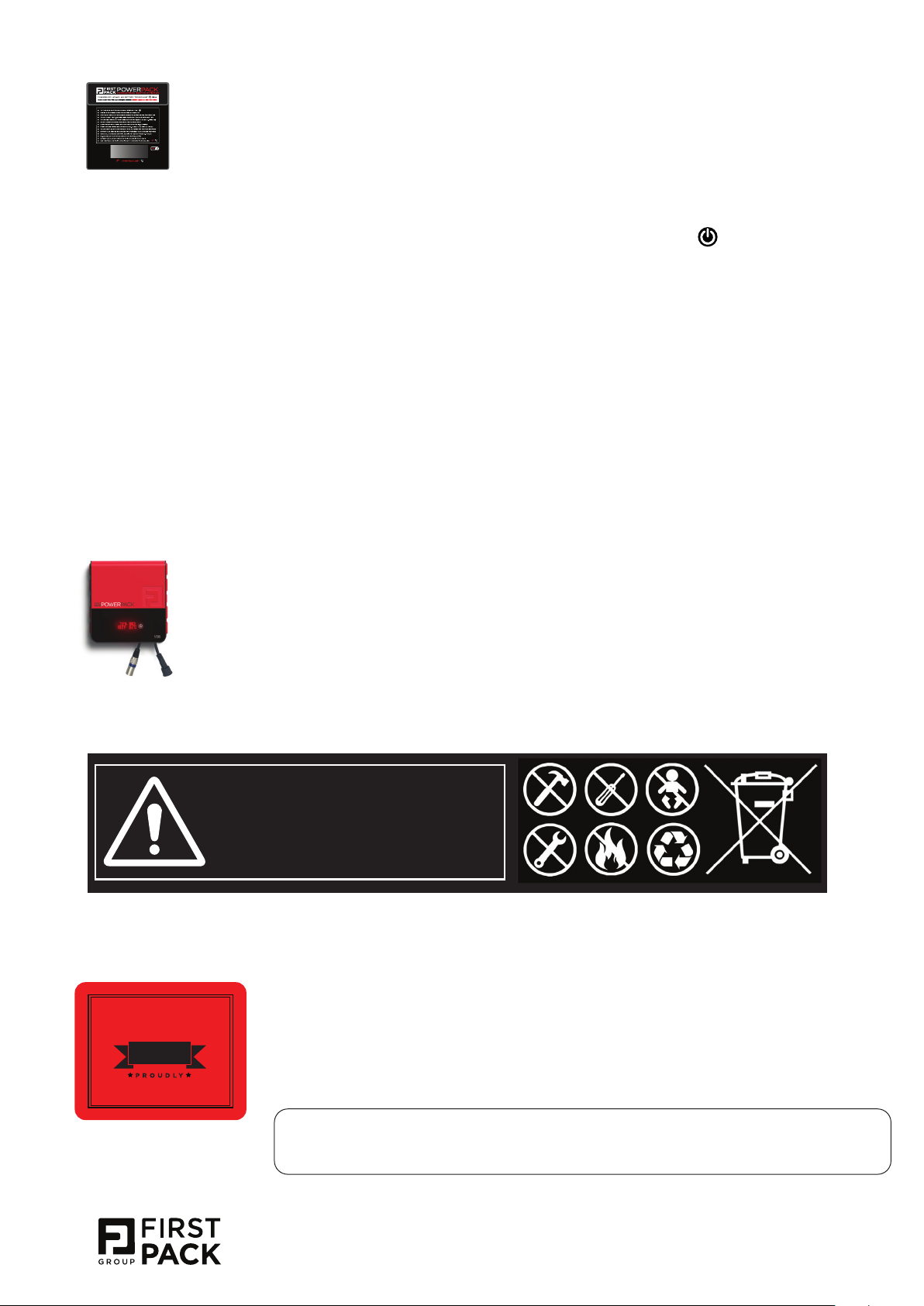
SAFETY WARNINGS:
LITHIUM ION BATTERIES INSIDE
CAUTION: The Batteries used in this device may cause
a fire or explosion or chemical burn hazard if mistreated.
Do not disassemble, heat above 60°C(140°F), crush casing,
puncture, short external contacts or incinerate. Dispose of or
recycle according to manufacturer’s instructions. Keep away
from children. See operating instructions indicated on unit.
WARRANTY:
N
A
T
R
A
U
G
12mths
M
A
N
U
conditions apply
F
E
E
for
A
C
T
U
D
A
N
I
H
C
N
I
D
E
R
Power Pack carries a 12 month warranty against factory defects
from date of purchase. The warranty is subject to standard usage
and treatment under normal industry conditions.
Proof of purchase date will be required and must fall within the 12
month warranty period (eg: a copy of the invoice or delivery docket)
Credit claims can be sent to [email protected] for processing
and must include invoice number, photos and details surrounding the claim
. (approx 5 hours)
.
CONTACT:
NOTE: First Pack Group reserves the right to reject any credit claims
where there is evidence or suspicion of misuse, rough or careless
handling of Power Pack or any of its components.
For any technical enquiries or trouble shooting questions please email:
3.
 Loading...